
AI SEO Tools: What Really Works (and What’s Just Hype)
Which AI SEO tools are worth using in 2026? How to build a lean tech stack, and where automation helps, without sacrificing quality or strategy, this guide will answer

Growth Marketer
.avif)
Content Marketer



.svg)


TL;DR
- AI tools shine in structure, not strategy: They speed up keyword clustering, content briefs, and on-page fixes, but don’t make judgment calls.
- Most AI SEO suites are overkill: SEOs report real gains from focused tools in research, writing support, and reporting, not all-in-one dashboards.
- Keep stacks lean and useful: The best results come from 1–2 tools per workflow stage that integrate well with your CMS and analytics setup.
- AI content still needs a human finish: Raw outputs must be edited for tone, facts, and audience fit, especially in YMYL or branded content.
AI SEO tools are everywhere right now. Open Reddit, LinkedIn, or that SEO Slack channel you’re in, and someone’s always asking: “Which AI SEO tools actually work?”
And honestly, it's a fair question.
Between AI Overviews, Google’s AI mode, AI-powered search (ChatGPT, Perplexity, Gemini, etc.), and Google constantly tweaking what shows up above the fold, SEO teams are under pressure. They are expected to do faster research, smarter content planning and strategy, and more frequent optimization with the same (or smaller) resources. That’s where the AI SEO tools come in. These tools promise to automate everything from keyword clustering to content briefs to technical SEO audits.
But do they really work… or are they just fancy tools that spin out the same old content?
That’s what this guide is here to clear up.
In this article, we’ll:
- Clarify what AI SEO tools really do (and what they don’t)
- Show where they actually help in a day-to-day SEO workflow
- Recommend a lean, practical tool stack you can actually use weekly, not just admire in a Loom demo
Grab a coffee. Let’s make sense of the chaos.
Related read: What is Search Engine Optimization
What are AI SEO tools (and what they’re not)?
Let’s keep this simple. AI SEO tools are tools that use machine learning and natural language processing to automate or speed up pieces of your SEO workflow.
Practically, that usually means help with:
- Keyword research & clustering – discovering keywords, grouping them into clusters, understanding search intent
- Content planning & optimization – briefs, outlines, semantic keyword suggestions, content scoring
- Technical & on-page – audits, meta tags, internal link suggestions, cannibalization checks
- Reporting & forecasting – turning raw GSC/GA data into dashboards, alerts, and trend insights
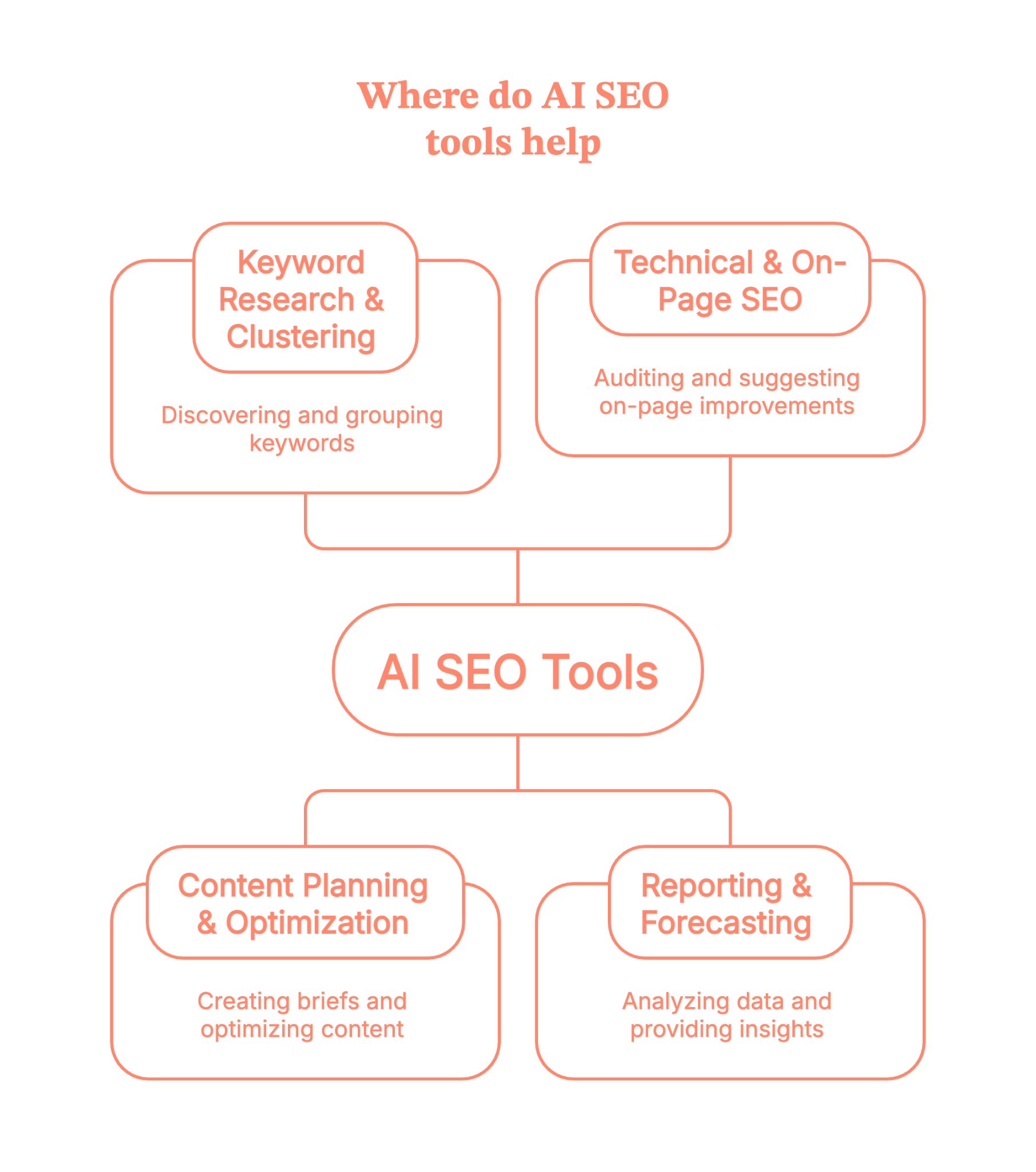
So when we say AI tools for SEO, we’re not just talking about “write me a blog post” tools. We’re talking about anything that uses AI to:
- Analyze SERPs at scale
- Spot patterns in search data
- Suggest optimizations based on those patterns
Here’s the most important boundary: AI SEO tools support SEO. They don’t do SEO for you end-to-end.
They won’t:
- Decide your positioning
- Build a content strategy from thin air
- Replace human judgment on quality, brand voice, or E-E-A-T
Think of AI SEO tools as very fast, very literal assistants. Powerful, yes. But they still need you to be the strategist.
Related read: SEO benchmarking guide
How AI SEO tools fit into a modern SEO workflow
Instead of thinking “Which is the best SEO AI tool?” it’s more useful to ask, “Where in my workflow can AI save time without wrecking quality?”
Let’s walk through a realistic flow.
1. Research & strategy
You start with keyword and topic research:
- Use tools like Semrush or AHREFS for keyword data and competitor analysis.
- Layer in AI-powered clustering tools like Keyword Insights to group keywords by SERP similarity and search intent, so you’re building topic clusters, not random one-offs.
- Use the AlsoAsked section to pull People Also Ask questions and map related questions people are actually typing into Google.
Suddenly, you’re not just staring at a spreadsheet of keywords; you’re looking at intents and clusters.
2. Content briefing & writing
Next, you move into content planning:
- Tools like Surfer and Clearscope analyze the SERP and suggest headings, entities, semantic terms, and approximate word counts so you can build a strong brief in minutes.
- AI writing tools like Jasper or its alternatives can draft intros, outlines, FAQs, and variations on headings so writers aren’t starting from a blank page.
- Platforms like Slate - AI SEO Tool take it a step further by automating the entire organic growth loop: generating SEO-optimised content, refreshing existing pages, and tracking your brand's visibility across Google and AI search results.
- LLMs (like ChatGPT) are great for first drafts, restructuring sections, or turning a rough outline into something readable, as long as a human does the final editing, fact-checking, and brand voice alignment.
3. On-page & technical
Then comes optimization and technical:
- AI-powered audit/automation platforms like Alli AI and OTTO SEO can suggest or even deploy fixes for meta tags,canonicals, and other on-page issues at scale, often via a single script or integration.
These tools are particularly handy when you’re managing big sites or multiple clients and can’t manually tweak every template.
4. Reporting & iteration
Finally, reporting:
- Tools like Whatagraph pull in data from Google Search Console, Analytics, and other SEO tools, then turn them into visual dashboards and reports your team and stakeholders can actually read.
The ‘AI’ part here is less hype, more practicality it is anomaly detection, auto-summaries like “here’s what changed this month”, and suggestions on where to focus next.
So the big picture:
You move from research → briefs → writing → optimization → reporting, and a handful of AI SEO tools quietly compress the time spent at each stage.
{{INLINE_MOFU}}
Types of AI SEO tools (with examples)
Let’s break the ecosystem down into clear buckets and tuck specific tools into each.
1. Research & keyword clustering tools
In the age of LLM SEO, AI search, and AI Overviews, Google increasingly rewards topical coverage, not just one-off keywords.
Clustering helps you:
- Avoid cannibalization
- Build topic hubs
- Map informational vs transactional intent
Good fit for this
- Keyword Insights – SERP-based keyword clustering and topical mapping, with AI features for briefs and drafts.
- AlsoAsked – pulls live People Also Ask data and maps related questions visually, giving you long-tail ideas and FAQ structures in one go.
- Mangools – not ‘AI-only,’ but increasingly layered with smart SERP analysis and keyword discovery features, especially helpful for smaller teams.
Use these when you’re doing AI-driven keyword research and building topic clusters instead of chasing isolated terms.
2. Content briefs & optimization tools
These are the “make this content competitive” tools.
What they typically do:
- Analyze top-ranking pages
- Suggest semantic terms, headings, FAQs, and PAA questions
- Give you a content score based on coverage and on-page signals
Good fit for this
- Surfer – AI-assisted briefs, content editor with NLP suggestions, and audits that show which pages to improve first.
- Clearscope – well-known for simple content grading, term suggestions, and smooth integrations with Google Docs and WordPress.
You’d use these for AI content optimization, especially when you’re trying to keep quality high while scaling content velocity.
3. AI writing & “humanizing” tools
This is where things get… debatable.
Most teams use:
- Drafting tools – ChatGPT or Jasper for first drafts, outlines, FAQ ideas, and rewriting.
- Humanizers – tools like GPTHuman (and similar) to rephrase machine-y outputs so they feel less robotic and more “human.”
A key point to note here is that these are starting points, not publishing pipelines.
Best practice here:
- Use them heavily for structure, ideation, and rewrites
- Layer brand voice, proprietary examples, and nuance manually
- Run fact checks, especially on stats, medical, financial, or legal content
AI writing tools are great and are free to test, but they’re not a replacement for a writer who understands your audience.
4. Technical & automation tools
This is basically the ‘robots do the crawling, we do the fixing’ stage.
Alli AI and tools like OTTO SEO typically help with:
- On-page SEO automation (meta tags, headings, canonicals)
- Rules-based optimization across many pages
- Detecting duplicate content and technical SEO issues
You’d use these when you:
- Manage large sites or many client sites
- Can’t easily ship fixes via dev sprints
- Need AI seo audits / technical seo audits that don’t sit in a PDF forever.
Think of them as a bridge between your SEO strategy and your CMS/dev reality.
5. Reporting & insight tools
Finally, the “what’s working and what should we do next?” layer.
Whatagraph is a good example:
- Connects GSC, GA, Ahrefs/Semrush, and more
- Automates SEO dashboards and client-ready reports
- Increasingly uses AI to summarize trends and surface insights (“these pages lost visibility”, “these keywords spiked”).
You can pair this with your rank tracker of choice and get AI-powered seo tools that tell you where to look instead of dumping another CSV.
What real SEOs say about AI SEO tools (from a community POV)
If you lurk long enough on Reddit threads and SEO communities, a few themes show up again and again (usually accompanied by mild swearing):

1. A few tools are game-changers; most are “meh.”
SEOs consistently say that clustering tools, PAA mapping tools, and content optimizers save hours per week. But many “AI SEO suites” feel like rebranded content spinners with a dashboard slapped on.
2. “One-click SEO” is a fantasy
Many users report disappointment with tools promising traffic boosts from auto-generated posts or instant optimization. What actually works is: AI for ideation and structure + humans for editing, strategy, and final quality control.
3. People lean on AI most for repetitive or tedious tasks.
Think about all the recurring BORING tasks like outlines, FAQ ideas, internal link suggestions, title/description variations, and clustering. Not final copy. Teams often keep a “do not outsource” list, like brand pages, high-stakes product content, thought leadership, or anything with nuanced expertise.
4. The happiest users keep stacks small and intentional.
Common advice from community threads:
- Start with 2–3 tools per stage max (e.g., 1 for research, 1 for content, 1 for reporting)
- Don’t buy tools you can’t use weekly.
- Test new tools against a known baseline (e.g., “Does this actually reduce time-to-brief?”)
Of all the threads, this would be our personal favorite.
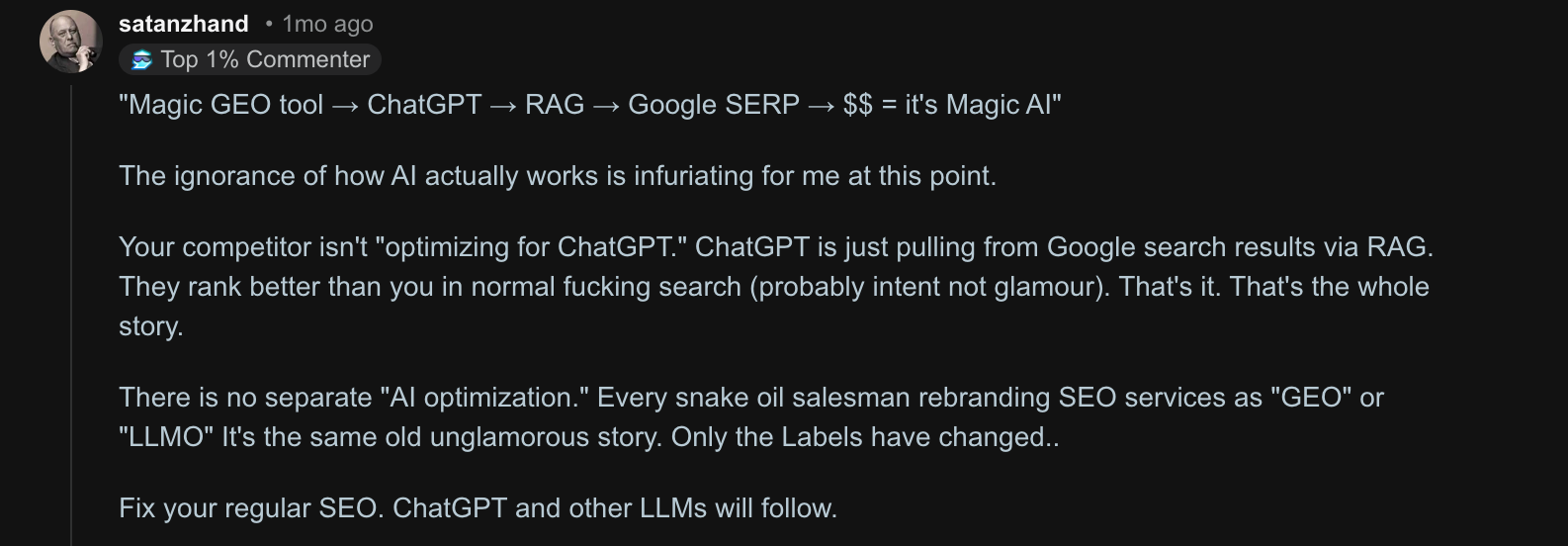
Back to business, if you’re feeling FOMO from every “Top 50 AI SEO tools” list, you can relax. Most experienced SEOs are quietly running on a lean stack, not hoarding every shiny new app.
How to choose the best AI SEO tools for your team
Here’s a simple framework to keep you from buying yet another tool you never log into.
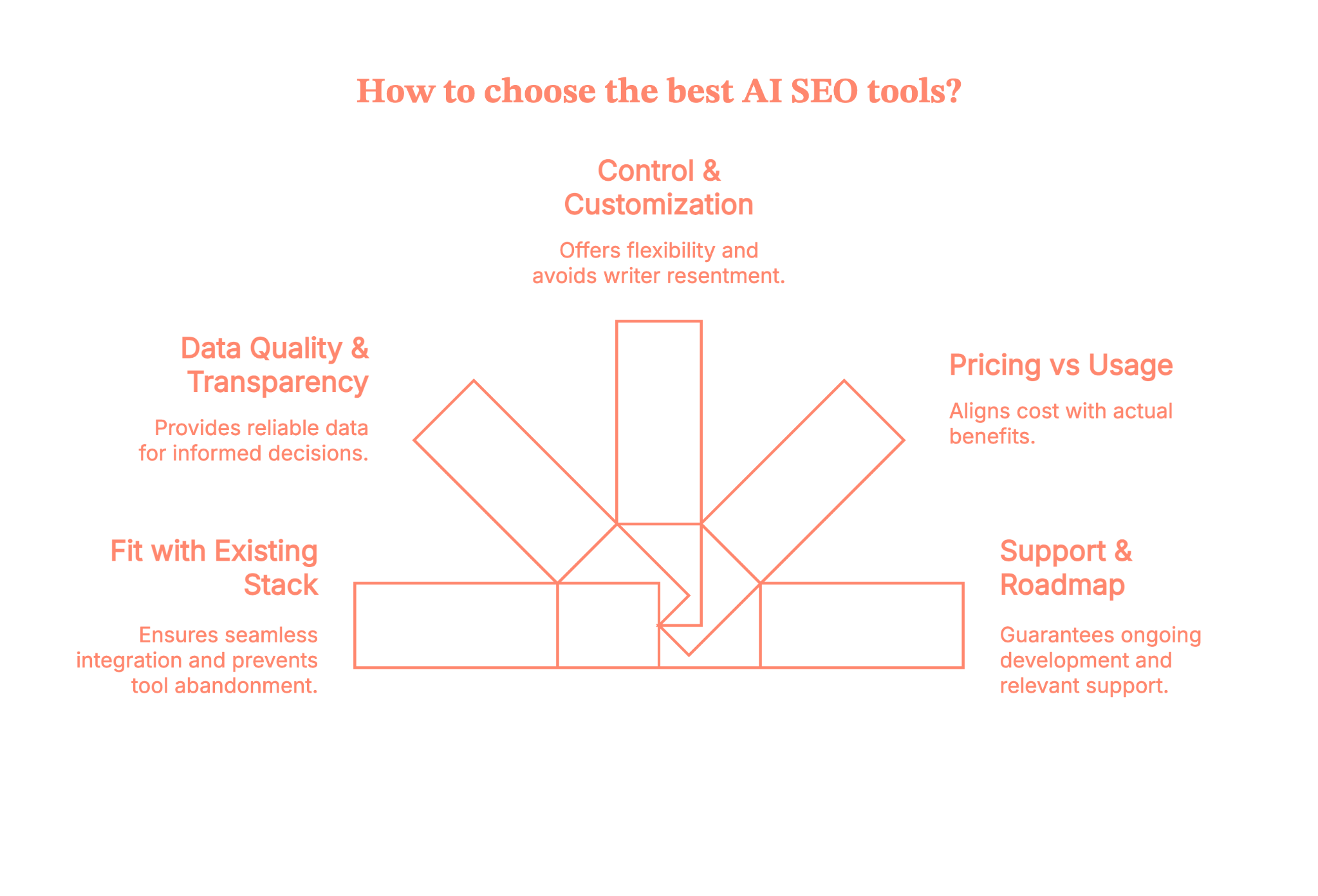
1. Fit first, features second
The important question to ask is “Does this plug into my existing stack?”.
- GSC / GA / Looker Studio
- Your CMS (WordPress, Webflow, custom, etc.)
- Your current SEO suite or rank tracker
If getting data in or out is painful, that tool will quietly die in month two.
2. Data quality & transparency
For tools doing AI-driven keyword research or PAA scraping, ask the following questions.
- Where do they get SERP/PAA data from?
- How often is it updated?
- Is it using live SERP data or stale internal datasets?
You don’t need perfection, but you do need to know what you’re trusting.
3. Control & guardrails
Look for the following:
- Customizable briefs and templates
- Tone and style controls
- Limits on keyword density / spammy recommendations
- Easy exports (Docs, CMS, CSV, API)
If a tool tries to lock everything inside its own editor, that’s friction your writers will resent.
4. Pricing vs actual usage
AI SEO tools love credit systems and per-seat pricing. So, check the following:
- How many briefs, articles, or reports do you really create per month?
- Is it per-user, per-workspace, or per-output?
- Can you clearly tie cost to time saved or traffic gained?
5. Support & roadmap
AI search is evolving fast. Look for:
- Evidence of active development (recent changelog, docs, blog)
- Support that understands AI Overviews/LLM SEO, not just “10 blue links” SEO
- A roadmap that includes SERP changes, AI Overview tracking, etc.
Quick checklist before you buy your next AI SEO tool
Here is a bunch of questions that you must ask before the purchase
- Does this integrate with my core analytics/SEO tools?
- Do I know where its data comes from?
- Can I customize outputs and keep the brand voice intact?
- Will at least one person on my team use this weekly?
- Can I justify the cost with a clear “this saves X hours or grows Y traffic” story?
If you can’t tick most of these, keep looking.
Example AI SEO stacks (by use-case)
Let’s turn all of this into concrete “starter stacks.”
1. Solo blogger/creator
- Goal: move faster without losing authenticity.
- Research & clustering: Mangools (KWFinder) + Keyword Insights
- Content optimization: Surfer or Clearscope (pick one)
- Writing: ChatGPT + Jasper for drafts and rewrites
- Basic tracking: GSC + a simple rank tracker
That gives you AI tools for seo without overwhelming you with dashboards.
2. In-house SEO team
- Goal: collaborate across content, dev, and leadership.
- Core suite: Semrush for keyword research, site audit, and competitor intel
- Content optimization: Surfer or Clearscope for briefs and on-page
- Technical automation: Alli AI for on-page rules and internal link suggestions
- Reporting: Whatagraph for cross-channel SEO reports & dashboards
Here, the focus is on shared visibility and making it easier to prioritize sprints and content roadmaps.
3. Agency
- Goal: keep delivery scalable and client-friendly.
- Research & clustering: Keyword Insights + AlsoAsked for topic maps and FAQ ideas
- Content optimization: Surfer or Clearscope (standardized across writers)
- Technical & automation: Alli AI or OTTO to roll out changes across many client sites
- Reporting: Whatagraph for white-label-friendly, automated reports
Pair this with strong internal SOPs so AI outputs are always human-reviewed before clients ever see them.
Risks, limitations, and best practices while using AI SEO tools
Let’s talk about the parts people regret.
Risks & limitations
1. Generic content everywhere
If you follow tool recommendations blindly, you end up with the same headings, entities, and examples as everyone else. That’s a fast track to “meh” content.
2. Over-optimization
Chasing a content score can push you into keyword stuffing, awkward headings, and bloated, unhelpful articles. Google’s helpful content and spam updates are not kind to that.
3. E-E-A-T & brand voice still matter
AI doesn’t know your internal data, your customer stories, or your lived experience. It also happily hallucinates facts.
Best practices
To stay on the right side of things:
- Use AI to shortlist ideas and structure (outlines, clusters, FAQs)
- Layer in proprietary insights, data, screenshots, and examples
- Keep a “do not automate” list (YMYL content, thought leadership, product pages)
- Treat AI scores as signals, not goals
- Regularly compare AI-optimized content against real performance and adjust
In short: Let AI do the repetitive lifting; keep humans in charge of originality and truth.
So… are AI SEO tools worth it?
Short answer..YES
But
AI SEO tools aren’t going to “do SEO” for you… but they can make a big, very real difference when you use them on your terms, not theirs.
The win isn’t in stacking 15 tools. It’s in knowing where you’re slow, where you’re guessing, and where AI can take the heavy lifting off your plate like research, clustering, briefs, audits, reporting, so your team can focus on thinking, not tab-wrangling.
So start small, pick 1–2 tools per stage, plug them into your existing workflow, and track what actually changes (time saved, content shipped, traffic gained).
Treat AI as your copilot, keep humans in charge of quality and strategy, and you’ll move from
“AI SEO tools = hype” to “AI SEO tools = unfair advantage” a lot faster than you think.
FAQs on AI SEO tools
1. What are AI SEO tools, and how are they different from traditional SEO tools?
AI SEO tools use machine learning and natural language processing to analyze search data, content, and technical issues and then suggest what to do next.
Traditional tools mainly report what’s happening (keywords, rankings, errors), while AI tools try to interpret patterns and generate ideas, clusters, or drafts for you.
2. What are the best AI SEO tools to use right now (for small businesses, agencies, or WordPress sites)?
There’s no single ‘best’ tool, but most winning stacks include one for keyword research/clustering, one for content optimization, and one for reporting.
Small businesses often favour simple, affordable all-in-ones; agencies lean towards tools with collaboration, white-label reporting, and automation.
3. Can SEO be done by AI, or will AI SEO tools replace human SEOs and content writers?
AI can handle a lot of the grunt work: clustering keywords, generating outlines, suggesting internal links, and even drafting rough content. But it can’t replace strategy, brand voice, deep subject expertise, or the judgment needed to decide what actually deserves to rank.
So no, it won’t replace SEOs or writers; it just changes their job from “do everything” to “direct and refine.”
4. Is AI-generated content safe for SEO, or can using AI SEO tools hurt my Google rankings and E-E-A-T?
AI-generated content is not automatically bad for SEO; what matters is whether it’s helpful, accurate, and genuinely valuable to users.
If you publish raw AI output that’s generic, spammy, or wrong, you absolutely can hurt your rankings and perceived E-E-A-T.
Use AI for drafts and structure, then add human editing, original insight, and fact-checking before anything goes live.
5. How do I choose the right AI SEO tools and build a simple AI SEO stack that actually fits my goals and budget?
Start from your workflow, not the tool. Here is what you have to do:
- List where you’re losing the most time (research, briefs, writing, audits, reporting).
- Then pick one tool per major stage, checking for data quality, integrations (GSC/GA/CMS), and pricing that matches how often you’ll really use it.
If you can’t explain how a tool will save hours or help ship better content, it probably doesn’t belong in your stack.

See how Factors can 2x your ROI
Boost your LinkedIn ROI in no time using data-driven insights



.avif)


See Factors in action.
Schedule a personalized demo or sign up to get started for free
LinkedIn Marketing Partner
GDPR & SOC2 Type II

.svg)



.avif)

