
Cross-Channel Marketing Attribution: How to Measure What Influences B2B Pipeline
Learn how cross-channel attribution connects B2B marketing touchpoints to account journeys, pipeline, and revenue. See what 633 calls and customer data reveal about channel overlap, tracking gaps, and pipeline.

Growth Marketer

Associate Director of Brand and Content



.svg)


TL;DR
- Cross-channel attribution shows which recorded marketing touchpoints contributed to a conversion, opportunity, or revenue.
- In B2B, the hard part is connecting activity across tools, contacts, and accounts. Missing tracking data can leave parts of the journey out.
- Decide what you’re measuring, which touchpoints count, how far back to look, and how to assign credit before comparing channels.
- Use attributed pipeline to spot patterns and decide what to investigate. To see whether a channel drove more revenue, run an experiment.
Your Google Ads report credits a demo to paid search. LinkedIn says the same account engaged with one of its ads. Your CRM attributes the opportunity to a webinar.
Which one is right?
Possibly all three.
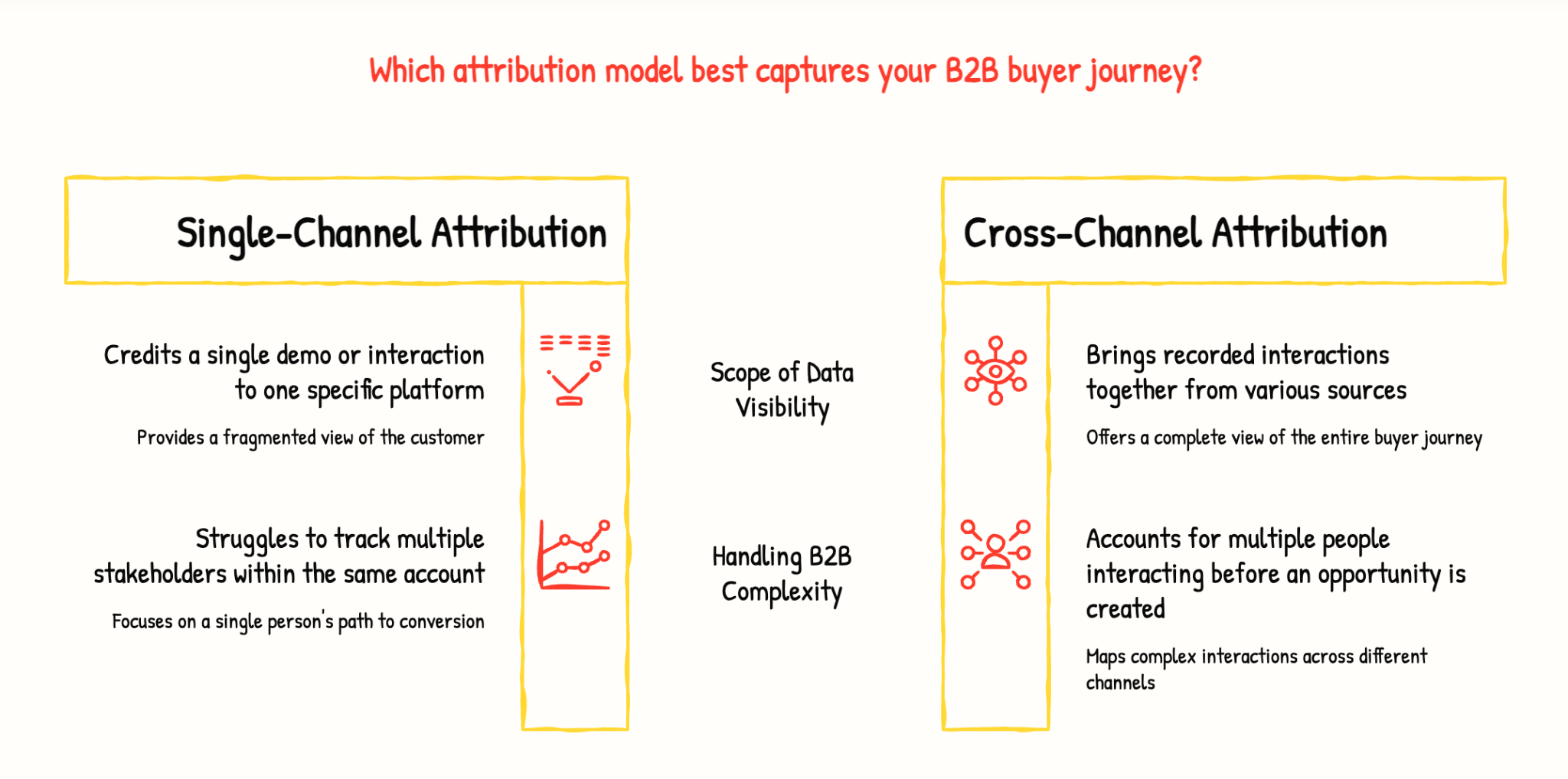
Each system may be reporting a different part of the same buyer journey. Cross-channel attribution brings those recorded interactions together and assigns credit based on rules you define.
For B2B companies, this is more complicated than tracking one person from an ad click to a form submission. Multiple people from the same account may interact with your company before the account becomes an opportunity. This is why account-based marketing attribution is useful for understanding activity across the entire buying group.
Cross-channel attribution helps you build a more complete view of that journey.
It does not prove that every recorded touch caused the deal. It only shows how credit is assigned across the interactions your systems captured.
What does cross-channel attribution connect?
Your buyer didn't just wake up one morning, Google your product, and hand you their credit card. (If yours do, please share your secret. Seriously. DM us.)
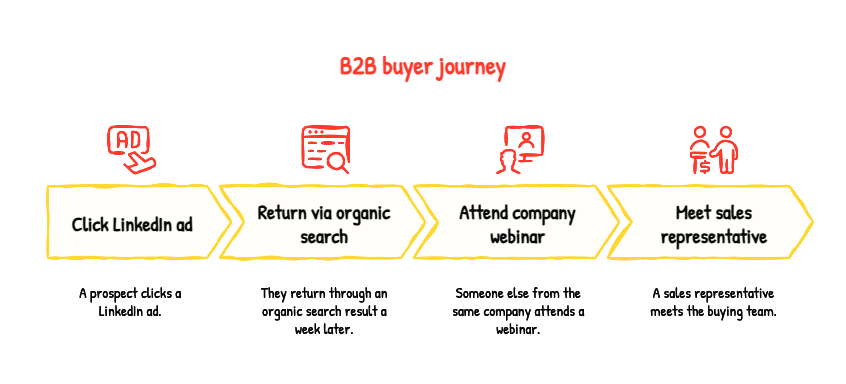
A typical B2B buyer journey may look like this:
- A prospect clicks a LinkedIn ad.
- They return through an organic search result a week later.
- Someone else from the same company attends a webinar.
- A sales representative meets the buying team.
- The account becomes an opportunity.
Each interaction usually lives in a different system:
- LinkedIn stores ad engagement.
- Google Analytics stores website activity.
- Your webinar platform stores registrations and attendance.
- Your CRM stores contacts, meetings, and opportunities.
- Your marketing automation platform stores emails and campaign activity.
Cross-channel attribution connects measurable interactions to a defined outcome. It usually involves three jobs:
- Collecting interactions from different channels.
- Matching those interactions to the right person, account, and opportunity.
- Assigning credit using an attribution model.
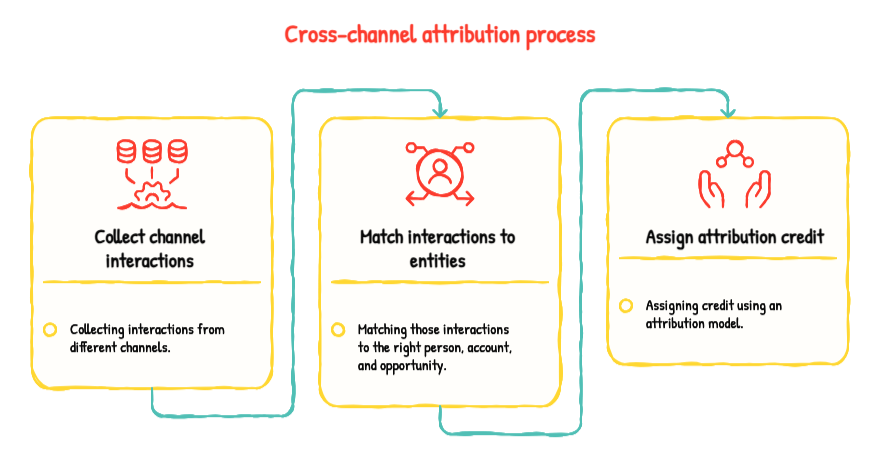
A journey timeline shows what happened and when. An attribution model decides how much credit each eligible interaction receives. Neither can recover activity that was never captured.
That limitation becomes more important in B2B, where one person rarely completes the entire buying journey. The person who reads your blog may not be the person who attends your webinar. The person who speaks with sales may not be the person who first discovered your company.
If your CRM associates only one contact with an opportunity, you may miss activity from the rest of the buying group. An account-level view can reveal more of the journey, but only when your identity matching and CRM associations are reliable.
A B2B cross-channel attribution example: one opportunity, several channels
Imagine that two contacts from the same target account eventually become associated with a $60,000 opportunity.
Before the opportunity was created, your systems recorded the following activity:
A last-touch report might give the webinar all the credit because it was the final recorded marketing interaction before the opportunity was created.
A linear model might divide credit equally between the LinkedIn ad, organic search visit, and webinar.
The sales meeting would still appear in the account history, but you may exclude it from marketing attribution.
The result depends on:
- Which touchpoints you include
- Which touchpoints you exclude
- How long your attribution window is
- Which model you use
- How accurately activity is matched to the account and opportunity
Now imagine the director first heard about your company from a private Slack group.
That recommendation may have influenced the deal more than any interaction in the table. But if your systems never recorded it, your attribution report cannot include it.
A more complicated model will not solve a missing-data problem.
How do cross-channel attribution models change the answer?
Cross-channel attribution defines the scope of the measurement. The attribution model determines how it divides credit within that scope.
Multi-touch attribution is the broader practice of assigning credit to multiple eligible interactions. Linear, position-based, and time-decay are examples of multi-touch models.
Suppose paid search leads in a last-touch report, while LinkedIn appears earlier in journeys from your highest-value accounts.
That difference is useful. It may suggest that paid search captures existing demand while LinkedIn helps introduce or influence accounts earlier in the journey.
But it does not prove that either channel caused the opportunity.
When a budget decision depends on the result, compare at least two attribution views and inspect the underlying opportunities. Model changes can shift the numbers significantly.
Model availability also varies by platform. For example, Google removed first-click, linear, time-decay, and position-based attribution models from GA4 in November 2023. The models above explain common attribution approaches; they are not available in every analytics platform.
What I learned from 633 calls about cross-channel attribution
I wanted to understand what customers and prospects actually struggle with when they talk about attribution, so I analyzed our external call data from the last 90 days.
I reviewed every Oliv meeting between July 9 and October 9, 2026, where the AI-generated summary mentioned attribution. That gave me:
- 633 external calls
- 1,005 attribution-related points
- 11 full transcripts where a customer or prospect raised a specific concern
The 633 calls included 337 prospect calls, 268 customer calls, and 28 partner calls. I tagged each attribution-related point by theme, so one call could appear under more than one theme.
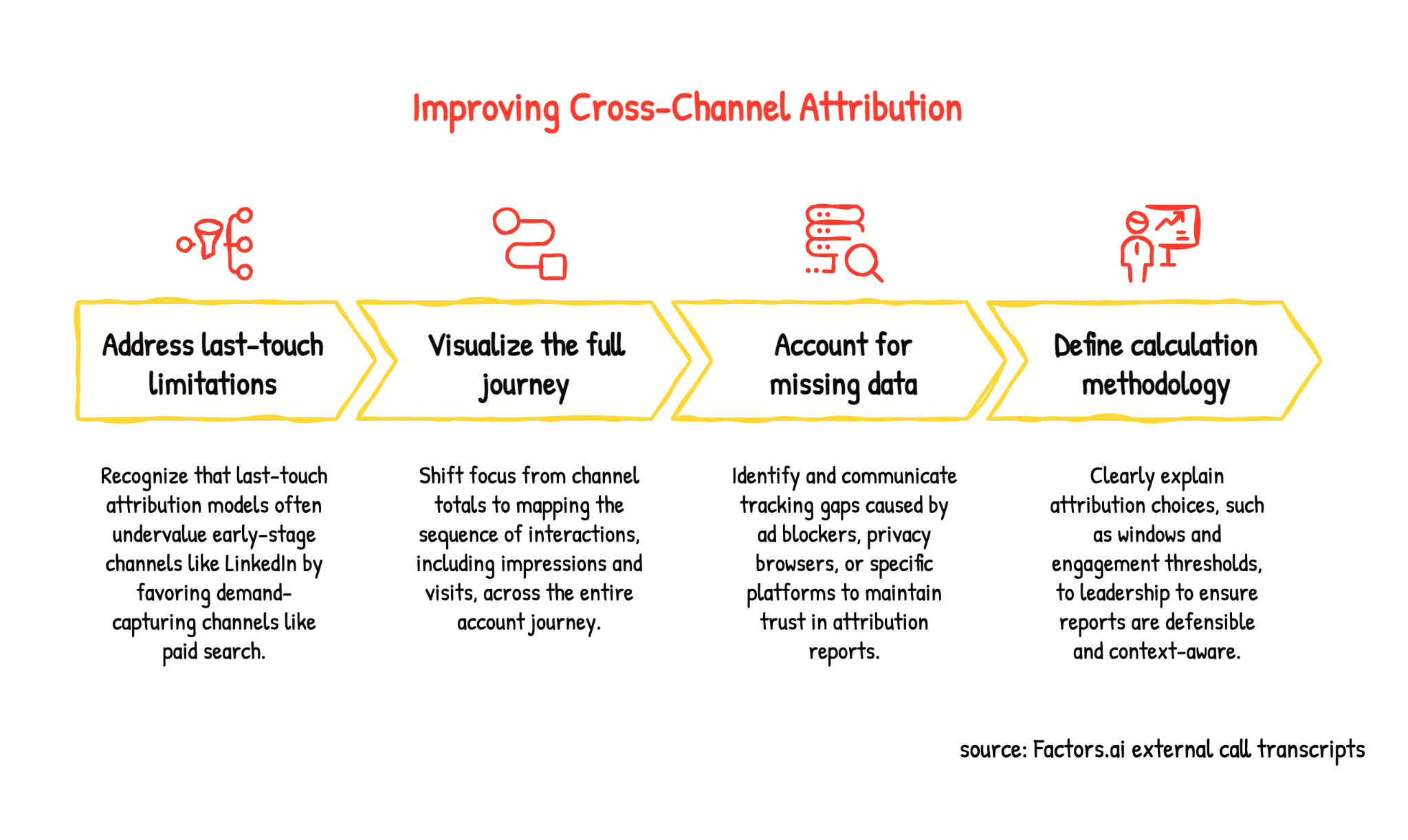
The same three problems kept appearing: last-touch attribution makes awareness channels look weak, influence reports can count the same deal under several campaigns, and missing touchpoints make the numbers difficult to defend internally.
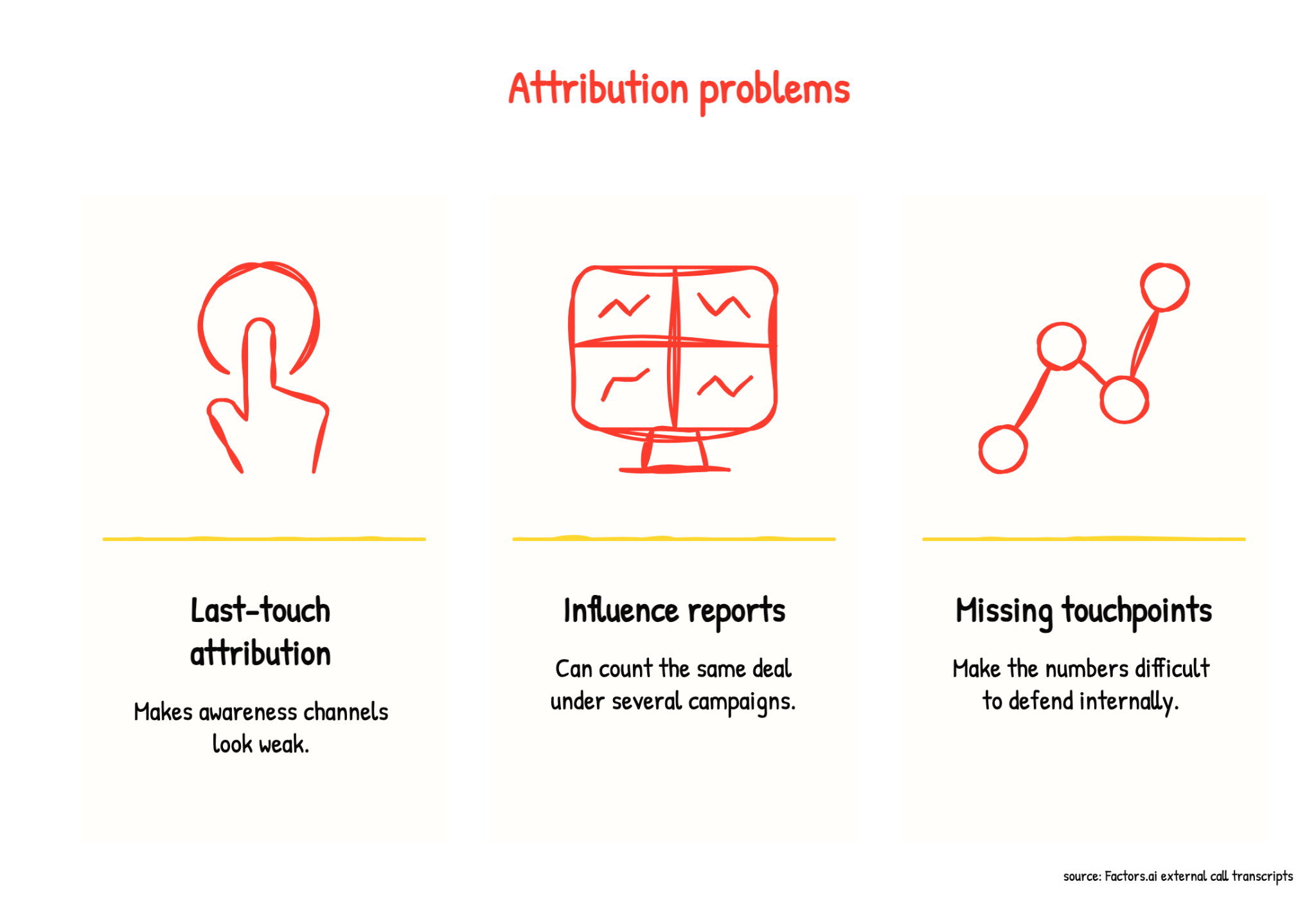
1. Last-touch attribution makes LinkedIn look weaker in reporting
The most common frustration was easy to understand. Paid search often receives credit because it captures demand near the end of the journey. LinkedIn may have introduced the company, built familiarity, or influenced several people at the account, but it receives little credit if the buyer eventually converts through Google.
One prospect explained it clearly:
“Google’s looking really good because it’s more last-touch. LinkedIn is doing something, we know it’s doing something, but it’s not really attributing based on our attribution model.”
Another prospect said their finance team used last-click data to move more budget into paid search:
“We’re not creating demand. We are just capturing the stuff that’s there.”
As you can see, attribution directly influenced budget allocation. The team knew last-touch data left out part of the journey. Finance still used those numbers to move more budget into paid search.
2. Teams want to see the journey, not another channel total
Across calls, customers and prospects wanted to see the order of interactions.
Did the account see a LinkedIn ad, visit the website, attend a webinar, return through paid search, and then request a demo? Which contacts were involved? How many impressions or visits happened before the deal was created?
One customer described the requirement this way:
“What we really want to see is how all of our different channel touchpoints are influencing deals and that influence on pipeline and revenue.”
A list of campaigns attached to an opportunity doesn’t answer every question. Teams want to see how those campaigns appeared across the journey and what happened between the first interaction and conversion.
3. Missing data makes customers question the report
Discrepancies and trust in the numbers came up in 39 customer calls and 13 prospect calls. That was about 15% of customer calls and 4% of prospect calls in this analysis.
Customers mentioned activity missed because of ad blockers, privacy-focused browsers, Meta lead forms, live chat, mobile journeys, email engagement, or tracking that started after an account had already begun researching.
One customer explained the consequence:
“If these gaps are not filled, leadership won’t believe what I show on attribution.”
No platform captures every interaction. But teams need to know what a report includes, when tracking started, and where activity may be missing. Without that context, people may start questioning the entire report.
4. Leadership needs to understand how the numbers were calculated
Customers also asked how to explain attribution choices to a CEO or CFO.
Why use a 180-day attribution window? Why should 50 impressions count as meaningful influence? Why does the same opportunity appear under several channels? What happens when a touchpoint is missing?
A report can be technically correct and still hard to defend if the presenter can't explain how the numbers were calculated.
Before presenting cross-channel attribution, I would define which interactions count as touchpoints, what level of engagement counts as meaningful, how long the attribution window lasts, whether an opportunity can appear under multiple channels, and which tracking gaps may affect the result.
These choices should reflect the sales cycle, deal size, account segment, and buyer journey. A six-month window may make sense for a long enterprise sale. It may not fit a short, self-serve purchase.
The calls showed me what teams want attribution to explain: how channels appear across an account journey. I then looked at our account data to see how paid and organic LinkedIn activity appeared alongside pipeline and conversion outcomes.
What Factors.ai 2026 Report shows about cross-channel influence
In our 2026 LinkedIn Benchmarks to Blueprints report, we analyzed data from more than 850 B2B companies representing over $150 million in LinkedIn ad spend. A separate CRM-connected dataset covered more than 100 companies and 50,000 closed deals worth over $5 billion.
We saw the following:
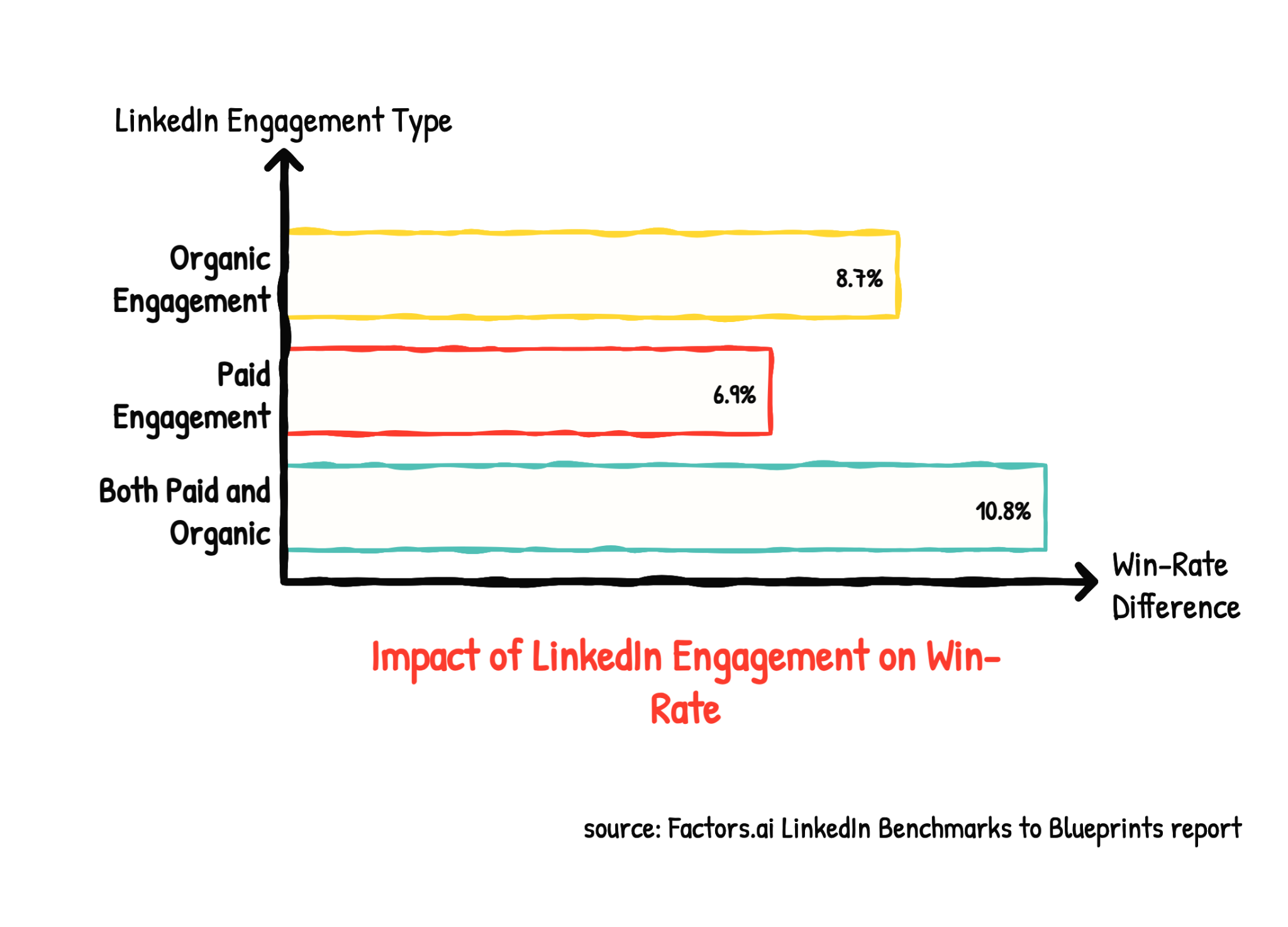
Accounts that engaged with both paid and organic LinkedIn content had the highest win-rate difference. This suggests that measuring paid and organic separately may hide part of the account journey.
The report also found that ICP accounts with LinkedIn engagement had:
- 52% higher paid search conversion rates
- 187% higher conversion from content-page visits to demo bookings
- 64% higher meeting-to-opportunity conversion
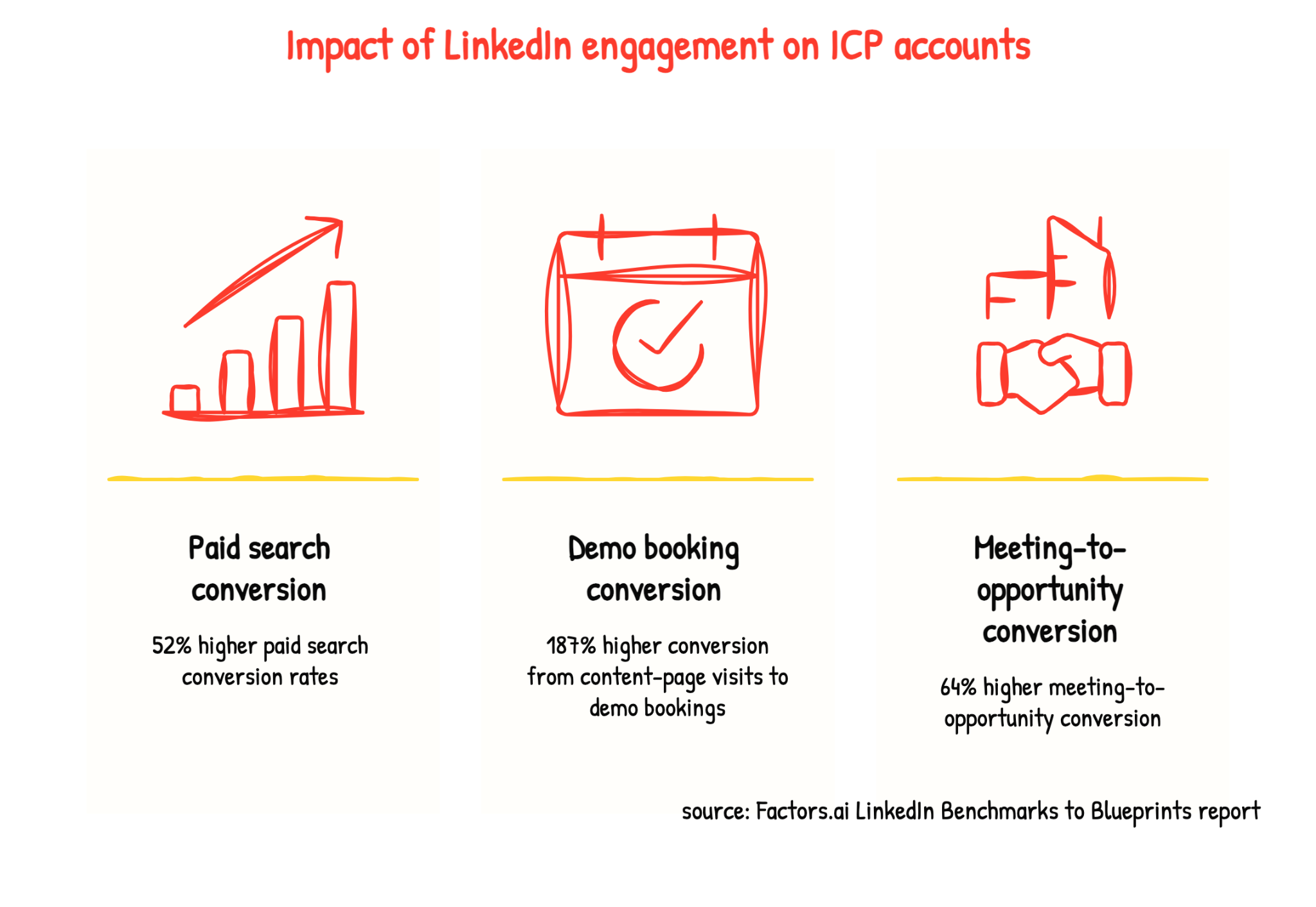
These are observed relationships. Use them to investigate your own data. For example, do accounts that engage on LinkedIn convert from paid search more often? Are they more likely to move from content to a demo?
Better visibility changes what attribution can show
We also found that LinkedIn Company Intelligence helped advertisers reach up to 3.8 times more companies and engage 4.5 times more companies.
Some of these companies were already seeing or engaging with ads but did not appear in reporting because they fell outside matched audiences. A low match rate can hide account activity, even when that activity happened.
This connects to what I heard in the calls: teams want to see the journey behind the channel total. One way to do that is to measure influence at the account level. Count the accounts and opportunities touched by each channel, then report the pipeline and revenue connected to them.
The same opportunity may appear under several channels. That overlap is expected. Do not add the channel totals together and report them as unique pipeline.
These findings don’t tell us which channel caused a deal. They show patterns worth investigating. The next step is to define the touchpoints, matching rules, attribution window, and outcome you want to measure.
How to measure cross-channel attribution in your own stack
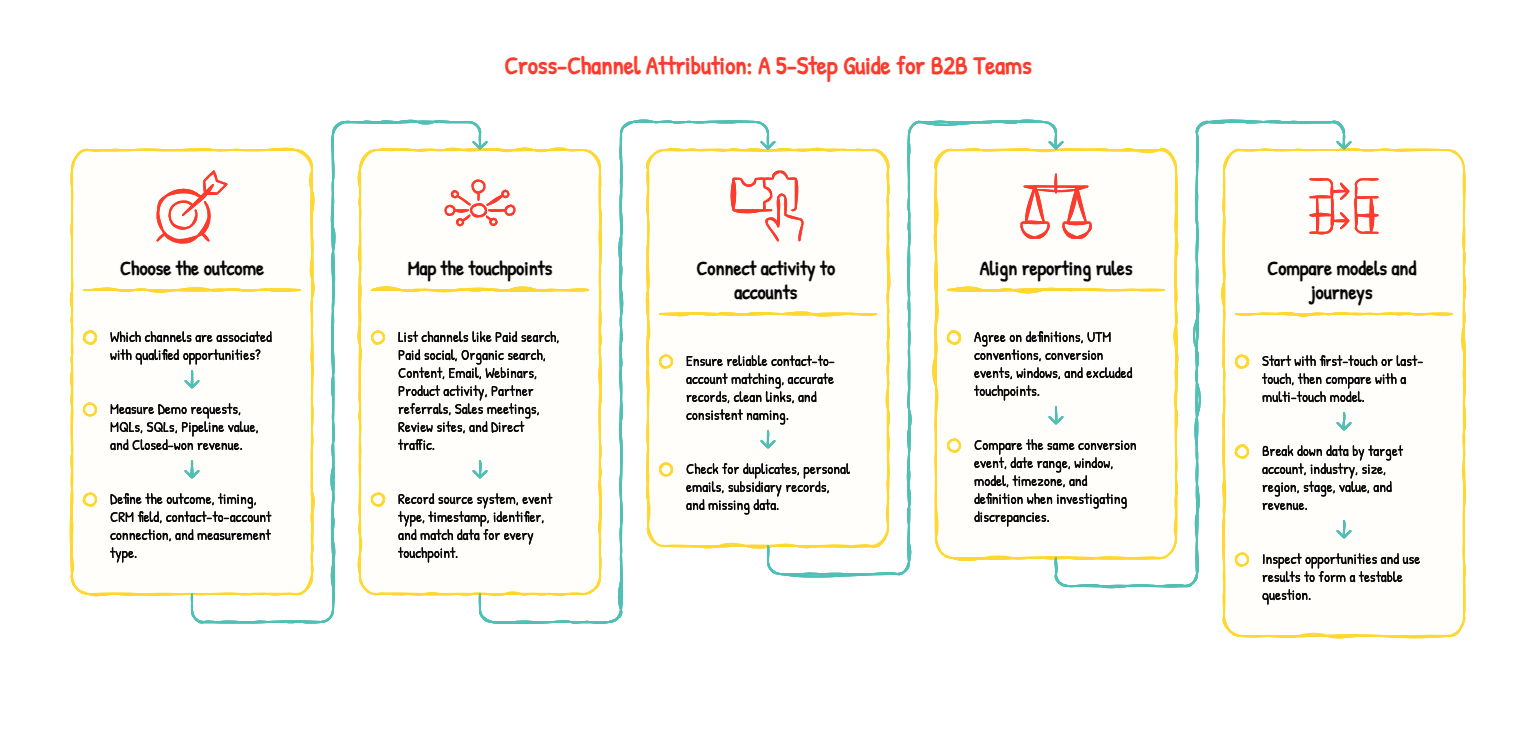
1. Choose the outcome you want to explain
Start with one specific question. For instance, which channels are associated with qualified opportunities?
You could also measure:
- Demo requests
- Marketing-qualified leads
- Sales-qualified opportunities
- Pipeline value
- Closed-won revenue
Each outcome tells you something different. A channel may generate many demo requests but very few qualified opportunities. Another channel may influence fewer leads but contribute to more pipeline.
That is why you should not compare these outcomes as the same thing. A campaign that generates form fills may not generate sales opportunities. And a campaign that influences a deal may not receive revenue credit until that deal closes, which could happen months later.
Choose the outcome that matches the business question you are trying to answer, then use the same outcome when comparing channels.
Define:
- The outcome you are measuring
- When the outcome occurs
- Which CRM field records it
- How contacts and accounts are associated with it
- Whether you are measuring quantity, value, or both
If you want to report on form fills and opportunities, treat them as separate stages rather than combining them into one number.
2. List the touchpoints you can actually capture
Create an inventory of the channels and activities you want to include:
- Paid search
- Paid social
- Organic search
- Content
- Webinars
- Events
- Product activity
- Partner referrals
- Sales meetings
- Review-site activity
- Direct traffic
For every touchpoint, document:
- The source system
- The event type
- The timestamp
- The available identifier
- Whether it can be linked to a person
- Whether it can be linked to an account
- Whether it can be linked to an opportunity
Be careful when interpreting channel integrations. An integration may receive clicks from several platforms through UTM parameters but show impressions only for its own campaigns. An impression, a click, and a verified website visit are different types of evidence.
Your report should make clear which interactions it includes and which it cannot capture.
The same applies to offline activity. You can import webinar attendance or log an event conversation against a CRM account. A vanity URL may help identify visits after a podcast mention, but it will not capture every listener who heard the episode.
Do not try to claim perfect visibility. Create a clear record of what each channel can and cannot measure.
3. Connect activity to the right account and opportunity
UTM parameters can identify campaign traffic. They cannot tell you which company will eventually buy.
A useful B2B attribution report also needs:
- Reliable contact-to-account associations
- Accurate account matching
- Clean CRM opportunity links
- Consistent campaign identifiers
- A way to connect multiple contacts from the same account
Start by checking for common data-quality problems, such as:
- Duplicate companies
- Personal email addresses
- Contacts linked to subsidiaries
- Contacts missing from opportunities
- Opportunities associated with only one member of the buying group
- Company names that do not match across systems
Before trusting an aggregate chart, inspect a sample of real opportunities. Ask:
- Can you find the relevant webinar attendance?
- Is the organic visitor matched to the right account?
- Are all relevant contacts associated with the opportunity?
- Do the campaign and opportunity dates align?
- Are duplicate accounts splitting the journey across multiple records?
If any answer is no, document the gap. Do not present an incomplete account history as a complete customer journey. Your attribution report is only as reliable as the identity and CRM data behind it.
4. Align your reporting rules
Before comparing channels, agree on the rules behind the report. Define:
- Channel names
- UTM conventions
- Conversion events
- Attribution windows
- Eligible touchpoints
- Excluded touchpoints
- Whether you report by interaction date or conversion date
- Whether view-through conversions are included
- How offline activity is recorded
This is where many channel reports become difficult to reconcile.
LinkedIn may include view-through conversions. Google Analytics may focus on website sessions or key events. Your CRM may count an opportunity only after sales creates it.
All three systems can be working correctly while reporting different numbers because they measure different events and apply different rules.
Be precise when discussing GA4, too. Google’s data-driven attribution model is the default for key events, while session-scoped traffic reports use different attribution rules. Google also documents differences between Analytics and Google Ads in areas such as channel eligibility, reporting time zones, and conversion settings.
Before investigating a discrepancy, confirm that you are comparing the same:
- Conversion event
- Date range
- Attribution window
- Attribution model
- Reporting timezone
- Channel definition
If any of these settings differ, the reports may not be directly comparable.
5. Compare models and investigate the underlying journeys
Once your tracking and reporting rules are aligned, compare outcomes across channels. Start with a simple first-touch or last-touch view, then compare it with a multi-touch model.
Break down the results by:
- Target account
- Company size
- Industry
- Region
- Opportunity stage
- Pipeline value
- Closed-won revenue
Then inspect the opportunities behind the totals.
A channel’s share may change because:
- You changed the attribution model
- A previously missing event started flowing into the system
- A CRM association was corrected
- Duplicate accounts were merged
- The attribution window changed
- Different channels record different types of interactions
Use these findings to form a testable question. For example:
Content frequently appears early in opportunities from our highest-value target accounts. Are these opportunities more qualified, and would investing more in this content improve pipeline?
That is a useful question to investigate.
The attributed number can point you in the right direction, but it is not the answer by itself.
How cross-channel attribution informs marketing budget decisions
A cross-channel attribution report can help you identify:
- Campaigns that repeatedly appear in qualified account journeys
- Channels that introduce new accounts
- Channels that appear close to opportunity creation
- Campaigns that generate conversions but few CRM opportunities
It can show you where to investigate, but it does not tell you how many of those opportunities would have happened without the campaign.
That is the difference between attribution and incrementality. Attribution assigns credit to recorded marketing interactions; incrementality measures what changed because the activity ran.
If you are making a significant budget decision, use a holdout or geo experiment to test the causal impact. Google’s GeoX documentation explains how geo experiments can help measure this.
Use both types of evidence for different decisions. Account journeys can help you improve targeting, content, and sales handoffs. Experiments can help you determine whether increasing or pausing a campaign changes pipeline or revenue.
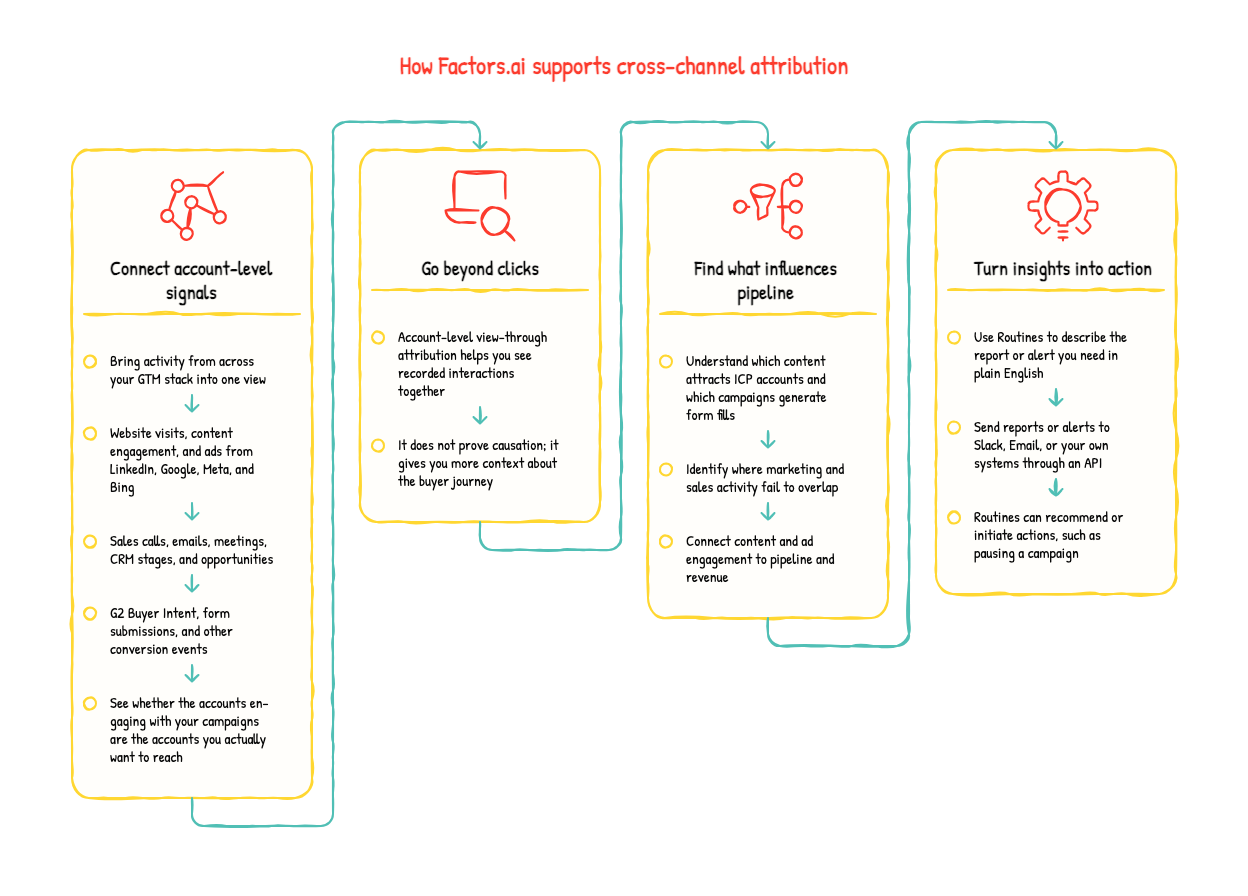
How Factors.ai supports cross-channel attribution
Factors.ai is an AI-enabled ABM and marketing attribution platform for GTM teams. At Factors.ai, we help B2B teams connect account-level engagement, advertising activity, sales activity, pipeline, and revenue in one view.
Our analytics and attribution platform helps you understand how accounts move through the funnel, which channels and campaigns appear in their journeys, and how those interactions relate to pipeline and revenue. You can filter performance by channel, campaign, funnel stage, segment, and account attributes instead of relying only on first-touch or last-touch reporting.
You can also dig deeper into the data. Instead of stopping at “LinkedIn influenced 35% of our pipeline”, you can ask “Which accounts engaged with LinkedIn, what did they do next, and which of those accounts became qualified opportunities?”
Connect marketing activity to account journeys
Factors.ai brings several types of activity into an account-level view, including:
- Website visits and content engagement
- LinkedIn, Google, Meta, and Bing ad activity
- Sales calls, emails, and meetings
- CRM lifecycle stages and opportunities
- G2 Buyer Intent signals
- Form submissions and other conversion events
This helps you see whether the accounts engaging with your campaigns are the accounts you actually want to reach. You can also compare marketing activity with sales activity and identify gaps between the two.
For example, you might discover that:
- A campaign generates many form submissions but little qualified pipeline.
- A content asset attracts fewer visitors but more target accounts.
- LinkedIn ads influence accounts that later return through organic search.
- Sales is contacting accounts that marketing has not recently engaged.
- A small group of accounts is receiving a large share of ad impressions.
Go beyond clicks with view-through attribution
Ad-platform reporting usually emphasizes clicks and conversions. That can miss accounts that saw an ad, didn't click, and later visited your website through another channel.
With Factors.ai, you can use account-level LinkedIn view-through reporting to identify whether an account viewed a LinkedIn ad before visiting your website, submitting a form, or becoming associated with an opportunity.
This does not prove that the ad caused the conversion. It gives you another recorded interaction to investigate as part of the account journey.
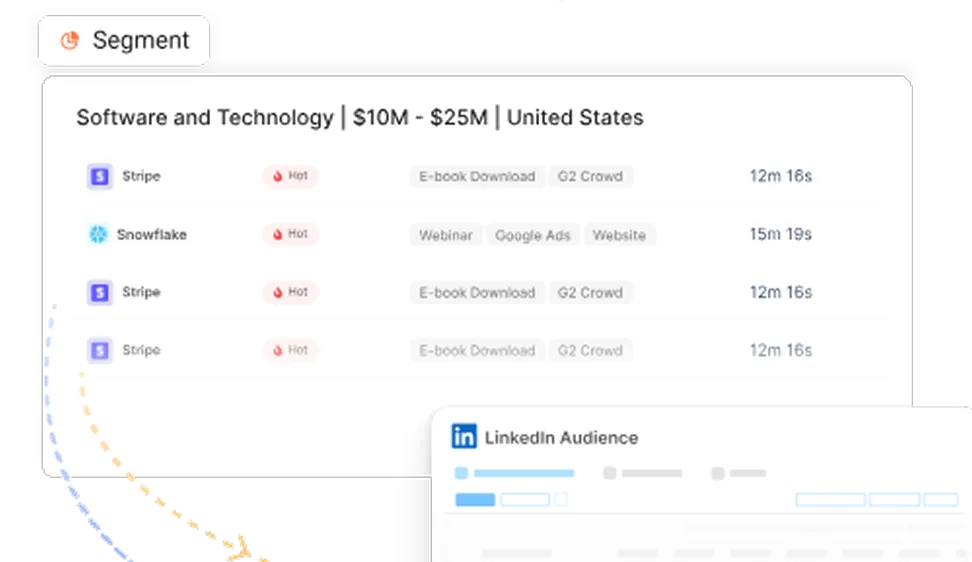
AudienceView used this visibility to examine whether LinkedIn ads played a role in opportunities recorded in Salesforce. The team also used activity from LinkedIn Ads, G2, and its website to segment accounts and run different campaigns for less-engaged and high-intent accounts.
Use attribution to improve content and paid media
You can also connect content engagement and paid media activity to account and revenue data.
Factors.ai’s analytics interface helps teams identify which content attracts ideal customer profiles and map those interactions to pipeline and revenue. It also connects ad spend from LinkedIn, Google, Meta, and Bing to outcomes such as pipeline and revenue.
Aviso, for example, used Factors.ai to understand how its organic content affected pipeline and revenue. The company also used account-level data to identify which accounts were engaging with its website, LinkedIn activity, and G2 signals.
Acadia used Factors.ai to identify companies visiting its website and create daily sales reports. Their team used information such as company size, industry, and visitor journey to prioritize warm outbound prospecting. They also analyzed website visitors to understand which paid search keywords attracted ideal customer accounts.
Turn attribution insights into action
Reporting is useful only when someone acts on it. This is where Factors.ai Routines fits into the workflow.
Routines let you describe a report or alert in plain English, choose a schedule, and send the output to Slack, email, or your own systems through an API.
You can use Routines to deliver recurring reports such as:
- Top website-visiting accounts from the previous week
- Accounts that viewed the pricing page
- New pipeline created last week
- LinkedIn campaign performance
- Accounts showing high engagement
- Content engagement by target account
Routines can also alert you only when a defined condition is met, such as:
- Cost per lead increasing sharply
- Campaign spend deviating from its normal range
- Impression share falling below a set threshold
- A campaign generating spend without conversions
Routines can support actions as well as reporting. For example, you can configure a routine to recommend or initiate a campaign pause when performance crosses a defined threshold.
Because automated actions can affect live campaigns, we recommend keeping a human involved while testing the workflow. Once you understand how the routine behaves, you can decide whether to allow more autonomous execution.
What our customers use Factors.ai for
Our customer stories show how teams use account-level attribution in different ways:
- Rocketlane used account scoring, CRM integration, and marketing ROI tracking to identify high-intent accounts, connect LinkedIn-generated pipeline to engaged accounts, and improve ABM campaign results. The company reported 23% higher MQLs from ABM campaigns.
- AudienceView used journey timelines, account scoring, intent signals, and LinkedIn AdPilot to understand how accounts moved through its funnel. It reported that 15% of its Q4 2024 pipeline was generated through Factors and that a $45,000 deal was identified and closed in 15 days.
- Upflow used website visitor intent, G2 signals, and CRM integration to support intent-based outreach. The case study reports that 35% of pipeline was influenced by G2 and Factors, while 25% of inbound opportunities came from website visitor intent.
- Cacheflow used LinkedIn view-through data alongside first-party and third-party engagement data to understand how ads influenced account journeys. Before using Factors.ai, the team reported that 30% to 40% of its lead sources could not be identified.
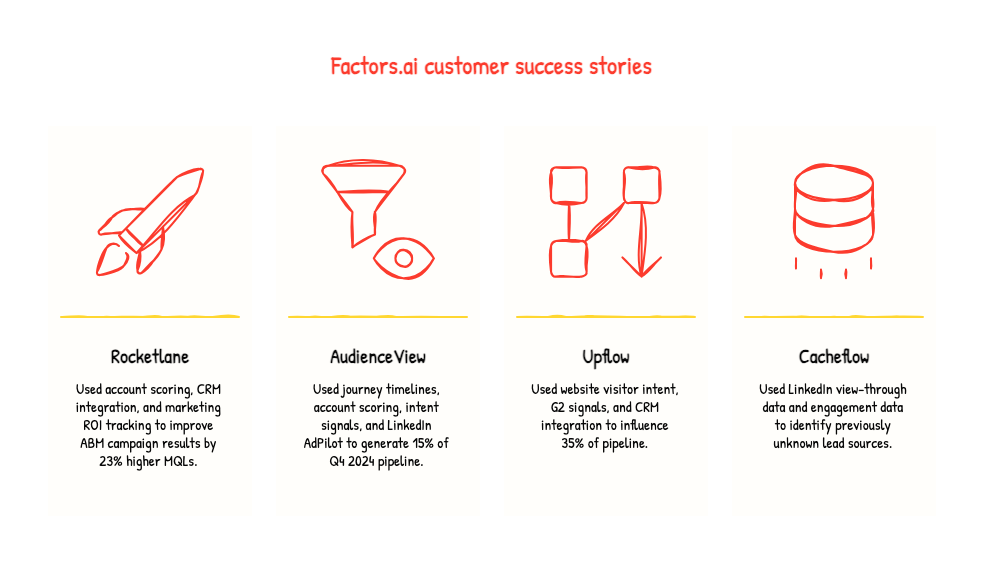
These results come from customer case studies and should not be treated as guarantees of incremental lift. They show how teams used account-level data to investigate journeys, improve targeting, and prioritize follow-up.
Factors.ai does not remove attribution's limitations. The quality of your reports still depends on the data you connect, the accuracy of your account matching, your CRM associations, your campaign identifiers, and the touchpoints you choose to include.
We help you move from “Which channel received credit?” to “Which accounts engaged, what happened next, and what should marketing or sales do now?”
That is where cross-channel attribution becomes useful: not as a final verdict on which channel caused revenue, but as a way to understand recorded journeys and turn those insights into better decisions.
Frequently asked questions on cross-channel attribution
Q. What's the difference between cross-channel and multi-touch attribution?
Cross-channel attribution measures activity across channels such as search, paid social, email, and events.
Multi-touch attribution determines how credit is shared across multiple eligible interactions.
A report can use both: it collects activity from different channels and then applies a multi-touch model to divide credit among the interactions it captures.
Q. Why do Google Analytics and LinkedIn Ads show different conversion numbers?
They may track different events, count clicks and impressions differently, use different attribution windows, or apply different reporting rules.
Start by comparing each platform’s conversion definition and attribution settings. If you are measuring pipeline, also check how many reported conversions became CRM opportunities. A conversion in an ad platform is not automatically a qualified opportunity.
Q. Can you attribute offline events and private recommendations?
You can include an offline event when it has a reliable record, such as event attendance linked to a CRM account.
A private recommendation may have influenced the buyer, but if it never enters your systems, you cannot assign it verified attribution credit. Asking a prospect how they heard about you can provide useful context, but self-reported information is different from a tracked interaction.
Q. Do you need dedicated attribution software?
Not necessarily. Start with the decision you need to make and the data you already have.
A small team can compare a few channels with CRM outcomes using its existing tools. Dedicated software becomes more useful when connecting multiple data sources, maintaining account and opportunity associations, or comparing attribution models becomes too time-consuming to manage manually.
Whatever you use, check which channels it actually covers and whether the underlying data is reliable before trusting the results.
Q. What is "Dark Social" and does it break my attribution?
Dark Social refers to the invisible "shares" that happen in Slack DMs, WhatsApp, or private communities. Since these don't carry UTM codes, they show up as "Direct" traffic in your reports.
It doesn't "break" your attribution, but it does hide the truth. You can solve this by adding a "How did you hear about us?" field on your demo form. Sometimes the best data comes from just asking.
Q. Is Multi-Touch Attribution (MTA) actually worth the setup for a small team?
If your sales cycle is longer than 30 days and involves more than two people, then yes. Single-touch models (first or last) are too simple for the "chaotic" B2B journey.
Start with a simple "Linear" model to see all the touches, then move to "U-Shaped" or "W-Shaped" models once you’re ready to reward the "hooks" and the "handshakes" specifically.
Q. How do I attribute "offline" events like conferences or podcast sponsorships?
This is where most digital tools fall down. The trick is using vanity URLs (e.g., yourbrand.com/podcast) or dedicated promo codes.
Pro Tip: For conferences, ensure your sales team logs the "Lead Source" in the CRM immediately after a conversation. If it’s not in the CRM, as far as the data is concerned, that $20,000 booth never happened. (Ouch).
Q. Can I do cross-channel attribution without a dedicated tool?
Technically, yes. You can manually export reports from every platform and stitch them together using a common identifier (like email addresses).
Most people try this for two months, and then look for automation. If you’re spending more time cleaning data than actually using it to make decisions, it’s time to get a tool.

Powered by Bombora
Enter your domain and we'll send you a free list of companies showing buying intent in your vertical.
.avif)
Powered by Bombora
Enter your domain and we'll send you a free list of companies showing buying intent in your vertical.
.avif)

See how Factors can 2x your ROI
Boost your LinkedIn ROI in no time using data-driven insights


.avif)
.avif)
See Factors in action.
Schedule a personalized demo or sign up to get started for free
LinkedIn Marketing Partner
GDPR & SOC2 Type II


.svg)



.avif)

