
Google Ads 101: Types & Benefits
Learn the 9 types of Google Ads — Search, Display, Shopping, Video, Performance Max & more. Discover key benefits, how Google Ads works, and beginner tips to maximize your ROI.
.avif)
Content Marketer

Content Marketer



.svg)


TL;DR
- Google Ads is Google's pay-per-click (PPC) advertising platform. Ads are ranked using an auction system based on your bid × Quality Score.
- 9 Google Ads Types: Search Ads, Display Ads, Shopping Ads, Video Ads, App Ads, Local Service Ads, Smart Ads, Discovery Ads & Performance Max.
- Key Benefits: Immediate Visibility, Precise Targeting, Flexible Budgeting, Retargeting, Performance Tracking, Competitive Edge, Maximize ROI.
- Factors Integration Benefits: Precision Retargeting, Account-Based Segmentation, Granular Targeting, Data-Driven Insights.
Google Ads is Google's online advertising platform where businesses pay to display ads across Google Search, YouTube, Gmail, and millions of partner websites. It works on a pay-per-click (PPC) model — you only pay when someone clicks your ad.
With over 8.5 billion searches per day on Google and 63% of people having clicked on a Google Ad at some point, it's the most widely used digital advertising platform for businesses of all sizes.
This guide covers the 9 main types of Google Ads, their key benefits, how Google Ads works, and how to get more from your campaigns with account intelligence tools like Factors.
How Google Ads Works
Google Ads operates on an auction-based system where advertisers bid on keywords relevant to their business. But the highest bid doesn't always win — Google combines your bid with a Quality Score to determine your ad's position.
The simplified formula:
Ad Rank = Maximum Bid × Quality Score
Quality Score (rated 1-10) is based on three factors:
- Expected click-through rate (CTR): How likely users are to click your ad
- Ad relevance: How closely your ad matches the search intent
- Landing page experience: How relevant and useful your landing page is
Campaign structure:
Google Ads is organized into three levels:
- Campaign — Your overall objective (e.g., Sales, Leads, Traffic) and budget
- Ad Group — A set of related keywords and ads
- Ads — The actual text, images, or videos users see
This structure means you can run multiple campaigns for different goals, each with targeted ad groups and tailored ads.
Types of Google Ads
There are over 20 types of Google Ads, but these are the most widely used ones:
1. Search Ads

Search ads are the most popular and widely used format for Google Ads. These text-based ads appear at the top of Google's search results when users search for specific keywords relevant to your product or service.
Benefits:
- High Intent Targeting: Search Ads are shown to users actively searching for your products or services, increasing conversion potential.
- Instant Visibility: These ads appear at the top of search engine result pages (SERPs), ensuring prime visibility for your business.
- Cost-Efficient: Google Ads uses a pay-per-click (PPC) model, so you only pay when someone clicks on your ad.
2. Display Ads

Display Ads are visual banners shown across websites that are part of the Google Display Network. These ads use imagery and multimedia to engage users who might not be actively searching for your product but are likely to be interested.
Also read: Google ads quality score analysis.
Benefits:
- Extensive Reach: Google's Display Network covers millions of websites, giving businesses access to a vast audience.
- Visual Appeal: Display Ads support a variety of creative formats, including images, videos, and rich media, which help attract attention.
- Retargeting Options: You can use Display Ads for remarketing, showing ads to users who have already interacted with your website.
3. Shopping Ads

Did you know?
85% of clicks on all Google Ads campaigns come from Google Shopping Ads.
Google Shopping Ads are highly visual ads that display your product images, prices, and seller information directly on the Google search results page. They are ideal for e-commerce businesses looking to showcase their products.
Benefits:
- High Conversion Rates: Shopping Ads feature detailed product information, making them particularly effective at converting users.
- Greater Product Visibility: With product images and prices shown directly on the SERP, Shopping Ads attract more clicks from potential buyers.
- Detailed Reporting: Google Shopping Ads offer in-depth analytics, helping you measure performance and optimize accordingly.
4. Video Ads (YouTube Ads)
YouTube, owned by Google, is one of the largest video platforms in the world. Video Ads on YouTube appear before, during, or after video content and can be skippable or non-skippable.
Benefits:
- High Engagement: Video content is inherently engaging, allowing you to tell your brand's story dynamically.
- Massive Audience Reach: YouTube boasts billions of monthly active users, making it one of the most effective platforms for brand visibility.
- Targeted Advertising: You can target users based on their viewing habits, demographics, or interests.
5. App Ads

If your business has a mobile app, Google App Ads can help promote it across Google Search, YouTube, Google Play, and other apps. These ads aim to drive app downloads and in-app engagement.
Benefits:
- Cross-Platform Promotion: Google App Ads allow you to reach users across multiple Google-owned properties.
- Automation: Google optimizes these campaigns by using machine learning to determine the best-performing ads.
- Boosts App Installs: App Ads are designed to drive user installs, making them highly effective for mobile-first businesses.
6. Local Service Ads

Local Service Ads are designed for businesses that provide local services, such as plumbing, cleaning, legal help, and more. They are displayed at the very top of search results for users in your service area.
Benefits:
- Direct Lead Generation: Local Service Ads charge you per lead rather than per click, which helps ensure you're only paying for genuine interest.
- Builds Trust: Many Local Service Ads come with a "Google Guaranteed" badge, which adds credibility to your business.
- Perfect for Local Businesses: These ads are ideal for companies that serve specific geographic areas, increasing the likelihood of attracting local customers.
7. Smart Ads

Smart Ads are Google's AI-driven, automated ad campaigns. You provide basic information, such as your budget and goals, and Google optimizes the rest.
Benefits:
- Automation: Google handles the heavy lifting by optimizing ads for you, saving time and resources.
- Broader Reach: Smart Ads can appear across Search, Display, and YouTube networks, ensuring maximum visibility.
- Data-Driven Optimization: Google's machine learning optimizes bidding, targeting, and ad placement in real-time to improve performance.
8. Discovery Ads

Discovery Ads allow businesses to engage users by browsing content across Google's feed-driven platforms, such as YouTube Home, Discover, and Gmail. These visually engaging ads spark curiosity and encourage users to learn more about your brand.
Benefits:
- High Visual Appeal: Discovery Ads are visually rich, allowing businesses to create visually compelling stories that capture attention.
- User Intent: Discovery Ads appear when users browse content, making them perfect for inspiring discovery and engagement.
- Broad Audience Reach: Discovery Ads can help you reach over 3 billion potential customers across Google's most popular platforms.
9. Performance Max Ads
Performance Max (PMax) is Google's AI-driven campaign type that runs ads across all Google channels — Search, Display, YouTube, Gmail, Maps, and Discover — from a single campaign.
Benefits:
- All-in-one reach: A single campaign covers every Google property, eliminating the need to manage separate campaigns per channel.
- AI optimization: Google's machine learning automatically creates ad combinations, adjusts bidding, and allocates budget to the best-performing channels.
- Goal-based: You set a conversion goal (leads, sales, store visits) and Google optimizes everything to hit it.
Note: Performance Max has become one of the most popular campaign types since its launch, especially for e-commerce and lead generation.
Also, read ChatGPT Ads for B2B
Key Benefits of Google Ads

1. Get Faster Results than SEO
While SEO is an essential long-term strategy for improving organic search rankings, it can take time to yield results. Google Ads, on the other hand, provides immediate visibility at the top of search results. Once you launch a campaign, your ads are instantly placed in front of your target audience, driving more immediate traffic to your site.
2. Reach the Right Audience
Google Ad campaigns allow you to define your target audience based on location, demographics, interests, and search behaviors. With advanced targeting options, you can ensure your ads are shown to users who are most likely to engage with your business. You can even retarget users who have visited your site but didn't convert, bringing them back for another chance to close the deal.
3. Increase Brand Recognition
Visibility on Google SERPs significantly boosts brand recognition. By displaying ads on the world's largest search engine, you ensure that your brand remains top-of-mind for consumers as they browse online. Even if users don't click on your ads right away, repeated exposure increases the likelihood of future engagement.
4. Control Over Your Budget
Google Ads offers flexible budgeting options, allowing you to control how much you spend per click, day, or campaign. You can pause campaigns, increase spending on high-performing ads, or reduce spending as needed. This ensures that you stay within budget while maximizing your ROI.
5. Monitor and Measure Performance
With Google Ads, you can track and measure every aspect of your campaigns. Detailed performance metrics like clicks, conversions, impressions, and ad spending provide valuable insights that allow you to fine-tune your ads for better results. You can see which ads perform well and which keywords drive traffic and make adjustments to improve future campaigns.
6. Outperform Competitors
Google Ads is transparent, allowing you to monitor your competitors' actions. You can analyze their strategies, see which keywords they target, and adjust your approach to outperform them. You can gain an edge and capture more market share by identifying gaps or weaknesses in your competitor's ads.
7. Retarget Customers
Google Ads makes it easy to retarget users who have interacted with your brand but didn't convert. You can display banner ads to these users on other websites they visit, gently nudging them to return and complete their purchase. Retargeting ads are a great way to stay connected with potential customers even after they've left your site.
8. Maximize ROI
Google Ad campaigns effectively drive conversions and maximize your return on investment (ROI). You can create highly targeted campaigns to reach users most likely to convert, ensuring that every dollar spent is directed toward valuable leads. Plus, with the detailed analytics provided, you can continuously improve your ad campaigns to boost your ROI over time.
How Much Do Google Ads Cost?
Google Ads has no minimum spend requirement — you can start with any budget. Here's what to expect:
- Average CPC (Cost Per Click): $1–$2 for Search Ads on the Google Search Network, and under $1 for the Display Network.
- B2B keywords: Tend to be more expensive, averaging $3–$8+ per click depending on industry competitiveness.
- Daily budget: Most small businesses start with $10–$50/day to gather enough data for optimization.
Key cost factors:
- Keyword competition: High-demand keywords (e.g., 'CRM software') cost more than niche terms.
- Quality Score: Higher Quality Scores lower your cost per click — Google rewards relevant, high-quality ads.
- Bidding strategy: Manual CPC gives you control; automated bidding (Maximize Conversions, Target CPA) lets Google optimize spend.
Pro tip from the community: Start with a modest budget ($10–$20/day), focus on exact match keywords, and scale up once you've identified what converts.
Google Ads Tips from the Community
Here's what experienced advertisers on Reddit consistently recommend for beginners:
Start with Search Ads only. Multiple threads on r/googleads agree: don't try Display, Video, and Shopping all at once. Master Search Ads first, then expand.
Don't trust Google reps blindly. A common warning across r/googleads: Google's account reps often recommend changes that increase your spend but don't improve results. Always evaluate their suggestions against your actual performance data.
Negative keywords are essential. Build an extensive negative keyword list from day one. Without them, your ads will show for irrelevant searches and waste budget.
Track real conversions, not just clicks. Set up proper conversion tracking before spending a dollar. Tools like CallRail or WhatConverts help you understand which keywords drive actual sales, not just traffic.
Start small, then scale. Begin with $10–$20/day, test for 2–4 weeks, identify winning keywords and ads, then increase budget on what works.
Factors Integration with Google Ads
Google's Audience Segments offer a powerful yet limited native targeting mechanism. While it enables targeting based on basic demographics and browsing behavior, it often falls short for B2B marketers aiming for precision. By integrating and unlocking the many benefits of Google Ads with an account intelligence tool like Factors, businesses can unlock a more strategic and data-driven approach to their ad campaigns.
Here's how Factors enhances your Google Ads experience:
1. Retarget with Precision:
Factors allows you to retarget specific audience segments based on their stage in the buyer journey or ICP (Ideal Customer Profile) fitment. For example, you could run personalized ads targeting customers who have previously engaged with your product but did not convert. Whether upselling or re-engaging with long-lost leads, Factors offers the flexibility to target with precision, boosting your overall ad ROI.
2. Account-Based Segmentation
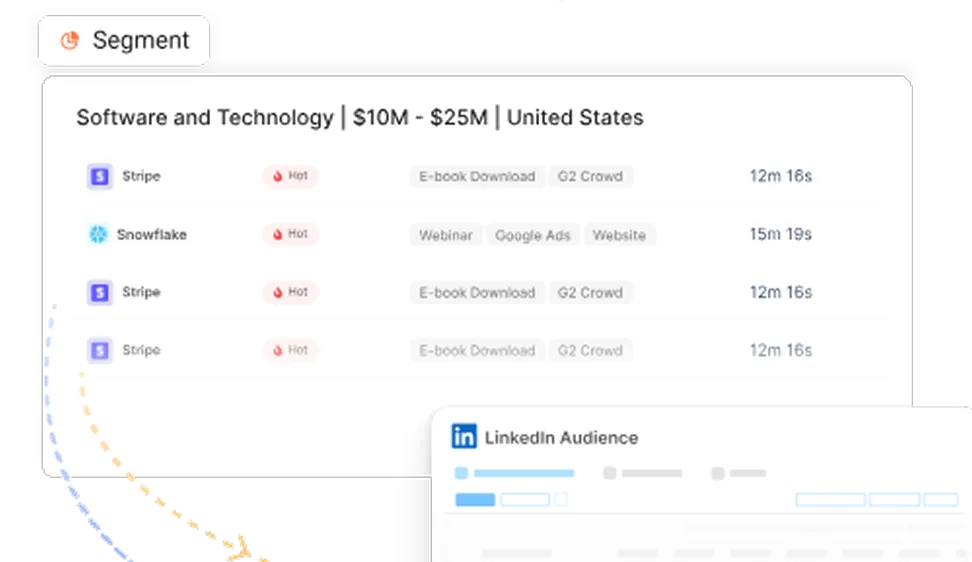
Factors identifies and enriches anonymous companies engaging with your website, social media, or product pages like G2. Using firmographic and engagement data, you can create highly specific audience segments. For instance, you could segment "US-based software companies with 100-999 employees who viewed your pricing page" and then push these segments into Google Ads. This level of granularity ensures you're only serving ads to high-intent accounts, saving ad spending on irrelevant audiences.
3. Data Flow to Google Analytics and Ads
Once you've created your custom audience segments, Factors enables you to push this data into Google Analytics. Since Google Ads retargets based on website visitor data captured in GA, this integration acts as a proxy to help you target the right accounts across various ad types (search, video, display).
4. Intent-focused Keyword Research:
You may need to balance your bidding strategy when working with a marketing budget. Factors helps you run variable responsive search ads, where you can bid higher on broader, competitive keywords only for accounts that match your desired Audience Segment. For example, you could bid $6 for the keyword "CRM software" but only display ads to "US-based SMEs" identified through Factors. This ensures that even if you're competing for high-volume keywords, only relevant accounts see the ads, maximizing your spend.
5. Granular Targeting:
Instead of running broad campaigns, Factors lets you laser-focus on companies that show strong engagement signals, like viewing key product pages or engaging with LinkedIn ads. This way, you can optimize your ad spend, knowing that your ads are reaching only the most qualified leads. It allows for strategic bidding and a more efficient allocation of your budget.
Frequently Asked Questions About Google Ads
Q1. How much does Google Ads cost per month?
There's no fixed monthly cost — you set your own budget. Most small businesses spend $1,000–$5,000/month, but you can start with as little as $10/day. Costs depend on your industry, keyword competition, and Quality Score.
Q2. What type of Google Ad is best for beginners?
Search Ads are the best starting point for beginners. They target users actively searching for your product or service, deliver high-intent traffic, and are the easiest to set up and measure.
Q3. How does Google Ads bidding work?
Google Ads uses an auction system. You set a maximum bid (how much you'll pay per click), and Google combines it with your Quality Score to determine your ad position. Higher Quality Scores can mean lower costs and better placement.
Q4. What is Google Ads Quality Score?
Quality Score is Google's 1–10 rating of your ad's relevance and quality. It's based on expected click-through rate, ad relevance, and landing page experience. A higher Quality Score lowers your cost per click and improves ad position.
Google Ads provides a versatile platform for businesses to boost online visibility and drive targeted traffic.
1. Key Ad Formats: Includes Search Ads, Display Ads, Shopping Ads, Video Ads, App Ads, Local Service Ads, Smart Ads, and Discovery Ads.
2. Benefits: Immediate visibility, precise targeting, flexible budgeting, retargeting capabilities, performance tracking, and a competitive edge.
3. Enhancement with Factors.ai: Integrating with tools like Factors.ai enables precision retargeting, account-based segmentation, granular targeting, and data-driven insights.
Maximizing ROI through these capabilities helps B2B marketers optimize their campaigns for higher efficiency and effectiveness.
The Bottom Line on Google Ads
Google Ads is essential for businesses looking to increase their online presence, drive targeted traffic, and generate quality leads. You can reach your target audience across multiple platforms and formats with different types of ads—from Search to Shopping, Display, Video, and beyond. The benefits of Google Ads are vast, including precise targeting, measurable ROI, flexibility in budgeting, and immediate visibility. Whether you're a small business trying to boost local visibility or a large enterprise looking for comprehensive brand awareness and conversions, the benefits of Google Ads offer a scalable and versatile platform for you. All you've got to do is log in to your Google Ads account and get started!
Moreover, incorporating Factors into your Google Ads strategy goes beyond the typical audience segmentation options provided by Google Ads, bringing account-level intelligence into the mix. It's particularly beneficial for B2B marketers who need more granular control over targeting and messaging, ensuring that every dollar spent on Google Ads delivers maximum impact.
If you're ready to reap the benefits of Google Ads and take their performance to the next level, contact us and explore Factors' powerful capabilities.
Also read Google Ads Audience Segments.

See how Factors can 2x your ROI
Boost your LinkedIn ROI in no time using data-driven insights


.avif)

See Factors in action.
Schedule a personalized demo or sign up to get started for free
LinkedIn Marketing Partner
GDPR & SOC2 Type II


.svg)



.avif)

