
Heading 2
LinkedIn Video Ads Best Practices: A B2B Marketer's Guide to Better Results
Learn LinkedIn video ads best practices for B2B marketers. Improve targeting, creative, CPL, and pipeline with expert strategies from Factors.ai.
Written by
.avif)
Vrushti Oza
Content Marketer



.svg)


TL;DR
- LinkedIn video ads have become a serious pipeline channel for B2B teams, not just a brand awareness play. The best-performing campaigns pair strong creative hooks with precise targeting and full-funnel sequencing.
- Your first three seconds determine whether anyone watches the rest. Design every video for sound-off viewing with captions, text overlays, and clear motion graphics.
- Targeting is where most LinkedIn video ad strategies either win or waste budget. Start narrow with job titles and seniority, layer account lists, and retarget engaged viewers at each funnel stage.
- Vanity metrics like view counts and completion rates don't tell you much unless you can tie them to accounts, pipeline, and revenue. That's where tools like Factors.ai close the gap.
- The winning formula is straightforward: sharp hooks, tight targeting, funnel-aware sequencing, revenue-level measurement, and a commitment to continuous creative testing.
You know that tiny act of self-sabotage where you open LinkedIn for two minutes to check one notification, and twenty minutes later you’ve watched three founder clips, half a webinar snippet, a product demo, someone explaining revenue strategy in front of a brick wall, and a CMO talking directly into the camera with suspicious confidence?
That’s exactly why LinkedIn video ads work…they slip into a feed people already browse in small stolen moments between meetings, coffee breaks, airport queues, and pretending to listen on calls that should have been emails. Done well, they don’t feel like ads at all… they feel like useful content that happened to have a budget behind it.
The problem is that most B2B teams still treat video like a box to tick, they crop a webinar recording, add subtitles, launch a campaign, and hope ‘video performs better’ carries the rest. Then they wonder why views look decent but pipeline looks allergic.
LinkedIn video ads best practices are really about understanding context. What mindset is your buyer in when they see this? Why should they stop scrolling? What should they remember three hours later? And how do you turn a few seconds of attention into an actual buying journey?
This guide gets into all of that: how to create LinkedIn video ads people genuinely watch, how to target them properly, how to measure impact beyond vanity metrics, and how to stop spending budget on videos your audience politely ignores.
Why LinkedIn video ads matter for B2B?
Video isn't exactly new to LinkedIn, but the pace at which it's grown over the past two years has caught a lot of B2B marketers off guard. Uploads and engagement have climbed significantly across the platform, and LinkedIn's own algorithm now gives video content more real estate in the feed than it did even twelve months ago. If you're still treating video as a "nice to have" line item in your content plan, you're already behind the teams that treat it as a core revenue channel.
This makes sense when you think about how B2B buyers actually consume information now. Before they agree to a demo, most buyers want to understand your point of view, your product's value, and whether your team seems credible. They're doing that research in their feed, between meetings, often on mobile. A well-crafted video answers those questions faster than a whitepaper ever could.
What's changed in 2026 isn't just the volume of video on LinkedIn. It's the role video plays across the buying journey. Smart B2B teams now use video at the top of the funnel for awareness, in the middle for education and trust-building, and at the bottom for proof and conversion. Static image ads still have a place, but they can't do what a 30-second customer story or a founder-led insight clip can do in a crowded feed. The scroll-stopping power of movement, voice, and human faces is hard to replicate with a flat graphic.
Many B2B brands still treat video like a side project that gets resourced once a quarter when someone remembers to brief the agency. The teams seeing real results treat it like a revenue asset, with the same rigour they'd apply to any other paid channel. That means planning creative by funnel stage, aligning targeting to ICP, and measuring outcomes beyond views. Video on LinkedIn isn't brand fluff anymore. It's a pipeline assist channel, and the sooner you treat it that way, the sooner it starts contributing to your numbers.
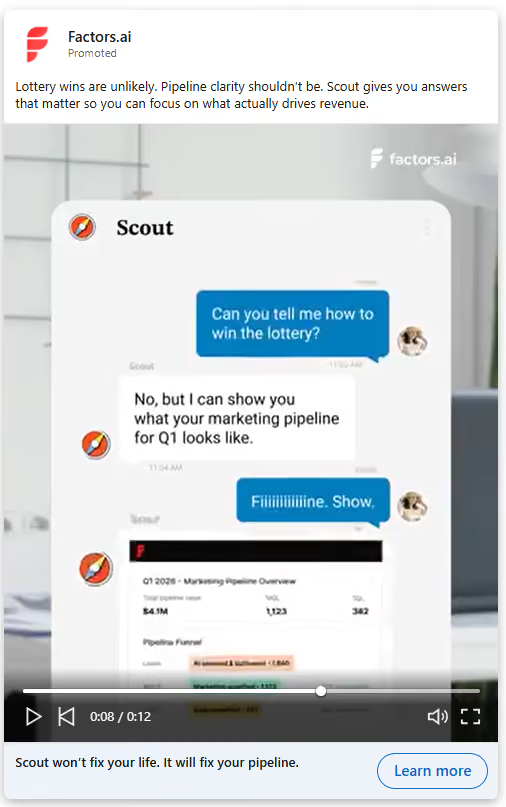
Here’s an example of a recent video ad we, at Factors.ai, are running:
What makes LinkedIn video ads different from other channels?
Not all video platforms are created equal, and the mistake I see most often is B2B teams repurposing their Instagram Reels or TikTok clips for LinkedIn without thinking about context. The audience mindset on LinkedIn is fundamentally different. People open the app in a professional frame of mind. They're thinking about their work, their industry, and their next career move. They're not looking for entertainment. They're looking for signal.
That professional context is what makes LinkedIn's audience so valuable for B2B video advertising. You're not reaching casual scrollers. You're reaching decision-makers, operators, and members of buying committees. The VP of Marketing who controls a six-figure ad budget. The Head of Revenue Operations evaluating new tools. The CFO who'll eventually sign off on your deal. These are the people watching your video between Slack messages and calendar invites, and they have very little patience for content that wastes their time.
This is why the most effective LinkedIn video ads tend to be educational, insight-led, or proof-led. Entertainment-first content that thrives on TikTok or Instagram often falls flat here because the viewer is in a completely different mode. On LinkedIn, a video that shares a sharp industry insight or walks through a real customer result will outperform a flashy brand spot almost every time. The platform rewards substance over style, and that's actually good news for B2B teams who have plenty of substance but don't have a Hollywood production budget.
Certain verticals benefit most from this dynamic. B2B SaaS companies, agencies, fintech, martech, and HR tech brands all have complex products with multi-stakeholder buying journeys. Video gives them a way to simplify that complexity and build trust before a prospect ever fills out a form. If you think of LinkedIn as where video goes to work, the creative decisions you make start to change. You stop asking "will this go viral?" and start asking "will this earn 30 seconds of attention from the right person?"
LinkedIn video ads best practices for creative
Creative is where your LinkedIn video ad strategy either earns attention or gets scrolled past. You can nail your targeting and your funnel structure, but none of it matters if the video itself doesn't stop someone mid-scroll. These are the creative principles that consistently separate high-performing LinkedIn video ads from the forgettable ones.
- How do you hook viewers in the first three seconds?
The first three seconds of your video are an audition. If you don't earn attention immediately, you won't get a chance to deliver your message. LinkedIn's feed moves fast, and your video is competing with posts from colleagues, industry news, and job updates. You need a reason for someone to pause.
There are a few reliable hook structures that work well in B2B. You can open with a sharp question that speaks to a pain your audience recognises. Something like "Why is your team spending 40% of budget on leads that never convert?" forces the viewer to engage because it speaks directly to their reality. You can state a painful truth that challenges a common assumption. You can flash a bold, specific stat that reframes how someone thinks about a problem. Or you can use a visual pattern interrupt, something unexpected in the first frame that breaks the monotony of the feed.
One of my favorite LinkedIn video ad examples used a simple opening line: "Your CPL looks great. Your pipeline doesn't." It worked because it acknowledged a tension every B2B marketer feels but rarely says out loud. The hook isn't about being clever for the sake of cleverness. It's about demonstrating, in under three seconds, that you understand the viewer's world well enough to be worth listening to.
- Why should you design for sound-off viewing?
Here's a reality most video teams overlook: the majority of your LinkedIn audience is watching without sound. They're at their desk, in a meeting, or on a train. They won't unmute unless you've already convinced them the content is worth hearing. If your video relies on a voiceover to make sense, you've lost most of your audience before the first sentence lands.
Captions are non-negotiable. Every word spoken in your video should appear as text on screen, ideally styled in a way that's easy to read on mobile. Beyond captions, think about text overlays that reinforce key points, motion graphics that guide the viewer's eye, and visual storytelling that communicates your message even on mute. The best-performing LinkedIn video ads work as silent films first and audio experiences second. When you design for sound-off, you're designing for how people actually consume content at work.
- What video length works best for LinkedIn ads?
Length depends on intent, and this is unfortunately where a lot of B2B teams get it wrong. They either default to 60-second explainers for every campaign or chop everything into 6-second bumpers that don't say anything meaningful. The right length is a function of where the viewer sits in your funnel and what you're asking them to do.
For pure awareness, 15 seconds is often enough. You're introducing a point of view or a brand impression, and brevity works in your favour. For consideration-stage content, 20 to 40 seconds gives you room to explore an idea, share a customer insight, or walk through a problem/solution frame. For product explainers, case studies, or proof-led content at the bottom of the funnel, 45 to 90 seconds can work well, but only if value appears early. A 90-second video that buries the insight at the 50-second mark will never get there for most viewers.
The principle is front-load value. Regardless of length, the viewer should feel like they've gained something useful within the first 10 seconds. If they stay longer, great. But never assume they will.
- Why do human faces outperform logos and graphics?
There's a reason the most effective B2B video ads tend to feature real people rather than animated logo sequences… human faces create connection. They signal authenticity. And in a feed full of polished brand graphics, a real person talking directly to camera stands out precisely because it feels less produced.
Founders work well because they carry credibility and conviction. Customers work well because they provide proof from someone who isn't paid to say nice things. Subject matter experts work well because they bring genuine depth. Even sales reps explaining a market trend can create effective video content, because they're close to the conversations buyers are actually having. In most B2B testing, faces outperform logo-heavy slides on engagement, completion rates, and downstream action. Your brand guidelines might prefer the polished animation, but your audience prefers a human being who seems like they know what they're talking about.
- How should you end a LinkedIn video ad?
Every video needs to close with one clear call to action. Not two, not three, and definitely not a vague "learn more" that doesn't tell the viewer what happens next. The CTA should match the funnel stage and the content that preceded it. If you've just shared a customer story about a specific result, "See the full case study" makes sense. If you've walked through a problem, "Download the benchmark report" gives the viewer a logical next step.
Strong CTAs for LinkedIn video ads include booking a demo, downloading a guide, watching a full walkthrough, or viewing a benchmark report. The important thing is specificity. "Book a 15-minute pipeline review" is stronger than "Get in touch." The viewer should know exactly what they'll get and how long it'll take. A video that earns 30 seconds of attention and then fumbles the close with a weak CTA is a wasted opportunity, and I've seen it happen more times than I'd like to admit.
LinkedIn video ads best practices for targeting
Great creatives with poor targeting is like writing a brilliant email and sending it to the wrong list. You'll get vanity metrics that look decent on a dashboard but produce nothing downstream. Targeting is where your LinkedIn ads video campaign either reaches the people who can actually buy, or burns budget reaching people who'll never convert. These are the targeting principles that matter most.
- Why should you start narrow and expand later?
The instinct with LinkedIn ads is often to cast a wide net and let the algorithm figure it out. That works on some platforms, but LinkedIn's auction dynamics and CPMs reward precision. Starting with a tight audience lets you validate your messaging, learn what resonates, and build a baseline of performance data before you scale.
Begin with the targeting dimensions that most closely define your ICP. Job titles and seniority are usually the strongest starting filters, because they tell you whether you're reaching the right level of decision-maker. Layer in function, company size, and industry to narrow further. A video ad targeting "VP of Marketing at SaaS companies with 200-1000 employees" will outperform a broad "Marketing professionals" audience nearly every time, because the message can be more specific and the viewer can feel that specificity. Once you've found combinations that deliver qualified engagement, you can gradually expand by loosening one dimension at a time.
- How do account lists sharpen your targeting?
If you're running account-based campaigns, uploading your ICP account list or CRM target accounts is one of the most powerful targeting moves available on LinkedIn. It lets you serve video ads specifically to employees at the companies you've already identified as high-fit prospects. This turns your video campaign from a broadcast play into a precision instrument.
You can upload lists directly into LinkedIn's matched audiences, or sync them from your CRM. The key benefit is that you're no longer relying solely on LinkedIn's demographic filters. You're saying "show this video to people at these specific companies" and then layering demographic filters on top to reach the right roles within those accounts. For B2B teams running ABM motions, this is where LinkedIn video ads become genuinely strategic rather than just another awareness channel.
- How should you retarget engaged viewers?
Retargeting is where the funnel logic of your video strategy comes together. LinkedIn lets you build audiences based on video engagement, and this is one of the most underused features I see in B2B accounts. You can create audiences of people who watched 25% of your video, 50%, or even 75%. Each of these engagement thresholds tells you something different about intent.
Someone who watched 25% gave you a few seconds of attention. They're mildly interested. Someone who watched 50% or more actively chose to keep watching, which signals real engagement with your message. You can layer these video audiences with website visitors and form openers to build retargeting segments that are both warm and qualified. The magic happens when you serve a ToFu video to a broad audience, then retarget the engaged viewers with a MoFu case study, and finally retarget those engaged viewers with a BoFu demo offer. That's a video funnel that actually moves people through a journey, not just a single ad running to everyone.
- Why should you exclude existing customers?
This seems obvious, but I'm consistently surprised by how many B2B teams forget to do it. If you're running video campaigns without excluding your current customer list, you're paying LinkedIn CPMs to show ads to people who've already bought from you. Unless you're running a specific expansion or upsell campaign, those impressions are pure waste.
Upload your customer list as an exclusion audience. Update it regularly, ideally monthly or whenever a significant batch of new customers closes. This simple hygiene step can meaningfully reduce your cost per lead and ensure that your budget is reaching prospects, not existing accounts who are already in your product. It takes five minutes to set up, and it saves thousands over the course of a quarter. There's no good reason not to do it.
What are the best funnel strategies for LinkedIn video ads?
Most B2B brands fail with LinkedIn video ads for THIS one simple and structural reason… they run one video to all funnel stages. They'll create a single product explainer, target it broadly, and wonder why the CPL is high and the pipeline impact is negligible. The problem isn't the video. It's the absence of a funnel-aware strategy that serves different content to people at different stages of their buying journey.
- Top of funnel: building awareness with point-of-view content
At the top of the funnel, your audience doesn't know you yet, or knows you only vaguely. They're not looking for a product demo. They're looking for ideas, perspectives, and people who understand their world. This is where point-of-view clips work exceptionally well. A founder sharing an opinionated take on where the industry is heading. A short video highlighting an industry pain point that your audience recognises but hasn't seen articulated clearly. A narrative that makes the viewer think "these people get it."
The goal at ToFu isn't conversion. It's recognition. You want the viewer to remember your brand and associate it with a specific point of view. Keep these videos short, punchy, and opinionated. Bland thought leadership that could've been written by anyone won't earn attention in a competitive feed. The best ToFu video ads feel like the opening of a conversation your audience didn't know they wanted to have.
- Middle of funnel: educating and building trust
Once someone has engaged with your brand at the awareness stage, the middle of the funnel is where you earn their trust and help them understand your product's value in the context of their specific problems. This is where case study videos, product education content, and comparison-angle videos work best. You're not selling yet. You're teaching.
A strong MoFu video might walk through how a company similar to the viewer's solved a specific problem using your approach. It might explain a concept that's central to your product's value proposition, without ever mentioning the product by name. The key is that the viewer should feel smarter after watching, like they've gained an insight they can use regardless of whether they buy from you. That generosity builds trust, and trust is the currency that moves B2B deals forward. Comparison-angle content also works well here, not as aggressive competitor bashing, but as honest frameworks that help buyers understand their options.
- Bottom of funnel: converting with proof and urgency
At the bottom of the funnel, your audience knows who you are and understands the problem you solve. What they need now is confidence. ROI proof videos that show specific numbers from real customers are incredibly effective here. Testimonials from recognisable brands or relatable companies remove the risk perception that slows down B2B deals. Short demo snippets that show the product in action, focused on the specific workflow the viewer cares about, can be the nudge that turns interest into a booked meeting.
Urgency offers work at BoFu too, but they need to be genuine. A limited-time benchmark report, an exclusive early-access programme, or a time-bound consultation offer can create the motivation to act now rather than "next quarter." The critical principle across all funnel stages is match. Your video content should match the viewer's current stage of awareness, consideration, or decision. When that match is tight, everything downstream improves, from engagement rates to cost per qualified lead to actual pipeline created.
How should you measure LinkedIn video ad performance?
Measurement is where most B2B video strategies fall apart. Not because teams don't have data, but because they're looking at the wrong data. LinkedIn provides a generous dashboard of engagement metrics for video ads, and most of them are interesting but ultimately insufficient for B2B teams that care about revenue.
- Engagement metrics: useful but incomplete
The standard engagement metrics for LinkedIn video ads include 3-second views, completion rate, click-through rate, and shares. These tell you whether your creative is working as a piece of content. A high completion rate suggests the video held attention. A strong CTR suggests the CTA resonated. Shares indicate the content felt valuable enough to pass along. All of these are useful signals for creative optimisation.
But here's the problem: engagement metrics operate in a vacuum. They tell you how the video performed as media, but they don't tell you whether the right people watched or whether those views led to anything downstream. I've seen campaigns with a 35% completion rate and strong CTR that produced zero qualified pipeline, because the audience was wrong. Engagement metrics are necessary for creative iteration, but they're dangerous as success metrics if they're the only thing you're reporting.
- Commercial metrics: the ones that actually matter
The metrics that connect your LinkedIn video ad strategy to revenue are cost per lead, cost per qualified lead, opportunity rate, pipeline influenced, and revenue sourced. These require connecting your LinkedIn data to your CRM and, ideally, to an attribution layer that can track the full journey from video view to closed deal.
Cost per lead tells you efficiency. Cost per qualified lead tells you whether those leads are actually worth pursuing. Opportunity rate tells you whether qualified leads are turning into real sales conversations. Pipeline influenced tells you how much revenue is sitting in stages where a LinkedIn video touchpoint was part of the journey. And revenue sourced tells you the bottom line: did this campaign contribute to money in the bank?
A 20% completion rate means very little if zero buying accounts engaged with your video. Conversely, a 12% completion rate might be perfectly fine if the viewers who did engage were senior decision-makers at target accounts who later entered your pipeline. The metric that matters is always the one closest to revenue, and everything upstream is a diagnostic tool to help you get more of it.
This is where Factors.ai becomes genuinely useful. Instead of stopping at clicks and views, Factors.ai connects video engagement to specific accounts and traces the path from ad impression to pipeline to revenue. It answers the question that LinkedIn's native reporting can't: "Who watched, and did it matter?" That shift from anonymous engagement metrics to account-level revenue impact changes how you make decisions about creative, targeting, and budget allocation.
What mistakes do B2B brands make with LinkedIn video ads?
After auditing dozens of B2B LinkedIn video campaigns, the same mistakes show up again and again. Most of them are avoidable, which makes them all the more frustrating. Here are the ones I see most frequently, in rough order of how much budget they waste.
- Overproduced brand videos with no clear point
Some teams spend weeks producing a cinematic brand spot that looks beautiful but doesn't actually say anything specific. LinkedIn audiences don't reward production value. They reward relevance and clarity. A founder recording a 20-second insight on their phone will often outperform a polished brand anthem that took six weeks to produce.
- No captions or text overlays
If your video doesn't work on mute, it doesn't work on LinkedIn. Full stop. The number of B2B video ads I see that rely entirely on voiceover with no visual text support is staggering. These videos are essentially invisible to the majority of the feed.
- Weak first three seconds
Opening with a logo animation, a slow fade-in, or a generic "Hi, I'm [Name] from [Company]" is the fastest way to lose your audience. Those three seconds are your audition. If you don't earn attention immediately, nothing else in the video matters.
- Broad targeting with no ICP focus
Running video ads to "Marketing Professionals worldwide" is a great way to get cheap views and expensive pipeline. Precision matters more on LinkedIn than on almost any other paid channel because the CPMs are higher. Every impression costs more, so every impression needs to count.
- Measuring only click-through rate
CTR is one signal among many, and it's often misleading for video. Video ads build awareness and influence that doesn't always manifest as an immediate click. If CTR is your only success metric, you'll consistently undervalue video's contribution and pull budget from campaigns that are quietly doing heavy lifting further up the funnel.
- Running the same creative for months
Creative fatigue is real on LinkedIn, especially with smaller, well-targeted audiences. If the same group of decision-makers sees your video ten times, they'll stop noticing it. Refresh your creative regularly. You don't need entirely new concepts every time, but new hooks, new faces, or new angles keep the content fresh.
- No retargeting journey
Running a single video to a broad audience with no follow-up sequence is the B2B equivalent of saying hello to someone at a conference and then walking away. The retargeting journey is where video becomes a funnel, and without it you're leaving most of the value on the table.
- Sending cold traffic straight to a demo page
Someone who just watched 15 seconds of your awareness video isn't ready to book a demo. If your CTA skips straight from awareness to conversion, you'll see high bounce rates and low form fills. Meet the viewer where they are, and give them a next step that matches their current level of interest.
How does Factors.ai improve LinkedIn video ad ROI?
Most teams know their view counts. Most can pull completion rates and CTR from LinkedIn Campaign Manager. Where things break down is the gap between those engagement metrics and actual business outcomes. You know the video was watched. But you don't know which companies watched it, whether those companies are in your ICP, or whether the video influenced any downstream pipeline. That's the gap Factors.ai closes.
Factors.ai identifies which companies engaged with your LinkedIn video ads, even when individual viewers don't click or fill out a form. It connects view-through engagement to specific accounts, so you can see whether your target accounts are actually consuming your content. That visibility alone changes the conversation in a campaign review. Instead of reporting "50,000 views," you can report "23 target accounts engaged with this video, and 7 of them entered pipeline within the next 30 days."
The platform also syncs engaged accounts into retargeting flows. When Factors.ai identifies that a target account watched your ToFu video, it can trigger the next step automatically, whether that's serving a MoFu case study, alerting your SDR team, or adding the account to a nurture sequence. This turns your LinkedIn video ads from a passive awareness play into an active pipeline engine with real sequencing logic.
One of the most valuable capabilities is comparing different ad formats by revenue influence. You can see how video ads stack up against image ads and document ads, not by CTR or CPM, but by how much pipeline and revenue each format influenced. That gives you a defensible answer when someone in a budget meeting asks whether video is actually worth the extra production cost.
Factors.ai also helps you build smarter account-based journeys by connecting LinkedIn engagement data with website visits, CRM activity, and other intent signals. You get a unified view of how target accounts are moving through your funnel, with video touchpoints mapped alongside every other interaction. Most teams know views. Factors.ai helps you know who watched and whether it actually mattered for revenue.
In a nutshell…
LinkedIn video ads have moved well past the "nice to have" stage for B2B growth teams. They're now a core channel for building awareness with buying committees, earning trust through education, and creating measurable pipeline impact. But the difference between teams that waste budget on video and teams that generate real ROI comes down to a few specific disciplines.
Your creative needs a strong hook in the first three seconds, captions for sound-off viewing, and a clear CTA that matches the viewer's funnel stage. Your targeting needs to start narrow with ICP-specific filters and account lists, then expand based on performance data rather than assumptions. Your funnel strategy needs distinct content for awareness, consideration, and conversion, because one video can't do the work of three.
Measurement is where the biggest gap exists for most B2B teams. Moving beyond views and CTR to track cost per qualified lead, pipeline influenced, and revenue sourced is what separates performance marketing from content marketing theater. Tools like Factors.ai bridge that gap by connecting video engagement to specific accounts and tracing the path to revenue.
The winning formula isn't complicated: sharp hooks, precise targeting, funnel-aware sequencing, revenue-level measurement, and continuous creative testing. If you're already running LinkedIn video ads, audit your current campaigns against these principles. If you're just getting started, build the infrastructure for measurement and retargeting before you spend your first pound on production. The teams that treat video as a revenue asset rather than a brand project are the ones seeing compounding returns, quarter after quarter.
Frequently asked questions about LinkedIn video ads best practices
Q1. What are the best LinkedIn video ads best practices?
The most impactful practices start with your first three seconds, which need a hook strong enough to stop someone mid-scroll. From there, design for sound-off viewing with captions and text overlays, keep your video length matched to the funnel stage, and close with a single clear CTA. On the targeting side, start narrow with ICP-specific filters, layer account lists, and build retargeting audiences from engaged viewers. Most importantly, measure pipeline impact and revenue influence rather than just views and completion rates. The teams that get results are the ones that treat every element of the campaign, from creative to measurement, as a connected system.
Q2. Do LinkedIn video ads work for B2B?
They work exceptionally well for B2B, and in many cases outperform other formats for awareness and trust-building. LinkedIn's audience is already in a professional mindset, which means they're receptive to educational, insight-led, and proof-led content that speaks directly to their work challenges. Video is particularly strong for reaching buying committees, because a well-crafted 30-second clip can communicate credibility and value faster than a whitepaper or static image ever could. The key is matching your content to the right funnel stage and targeting it precisely to the people who actually influence purchase decisions.
Q3. What video length works best on LinkedIn?
It depends on the objective, honestly. For awareness campaigns, 15 to 30 seconds tends to perform best because you're just trying to earn recognition and a brand impression. For consideration-stage content where you're educating or building trust, 20 to 40 seconds gives you enough room to deliver a meaningful insight. Longer formats of 45 to 90 seconds can work for bottom-of-funnel content like product walkthroughs and case studies, but only if value appears within the first 10 seconds. The universal rule is to front-load your most important message, because you can't count on viewers staying until the end.
Q4. Are LinkedIn video ads better than image ads?
The honest answer is that it depends on the funnel stage and the specific goal of your campaign. Video tends to win for storytelling, engagement, and top-of-funnel brand building because movement and human faces naturally capture more attention in the feed. Single-image ads can still outperform video on direct-response campaigns where the CTA is simple and the audience is already warm. The strongest B2B advertisers use both formats strategically rather than picking one over the other. Tools like Factors.ai let you compare video and image ads by actual revenue influence, which gives you a clearer answer than engagement metrics alone.
Q5. How do I measure LinkedIn video ad ROI?
Start by moving beyond LinkedIn's native engagement metrics, which focus on views, completion rates, and clicks. Those are useful for creative optimization, but they don't tell you whether the right people engaged or whether any revenue resulted. To measure real ROI, track cost per qualified lead, opportunity rate, pipeline influenced, and revenue sourced from accounts that were exposed to your video campaigns. This requires connecting your LinkedIn data to your CRM and ideally using an attribution tool like Factors.ai that ties account-level video engagement to downstream pipeline and revenue. The question you should be answering isn't "how many people watched?" It's "which accounts watched, and did it contribute to a deal?"

See how Factors can 2x your ROI
Boost your LinkedIn ROI in no time using data-driven insights
Try AdPilot Today



.avif)



See Factors in action.
Schedule a personalized demo or sign up to get started for free
LinkedIn Marketing Partner
GDPR & SOC2 Type II

.svg)







.avif)
.avif)