
AI Sales Tools: What Actually Helps Reps Sell (Not Just Click Around)
AI sales tools promise a lot. This guide shows what actually works, how teams use AI in practice, and how to avoid costly mistakes.

Writer



.svg)


TL;DR
- AI delivers the most value when it takes work off a rep’s plate and helps them focus on the right deals. It is NOT a replacement salesperson.
- The most reliable wins from AI come from practical uses like automatic call summaries, cleaner CRM data, intent-based account prioritization, and better coaching inputs for managers.
- Teams will get burned if they use AI to scale outbound too fast or stack multiple tools that all basically do the same thing.
- AI signals are most effective when they start better conversations in pipeline reviews and 1:1s. Don't treat AI responses as final answers or hard decisions.
- In practice, a small number of tools with clearly defined jobs will outperform a crowded sales stack full of overlapping “smart” features.
I'm in marketing, but the nature of my job requires me to speak with sales leaders about twice a week. They've all been saying something to this end lately, “We have AI in our stack… but I’m not sure it’s actually helping us close more deals.”
There are so many options for AI sales tools available now, but discernment is a challenge. What's good? What fits your needs?
So I wrote this guide. Hopefully, it'll help you make a practical decision that breaks your budget. I've tried to go beyond a typical ‘27 tools you must try’ list, and tell you what these tools do well, where they fall short, and how they can boost pipeline velocity, rep productivity, and forecast accuracy.
What are AI sales tools?
AI sales tools use machine learning and automation protocols to study sales data and suggest/initiate necessary actions across the sales pipeline. This covers prospecting, outreach, deal management, forecasting, and coaching.
Traditional sales tools just record the data, but sales AI tools can actually interpret it. The best AI tools can:
- Suggest who a sales rep should contact for a specific conversation
- Suggest conversational topics and notes based on the deal context
- Flag any deal showing signs of risk
- Take over grunt work: note-taking, follow-ups, and data logging
Your AI sales assistant can use intent. They can turn raw data into intelligence and guidance.
For instance, Factors.ai can analyze existing account engagement and intent signals to surface which accounts are heating up, which ones are stalling, and where sales teams should focus next.
Why is AI in sales now?
AI can significantly change how sales professionals operate, as well as data density and workflow maturity. It can impact sales performance by evaluating data across:
- Emails, calls, meetings, demos
- CRM activity across every stage
- Intent signals and engagement history
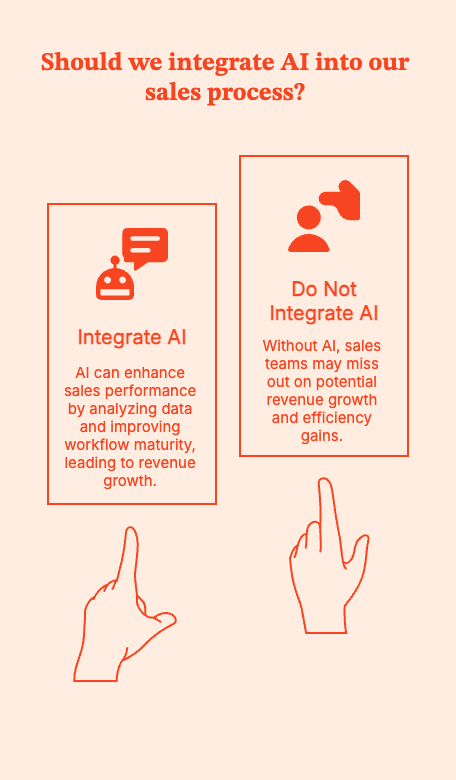
In fact, Salesforce’s sixth State of Sales report found that 83% of sales teams with AI saw revenue growth vs. 66% without AI.
Mainstream tools like Pipedrive and Salesforce have recognized AI's efficacy, and are configuring AI integration capabilities into their stacks. They now ship with built-in native AI assistants.
{{INLINE_MOFU}}
Core AI sales use cases across the funnel
Don't just jump into a list of tools. Start by figuring out where reps lose time, focus, or momentum.
Now look for tools where AI addresses these gaps.
Here's how AI can help sales teams across the funnel:
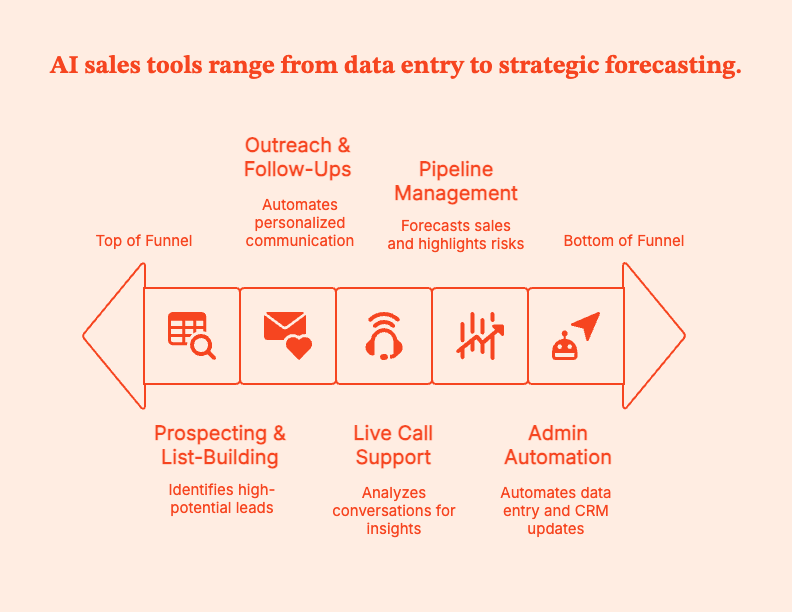
- Prospecting & list-building
At the top of the funnel, AI works by answering: “Who is worth a rep’s time today?”
AI tools can analyze and deliver data-driven insights by:
- Finding accounts similar to already won customers, rather than just firmographics
- Pay attention to leads by studying intent signals, engagement history, and past outcomes
- Enrich contact data automatically, so reps have everything they need to do their job
AI tools turn static lead lists into dynamic prioritization.
For instance, Factors.ai can flag which target accounts are actively researching, engaging with content, or signaling buying intent, so reps focus on where momentum already exists rather than guessing.
- Outreach & follow-ups
At this stage, AI can shine (or fail) by:
- Creating first drafts of emails or suggesting conversation insights or call openers
- Recommending the best follow-up times based on engagement patterns
- Summarizing account context before each call so reps stay up to date.
AI helps with closing deals by compressing prep time, cutting down repetitive tasks, and keeping reps up to date.
- Live call support & conversation intelligence
AI tools are most obviously beneficial at this stage by:
- Recording and analyzing calls
- Highlighting objections, competitor mentions, and decision criteria
- Gauge talk ratios, pacing, and engagement
- Pick up any coachable moments for managers
Reps sell. AI listens. Managers coach with evidence instead of anecdotes. Over time, you find out what winning calls sound like, where deals die, and which behaviors likely move opportunities forward.
- Pipeline management & predictive sales AI
Honestly, I'm convinced that sales forecasting emerged straight from hell. The right predictive sales AI tool can make hell much less hot.
Give AI historical test data and real-time activity. Then it can:
- Forecast close dates.
- Read-line deals that look acceptable on the surface but lack momentum
- Highlight opportunities that may be slipping without notice.
For RevOps and sales leaders, AI gives early warnings so forecast conversations become strategic, not reactive. For example, Factors.ai points out which opportunities and target accounts are showing rising or declining activity, giving reps additional context before deals quietly slip.
See for yourself. Book a demo.
- Admin automation & CRM hygiene
Modern sales assistants can go a long way in:
- Logging calls, emails, and meetings. No more human grunt work.
- Update CRM fields based on activity
- Sum up meetings and suggest next steps
Reps can be spared the drudgery of manual data entry. AI-powered tools can keep CRMs accurate and let humans focus on improving pipeline hygiene and forecast reliability. They can also help achieve the valuable but hard to attain B2B sales And marketing alignment.
Types of AI sales tools
It's hard to pick an AI sales tool when there’s a new one popping out every week. Vendors invent new labels. Analysts redraw the map every year.
Sales teams often end up comparing tools that don't even solve the same problem.
To clear the confusion, let's try putting these tools into buckets: five functional categories, to be precise.
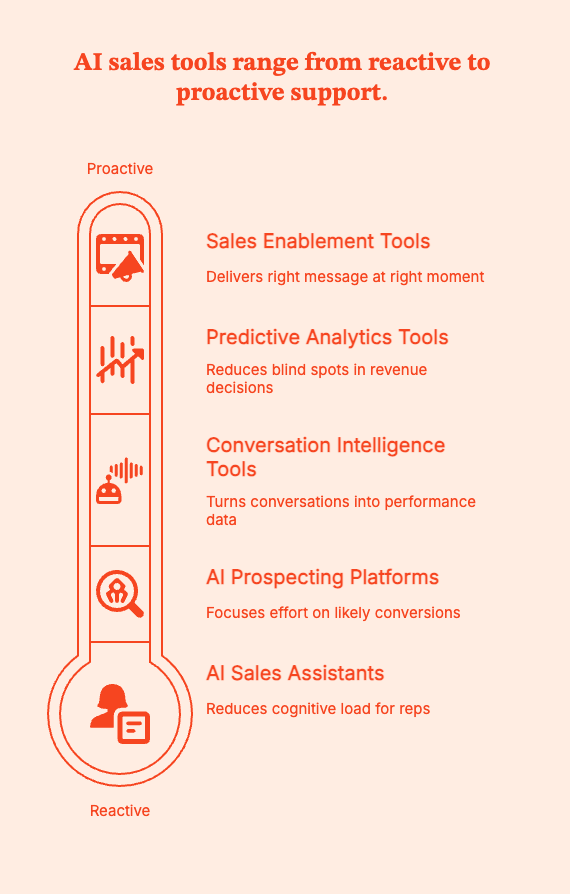
1. AI sales assistants/copilots
Mental model: “Reduce cognitive load for reps.”
AI features have quickly popped up within existing tools: emails, calendars, and CRMs. Their goal is to handle the small, repetitive decisions that don't need human intelligence but drain human effort.
In practice, the AI assistant can:
- Summarize calls and meetings, so reps don't have to
- Recommend next actions based on deal activity
- Glean relevant content or context without forcing reps to search through old conversations
When choosing tools in this bucket, check if the AI assistant requires reps to change how they sell or check a separate dashboard. You need friction removal, not more work.
2. AI prospecting & enrichment platforms
Mental model: “Focus human effort where it’s most likely to convert.”
AI tools in this bucket combine large datasets, intent signals, and AI ranking models to flag which accounts and contacts are actually worth pursuing at each moment.
These tools can:
- Surface lookalike accounts based on past deal wins
- Top-rank the right leads based on behavioral and intent data
- Enrich contact records automatically
AI tools for prospecting and enrichment are perfect for SDR teams working with high volumes. It saves time spent on researching, which can be spent talking to the right people.
3. Conversation intelligence & coaching tools
Mental model: “Turn conversations into performance data.”
Conversation intelligence tools record and analyze sales calls to pull up the actual valuable insights that will move deals forward.
These tools can:
- Underline objections, competitor mentions, and buying signals
- Find the talk tracks that helped with closing deals
- Alert on risky patterns that led to losses
- Speed up onboarding
Pattern recognition is the key value these tools bring to your table. It will give managers real-time coaching on what to say, what to talk up, deal reviews, and training.
4. Predictive analytics & forecasting tools
Mental model: “Reduce blind spots in revenue decisions.”
Forecasting tools powered by AI are mostly used by RevOps and sales leadership. They evaluate historical deals, pipeline behavior, and real-time engagement to:
- Score deal risk on more data
- Predict revenue and possible close dates
- Call attention to trends at the rep, territory, or segment level
When used carefully, these insights can turn opinion-based debates into informed discussions.
5. Sales enablement & content recommendation tools
Mental model: “Deliver the right message at the right moment.”
AI-powered enablement tools work to minimize guesswork during live deals.
These tools can:
- Suggesting the deck or case study to use at a given funnel stage
- Recommending content based on deal context or buyer behavior
- Tracking the content actually impacting deal progression
Tools in this bucket improve pipeline consistency and prevent message drift. The result is better deal health and eventual revenue growth.
Pro-Tip: Pick one or two categories that map directly to their biggest constraints: rep time, pipeline visibility, or message consistency.
How sales teams actually use AI: what sticks vs. what does not
What works:
| What sticks | Why it works | Evidence / example | How to implement |
|---|---|---|---|
| Call summaries & action items | Removes note taking and reliably captures next steps. Reps can hand off work without losing context. Managers get objective coaching material. | Conversation intelligence vendors report measurable uplifts in win rates from pattern-based coaching (WIRED). | Enable auto-transcripts and action-item capture for one team. Ask reps to confirm summaries before pushing to CRM. Track time saved per rep and actions completed. |
| Automated follow-up reminders | Prevents deals from going cold. Turns intent signals into action without relying on memory. | Automated follow-ups lead to faster response times and higher qualification and meeting rates (Artisan). | Trigger reminders based on email opens or site visits. Compare meeting conversion for automated vs manual follow-ups. |
| Prospect research acceleration | Reduces prep time by enriching contacts and prioritizing accounts. Improves meeting quality. | Lookalike modeling and intent scoring improve meeting-to-opportunity ratios (Warmly). | Auto-enrich new leads. Surface only the top three data points for reps. Avoid noisy profiles. |
| Conversation intelligence for coaching | Turns calls into teachable moments used in 1:1s and deal reviews. | Teams using call insights in coaching see faster ramp and higher win rates (AssemblyAI). | Send a weekly coaching digest with two clips per rep. Tie each clip to one behavior to improve. |
| CRM hygiene & auto-logging | Creates quiet but consistent improvements in pipeline quality and forecast accuracy. | Auto-logging drives cleaner pipelines and more reliable forecasting (Warmly). | Auto-log calls and emails for a pilot group. Allow reps to edit entries within 24 hours. |
What does not work:
| What does not stick | Why it fails | Evidence / example | How to avoid / guardrail |
|---|---|---|---|
| “Spray and pray” AI email blasts | Destroys trust and deliverability. Damages domain reputation and lowers response quality over time. | High-volume, low-relevance AI emails are more likely to hit spam filters and generate poor conversion rates (LinkedIn). | Mandate personalization at scale. Restrict automated outreach volumes. A/B test messaging continuously. Tie emails to verified intent signals. |
| Assistants that only generate notifications | If an assistant only adds more alerts without solving a real problem, reps tune it out. | Passive notifications have low adoption and create alert fatigue (Forbes). | Consolidate alerts into a single prioritized digest. Focus notifications on clear next actions, not just information. |
| Tools that require reps to change how they already sell | High adoption friction. If reps must switch tools or follow new rituals, usage drops quickly. | In-workflow tools see significantly higher adoption than standalone dashboards (Salesforce). | Embed AI directly into the CRM or email client. Track real usage, not licenses. Make the easiest path the default behavior. |
Pro-Tip: Practical guidance and guardrails:
- Pilot one use case at a time. Focus on the smallest, highest-friction win. Example: reduce admin time for SDRs by automating meeting notes and follow-up tasks for 30 days.
- Keep humans in the loop. Require quick rep confirmation for AI-suggested emails and CRM updates in the first 30 days.
- Track adoption, time saved, meeting conversion, and CRM completeness. Keep dashboards simple.
- No mass automation. Limit sequence scale and require contextual signals before broad email sends.
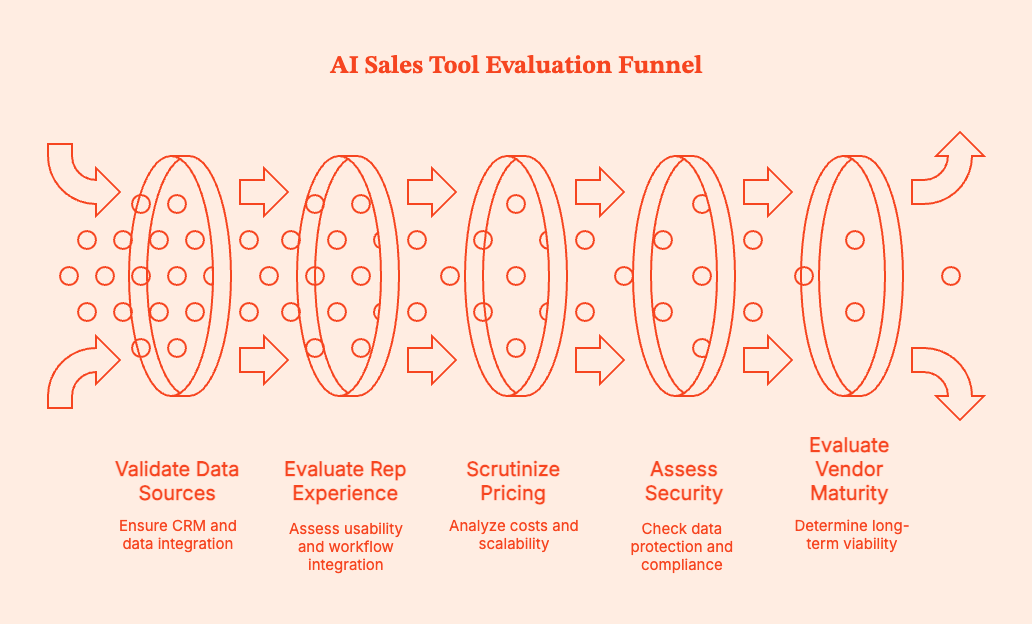
How to choose the best AI sales tools: buyer checklist
If you’re evaluating AI sales tools, the goal isn’t to find the smartest AI. It’s to find the tool that solves a specific sales problem without creating new ones.
Use this checklist to keep evaluations grounded, avoid shiny-object purchases, and don’t pick tools that solve specific problems without creating new ones.
1. Clearly define the job you’re hiring the tool for
Ask:
- What outcome do you want to improve?
- Is the tool for prospecting, pipeline visibility, rep coaching, forecasting, or admin reduction?
- Which part of the sales funnel is broken or inefficient?
- What metric should move if this works?
Stay away from tools that promise to do everything.
2. Validate data sources and CRM integrations
AI tools are only as good as the data they can access. Check:
- Native integrations with your CRM
- Read and write access (No read-only dashboards)
- Connections to email, calendar, dialer, and call recording tools
Toss out any tools that require reps to manually copy insights from one system to another.
3. Evaluate the rep experience in real workflows
Judge the tool from the sales rep's point of view. Ask:
- Does the tool live inside the CRM, inbox, or calendar?
- Does it reduce clicks?
- Can a rep understand why the tool works under 60 seconds?
Any tool needing too much formal training will slow down your reps.
4. Scrutinize pricing and expansion costs
Pay close attention to pricing in scenarios where tool usage scales. Double-check:
- Per-seat vs flat-fee pricing
- AI add-ons being priced separately from core licenses
- Usage-based limits on transcripts, emails, or analyses
5. Assess security, compliance, and data ownership
How does the AI sales tool store and expose your call recording, email analysis, and AI training data?
Double-check the following:
- Where data is stored and how long it’s retained
- Whether customer data is used to train shared models
- Compliance with SOC 2, GDPR, and consent requirements
- Clear opt-out or redaction controls
6. Evaluate vendor maturity and long-term viability
Don't look at AI sales tools that are too early-stage or experimental.
Assess:
- The tool's product roadmap after the next quarter
- The brand's financial backing and customer base
- Support quality and response times
- Clear positioning and history of pivots
7. Run a time-boxed pilot with real success criteria
Demand proof before purchase. Pilot the tool with a small, representative group. Define 2–3 success metrics in advance, and track them in a 30–90 day evaluation window.
Your chosen AI tool should remove friction, sharpen focus, and help sales teams make better decisions without changing how they sell.
Implementing AI in your sales org (60–90 day playbook)
| Phase | Primary goal | What to do (step by step) | Who owns it | What to measure | Common mistakes to avoid |
|---|---|---|---|---|---|
| Month 1: Diagnose | Identify where AI will actually help, not where it looks impressive | Map the current sales process end to end, including prospecting, outreach, calls, CRM updates, and forecasting. Interview 5–10 reps and 2–3 managers to understand where time is wasted and where deals stall. Review CRM data quality and forecast accuracy from the last 2–3 quarters. Narrow focus to 2–3 friction points such as admin time, follow-up gaps, or forecast slippage. | RevOps lead with VP Sales input | Top 3 friction points clearly documented. Baseline metrics captured, including admin hours, meeting conversion rates, and forecast variance. | Letting vendors define the problem. Trying to fix too many issues at once. Skipping rep input and relying only on leadership assumptions. |
| Month 2: Pilot | Validate value with minimal disruption | Select one AI sales assistant and one tool tied to pipeline visibility or prospecting. Pilot with a small but representative group, typically 10–20 percent of reps. Define success metrics before rollout. Set guardrails such as human review for emails, editable CRM updates, and no automated outbound at scale. Hold weekly check-ins to gather feedback. | RevOps runs the pilot, with frontline managers reinforcing usage | Time saved per rep. Meetings booked or follow-up completion rate. Forecast accuracy. Rep adoption and sentiment. | Rolling out to the whole team too early. Measuring vanity metrics like “AI usage.” Allowing AI to run without review. |
| Month 3: Standardize | Turn successful pilots into repeatable habits | Document clear “how we use AI” workflows with examples. Train managers on using AI insights in 1:1s, deal reviews, and coaching conversations. Update enablement materials and onboarding to include AI-supported workflows. Decide what to scale, pause, or stop based on pilot results. Communicate clearly how AI supports performance and protects rep autonomy. | Sales leadership with enablement and RevOps | Consistent usage across the pilot group. Measurable improvement versus baseline. Reduced manual CRM updates. Manager adoption of AI insights in coaching. | Using AI insights for performance scoring. Failing to document workflows. Scaling tools without training managers. |
Risks, limits, and common mistakes
AI is a multiplier. It expands what's already working (and not working) in your sales funnel.
If teams ask AI to solve the wrong problem, deploy it too broadly, or trust it more than is reasonable, it will make existing problems worse.
- Over-automating outbound and losing trust
Do not let AI scale outbound before its relevance is proven.
AI can send more emails, faster, to more people. But volume doesn't work if messages aren't grounded in real context. If teams automate first-touch and follow-ups without close control and review, they'll get lower reply rates, burned domains, and prospects who tune out.
- Buying too many overlapping tools and creating noise
Avoid AI tool sprawl. Don't get one tool for call summaries, another for emails, another for forecasting. You'll end up with six tools, each with its own alerts, dashboards, and workflows.
Eventually, reps just stop trusting any open signal because everything is "important".
Consolidate tools ruthlessly. Pick a few that integrate deeply.
- Blindly trusting AI scores without context
AI engines will generate deal risk scores, lead rankings, and forecast predictions based on historical patterns. They are useful, but don't take them as gospel truth.
AI will miss a last-minute executive escalation, a political blocker, or customer relationships outside the CRM. Treat the insights it offers as prompts for conversation, not decisions.
If a model flags a deal as at risk, ask why and dig deeper.
- Ignoring consent, compliance, and data ethics
Call recordings and email analysis, and AI training data raise real questions about consent, data ownership, and regulatory exposure. And no, not all vendors will handle this for you by default.
Get clear answers to basic questions: where data is stored, who can access it, how long it is retained, and whether it is used to train shared models.
- Forgetting that AI reflects your existing sales motion
AI will not fix broken fundamentals. If your ICP is fuzzy, your messaging is generic, or your CRM data is unreliable, AI will simply scale those flaws faster.
Set clear qualification standards. Start with already decent outbound volume. Expect managers to help the AI engine learn, too.
Get AI to do more so you get more done
AI sales tools are no longer experimental. They are also no longer competitive on their own.
Sales teams win by intentionally picking which tools to use. They have clear problems to solve, applied AI with restraint, and built habits around exactly that.
Pro-Tip: The most effective AI tools will probably feel understated. Factors.ai focuses on clarity and prioritization rather than volume, so your conversation intelligence is data-backed and relevant. No fluff.
Pick fewer tools with sharp jobs. Ideally, your AI models live inside existing workflows instead of getting reps to choose new ones. More ideally, it delivers insights that make managers better coaches, not better micromanagers.
Don’t buy AI to feel modern. Buy it to remove friction.
Summary: AI Sales Tools
AI sales tools have gone from “nice to have” to “hard to ignore.” But just having AI in your sales stack won't close more deals. You need intent.
The best-performing sales orgs use AI to solve very specific problems like reducing admin work, spotting buying intent earlier, and improving pipeline visibility. They do not expect AI to magically fix broken processes or replace human judgment.
AI sales tools do certain things realistically well, fall short in others, and succeed/fail based on how they are used in the field. The most reliable wins come from getting AI to do the grunt work, such as call summaries, CRM hygiene, intent-driven prioritization, and early warning signals for deals about to stall.
The biggest failures come from over-automated outbound, too many overlapping tools, and treating AI scores as accurate without context.
Teams should evaluate AI sales tools based on the job-to-be-done. Prospecting, coaching, forecasting, and admin reduction require different types of AI and different levels of human oversight.
Tools like Factors.ai use AI where it returns more value: interpreting engagement and intent signals so reps and managers can focus on the right accounts at the right time.
Buy AI to remove friction, not to feel modern.
Frequently Asked Questions for AI Sales Tools
Q. What are AI sales tools?
AI sales tools utilize artificial intelligence to enable sales teams to work more productively and profitably. They actively analyze patterns across leads, deals, and customer interactions to suggest actions, surface risks, and reduce manual work.
Q. What is an AI sales assistant?
An AI sales assistant is a virtual intern or helper adept at handling mundane routine tasks such as logging, summarizing calls, and suggesting next steps. These tools work to save time and mental space for reps so they can focus on selling.
Q. How does AI help in sales?
AI can study, interpret, and evaluate large volumes of sales data that humans simply cannot process on their own. It points out leads worth the attention, deals that are at risk, and where reps should focus for maximum productivity and forecast confidence.
Q. What is predictive sales AI?
Predictive sales AI uses historical deal data and real-time engagement signals to make informed predictions about sales outcomes, eg, close likelihood and timing. While it cannot replace human judgment, AI here can provide early warnings.
Q. Which are the best AI tools for sales?
You won't find one "best" AI sales tool. Most teams combine a few tools, like AI sales assistants, prospecting or intent platforms, conversation intelligence tools, and forecasting or RevOps software...all tailored to their particular needs.
Q. Can small businesses use AI sales tools?
Absolutely. Most well-known CRMs and SMB-focused tools have already incorporated AI features like call summaries, email suggestions, and basic forecasting. Prices, too, are more affordable. Small teams might see value faster because AI removes admin work and cuts staffing costs that they can't afford.
Q. Can AI replace sales reps?
Absolutely not. AI works great at handling data-heavy and repetitive tasks. But all complex deals depend on human judgment, trust, and relationships. AI cannot do what humans do, but it can help humans do it better.
Q. How much do AI sales tools cost?
Pricing varies depending on brand and features. AI-enhanced CRMs often start around $15–$50 per user per month. Advanced platforms can cost much more depending on features, add-ons, and usage limits.
Q. Can AI sales tools integrate with Salesforce and HubSpot?
Yes, most modern AI sales tools are built to integrate with popular CRMs like Salesforce and HubSpot. Tools can connect to your existing stack, read and update data, so they fit naturally into existing sales workflows.

See how Factors can 2x your ROI
Boost your LinkedIn ROI in no time using data-driven insights



.avif)


.avif)

See Factors in action.
Schedule a personalized demo or sign up to get started for free
LinkedIn Marketing Partner
GDPR & SOC2 Type II

.svg)



.avif)

