
How Much Does ZoomInfo Actually Cost in 2026?
ZoomInfo costs anywhere from $15K to $60K+ a year. Get the full pricing breakdown and see whether a lower-cost alternative makes more sense.


Growth Marketer



.svg)


ZoomInfo Pricing TL;DR
- ZoomInfo pricing starts at around $14,995 a year for the Professional plan. The Advanced plan costs around $24,995 to $29,995 a year, while the Elite plan is priced from roughly $35,995 and can go beyond $40,000 with add-ons.
- The final cost is usually higher than the plan price. Extra seats, credit overages, and add-ons like the Global Data Passport can push mid-market teams into the $30,000 to $60,000 range.
- Credits can have a big impact on the final bill. Each plan comes with a set credit allowance for accessing and exporting data. Once you run through it, additional credits have been reported at around $0.50–$1.50 per credit, with lower per-credit rates available when bought in bulk.
- Pricing is negotiable. Buyers report getting 20 to 40 percent off the first quote, particularly around quarter-end.
- There are much cheaper options if you don’t need everything ZoomInfo offers. Tools like Apollo, Lead411, UpLead, Wiza, and LeadIQ have public plans that start well below ZoomInfo’s ~$15,000 entry price, particularly if your main need is prospecting or contact data.
ZoomInfo pricing can vary quite a bit depending on the plan you choose, the number of users, your credit usage, and the add-ons you need. This guide breaks down what you can expect to pay, what pushes the final bill up, and whether the price is worth it.
And if ZoomInfo feels too expensive for what you actually need, we’ll look at alternatives that may give you better value.
What is ZoomInfo?
ZoomInfo is a go-to-market intelligence platform that gives sales and marketing teams access to company data, contact information, buyer intent signals, and other tools to find and engage potential customers.
Its platform includes three main products:
- Sales: Contact and company data, prospecting, intent signals, and sales workflows.
- Marketing: Account-based marketing, advertising, buyer intent, website chat, and form enrichment.
- Talent: Talent search, candidate outreach, employer branding
SalesOS is the most popular product in the ZoomInfo lineup and the one we'll focus on in this guide. It gives sales teams access to ZoomInfo's database of 321 million active professionals across 104 million companies, along with advanced search filters, real-time alerts, and integrations to help them find and prioritize prospects.
This guide focuses on what you’ll pay for ZoomInfo Sales, from the base package to extra seats, credits, and add-ons. The plan table also covers Marketing and Talent, in case you’re deciding which products to include in your quote.
How much does ZoomInfo cost? A complete breakdown
ZoomInfo does not publish official prices on its website, since pricing is typically customized based on what your team needs. The final quote depends on the plan you choose, the number of users, your credit usage, and any additional products or data packages you add.
Based on reported quotes, SalesOS is generally offered across three tiers: Professional, Advanced, and Elite.
What Are ZoomInfo’s Reported Base Plan Prices?
Professional is the entry-level ZoomInfo plan. It gives teams access to core contact and company data, with the smallest credit allowance amongst the three tiers.
Copilot Advanced adds more intelligence around the data, including intent signals and buying-group insights, along with a larger credit pool. Reported pricing typically falls between $24,995 and $29,995 a year before additional seats or add-ons.
Copilot Enterprise includes everything in Advanced and adds ZoomInfo Copilot, its AI layer. Copilot can summarize accounts, identify people within a buying committee, surface relevant account information, answer questions about prospects, and help draft outreach. This pushes the price to anywhere between $35,000 to $40,000, and sometimes more.
Read more about Copilot from ZoomInfo’s CEO, Henry Schuck.
ZoomInfo introduced a second way to price contracts in Q3 2026. The hybrid model combines an annual platform fee with prepaid credits and is available alongside traditional seat-based packages. If you’re buying or renewing, ask which model applies and what happens when you use up the credits.
What are the add-on costs that affect your final ZoomInfo bill?
The base plan price is only part of what you may end up paying. Additional users, credit usage, and add-ons can all increase the final contract value.
1. Additional seats
Adding more users increases the annual contract value. Additional seats have been reported at around $1,500–$2,500 per user per year, depending on the plan and agreement.
2. Credits
ZoomInfo uses a credit-based system for accessing and exporting data.
Your plan comes with a set allowance, and credits are consumed as users reveal or export information from the platform. A small team doing occasional account research may stay within that allowance. A larger SDR team building prospect lists every day can go through it much faster.
Reported prices for additional credits generally sit between $0.50 and $1.50 per credit. Buying credits in larger batches can bring the per-credit cost down.
Before signing a contract, ask ZoomInfo:
- How many credits are included
- What actions consume credits
- Whether different data types use different amounts
- What happens when you reach the limit
- How much additional credits cost
- Whether unused credits roll over
The useful question is not simply, “How many credits do we get?”
It is, “How many are we actually likely to use?”
3. Other add-ons
ZoomInfo also sells additional products and data packages on top of the core subscription.
One of the most common ones is the Global Data Passport, which gives teams access to company and contact data outside North America. Global Data Passport has been reported at around $9,995 a year, making it an important cost to factor in if you sell into Europe, APAC, or other international markets.
Other reported costs include services such as NeverBounce email verification, at roughly $3,000, along with products for intent, conversation intelligence, enrichment, workflows, and marketing.
Not every company needs these. But even one or two can change the final contract value quite a bit.
For example, a five-person team on the Advanced plan could start at $24,995, pay another $5,000 for two additional seats, and reach roughly $30,000 before credit overages or add-ons. Add international data or another ZoomInfo product, and the annual cost moves past $40,000.
That is why it is worth asking ZoomInfo for an itemized quote rather than looking at the base plan price alone.
What Do Prospects and Customers Say About ZoomInfo Pricing?
The pricing ranges above also show up in real discussions on forums like Reddit.
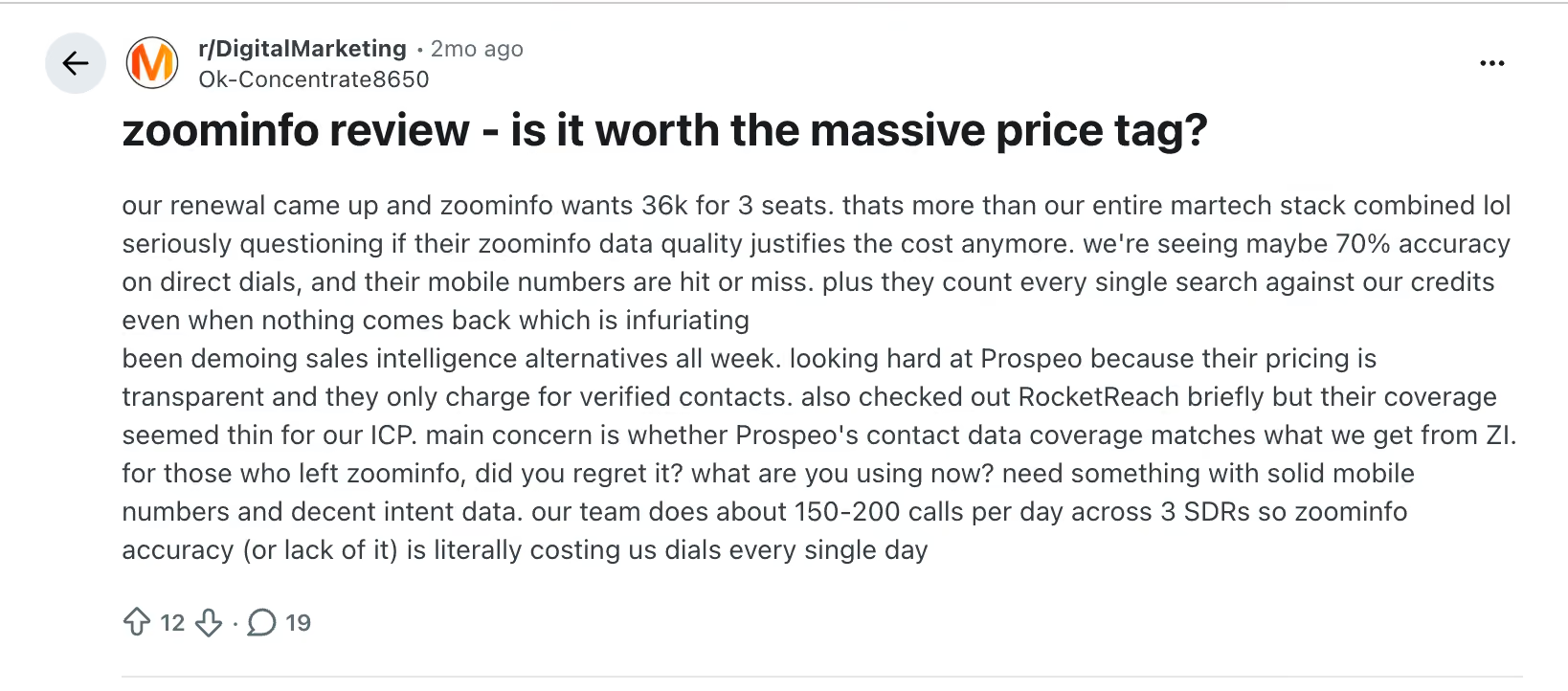
One Reddit user said their team was quoted $36,000 for three seats at renewal. They also mentioned that credits were being used even when searches did not return useful results, which is worth clarifying if your team expects to use ZoomInfo heavily.
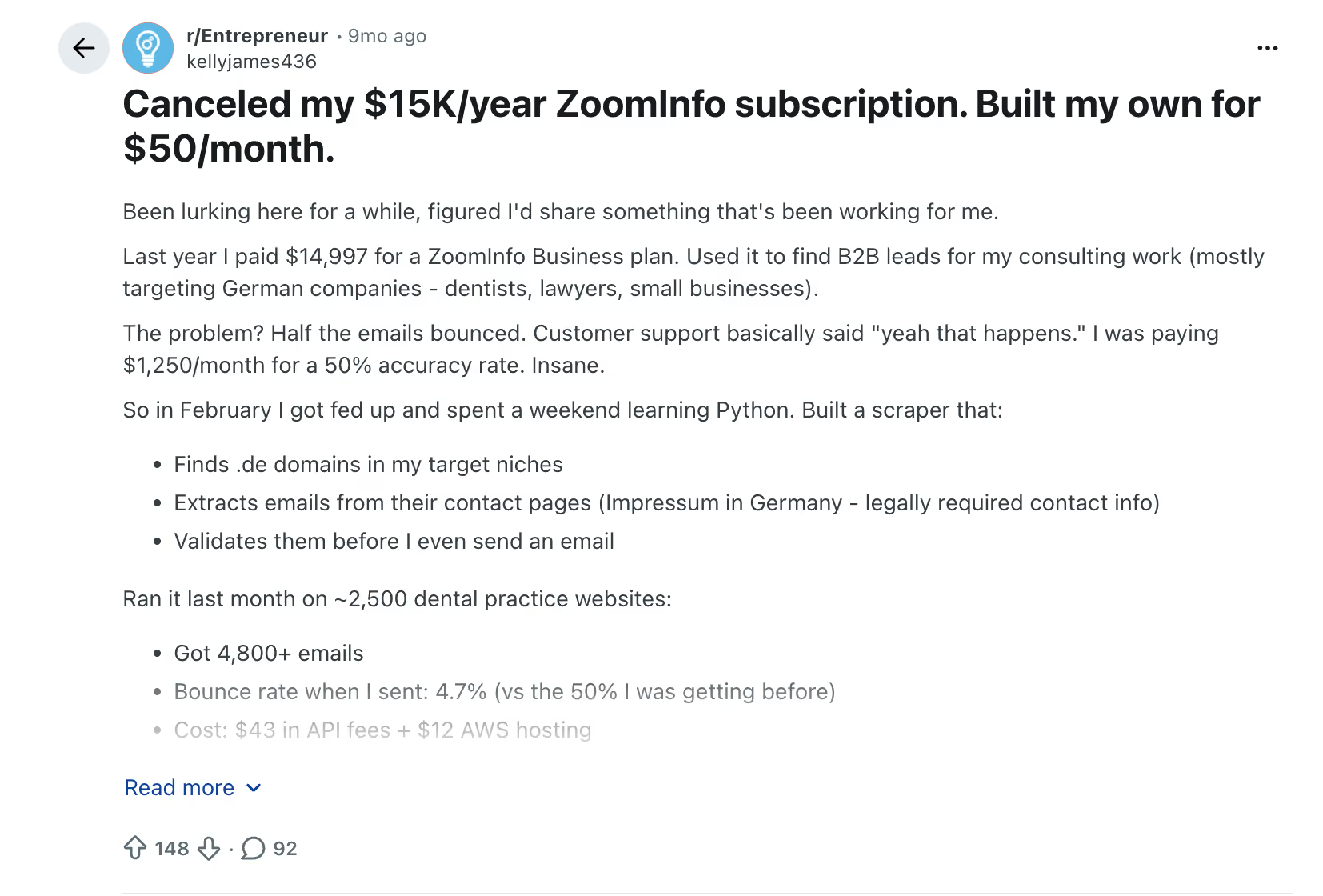
Another customer reported paying $14,997 for a year and seeing email bounce rates of around 50%. That will not reflect every customer's experience, but it does show why it is worth testing ZoomInfo's data against your target accounts before signing an annual contract.
These examples are useful less as exact benchmarks and more as a reminder that the final value of a ZoomInfo contract depends on more than the quote. Credit usage, data quality, and how much of the platform your team actually uses all matter.
How to Negotiate ZoomInfo Pricing
If you do decide ZoomInfo is worth it, don't assume the first quote is the price you have to pay.
Procurement platform Vendr has handled more than 1,000 ZoomInfo deals and reports average savings of 21.81%. Its data also shows that contract length, seat volume, timing, and credit commitments can all give buyers room to negotiate.
Here are the levers worth focusing on:
- Ask for an itemized quote: Separate the platform fee, seats, credits, and add-ons. This makes it much easier to see where there is room to negotiate.
- Negotiate credits upfront: Estimate how many credits your team will actually use and ask for a larger allowance or a lower price for additional credits once you run out. You can also ask whether extra credits can be purchased later at the same rate you negotiated when signing the contract.
- Use competing quotes: If you are also evaluating Apollo, Cognism, Lead411, or another alternative, bring those numbers into the conversation. A credible alternative gives you more leverage than simply asking for a lower price.
- Use quarter-end timing: Vendr suggests buyers can get better pricing and terms around ZoomInfo's fiscal quarter-end periods.
- Be careful with multi-year deals: A longer commitment can get you a better annual price, but negotiate the ability to adjust seats or credits and put a cap on annual price increases before you sign.
- Check the renewal terms before you sign: Look at the notice period, auto-renewal language, and any built-in price increase. These are much easier to negotiate before the initial contract is signed.
The goal isn't simply to get the biggest percentage discount. A lower base price can still turn into an expensive contract if the credit allowance is too small, add-ons are priced separately, or the renewal comes with a steep increase in price.
Also read: Top 15 Intent Data Platforms to Boost Your B2B Sales in 2026
What If ZoomInfo Is Too Expensive for Your Team?
ZoomInfo packs a lot into the platform, but not every team needs all of it. If you mainly need contact data, prospecting tools, or a simpler way to build lead lists, paying around $15,000 or more a year may be difficult to justify.
The tools below all have publicly listed plans that let teams get started for considerably less.
For a more detailed insight into how these tools compare on data quality, features, and use cases, read our guide to ZoomInfo alternatives.
What If You Want to Do More Than Prospecting and Run ABM End to End?
Prospecting is only one part of an ABM program.
You still need to identify the right accounts, understand which ones are showing intent, run campaigns against them, track how they engage across channels, and work out which campaigns influence pipeline.
That often means stitching together multiple tools such as one for prospecting, another for advertising, another for intent, and another for attribution.
Factors.ai is built to bring those pieces together. It's an AI ABM platform that can identify accounts visiting your website, combine intent signals from channels such as LinkedIn and G2, build and sync audiences for ad campaigns, track account journeys across marketing and sales touchpoints, and measure how those activities influence pipeline and revenue. Factors.ai also publishes its pricing, unlike ZoomInfo.
Also read: Factors.ai vs ZoomInfo: Pros and Cons
ZoomInfo Pricing FAQs
What is the cheapest ZoomInfo plan?
ZoomInfo Lite is free. For paid access, AWS Marketplace lists ZoomInfo Sales Basic at $3,000 for 12 months with one user and 2,000 bulk credits. Tropic’s $14,995 annual benchmark is for a three-seat Professional+ package.
How do I cancel my ZoomInfo subscription?
Check your contract or Order Form first. ZoomInfo agreements commonly include auto-renewal clauses, and Vendr reports notice periods of around 30–90 days depending on the contract. If you want to cancel, send a written notice of non-renewal before that deadline and get confirmation that it has been received.
Missing the notice window can mean the contract auto-renews under the terms you originally agreed to.
What is ZoomInfo API pricing?
ZoomInfo publishes pay-as-you-go GTM.AI pricing for API and agent workflows. The service offers separate credit pools for data enrichment and AI research. If you’re buying API access through a sales contract, check the terms in your quote.
For contract-based API access, ask which endpoints are included, which calls use credits, and what additional usage costs.
Are there cheaper alternatives to ZoomInfo?
Yes. Tools such as Apollo, Lead411, UpLead, Wiza, and LeadIQ all have publicly available plans that start well below ZoomInfo's reported $15,000 annual entry price. The right option depends on whether you need contact data, outbound tools, enrichment, or LinkedIn-based prospecting.
Can I use ZoomInfo for free?
Yes. ZoomInfo Lite is a free plan with 10 monthly credits, or 25 through Community Edition. ZoomInfo also offers a separate free trial for evaluating its paid platform.
How much does ZoomInfo cost per month?
ZoomInfo costs roughly $1,250 per month for the Professional plan, $2,083–$2,500 per month for the Advanced plan, and $3,000–$3,333 per month for the Elite plan. Your actual monthly cost can be higher once extra seats, credits, and add-ons are included.

Powered by Bombora
Enter your domain and we'll send you a free list of companies showing buying intent in your vertical.
.avif)
Powered by Bombora
Enter your domain and we'll send you a free list of companies showing buying intent in your vertical.
.avif)

See how Factors can 2x your ROI
Boost your LinkedIn ROI in no time using data-driven insights


.avif)
.avif)
See Factors in action.
Schedule a personalized demo or sign up to get started for free
LinkedIn Marketing Partner
GDPR & SOC2 Type II


.svg)



.avif)

