.svg)


Google Ads Quality Score: Types, Benefits & Improvement Strategies
Is your Google Ads Quality Score driving your campaigns or holding them back?
Google Ads Quality Score is a key metric that directly affects your ad performance and cost-per-click (CPC). A higher Quality Score signals to Google that your ad is relevant, engaging, and provides a good user experience. In turn, Google rewards you by lowering your CPC, reducing ad spend, and improving ad rank to reach the ideal customer profile (ICP).
In this article, we’ll explore the key elements—ad relevance, landing page experience, and click-through rate (CTR)—that contribute to a higher Quality Score and tips for improving them.
TL;DR
- Quality Score measures your ads’ relevance, user experience, and engagement, directly impacting ad performance and costs.
- Higher Quality Scores lead to lesser CPC, improved ad rankings, and better visibility to target audiences.
- Different types of Quality Scores provide insights into specific campaign areas: Account Level, Ad Group Level, Keyword Level, Ad Level, Landing Page, and Display Network.
- Improving Quality Score involves keyword research, optimizing for ad relevance, increasing expected CTR, and enhancing the landing page experience.
- You can check your Quality Score in Google Ads by adjusting your campaign settings to include relevant metrics.
What is ‘Quality Score’ in Google Ads?
The Quality Score in Google Ads indicates how well your ads resonate with your audience. It functions like a tool that evaluates your ad quality. It compares your ads against competitors who appear on the Search Engine Results Page (SERP), targeting the same keywords. Your ads are assigned a Quality Score based on the quality and relevance of your ad, keywords, and landing page experience for users searching for specific keywords.
Google measures Quality Score on a scale of 1 to 10, with 10 being the highest. If your Quality Score is low, say a 3/10, it signals to Google that your ad, keywords, or landing page may not be relevant or valuable for users. Conversely, a high Quality Score of 9/10 shows Google that your ad is highly relevant, allowing you to benefit from better ad placements and lower costs. It also increases your visibility to the ICP decision-makers searching for solutions like yours.
Also, read Benefits of Google Ads to know how Google Ads can help you generate quality leads.
Types of Quality Score
There are multiple types of Quality Scores, and each score is essential for understanding your ad performance and areas for improvement.
The different types of Quality Score are:

1. Account-Level Quality Score
Account-Level Quality Score is a metric that discloses your Google Ads account's overall performance. It evaluates the historical performance of all ads, keywords, and landing pages together. Higher scores are rewarded if the ads consistently deliver value to users and meet Google’s quality standards.
2. Ad Group Quality Score
Ad group Quality Score shows how well your keywords and ads work together within an ad group. A low score means a lack of relevance between keywords and ads, making it less useful to your ICP audience and decreasing user experience.
3. Ad-Level Quality Score
Google measures ad-level Quality Score for individual ads. It measures the relevance of the ad copy to the keywords it targets, expected CTR, and landing page experience. By meeting user expectations, you can improve the Ad-level Quality Score and receive better ad ranks and lesser CPCs.
4. Keyword-Level Quality Score
Each keyword in your account is rated between 1 and 10 based on its relevance to ads, landing pages, and expected CTR. A high score means the keyword will likely trigger relevant ads aligning with users’ search intent.
5. Landing Page Quality Score
It measures your landing page's relevance and user experience. Content originality, business transparency, and ease of navigation on the ad landing page affect the score. A high score indicates a good user experience.
6. Display Network Quality Score
This score applies to ads on Google’s Display Network. It rates the relevance and effectiveness of ads and landing pages based on the Display Network sites (YouTube, Gmail, etc) where the ads appear. A high score enhances ad placement and visibility within the Display Network.
Why is Quality Score in Google Ads Important?
As an advertiser, getting a higher Quality Score in Google Ads is essential.

With a higher Quality Score, you can:
1. Higher Ad Rank
Quality Score is directly proportional to ad rankings, increasing visibility in search results. With a higher ad rank, more ICP users will see and click your ads, driving more traffic to your landing page and improving conversion rates.
2. Reducing CPC
Who wouldn’t want a lesser CPC for their ads? A high Quality Score signals to Google that your ads are relevant and valuable to users, which can lower your cost-per-click (CPC) and reduce your ad budget.
3. Increasing CTR
Relevant and engaging ads are more likely to attract clicks, driving more qualified traffic to your landing page leading to higher click-through rates (CTR).
4. Increase Conversion Rates
Ad relevance and landing page experience increase Quality Scores. A relevant ad-to-landing page journey for the user leads to better engagement, higher conversion rates, and improved Return on Ad Spend (ROAS).
Factors Affecting Quality Scores in Google Ads
The key factors affecting your Google Ad’s Quality Score are:
1. Expected CTR
Click-Through Rate (CTR) measures how likely users are to click on your ads when they appear on the Search Engine Results Page (SERP). Google estimates CTR based on historical performance data and your competitors’ ads. When the target audience finds the ads relevant, more users click on them, increasing the CTRs and boosting the Quality Score.
For instance, you’re running Google Ads for a SaaS business targeting visitor identification software keywords. The page's headline is, ‘Track Website Visitors in Real-Time.’ Your CTR will be high if users find the headline compelling and click through frequently. Google sees this high CTR as a positive indicator of relevance, which improves your Quality Score.
However, if the ad headline was less relevant, like ‘Monitor Your Online Traffic,’ it might not grab as much attention from businesses looking for visitor identification software, resulting in a lesser CTR and Quality Score.
2. Ad Relevance
Ad Relevance means how much your ad matches the user intent behind the search query. The target keywords should be highly relevant to the ad copy. It ensures that users find your ads helpful and aligned with their search. If your ad closely matches the search keyword you’re targeting, your Quality Score increases.
Suppose you are running an ad for the keyword visitor identification software. The ad copy headline is, ‘Identify Who is Visiting Your Website.’ It matches the search intent and provides a relevant solution to users actively searching for visitor identification.
On the other hand, if the ad copy headline is generic, such as ‘Best Software for Website Management,’ it becomes irrelevant to users searching for website visitor identification. So, a lesser relevance means a lower Quality Score.
3. Landing Page Experience
Factors affecting landing page experience are page load speed, mobile-friendliness, easy navigation, and content relevance. A landing page that aligns well with the ad and provides value to visitors has a higher Quality Score.
For example, a potential customer searches for ‘visitor identification software’ and clicks your ad. The page is slow to load, difficult to navigate, or lacks clear information about visitor tracking features. It creates a poor landing page experience, causing the user to leave. Google interprets this as a bad user experience, lowering your Quality Score.
But if your ad landing page loads quickly, is mobile-friendly, and provides relevant content on visitor identification solutions for marketers, users are more likely to stay on the page and engage, improving your Quality Score.
4. Historical Account Performance
Suppose your Google Ads account has a history of high-performing campaigns that consistently deliver relevant, high-quality ads. In this case, Google is more likely to reward your new ads with a higher Quality Score from the start.
But if your account has a history of poor performance, such as ads with low CTRs or ads that frequently lead to irrelevant landing pages, the Quality Score of new ads is negatively impacted. This happens because Google perceives your ads as having lesser relevance or engagement quality.
Check out our detailed guide on Google Ads Strategy in 2025, to learn more about optimizing your campaigns.
How to Increase Quality Score in Google Ads?
You can increase your Quality Score in Google Ads by focusing on the critical areas like:
1. Keyword Research
1.1 Staying Updated on Latest Trends
Regular keyword research helps you stay updated on the latest trends and allows you to optimize for the most relevant keywords. It signals to Google that your landing page is fresh and relevant, increasing the Quality Score.
1.2 Identify High-Intent Keywords
Identify high-intent keywords and appropriate keyword match types and optimize for them. This increases your chances of displaying ads to your ICP audience, improves CTR and ad relevance, and raises your Quality Score.
1.3 Filter Negative Keywords
Your ads might get triggered for irrelevant keywords, called negative keywords. Adding them as negative keywords to your ads account prevents irrelevant impressions and ensures ads appear only for relevant queries, enhancing your Quality Score.
2. Optimizing For Ad Relevance
When your ad is highly relevant, it is more likely to engage the audience, improve CTR, and signal to Google that it meets users’ expectations, increasing your Quality Score.
2.1 Align Your Keywords to Ad Copy
Your ad copy should include all the keywords relevant to the user's search intent. Use the target keywords in the headline and description to show users that your ad addresses their needs.
2.2 Refine Ad Group Structure
Group similar keywords together so that ads align to specific themes. For instance, create separate ad groups for product features and user needs to increase relevance.
Imagine you're running a campaign for B2B visitor identification software. During keyword research, you identify high-intent keywords like best visitor identification software and visitor tracking software for B2B.
To optimize ad relevance, you should:
- Create ad groups focused on specific themes (e.g., visitor identification software and visitor tracking for B2B) rather than grouping all keywords together.
- Customize ad copy for each ad group to match the keyword intent.
3. Increasing Expected CTR
A high expected CTR signals to Google that users find your ad useful, which improves your Quality Score and can reduce your CPC
3.1 Writing Compelling Ad Copy
Compelling headings and descriptions highlighting the benefits, unique selling points, discounts, or free trials can make your ad more click-worthy.
3.2 A/B Testing
Run A/B tests on ad copies to see which versions get the most clicks. Small changes like the Call-To-Action (CTA) or headline structure can improve CTR.
3.3 Using Ad Extensions
Ad extensions like sitelinks—for example, Features, Customer Success Stories, or Pricing—provide users with more context and ways to engage, making your ad more informative and clickable.
For example, you’re running ads for keyword B2B visitor identification software. You can increase expected CTR by crafting a compelling ad highlighting a unique value proposition and encouraging action. Instead of a generic headline like ‘Visitor Identification Software for B2B’, use a headline that addresses a direct benefit: ‘Identify Anonymous Website Visitors – Convert Leads Faster!’ Rather than ‘Learn More,’ a targeted CTA could be ‘Book Your Demo Today,’ which can improve CTR.
4. Enhancing Landing Page Experience
When the landing page aligns with the ad’s message, loads quickly, and offers clear navigation, it provides a better user experience and boosts Quality Score.
4.1 Align Landing Page Content With Ad’s Messaging
When a user clicks on the ad and reaches the landing page, the copy on the page should continue the ad’s message on the SERP. For example, if the ad promotes a feature, the landing page should detail that feature. It improves user experience.
4.2 Improve Load Speed and Mobile Optimization
Users expect a fast and smooth experience, so improving the page load speed is critical. If the page is too slow to load, it leads to high bounce rates. Higher bounce rates mean lesser user engagement, thereby decreasing your quality score. Since users may access the page on various devices, make sure it’s mobile-friendly.
4.3 Provide clear CTA and Navigation
The landing page should be easy to navigate and have a clear CTA guiding users to the next steps. To enhance usability, provide clear navigation options like links to Features, Pricing, and Customer Success Stories.
For example, imagine your ad promoting a B2B visitor identification software. A user sees the title ‘Identify Anonymous Website Visitors – Convert Leads Faster’ and clicks. The landing page should then showcase the software's visitor identification features, highlight how it can boost lead conversion, and include clear CTAs like signing up for a free demo or trial. It enhances the user experience and encourages action. This relevance and ease of use improve the chances of conversion and signal to Google that your landing page is valuable, positively impacting the Quality Score.
4.4 Improve User Engagement Signals
Google considers user engagement signals when deciding if your content is useful. These signals are bounce rate and time spent on the page. Improve them by offering interactive elements like video or interactive demos to increase Quality Scores.

How do You Check the Quality Score on a Google Ads Account?
Here is a step-by-step process to check the Quality Score on your Google Ads account.
- Log in to your Google Ads account and select the Campaigns icon.
- Expand the Audiences, keywords, and content dropdown in the menu.
- Choose Search keywords from the options.
- Click on the columns icon in the table's upper right corner.
- In the 'Modify columns for keywords' section, locate and open the 'Quality Score' category.
- To view your current Quality Score and its components, add the following columns to your statistics table: Quality Score, Landing Page Experience, Expected CTR, and Ad Relevance.
- For historical data on Quality Score for the selected reporting period, include these metrics: Quality Score (hist.), Landing Page Experience (hist.), Ad Relevance (hist.) and Expected CTR (hist.)
- Click Apply to implement your changes.

Improving Google Ads Quality Score for Better Performance
Google Ads Quality Score influences your ad performance and CPC. A higher score indicates that your ad is relevant and offers a good user experience, leading to lesser CPC and better ad rankings. Key elements affecting Quality Score include ad relevance, landing page experience, and expected click-through rate (CTR).
There are various types of Quality Scores, such as Account level, Ad Group level, Ad level, keyword level, Landing Page level, and Display Network Quality Scores, each providing insights into specific performance areas.
Improving your Quality Score involves thorough keyword research, enhancing ad relevance, and optimizing the landing page experience. These efforts increase visibility, reduce costs, and improve conversion rates. Checking your Quality Score is straightforward through your Google Ads account, enabling you to monitor and enhance campaign performance effectively.
Check this out: Guide to Google Ads management.
Google Ads Quality Score: Key Factors & Optimization Strategies
Improving Quality Score enhances ad performance, lowers costs, and boosts ROI.
1. Core Components: Expected click-through rate (CTR), ad relevance, and landing page experience.
2. Benefits: Lower cost-per-click (CPC) and improved ad positioning.
3. Optimization Strategies: Conduct thorough keyword research, refine ad copy, and enhance landing page experience.
Regularly optimizing these factors leads to more effective ad campaigns, higher engagement, and better overall performance.
FAQs on Google Ads Quality Score
What is a good Quality Score for Google Ads?
A good Quality Score for Google Ads typically ranges from 7 to 10, indicating that your ads are relevant and provide a positive user experience. Higher scores can lead to lower costs and better ad placements.
How to calculate Google Ads Quality Score?
Google Ads calculates Quality Score by evaluating three key factors: expected click-through rate (CTR), ad relevance, and landing page experience. Google scores each factor from 1 to 10, with the overall Quality Score reflecting their combined performance.
Why is my Quality Score so low on Google Ads?
A low Quality Score may result from poor ad relevance, low expected click-through rates, or a poor landing page experience. Your ads must align with user search intent or provide a satisfactory user experience.
What is the expected CTR in Quality Score?
Expected CTR is a prediction based on historical data of how likely users are to click on your ad when it appears for a given keyword. A higher expected CTR indicates that users find your ad relevant, positively impacting your Quality Score.
How to increase Quality Score?
To improve the Quality Score, you should improve ad relevance, enhance the landing page experience, and increase expected click-through rates (CTR). Conduct thorough keyword research and optimize your ads to align closely with user intent.
What is the Quality Score formula?
There is no specific formula for calculating Quality Score, as it is a proprietary metric used by Google. However, factors such as expected CTR, ad relevance, and landing page experience determine the score assigned to each ad.
.avif)
Google Ads Strategy 2025: 16 Tips For Quality B2B Lead Generation
Google Ads remains one of the most powerful sources for B2B lead generation. Its ability to target the Ideal Customer Profile (ICP) based on search behavior is incredible. However, reaching the right audience takes more than just setting up a campaign to see results.
With evolving buyer behavior in 2025, B2B marketers must update their Google Ads strategy. These strategies should focus on the right keywords, bidding strategies, and ad formats.
This article will discuss the top Google Ads strategies for B2B marketing in 2025. These strategies will focus on driving ICP traffic and increasing ad performance to maximize lead-generation efforts.
TL;DR
- Google Ads remains an essential tool for B2B lead generation. It allows marketers to target the Ideal Customer Profile (ICP) through search behavior.
- Key strategies for 2025 include refining audience segmentation and campaigns tailored to the buyer’s journey stages (awareness, consideration, and decision) to optimize lead quality.
- Additionally, focusing on industry-specific keywords and using A/B testing will help improve ad performance and ROI.
What is B2B Google Ads
When you use Google Ads (formerly Google AdWords) as a paid advertising strategy to promote your business or services from one business to another (business-to-business), this is known as B2B Google Ads. B2B Google Ads focuses on attracting and engaging other businesses with goals to generate leads or drive brand awareness.
Unlike B2C (business-to-consumer) marketing, which focuses on individual consumers, B2B Google Ads campaigns target the decision-makers. These can be executives, managers, and founders responsible for purchasing products or services for their organizations.
B2B Google Ads Strategy Can Be Complex. Here’s Why.
1. Longer Sales Cycle
In B2C, customers often make quick purchase decisions. B2B sales cycles are typically longer and more intricate. As a result, campaigns need to nurture leads over an extended period.
2. Multiple Decision Makers
B2B purchases often involve multiple stakeholders within a company. Reaching the right people at the right time with the right message can be challenging. To influence these decision-makers, you need highly targeted ads with personalized copy.
3. Complexity of Target Audience
In B2B marketing, the target audience is more segmented and more specific. You target C-level executives, managers, or department heads who can be your key decision-makers. With Google Ads, you target people based on their job titles, which can be helpful for highly targeted campaigns. You can target specific industries (e.g., healthcare, technology, or finance) and company sizes (e.g., small businesses vs. enterprises) to ensure the right type of business is seeing the ad. Or you could focus on specific regions, countries, or cities where your potential clients are based.
For example, a marketing workflow automation product might target marketing directors at companies with over 500 employees in the e-commerce industry within Virginia, USA.
4. Higher Competition And Budget Allocation
In many B2B industries, the competition can be high, especially for high-value keywords. Bidding for these keywords can become expensive. To ensure a good return on investment (ROI), you must be careful about budget management and continuously optimize for ad performance.
5. The Focus on Lead Generation
B2B campaigns mainly focus on lead generation rather than direct sales. You must structure your campaigns to collect contact information or sign up for a trial/demo. It requires effective use of ad extensions, such as lead forms and optimized landing pages tailored to collect leads.

How to Build a B2B Google Ads Strategy?
Here are the five essential steps to build an effective Google Ads strategy that generates high-quality leads consistently.

1. Set Clear and Measurable Goals
You must know what you want to achieve by running an ad campaign. To improve campaign performance, set measurable goals, such as the number of leads, cost per lead, or return on ad spend. Common B2B goals can be to raise brand awareness, generate more leads, or get prospects to sign up for free trials or product demos.
For example, ‘Increase website traffic by 30% within the next month’ and ‘Secure 50 free trial sign-ups within the next 2 weeks’ can be some of your goals.
2. Identify Your Target Audience
Define the characteristics of your ideal customer persona: the industry, job title, company size, and geographic location.
3. Keyword Research and Selection
Identify highly relevant keywords with the right search volume and intent. These can be long-tail, high buyer intent, solution-oriented, or niche keywords.
4. Write Compelling Ad Copy
Your ads should directly address the pain points and should be solution-focused. It should highlight how your product or service can solve the problem. For example, ‘2X your LinkedIn Ads ROI with LinkedIn AdPilot.’
5. Set up Conversion Tracking
Conversion Tracking in Google Ads tracks valuable actions like lead form submissions, phone calls, or downloads. It measures the effectiveness of the campaigns and helps you make data-driven decisions.
16 Tips For an Effective B2B Google Ads Strategy and How To Measure Them
1. Refine Your Audience Segmentation
Audience segmentation makes sure your ads reach the right audience. Instead of basic demographic targeting, you can use Google’s audience features like Custom Intent Audiences, Customer Match, and In-Market Segments. These tools can segment your audience by behavior, interests, or intent. It enables you to target users actively researching or planning to purchase solutions like yours. It increases the chances of conversion.
Metrics to Track:
- Conversion Rate
- Click Through Rate
- Cost per Conversion
How to Measure:
Use Google Ads' audience reports to track performance across different segments, such as Custom Intent, Customer Match, and In-Market Audiences. Test and refine your audience targeting based on conversion performance.
2. Segment Campaigns by Buyer’s Journey Stages
B2B sales cycles are long. You need a strategy to cover the entire sales funnel. Create separate campaigns for awareness, consideration, and decision-making stages. Prospects in the awareness stage will require different messaging than those in the consideration or decision stages. Personalizing ads based on the buyer’s journey ensures the messaging aligns with their needs.
Create separate campaigns or ad groups for each stage of the buyer’s journey—awareness (informational content), consideration (product demos, features), and decision (pricing, CTA to book a consultation).

Metrics to Track:
- Conversion Rate per Stage
- Cost per Lead
- CTR
How to Measure:
Segment campaigns based on the buyer's journey (awareness, consideration, decision). Track performance for each stage using separate ad groups and monitor the CTR and conversion rate to ensure the message resonates.
3. Incorporate Thought Leadership Content and Run Educational Campaigns
B2B buyers need information to educate themselves before purchasing a product or service. Content Marketing plays a significant role in this process. Create campaigns that promote whitepapers, case studies, or blog posts to establish authority. Use lead magnets to capture leads early in the sales funnel, then nurture them through targeted follow-up ads that provide educational content.
Metrics to Track:
- Leads Generated
- Engagement Metrics
- Conversion Rate for Lead Magnets
How to Measure:
Set up Conversion Tracking to capture leads from educational content like whitepapers or case studies. Monitor the engagement (clicks, downloads, form submissions) and analyze how these leads convert.
4. Leverage LinkedIn Audience Targeting with Google Ads
Use LinkedIn’s audience targeting features with your Google Ads campaigns to reach a particular, professional audience. Build custom audiences (segments) based on user behavior, e.g., users who have visited your LinkedIn page or engaged with your posts. Upload your existing customer data on both LinkedIn and Google Ads. Once you’ve reached your audience on LinkedIn, you can retarget them with remarketing ads on Google when they search for relevant keywords, ensuring you're engaging prospects across multiple touchpoints.
‘Segment Insights’ on Factors is a feature designed to enhance go-to-market (GTM) strategies by focusing on segment performance rather than just channel metrics. It provides insights about how these audience segments engage with various marketing channels.
With Segment Insights by Factors, you can:
- Measure Segment-Level Performance: Track key performance indicators (KPIs) such as engagement levels, pipeline growth, and revenue generated for your segments.
- Compare Segments: Compare win rates and revenue metrics to identify which strategies resonate best with your target audiences.
- Conduct Lift Analysis: Assess the impact of marketing activities on target accounts by comparing audience segments assigned to specific campaigns with those not. It helps provide a clear view of the return on investment.
Metrics to Track:
- Engagement Rates
- Cross-Platform Conversion Rate
- Customer Match Performance
How to Measure:
Use Google Ads Audience Manager to track retargeting and cross-platform performance. Use Google Analytics to measure conversions across LinkedIn and Google Ads campaigns.
5. Focus on Industry Specific Keywords and Competitor Targeting
For B2B businesses, especially those operating in niche markets, you must bid for industry-specific keywords and focus on competitor targeting. Conduct a competitive analysis and identify keywords that reflect competitors’ offerings or positions. Target these keywords with ads that highlight your product's unique selling points.

Metrics to Track:
- Impression Share
- CTR
- Competitor Comparison (Auction Insights)
How to Measure:
Monitor Auction Insights to compare your performance with competitors. Track keyword performance in Google Ads and adjust bids and messaging to highlight your unique selling points.
6. Measure Multi-Channel Attribution
B2B campaigns run across platforms like Google Ads, LinkedIn, Emails, etc. So, you need to understand multi-channel attribution. Google Analytics can provide insights into the attribution model, helping you understand how different touchpoints contribute to conversions.
While Google Analytics can provide these insights, Factors offers customizable attribution models, such as First Click Attribution, Time Decay Attribution, and account intelligence, to suit specific business needs.

Track the customer journey across channels and adjust your Google Ads strategy to ensure each touchpoint is measured correctly and optimized.
Metrics to Track:
- Cross-Channel Conversion Path
- Conversion Rate by Channel
How to Measure:
Use Attribution Reports to measure cross-channel conversions and adjust your campaigns based on the customer journey across multiple touchpoints.
7. Leverage Google Ads Experimentation Features
Google Ads platform has a Drafts & Experiments feature that lets you test different aspects of your campaigns, from bidding strategies to ad creatives. Set up controlled experiments to test variables like ad copy, bidding strategies, targeting options, or landing page design to gather data on what works best for your audience. This determines which changes result in better ad performance.

Metrics to Track:
- Test Results (CTR, Conversion Rate, Cost Per Action)
- Statistical Significance
How to Measure:
Use Google Ads Experiments to run A/B tests for ad copy, bidding strategies, targeting options, or landing page designs. Track performance to determine the most effective approach.
8. Define the Criteria for Sales Qualified Leads
Understand what a Sales Qualified Lead looks like to scale your Google Ads and optimize for lead quality. Align your marketing team closely with the sales team to define the criteria for qualified leads and ensure that your Google Ads campaigns target those profiles.
Metrics to Track:
- Lead Quality
- Conversion to SQL Rate
- Cost per SQL
How to Measure:
Align with your sales team to define SQL criteria. Using Google Ads and CRM integration, track the conversion rate from leads to SQLs.
9. Set Up Continuous Keyword Refinement
Keyword performance changes over time. Regularly refine your keywords for better campaign efficiency. Add new high-performing keyword themes and pause the underperforming keywords. Review your search query report for new opportunities and remove negative keywords. These steps ensure your keywords align with your target audience’s needs.
Metrics to Track:
- Keyword Performance (CTR, Conversion Rate, CPC)
- Search Query Report
How to Measure:
Regularly review Search Query Reports and adjust your keyword list.
10. Create Custom Landing Pages
Create a dedicated landing page for a specific ad or campaign to ensure the content is highly relevant to the user’s search intent.
For example, if your Google Ads campaign targets ‘marketing automation software for small businesses,’ the landing page should specifically address that topic and showcase how your product solves problems for small business owners.
Metrics to Track:
- Bounce Rate
- Conversion Rate
- A/B Test Results
How to Measure:
Use Google Analytics to monitor bounce rates, session duration, and conversions for your landing pages. Run A/B tests to test different landing page versions and measure performance.
11. Set up Conversion Lift Based on Geography
Geo-Conversion Lift Tracking determines the effectiveness of your ads in different locations. It is beneficial for B2B businesses targeting specific regions. This feature lets you track conversions and optimize bids for high-performing regions.
Metrics to Track:
- Geo-Conversion Rate
- Location-Specific Metrics (CTR, Conversion Rate)
How to Measure:
Use Google Ads Location Reports and Geo-Conversion Lift Tracking to measure regional performance.
12. Optimize Ad Quality Score
Focus on improving your Quality Score by refining your keyword relevance, optimizing landing pages, and ensuring ad relevance. A higher Quality Score can reduce Cost-Per-Click and improve ad placements.
Metrics to Track:
- Quality Score, CTR
- Ad Relevance
- Landing Page Experience
How to Measure:
Monitor Quality Score in Google Ads for each keyword.
13. Implement Retargeting and Remarketing
B2B campaign prospects often need multiple touchpoints before converting. Retargeting is essential to re-engage visitors who showed interest but didn’t take action, keeping your brand in mind and encouraging them to return and complete a conversion. In Google Ads, use remarketing lists to group users based on their behavior on your website. You can create different lists for various stages in the buyer’s journey.
For example, with this list, segment users who visited your pricing page but didn’t request a demo and create a specific remarketing campaign with targeted messaging such as ‘Still Considering? Let’s Talk.’
Metrics to Track:
- Remarketing Conversion Rate
- Cost per Remarketing Conversion
How to Measure:
Use Remarketing Lists in Google Ads and monitor how well these segments convert using Conversion Tracking.
14. Make Device Bid Adjustments
User behavior varies across each device (e.g., desktop, mobile, or tablet). In Google Ads, you can modify bids based on your device. With Bid adjustments, you can allocate budgets based on performance. For instance, if you find that desktop users convert at a higher rate than mobile users, you can increase your bid for the desktop by 20% to drive more clicks from desktop users.
Metrics to Track:
- Conversion Rate by Device
- CTR by Device
- CPC by Device
How to Measure:
Use Device Report in Google Ads to track performance by device type.
15. Use Responsive Search Ads (RSA)
RSAs automatically adjust the headlines and descriptions of your ads based on the search queries and user intent in real-time. You provide multiple headlines and descriptions for this ad format. Google’s machine learning automatically tests and combines these to find the best-performing combination for each search query.
Metrics to Track:
- CTR
- Conversion Rate
- Ad Performance (Headline/Description Combinations)
How to Measure:
Monitor the CTR and conversion rate to identify which combinations work best.
16. Sync Your CRM With Google Ads
Your Customer Relationship Management tool contains data about your existing customers, leads, and prospects. The data includes demographics, behavior, interests, and previous interactions with your business. By integrating this data into Google Ads, you can more effectively target these users based on their stage in the buying journey.
Metrics to Track:
- Lead Quality
- Conversion Rate for Customer Match
- Sales Cycle Length
How to Measure:
Integrate CRM data into Google Ads using Customer Match and measure how well those leads convert compared to others. Track performance via CRM and Google Ads reports.
B2B Google Ads Strategies for 2025: Target, Optimize, Convert
Google Ads remains a key tool for B2B lead generation, helping marketers reach decision-makers based on search intent. In 2025, a successful B2B Google Ads Campaign requires precise audience segmentation, industry-specific keywords, and campaigns aligned with the buyer’s journey (awareness, consideration, decision).
Key B2B strategies include A/B testing ad formats, refining conversion tracking, and using multi-channel attribution to measure ROI. B2B marketers should optimize landing pages, run remarketing campaigns, and use responsive search ads to improve engagement. LinkedIn integration and CRM syncing enhance targeting and campaign efficiency.
With rising costs and competition, businesses need data-driven decisions and continuous optimization to get results. A structured approach ensures Google Ads remains a profitable channel for B2B companies.
Improve Your Google Ads Strategy With Factors
Integrating your Google Ads account with Factors can enhance your B2B ad strategy, driving more qualified leads and improving overall campaign efficiency. With Factors, you can precisely target your ICP audience, optimize for Ad spend, and improve the ROI. Here’s how
1. Advance Audience Segmentation
Factors allows you to create detailed audience segments using firmographic data (such as company employee size and industry) and engagement metrics (like ad interactions).
For example, you can target ‘US-based software companies with 100-500 employees that have viewed at least one LinkedIn Ad and visited the pricing page,’ which helps you focus on the most relevant prospects.
2. Enhanced Retargeting Capabilities
Identify and enrich data on anonymous visitors, engaging with your website, LinkedIn Ads, Google Ads, and G2 pages for accurate retargeting. It ensures your ads reach companies showing clear buying intent, increasing the chances of conversion.
3. Comprehensive Performance Analysis
Factors gives you detailed insights into how different audience segments engage with your Google Ads campaigns. Analyze metrics like engagement levels, pipeline growth, and revenue generated to assess and optimize your ad campaigns.
By leveraging these features, you can refine your Google Ads strategy and ensure that your marketing efforts convert your target accounts.
FAQs on Google Ad Strategy
What are the best strategies for creating effective Google Ads?
Focus on refining audience targeting, segmenting campaigns by the buyer’s journey stages, targeting industry-specific keywords, and continuously testing your ads to optimize performance.
How can I improve audience targeting in my B2B Google Ads campaigns?
To improve audience targeting, use Google Ads features like Custom Intent Audiences, Customer Match, and In-Market Segments to reach users based on their behavior, interests, and purchase intent. These tools allow you to target decision-makers and prospects actively searching for solutions like yours.
Why is segmenting campaigns by the buyer’s journey important for B2B?
Segmenting campaigns by the buyer’s journey ensures your messaging aligns with prospects’ needs at each stage. For example, awareness-stage campaigns should focus on educational content, while decision-stage campaigns should offer clear calls to action, such as demos or pricing.
.avif)
Are Google Ads Worth It? Pros, Cons & Considerations
Google Ads have become a go-to marketing tool for businesses of all sizes to target their Ideal Customer Profile (ICP) and drive results. But is it truly worth the investment? The data tells a compelling story:
- Over 80% of desktop searches happen on Google.
- According to Google estimates, businesses earn an 800% ROI, making $8 for every $1 spent.
- Top-ranking search ads on the platform have an average click-through rate (CTR) of 6.64%, while conversion rates typically fall between 3% and 4%.
- With Google projected to generate over $340 billion in ad revenue by 2027, it’s clear that it's clear that businesses see real value in Google Ads to reach their target audience.
But is Google Ads the best strategy for your business? In this article, we’ll explore its pros and cons so you can decide if it deserves a spot in your marketing plan.
Also, check out our article on Google Ads for SaaS.
TL;DR
- Google Ads allows businesses to target specific audiences through tailored campaigns.
- Its pay-per-click (PPC) model is accessible for varying budgets, enabling higher conversions, especially with niche keywords.
- While Google Ads can deliver immediate visibility, achieving consistent sales-qualified leads requires ongoing management and optimization.
- Understanding your specific objectives—whether for brand awareness or direct sales—is crucial in determining the platform's value.
- When approached strategically, with clear goals and proper budget allocation, Google Ads can be a worthwhile investment for B2B companies. As digital advertising costs rise, an informed approach will help you decide if it fits your marketing strategy.
Pros and Cons of Google Ads
Pros of Google Ads

1. Google Rules the Search Engine Industry
Google Ads platform dominates the search engine industry. As of January 2024, Google holds a market share of 81.95% for desktop search engines. Nearly everyone relies on Google, and it doesn’t include the other parts of the Google ecosystem, like YouTube, which further expands your audience.
This dominance provides a vast opportunity for your paid ad campaigns to reach potential customers effectively.
2. Target Users Based on Real-Time Search Intent
One of the most significant advantages of Google Ads is its ability to reach the right audience at the right time.
For example, you have a blog post about the best B2B visitor identification tools. That’s a niche topic, right? Google lets you zero in on the exact audience looking for that content. By creating an ad campaign around keywords like ‘B2B visitor identification tools,’ you can reach users who are already interested in what you offer.
With Google Ads, you’re not casting a wide net; instead, you’re reaching individuals who are actively searching for the solutions you provide.
3. Faster Results Than SEO
SEO campaigns take time to produce results, and frequent Google ranking updates can complicate your strategy. While SEO is essential for any business, gaining visibility in search results often takes weeks or even a few months. In contrast, paid search ads appear immediately.
The immediacy of Google Ads is one of its most appealing benefits, especially compared to the lengthy process of organic rankings. With the right bid and Quality Score, Google Ads can secure a top position in search results, helping you outpace competitors and reach your target audience faster.
To know more about how to secure top positions for your Google Search Ads, read our article on Google Ad Rank.
4. Powerful Performance Tracking
Google Ads offers a robust, free tool packed with analytics to boost your marketing efforts.
The PPC (Pay-per-click) statistics show how your ads perform and suggest changes to improve your results. You can easily A/B test ad copy and landing pages to maximize ROI. Track metrics like average cost per click, ad position, and conversion rate to gain valuable insights. Quickly monitor click-through rate (CTR), cost per conversion (CPC), keyword search volume, ad quality score, and ranking.
You can also link your Google Ads account to Google Analytics to compare PPC and organic search data. This integration helps you allocate your marketing budget more effectively and provides solid data to back your decisions to the leadership.
Google Ads provides detailed insights into your audience, campaigns, and keywords, giving you ample opportunities for optimization. Its user-friendly interface makes it easy to navigate data and focus on what matters most.
5. Wide Range of Google Ads Format
Google Ads started with simple text-based ads but has evolved significantly since then. While many original features remain, the platform has many tools designed to attract and engage new customers.
Sitelinks, social proof, location targeting, ad extensions, and shopping ads for eCommerce can enhance your ads, allowing for exceptional customization and control over your advertising experience.
Although we often think of search ads when discussing Google Ads, the platform offers various ad formats that can be crucial to your marketing strategy. These are text ads, search ads, responsive ads, display ads, video ads, etc. You can also enhance your ads with rich, interactive elements like maps and high-resolution images for lesser bounce rate.
Regardless of your industry, Google Ads has features that can help make your products and services more appealing to your target audience.
6. Control Spending and Generate ROI
With Google Ads, you have complete control over key campaign parameters, including how much you're willing to spend per click. You can set a daily budget, and Google will distribute your spends throughout the month. While daily costs may vary, your total spending will always stay within your monthly limit. Even with a budget as low as $100 per month, Google Ads can work for your business.
Google’s auction model ensures you pay the lowest possible price for each click. Your cost per click is determined by the highest bid from the ad ranked below yours, plus one cent.
On average, pay-per-click (PPC) campaigns generate $2 for every $1 spent, making Google Ads an effective advertising tool.
Cons of Google Ads
1. Time-Consuming
Although Google has automated many tasks within its ad platform, you can’t just set up your campaigns and leave them running. To maximize your ad spend, you must actively manage and fine-tune your campaigns, especially in the early stages.
You must know how to work with the Ads interface, interpret the insights and improve performance. This includes revising your strategy based on new data, monitoring keyword performance, managing negative keywords to avoid wasted ad spend, and using the data from initial results to optimize and adjust. Ignoring these steps can quickly lead to wasted budget and underperformance.
While Google’s machine learning enhances automation, automatically applying Google’s recommendations isn’t always the best move; you must maintain control to ensure your campaigns align with your goals.
2. Some Keywords are Expensive
Paying the lowest price per click doesn’t guarantee that Google Ads are cheap. You’re bidding against competitors, and for specific high-value keywords, costs can quickly rise. As one of the top marketing channels, Google Ads is highly competitive, and the more marketers use it, the more expensive it becomes.
Below in this example, you can notice how the cost differs between the keywords ‘insurance’ and ‘marketing.’ The insurance industry is highly competitive, which leads to higher bids.

Google Ads is flexible and works with almost any budget, but digital ad prices are rising (13% year-over-year increase in cost-per-click). While poor optimization can waste your budget, the bigger challenge is keeping up with rising digital advertisement costs. With more marketers in the game, standing out is more challenging than ever. To cut through the competition, you need a strategic approach and a proper budget to back it up.
Are Google Ads Worth It for Small Businesses? What Should You Consider?
To determine if Google Ads is right for your business, consider the following questions:
- What specific outcomes do you want Google Ads to deliver?
- Is Google Ads a profitable investment for your business?
- What are your marketing costs, and how will they affect your ad budget?
Answering these questions will help you decide whether Google Ads is a worthwhile investment for your B2B SaaS business.
Question 1: What Specific Outcomes Do You Want Google Ads To Deliver?
Firstly, you should understand what Google Ads can and cannot do.
Google Ads cannot:
- Guarantee sales or leads
- Ensure that generated leads will convert
- Steal customers from your competitors
However, Google Ads can help you achieve realistic goals like:
- Increasing visibility for your brand, products, or services
- Appearing when people search for your competitors
- Reaching potential clients through targeted ads
- Promoting your physical location to nearby prospects
- Driving website traffic to specific landing pages to increase engagement
- Building brand awareness through remarketing campaigns, which allow you to re-engage users who previously visited your website
- Generating actionable insights about your target audience through campaign performance data, helping you refine your overall marketing strategy
So, the first step is always setting up clear goals about what to achieve with Google Ads.
Question 2: Is Google Ads a Profitable Investment for Your Business?
Once you have set clear goals, determine how much ROI you’ll generate for every $1 spent. Factors like industry competition, cost-per-click, and website conversion rates also impact your results. Evaluate these factors to understand the profitability of your Google Ads campaigns.
Typically, businesses actively running ads on Google fall into any one of these categories:
1. Breakeven
When your Google Ads campaign hits breakeven, it means you’re covering your costs but not yet generating a profit. While this might seem like a neutral outcome, there are compelling reasons to dig deeper and evaluate whether it’s still a worthwhile investment.
Consider additional factors like:
1.1 Brand Awareness
Even if you’re not making a profit now, Google Ads can boost your brand visibility. This awareness builds trust and recognition over time, influencing potential customers who might convert later.
For example, a break-even campaign might result in your ads being seen by thousands, planting the seed for future sales as your brand becomes more familiar.
1.2 Profit Margins
High profit margins mean you can afford to invest in customer acquisition without immediately seeing profits. On the other hand, if your margins are slim, a break-even point could strain your business financially.
For example, a product with a 60% margin can sustain more aggressive ad spending than one with a 10% margin at breakeven.
1.3 Repeat Customers
Acquiring customers who come back repeatedly turns a break-even scenario into a long-term win. A single purchase might cover costs, but additional purchases turn these customers into profitable assets.
For instance, if a break-even campaign attracts subscribers or customers with a high retention rate, the return on investment (ROI) grows over time.
1.4 Customer Lifetime Value (CLV)
CLV measures the total revenue a customer generates over their relationship with your business. If your Google Ads bring in high-CLV customers, you’re building a foundation for future profitability.
For example, if you spend $50 to acquire a customer and their CLV is $500, a breakeven point today might be a sign of long-term gains.
By carefully evaluating these factors, you can decide if a breakeven campaign is aligned with your business goals or if adjustments are necessary to improve profitability.
2. Unprofitable:
If you are losing money on Google Ads, then you are unprofitable running Google Ads. Immediately reassess your objectives.
2.1 Direct Sales vs. Brand Awareness
The purpose of your campaign directly influences how you measure success. If your focus is direct sales, profitability is immediate. For brand awareness, returns are long-term and harder to measure immediately.
For example, a campaign generating minimal direct sales may still be effective for increasing visibility and positioning your brand as a leader in your industry.
To summarize,
- for direct sales, analyze whether your ads align with the right audience and if the offer is compelling.
- for brand awareness, understand that consistency is key; results may only show over time, but they can contribute to customer loyalty and future sales.
2.2 Evaluating Audience Resonance
Ads that don’t resonate with your audience won’t convert, leading to wasted spending. Poor targeting, irrelevant messaging, or ineffective creatives can be the root of the problem.
For instance, an ad with a generic message might fail to attract attention, while one tailored to highlight a specific pain point can yield better engagement.
Then, how do you improve your ads to resonate better with your audience?
- Test different ad formats and messages through A/B testing.
- Use audience insights to refine targeting based on behavior, demographics, or interests.
2.3 Targeting Competitor Keywords
Targeting competitor keywords can be a high-cost strategy, often resulting in low ROI due to stiff competition. Established brands with bigger budgets can outbid smaller businesses, driving up cost-per-click (CPC) without guaranteeing conversions.
For example, a a small SaaS startup bidding on keywords like 'Salesforce CRM’ might lose out on Salesforce’s ads, wasting money without significant results.
What are the other measures you can take in this scenario?
- Bid for long-tail keywords. These are more specific and often have lower competition, meaning lower costs and more qualified leads.
- Focus on a specific audience that larger competitors often overlook.
3. Directly profitable
If your earnings from Google Ads exceed your spending, you've achieved a directly profitable campaign. Your advertising investment generates positive returns, contributing to your overall revenue.
4. Indirectly profitable
Indirect profitability can be harder to measure. However, you notice an impact on revenue when ads are paused or turned off. This indicates that your ads contribute to brand awareness and drive potential customers, even if you can't directly attribute conversions.
By considering these factors, determine if your Google Ads campaigns are profitable or not profitable.
Question 3: What Are Your Marketing Costs, And How Will They Affect Your Ad Budget?
When considering Google Ads, account for the costs involved in setting up and managing your campaigns.
- If you run your Google Ads account yourself, your main costs will be time and the learning curve. The platform can be complex, and you risk wasting your budget without the right skills.
- Hiring an external expert can save you time but involves higher upfront costs.
- Hiring someone internally to manage your Google Ads can be beneficial if they can also handle other marketing tasks. This approach involves costs like salary, benefits, and an initial learning curve for optimal performance.
Evaluate these scenarios to determine which approach aligns best with your business needs and budget. By answering these three questions, you can determine if you can include Google Ads in your marketing strategy.
The Verdict: Are Google Ads Worth It?
Google Ads offer a compelling opportunity for B2B marketers to reach their targeted audience effectively. Overall, Google Ads can be worth it.
They won't generate sales-qualified leads instantly. Achieving results takes time and effort, especially in the B2B space. Before diving in, invest time in understanding Google Ads management and best practices. A solid B2B Google Ads strategy, a well-defined budget, and ongoing optimization are essential for getting the most out of the platform.
For B2B companies, Google Ads can be a valuable investment when executed with clear goals, proper budgeting, and continuous optimization. A data-driven approach ensures sustained lead generation, brand visibility, and long-term growth.
Measure Your Google Ads ROI Better With Factors
Google Ads are worth it if it justifies the ROI. Segment insights by factors can significantly boost your Google Ads ROI by enabling targeted analysis and optimization. Here’s how:
- Segment-Level Measurement: Focus on specific audience segments to track how they respond to ads. It allows you to eliminate irrelevant data and zero in on what matters for better targeting and budget efficiency.
- Custom KPIs: Create custom metrics for each segment to assess campaign performance better. This will help you determine which segments are worth targeting and improve campaign focus.
- Segment-Level Comparison: Compare different audience segments or perform A/B tests to see what resonates best. It enables data-driven adjustments to optimize your spend for higher ROI.
- Lift Analysis: Use lift analysis to compare similar segments—one receiving ads and one not—to understand which strategies are most effective. This will allow better budget reallocation and improved returns.
FAQs on Google Ads
Is it worth investing in Google Ads?
Every business has unique needs. Investing in Google Ads can be worth every penny depending on the specific goals the company wants to achieve, the ad budget, and the company’s ad profitability model.
Is Google Ads worth it with a small budget?
Yes, Google Ads can work efficiently even with a small budget, but this largely depends on the industry you are in. In a highly competitive industry, the CPC might be higher. In those cases, you should use an effective strategy that reduces the cost and gives you maximum returns on ad spending.
Is $100 enough for Google Ads?
It depends on your industry, average CPC, and ad network.
.avif)
Google Ads Conversion Tracking: Types, Importance, and Three Steps To Set It Up
Running ads on Google is an efficient way of attracting more potential customers. However, spending hundreds of dollars experimenting with different types of Google Ads without knowing if they drive sales or sign-ups can be frustrating. Conversion tracking is the solution to this problem.
Conversion tracking in Google Ads shows where your money goes. It gives you information about users' actions after engaging with your ads. With conversion tracking, you will know which campaigns drive the most sales, inquiries, or sign-ups.
This blog will guide you through the steps to set up conversion tracking and maximize returns on your Google Ads spend.
TL;DR
- Conversion tracking measures valuable actions, such as purchases and sign-ups, that occur after users interact with your ads.
- It helps you optimize your campaigns, target customers more effectively, and track return on investment (ROI)
- To set up conversion tracking, you must first set up conversion actions, install tracking tags, and choose an attribution model.
- Enhance your conversion tracking in Google Ads with Factors - a feature rolling out soon.!
What is Conversion Tracking in Google Ads?
When a potential customer performs an action, such as filling out a form, signing up for a demo, or signing up for a free trial, it is called a ‘conversion’ for your Google Ads.
Conversion Tracking is a feature in Google Ads that tracks and measures these actions after users engage with the ads.
By setting up Conversion Tracking, you can monitor the effectiveness of the ads and identify keywords and campaigns that are performing well. It allows you to allocate your budget more effectively and optimize campaigns for better performance.
Key Terms for Google Ads Conversion Tracking
Before setting up conversion tracking in Google Ads, you must familiarize yourself with key terms and concepts related to the process. Understanding these terms will help you correctly set up and interpret your conversion data.
Here’s a breakdown of the essential terms you should know:
1. Conversion Action
A conversion action is any specific action you want to track and measure on your website, app, or through your ads. Examples include purchases, sign-ups, form submissions, or phone calls. When you set up conversion tracking, you're defining what constitutes a conversion for your business.
2. Conversion Tracking Tag
The conversion tracking tag is a small piece of JavaScript code you place on your website to track user interactions (conversions). For this, you need two codes. They are:
- Global Site Tag (gtag.js): This code should be on every website page.
- Event Snippet: A specific code placed on the page where the conversion action occurs, such as a website's ‘Thank You’ page.
3. Conversion Value
Conversion value is the monetary value you assign to a conversion action. For example, if a customer purchases a product for $100, the conversion value would be $100. It helps you measure your ad campaigns' return on investment (ROI).
4. Conversion Window
The conversion window is the period after a user clicks on your ad during which Google attributes a conversion to that click. For example, if you set the conversion window to 20 days and a user clicks on your ad but completes the purchase 15 days later, Google will attribute the conversion to the original ad click. Google Ads allows you to define this window, typically ranging from 1 to 90 days.
5. Attribution Model
The attribution model assigns conversion credit to different touchpoints in the user’s journey. Standard attribution models are:
- The Last Click Model: Gives all the credit for a conversion to the last ad clicked before the conversion.
- The First Click Model: Credits the first ad clicked by the user.
- The Linear Model: Distributes credit equally across all touchpoints.
- The Time Decay Model: Gives more credit to ads clicked closer to the conversion time.
- The Position-Based Model: Credits 40% to the first and last interactions and distributes the remaining 20% evenly among the other interactions.
6. Tracking Template
A tracking template is a URL you can apply at the account, campaign, or ad group level to track additional information about ad clicks. It uses URL parameters in Google Ads to track metrics like ad campaigns or keyword-level performance.
7. Smart Bidding
Smart bidding is a set of automated bid strategies in Google Ads that use machine learning to optimize for conversions based on conversion data. Common smart bidding strategies include:
- Target CPA (Cost per Acquisition) sets bids to achieve a target cost per conversion.
- Target ROAS (Return on Ad Spend) sets bids to achieve a target return on ad spend.
- Maximize Conversions that automatically sets bids to get the most conversions for your budget.
8. Conversion Rate
The conversion rate is the percentage of visitors who complete a desired action (conversion) after clicking on your ad. The Conversion Rate formula is:
Conversion Rate = (Total Clicks / Total Conversions) × 100
This metric helps you evaluate your ads' effectiveness to drive meaningful actions.
9. Cross-Device Conversions
Cross-device conversions happen on a device different from the one originally used to click on the ad. For example, if a user clicks on an ad on their phone and purchases on a desktop, Google Ads will count this as a cross-device conversion.
10. Lead Tracking
Lead tracking is the process of monitoring actions that result in lead generation, such as form submissions, sign-ups, or contact requests. When setting up conversion tracking for leads, you’ll typically set up a conversion action for these specific activities.
11. Google Tag Manager (GTM)
Google Tag Manager is a tool that allows you to manage and deploy marketing tags (including conversion tracking codes) on your website without modifying the website code directly. It simplifies the process of adding and updating tags.
12. View-Through Conversions (VTC)
View-through conversions occur when a user sees an ad but doesn't click on it. If the user later visits your website and completes a conversion action, Google counts it as a view-through conversion. It measures the influence of ads that users view but don’t click.
If you want more information about Google Ads, check out our Google Ads Quality Score Analysis blog.
Types of Conversions You Can Track in Google Ads
Google Ads can track several conversions based on the user’s actions on your website, app, or other platforms.
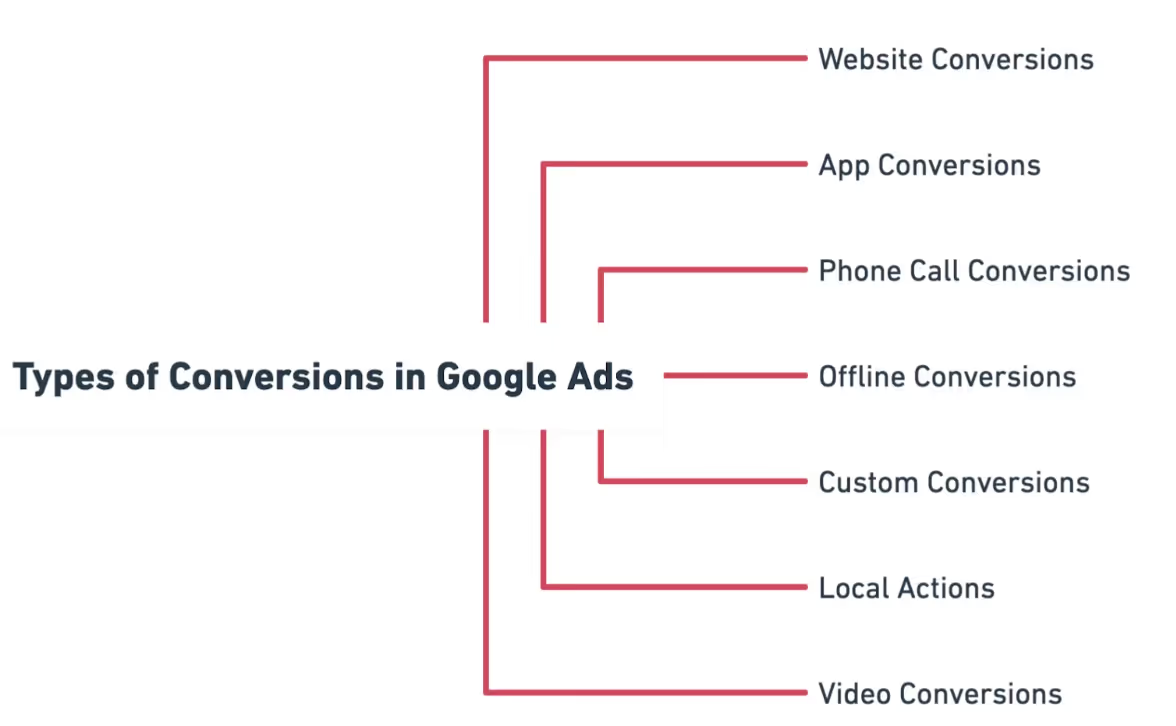
Here are the key types of conversions you can track:
1. Website Conversions
These track users' actions after clicking on your ad and visiting your website. The actions can include purchases, sign-ups, lead form submissions, e-book downloads, and page views.
2. App Conversions
These are for mobile apps and track actions within the app after a user’s ad interaction. The interactions can be a user installing your app after clicking on your ad or when a user performs specific actions within the app, like completing a registration or making an in-app purchase.
3. Phone Call Conversions
These conversions track phone calls made by users after interacting with your ads. The conversion action can be a user clicking on a phone number in your mobile ad and calling your business directly or when a user clicks a phone number listed on your website.
4. Offline Conversions
Import offline conversions from your CRM to track offline interactions and sales linked to your ad campaigns. For example, a user may visit your store and purchase after clicking on an ad, or a sale may occur over the phone due to an online ad interaction.
5. Custom Conversions
You can also define custom conversions to track specific actions that matter to your business. Track when users click on particular buttons on your website.
6. Local Actions
These conversions are related to physical locations. You can track users’ interaction with your ad, whether they visit your store or get directions to your physical store from maps mentioned in the ad.
7. Video Conversions
Video conversions track actions from users who interact with your video ads. These can include video views and engagement with the video, such as clicking on CTAs or interacting with features like overlays or end screens during or after they watch your video.
Why is Conversion Tracking Important?
If you run ads on Google, you might continuously monitor your campaigns' clicks and impressions. These metrics are essential, but you also need more information about what happens after users click on your ads.
To learn about campaign performance, you need to set up Conversion Tracking. It is one of the most essential steps for your B2B Google Ads strategy.
Conversion tracking helps you:
1. Optimize Ad Campaigns and Measure ROI
With Conversion data, you can optimize your ads for the best ROI. By identifying the keywords and ads generating conversions, you can adjust your bids, targeting, and budgets accordingly.
For example, you can increase bids on top-performing keywords or pause underperforming ads. It helps you reallocate your budget to more effective ads.
2. Leverage Conversion Based Bidding Strategies
Google Ads’ platform offers automated bidding strategies, such as Target CPA (Cost Per Acquisition) and Target ROAS (Return on Ad Spend), that optimize bids based on conversion data. These strategies automatically adjust bids to help you achieve your desired cost-per-conversion.
3. Refine Targeting Based on Conversion Data
With Conversion Tracking data, you can identify the demographic groups (age, gender, location), devices, and time of day that bring maximum conversions.
Here’s how.
- You can target these demographics more aggressively using refined targeting options.
- If your audience converts more on mobile devices, you can focus your efforts on mobile-targeted campaigns.
- If conversions peak during weekends or certain hours of the day, you can schedule your ads to run only at those times.
4. Optimize Landing Pages and Conversion Funnels
Conversion Data reveals where your potential customers drop off in the conversion funnel. For example, if users click your ad but don't convert on the landing page, it indicates that the landing page isn’t compelling enough or that there’s a barrier preventing conversions.
Conduct A/B testing on your landing pages to see which elements improve conversions. Optimizing the user experience on your landing page can boost conversion rates and overall ad performance.
Prerequisites for Setting Up Conversion Tracking in Google Ads
Before you start, ensure the following.
- You have a Google Ads account. To know more about the platform, read this article on Google Ads Management.
- You can edit your website’s code or work with a developer who can.
- Google Tag Manager is set up for your website.
How to Set Up Conversion Tracking in Google Ads: The Three Key Steps
1. Set up Your Conversion Action
- Sign in to your Google Ads account.
- Click on Goals>Conversions. Here, you’ll set up and manage your conversion actions.
- In the Conversions tab, click the + button to create a new conversion action.
- Choose the type of Conversion you want to track. Google Ads gives you different types of conversion actions to track. Choose the one that fits your business needs.
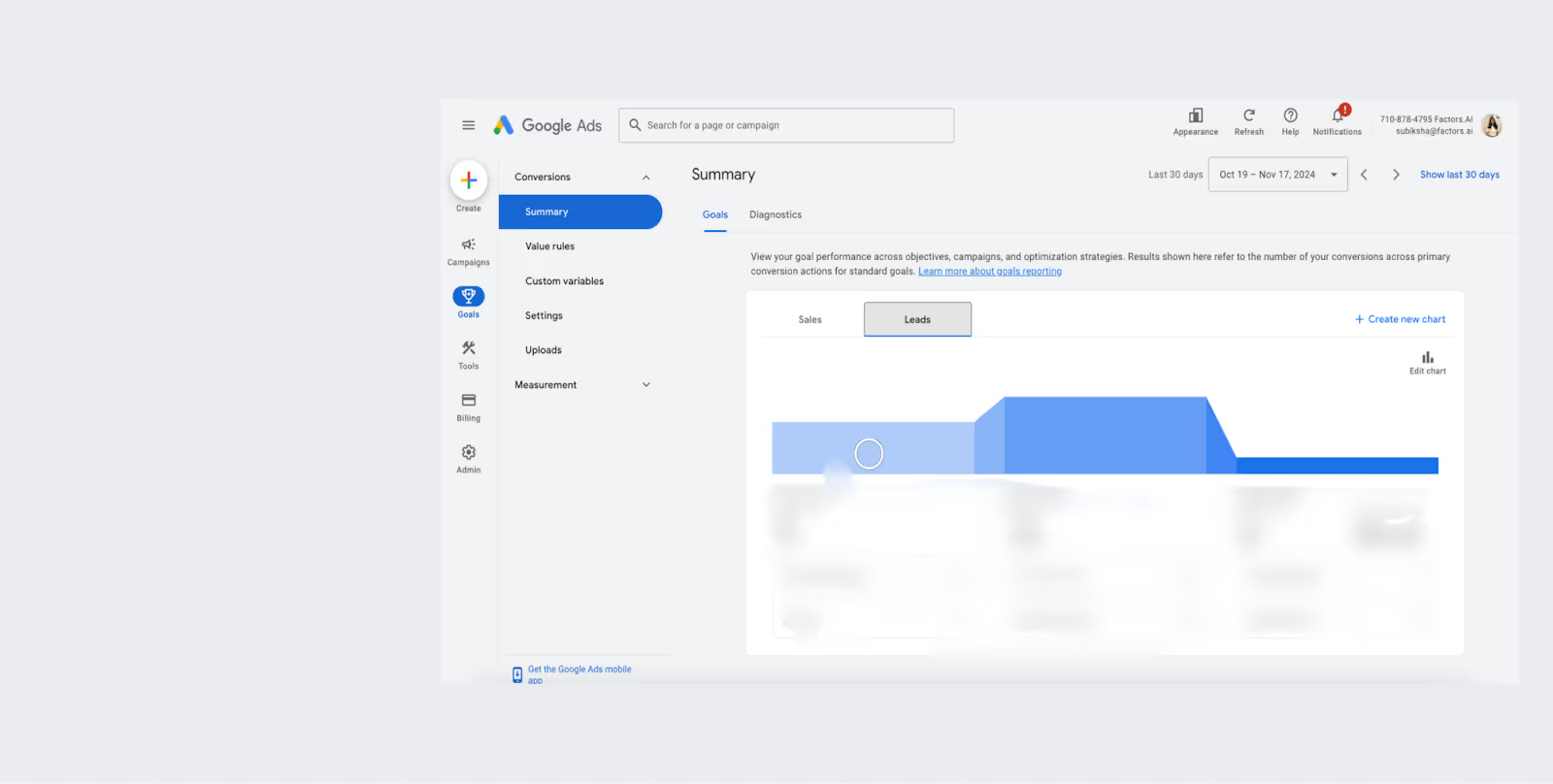
- Choose a descriptive name for your conversion (e.g., ‘Lead Form Submission’ or ‘Product Purchase’).
- Select the Conversion Category. Choose the category that best fits the action you are tracking, such as:some text
- Sales: Purchases, etc.
- Leads: Form submissions, appointments, requests for quotes, etc.
- Set the Conversion Value. You can assign a value to your conversion, which could be a fixed value (e.g., $50 for each lead) or dynamic (e.g., using the value of a product sold). This helps you measure the ROI.
- Decide if you want to count every conversion (useful for purchases) or just one conversion per user (useful for lead generation).
- Set the Conversion Window. You can set this to anywhere from 1 to 90 days.
- Choose an attribution model that suits your needs.
2. Install the Google Tag
- After configuring your conversion action, Google Ads will provide you with a Global Site Tag (gtag.js). This is the base tracking code that should be placed on every website page.
- You will also get an Event Snippet (specific to the conversion action you’re tracking, e.g., ‘Purchase’ or ‘Form Submission’).
- Place this Event Snippet on the page where the conversion happens (like the Thank You or Confirmation page).
- You can implement the tag directly into your website’s HTML or use Google Tag Manager (GTM) to manage tags on your site.
3. Test Your Conversion Tracking
- Google Tag Assistant (a browser extension) can help verify that your tags are firing correctly on your website.
- Perform a test conversion (e.g., submit a form or complete a purchase) and check Google Ads to see if the conversion is recorded correctly.
- It might take a few hours for conversions to appear in your Google Ads account, so allow some time for data to populate.

Common Issues and Troubleshooting While Setting Up Conversion Tracking
If your conversion tracking doesn’t work as expected, check the following.
- Ensure you have installed the global site tag and event snippets on the correct pages.
- Verify that the trigger conditions in Google Tag Manager match the conversion action.
- Confirm that you have linked Google Ads to Google Tag Manager or Analytics if you use them.
Key Considerations for B2B Conversion Tracking
If you run Google Ads for SaaS (B2B) or other B2B businesses, consider the following.
1. Longer Sales Cycle
B2B purchases often involve longer sales cycles, meaning conversions may not always be immediate. By tracking actions such as content downloads, form submissions, or demo requests, you can better identify engaged prospects.
2. Multiple Decision Makers
B2B decisions often involve multiple stakeholders, so be sure to track actions that show interest at various stages of the decision-making process (e.g., webinars, proposals, etc.).
3. Offline Conversions
In many cases, B2B sales may occur offline (e.g., over the phone or in person), so importing offline conversions into Google Ads can be valuable for tracking the entire customer journey.
By understanding and tracking these key B2B conversion actions, you can gain a more comprehensive view of your Google Ads campaigns' performance and optimize them for better lead generation.
Improve Conversion Tracking With Factors - Coming Soon!
Our team at Factors is developing a new feature to enhance ad targeting through Google's Conversions API (CAPI) and help B2B marketers run more effective Google Ads campaigns.
Currently, HubSpot deals can be sent as feedback to Google, allowing the platform to learn from past conversions. What if you can include MQLs (Marketing Qualified Leads) and SQLs (Sales Qualified Leads)? This would enable Google to target users similar to these prospects and further improve your campaign effectiveness. By assigning conversion values to MQLs and SQLs, Google will better understand their relative importance, resulting in more precise targeting.
For example, imagine 120 companies visit your website. Out of that, 20 become MQLs, 15 become SQLs, and 2 convert into customers with deal values of $10,000 each. Currently, Google Ads can receive data about these two closed deals, indicating a total conversion value of $20,000. This helps Google target audiences with similar characteristics.
Our goal is to provide more granular feedback to Google. Instead of only sending data on closed deals, Factors will help you send data on the 20 MQLs and 15 SQLs, allowing Google to target users similar to these prospects and make your ad campaigns even more effective.
This feature will be rolled out soon—stay tuned.
Is Google Ads Conversion Tracking Essential for ROI?
Running Google Ads without conversion tracking can lead to wasted ad spend.
Key benefits include:
- Better Optimization: Understand which ads drive valuable actions.
- Data-Driven Bidding: Improve ROAS with smart bidding strategies.
- User Behavior Insights: Track purchases, sign-ups, or form submissions.
However, challenges like incorrect tag setup, attribution confusion, and data delays may impact accuracy. While conversion tracking is crucial for campaign success, proper implementation is key. Tools like Google Tag Manager and GA4 help streamline tracking for better ad performance.
FAQs on Google Ads Conversion Tracking
1. What is conversion tracking in Google Ads?
Conversion tracking in Google Ads allows you to measure users' actions after interacting with your ads, such as lead form submissions, sign-ups, or phone calls. It helps you understand which campaigns drive valuable results so you can optimize your ad spend for better ROI.
2. How do I set up conversion tracking in Google Ads?
To set up conversion tracking, define your conversion action (e.g., purchases or form submissions), install the Google Ads tracking tags (Global Site Tag and Event Snippet) on your website, and select an appropriate attribution model. Then, monitor and test your conversion data to ensure accuracy.
3. What types of conversions can I track in Google Ads?
You can track several types of conversions in Google Ads, including website actions (purchases, form submissions), app installs, phone calls, offline conversions (sales tracked via CRM), and video interactions. In B2B, it’s also important to track longer sales cycles and offline activities like webinars, mixers, etc.
4. What should you do first to set up conversion tracking?
The first step in setting up conversion tracking in Google Ads is to define your conversion action. It means deciding what specific actions you want to track, such as purchases, form submissions, phone calls, or app installs.