.svg)


What Is GTM Engineering Integration? (And Why Your Stack Will Breathe a Sigh of Relief)
Ever feel like your GTM tools are in five different group chats, all ignoring each other? Marketing sees intent. Sales wants contacts. Ops wants a clean CRM. Meanwhile, your buyer is doing 80% of their research before they ever talk to you (and clicking away while you copy and paste between tabs). Sound familiar?
If only there were a way to make your apps talk, move, and act like one team… Good news, there is.
GTM engineering integration connects your external apps, including Factors.ai (account ID and journeys), Apollo (contacts), HubSpot/Salesforce (CRM), Slack/Teams (alerts), and orchestration layers like Make.com, Zapier, and Clay, so data flows automatically and outbound triggers fire at the right moment.
Yes, even when you’re not staring at the dashboard.
TL;DR
- GTM integrations connect siloed tools, allowing data to flow automatically from web visits to outbound sequences.
- It delivers real-time alerts with enriched contacts and tailored context, right where reps work.
- This also reduces manual work by syncing enrichment, CRM updates, and outreach steps.
- Prioritize the right accounts using AI-enabled predictive account scoring, rule-based filters, and territory routing to optimize your sales strategy.
The 30-second version: from signal to conversation
A high-intent account hits your pricing page:
- Detects the visit (Factors)
- Enriches likely buyers (Apollo)
- Prioritizes with rules/AI (OpenAI)
- Alerts the right rep (Slack/Teams)
- Writes cleanly to CRM (HubSpot/Salesforce)
- Launches email/LinkedIn plays (Apollo/Smartlead, HeyReach/Trigify)
Result: Reps receive context, contacts, and copy while the intent is still warm (ideally piping hot).
To read more about the process, check our Website visitor to warm outbound play using GTM engineering services page.
Why GTM engineering integration matters
Every modern GTM team runs multiple point tools (identification, enrichment, sequencing, chat, ads, analytics). Left unintegrated, they create data silos and slow handoffs. Meanwhile, buyers conduct most of their research before speaking with sales teams.
Translation: speed + context is everything.
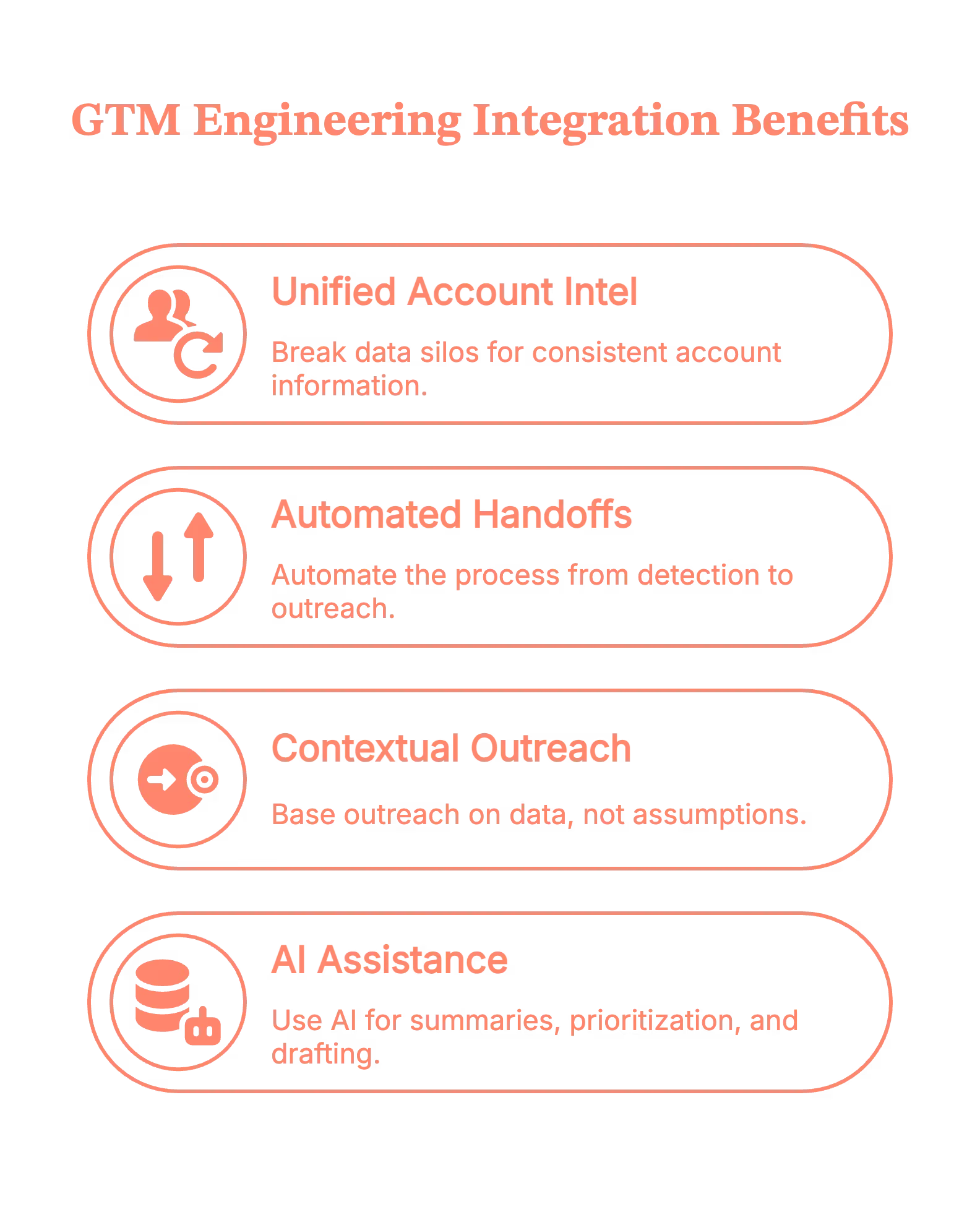
- Break silos so everyone works from the same, current account intel
- Automate handoffs end-to-end (detect → enrich → outreach)
- Ground outreach in context, not guesswork
- Use AI for summaries, prioritization, and drafting—based on trusted data
Psst! Teams identify up to ~75% of visiting accounts with Factors.ai and reach verified decision-makers faster via Apollo.
5 types of GTM engineering integrations
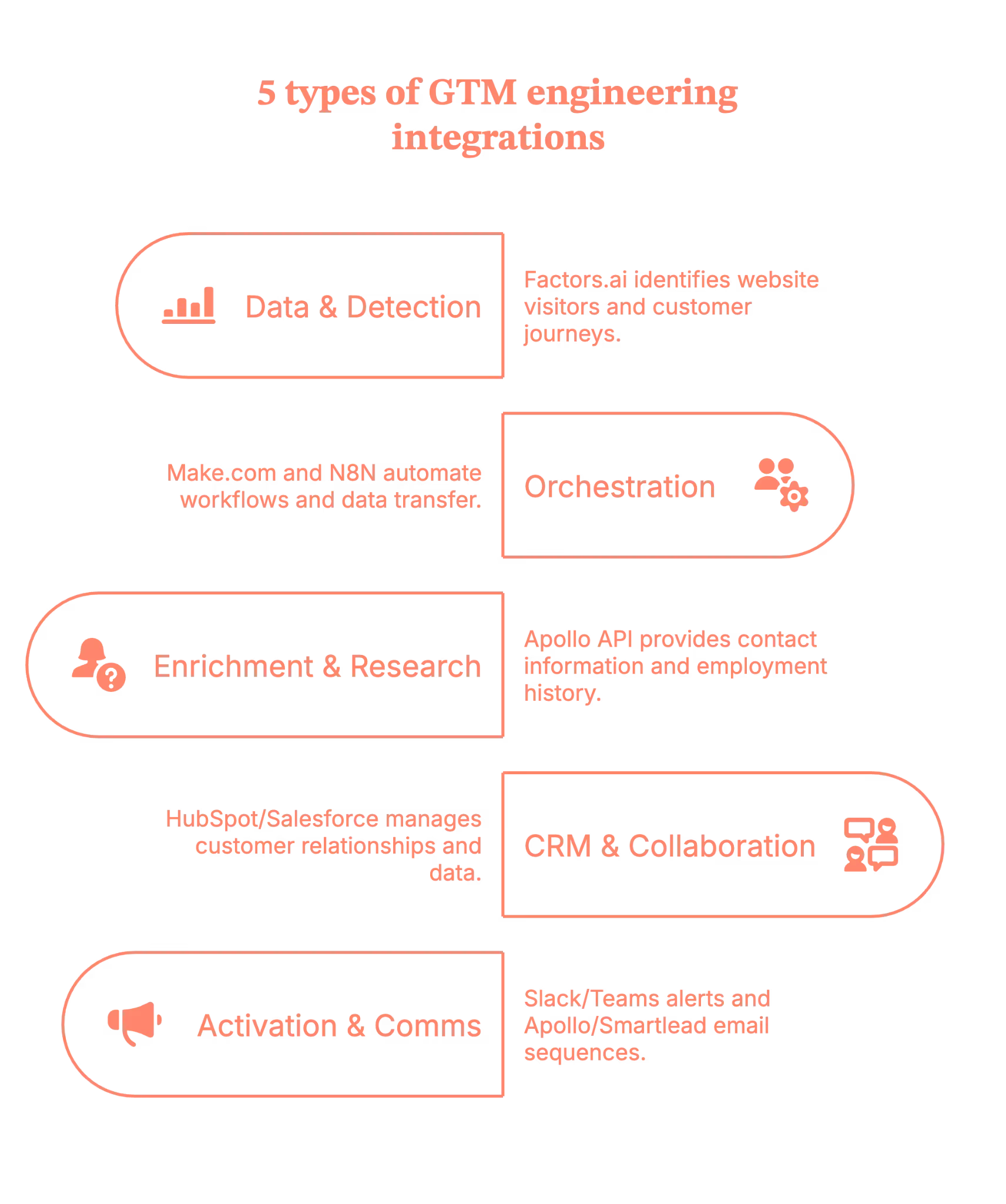
- Data & detection: Factors.ai for website visitor identification, customer journeys (last 30 days), and signals from LinkedIn/Google Ads, G2, and product activity.
- Orchestration: Make.com (primary)/N8N, plus Zapier/Clay.
- Enrichment & research: Apollo API (contacts vs. people, verified work emails, employment history).
- CRM, storage & collaboration: HubSpot/Salesforce (de‑dupe, create/update, tasks/ownership). Google Sheets/Docs (working tables; research + outreach drafts).
- Activation & comms: Slack/Teams (territory‑aware alerts with deep links to Factors journeys). Apollo/Smartlead (email sequences), HeyReach/Trigify (LinkedIn), ad platforms (retargeting).
7 practical steps to make the GTM engineering integration live in your stack
Step 1: Map your signals in Factors (what happened, and when)
Define your ICP and intent rules inside Factors.ai. Pull in journeys for the last 30 days and connect signals from LinkedIn/Google Ads, G2, and product activity.
Tip: Start with pricing pages, docs, and comparison pages. That’s where intent gets loud.
Step 2: Orchestrate the flow with Make.com/N8N (your switchboard)
Use Make.com/N8N as the primary runner (Zapier/Clay as needed). Trigger on the Factors.ai event (the customer journey).
Guardrail: Keep a ‘companies processed’ list separately so you don’t re-enrich the same account every hour (your API credits will thank you).
Step 3: Enrich the right people via Apollo (contacts, not just ‘people’)
Call the Apollo API to retrieve details based on titles/regions/seniority, and capture verified work emails, as well as employment history.
Pro move: Filter for role relevance (e.g., ‘Director+ in RevOps/Marketing/Sales in-region') so reps don’t wade through noise.
Step 4: Keep the record of truth clean (CRM hygiene)
Upsert into HubSpot/Salesforce with de-dupe logic, set ownership, and create tasks only when the signal meets your threshold.
Little thing, big win: Tag contacts as new vs. existing so reps instantly see context (and don’t have to introduce themselves again, awkwardly).
Step 5: Prioritize with AI (what’s hot vs. merely warm)
Utilize AI to deduplicate URLs, count occurrences, segment users, and score contacts according to your rules. For example:
- Known user in the product? ★★★★★
- Same city/region as the assigned rep? ★★★★☆
- One random homepage visit? ★☆☆☆☆
Outcome: Reps start at the top of the list, and it’s the right list.
Step 6: Alert where reps live (Slack/Teams)
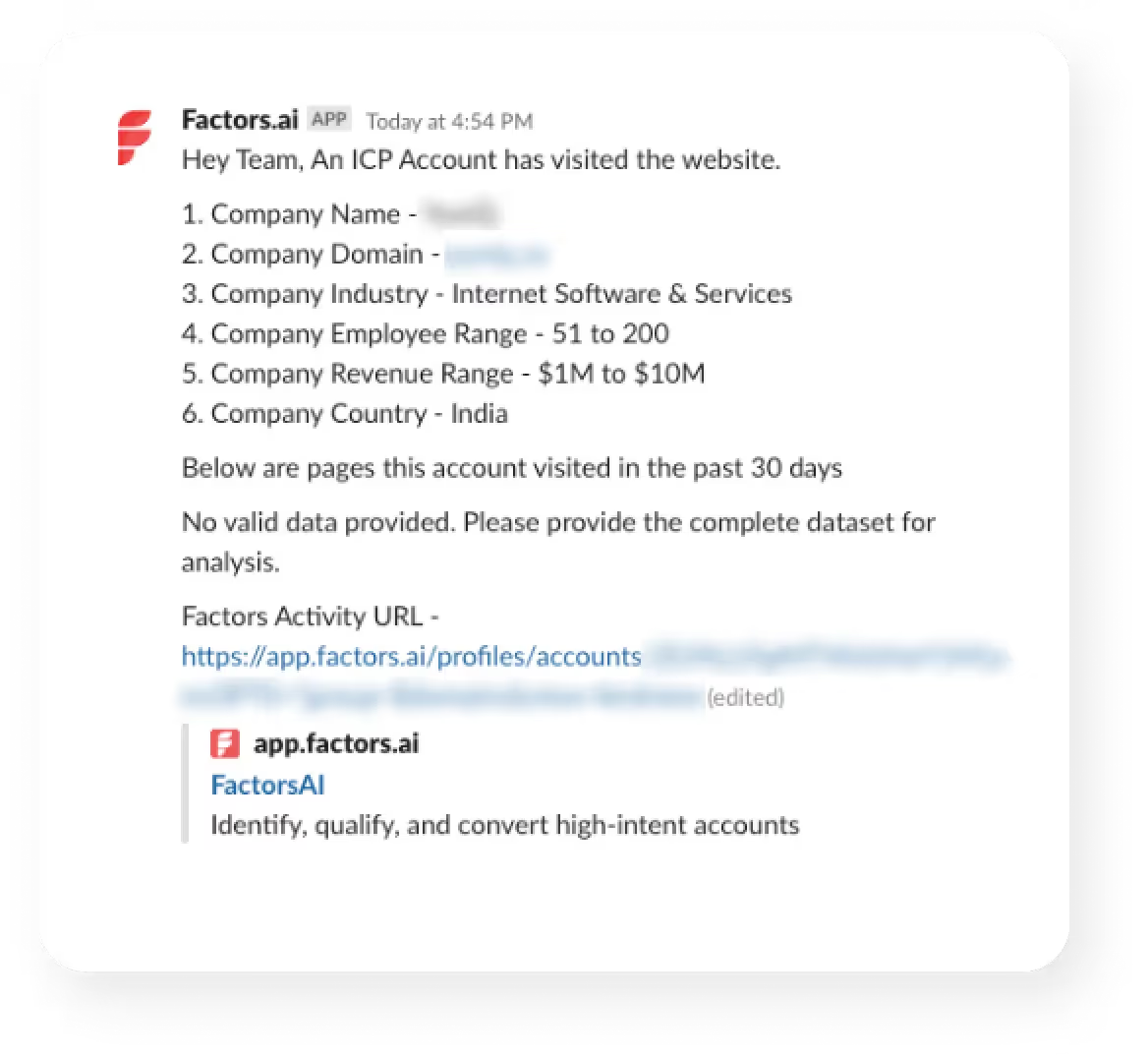
Send an alert to Slack/Teams with the following details:
- Account + segment
- Journey highlights (pages, recency)
- Top contacts (emails + LinkedIn)
- A draft opener
Deep link to the Factors.ai journey
(Because nobody wants to hunt for links in a maze of folders.)
With Factors.ai, your alert will look something like this.
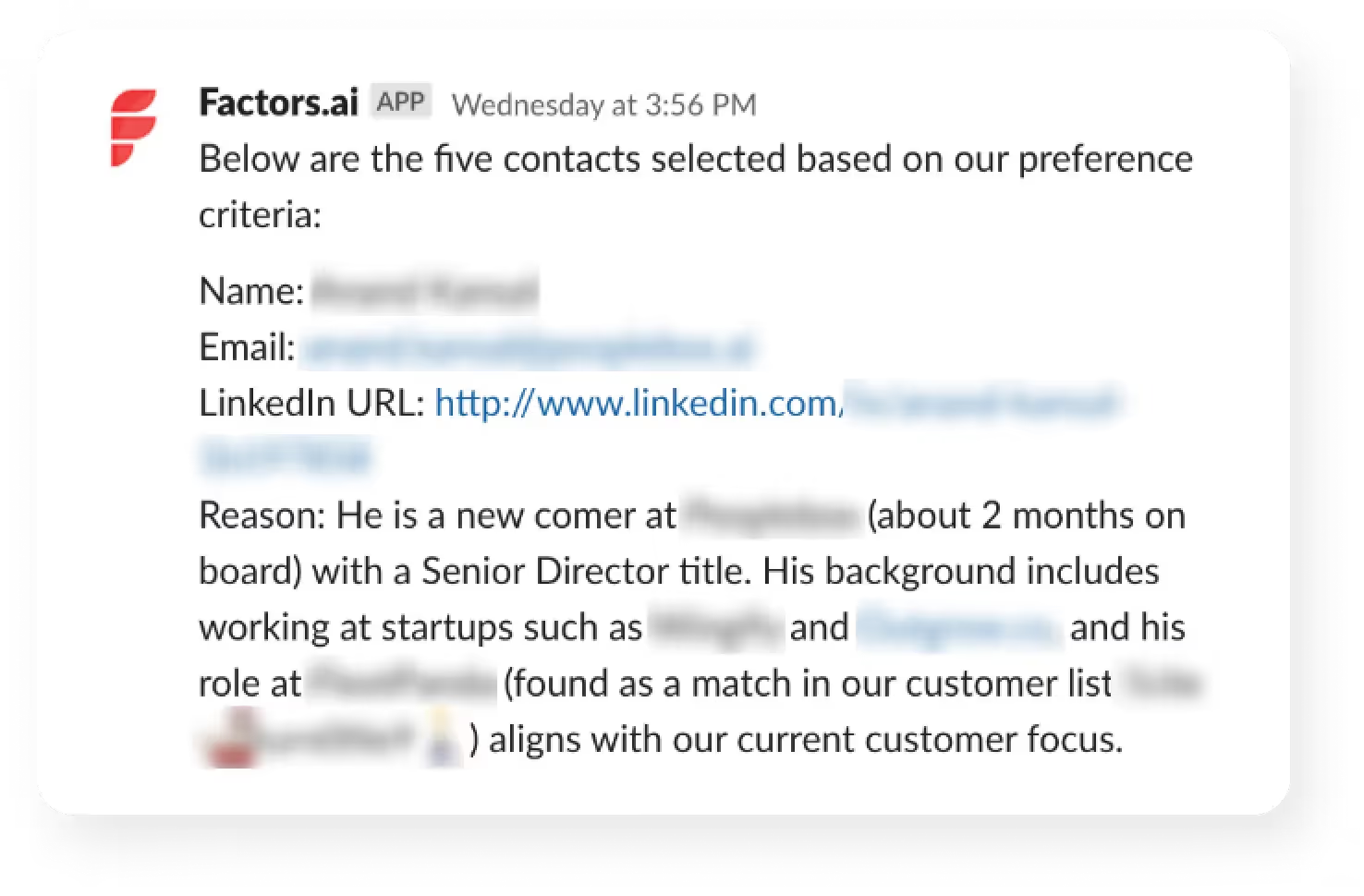
Step 7: Execute and write back (so your loop stays tight)
SDR tweaks the copy and sends via Apollo/Smartlead, adds a LinkedIn touch (HeyReach/Trigify), and the system writes back to CRM.
Why it matters: Outreach, CRM, and analytics now agree on what happened and what’s next.
No he-said-she-said across tools.
5 benefits you’ll get from GTM Engineering integrations
1) Faster time‑to‑touch
Real-time alerts and pre-enriched contacts enable reps to respond in minutes when intent is at its highest.
2) Cleaner data, fewer manual tasks
Automated enrichment (Apollo), deduplication, and CRM updates keep data accurate and eliminate ‘copy-paste operations.’
3) Higher coverage & precision
With Factors identifying up to 75% of visiting accounts and Apollo returning verified work emails, reps reach the right people sooner.
4) Smarter prioritization
Account & contact tiering (rules + AI) focuses reps on Tier‑1 opportunities.
5) Coordinated multichannel
Email (Apollo/Smartlead), LinkedIn (HeyReach/Trigify), and precision retargeting line up behind the same signal, so every touch feels timely and relevant.
Guardrails that keep your GTM engineering integrations smooth
- Add a 4-5 min sleep so alerts land after enrichment finishes
- Route by territory/geo in Slack
- Maintain exclusions (e.g., ignore losses in the last 60 days)
- Standardize card + doc templates for speed and consistency
- Log steps to a Sheet for easy QA (spreadsheets are the unsung heroes)
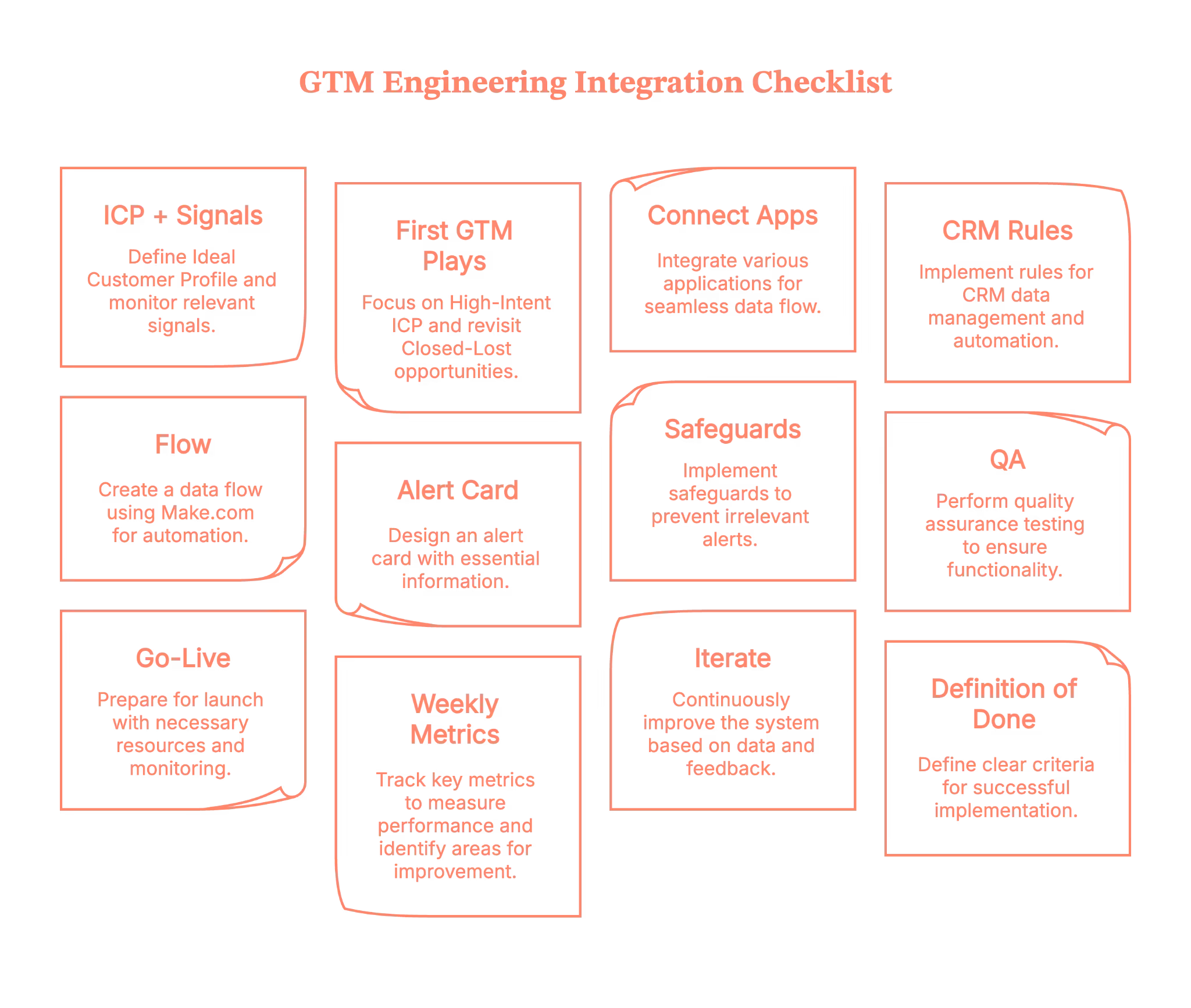
GTM engineering integration: The master checklist
Here is a getting-started checklist for your GTM plays.
- ICP + signals: define ICP; watch pricing/docs/comparison, G2, product usage
- First GTM plays: High-Intent ICP; Closed-Lost Revisit
- Connect apps: Factors → Make.com → Apollo → HubSpot/Salesforce → Slack/Teams → Sheets/Docs
- CRM rules: upsert by email + domain; fields: Intent_Score, Last_Intent_Source, Journey_URL; default owner
- Flow (Make.com): Trigger (Factors) → Journey API → Sheets → Enrich (Apollo) → Upsert CRM → Score (AI) → Alert (Slack/Teams) → Write-back → Sleep 4–5m
- Alert card must include: account/segment, last pages, top 2–3 contacts (email + LinkedIn), draft opener, links (Journey / Doc / CRM)
- Safeguards: exclude recent losses (60d), competitors, personal domains; ≤1 alert/account/24h; ≤3 contacts/alert; quiet hours
- QA: 5–10 test events; verify routing, links, dedupe; run a negative test (homepage-only = no alert)
- Go-live: ship copy packs; 15-min enablement; monitor first 48h; set escalation path
- Weekly metrics: Signals→Alerts→Replies→Meetings→SQLs→Pipeline; time-to-first-touch; contactability; coverage
- Iterate (weeks 2–4): tighten filters/scoring; add Form-Fill Drop-Offs + Research Pack; expand routing; add retargeting
- Definition of done: live alert with ≥2 verified contacts; outreach sent; auto CRM write-back; median TTF touch ≤30 min; meeting booked or learnings applied
Plug in, switch on, and multiply your pipeline with Factors.ai GTM engineering services
With Factors' GTM engineering services, your stack stops acting like separate apps and starts operating like a coordinated revenue system. You’ll identify up to 75% of visiting accounts, enrich the right buyers with verified emails, and deliver ready-to-send outreach to the right rep in minutes.
Instead of copy-pasting between tabs, your team moves in a tight loop: detect → enrich → prioritize → alert → execute → write-back. Everyone sees the same context; nobody asks, ‘Who owns this?’; and intent doesn’t go cold while ops wrangles spreadsheets.
Want to see it on your data? Book a demo with us and watch the end-to-end flow—detection to Slack to CRM to outreach, run exactly the way your outbound team needs (and yes, we’ll bring sample plays you can keep).
How we work:
- Done-with-you: we co-build flows with your RevOps team (hands-on keys, full enablement).
- Done-for-you: we design, implement, and document; your team runs it day-to-day.
Ready to tighten your loop?
GTM Engineering Integration: Turning Signal into Revenue Without the Copy-Paste
GTM engineering integration is the connective tissue that transforms scattered go-to-market tooling into a synchronized, responsive revenue engine. By linking platforms like Factors.ai, Apollo, HubSpot, Salesforce, Slack, and orchestration tools such as Make.com or Zapier, teams gain the ability to act in real-time, with no swivel-chair operations or delays.
This approach captures high-intent signals, enriches accounts and contacts with verified data, writes contextually clean entries into the CRM, and triggers personalized outreach while buyer interest is still at its peak. Whether identifying buyers on a pricing page or alerting reps in Slack with enriched leads and ready-to-send copy, the system ensures nothing slips through the cracks.
The integration isn’t just about speed; it’s about precision. With AI scoring, deduplication, territory-aware routing, and built-in quality checks, GTM teams reduce manual tasks, shorten response time, and increase meeting conversion. The outcome? Outreach that’s accurate, timely, and aligned, without relying on reps to connect the dots manually.
FAQs on GTM engineering integrations
Q1. What exactly is GTM engineering integration?
GTM engineering integration is the technical process of connecting your go‑to‑market (GTM) stack, like your CRM, ads account, intent data, enrichment tools, and sequencing platforms. This helps the data and workflows move automatically between them. It bridges strategy and execution, applying engineering discipline (e.g., data pipelines, APIs, automation) to your revenue operations systems.
In short, rather than having isolated tools (marketing, sales, ops) each doing their own thing, integration ensures they all work as part of a unified system.
Q2. What are the common pitfalls when implementing GTM engineering integrations?
Some of the most frequent challenges include:
- Misalignment across teams: Sales, marketing, and ops often have differing definitions, goals, and tool preferences, which makes integration harder.
- Over‑engineering: Building overly complex custom workflows or automation before you’ve nailed the core processes can create fragility.
- Poor data hygiene: If your CRM/enrichment data is incorrect, no amount of integration will fix the root problem.
- Lack of measurement and feedback loops: Without metrics, you can’t know whether your integration is delivering value.
Recognizing these early helps ensure you build a sustainable system, not just a one‑off technical fix.
Q3. Which tools and integrations typically feature in a GTM engineering stack?
A solid GTM integration capability often involves:
- Intent signal tools (e.g., website tracking, pricing page visits)
- Enrichment platforms (to get verified contacts, firmographics)
- CRM systems (e.g., HubSpot, Salesforce) for record‑keeping and routing
- Orchestration/workflow automation tools (e.g., Make.com, Zapier, n8n) to build the flows
- Communication/sequencing platforms (e.g., email/LinkedIn tools, Slack/Teams alerts)
- Dashboards & analytics to monitor flow/impact
This mix enables the flow of detect → enrich → route → alert → execute.

What is GTM Engineering
If your go-to-market still runs on spreadsheets, heroics, and ‘’just one more manual export,’’ GTM engineering is how you swap duct tape for durable systems.
Good news, there is a better way to do it. GTM engineering blends technical chops with revenue strategy to automate and scale buying journeys, from the first signal of intent to a closed-won deal (and the renewals after). Put simply, you create systems that help the work get done, not just dashboards that tell you what’s happening.
TL;DR
- GTM engineering automates your GTM motion, connecting data, AI, and workflows to replace manual revenue processes.
- It goes beyond traditional RevOps; GTM engineers build systems that trigger real seller actions, not just dashboards.
- Real-time orchestration means faster pipeline: website visitor identification, contact and account scoring, and next-step triggers fire within minutes.
- Skills span both code and conversion: GTM engineers wire APIs and AI while knowing what drives meetings and deals.
Introduction to GTM engineering
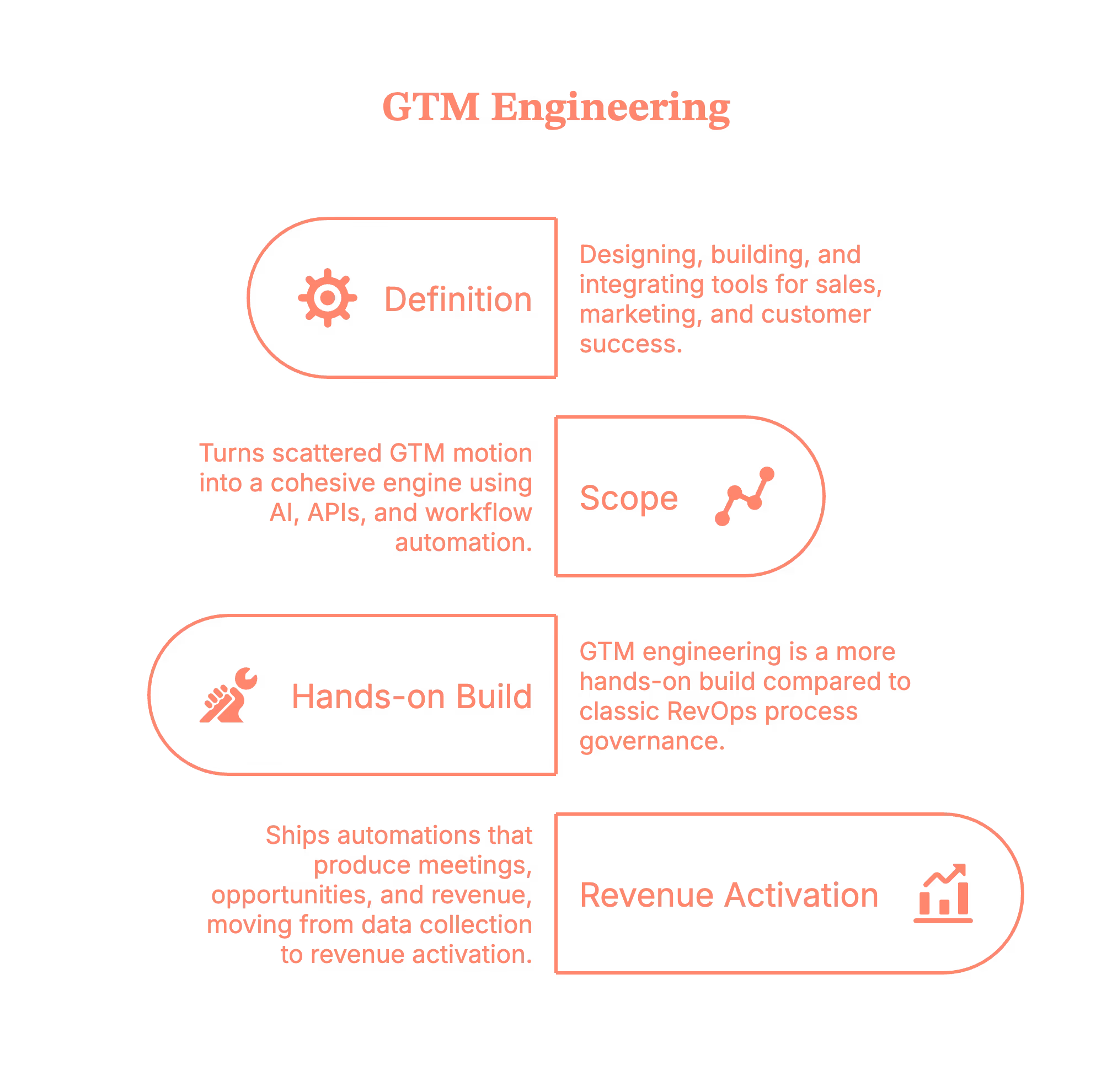
GTM engineering is the discipline of designing, building, and integrating the tools, data pipelines, and automations that power sales, marketing, and customer success. It turns scattered GTM motion into a cohesive engine using AI, APIs, and workflow automation.
Not ‘just RevOps.’ Compared to classic RevOps process governance, GTM engineering is a more hands-on build: it ships automations that produce meetings, opportunities, and revenue, moving from data collection to revenue activation.
Why has GTM engineering surged since 2023
AI agents, better enrichment, and a rising appetite for automation proved that more effort won’t fix manual research, slow campaigns, or dirty data; better systems will. Teams that adopted GTM engineering began connecting intent signals to seller actions in minutes, rather than days.
In plain English, a GTM engineer connects the dots between intent signals, AI agents, and your stack so your team acts faster, smarter, and at scale.
Related read: Top GTM engineering tools for marketing teams.
GTM engineering is a critical function in your modern marketing stack (and why it matters)
- Drives outcomes, not just visibility. Workflows improve conversion and cycle time (vs. more reporting).
- Automates & scales GTM motions (lead capture, enrichment, scoring, routing, outreach, follow-ups) with AI and integrations.
- Creates advantage by activating buying signals others miss, or can’t act on quickly.
- Requires commercial fluency across ICPs, stages, and handoffs; it’s technical and revenue-literate.

In practice, this is real-time intent alerts, with waterfall enrichment, and agents that identify website visitors, prioritize contacts, and trigger outreach, without headcount chaos.
The GTM engineer’s role in RevOps (Revenue Operations)
GTM engineers sit inside/alongside RevOps and work with Sales, Marketing, and CS to turn strategy into systems:
- Design & implement automations for enablement, scoring, and deal-flow orchestration (score → route → sequence → alert).
- Own data hygiene (normalization, de-dupe, identity resolution) and build repeatable processes that scale.
- Integrate AI & 3rd-party data to increase pipeline velocity and lift conversion rates.
Copy-paste-able patterns you can ship:
- Instant Slack/Teams intent alerts when target accounts spike.
- Website Visitor Identification → infer likely account + roles/geo/pages → trigger compliant outreach. Read more about this on our blog Website visitor to warm outbound play using GTM engineering services.
- Contact relevance & tiering agents → surface buying-committee contacts with talking points + priority scores.
- Account tiering & ICP qualifiers combine job changes, hiring, and funding signals to prioritize and route.
GTM engineering pods & collaboration (How teams actually work)
A modern GTM pod typically includes GTM engineers + AEs/SDRs + Growth/Marketing + RevOps:
- Engineers build the data/automation backbone.
- Sales & SDRs act on actionable signals (not noisy alerts).
- Marketing fuels and personalizes customer journeys with the right content at the right moment.
CS is stage two of the pipeline: post-meeting engagement alerts, closed-lost re-engagement when old opps return, and nurture flows that share the same orchestration fabric, so handoffs feel seamless.
What great GTM engineers know (skills that move revenue)
- Software/data engineering basics to wire APIs, webhooks, events, and identity resolution.
- AI/automation: design agents and low/no-code workflows (LLMs, enrichment, routing, content).
- Commercial judgment across ICP, stages, attribution, and prioritize what creates the pipeline.
- Enrichment that activates revenue: use waterfall enrichment to lift coverage, then pipe verified data into CRM for scoring and triggers (vs. letting fields rot).
The GTM tech stack for the growth teams
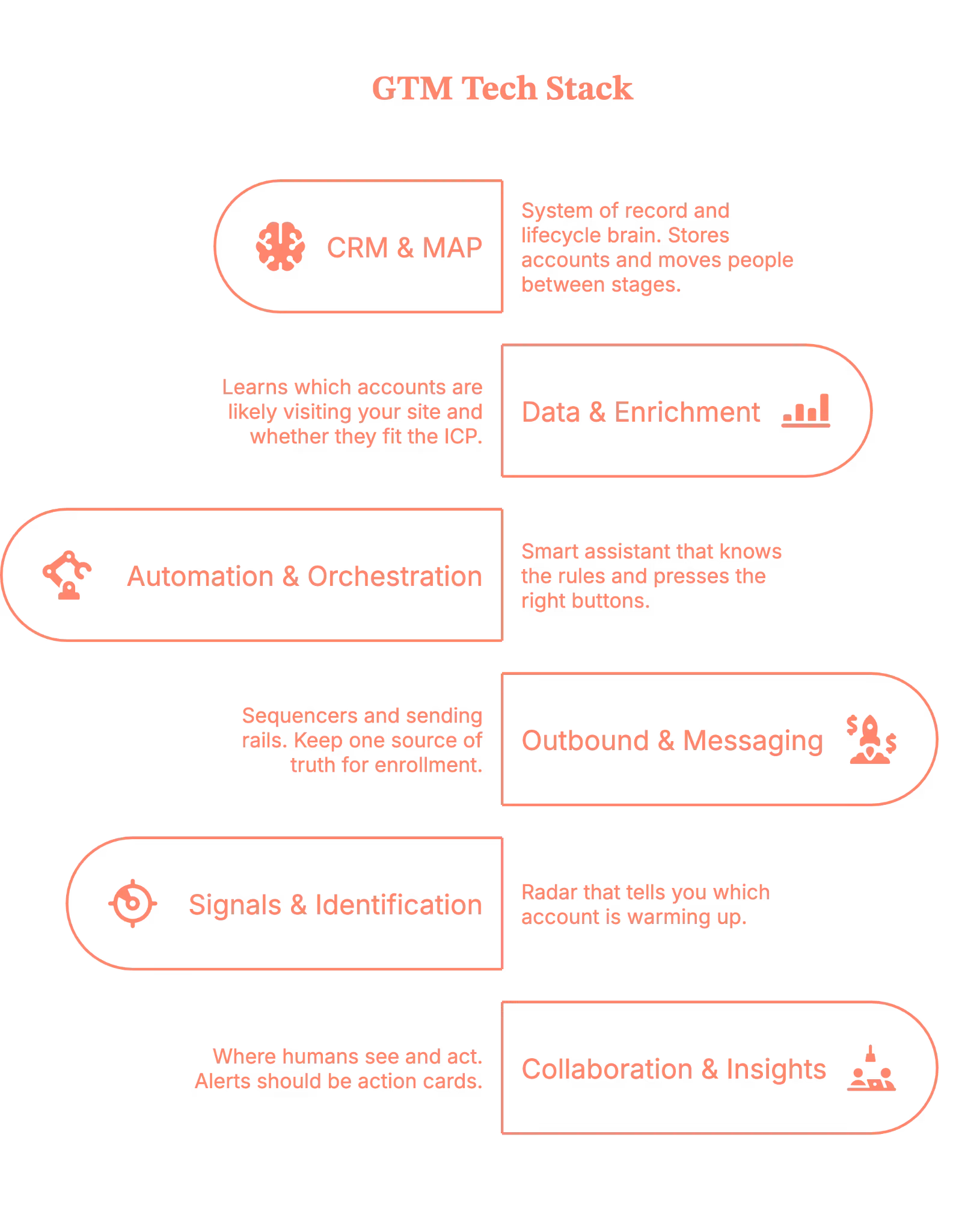
Here’s the GTM tech stack in plain language, what each layer actually does, how they work together, and what ‘good’ looks like.
1. CRM & MAP (Salesforce/HubSpot + lifecycle automation)
- Your system of record and lifecycle brain. It stores accounts/contacts/opportunities and moves people between stages (Lead → MQL/SQL → Opportunity → Customer).
- When a form is submitted or a meeting is booked, lifecycle rules update status, owners, and SLAs.
Tip: Keep fields opinionated, enforce deduplication on email and domain, and make lifecycle state changes idempotent so that retried events don’t double-create leads.
2. Data & Enrichment (Clay + providers, Clearbit/ZoomInfo/Factors.ai equivalents, product telemetry)
- This is how you learn which accounts are likely visiting your site and whether they fit the ICP.
- Use waterfall enrichment (try provider A, then B, then C) and log provenance.
- Bring in product telemetry (such as trials and feature use) as an intent signal, not just web visits.
- Treat each attribute with a trust tier (e.g., Tier 1 = verified, Tier 2 = inferred), so your account scoring and routing can prefer higher‑confidence data.
3. Automation & Orchestration (Make/Zapier; LLM agents for research, message generation, routing)
- You can think of this like a smart assistant. When something happens, it knows the rules and presses all the right buttons for you across your tools.
- LLM agents can draft research, prioritize contacts, or propose next steps, but wrap them with guardrails (templates, allow‑listed claims, retrieval) and idempotency (an action key so the same event won’t trigger twice if it’s retried).
4. Outbound & Messaging (Outreach/Salesloft/Apollo, Smartlead, LinkedIn workflows)
- Your sequencers and sending rails. Keep one source of truth for enrollment to avoid double‑sequencing someone from two tools.
- Personalize with structured snippets (why now, why us) coming from the decision engine rather than free‑text improvisation.
5. Signals & Identification (website visitor ID, job‑change alerts, funding/hiring signals)
- This is your radar. Reverse‑IP/site ID and partner/product signals tell you which account is warming up.
- External signals (job changes, funding, hiring) add a ‘why now’ context. Debounce short‑burst activity so a 3‑page refresh doesn’t look like a spike.
6. Collaboration & Insights (Slack/Teams alerts, dashboards, pre‑call intelligence)
- Where humans see and act. Alerts should be action cards (account, reason, recommended next step, SLA timer) rather than FYIs.
- Dashboards display system health (coverage, routing accuracy, and p95 time-to-first-touch) and business impact (meetings/100 ICP visits and win rate by tier).
How GTM Engineers Drive Impact (with examples)
- Faster speed‑to‑lead: real‑time alerts + auto‑assembled context → SDRs act in minutes, not days.
- Higher coverage: visitor identification + relevance & tiering agents surface the right people inside the right accounts.
- Predictable routing & follow‑through: ICP qualification and geo rules route to the right owner with no manual triage.
- Closed‑lost resurrection: alerts when old prospects return, with page‑level intent for tailored follow‑up.
Metrics that actually move the needle for a GTM engineer
- Meetings per 100 ICP visits (leading indicator).
- Relevance hit‑rate (did we reach the buying group?).
- Holdout lift (A/B at account level).
- Time‑to‑context (seconds to compile research for an SDR).
- Prospect comeback rate (closed‑lost that re‑engaged through signals).

Introducing GTM Engineering services from Factors.ai
Picture this: your SDR opens Slack to a single alert that says which account just spiked, who likely visited, why they care, and the next best step.
That’s Factors.ai’s GTM Engineering in action, real-time alerts, ICP-aware scoring, and write-backs to your CRM so warm outbound actually scales.
Here’s the kicker: we don’t just ‘alert and pray.’ Factors.ai identifies up to 75% of visiting accounts (versus ~8–10% with person-level tools), and even pinpoints up to 30% of the likely contacts behind those visits, so reps reach the right people quickly. Teams using these workflows engage up to 3× more high-fit accounts and see better ROI without adding headcount chaos.
What you get (done-for-you, not DIY): Website Visitor ID, Contact Relevance & Tiering, Account Tiering, Account Map, Meeting Assist, and Closed-Lost Re-engagement, all tailored to your ICP, sales motion, and stack, and maintained by us like an extension of your team.
Clear roles, documented workflows, and milestone tracking included (so this doesn’t die in someone’s Notion).
If you want your intent data to turn into booked meetings (not just pretty charts), book a demo, and we’ll show your accounts lighting up, with the exact contacts and talk tracks your reps can use today.
GTM Engineering Explained: The Engine Behind Scalable Revenue
GTM (Go-To-Market) Engineering is a specialized discipline that builds the technical infrastructure behind revenue operations, automating sales, marketing, and customer success activities that drive actual outcomes. Unlike traditional RevOps, which often focuses on process governance and reporting, GTM engineering is hands-on: writing automations, connecting APIs, and turning noisy signals into seller actions that generate meetings, pipeline, and revenue.
The rise of AI agents, enrichment tools, and real-time signal tracking since 2023 has made GTM engineering indispensable. It enables near-instant response to buyer intent, surfacing high-fit contacts and routing them through a streamlined system that personalizes outreach, scores leads, and triggers smart engagement, without bloated headcount or spreadsheet sprawl.
It requires a rare blend of technical fluency (in data pipelines, APIs, and LLMs) and commercial acumen (understanding ICPs, funnel stages, and conversion triggers). From website visitor ID to deal orchestration, GTM engineers build the ‘invisible systems’ that accelerate time-to-context and maximize every high-intent signal, powering both speed and precision at scale.
FAQs on GTM Engineering
Is this just RevOps with a shiny title?
No. RevOps sets rules and reporting; GTM engineering builds the software-like workflows that create pipeline. Many teams need both.
How is this different from ‘growth engineering’?
Growth engineering classically focused on product-led activation/retention; GTM engineering focuses on revenue systems across sales/marketing/CS. An overlap exists, but the scope and outputs differ.
What tools do I need?
Start with CRM, enrichment, orchestration, outreach, and alerts; add LLM agents where they remove research/writing toil.
If you have to remember just one thing, it should be this: GTM engineering turns intent signals into seller actions reliably and at scale. When the system works, your representatives talk to the right people at the right moment with the right context. The rest is just… plumbing you no longer think about.

AI SEO Tools: What Really Works (and What’s Just Hype)
AI SEO tools are everywhere right now. Open Reddit, LinkedIn, or that SEO Slack channel you’re in, and someone’s always asking: “Which AI SEO tools actually work?”
And honestly, it's a fair question.
Between AI Overviews, Google’s AI mode, AI-powered search (ChatGPT, Perplexity, Gemini, etc.), and Google constantly tweaking what shows up above the fold, SEO teams are under pressure. They are expected to do faster research, smarter content planning and strategy, and more frequent optimization with the same (or smaller) resources. That’s where the AI SEO tools come in. These tools promise to automate everything from keyword clustering to content briefs to technical SEO audits.
But do they really work… or are they just fancy tools that spin out the same old content?
That’s what this guide is here to clear up.
In this article, we’ll:
- Clarify what AI SEO tools really do (and what they don’t)
- Show where they actually help in a day-to-day SEO workflow
- Recommend a lean, practical tool stack you can actually use weekly, not just admire in a Loom demo
Grab a coffee. Let’s make sense of the chaos.
Related read: What is Search Engine Optimization
TL;DR
- AI tools shine in structure, not strategy: They speed up keyword clustering, content briefs, and on-page fixes, but don’t make judgment calls.
- Most AI SEO suites are overkill: SEOs report real gains from focused tools in research, writing support, and reporting, not all-in-one dashboards.
- Keep stacks lean and useful: The best results come from 1–2 tools per workflow stage that integrate well with your CMS and analytics setup.
- AI content still needs a human finish: Raw outputs must be edited for tone, facts, and audience fit, especially in YMYL or branded content.
What are AI SEO tools (and what they’re not)?
Let’s keep this simple. AI SEO tools are tools that use machine learning and natural language processing to automate or speed up pieces of your SEO workflow.
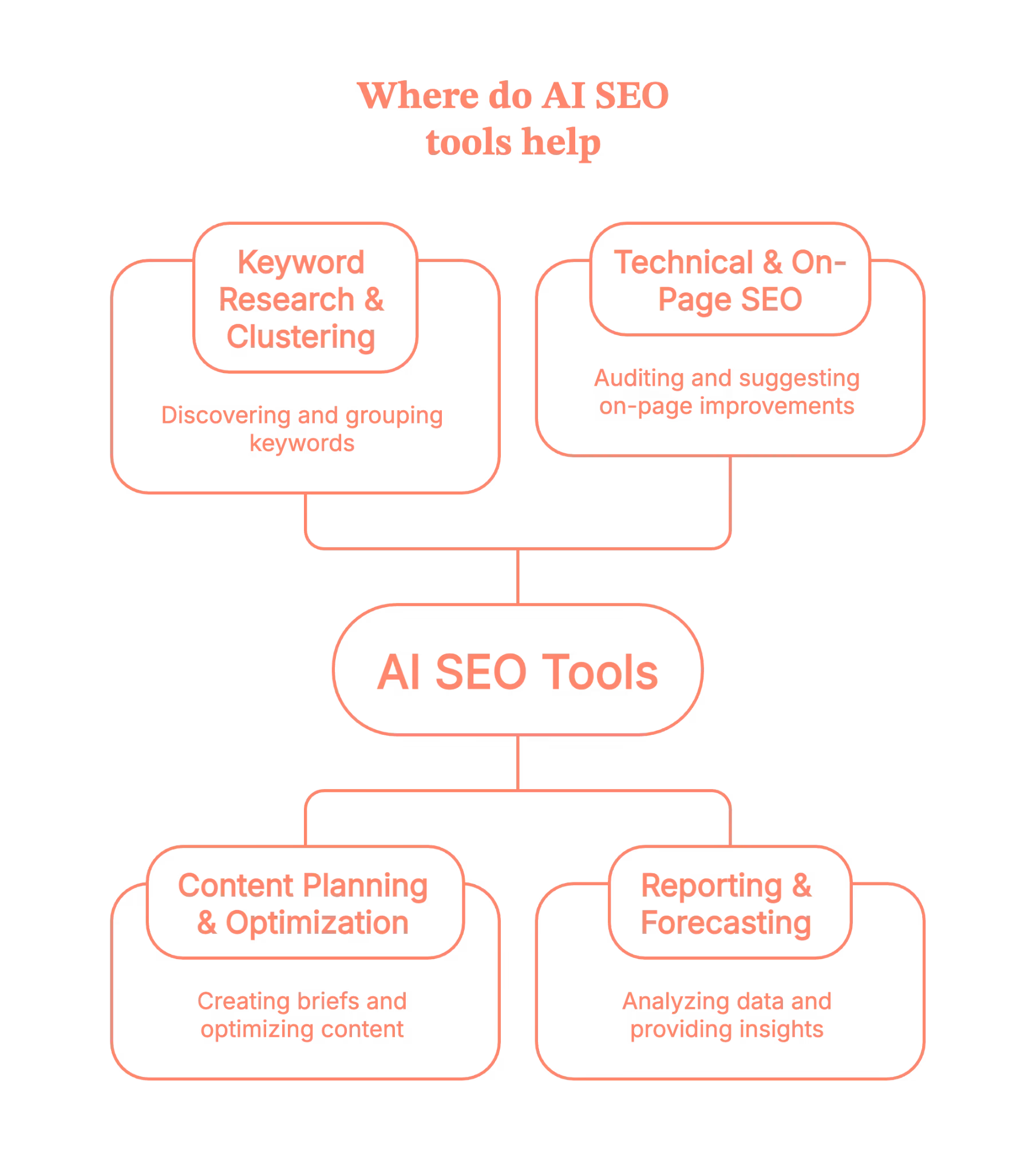
Practically, that usually means help with:
- Keyword research & clustering – discovering keywords, grouping them into clusters, understanding search intent
- Content planning & optimization – briefs, outlines, semantic keyword suggestions, content scoring
- Technical & on-page – audits, meta tags, internal link suggestions, cannibalization checks
- Reporting & forecasting – turning raw GSC/GA data into dashboards, alerts, and trend insights
So when we say AI tools for SEO, we’re not just talking about “write me a blog post” tools. We’re talking about anything that uses AI to:
- Analyze SERPs at scale
- Spot patterns in search data
- Suggest optimizations based on those patterns
Here’s the most important boundary: AI SEO tools support SEO. They don’t do SEO for you end-to-end.
They won’t:
- Decide your positioning
- Build a content strategy from thin air
- Replace human judgment on quality, brand voice, or E-E-A-T
Think of AI SEO tools as very fast, very literal assistants. Powerful, yes. But they still need you to be the strategist.
Related read: SEO benchmarking guide
How AI SEO tools fit into a modern SEO workflow
Instead of thinking “Which is the best SEO AI tool?” it’s more useful to ask, “Where in my workflow can AI save time without wrecking quality?”
Let’s walk through a realistic flow.
1. Research & strategy
You start with keyword and topic research:
- Use tools like Semrush or AHREFS for keyword data and competitor analysis.
- Layer in AI-powered clustering tools like Keyword Insights to group keywords by SERP similarity and search intent, so you’re building topic clusters, not random one-offs.
- Use the AlsoAsked section to pull People Also Ask questions and map related questions people are actually typing into Google.
Suddenly, you’re not just staring at a spreadsheet of keywords; you’re looking at intents and clusters.
2. Content briefing & writing
Next, you move into content planning:
- Tools like Surfer and Clearscope analyze the SERP and suggest headings, entities, semantic terms, and approximate word counts so you can build a strong brief in minutes.
- AI writing tools like Jasper or its alternatives can draft intros, outlines, FAQs, and variations on headings so writers aren’t starting from a blank page.
- LLMs (like ChatGPT) are great for first drafts, restructuring sections, or turning a rough outline into something readable, as long as a human does the final editing, fact-checking, and brand voice alignment.
3. On-page & technical
Then comes optimization and technical:
- AI-powered audit/automation platforms like Alli AI and OTTO SEO can suggest or even deploy fixes for meta tags,canonicals, and other on-page issues at scale, often via a single script or integration.
These tools are particularly handy when you’re managing big sites or multiple clients and can’t manually tweak every template.
4. Reporting & iteration
Finally, reporting:
- Tools like Whatagraph pull in data from Google Search Console, Analytics, and other SEO tools, then turn them into visual dashboards and reports your team and stakeholders can actually read.
The ‘AI’ part here is less hype, more practicality it is anomaly detection, auto-summaries like “here’s what changed this month”, and suggestions on where to focus next.
So the big picture:
You move from research → briefs → writing → optimization → reporting, and a handful of AI SEO tools quietly compress the time spent at each stage.
Types of AI SEO tools (with examples)
Let’s break the ecosystem down into clear buckets and tuck specific tools into each.
1. Research & keyword clustering tools
In the age of LLM SEO, AI search, and AI Overviews, Google increasingly rewards topical coverage, not just one-off keywords.
Clustering helps you:
- Avoid cannibalization
- Build topic hubs
- Map informational vs transactional intent
Good fit for this
- Keyword Insights – SERP-based keyword clustering and topical mapping, with AI features for briefs and drafts.
- AlsoAsked – pulls live People Also Ask data and maps related questions visually, giving you long-tail ideas and FAQ structures in one go.
- Mangools – not ‘AI-only,’ but increasingly layered with smart SERP analysis and keyword discovery features, especially helpful for smaller teams.
Use these when you’re doing AI-driven keyword research and building topic clusters instead of chasing isolated terms.
2. Content briefs & optimization tools
These are the “make this content competitive” tools.
What they typically do:
- Analyze top-ranking pages
- Suggest semantic terms, headings, FAQs, and PAA questions
- Give you a content score based on coverage and on-page signals
Good fit for this
- Surfer – AI-assisted briefs, content editor with NLP suggestions, and audits that show which pages to improve first.
- Clearscope – well-known for simple content grading, term suggestions, and smooth integrations with Google Docs and WordPress.
You’d use these for AI content optimization, especially when you’re trying to keep quality high while scaling content velocity.
3. AI writing & “humanizing” tools
This is where things get… debatable.
Most teams use:
- Drafting tools – ChatGPT or Jasper for first drafts, outlines, FAQ ideas, and rewriting.
- Humanizers – tools like GPTHuman (and similar) to rephrase machine-y outputs so they feel less robotic and more “human.”
A key point to note here is that these are starting points, not publishing pipelines.
Best practice here:
- Use them heavily for structure, ideation, and rewrites
- Layer brand voice, proprietary examples, and nuance manually
- Run fact checks, especially on stats, medical, financial, or legal content
AI writing tools are great and are free to test, but they’re not a replacement for a writer who understands your audience.
4. Technical & automation tools
This is basically the ‘robots do the crawling, we do the fixing’ stage.
Alli AI and tools like OTTO SEO typically help with:
- On-page SEO automation (meta tags, headings, canonicals)
- Rules-based optimization across many pages
- Detecting duplicate content and technical SEO issues
You’d use these when you:
- Manage large sites or many client sites
- Can’t easily ship fixes via dev sprints
- Need AI seo audits / technical seo audits that don’t sit in a PDF forever.
Think of them as a bridge between your SEO strategy and your CMS/dev reality.
5. Reporting & insight tools
Finally, the “what’s working and what should we do next?” layer.
Whatagraph is a good example:
- Connects GSC, GA, Ahrefs/Semrush, and more
- Automates SEO dashboards and client-ready reports
- Increasingly uses AI to summarize trends and surface insights (“these pages lost visibility”, “these keywords spiked”).
You can pair this with your rank tracker of choice and get AI-powered seo tools that tell you where to look instead of dumping another CSV.
What real SEOs say about AI SEO tools (from a community POV)
If you lurk long enough on Reddit threads and SEO communities, a few themes show up again and again (usually accompanied by mild swearing):

1. A few tools are game-changers; most are “meh.”
SEOs consistently say that clustering tools, PAA mapping tools, and content optimizers save hours per week. But many “AI SEO suites” feel like rebranded content spinners with a dashboard slapped on.
2. “One-click SEO” is a fantasy
Many users report disappointment with tools promising traffic boosts from auto-generated posts or instant optimization. What actually works is: AI for ideation and structure + humans for editing, strategy, and final quality control.
3. People lean on AI most for repetitive or tedious tasks.
Think about all the recurring BORING tasks like outlines, FAQ ideas, internal link suggestions, title/description variations, and clustering. Not final copy. Teams often keep a “do not outsource” list, like brand pages, high-stakes product content, thought leadership, or anything with nuanced expertise.
4. The happiest users keep stacks small and intentional.
Common advice from community threads:
- Start with 2–3 tools per stage max (e.g., 1 for research, 1 for content, 1 for reporting)
- Don’t buy tools you can’t use weekly.
- Test new tools against a known baseline (e.g., “Does this actually reduce time-to-brief?”)
Of all the threads, this would be our personal favorite.
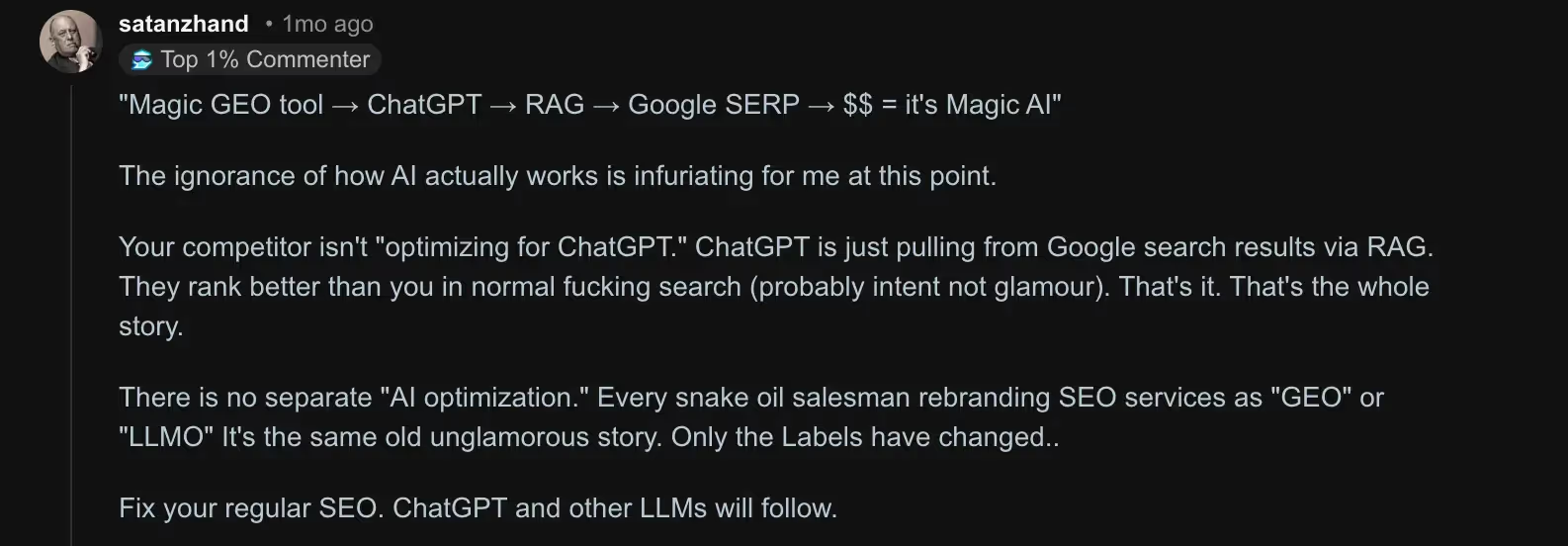
Back to business, if you’re feeling FOMO from every “Top 50 AI SEO tools” list, you can relax. Most experienced SEOs are quietly running on a lean stack, not hoarding every shiny new app.
How to choose the best AI SEO tools for your team
Here’s a simple framework to keep you from buying yet another tool you never log into.
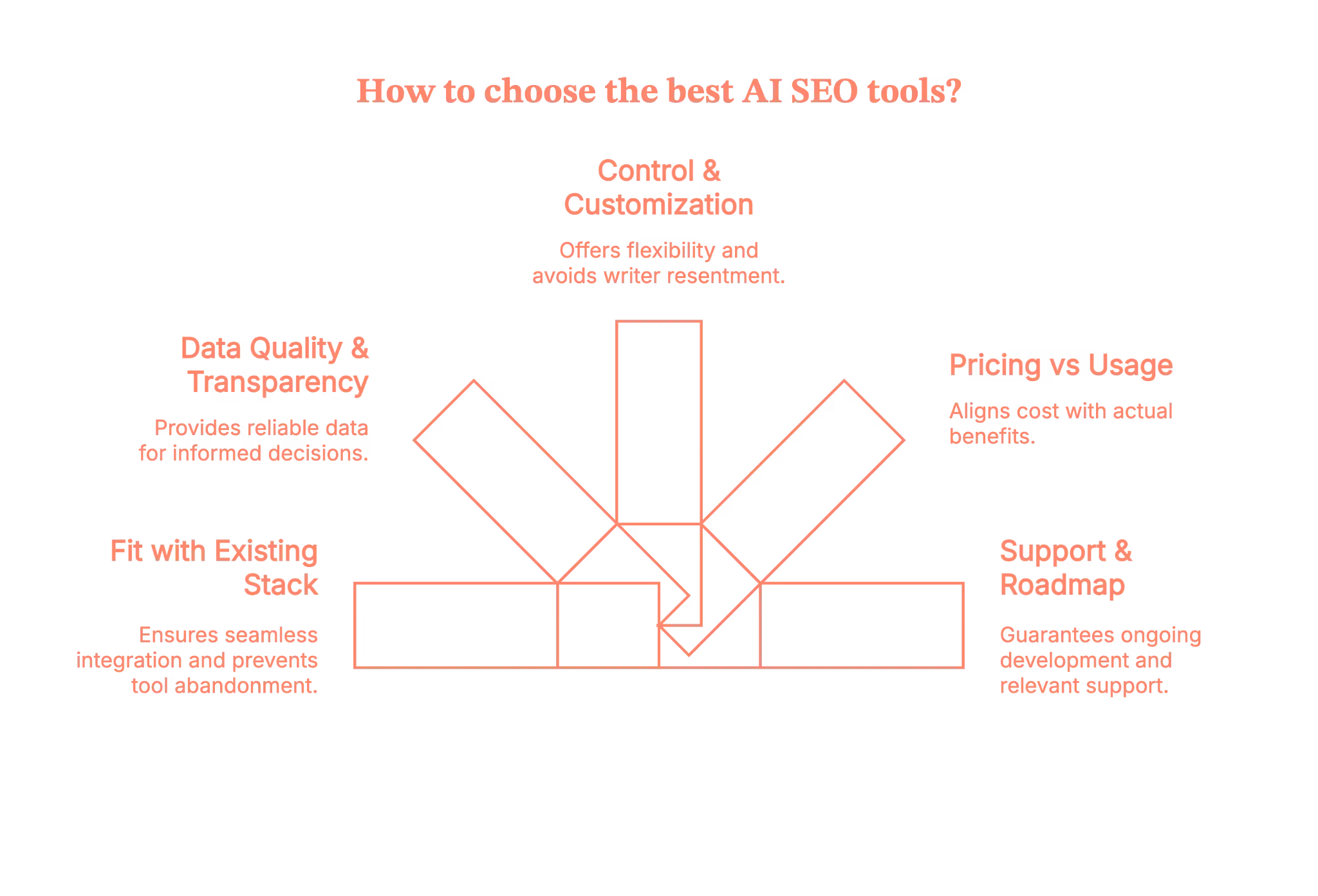
1. Fit first, features second
The important question to ask is “Does this plug into my existing stack?”.
- GSC / GA / Looker Studio
- Your CMS (WordPress, Webflow, custom, etc.)
- Your current SEO suite or rank tracker
If getting data in or out is painful, that tool will quietly die in month two.
2. Data quality & transparency
For tools doing AI-driven keyword research or PAA scraping, ask the following questions.
- Where do they get SERP/PAA data from?
- How often is it updated?
- Is it using live SERP data or stale internal datasets?
You don’t need perfection, but you do need to know what you’re trusting.
3. Control & guardrails
Look for the following:
- Customizable briefs and templates
- Tone and style controls
- Limits on keyword density / spammy recommendations
- Easy exports (Docs, CMS, CSV, API)
If a tool tries to lock everything inside its own editor, that’s friction your writers will resent.
4. Pricing vs actual usage
AI SEO tools love credit systems and per-seat pricing. So, check the following:
- How many briefs, articles, or reports do you really create per month?
- Is it per-user, per-workspace, or per-output?
- Can you clearly tie cost to time saved or traffic gained?
5. Support & roadmap
AI search is evolving fast. Look for:
- Evidence of active development (recent changelog, docs, blog)
- Support that understands AI Overviews/LLM SEO, not just “10 blue links” SEO
- A roadmap that includes SERP changes, AI Overview tracking, etc.
Quick checklist before you buy your next AI SEO tool
Here is a bunch of questions that you must ask before the purchase
- Does this integrate with my core analytics/SEO tools?
- Do I know where its data comes from?
- Can I customize outputs and keep the brand voice intact?
- Will at least one person on my team use this weekly?
- Can I justify the cost with a clear “this saves X hours or grows Y traffic” story?
If you can’t tick most of these, keep looking.
Example AI SEO stacks (by use-case)
Let’s turn all of this into concrete “starter stacks.”
1. Solo blogger/creator
- Goal: move faster without losing authenticity.
- Research & clustering: Mangools (KWFinder) + Keyword Insights
- Content optimization: Surfer or Clearscope (pick one)
- Writing: ChatGPT + Jasper for drafts and rewrites
- Basic tracking: GSC + a simple rank tracker
That gives you AI tools for seo without overwhelming you with dashboards.
2. In-house SEO team
- Goal: collaborate across content, dev, and leadership.
- Core suite: Semrush for keyword research, site audit, and competitor intel
- Content optimization: Surfer or Clearscope for briefs and on-page
- Technical automation: Alli AI for on-page rules and internal link suggestions
- Reporting: Whatagraph for cross-channel SEO reports & dashboards
Here, the focus is on shared visibility and making it easier to prioritize sprints and content roadmaps.
3. Agency
- Goal: keep delivery scalable and client-friendly.
- Research & clustering: Keyword Insights + AlsoAsked for topic maps and FAQ ideas
- Content optimization: Surfer or Clearscope (standardized across writers)
- Technical & automation: Alli AI or OTTO to roll out changes across many client sites
- Reporting: Whatagraph for white-label-friendly, automated reports
Pair this with strong internal SOPs so AI outputs are always human-reviewed before clients ever see them.
Risks, limitations, and best practices while using AI SEO tools
Let’s talk about the parts people regret.
Risks & limitations
1. Generic content everywhere
If you follow tool recommendations blindly, you end up with the same headings, entities, and examples as everyone else. That’s a fast track to “meh” content.
2. Over-optimization
Chasing a content score can push you into keyword stuffing, awkward headings, and bloated, unhelpful articles. Google’s helpful content and spam updates are not kind to that.
3. E-E-A-T & brand voice still matter
AI doesn’t know your internal data, your customer stories, or your lived experience. It also happily hallucinates facts.
Best practices
To stay on the right side of things:
- Use AI to shortlist ideas and structure (outlines, clusters, FAQs)
- Layer in proprietary insights, data, screenshots, and examples
- Keep a “do not automate” list (YMYL content, thought leadership, product pages)
- Treat AI scores as signals, not goals
- Regularly compare AI-optimized content against real performance and adjust
In short: Let AI do the repetitive lifting; keep humans in charge of originality and truth.
So… are AI SEO tools worth it?
Short answer..YES
But
AI SEO tools aren’t going to “do SEO” for you… but they can make a big, very real difference when you use them on your terms, not theirs.
The win isn’t in stacking 15 tools. It’s in knowing where you’re slow, where you’re guessing, and where AI can take the heavy lifting off your plate like research, clustering, briefs, audits, reporting, so your team can focus on thinking, not tab-wrangling.
So start small, pick 1–2 tools per stage, plug them into your existing workflow, and track what actually changes (time saved, content shipped, traffic gained).
Treat AI as your copilot, keep humans in charge of quality and strategy, and you’ll move from
“AI SEO tools = hype” to “AI SEO tools = unfair advantage” a lot faster than you think.
FAQs on AI SEO tools
1. What are AI SEO tools, and how are they different from traditional SEO tools?
AI SEO tools use machine learning and natural language processing to analyze search data, content, and technical issues and then suggest what to do next.
Traditional tools mainly report what’s happening (keywords, rankings, errors), while AI tools try to interpret patterns and generate ideas, clusters, or drafts for you.
2. What are the best AI SEO tools to use right now (for small businesses, agencies, or WordPress sites)?
There’s no single ‘best’ tool, but most winning stacks include one for keyword research/clustering, one for content optimization, and one for reporting.
Small businesses often favour simple, affordable all-in-ones; agencies lean towards tools with collaboration, white-label reporting, and automation.
3. Can SEO be done by AI, or will AI SEO tools replace human SEOs and content writers?
AI can handle a lot of the grunt work: clustering keywords, generating outlines, suggesting internal links, and even drafting rough content. But it can’t replace strategy, brand voice, deep subject expertise, or the judgment needed to decide what actually deserves to rank.
So no, it won’t replace SEOs or writers; it just changes their job from “do everything” to “direct and refine.”
4. Is AI-generated content safe for SEO, or can using AI SEO tools hurt my Google rankings and E-E-A-T?
AI-generated content is not automatically bad for SEO; what matters is whether it’s helpful, accurate, and genuinely valuable to users.
If you publish raw AI output that’s generic, spammy, or wrong, you absolutely can hurt your rankings and perceived E-E-A-T.
Use AI for drafts and structure, then add human editing, original insight, and fact-checking before anything goes live.
5. How do I choose the right AI SEO tools and build a simple AI SEO stack that actually fits my goals and budget?
Start from your workflow, not the tool. Here is what you have to do:
- List where you’re losing the most time (research, briefs, writing, audits, reporting).
- Then pick one tool per major stage, checking for data quality, integrations (GSC/GA/CMS), and pricing that matches how often you’ll really use it.
If you can’t explain how a tool will save hours or help ship better content, it probably doesn’t belong in your stack.

AI Market Research Tools: From Hype Threads to 10 Tools Worth Using
AI market research tools are having a moment.
If you hang out on Reddit, LinkedIn, or even scroll through Google’s ‘People Also Ask’ boxes, you’ll see the same themes:
- “Can ChatGPT do market research?”
- “What are the best AI tools for market research?”
- “Is there an AI that can replace my agency?”
- “Why are all these tools just fancy wrappers around Google?”
And somewhere in there, someone inevitably drops: “Don’t worry, there is an AI for that.”
So let’s zoom out and make sense of all this.
What are people actually doing with AI market research tools, what’s working, what’s overrated, and where is this all headed?
Let’s unpack what’s actually going on in the community conversation… and then I’ll walk you through 10 AI market research tools that are genuinely worth your time.
TL;DR
- AI tools are most helpful with speed, framing, and synthesis, rather than providing final answers.
- Use synthetic personas and digital twins as thinking tools, not decision-makers.
- Map tools to questions, not the other way around; start with the business decision first.
- Real competitive edge lies in combining AI acceleration with human interpretation.
What the internet really says about AI tools for market research
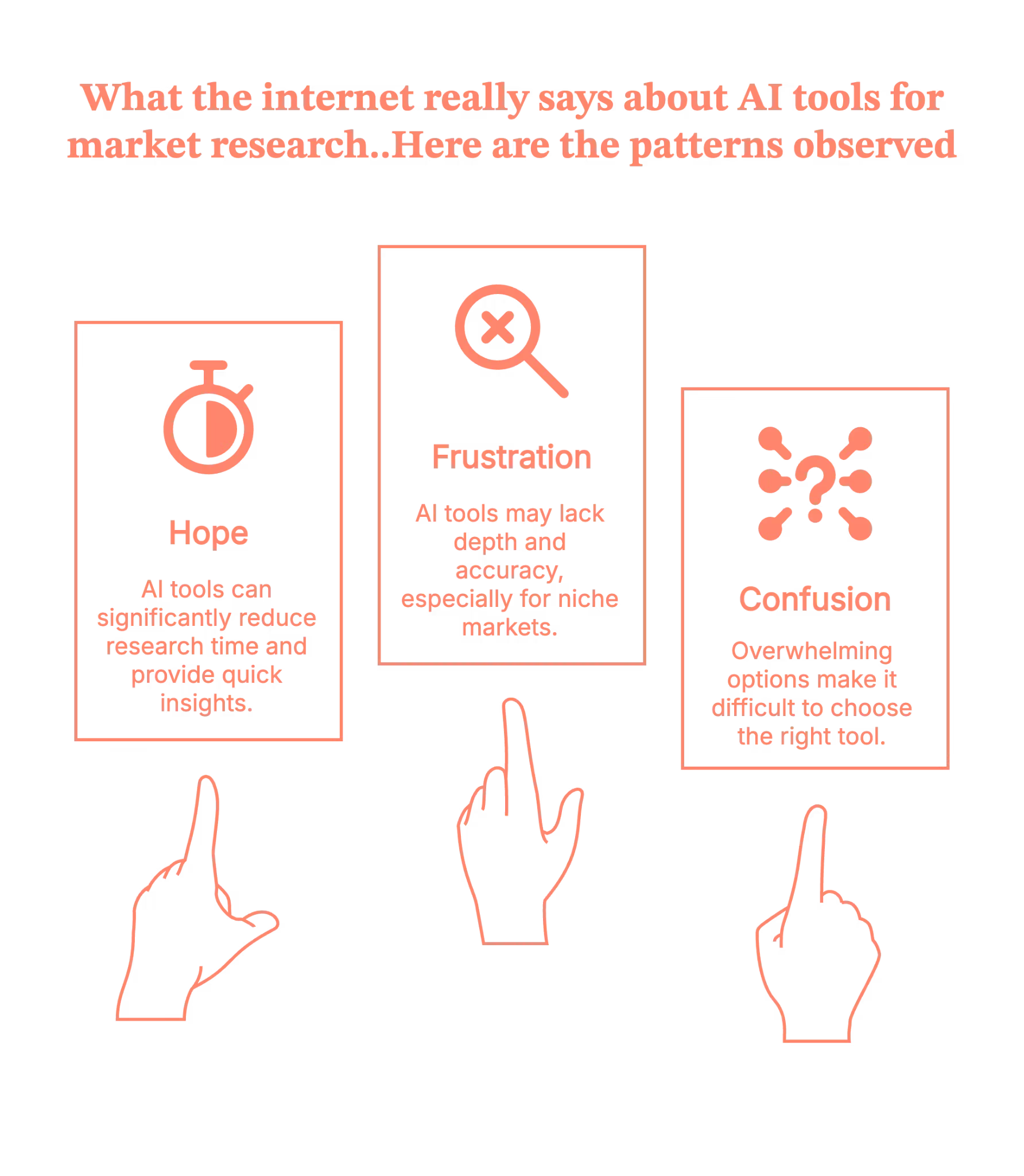
If you scroll through Reddit threads about AI tools for market research or ChatGPT for market research, three big patterns show up:
1. Hope: “This could save me weeks.”
Researchers, founders, and marketers love the idea that:
- Desk research that once took two weeks now happens in a day
- You can spin up personas, competitor lists, and trend scans in a few prompts
- AI can help non-researchers think like an analyst
Blogs and tools lists echo this – many teams report that AI tools for market research let them ramp up on a market or category in a fraction of the time.
2. Frustration: “Most tools are just wrappers.”
On the flip side, you see posts like on Reddit like:
“Most of these AI market research tools are just fancy wrappers around search results. You get lists and summaries, but not the kind of insight that changes how you think about a market.”
And more bluntly from some marketers: when they try to use AI for niche B2B or local markets, ChatGPT confidently makes things up, or misses key players they know from the field.
3. Confusion: “Where do I even start?”
There are:
- Listicles with ‘8 free AI tools for market research’ (ChatGPT, Perplexity, Claude, Elicit, etc.)
- Deep dives with ‘12 best AI market research tools by use case’ (synthetic users, AI persona tools, ad testing, conversational surveys)
- Articles ranking ‘7 best AI tools for market research,’ including Clay and SparkToro for audience analysis
And then the ‘There is an AI for that’ website and similar directories that list hundreds of tools for every imaginable use case. They’ve become a go-to discovery channel, but also a source of overwhelm – like an app store with no curation.
So communities are basically saying:
“AI is clearly powerful, but I don’t want 50 tools. I want a handful that actually change how I work.”
Let’s map the chaos into something more useful.
Also, read Top GTM engineering tools for 2026.
The three big jobs of AI market research tools
If you strip away the branding, AI tools for market research mostly fall into three jobs:
- Desk research copilots – tools like ChatGPT, Claude, Gemini, and Perplexity that help you think, synthesize, and outline.
- Synthetic audiences – tools that build synthetic personas or digital twins so you can ‘ask the market’ questions without running a survey every time.
- Audience & signal intelligence – tools that crawl the web, enrich leads, or aggregate behavior (Clay, SparkToro, competitor/trend tools, etc.).
Those three jobs usually show up in two different ways of using AI in market research
- Oracle mode – you type a question into a large language model and hope the answer isn’t hallucinated.
- Proxy mode – you use synthetic personas, digital twins, or AI-powered panels to simulate how real people might respond.
HBR’s recent piece on ‘The AI Tools That Are Transforming Market Research’ describes this proxy shift clearly, especially around synthetic personas and digital twins:
- Synthetic personas – AI-simulated segments built from demographic, behavioral, or psychographic data.
- e.g., you can ask, “As a college-aged male gamer who spends $50/month on in-app purchases, how would you react to…?”
- Digital twins – AI models of real individuals calibrated on their survey answers, behavior, and traits.
- Your panel becomes a set of digital twins you can re-ask questions without pinging the human every time.
- Your panel becomes a set of digital twins you can re-ask questions without pinging the human every time.
In academic tests, digital twins reached about 88% relative accuracy in reproducing their human counterparts’ responses, which is impressive. However, they still only captured around half of the experimental effects you see in real humans. Translation: promising, not perfect.
Communities are reacting in a pretty balanced way:
- Excited about speed
- Wary about bias and ‘AI respondents’ that sound more polite and optimistic than actual customers
- Confused by overlapping vendor language – synthetic users vs digital twins vs synthetic data
So the smart teams are asking:
“Where can AI safely speed things up – and where do we still need humans in the loop?”
Let’s look at how ChatGPT for market research fits into that picture first.
ChatGPT for market research: what it’s good for (and where it breaks)
Reddit is full of people asking, “How do I use ChatGPT for market research?” and hitting one of two walls:
- It’s either too generic
- Or it fabricates very specific facts about local markets, niche B2B spaces, or real company counts.
The pattern that’s emerging in communities and practitioner blogs is, use ChatGPT as a thinking partner, not a database.
Where ChatGPT is great:
- Clarifying your brief
- e.g., Turn this vague idea into 3 concrete research questions.
- Designing instruments
- e.g., Draft interview guides, screener questions, and survey items you can later refine.
- Summarizing messy qualitative data
- e.g., Cluster open-ended responses into themes, highlight quotes, suggest segment-specific insights.
- Role-playing synthetic personas (lightweight)
- e.g,. Answer as a 28-year-old founder of a B2B SaaS in logistics – how would you react to this pricing?
Where people get burned:
- Treating model output as live market data (‘What’s the exact current market share of X in Germany?’).
- Asking for exhaustive local lists (small vendors, niche communities, local competitors).
So yes, compared to most market research AI tools, ChatGPT (and its peers) are a fantastic thinking companion. But they’re not a replacement for panels, CRM data, or real customers.
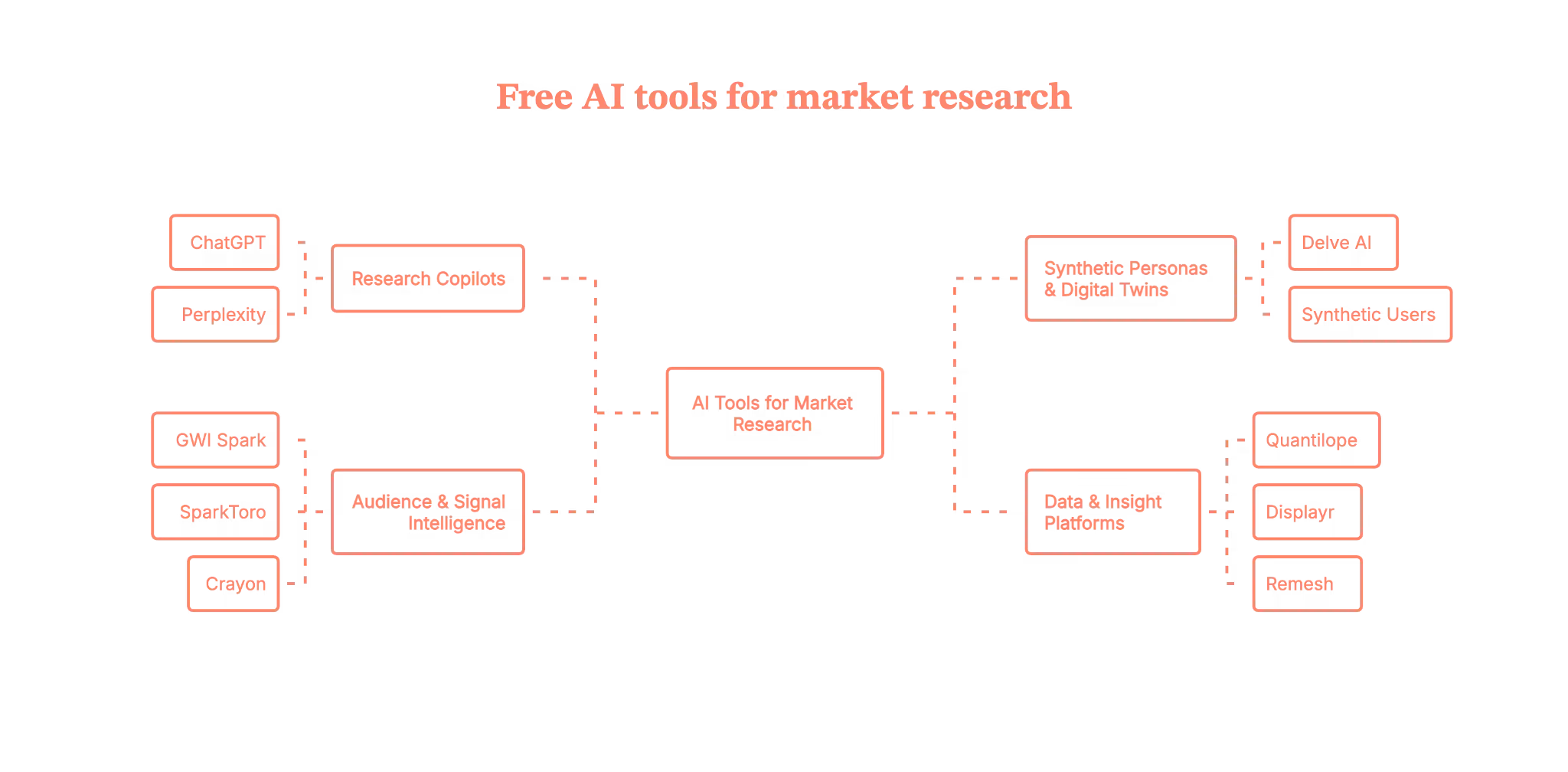
Now, instead of dumping 50 tools on you like a directory, let’s focus on 10 AI tools for market research that keep popping up in serious discussions, and explain where in your workflow they actually help.
10 best AI tools for market research (and where they fit)
I’ll group these into four buckets:
- Research copilots
- Synthetic personas & twins
- Audience & signal intelligence
- Data & insight platforms
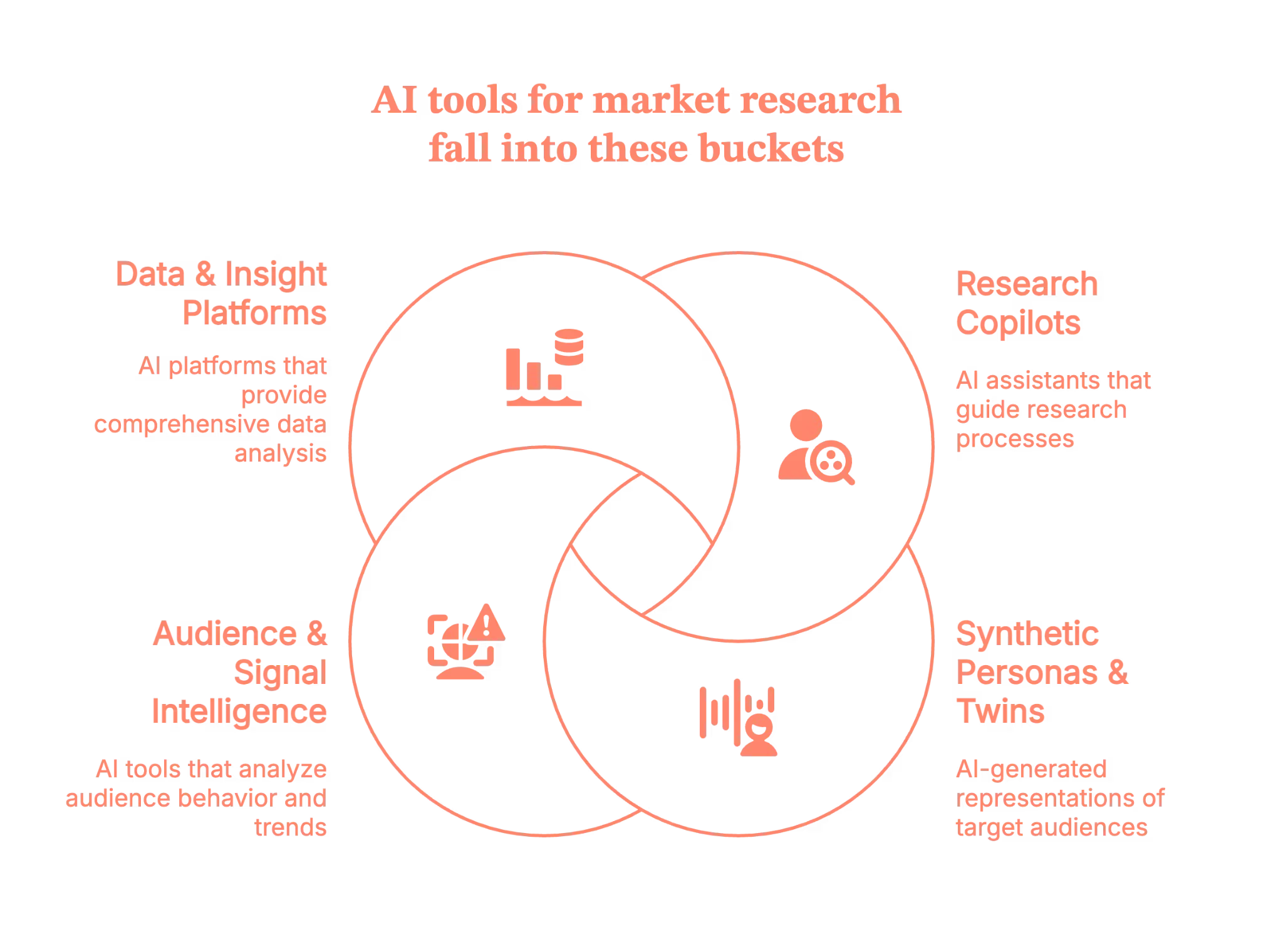
Research copilots
1. ChatGPT – the generalist research brain
We’ve already seen where ChatGPT shines in research. As a tool in your stack, here’s how to put it to work.
- Great for: framing research questions, drafting guides/surveys, summarizing interviews, generating hypotheses.
- Why people like it: it’s flexible, fast, and good at turning chaos into structured thinking – as long as you fact-check any hard numbers.
Use it to:
- Turn stakeholder brain-dumps into clear research objectives
- Draft multiple versions of stimuli, concepts, and landing page copy to test
- Summarize qual transcripts into ‘What we’re really hearing’ narratives
2. Perplexity – research with receipts
- Perplexity leans into grounded answers with citations and a ‘Deep Research’ mode that runs dozens of searches and synthesizes them into a report.
- Great for: competitive intel, scanning adjacent markets, gathering secondary insights you can then interpret.
Use it to:
- Quickly map existing players, business models, and common value props in a new space
- Pull together a sourced landscape doc you can annotate with your own POV
Synthetic personas & digital twin tools
3. Delve AI – personas, digital twins, synthetic users in one place
Delve AI positions itself as AI market research + marketing software:
- Generates data-driven personas, digital twins of customers, and synthetic users from analytics, CRM, competitor, or social data.
- Lets you chat with these virtual customers, run synthetic research, and get channel-specific recommendations.
Best for:
- Teams that already have a decent amount of traffic/customer data and want to:
- Turn that into living personas
- Run ‘what if?’ scenarios before committing to big campaigns
It’s basically a commercial implementation of the synthetic persona / digital twin ideas HBR and academics are exploring – but with marketing outputs attached.
4. Synthetic Users – instant ‘interviews’ with AI participants
Synthetic Users focuses on AI-generated research participants:
- You define the profile; the platform generates synthetic participants who can answer interview questions or surveys.
- Supports follow-up probing and auto-generated insight reports.
Best for:
- Early-stage exploration when recruiting real participants is hard, or when you want to rehearse research before going live.
Important caveat (echoing UX and MR experts): treat synthetic users as rehearsal and hypothesis tools, not replacements for real users – especially for emotionally loaded or high-stakes topics.
Audience & signal intelligence
5. GWI Spark – AI on top of real global survey data
GWI Spark is an AI assistant sitting on top of a massive, global survey dataset (nearly a million consumers across 50+ markets).
- You type natural-language questions (‘How do Gen Z in the US discover new skincare brands?’)
- Spark responds with actual survey-based insights, not scraped web guesses.
Best for:
- Brand, product, or strategy teams that need trusted, quantitative, fast, and don’t have time for custom fieldwork on every question.
6. SparkToro – where your audience actually hangs out
SparkToro is an audience research tool that tells you:
- Which sites, podcasts, YouTube channels, Subreddits, and social accounts your audience pays attention to.
It’s not an AI respondent tool; it’s a behavioral mirror:
- Great for:
- Media planning
- Influencer selection
- Positioning and content ideas based on real audience affinities
Think of it as: ‘Stop guessing which channels your persona uses. Here’s what they actually consume.’
7. Crayon – AI-powered competitive intelligence
Crayon is a competitive intelligence platform that continuously monitors competitor sites, pricing, messaging, and other signals.
- AI helps flag meaningful changes and surface insights for sales, product, and marketing.
Best for:
- Product marketers and strategy teams who’d love a full-time “competitive analyst” but don’t have headcount.
Use it to:
- Track shifts in competitor positioning, packaging, and feature launches
- Feed that intel back into your research questions: “What does this market move mean for our segment X?”
Data & insight platforms
8. Quantilope – end-to-end AI-powered consumer intelligence
Quantilope is a consumer intelligence platform that blends survey automation with AI-based analysis and reporting.
- Built for: concept tests, pricing studies, U&A, etc.
- AI helps with survey setup, analysis, and storyboard/visualization.
Best for:
- Teams already comfortable with survey-based research who want to compress the study → insight → deck cycle without losing methodological rigor.
9. Displayr – AI for survey analysis & reporting
Displayr is an AI-powered analysis and reporting suite popular with MR pros:
- Cleans and weights data, runs analyses, codes open-ended responses, and auto-builds dashboards.
Think of it as:
- Your quant ‘insight factory’ – AI does the heavy lifting, you stay in control of what the story actually means.
Best for:
- Teams drowning in data who need to turn large, messy datasets into usable stories faster.
10. Remesh – AI-boosted qual at quantitative scale
Remesh is a platform for live, large-scale qualitative conversations:
- You can run online focus groups with up to ~1,000 participants at once.
- Participants respond, vote on each other’s answers; AI organizes and analyzes the open text in real time.
Best for:
- When you want qualitative depth + quantitative reach: message testing, concept reactions, early product feedback.
How to actually use these tools without losing the plot (and your mind)
With all of these, it’s tempting to go tool-first. Instead, borrow a page from the HBR guidance on synthetic personas and digital twins and flip it:
- Start with the decision, not the tool.
- ‘We need to decide: launch this feature now vs next quarter.’
- ‘We need to repackage pricing for segment X.’
- Decide what evidence would change your mind.
- X% of target customers see this as a ‘must have.’
- Clear list of top 3 objections by segment
- Map tools to questions, not the other way around.
- Use ChatGPT / Perplexity to sharpen the brief and outline methods.
- Use GWI Spark / SparkToro / Crayon for fast, top-down market reading.
- Use Delve AI / Synthetic Users to rehearse concepts or stress-test scripts.
- Use Quantilope / Remesh / Displayr when you’re ready for structured, defensible data.
- Benchmark synthetic against real.
This is straight out of the digital twin research playbook, run small human samples in parallel and compare.
Don’t just ask ‘Is it accurate?’ – ask:
- Would we have made the same decision using only the synthetic data?
- Keep humans in the high-leverage loops.
Let AI compress the painful parts (collection, summarization, first-pass analysis), but keep humans for:- Prioritization
- Interpretation
- Ethics and ‘Should we do this?’ calls
Forget the hype. Here’s where AI market research tools actually work
AI market research tools are everywhere, but most discussions online echo the same confusion: “What’s real, what’s noise, and where do I even begin?”
Rather than chasing bloated tool directories, focus on ten standout platforms that users keep returning to: tools like ChatGPT and Perplexity for framing and synthesizing, Delve AI and Synthetic Users for lightweight persona modeling, and behavioral data engines like SparkToro and Crayon.
But the key takeaway isn’t tool selection, it’s methodology. The smartest teams are blending AI’s speed with human insight, mapping tools to decisions, not the other way around. Whether you're streamlining research workflows or pressure-testing campaigns before launch, the value lies in matching the tool to the job, not replacing judgment with automation. AI won’t replace your research team, but it will challenge you to think faster, ask sharper questions, and stay closer to real-world signals.
In other words, you don’t need fifteen market research AI tools to be ‘doing AI’.
You need a clear question, a handful of tools you trust, and a process that blends synthetic speed with human judgment.
Because the real competitive advantage over the next few years won’t be “We used AI.”
It’ll be:
“We used AI to ask better questions, faster – and still cared enough to talk to actual people.”
PS: Got intent data and AI insights? Here’s how to turn them into pipeline
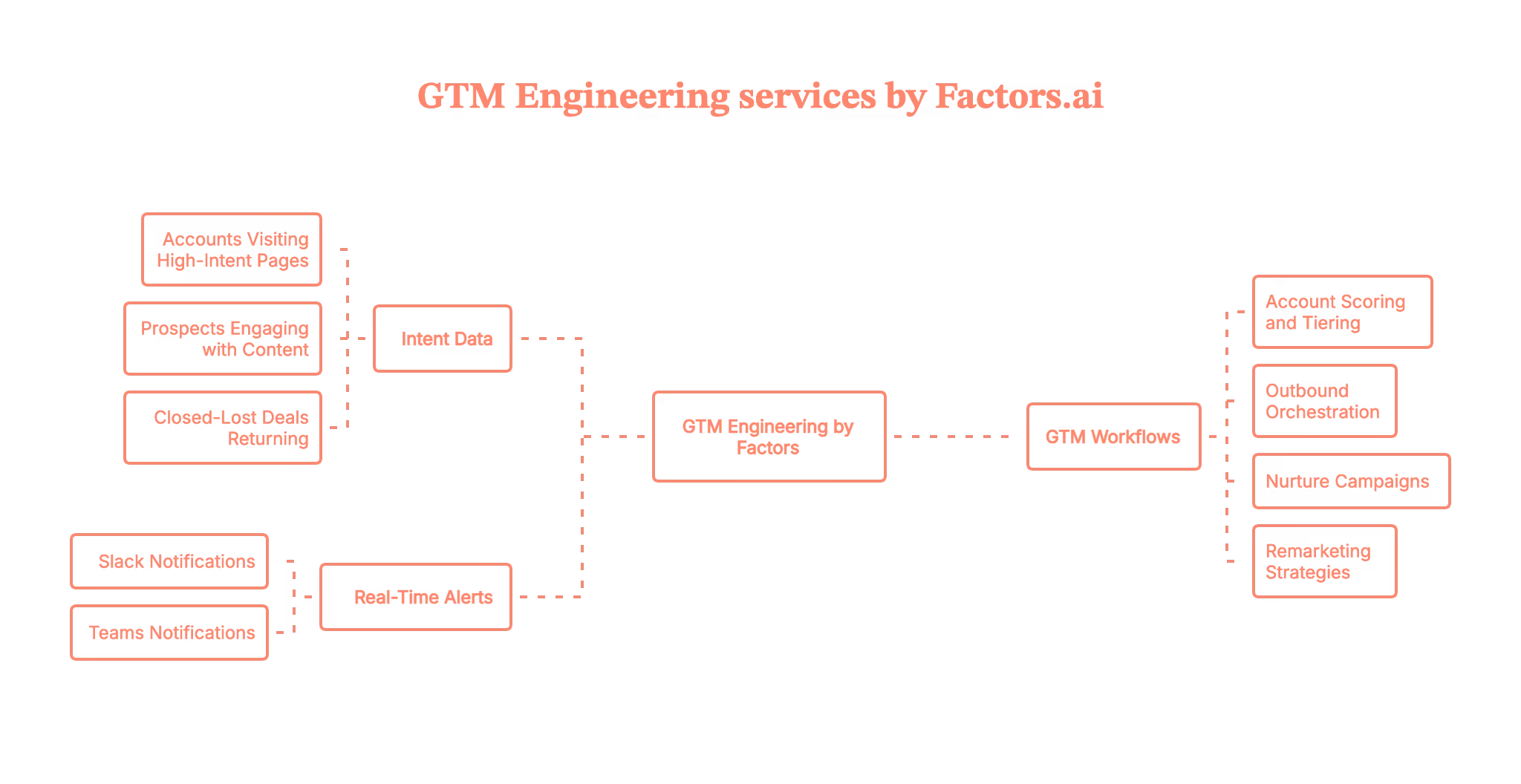
If you’re already playing with AI market research tools, you’re probably sitting on a growing pile of signals:
- Accounts visiting high-intent pages
- Prospects engaging with content or ads
- Closed-lost deals quietly coming back to your site
The real question becomes: “Now what?”
That’s exactly the gap GTM Engineering by Factors is built to close.
Instead of just telling you which accounts are warm, Factors connects your website, CRM, ad platforms, and enrichment tools, then turns all those signals into clear actions for sales and marketing:
- “Here are this week’s highest-intent accounts and the 2–3 people to contact in each.”
- “This closed-lost account is back on your pricing page. Here’s what they’re looking at.”
- “These accounts fit your ICP, are hiring in key roles, and just spiked on product pages.”
Behind the scenes, Factors builds and maintains GTM workflows that:
- Score and tier accounts based on fit and behavior
- Trigger real-time alerts in Slack/Teams
- Orchestrate outbound, nurture, and remarketing across tools you already use
So instead of adding ‘yet another AI tool,’ you’re adding a GTM automation layer that turns research and intent data into meetings and pipeline.
If your next question is, “How do we connect all this AI insight to actual revenue?” GTM Engineering by Factors is a very solid first step.
Curious what this could look like on your stack, with your accounts and intent signals?
Book a demo with the Factors team, and we’ll walk you through a live GTM Engineering setup end-to-end.
To learn more, also read our blog on website visitors to warm outbound plays with GTM engineering.
FAQs on AI market research tools
Q.1 The best AI for market research?
Most people often mix LLMs (ChatGPT/Claude) with research assistants like Perplexity for discovery, then validate with domain tools.
Q.2 AI surveys that have conversations instead of static questions — useful or overthinking?
Conversational/AI-moderated surveys can increase depth and speed; the value depends on the guardrails and the reliability of the analysis.
Q.3 How many AI market research tools do I actually need to get started?
You can do a lot with a lean stack: one LLM copilot (ChatGPT/Claude), one research assistant with citations (Perplexity), and one or two audience/insight tools (like SparkToro, GWI Spark, or your platform of choice). The win comes from your workflow, not from collecting logos.
Q.4 Can AI replace my research agency or in-house team?
Not yet (and probably not for a while). AI is brilliant for speed, like drafting guides, summarizing data, and stress-testing ideas. But you still need humans for sampling, methodology, interpretation, and the “So what do we do now?” decisions.

B2B Demand Generation Best Practices That Actually Drive Pipeline
Your dashboard looks great.
Leads are coming in, CPL is ‘on target’, content is shipping, events are happening, paid is always-on.
…and yet when you open the pipeline report, it’s a bit of a ghost town.
Sales is saying: “Yeah… but none of these people are actually buying.” Finance is asking about CAC. Your CEO wants pipeline from demand gen, not form fills.
Sound familiar?
If you work in B2B SaaS marketing, this is THE tension. You’re doing a lot of stuff, but you’re not always sure what’s really moving the marketing-sourced pipeline and revenue.
This guide is a practical playbook to avoid this tension.
We’ll walk through 9 B2B demand generation best practices you can use as an audit checklist, plus simple benchmarks so you can sanity-check CAC payback and funnel performance for a B2B SaaS motion.
PS: If you are confused between ABM and Demand generation, read our blog: Account-Based Marketing vs Demand Generation.
TL;DR
- Narrow your ICP: Vague targeting kills efficiency; define exact firmographics, technographics, triggers, and buyer roles to guide campaigns.
- Build a real funnel: Structure content to support awareness, consideration, and purchase stages; don’t rely on surface-level blog posts or gated PDFs.
- Measure qualified outcomes: Shift away from CPL and toward SQLs, pipeline value, CAC, and payback period for each campaign and channel.
- Align with Sales: Treat Sales as a partner in demand gen; align definitions, build feedback loops, and review pipeline together, not in silos.
So… what is B2B Demand Generation really?
In SaaS, B2B demand generation is everything you do to:
- Create demand to get the right people to understand the problem you solve and why it matters now.
- Capture demand to show up when in-market buyers are actively looking, and turn that intent into pipeline.
It’s not just running paid ads or collecting form fills. It’s the system that takes strangers and turns them into:
- Educated, problem-aware buyers
- Qualified opportunities in your CRM
- Revenue your CFO will actually care about
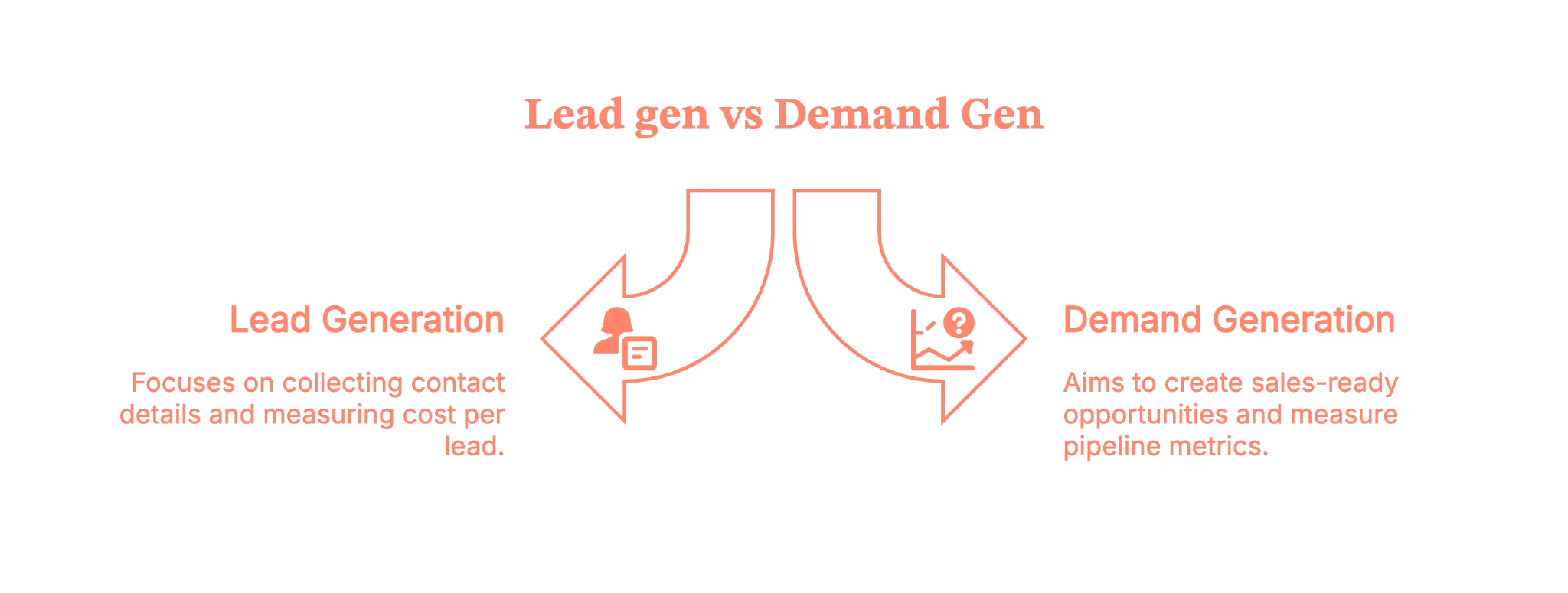
B2B Demand Generation vs Lead Generation
Here is the difference.
- Lead gen optimizes to collect contact details. Ebook downloads, generic newsletter signups, “get the checklist” gates. You measure leads and CPL.
- Demand gen optimizes to create sales-ready opportunities and revenue. You measure pipeline, SQLs, cost per opportunity, CAC, and payback.
This is what you need to know.
Lead gen fills a database.
Demand gen fills a pipeline.
You need both at some level, but this article is about structuring demand gen so Sales stops complaining and Finance stops squinting at your dashboards.
If you are thinking of diving deep into the differences, here is a blog to read: Lead genration vs Demand generation.
Best practice #1 – Get painfully clear on who you’re actually targeting
If your ICP is “mid-market companies in North America that care about efficiency,”… you don’t have an ICP, you have a wish.
So, start with a razor-sharp Ideal Customer Profile and a clear problem statement.
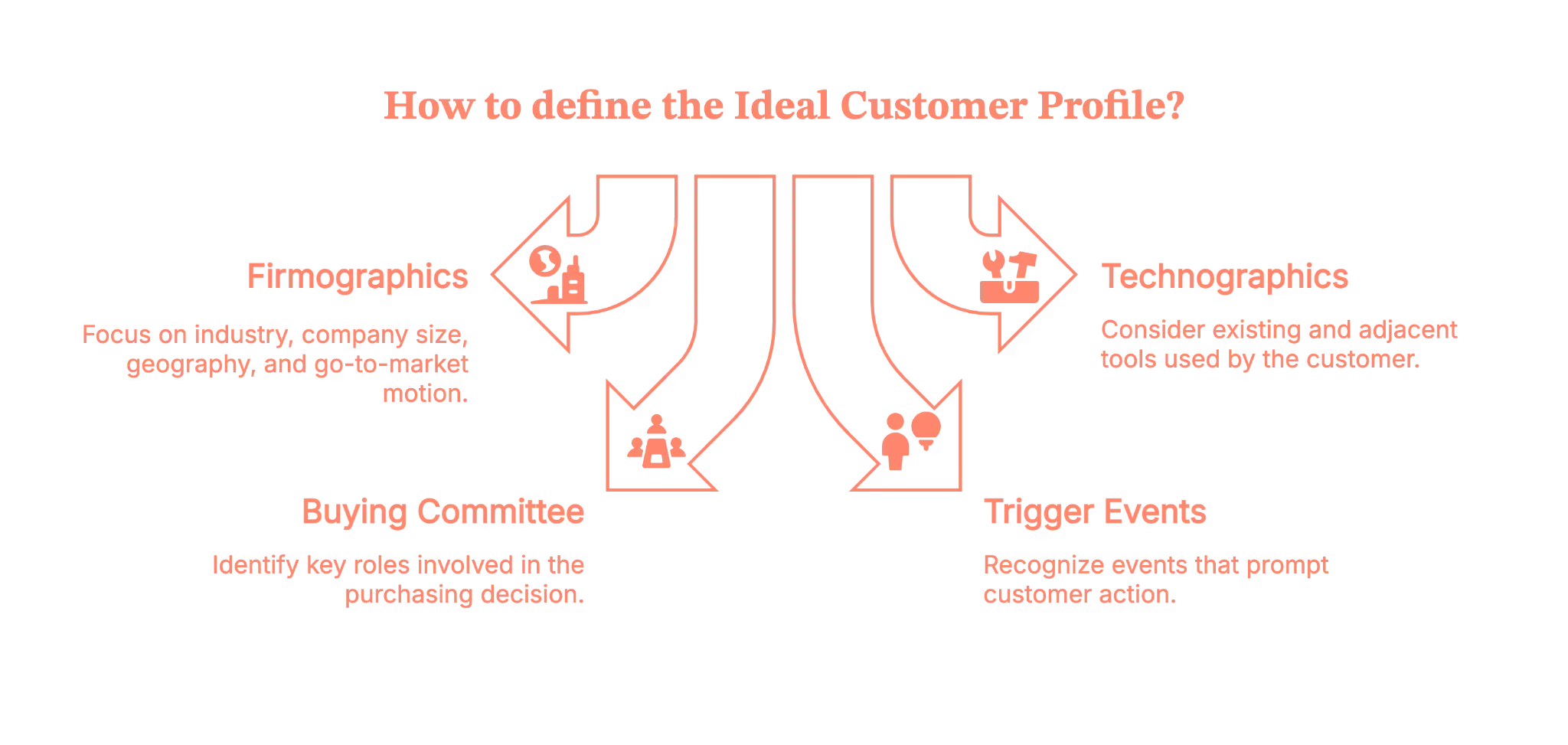
For SaaS, your ICP should include:
1. Firmographics
- Industry / vertical
- Company size (by revenue and/or employee count)
- Geography (US, NA, EMEA, etc.)
- Go-to-market motion (PLG, sales-led, hybrid)
2. Technographics
- What tools they already use (CRM, MAP, data stack)
- Adjacent tools that signal a good fit (e.g., using Salesforce and HubSpot, using Snowflake, etc.)
3. Buying committee
- Primary champion (Director of Ops, VP Marketing, RevOps, etc.)
- Economic buyer (CFO, CRO, CMO)
- Key blockers (IT, Security, Legal)
4. Trigger events
- Hiring for specific roles
- Raising a funding round
- Moving upmarket or into a new segment
- Tool consolidation or vendor changes
Don’t build this in a vacuum
Sit down with:
- Sales – “Which customers close fastest and pay the most?” “Who do you never want to talk to again?”
- Customer Success – “Who gets value quickly?” “Who churns?”
- RevOps – “What does the data say about win rates and sales cycle by segment?”
Write this down in a doc and keep updating it. Use it to prioritize accounts, channels, and messages.
And yes, you’re allowed to say “No” to segments that consistently waste your time.
Self-audit questions
- Do you have a written ICP doc, or is it tribal knowledge?
- Can everyone describe your “hell no” accounts?
- Are campaigns built around these definitions, or are you still targeting “anyone with a LinkedIn profile”?
Best practice #2 – Turn scattered content into a real demand engine
Most SaaS teams already “do content” like blogs, webinars, ebooks, and a random podcast episode from 2022.
The problem is that it’s rarely structured as a full-funnel demand gen engine.
Let’s fix that.
Map your content to the whole demand gen funnel
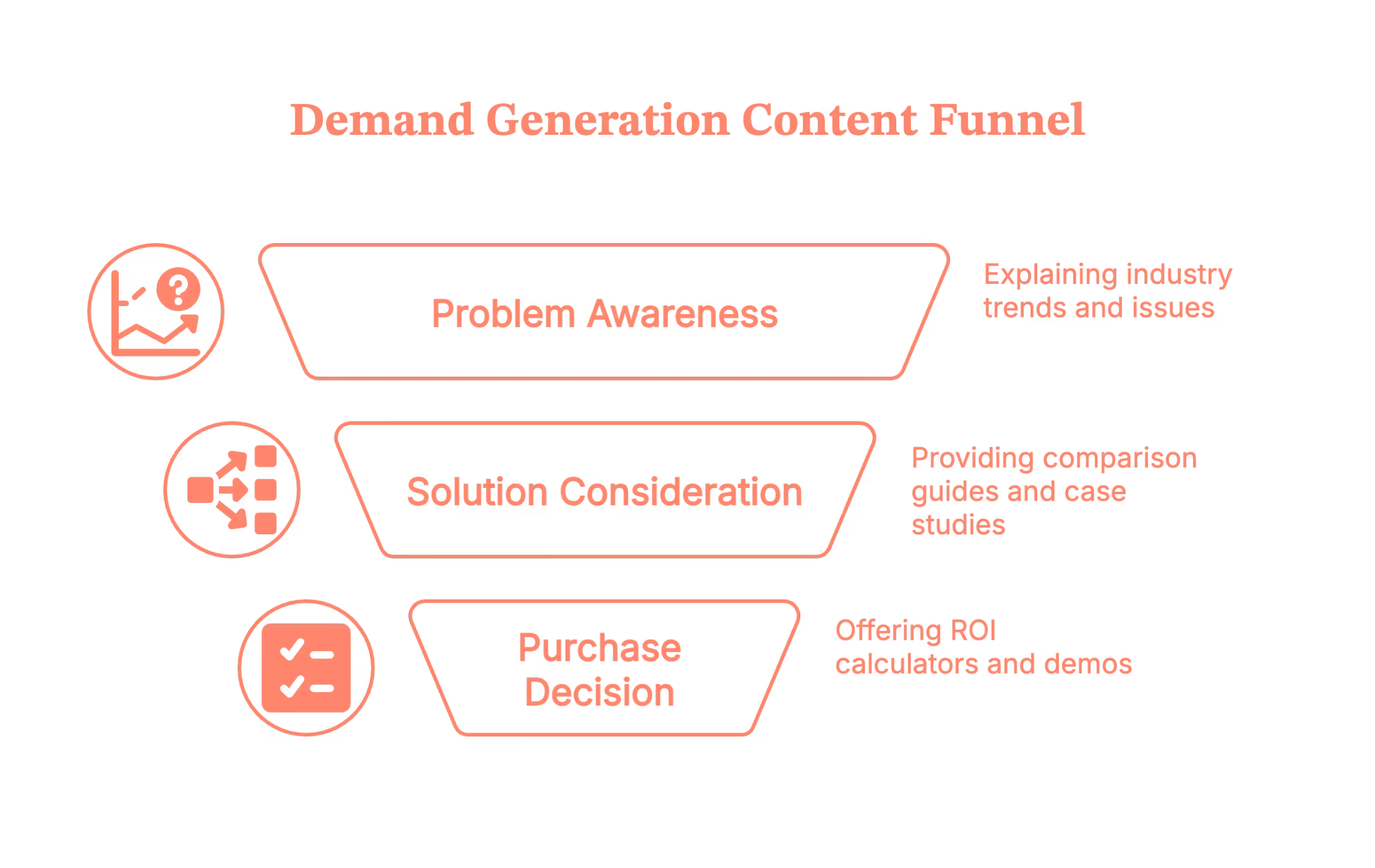
Think of it in three stages:
1. Problem/awareness (create demand)
- Problem explainers
- Industry trend breakdowns
- Strong points of view and “here’s what everyone’s getting wrong” content
2. Solution/consideration
- Comparison guides (“build vs buy”, “X vs Y category”)
- Case studies by segment
- Webinars / live sessions with practical walk-throughs
- “How we do X internally” content
3. Purchase/decision (capture demand)
- ROI calculators and business case templates
- Interactive demos or product tours
- Implementation guides
- Security and integration one-pagers
Ask yourself this question: “If someone binge-consumed our content, could they build a business case without ever talking to us?”
If not, you’re leaving pipeline on the table.
Use content formats that B2B buyers will actually consume
For B2B SaaS, a good mix usually includes:
- Deep blog/article guides (for SEO + education)
- Case studies in multiple formats (PDF, short video, live customer interviews)
- Webinars / live sessions you later chop up for social and email
- Short video clips for LinkedIn and nurture
- Interactive tools like calculators, assessments, and benchmarks
- Original research or mini “state of X” reports
Don’t overcomplicate this. Start by taking 2–3 of your best ideas and expressing each in 3–4 formats.
Gated vs Ungated: When to ask for an email
Here’s a simple SaaS demand generation rule of thumb:
Ungated
- Educational blog posts
- Thought leadership
- Most videos and webinars after the live date
- Frameworks and explainers
Use these to build trust and demand. The more helpful content people see, the more likely they are to raise their hand later.
Gated (sparingly)
- Tools or templates that have clear, immediate value
- Event registrations
- Deep evaluation content like ROI calculators or tailored assessments
Gate it when exchanging an email feels fair and aligned with buyer intent. If you’d be annoyed filling out a form for it, don’t gate it.
Self-audit questions
- Do you have content mapped to each demand gen funnel stage, or is it all top-of-funnel?
- Could a champion build a decent internal business case using only what you’ve published?
- Are you over-gating content that should be helping us create demand?
Best practice #3 – Show up consistently in the channels your buyers actually use
If you rely on a single channel (just Google Ads, just webinars, just events), you’re one algorithm or budget cut away from a dry pipeline.
Effective B2B demand generation tactics use a multi-channel mix that reflects how buying committees actually research and decide.
Core channels that tend to work for B2B SaaS
For B2B SaaS, your short list usually should include the following:
LinkedIn – Your prospects and customers hang out here
- Organic – personal profiles (founders, execs, subject-matter experts), company page
- Paid – Sponsored Content, Conversation Ads, retargeting
Email – always-on channel for nurturing buyers
- Newsletter with genuinely useful content, not just product updates
- Nurture sequences tailored by segment and intent stage
Paid search (Google/Bing) – capture high-intent, in-market buyers
- Capture in-market demand on high-intent keywords
- Carefully separate branded, competitor, and generic category terms
Paid social – amplify reach and reinforce messages
- LinkedIn and Meta (Yes, it works like a charm) for retargeting and lighter awareness
- Display/video to stay visible to target accounts
Communities & events – deepen relationships with buyers
- Niche Slack/Discord groups, peer communities, and industry events
- Webinars, customer roundtables, AMAs
Podcasts / YouTube – if you have the resources
- Great for narrative building and longer-form trust
The key is to pick 2–3 primary channels where your buyers already spend time, then layer in retargeting and content distribution.
Think in multi-touch, not one-hit wonders
Your future customer might:
- See a LinkedIn post
- Hear your founder on a podcast
- Click a paid search ad
- Attend a webinar
- Finally, book a demo via your site
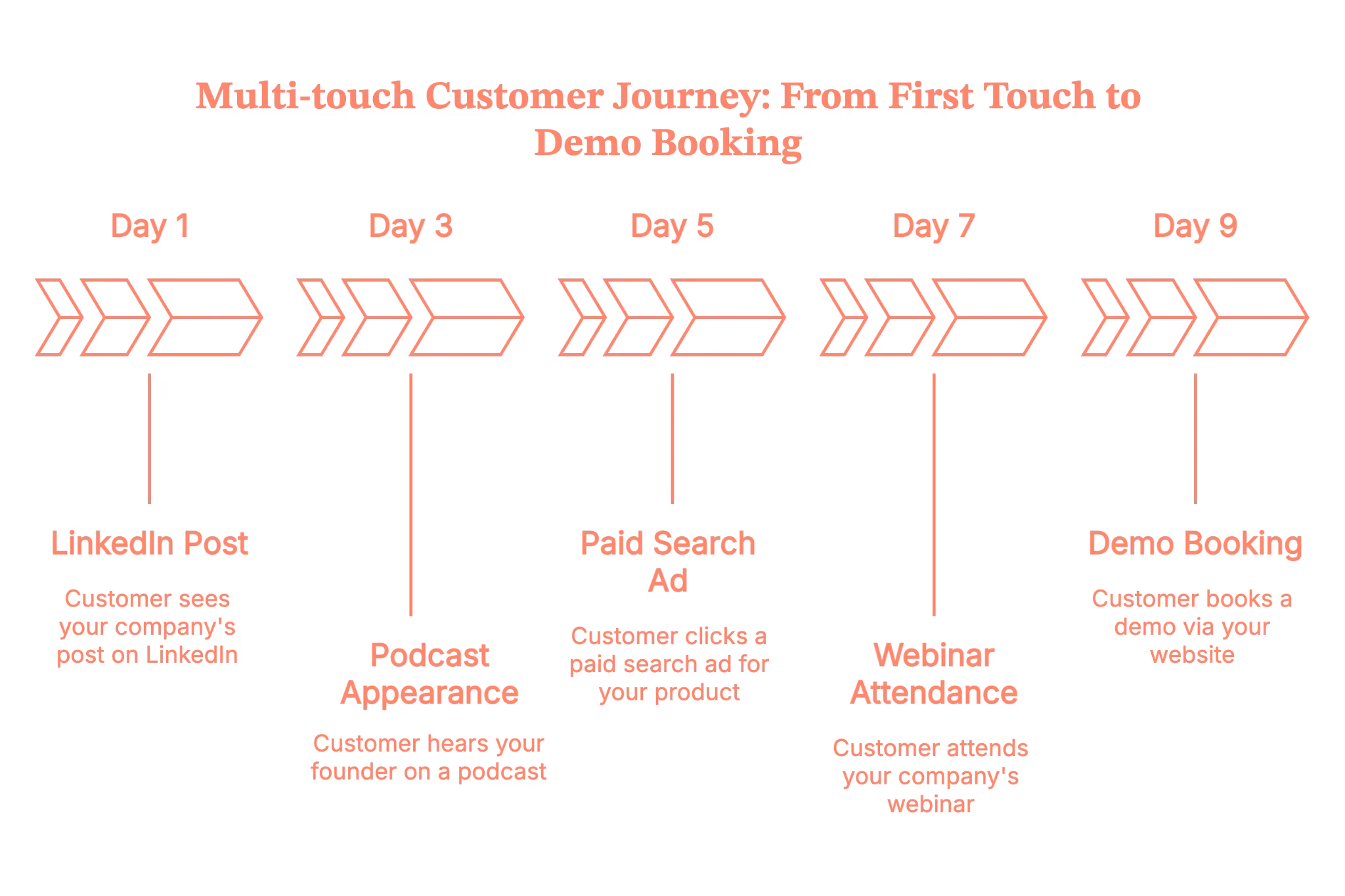
That’s not “attribution hell”, it’s reality. Your job is to build familiarity and trust across multiple touchpoints, not to hope that one ad does all the work.
This is also where multi-touch attribution stops being a nice-to-have and starts being survival gear. To know more about the implementation process, read our blog on Implementing multi-touch attribution.
With Factors.ai, you can actually see how all those touches work together – LinkedIn ads, webinars, website visits, organic visits, outbound emails, etc. This helps you understand which combinations reliably turn into SQLs, opportunities, and revenue, not just clicks.
In fact, Factors.ai has gone one step further and built you features called ‘Account 360’ and ‘Milestones’.
- Account 360 pulls in activity from your site, CRM, and ad platforms, scores accounts, and sends real-time Slack/Teams alerts when high-intent actions happen.
- Milestones visualizes every touch across 1st, 2nd, and 3rd-party intent and shows how accounts move between stages and which interactions actually drive conversions.
Together, they turn multi-touch attribution from guesswork into a clear, account-level story – so you can stop optimising for cheap leads and double down on the plays that consistently create pipeline and closed-won revenue.
Self-audit questions
- Do you know the top 2–3 channels that consistently touch opportunities before they close?
- Are you using retargeting to stay top of mind with people who’ve engaged with high-intent content?
- Are your channels working together, or is each campaign a silo?
Best practice #4 – Use paid media to pour fuel on what already works
Paid can be magical… or it can be the fastest way to light budget on fire.
Trust us, we are not making this up, read more about this on our recently curated LinkedIn B2B Benchmark report of 2025.
Treat paid demand generation as an amplifier, not your primary source of “figuring out what message works”.
Start from proven messages and offers
Before scaling spend, make sure you have:
- Website messaging that already converts some traffic
- At least a couple of offers that Sales LOVES (e.g., assessment, ROI analysis, tailored demo)
- 1–2 content pieces that organic or outbound already prove are resonating
Use those as the starting point for LinkedIn, Google, and Meta campaigns.
Your Google Demand Gen campaigns and other similar campaigns can work for B2B, but:
- They need a significant conversion volume to optimize
- They’re better at cheap traffic than at guaranteed high-intent leads
- You still need a tight audience, a creative strategy, and strong landing pages
If your budget is limited and your CFO is watching every dollar, prioritize:
- Search on high-intent keywords
- LinkedIn targeting your ICP
- Retargeting of engaged visitors and key account lists
Then layer in broader “Demand Gen” style campaigns as you learn.
If your paid budgets are tight, you might want to read our blog on LinkedIn ads targeting mistakes to to avoid costly mistakes.
Optimize for qualified outcomes, not vanity metrics
Shift from:
- Cost per click → cost per qualified demo/cost per opportunity
- Leads → SQLs and opportunity creation
- Shallow forms → clear, honest offers (“Talk to a specialist”, “See how this works with your stack”)
Operationally, that means:
- Dedicated landing pages with one clear call to action
- A/B testing headlines, social proof, and offers
- CRM feedback loops to see which campaigns actually create pipeline and revenue, not just interest
Self-audit questions
- Do you know which paid campaigns produced your last 10 closed-won deals?
- Are you optimizing for the metrics Sales and Finance care about, or just CTR and CPL?
- Are you running any campaigns purely because “everyone else is”?
Best practice #5 – Fix your data, tracking, and conversion paths before scaling harder
You can’t run serious SaaS demand generation on a broken data foundation (well, you can, but you’ll hate it).
Get the basics of tracking right
At a minimum, you need:
- Consistent UTMs on all paid and major owned campaigns
- Tight CRM integration (HubSpot, Salesforce, etc.)
- Clearly defined lead statuses and lifecycle stages
- A simple attribution model (even if it’s just “primary source” + “assist touches” for now)
Don’t chase perfect attribution; chase trustworthy, directional data you can actually act on.
Treat your website like a product
Your website is the core of your demand gen funnel. Start treating it like a conversion product:
- Clear primary CTAs on high-intent pages (Pricing, Product, Integrations, etc.)
- Fast load times, especially on mobile
- Messaging that speaks in your ICP’s language, not internal jargon
- Social proof that matches the segment you care about most
Run ongoing CRO experiments on:
- Headlines and hero sections
- Form length and fields
- CTAs like “Book a demo” vs “See it in action” vs “Talk to an expert”
Even small lifts (say, 10–20% better conversion rate) can meaningfully improve CAC and payback across your demand gen funnel.
Self-audit questions
- Do you trust your source and campaign data in the CRM?
- Can you see which channels tend to create opportunities and revenue, not just traffic?
- When was the last time you ran a real A/B test on your main demo page?
Best practice #6 – Treat Sales like a co-owner of demand, not a downstream complaint box
If Demand Gen and Sales only meet to argue about lead quality, you don’t have a demand engine; you have turf wars.
You want a shared pipeline machine.
Align on definitions first
Make sure you’ve agreed on:
- MQL – If you still use it, define it tightly. Don’t call everyone who downloads a PDF an MQL.
- SQL – Sales-accepted lead that meets ICP and has some buying intent.
- Opportunity – Consensus on what qualifies as a real opportunity
- ICP fit – The non-negotiables for account fit.
Document this and use it to qualify your inbound leads.
Build feedback loops into your process
Set up regular check-ins where you review:
- Which campaigns and offers produce people Sales actually wants to talk to
- Common objections or misconceptions prospects have
- Missing content or tools that Sales wish they had
Add simple mechanisms such as:
- “Reason disqualified” field in CRM
- A Slack channel for quick feedback on new campaigns
- Short post-meeting notes tagged to campaigns
Don’t forget post-lead workflows
- Speed to lead: For inbound demo requests, aim for minutes, not days.
- Routing and lead scoring: Ensure high-intent leads from target accounts go to the right reps, fast.
- Nurture: Not-ready-yet leads shouldn’t just sit in a list. Put them into relevant, helpful nurture based on their segment and behavior.
We know that Sales and marketing are like twins that don’t get along. But read our blog for 6 practical tips to align sales and marketing teams. We promise NO FLUFF.
Self-audit questions
- Can Sales and Marketing point to the same dashboard when you say “pipeline from marketing”?
- Do you have written MQL/SQL/opportunity definitions that Sales actually agreed to?
- Are high-intent demo requests treated like gold or just another task?
Best practice #7 – Measure demand gen by pipeline and revenue, not just activity
Here’s where demand generation for B2B gets real: what you measure is what you optimize for.
If you only track leads and CPL, you will end up optimizing for cheap, low-intent leads.
Core B2B demand generation metrics to track
At a minimum, these are the metrics you should track by channel and campaign:
- SQLs and opportunities created
- Pipeline generated (value of opportunities)
- Win rate by channel/segment
- Sales cycle length by channel/segment
- Cost per SQL / cost per opportunity
- Customer Acquisition Cost (CAC) by channel
- CAC payback period
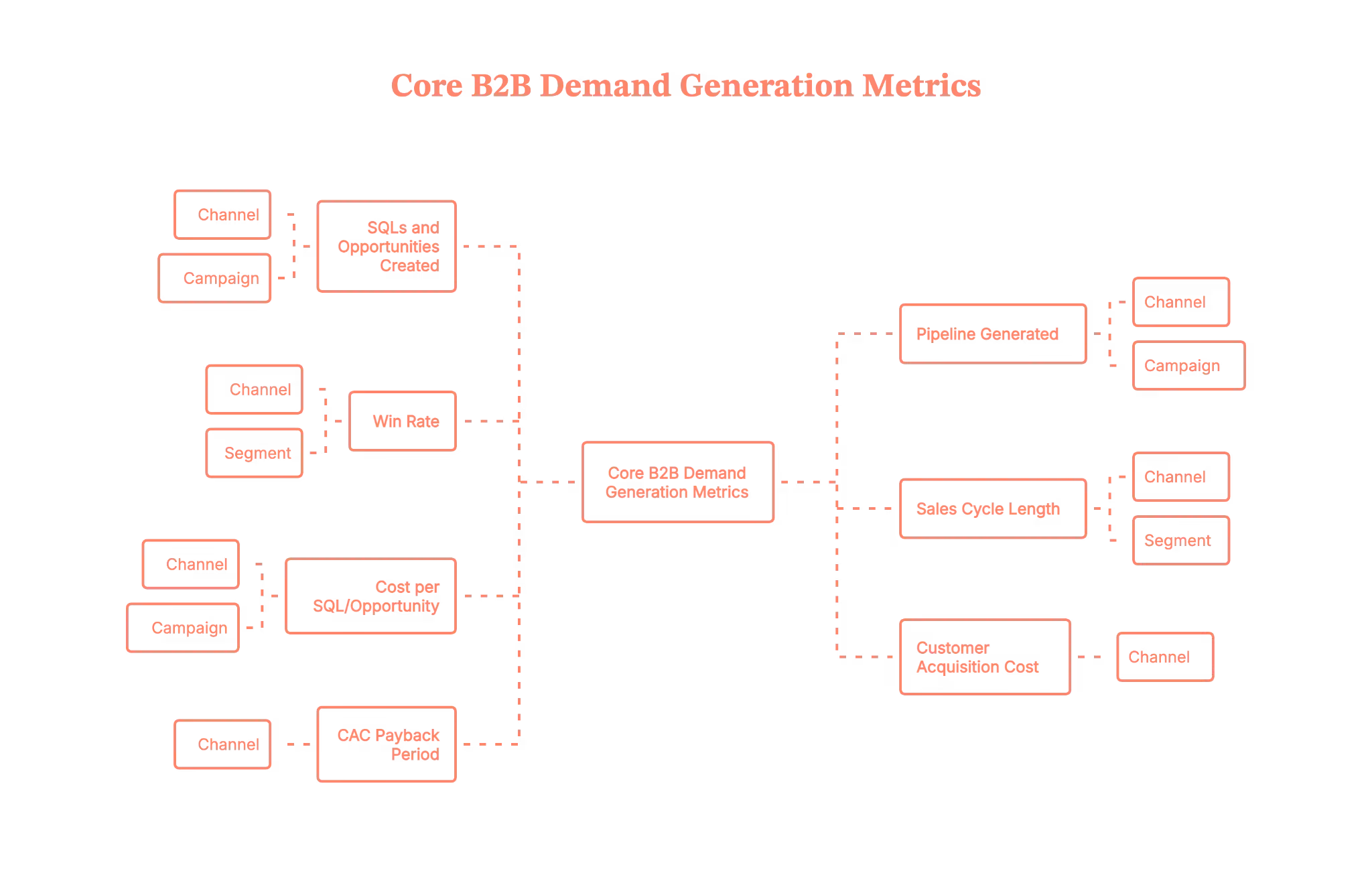
What “good” can look like for B2B SaaS (directionally)
This varies by ACV and segment, but as a directional sense:
- Marketing-sourced pipeline often aims for 20–50%+ of total new pipeline (higher for earlier-stage companies).
- Reasonable CAC payback for many B2B SaaS businesses is 12–24 months, with best-in-class often under 12 months, and some enterprise motions accepting longer.
- SQL → Opportunity conversion might sit around 20–40%, depending on how strict your SQL definition is.
Use these as ranges, not strict rules. The key is improving your own numbers over time.
Build a simple revenue-focused dashboard
On a monthly or a weekly basis, track the following:
- Pipeline created by the source and campaign
- Closed-won revenue by source
- CAC/CAC payback by channel (even if approximate)
- Top 5 campaigns that influenced closed-won deals
This is how you turn “marketing is a cost center” into “marketing is a predictable growth lever”.
Self-audit questions
- Do you know which campaigns created last quarter’s pipeline, not just last quarter’s leads?
- Can you estimate CAC and payback period by major channel?
- Are you reviewing these numbers with Sales and leadership on a recurring basis?
Best practice #8 – Run experiments and document your own SaaS demand gen strategies
Here’s the uncomfortable truth: all the B2B demand generation best practices in the world won’t perfectly fit your product, price point, and sales cycle.
You need to test and codify what works for you.
Treat campaigns like experiments
For each experiment, define:
- Hypothesis – “We believe offering an ROI assessment to director-level ops leaders will increase demo-to-opportunity conversion.”
- What you’ll change – offer, channel, creative, audience, or funnel step.
- Success metrics – SQLs, opportunities, pipeline, or efficiency (e.g., cost per opportunity).
- Timeframe and sample size – give it enough time and volume to be statistically useful.
Run a manageable number of experiments per quarter (for example, 3–5 meaningful ones), and actually review the results.
Build an internal “playbook” doc. PS: It should be a living doc with
- Your ideal customer profile(s)
- Proven offers by segment and funnel stage
- Top-performing campaigns with examples of creative and landing pages
- Experiments that failed and what you learned
This becomes onboarding gold for new team members and a guardrail against “we tried that already” amnesia.
Self-audit questions
- Do you have a list of our top 5 “always on” plays that reliably drive pipeline?
- Are you running structured experiments, or just trying random ideas?
- Is there a central doc where all of this lives?
Stitching it all together: a simple SaaS Demand Gen framework
Let’s make this practical. Here’s a simple 3-step loop you can use to structure your demand generation strategy.
1) Clarify: who, what, and why now
- ICP and anti-ICP are clearly defined
- Core problems and pains, in the customer’s language
- Key use cases and value propositions
- Segmentation by ACV/segment where relevant
2) Create & distribute: content + channels
- Full-funnel content mapped to awareness, consideration, and decision
- Always-on, helpful content distributed via LinkedIn, email, and communities
- Paid campaigns that amplify what’s already resonating
- Website and landing pages tuned for clarity and conversion
3) Capture & measure: offers, tracking, and pipeline
- Strong, honest offers for high-intent buyers
- Clean tracking from click → CRM → opportunity → revenue
- Regular review of pipeline, CAC, and payback by channel
- Feedback loops with Sales and CS to refine targeting and messaging
Run this loop every quarter. Improve one or two parts at a time. You’ll be surprised how fast the engine compounds.
B2B SaaS demand generation FAQs
Q. What are the most effective B2B demand gen channels for SaaS?
For most SaaS teams, the usual top performers are LinkedIn (organic + paid), paid search, email, and website content. Many also get strong results from niche communities and events. The best channels are the ones that reliably touch opportunities before they close, not just the ones that generate the most cheap leads.
Q. How long does it take to see results from B2B demand generation?
You can see early signals (traffic, engagement, SQLs) in a few weeks, but meaningful pipeline and revenue usually take 3–6 months to show up, and 6–12 months to really stabilize. Longer sales cycles and higher ACVs stretch that out. This is why you want a mix of quick-win capture tactics and longer-term demand creation.
Q. How much budget should I allocate to B2B demand gen?
There’s no magic number, but many SaaS companies allocate a significant portion of their marketing budget to demand creation and capture across content, paid, and events. Work backwards from your pipeline and revenue targets, your CAC/payback goals, and your current conversion rates to estimate what you can afford to spend per opportunity and per customer.
Q. Do Google’s “Demand Gen” campaigns work for B2B?
They can, but they’re not a silver bullet. They usually work best when you already have good creative, clear ICP, and enough conversions for the algorithm to learn from. If your budget is tighter, prioritize high-intent search and LinkedIn before throwing a lot of spend at broad Demand Gen campaigns.
Q. How do I know if my demand gen is working?
Look at pipeline and revenue trends, not just leads. If you’re seeing more SQLs, more opportunities, and more closed-won deals from your target segments at an acceptable CAC and payback, your demand gen is working. If leads are up but pipeline and revenue aren’t moving, something’s broken in targeting, messaging, or qualification.
.avif)
Google Ad Rank: How to Secure Top Ad Positions
Imagine you’re searching for ‘visitor identification software’ on Google. The first ad that appears immediately grabs your attention. It is relevant, clearly explains how the software identifies website visitors, and even offers a free demo. Below this ad, you notice a few others. They don’t stand out as much—one has vague messaging, while another doesn’t seem as relevant to your search.
Why does the top ad rank higher than the others?
You might assume it's because the company paid more. While this is one factor influencing an ad's position, it’s not always the case. Several factors, including the bid amount, keyword relevance, and ad quality, determine the ad’s rank.
Ads in higher positions generally receive more clicks. If you're using Google Ads and want to improve your ad ranking, understanding ad rank is essential.
In this article, we’ll explore the factors determining a Google ad’s rank and offer tips on optimizing your ads for higher visibility.
Also, read Google Ads for SaaS companies.
TL;DR
- Google Ad Rank is crucial for determining the position of ads on the search results page, influencing visibility and click-through rates.
- Key factors determining Ad Rank include bid amount, Quality Score, and ad relevance. If ads are of better quality, they can rank higher even with lower bids.
- Ad Extensions enhance ad functionality and visibility, often leading to higher click-through rates and improved Ad Rank.
- To improve Ad Rank, focus on optimizing ad relevance, enhancing landing page experience, utilizing bid adjustments, and continuously monitoring ad performance.
What is Google Ad Rank?
Google Ad rank is a value used by Google to assess an ad's position on the Search Engine Results Page (SERP). If your ads are clear, helpful, and relevant to the search query, these factors combine to improve your ad rank, helping you secure the top spot on the SERP. Other ads with a lower ad rank are displayed below due to less relevance or poorer Quality Scores.
How Does Google Determine an Ad’s Rank?

The following factors determine your Google Ad Rank.
1. Your bid amount
The bid amount is the maximum you are willing to pay for a click on your ad. While a higher bid can increase your chances of ranking higher, it does not guarantee the top spot. Google balances bid amounts with ad quality to ensure the most relevant ads appear first, not just those with the highest bids.
For example, if you set a bid of $6 per click, you’re telling Google that you’re willing to pay up to $6. But if another advertiser bids $5.50 and has a higher ad quality, they might rank above you, even though their bid is lower than yours.
2. Quality Score (Ad Quality)
Quality score is a metric that measures how relevant and useful your ads are to the users. It is taken into account to ensure that the ads appearing on the SERP provide a good user experience. A higher Quality Score can improve your ad’s position even if your bid is low.
The Quality Score is measured using three components. They are:
2.1 Expected Click-Through-Rate (CTR)
This estimates how likely users are to click on your ad based on its relevance to the search query. Google looks at past performance and the overall effectiveness of your ad to determine your expected CTR. If people tend to click on your ad more often, Google assumes it’s relevant, boosting your Quality Score.
2.2 Ad Relevance
This measures how closely your ad matches the search query. Ads that are specific to the user’s intent perform better. If your ad’s message and keywords on your ad landing page align well with the search intent, it will score higher in relevance.
2.3 Landing Page Experience
Firstly, users should have a positive experience on the landing page after clicking your ad. The landing page should deliver on the promise made in the ad.
Secondly, Google considers the page's loading speed, mobile-friendliness, context relevance, and ease of page navigation to determine the landing page experience. A poor landing page experience lowers your Quality Score, while a high-quality landing page improves it.
3. Ad Rank Thresholds
Ad rank thresholds are the minimum quality standards your ad must meet to be eligible to appear for certain positions on the SERP. Google uses these thresholds to ensure that only high-quality ads are displayed to users. Here’s how it works:
3.1 Minimum Requirements
Each ad auction has a baseline threshold that ads must meet. If your ad's Quality Score and bid don't meet this minimum standard, your ad may not appear at all or appear in a lower position than desired.
3.2 Impact on Ad Visibility
Meeting the threshold does not guarantee a high position, but failing to meet it can prevent your ad from appearing in top positions. A low Quality Score can reduce your visibility even if your bid is competitive.
3.3 Quality over Quantity
Google prioritizes user experience, so ads that don’t meet quality thresholds won’t be prominently displayed, even if you are willing to pay more. This system encourages advertisers to create relevant and high-quality ads that enhance the overall user experience.
3.4 Dynamic Nature
Ad rank thresholds can change based on various factors like keyword competition, changes in user behavior, and updates to Google’s Ad policies. You must continuously optimize the ads to meet these evolving standards.
4. Competition
Competition refers to the number of advertisers bidding on the same keywords and the quality of their ads. When multiple advertisers target the same keywords, Google evaluates all competing ads based on their bids and Quality Scores to determine the ad rank.
Imagine three companies bidding on the keyword ‘intent data mapping.’ The more advertisers bidding for this keyword, the more competitive the auction becomes. This increased competition means each advertiser must focus on their bid amount and ad quality to secure a top position.
- Company A bids $4 with a high-quality ad and a strong landing page.
- Company B bids $5 with a decent-quality ad but a less relevant landing page.
- Company C bids $5.5 but has a poorly written ad and a slow-loading landing page.
Even though Company A has the lowest bid, Company A could still rank higher due to a better Quality Score. Google prioritizes relevant ads that are likely to provide a good user experience.
5. Search Context
Search context refers to various factors that influence how Google ranks ads for a specific query. These factors help Google deliver the most relevant ads to users based on their unique situations. This works based on the following factors:
5.1 Search Terms and User Intent
Google analyzes the intent behind the search query. Users searching for visitor identification software might want to compare options, while others may be ready to make a purchase or request a demo.
Ads that align with the user intent such as providing detailed comparisons, offering demos, or emphasizing ease of implementation—are more likely to rank higher.
Also, read this article on Types of Google Ads.
5.2 User Location
When someone searches for ‘visitor identification software’ in a specific location like Virginia, Google may prioritize ads from companies operating in that region or those with localized content. This ensures that users see ads relevant to their geographic location, increasing the likelihood of conversion.
5.3 Type of Device
The type of device used for the search, such as a desktop, tablet, or mobile phone, can affect ad ranking. Mobile users may see different ads than desktop users. If a company’s landing page is optimized for mobile devices and includes mobile-specific features (such as click-to-call buttons), it may rank higher when searched on mobiles.
5.4 Time of Day
The timing of the search can also impact which ads appear. For example, if a user searches for visitor identification software during business hours, ads promoting solutions tailored to immediate business needs may rank higher. Conversely, searches during off-hours may favor ads that highlight 24/7 support or free trials, appealing to users researching solutions at night.
6. Using Ad Extensions
Ad extensions provide additional information that makes your ad more useful. These extensions include call buttons, location information, site links, etc. These extensions can improve your ad's visibility, increase click-through rates (CTR), and enhance your ad rank.
Google Ad Rank Formula With Example
The Google Ad Rank formula is simple.
Ad Rank = Quality Score x Bid Amount
This means your ad’s position on the SERP is determined by multiplying the maximum bid you’re willing to pay by your ad's Quality Score. A higher Ad Rank results in better ad positioning, which can lead to more clicks and conversions.
Let’s break it down with a clear example.
Imagine three companies—Company A, Company B, and Company C—are competing for the keyword ‘visitor identification software.’ Here’s how their bids and Quality Scores look:
Inference:
- Company A has the highest Ad Rank, meaning its ad will likely appear at the top of the SERP for this keyword.
- Company C’s ad may appear below Company A’s but still above Company B's.
- Company B has a higher bid but a lower Quality Score, which results in the same Ad Rank as Company C. However, if the ad rank threshold is met, Company B’s ad may still show in a lower position.
Also, read a guide to Google Ads management.
How to Improve Your Google Ad Rank

To improve your Google Ads rank, focus on these factors.
1. Optimize For Ad Relevance
Align your ad copy and keywords with users' search queries. Use targeted language that matches user intent and incorporate relevant keywords into your ad copy. This ensures that your ad’s messaging closely aligns with your targeted keywords.
2. Enhance Ad Quality
Write compelling ad copy that highlights your unique value proposition and includes a strong call to action. Leverage ad extensions such as sitelinks, callouts, and structured snippets to enhance your ad’s visibility and CTR. Ensure these extensions are relevant to your keywords to avoid negatively impacting your Ad Rank.
3. Improve Landing Page Experience
Create a seamless user experience by ensuring your landing pages load quickly and are mobile-friendly. Offer valuable content, ensure easy navigation on the page, and provide error-free paths to conversion.
4. Utilize Bid Adjustments
Optimize your bids with bid adjustments based on device, location, and time of day. Increase bids for high-performing keywords to boost your ad rank and visibility.
5. Monitor and Refine
Do a Google Ads audit, and continuously monitor and optimize your ads to improve your performance. Use performance data to identify high-performing ads and make necessary adjustments. Test various ad variations, landing pages, and bid adjustments to improve your ad rank over time.
Google Ad Rank: Key Takeaways
Google Ad Rank determines the position of ads on the search results page, which impacts visibility and click-through rates. It combines several factors, such as bid amount, ad quality, and relevance. When a user searches ‘B2B visitor identification software,’ a relevant top ad may outperform others despite having a lower bid.
To improve your Ad Rank, focus on optimizing ad relevance, enhancing ad quality, and creating user-friendly landing pages. Utilize bid adjustments based on various factors and monitor performance regularly. Understanding how these elements work together can help you achieve better positions and increase conversions.
FAQs on Google Ad Rank
What is ad rank in Google?
Ad Rank in Google determines your ad's position on the search results page. It combines your bid amount and Quality Score, which reflects the relevance and quality of your ad.
How do I rank high in Google Ads?
Ensure your ad copy matches user search queries to optimize your ad relevance and rank high in Google Ads. Enhance your ad quality by writing compelling copy and using ad extensions. Improve your landing page experience for better user engagement and monitor performance to refine your strategy.
What are the levels of Google Ads?
Google Ads does not have fixed levels but operates through a bidding and ranking system based on your bid amount and Quality Score. A higher Ad Rank leads to better ad positioning, while a lower Ad Rank results in less visibility.
What is the Google Ad Rank list?
The Google Ad Rank list is the order in which ads appear on the search results page, determined by their Ad Rank values. Higher Ad Rank leads to better ad positions and increased visibility.
What is the formula for Google Ad Rank?
The formula for Google Ad Rank is Ad Rank = Bid Amount x Quality Score. This formula states that your ad position is determined by multiplying the maximum bid you are willing to pay by your quality score.
What is the difference between Ad Rank and Quality Score?
Ad Rank determines your ad's position on the search results page, while Quality Score assesses how relevant and useful your ad is to users. Quality Score contributes to Ad Rank but is just one of the factors influencing it.