.svg)


Factors vs Dealfront: A Comparison of Go-to-Market Platforms
When it comes to optimizing B2B marketing and sales processes, two platforms that stand out are Dealfront and Factors.
Both offer sophisticated AI-powered tools for lead generation, marketing insights, and customer profiling, but they differ significantly in their core offerings, target markets, and strengths.
In this blog, we will explore the key features of both platforms, compare their strengths and weaknesses, and evaluate why, in some instances, Factors might be a more compelling choice than Dealfront for businesses looking for versatile alternatives.
TL;DR
- Dealfront and Factors are AI-powered platforms for optimizing B2B marketing and sales, but they differ significantly in focus and target markets.
- Dealfront specializes in lead generation, sales intelligence, and compliance for European businesses, while Factors emphasizes marketing analytics, multi-touch attribution, and campaign performance across global markets.
- Dealfront excels in lead generation and European data compliance, ideal for businesses targeting the European market.
- Factors focuses on multi-touch attribution and campaign optimization, making it suitable for global marketing teams.
- Dealfront is best for European sales teams; Factors offers broader, AI-driven marketing insights with flexible pricing.
- Businesses should choose Dealfront for compliance and lead generation, and Factors for optimizing marketing ROI and customer journeys globally.
About Dealfront

Dealfront, formerly known as Echobot and Leadfeeder, emerged in 2023 as a unified Go-To-Market (GTM) platform following the merger of two major players in European sales and marketing intelligence. The platform is particularly strong in helping companies generate leads and close deals across diverse European markets. Its deep integration of European data, languages, and culture, combined with advanced AI, sets Dealfront apart for European businesses.

Key Features of Dealfront:
- Lead Generation: Dealfront combines Echobot's sales intelligence with Leadfeeder's web visitor tracking abilities. This helps companies identify and qualify high-quality leads from website traffic while offering real-time insights into customer behavior.
- Localized Data: Dealfront's standout feature is its localized data and AI-driven insights. Specifically, it’s built to navigate Europe’s fragmented market regulations, languages, and compliance standards, giving sales and marketing teams tailored, country-specific data and insights. This makes Dealfront highly attractive to businesses targeting multiple European regions. Its AI is trained to understand local nuances in languages and regulations, enabling more accurate and compliant lead-generation efforts, especially in countries with complex data protection laws like Germany.
Core Features of Dealfront:
- Discover: Dealfront helps companies identify their total addressable market by offering data on potential European prospects. It centralizes vast amounts of data from different sources into one actionable platform.
- Qualify: Dealfront helps sales teams assess their quality by evaluating fit and engagement metrics once potential leads are discovered.
- Convert: This stage focuses on helping users convert leads into paying customers using visitor tracking and behavioral analysis tools.
- Optimize: Dealfront continuously optimizes lead qualification and conversion processes after converting leads, making customer profiles more dynamic and reflective of real-time behavior.
Why Dealfront Stands Out:
- Compliance and Data Sensitivity: Its algorithms are designed to meet stringent GDPR requirements, particularly for businesses operating in highly regulated industries.
- Integration Capabilities: Dealfront offers seamless integration with CRMs like HubSpot, Salesforce, and other marketing automation platforms. This provides easy workflows for lead nurturing.
- Europe-Specific Insights: Unlike many global competitors, Dealfront provides granular European data with language-specific insights that are invaluable for regional targeting.
About Factors

Factors.ai is a robust, AI-powered platform designed to help marketing and sales teams drive data-driven decisions. Factors take a broader approach, focusing on the optimization of marketing campaigns through insights gained from customer journeys, which helps in multi-touch attribution and customer behavior analysis.
Where Dealfront emphasizes lead generation and conversion through localized insights, Factors dives deep into performance analytics and marketing automation. It assists businesses in understanding the full impact of their campaigns, tracking engagement across multiple channels, and giving detailed insights into attribution, pipeline generation, and conversion metrics.
Key Features of Factors:

- Multi-Touch Attribution: Factors allows businesses to measure the impact of every marketing activity, from awareness to purchase, helping them identify which channels drive the most value.
- Journey Mapping: The platform provides a comprehensive view of the customer journey across all touchpoints, enabling marketing teams to optimize their strategies based on real-time data.
- Sales and Marketing Alignment: Factors enable teams to track the entire funnel, ensuring that marketing efforts are closely aligned with sales outcomes. This makes it easier to optimize resources for the most impactful activities.
Why Choose Factors?

- Holistic Campaign Tracking: Factors focuses on helping companies optimize their entire marketing funnel, from awareness to purchase, by providing detailed insights on campaign performance and customer journeys.
- AI-Powered Insights: The platform uses AI to provide advanced attribution models and real-time insights, helping marketing teams make more informed decisions about budget allocation and resource prioritization.
- Flexible Integrations: Factors integrates with several leading CRMs and marketing platforms, providing seamless data flows between tools and improving marketing efforts' effectiveness.
Dealfront vs. Factors: A Detailed Comparison
When evaluating Dealfront and Factors, it’s essential to consider their distinct strengths and how they align with specific business needs. Below, we compare them across several key categories:
1. Target Market and Use Cases
- Dealfront is optimized for businesses operating primarily in European markets, focusing on sales intelligence, lead generation, and conversion. Companies looking to expand in Europe will benefit from its localized data and compliance with GDPR.
- Factors are more suited for global companies that require in-depth marketing performance analysis and campaign optimization. Its strength lies in tracking the entire customer journey and offering multi-touch attribution models. If your business is focused on refining marketing campaigns across various touchpoints and improving conversion rates globally, Factors provides a more holistic view.
2. Core Strengths
- Dealfront excels in lead generation and conversion optimization, especially for companies targeting European markets. Its powerful algorithms are specifically designed to handle the nuances of local languages, regulations, and compliance standards. Integrating web visitor tracking and sales intelligence lets companies discover and qualify leads in real-time.
- Factors are built for multi-touch attribution and campaign performance tracking. It helps businesses understand which marketing strategies drive conversions and provides deep insights into customer behavior across all channels. If your goal is to optimize marketing spend and improve the efficiency of campaigns, Factor is a strong contender.
3. Compliance and Data Sensitivity
- Dealfront is a go-to choice for businesses that prioritize data protection and compliance. Built specifically to navigate European data regulations, it offers extensive safeguards, including full GDPR compliance. This is crucial for companies operating in industries where data privacy is a top concern.
- Factors also offers compliance features but is more focused on campaign tracking and performance. It’s designed to work across a wide variety of markets and industries, though it may not offer the same level of region-specific compliance features as Deal Front.
4. Integration and Usability
- Dealfront offers seamless integration with leading CRM platforms, including HubSpot and Salesforce. This makes it easier for companies to incorporate the platform into their existing workflows and provides actionable insights for both sales and marketing teams.
- Factors also offer extensive integration options with CRM and marketing automation platforms but focus more on syncing marketing data and performance metrics. It’s an ideal tool for marketing teams to track attribution across multiple channels.
5. Pricing and Flexibility
- Dealfront tends to be priced at a premium due to its extensive features and compliance capabilities, particularly for businesses targeting European markets.
- Factors offer competitive pricing for businesses looking for advanced marketing analytics and performance tracking. Its pricing models are often more flexible, making it accessible for small and medium enterprises (SMEs) and larger companies.
Dealfront Alternatives: Why Consider Factors?
While Dealfront has established itself as a leader in European sales and marketing intelligence, there are several reasons why businesses might consider switching to or incorporating Factors as an alternative:
- Broader Use Cases: Factors is better suited for companies that need insights into marketing performance and customer behavior across multiple channels. Its AI-powered tools offer detailed insights into campaign effectiveness, making it easier to optimize marketing efforts.
- Global Reach: While Dealfront is highly specialized for European markets, Factors offers a more global perspective, with features that apply to businesses across various regions and industries.
- Advanced Attribution Models: Factors' multi-touch attribution capabilities allow businesses to track the full impact of their marketing efforts, providing a more comprehensive view of the customer journey than Dealfront.
- Cost-Effective: For businesses focused on optimizing marketing spend and improving ROI, Factors offers a more affordable and flexible solution than Dealfront.
Both platforms offer powerful tools for analytics and lead generation, but cater to different priorities.
1. Platform Strengths: Dealfront excels in visitor insights and CRM integrations; Factors focuses on behavioral analytics and privacy compliance.
2. Key Differentiators: Emphasis on data handling, feature depth, and compliance capabilities.
3. Strategic Considerations: Selection depends on your business's need for granular behavior tracking vs. comprehensive lead visibility.
Understanding your go-to-market goals helps determine whether Factors or Dealfront is the better fit.
In a Nutshell
When choosing between Dealfront and Factors, the decision largely depends on your business's needs. If your primary goal is generating leads and closing deals in European markets, Dealfront’s specialized data, localized insights, and compliance with European regulations make it a powerful tool.
However, if your focus is on optimizing marketing campaigns, tracking customer journeys across multiple touchpoints, and gaining deep insights into marketing performance, Factors is a compelling alternative. Its AI-driven approach to attribution and performance tracking makes it an excellent choice for businesses looking to enhance their marketing strategy globally.
Overall, Factors stands out for its flexibility, ease of use, and focus on delivering actionable insights for marketing teams, making it a strong alternative to Dealfront, especially for businesses looking to optimize their marketing ROI.
Also Read: 5 Leadfeeder Alternatives for Website Visitor Identification

Make the most of your LinkedIn Ads budget: LinkedIn True ROI
“I love wasting my ad budget and not getting the right ROI for my LinkedIn ads.”, said no marketer ever (hopefully).
While 70% of marketers trust LinkedIn to be a valuable channel that drives a good return on investment, many believe the platform is one of the most expensive channels.

Source: https://blog.hootsuite.com/linkedin-statistics-business/
With high costs per impression (CPM) and cost per click (CPC), marketers often find it hard to justify LinkedIn’s cost-benefit as a marketing channel. According to a report, LinkedIn's average CPM is around $34.00, compared to Facebook's average CPM, which is $10.61.
Despite these relatively high costs, there's no denying that LinkedIn ads do work. A substantial 89% of B2B marketers utilize LinkedIn for lead generation and 62% report that it successfully generates leads for them.
So, what’s the challenge?
The main challenge is accurately measuring the ROI and demonstrating its impact on the pipeline and revenue.
Where does this challenge stem from?
LinkedIn ads work as a display platform, showing ads to accounts discovering content, not researching products. This makes them a low-intent audience needing education and persuasion.
Think of it this way: you wouldn't measure the performance of billboards or TV commercials based only on click-through rates. So, why do it for LinkedIn? Click-through attribution misses the full impact of LinkedIn ads, just like it does for traditional display advertising. Factors helps marketers prove LinkedIn's true ROI.
TL;DR
We're super excited to announce LinkedIn AdPilot, a LinkedIn ads optimization platform that supports a range of functions, including LinkedIn True ROI. This article explores how and why LinkedIn True ROI is the most accurate approach to measuring the real influence of your LinkedIn ads beyond clicks and sign-ups.
Read more about LinkedIn AdPilot here:
- Introducing LinkedIn AdPilot by Factors
- Synchronize all your data across platforms and create accurate audience lists with Audience Builder.
- Control how your ads are shown to your audiences with Smart Reach.
- Let CAPI help you send accurate conversion feedback to Factors, tackling the challenge of cookie deprecation.
- Tackle inefficiencies of manual ad management with Campaign Automation.
What is ‘LinkedIn True ROI’?
LinkedIn True ROI is a method of attributing conversions or actions that were viewed but not clicked. It recognizes that these ads can still prompt the desired action without a direct click.
The Challenge
Marketers struggle to justify LinkedIn ad costs due to poor reporting. This, in turn, leads to high expenses, underestimated impact, and misguided strategies, making it hard to prove LinkedIn ads' true value to leadership.
Click-through attribution misses the broader impact of ad impressions. The click-based approach to LinkedIn ROI ignores how ad impressions influence bottom-of-the-funnel conversions.
Food for thought
💡 The click-through Rate on LinkedIn is mostly 0.5%. By relying on click-through attribution, marketers effectively say that 99.5% of the impressions that are not clicked on do not have any impact or influence on the buyers.
Two interesting concepts that draw back to this challenge:
The Subconscious Influence of Billboards and Other Display Channels
Imagine this: You're driving down a highway lined with billboards. You might not notice each one, but they leave an impression on your subconscious. Later, those billboards can influence your perceptions and decisions about a product or service. And this is even if you don't remember seeing them. Similar influences can come from sidebar ads or sponsored content in your feed.
So, why does your target audience miss your LinkedIn Ads?
- Subconscious Processing:
Users don't engage with these ads during browsing. However, repeated exposure builds brand recognition. While users may not remember specific ads, they may recall the brand when they need related products or services. This influence is amplified in B2B contexts mainly because multiple decision-makers and touchpoints exist across channels.
A LinkedIn ad may not generate immediate clicks but shapes perceptions and decisions. LinkedIn and similar platforms go beyond clicks and sign-ups. Yet, GTM teams often overlook this broader impact, focusing on immediate outcomes. LinkedIn True ROI assesses ads' indirect effects, giving a comprehensive view of their performance.
Introducing LinkedIn AdPilot: LinkedIn True ROI
Our Ad Pilot introduces 'LinkedIn True ROI', effectively capturing hidden LinkedIn engagement. It recognizes the impact of ads users viewed but didn't click on. AdPilot combines this with other account actions, such as website visits and blog interactions at an account level.
This offers a broader perspective on how LinkedIn contributes to conversions and revenue.
“Even if one person from a specific account visits our website, Factors helps us target decision makers and the larger buying committee as whole to ensure that all the right people from a target account see our ads. Ultimately, this helps our LinkedIn ad budgets go that extra mile further.” - Abhishek Iyer, Director of Marketing at Descope.
Use Cases for LinkedIn True ROI:
LinkedIn True ROI provides avenues for understanding and optimizing your LinkedIn ad campaigns. Here are some ways you can leverage our LinkedIn True ROI to enhance your marketing efforts:
1. Measure LinkedIn ROI Accurately
Accurately measuring LinkedIn ROI is crucial for proving the value of your ads. Click-through attribution typically undervalues LinkedIn’s impact by only counting direct interactions. However, LinkedIn True ROI captures the influence of LinkedIn ads on lead conversions.

Let’s understand this with an example:
- Number of Opportunities
Let's take Factors’ LinkedIn spending in Q1 2024 as an example. We analyzed one month of LinkedIn ads from an SME SaaS remarketing campaign group. Our analysis showed how different approaches affected deals and pipeline contributions. Click-through attribution data came from LinkedIn’s ad manager, while Factors.ai collected LinkedIn True ROI data for this campaign.
The results revealed that the campaign generated only one opportunity through click-through attribution. However, LinkedIn True ROI showed that the same campaign influenced at least 11 opportunities.

- Cost per Opportunity
The cost per opportunity varies starkly based on the number of opportunities and the exact total spend.
Click-through attribution indicates a high $4,338 per opportunity, whereas LinkedIn True ROI shows a more reasonable $395 per opportunity. This difference, nearly 11 times higher based on clicks alone, can lead to the misconception that LinkedIn is too costly.

- Pipeline Value
The impact on the sales pipeline is crucial. Click-through attribution indicates LinkedIn generated $1,800 in pipeline value from one opportunity, with a cost per opportunity of $4,338. In contrast, LinkedIn True ROI reveals 11 opportunities contributing $19,440 to the pipeline at $395 each. Evaluating costs based on ad views rather than clicks provides a more realistic and favorable ROI—$19,440 in pipeline from $4,348 in spend makes far more sense than $1,800.

2. Improve LinkedIn Ads Performance
Understanding which ads drive conversions helps marketers optimize campaigns effectively. Analyzing the most effective ads influencing potential customers allows for refining ad creative, targeting, and budget allocation. This iterative process improves with more data collected.
For example, if certain LinkedIn ads are regularly viewed by target accounts but not clicked, LinkedIn True ROI can reveal their influence on actions like website visits or content engagement. Marketers can then adjust ad creatives for better resonance and increased engagement.

3. Ensure Better LinkedIn (Re)Targeting
LinkedIn True ROI helps improve retargeting strategies by understanding how ads work. Marketers use this to find accounts that see specific ads, making retargeting more personalized and avoiding ad fatigue.
Suppose an account often sees a brand ad but doesn't click. With True ROI, marketers can show them other helpful content like testimonials or product examples. This keeps the retargeting relevant and exciting, guiding prospects further along.
LinkedIn True ROI also shows which types of content work best by spotting patterns in how ads are viewed. This helps marketers plan better content strategies that match their audience's preferences.

4. Gain Granular Insights into Customer Journey
LinkedIn True ROI provides detailed insights into how LinkedIn ads affect each stage of the buying process. Marketers can see how prospects move through the funnel using data from website visits, CRM systems, and other marketing channels.
For instance, a prospect might view a LinkedIn ad, visit the website, download a whitepaper, and later request a demo. While traditional click-through attribution focuses on the final action, LinkedIn True ROI recognizes the LinkedIn ad's initial impact. This helps marketers refine strategies that effectively support the entire customer journey.
“Given that we’re not in the habit of gating our content assets, it’s valuable to understand the full range of otherwise hidden touchpoints that influence conversions.” – Abhishek Iyer, Director of Marketing at Descope

5. Demonstrate Marketing Impact to Leadership
Finally, LinkedIn True ROI helps marketers demonstrate the true impact of their LinkedIn ads to leadership. Marketers can justify their ad spend and secure ongoing investment by providing a comprehensive view of ad influence and ROI.
Accurately attributing conversions to LinkedIn ads can be challenging, especially when dealing with high CPCs and CPMs. LinkedIn True ROI provides the data needed to showcase LinkedIn’s value, presenting a clearer picture of how ads contribute to the sales pipeline.
“It’s very helpful to achieve a bird’s eye view of the customer journey that leads up to a demo — even when a direct attribution isn’t explicitly present in our CRM. In many instances, we see that a lead has been viewing our LinkedIn ads for months before landing on a search ad or blog and then signing up. This helps us validate what we already know: it’s rarely a single touchpoint that leads to conversions.” – Abhishek Iyer, Director of Marketing at Descope
True ROI on LinkedIn goes beyond clicks to measure the value of ad impressions that influence conversions.
1. Attribution Model: Includes viewed-but-not-clicked ads in conversion analysis.
2. Measurement Advantage: Reveals hidden value from brand exposure and top-of-funnel impact.
3. Strategic Benefits: Improves ROI accuracy, informs smarter spend decisions, and enhances campaign optimization.
By embracing True ROI, marketers gain a complete picture of LinkedIn ad performance and drive more effective outcomes.
In a nutshell
LinkedIn True ROI is a game-changer for B2B marketers. It unlocks the value of LinkedIn ads by accurately measuring their impact. This capability helps marketers justify ad spend, optimize campaigns, and improve retargeting. It ensures LinkedIn ads are evaluated on their real influence, not just clicks.
With LinkedIn True ROI, marketers can accurately measure and optimize their LinkedIn ads, leading to better results and a higher return on investment.
Ready to uncover the true impact of your LinkedIn ads? Start using Factors.AI’s LinkedIn True ROI feature today to understand your campaign’s effectiveness better. Get in touch with us to learn more and get started.
Looking to know more about LinkedIn True ROI? Click here.

Understanding Multi-Touch Attribution Models
Life is full of mysteries - like 'What does the fox say?' and 'Who gets credit for this campaign's leads?' Thanks to multi-touch attribution, at least one of those questions finally has an answer! More often than not, customer journeys span multiple channels and devices, and attributing conversions to the right touchpoints has become more critical than ever.
The days of single-touch attribution have almost disappeared as more organizations realize the importance of understanding a customer's journey before purchasing. Enter the multi-touch attribution model, a data-driven approach to assigning credit across all touchpoints that contribute to a conversion.
This blog will explore a clear path toward a well-rounded understanding of multi-touch attribution.
TL;DR
- Multi-touch attribution assigns credit for conversions across multiple touchpoints, allowing businesses to identify the most effective channels and interactions.
- The Linear Attribution Model assigns equal credit to every touchpoint in the customer journey.
- Time Decay Attribution gives more credit to recent touchpoints, emphasizing interactions closer to the conversion.
- U-shaped attribution places higher credit on the first and last interactions, with reduced weight on mid-journey touchpoints.
- W-shaped attribution assigns credit to the first interaction, a lead creation point, and the final touchpoint, with some credit to other interactions.
- Factors enables brands to build and analyze these models, offering data-driven insights for more effective marketing strategies.
- Multi-touch attribution helps marketers understand each touchpoint's impact, improving budget allocation and strategic planning.
What is Multi-Touch Attribution?
Multi-touch attribution (MTA) distributes credit for conversions across multiple customer interactions with a brand before completing a desired action, such as a purchase or sign-up. Unlike single-touch models, which assign credit solely to the first or last interaction, multi-touch attribution acknowledges that each touchpoint may guide a customer toward conversion.
Old models like last-click or first-click attribution don't capture the whole customer journey. Last-click gives all credit to the final step before a sale, often overvaluing activities like paid search. First-click focuses only on initial awareness, ignoring later interactions that help make the sale.
Changes in consumer behavior and technology have led to the development of new attribution methods. Customers now engage with brands across many devices and channels. Businesses need better ways to track these interactions. Modern MTA solutions use advanced analytics and machine learning to analyze customer data, offering useful insights for marketing improvement.
By using MTA, businesses can:
- Measure how well each channel performs
- Allocate marketing budgets more effectively.
- Understand customer journey patterns.
- Make decisions based on data.
- Improve ROI across campaigns.
Multi-touch attribution is not just a data model; it’s a mindset shift. It recognizes that customers no longer have a linear path to purchase. A potential buyer might interact with an email campaign, engage with social media ads, and click on a Google search ad before finally converting. Assigning credit to each of these touchpoints, rather than just the last one, helps brands understand the total value of their marketing efforts.
Why is Multi-Touch Attribution Important?
Customer journeys are complex and non-linear. Traditional single-touch models oversimplify this journey and may result in inaccurate credit assignments, leading to:
- Misallocation of Budget: If only the last touchpoint receives credit, you might prioritize channels that close conversions, even if other channels contribute heavily to the customer journey.
- Unoptimized Marketing Mix: By understanding the contribution of each touchpoint, marketers can gain insights to optimize campaigns.
- Limited Insight on Customer Behavior: Multi-touch attribution helps marketers understand how different channels and content types influence customers at various funnel stages.
Multi-touch attribution provides insights into the buyer journey and allows brands to optimize each stage, ensuring that no touchpoint goes unnoticed.
Types of Multi-Touch Attribution Models

Different multi-touch attribution models distribute credit in various ways. The choice of model depends on the nature of your business, sales cycle, and marketing strategy. Here are the main types:
1. Linear Attribution Model
The Linear Attribution Model treats every interaction equally, distributing credit across all touchpoints contributing to a conversion. In a linear model, if a customer’s journey includes four touchpoints, each will receive 25% of the credit.

When to Use It
The linear model is useful when:
- You want a simple view of the customer journey.
- Each touchpoint plays a consistent role in moving prospects through the funnel.
- Your goal is to assess the overall influence of each channel rather than prioritize one over the other.
Strengths and Weaknesses
- Strengths: Simple, easy to understand, and provides a balanced view of the customer journey. It’s beneficial for campaigns with several smaller, interdependent touchpoints.
- Weaknesses: Overemphasizes touchpoints that may not significantly impact conversion, as each touchpoint gets equal weight regardless of its influence.
2. Time Decay Attribution Model
In the Time Decay Attribution Model, credit is distributed based on the proximity of each touchpoint to the conversion event. The closer the interaction is to the conversion, the more weight it receives. For example, a touchpoint that happened two days before a purchase would get more credit than one that occurred a month prior.
When to Use It
Time decay is ideal when:
- Your sales cycle is relatively short, and recent touchpoints are crucial in driving conversions.
- You have a specific nurturing process where late-stage interactions are more influential in closing the sale.
- Your business wants to emphasize the impact of interactions that push a customer toward conversion.
Strengths and Weaknesses
- Strengths: Better reflects the role of closing touchpoints, particularly in shorter sales cycles.
- Weaknesses: Can under-credit early touchpoints, which may have initially captured the customer’s attention and set the stage for conversion.
3. U-Shaped (Position-Based) Attribution Model
The U-Shaped Attribution Model places the most weight on the first and last touchpoints while giving less credit to interactions that occur in between. Typically, 40% of the credit goes to the first interaction, another 40% to the final touchpoint, and the remaining 20% is equally divided among middle interactions. This model emphasizes the importance of initial awareness and the final conversion push.

When to Use It
The U-shaped model is useful for:
- Campaigns where initial engagement and final conversion activities, such as e-commerce or subscription services, are crucial.
- Understanding the impact of top-funnel and bottom-funnel activities in a funnel with distinct awareness and conversion stages.
- When the beginning and end of the journey are more critical than mid-funnel nurturing steps.
Strengths and Weaknesses
- Strengths: It recognizes the unique importance of introducing the brand and converting the lead, capturing the critical stages of awareness and decision-making.
- Weaknesses: It undervalues mid-funnel interactions that help nurture leads through consideration and interest phases.
4. W-Shaped Attribution Model
The W-Shaped Attribution Model expands on the U-shaped model by placing significant weight on three key touchpoints: the first interaction, a mid-funnel lead conversion point, and the final interaction. Each touchpoint typically receives 30% of the credit, with the remaining 10% spread among any other touchpoints in between.

When to Use It
The W-shaped model is well-suited for:
- B2B businesses with complex customer journeys and distinct sales stages (e.g., initial awareness, lead qualification, and final purchase).
- Journeys where lead qualification or a specific milestone interaction (like a demo or trial sign-up) is pivotal.
- Brands that want to give appropriate credit to the customer journey's early, middle, and closing stages.
Strengths and Weaknesses
- Strengths: Provides a balanced approach for longer, more intricate sales cycles, particularly in B2B, where multiple stages are equally influential.
- Weaknesses: It may need to be more complex or weighted for simpler sales cycles, especially where a single touchpoint drives most of the conversion.
5. Full-Path Attribution Model
The full-path model extends W-shaped attribution by also considering opportunity creation, making it particularly useful for B2B companies with complex sales cycles.
6. Custom Attribution Models
For businesses with unique customer journeys, custom attribution models use machine learning and historical data to assign credit based on actual customer behavior. These models offer the highest level of accuracy but require advanced analytics capabilities.
Choosing the right attribution model is essential for extracting meaningful insights from your marketing data. Many businesses test multiple models before settling on the one that best represents their customer journey.
Why Do You Need to Implement Multi-Touch Attribution?
Multi-touch attribution (MTA) ensures you accurately measure how different marketing efforts contribute to conversions. Here’s why it’s essential:
1. More Accurate Performance Measurement
MTA assigns value to each touchpoint in the customer journey, giving a realistic view of how different channels work together. Instead of over-crediting a single step, you understand which interactions truly influence conversions.
2. Better Budget Allocation
Without attribution, marketing budgets are often spent on channels that seem to perform well in isolation but may not actually drive conversions. MTA helps identify which campaigns bring the highest ROI so you can allocate resources more effectively.
3. Improved Customer Insights
By tracking how prospects engage with your brand across multiple touchpoints, MTA helps you understand customer behavior. Do they convert after a webinar? Do they engage more with organic content before clicking a paid ad? These insights refine your marketing strategy.
4. Aligning Marketing and Sales Efforts
Sales and marketing teams often struggle with misaligned goals. MTA bridges the gap by showing how marketing influences pipeline growth, helping sales teams follow up with leads more strategically.
5. Enhancing Personalization and Retargeting
With deeper insights into customer journeys, you can personalize marketing messages at different stages. MTA helps optimize retargeting efforts by showing which interactions push leads closer to a purchase.
6. Adapting to Changing Consumer Behavior
Consumers now interact with brands across multiple platforms—desktop, mobile, social media, email, and offline channels. MTA helps businesses adapt by providing a holistic view of all touchpoints instead of relying on outdated single-touch attribution models.
Without multi-touch attribution, businesses risk making marketing decisions based on incomplete data. Implementing MTA leads to smarter investments, better customer experiences, and higher conversion rates.
How to Implement Multi-Touch Attribution?
Here’s how to set up multi-touch attribution step by step.
Step 1: Identify Customer Touchpoints
List all digital and offline touchpoints that contribute to the buyer’s journey. This includes:
- Social media ads
- Organic search clicks
- Blog visits
- Email campaigns
- Webinars or events
- Retargeting ads
- Direct website visits
Step 2: Set Up Tracking & Data Collection
To track touchpoints, use:
- Google Analytics 4 (for website + ads tracking)
- UTM Parameters (to tag marketing campaigns)
- Customer Data Platform (CDP) (for cross-channel tracking)
- CRM systems (for sales data integration)
Step 3: Choose the Right Attribution Model
Pick a model that matches your business goals and customer behavior. If unsure, start with:
- Time Decay for long sales cycles
- U-Shaped for lead generation
- Data-Driven for AI-based optimization
Step 4: Integrate Your Tech Stack
- Ensure seamless data flow between your analytics tools, CRM, and marketing platforms.
- Use API connections to share data across tools.
Step 5: Data Accuracy and Consistency
- Standardize data collection methods to prevent inconsistencies.
- Poor data hygiene can lead to inaccurate attribution and misleading insights
Step 6: Analyze and Optimize
Regularly review attribution reports and adjust marketing efforts accordingly. Measure:
- Conversion rates per touchpoint
- ROI per channel
- Lead-to-sale time improvements
Shift budgets toward high-performing channels and refine messaging based on customer interactions.
Building a Multi-Touch Attribution Model with Factors
With all the different multi-touch attribution models available, the question remains: how can brands build a model that provides accurate, actionable insights without overwhelming complexity? Factors offers a solution by simplifying the complex process of multi-touch attribution. Here’s how Factors assists marketers:
- Data Integration
Factors connects to various data sources, aggregating touchpoints across channels. This includes data from ad platforms, CRM systems, and analytics tools, enabling a holistic view of the customer journey.
- Pre-Built Attribution Models
The platform provides customizable multi-touch attribution models, making it easy for marketers to select a model that best suits their needs. Factors offers linear, time decay, and custom algorithmic models.
- Visualization and Reporting
Factors turns raw data into visual insights, allowing marketers to see how different touchpoints contribute to conversions. This is crucial for presenting data to stakeholders and adjusting campaigns based on real-time insights.
- Machine Learning Capabilities
For brands looking to implement algorithmic models, Factors leverages machine learning to predict channel effectiveness. This allows for more accurate credit distribution based on data-driven insights.
- Real-Time Attribution Analysis
Factors provides real-time updates, allowing marketers to make informed decisions on the fly. This ensures that marketing efforts are continually optimized based on the latest customer interactions.
Factors Use Case: Building a Multi-Touch Attribution Model
Imagine a mid-market software company partnering with Factors to streamline its attribution process. This company needs help understanding the ROI of individual campaigns, relying on a last-touch attribution model that credits only the final touchpoint. As a result, channels like social media, which primarily influence the early stages of the customer journey, are undervalued.
Now, suppose the company adopts Factors’ multi-touch attribution model. They can now see how each channel contributes at different customer journey stages. Social media ads, previously deemed ineffective, would be recognized as key drivers of lead nurturing in the early stages. By leveraging a W-shaped attribution model, the company can allocate credit across initial, mid-funnel, and final interactions, showcasing the role of each channel in driving conversions.
Results with Factors:
- Enhanced Budget Allocation: With a clearer understanding of social media’s impact on early-stage awareness, the company can confidently invest more in this channel.
- Optimized Campaign Performance: Real-time data from Factors enables the company to adjust campaigns dynamically, improving conversion rates over time.
- Improved Client Reporting: Factors’ visual reports make highlighting the value of each touchpoint easier, helping clients appreciate the benefits of a multi-touch attribution approach.
Other Multi-Touch Attribution Softwares
Choosing the right multi-touch attribution software can significantly impact how accurately you track marketing performance. Here are five top solutions, each with unique features to help businesses optimize their attribution strategies.
1. Ruler Analytics

Features:
- Call tracking integration – Tracks phone calls as touchpoints within the attribution model.
- Offline conversion tracking – Captures lead-to-sale attribution, including form submissions and store visits.
- Marketing-to-sales data syncing – Automatically updates CRM with marketing attribution data.
- Lead scoring insights – Assigns value to leads based on multi-touch interactions.
- Dynamic UTM tracking – Helps optimize campaigns based on real-time attribution data.
Pricing:
Public pricing is not available.
2. Wicked Reports

Features:
- Shopify and WooCommerce integrations – Native support for e-commerce platforms.
- First-party data collection – Helps mitigate the impact of cookie tracking restrictions.
- Subscription-based revenue tracking – Ideal for SaaS and membership-based businesses.
- Facebook and Google Ads integration – Pulls real-time ad data for better campaign analysis.
- Cohort-based analysis – Groups customers by acquisition date to track long-term value.
Pricing:
Paid plan starts at $500/month.
3. Adobe Analytics

Features:
- Advanced AI-driven attribution: Uses Adobe Sensei to adjust attribution weights based on real-time data dynamically.
- Algorithmic attribution modeling: Applies machine learning to determine the actual impact of each marketing touchpoint.
- Customer journey analysis: Provides a visual representation of how users interact with different channels before making a conversion.
- Custom attribution models: Allow businesses to tailor credit distribution based on their unique sales cycles.
- Offline and online data integration: Enables seamless tracking of in-store, call center, and digital interactions.
Pricing:
Pricing details are not available.
4. Google Analytics 4 (GA4)

Features:
- Event-based tracking – Moves beyond sessions and pageviews for a granular analysis of user actions.
- Privacy-focused attribution – Adapts to cookie-less browsing and GDPR compliance.
- Predictive analytics – Uses AI to forecast customer actions and trends.
- Multi-channel funnel insights – Shows the entire customer journey across digital touchpoints.
- Attribution export capability – Enables deeper analysis in BI tools like BigQuery.
Pricing:
Pricing is not publicly disclosed.
To learn more, refer to this curated list of the best marketing attribution tools
Tips to Implement and Optimize Multi-Touch Attribution
By following best practices and optimization strategies, you can ensure your attribution model delivers accurate insights and helps improve marketing performance. Here’s how to get the most out of multi-touch attribution:
1. Prioritize Data Quality
Multi-touch attribution is only as good as the data feeding into it. Poor data quality, such as duplicate records, missing information, or inconsistent tracking, can lead to misleading insights. To maintain data integrity:
- Standardize data formats across all marketing and analytics tools.
- Remove duplicate leads and incorrect entries on a regular basis.
- Use clear tracking parameters, such as UTM tags, for every campaign.
- Conduct frequent data audits to catch errors early.
Without clean data, even the best attribution model will provide inaccurate results.
2. Choose the Right Attribution Model for Your Goals
Not all attribution models are suitable for every business. Some models work better for brand awareness campaigns, while others are ideal for conversion-focused strategies.
- If your goal is brand awareness, consider linear attribution to distribute credit equally across touchpoints.
- If you have a long sales cycle, time decay attribution may be more suitable, as it prioritizes interactions closer to conversion.
- If you want to balance early and late-stage interactions, a U-shaped model might be the best fit.
- For complex B2B sales funnels, custom attribution models powered by AI provide the most accurate insights.
Regularly test and refine your attribution model to ensure it aligns with your marketing objectives.
3. Ensure Cross-Channel Integration
Modern customer journeys span multiple platforms, including social media, email, paid ads, organic search, and even offline interactions. To capture a holistic view of attribution:
- Use a centralized data platform (such as a CDP) to merge data from different sources.
- Ensure all marketing tools are connected, including Google Analytics, CRM systems, and ad platforms.
- Implement cross-device tracking to link customer interactions across mobile devices, desktops, and tablets.
- Track offline conversions (e.g., phone calls, in-person sales) and integrate them into your attribution model.
By having all your data in one place, you can create a more accurate and actionable attribution strategy.
4. Automate Attribution Analysis
Manually analyzing attribution data is time-consuming and prone to human error. Automation helps you process large datasets quickly and uncover insights faster.
- Use AI-powered attribution tools to identify patterns in customer behavior.
- Automate reporting dashboards to track key attribution metrics in real-time.
- Leverage predictive analytics to forecast which channels will drive future conversions.
Automation allows marketing teams to spend less time crunching numbers and more time optimizing campaigns.
5. Regularly Test and Optimize Attribution Models
Attribution models should evolve as customer behavior changes. Conduct regular A/B tests to validate the accuracy of your model and adjust your approach based on performance.
- Compare different attribution models to see which one provides the most actionable insights.
- Run controlled experiments (e.g., turning off a specific marketing channel for a short period) to measure its actual impact.
- Adjust credit distribution based on new customer journey trends and insights.
An outdated attribution model can lead to misallocated budgets and missed opportunities, so constant testing is crucial.
6. Train Your Team on Attribution Principles
Attribution is only effective if your team understands how to interpret and apply the data. Many marketers struggle with attribution simply because they lack the necessary training.
- Educate your team on how attribution models work and how they impact decision-making.
- Develop clear guidelines for analyzing attribution reports.
- Hold regular training sessions to keep everyone updated on new tools and methodologies.
When everyone on your team understands attribution, they can make smarter, data-driven marketing decisions.
7. Align Attribution with Business Goals
Multi-touch attribution should not be viewed in isolation—it needs to be aligned with broader business objectives.
- Define key performance indicators (KPIs) that align with company goals (e.g., cost per acquisition, ROI, customer lifetime value).
- Use attribution insights to inform budgeting decisions and optimize ad spend.
- Ensure leadership teams understand attribution data, so they can make informed strategic decisions.
Attribution should serve as a roadmap for optimizing marketing efforts, not just a reporting tool.
8. Stay Up to Date with Industry Changes
Attribution is constantly evolving due to advancements in AI, changes in privacy regulations, and shifts in consumer behavior. Staying up to date ensures your attribution strategy remains effective.
- Follow industry trends on AI-driven attribution and cookie-less tracking.
- Adapt to privacy regulations (such as GDPR and CCPA) by using first-party data strategies.
- Experiment with new tools, such as Google Analytics 4, which continues to evolve.
By staying ahead of industry changes, you can future-proof your attribution strategy and maintain marketing efficiency.
Also, read this guide on common challenges in marketing attribution and solutions to overcome them.
Multi-touch attribution distributes credit across all interactions in a buyer’s journey, offering a holistic view of conversion paths.
1. Attribution Models: Linear, time decay, U-shaped, and W-shaped models assign credit differently across touchpoints.
2. Platform Capabilities: Factors enables custom attribution modeling and in-depth analysis for each channel’s impact.
3. Strategic Benefits: Identify high-performing channels, allocate budgets effectively, and refine marketing strategies.
Adopting multi-touch attribution empowers marketers to make informed decisions and drive more efficient, impactful campaigns.
In a Nutshell
Multi-touch attribution has become essential for understanding the modern customer journey. By accurately attributing value across multiple touchpoints, businesses can gain clarity on what works and what doesn’t, ensuring that every marketing dollar is well spent.
Using a platform like Factors makes building and analyzing a multi-touch attribution model accessible, even for those without extensive technical expertise. Whether you’re just starting with multi-touch attribution or looking to refine your current model, Factors’s tools, data integrations, and machine-learning capabilities offer a powerful way to gain insights, drive performance, and justify marketing investments.
With the right multi-touch attribution model, your brand can go beyond basic metrics and dive into actionable insights, ensuring every channel, ad, and interaction truly counts.

Factors vs Warmly: Which B2B GTM Platform Fits Your Playbook?
If you’ve been exploring AI tools for GTM automation, you’ve probably crossed paths with Factors and Warmly. On the surface, they look like twins, both promise real-time intent, AI agents, and faster pipelines. But dig deeper, and you’ll see one’s a finely built ship, the other’s just spotting ripples on the surface.
Factors.ai is built to tame the Kraken; it brings your website, ads, CRM, and analytics into one coordinated crew. Every signal, every campaign, every touchpoint sails in sync. Warmly’s the lookout in the crow’s nest, fast to spot intent, quick to shout ‘Hey, there’s movement!’ before rowing to the next account.
Both useful, just different missions. One helps you chart a course. The other helps you chase waves.
In this guide, we’ll compare how each handles functionality, pricing, analytics, ad activation, support, and compliance, so you can decide which ship actually gets your GTM where it’s meant to go.
Factors.ai vs Warmly: Functionality & Features
When you look at Factors and Warmly, both seem to help GTM teams spot intent and automate engagement with AI. But under the surface, their focus and depth are quite different.
Let’s start with a quick overview.
Factors.ai Features and Functionality
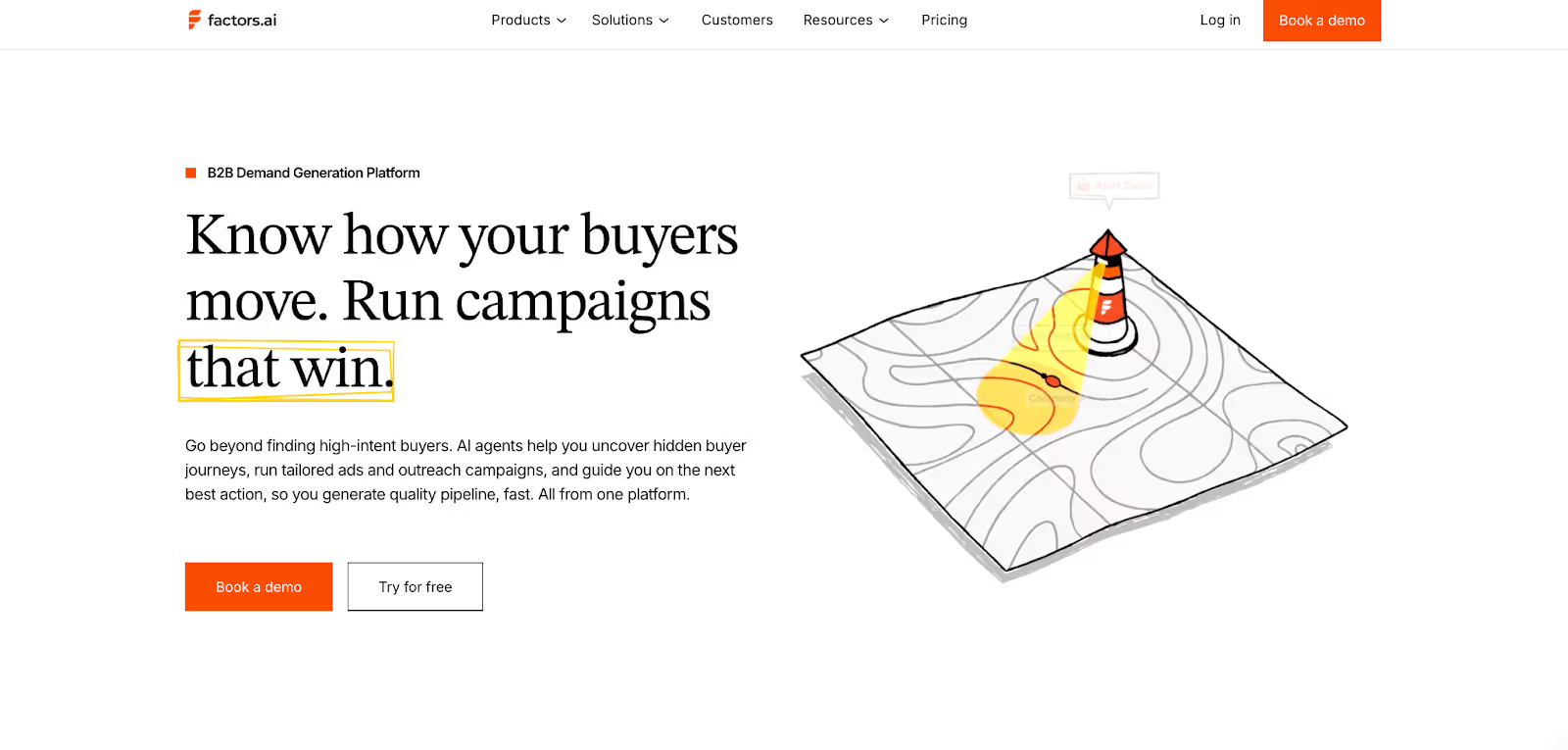
Factors goes beyond showing who’s interested and helps your team understand why and what to do next.
Key capabilities include:
- Unified View of Every Account (Account 360)
- Connects website, ad, CRM, and product data into one sortable view of every account.
- Tracks every touchpoint, from first visit to closed deal, ensuring no high-intent account slips through the cracks.
- Aligns marketing, sales, and RevOps with a single source of truth for all GTM activity.
- High Coverage Identification
- Identifies 75%+ of anonymous visitors through waterfall enrichment across Snitcher, 6sense, Demandbase, and Clearbit.
- Tracks intent signals across stages and syncs them directly with CRMs and ad platforms.
- AI Agents That Do the Work
- Handle account research, buying group mapping, post-meeting tracking, and closed-lost reactivation automatically.
- Send real-time Slack or Teams alerts for key actions like form-fill drop-offs or demo revisits.
- Surface the right contacts within each account and provide personalized outreach insights, so reps always know who to engage and when.
- Cross-Platform Activation with AdPilot
- Integrates seamlessly with HubSpot, Salesforce, LinkedIn Ads, Google Ads, and G2.
- AdPilot automates retargeting and audience syncs, optimizing campaigns using CRM and engagement data.
- Includes Google CAPI and Audience Sync for high-precision targeting, budget efficiency, and buyer-stage-specific campaigns.
- Keeps audiences fresh with daily automated updates, ensuring your ads always reach in-market accounts.
- Advanced Account & Contact Scoring
- AI prioritizes outreach by scoring accounts and contacts based on ICP fit, funnel stage, and engagement intensity.
- Helps GTM teams focus on high-potential opportunities instead of low-value leads.
Together, these capabilities turn intent data into coordinated action, helping GTM teams build pipeline more efficiently.
Warmly Features and Functionality
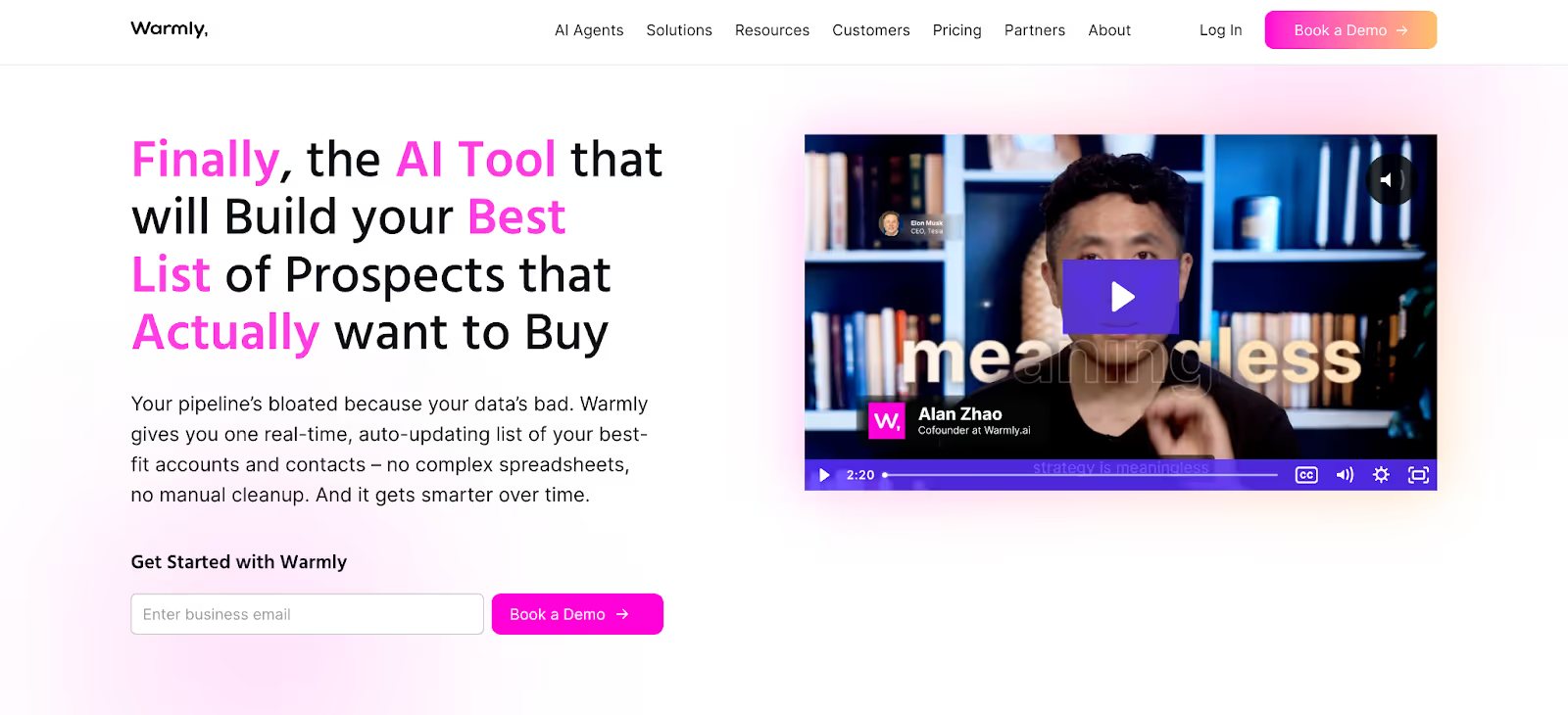
Warmly focuses on helping reps connect with buyers while they’re still active. It’s built around real-time engagement and person-level signals.
- Multi-Layered Intent System
- First-party data from website behavior and visits.
- Second-party data from LinkedIn (funding, job changes).
- Third-party data from competitor or keyword-based interactions.
- Warmly AI Chat
- Engages visitors automatically.
- Qualifies, shares resources, and can book meetings instantly.
- AI Agents Across the Funnel
- Marketing Ops for targeting and routing.
- Demand Gen for campaigns.
- SDR and Co-Pilot agents for automated lead engagement.
- Integrated Workflow
- Connects with HubSpot, Salesforce, Slack, LinkedIn Ads, and Google Ads.
- Keeps reps informed with real-time Slack updates.
Warmly helps teams stay quick and responsive when new interest appears, keeping outreach personal and timely.
Factors.ai vs Warmly: Who wins on the feature front?
Warmly does a great job for teams that rely on instant engagement. The person-level data and AI Chat make it ideal for fast outbound and SDR-heavy setups.
Factors.ai, on the other hand, offers a deeper system for GTM teams that want to connect the dots across their entire funnel. It not only spots intent but also structures how your team acts on it.
In short:
- Warmly helps you respond faster, but with a partial view.
- Factors helps you scale smarter and see the full picture.
Factors.ai vs Warmly: Pricing Comparison
Both platforms take very different routes when it comes to pricing. Factors focuses on scalability across tiers, while Warmly builds its model around AI Agents designed for specific GTM goals.
Let’s look at them side by side.
Factors.ai Pricing
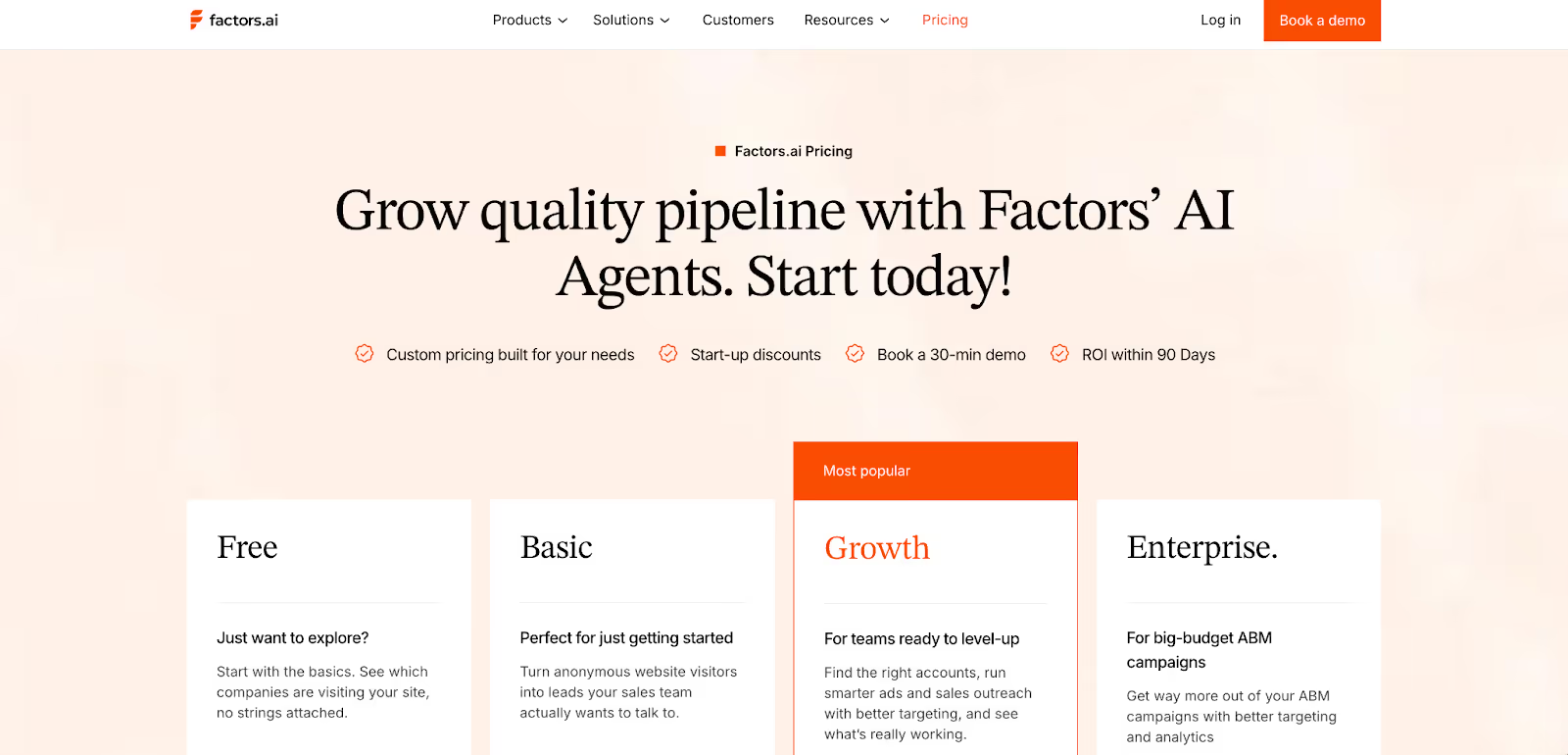
Factors follows a structured plan that grows with your GTM needs. It doesn’t limit value to one function but expands across the funnel as your operations scale.
Here’s how it’s set up:
- Free Plan
- Identify up to 200 companies/month
- Includes dashboards, visitor tracking, Slack integration
- Basic Plan
- 3,000 companies/month
- Adds LinkedIn intent signals, GTM dashboards, and ad integrations
- Connects to HubSpot, Salesforce, and Google Search Console
- Growth Plan (Most Popular)
- 8,000 companies/month
- Includes ABM analytics, account scoring, G2 intent data, workflow automation, and a dedicated CSM
- Enterprise Plan
- Unlimited companies and up to 25 seats
- Predictive scoring, AdPilot for Google and LinkedIn, advanced segmentation, and white-glove onboarding
What makes it valuable
- Consolidates multiple tools (visitor ID, attribution, enrichment, ad activation) into one.
- Expands naturally as the team scales and no need to stack point tools.
- GTM Engineering Services can design and automate your entire RevOps setup.
Warmly Pricing
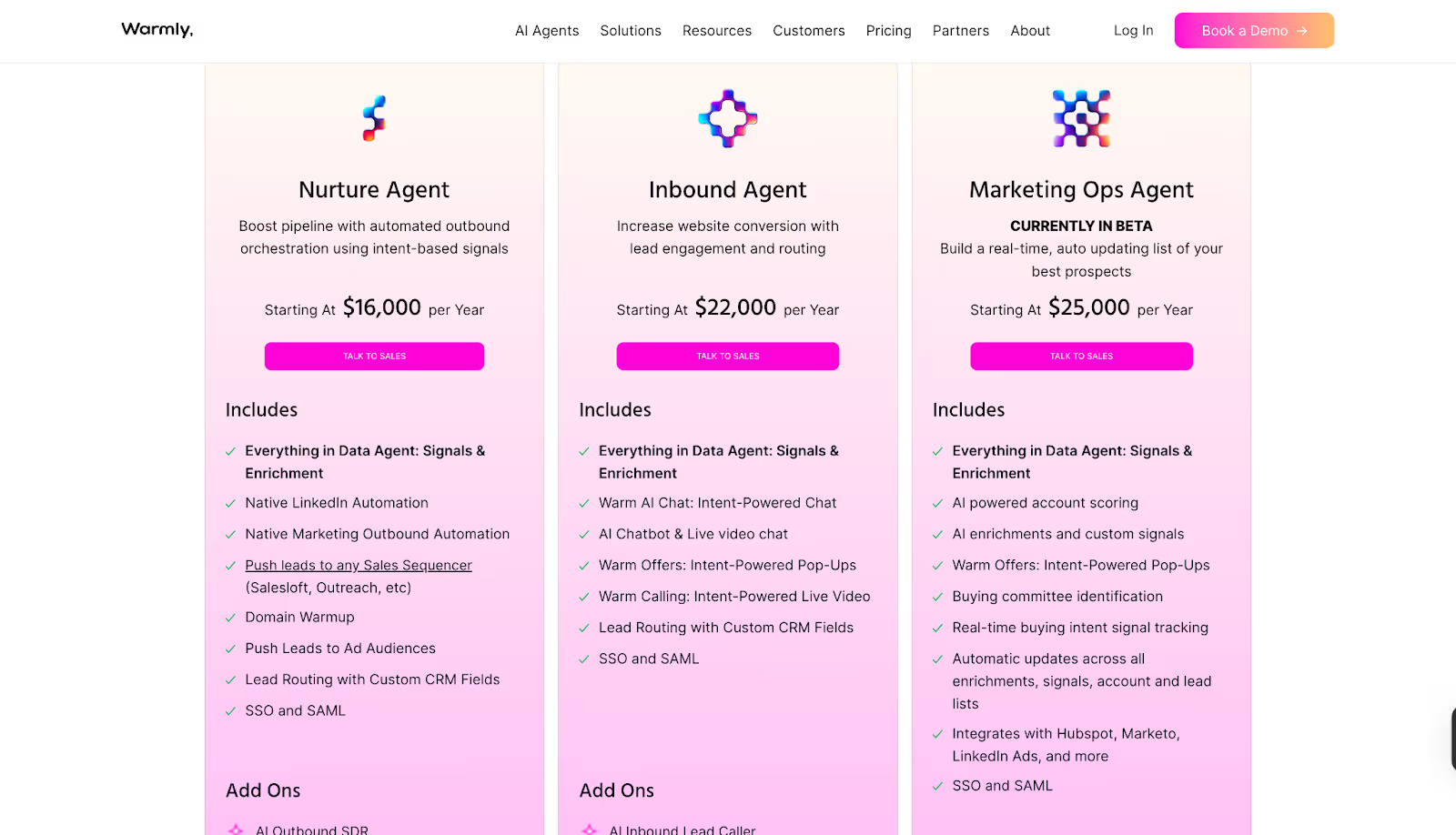
Warmly’s pricing revolves around AI Agents, each designed for a specific motion like outbound, inbound, or marketing operations.
Available Agents:
- Nurture Agent – $16,000/year
- Built for outbound orchestration using intent-based signals
- Includes:
- Native LinkedIn and marketing automation
- Domain warmup
- Lead routing with custom CRM fields
- Push leads to ad audiences or sales sequencers
- SSO and SAML
- Add-on: AI Outbound SDR
- Inbound Agent – $22,000/year
- Designed to increase conversion through engagement and routing
- Includes:
- Warm AI Chat for intent-based conversations
- AI chatbot and live video chat
- Intent-powered pop-ups and calls
- Lead routing with CRM sync
- SSO and SAML
- Add-on: AI Inbound Lead Caller
- Marketing Ops Agent – $25,000/year (Beta)
- Focused on enrichment, scoring, and real-time signal tracking
- Includes:
- AI-powered account scoring and custom signals
- Buying committee identification
- Real-time updates across all signals
- Integrations with HubSpot, Marketo, and LinkedIn Ads
- SSO and SAML
Warmly’s model gives you flexibility to pick only what you need, but it can get expensive as your team grows across multiple functions.
Factors.ai vs Warmly: Who wins on the pricing front?
Warmly offers clear options for teams that want AI Agents focused on specific goals. The annual structure makes sense for dedicated use cases like inbound engagement or outbound automation.
Factors, on the other hand, gives you an all-in-one foundation that grows with your GTM system. Its tiered pricing covers a broader set of needs like analytics, orchestration, and automation without having to buy separate modules.
In short:
- Warmly works well if you want targeted AI Agents for one motion at a time.
- Factors makes more sense if you want one scalable platform to power your full GTM stack.
Factors.ai vs Warmly: Analytics and Attribution
Spotting interest is one thing. Knowing which actions actually turn into revenue is another.
That’s where analytics and attribution become the real test of how strong your GTM platform actually is.
Here’s how Factors and Warmly stack up.
Factors.ai Analytics and Attribution
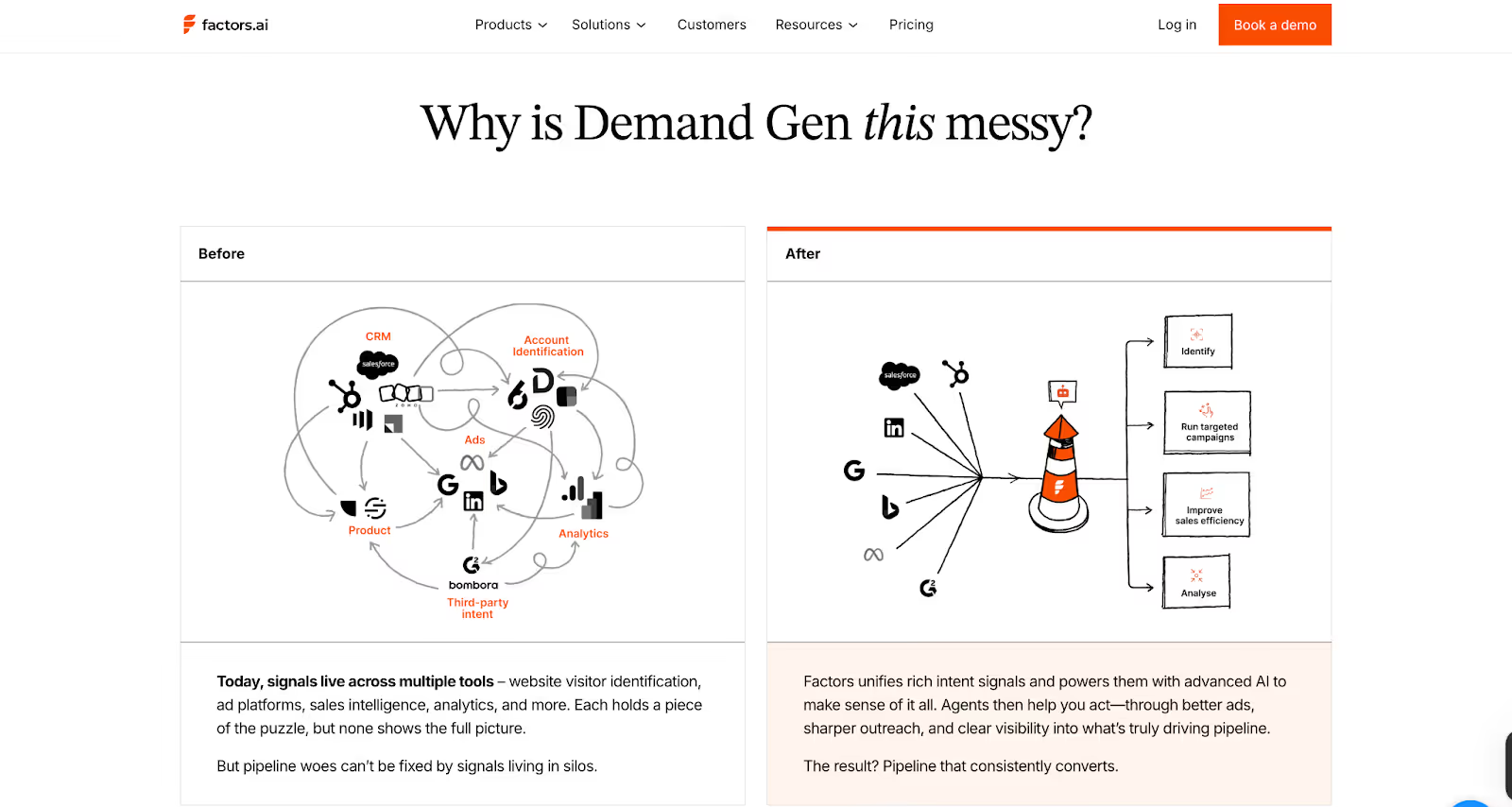
Factors gives your team a complete view of how marketing and sales activity turns into revenue. Every ad click, website visit, or CRM update gets connected in one continuous line, from awareness to closed deal.
Key analytics capabilities include:
- Multi-touch Attribution
- Tracks influence from first touch to final conversion.
- Answers questions like “Which campaign actually created pipeline?”
- Funnel Stage Analytics
- Visualizes the full path from MQL to Closed Won.
- Highlights which campaigns push deals forward and where drop-offs happen.
- Customer Journey Timelines
- Combines web, CRM, ad, and product data into one chronological view.
- Helps GTM teams see the full story behind every opportunity.
- Segmented Dashboards
- Filter by geography, persona, or product line.
- Compare how different audiences move through the funnel.
- Drop-off & Bottleneck Detection
- Automatically flags friction points.
- Helps RevOps and GTM leaders refine campaigns faster.
Together, these features make analytics actionable. You don’t just see activity; you can measure what’s really driving revenue.
If you want to understand the different ways attribution works and which model fits your stack, we also explain multi-touch approaches in our guide to understanding multi-touch attribution models.
Warmly Analytics and Attribution
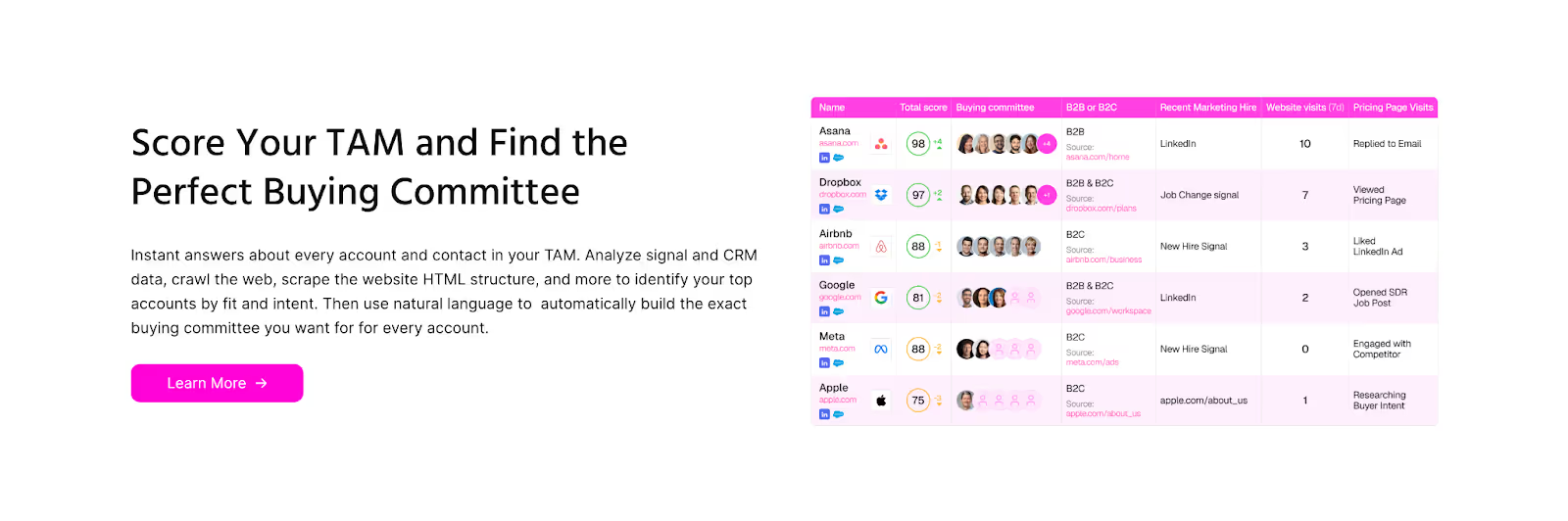
Warmly focuses on engagement visibility rather than deep attribution. It highlights how prospects interact with your content and website but doesn’t connect those signals back to the entire sales funnel.
What it offers:
- Engagement Reports
- Track visitor activity, entry and exit stats, and referrer data.
- Intent Insights
- Show which visitors are most active and which campaigns are attracting them.
- Signal Highlights
- Identify high-value interactions such as LinkedIn clicks or return visits.
These analytics give sales teams a quick pulse on engagement but lack the full context needed to trace ROI across campaigns or channels.
Verdict on Analytics & Attribution
Warmly gives a surface-level view of visitor activity. It’s helpful for understanding which prospects are active right now, especially when combined with its real-time chat and AI engagement.
Factors gives the complete story. It connects every signal, from anonymous visits to deal closure, and helps GTM teams tie activity back to revenue. The insights go deeper, helping you understand what’s working and what needs improvement.
In short:
- Warmly gives visibility.
- Factors gives clarity and accountability.
Factors.ai vs Warmly: Ad Activation & Retargeting
Intent signals are only useful if your team can act on them fast.
Both Factors and Warmly help you activate audiences, but the depth of automation and targeting accuracy makes a big difference in how your GTM motion performs.
Here’s how they compare.
Factors.ai Ad Activation and Retargeting
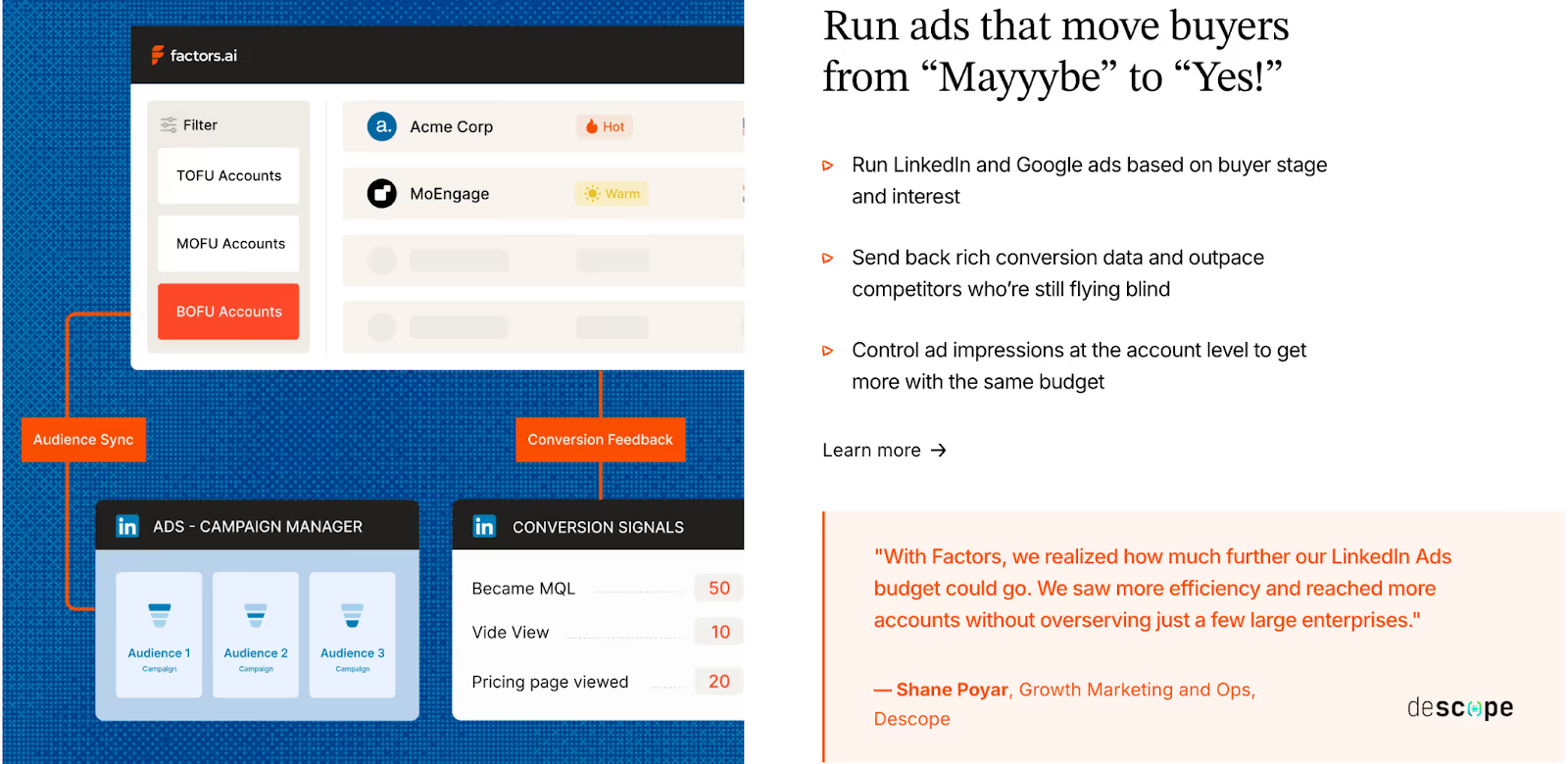
Factors approaches advertising as part of the GTM cycle, not a separate activity. The goal is to help your team reach the right accounts the moment intent appears.
Key ad capabilities include:
- Dynamic Audience Syncs
- Automatically build and refresh audiences on LinkedIn and Google based on buying intent, ICP match, or funnel stage.
- Automatically build and refresh audiences on LinkedIn and Google based on buying intent, ICP match, or funnel stage.
- Smart Retargeting
- Target accounts showing signals from multiple sources such as G2, website activity, CRM updates, or product usage.
- Ensures your ads reach the right companies at the right time.
- Conversion Feedback Loops
- When an SDR marks a lead as qualified, that data feeds back into ad platforms.
- Helps ad algorithms optimize toward accounts that actually convert.
- Google CAPI Integration
- Sends richer conversion data to Google for smarter bidding and lower wasted spend.
- Budget & Frequency Controls
- Manage impressions at the account level to avoid overserving ads to the same group.
With these features, Factors closes the gap between marketing and sales activation. It helps you spend smarter, retarget better, and turn intent into impact faster.
Warmly Ad Activation and Retargeting
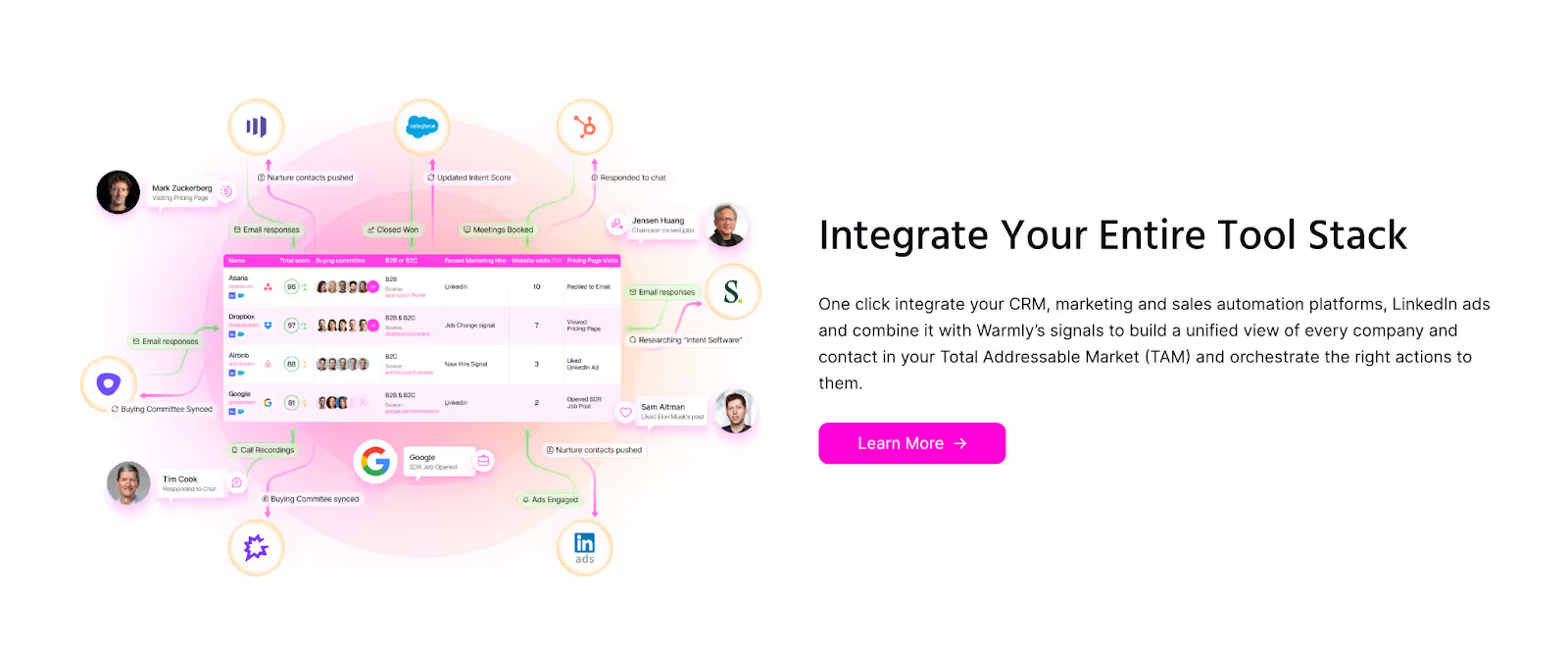
Warmly includes ad integrations but focuses mainly on real-time rep engagement rather than automated ad orchestration.
Capabilities include:
- LinkedIn Ads Integration
- Allows sales reps to see which ads visitors interacted with and engage those prospects directly.
- Keeps outreach more contextual for SDRs.
- Google Ads Integration
- Listed under marketing integrations, but there are no public details on how it handles audience updates or optimization.
Warmly’s ad setup works best for teams that want visibility into ad-driven visitors but prefer manual control over ad campaigns.
Verdict on Ad Activation & Retargeting
Warmly connects sales teams closer to ad-driven visitors, helping reps act quickly when someone engages. It’s effective for teams that prioritize immediate outreach.
Factors connects ad engagement with your full GTM motion. It automates audience syncs, optimizes spend through conversion feedback, and ensures ads reach only active, in-market accounts.
In short:
- Warmly helps you react faster.
- Factors helps you orchestrate smarter.
Factors.ai vs Warmly: Onboarding & Support
The quality of onboarding decides how quickly the system becomes useful for the team. Both Factors and Warmly help new users get started, but their styles and level of involvement are quite different.
Factors.ai Onboarding and Support
Factors builds its onboarding around your existing GTM motion. The process is detailed but smooth, designed to fit your team’s structure rather than forcing you into a predefined setup.
Here’s what it includes:
- Personalized Configuration
The onboarding starts with your ICP, funnel stages, and current processes. Each workflow, signal, and alert is mapped to how your team already operates. - Dedicated Slack Channel
A direct line connects you with your customer success manager and GTM engineers. It’s continuous support like quick answers, shared feedback, and real collaboration. - Weekly Reviews
Regular check-ins help align usage with results. These sessions track adoption, troubleshoot bottlenecks, and refine how the team uses the platform week by week. - Optional GTM Engineering Services
For teams that don’t have in-house RevOps, Factors provides an add-on service layer.
This includes:- Custom ICP modeling and GTM playbook design.
- Setup of enrichment, alert, and ad activation workflows.
- SDR enablement through post-meeting alerts, closed-lost reactivation, and buying group mapping.
- Ongoing reviews, optimization, and documentation of the GTM process.
Together, these services make onboarding feel more like partnership. The goal is to help teams set up a system that continues to perform smoothly over time.
Warmly Onboarding and Support
Warmly takes a simpler route. It aims to minimize friction and help teams start using the platform right away.
What it offers:
- Fast Setup
Connects with Slack, CRMs, and ad platforms in a few minutes. The system begins showing visitor activity immediately. - Real-Time Support
Help is available through Slack for integration or feature-related questions. - Smooth Experience
The process feels intuitive and doesn’t require training sessions or structured onboarding. It’s ideal for smaller teams or those comfortable learning by doing.
Verdict
Warmly prioritizes speed and ease. Teams can start using it almost instantly without waiting for setup cycles.
Factors provides a deeper onboarding process that’s hands-on and strategic. The white-glove support and optional GTM services turn the setup period into a foundation-building phase for the whole GTM motion.
Factors.ai vs Warmly: Compliance and Security
When GTM platforms deal with buyer data, privacy and compliance become just as important as performance. Most mid-market and enterprise teams look closely at how tools handle security certifications and data governance before moving forward with a deal.
Both Factors and Warmly maintain strong data protection frameworks, but their scope and documentation vary.
Factors Compliance and Security

Factors has built its platform to meet enterprise-level data and privacy requirements. Its certifications and practices are designed to clear procurement checks quickly and keep data handling transparent.
Key measures include:
- Global Standards
Fully compliant with GDPR and CCPA, meeting both EU and US privacy laws. - Certifications
Holds ISO 27001 and SOC 2 Type II, ensuring secure management of customer data and system operations. - Privacy-First Enrichment
Uses firmographic and behavioral signals responsibly, avoiding invasive identification methods. - Data Agreements
Provides signed Data Processing Agreements (DPAs) for customers who require documented data handling assurance.
These layers of certification and clarity make Factors suitable for teams working with enterprise clients or regulated industries where compliance is a deciding factor.
Warmly Compliance and Security

Warmly also follows recognized data protection standards and keeps its compliance aligned with major frameworks.
Key measures include:
- Privacy Coverage
Adheres to GDPR, CCPA, and the EU Data Act, giving users control over their information. - SOC 2 Certification
Audited for security and data management standards. - Data Transparency
Provides general visibility into how intent data is enriched but does not publish a dedicated DPA or detailed enrichment policy.
Warmly’s compliance setup fits well for modern SaaS teams that handle sales and marketing data responsibly, though it offers fewer public details on the structure of its data governance.
Verdict
Both platforms meet key privacy standards and are safe for use in regulated environments.
Factors’s wider certification coverage and published data agreements make it stronger for companies that undergo detailed vendor reviews. Warmly covers the essentials and aligns with major regulations, which is suitable for teams that want privacy assurance without complex legal layers.
Factors.ai vs Warmly: Which tool to choose when?
Both Factors and Warmly help GTM teams move faster with AI. They make it easier to identify intent, automate workflows, and connect marketing with sales. But as we’ve seen across the chapters, the two platforms are designed with different priorities in mind.
Here’s a short recap before we wrap up.
When Factors Makes Sense
Factors fits teams that want their entire GTM motion connected. It brings together website, CRM, ad, and product data, then uses AI to help sales and marketing work from the same source of truth.
It’s especially suited for:
- B2B SaaS and enterprise teams managing complex funnels.
- RevOps leaders who need visibility across multiple channels.
- Marketing teams running ABM campaigns across LinkedIn and Google who need better targeting and ROI visibility.
- Companies that rely on multi-touch attribution to prove ROI.
- Teams that want guided onboarding and long-term support.
- Businesses that must meet strict compliance requirements before procurement.
Factors works best when the goal is scale, not just more leads, but a cleaner and more predictable pipeline.
When Warmly Makes Sense
Warmly focuses on person-level intent and immediate engagement. It’s fast to deploy and built around AI Agents that automate outreach, nurture inbound visitors, and help SDRs personalize their approach.
It’s well suited for:
- Small to mid-sized B2B teams that want instant activity visibility.
- Startups that need to automate early-stage prospecting.
- Teams running heavy outbound campaigns through LinkedIn and email.
- Companies that prefer plug-and-play onboarding without customization.
Warmly works well when the priority is quick activation and real-time connection with prospects.
Factors.ai and Warmly cater to different GTM strategies. Factors.ai, priced from $399/month, integrates marketing and sales with features like buyer journey analytics, multi-touch attribution, and ad platform integrations (LinkedIn, Google, Facebook, Bing). It’s ideal for teams seeking a comprehensive approach with account scoring, segmentation, and workflow automation. In contrast, Warmly focuses on sales automation with real-time engagement tools like AI-powered chatbots and intent data enrichment. Starting at $700/month, it excels in on-site lead engagement but lacks deep marketing analytics. If you prioritize sales outreach, Warmly is the choice, while Factors.ai offers a more integrated marketing-sales solution.
In a nutshell…
Both platforms help GTM teams make smarter use of intent, but they serve different operating styles.
Warmly delivers speed and immediate visibility for sales-led teams.
Factors brings long-term clarity, automation, and structure for data-driven GTM functions that want to scale reliably.
If your team needs a full-funnel system that tracks, analyzes, and activates every signal, Factors aligns better with that journey.
If you want to keep things lightweight and focus on faster prospecting, Warmly fits that direction.
And if you’d like to explore other options beyond Warmly, check out this in-depth comparison of top Warmly-AI alternatives.

10 Best Leadlander Alternatives and Competitors for 2025
LeadLander serves as a dedicated website visitor analytics and reporting solution tailored for Business-to-Business (B2B) companies. Its primary focus is on the identification of anonymous website visitors, offering essential sales intelligence. By furnishing specific details about each visitor, including verified contact profiles, LeadLander transforms these anonymous interactions into actionable leads. The platform aims to expedite the sales process by showcasing the origin of valuable customers and showcasing customer journeys through website navigation.
So, why look for a Leadlander alternative?
Scenario: Some users perceive Leadlander as relatively expensive, especially for businesses with limited budgets.
Consideration: Evaluate alternative solutions with pricing models that align more closely with your budget constraints while ensuring they meet your specific requirements.
- Integration Challenges:
Scenario: Users have reported difficulties integrating Leadlander with specific platforms, limiting the utility of collected data.
Consideration: Prioritize alternatives that offer seamless integration with your existing tech stack to maximize the efficiency of data utilization.
- Data Accuracy Concerns:
Scenario: While providing accurate tracking data, users express concerns about the precision of metrics, such as the count of unique visitors.
Consideration: Look for alternatives with a strong reputation for data accuracy and quality, ensuring reliable insights for informed decision-making.
- User Interface Usability:
Scenario: The user interface of Leadlander is criticized for its appearance, and some users, especially those with limited technical experience, find it challenging to navigate.
Consideration: Explore alternatives with intuitive and user-friendly interfaces to enhance the overall user experience and facilitate independent navigation.
- Support Responsiveness:
Scenario: Timely support may pose challenges, with extended waiting times and instances where support tickets remain unanswered.
Consideration: Prioritize alternatives with dedicated and responsive support services to ensure efficient problem resolution and maximize the return on investment.
- Feature Enhancement and User Feedback Integration:
Scenario: Users have expressed the need for ongoing improvements in Leadlander's features and user interface.
Consideration: Consider alternatives that actively integrate user feedback for enhancements and demonstrate a commitment to refining features over time.
- Specific Feature Requirements:
Scenario: Your business may have specific feature requirements not fully met by Leadlander.
Consideration: Identify alternatives that offer the specific features crucial for your business goals and tailor your decision based on feature alignment.
{{INLINE_CTA_A}}
Here are some tools we’ll compare today
- LeadMagic
- Factors.AI
- Warmly
- Albacross
- CANDDi
- Clearbit
- Lead Forensics
- Demand
- ZoomInfo
- Dealfront
Factors to consider in the alternative
- Pricing Structure:
Evaluate the pricing plans of alternative solutions to ensure they align with your budgetary constraints. Look for transparent pricing models that cater to your business needs without compromising essential features.
- User Interface Usability:
Prioritize platforms with user-friendly interfaces, especially if your team includes members with varying technical expertise. A visually intuitive and easily navigable interface contributes to a smoother user experience.
- Performance and Stability:
Assess the performance track record of alternative platforms to ensure stable operations and minimal disruptions. A reliable platform contributes to consistent and uninterrupted usage, enhancing overall efficiency.
- Integration Capabilities:
Check the integration capabilities of alternative solutions, especially with the platforms your business relies on. A solution that seamlessly integrates with a variety of tools ensures a cohesive workflow and maximizes data utility.
- Data Accuracy and Precision:
Prioritize alternatives that prioritize data accuracy and provide precise metrics. Reliable tracking data is crucial for making informed decisions, and a platform that delivers accurate insights enhances the value of collected data.
- Support Services:
Assess the responsiveness and quality of support services offered by alternative platforms. A solution with dedicated and effective support mechanisms ensures timely assistance and efficient problem resolution.
- Alignment with Business Size:
Ensure that the pricing plans of alternative solutions align with the size and budget constraints of your business. Look for scalable solutions that cater to the specific needs of enterprises similar in size to yours.
- Feature Set and Functionality:
Compare the features and functionalities of alternative platforms to ensure they meet your business requirements. Look for solutions that offer a comprehensive set of tools and capabilities relevant to your goals.
- Trial Period and Flexibility:
Explore platforms that offer trial periods or free plans to allow for hands-on experience. This ensures that the chosen alternative meets your expectations and offers the flexibility needed for successful implementation.
- User Feedback and Reviews:
Research user reviews and feedback for alternative solutions to gain insights into the experiences of other businesses. Real-world experiences can provide valuable information on the platform's strengths and potential shortcomings.
{{INLINE_CTA_A}}
Before we start off, here’s a little about Leadlander

Leadlander Features
- B2B Website Traffic Identification:
Leadlander focuses on the identification of corporate-based website traffic, providing valuable insights into the companies exploring business websites.
- Verified Contact Profiles:
The platform offers verified contact profiles, encompassing details such as name, email, title, and other critical data points for employees at companies exploring your website. This facilitates actionable connections and informed engagement.
- Analytics and Detailed Reporting:
Leadlander delivers specific details about each website visitor, transforming anonymous visits into actionable contacts. The platform provides insights into customer journeys, connections to conversions, and valuable intent data.
- Sales Platform Integration:
Seamlessly integrating with widely used platforms like Salesforce, Mailchimp, HubSpot, and Slack, Leadlander streamlines the sales process for optimal effectiveness.
- Responsive Support Services:
Leadlander offers dedicated and responsive service and support to maximize the return on investment for users, ensuring efficient utilization of the platform.
- User-Friendly Interface:
Facilitating real-time delivery of actionable data through customized reports, alerts, and online access, Leadlander provides an easy-to-use interface for convenient utilization.
- Intent and Corporate Data Access:
The platform supplies intent data to unveil individual prospects and their details, along with access to key contacts at prospect companies.
Leadlander Pricing
Leadlander offers two distinct pricing plans to cater to varying business needs. The Small Business Plan, priced at $900 annually or $89 per month, is tailored for enterprises with moderate requirements. It includes features such as up to 100 leads per month, tracking for one domain, access to the contact network, unlimited user accounts, and 12 months of data storage.
Leadlander Limitations
- Integration Challenges:
Some users encounter difficulties integrating Leadlander with specific platforms, restricting the utility of collected data.
- Data Accuracy Concerns:
While providing accurate tracking data, some users express concerns about the precision of metrics, such as the count of unique visitors.
- User Interface Usability:
Users, especially those with limited technical experience, find the interface of Leadlander challenging to navigate and comprehend.
- Technical Support Quality:
Issues with the quality and availability of technical support have been reported, making it challenging to receive assistance when needed.
- Affordability Concerns:
While considered cost-effective, some users perceive Leadlander as expensive, particularly for businesses with limited budgets.

1. LeadMagic

LeadMagic Features
- Visitor Identification for Timely Sales and Marketing Communication:
LeadMagic excels in identifying noteworthy accounts visiting a website, ensuring timely communication to both sales and marketing teams.
- Intelligent Lead Scoring for Targeted Approaches:
The platform intelligently assesses and prioritizes leads based on engagement levels. This intelligent lead scoring system promotes a targeted approach to the most promising prospects, improving overall lead management.
- Streamlined Lead Nurturing Campaigns Through Automation:
LeadMagic streamlines lead nurturing campaigns through its automation capabilities, facilitating the automated nurturing of leads. This contributes to building relationships with potential clients more efficiently and systematically.
- Customized Lead Generation Strategies Covering SEO, Social Media, and PPC:
Businesses benefit from LeadMagic's customized lead generation strategies, encompassing SEO, social media marketing, and PPC advertising. This ensures optimal visibility and engagement for the brand across diverse digital channels.
- Comprehensive Digital Marketing Solutions for Optimal Brand Visibility:
LeadMagic provides comprehensive digital marketing solutions that cover various aspects, including search engine optimization (SEO), social media engagement, and pay-per-click (PPC) advertising. This approach ensures optimal brand visibility and engagement in the digital landscape.
LeadMagic Pricing
LeadMagic's pricing is determined by the monthly identification of companies, starting at an upfront annual fee of $139.


LeadMagic Limitations
- Currency Limitation and Future Billing Considerations:
Currently, LeadMagic accepts payments exclusively in USD, posing a limitation for users who prefer other currencies. However, there are indications of potential future considerations for billing in AUD, offering prospects for expanded payment options.

- Interface Improvement and Active User Feedback Integration:
LeadMagic acknowledges the need for interface improvement and actively integrates user feedback for enhancements. This commitment to refining the user interface ensures a more user-friendly experience based on ongoing user input.

- Challenges in the Onboarding Process with Cleanliness Concerns:
Users have reported challenges during the onboarding process with concerns about data cleanliness. Addressing these issues is crucial for users in the initial stages of adopting the platform, emphasizing the importance of a smooth onboarding experience.
2. Factors.AI

Factors.AI Features
- Advanced Account Identification:
Factors.AI, in collaboration with 6sense, leverages enterprise-grade IP data to identify up to 64% of anonymous companies. This includes firmographics like employee headcount, industry, and location, coupled with website activity metrics such as page visits and scroll-depth. Real-time Slack alerts are configured based on firmographic features and website behavior, keeping teams informed of high-intent visitors.
- Holistic Account Timelines:
Integration with campaigns, websites, and CRM data allows Factors.AI to furnish end-to-end account-level timelines across the customer journey. Users gain insights into touchpoints influencing accounts from initial visitors to paying customers.
- Comprehensive Analytics Features:
ABM Analytics:
Unifying reporting across ad platforms, CRMs, and CDPs to support campaign and website analytics at an account level.
Path Analysis:
Enabling the viewing of aggregate user behavior and identifying conversion and drop-off points.
Multi-Touch Attribution:
Connecting go-to-market initiatives to the pipeline, optimizing resource allocations, and proving marketing ROI.
Factors.AI Pricing
Factors.AI has a free plan, and no credit card is required, the basic plan starts at $149 per month (billed annually). Learn more about Factors pricing here: factors.ai/pricing
Factors.AI Limitations
- Documentation and Educational Resources:
Although there are existing materials available, insights from user reviews highlight the demand for more comprehensive guides. Providing clear and instructive documentation is crucial to empower users in fully utilizing the features of Factors.AI, fostering a more user-friendly environment.

- User Interface Enhancement:
User feedback suggests an opportunity to enhance the user interface by improving intuitiveness, navigation clarity, and the inclusion of visual cues. A more user-friendly experience is essential, especially for new users, contributing to a smoother onboarding process and heightened overall satisfaction.

{{INLINE_CTA_A}}
3. Warmly

Warmly Features
- Comprehensive Access to Enrichment and Intent Data:
Warmly provides users with extensive access to both enrichment and intent data. This encompasses a rich source of information regarding potential leads, allowing businesses to gain a deeper understanding of visitor profiles and tailor engagements accordingly.
- Unified Buyer Experience Integrating Intent Insights for Effective Engagement:
The platform focuses on creating a unified buyer experience by seamlessly integrating intent insights into the engagement process. By aligning the understanding of visitor intent with immediate actions, Warmly enhances the effectiveness of engagements with decision-makers.
- Autonomous Sales Orchestration Bridging the Gap Between Intent Signals and Outreach:
Warmly facilitates autonomous sales orchestration by bridging the gap between intent signals and outreach efforts. This feature ensures that sales teams can efficiently leverage identified intent signals to engage with prospects, optimizing competitiveness in the market.
- Effortless Integration with Existing Tools, Converting High-Intent Visitors into Leads:
Warmly prioritizes user convenience through effortless integration with existing tools. This functionality is designed to convert high-intent website visitors into leads seamlessly, ensuring a smooth transition from identification to engagement.
- Orchestrated Workflows Triggered by Site Activity for Automated Prospecting Campaigns:
The platform enables orchestrated workflows that are triggered by site activity. This automation feature allows for the seamless execution of prospecting campaigns based on real-time actions, ensuring a proactive and timely approach to lead generation.
Warmly Pricing
Warmly offers a free account with access to 500 leads per month. The Business plan, starting at $805 per month, provides users with access to 25,000 leads monthly.

Warmly Limitations
- Recognition Challenges with Distinguishing Valuable Leads from Bot Traffic:
The platform acknowledges challenges in accurately distinguishing valuable leads from bot traffic. This aspect highlights the importance of refining recognition mechanisms to ensure a more precise identification process.

- Limitations in User Identification, Suggesting Potential Improvements in Code Additions:
Users have reported limitations in identifying every user, indicating the need for potential improvements. Suggestions, such as code additions to marketing emails, have been proposed to enhance user identification and provide a more comprehensive view.

- Difficulty in Filters, Displaying Existing Customers as Leads:
Users have encountered occasional difficulty in filters, with instances of existing customers being displayed as leads. This points to the need for refining filter functionalities to ensure accurate and reliable differentiation between existing customers and new leads.

- Ongoing Development Expected in Reporting Features for Enhanced CRM Integration:
Anticipated ongoing development in reporting features suggests a commitment to enhancing CRM integration. Users can expect improvements in the platform's reporting capabilities, contributing to more informed decision-making processes and seamless integration with CRM systems.

4. Albacross

Albacross Features
- Identification and Insights:
With its base in Sweden, Albacross, a leading company specializing in visitor identification and intent data, collaborates with a vast network of over 10,000 companies. Albacross stands out in its ability to pinpoint anonymous accounts, providing comprehensive firmographic details and a deep understanding of visitor intent.
- Customization Capabilities:
Albacross seamlessly integrates with popular personalization tools such as Optimizely and VWO. This unique capability empowers businesses to tailor website content dynamically based on individual visitor profiles, enhancing the overall user experience.
- Strategic Display Advertising:
Albacross introduces a distinctive feature by enabling the creation and monitoring of display ads directly within its platform. Forming partnerships with reputable publications like The New York Times and Daily Mail, Albacross facilitates the strategic deployment of account-level targeted ads, expanding the reach and impact of advertising efforts.
Albacross Pricing
Albacross also has a free 14-day trial plan. The Self-Service Package, available at a monthly rate of €79, presents a variety of features aimed at elevating your user experience. Under this plan, you gain the ability to identify a maximum of 100 companies, monitor visitor activities, and leverage advanced segmenting and filtering functionalities.

Albacross Limitations
- Limited Interface Customization:
Certain users express a limitation in the app's interface, highlighting that downloadable CSV reports provide more in-depth insights than the app's native interface. The ability to customize the interface would be advantageous, allowing users to choose and display specific columns in alignment with their preferences.

- Concerns with Integrations:
Feedback from users indicates potential challenges with integrations, particularly with CRMs like Salesforce. Despite available workarounds such as Zapier, this poses a potential concern for B2B teams aiming for streamlined workflows and seamless connectivity.

{{INLINE_CTA_A}}
5. CANDDi

CANDDi Features
- Individualized Account Identification Capabilities
CANDDi goes beyond identifying companies, extending its capability to recognize individual visitors to your website. This unique feature empowers personalized follow-ups and enables tailored pitches, fostering a more targeted and effective engagement strategy with potential prospects.
- Helps Convert Warm Leads
Leveraging CANDDi's advanced visitor tracking solution sheds light on the 98% of website visitors who may not initially inquire. This facilitates the conversion of warm, qualified leads directly into your sales team’s inbox and CRM, amplifying your lead generation and sales initiatives.
- Real-Time Alert Mechanism
CANDDi operates in real-time, merging IP tracking with cookie tracking to ensure no sales opportunities go unnoticed. Whether prospects are browsing from their office or home, you receive immediate alerts the moment crucial activities unfold on your website.
- Precision in Attribution Measurement
It offers detailed insights into visitor attribution, showcasing the specific origin of each visitor, including the marketing channel and campaign. This granular information empowers you with the knowledge of what drives conversions, facilitating more informed decision-making for your marketing endeavors.
CANDDi Pricing
Currently, CANDDi does not offer a free plan. However, users can sign up for trial plans for each of their plans. The Starter Plan starts at $249 per month + VAT.

CANDDi Limitations
- Compatibility with Apple Macs:
Currently, there's a limitation in functionality on Apple Macs. While it's anticipated that improvements are in progress, users on Mac devices may encounter constraints in accessing certain features.

- Interface Intuitiveness:
The platform's interface lacks intuitiveness, making it challenging for users to navigate independently. Users often find themselves relying on assistance from their account manager for guidance, which may impact the user experience.

- Form Tracking Code Application:
Applying the form tracking code is a complex process, requiring substantial effort and collaboration with a web developer. Users have reported spending significant time, approximately four hours, to integrate the tracking code, indicating a potential area for improvement in user-friendliness.
- Guided Platform Usage:
Enhancements in the platform could include prompts or guides to assist users in understanding and maximizing the utility of certain features. This would contribute to a more user-friendly experience, particularly for those exploring the platform independently.

6. Clearbit

Clearbit Features
- Clearbit's Business Targets:
Clearbit's Business Targets feature allows businesses to explore every B2B company on the internet. Going beyond basic target account lists, it enables the creation of a comprehensive audience comprising all potential purchasing companies. The Business Targets tool is instrumental in understanding the genuine B2B target market.
- Intent Identification and Conversion Pipeline:
Clearbit's solution aids in identifying anonymous website visitors, revealing buying intent from high-fit companies. This capability facilitates prompt action to convert intent into a pipeline, effectively transforming website visitors into potential leads and customers.
- Access to Validated B2B Contact Repository:
The platform grants access to a global B2B contact repository housing over 30 million validated contacts. With extensive coverage across the US, APAC, and EMEA, businesses can reach a broad audience of potential prospects. The contacts' deliverability is assured, providing accurate B2B contact data to support the conversion of intent into a pipeline.
- Smooth Integration with Salesforce:
Clearbit seamlessly integrates with Salesforce, allowing effortless data export to the Salesforce Customer Platform. This integration ensures immediate deduplication of data, making it campaign-ready and offering a streamlined prospecting experience.
Clearbit Limitations
- Affordability Concerns:
Some users express concerns about the pricing, deeming it relatively high, especially for early to mid-stage startups. Beyond the cost aspect, users note that credits are often quickly depleted, necessitating additional purchases for more detailed information. This limitation may impede users seeking thorough exploration of the available features and data.


- Intermittent Performance Challenges:
A notable drawback includes occasional lag or unexpected closures without prior notification in specific situations. These unpredictable performance issues may cause interruptions and inconvenience, affecting the overall reliability and user experience of the application.

- Feature Comparison with LinkedIn Sales Navigator:
Some reviews highlight a potential drawback in the form of missing features, such as the ability to InMail prospects and receive real-time notifications for critical decision-making updates within companies. This absence may be viewed as a limitation when compared to similar platforms.
- Limited Customization Options:
The inability to customize the dashboard restricts the capacity to tailor the user interface according to individual preferences. This indicates potential room for improvement in aligning with industry standards.

{{INLINE_CTA_A}}
7. Lead Forensics

Lead Forensics Features
- Visitor Activity Tracking:
Efficiently monitor and document the actions of both companies and individual visitors engaging with a website.
- Contact Details Disclosure:
Reveal pertinent contact details of website visitors, enabling timely and informed outreach initiatives.
- Advanced Lead Scoring:
Implement a robust lead scoring system based on the behavior of website visitors, ensuring an effective prioritization mechanism for sales and marketing teams.
- CRM and Marketing Integration:
Seamlessly integrate with CRM systems and marketing automation tools, fostering a cohesive and streamlined workflow for enhanced efficiency.
- Real-Time Engagement Notifications:
Offer real-time notifications to facilitate immediate engagement with high-potential leads, ensuring timely and personalized interactions.
- Comprehensive Analytics and Reporting:
Provide detailed analytics and comprehensive reporting, offering valuable insights into visitor patterns and behavior for informed decision-making.
Lead Forensics Pricing:
Specific pricing details are not available, but Lead Forensics offers Essential and Automate plans.

Lead Forensics Limitations:
- User Interface Critique:
Users have voiced criticism regarding the unintuitive nature of the user interface, particularly in areas such as analysis, dashboards, and filters. This may pose challenges in terms of user experience.

- Navigation Challenges Across Domains:
Reports of navigation difficulties across multiple domains have been noted, impacting the overall user experience. Users have encountered challenges when moving between different domains within the platform.

- Cost Concerns for Small Businesses:
Smaller businesses have expressed concerns about the costs associated with the platform, suggesting potential misalignment with budget constraints. The pricing model may pose challenges for businesses operating within limited financial parameters.

8. Demand

Demand Features:
- Anonymous Account Identification:
Demand excels in identifying and engaging with B2B website traffic identification, providing a robust foundation for lead nurturing. The platform's capabilities extend beyond mere identification, fostering strategic interactions to nurture potential leads effectively.
- LinkedIn Automation for Personalized Outreach:
A standout feature of Demand is its advanced LinkedIn automation, empowering users with tools for personalized outreach and streamlined demo bookings. The platform facilitates seamless communication on LinkedIn, ensuring tailored engagement that resonates with target audiences.
- Technology Signals Analysis:
Demand offers sophisticated technology signals analysis, enabling businesses to tailor their engagement strategies based on the technology usage patterns of their prospects. This feature enhances targeted engagement, ensuring that interactions align with the technological preferences of the target audience.
- Automated Sentiment Analysis and CRM Sync:
Efficient lead management is a cornerstone of Demand's features. The platform incorporates automated sentiment analysis, providing insights into prospect sentiments. Additionally, seamless CRM sync ensures that these insights contribute to a well-informed and streamlined lead management process.
- AI-Powered Sales Assistant:
Demand's AI-powered sales assistant stands out as a valuable tool for personalized outreach and improved acceptance rates. Leveraging artificial intelligence, this feature augments the effectiveness of outreach efforts, contributing to higher acceptance rates and enhanced overall engagement.
Demand Pricing
Demand offers three plans, starting from $59/user/month, with a free 7-day trial.

Demand Limitations:
- Support Responsiveness:
Timely support may pose challenges, with extended waiting times and instances where support tickets remain unanswered for prolonged periods.
- Effectiveness of Support:
Support responses, when received, may not always offer immediate solutions, often requiring extensive back-and-forth communication for effective problem resolution. Instances of non-responsive support when faced with queries lacking a straightforward answer have been reported.
- Enhancement of Knowledge Base:
User feedback highlights the demand for a more comprehensive knowledge base, aiming to facilitate self-help and ultimately improve the overall user experience by providing in-depth resources.
- User Interface and Performance:
Criticism is directed at the UI's aesthetics, and occasional sluggishness could impact the user experience, despite overall positive feedback on functionality. Suggestions for refining the UI for a more visually appealing and responsive interface are noted.

- Streamlining Manual Tracking:
Users observe a manual process for excluding personal emails from CRM tracking, indicating an opportunity for improvement in automation to streamline this aspect of the user experience.

9. ZoomInfo

ZoomInfo Features
- Sales Prospecting Software:
ZoomInfo provides B2B sales prospecting software to help businesses identify and reach their next best customer. It uses data-driven insights and buying signals to reveal ready-to-buy companies, ultimately empowering sales teams to define markets and discover potential buyers effectively.
- Contact and Company Data:
With access to the largest B2B contact database of 70M+ direct dial phone numbers and 174M+ verified email addresses, ZoomInfo's contact and company data feature allows businesses to build an account universe based on their Ideal Customer Profiles. This enables them to reach decision-makers and key contacts more efficiently.
- Buyer Intent:
ZoomInfo's buyer intent service helps businesses identify and reach prospects at the beginning of their buyer's journey by tracking companies researching solutions like theirs across the web. This feature provides valuable insights for early engagement and lead generation.
- B2B Website Traffic Identification:
By allowing businesses to discover and connect with decision-makers from companies exploring their business website, ZoomInfo's website visitor tracking feature enhances the ability to engage with potential leads.
- Conversation Intelligence:
The platform offers conversation intelligence tools to analyze customer calls, meetings, and emails. This analysis helps drive process changes that impact the bottom line, making every interaction count.
- Engagement:
ZoomInfo helps generate and analyze interactions across communication channels, including sales calls, email and phone outreach, and business website engagements, to create more conversations that convert customers.
- Email & Phone Automation:
Through its native phone dialer and email tool, ZoomInfo enables businesses to build and execute multi-touch sales cadences, streamlining the outreach process.
- Website Chat for Sales:
ZoomInfo Chat is an easy-to-use, data-driven chatbot tool designed to shorten the sales cycle. Businesses can set real-time lead alerts to engage best-fit buyers or automate lead-qualifying interactions to free up their internal team.
- Contact Tracking:
Businesses can easily track their account champions and key contacts using ZoomInfo's contact tracking feature, allowing them to stay informed of their best relationships and potential new opportunities.
- Integrations:
ZoomInfo's comprehensive data and innovative technology can be integrated with existing tools, maximizing sales productivity and automating manual processes based on relevant external and internal activities.
- Workflows:
The platform allows businesses to act faster on critical market signals by automating outreach and sales activities, from buyer intent to funding updates and technology installations.
- Lead Enrichment:
With ZoomInfo Enrich, businesses can clean and standardize their data while capturing and appending fresh, precise information into their database, ensuring high-quality data on new and existing records.
{{INLINE_CTA_A}}
ZoomInfo Pricing
While specific pricing is not available, ZoomInfo has three plans.

ZoomInfo Limitations
- User Interface Limitations:
ZoomInfo's user interface is noted for areas that could be improved, including the ability to change and move columns, as well as export data to Excel. Some updates require intervention from the organization's Salesforce, IT, or ZoomInfo Admin, limiting individual users' autonomy. While recognizing the importance of Role-Based Permissions, users express a desire for Sales Reps to have a mechanism to "suggest changes" for their Admin.

- Contact Data Accuracy Challenges:
Identifying outdated or incorrectly updated contacts has been a challenge for some users, especially when those contacts are not utilizing LinkedIn effectively or maintain a limited online presence. This difficulty can impact the effectiveness of outreach efforts.

- Chrome Extension Stability:
Users report occasional issues with the stability of the ZoomInfo Chrome extension, noting instances of random sign-outs. While this has also been experienced on the website, users mention that it hasn't been as prevalent recently. Such interruptions may impact the seamless use of the platform.

10. Dealfront (Formerly Echobot and Leadfeeder)

Dealfront Features
- Advanced Website Visitor Tracking:
The platform offers robust capabilities for tracking website visitors, providing comprehensive insights into their behavior. Users can gain a detailed understanding of how visitors interact with the website, helping to tailor engagement strategies.
- Lead Scoring and Qualification Tools:
Equipped with tools for lead scoring and qualification, the system enables users to prioritize leads based on their behavior. This feature facilitates efficient lead management by focusing on high-potential prospects.
- Seamless Integration with CRM and Marketing Automation:
The platform seamlessly integrates with CRM and marketing automation platforms, streamlining processes and ensuring a cohesive approach to customer relationship management. This integration enhances workflow efficiency and data consistency.
- Real-Time Notifications for Strategic Follow-Ups:
Users benefit from real-time notifications, enabling prompt and strategic follow-ups with target leads. This feature ensures timely engagement, increasing the chances of converting leads into customers.
- Comprehensive Visitor Information:
The platform provides detailed information about website visitors, contributing to enhanced prospect identification. Users can access a wealth of data to tailor their outreach efforts and create personalized interactions.
- Custom Feeds and Filtering Options:
To further assist users in analyzing visitor data, the platform offers custom feeds and filtering options. This functionality allows for the segmentation of visitor data, providing a more granular understanding of different audience segments and their behaviors.
Dealfront Pricing:
They offer a free plan with no time limit, and the paid plan starts at € 198 per month, paid annually.

Dealfront Limitations:
- Limitation in Tracking LinkedIn Ad Visits:
Users have reported an inability to effectively track companies visiting the website from LinkedIn ads, particularly on mobile devices. This limitation hinders comprehensive visibility into the impact of LinkedIn advertising efforts.

- Persistent Integration Errors with Microsoft CRM:
The platform has faced ongoing integration errors with Microsoft CRM for approximately a year, affecting usability for users relying on this specific CRM system. The persistence of integration issues raises concerns about the platform's compatibility with Microsoft CRM.
- Incorrect Assignment of Dealfront Visits in CRM:
Users have experienced issues with the correct assignment of Dealfront visits in CRM, rendering this feature unusable. This inaccuracy in data assignment poses challenges for users who depend on precise tracking and attribution.
- Service and Error Resolution Concerns:
Concerns have been raised regarding the service and resolution of errors within the platform. Users have reported challenges in error resolution, prompting some to explore alternative solutions to address these issues. The perceived issues in service and error handling contribute to uncertainties about the platform's reliability.

- Manual Processes and Interface Absence:
Users have expressed dissatisfaction with Dealfront Target, citing manual steps as a significant drawback. The absence of an interface with the CRM necessitates manual intervention, leading to time-consuming processes that could be streamlined with a more integrated solution.
- Challenges in Data Timeliness and Quality:
Dealfront Target faces challenges related to data timeliness and overall data quality, which may fall short of user expectations. Users have reported instances where contact data did not meet the desired standards, highlighting potential areas for improvement in maintaining accurate and up-to-date information.

As businesses scout for Leadlander alternatives, their decision would depend on their specific needs but may include budget considerations, and preferences of businesses. Thoroughly evaluating the features, limitations, and user feedback for each alternative is crucial in making an informed decision that aligns with the goals of the organization.
{{INLINE_CTA_A}}
If you're seeking alternatives to LeadLander for website visitor tracking and lead generation, here are several robust platforms to consider:
1. Lead Forensics
A B2B tool that identifies anonymous website visitors, providing detailed company and contact info. It integrates with CRM systems and offers real-time alerts, making it ideal for converting website traffic into leads.
2. Factors.ai
Combining website visitor tracking with advanced analytics and account-based marketing, Factors.ai captures cross-channel intent signals and automates workflows, enhancing sales and marketing efficiency.
3. Clearbit
Clearbit enriches visitor data with real-time company insights. It integrates with marketing platforms for personalized outreach and lead scoring, boosting targeted marketing efforts.
4. Visitor Queue
Visitor Queue identifies companies visiting your website and provides key contact info. Its user-friendly interface and affordable pricing make it a great choice for small to mid-sized businesses.
5. Albacross
Albacross offers lead generation and ABM solutions by converting anonymous visitors into actionable leads. It provides visitor behavior insights and integrates with major CRM systems for efficient lead management.
When selecting an alternative to LeadLander, consider factors like integration capabilities, data accuracy, interface, support, and pricing to find the best fit for your business.

Factors vs. Lead Forensics: Which Lead Generation Tool is Best for Your Business?
When choosing the right lead generation and visitor tracking platform, businesses often compare popular tools like Lead Forensics and Factors.ai. Both platforms aim to help companies identify and track website visitors to convert them into leads, but their approaches differ significantly.
In this blog, we will compare Lead Forensics vs. Factors and highlight why Factors.ai stands out as the superior, more comprehensive alternative, and provide a detailed feature comparison to help you choose the best solution for your entire GTM team.
TL;DR
- Both Factors and Lead Forensics are valuable tools for B2B marketing, but they cater to different aspects of the GTM strategy.
- While Lead Forensics is primarily focused on visitor identification and basic lead generation, Factors goes far beyond with a holistic approach, offering advanced analytics, intent signals, attribution tracking, and features that support the entire GTM team.
- Factors not only provides more accurate data but also integrates seamlessly with platforms like LinkedIn, G2, and more, delivering greater value through its broad functionality and flexible pricing.
- For businesses seeking a comprehensive, data-driven solution that empowers all functions of the GTM team, Factors is the superior choice, offering far more than just visitor identification.
Compare: Lead Forensics vs. Factors
Overview of Lead Forensics

Lead Forensics is a widely used B2B lead generation platform that helps businesses identify anonymous website visitors and provides actionable insights. By tracking website visitors and associating them with company details, Lead Forensics allows businesses to reach out to potential customers more efficiently.
Key Features of Lead Forensics:

- Website Visitor Identification: Identifies companies visiting your website and provides detailed data, including company size and revenue.
- Real-Time Notifications: Sends instant alerts when a high-value prospect visits your site, enabling sales teams to act quickly.
- Detailed Analytics: Offers insights into visitor behavior, which helps sales and marketing teams tailor their outreach efforts.
- CRM Integration: Seamlessly integrates with popular CRMs like Salesforce to manage and track leads effectively.
- Lead Scoring: Allows businesses to rank leads based on the likelihood of conversion, prioritizing efforts for high-potential prospects.
Overview of Factors

Factors is a marketing analytics platform designed to help businesses understand customer behavior, generate qualified leads, and optimize their marketing strategies. Unlike Lead Forensics, which focuses mainly on visitor identification, Factors provides deeper insights into the entire customer journey by using behavioral analytics and machine learning.
Key Features of Factors:

- Sales Intelligence (SI): Delivers actionable insights by identifying high-intent prospects, enabling GTM teams to focus on the most promising leads.
- LinkedIn Ads Integration: Seamlessly integrates with LinkedIn Ads, allowing businesses to optimize their ABM campaigns and reach the right audience with precision targeting.
- Account-Based Marketing (ABM): Empowers GTM teams to execute highly effective ABM strategies by providing detailed account-level insights and engagement tracking.
- Web De-anonymization: Uncovers anonymous website visitors, giving marketing and sales teams the ability to identify and engage potential customers early in the buying journey.
- Scalability: Built to support your business as it grows, providing flexible, scalable solutions that cater to companies of all sizes.
Detailed Feature Comparison
1. Visitor Identification and Tracking
Lead Forensics excels at identifying companies behind website traffic by matching IP addresses to businesses. This feature is handy for B2B companies focused on targeting specific industries or companies. It allows businesses to know which companies are visiting their site but may raise privacy concerns as it uses IP-based tracking.
Factors, by contrast, focuses on behavioral analytics. It provides anonymized insights into user behavior across multiple touchpoints, enabling businesses to understand how customers engage with their websites, emails, or social media content. Factors' use of anonymized data complies with stringent privacy regulations like GDPR, making it more suitable for businesses that prioritize data protection.
2. Data Privacy and Compliance
Data privacy is increasingly becoming crucial when choosing a lead generation platform. Lead Forensics operates by identifying companies using IP addresses, which could raise issues in regions with strict data protection laws, such as Europe under GDPR.
In contrast, Factors focuses on privacy-conscious data collection. Using anonymized behavioral data ensures compliance with strict privacy regulations like GDPR and CCPA, making it a safer choice for businesses that operate globally or in heavily regulated industries.
3. Customization and Personalization
Lead Forensics allows customization, such as setting up lead scoring and CRM integration. Still, its core focus remains on identifying website visitors and providing data to sales teams for outreach.

On the other hand, Factors goes beyond visitor identification by offering AI-powered personalization. It enables businesses to customize their marketing strategies based on in-depth behavioral data, making Factors a better fit for companies looking to deliver personalized marketing experiences and improve engagement with potential customers.
4. Ease of Use and Implementation
While Lead Forensics is highly practical, its setup process can be more complex. Some users find it challenging to configure visitor tracking correctly, and the interface is often considered less intuitive.
Factors offers a more user-friendly experience with a simple interface and easy-to-implement features. It also provides excellent onboarding and support services, ensuring businesses can quickly get up and running without extensive technical expertise.
5. Pricing and Scalability
Both platforms offer custom pricing based on the specific needs of the business. However, Lead Forensics is generally considered more expensive, especially for smaller companies or startups, while Factors is regarded as a more affordable and scalable solution. Its flexible pricing structure makes it an attractive choice for companies of all sizes, from small startups to large enterprises.

Why Factors Is the Best Lead Forensics Alternative
While Lead Forensics has been a popular choice for B2B lead generation, Factors offers a more modern, scalable, and privacy-conscious solution that aligns with today’s businesses' needs.

Here are a few reasons why Factors stands out as the best alternative to Lead Forensics:
1. Account-Based Marketing
Unlike Lead Forensics, which primarily identifies website visitors, Factors offers in-depth insights tailored for Account-Based Marketing (ABM). It tracks the entire account journey across multiple touchpoints, enabling businesses to understand how key accounts engage with their brand, which content resonates with decision-makers, and where ABM strategies can be optimized. This holistic view empowers GTM teams to drive more targeted and personalized outreach.
2. Data Privacy and Compliance
Data privacy is critical in today’s regulatory landscape. Factors' focus on GDPR-compliant, anonymized data ensures that businesses can continue to gain valuable insights while complying with data protection laws. This makes Factors a safer and more sustainable choice for businesses operating in regions with stringent privacy regulations.
3. Account Scoring
One of Factors’ key differentiators is using AI and machine learning to provide predictive insights. This allows businesses to identify high-potential leads, forecast customer behavior, and optimize marketing strategies based on real-time data. Lead Forensics lacks this advanced AI-driven capability.
4. Cost-Effective and Scalable
Factorsi offers more flexibility for businesses looking for an affordable, scalable solution. While Lead Forensics can be prohibitively expensive for small and medium-sized businesses, Factorsi provides a pricing structure that scales as the business grows, making it a more accessible solution for companies of all sizes.
5. Customer-Centric Support
Factors has a reputation for providing excellent customer support, with dedicated success teams that help businesses get the most out of the platform. This ensures a smoother onboarding process and ongoing support, which Lead Forensics users have sometimes found lacking.
This comparison highlights the differences between Factors.ai and Lead Forensics. While Lead Forensics specializes in identifying website visitors, Factors.ai provides a comprehensive suite with behavioral analytics, AI-powered insights, and strong ABM capabilities. Factors.ai's holistic approach supports both marketing and sales teams, enabling better collaboration and more effective go-to-market strategies.
In a Nutshell
When comparing Lead Forensics and Factors, both platforms offer valuable lead generation and visitor tracking features. Lead Forensics is a robust tool for identifying website visitors, particularly for B2B companies focusing on outbound sales. However, it comes with potential privacy concerns and higher costs and lacks the advanced AI-driven insights offered by Factors.
Factors, on the other hand, provides a more comprehensive solution by focusing on behavioral analytics, AI-powered insights, and data privacy. Its scalable, cost-effective pricing structure and strong focus on compliance and personalized marketing make it the best alternative to Lead Forensics.
Ultimately, if you are looking for a lead generation tool that combines deep behavioral insights, AI-driven analytics, and a privacy-conscious approach, Factors is the superior choice for your business.