
How to Check Competitor Website Traffic: Tools, Benchmarks & Keyword Wins
Learn how to check competitor website traffic using Semrush, Similarweb, Ahrefs, and SpyFu. Compare visits, traffic sources, top pages, and keywords—plus understand what these estimates can and can’t tell you.

.avif)
Content Marketer



.svg)


You might think you know what a competitor’s SEO strategy looks like. But are you really going to market on gut feel alone?
Sure, if you had an unlimited budget, you could afford to guess. Most of us don’t.
When you’re working with near-zero budgets and million-dollar growth targets, assumptions get expensive fast. What you actually need is real data on which content formats bring in visitors before you spend a single rupee.
That visibility comes from analyzing competitor website traffic.
The only catch is, you cannot access their first-party data through Google Analytics or Search Console.
So, let’s talk about the next best method to find competitor website traffic and keywords so you can compete for them on the SERPs.
Quick answer: how to check competitor website traffic
- Enter a competitor domain into Similarweb, Semrush, or Ahrefs.
- Review estimated monthly visits, traffic sources, and country-level trends.
- Inspect the site’s top pages and top keywords to see what drives that traffic.
- Compare multiple competitors over time instead of trusting a single snapshot.
What tools do you need for Competitor Website Traffic Analysis?
Before jumping into competitor analysis, you need the right website traffic analysis tools. Here’s a quick list of the free and paid ones you can use based on your budget and how deep you want to go.
ToolBest forTraffic data shownKeyword dataTop pagesTraffic sourcesFree accessMain limitationSimilarwebHigh-level traffic benchmarkingEstimated visits, geography, engagementLimitedYesYesLimited free checksBest for directional estimates, not exact analyticsSemrushTraffic share and channel analysisVisits, trends, market share, audience overlapStrong organic and paid dataYesYesLimited reportsFull competitive workflows require paid plansAhrefsOrganic traffic and page-level SEO researchOrganic traffic estimatesStrong organic keyword dataYesLimited channel detailNo meaningful free traffic checkerWeaker for full channel-mix benchmarkingSpyFuPPC competitor researchEstimated paid visibilityStrong paid keyword historySome landing-page visibilityLimitedLimited free lookupsMost useful for ads, not broad traffic analysisSE RankingBalanced SEO and paid snapshotsOrganic and paid estimatesGood keyword coverageYesYesLimited trial accessSmaller data sets than the largest platformsUbersuggestBudget-friendly keyword discoveryBasic traffic estimatesBasic organic keyword dataLimitedLimitedYesLess depth and fewer comparison features
Free Tools for Quick Checks and Analysis
- Similarweb Website Traffic Checker provides directional visits, traffic sources, and country breakdowns with five free daily comparisons.
- Semrush Website Traffic Checker offers 10 free traffic reports per month showing estimated traffic, channel mix, and accuracy scores.
- Neil Patel's Ubersuggest gives limited daily searches for traffic estimates and top keywords.
These free options work well for occasional competitor checks or when you're just starting to build competitive intelligence.
But when you need comprehensive website traffic data across multiple competitors with historical data tracking, premium tools become worthwhile investments.
Paid Tools for Deeper Analysis
Semrush Traffic Analytics + Market Explorer compares traffic share, audience overlap, and growth velocity across five domains. Key features include the Growth Quadrant showing who's gaining or losing position. According to Semrush's documentation, their clickstream data covers over 200 million users.
- Ahrefs Site Explorer excels at organic search intelligence with traffic estimates, top pages, and traffic share by domain. Ahrefs updates frequently, making it reliable for tracking ranking changes and spotting content momentum.
- Semrush paid plans add features such as Semrush Trends, advertising research, market share views, and social media tracking.
- SE Ranking provides organic and paid breakdowns with geographic distribution. Its models also adjust click-through-rate estimates based on SERP features.
- SpyFu specializes in PPC intelligence with budgets, paid keyword history, and ad copy variations. SpyFu tracks more than 15 years of historical data, revealing seasonal patterns and campaign trends.
Step-by-Step: How to Check Competitor Traffic
Running a one-time competitor check gives you a snapshot. Building a repeatable process gives you actionable traffic insights you can act on. The workflow below helps you move from curiosity about competitor traffic to a repeatable system that plugs directly into your content marketing calendar and paid campaigns.
1. Build Your Competitor List
Track both direct competitors (same products, same audience) and search competitors (ranking for your keywords).
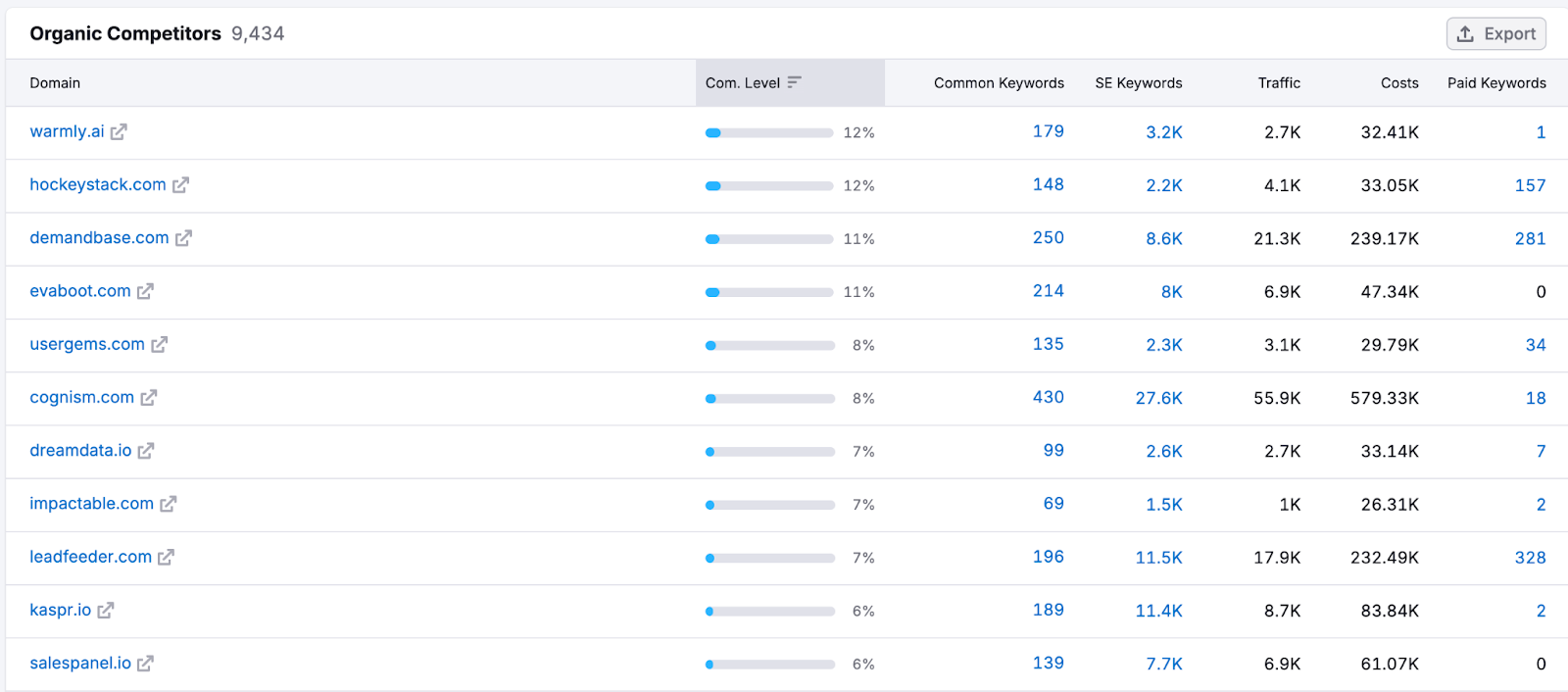
Semrush Organic Research helps you expand beyond obvious rivals by showing sites competing for the same organic keywords.
Your direct competitor might be another project management tool, but your search competitor could be a productivity blog ranking for "how to organize team tasks." Both steal potential customers at different funnel stages. And you need to pay attention to both.
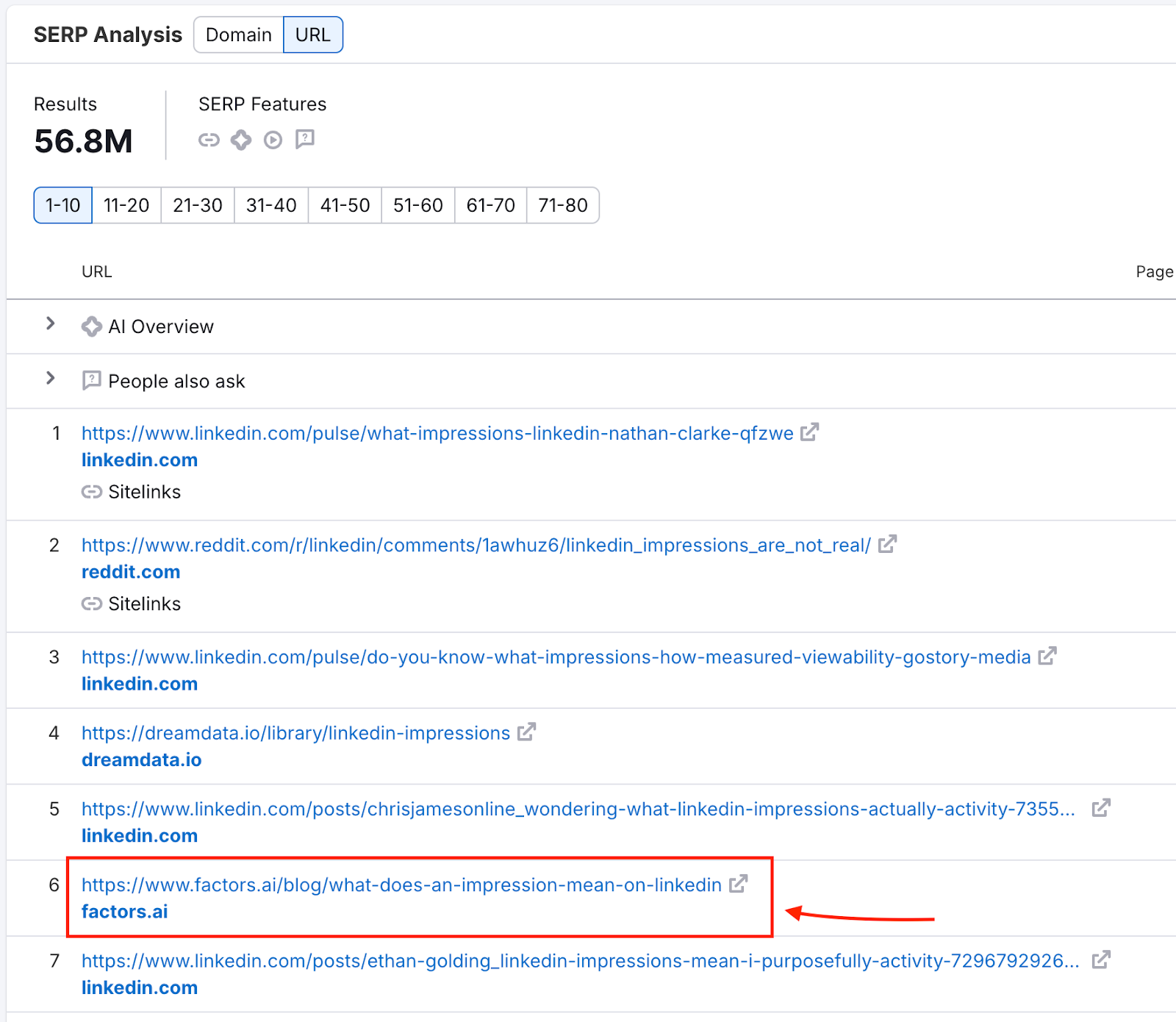
Here’s how you could go about it:
- Start by listing 3-5 companies you know compete for the same deals.
- Enter your domain in Semrush, navigate to Organic Research > Competitors, and you'll discover 2-3 sites you never considered.
- Pay attention to competitors with 30-50% keyword overlap. A CRM might compete with a sales automation tool and a lead generation guide for "sales pipeline management."
2. Get Traffic & Channel Mix
Pull up each competitor in Similarweb or Semrush. Then, note estimated monthly visits (US-filtered), channel split (organic, paid, direct, referral, social), and three-month traffic patterns.
Channel mix reveals resource allocation.
- Competitor A shows 150k monthly visits: 65% organic, 15% paid.
- Competitor B shows 180k visits: 35% organic, 45% paid.
Despite similar traffic, they run different acquisition playbooks.
In this case, Competitor A has built an SEO moat while Competitor B relies more on paid acquisition with higher customer costs and greater ad-platform vulnerability.
3. Benchmark Share & Growth
Semrush Market Overview shows traffic share percentages and positions competitors in a Growth Quadrant: "Game Changers" (high growth, rising share), "Leaders" (high share, stable), or declining players.

For instance, you may celebrate 100k monthly visits while competitors capture 500k each. Then you discover the total addressable search volume sits at 5M monthly searches. You're fighting for 2% market share while three competitors own 10% each. That 70% unclaimed territory represents your real opportunity for gaining a competitive edge.
4. Identify Top Pages
Semrush Traffic Pages shows which URLs drive the most visits. The question you want to be asking is, does your competitor dominate with comparison pages, long-form guides, or product landing pages?
For instance, checking whether a page like our guide to the best ABM tools ranks well tells you whether listicles or dedicated comparisons win that space.
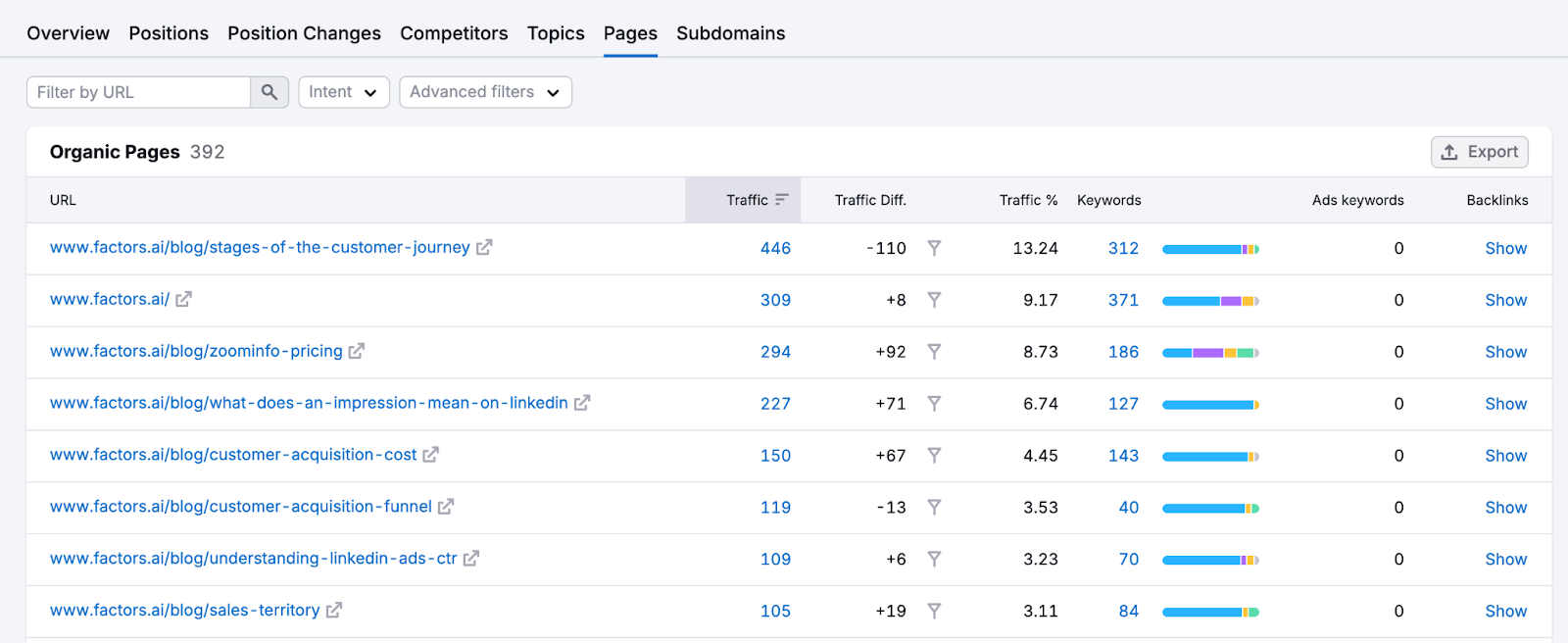
Go through 10-20 SERP competitors and look for repeatable content patterns. For instance, if 60% of your competitors have “A vs. B” comparison pages ranking in the top 10 and you don’t, that’s a clear gap you need to fill.
5. Turn Competitor Traffic Into Keyword Opportunities
Once you know which pages bring competitors the most traffic, the next step is turning those pages into keyword opportunities you can actually act on.
- Export the competitor’s top pages from Semrush, Similarweb, or Ahrefs.
- Pull the top organic keywords for each winning page and note position, volume, and traffic share.
- Group those terms by intent, such as comparison, category, integration, or problem-aware searches.
- Identify missing keywords you do not rank for and weak keywords where you sit outside the top 10 or top 20.
- Prioritize terms with clear commercial value, strong relevance, and realistic ranking potential.
- Feed the winners into your content roadmap, comparison pages, and paid search tests.
This step matters because traffic estimates alone tell you where competitors are winning, but keyword-level analysis shows why they are winning and what you should build next.
6. Monitor Changes
Set weekly snapshots in your chosen tool. For example, a tool like Visualping alerts you when competitor pages update.
You can create a simple tracking dashboard for the same. Every Monday:
- Log each competitor's total traffic, top 5 ranking changes, and new content published.
- Watch for sudden traffic spikes.
- Check Google Trends for the target keyword.
- Flat trend means they improved the content.
- A rising trend means they caught a wave.
Also set up Visualping to track their pricing page, features page, and main landing page. Pricing changes often precede major campaigns. New feature launches reveal product roadmap priorities.
When three competitors simultaneously increase paid spend, industry competition is heating up. When all reduce content output, that's your window to dominate organic search.
{{INLINE_BOFU}}
Going from Competitor Traffic to Competitor Keywords and Beyond
Traffic numbers tell you what. Keywords tell you the how.
Knowing a competitor gets 500k monthly website visitors means little until you understand which search terms and paid campaigns actually drive those visitors. So let’s look at the extraction process.
Organic Keyword Extraction
Semrush Organic Research shows every term competitors rank for, with position, search volume, difficulty, and traffic share. Filter for positions 1-10 with volume above 500 to surface their money keywords. Keyword Gap reveals shared keywords (you both rank, they outrank you), missing keywords (they rank, you don't), and weak keywords (you rank outside the top 20).
Ahrefs Site Explorer takes a page-level approach. Click any top page to see its organic keywords and traffic drivers. The "Traffic share by domains" report shows which competitors own visibility for specific keyword clusters.
Organic keyword research reveals what content attracts searchers. Paid keywords reveal where competitors invest actual budget, making them more reliable indicators of what actually converts.
PPC Competitor Keywords
SpyFu shows every keyword competitors bid on, estimated CPC, monthly spend, and ad copy variations. SpyFu's Kombat tool reveals keywords multiple competitors bid on for strong conversion signals. According to Directive Consulting, keyword overlap identifies high-value terms validated by competitor budgets.
Semrush Advertising Research and Ahrefs Paid Keywords show search ads copy, landing pages, and spend trends. Google Ads Keyword Planner offers free keyword discovery. Just enter a competitor's domain under "Discover new keywords."
Build Your Tracking Dashboard
Raw website traffic data doesn't help without organization.
Create a spreadsheet with these columns: Domain, US Visits (est.), Traffic Share %, Channel Mix, Top Pages, Top Organic Keywords, Top Paid Keywords, Change vs Last Month %, and Notes. Populate monthly to spot patterns like paid plan budget shifts, new content hubs, or post-redesign traffic drops.
How accurate is competitor website traffic data?
Competitor website traffic data is useful, but it is never exact. Tools such as Similarweb, Semrush, Ahrefs, and SpyFu rely on modeled estimates built from clickstream panels, keyword data, and other third-party sources.
That means each platform can show a different traffic number for the same domain. Smaller sites usually have wider error margins, while larger sites tend to produce more stable directional estimates. When two or three tools point to the same trend, you can trust the pattern more than the exact visit total.
Use competitor traffic tools for relative analysis, not perfect measurement. In practice, the most decision-useful metrics are:
- share of traffic versus competitors
- channel mix across organic, paid, direct, referral, and social
- top pages and the topics behind them
- month-over-month or quarter-over-quarter momentum
Cross-checking multiple tools gives you a more reliable view than relying on a single dashboard. If one platform says a site has 120k visits and another says 180k, the exact number may be fuzzy, but both can still confirm whether the competitor is growing, slowing down, or shifting channels.
What external tools still can't show
You'll never see exact Google Analytics data, conversion rates, or real user behavior metrics for a competitor. Email and app traffic also stay largely invisible. MonsterInsights confirms: "First-party data gives exact numbers only for properties you control. Third-party tools provide estimates."
These tools are excellent for tracking search visibility, traffic sources, and ranking patterns, but they cannot tell you what happens after visitors land on the site. You will not see bounce rate, time on page, or which sessions convert into pipeline or revenue. For your own site, pair competitor research with Search Console and analytics data for a complete picture.
Turn Competitor Traffic Into Your Content Strategy
Checking competitor traffic shows what's already working in your market. With that data, you're simply gathering validated strategies, then building better ones or filling in overlooked gaps.
To get started, pick one competitor and run them through Similarweb for traffic overview, Semrush for market share and top pages and organic keyword gaps. Export their top 20 ranking keywords and compare against your rankings. You'll typically find 5-10 terms where you could rank and haven't created content yet.
That's your roadmap. For paid campaigns, download their SpyFu keywords and filter for consistent monthly spend (conversion signals). Then test a few keywords in your campaigns with lower bids, tracking performance against existing keywords.
Set monthly check-ins to find traffic share changes, content launches, and ranking shifts. When a competitor gains 20% more organic traffic, investigate what changed. New content hub, site speed improvements, fresh backlinks. Learn from their wins while avoiding their losses.
Web traffic analysis works because it proves what converts in your market. Your competitors already ran the experiments and validated the demand. You just need to analyze the results and execute better. Combine these website traffic checker insights with other tools like Google Analytics and Search Console for your own properties to build complete market intelligence.
Frequently Asked Questions
Q: How can I see how much traffic a website gets?
A: Use Similarweb or Semrush for directional traffic estimates, then add Ahrefs for top pages and organic keyword data. Treat the numbers as trends, not exact analytics, and cross-check multiple tools when possible.
Q: What's the most accurate way to check traffic?
A: The most accurate view is the site owner’s internal analytics, which you cannot access. For competitor research, combine Semrush, Ahrefs, and Similarweb and validate what you see against keyword rankings and backlink signals.
Q: How do I compare competitors' traffic against mine?
A: Use Semrush Market Explorer or similar benchmarking views to compare traffic share, growth trends, and channel mix. Relative positioning usually matters more than exact visit counts.
Q: Which tools show competitors' top pages?
A: Semrush Traffic Analytics and Ahrefs Top Pages are the most useful starting points. They surface the URLs driving the most visibility so you can reverse-engineer formats, topics, and keyword themes.
Q: How do I find competitors' PPC keywords?
A: Use SpyFu first for paid keyword lists, spend estimates, and historical ad copy. Semrush Advertising Research and Ahrefs Paid Keywords can then help confirm active terms and landing pages.
Q: Any free ways to get competitors' keywords?
A: Yes. Google Ads Keyword Planner offers free discovery if you enter a competitor domain under "Discover new keywords," and Ubersuggest provides a limited number of daily searches.
Q: What is the best free tool to check competitor website traffic?
A: Similarweb is usually the best free starting point for competitor website traffic because it quickly shows estimated visits, traffic sources, and geography. Semrush’s free reports and Ubersuggest can also help, but they are more limited.
Q: Can I see a competitor’s Google Analytics traffic?
A: No. You cannot see a competitor’s exact Google Analytics traffic unless they give you access. Third-party tools can only estimate traffic based on external data sources and modeling.

See how Factors can 2x your ROI
Boost your LinkedIn ROI in no time using data-driven insights


.avif)


See Factors in action.
Schedule a personalized demo or sign up to get started for free
LinkedIn Marketing Partner
GDPR & SOC2 Type II


.svg)



.avif)

