


How Factors can refine your ABM efforts
How to Measure the Impact of Paid Marketing Using Factors
Learn how to use Factors to analyze the interplay of LinkedIn ads and search ads

It rarely happens that a buyer sees an ad for the first time and immediately seeks to purchase the product.
Your target accounts likely engage with multiple touchpoints across multiple channels before they make a purchase decision. Perhaps they view a LinkedIn ad and visit your website or they click on a paid search ad that takes them to your pricing page.
But ad clicks and impressions don’t give you the full picture. You need to understand how exactly your prospect engages with your website after seeing your ads.
Scroll ahead to learn how you can measure the interplay of Google and LinkedIn ads using Factors ⬇️
How to measure paid ads impact with Factors
Step 1: Create a funnel report where you add events such as “LinkedIn ad viewed” and “Website session.”
Step 2: Filter by Channel as “Paid Search.” You can see how many accounts viewed your LinkedIn ad and visited your site through a search ad.

If you want to know which search term they clicked on, simply break it down by adding “Search term and landing page URL.” You can also add “company domain” to identify individual companies that interacted with your LinkedIn and search ads.
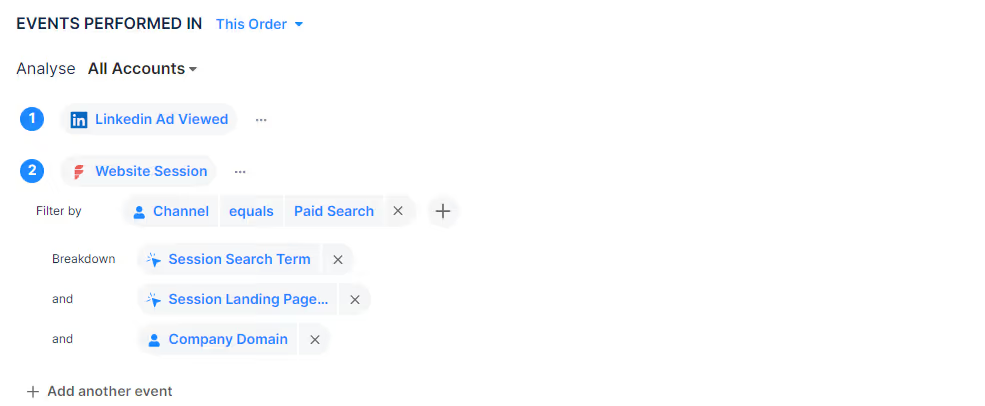
Now, you have a clear picture of companies evaluating your solution after viewing both LinkedIn and search ads.

As you can see above, most visitors find our website via competitor and branded keywords. Target accounts that land on your website after viewing both LinkedIn and Google ads have a higher intent than those who just view either of the two.
Your sales and marketing teams can leverage data in many ways:
Refine your LinkedIn retargeting efforts
Let’s say you’re a project management software company and a prospect visits your site via a competitor keyword. You can use this data to run a retargeting ad that features a customer testimonial where they explain why your solution is better than your competitors.
Personalize your outreach
Your sales teams can tailor their outbound campaigns based on the ads your prospects are viewing. For example, if your prospect is currently evaluating your competitors, sales can send over comparison decks with feature by feature comparisons explaining how your tool is the right choice for their needs.
Improve your search ads
When prospects visit your site by typing a specific keyword, you can double down and bid on similar keywords. For example, if the keyword “project management software” attracts your target audience, you can run ads for other product-related keywords like “task management tools.”

Accurately measure paid ads ROI with Factors
If you want to fully gauge the effectiveness of your ad campaigns, it’s important to have complete visibility of whether your ads impact your buyer’s decision making. Speak to our team today and find out how you can optimize ad spend and get 50% more ROI from your LinkedIn and Google ads.

Related Posts
.avif)


See Factors in action.
Schedule a personalized demo or sign up to get started for free
LinkedIn Marketing Partner
GDPR & SOC2 Type II

.svg)



.avif)

