8 Vector.co Alternatives for ABM, Visitor ID, and Attribution (2026)
Compare 8 Vector.co alternatives for ABM, website visitor identification, and attribution. Explore features, pricing, strengths, and drawbacks.

Content Marketer
Associate Director of Brand and Content


In this Blog




Vector.co alternatives TL;DR
- If you run ABM mostly on LinkedIn and Google and need attribution that splits credit across channels, start with Factors.ai, or add Dreamdata if attribution is the only gap.
- If you run enterprise ABM with a programmatic ad budget and a dedicated ops team, compare 6sense for predictive buying stages and Demandbase for buying-group advertising.
- If you mainly need to know who is visiting, use RB2B for named US visitors, Leadfeeder for company-level identification worldwide, Warmly when you want to chat with visitors live, and Common Room when your buyers show up in developer communities first.
The reason you’re looking past Vector.co usually decides your shortlist. If you sell outside the US, you need identification that works where your buyers are. If you report to a CFO, you need attribution that splits credit across channels. If your team only uses one part of Vector, a $36,000 annual contract is hard to defend when a $79 tool covers that one job.
This guide groups the top Vector alternatives by those jobs and explains what each one replaces, what it costs, and where it falls short.
Disclosure: We’re Factors.ai, and we’re one of the eight tools below. We’ve focused on what each tool does well, where it differs from Vector, and the trade-offs you should check before you buy.
Vector.co alternatives at a glance
The eight alternatives fall into three groups. Factors.ai, 6sense and Demandbase replace most of Vector’s ABM platform. Dreamdata replaces the measurement side. Common Room, Leadfeeder, RB2B and Warmly replace the visitor identification side, each with a different follow-up workflow.
G2 ratings and pricing reviewed November 12, 2026. Starting prices cover different products and usage allowances, so they aren’t like-for-like.
What Vector.co does well
Vector.co started as a contact-level visitor identification tool and now sells itself as an ABM platform that replaces 6sense and Demandbase. The product covers signals, scoring, buying-group journeys, advertising and deal reporting.
Vector’s strongest idea is working at the level of the person, not the account. Its visitor identification resolves a visit to a company and, where a consented match exists, to a named person with role and work email. Vector then turns those people into ad audiences for LinkedIn, Google, Meta and Reddit, matched on hashed emails and mobile ad IDs rather than company lists. Its Specter scoring model explains in plain language why an account is in market and which contacts to approach, which speaks to the black-box scoring complaints you’ll see in the 6sense and Demandbase reviews below.
Vector also adds a LinkedIn Bid Agent and Stories, which write a narrative of the marketing and sales activity behind each deal.
Pricing is published. The Growth plan starts at $36,000 a year, Scale at $60,000 and Enterprise at $96,000, with unlimited seats and every feature in every plan.
Users like what they’ve seen so far. Vector holds a 4.9/5 on G2 from 16 reviews, most of which praise setup that takes minutes and support that comes straight from the founders.
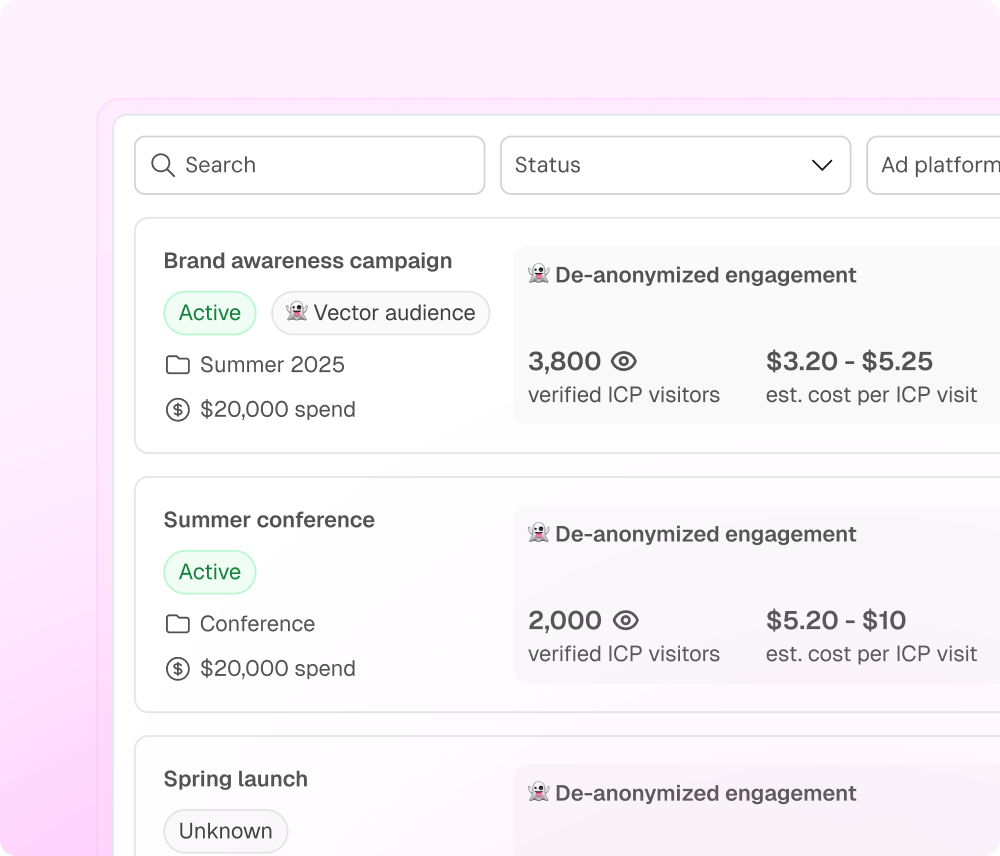
Vector campaign view with de-anonymized engagement per campaign.
Why teams switch from Vector.co
The reasons to look elsewhere tend to be specific. Each of the five below matters for some teams and not at all for others, so check which ones apply to how you sell, report and budget.
Vector.co person-level identification works best on US traffic
Vector’s own pages are careful here. Its visitor identification FAQ says company matches are the norm and contact-level matches are “a smaller, higher-intent slice.” Vector’s help center puts the contact match rate at about 10%, rising to roughly 30% once IP-to-company matches are included. A separate Vector landing page claims 30 to 35% of US traffic at the contact level, so expect the number to vary with your audience.
Geography matters more than the headline rate. Common Room, which licenses Vector for its enhanced identification, routes only US traffic through Vector. An enterprise marketer on G2 noted that Vector “does not provide unlimited site visitor identification for Canadians (it is a US-only feature)” (G2 review).
If a large share of your pipeline comes from Europe or Asia, measure company-level and person-level matches separately, by country, before you sign.
Vector.co Stories explain a deal but don’t split credit
Stories are useful when you need to show leadership how a won deal came together. Vector generates one for every opportunity that opens or closes, ranking the ads, pages and events that reached the buying group.
Stories are deliberately not an attribution model. Vector’s Stories page says a pie chart of channels doesn’t explain why a deal closed, and describes Stories as proof “from the CRM, not a model.” So you won’t get first-touch, linear or time-decay views that compare how much pipeline LinkedIn, Google and events each contributed. If your budget conversations depend on those comparisons, you’ll need another tool.
Vector.co pricing follows your traffic and ad spend, not your usage
Vector sizes plans on two numbers. The first is your total unique monthly site visitors, not the share Vector identifies. The second is your company’s total monthly ad spend, including campaigns you run outside Vector. Growth covers up to 25,000 visitors and $25,000 in monthly ad spend, and whichever number lands you in the bigger plan decides your price.
Every plan is an annual contract. For a team that only wants named US visitors from a pricing page, $36,000 a year is a lot to pay for one feature, and RB2B’s Pro+ plan starts at $199 a month for the same job.
Vector.co integrations are still catching up
Seven of Vector’s 16 G2 reviews ask for more or better integrations. The most specific complaint is about HubSpot. A mid-market reviewer wrote that “Integrating with other tools is a bit clunky” and explained that the HubSpot sync runs on a single list and that some connections only work through webhooks (G2 review). If HubSpot is your system of record, ask Vector to show you the sync on your own portal.
Vector.co is an early-stage company, and mature ABM programs feel that most
Vector raised a $10M Series A in May 2026 and has changed its positioning more than once. Vector’s own blog explains why it repositioned around building ad audiences, and today its homepage pitches a full ABM platform. Several core pieces are new, including the Specter 1.0 scoring model, the Bid Agent and an MCP server.
The reviews reflect a young product. A reviewer in August 2026 wrote that “it occasionally has minor performance bugs, but the team is always quick to respond and resolve them” (G2 review). A founder in July 2026 said, “sometimes I sense they are still finding their footing” (G2 review). Eleven of the 16 reviews date from 2024, when Vector was a free visitor ID tool, so few reviews speak to the platform you’d buy today.
None of this is a problem if you’re building your first ABM program and value a responsive founding team. It’s riskier if you already run a mature program. Your scoring definitions, CRM sync and board reporting need to stay stable from quarter to quarter, and a vendor still shipping version-one features can change any of them. Before you migrate, ask which features are generally available, which are in beta, and what the support terms say about fixes.
[PLACEHOLDER: Interactive tool, “Find your top 3 Vector.co alternatives.” Embed the shortlist tool here.]
1. Factors.ai for multichannel ABM and marketing attribution
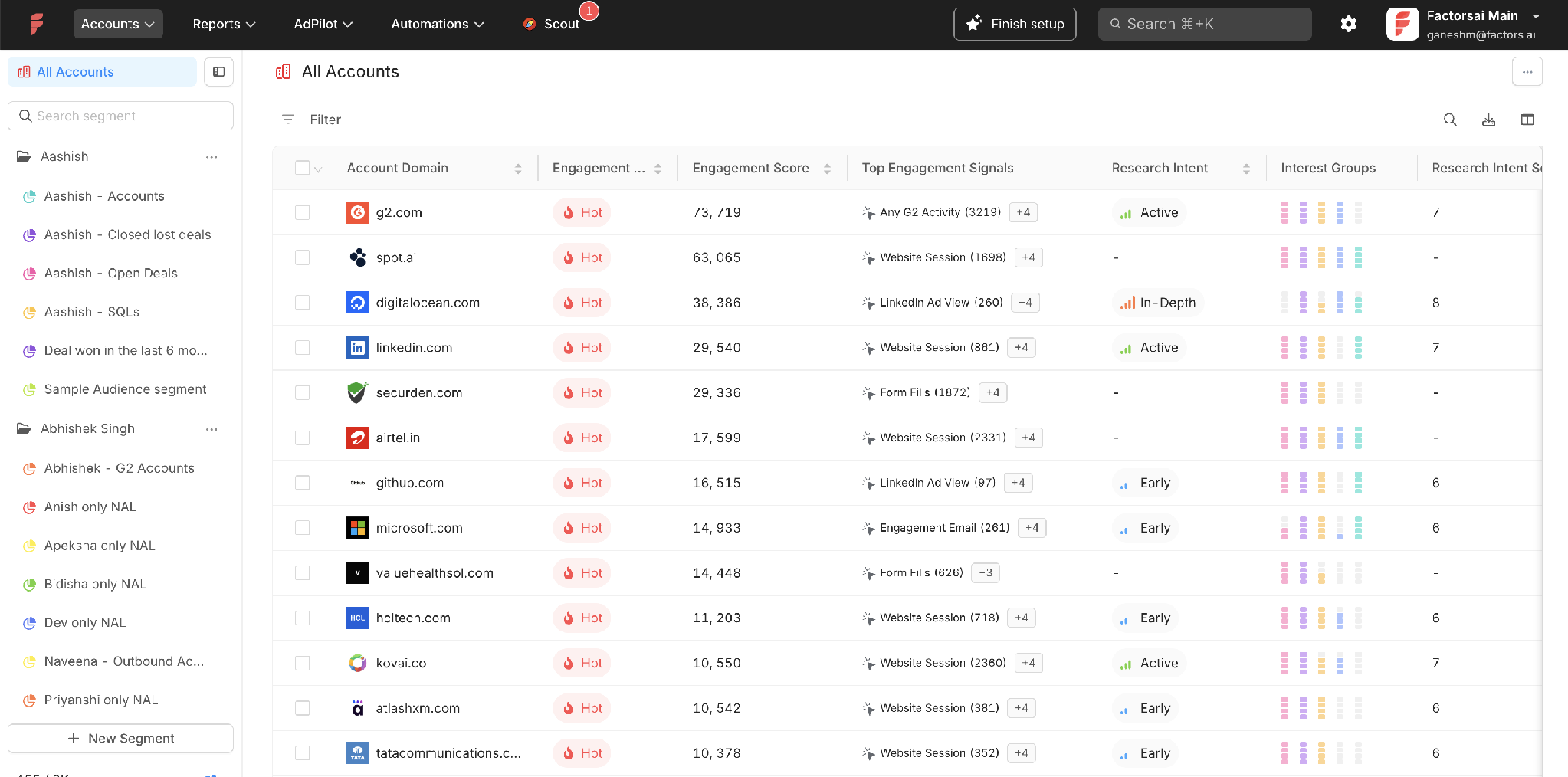
The Factors.ai All Accounts view ranks accounts by engagement score and shows the signals and research intent behind each one. Source: Factors.ai.
Capterra: 4.6/5 (24 reviews)
Pricing: Lite at $199/month after trial, Basic at $6,000/year, Growth at $20,000/year, Enterprise from $36,000/year. LinkedIn impression control, conversion feedback, Google and LinkedIn audience sync, and Google Enhanced Conversions are part of Enterprise.
Best for: B2B marketing teams combining account intelligence, LinkedIn and Google advertising, and pipeline attribution.
What Factors.ai does
Factors.ai is an AI-powered account-based marketing platform that helps your team find accounts showing buying activity, reach those accounts across channels, and measure which marketing touches contributed to pipeline.
The Account Timeline shows what each account has done, in order. It brings together website visits, CRM stages and meetings, G2 research, Bombora topic intent, company-level LinkedIn ad and organic engagement, and business changes such as a new executive or a funding round. You can build segments from any of those signals and send them to LinkedIn, Google, Meta and other supported destinations.
LinkedIn AdPilot and Google AdPilot add controls inside the two channels where most B2B paid budgets sit. Scout, the AI layer, answers questions about accounts and runs configured plays when a signal comes in.
Factors.ai splits pipeline credit across channels
Factors lets you select a goal such as opportunity creation or deal won, choose which marketing touchpoints count, set the attribution window, and compare first-touch, last-touch, linear, U-shaped and time-decay models. The same recorded journey can give different credit to LinkedIn, Google and email under each model, and seeing those differences side by side is what helps you defend a budget shift.
Vector’s Stories answer a different question. A Story tells you what happened in one deal. An attribution model tells you how much each channel contributed across many deals. If you have to explain to finance why LinkedIn deserves more budget next quarter, you need the second.
Factors.ai also reports influence, meaning which opportunities had a qualifying touch before they were created. When a holdout group is available, it compares exposed accounts with accounts that didn’t see the campaign, which gets you closer to whether a channel changed the outcome.
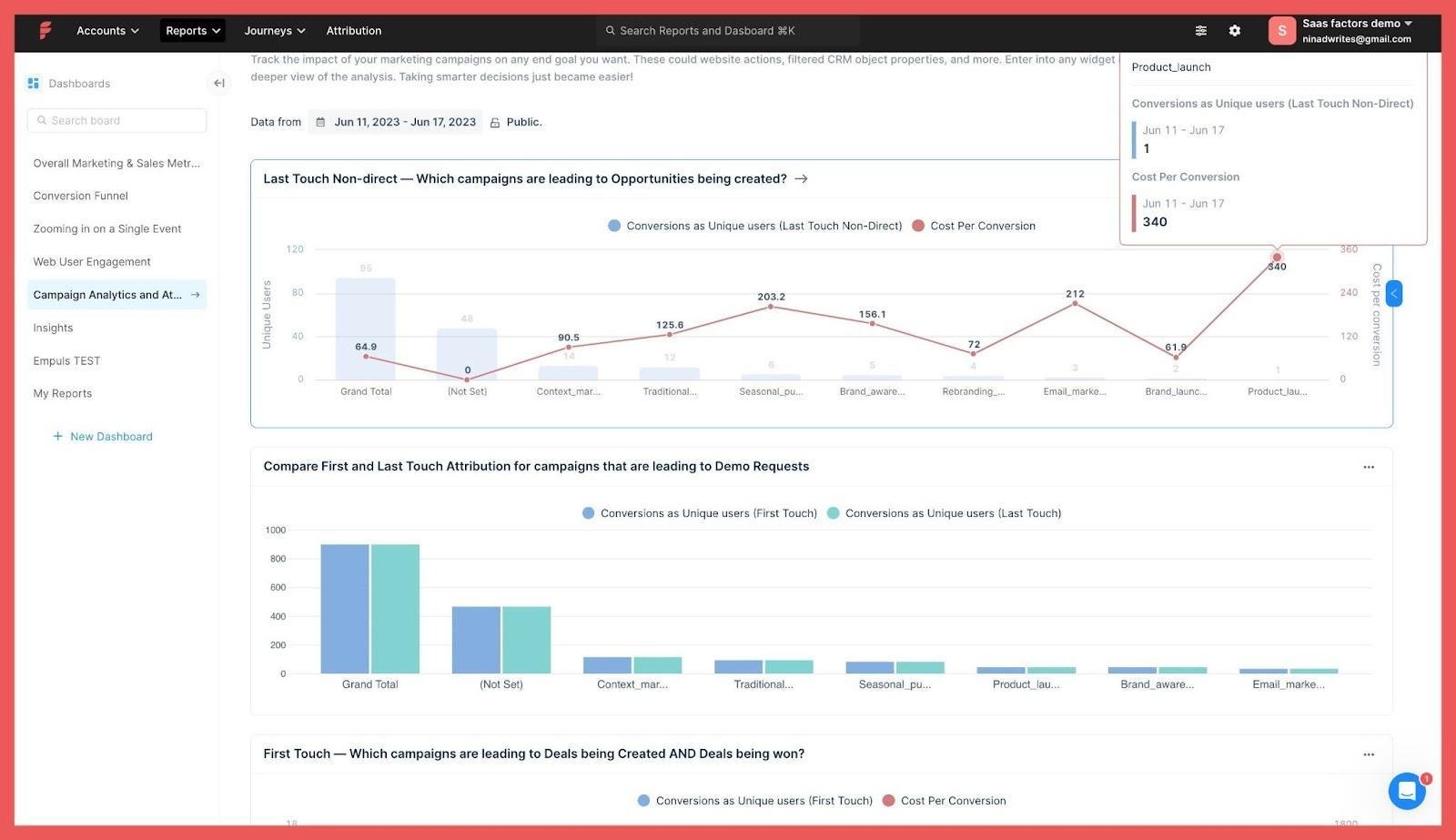
Factors.ai attribution reports comparing campaign results under different models. Source: Factors.ai.
Factors.ai shows LinkedIn influence before anyone clicks
Factors.ai records company-level LinkedIn ad impressions, so you can see which target accounts were exposed to a campaign before a site visit or an opportunity, even when no one clicked. View-through reporting shows the exposure and its timing. It doesn’t prove that a specific contact saw the ad or that the impression caused the deal.
The timing is the useful part. In Factors’ From Benchmarks to Blueprints research, which covered LinkedIn activity across 850+ B2B companies, $150M+ in ad spend and more than 50,000 closed deals, meaningful LinkedIn engagement began 124 days before a deal was created in the CRM. A report that starts at opportunity creation misses those four months.
The analytics and attribution reports also connect ad spend and engagement to MQLs, SQLs, opportunities and closed-won deals. You can filter by channel, campaign, segment or funnel stage.
How Vector.co’s Bid Agent manages LinkedIn bids
Vector’s Bid Agent replaces LinkedIn’s Max Delivery bidding. Max Delivery tries to spend your daily budget. The Bid Agent instead adjusts bids up to every 15 minutes based on live auction conditions and paces budget across the week, moving spend into the windows where your audience is cheaper to reach. Vector says you keep your audiences, creatives and targeting, and that the agent only changes bidding and pacing. Its product page shows an example with a 45% lower cost per click.
The Bid Agent answers the question “how much should we pay for each impression or click?” It doesn’t control which accounts inside your audience receive those impressions. LinkedIn still decides delivery, and a cheaper bid can buy more impressions for the same handful of large companies that were already absorbing your budget.
How Factors.ai Smart Reach caps LinkedIn delivery per account
Smart Reach solves the distribution problem. You set how many impressions or clicks each account can receive in a defined interval, at the campaign, campaign group or ad account level. When an account reaches its cap, Factors stops serving it, and the budget goes to target accounts that haven’t seen you yet.
Caps don’t have to be the same for everyone. In the rule below, every account in a bottom-of-funnel campaign group gets up to 200 impressions or 5 clicks a month, while accounts in an “engaged with sales” segment get up to 1,000 impressions or 10 clicks. You can base rules on any account property or segment, such as country, ICP tier or open opportunity.
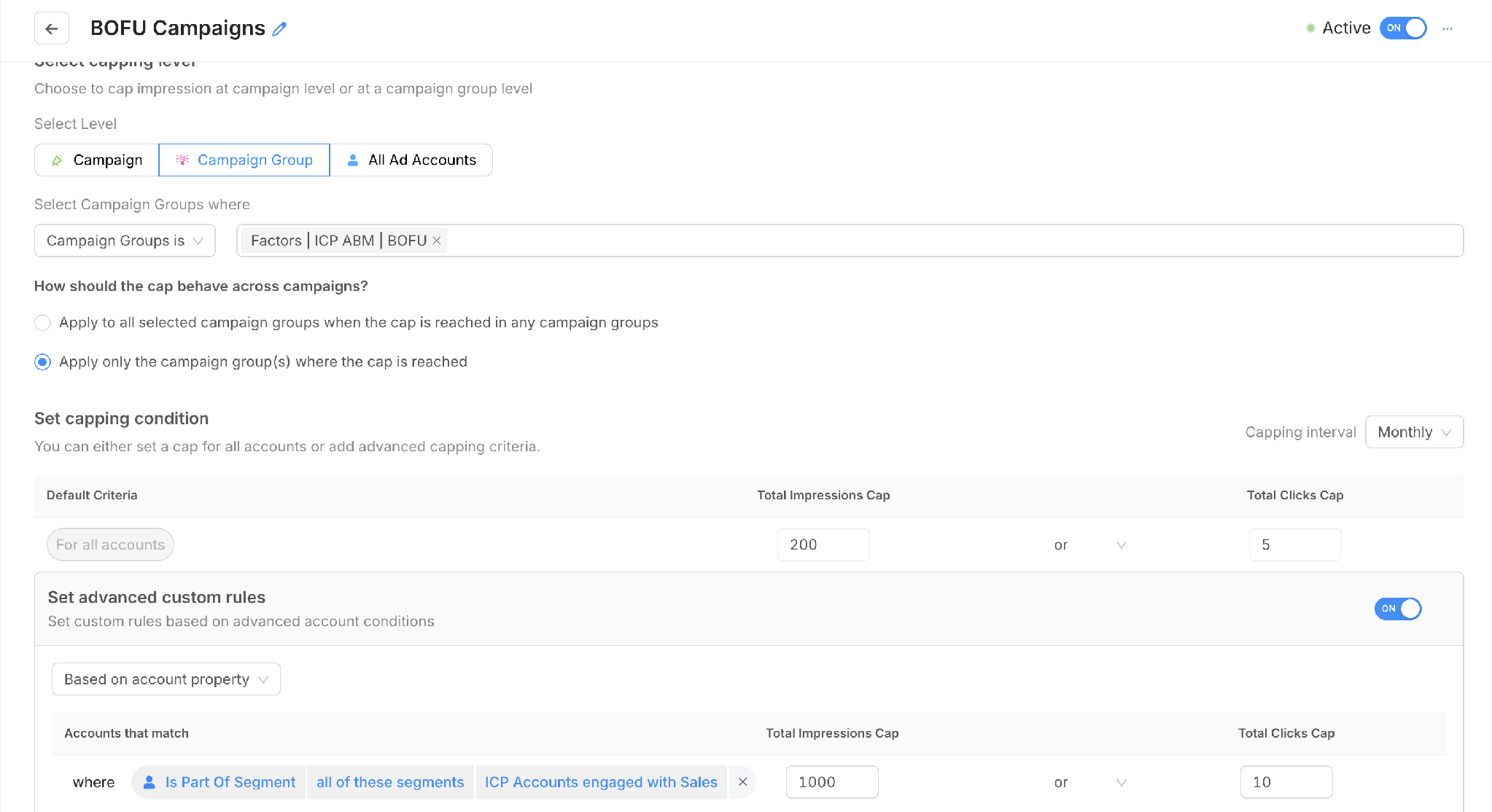
A Smart Reach rule with a default cap and a higher cap for a priority segment. Source: Factors.ai.
Smart Reach also reports what the caps did. On our own LinkedIn account, the dashboard for November 1 to 11, 2026 shows 25 accounts capped, 7,075 impressions saved and $737 of spend redirected. In Factors’ published Sprinklr case study, the team used Smart Reach to control delivery and reported saving 1.5 million impressions.
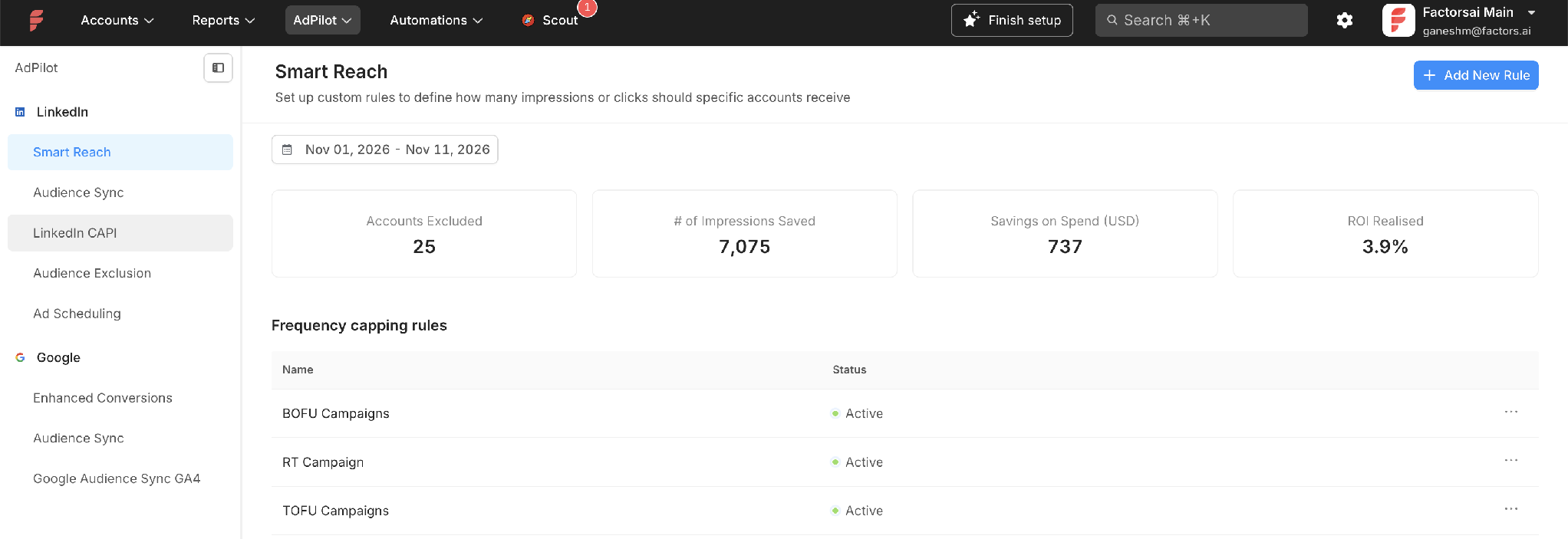
Smart Reach results on Factors’ own LinkedIn account, November 1 to 11, 2026. Source: Factors.ai.
Does your ABM program need Smart Reach or a bid agent?
The two features fix different problems, so start with the one you actually have.
If your LinkedIn cost per click is too high and your audience is broad, Vector’s Bid Agent automates the price side. It changes bids continuously, which no rule you write by hand can match.
If you run ABM against a named account list, the bigger loss is usually concentration. A few large companies with many employees soak up impressions while half your list never sees an ad. Bidding more efficiently doesn’t fix that, and capping per account does. Since coverage of the target list is the point of ABM, Smart Reach is the control that maps to how ABM teams are measured.
Factors also handles timing through Ad Scheduling, which raises or lowers bids by time block on the ad sets you choose. Ad Scheduling runs on rules you set rather than an agent that adjusts every 15 minutes, so it suits teams that know when their buyers aren’t online.
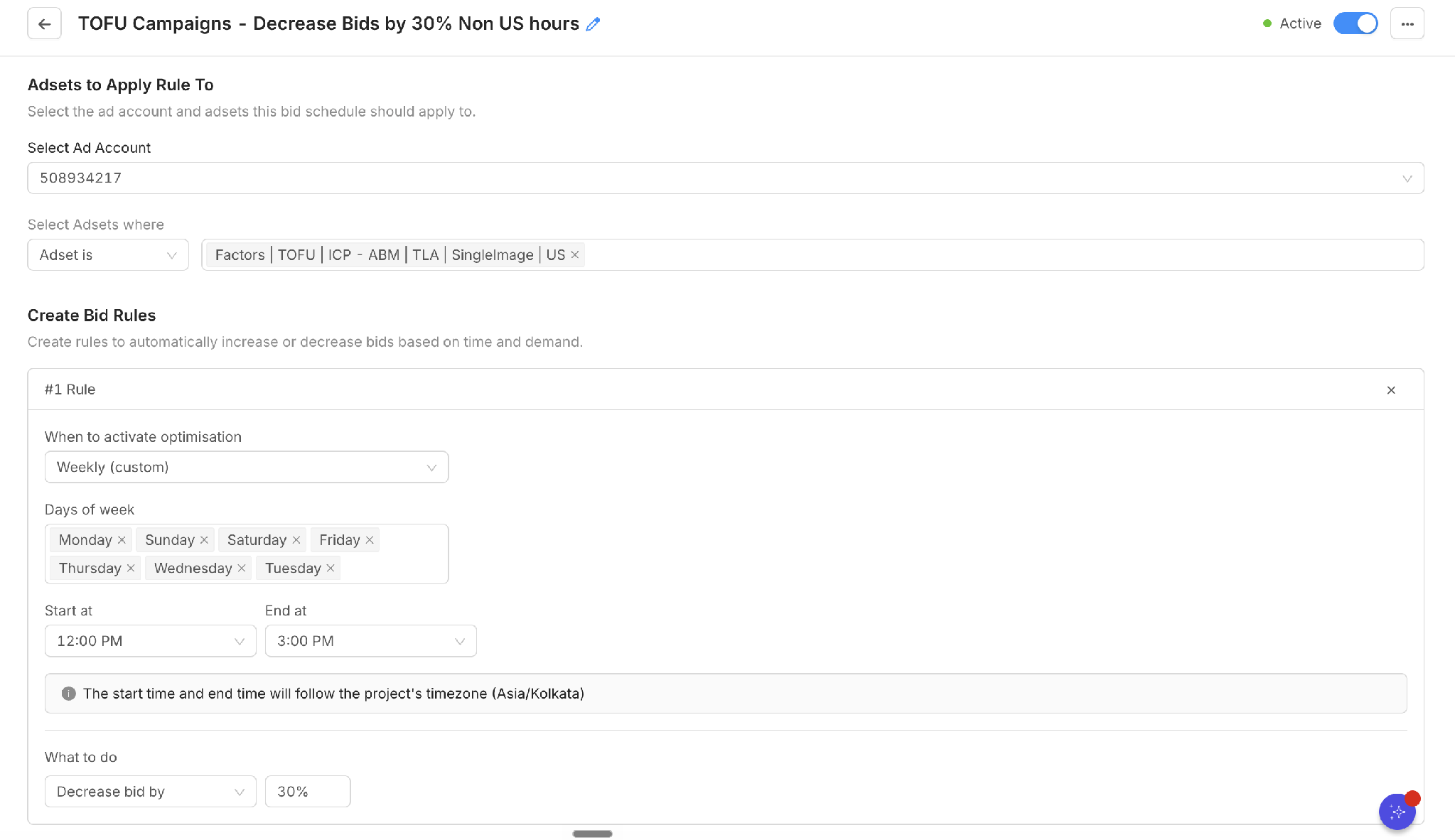
An Ad Scheduling rule that lowers bids by 30% outside US working hours. Source: Factors.ai.
Factors.ai keeps LinkedIn audiences and exclusions in sync
LinkedIn AdPilot syncs Factors segments to LinkedIn as company-level or contact-level audiences. When an account enters or leaves the segment, the LinkedIn audience updates without a new CSV upload.
Exclusions work the same way. In the example below, a competitor list is synced to LinkedIn as a company audience with a 100% match rate, so you can exclude competitors from every campaign that uses it. The same approach keeps customers and open deals out of new-logo prospecting.
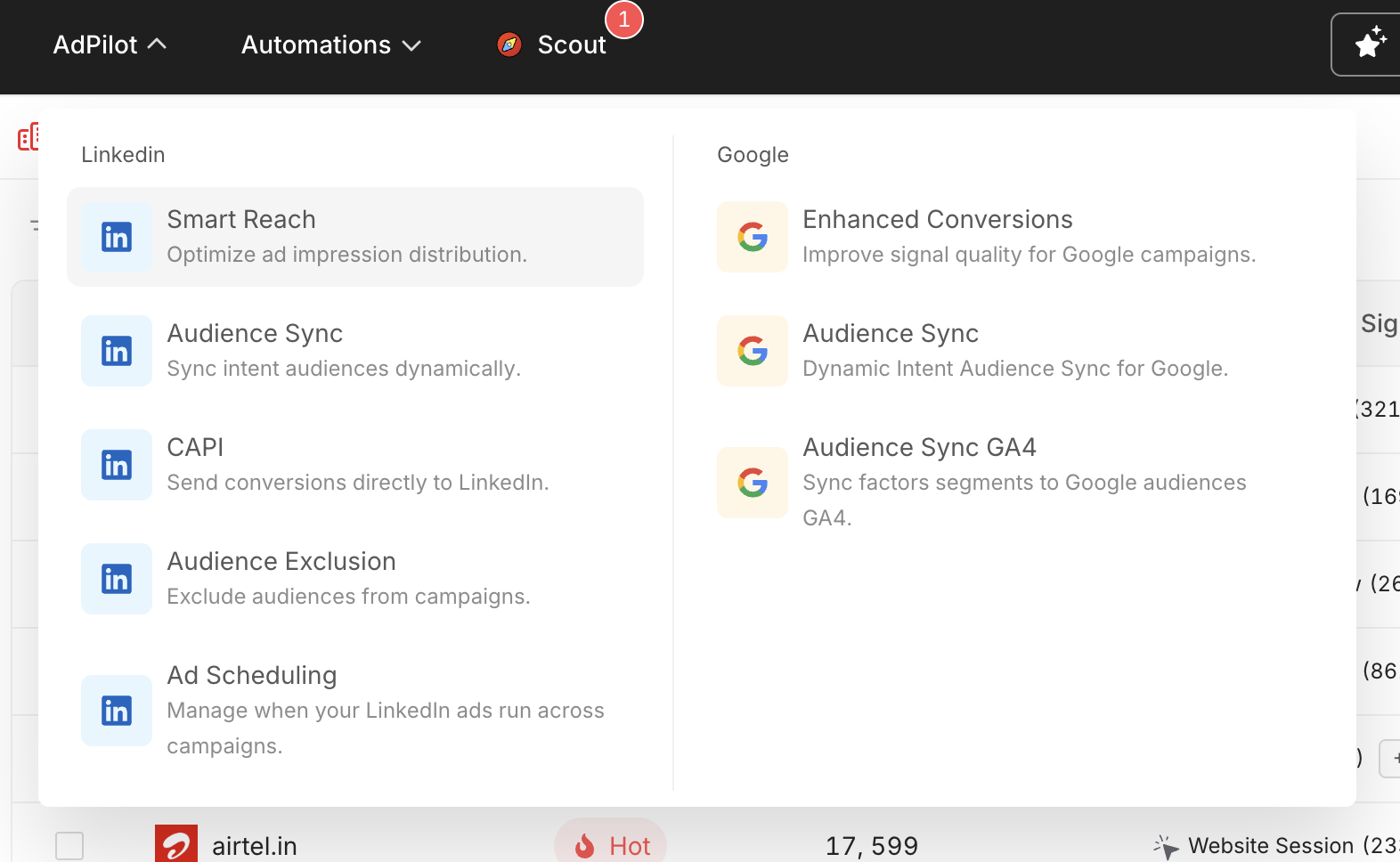
LinkedIn AdPilot and Google AdPilot features in Factors.ai. Source: Factors.ai.
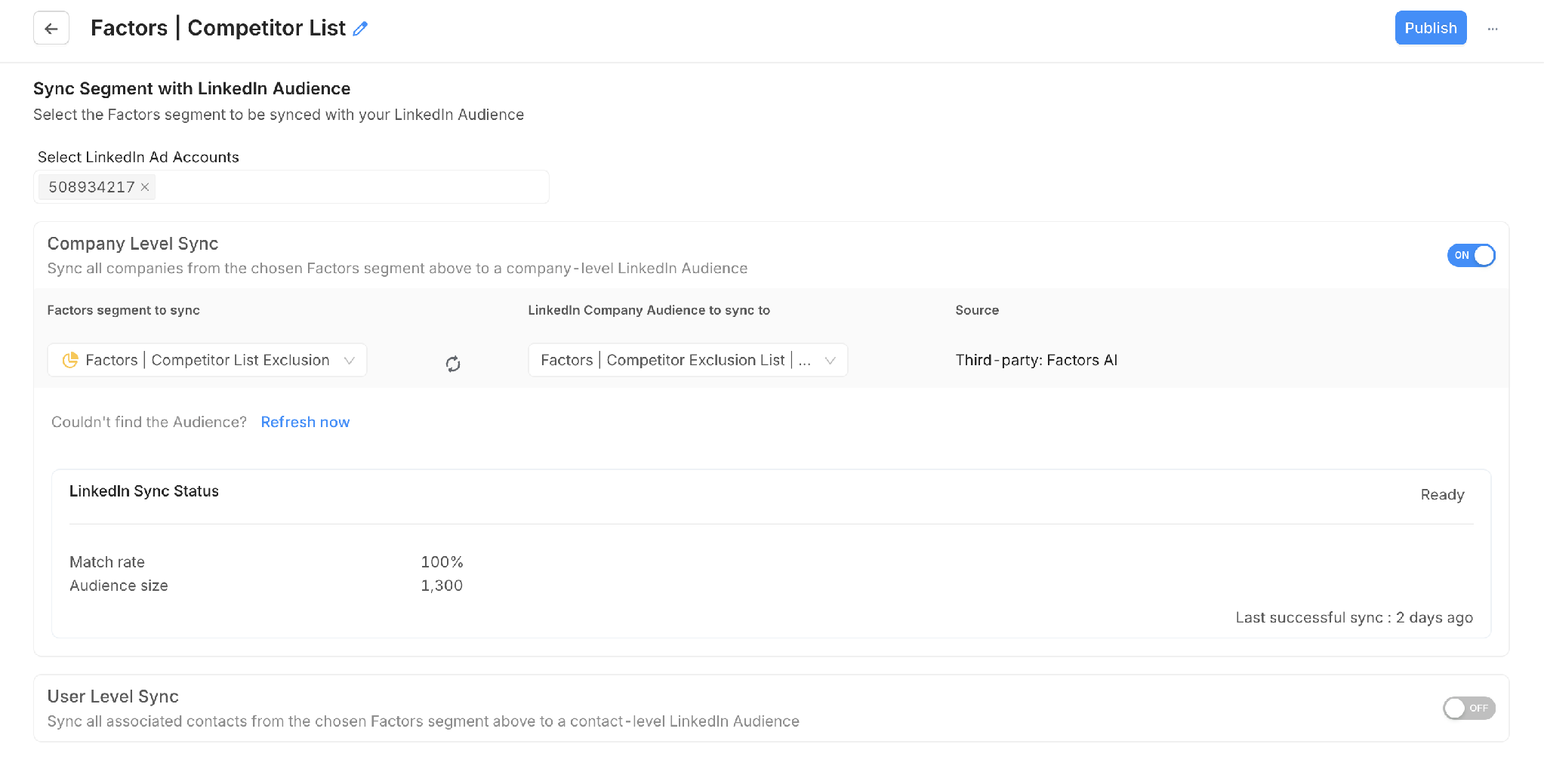
A competitor exclusion segment synced to LinkedIn as a company audience. Source: Factors.ai.
Vector also syncs contact-level audiences across networks, and does it for more platforms, including Reddit. Factors goes further on control inside LinkedIn itself.
Factors.ai sends CRM conversions back to LinkedIn and Google
Ad platforms optimize toward whatever you tell them counts as a conversion. If that’s a form fill, they find more people who fill out forms, whether or not sales wants them.
LinkedIn CAPI in Factors sends a CRM or website event to LinkedIn as its own conversion. You can send “deal created” or “became an SQL” from HubSpot, map contact fields to improve LinkedIn’s match rate, and see how many events each conversion has sent.
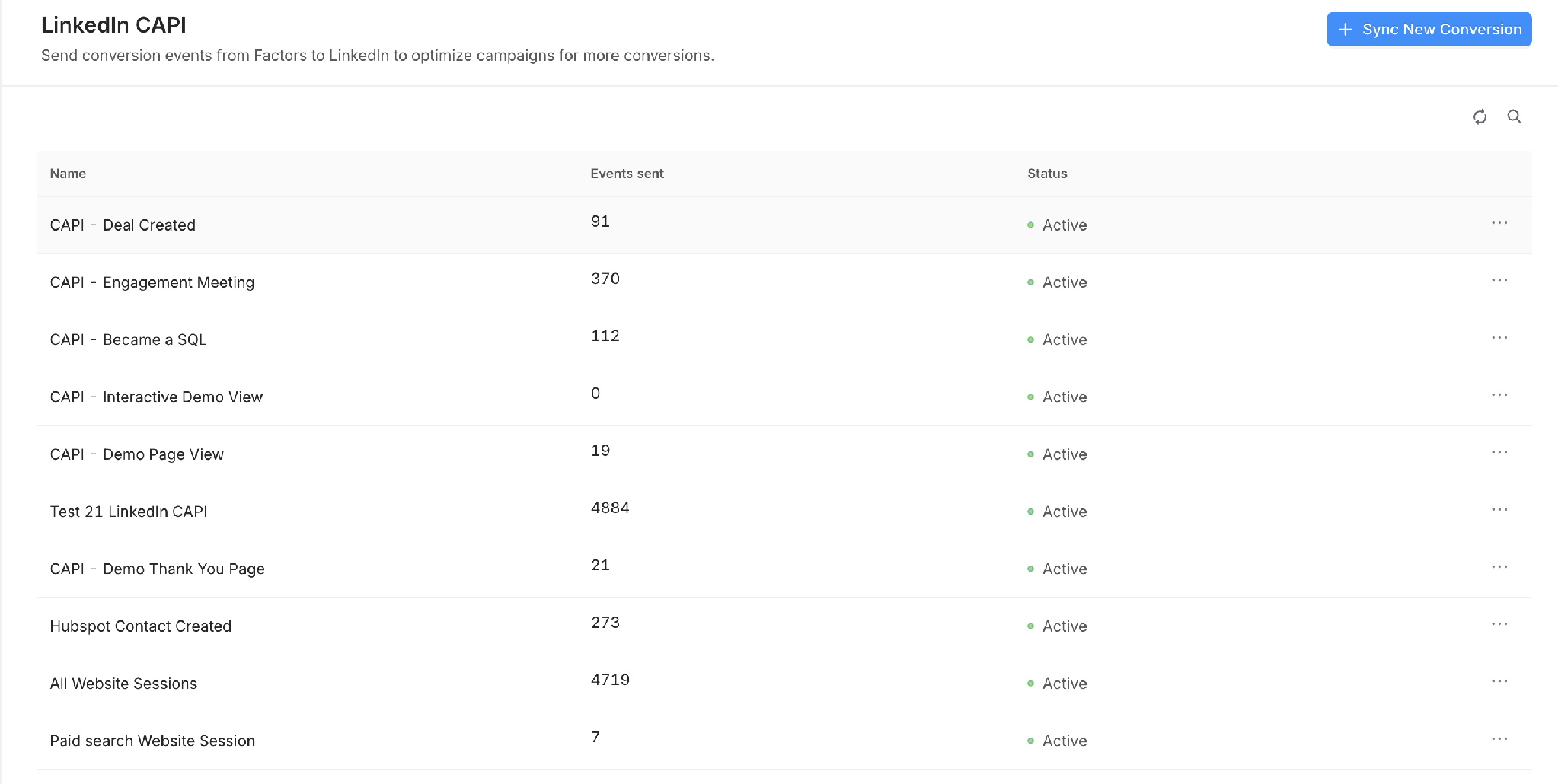
LinkedIn CAPI conversions configured in Factors.ai. Source: Factors.ai.
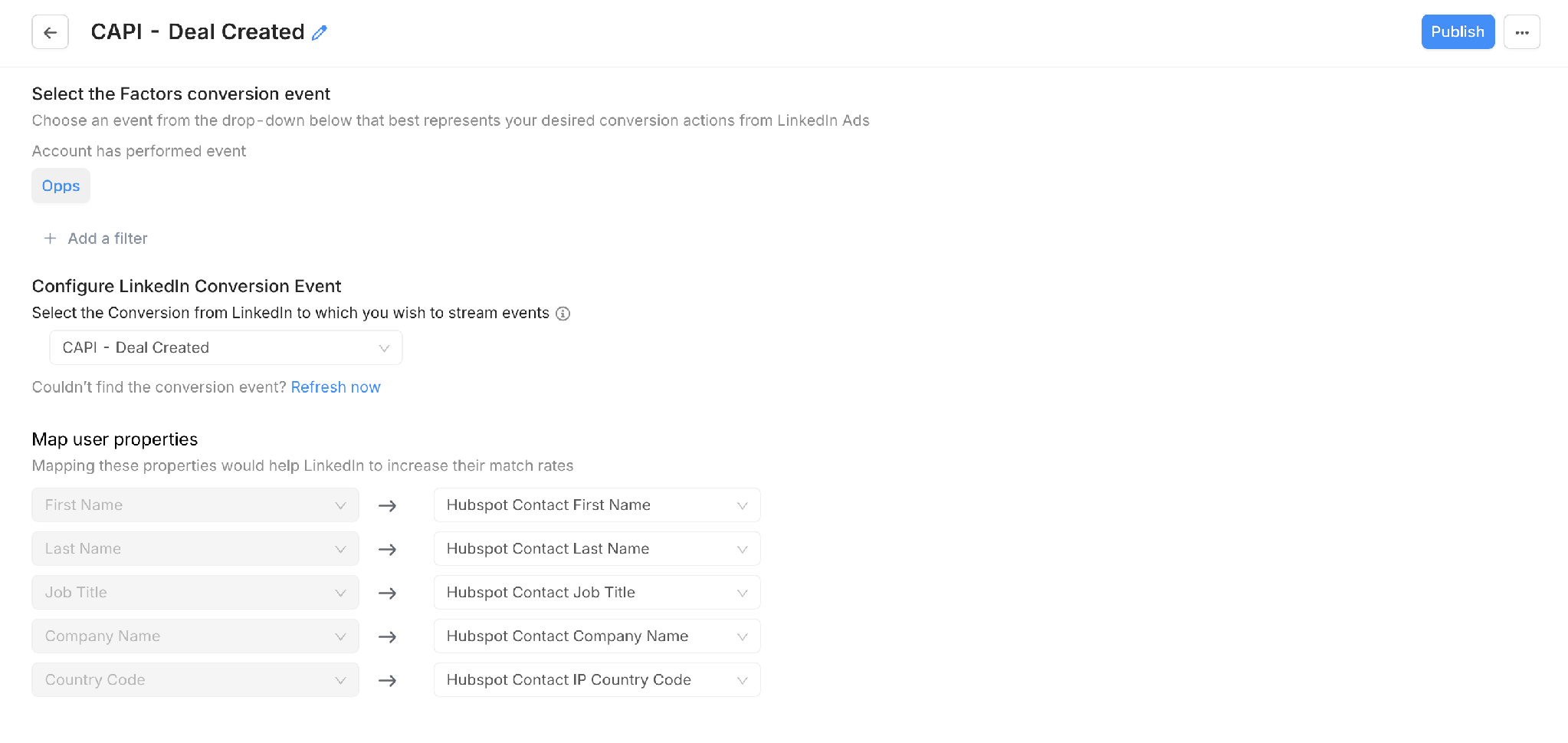
Mapping a “Deal Created” CRM event to a LinkedIn conversion. Source: Factors.ai.
Google AdPilot does the same through Enhanced Conversions, sending an SQL or opportunity milestone to Google Ads. The paid search report then shows, by campaign, how spend turned into accounts reached, MQLs, SQLs and deals.
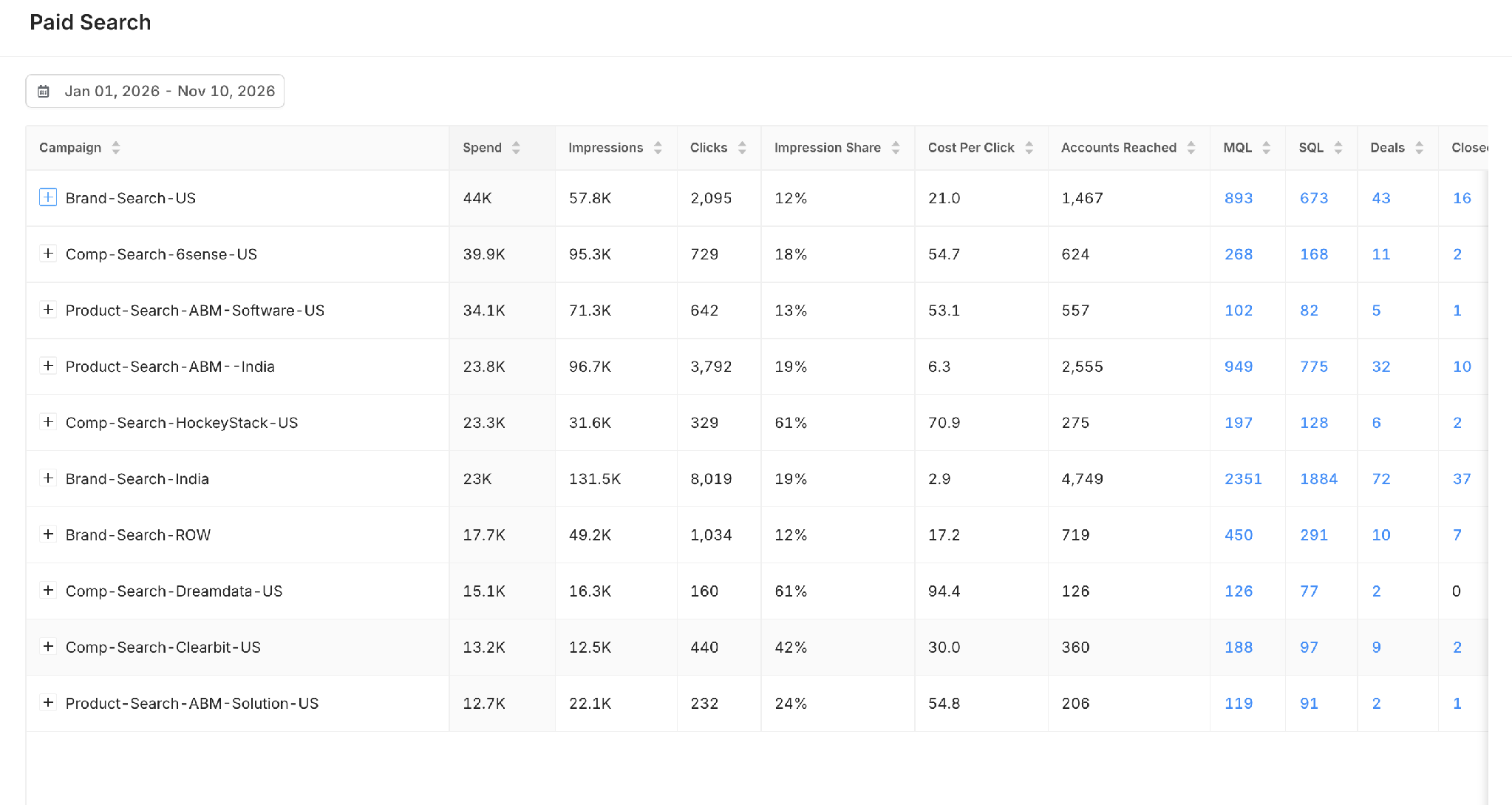
Google Ads campaigns reported down to SQLs, deals and closed-won. Source: Factors.ai.
Factors.ai identifies companies globally and named people on US traffic
Factors identifies visiting companies across supported geographies. For named people, its RB2B-powered Visitor Identity Enrichment adds name, title, LinkedIn profile or work email on eligible visits, primarily in the US.
Person identification, contact enrichment, hiring signals and public signals draw from one shared data credit pool. You can limit person identification to the pages where it matters most, such as pricing and demo pages, and still identify companies across your whole site.
Vector’s native person-level identification is also US-centered, so neither tool solves named identification for European traffic. If you sell globally, compare company-level match rates by country, since that’s where most of your non-US coverage will come from.
Factors.ai vs. Vector.co feature comparison
What users say about Factors.ai
Zhenni W., Co-founder, G2: 5/5 (September 24, 2026)
A one-person marketing team, Zhenni singles out the LinkedIn integration. “It’s native, not a workaround, so I can build ad audiences from site intent and then see whether those accounts came back.”
Muthukumar K., Lead Performance Marketer, G2: 4/5 (July 20, 2026)
Muthukumar uses Factors for account-level attribution across paid campaigns, and says it helps his team see every paid channel that influenced a conversion. “We can also easily build high-intent audiences and activate them across LinkedIn and Google Ads.”
Divya V., Senior Marketing Executive, G2: 5/5 (September 25, 2026)
Divya describes what changed for a team that relied on forms. “Factors shows us which companies are visiting our website and what they’re looking at, before they ever fill out a form.”
Verdict on Factors.ai as a Vector.co alternative
I’d choose Factors.ai if your ABM program runs mostly on LinkedIn and Google and you need to prove what it contributed. You get the signals behind each account, account-level control over LinkedIn delivery, conversion feedback to both ad platforms, and fractional attribution. Note that the AdPilot controls are part of Enterprise, which starts at $36,000 a year, close to Vector’s Growth plan. Vector is the closer fit if named US visitors and contact-level ads across many networks are your main requirement.
2. 6sense for predictive ABM and third-party intent data
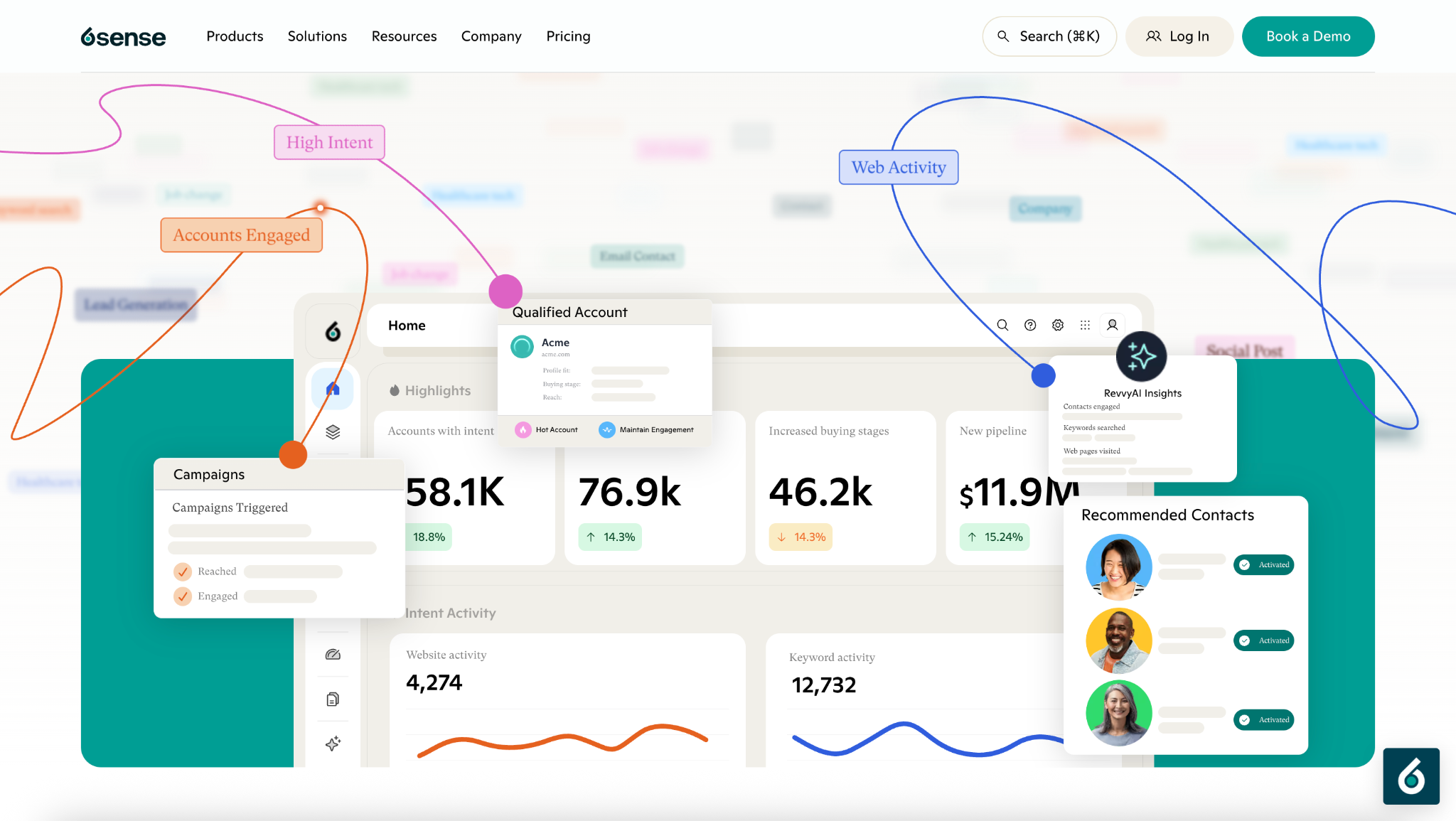
6sense homepage product view. Source: 6sense.
Capterra: 4.1/5 (42 reviews)
Pricing: Custom quote. Predictive models, the Bombora topic pack and extra credits are sold as add-ons.
Best for: Enterprise teams running large ABM programs on predicted account readiness.
What 6sense does
6sense combines its own third-party research intent, website engagement, CRM activity and company data to predict which accounts are in market. It sells three products on the same data, Revenue Marketing for ads, segments and workflows, Sales Intelligence for reps, and 6sense Intelligence for data teams.
Compared with Vector’s contact-first approach, 6sense works across a much larger account universe and asks you to plan campaigns around where each account sits in its buying cycle.
Where 6sense goes further than Vector.co
Predictive buying stages. 6sense places accounts in Target, Awareness, Consideration, Decision and Purchase stages, estimating which companies are likely to open or advance an opportunity in the next 90 days. Predictive models are an add-on, so check that your package includes them.
Third-party research intent. 6sense tracks category research outside your website, so an account researching your category on other B2B sites can surface before it ever visits your homepage. Vector also tracks research signals, but predicted intent is the center of how 6sense works.
A native DSP. 6sense runs programmatic display through its own platform, using fit, buying stage and intent to build audiences. Audience workflow templates change campaigns and outreach as accounts move between segments. Vector activates contact audiences through connected ad networks instead.
RevvyAI and MCP. RevvyAI answers GTM questions about your account data, and 6sense includes an MCP server so your AI tools can reach the same intelligence.
6sense vs. Vector.co feature comparison
What users say about 6sense
Nathan B., Sr. Omnichannel Marketing Manager, enterprise, G2: 3.5/5 (November 4, 2026)
Nathan credits hands-on onboarding and the advertising side. “The DSP is great for top-of-funnel advertising, and I value the depth of intelligence around sales readiness, in-market activity, buyer intent, and readiness.” He also found account overlap across campaigns hard to work out.
Verified user, computer software, small business, G2: 3/5 (September 21, 2026)
This reviewer likes the account identification and intent data but questions the scoring. “The prioritisation is a black box for us and seems specific to its purchasing funnel, not our stages.”
Lauren H., Marketing Specialist, mid-market, G2: 4.5/5 (November 3, 2026)
Lauren uses intent signals to find new accounts for sales, and names the main cost. “Intensive set up process, needs dedicated team”
Verdict on 6sense as a Vector.co alternative
I’d shortlist 6sense for enterprise ABM when predicted intent and a native DSP justify the operational effort. Plan for a dedicated owner, and ask how the score is built for your accounts, since reviewers describe prioritization they can’t fully inspect. Vector stays the more direct fit for named US visitors and contact-based advertising.
3. Demandbase for enterprise buying-group advertising
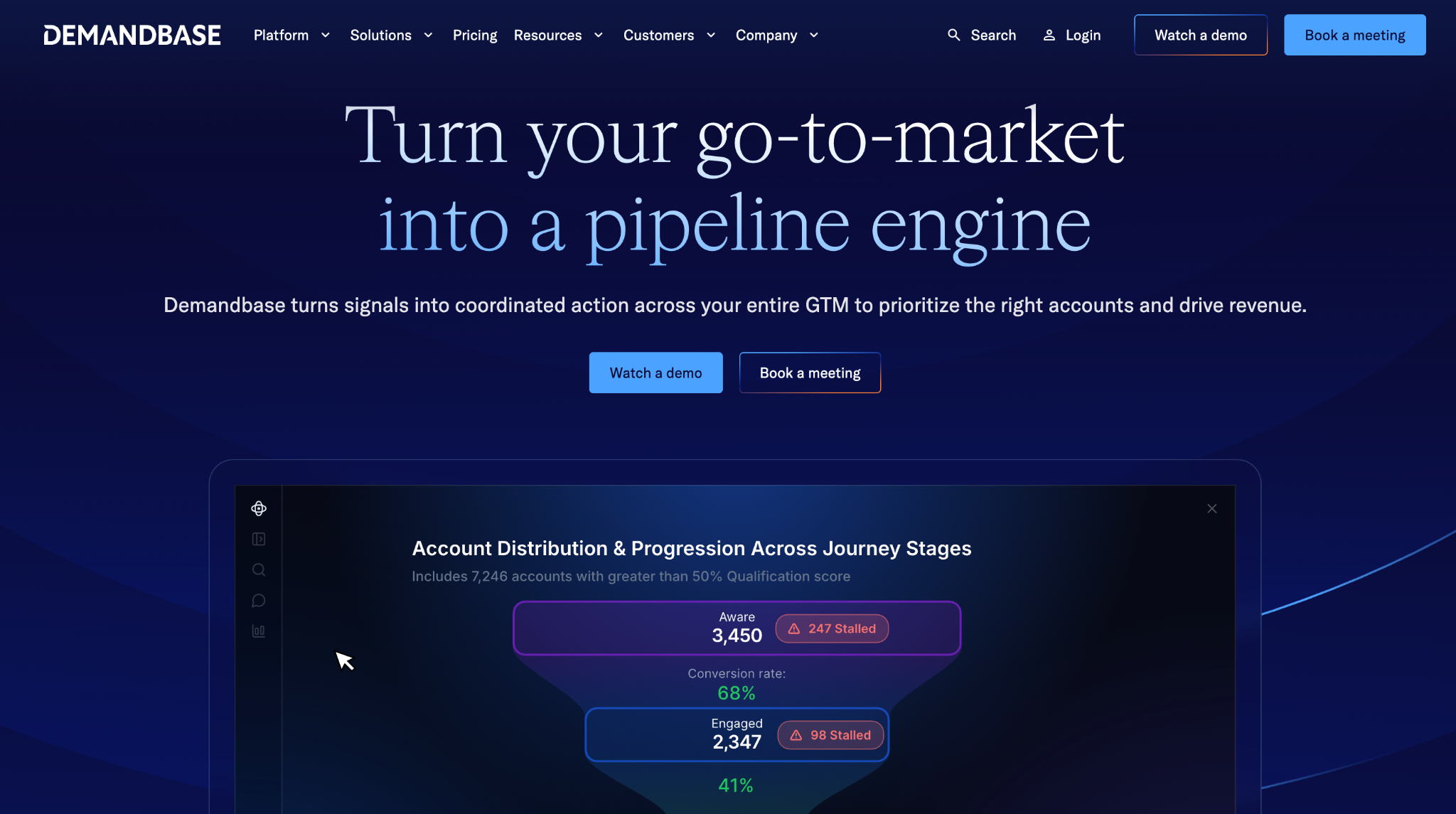
Capterra: 4.4/5 (18 reviews)
Pricing: Custom. Demandbase charges a platform fee plus a fee per user, and advertising media is extra.
Best for: Enterprise marketing teams running campaigns around defined buying groups.
What Demandbase does
Demandbase combines account identification, research intent, scoring and advertising on its own account data. Its distinguishing strength is treating buying groups as audiences you can define, target and measure, rather than treating a company as one uniform audience.
Demandbase also runs its own advertising DSP and sells sales intelligence. It’s a close match to Vector if you already organize ABM around specific buying roles.
Where Demandbase goes further than Vector.co
Defined and measured buying groups. Demandbase lets you define buying groups with roles and personas and inspect engagement coverage for each one. If you sell cybersecurity software, you could track security leaders, technical evaluators and procurement separately. Vector also maps buying groups in its Journeys view, while Demandbase builds those roles into campaign and reporting workflows. How many buying groups you can define depends on your package.
People-based advertising through a native DSP. Demandbase’s People-Based Advertising can prioritize known contacts, job functions, seniority or buying groups. It’s useful when you want to reach security leaders at target accounts without paying for unrelated roles.
Predictive account qualification. Demandbase’s Qualification Score compares a company with your historical customers on firmographics, technographics and other signals. Qualification measures fit. It isn’t evidence that the company is ready to buy.
Demandbase vs. Vector.co feature comparison
What users say about Demandbase
BDR Manager, mid-market, G2: 5/5 (November 3, 2026)
This team switched from a competitor and compares the results with the year before. “We’ve booked 17 meetings within the first 90 days” compared with eight in the previous full year.
Senior Support Manager, mid-market, G2: 5/5 (October 6, 2026)
This reviewer values Demandbase’s intent signals but not the scoring transparency. Demandbase scoring “feels like a black box algorithm that I can’t see or tweak.”
Customer Service Specialist, enterprise, G2: 4.5/5 (October 7, 2026)
This reviewer says Demandbase pays off for teams with many reps, a clean CRM, a dedicated admin and a large budget, and gives smaller teams a blunt warning. “If you’re stretching your budget or headcount run away”
Verdict on Demandbase as a Vector.co alternative
Demandbase makes sense for established buying-group ABM programs with the budget and people to run them. Defined roles, persona targeting and a native DSP all support that approach. Vector is a more direct fit for smaller teams focused on named US visitors and contact audiences across networks.
4. Common Room for buyer research and sales prospecting
Capterra: 4.5/5 (3 reviews)
Pricing: Essential at $2,500/month, billed annually, with 5 seats, up to 100,000 contacts and 1,000 website deanonymizations a month. Advanced and Enterprise are custom.
Best for: Sales and GTM teams tracking buyers across websites, products and communities.
What Common Room does
Common Room helps sales find people showing interest beyond your website. It connects signals from GitHub, Slack communities, LinkedIn, product usage and your CRM to individual buyer profiles, then lets reps research and act on them.
Zoom announced its acquisition of Common Room in July 2026 and plans to fold it into Zoom Revenue Accelerator. If you’re buying for the long term, ask how the product roadmap and pricing will change under Zoom.
Where Common Room goes further than Vector.co
Community and product usage signals. A developer might contribute to your GitHub repo, join your Slack community or use your free product before ever becoming a lead. Common Room connects those signals to a contact profile so your reps know who is already engaged.
Person360 and enrichment. Person360 combines contact details, professional information and activity in one profile, which reps can enrich and send to a CRM or outreach tool.
Buyer research and prospecting. Reps can filter contacts by role, company and activity, review the signals behind each one, and act through connected sales tools. Buying Committee suggests stakeholders and shows who is engaged.
Common Room’s enhanced US visitor identification runs on Vector. The integration documentation explains that customers connect a free Vector account, and only US traffic is routed through it. If Vector’s US identification is the part you want to replace, Common Room doesn’t give you an independent alternative.
Common Room vs. Vector.co feature comparison
What users say about Common Room
Forrest L., small business, G2: 4.5/5 (November 1, 2026)
Forrest uses Common Room to commercialize an open-source product. “I can build automated workflows around developer behaviors, such as frequent code activity, to create prioritized warm lead queues.”
Reyna A., small business, G2: 5/5 (November 6, 2026)
Reyna values real-time visitor identification but cautions against relying on the built-in enrichment. “Wrong email addresses and disconnected phone numbers seem to be a pretty common issue”
Maribel C., small business, G2: 5/5 (October 23, 2026)
Maribel uses open-source signals to write warmer outbound, but finds the interface heavy. “I have to move through multiple nested tabs, filters, and account layers to get the precise data I need”
Verdict on Common Room as a Vector.co alternative
Common Room is worth considering when your reps need to research buyers across communities, product usage and the web. It serves a different job from Vector’s ad platform, and it isn’t an independent replacement for Vector’s US identification, since that feature runs on Vector.
Also Read: Factors’ take on Common Room pricing in 2027.
5. Dreamdata for B2B revenue attribution
Capterra: 4.8/5 (58 reviews)
Pricing: Free plan, Attribution plan custom, Activation as an add-on. The free plan includes company identification, an audience builder and two months of user history.
Best for: Marketing teams that need channel attribution and account journeys tied to revenue.
What Dreamdata does
Dreamdata brings together marketing interactions, CRM opportunities and revenue to show how campaigns contribute to pipeline. It records account journeys across website visits, ads, events and CRM activity.
Dreamdata also offers company identification and audience building, but attribution is the clearest reason to choose it over Vector.
Where Dreamdata goes further than Vector.co
Fractional attribution models. Dreamdata supports first touch, last touch, linear, U-shaped, W-shaped, data-driven and custom models. An early LinkedIn ad and a later Google click can receive different credit under each model. Vector’s Stories record the journey without splitting credit.
LinkedIn impression attribution. Dreamdata has a dedicated impression model that weighs how many impressions an account saw, the campaign type and how recent they were. You can compare view-through influence with click-based attribution instead of treating every impression as a click.
CRM-linked account journeys. Dreamdata connects campaign and website interactions with stages such as MQL, opportunity and closed deal, so you can check whether a campaign shows up in later pipeline even when it generated few direct demo requests.
[Screenshot to add: Dreamdata attribution report comparing models side by side. Source: Dreamdata.]
Dreamdata vs. Vector.co feature comparison
What users say about Dreamdata
Verified user, IT services, mid-market, G2: 5/5 (updated November 3, 2026)
This team switches between data-driven, linear, first-touch and last-touch models. “Comparing models side by side shows us where a channel opens deals versus where it closes them”
Lisa S., Director of Marketing Communications & Operations, small business, G2: 4.5/5 (November 5, 2026)
Lisa built her monthly channel reports on Dreamdata’s stage models and flags the ramp-up. “There is a learning curve, especially around stage models and how attribution is calculated.”
Andy M., Marketing & Growth Mentor, mid-market, G2: 5/5 (updated October 28, 2026)
Andy praises the Activation Hub but doesn’t rely on Dreamdata’s company data. “Company data found in Reveal or segmentation reports are not accurate when it comes to industry, headcount, company location and similar.”
Verdict on Dreamdata as a Vector.co alternative
For detailed revenue attribution, I’d put Dreamdata ahead of Vector. Its models and CRM-linked reports show how each channel contributed to pipeline. Vector is the closer fit for named US visitor identification and contact-level advertising, and some teams run Dreamdata alongside an identification tool for that reason.
6. Leadfeeder for company identification and website intent
Capterra: 4.2/5 (137 reviews)
Pricing: Free Lite plan, Discover from €79/month, Activate from €369/month and Scale from €599/month, billed annually. Monthly billing costs about 30% more.
Best for: Teams identifying visiting companies and using website activity for sales follow-up.
What Leadfeeder does
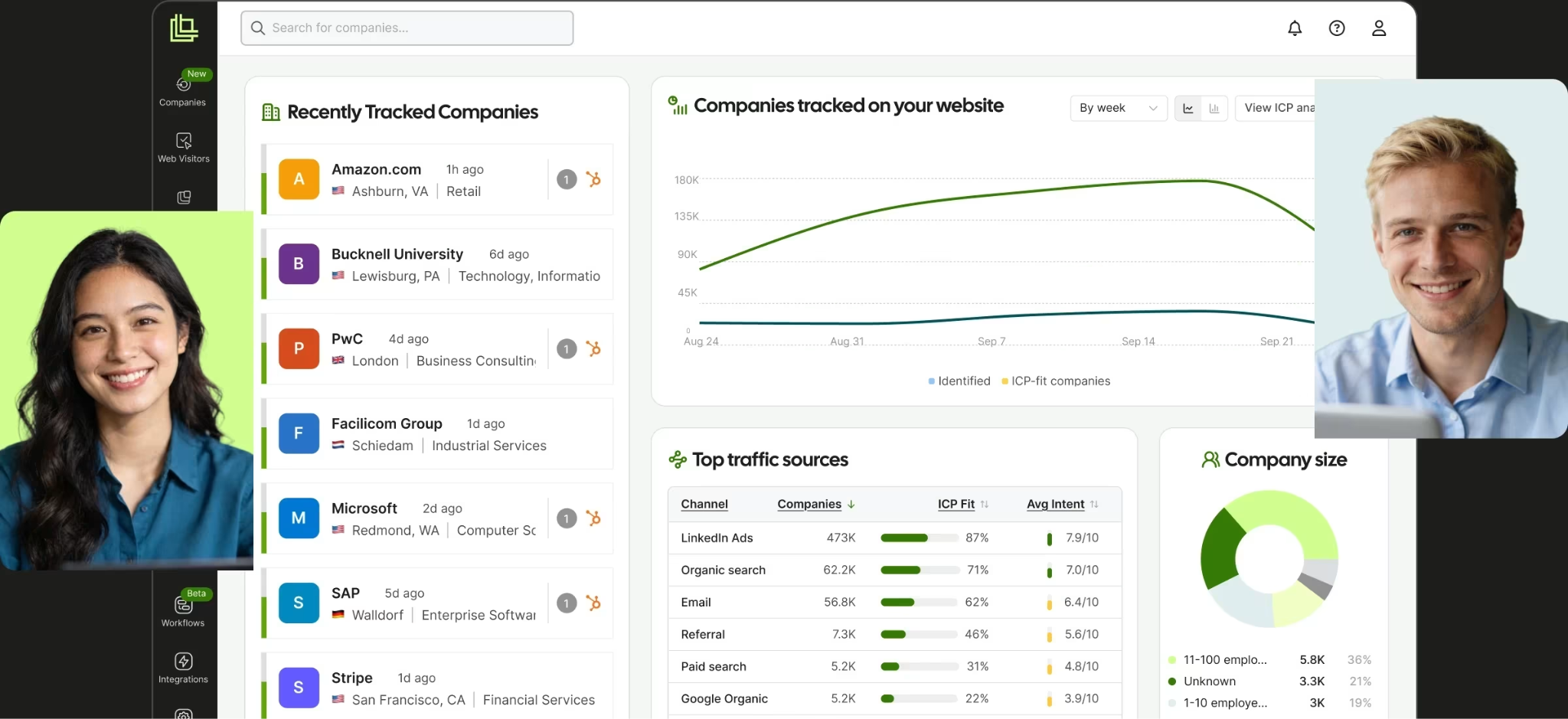
Leadfeeder identifies companies visiting your website without a form fill, and shows reps which pages they viewed, where they came from, and how their interest changes over time.
Dealfront rebranded back to Leadfeeder on March 24, 2026, so the platform now includes company prospecting, contact enrichment, display campaigns and CRM automation under the Leadfeeder name. Web Insights, included in every plan, helps you compare the quality of companies each campaign brings in.
Where Leadfeeder goes further than Vector.co
Lower-cost company identification. The free Lite plan shows the last 100 identified companies a month with seven days of history. Discover adds full company profiles, real-time alerts, CRM sync, Google and LinkedIn ad reports, and API and MCP access. Company identification isn’t the same as identifying the person on the page, and contact enrichment is a separate step paid for with credits.
Web Insights for traffic quality. Web Insights shows which channels, campaigns and pages bring companies to your site, with ICP fit, intent score and conversions on every report row. Two Google Ads campaigns can drive similar visits and very different numbers of ICP companies, and Web Insights shows you which is which.
Enrichment and follow-up. Activate adds verified emails and phones, intent filters, B2B display campaigns and CRM automations. Scale adds automatic CRM enrichment and a dedicated CSM.
Leadfeeder vs. Vector.co feature comparison
What users say about Leadfeeder
Farman K., Senior Website Specialist, mid-market, G2: 4.5/5 (October 22, 2026)
Farman uses custom feeds filtered by ICP. “I can track which companies visit, return to, and engage with our website.” He also notes that companies can drop out of custom feeds when the filters aren’t set right.
Flora G., Marketing Director, small business, G2: 4.5/5 (October 9, 2026)
Flora likes the company detail but fills contact gaps elsewhere. “The contacts, there are not always identified contacts for all companies, especially access to emails.” She pairs Leadfeeder with Apollo for emails.
Eric S., Marketing, small business, G2: 4/5 (updated July 17, 2026)
Eric’s issue was the contract, not the product. “I did not receive a renewal reminder before my annual renewal date” He adds that senior leadership later resolved it fairly. Note the 30-day cancellation window before you sign an annual plan.
Verdict on Leadfeeder as a Vector.co alternative
Leadfeeder works best when your goal is company identification and campaign traffic analysis on a small budget. Its lower plans suit teams that don’t need a full ABM platform. Vector stays closer to person-level ID plus contact-level advertising.
7. RB2B for affordable US visitor identification
Capterra: 3.0/5 (2 reviews). Too few reviews for a meaningful comparison.
Pricing: Free, Starter $79/month, Pro from $149/month, Pro+ from $199/month.
Best for: Small sales teams sending named US visitor details to Slack, Teams or a CRM.
What RB2B does
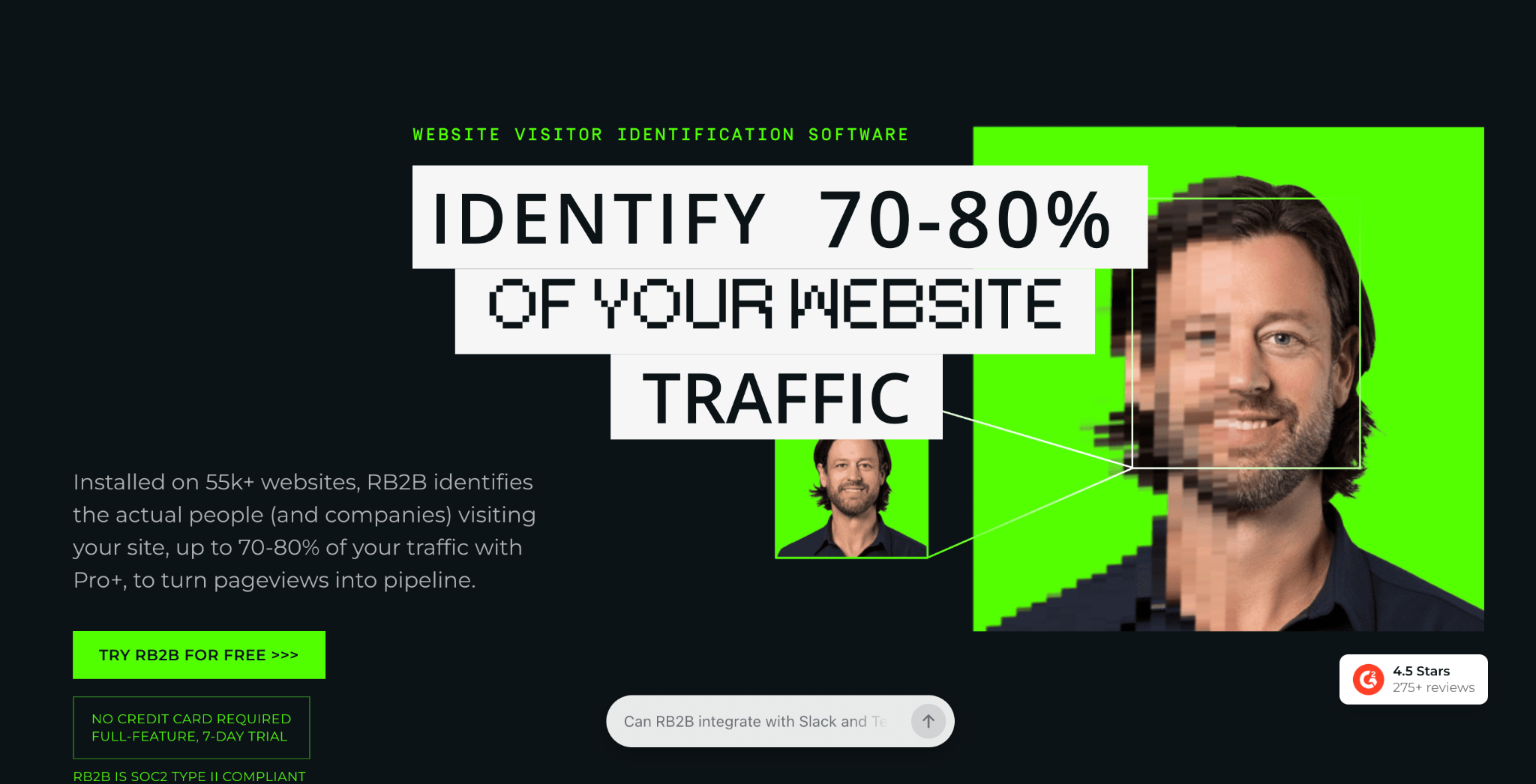
RB2B identifies eligible website visitors and notifies sales with details such as name, LinkedIn profile, business email and pages visited, depending on your plan. Company-level identification works globally, while person-level identification covers US traffic only.
Its narrow workflow is the point. If visitor identification is the only part of Vector you use, RB2B replaces it for a fraction of the cost.
Where RB2B goes further than Vector.co
Affordable person identification. The free plan gives you company-level ID and 150 resolutions a month. Starter at $79 a month sends LinkedIn profiles of US visitors to Slack or Teams for 300 resolutions. Pro from $149 adds business emails and every integration, and Pro+ from $199 adds an identity-graph waterfall. RB2B states 15 to 20% coverage on its basic resolution and 35 to 45% on Pro+, so test both on the same traffic.
Visitor alerts without an ABM suite. The Slack integration shows a visitor’s profile and return history, and reps decide whether to follow up. Vector also sends alerts, but you pay for scoring, advertising and Stories alongside them.
Page and ICP filtering. Paid plans let you tag high-intent pages, filter by ICP and exclude domains or lists. Pro and Pro+ send matching records to HubSpot, Salesforce, Clay, Apollo, Zapier and webhooks, so you keep your current outbound tools.
Support on every plan is AI-first, through chat and email, with human escalation. If you’re used to a Vector solutions architect, expect a lighter-touch relationship.
RB2B vs. Vector.co feature comparison
What users say about RB2B
Alyssa P., Marketing Lead + Customer Success Manager, small business, G2: 5/5 (August 14, 2025)
Alyssa’s team gets few form fills, so identification became its inbound channel. “We installed the RB2B pixel in March 2025, and as of August 2025 we have closed 5 large-scale deals”
Verified user, IT services, mid-market, G2: 2/5 (updated April 3, 2025)
This reviewer likes how quickly RB2B worked out of the box but found data quality uneven and paid for traffic they didn’t want. “We burn through our credits on non-ICP traffic.” RB2B has since added filters that keep non-ICP visitors out of alerts.
Dave M., Chief Revenue Officer, small business, G2: 5/5 (updated March 10, 2025)
Dave’s team sells into Latin America as well as the US. “I dislike RB2B’s current limitation, which is that it only captures profiles from the United States.”
Verdict on RB2B as a Vector.co alternative
For named US visitor alerts without an ABM suite, RB2B is the simpler choice. Its pricing and focused workflow are easy to justify for that one job. It doesn’t replace Vector’s scoring, advertising or reporting.
[Screenshot to add: RB2B Slack alert showing a named visitor and the pages they viewed. Source: RB2B.]
8. Warmly for visitor identification and real-time engagement
Capterra: Listed, not yet rated
Pricing: AI Web-Deanonymization from $10,000/year, Inbound Chat from $20,000/year, AI Inbound Autopilot from $30,000/year. Quarterly billing is available, and annual billing saves 30%. A GTM Signals package with intent, hiring and funding signals is a $10,000/year add-on.
Best for: Teams that want to identify visitors and engage them through chat, routing and follow-up.
What Warmly does
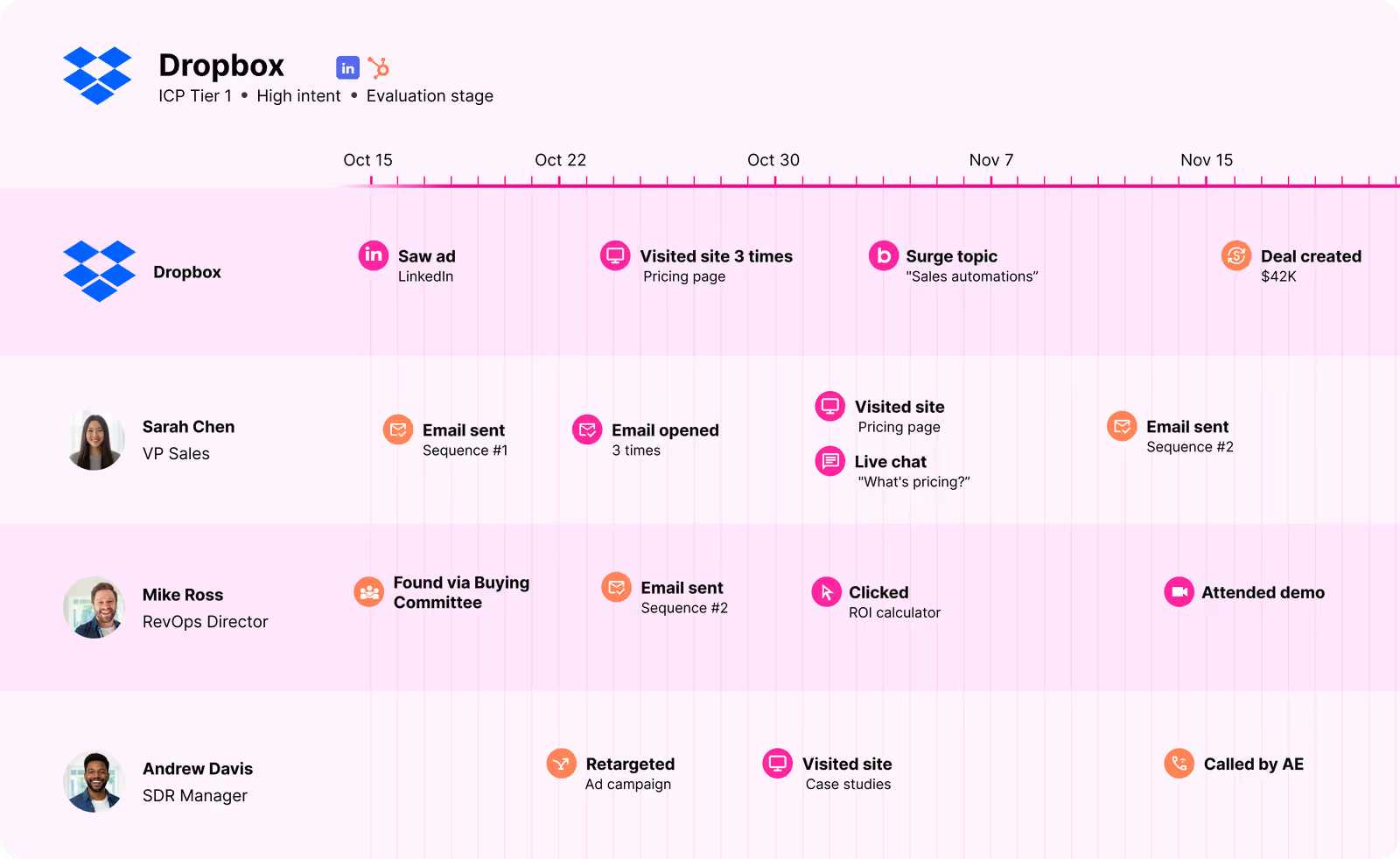
Warmly identifies people and companies on your website while they’re showing interest, then gives you ways to act in the moment, including live chat, AI chat agents, lead routing, automated follow-up and CRM sync. A visit to your pricing page can trigger a Slack alert or a website conversation.
HubSpot agreed to acquire Warmly on June 30, 2026, and said existing contracts, pricing and integrations stay unchanged for now. If you run Salesforce rather than HubSpot, ask how the roadmap will treat non-HubSpot customers.
Where Warmly goes further than Vector.co
Native chat. Inbound Chat pairs identification with an AI chatbot and live “warm calling,” so a visitor can get an offer or be connected to sales while still on the page. Chat starts at $20,000 a year, and identification alone at $10,000. Vector identifies and alerts but doesn’t run website conversations.
AI qualification and follow-up. Warmly’s AI agents answer questions, qualify visitors and send follow-up emails. AI Inbound Autopilot adds goal-setting, decision-making and auto-generated mini-demos. Don’t assume chat or follow-up comes with the identification-only plan.
Alerts and routing. Warmly sends signals to Slack and your CRM. An open deal or a closed-lost account returning to pricing can notify its owner, and that alert can lead straight into a chat or an automated sequence.
Warmly vs. Vector.co feature comparison
What users say about Warmly
Verified user, computer software, mid-market, G2: 3.5/5 (April 21, 2026)
This team runs SDR outreach from Warmly’s Slack channels. “Our SDRs book meetings directly from the ICP-visitor and closed-lost Slack channels” The same reviewer flags a buggy chatbot builder and a HubSpot sync that created many duplicate companies.
Paul B., CMO, small business, G2: 4.5/5 (April 22, 2026)
Paul praises the hands-on team but names reliability as his biggest frustration. “We’ve had stretches where Slack orchestrations stopped firing for weeks”
Verified user, computer software, small business, G2: 3/5 (April 22, 2026)
This reviewer rates support highly but not the contact data Warmly writes to the CRM. “We end up with a lot of spam or invalid contacts.”
Verdict on Warmly as a Vector.co alternative
Warmly is strongest when real-time website engagement matters most. Chat and AI routing let you respond while visitors are still on your site. Vector stays more focused on contact-level advertising and buying-group measurement.
How to test Vector.co against an alternative
A short, controlled trial tells you more than a long demo. Here’s how I’d set one up.
Visitor identification. Run both tools on the same traffic for the same two weeks. Count the companies and people each one identifies, check a sample by hand against your CRM, and split the results by country.
Advertising. Use one real target-account segment. Check what audience rules you can build, how often audiences refresh, and whether you can see delivery per account. If concentration is your problem, look for per-account caps, not only bid automation.
Attribution. Pick a recent closed-won deal and trace its marketing and CRM history in each tool. Check whether the report matches how your team already defines sourced and influenced pipeline.
Maturity. Ask each vendor which of the features you plan to use are generally available and which are in beta, and how fixes are handled in your contract.
Pricing. Vector’s Growth plan starts at $36,000 a year and is sized by your site traffic and total ad spend. Factors.ai Enterprise, which includes LinkedIn and Google AdPilot, starts at $36,000 a year. These are different products with different limits, so compare quotes for the features and scale you need.
Frequently asked questions about Vector.co alternatives
What are the best Vector.co alternatives for ABM?
For a broad ABM replacement, look at Factors.ai, 6sense and Demandbase. 6sense leads on predictive buying stages, Demandbase on buying-group advertising, and Factors.ai on LinkedIn and Google delivery controls with multi-touch attribution.
Does Vector.co support multi-touch attribution?
Not in the fractional sense. Vector’s Stories show each deal as a narrative of the activity that led to it, without splitting credit across channels. Dreamdata and Factors.ai both split credit using attribution models.
Is Vector.co a good fit for a mature ABM team?
Vector can work, but plan for an early-stage vendor. Vector raised its Series A in May 2026, and several core features are recent releases. Mature programs with stable scoring and reporting should confirm which features are generally available and pilot the workflows they depend on before migrating.
Can Common Room replace Vector.co’s visitor identification?
Not independently. Common Room has its own tracking, but its enhanced US identification runs through a connected Vector account.
Can Factors.ai identify website visitors outside the US?
Yes, at the company level. Named visitor identification runs through RB2B on eligible, primarily US visits, and draws on Factors’ shared data credit pool. Measure company and person matches separately, since they cover different traffic.
Is RB2B cheaper than Vector.co?
Yes. RB2B’s paid plans start at $79 a month and Vector starts at $36,000 a year, but they aren’t the same product. RB2B names US visitors, while Vector also covers scoring, advertising, journeys and deal reporting.
Which Vector.co alternative suits a small sales team?
RB2B or Leadfeeder, if you mainly want visitor alerts. Warmly is worth a look if you also want to chat with and route visitors in real time.

Powered by Bombora
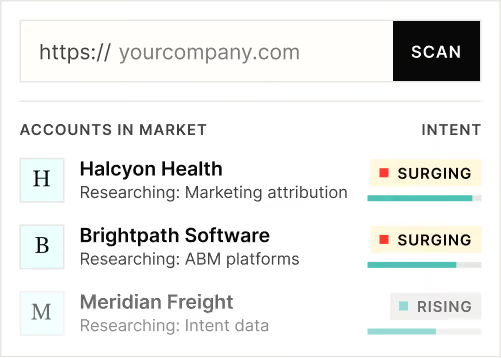
Enter your domain and we'll send you a free list of companies showing buying intent in your vertical.
Powered by Bombora
Enter your domain and we'll send you a free list of companies showing buying intent in your vertical.

See how Factors can 2x your ROI
Boost your LinkedIn ROI in no time using data-driven insights





See Factors in action.
Schedule a personalized demo or sign up to get started for free
LinkedIn Marketing Partner
GDPR & SOC2 Type II