Vector.co Pricing in 2027: Plans, Credits, Reviews, and Is It Worth $36,000 a Year?
Vector.co pricing ranges from $36,000 to $96,000 a year, decided by your site traffic and ad spend. We break down the plans, credits and what users say.

Content Marketer
Associate Director of Brand and Content


In this Blog




Vector.co is a contact-level ABM platform that identifies the people visiting your website, scores accounts on buying intent, syncs audiences to your ad platforms and reports on attribution.
The platform sells everything on a single annual contract, and the entry level Growth plan starts at $36,000 a year.
At that price, Vector sits in the same budget conversation as 6sense and Demandbase, the two platforms Vector openly positions itself to replace.
Below, we break down what each Vector plan costs, how Vector’s credits work, what G2 reviewers say about the product and the questions worth asking before you sign.
How much does Vector.co cost in 2027?
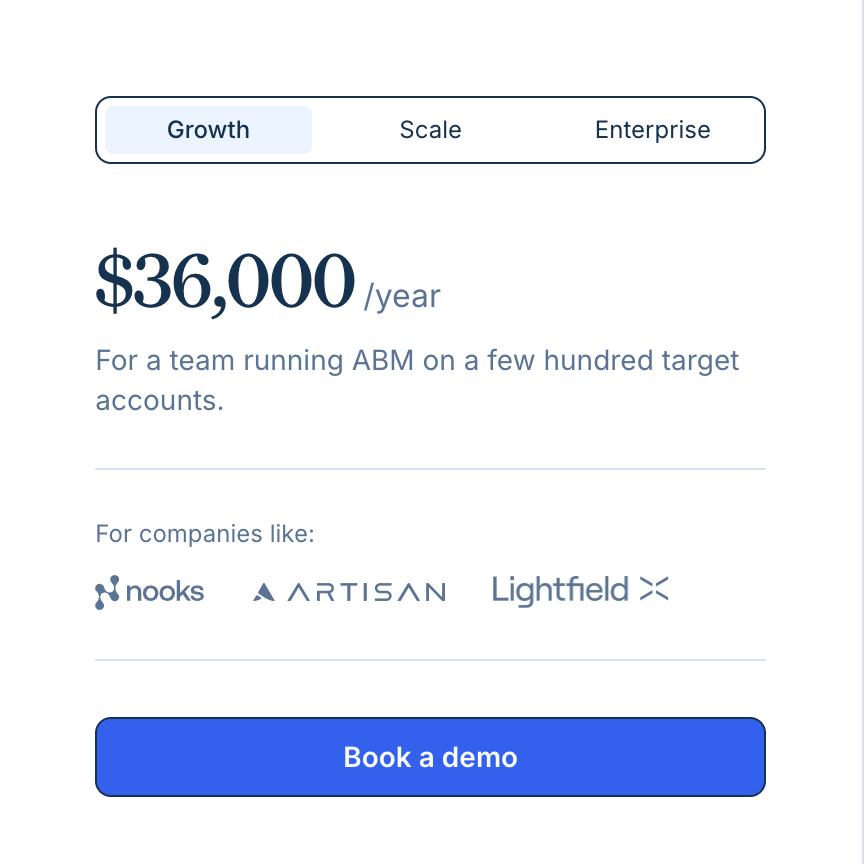
Vector lists three plans on its pricing page, and all of them are annual contracts. The platform doesn’t have a monthly subscription option. Growth costs $36,000 a year, Scale costs $60,000 a year and Enterprise is priced at $96,000 a year.
Growth fits a smaller marketing team with steady traffic and a modest paid budget, usually focused on one region and one main ad channel. The catch is the ad spend limit. A team with low traffic that spends more than $25,000 a month across LinkedIn, Google and other channels moves straight to Scale.
Scale fits a mid-market team running paid campaigns on several channels while sales works the same accounts. Moving up from Growth costs $24,000 more a year, and in return you get four times the traffic and ad spend limits and two more bid agents.
Enterprise is for a company with large traffic and paid budgets spread across regions or business units.
How Vector decides which pricing plan suits your business
You might expect to pick a plan by the number of accounts you target, but that is not how Vector sizes the contract. Two numbers set your plan, your unique monthly site visitors and your total monthly ad spend. Whichever one lands you in the bigger plan is the plan you pay for.
Growth covers up to 25,000 monthly visitors and $25,000 in monthly ad spend, Scale covers up to 100,000 visitors and $100,000 in ad spend, and Enterprise covers up to 250,000 visitors and $250,000 in ad spend.
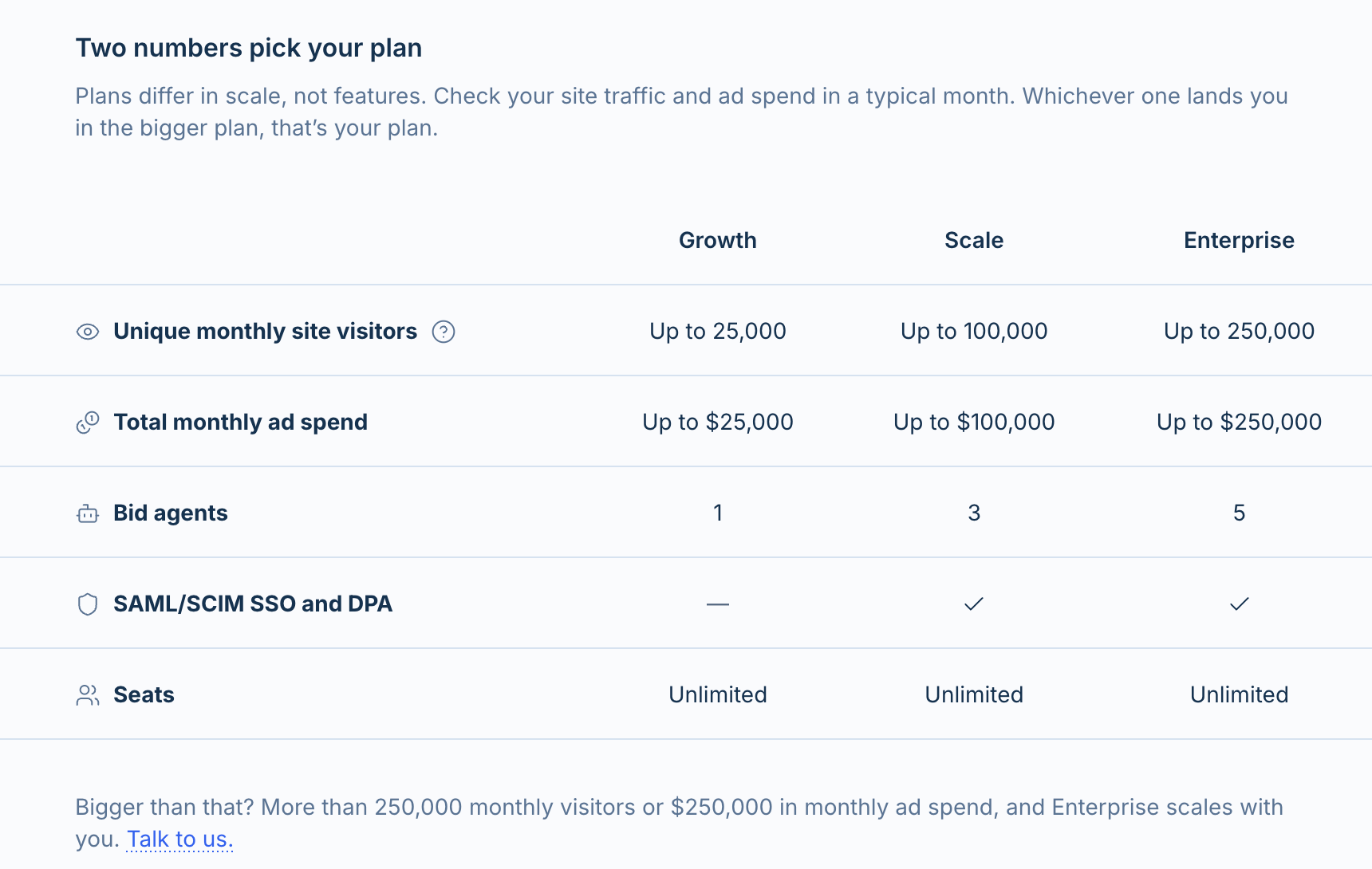
Vector sizes plans by monthly site visitors and total ad spend.
Both numbers are counted more broadly than you might expect. Site visitors means every unique visitor, not only the ones Vector manages to identify. Ad spend means your company’s total monthly spend, including campaigns you run outside Vector. Vector’s own FAQ gives the example of a company with 20,000 visitors and $50,000 in monthly ad spend. Its traffic fits Growth, but its ad budget puts it on Scale at $60,000.
Ad spend is usually the number to watch. A team with modest traffic and a large LinkedIn budget will pay for Scale even if it only targets a few hundred accounts.
If your traffic or spend consistently runs above your plan’s limits, Vector says it will move you up, even before renewal, though occasional spikes won’t trigger a change. Anything above 250,000 visitors or $250,000 a month in ad spend means you’ll need to talk to Vector’s sales team about Enterprise pricing.
Questions to ask in your demo
- Which plan do our monthly visitors and total ad spend put us on, and how is ad spend measured?
- What happens to our price if we cross a threshold mid-contract?
- If we only buy for one business unit or region, can the plan be scoped to that unit’s traffic and spend?
- How many credits does our plan include each month?
How do Vector.co credits work
Every Vector plan comes with a credit allowance, and you don’t need to buy credits separately to get started. What the pricing page doesn’t tell you is how big that allowance is. Vector’s own pages also describe credits in two different ways, which makes budgeting harder than it should be.
The pricing FAQ says credits run “behind the scenes” for two things only, identifying website visitors and running custom AI research. Vector’s help article on usage and credits describes a much broader meter.
In the help article’s version, every tracked account costs a flat 10 credits a month, some signals charge per event and some actions charge each time they run. Until Vector lines the two up, plan your budget using the help article.
Tracked accounts are the easiest part to plan for. 500 tracked accounts use 5,000 credits a month, and 2,000 use 20,000. You also don’t have to track every account in your CRM. If your team owns 2,000 accounts but actively works 400 of them, tracking just those 400 uses 4,000 credits a month instead of 20,000.
Three things push usage up over a contract:
- Accounts you stop working keep costing credits: Vector doesn't untrack accounts on its own, so an account stays on the meter until someone removes it.
- Company signals are charged per event: The Signal Library lists raised funding, acquisitions, earnings reports and major company news at 1 credit per detected event. Custom signals show their own cost before you turn them on.
- Monthly credits don't roll over: Subscription credits expire at the end of each billing cycle. Top-up and partner credits have their own terms.
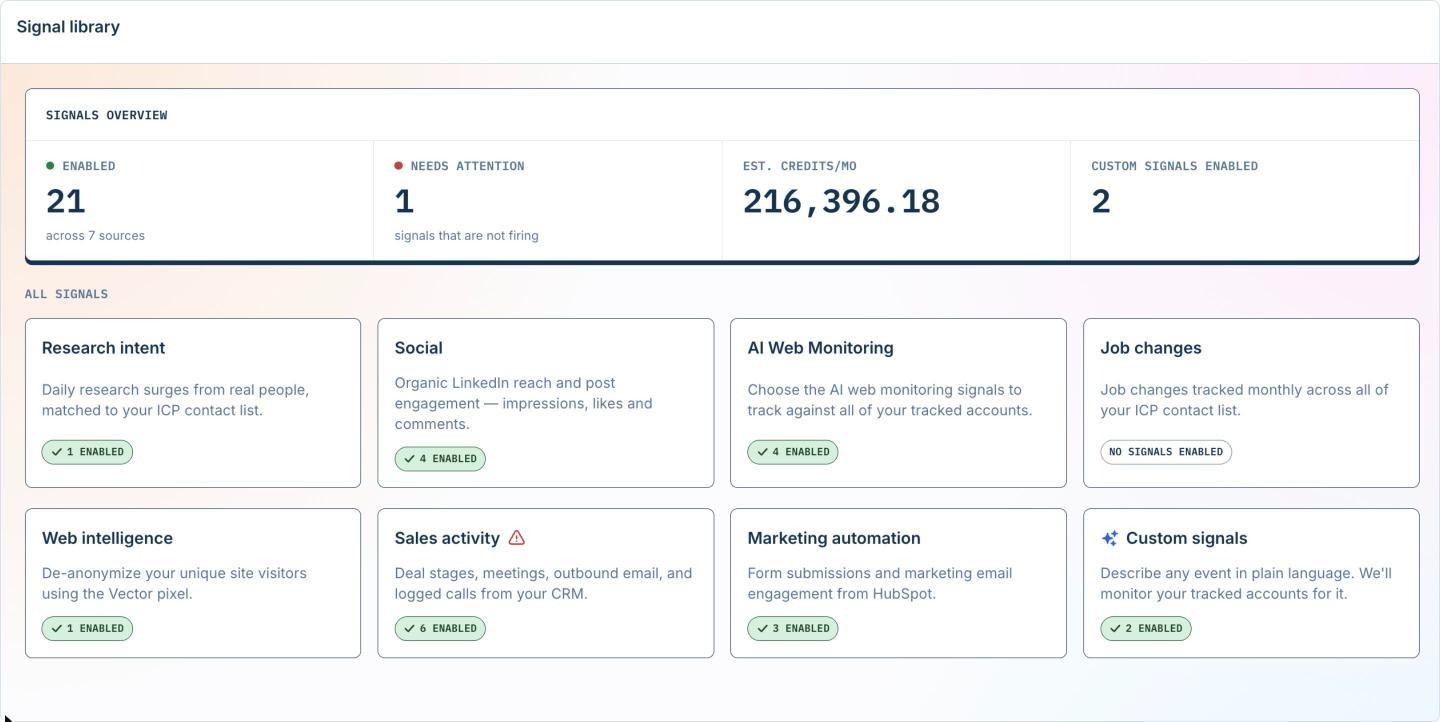
The Signal Library shows estimated monthly credit usage for the signals you enable.
What happens if Vector.co runs out of credits?
It depends on whether you’ve turned on auto-top-up. With auto-top-up off, Vector pauses your account once your credits run out. The website pixel stops collecting visits until new credits arrive. You won’t get an extra bill, but any target accounts that visit during the pause are missed, and Vector’s help center says those identifications aren’t backfilled later.
With auto-top-up on, Vector never pauses your account. Vector buys more credits when you run out and adds them to your bill, up to a monthly cap you set in steps of 5,000 credits. You can set a cap of up to 100,000 credits a cycle without going through sales.
For most teams, the safer setup is auto-top-up turned on with a cap you’re comfortable with, plus a monthly check of the usage forecast.
Questions to ask in your demo:
- How many credits does our plan include each month, and what does a top-up pack cost?
- Which of the signals we plan to use consume credits, and what’s the estimated monthly usage for our account list?
- Your pricing page says credits only cover visitor identification and AI research, but your help docs say tracked accounts use 10 credits a month. Which applies to our contract?
What Vector.co's G2 reviews tell you in 2027
Vector has a 4.9 out of 5 rating on G2 from 16 reviews, with 15 of them at five stars and one at four.

If you’re weighing a $36,000 contract, the dates on those reviews matter more than the score. Eleven of the 16 reviews were written in 2024, three in 2025 and only two in 2026.
In 2024, Vector was a visitor identification tool, and for part of that year it was free. Cam F., a company president, titled his September 2024 review “Can’t believe it’s free.” The Signal Library, account scoring, Journeys, Stories and the Bid Agent all launched between late 2025 and late 2026.
Those are the features you’d be paying $36,000 a year for today, and almost none of the reviews cover them.
The 4.9 mostly reflects how early users felt about the original product. The themes in the reviews are still worth knowing before you talk to Vector.
What reviewers praise: Setup speed comes up again and again. Matty H., a Founder & CTO, says his team was getting Slack notifications about new site visitors within a few minutes of setting Vector up. Reviewers also single out direct access to the founders, Josh and Nick, who handled onboarding calls and support messages themselves. The two 2026 reviews focus on syncing CRM audiences to ad platforms, which is where Vector is now putting its weight.
What reviewers criticize: Integrations and US-only visitor identification are the most common complaints, and both get their own sections below.
One recent reviewer describes what working with a young product is like:
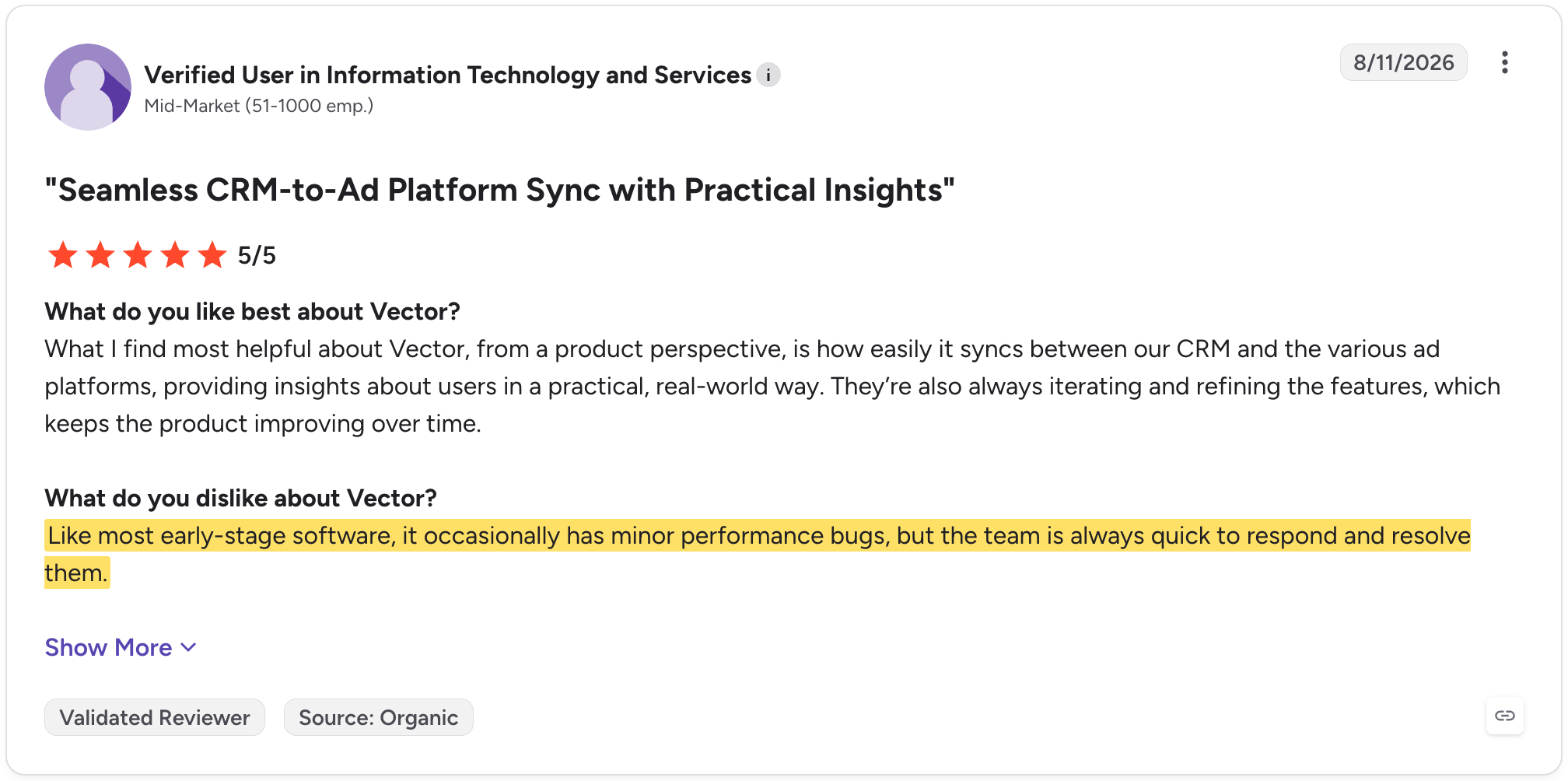
If you’re comfortable working with a vendor that ships fast and fixes issues when you flag them, Vector’s newness can work in your favor. If your reporting and integrations need to run the same way every week without surprises, look at a more mature ABM platform like Factors.ai or Influ2.
Can Vector.co identify the website visitors your sales team wants?
Contact-level visitor identification remains one of Vector's most useful capabilities. Rather than only showing that a company visited your website, Vector can identify eligible individuals, including their names, roles, and work email.
Don’t expect a named contact from every visit, though. Vector’s FAQ puts the contact match rate at about 10%, rising to about 30% when it falls back to identifying the company from the visitor’s IP address.
Vector's help center shows what this looks like in practice. In one example week of its own visitor feed, 1,378 site visitors produced 434 identified visitors (about 31%) and 84 visitors who matched the ideal customer profile (about 6%).

One week of Vector's visitor feed: about 31% of visitors identified, about 6% in the ICP. Source: Vector's Visitor Feed help article.
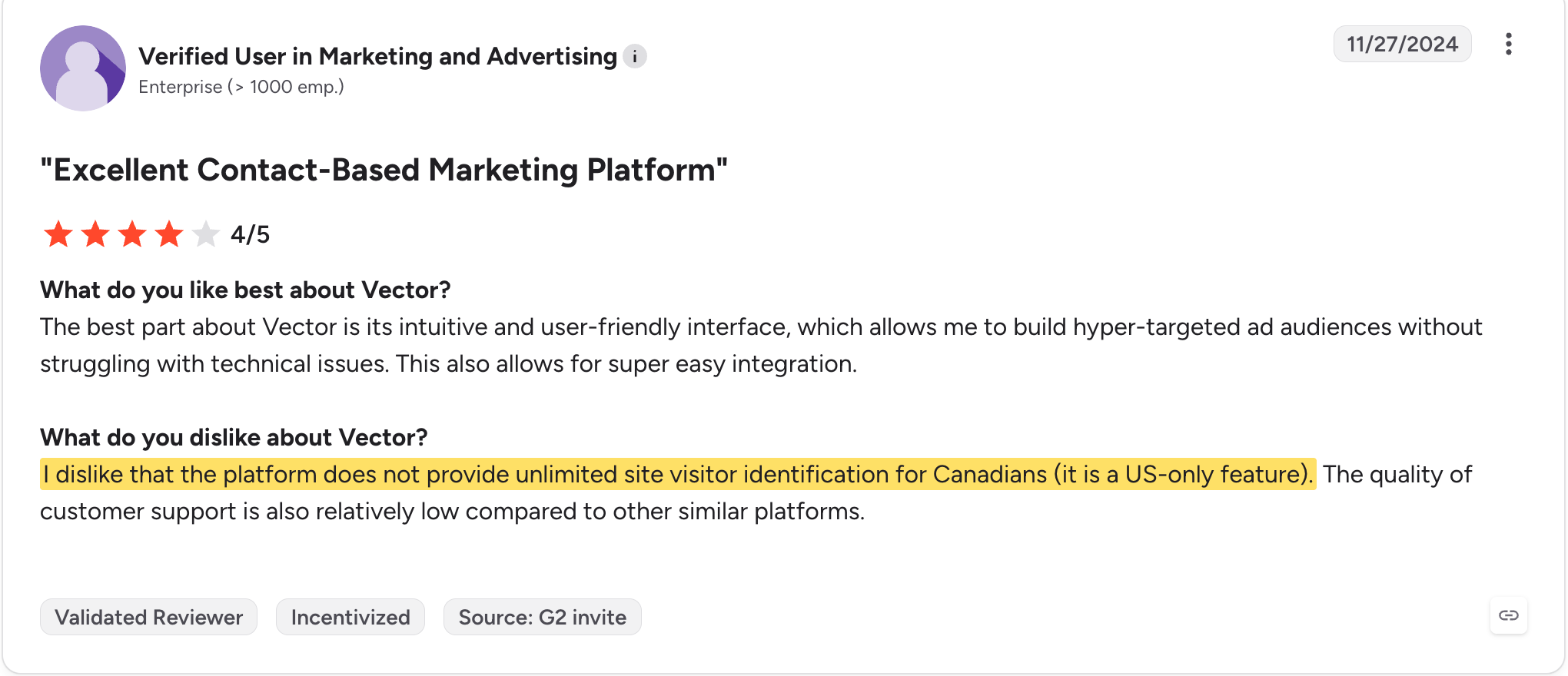
The list gets shorter if a good share of your traffic comes from outside the US. Vector only names US-based visitors, and for visitors in the EU it may show company-level information at most.
An enterprise marketing user on G2 flagged the US-only limit, which matters if you sell outside the US:
Questions to ask in your demo:
- What match rate should we expect on our US and non-US traffic?
- Can we test identification on our own traffic before signing, with pass/fail criteria agreed in advance? (Vector's own buyer guide recommends this.)
Where Vector.co earns its price: CRM-to-ad audience syncing
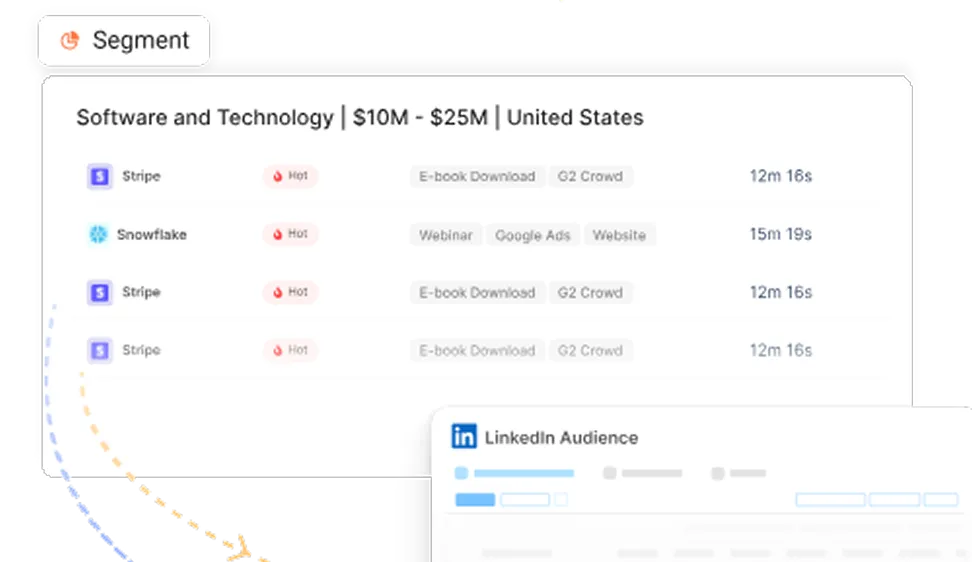
Moving contacts from your CRM and website into ad audiences is Vector's clearest strength. Instead of exporting lists every week, your team can build something called a Segment once and Vector keeps the matching ad audience current.
Each Segment has three parts. A source decides where contacts come from: all site visitors, a CRM list or report, a CSV, or research intent.
Filters narrow it by ICP fit, account stage, title, industry or the ad that brought someone in.
Actions send the result to LinkedIn, Google, Reddit, X or ChatGPT Ads natively, to Meta and Bing in beta, or to Slack, your CRM or a webhook.
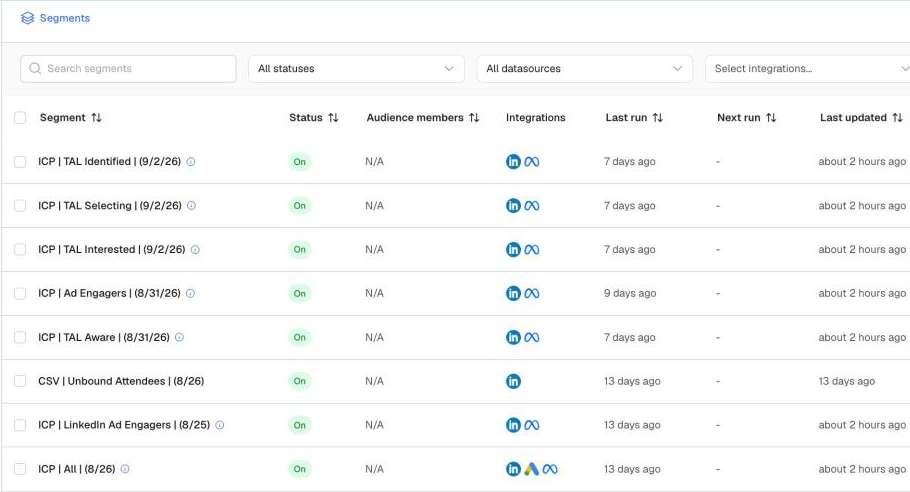
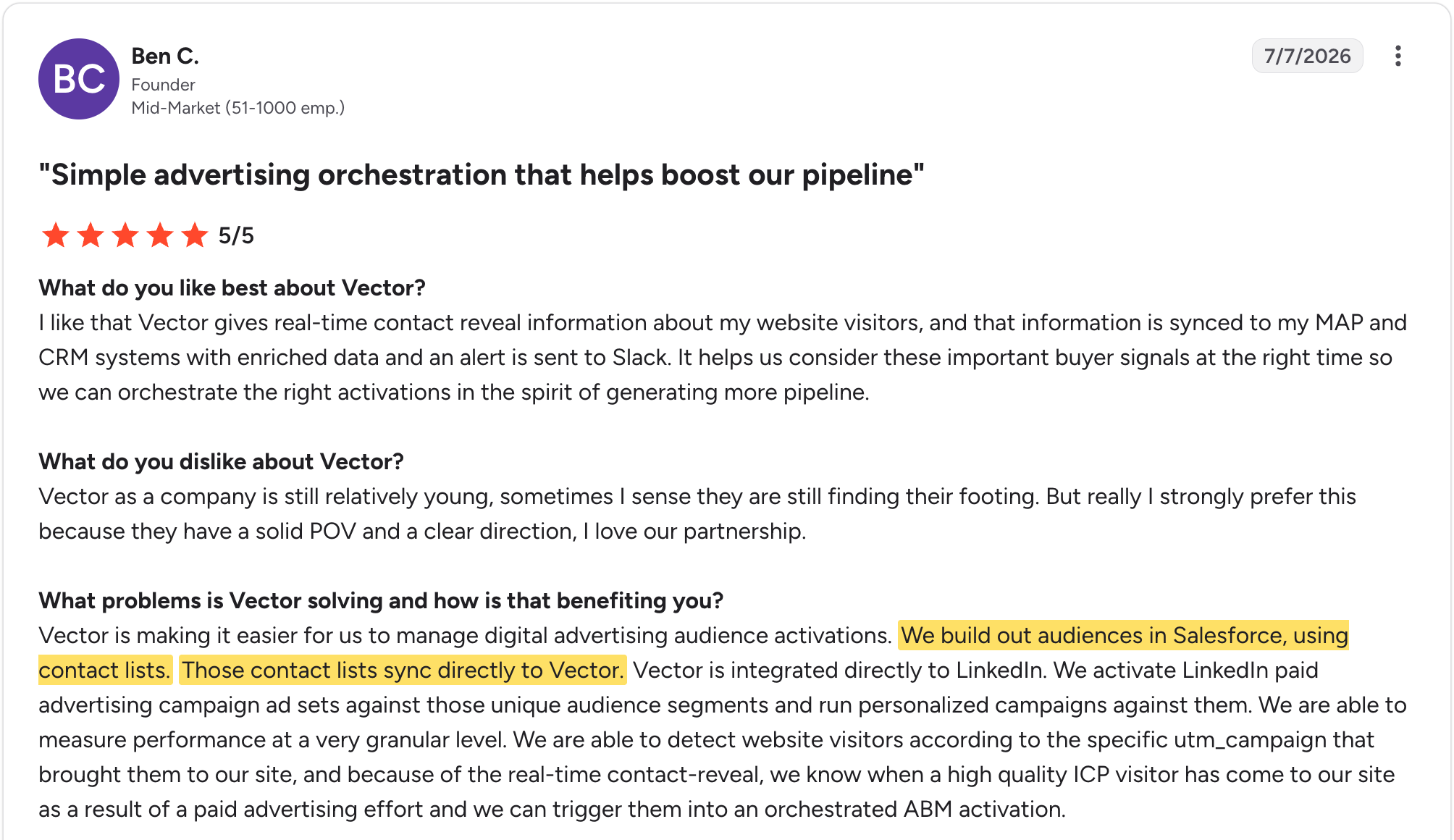
Ben C., a founder reviewing Vector on G2, describes how his team uses it. They build audiences from contact lists in Salesforce, sync those lists to Vector, run them as LinkedIn campaigns and use website visits to trigger further marketing.
The strongest argument for Vector is when a customer already has a useful CRM audience:
The sync pays off when an account moves from early research to an active evaluation. At that point you probably don’t want to keep showing them the same introductory ads. Vector can move that account's contacts into a different audience automatically as its stage changes.
However, audience updates aren't necessarily instant. Vector's help center says new ad audiences can take up to 48 hours to populate.
Questions to ask in your demo
- What match rates do customers like us usually see when syncing CRM lists to LinkedIn, and can we test one of our own lists during a pilot?
- After an account’s stage changes in our CRM, how long does it take for its contacts to move into the new ad audience?
- Which of our ad platforms sync natively today, and when do you expect the ones in beta to be fully supported?
- Does building or syncing segments use credits, and if so, how many?
Do Vector.co users run into integration problems?
Integrations are the most common complaint in Vector’s reviews, and Vector’s own documentation explains why. Vector’s CRM connections are built to push Vector’s data into your CRM when a Segment tells them to. They aren’t built to keep the two systems in continuous two-way sync.
HubSpot works the same way. HubSpot only receives data through Segment actions and supports a fixed set of custom fields.
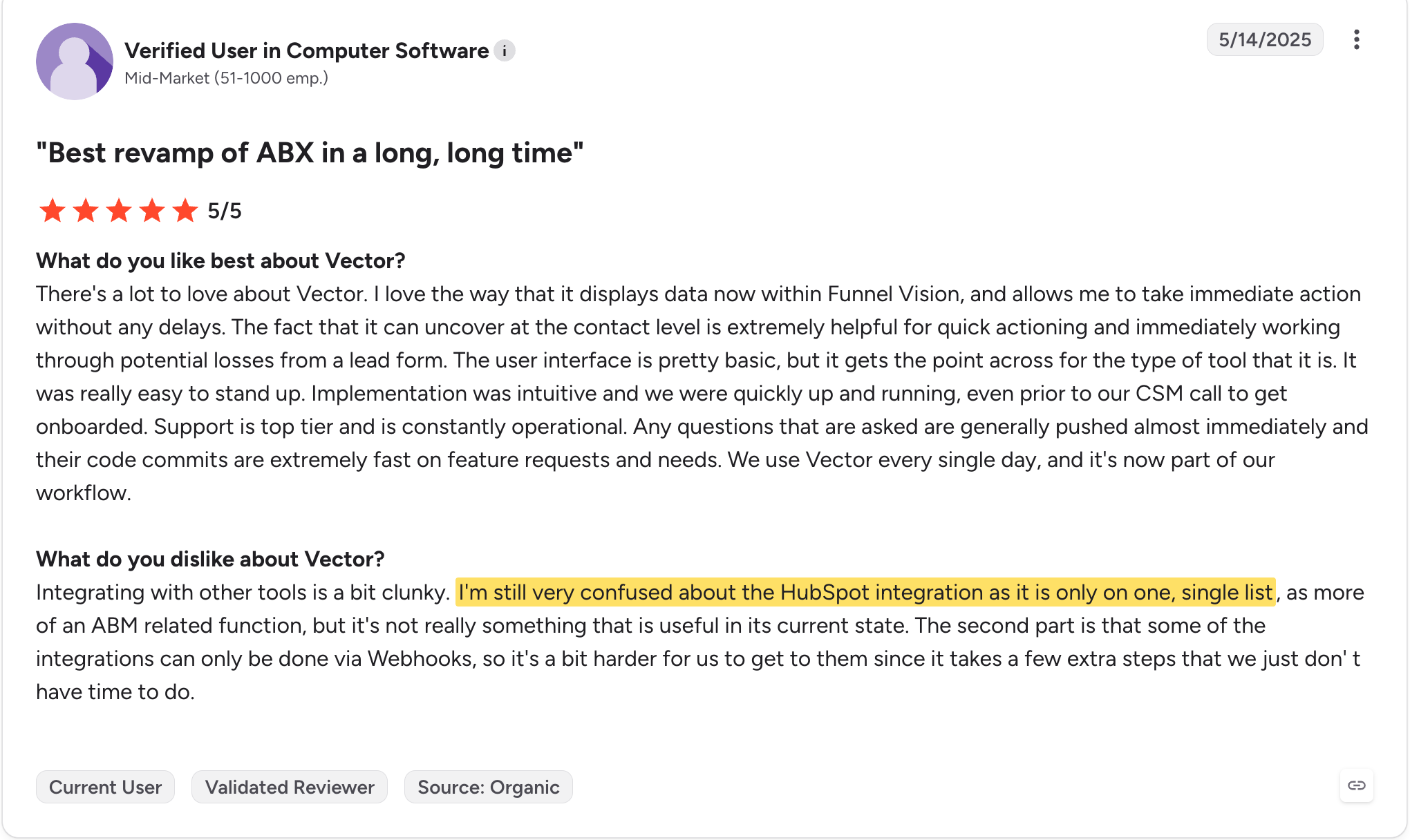
For a team without dedicated RevOps support, this can mean more setup and more checking than expected. A mid-market software user on G2 said the HubSpot integration confused them because it only worked from a single list. They also said they had to set up webhooks to automate steps they expected to run on their own.
Ad platform support is uneven as well. Vector's integrations directory lists LinkedIn, Google, Reddit, X and ChatGPT Ads as native, Meta and Bing as beta, and Snapchat, TikTok, StackAdapt and The Trade Desk as CSV exports only.
On the marketing automation side, Pardot is native while Marketo and Eloqua are still listed as coming soon. Tools such as Clay, Zapier, Snowflake and Redshift connect through webhooks.
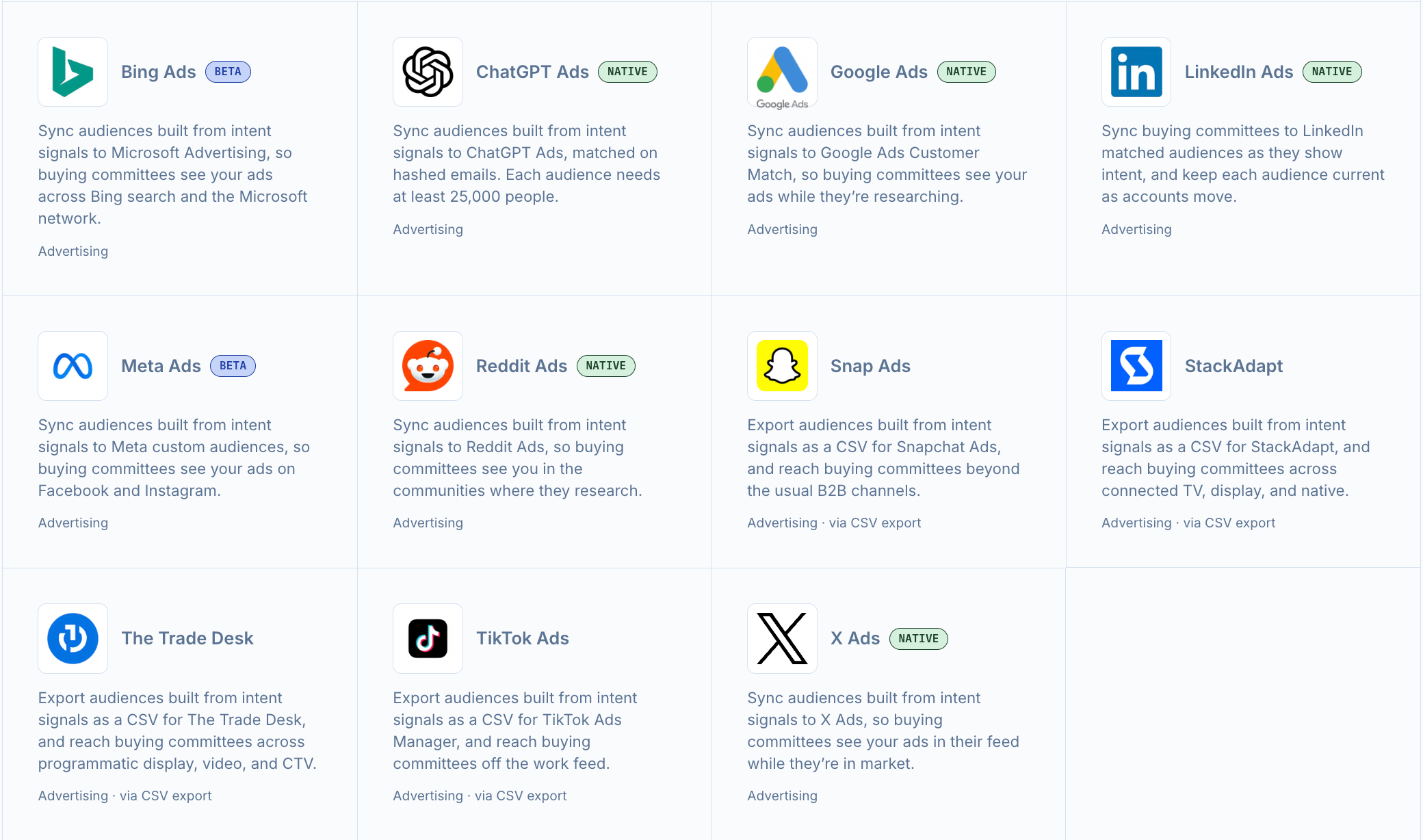
Vector's advertising integrations: native, beta and CSV export only. Source: vector.co/integrations, November 2026.
Questions to ask in your demo
- Which fields does Vector write to our CRM, and does anything flow back from our CRM to Vector apart from account lists?
- How will we know when a record is skipped, and where can we see sync errors?
- Do we need to build Salesforce Flows or webhooks to route Segments the way our team works, and who usually sets that up?
What Vector.co Account Stories can and cannot prove about revenue
If you’ve ever been asked what marketing actually did on a deal, Account Stories are Vector’s answer to that question.
When an opportunity opens or closes as won, Vector looks back over the signals on that account and writes a short narrative of how the deal came together. Each Story includes a headline, two to six key moments and the contacts involved.
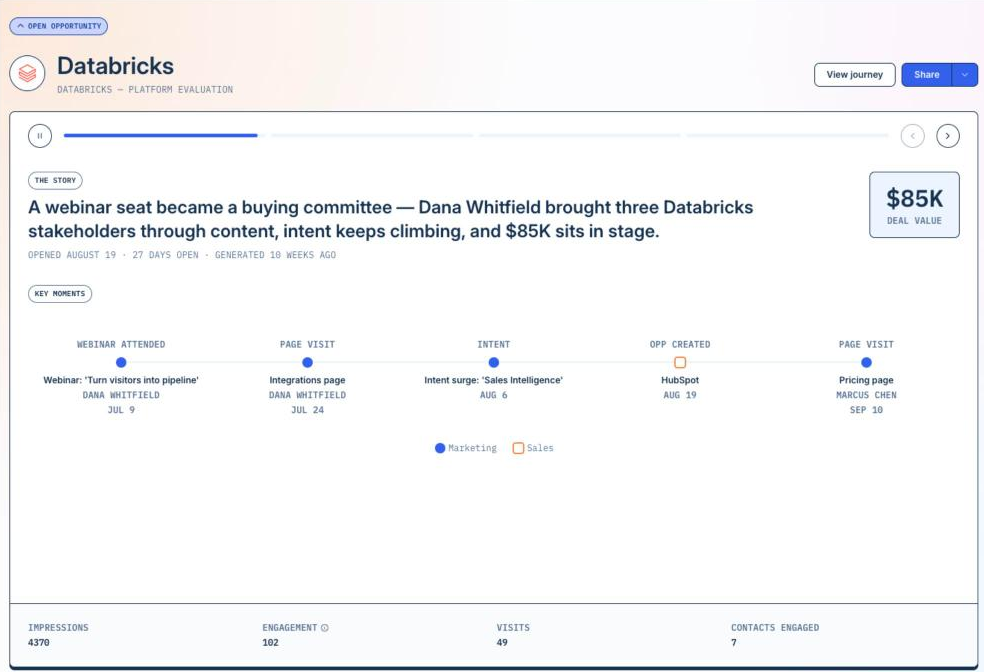
It is not attribution in its usual sense, though. Vector's Stories documentation says plainly that Stories "do not claim that a particular marketing activity caused an opportunity," and they don't split credit across channels.
The same documentation sets conditions that decide which deals get a Story at all:
- At least two signal events in the last 90 days: A deal with a long, quiet stretch before the opportunity may not qualify.
- No closed-lost deals: Only open and closed-won opportunities are eligible, so you can't compare what marketing did on a won deal with a lost one.
- Tracked marketing activity is required: An opportunity with no marketing activity from Vector's signals gets no Story, so a deal that came through a referral or pure outbound may have nothing to show.
Questions to ask in your demo
- Can you show us Stories on a few opportunities in your demo account, including one with very little marketing activity?
- Across your current customers, roughly what share of opportunities qualify for a Story?
- Can the 90-day lookback be extended for longer sales cycles?
- How do your customers report marketing’s contribution across all deals, not one deal at a time?
Is Vector.co's LinkedIn Bid Agent worth paying for?
Vector’s Bid Agent adjusts your LinkedIn bids up to every 15 minutes and spreads your budget across the week instead of spending it day by day. If your LinkedIn clicks are expensive, the Bid Agent can stretch the same budget further.
Cheaper clicks don’t tell you who’s seeing your ads, though. In ABM, getting in front of your whole target list matters more than the price of each click.
Say you’re targeting 500 companies and 50 large ones take most of the impressions. The Bid Agent can lower what each of those impressions costs, but the other 450 accounts still barely see your ads.
Factors.ai’s Smart Reach handles the reach problem directly. The functionality caps impressions or clicks per account over a set period and moves the budget your top accounts would have absorbed to the rest of your list. Two Factors.ai customers show what that looks like in practice.
- Descope moved about 140,000 impressions a month to other accounts. The share going to its top 100 accounts fell from 38% to 24%, and its LinkedIn Ads ROI rose 25%.
- Sprinklr reallocated 1.5 million impressions toward priority accounts and saved about $205K in ad budget. LinkedIn now influences 15% of its enterprise pipeline.
Pricing works out in Factors.ai’s favor too. For $36,000, Vector’s Growth plan gives you one bid agent. For the same $36,000 on Factors.ai, you get a breadth of features for your LinkedIn program:
- Impression capping
- LinkedIn bid scheduling
- Conversion feedback to LinkedIn through the Conversions API
- Automatic audience sync to LinkedIn and Google
Factors.ai also shows which impressions turned into pipeline, so you can see whether spreading reach paid off.
Questions to ask in your demo:
- Can you walk us through the Bid Agent’s change log on a campaign in your demo account, including what it changed and why?
- What does the Bid Agent optimize for, cost per click, reach across our target accounts or something else?
- Can we cap impressions per account inside Vector, or does the Bid Agent only adjust bids?
- How are bid agents counted, per LinkedIn ad account, per campaign group or per campaign?
Vector.co vs. Factors.ai pricing: Which ABM platform offers better value for money?
Factors.ai usually costs less than Vector, and the difference shows up once your ad spend crosses $25,000 a month.
Vector prices on your monthly site visitors or your total ad spend, whichever is higher. A bigger ad budget can push you into a more expensive Vector plan even if your traffic stays the same.
Factors.ai prices on the visitors it tracks and the features you need, and your ad spend doesn’t change your plan.
Here’s how that plays out in four common situations.
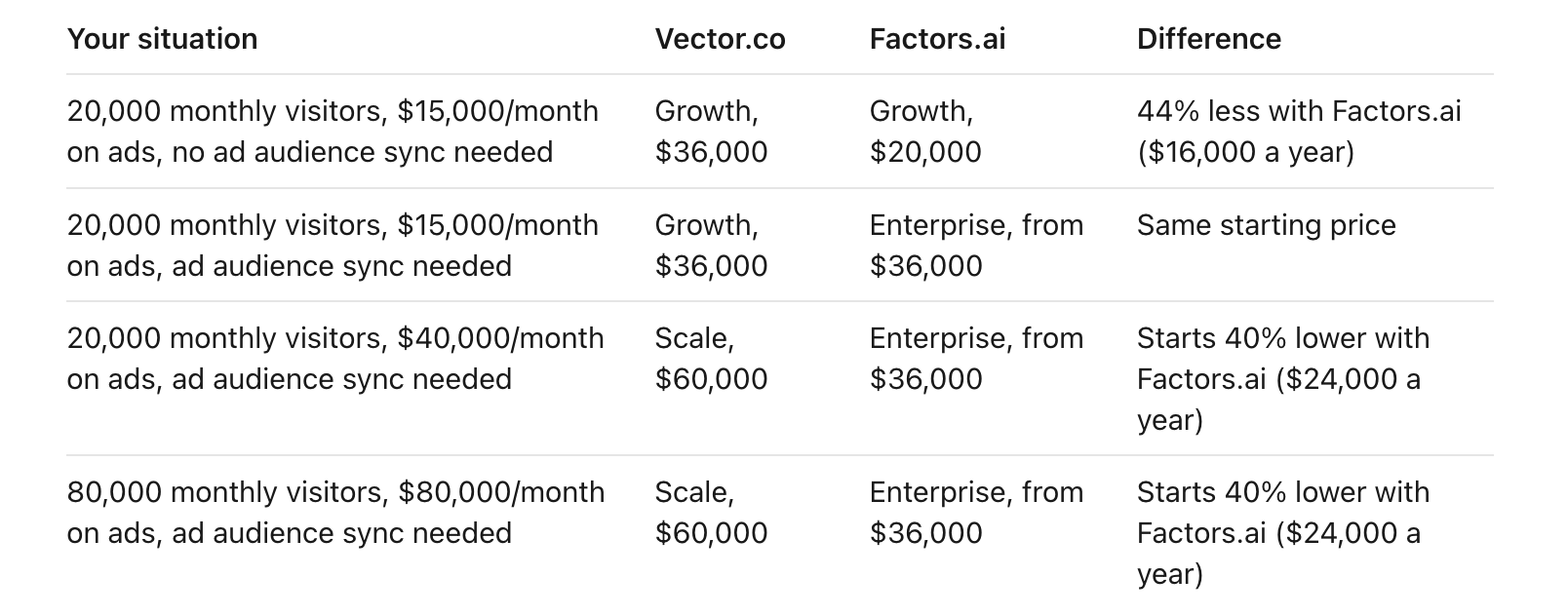
The two platforms overlap in account intelligence, visitor identification and ad audiences. Vector does include some things Factors.ai charges extra for or limits by plan:
- Seats: Vector gives every plan unlimited seats, while Factors.ai ranges from 3 seats on Lite to 25 on Enterprise.
- Person-level visitor identification: It's built into Vector for US traffic. Factors.ai offers it through an RB2B add-on.
- Bid agents: Every Vector plan includes at least one.
Final verdict: Is Vector.co worth the price?
Vector.co is worth the price if your main goal is identifying US buyers on your website and moving them into contact-level ad audiences and sales follow-up. Vector’s CRM-to-ad audience syncing is its strongest feature, and unlimited seats help if a large sales team needs access.
Before you sign, confirm which plan your ad spend puts you on. Ad spend alone can move you from $36,000 to $60,000 a year.
For narrower needs, the entry price is harder to justify. If you only need visitor identification, a dedicated identification tool costs a fraction of Vector’s price. If your priority is LinkedIn ad performance or proving marketing’s impact across all your deals, a platform built around impression control and multi-touch attribution, like Factors.ai, may fit better.
Whichever platform you pick, run a short proof of concept on your own accounts first, with pass/fail criteria agreed up front.

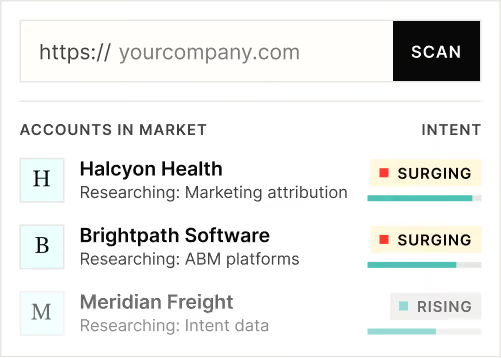
Powered by Bombora
Enter your domain and we'll send you a free list of companies showing buying intent in your vertical.
Powered by Bombora
Enter your domain and we'll send you a free list of companies showing buying intent in your vertical.

See how Factors can 2x your ROI
Boost your LinkedIn ROI in no time using data-driven insights





See Factors in action.
Schedule a personalized demo or sign up to get started for free
LinkedIn Marketing Partner
GDPR & SOC2 Type II