.svg)

%20(1).avif)
Growth Marketing vs Demand Generation: A Comprehensive Analysis
As marketers, we face a barrage of new terminology, and it can be confusing to truly understand the nuances of each concept.
Two such terms popping up are “Demand Generation” and “Growth Marketing.”. But how would you differentiate between the two?
Here’s a detailed comparison of growth marketing vs demand generation and how you can implement it for your GTM motion ⬇️
TL;DR,
- Growth marketing focuses on long-term, sustainable growth by optimizing the customer lifecycle, prioritizing customer retention, and using data-driven strategies.
- Demand generation aims at immediate demand creation through targeted tactics that drive short-term lead generation and conversions.
- Growth marketing emphasizes long-term relationships, while demand generation focuses on quick results.
- Understanding both strategies is essential for developing effective marketing plans that align with evolving consumer behaviors and business goals.
Definition of Growth Marketing
Growth marketing is a strategic approach focused on achieving long-term sustainable growth for a business. It emphasizes the entire customer lifecycle, from awareness and acquisition to activation, retention, and referral. Unlike traditional marketing, growth marketing prioritizes data-driven strategies and continuous experimentation to optimize results and drive business growth.
Definition of Demand Generation
Demand generation, conversely, is centered around creating immediate demand for products or services. It primarily focuses on short-term lead generation and sales, utilizing targeted marketing tactics to generate interest and drive conversions. Demand generation strategies often involve creating compelling and targeted content to engage potential customers and prompt them to take action.
Importance of Understanding These Concepts in Modern Marketing
Businesses must adapt to changing consumer behaviors and market trends. Understanding growth marketing and demand generation is essential for developing effective marketing strategies that align with business goals and drive tangible results. By comprehending these concepts, businesses can tailor their marketing efforts to meet the evolving needs of their target audience and achieve sustainable growth.
3 Core Concepts of Growth Marketing
Focus on Long-term Sustainable Growth
Growth marketing prioritizes long-term sustainable growth over short-term gains. It involves building a comprehensive customer journey that focuses on nurturing and retaining customers, ultimately maximizing their lifetime value to the business.

Data-driven Strategies
Data is central to growth marketing, guiding decision-making processes and enabling continuous optimization. By leveraging analytics and customer insights, businesses can identify opportunities for growth and tailor their marketing strategies to engage their target audience effectively.
Emphasis on Customer Retention and Lifetime Value
In growth marketing, customer retention and lifetime value are paramount. The focus extends beyond acquiring new customers to nurturing existing ones, fostering long-term relationships, and maximizing the value derived from each customer over time.
3 Core Concepts of Demand Generation
Focus on Short-term Lead Generation and Sales
Demand generation strategies are geared towards generating immediate interest and driving short-term lead generation and sales. The primary objective is to create immediate demand for products or services and prompt potential customers to make a purchase decision.

Targeted Marketing Tactics
Demand generation relies on targeted marketing tactics to reach potential customers at the right time with the right message. This may involve personalized content marketing, social media advertising, and other targeted approaches to capture the attention of the target audience.
Emphasis on Creating Immediate Demand for Products or Services
Unlike growth marketing, demand generation strongly emphasizes creating immediate demand for products or services, driving conversions, and capitalizing on short-term opportunities to generate revenue.
3 Practical Applications of Growth Marketing
Building a Comprehensive Customer Journey
Growth marketing involves mapping a comprehensive customer journey encompassing every stage of the customer lifecycle. By understanding customers' needs and behaviors at each touchpoint, businesses can effectively tailor their marketing efforts to guide prospects through the sales funnel.
Implementing Personalized Marketing Strategies
Personalization is key in growth marketing. It allows businesses to deliver tailored experiences that resonate with individual customers. By leveraging customer data and behavioral insights, businesses can create personalized marketing campaigns that drive engagement and foster long-term loyalty.
Leveraging Analytics and Data for Continuous Improvement
Analytics and data serve as the backbone of growth marketing, enabling businesses to measure their marketing efforts' performance and identify areas for improvement. Businesses can optimize their marketing initiatives by continuously analyzing data and iterating on strategies to achieve sustainable growth.
3 Practical Applications of Demand Generation
Creating Compelling and Targeted Content
Demand generation relies on creating compelling, targeted content that resonates with the target audience. Whether through blog posts, videos, or social media content, businesses must craft messaging that captures attention and prompts action.
Utilizing Various Marketing Channels for Lead Generation
To effectively generate demand, businesses must leverage various marketing channels, including social media, email marketing, search engine optimization, and paid advertising. By diversifying their approach, companies can reach a wider audience and drive interest in their products or services.
Implementing Effective Sales Strategies to Convert Leads into Customers
Demand generation strategies extend beyond lead generation to encompass the conversion of leads into customers. This involves implementing effective sales strategies, nurturing leads through the sales process, and ultimately driving conversions to capitalize on the demand generated.
3 Key Differences Between Growth Marketing and Demand Generation
Timeframe for Results
One key difference between growth marketing and demand generation is the timeframe for results. While demand generation focuses on immediate results and short-term gains, growth marketing prioritizes sustainable growth over time.
Focus on Customer Relationship
Growth marketing strongly emphasizes building and nurturing long-term customer relationships, focusing on customer retention and lifetime value. In contrast, demand generation is more transactional, aiming to create immediate demand and drive quick conversions.
Metrics for Measuring Success
The metrics used to measure success also differ between growth marketing and demand generation. Growth marketing focuses on customer retention, lifetime value, and overall business growth metrics. At the same time, demand generation metrics are as follows:

Wrapping up
Understanding the nuances of growth marketing and demand generation is essential for navigating the complex landscape of modern marketing. By grasping these strategies' core concepts and practical applications, businesses can develop targeted marketing initiatives that align with their goals and drive tangible results. As the marketing landscape continues to evolve, the integration of growth marketing and demand generation will play a crucial role in shaping the future of marketing, enabling businesses to adapt to changing consumer behaviors and achieve sustained growth in an increasingly competitive environment.

How to use LinkedIn ads for Product-led Growth
Product-led growth (PLG) is all about letting your product do the talking. People no longer want to sit through multiple sales calls and lengthy onboarding processes —they prefer to quickly experience the product value and speed up their decision-making.
Of course, the best way to convey product value is to educate your prospects via the channels where they are most active, aka LinkedIn. Given that 4 out of 5 users on the platform are decision-makers, using LinkedIn ads is the ideal way to educate your target accounts about how your tool best solves their pain points.
Let’s dive into how you can leverage the power of LinkedIn ads in a PLG motion ⬇️
Leverage account engagement data the right way
Account engagement data is a treasure trove that offers crucial context on how your prospects make buying decisions. You can use it to tailor your ads based on how far they’re along the PLG funnel.
Unfortunately, companies struggle with effectively consolidating and leveraging this data for their ad campaigns. If you want to run personalized account-level campaigns on LinkedIn, you must invest in a tool that translates complex data into actionable insights to help refine your ad strategy.
Here are a few ways you can use Factors to interpret your account data, optimize your LinkedIn ads, and move prospects across the PLG funnel:
Show ads based on product engagement
Any time a user signs up, boom – they instantly get an email prompting them to schedule a demo. While there’s nothing wrong with this approach, it’s unlikely that every user who signs up is ready to talk to sales.
We suggest using LinkedIn ads to strategically target the buying committee and show them how your features effectively solve their problems. It is a subtle approach that showcases your product's USP without seeming pushy for a sales call.
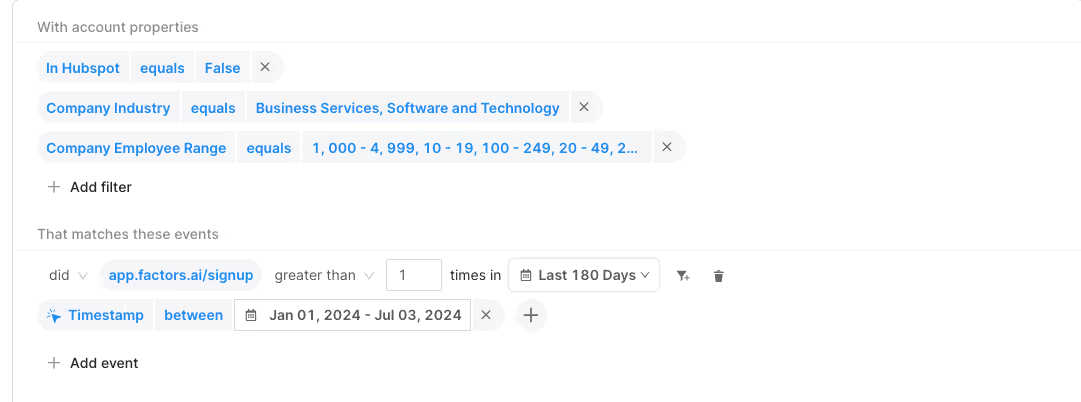
You can use our Audience Builder feature to target the right accounts with your preferred criteria. For example, if you want to target all accounts who signed up for a free trial but haven’t booked a demo, you can create a segment on our platform and import it to LinkedIn Campaign Manager
Now that you’ve begun showing ads to potential customers, it’s time to focus on “how” you show these ads.
It’s important to remember that not everyone who signs up for your product is a guaranteed customer. You shouldn’t bombard users with the same ad repeatedly, as this can cause a negative attitude toward your brand. Buuut, you still want to ensure your product is top of mind while they’re evaluating other solutions.
A tricky balance, isn’t it? 👀
Luckily, with Smart Reach, you can implement a cap for how many times you want to show your ads to specific accounts. Here’s an example of how we use Smart Reach at Factors to control exposure to our ad campaigns:
- For every account that signs up for our product, we initially set a cap of 500 impressions monthly.
- If they log in more than twice, it indicates they found value in our product but still need to truly understand the features. In this case, we bump it up to 750 impressions per month.
- When they hit certain product milestones, such as creating a dashboard or setting up alerts – it implies they’re aware of our features but still need a final nudge to move to the paid plan. At this stage, we double the frequency cap to 1500 impressions.
- Once they click the “upgrade” button, we set the cap to 3000 impressions.
As we’re increasing the frequency cap for all these accounts, we’re ensuring that ads are only shown to relevant accounts without causing ad fatigue.
If you want to know whether your target accounts are truly resonating with your ads, you can use True ROI. With view-through attribution, you get the complete picture of how LinkedIn plays a role in turning your free-trial users into paying customers.
Here’s a report that shows how many people signed up for a demo:
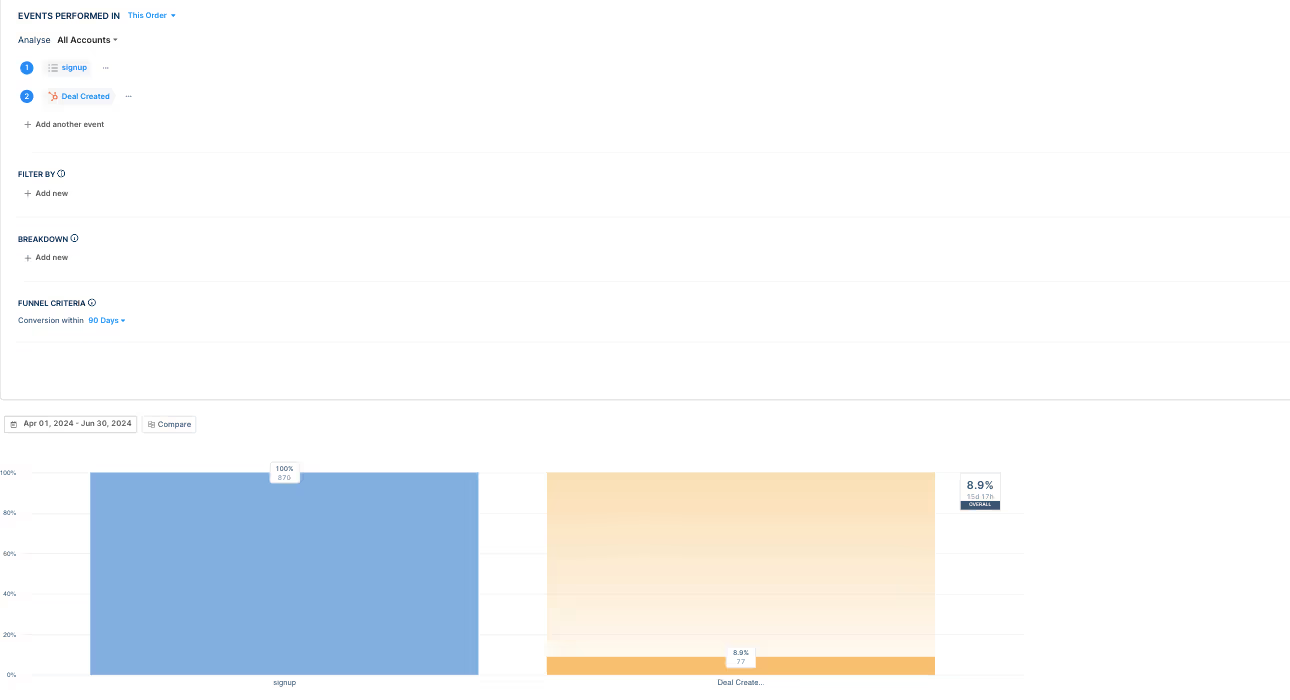
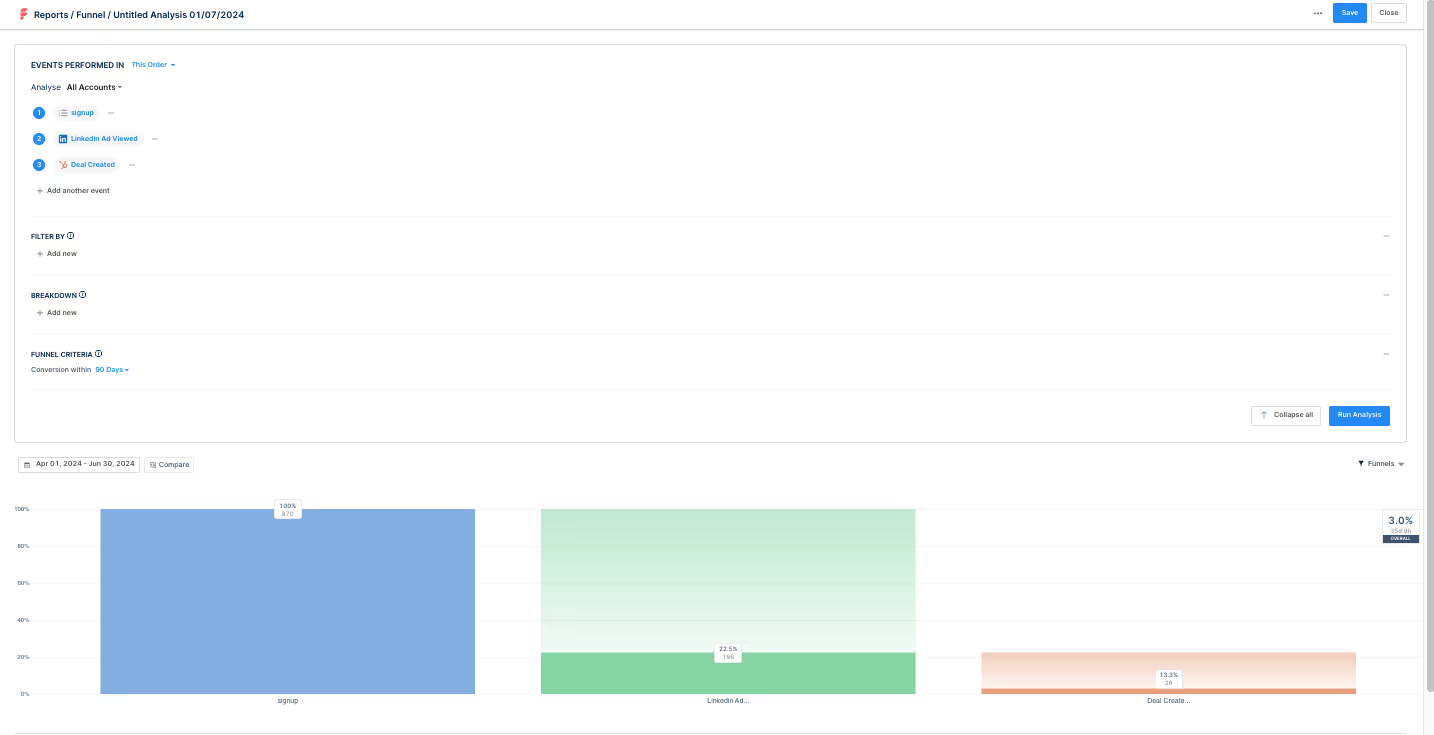
Once you add the event “LinkedIn ad viewed,” you can see how many users signed up after viewing your ads. This gives greater clarity on how your ad campaigns drive signups and revenue.
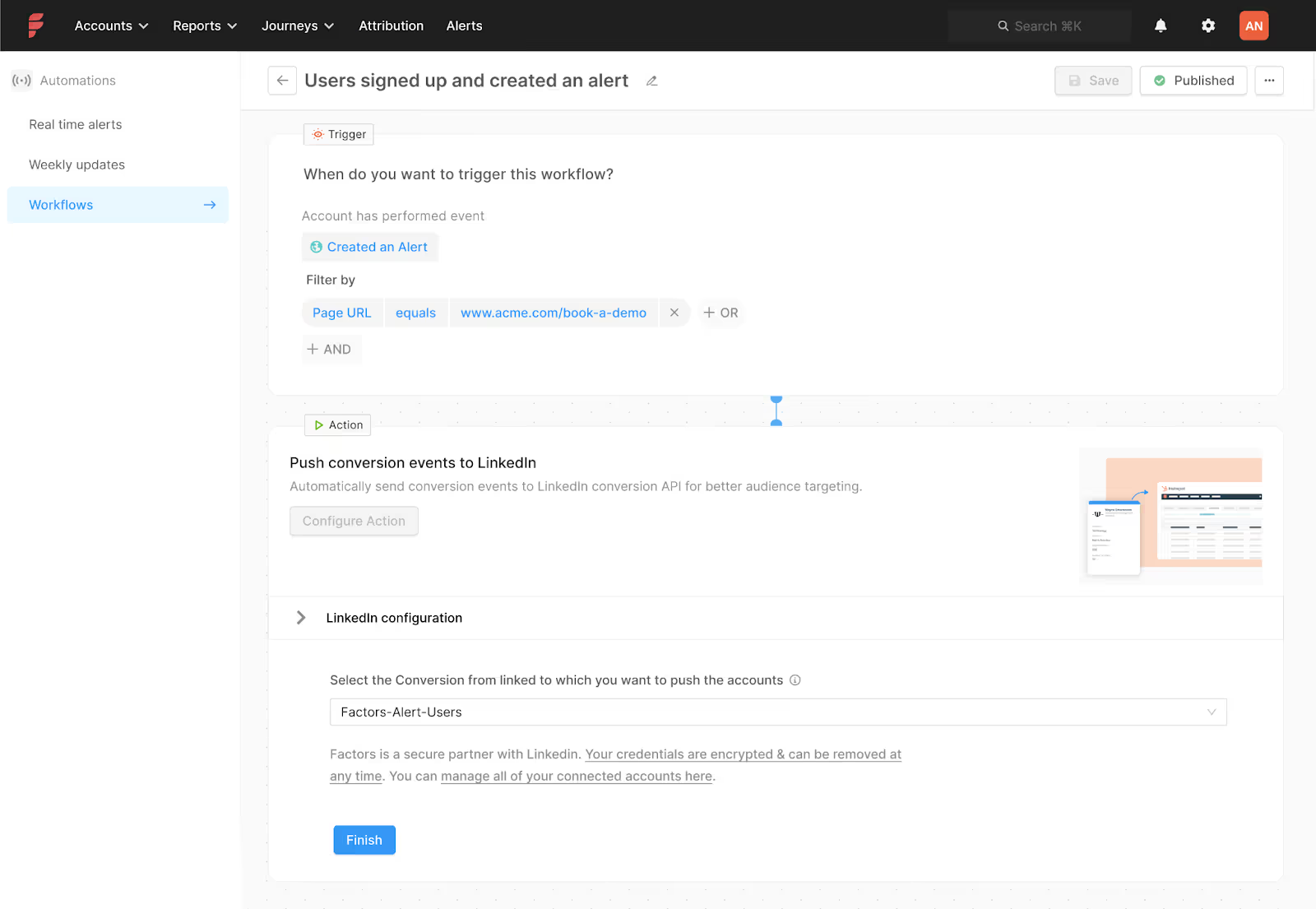
Plus, you can also leverage our CAPI integration to send your conversion data from your website and CRM to LinkedIn to better scale and optimize your ad campaigns. CAPI ensures that you show your ads only to accounts that fall under your ICP, thereby helping you massively save ad spend. Here’s how you can set up CAPI to target your ads to users who set up an alert:
Wrapping up
Showcasing the product front and center is the core of PLG. When you use LinkedIn ads the right way, you can drive consideration for signed up users and turn them into advocates in no time. Speak to our team today to find out how you can use AdPilot to boost your PLG motion.

How to Use LinkedIn Ads for Customer Marketing
It’s no secret every company massively focuses on acquiring new customers. However, it’s equally important to focus on customer retention because acquiring new customers is five times more expensive than retaining existing ones.
But what’s the best way to drive customer retention and generate upselling opportunities? While most marketers would vouch for emails, we believe it’s LinkedIn ads 👀
Scroll ahead to learn how LinkedIn could be a valuable asset for your customer marketing initiatives ⬇️
Why use LinkedIn for customer marketing?
We know using LinkedIn ads might seem unusual, especially when it’s easier and more feasible just to send emails to your existing customer base. But we’ve identified a few shortcomings with this approach:
- For starters, your emails would only reach 1-2 contacts in an account instead of the entire buying committee. If you want to encourage your customer to consider upgrading their plan, targeting the relevant folks via your ads would be easier.
- Even when you do send emails to your customers, there’s a high chance your emails will remain unopened and they’ll be unaware of the content within.
LinkedIn is a surefire way to reach your stakeholders without cluttering their inboxes and ensuring they’re aware of your latest features. Now, let’s look at how you can use ads to reach them.
Measure product usage data
Every customer uses your product differently. While some see your tool as a holy grail in their tech stack, others might not be as dependent on it. You need to analyze product usage to understand how frequently customers use your product in their daily activities. You can also leverage NPS surveys to gauge their satisfaction with your tool.
We recommend running LinkedIn ads based on their probability of churn and the number of days to contract expiry. For example, if you notice low product usage for a specific set of accounts, you can increase the frequency at which you show them ads.
You can also prioritize showing ads to customers based on how they rate your tool on your NPS surveys. If customers rate your tool as 7 or below on NPS surveys, you can target these accounts with ads that showcase your product’s differentiators.
Phew, that sounds like a lot of conditions for running ads. Imagine manually creating multiple audience lists for each campaign goal and tracking their ROI. Seems exhausting 🥱
What if we told you that we have a solution that makes running and optimizing LinkedIn ads a breeze?
Presenting: AdPilot by Factors, your one-stop solution to supercharging LinkedIn ads ROI.
Here’s how you can use AdPilot to increase upselling opportunities:
Audience Builder can help you target the right customers with your preferred criteria. For example, if you want to target all accounts that have logged in less than five times you can create a segment on Factors and import it to Campaign Manager.

But remember, not all customers are equal – you’d naturally want to show more ads based on churn propensity. *sigh* If only you could control how your ads are shown, right?
Well, with Smart Reach you can!
Marketers can use Smart Reach, to control ad exposure across their target account list. You can show your ads based on the number of days till contract renewal and churn score, which is calculated by analyzing NPS scores and product usage. Here’s a visual explanation of the same:

Let’s dive deep into how we use Smart Reach at Factors to control exposure to our ad campaigns:
- Currently, all our customers are capped at 500 impressions per month
- For customers where renewal is less than 3 months but churn probability is low - we increase to 1000 impressions to keep them aware of our new product upgrades
- Regarding customers where renewal is less than 3 months and churn probability is medium, we raise the cap to 1500 impressions to further drive home the point about how our product is the ideal solution for all their pain points
- For customers whose renewal is less than 3 months and whose churn probability is high, we increase the cap to 3000 impressions and run ads based on our customers' success stories to boost credibility.
We follow a similar pattern when showing ads based on the number of days till contract expiry, wherein we increase the number of impressions for accounts as they get closer to their contract end date.
As we adjust the frequency cap for all these accounts, we ensure that ads are only shown to relevant customers without causing ad fatigue.
If you want to measure how customers take action after viewing your ads, you can use True ROI. With view-through attribution, you can clearly see how seeing an ad impacts their decision to use the product.
Here’s a report that shows how many people decided to log in after viewing an ad:


With our CAPI integration, you can optimize your ad efforts by only showing your ads to customers at churn risk or reaching contract expiry. Here’s how you can set up CAPI to target your ads to customers who have not logged in for more than a month:

When running ads for customers, we recommend showcasing your best testimonials and case studies case studies to boost credibility for your product. Here’s an example of how Gong uses customer reviews in their ads:

Wrapping up
Customer marketing should be a critical part of your marketing strategy, but many marketers neglect it or send a couple of emails occasionally. Leveraging LinkedIn ads is a great way to keep your customers aware about how they can make the most of your product. Speak to our team today to learn how AdPilot can 2x your LinkedIn ROI.

How to use LinkedIn ads to Support SDR Outbound
B2B sales is a long and arduous process. Leading prospects from “Qualified Lead” to “Closed won” is a trying ordeal for even the best SDRs. So, what’s the best way to fast-track these deals?
Two words: LinkedIn ads.
Instead of having your sales reps constantly follow up with “just checking in” emails, you can leverage the power of your ad campaigns to drive consideration for your product as they’re talking to your sales team.
Let’s dive into how you can use LinkedIn ads to support your outbound efforts ⬇️
Streamline your ABM with account engagement data
As you know, ABM typically involves marketing and sales aligning on a target list of accounts and then reaching out to them parallelly via sales outbound and marketing campaigns. However, the way marketers implement this process leaves much to be desired.
For example, if someone replies to your sales email, they’d naturally have higher buyer intent than someone who simply leaves your emails unopened. Would it make sense to show ads to prospects that aren’t interested in your solution? Moreover, you have no control over how your ads are shown to accounts in this list. For instance, you’d naturally want to show more ads to accounts in the SQL stage rather than ones already in negotiations.
Rather than spreading your LinkedIn impressions uniformly across all accounts in the target account list, it is wiser to focus most of your ad spend on accounts showing more intent. You can use account engagement data to tailor your ads based on how far they’re along the sales funnel. To achieve this, you must invest in a tool that consolidates all your CRM data and turns it into actionable insights for your ad strategy.
Here’s how you can use Factors AdPilot to interpret your account data, optimize your LinkedIn ads, and move prospects across the funnel:
Show ads based on sales engagement
While your prospects engage with your sales rep, you can target the buying committee by adding them to a sequential ad campaign and showing how your features effectively solve their problems.
You can use Audience Builder to target the right accounts per your campaign objectives. For example, if you want to target all accounts that have completed a demo call, you can create a segment on our platform and import it to LinkedIn Campaign Manager.
However, you should also limit the number of times you show them ads to avoid ad fatigue. Unfortunately, LinkedIn doesn’t yet have a feature that allows you to control the ad frequency at an account level. Lucky for you, Smart Reach can make it happen!
Smart Reach allows you to cap the number of impressions shown to specific accounts. Find out how we use Smart Reach at Factors to control ad exposure:
- Every account in the target account list (agreed on by marketing and sales) gets 500 impressions per month.
- If the account replies to an email or starts showing website activity, we bump up the impressions for them to 1500
- If a deal is booked we increase the impression cap to 2500 and by 1000 for every stage in the deal funnel.
This approach results in better sales and marketing alignment and allows you to target your account list better.
If you want to know whether your ads are truly working, it’s True ROI to the rescue. Thanks to view-through attribution, you get a complete overview of how prospects interact with your ads and make buying decisions.
Here’s a report that shows how many prospects view your ads and visit your website after a demo call:

You can also use our CAPI integration to send your conversion data from your website and CRM to LinkedIn. For example, you can send data of users who respond to sales emails to optimize your campaigns better:
Wrapping up
Outbound Sales can be daunting, but simultaneously running LinkedIn ads makes it easier. When you target your ads to prospects according to how they’re engaged with sales, you can speed up your sales process without seeming pushy. Speak to our team today to learn how AdPilot can help you supercharge your ad campaigns and close deals in no time.
.png)
Set Up Sales Automation Workflows Using Factors
If you still spend time randomly sending emails to prospects in your account list with a generic pitch slap, you’re selling wrong. An effective sales strategy is all about driving consideration for high-intent prospects at the right time with the right pitch, whether they’ve just signed up, completed a demo, or are suddenly showing interest in your product again.
However, the major hurdle is the tedious process of manually finding contact data, syncing CRMs, and personalizing emails for every prospect on the list.
Enter: Automation.
A sales automation workflow helps busy sales teams turn prospects into pipeline by streamlining business processes and ensuring that you reach out to prospects promptly.
In this article, we explain the different types of automation workflows we can create for your sales teams ⬇️
Creating sales automation workflows using Factors: Case Study
At Factors, we create custom workflows for customers to simplify data transfer so that their sales teams can effectively act on the data. For this, we make these signals available in the format that the salesperson needs in the tool of their choice. Here’s an example of a workflow we set up for a CreativeOps company
This workflow demonstrates the process of transferring Factors data to create a contact in HubSpot, which is then pushed to Apollo to be added to their email sequences.
The Problem
Our customer wanted to ensure their salespeople could promptly act on these signals to build pipeline. Since they used HubSpot and Apollo, they requested a custom workflow that could sync new leads from the accounts that Factors identified on their website and organize this data in a specific way such that all accounts received personalized emails based on the deal stage. For example, if 50 companies visit the customer’s website, they want to automate the process of identifying their leads from each account and adding them to their outreach sequences. To accomplish this, we built a custom workflow with 4 different criteria to streamline their outbound efforts.
The Solution
We used webhooks and make.com to create multiple workflows for the following scenarios:
- The account identified is a new company
- The account is an existing company in the CRM that was identified as “closed lost.”
- Existing company in the CRM but with no deal associated
- The contact doesn’t exist in the CRM

💡Learn more about using Webhooks with Make.com
Here’s a detailed explanation of how each of the above workflows operates:
- The account identified is a new company
The first branch involves identifying the new account and creating a new company on HubSpot. While Factors cannot identify user-level data due to privacy concerns, we can potentially identify the leads associated with the account via job titles.
The brand has included 25 job titles under its ICP, so now, our customer can automatically identify relevant contact data via Apollo, add the email IDs to their CRM, and send out outreach emails based on their website activity (e.g., visited paid landing page, pricing page, etc.).
💡Factors allows you to send personalized outreach emails to your prospects based on how they engage with your brand.
- The account is an existing company in the CRM
We set up this workflow branch to identify leads who visited the website after getting marked as “closed lost” on Hubspot. Here’s how you can set up the filter on Make.com:

The customer wanted to re-engage with closed, lost accounts older than 90 days. In this case, we again re-route to Apollo to identify and add potentially new leads associated with the account to an email sequence. The workflow also automatically adds the existing contacts from Hubspot to the sequence.

- Existing company in the CRM but with no deal associated
This part of the workflow follows a similar process to the one mentioned above, with the only difference being that we automate contact creation on HubSpot as an additional step.

- No contact exists in their CRM
We set up a filter to identify accounts that visit the company’s website but aren’t associated with any contacts in HubSpot.

In this case, we automate identifying leads via Apollo and update contacts on HubSpot before pushing them to an email sequence.
The Result
Our workflows simplified their outbound process. Instead of manually identifying accounts by deal stage and writing out emails, they could effortlessly send personalized email sequences automatically via Apollo while simultaneously identifying and updating new leads within their CRM.
Build stellar workflow automations with Factors
Every company's sales team operates differently and has multiple tools in its tech stack. Instead of having your account data in messy and disparate systems, it’s critical to have a custom workflow that saves you the time and effort spent on sales outreach.
Factors’ sales automation workflows are a boon for busy sales teams who want to skip tedious tasks and focus on generating revenue for the company. We create customized workflows that integrate with the right tools and use your data to its maximum potential. Speak to our team today to understand how you can automate your business processes with Factors.
{{CTA_BANNER}}

Understanding Google’s New Guidelines for Bulk Email Senders
Are you tired of unsolicited, spammy emails in your inbox? Well, all that will (to an extent) end in February 2024 as Google implements new guidelines for bulk email senders to make your inbox safer and spam-free.
Google will require bulk email senders (people who send over 5,000 emails per day to Gmail inboxes) to follow certain best practices requiring strong authentication, easy unsubscription, and lower spam rates.
“It’s clear that email has become an essential part of daily communication. And whether you’re submitting a job application or staying in touch with a loved one, your emails should be safe and secure.” – Neil Kumaran Group Product Manager, Gmail Security & Trust
Let’s dive into understanding these best practices and what these new policies mean for your cold outreach strategy in 2024.
Summary of Bulk Email Sender Guidelines
Here is a quick gist of Google’s email sender guidelines and the best practices they recommend for bulk email senders:
1. Requirements for Authentication
Ensure email authentication for each of your sending domains at your domain provider by settling up the following:
- SPF (Sender Policy Framework): This basic authentication method verifies if an email was sent from an authorized server. Bulk senders need to configure their domain to use SPF.
- DKIM (Domain Keys Identified Mail): This adds a digital signature to each email, allowing Gmail to verify the email's authenticity and integrity.
- DMARC (Domain-based Message Authentication, Reporting & Conformance): This builds on SPF and DKIM by providing reporting and enforcement mechanisms. Bulk senders must publish a DMARC policy that states what Gmail should do with emails that fail authentication.
- ARC(Authenticated Received Chain): it shows the previous authentication status of forwarded messages and previously failed authentication. Senders must use ARC authentication if they forward emails regularly.
Google recommends always using the same domain for email authentication and hosting your public website. Senders must have valid forward and reverse DNS records for these sending domains and IP addresses.

2. Requirements for Easy Unsubscription
If you send over 5,000 marketing and sales emails daily, your marketing and subscribed messages must support one-click unsubscribe.
- Unsubscribe links: Every email must contain a clear and readily available unsubscribe link. This link should be placed in a prominent location, such as the footer of the email.
- Preference centers: Bulk senders can offer preference centers where users can manage their subscription preferences and easily unsubscribe from specific email lists.
- Confirmation process: Unsubscribe requests should be confirmed promptly, and users should not receive further emails after opting out.

Google suggests that you only send emails to people who want to get your messages, so they’re less likely to report messages from your domain as spam.
3. Spam Rate Monitoring
You can track your spam rate using Postmaster tools. Ensure it stays below 0.10%, and avoid reaching a spam rate of 0.30% or higher.
Here are a few tips to avoid having your emails land in your receiver’s spam:
- Don't mix different types of content in the same message.
- Don't impersonate other domains or senders without permission.
- Don't purchase email addresses from other companies.
- Some countries and regions restrict automatic opt-in. Before you opt-in users automatically, check the laws in your region.

Bulk senders who fail to comply with the guidelines may face various consequences, including reduced deliverability rates, warnings, suspension of email-sending privileges, or even legal action.
How Does This Affect Your Cold Email Strategy?
Even if your sales/marketing team has these parameters in place, Google's refreshed bulk email sender guidelines signal that mass mailing prospects may slowly be on the decline. While this may sound like not-so-good news for your outbound marketing efforts, here's why this may actually be a blessing in disguise.
Email marketing, if implemented correctly, can continue to be one of the best B2B sales channels in your GTM strategy. The key, however, will be to adopt a systematic, intent-based approach as opposed to spray-and-pray tactics.
Let’s say you’re selling software that streamlines candidate assessment, and your buyer personas are hiring managers and CHROs.
If your sales team sends out emails to thousands of CHROs at random — without any insight into whether or not they’re in-market for your product, you’re bound to receive replies, if any, such as: “Sorry, we’re not currently looking to buy” or worse still, “unsubscribe 😠.”
Not only does this high-volume approach result in little result from lots of effort, but cold outreach may also leave a bad taste in the mouth of prospects who may be looking to buy down the road.
What’s the alternative to this? Intent-based, account-level outreach, of course! 😎
On average, only 4% of website visitors convert via sign-ups, but what if you could identify, qualify, and target the remaining 96% of anonymous website traffic with outreach based on intent? What if you could carefully research engagement amongst high-intent buyers and send them personalized cold emails highlighting exactly how your tool can meet their requirements?
Our experience working with hundreds of B2B teams finds that this results in far more conversions with far fewer emails.

Factors is an IP-based account intelligence and activation platform that:
- Identifies anonymous accounts visiting your website, viewing your LinkedIn, or interacting with your G2 pages
- Qualifies high-intent ICP accounts based on firmographics and cross-channel engagement
- Enriches sales-ready accounts with Apollo-fuelled contact data before activating outreach by integrating with your marketing automation platform.
Here’s a little about how it works:
First, our account intelligence feature allows you to uncover anonymous traffic with IP-based intelligence & enrichment.

Next, you can qualify ICP buyers based on their firmographics and score accounts based on their engagement across the website, G2, and LinkedIn intent signals.
Finally, create a list of accounts ready to buy and send emails with a compelling pitch to win sales-ready accounts over in no time. Want to learn the basics of account scoring?
▶️Check out our guide: An Introduction To B2B Account Scoring

Wrapping Up
Google has taken a much-needed step to establish these bulk email sender guidelines. Whether you’re executing cold outreach or email marketing campaigns, you must monitor your bulk emails and ensure basic email hygiene to create a secure email ecosystem.
If you want to ditch the cookie-cutter bulk email strategy and want to restructure your cold outreach efforts by focusing on high-intent buyers, book a demo with us today!