Common Room Pros and Cons to Consider Before You Buy
What do Common Room reviews on G2 actually tell you? See the praise, specific complaints, and context behind the feedback before your team commits.

Associate Director of Brand and Content

Co-founder and CMO




Quick Summary of Common Room reviews:
- Common Room is strongest when your reps need context about people. Job changes, champion relationships, community activity, and product engagement can help explain whom to contact and why.
- Public feedback is positive overall. G2's main profile reports 4.5/5 from 146 reviews, checked November 3, 2026. Individual reviews still reveal important differences in setup, data coverage, and usability.
- Expect to configure the sales process around the signals. Reviews praise faster prospecting but also describe CRM mapping problems, learning effort, and signals that need further interpretation.
- Common Room Essential costs $30,000 a year. It is advertised as $2,500/month, billed annually. There is no published month-to-month plan. Research and prospecting have separate usage allowances, and some features cost extra.
- Choose according to the work you need done. Common Room merits evaluation for people-led prospecting. Factors.ai is a stronger fit for cross-channel advertising activation and marketing attribution; Apollo may suit contact discovery and email sequencing; Clay suits custom research and provider selection.
If you're reading Common Room reviews before signing a contract, you probably need to know whether your reps will get useful prospects and whether your team can make the platform work with the systems you already use.
Our assessment is that Common Room deserves a place on your shortlist for people-level prospecting and signal collection. The trade-offs become clearer when you examine CRM mapping, contact coverage, signal interpretation, and reporting. A platform can help you find engaged people while still leaving your team with work to qualify and contact them.
How does Common Room help your GTM team?
Common Room is a buyer-intelligence platform that helps your sales team find relevant people, understand their activity, and prioritize outreach. Its appeal is strongest when your buyers leave signals across several places, such as your website, product, LinkedIn, GitHub, and community channels.
For example, a former customer joins a target account, visits your website, and engages with your developer community. Common Room can bring those signals together for a more informed follow-up than an email based only on job title.
Common Room's LinkedIn Ads connection doesn't manage bids or campaigns. Its sales integrations also don't automatically replace your sequencing subscription.
What prospects told us about Common Room
We reviewed 72 sales and customer-call transcripts discussing opinions and reviews of Common Room. Buyers valued its people-level signals, but also considered how the platform would fit into their existing tools, budget, and sales process.
The conversations highlighted these themes:
- People-level signals: Job changes, champion tracking, and community activity helped reps find relevant people and reasons to reach out.
- Tool overlap: Teams wanted to establish which subscriptions Common Room could replace and which they would still need.
- Price and value: Buyers weighed the cost against the research, prospecting, and signal collection Common Room would handle.
- Sales workflows: Some teams regularly used signals for outreach; others struggled to make the information useful for their reps.
- Enrichment and CRM mapping: Some buyers reported problems enriching contacts or connecting records correctly with their CRM.
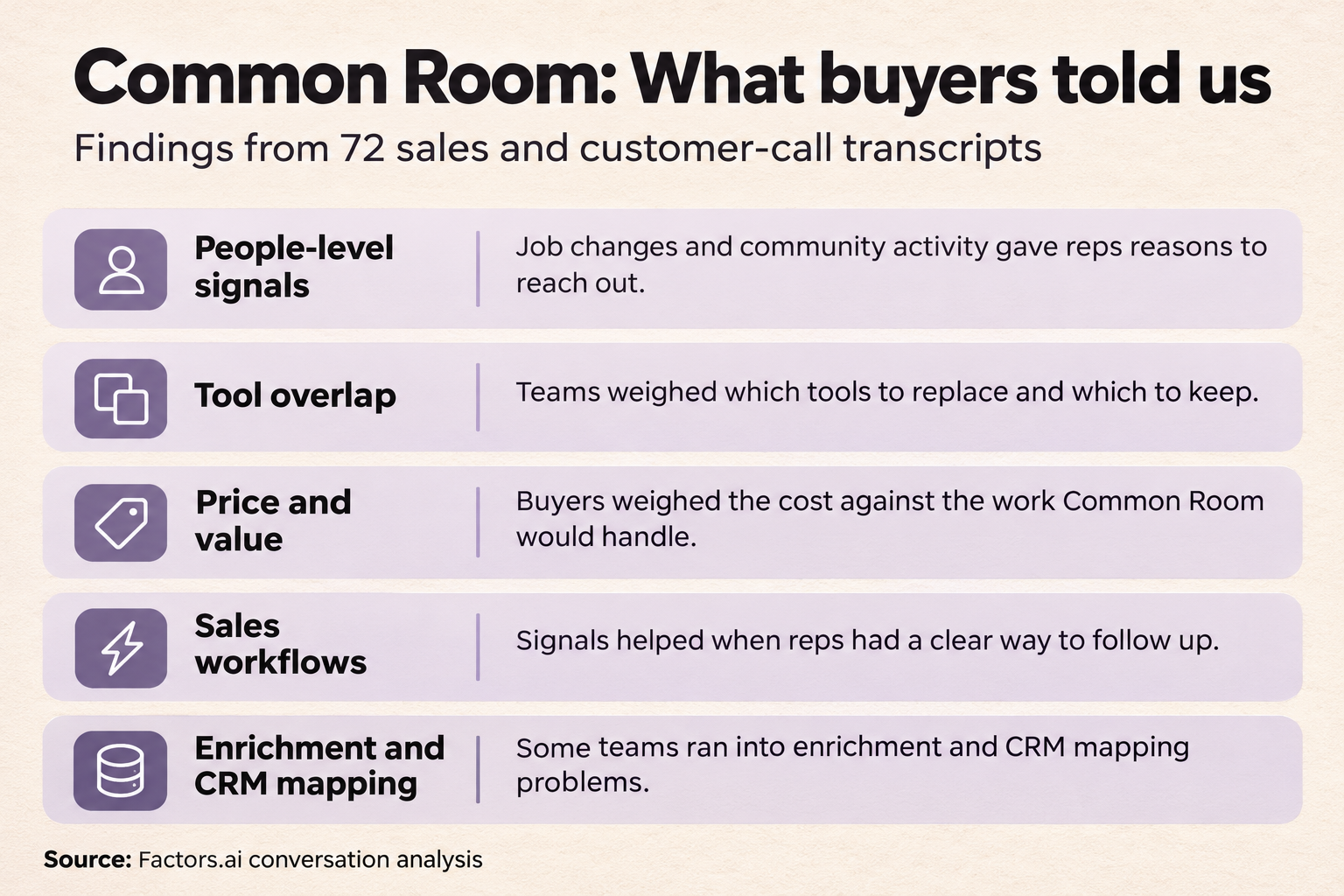
Common Room buyer insights from 72 call transcripts, covering people-level signals, tool overlap, pricing, sales workflows, and enrichment and CRM mapping challenges.
Common Room pros and cons at a glance
Common Room's main advantage is reducing the work of finding and interpreting buyer activity across different sources. Its limitations concern how reliably that information fits your records, your reps' daily work, and your reporting requirements.
What do buyers like about Common Room?
- Common Room brings people and community signals into one place
Common Room is worth evaluating if knowing which person to contact is as important as knowing which company is engaged. A former champion changing jobs or a developer discussing your product gives a rep context that a generic account list doesn't provide.
Matthew C.’s BDR team sells a developer-first product. In his review of Common Room on AWS, he valued having “a single view across OSS activity, Reddit, Slack, LinkedIn and more,” instead of checking those channels separately.
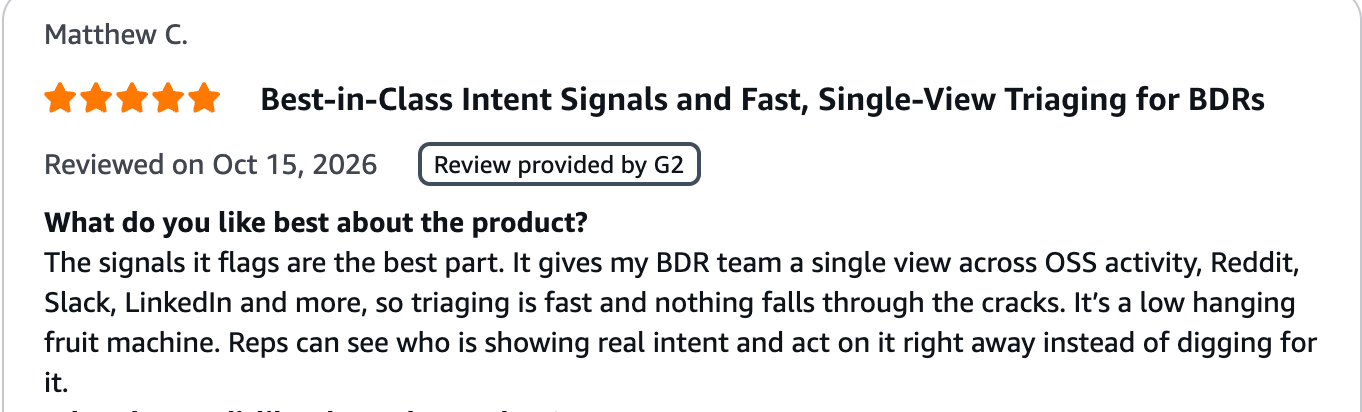
Customer review praises Common Room for showing BDRs activity across open-source projects, Reddit, Slack, and LinkedIn together.
A midmarket software user described a similar benefit in their G2 review. They praised the ability to get “a unified view of a person” and identify relevant accounts and contacts.
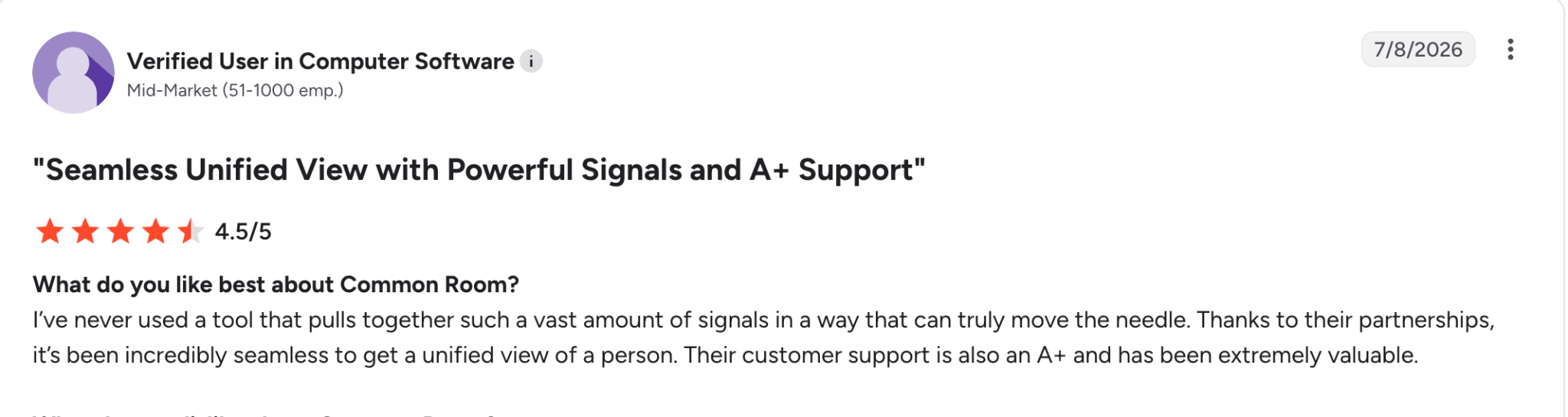
A verified G2 reviewer praises Common Room’s person-level signal coverage and customer support.
Our call evidence supports this strength: 10 companies used or valued built-in people, social, or community signals. One buyer described BDRs working from job-change alerts and said they were “always active on common room.”
For your team, these signals are particularly useful for:
- Reconnecting with former customers: When a champion joins a target account, your rep can reconnect around their previous experience with your product.
- Selling developer tools: Someone asking implementation questions in your community gives your rep a specific topic to discuss. Their company and role help determine whether the conversation belongs with sales or developer support.
- Common Room helps reps choose contacts within target accounts
Knowing which company is engaged doesn’t tell your SDR whom to contact. Common Room helps your reps find relevant people within that account and prioritize those with recorded engagement.
Its Vector integration helps identify individual US-based website visitors and combines those matches with Common Room’s Person360 profiles. It won’t identify every visitor. Separately, Prospector lets you search for contacts by title, role, and seniority, whether or not they’ve visited your website.
One customer described his daily use of Common Room on G2 saying he had been able to “cut my prospecting time in half.” He still used ZoomInfo alongside Common Room for some contact details.
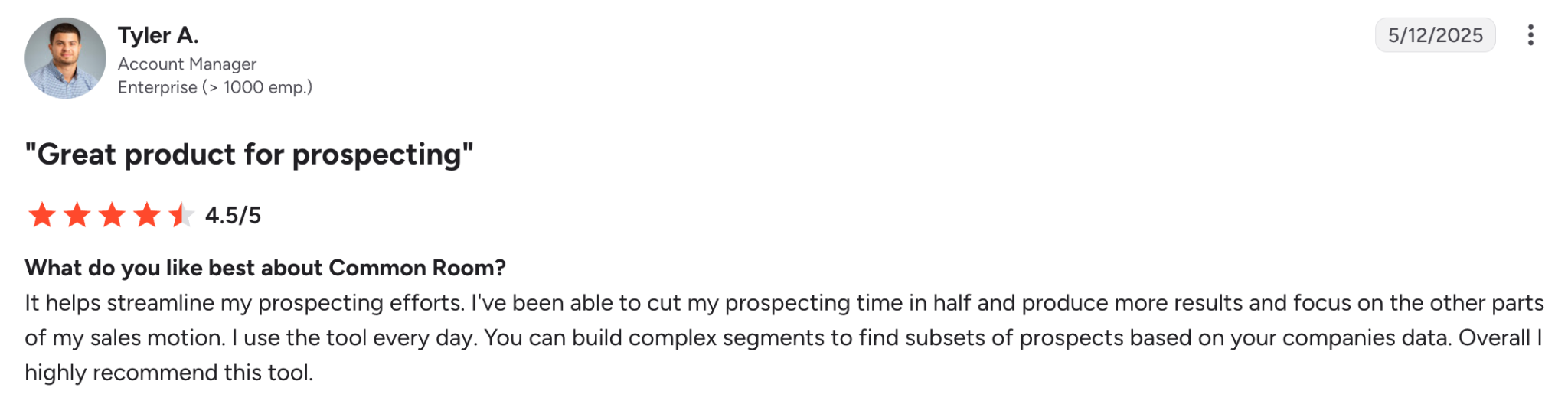
Tyler A.’s G2 review describes halving his prospecting time with Common Room and building targeted prospect segments.
Five companies in our call analysis also cited person-level identification or contact lists as an advantage.
Suppose your SDR has 100 target accounts. An identified visitor viewing your pricing page gives them someone to investigate first. Where visits remain anonymous, Prospector can help find relevant contacts, but those search results aren’t confirmed visitors.
- Common Room lets your team build targeted segments and scoring rules
Common Room can help RevOps define which contacts qualify for a sales play, rather than leave every rep to filter the database differently.
A job-change audience, for example, could include former customers at target accounts while excluding people who joined companies outside your target segment.
One user valued the ability to “create segments based on buying signals for targeted outreach.”
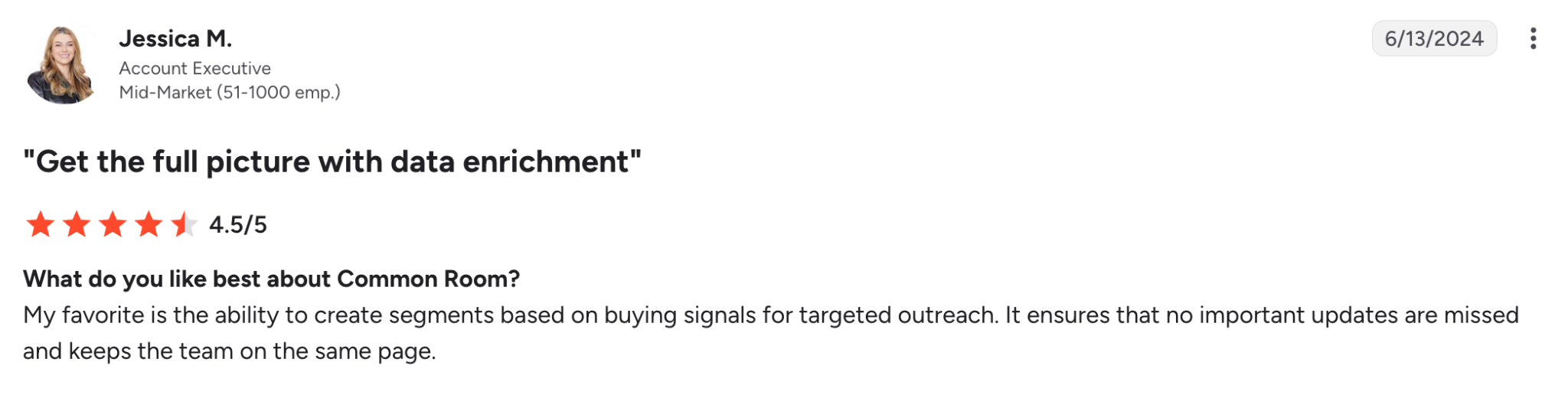
Jessica M.’s G2 review highlights using Common Room’s buying signals to create segments for targeted outreach.
An account executive’s review connects this with daily sales work, describing research, scoring, contact selection, and cadence preparation in one process.
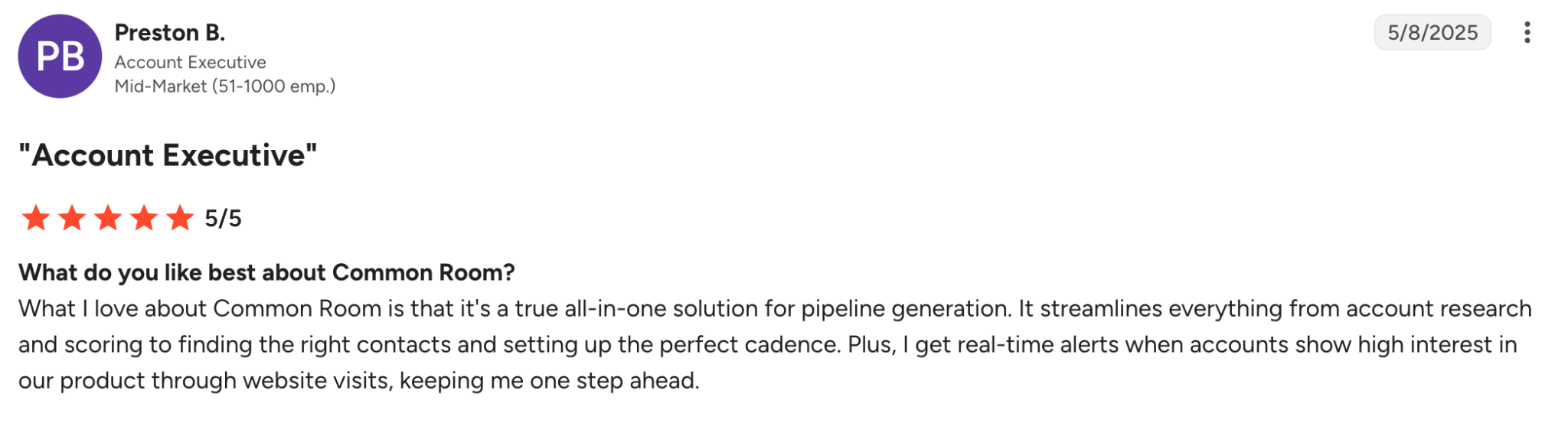
Preston B.’s G2 review describes using Common Room for account research, scoring, contact selection, and website engagement alerts.
Common Room’s AI-native scoring beta can also suggest criteria and weights using your CRM data, engagement, and contact attributes. Your team can inspect, edit, and preview the rules before activation. The score changes when you edit it, rather than learning automatically over time.
If you’d prefer an alternative to Common Room’s beta score builder, Factors.ai offers custom account scoring alongside website company identification, CRM workflows, and ABM analytics. Its Growth plan costs $20,000/year, which is $10,000 less than Common Room’s starting plan.
- Common Room's RoomieAI can reduce repeated account research
RoomieAI is useful when your reps ask the same research questions across many accounts. Instead of having each SDR investigate a company’s business model or recent developments separately, your team can define the questions and use the findings to prepare outreach.
One user on G2 appreciated its signal stacking and automated research functionality. A sales operations director explained how teams can shape the output: “You can build custom fields and ai-prompts directly into the product.”
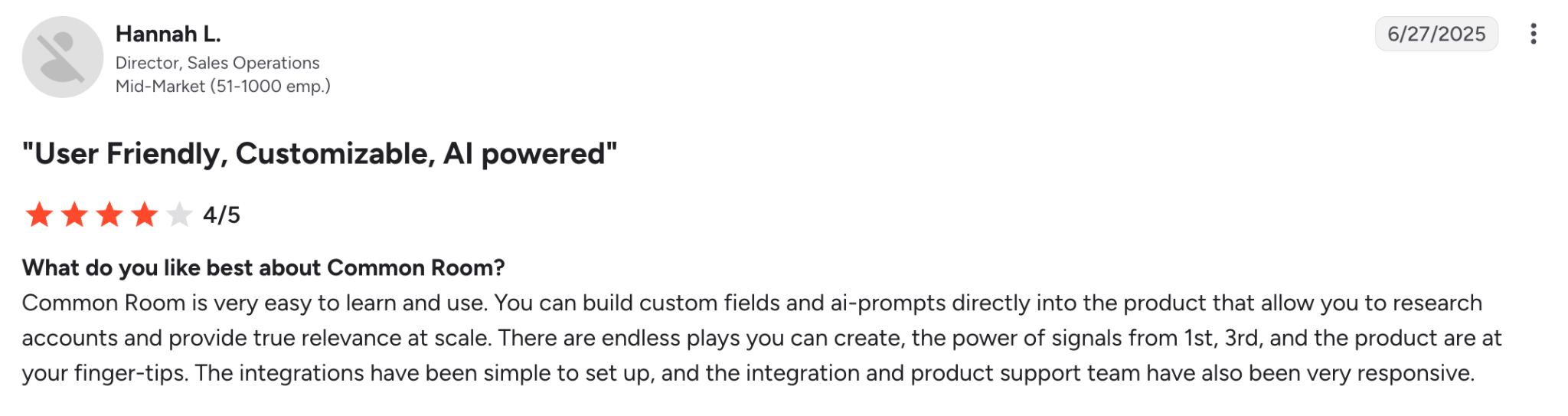
Hannah L.’s G2 review highlights Common Room’s custom fields and AI prompts for account research.
RoomieAI becomes more useful when you need the same research to be done across a prospect list and want the findings available within Common Room. Keep in mind that Research consumes credits, so include the volume you expect to run in your pricing comparison.
- Common Room's support can help your team through implementation
Common Room’s implementation support matters when your team needs help connecting its CRM and getting its first sales plays running. Reviews describe useful assistance with configuration, integrations, and workarounds.
One user praised the team’s involvement during implementation, helping iron out all technical issues. She also highlighted how the support team of Common Room is extremely responsive and helpful if their team ever hits a snag.
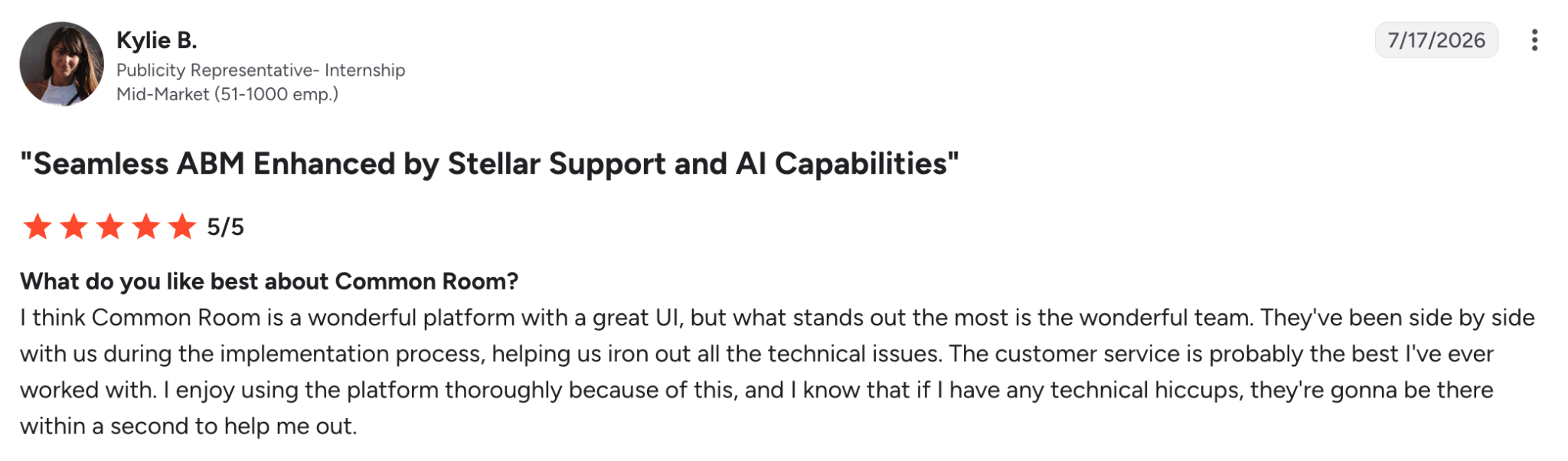
Kylie B.’s G2 review praises Common Room’s hands-on implementation help and responsive technical support.
Apart from praising the signals you can get from the platform, a customer mentioned that Common Room’s support is A+.
For a small team with limited resources, the deciding factor is whether the implementation help covers work you cannot handle internally. CRM field mapping, account ownership, and the first outreach workflow need clear owners.
What are the limitations and drawbacks of Common Room?
- Common Room’s CRM mapping and data exports can require extra work
An available integration doesn't guarantee that Common Room's records will match your CRM structure without adjustment. If contacts land against the wrong accounts or important fields are overwritten, useful signals become harder for reps to act on.
One Common Room user described difficulty matching Common Room’s database with their CRM. Their implementation took about six months, with obstacles remaining afterward.

A G2 reviewer reports CRM mapping problems that extended Common Room implementation to about six months.
Daniel Conn’s LinkedIn post describes another problem: CRM data being overwritten and additional work configuring outbound workflows and webhooks.
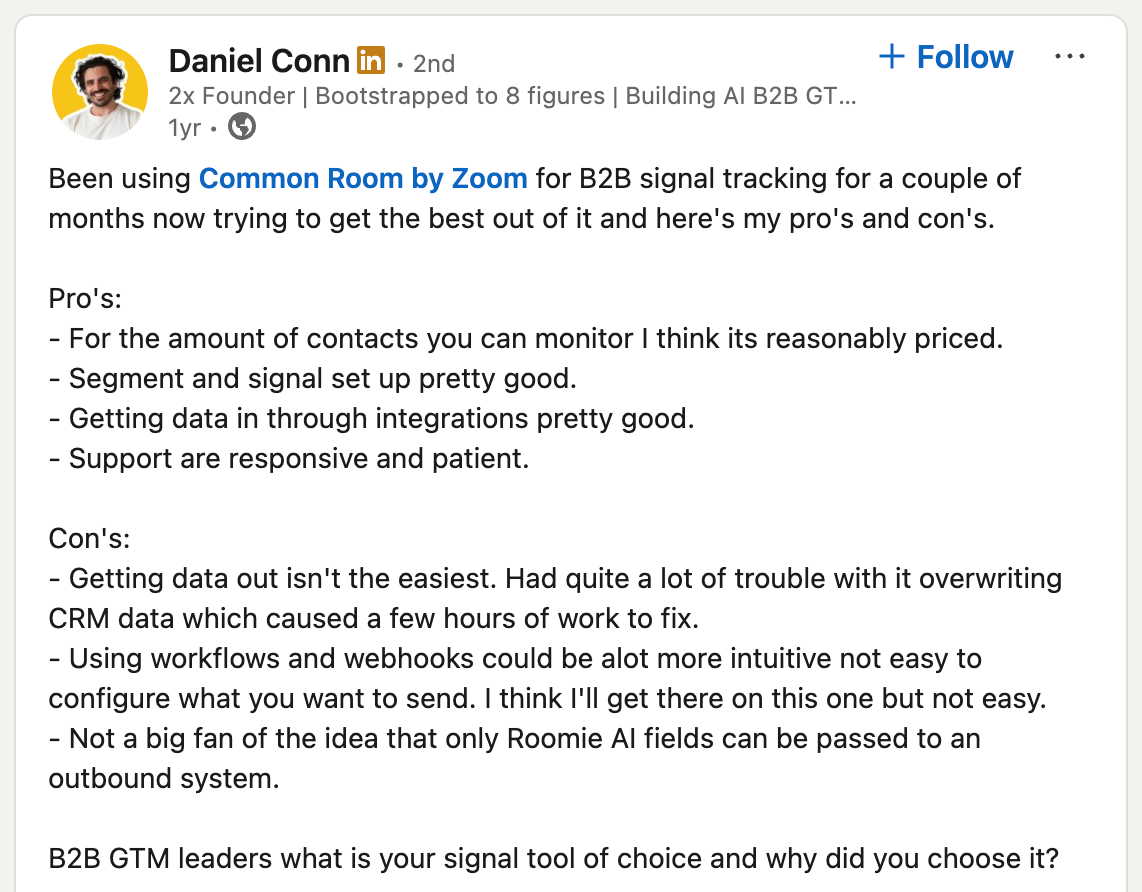
Daniel Conn’s LinkedIn post praises Common Room’s signals and support while reporting CRM overwrites and difficult outbound data configuration.
For your evaluation, follow real records through the connection in both directions. Include a subsidiary and someone who has changed employers. You want to establish that contacts reach the correct accounts, ownership stays intact, and field updates behave as expected before syncing a larger database.
- Common Room’s reporting may not cover your marketing attribution needs
Common Room can show how its sales activities contribute to meetings and opportunities, but that doesn’t give your marketing team cross-channel, multi-touch attribution.
Its Business Overview documentation explicitly starts attribution from actions inside Common Room, such as researching a contact or adding someone to an outreach sequence. Salesforce meetings and opportunities are then classified as sourced or influenced by those actions.
One reviewed on G2 wanted reporting by manager, team, and outreach sequence. They highlighted how getting some of these reports isn’t quite straightforward, and that you’d have to request Common Room’s engineering team.

A user describes difficulty creating Common Room reports by manager, team, and outreach sequence without engineering help.
For your marketing team, the bigger question may be which campaigns contributed before sales contacted the buyer. An account could see your LinkedIn ads, return through Google, consume content, and later become an opportunity. Measuring Common Room’s involvement doesn’t explain how those earlier marketing touchpoints contributed.
This is where a platform like Factors.ai could make more sense. It connects supported advertising, website, and CRM interactions into contact and account journeys. Its multi-touch models distribute conversion credit across recorded touchpoints, while LinkedIn view-through reporting includes account-level ad exposure without a click.
- Common Room needs an owner for setup and sales adoption
Someone on your team needs to maintain the segments, qualification rules, and sales plays your reps will use. Access to more buyer information doesn’t automatically give an SDR a workable prospecting routine.
A reviewer on G2 spoke about the initial learning period and setup work. One BDR had this to say: Once the tool was brought on we had a hard time onboarding different plays. We tried to reach out to their team but we didn't get much help until later in the process.
If you have limited RevOps capacity, begin with a defined sales play, such as reconnecting with former customers at target accounts. Assign someone to maintain its audience and routing rules. Without that ownership, your reps may inherit another database to search rather than a list they know how to work.
- Common Room’s contact coverage and visitor identification need separate checks
Finding a relevant contact doesn’t guarantee you’ll have their phone number or know that they personally visited your website. These are separate requirements, particularly for teams that rely on cold calling.
The below review from a Common Room customer on G2 shows their skepticism trusting intent signals and the deanonymization capability.

A Common Room customer questions the tool’s visitor identification and says intent signals do not always explain why an account was flagged.
This sentiment is further reinforced in a 2026 user review: “I find that Common Room’s contact-level tracking sometimes isn’t accurate or precise enough to identify the exact person who visited the site.”
Common Room now lists premium phone enrichment through Prospector, so assess the current offering rather than assume older gaps remain unchanged. Its enhanced person-level website identification uses Vector for US-based visitors.
- Common Room can get expensive and leave you paying for a separate outreach tool
Common Room pricing starts at $30,000/year, billed annually. What’s important to consider is that there’s no monthly plan available.
For a small team testing out outbound for the first time or or planning a short-term campaign, that’s a substantial commitment before you know how regularly your reps will use it.
A reviewer explicitly raised this on G2 and mentioned how they wanted automated outreach options and said partner tools could address the requirement.

A customer requests automated outreach in Common Room and notes that partner add-on tools can provide it.
Common Room’s documentation confirms this setup: contacts can be added to Outreach sequences or Salesloft cadences. The integration connects the products; it doesn’t include the other tool’s subscription.
For a smaller starting commitment, consider Apollo or Unify for prospecting and sequencing. If your main requirement is LinkedIn account engagement and campaign reporting, ZenABM or Fibbler may be a more focused purchase.
Our Common Room pricing guide explains the annual commitment, additional costs, and monthly alternatives, including their prices and plan limitations.
Evaluate Common Room alongside these alternatives
Common Room belongs on your shortlist for champion tracking and signal-led prospecting. For contact search, custom research, or marketing measurement, compare the alternatives below before committing to a broader subscription.
The Factors.ai vs Common Room comparison explains the differences in identification, advertising, and measurement. The Common Room alternatives guide covers other prospecting and marketing choices.
Frequently Asked Questions about Common Room reviews
- Is Common Room only useful for developer communities?
No. Common Room supports sales prospecting using website activity, CRM data, social engagement, and job changes alongside developer-community signals. Your reps could use Common Room to reconnect with a former customer who changes companies, even if GitHub or community activity plays no part in your sales process. Common Room
- Can Common Room replace your CRM?
Common Room works alongside your CRM rather than replacing it. Salesforce and HubSpot integrations let your team use CRM records alongside buyer signals and send information between platforms. Keep your CRM for managing deals and your sales pipeline; use Common Room to help reps decide whom to contact and why.
- Can Common Room replace Clay?
Yes, Common Room can replace Clay workflows for enrichment, account research, and buying signals when its built-in capabilities cover the work your team needs. Clay remains useful when you want specific enrichment providers or custom research workflows. You can also keep both, passing Clay’s enrichment results back into Common Room for reps to use.
- Should your team choose Common Room?
Shortlist Common Room when your sales reps regularly use champion moves, job changes, and community activity to decide whom to contact. Your team will also need someone to maintain the segments and sales plays.
For contact data and email sequences, check out Apollo.io as well. For marketing attribution and cross-channel advertising, try Factors.ai.

Powered by Bombora
Enter your domain and we'll send you a free list of companies showing buying intent in your vertical.
Powered by Bombora
Enter your domain and we'll send you a free list of companies showing buying intent in your vertical.

See how Factors can 2x your ROI
Boost your LinkedIn ROI in no time using data-driven insights





See Factors in action.
Schedule a personalized demo or sign up to get started for free
LinkedIn Marketing Partner
GDPR & SOC2 Type II