.svg)


Dreamdata vs. Hockeystack [2025]: Features, Pricing, Reviews & More
It’s no secret that the B2B SaaS funnel involves several touchpoints across campaigns, website, offline events, and CRM. Given that customer journeys are complex and nonlinear, measuring and optimizing marketing’s impact on revenue may seem like a daunting task. To solve for this, there’s been an influx of plug and play B2B marketing attribution and analytics tools in recent years.
While there’s no shortage of marketing attribution tools out there, each solution has its own unique set of features, strengths, and limitations. This blog compares two popular B2B marketing attribution tools — Dreamdata and Hockeystack — to help readers decide which solution may be better suited to their needs.
Note that this blog won’t cover the basics of what marketing attribution is. Instead, you can find a wide range of resources on marketing attribution here:
- A Comprehensive Guide To Marketing Attribution
- B2B Marketing Attribution
- Challenges With B2B Attribution (And How To Get Over Them)
About Dreamdata
Dreamdata is a Denmark-based B2B revenue attribution platform that works to connect and crunch revenue related data across the customer journey. At a high level, much like any other competent marketing analytics tool, Dreamdata helps teams identify what GTM effort drives revenue, where to cut costs, and how to scale the right campaigns.
As following sections highlight, Dreamdata provides a robust analytics suite, a wide-range of integrations, and a strong customer success experience. That being said, the platform seems to fall short when it comes to implementation, custom reporting and dashboarding, and ease of use. Each of these features and limitations are covered in detail below.
About HockeyStack
HockeyStack is a B2B analytics and attribution platform that helps teams track data across campaigns, website, and CRM to measure marketing ROI, view account-based intent signals, and improve budget allocation.
HockeyStack claims a rapid implementation process and customizable dashboards. That being said, HockeyStack offers fewer integrations and limited granularity when it comes to reporting. Again, each of these features and shortcomings are highlighted in detail below.
Dreamdata vs. HockeyStack: Key Features
Both Dreamdata and HockeyStack are effective marketing attribution tools in their own right — but no product is perfect. The next couple of sections examine key features, strengths and limitations of each solution. Naturally, there’s bound to be significant overlap; but the devil is in the details. After covering a few key common features, we explore where each platform outperforms the other.
#1 Tracking & Analytics:
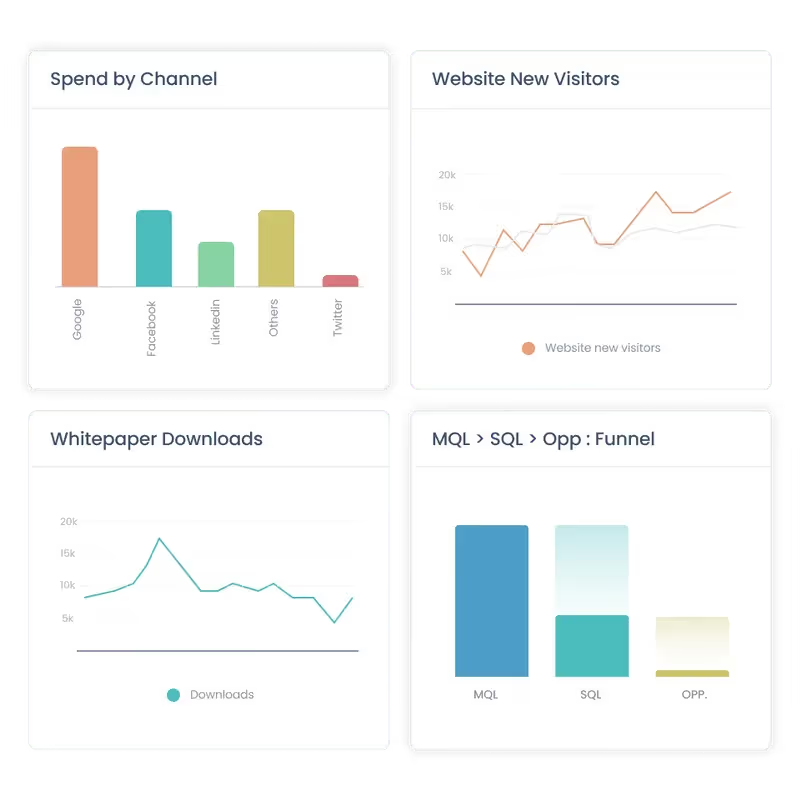
As most analytics solutions do, both Dreamdata and Hockeystack unify marketing and revenue data under one roof. Both tools also provide a wide range of analytics capabilities to help teams make well-informed decisions across campaigns, website, content, and more.
Both solutions employ javascript codes that are added to a website to track visitor interactions and engagement. They can measure standard website performance metrics like pageviews, scroll depth, clicks, form submissions, and more at an account and user level. In turn, teams can gauge customer behavior and learn how different content and webpages influence pipeline by cohort.
Dreamdata and HockeyStack also integrate with ad platforms, marketing automation platforms, and CRMs to consolidate campaign metrics, offline events, and revenue metrics. This helps marketing teams monitor their efforts and understand what’s helping or hurting bottom line conversions. Note that Dreamdata currently provides a wider range of integrations than HockeyStack — more on this later.
#2 Multi-touch attribution
Attribution analysis is at the core of Dreamdata and Hockeystack. Unsurprisingly, both solutions do a good job of measuring performance across marketing activities and attributing each touchpoint back to revenue.
They can stitch and credit measurable touchpoints across channels, campaigns, website, and offline events (from CRM) based on their influence on pipeline. Using a range of multi-touch attribution models, marketing teams can quantify their impact on revenue from first-touch to deal won at an account level. Here are a few use-cases multi-touch attribution on Dreamdata and Hockeystack can solve for:
- Measuring ROAS across ad campaigns
- Attributing revenue back to marketing channels
- Tracking the impact of organic social and SEO efforts
- Learning which content and channels drive bottom-line metrics

#3 Journeys
Journeys analytics is a relatively recent feature that’s not as common amongst other marketing analytics and attribution tools. That being said, both Dreamdata and HockeyStack offer variants of journey analytics.
In short, journey analytics helps teams visualize complex, non-linear customer journeys by mapping each stakeholder’s touch-points at an account level. Why is this helpful? It provides an intuitive timeline of profiles, behavior, and intent across each account within the pipeline. This information may in turn be used to personalize further marketing efforts, optimize retargeting campaigns, customize sales pitches, and identify buying patterns.

HockeyStack and Dreamdata work well for all three features covered above. Still, both tools have their own strengths and limitations. The following section highlights stand-out reasons why users may prefer one over the other.
What Dreamdata Does Better
1. Out-of-the-box Integrations
Dreamdata offers a wider range of out-of-the-box integrations as compared to HockeyStack. While both solutions provide integrations with the most popular ad platforms, CRMs, MAPs, and CDPs, Dreamdata goes the extra mile to cater to relatively niche platforms and data warehouses as well.
Key integrations supported by Dreamdata and HockeyStack*: HubSpot, SalesForce, Google Ads, Facebook Ads, Linkedin Ads, Marketo, Pardot, Intercom, Segment
Key integrations supported by Dreamdata but not HockeyStack*: Zoho, G2, Zapier, Outreach, AdRoll, Google Data Studio, BigQuery
*based on HockeyStack website
Pro Tip: Note that in case Dreamdata and HockeyStack doesn’t support an integration for a specific platform, both tools offer custom integrations as per demand.
2. Detailed & Granular Reporting
Although this isn’t necessarily a drawback with HockeyStack, users have complained about its lack of granularity. Reviews compare HockeyStack’s reporting capabilities to that of Google Analytics (GA4) — decent, but not detailed enough. Given that Dreamdata is a relatively mature product, their reporting capabilities provide deeper insights across conversion rates, customer lifetime value, and revenue attribution, and more.

3. Customer Success
B2B analytics and attributions platforms are complex. While tools are becoming increasingly intuitive, it’s important for non-technical users to have easy access to timely, effective CSM. Fortunately, Dreamdata seems to support robust customer success servicing. This is especially valuable since Dreamdata’s implementation is reportedly an involved process.

4. Templatized Reporting + UI
This is a double edged sword. Dreamdata delivers a structured, non-customizable dashboard and event framework that offers little room for flexibility. Dashboards are broadly grouped into the following categories: Engagement, Content, Performance, Journeys and Revenue.
On one hand, this may be beneficial to smaller SaaS teams with limited technical resources as it’s likely to cater to most of their analytics and reporting needs.
However, as the business starts to scale, its requirements may include custom dashboards and events that are company-specific. At this point, Dreamdata’s templatized reporting may be a drawback.
Although reviews suggest that Dreamdata involves a steep learning curve, it’s fair to assume that its UI is a step ahead of HockeyStack. HockeyStack is a relatively younger product and users tend to find the platform a little rough around the edges. That being said, reviews also suggest that they’re showing quick improvement. It’s likely only a matter of time before both platforms are on par with each other.

What HockeyStack Does Better
1. Implementation
HockeyStack makes strong claims about its rapid implementation process, suggesting that users can onboard and get started in a matter of minutes. This is in stark contrast to Dreamdata, which, as a more sophisticated tool, requires an involved, drawn-out implementation process. HockeyStack’s intuitive onboarding is a big advantage to smaller teams that don’t have the resources for dedicated onboarding or maintenance support.

2. Custom Dashboards
Dreamdata’s platform focuses on solving the most common SaaS use-cases. As a result, the platform tends to be relatively less flexible. HockeyStack, on the other hand, promotes far more customizations across events, reports, dashboards, and visualizations. HockeyStack provides the option of preconfigured templates, but lets users build reports from scratch as well. While granularity may be lacking when compared to Dreamdata, this ability for flexible dashboarding may be helpful for teams looking for tailor-made, high-level reports.

3. Funnels, Surveys & Impression Tracking
Along with the key analytics and attribution features discussed, HockeyStack provides a few features that Dreamdata doesn't.
The most valuable of these features is probably Funnels. Funnels is a powerful analytics technique that helps users graphically visualize different stages of the sales cycle. These stages can be configured by users to, for example, see how website visitors are progressing from the home page, to the pricing page, and to a blog before scheduling a demo.
Surveys is another feature that, as the name suggests, allows users to create surveys for self attribution. Finally, Linkedin Impression Tracking is another nifty feature that enables users to identify companies viewing Linkedin campaigns.
Dreamdata vs. HockeyStack: Pricing
[December 2023 Update]: Both HockeyStack and Dreamdata have revised pricing since this article was published. While HockeyStack have increased their starting price, Dreamdata have decreased theirs. Here's an updated rundown of pricing:
- Dreamdata pricing now starts at $599/mo for up to 30,000 MTUs
- HockeyStack pricing now starts at $1399/mo for up to 10,000 monthly visitors


[Pricing as of February 2023]
- Dreamdata’s paid plans start at $999/month for 10 seats and up to 10,000 MTUs
- HockeyStack’s paid plans start at $949/month for 10 seats and up to 10,000 monthly visitors
- HockeyStack offers a 14-day free trial
- Dreamdata offers a free web analytics tool as an alternative to Google Analytics


Still On The Fence About What B2B Attribution Tool To Go With?
And there you have it. A breakdown of Dreamdata and HockeyStack, and the reasons why one could be a better fit for you over the other. Still On The Fence About What B2B Attribution Tool To Go With? Here are a few reasons why you might want to consider Factors as well:
- Rapid, no-code integrations across ad platforms, CRM, MAP, and more
- Granular, end-to-end analytics, attribution, and journeys across ad campaigns, website content, offline events, organic content, and more
- Fully customizable events, properties, dimensions, and dashboard
- Dedicated customer success management
- Funnels, path analysis and website tracking
And…
- Website visitor identification
- AI-fueled conversion insights
- Real-time Slack alerts
- Cost-effective analytics pricing plans starting at $399/month
Dreamdata vs. HockeyStack – both are powerful B2B marketing attribution platforms, but they cater to different needs:
- Dreamdata is known for its advanced multi-touch attribution and deep third-party integrations, making it ideal for larger teams navigating long, complex sales cycles. However, it comes with a steeper learning curve, longer setup time, and limited dashboard customization.
- HockeyStack, on the other hand, is built for speed and flexibility. It offers quick implementation, highly customizable dashboards, funnel visualization, and even cookieless tracking, making it perfect for agile marketing teams needing fast, actionable insights.
Pricing Snapshot:
- Dreamdata: Starts at $999/month.
- HockeyStack: Offers a free tier, with paid plans starting at $99/month.
Enter Factors.ai – a game-changing platform that merges the best of both worlds. It combines multi-touch attribution, account intelligence, and workflow automation into a seamless experience. With Factors.ai, marketing teams can gain comprehensive insights, streamline operations, and drive revenue-focused decision-making with ease.
Leadfeeder [Dealfront] Vs. Factors: Compare Pricing & Features
Leadfeeder is a well-established B2B lead generation software that helps go-to-market teams identify and enrich anonymous website traffic. Leadfeeder has recently joined forces with another sales intelligence platform, Echobot, to form Dealfront — a Europe-centric B2B data platform.

As a result of this collaboration, Leadfeeder has consolidated multiple products, increased pricing plans, and limited the number of seats per account. Accordingly, several former-Leadfeeder users are considering switching to IP intelligence alternatives.
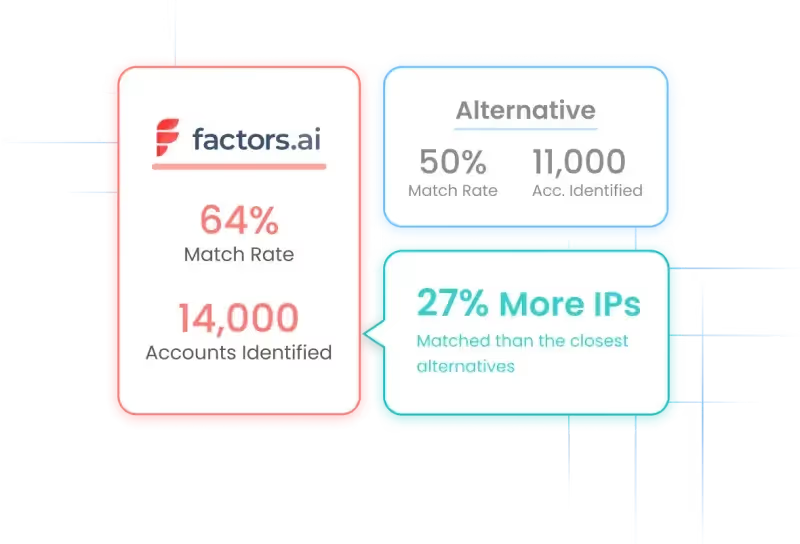
While Factors is a relatively new player in the account identification space, it’s quickly emerging as a popular alternative to Leadfeeder given its cost-effective plans and industry-leading match rates of up to 64%. That being said, every platform has its unique advantages and limitations that must be considered before making a purchase decision.
This blog compares Leadfeeder vs Factors to highlight features, benefits and drawbacks of each tool — and explore why one might make more sense for your use-cases over the other.
Leadfeeder vs. Factor.ai
Before diving into the differences between Leadfeeder and Factors, it’s worth highlighting a few commonalities between both tools given that they’re close alternatives to each other.
1. Account identification
Needless to say, identifying anonymous accounts on your website is a core functionality of both Leadfeeder and Factors. Both visitor identification tools use IP-based targeting technology to match anonymous traffic with company IPs so users can see who’s visiting their website without the need of form submissions or gated content.
This provides valuable insights into the nature of website traffic as well as which accounts to go after with retargeting ads or outbound outreach.
While both Leadfeeder and Factors rely on similar technologies, the accuracy with which they identify visitors can vary dramatically based on their respective databases. More on this later.
2. Account-level enrichment
Along with identifying company names, both Leadfeeder and Factors deliver robust account-level firmographic enrichment data such as industry, employee headcount, geography, revenue-range, and much, much more.
Account-level enrichment helps go-to-market teams quickly qualify whether a lead fits the target audience or ideal customer profile. This in turn helps focus marketing initiatives and sales outreach to a highly targeted set of accounts — as opposed to expensive and ineffective spray and pray tactics.
3. Implementation
Given that Leadfeeder and Factors employ similar IP-lookup technology to identify and track visitors, the implementation process is more or less identical. Both tools have quick and intuitive onboarding that involves the insertion of a light-weight code script onto the website. The script will soon start identifying visitors once activated.
Overall, the entire implementation process takes no more than 10min for either solution.
4. Real-time alerts
A really nifty feature offered by Leadfeeder and Factors is the ability for users to receive real-time Slack notifications when high-intent accounts are live on the website. These alerts can be configured to go off only when specific visitor criteria are met. For instance, teams can be notified only when a visitor is from a US-based SaaS platform with at least 100 employees and is on a high-intent page such as pricing.
Research suggests that contacting leads quickly dramatically improves chances of conversions. Accordingly, this is an especially valuable feature for sales reps looking to strike while the iron’s still hot.
5. Privacy-compliance
Leadfeeder and Factors are 100% privacy compliant. Both tools adhere to GDPR and CCPA privacy policies. Factors is also SOC2 type II certified. SOC2 information about Leadfeeder is not publicly available so we refrain from commenting on this.
With common features out of the way, let’s discuss what each visitor identification solution does better than the other.
What Factors does better than Leadfeeder
Here are a few reasons to consider Factors over other alternatives:
1. Data accuracy (outside Europe)
Rigorous comparative testing over a sample size of 20,000 domains reveals that Factors achieves industry-leading match rates of up to 64%.
No doubt, both Leadfeeder and Factors boast impressive IP databases. In fact, Leadfeeder is at the forefront of IP-matching for Europe-specific data. Challenge with Leadfeeder may surface when targeting companies from US and other geographies outside Europe:
Leadfeeder records IPs for a whopping 26 millions companies in Europe but only about 8.5 million companies in the US and the rest of the world. Factors, on the other hand, covers almost double this figure with over 15 million companies.
Accordingly, if your business solely focused on the EU market, Leadfeeder is likely the better choice. But for global business, including the US, Factors should be the default. It taps into a relatively larger IP database to identify a wider range of companies from the rest of the world.
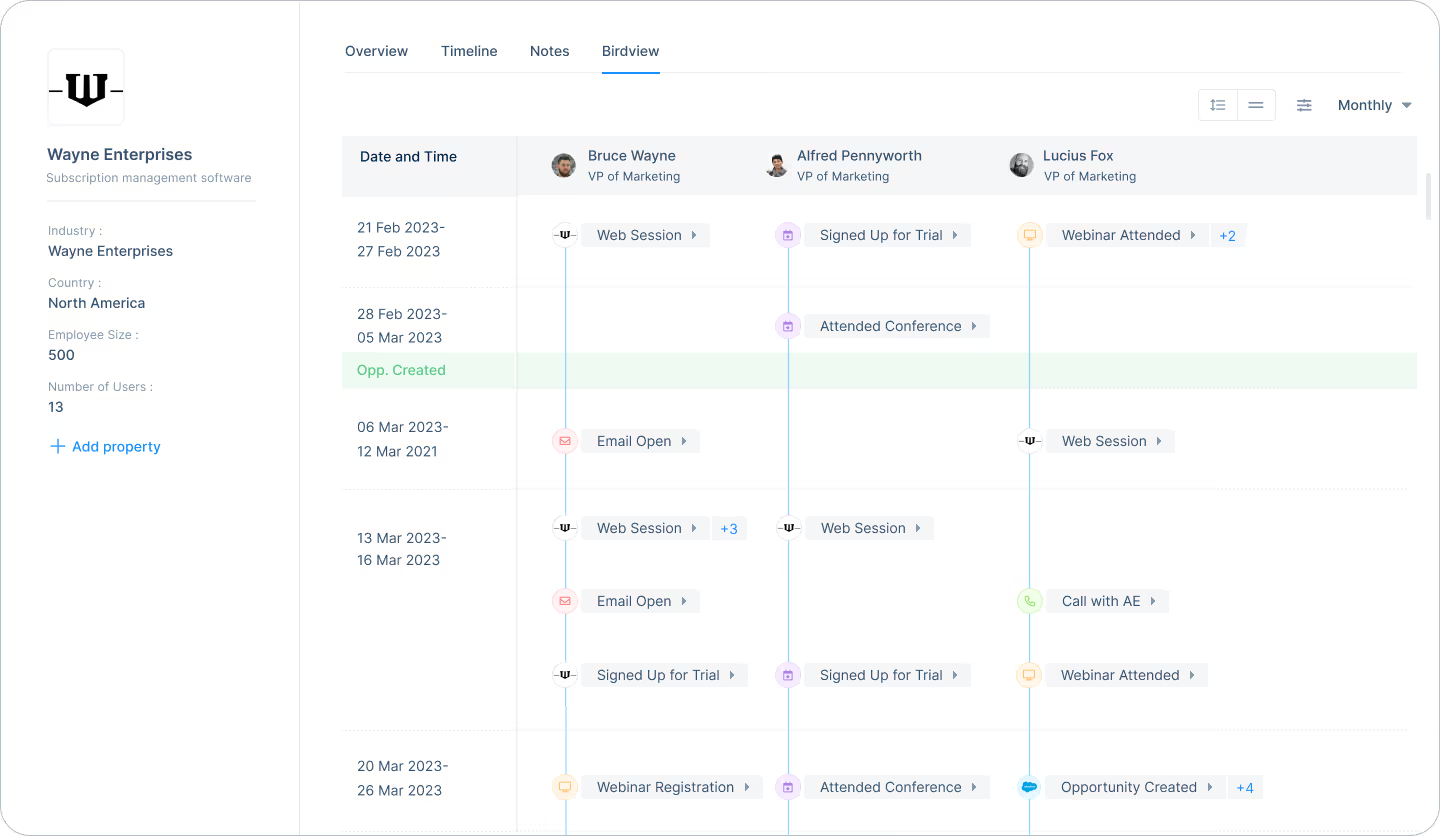
2. Account timelines
Account timelines is a feature unique to Factors that helps users visualize customer journeys and touchpoints in real time at an account and user level.
This is a powerful tool, especially in conjunction with visitor identification, to identify what influences different stakeholders within the same account to move from the awareness stage of the customer journey to closing the deal.
3. Advanced analytics
Factors is built upon strong analytics and attribution foundations. As a result, it’s capable of far more granularity in terms of reporting metrics and KPIs as compared to other marketing intelligence tools.
Factors auto-tracks website KPIs including:
- Page views
- Button clicks
- Percentage scroll depth
- Session duration
- Funnels (Eg: Homepage >> Pricing >> Blog >> Features)
- Custom KPIs and more
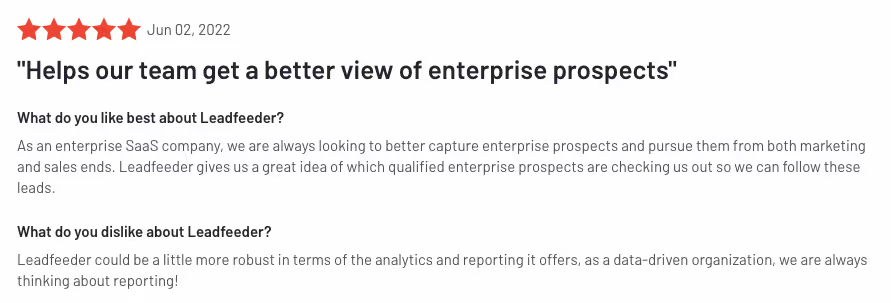
In addition to these out-of-the-box analytics, Factors integrated with ad platforms, website, CDPs, and CRMs to deliver powerful multi-touch attribution, path analysis, automated AI-fuelled insights, and more. In short, when it comes to analytics, Factors sheds light on what you need to know to drive more pipeline with less spend.
4. Customer success
While both Leadfeeder and Factors are relatively intuitive platforms, there’s no denying that they’re sophisticated products with at least some learning curves. With such products, it’s imperative to have onboarding support and dedicated customer success management — both of which Factors takes great pride in offering.

What Leadfeeder does better than Factors
Here are a few reasons to consider Leadfeeder over other alternatives:
1. Contact enrichment
While no solution can identify exactly who’s visiting your website at a user level, Leadfeeder natively provides users with a list of ideal prospects from the companies visiting a website.
For example, a fintech company may target the finance team from SaaS companies with over 10M in ARR. In this case, Leadfeeder can more or less find the contact info of CFO, VP finance, finance manager etc from companies already visiting your website — even though these professionals may not actually be the ones visiting.
This is useful for teams who’d rather not rely on specialized sales intelligence tools like Zoominfo or Apollo for dedicated contact-level data.
At the moment, Factors integrates with Apollo to provide this contact-level information. Since the majority of users rely on third-party service providers for contact information, this does not tend to be a blocker.
2. Integrations
Leadfeeder provides several native two-way integrations with popular sales and marketing tools including:
- Pipedrive
- Salesforce
- Activecampaign
- Mailchimp
- HubSpot
- Zapier
This helps users automatically upload account and contact information directly to their go-to-market tools and CRMs.
Factors integrates deeply with ad platforms, CRMs, CDPs, and more. While Factors does not provide native integrations with the full range of solutions Leadfeeder supports, it does integrate with Zapier/Make.com to support data pushback via Webhooks. At the moment, users can download csv files from Factors and upload them back into their preferred CRM, MAP, etc.
3. Native campaigns & promotions
Leadfeeder’s Promote feature allows users to target specific company IP-addresses with programmatic display ads across Google, Rubicon, Appnexus, and Pubmatic.
While the efficacy of display ads continues to be hotly debated, this may be a useful way to target companies that already visit your website and fit the ideal customer profile. The primary metrics to track these campaigns are impressions, CTR, and website visits.
Compare Leadfeeder Pricing
Leadfeeder is a relatively inexpensive solution as compared to established Leadfeeder alternatives such as Clearbit and Albacross. That being said, its recent collaboration with Echobot has revised pricing:
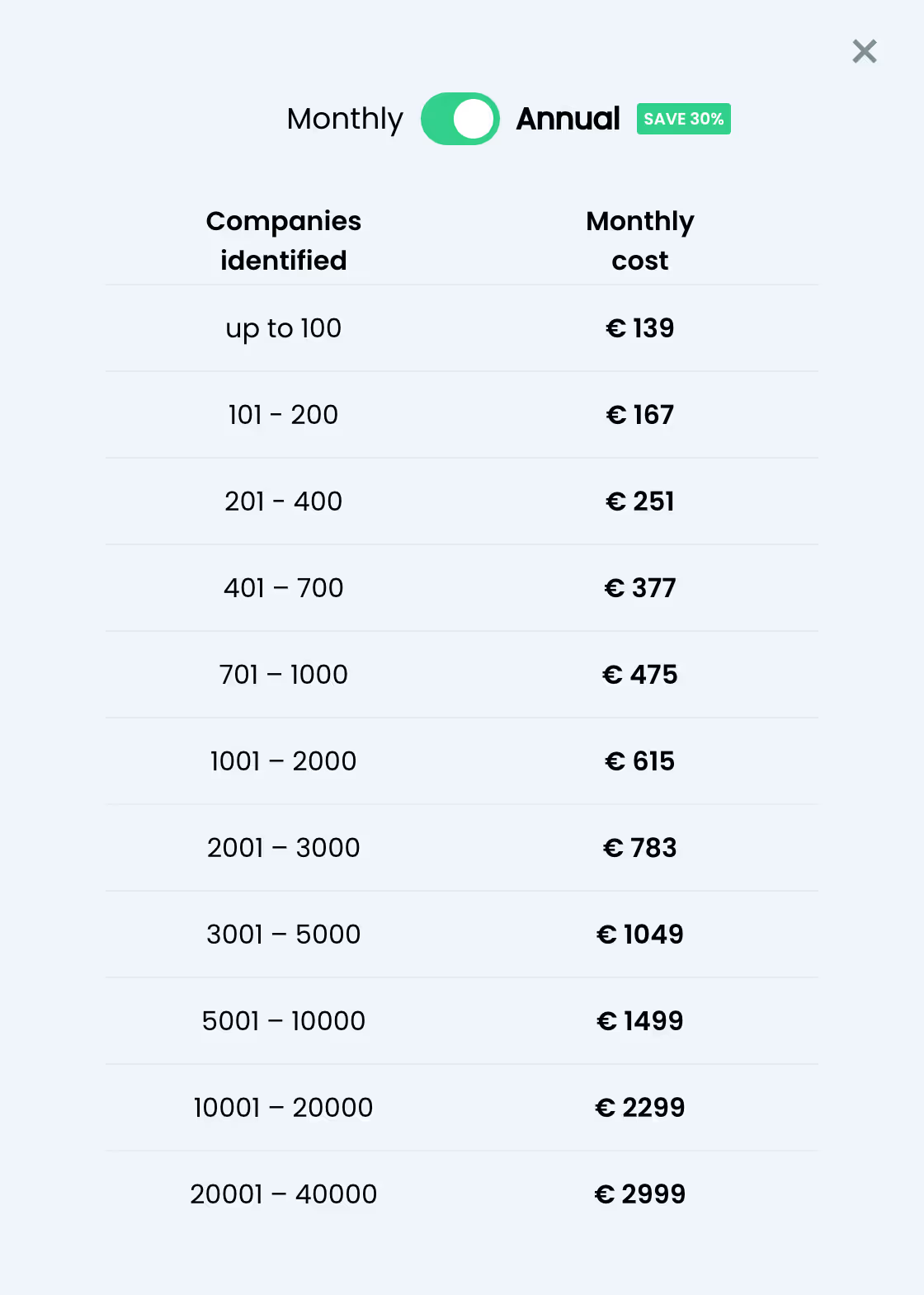
Now, Leadfeeder plans start at €139/mo ($152) to identify up to 100 accounts per month
Factors, on the other hand, continues to remain one of the most cost-effective marketing intelligence tools out there with plans starting as low as $99/month for up to 350 accounts identified and enriched per month. Factors pricing is based on the number of monthly website visitors and follows a gradient. Learn more about our pricing here: factors.ai/pricing
What’s the right tool for you?
This blog has compared Leadfeeder vs Factors.ai in terms of features, benefits, and drawbacks. Depending on your use-cases, one is likely to make a better fit for you than the other. Here are a couple of considerations:
- If data accuracy outside of Europe, cost-effectiveness, and holistic account scoring is a priority to you, Factors is likely better choice.
- If Europe-centric data and native contact enrichment is a priority to you, then Leadfeeder may be a better fit.
If you’d like to see how Factors achieves industry-leading match rates of up to 64%, book a demo here: See Factors in action
Top B2B Lead Generation Tools
Lead generation tools help businesses identify and enrich website traffic, enabling more precise targeting and increased conversions.
1. Top Platforms: Factors.ai and Leadfeeder.
2. Key Features:
- Factors.ai: Industry-leading match rates (up to 64%), extended lead history (up to 365 days), and integrations with multiple data providers.
- Leadfeeder: Merged with Echobot to form Dealfront, offering account identification and firmographic enrichment, but with limited account seats and increased pricing plans.
3. Strategic Benefits:
- Factors.ai: Enhanced data accuracy, longer lead history retention, and cost-effective plans.
- Leadfeeder: Useful for tracking website visitors but has faced changes that may make alternatives like Factors.ai more appealing.
Implementing these lead generation tools enables businesses to improve visitor identification, streamline outreach, and boost overall lead quality.

The Principles Of Modern B2B Marketing I: Brand Building Vs. Sales Activation
B2B marketing strategies that maximize growth
B2B marketing may be in trouble. Research suggests that B2B organizations are inadvertently transforming marketing into a supporting tool for the sales function. In reality, however, marketing is at the very core of a business. With the right principles securely in place, B2B marketing may well transform into the growth engine of B2B organizations.
It’s about time we rethink the principles of marketing
Linkedin’s B2B institute recently conducted wonderful research using B2B effectiveness data in collaboration with Peter Field, Les Binet and the IPA. The primary motivator of this research was to identify the best marketing principles that correlated with growth. Keep in mind that in this case, growth does not mean improving CTR, impressions, engagements or other traditional digital marketing metrics. Instead, we’re referring to growth in terms of market share, revenue, profitability, and other bottom line business metrics.
What makes this research especially special is the fact that it's never been done before through the lens of B2B marketing. That is, of course, until now. The following series will delve into each of these principles one article at a time with hopes of providing an intuitive, straightforward explanation of cutting-edge B2B marketing research.
If you had to take away one thing from this series, it’s this:
Extensive research and anecdotal evidence point to one thing — The key to marketing-sourced growth is balance. While this may seem obvious, the truth is that modern B2B marketing is almost always unbalanced. They tend to involve solely short-term, volume-based endeavors that play to logic and reasoning as opposed to a balanced view of short AND long term strategies that consider volume AND price, logic AND emotion, awareness AND fame.
With that out of the way, let’s finally move on to the first principle of B2B marketing strategies that maximize growth.
Brand Building Vs. Sales Activation
A. Have Your Cake & Eat It Too: Brand Building and Sales Activation I
In their research, Binet and Field identify two types of marketing:
1. Sales activation: Sales activation definitely provides short-term growth. But while sales activation captures existing demand, it does not create it. Results with sales activation often produce results that decay just as fast they appear – which isn’t necessarily a bad thing, just something to keep in mind for the long term.
2. Brand building: Brand building provides long-term growth. In a sense, this creates and captures demand together. Note that when executed well, brand building delivers short-term growth as well. So the big takeaway is that you don’t have to pick between one or the other. In a sense, brand building contributes to future demand to ensure a durable pipeline of future sales and profits.
Ideally, a combination of both types of marketing will yield the best results. If you had to pick one, however, the choice is easy. Brand building is the only strategy that delivers both short-term and long-term growth.
B. The 60/40 Rule: Brand Building & Sales Activation II
In B2C marketing, organizations with the most short-term and long-term growth spend most of their budget towards branding (60%) as opposed to sales activation (40%). In most B2B orgs, this marketing investment is skewed in the opposite direction; with most spend being allocated towards activation (54%).

What might explain this variation? Put simply, B2B sales is harder. It involves several touch points across several stakeholders over several months. It also necessitates far more exposition around the product, use-cases, functional benefits, and more. There’s no doubt that in B2B, sales activation, especially in early-stages, has an important (albeit expensive) role to play. But as the novelty and needs of a new business fades, marketing needs to mature towards a brand-focused distribution to ensure sustainable growth.

C. Flip The Funnel: From ToFu/BoFu To In/Out Market
The funnel is a well-known construct in B2B marketing. The conventional B2B funnel depicts a voluminous top-of-the-funnel that wittles down along each step of the funnel towards the bottom of the funnel. Interestingly, Binet and Field suggest flipping the funnel. Rather than ToFu and BoFu, they recommend thinking of the funnel as “in market” buyers and “out market” buyers. In this case, activation spend is mostly for limited market buyers while branding spend is for the much larger, out market buyers.

This approach tends to be more customer-centric because:
- Customers don’t think of themselves as being in the “brand building” phase or “sales activation phase”. Instead, customers think of themselves as being “in-market” to buy a product or “out-market” to not buy a product at this moment.
- Marketers have two customers: Your external customers and your internal finance team. Thinking about the funnel as current cash flow customers and future cash flow customers will help align marketing with the CFO or finance team as well.
D. Different Stroke For Different Folks:
Of course, in-market buyers are inherently very different from out-market buyers. This necessitates different approaches for creative, distribution, and measurement.
For in-market approach:
- Rational Messaging - for immediate ROI and value
- Narrower targeting - for a narrower market
- Sales metrics - revenue and pipeline are the most relevant KPI for in-market
For out-market approach:
- Emotional Messaging - for long term brand retention
- Broder targeting - for a larger market
- Memory metrics - brand sense is an example of a relevant memory metric
And there you have it. The first principles delved deep into the pros and cons of Sales Activation and Brand Building. While employing both approaches in unison are crucial to long-term success, the verdict is that, at the end of the day, the goal should be to prioritize brand building. We also highlight an unconventional perspective of the good old sales funnel. Join us next week to go over the second principle: Awareness vs Fame.
Balancing Brand Building and Sales Activation in B2B Marketing
In modern B2B marketing, balancing brand building and sales activation is essential for sustainable growth.
1. Sales Activation focuses on short-term gains by capturing existing demand, delivering quick but often temporary results.
2. Brand Building creates new demand and strengthens market presence, driving long-term success.
While both strategies play a vital role, prioritizing brand building ensures lasting growth and a strong competitive position in the market.
.avif)
5 Stages Of The Customer Journey
Customer centricity is at the heart of a successful business. Delivering value to buyers at every customer journey stage drives sales conversions and retention. This, however, is easier said than done — especially in the case of B2B customer journeys.
Understanding the customer journey is crucial for modern marketing and sales strategies. With evolving customer behaviors and preferences, it's essential to adapt and refine approaches to address the complexities of how customers interact with brands.
This journey is no longer a straightforward path but a complex, often non-linear process. To effectively engage with potential customers, businesses need to grasp the intricacies of each stage, especially awareness, consideration, and decision. This blog explains these stages, offering practical insights and strategies based on current industry understanding and research.
TL; DR
- Understanding the customer journey is crucial for B2B marketing and sales success due to its complexity and non-linear nature.
- Customer journeys map out various buyer interactions to track how and why prospects become paying customers.
- The customer journey consists of 5 broad stages: Awareness, Consideration, Decision, Retention, and Advocacy.
- Delivering relevant material along each stage ensures that prospects feel understood and valued. This, in turn, contributes to successful journeys and provides practical insights and strategies for each stage.
- Businesses can enhance engagement and build long-term relationships by addressing customer needs and behaviors throughout the journey.
- Factors.ai connects the dots across campaigns, websites, and CRM to map the customer journey using path analysis and account timelines.
The Evolution of Customer Journey Stages
The B2B sales cycle involves several stakeholders and touch points across campaigns, social media, organic efforts, offline events, and more. A customer journey maps out these interactions to track how and why prospects become paying customers.
Since B2B sales cycles tend to be lengthy, non-linear experiences, it can be challenging to map them accurately without the right tools and frameworks.
Learn more about customer journey mapping here: The Complete Guide To Customer Journey Mapping.
Traditionally, the customer journey was viewed as a linear process, with prospects moving through clearly defined stages: awareness, consideration, and decision. However, modern perspectives reflect a more nuanced view. Today’s customers might navigate through these stages in a circular or even chaotic manner, reflecting the complexities of contemporary decision-making.
According to Gartner, only 17% of a customer journey is spent directly conversing with the vendor. The remaining 83% takes place through independent research and internal deliberation. Hence, businesses must distribute relevant value at each journey stage — even outside discovery sessions and demo calls.

Understanding the Awareness Stage
The awareness stage is where the customer journey begins. At this point, potential customers become aware of a problem or need but have not started actively seeking solutions. It's crucial to recognize that potential customers need help understanding the scope or urgency of their issue during this stage. They may be exploring general trends or innovations without a clear sense of how these relate to their specific needs.
Customers in the awareness stage primarily gather information. They might browse blogs, read articles, and engage with introductory content. Marketing efforts in this stage should focus on educational content that introduces customers to new concepts or challenges. Content such as informative blog posts, eBooks, webinars, and automated AI Phone Calls can effectively capture their interest by delivering personalized voice messages that highlight relevant industry challenges, complementing email campaigns for a cohesive multi-channel engagement strategy.

Transitioning to the Consideration Stage
As customers move from awareness to consideration, they start recognizing the need for a solution. This transition is often triggered by an internal realization, such as remembering the inefficiency of current processes or the impact of emerging trends. This is a critical phase for businesses where prospects evaluate various solutions to address their identified needs.
During the consideration phase, customers will likely seek detailed information about potential solutions. They will look for case studies, ROI calculators, and in-depth product details to compare options. Effective marketing strategies during this phase should provide comprehensive resources that assist decision-making. This includes offering detailed product descriptions, customer testimonials, and interactive tools that help prospects understand the benefits and value of different solutions.
A few questions to ask here would be:
- Is the value of my product easy to grasp?
- Can people find my business without hassle?
- How does my product compare against competitors in terms of pricing and features?
- What is my unique selling point to convince buyers to pick me over the competition?
At this stage, it’s important to highlight why your product outshines the others with relevant case studies, product webinars, FAQ documentation, and more.

Navigating the Decision-Making Process
The decision stage is where customers are ready to finalize their purchase. At this point, they compare different solutions and make a final choice. However, it's important to note that the decision-making process is sometimes linear. Customers may revisit earlier stages if they encounter new information or if internal factors, such as budget constraints or organizational changes, influence their decision.
The decision stage involves evaluating competitors and making a purchase decision. Marketing efforts should be geared towards removing any final obstacles to purchase. This includes providing clear pricing information, offering competitive comparisons, and addressing any lingering objections. Strong calls to action and easy-to-navigate purchasing processes can significantly impact the final decision.

Circular and Non-Linear Customer Journeys
Modern customer journeys are often circular or iterative rather than strictly linear. Customers might revisit earlier stages as they gather more information or reassess their needs. HubSpot supports this perspective, noting that the customer journey can involve looping back to previous stages, reflecting the dynamic nature of modern decision-making.
To effectively manage this non-linear journey, businesses must be adaptable and responsive. Implementing tools for account scoring and path analysis can help identify where prospects are in their journey and adjust marketing strategies accordingly. For instance, if a prospect shows renewed interest in a particular product feature, it may indicate a return to the consideration phase.
Customer Journey vs. Buyer Journey
The customer and buyer journeys are both essential concepts in marketing and sales, but they refer to slightly different processes. Here’s a breakdown:

Leveraging Customer Feedback and Data
Collecting and integrating customer feedback is crucial for refining the customer journey. Feedback at various stages provides valuable insights into customer needs and preferences. By incorporating this feedback, businesses can better align their marketing strategies with customer expectations and improve overall engagement.
Implementing tools for feedback collection, such as surveys and user reviews, can help businesses understand pain points and areas for improvement. Regularly analyzing this data allows for continuous optimization of marketing efforts and enhances the overall customer experience.
Enhance Customer Experience with Personalization
Personalization plays a vital role in managing the customer journey effectively. Tailoring content and interactions based on customer behavior and preferences can significantly enhance engagement. Using data to personalize email campaigns, website content, and product recommendations can create a more relevant and engaging customer experience.
Personalization should be based on insights gained from customer interactions and feedback. Data analytics involves understanding customer behavior, preferences, and pain points. Personalized content can address specific needs and concerns, making it more likely to resonate with the target audience.
The Role of Technology in Managing the Customer Journey
Technology plays a significant role in managing and optimizing the customer journey. Customer relationship management (CRM) systems, marketing automation tools, and analytics platforms are essential for tracking and analyzing customer interactions. These tools can provide valuable insights into customer behavior, preferences, and engagement patterns.
Implementing CRM systems allows businesses to manage customer relationships more effectively by tracking interactions, managing leads, and analyzing data. Marketing automation tools can streamline communication, and nurture leads through personalized content and targeted campaigns. Analytics platforms provide insights into customer behavior, helping businesses make data-driven decisions and optimize their marketing strategies.
Integrating Omnichannel Marketing for a Seamless Journey
In today's digital age, customers interact with brands across multiple channels. Integrating an omnichannel marketing approach ensures a seamless and consistent experience throughout the customer journey. This involves unifying marketing efforts across various platforms such as social media, email, and in-store experiences.
An effective omnichannel strategy involves synchronizing marketing messages and ensuring that customer interactions are consistent regardless of the channel. This enhances the customer experience and provides a holistic view of customer behavior, enabling better decision-making and more personalized interactions.
Difference Between Customer Journey and Sales Funnels
While the customer journey and sales funnel are often used interchangeably, they represent different aspects of the purchasing process.
The sales funnel is a linear model that outlines a customer's stages, from awareness to purchase. It typically includes stages such as awareness, interest, decision, and action. The funnel model focuses on guiding customers through a sequence of steps toward a final conversion. It's a valuable tool for visualizing and managing the sales process but can oversimplify the complexity of modern customer interactions.
In contrast, the customer journey is a broader concept encompassing all customer interactions with a brand, from initial contact to post-purchase experiences. It acknowledges that customer interactions are not always linear and may involve multiple touchpoints and feedback loops. The customer journey model emphasizes the importance of understanding and optimizing the entire experience, including emotional and contextual factors, rather than just focusing on driving conversions.
The Importance of Customer Journey Mapping
Customer journey mapping is a valuable tool for visualizing the customer experience. It helps businesses understand customers' various touchpoints and interactions with the brand. By mapping out the customer journey, companies can identify potential pain points and opportunities for improvement.
Creating detailed customer journey maps is essential to gain insights into customer behavior and preferences. These maps should include all journey stages, from initial awareness to post-purchase interactions. Regularly updating and analyzing these maps allows businesses to stay attuned to evolving customer needs and optimize their marketing strategies.
Tracking Customer Journey Maps with Factors.ai
Factors.ai provides a robust platform for tracking and analyzing customer journey maps. This tool offers valuable insights into customer behavior, preferences, and interactions across various touchpoints.
With Factors.ai, you can:
- Visualize Customer Journeys
Create detailed maps illustrating how customers interact with your brand through different stages. This visualization helps identify critical touchpoints and understand the overall customer experience.
- Analyze Customer Behavior
Track customer actions, preferences, and engagement patterns. Factors.ai provides data-driven insights that inform your marketing and sales strategies, allowing you to tailor your approach based on actual customer behavior.
- Optimize Touchpoints
Use the insights gained from journey maps to optimize customer touchpoints and enhance the overall experience. Factors.ai enables you to identify pain points and improvement areas, helping you refine your strategies for better results.
- Measure Impact
Assess the impact of interactions and touchpoints on customer satisfaction and conversion rates. Factors.ai offers tools to measure the effectiveness of your efforts and make data-driven decisions to drive better outcomes.
By leveraging Factors.ai, you can better understand the customer journey and make informed decisions to enhance engagement and drive success.
Building Long-Term Customer Relationships
The end goal of managing the customer journey effectively is building long-term customer relationships. This involves facilitating a smooth journey from awareness to a decision and ensuring ongoing engagement and satisfaction post-purchase. Loyalty programs, personalized follow-ups, and excellent customer service are crucial to fostering long-term relationships.
Post-purchase engagement is crucial for maintaining customer loyalty and encouraging repeat business. This can include sending personalized thank-you emails, offering exclusive discounts, and providing excellent customer support. Companies can turn satisfied customers into brand advocates who contribute to long-term success by continuously nurturing customer relationships.
Optimize Your Customer Journey for Better Conversions
Understanding and optimizing the five stages of the customer journey - Awareness, Consideration, Decision, Retention, and Advocacy - can significantly impact customer engagement and business growth.
Here’s how:
1. Awareness: Educate potential customers with valuable content that addresses their pain points and introduces your brand.
2. Consideration: Provide in-depth solution comparisons, case studies, and testimonials to help prospects evaluate their options.
3. Decision: Ensure a seamless purchasing experience with clear pricing, demos, and a frictionless checkout process.
4. Retention: Build long-term relationships with personalized engagement, exceptional customer support, and loyalty programs.
5. Advocacy: Turn satisfied customers into brand advocates by encouraging reviews, referrals, and community engagement.
By refining each stage, businesses can enhance customer experiences, increase conversions, and drive sustainable growth.
In a nutshell
Navigating the modern customer journey requires a comprehensive understanding of the various stages and an adaptable approach to marketing. The transition from awareness to consideration is a critical phase that demands targeted strategies to address evolving customer needs. Businesses can better engage with prospects and drive successful outcomes by focusing on educational content, detailed product information, and practical decision-making support.
Understanding that the customer journey is often non-linear and iterative allows businesses to remain flexible and responsive. By focusing on each stage and addressing your customers' unique needs and behaviors, you can achieve long-term success and foster a positive relationship with your audience.
Factors.ai can help track each stage, from awareness to advocacy. To see Factors.ai in action, book a personalized demo here!
FAQs on 5 Stages Of Customer Journey
1. What is a customer journey, and why is it important for businesses?
The customer journey is the complete experience a customer has with a brand, from the first interaction to post-purchase. It is important because it helps businesses understand customer behaviors and needs at each stage, allowing for better engagement, sales conversions, and long-term relationships.
2. How can businesses track and improve the customer journey?
Businesses can track the customer journey using tools like Factors.ai, which provides insights into customer behavior, engagement patterns, and pain points. By analyzing this data, businesses can optimize touchpoints, improve customer experience, and enhance overall marketing strategies.
3. What are the 5 stages of a customer journey?
The 5 stages of a customer journey are:
- Awareness: The customer recognizes a problem or need.
- Consideration: The customer explores potential solutions.
- Decision: The customer chooses a solution and makes a purchase.
- Retention: The business focuses on keeping the customer satisfied and engaged.
- Advocacy: Satisfied customers recommend the brand to others.

Google Ads: Better Audience Segments with Factors.ai
With a market share of 83% and its brand name officially a verb in the dictionary, it's no secret that Google is the most dominant search engine on the planet. This, in turn, makes search ads or PPC one of the most popular marketing channels for marketers as well. In fact, as much as 65% of SME businesses run PPC search ad campaigns on Google — with nearly 80% of teams claiming it's a necessity for success.

That being said, Google ad campaigns are not without their drawbacks, especially for B2B marketers. Google ads primarily rely on keywords and searcher intent in deciding when and where to display ads. Account-based marketers, however, would rather have a say in who to display their ads too as well.
For example, rather than blowing through budgets by displaying ads to everyone that looks up “CRM software”, an ABM marketer may prefer showing their ads only to a list of 1,000 specific target accounts. This way, wasted spends may be eliminated and bids may be raised, given the narrow target audiences. As it stands, however, Google supports a rudimentary and largely ineffective approach to audience building and segmentation for its ads. The following blog explores these limitations and highlights a better way to build audience segments with Factors.ai.
Let’s dive in.
As it stands: Google Ads audience targeting
Google Ads supports the ability to to reach people based on who they are, their interests and habits, what they’re actively researching, or how they've interacted with your business via Audience Segments.
How Audience Segments works
Google’s audiences are made up of segments of people with specific interests, intents, and demographic information based on Google’s database. Advertisers may choose from a wide range of segments such as “music fans”, “people shopping for bicycles”, or “people that have visited your website”. This data is estimated based on people’s engagement with Google’s own products and third-party websites. Specifically to Search ads, Google supports 4 types of Audience Segments:
- Affinity segments: Reach users based on their passions, habits, and interests
- Detailed demographics: Reach users based on long-term life facts.
- In-market: Reach users based on their recent purchase intent
- Your data: Reach users that have interacted with your business.some text
- Website and app visitors: Reach people who have visited either your website or apps.
- Customer Match: Reach your existing customers based on your CRM data.
- Similar segments: Reach new users with similar interests to your website visitors or existing customers.
In addition to this, Google also supports Custom Segments and Life Events as segment types for it’s other ad channels (Display, Videos, etc).
Limitations with Audience Segments
In theory, Audience Segments sound super valuable. Based on your selection of Audience segments, Google’s AI models will automatically choose the right audience to best fit the needs of your campaign. However, a closer inspection reveals inherent limitations with each of the four approaches:
- Affinity segments, detailed demographics and in-market segments are primarily tailored for B2C and D2C use-cases. That is, they’re built to cater to audiences based on individual interests, as opposed to account-level buying intent. They may work well to identify and target “skiing enthusiasts”, these audience segments often struggle with “B2B SaaS teams looking for a CRM”.
- Your data audiences segments do a slightly better job in that they attempt to target audiences based on existing brand engagement. Still, it’s fraught with limitations. According to Google’s advertising policy, Google advertisers may only upload customer data, not prospecting data from their CRM. This is of course, extremely limiting given that the majority of your total addressable market may not be actively engaging with your brand. Furthermore, Google’s own retargeting capabilities are limited to a vague set of website visitors (via Google Analytics) as opposed to comprehensively enriched audiences across website traffic, LinkedIn ads, and other channels.
That being said, if you provide Google enough data about your target audience members via Customer Match lists, it can spot your target accounts and serve them, and them alone, your ads.


Long story short, Google’s native targeting mechanisms exist by the name of Audience Segments. However, this isn't, in its current form, very helpful to B2B marketers. In the following section let’s explore how Audience Segments may be used as a jumping off point in tandem with an account intelligence and activation tool such as Factors.ai to make the most of your targeted ads.
Better Google audiences & targeting with Factors.ai
What if you could retarget existing customers with personalized ads on upselling opportunities? Or vary your bids based on buying stage and ICP fitment? Or re-engage with long gone MQLs and lost opportunities with YouTube ads or GDN? These are a few examples of the powerful use-cases supported by Factors.ai for your Google Ads. Here’s how it works:
- Identify and enrich: Factors identifies and enriches anonymous companies engaging with your website, LinkedIn ads, and G2 pages. These companies may be segmented via a combination of granular engagement and firmographic criteria within Factors. These segments may be as straightforward or involved as you’d like. A straightforward segment may look like: “US-based software companies” while involved segments may look like: “US-based software companies with 100-999 employees that have viewed at least one LinkedIn ad and visited the pricing page”. Create as many segments as you’d like depending on your intended objectives and granularity.
- Fire into Google Analytics: The next step involves firing relevant events (in this case, an event is an engaged company that matches your segment criteria) into Google Analytics. As you might recall, Google Ads will only retarget website visitors and contacts that have been recorded in GA or your CRM. Pushing these audience segments from Factors into GA acts as proxy to this.
- Push from GA into Google Ads: Now that you have built up segments in Google Analytics, it’s a simple matter to push said accounts into Google Ads for further targeting across search ads, videos ads, display ads, and more. Here are a few more ways in which you can use this flow:

How you can use Factors.ai + Google Ads
In addition to the aforementioned use-cases, here are a few more ways to leverage Factors.ai:
Variable RSA
Regardless of the size of your business, your marketing team is working with a budget. Accordingly, most marketers focus their efforts on specific, relatively low-volume keywords so as to not blow their budgets on irrelevant clicks from high-volume keywords. With Factors, however, you can have the best of both worlds by bidding on broader keywords and response search ads only for the companies you care about. For example, you may bid $2 for the long tail keyword “CRM software for US-based SMEs” but bid $6 for the short tail keyword “CRM software” only for the Audience Segment you care about. This way, the higher bid ads will be displayed only when your target accounts are searching for it — as opposed to the entire internet.
Granular targeting
Given marketing’s limited budgets, you could choose to focus your ad spend only on companies that meet a super specific engagement and ICP criteria as the one highlighted earlier (“US-based software companies with 100-999 employees that have viewed at least one LinkedIn ad and visited the pricing page”). This way, you know that your ads will be served only to highly engaged accounts with explicit buying intent. This smaller pool of target accounts also enables you to raise bids more aggressively given the focused scope of audiences.
{{CTA_BANNER}}
Cross-channel targeting
A key aspect of the account-based market is targeting (and retargeting) accounts across channels. At the moment, Google Ads only supports the ability to target accounts visiting your website or in your CRM. With Factors, this reach may be expanded to companies viewing your LinkedIn ads, engaging with your G2 pages, or simply part of your ABM target accounts list. These segmented accounts may then be automatically targeted across your search ads, display ads, videos ads, LinkedIn ads, mail outreach, and more with Factors’ code-free workflow automations.

Google Ads' native audience segmentation offers basic targeting options like affinity, in-market, and demographic segments. However, these can be limiting for B2B marketers aiming for precision.
Here's how Factors enhances Google Ads targeting:
1. Custom Audience Segments: Factors.ai enables the creation of custom audience segments based on firmographic data, buyer intent signals, and CRM insights.
2. Benefits: This approach allows for more effective targeting of high-intent accounts, reducing ad spend waste and improving ROI.
3. Advanced Segmentation: Integrating Factors.ai with Google Ads facilitates advanced audience segmentation, aligning marketing efforts more closely with sales objectives and enhancing overall campaign performance.
Best Leadfeeder Alternatives For Website Visitor Identification
It’s official. Leadfeeder has joined forces with Echobot to form Dealfront — a Europe-centric go-to-market platform. As a result of this merger, Leadfeeder’s pricing plans have increased to start at $215+ per month with limited seats and data.
Several Leadfeeder users are looking for comparable sales intelligence alternatives to help identify and track anonymous website visitors.
If you’re in the same boat, or are simply considering your options, this is the right place for you.
The following article explores 5 comprehensive Leadfeeder alternatives to help your team make a seamless switch. We'll highlight key features, benefits, and drawbacks with each Leadfeeder alternative.
By the end of this article, we’d like to help you find an equally effective, if not better, alternative to your current visitor identification tool.
Looking to learn more about visitor identification? Check out these further readings:
Leadfeeder Alternatives For Website Visitor Identification
1. Factors.ai
Leading off our list is Factors.ai. Factors is unique in that it’s originally built upon strong analytics and attribution foundations. A recent partnership with 6sense, a leading enterprise-grade ABM platform, has propelled Factors into becoming a rising star in the visitor identification software space.
With this collaboration, Factors delivers industry-leading visitor identification, firmographics, and account timelines along with its existing ABM analytics and multi-touch attribution capabilities.
Factors.ai Key Features
Here’s a brief breakdown of Factors.ai’s key features
1. Account Identification
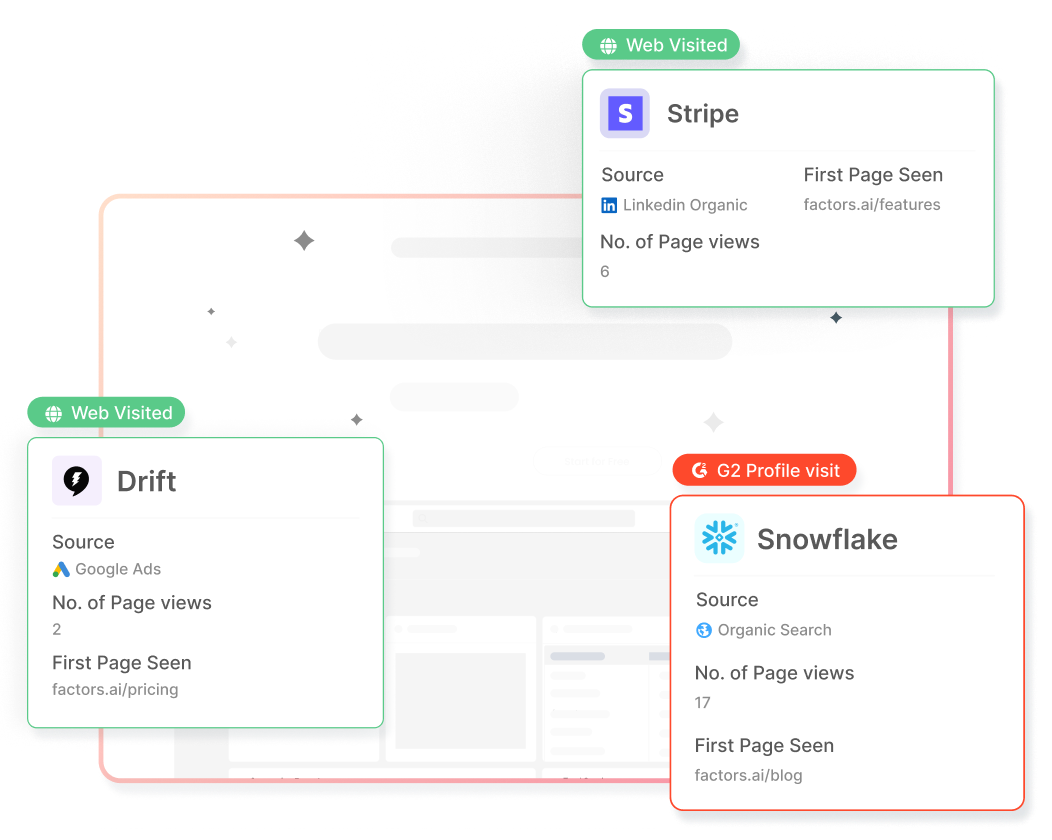
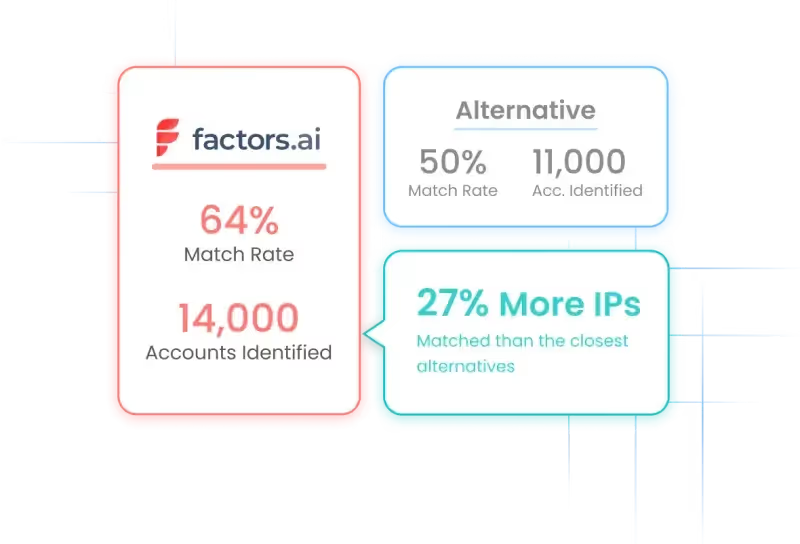
Of course, every tool featured on a list of Leadfeeder alternatives must be capable of identifying and tracking accounts visiting the website. Factors is no exception to this. In fact, as a result of its collaboration with 6sense, Factors taps into enterprise-grade IP data to identify up to 64% of anonymous companies — including firmographics (employee headcount, industry, location, etc) and website activity (page visits, time spent, scroll-depth, etc).
Factors also provides real-time Slack alerts to help teams stay on top of high-intent visitors and strike while the iron’s still hot. These alerts can be configured to go off based on specific firmographic features and website behavior — so you can target ICP companies visiting your site.
2. Account Scoring & Timelines
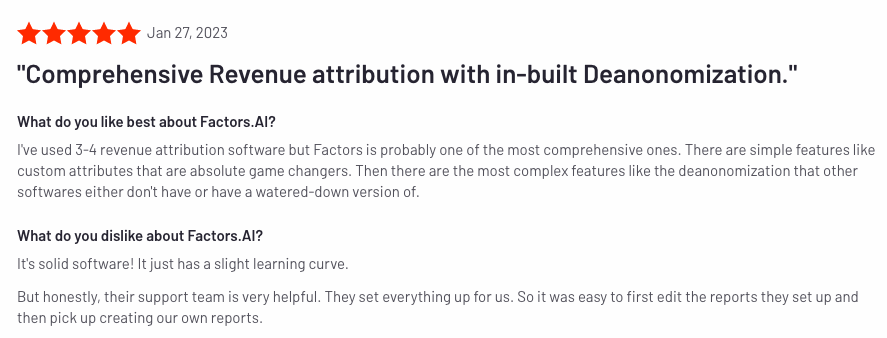
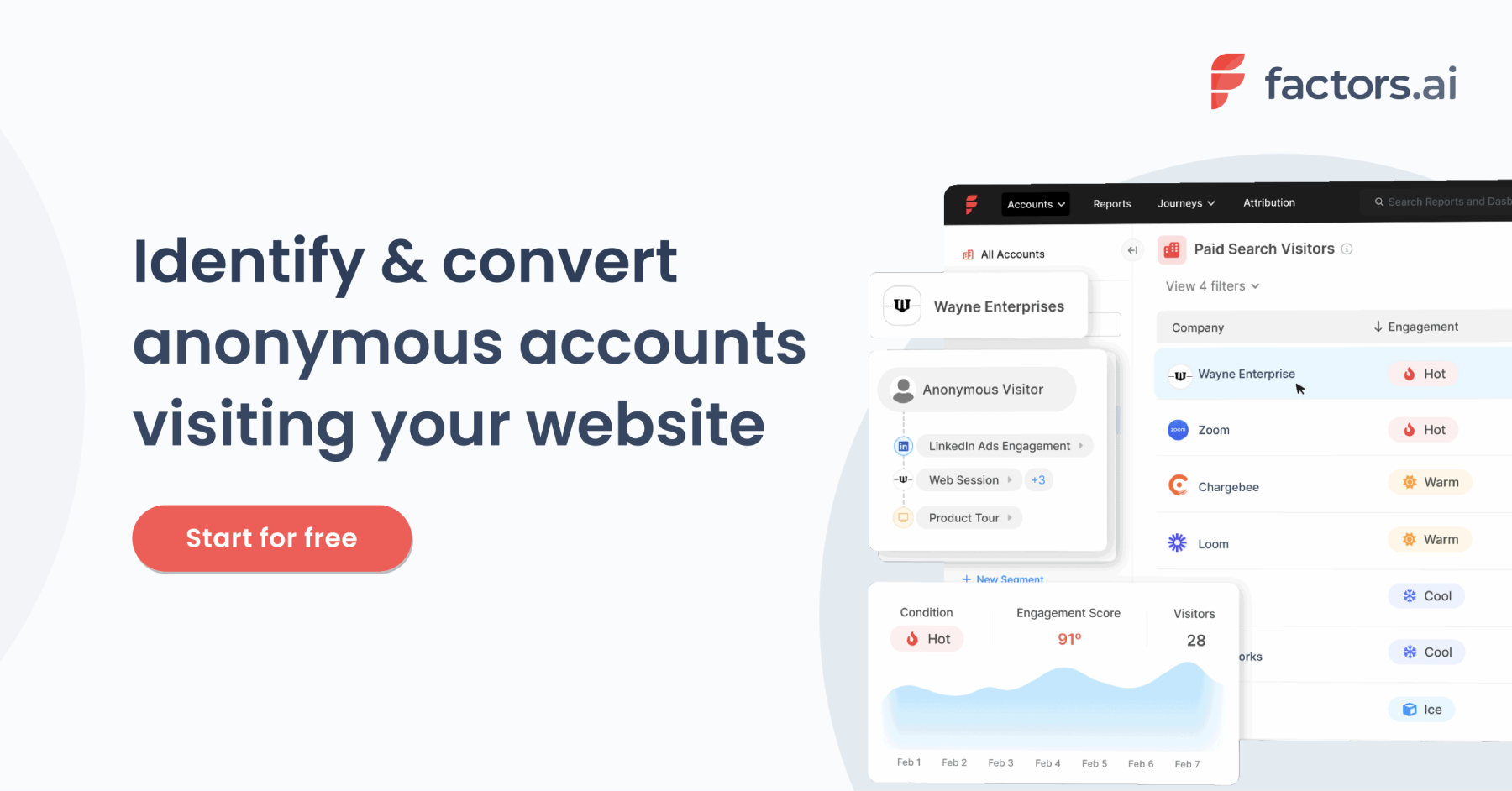
Factors integrates with campaigns, website, and CRM data to provide cross-channel account scoring and full-funnel timelines across the customer journey. With this feature, users can see exactly what touchpoints (ads, blogs, emails, webpages, etc) are influencing accounts to progress from top-of-the-funnel visitors to paying customers. Users can identify and prioritize high-intent accounts for focused outreach and re-marketing efforts
3. Advanced Analytics:
Unlike other solutions on this list (including Leadfeeder), Factors provides a wide range of analytics and attribution capabilities in addition to visitor identification. A few advanced analytics features include:
- ABM analytics - Integrates with ad platforms, CRMs, CDPs and more to unify reporting and support campaign analytics, website analytics, funnels, and more at an account level.
- Path analysis - View aggregate user behavior and identify points of inflection in conversions and drop-offs along the customer journey
- Multi-touch attribution - Connect the dots between go-to-market initiatives and pipeline, optimize resource allocations across campaigns, and prove marketing ROI with a wide range of multi-touch attribution models.
{{INLINE_CTA_A}}
Benefits of Factors.ai
Here are a few reasons why you may prefer Factors.ai to other tools:
1. Data accuracy: As previously mentioned, Factors taps into 6sense’s extensive database to provide industry-leading website visitor identification. In fact, rigorous testing with a sample data set of over 20,000 domains reveals that Factors identifies upto 27% more accounts than the closest alternatives — including established brands such as Clearbit and Demandbase.
2. Granular metrics: Given Factors’ roots in account analytics, it’s capable of reporting granular metrics and events as compared to other visitor identification alternatives. A few of these include:
- % scroll-depth
- Auto-button captures
- Cursor engagement
- Page time spent
3. Scoring & Alerts: Not all your website visitors are immediately read-to-buy. Some are further along the funnel than others. According, Factors supports custom account scoring models so you can qualify and be alerted to high-intent, ICP accounts engaging with your company in real-time.
Drawbacks of Factors.ai
Contact-level enrichment - No privacy-compliant software can identify exactly which individual visited a website without having a visitor explicitly submit a contact form. That being said, the majority of tools on this list can source a list of ideal prospects to reach out to from the companies they’ve identified.
At the moment, Factors cannot provide this information natively. Instead, users can find contact information on third party tools such as Zoominfo or Apollo.
Factors.ai Pricing
Learn more about pricing here: factors.ai/pricing
Curious to see Factors in action? Book a personalized demo here.
{{INLINE_CTA_A}}
2. Albacross
Next up, we have Albracross. Albracross is one of the leading visitor identification and intent data companies in Europe. The Sweden-based platform works with over 10,000 companies to provide customer data enrichment, sales alerts, and intent signals.

Key Features
1. Account Identification: Like the other tools on this list, Albacross identifies anonymous accounts, firmographic information and visitor intent. Albacross features one of the largest proprietary first-party databases in the world.
2. Personalization: Albacross natively integrates with popular personalization tools such as Optimizely and VWO to customize website content based on who’s visiting the site. This is a powerful feature for product marketers looking to identify visitors and tailor messaging based on their profiles.
3. Display ads: A nifty feature offered by Albacross is the ability to launch and monitor display ads within the platform itself. The software partners with several publicists such as The New York Times and Daily Mail to distribute account-level targeted ads.
Benefits of Albacross
Here are a few reasons why you may prefer Albacross to other tools:
1. Experimenting: Given that Albacross is one of the few Leadfeeder alternatives to integrate with personalization tools, it offers the unique benefit for product marketers to experiment and run A/B tests in conjunction with visitor identification and intent data.
2. Customer success: Several reviews rave about Albacross’s stellar customer success management. Given that Albacross is considered to be an involved, enterprise-level tool, it’s essential to have this level of support to get the most value out of the product.

Drawbacks of Albacross:
Here are a few reasons you may consider other tools over Albacross:
1. Rigid firmographics and filters - Albacross seems to lack agility when it comes to filters and breakdowns. Reviews reveal that it’s currently not possible to filter identified companies based on firmographics such as name or size. As a result, users seem to find sorting and reporting somewhat challenging.

2. Buggy integrations: Multiple reviews claim that Albacross’s integrations, especially with CRMs like Salesforce, could do with some work. Given that visitor identification is primarily used to support ABM, this can be a major drawback to B2B teams. Tools like Zapier may be used to smoothen out workflows for now.

3. Lead Forensics
Founded in 2009, Lead Forensics is the oldest, most established website visitor identification software in this list. They own a sizable database of over 1.4 billion IP addresses, adding up to 55 millions contacts every year.

Key Features
Lead Forensics doesn’t have too many bells and whistles as compared to the other tools on this list. Its primary features are limited to visitor identification and contact data.
1. Account identification: Like Leadfeeder, Factors, and Albacross, Lead Forensics identifies anonymous businesses visiting your website by connecting the dots between IP addresses and company names. In the case of multinational companies, Lead Forensics is capable of showing which specific office is interacting with your website. This is handy for businesses looking to sell to large corporations.
2. Contact data: Lead Forensics also helps teams identify key contacts within companies visiting your website to assist with retargeting and outbound reachout. Here’s a brief summary of the kind of details that Lead Forensics can provide:
- Business name
- Contact details of key decision makers
- Telephone, email and LinkedIn details
- Demographics
- Search behavior
- Financial data

Benefits of Lead Forensics
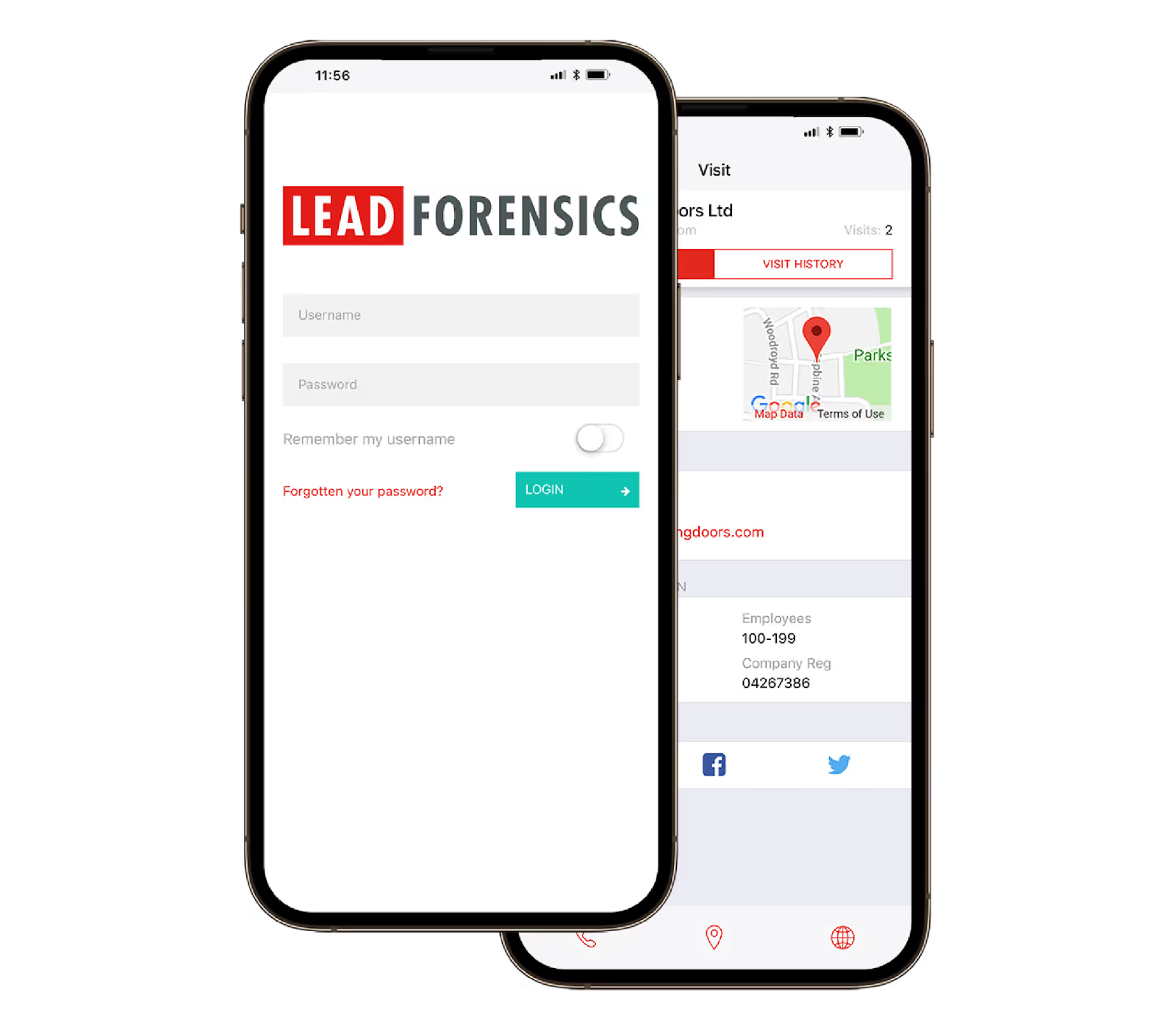
A unique benefit with Lead Forensics is its mobile application. With their “Essential” plan, users can have trigger reports sent directly to their phones.
Drawbacks of Lead Forensics
Here are a few reasons you may consider other tools over Lead Forensics:
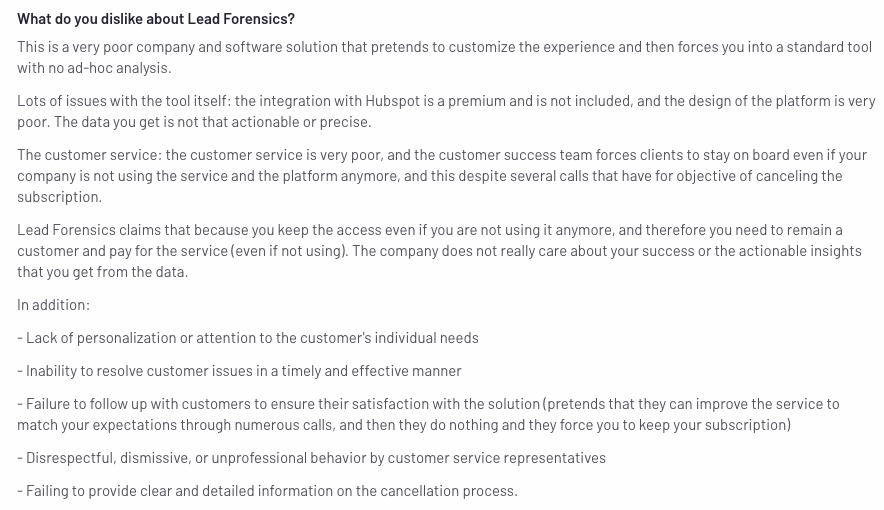
1. Poor UI - Lead Forensics is one of the oldest visitor identification software around. While experience is generally a positive sign, several users complain about Lead Forensics’ UI remaining outdated and unintuitive. Users find the tool to have limited functionality in terms of ad-hoc analysis, dashboards, and filters as well.
2. Pricing - While Lead Forensics does not openly reveal its pricing plans, it’s generally considered to be on the more expensive side. While this may not be a barrier for larger, enterprise-level companies, pricing may be prohibitive for small to mid-market start ups — especially when there are cost-effective alternatives available.

{{INLINE_CTA_A}}
4. Clearbit
Fourth in our list is Clearbit. Clearbit is another well-established B2B data activation platform that offers a wide suite of products within its platform.

Key Features
Clearbit is divided into three broad products:
1. Reveal - Clearbit identifies anonymous website visitors using IP-lookup. Given that every tool on this list does this, data accuracy and pricing are two important considerations when differentiating between alternatives.
2. Enrichment - Clearbit also provides firmographics from over 250 data sources. This includes technologies, headcount, revenue, location, contact information, and more.
3. Capture - like Leadfeeder Contacts, identifies best-fit contacts from companies visiting your website to reach out to with retargeting campaigns or outbound efforts

Benefits of Clearbit
1. Free plan: While Clearbit’s paid plans are relatively expensive, they offer a nifty free plan to de-anonymize anonymous traffic. That being said, the free plan is quite limiting as users can enrich only 50 domains a month. This becomes an issue as website traffic starts to scale over time. Still, it’s free — so who can complain?
Here’s a breakdown of what Clearbit’s free plan offers:
- Identify site traffic
- Calculate total addressable market size
- Determine ideal client profile
- Enrich domains and emails (up to 50 per month)
- Find email addresses (up to 100 per month)
2. Smart chat: Smart chat is a handy feature for sales reps to connect with high-value, high-intent visitors with personalized conversational ABM while visitors are live on the site. Chat prompts can be triggered based on visitor characteristics and behavior such as industry, page views, headcount, etc.
Drawbacks of Clearbit
1. Pricing: Clearbit does not reveal pricing details on its website. But several user reviews suggest that pricing is on the higher side for early to mid-stage startups.

2. Customer support: Clearbit works with a wide range of clients from early-stage startups to enterprise-level companies. Users from the former seem to face issues when it comes to customer support, claiming that it’s often slow and inadequate.

5. Visitor Queue
The final option on our list is Visitor Queue. Visitor Queue is a Canada-based visitor identification and personalization platform that identifies the name, contact detail and user data of accounts visiting your website.

Key Features
1. Visitor identification: What separates Visitor Queue from the rest of the tools on this list is its ability to aggregate company social profiles in addition to standard firmographics and contact information.
2. Personalization: Like Albracross, Visitor Queue allows users to personalize their website based on configurable criterias such as industry, source/medium, location, and more. This helps product marketers differentiate their brand from competitors and experiment with different messaging to improve conversions.
Benefits of Visitor Queue
1. Unlimited users - Most tools on this list (excluding Factors.ai) limit the number of seats per account. Given that visitor identification is used by sales, marketing, and customer success teams, it’s valuable to have an unlimited number of users with Visitor Queue.
2. Pricing - Visitor Queue is a more affordable option as compared to the likes of Clearbit and Lead Forensics with prices starting at just $31/month to identify 100 companies per month. This makes it a good option for early-stage teams that are working with tight budgets.
Drawbacks of Visitor Queue
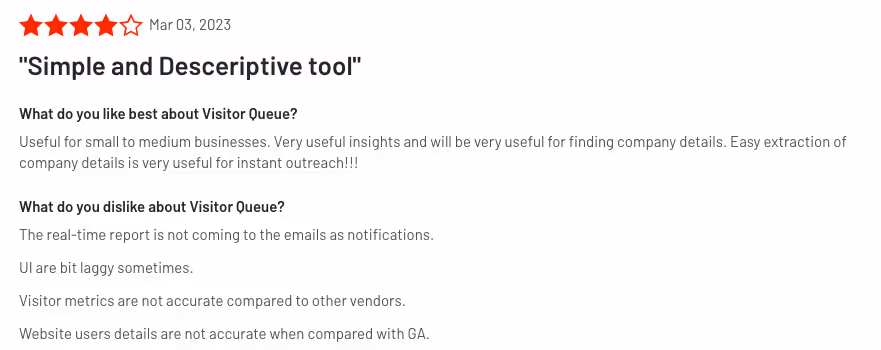
1. Rigid reporting - While Visitor Queue does well at the basics, users complain about its restrictive UI when it comes to ad hoc reports, filters, and dashboards. As a company starts to grow, its requirements for tailor-made reporting do too. Visitor Queue wouldn’t back a good fit for custom usage.

2. Data issues - User reviews complain about data inaccuracies with Visitor Queue. While no tool is perfect, Visitor Queue seems to lag behind industry-standards in terms of accurately identifying visitors. While it’s great to have an inexpensive alternative, a visitor identification tool won’t be of much value unless it identifies the right visitors.

And there you have it! A brief summary of 5 comprehensive Leadfeeder alternatives to help you identify anonymous website visitors. Each of these tools have their pros and cons — and one is likely to be better suited to your needs than the others.
Top Leadfeeder Alternatives
Businesses seeking cost-effective and feature-rich website visitor identification tools can explore various alternatives.
1. Leading Alternatives: Factors.ai for advanced analytics and attribution, Visitor Queue for affordability and effective lead tracking.
2. Key Features: Pricing flexibility, seamless integrations, high data accuracy, and real-time visitor insights.
3. Decision Factors: Evaluate based on budget, integration needs, and business-specific requirements.
Selecting the right platform enhances lead generation, improves marketing efficiency, and drives better conversion rates.
Let’s make the decision easier for you:
- If pricing and account-level data accuracy are priorities, Factors.ai is likely the best option.
- If the ability to personalize your website based on who’s visiting your site is what you’re looking for, Albacross and Visitor Queue are two great options.
- If you’re a larger enterprise without budget constraints, Clearbit could be the right option.
Factors.ai identifies up to 64% of anonymous visitors, the highest match rate in the industry. Looking to learn more about how Factors can help? Book a personalized demo here!
All in all, choosing the right Leadfeeder alternative depends on your priorities, whether that’s pricing, data accuracy, personalization, or advanced analytics. Tools like Factors.ai and HockeyStack offer robust analytics and attribution for GTM teams. Visitor Queue and Albacross cater to product marketers looking to personalize based on intent. Clearbit and Lead Forensics serve teams that require enriched contact data and ABM alignment. Evaluate your needs and test out a few platforms before you make the switch, the right visitor ID tool can make a tangible difference to your pipeline and outreach efficiency.
{{INLINE_CTA_A}}