
Top 22 Account-Based Marketing (ABM) Tools for 2027
This guide compares 22 ABM tools on pricing, features, and real customer feedback. Some run your entire motion, while others are more specialist tools.
.avif)
Senior Content Marketing Manager

Content Marketer



.svg)


Quick Summary:
- We have included both full ABM suites and specialist tools. Many teams do not need to replace their entire stack. They need a better way to handle one part of ABM.
- Factors.ai is a strong fit if you want account intelligence, paid activation, sales workflows, and attribution in the same ABM platform without moving into a large enterprise suite.
- Demandbase and 6sense cover some of the broadest enterprise ABM requirements, including intent, account prioritization, advertising, and sales intelligence.
- Bombora is relevant when third-party intent data is the main gap in your existing stack.
- Vector and Influ2 go deeper on contact-level advertising when targeting specific people matters more than reaching the account as a whole.
- Userled and Recotap are worth looking at for LinkedIn-heavy ABM and personalized campaign activation.
- Common Room and Warmly are more useful when the business needis turning buyer signals into sales action.
An account-based marketing platform helps B2B teams identify the accounts they want to reach, understand which ones are showing interest, coordinate marketing and sales activity around those accounts, and measure whether that activity turns into pipeline.
The category now covers a much broader range of products.
Some ABM platforms cover most of the motion, including identification, intent, scoring, advertising, sales workflows, and ABM attribution. Others go much deeper on one job, such as third-party intent or contact-level advertising.
This guide looks at 22 ABM platforms and specialist tools based on what they actually do, how they fit into an existing GTM stack, current ABM platforms pricing where it is published, and what customers say after using them.
What buyers actually care about when evaluating ABM platforms
To understand how teams evaluate ABM platforms in practice, we reviewed more than 200 Factors.ai prospect calls from the past 18 months where competing and adjacent tools came up. Four questions surfaced repeatedly:
- Does the cost make sense for how much of the platform the team will actually use?
- Can the team understand why an account has been prioritized?
- Is the product identifying companies, individual buyers, or both, and how reliable is that data?
- Will it replace parts of the existing stack or sit alongside them?
Why trust us
This article is published by Factors.ai, one of the platforms covered below. We know our own product more closely than the others and want to be upfront about that.
More than 1,000 GTM teams use Factors.ai, including Sprinklr, Descope, and Everstage. Working with these teams gives us a close view of what B2B companies need from an ABM platform.
We checked every product against current vendor documentation and recent customer feedback. We also say when a specialist tool is better suited to a particular job.
Quick Comparison of the Top 5 ABM Platforms
A Detailed Look at the Top 22 ABM Platforms for 2027
1. Factors.ai
Factors.ai is an AI ABM and attribution platform for B2B GTM teams. It helps teams find accounts showing intent, understand why they are active, and turn that information into advertising or sales action. Multi-touch attribution shows how marketing and sales touchpoints contribute to pipeline across the buyer journey.
.avif)
It is one of the few ABM platforms to bring first-party intent, third-party intent, business signals, and technographic data into a single account timeline. You get the context behind an account’s interest, not just the name of a company visiting your website.
Teams can control how these signals affect account scores and choose the outcome their predictive model should forecast.
Scout is Factors.ai's AI layer that lets you investigate account activity and automate workflows. And through the Factors.ai MCP, the same intelligence and actions can be accessed from ChatGPT or Claude, allowing teams to work from the AI tools they already use.
Here's what a few of our customershave to say:
“We saw 23% more MQLs from our ABM campaigns and moved from guesswork to making informed decisions.” Steve Colberg, Head of Growth at Rocketlane.
“Factors gave us the clarity we needed with LinkedIn Ads, which influenced 15% of our enterprise pipeline.” Arun Pattabhiraman, CMO at Sprinklr.
Key features of Factors.ai
- Website visitor identification: Waterfall enrichment identifies more than 75% of visiting companies and adds firmographic and behavioral context.
- Cross-channel activation and attribution: Activate high-intent audiences across LinkedIn, Google, Microsoft Ads, Reddit, StackAdapt, and other paid channels. Multi-touch attribution shows how each channel contributes to pipeline.
- Account intelligence: Website visits, CRM events, campaign activity, and intent can be viewed across the same account journey.
- Scout AI agents: Teams can ask questions about account data in plain English or trigger actions when selected signals appear.
Factors.ai Pricing
Factors publishes four plans and offers startup discounts.
- Lite: $199/month after the trial. Website visitor identification, traffic analysis, and account alerts.
- Basic: $6,000/year. Includes 75%+ company identification, account segmentation, LinkedIn Ads influence reporting, CRM sync, and up to 50 reports.
- Growth: $20,000/year. Adds custom scoring, G2 intent, and more advanced ABM analytics.
- Enterprise: Starts at $30,000/year. Adds predictive account scoring, LinkedIn impression control, dynamic audience syncing, and more advanced intent analysis.
Pros of Factors.ai
- The account journey is easier to follow across channels: Early intent, website activity, advertising, and pipeline can be viewed together rather than reconstructed from separate dashboards. Read the user review.
- Day-to-day campaign analysis is relatively approachable: HubSpot and Salesforce integrations also keep much of the workflow close to systems teams already use.
Cons of Factors.ai
- Reporting can take some setup: Teams wanting highly specific dashboards may need to configure reports before they get the exact view they want. Read the user review.
- Full attribution and ad activation require a larger budget: These capabilities are available on the Enterprise plan, which starts at $30,000 a year. This is still below the cost of many enterprise ABM platforms, but may be difficult for an SMB to justify.
2. Demandbase
Demandbase is the company behind Demandbase One, its main ABM platform for sales and marketing. Teams can buy the full platform or start with its Advertising or Data products separately.
Within Demandbase One, account intelligence helps feed advertising, sales workflows, and measurement. Its native B2B DSP is an important distinction for teams that want to run account-based advertising within the platform rather than send audiences to another tool.
One long-time Demandbase user (from our Sales calls) described gaps in a specific form-enrichment workflow, where the company and contact information required by the team was not always returned. The same buyer was not convinced competing platforms used materially different technology.
So, the useful evaluation question is therefore not simply which vendor claims the highest match rate, but whether the platform can reliably return the information required by your most important workflows.
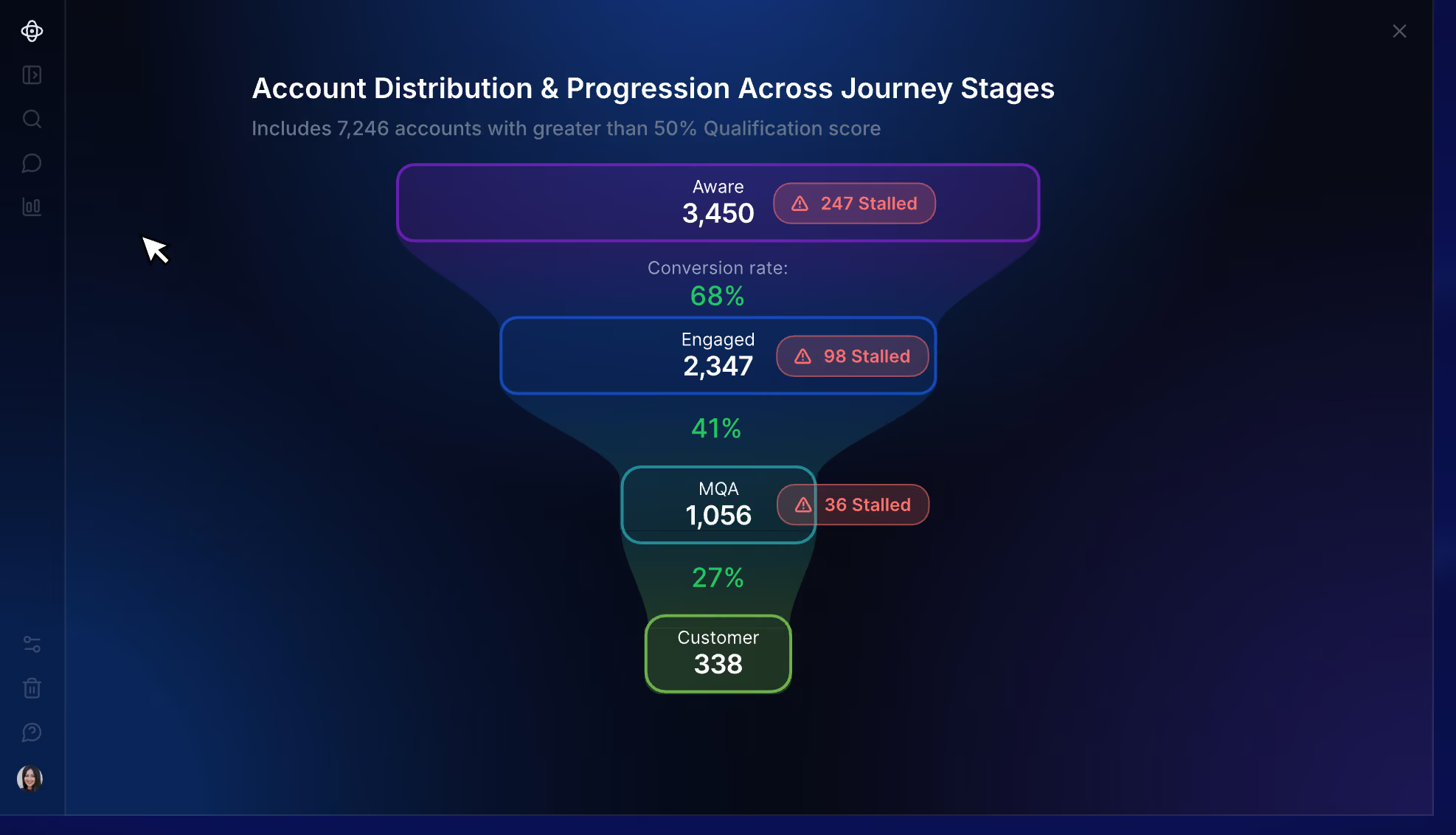
Demandbase Pricing
- Account intelligence: First-party GTM data and third-party signals are used to identify in-market accounts, engagement, and buying groups.
- B2B advertising: Demandbase operates its own DSP for account-based advertising.
- Demandbase AI: Pipeline goals and buying signals feed recommendations about which accounts and GTM plays deserve attention.
- Orchestration and measurement: Account activity can trigger marketing or sales actions and be measured against pipeline.
Pricing of Demandbase
Demandbase does not publish dollar pricing. Contracts use a customized platform fee with additional user fees.
Pros of Demandbase
- Account intelligence goes deep enough for complex prioritization: Marketing and sales have more context before deciding which accounts deserve time or budget.
- Advertising is a substantial part of the product: Teams that want account intelligence to feed directly into media execution do not need a separate DSP. Read the user review.
Cons of Demandbase
- Implementation takes time: Demandbase needs to be configured around your data and GTM process before teams can use it properly.
- Highly customized configurations can take work: Building specific views and setups is not always straightforward. Read the user review.
3. 6sense
6sense is an enterprise ABM platform best known for predicting where accounts sit in the buying journey. Signalverse is the data foundation behind those predictions. It tracks research happening outside your website and pairs it with activity from your own channels. Predictive models use this information to place accounts into buying stages.
Marketing can use prioritized accounts in ad campaigns, while sales reps get account context and contact data for outreach.
Across the calls we reviewed, current and former 6sense users were not usually questioning its feature breadth. However, cost relative to the value the team was getting came up repeatedly.
Key features of 6sense
- Intent data and account identification: Signalverse uses off-site research activity, first-party data, and identity resolution.
- Predictive account scoring: Accounts move through buying stages based on purchase likelihood.
- Advertising: 6sense has its own B2B DSP and can also activate audiences on LinkedIn, Google Ads, and Meta.
- Sales Intelligence and RevvyAI: Sales teams get account prioritization, contact data, alerts, and AI-generated account context.
6sense Pricing
6sense does not publish pricing for Revenue Marketing or its paid Sales Intelligence configurations. All require a custom quote.
Based on Vendr’s procurement data, smaller contracts can start at around $50,000 a year, while larger enterprise agreements can exceed $300,000. The final price depends on the products purchased, data credits, and the size of the deployment. Advertising spend is charged separately.
Pros of 6sense
- Intent and predictive stages help narrow a large market: This is useful when the main problem is deciding which part of a large TAM deserves attention now.
- Sales gets useful context before outreach: Reps can see account activity and buying signals alongside contact information. Read the user review.
Cons of 6sense
- Getting comfortable with the platform can take time: There is a meaningful learning curve once teams move beyond the basic workflows.
- Scoring transparency is worth testing during evaluation: Buyers evaluating 6sense raised this concern repeatedly. The platform shows the signals contributing to its predictions and allows teams to configure inputs, but it does not expose the internal mathematical weightings used by the model. This matters if you want direct control over how each signal affects an account score. Read the G2 review
- More involved services may add to the implementation footprint: Custom ABM integrations, training, and deeper technical support can sit within the Professional Services add-on. Read the user review.
Recommended Read: 6sense alternatives
4. Fibbler
LinkedIn’s native analytics become limited when you want to connect campaign activity with pipeline. You can see how an ad performed, but it is harder to tell which companies were exposed and whether those accounts later became opportunities.
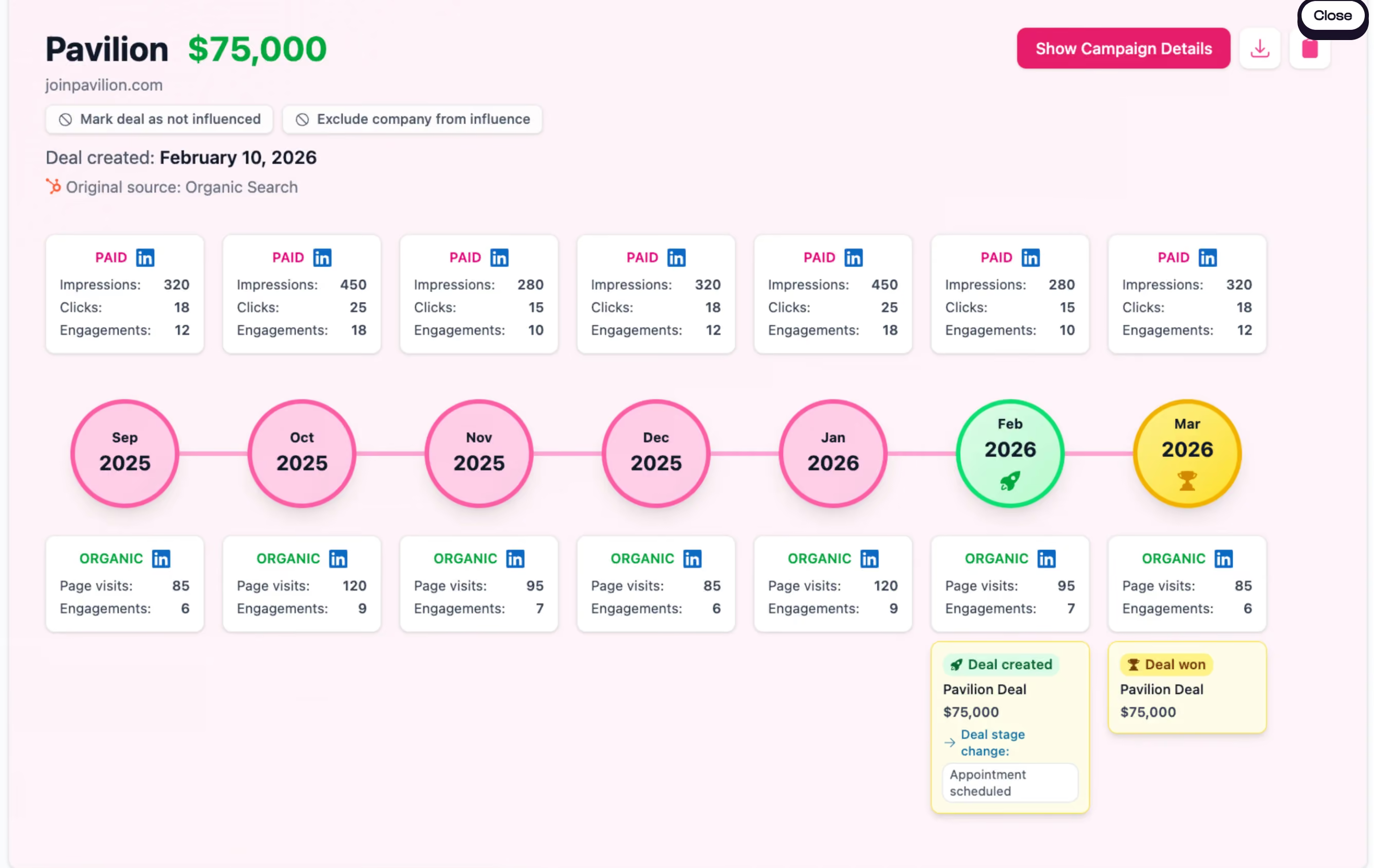
Fibbler handles this through LinkedIn’s Company Intelligence API. It matches paid and organic engagement with company records in your CRM, including impressions that never led to a click or form fill. Google Ads attribution is available as a separate add-on.
Key features of Fibbler
- LinkedIn revenue attribution: Company-level impressions and engagement can be connected with CRM pipeline.
- Account journeys: Each company gets a timeline showing advertising activity before an opportunity is created or closed.
- LinkedIn campaign controls: Marketers can cap impressions, schedule campaigns, exclude irrelevant job titles, and pass engagement signals into other systems.
Fibbler Pricing
- Growth: $89/month
- Unlimited: $129/month
- Agency: $159/month
- Google Ads: $59 per account/month
A 30-day free trial is available.
Pros of Fibbler
- The reporting goes beyond campaign metrics: It places ad spend alongside influenced pipeline and closed-won revenue, making LinkedIn’s commercial impact easier to explain.
- Setup is quick: Users report getting Fibbler running without the lengthy configuration associated with broader ABM and attribution platforms. Read the user review.
Cons of Fibbler
- Channel coverage is limited: LinkedIn is the core product, while Google Ads requires a separate add-on. Teams running campaigns elsewhere will need another attribution platform.
- Identification stops at the company level: You can see which company engaged, but not the individual behind the activity. Sales may need another data provider before acting on the signal.
5. Bombora
Bombora provides third-party intent data for teams that already have the rest of their ABM stack in place. Company Surge, its core product, identifies when a company is researching a topic more heavily than it normally does. This helps teams distinguish growing interest from routine research activity.
You can try this yourself. Factors and Bombora built a free tool that surfaces companies actively researching your category.
MiQ used Company Surge to expand a target list of roughly 1,000 companies with additional in-market accounts. According to Bombora, the expanded audience was 115% larger and generated 89% more incremental leads.
Key features of Bombora
- Company Surge: Compares research across selected topics with each company’s historical activity. A score of 60 or higher indicates a statistically significant increase.
- Intent-based audiences: Company Surge audiences can be activated through platforms such as LinkedIn, Reddit, and StackAdapt, as well as major DSPs.
- B2beacon: Measures advertising reach and engagement at the account and buying-group level using direct integrations with advertising platforms.
Bombora Pricing
Bombora does not publish pricing for Company Surge. Buyers need a custom quote.
Pros of Bombora
- Signals are relative to each account: Company Surge looks for increases against a company’s usual research activity instead of treating every content interaction as intent.
- It fits into an existing stack: Bombora feeds intent data into the platforms you already use for targeting and sales follow-up.
Cons of Bombora
- Results depend on topic selection: Broad or poorly chosen topics can produce noisy account lists. Teams still need to decide which signals are strong enough to act on. Read the user review.
- It does not run the wider ABM program: Bombora provides intent data, advertising audiences, and campaign measurement. Campaign execution and sales orchestration happen in other tools.
6. Vector
Vector is a niche tool in the ABM space. It is designed for demand gen teams that want to build ad audiences around named buyers instead of targeting whole accounts.
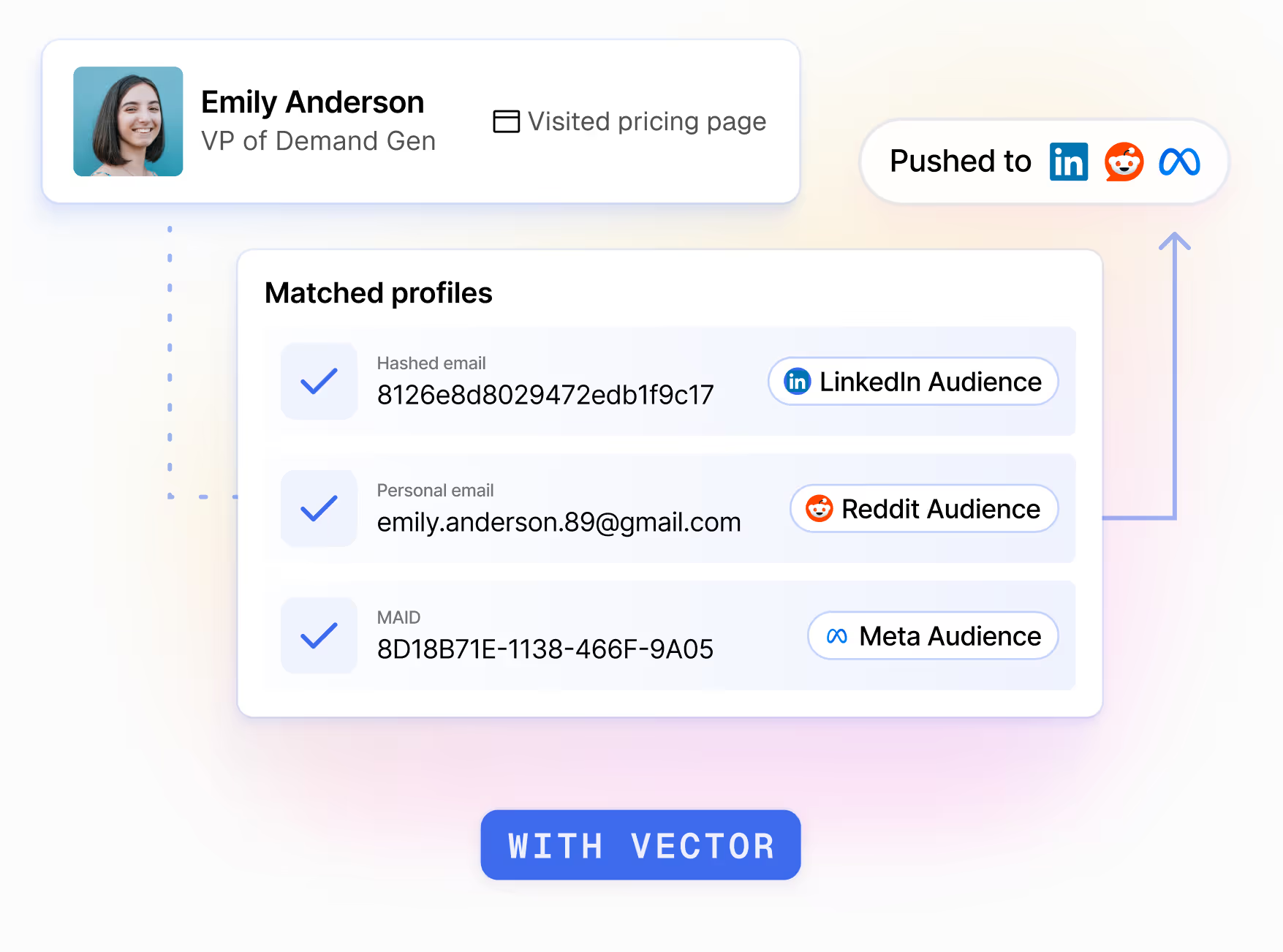
For the contacts it can identify, Vector uses website activity, ad engagement, and off-site research to keep paid audiences current. After a late-2025 repositioning away from sales-led outbound, this became the product’s main focus. Audiences can be synced across LinkedIn, Google, Meta, Reddit, and other supported channels.
Key features of Vector
- Reveal and Ad Reveal: Identifies some website visitors and ad clickers by name, title, and company.
- Off-site research: Surfaces contacts researching relevant topics or competitors before they visit your website.
- Signal-driven audiences: Adds or removes contacts as buyer activity changes, then syncs the updated audiences with connected ad platforms.
Vector Pricing
- Reveal: From $399 to $999/month, depending on identified visitor volume. A 14-day free trial is available.
- Target: Starts at $3,000/month with an annual commitment. Pricing scales with the number of active audiences.
Pros of Vector
- Advertising can target known buyers: Marketers have more control over who enters an audience and can preview the contacts before launching a campaign. Read the user review.
- Audiences update automatically: Buyer activity can move directly into paid campaigns without repeated CSV uploads.
Cons of Vector
- It is not a full ABM suite: Broader account scoring, journey analytics, and sales orchestration still require other tools.
- Website identification is partial: Vector says it surfaces 15% to 30% of website traffic at the contact level. Actual match rates vary by traffic source.
- Contact-level activation requires a sizeable commitment: The Target plan starts at $36,000 per year, which may put it beyond the budget of smaller teams.
7. AdRoll ABM
AdRoll ABM is the current name for RollWorks, which was rebranded in August 2025. The platform includes buyer insights and orchestration, but advertising and retargeting remain the clearest reasons to consider it. It fits ABM programs where paid media does much of the work of reaching target accounts.
The call research from Factors.ai points to the same strength. Two teams kept RollWorks for programmatic advertising while adding a separate platform for account intelligence or attribution. One buyer preferred it to Google paid search because of its ICP filtering, cost, and traffic quality. At another company, an internal analysis found RollWorks website data more influential on pipeline than 6sense.
Key features of AdRoll ABM
- Buyer insights: Keyword intent, ICP scoring, and predictive signals help teams identify accounts worth pursuing.
- Account-based advertising: Campaigns can target named accounts across web, CTV, LinkedIn, and Meta. Website visitors can also be retargeted at the account level.
- Journey stages and orchestration: Account activity can update journey stages and feed alerts or account data into connected CRM workflows.
AdRoll ABM Pricing
AdRoll does not publish dollar pricing for its three main ABM packages: Account-Based Advertising, Account-Based Marketing + Advertising, and Account-Based Marketing.
Account-Based Retargeting has no separate platform fee. Customers pay for the media they use.
Pros of AdRoll ABM
- Campaign setup is approachable: Creating audiences, launching campaigns, and monitoring performance is relatively easy.
- Support is consistently strong: Account managers and customer success teams receive positive feedback, particularly for onboarding and Salesforce reporting.
Cons of AdRoll ABM
- Detailed reporting can be limited: High-level ABM campaign metrics are readily available, but reviewers want more granular attribution and greater reporting flexibility. Read the user review.
- Keyword intent can produce irrelevant results: Some users report seeing accounts that do not match their selected topics or needing more control over keyword grouping.
8. HubSpot
HubSpot takes a different approach to ABM. Instead of selling a standalone product, it has built account-level tools into its existing products such as Marketing Hub and Sales Hub. This works best for teams already using HubSpot, since marketing and sales can manage target accounts from the same records they use for campaigns and deals.
Buyer Intent adds website activity and off-site research to those account records.
There are several customers who have benefitted from HubSpot's ABM model. For instance, Propeller Aero reported 23% higher average contract value and a 12% higher close rate for ABM deals.
Key features of HubSpot
- Target accounts and buying roles: Teams can flag priority companies, assign roles such as Decision Maker or Budget Holder to contacts, and review account activity and deals.
- Buyer Intent: HubSpot surfaces companies visiting selected pages or researching relevant topics. Accounts can be added to the CRM or enrolled in workflows.
- LinkedIn activation and reporting: Target-account lists can sync to LinkedIn audiences, while ABM reports track engagement and pipeline.
HubSpot Pricing
HubSpot does not sell ABM separately. Its core ABM tools are available with either Marketing Hub Professional or Enterprise, or Sales Hub Professional or Enterprise. Some features have additional requirements.
Marketing Hub pricing starts at:
- Professional: $800/month, plus a mandatory $3,000 onboarding fee
- Enterprise: $3,600/month, plus a mandatory $7,000 onboarding fee
Extra contacts and seats increase the total cost. Certain Buyer Intent actions also use HubSpot Credits.
Pros of HubSpot
- Buying roles sit inside the CRM: Teams can see who is involved in an account without maintaining a separate buying-group database.
- Workflow automation is flexible: Account status, intent criteria, and deal activity can trigger routing or record updates.
Cons of HubSpot
- There is no simple ABM package: The features available depend on the HubSpot products, editions, and seats you buy.
- Advanced setup takes time: More complex workflows and reporting have a steeper learning curve than the basic CRM.
9. Userled
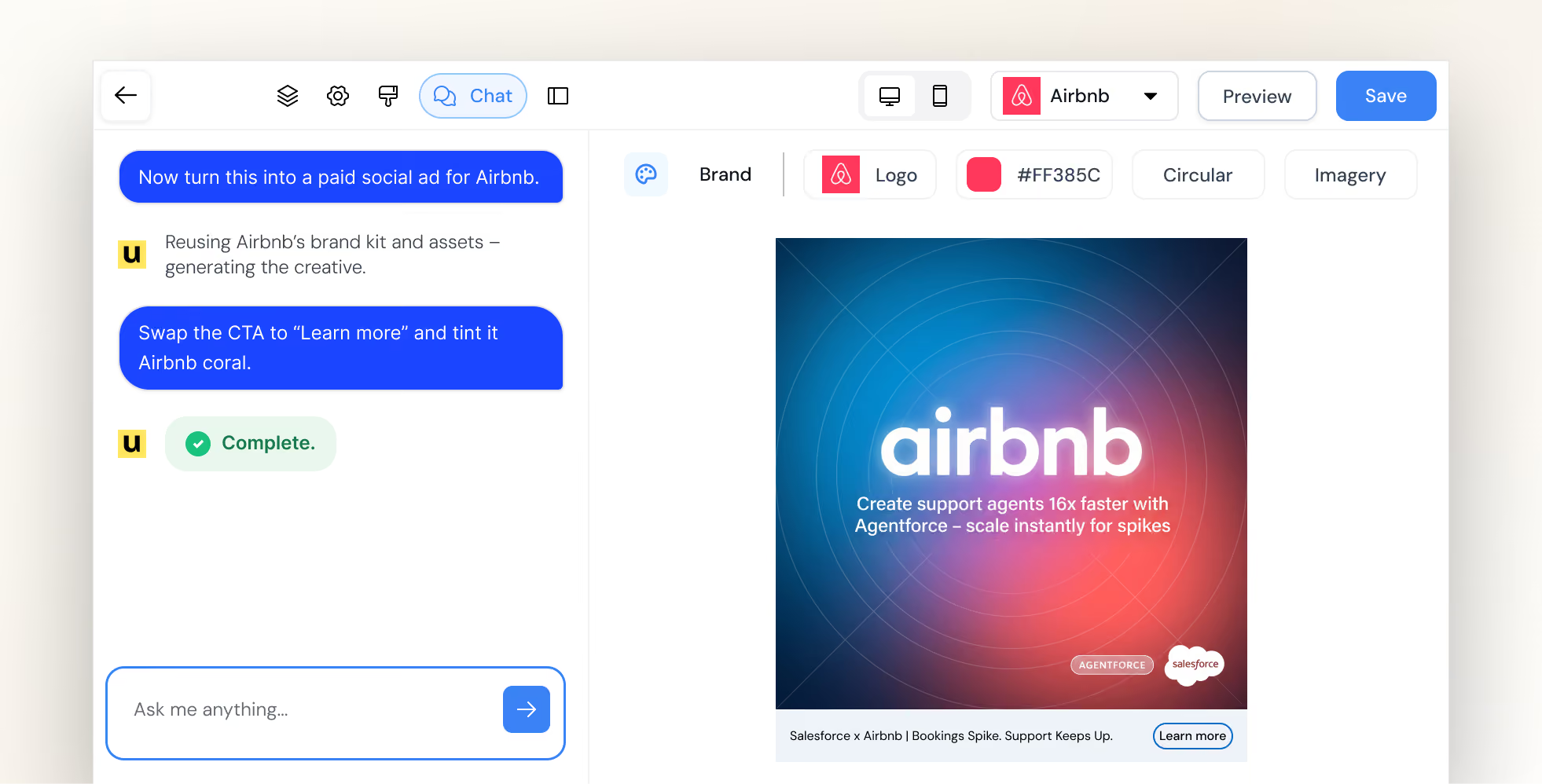
Userled is an ABM activation platform for teams that already have account and intent data but need a faster way to act on it. The platform creates personalized LinkedIn campaigns, microsites, and sales content without requiring every asset to be built manually.
Userled 2.0 brings in AI agents that help build campaigns and content. These agents can also adjust LinkedIn bids and surface engagement insights for sales.
Key features of Userled
- Personalized LinkedIn campaigns: Teams can create up to five ad variations per account, sync campaigns to LinkedIn, and track engagement at account and contact level.
- Microsites: Account-specific pages can be created from templates without relying on design or development for every campaign.
- Sales Plugin: Reps can create and share personalized content from a browser extension, then see how individual contacts engage.
- AI campaign agents: Separate agents handle campaign creation, content, bidding, and engagement insights.
Userled Pricing
- LinkedIn Ads: Starts at $2,000/month, billed annually
- Microsites: Starts at $2,000/month, billed annually
- Sales Plugin: Starts at $599/month for 10 seats
- Enterprise: Custom
LinkedIn Ads and Microsites are separate modules. Based on the published starting prices, using both begins at $4,000/month before the Sales Plugin or enterprise services.
Pros of Userled
- Personalization can be produced much faster: One customer describes working “at a pace that would be impossible to maintain manually.” Read the user review.
- Support is hands-on: Implementation help and responsive customer support are consistently praised in Userled’s G2 feedback.
Cons of Userled
- Native paid activation is concentrated on LinkedIn: Teams running account-based campaigns across other ad networks will still need their existing advertising tools or integrations.
10. Recotap
LinkedIn Campaign Manager can target a company list, but marketers have limited control over how delivery is distributed across those accounts. A small group of responsive companies can absorb much of the budget while other priority accounts receive little exposure.
Recotap is built to solve this problem. It uses website activity and external intent to map accounts to journey stages, then updates audiences as those signals change. Marketers can cap impressions at the account level, exclude specific companies, and control how spend is distributed across the target list.
Prodapt’s results show why those controls matter. Before using Recotap, 60% of its target accounts were not being reached and CPL ranged from $800 to $1,000. After introducing impression caps and stage-based campaigns, the company reported an 80% increase in account reach and a 66% reduction in CPL.
Key features of Recotap
- Signal-based audiences: Website intent and Bombora data are included. Recotap uses these signals alongside CRM activity to map accounts to journey stages and update segments as behavior changes.
- LinkedIn campaign controls: Marketers can set account-level impression caps, control pacing, exclude unwanted accounts, and move companies between campaigns automatically.
- 1:1, 1, and 1 personalization: Ads and landing pages can change based on the account or segment. Existing landing pages can also be personalized through rules rather than rebuilt from scratch.
- Revenue attribution and CRM sync: Account stages and engagement data sync to the CRM, while LinkedIn activity can be connected with pipeline and closed-won revenue.
Recotap Pricing
The Standard plan costs $1,499/month, billed annually. Enterprise pricing is custom.
Bombora and website intent data are included. Connecting G2 intent requires a separate G2 subscription.
Pros of Recotap
- Sales gets account context rather than another campaign dashboard: Journey stages and engagement scores can help reps see which accounts are warming up and where follow-up should be prioritized. Read the user review.
- Existing landing pages can be personalized: Teams can apply account-specific content rules to pages they already use instead of building a new microsite for every campaign.
Cons of Recotap
- Useful orchestration depends on the initial setup: Teams must define their journey stages, segment rules, and campaign transitions before Recotap can automate them effectively.
- You cannot run multi-channel ad campaigns from Recotap: Paid activation is limited to LinkedIn. Campaigns on other ad networks have to be managed separately.
11. Clay
Clay is not a conventional ABM suite. It is a GTM data and workflow platform used to build account lists when the targeting criteria cannot be pulled from a single database.
A team might want to find companies that recently raised funding, are hiring for a particular role, and use a competing technology. Clay can research those conditions across several data providers and the web, enrich the matching accounts, then send them into the CRM or other campaign tools.
Even in our sales calls, teams discussed using it alongside an ABM platform rather than replacing one.
Key features of Clay
- Waterfall enrichment: Clay can query several providers in sequence for the same field. If the first provider does not return a result, the workflow moves to the next instead of relying on one database.
- Claygent and signals: Claygent researches information from websites and other public sources. Signals can monitor events such as job changes, hiring activity, or company updates.
- Workflow activation: Records that meet selected criteria can update the CRM, trigger outreach, or sync to LinkedIn, Meta, and Google audiences. CRM auto-sync and audience pushes require the Growth plan or higher.
Clay Pricing
Clay’s current plans include:
- Free: 100 Data Credits and 500 Actions per month
- Launch: Starts at $185/month
- Growth: Starts at $495/month
- Enterprise: Custom pricing with an annual commitment
Clay separates Data Credits from Actions. Data Credits pay for information purchased through Clay’s marketplace. Actions cover the work Clay performs, such as running enrichments, calling an AI model, or exporting records. Using your own provider API keys avoids Data Credit charges, but the workflow still consumes Actions.
Pros of Clay
- It handles unusually specific targeting criteria well: Teams are not limited to the fields available in a standard prospecting database. One reviewer describes Clay as a “full research and enrichment engine for outbound.” Read the user review.
- The output does not have to stop at a list: Once an account meets the required conditions, Clay can update records or send the audience into the next campaign and outreach systems.
Cons of Clay
- There is a meaningful learning curve: Waterfalls and conditional logic take time to understand, particularly for teams that have not built enrichment workflows before. Multiple reviews raise the same issue. Read the user review.
- Usage needs active management: Large tables can consume Data Credits and Actions quickly when several providers or AI research steps are involved. Testing workflows on a smaller sample first helps prevent unnecessary usage.
12. Uberflip
Uberflip is a content experience platform rather than an account-identification or intent product. It helps marketing teams turn an existing content library into destinations created for individual accounts or audience segments.
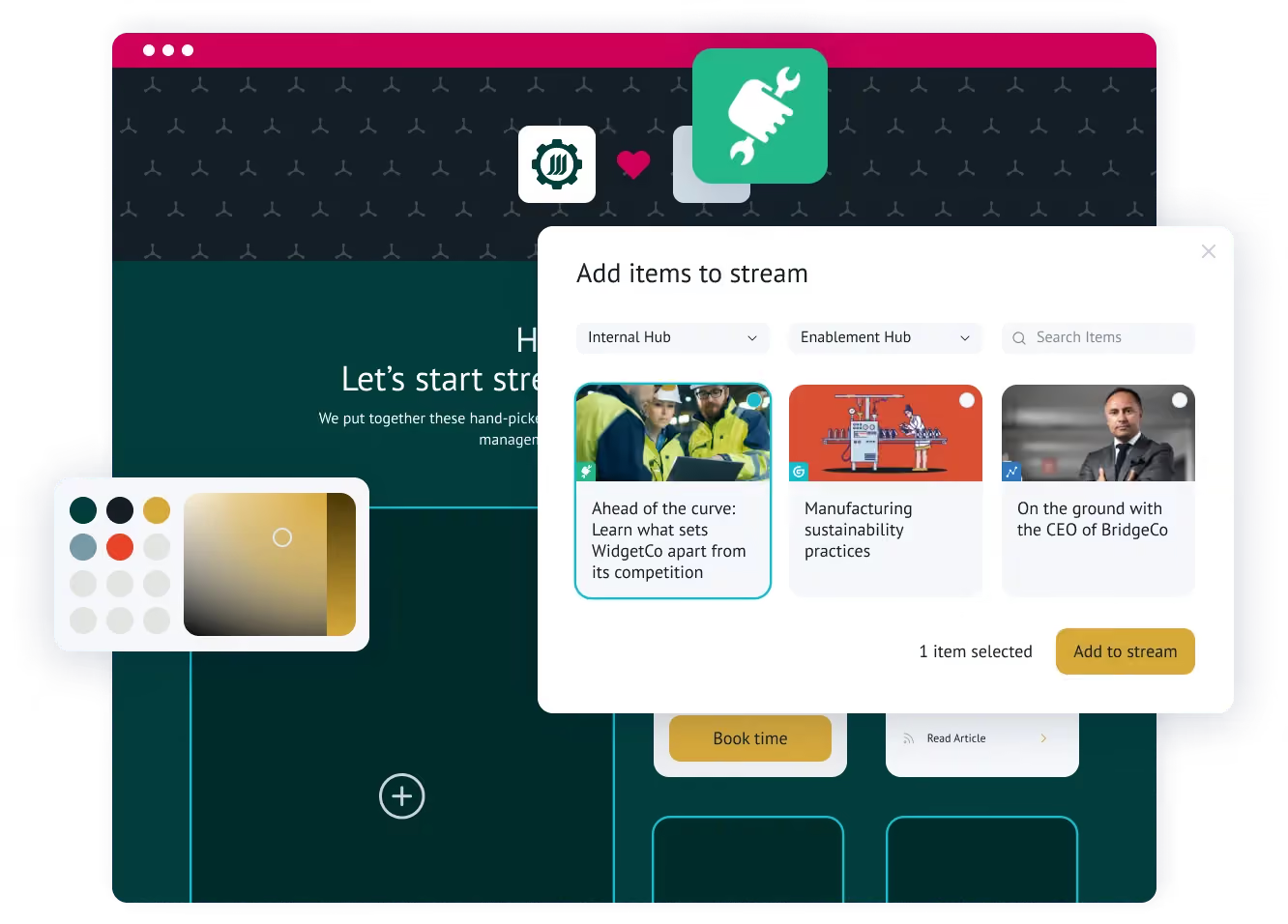
This is useful when a company has plenty of content but keeps sending every buyer to the same resource centre. Marketing can create targeted campaign pages from approved assets, while sales can reuse those assets in Digital Sales Rooms for specific buyers.
Matillion used Uberflip to support an ABM program covering 6,000 priority accounts. Within three months, the program added 777 MQAs and influenced $1.66 million in pipeline.
Key features
- Centralized content hub: Marketing teams can organize and tag existing content in one library, making relevant assets easier to find and reuse across campaigns.
- Personalized campaign destinations: Uberflip Pages lets marketers create account-specific or segment-specific destinations without building a new page in the main website CMS each time.
- Digital Sales Rooms: Sales reps can copy approved templates, select relevant content, personalize the room for a buyer, and track how the recipient engages with it.
Pricing
Uberflip does not currently publish dollar pricing. Buyers need to request commercial details.
Pages is included as part of the platform, although the number of published pages is one of the usage metrics that can affect subscription cost. Sales reps also need purchased Sales seats to create Digital Sales Rooms.
Pros
- Existing content becomes easier to reuse across ABM campaigns: Teams can create different account experiences from the same content library instead of producing another ebook or landing page whenever the target segment changes. Read the user review.
Cons
- Speed for sellers depends on the groundwork done by marketing: Digital Sales Rooms can be assembled quickly once the content library and templates are ready. Organizing assets, configuring the design, and completing the initial implementation can take considerably more work. Read the user review.
13. DemandScience
Rather than licensing software for your team to configure and operate, DemandScience uses its buyer intelligence and campaign team to plan, execute, and optimize programs on your behalf. This makes it most relevant to companies that want ABM execution handled alongside the technology.
The company changed considerably after Terminus merged into DemandScience in November 2024. Its current model is organized around three parts: Ionic provides the intelligence and orchestration, DemandScience Labs runs the campaigns, and Central gives customers visibility into audiences and performance.
Key features of DemandScience
- Identify accounts worth pursuing: Verified account and contact data is combined with behavioral, intent, firmographic, and technographic signals to prioritize likely buyers.
- Run campaigns across multiple channels: DemandScience manages execution across paid media, email, web, content syndication, and events using the same audience intelligence.
- Generate qualified contacts from target accounts: Content syndication and HQL or BANT programs can turn account interest into opted-in leads with additional qualification.
DemandScience Pricing
DemandScience does not publish standard pricing. There is no separate ABM platform subscription fee under its current model.
Pricing is tied to the programs and services you purchase, with data, campaign execution, and optimization included.
Pros of DemandScience
- The campaign team stays closely involved: Responsiveness is one of the clearest themes in recent user feedback. One customer says the team “responds quickly and is easy to reach,” including when campaign changes arise. Read the user review.
- Less ABM operations work has to sit internally: DemandScience Labs handles planning, execution, and ongoing optimization rather than leaving your team to operate another platform.
Cons of DemandScience
- Lead quality can vary by program: Current feedback includes customers reporting strong results as well as campaigns where a substantial share of the delivered leads fell outside the original brief. Clear targeting criteria and close campaign oversight remain important.
- You give up some self-service control: Teams cannot independently configure every campaign setting or automate all reporting in the way they might with a conventional ABM platform. One customer cites integration and reporting limitations and describes the product as “not really built for self-service.” Read the user review.
14. Salesforce Marketing Cloud Account Engagement+
Salesforce Marketing Cloud Account Engagement+ is Salesforce’s B2B marketing automation product. It works with the account, contact, and opportunity data in Salesforce CRM to help teams nurture and score buyers, track engagement, and connect marketing activity to pipeline.
Salesforce offers four Account Engagement+ editions. Plus+ is the first one that includes account-based marketing and analytics, making it the most relevant edition for this guide. Its approach to ABM is built around CRM data, nurture, and account-level reporting rather than anonymous account identification or paid media activation.
Key features of Salesforce Marketing Cloud Account Engagement+
- Score and nurture B2B buyers: Scoring measures how actively a prospect engages with marketing, while grading evaluates how closely they match the ideal buyer profile. These signals can trigger nurture programs or determine when a prospect is passed to sales.
- Analyse engagement at the account level: Plus+ includes five B2B Marketing Analytics licenses. Its ABM dashboards bring together marketing engagement, contacts, opportunities, and expected revenue for each account.
- Create and run cross-channel campaigns: Agentforce can generate campaign briefs, audience segments, and email content from a prompt. Salesforce Flow for Marketers can coordinate journeys across email, SMS, and WhatsApp, although messaging requires additional credits.
Salesforce Marketing Cloud Account Engagement+ Pricing
Account Engagement+ pricing starts at:
- Growth+: $1,250 per organization/month
- Plus+: $2,750 per organization/month
- Advanced+: $4,400 per organization/month
- Premium+: $15,000 per organization/month
All editions are billed annually. Plus+ is the relevant starting point for teams that need Salesforce’s ABM dashboards and B2B Marketing Analytics.
The subscription does not cover every potential cost. Additional contacts start at $100 per 10,000 contacts each month, while SMS, WhatsApp, and some Marketing Cloud Next features use separately purchased credits. Sales Emails and Alerts and more advanced analytics are also sold as add-ons.
Pros of Salesforce Marketing Cloud Account Engagement+
- Salesforce CRM integration is the strongest reason to choose it: Marketing engagement can be viewed alongside the accounts, contacts, and opportunities that sales already works with. Current feedback describes the “seamless integration with Salesforce CRM” as its biggest strength.
- Existing automation can be extended to target accounts: Teams already using Account Engagement for scoring, nurture, and sales handoffs can apply those workflows to ABM rather than building the process again in a separate platform.
Cons of Salesforce Marketing Cloud Account Engagement+
- Core workflows can feel rigid and clunky: The email builder may require HTML knowledge, while limited customization in funnel tracking and Einstein campaign features can make it difficult to reflect the way a team actually works. Read the user review.
- The total cost can extend well beyond the Plus+ subscription: Contact volume, messaging credits, sales features, and advanced analytics can all increase the price.
15. Adobe Marketo Engage
Marketo is rarely bought just to run ABM. Most companies use it as their marketing automation foundation, then add Target Account Management to organize existing nurture and campaign workflows around named accounts.
This sentiment echoed in our conversations with prospective buyers. Teams discussed it as marketing infrastructure supporting their ABM programs. rather than as a standalone account-intelligence or intent-data platform.
It makes the most sense for mature marketing teams that need deep automation and have the operations resources to manage it.
Key features of Adobe Marketo Engage
- Run complex nurture programs: Smart Campaigns use triggers or schedules to decide when someone enters a workflow. A CRM stage change could route a buyer to sales, while a content interaction could update their score or move them into a different nurture program.
- Coordinate campaigns around named accounts: Target Account Management matches individual records to named accounts and brings their activity into an account-level view. Teams can use the resulting engagement score to prioritize accounts and measure their contribution to pipeline.
- Activate the same audiences in paid campaigns: Marketo can sync a Smart List to platforms such as LinkedIn Matched Audiences. Audience membership stays connected to Marketo data, while media buying remains inside the advertising platform.
Adobe Marketo Engage Pricing
Adobe does not publish dollar pricing for Marketo Engage. Its current packages are Growth, Select, Prime, and Ultimate.
Target Account Management is included with Prime and Ultimate. It is available as a paid addition to Growth and Select, making the package configuration particularly important for ABM buyers.
Pros of Adobe Marketo Engage
- Automation can reflect complex B2B processes: Experienced teams have considerable control over segmentation, scoring, personalization, and multi-step campaigns. Programs can range from basic email nurture to detailed workflows spanning multiple products, regions, or lifecycle stages.
- Lead management and sales handoffs are mature: Scoring, CRM integration, campaign tracking, and automated routing have been central to Marketo for years. Read the user review.
Cons of Adobe Marketo Engage
- The flexibility comes with a steep learning curve: Campaign logic, scoring, segmentation, CRM synchronization, and reporting take time to understand. Even positive feedback notes that routine tasks can involve more steps than expected, making dedicated Marketo operations support important for larger implementations. Read the user review.
16. Albacross
Albacross helps demand generation teams act on anonymous website traffic. Once it identifies a visiting company, it assesses whether the activity is strong enough to merit follow-up.
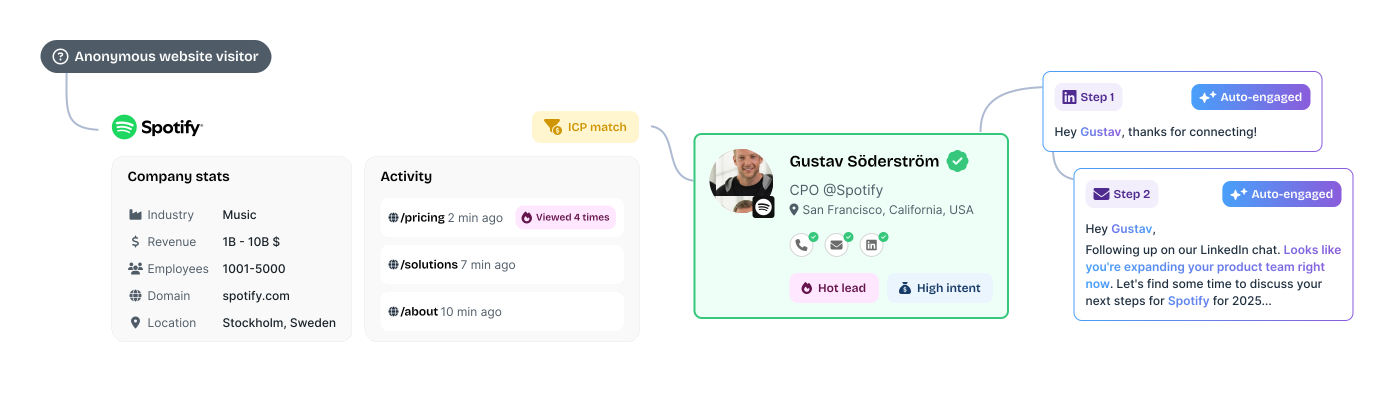
Its main strength is the short distance between insight and action. Sales can receive a list of prioritized accounts and launch email or LinkedIn outreach without a large ABM operations setup. This makes Albacross useful for teams that want more than a visitor-identification dashboard but less complexity than an enterprise ABM platform.
Key features of Albacross
- Company Identification: Albacross connects an anonymous website visit to a company and shows the firmographic profile behind it. Contact details are unlocked separately through verified email and phone credits.
- AI-Powered Segmentation: Website activity is evaluated as it happens and used to determine which visitors deserve attention. Teams can adjust the qualification rules to match the way they define a valuable account.
- Auto-Engage™: When a lead enters a selected intent segment, Albacross can start an AI-personalized email or LinkedIn sequence without waiting for someone to act on the signal manually.
- LinkedIn Ads integration: Selected leads can be kept in sync with a LinkedIn advertising audience for retargeting. The campaigns themselves continue to run inside LinkedIn.
Albacross Pricing
Albacross's pricing is as listed below:
- Starter: €59/month with annual billing or €84 with monthly billing
- Professional: €149/month with annual billing or €213 with monthly billing
- Organisation: Custom pricing with annual billing
Starter includes 10 verified email credits and five phone credits each month. Professional raises this to 25 email credits and 10 phone credits, which may not be enough for teams planning higher-volume outreach.
Professional is the first plan with LinkedIn Ads and HubSpot integrations. Salesforce synchronization and dedicated ABM access require the Organisation plan. ABM is listed as available on request rather than automatically included.
Pros of Albacross
- Intent data becomes useful without much maintenance: Martin from Epidemic Sound describes Albacross as “not just another layer of data.” Account activity can be prioritized and passed to sales without creating a large operational workload. Read the user review.
- Account-based advertising is easy to explain internally: Senior stakeholders can quickly see which accounts are being reached and how the budget is being used. This makes long-term brand and awareness spending easier to discuss with leadership.
Cons of Albacross
- Reporting depth can lag as adoption grows: Reviews point to limited usage reporting, fewer permission options, dashboard navigation issues, and a need for deeper analysis. The core account view is clear, but system owners may want more flexibility as adoption grows. Read the user review.
17. Influ2
Once a team has identified the buying committee inside a target account, Influ2 lets it advertise to those people directly. Contacts are pulled from the CRM, while Influ2 handles delivery across supported networks and reports which individuals saw or clicked each ad, even without a form fill.
The platform's value goes beyond knowing who engaged. It can use contact-level intent to change the next ad or trigger a sales action as that buyer’s interest develops. Through Signals Center, reps receive more context about what appears to interest the person and why the activity matters.
Bonterra used this model to reach 80% of the buying committees in its target accounts. Buyers who engaged with ads set up through Influ2 converted at twice the rate of contacts reached through cold outreach.
Key features of Influ2
- Cohort Designer: CRM data determines which contacts Influ2 should monitor or advertise to. For example, a team could build a cohort of active opportunities where an economic buyer has not yet engaged.
- Buyer Journey Orchestration: The ads shown to a contact can change as their behavior or lifecycle stagechanges. Influ2 can also coordinate those journeys with active Salesloft or Outreach sequences.
- Signals Center: Contact-level intent is presented in a live feed for sales. Reps can see which buyer is active, what topic appears to interest them, and which engagement created the signal.
- Revenue Reporting: Ad impressions and clicks can be followed into opportunity creation and deal progression. This allows teams to compare how contacts who engaged with advertising converted against a cold pipeline baseline.
Influ2 Pricing
Influ2 does not publish standard pricing. Plans are quote-based.
Buyers should confirm how seats and campaign capacity are allocated.
Pros of Influ2
- Ad spend stays focused on known members of the buying committee: Marketers choose the exact contacts they want to influence, while sales receives a named engagement signal for follow-up. This reduces the risk of spending heavily on an account without knowing whether the relevant decision-makers were reached.
- The setup is easier than the targeting model might suggest: Ease of use is one of the stronger themes in Influ2’s G2 user feedback. One reviewer described the setup as “almost shockingly easy.” Read the user review.
Cons of Influ2
- Advanced reporting and attribution have room to improve: Reviewers want a clearer view of where individual ad engagement happened and more freedom to adapt reporting to their attribution model. Workflow automation is another area where they see room for improvement. Read the user review.
- Pricing and capacity can become restrictive: Some customers find the pricing high for the capacity included. Ad-group limits can constrain larger programs, while the way seats are allocated may not work well for ABM agencies managing several clients.
18. Madison Logic
Madison Logic is designed for enterprise teams that want to run content syndication and paid media through the same partner. Display and LinkedIn cover the more familiar B2B channels, while Connected TV and audio extend campaigns beyond standard digital placements.
ML Insights helps guide where your media budget goes. Account activity is scored continuously, and research topics help marketers decide what content or message will be most relevant. Madison Logic also provides enterprise ABM strategists to support campaign planning and optimization, making this closer to a technology-and-media partnership than a conventional self-service ABM platform.
For teams that do not need Madison Logic’s publisher network or premium-media reach, Factors.ai offers a more niche alternative.
Key features
- ML Insights: Madison Logic’s own engagement data shows which accounts and buying-group members are becoming active. Bombora research adds off-site intent, while technology-installation data provides more context for targeting.
- ABM Content Syndication: Content is distributed through Madison Logic’s publisher network to selected accounts and relevant buyer roles. The resulting leads can flow into CRM and marketing automation systems for nurture or sales follow-up.
- ML ABM Web Analytics®: Anonymous website activity can beresolved at the account level. The High Value Engagements capability highlights meaningful actions such as demo requests or visits to important pages.
Pricing
Madison Logic does not publish standard campaign pricing. The ML Platform is included with any media buy at no additional platform cost.
The quote therefore depends on the campaigns purchased rather than a separate software licence. Media selection and campaign scope will have the greatest effect on total spend.
Pros
- Content syndication and advertising can work as one media plan: Teams can use the same account strategy across lead generation and paid reach instead of coordinating several specialist vendors. Endava reported 30x ROI on influenced pipeline after running content syndication and display campaigns through Madison Logic.
- Intent informs the message as well as the target list: The MLI Score helps prioritize accounts, while Trending Topics shows what those companies are researching. This gives marketers something concrete to use when selecting content and shaping campaign messaging.
Cons
- Lead delivery can be uneven: Account-level caps may slow delivery once the permitted number of leads has been reached at particular companies. This can make campaign volume harder to predict and complicate the timing of SDR follow-up. Read the user review.
- Custom analysis may still happen outside the platform: Standard dashboards provide a clear campaign view, but users want more control over date ranges and exports. Teams with specific reporting requirements may need to finish the analysis in another tool.
19. ZoomInfo Marketing
Detailed company and contact data is what ZoomInfo Marketing is known for. Demand generation teams can build ABM audiences from the same records sales uses for prospecting, which is particularly useful when adding another account database would create more matching and governance work.
ZoomInfo currently cites coverage of more than 100 million companies and 500 million contacts. The newer GTM Studio gives marketing and RevOps a workspace for turning all this data into audiences and signal-triggered plays.
Key features of ZoomInfo Marketing
- GTM Studio: Teams can create audience workbooks from CRM records and ZoomInfo datasets, then enrich or score the resulting accounts before activating a play. It is now the clearest entry point for cross-team campaign orchestration.
- Buyer Intent and WebSights: Buyer Intent surfaces accounts researching selected subjects. WebSights identifies organizations visiting the website and can move those visitors into an audience for follow-up.
- ZoomInfo Audiences: Audience membership updates as companies begin or stop matching the chosen criteria, avoiding repeated list exports.
- ZoomInfo Advertising: A proprietary B2B DSP uses ZoomInfo account data for programmatic campaigns. The current format support includes display alongside video and Connected TV.
ZoomInfo Marketing Pricing
ZoomInfo does not publish a standard rate card. Contracts can change with seats, data credits, and premium modules.
For a useful reference point, AWS Marketplace lists ZoomInfo Marketing ABM Pro+ at $69,995 for 12 months. That is a specific marketplace package, not a universal starting price. Ask ZoomInfo to separate platform access, usage allowances, and each add-on in the quote.
Recommended Read: ZoomInfo Pricing
Pros of ZoomInfo Marketing
- The database supports unusually precise audience definitions: Firmographic filters can be combined with role and contact data to narrow a campaign to the people who matter inside each account. One user values being able to isolate “key targets and not just a mass of junk we won't use.” Read the user review.
- Marketing does not have to reconcile its account universe with sales: Audience criteria, account records, and buying-group contacts come from the same underlying data. This is particularly valuable when ZoomInfo is already established in the sales workflow.
Cons of ZoomInfo Marketing
- Contact records still need a freshness check before outreach: Job changes are a recurring weak point in the data that ZoomInfo provides. Users have found outdated employment details despite high confidence scores and sometimes, have to check LinkedIn to confirm where somebody works. Read the user review.
- The final contract is difficult to estimate from the base product: Data credits and premium capabilities can sit outside the core package. The public AWS offer is useful context, but it does not replace a line-item quote for your configuration.
20. Common Room
When buyer activity is spread across your product, website, and external communities, no single source shows the full story. Common Room associates those signals with the relevant person and company, making it particularly useful for GTM teams that prioritize accounts using several forms of first-party engagement.
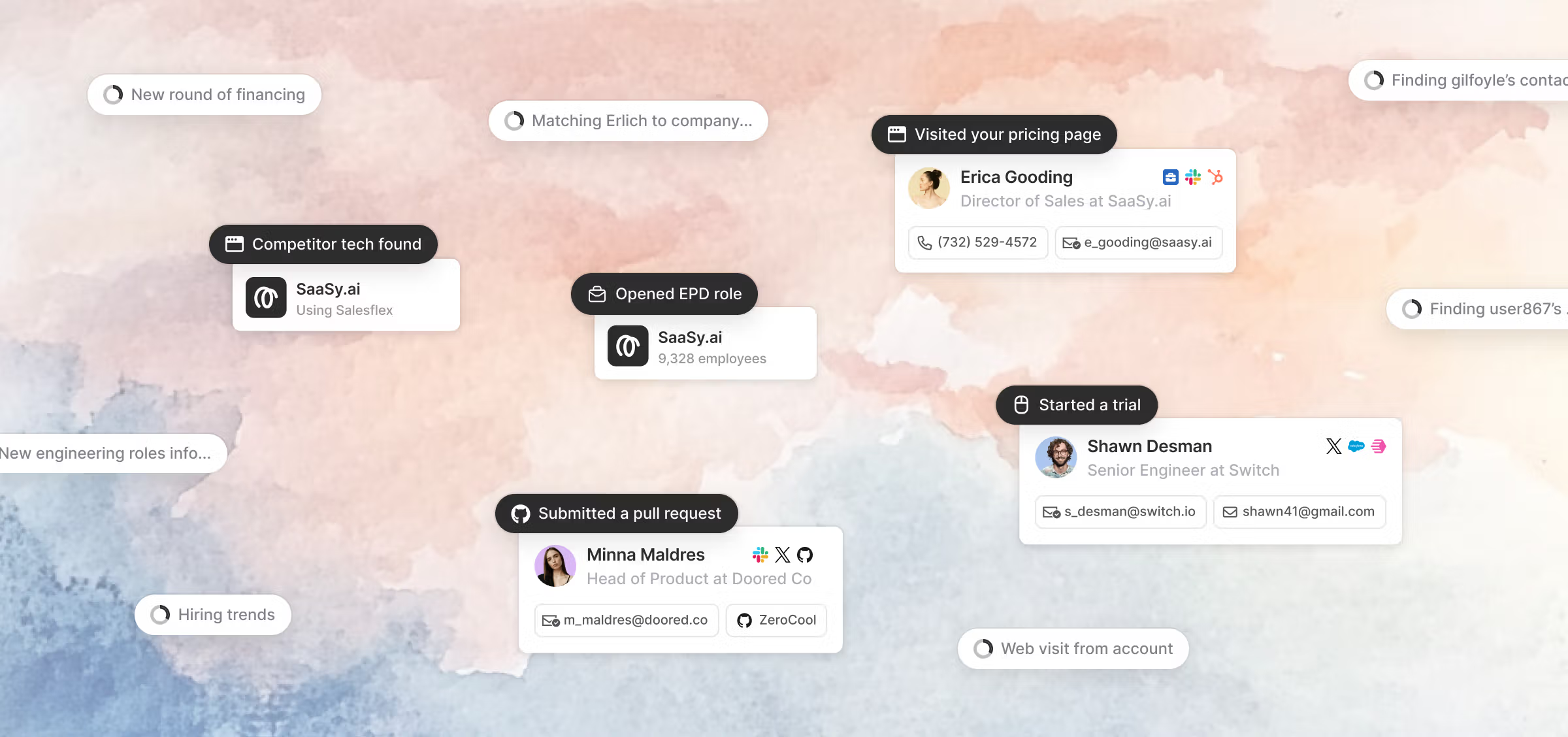
More than 50 native integrations cover established signal sources, while RoomieAI Capture can research activity that falls outside the standard set. Person360 handles identity resolution and enrichment.
Teams can also decide which fit and behavioral inputs influence account or contact scoring instead of relying entirely on a fixed model.
Key features of Common Room
- Signals and RoomieAI Capture: Native integrations ingest known sources such as product activity and community participation. Capture can research more specific account facts when a standard connector does not exist.
- Person360: Identity resolution links activity to an existing person and account record. Waterfall enrichment fills gaps in the profile rather than leaving each event attached to a separate identity.
- Account and Contact Scoring: Teams can define separate fit and behavior models. Visible score inputs and weight sliders make the prioritization logic editable rather than opaque.
- RoomieAI Spark and Activate: Spark surfaces people worth investigating with supporting context. Activate uses that context to prepare or automate outbound action.
Common Room Pricing
The Essential plan costs $2,500 per month, billed annually. It includes five seats, up to 100,000 contacts, 5,000 RoomieAI research credits, and 2,500 Prospector credits. Alerts, workflows, and segments are unlimited.
Advanced and Enterprise use custom pricing. Product signals are an add-on on Essential, and some export or data-management capabilities are also packaged separately.
Pros of Common Room
- It replaces a real piece of manual research: A sales leader says list building became faster because the team was “no longer manually stitching together signals from separate tools to figure out who's worth prioritizing.” Read the user review.
- Reps can get useful context without learning a complex analytics product: Segmentation and daily prospecting are described as straightforward on G2.
Cons of Common Room
- The account workspace is less flexible than the signal layer: Users point to overlapping accounts, rigid columns, and reporting views that are difficult to adapt. The HubSpot integration can also require work before the resulting workflow feels clean. Read the user review.
- Person360 does not remove the need to validate contact coverage: Some users have mentioned that accuracy of email and phone data is lower than that of ZoomInfo.
21. Warmly
Warmly helps you identify target accounts and the people involved in the buying decision. These contacts can be added to email outreach or LinkedIn ad audiences. When someone visits your website, its Inbound Agent uses past account activity to personalize the conversation and route qualified buyers to sales.
All of Warmly's AI agents are grounded in its Context Graph, a shared record of signals and past interactions for each account. This prevents website chat and outbound campaigns from treating the same person as separate leads. Warmly offers more ABM coverage than a visitor-identification or chat tool, although paid-media activation is mainly limited to LinkedIn.
Warmly announced an agreement to be acquired by HubSpot on June 30, 2026. The current product and commercial terms remain unchanged for now.
Key features of Warmly
- AI Web-Deanonymization: Warmly identifies companies and some named buyers from those companies. ICP filters determine which matches are worth routing into alerts or connected systems.
- Inbound Agent: AI chat can qualify interest and book a meeting during a website visit. If the AI has already opened the conversation, a rep can take over with the full chat history and continue from the same point.
- TAM Agent: Dynamic audiences update as account fit or intent changes. The agent can then find buying-group contacts and coordinate off-site outreach.
Warmly Pricing
- AI Web-Deanonymization: $10,000 per year
- Inbound Chat: $20,000 per year
- AI Inbound Autopilot: $30,000 per year
Each pricing tier starts with 10,000 credits per month. The GTM Signals Package costs another $10,000 per year, as does Warm Experiences. Quarterly billing is available at a higher effective price.
Warmly describes TAM Agent separately as included in plans starting at $15,000 per year, but it does not appear in the main pricing grid.
Pros of Warmly
- Account activity can trigger an immediate response: Closed-lost and in-cycle Slack orchestrations are the standout workflows. They bring relevant accounts back to the team’s attention when new activity appears. Read the user review.
- Vendor support is hands-on: User feedback describes simple initial installation as well as regular working sessions with Warmly’s team. This level of involvement is useful when routing and follow-up rules cross several systems.
Cons of Warmly
- Person-level identification is neither complete nor consistently accurate: Identification accuracy is a common concern with Warmly. Match rates are often reported around 30-40%, and some users note incorrect person matches. Read the user review.
- The price rises sharply once the job extends beyond identification: Moving from website deanonymization to inbound chat doubles the annual starting price. Autopilot and optional signal or personalization packages increase it further.
22. Metadata
Metadata is ideal for marketing teams that need to run the same B2B campaign across several ad platforms without rebuilding it in each one.
Which explains why the platform is closer to a media-operations layer than a conventional ABM intelligence platform. A marketer can describe the campaign outcome, review the audiences and budget proposed by Metadata's AI agents, and approve the native campaign structure before anything launches.
The current product uses seven specialized agents that divide the work. Some build audiences and creative; others operate campaigns or analyze results. Metadata then adjusts bids or budgets as performance changes. It is most useful when paid-media execution, rather than account discovery, is the bottleneck.
Key features of Metadata
- MetaMatch: The audience engine uses B2B firmographic, technographic, and intent criteria against more than 800 million profiles. Its identity matching makes those audiences usable on consumer-oriented channels where business titles alone are weak targeting data.
- MetadataONE: The newer agent interface turns a campaign brief into reviewable campaign objects. Every object remains subject to human approval before launch.
- Cross-channel campaign automation: Metadata builds the native structure required by each ad platform and shows campaign status in one workspace. It supports LinkedIn, Google, Meta, Reddit, and Microsoft Advertising. X and ChatGPT Ads are also part of the current channel set.
- Experiments and pipeline reporting: Teams can test how an audience responds to different offers or creative, then connect campaign spend with CRM outcomes rather than optimizing only for clicks.
Metadata Pricing
Metadata does not publish a price grid. The quote depends on the channels under management, the ad spend its agents will operate, and which parts of campaign execution remain with your team.
Pros of Metadata
- MetaMatch extends B2B targeting beyond LinkedIn: Extend B2B targeting past LinkedIn by mapping professional audience data to identifiers that platforms like Meta can use. Reviewers consistently point to audience depth and MetaMatch as some of the product's strongest features. Metadata's G2 feedback.
- One campaign can be built for several native ad platforms: Teams avoid recreating the same audience and structure inside every channel manager. A user says that being able to build in Metadata and push to multiple sources “saves so much time for our team.” Read the user review.
Cons of Metadata
- In-flight campaign changes are clunky: Changing the creative, audience, or bidding logic of an active campaign can be time consuming. Experienced media buyers may find the native ad manager more flexible for those adjustments. Read the user review.
- The AI agents do not completely eliminate the need for human judgment: Someone still has to approve the audience, budget, and experiment design. Users also describe an initial learning curve, particularly around reporting and setup.
How to choose the right ABM platform
Start with the part of your ABM program that's the actual bottleneck.
Factors.ai, Demandbase, and 6sense run intent detection, ad execution, and attribution from the same platform. Bombora, ZoomInfo, and Common Room are strong on identification but are typically paired with a separate tool for execution.
If you already know your accounts and the gap is personalizing outreach, Userled, Recotap and Influ2 solve for this.
Also keep in mind your existing tech stack. If most of your GTM workflow, lead routing, scoring, reporting, already runs inside HubSpot or Salesforce, a native add-on that works inside that CRM usually beats a separate ABM suite.
The right platform is the one that fixes your specific bottleneck, not the one with the longest feature list. Anything beyond that is capability you're paying to maintain without using.
FAQs on Account-Based Marketing Tools
What are the best ABM platforms?
It depends on which part of the motion needs fixing. Factors.ai, Demandbase, and 6sense cover the widest range of ABM work, including intent data, advertising, and attribution, in one platform. Bombora, Vector, and Influ2 are the stronger picks when the gap is narrower, like third-party intent or contact-level advertising specifically.
Which ABM tools track buyer intent?
6sense and Bombora are built specifically around third-party intent, tracking research activity happening outside your own site. Common Room and ZoomInfo add first-party signals from product usage, community activity, or website behavior into the same account view. Albacross and Factors.ai also flag intent through website visitor activity rather than third-party research alone.
Which ABM tools personalize outreach or content?
Userled and Recotap build personalized LinkedIn campaigns and landing pages tied to specific accounts or segments. Influ2 goes further, targeting named individuals inside a buying committee with ads that change as their engagement shifts. Uberflip personalizes at the content level, turning an existing library into account-specific pages without a rebuild.
Which ABM tools identify website visitors?
Factors.ai, Warmly, Vector, and Albacross all deanonymize website traffic, though coverage and depth differ. Factors.ai and Albacross identify companies, while Warmly and Vector go further by naming individual visitors, at lower match rates. Match rate and whether identification happens at the company or contact level are worth confirming directly with each vendor.
How much does ABM software cost?
Pricing spans a wide range depending on how much of the motion the platform covers. Point tools like Fibbler start at under $100 a month, while mid-market platforms like Recotap or Userled start in the low thousands monthly. Full enterprise suites like 6sense or Demandbase run into five and six figures annually, and several vendors don't publish pricing at all.
Are there free or cost-effective ABM tools?
Most full ABM suites don't have a free tier, but some specialist tools do. Clay offers a free plan with limited credits for account research and enrichment. For paid options, Fibbler and Albacross both start at under $100 a month.

Powered by Bombora
Enter your domain and we'll send you a free list of companies showing buying intent in your vertical.
.avif)
Powered by Bombora
Enter your domain and we'll send you a free list of companies showing buying intent in your vertical.
.avif)

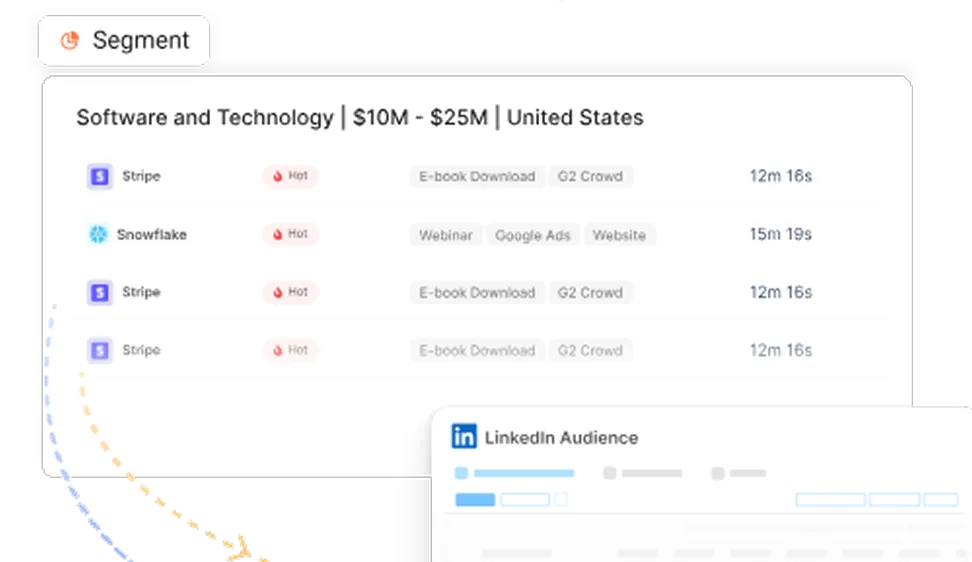
See how Factors can 2x your ROI
Boost your LinkedIn ROI in no time using data-driven insights


.avif)

See Factors in action.
Schedule a personalized demo or sign up to get started for free
LinkedIn Marketing Partner
GDPR & SOC2 Type II


.svg)



.avif)

