
AI Sales Strategy for Better Research, Outreach, and Follow-Up
Learn how to build an AI sales strategy for B2B teams, from choosing the right use case and checking your data to testing workflows and measuring results.

Associate Director of Brand and Content

Co-founder and CMO



.svg)


TL;DR
- Pick one sales decision to improve and record how your team handles it today.
- Decide which data AI needs, what it should produce, and what a rep will do with the result.
- Test the workflow with a small group. Measure the quality of its recommendations and the sales outcomes, as well as time saved.
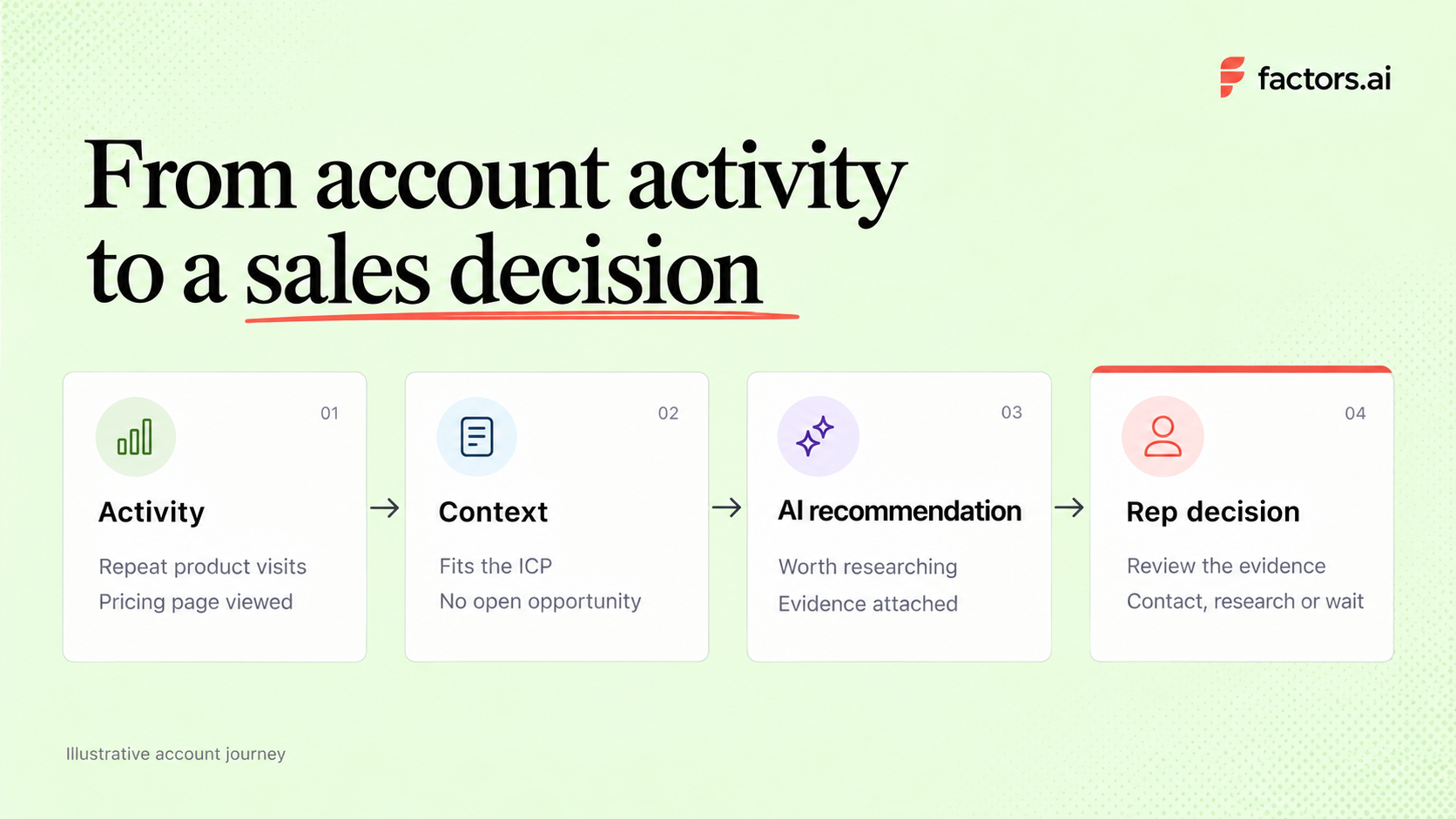
An AI sales strategy is a plan for using AI to improve a specific sales decision or task. For a B2B team, that could mean finding the accounts worth calling this week, preparing for a meeting, or spotting a deal that needs another stakeholder involved. The plan should say what information AI uses, what it produces, what a rep does with the result, and how the team will tell whether it helped.
Start with a decision your team already makes often and struggles to make consistently. Take account prioritization. If reps can research only a few companies each day, which should they choose? The same approach can improve meeting preparation, deal reviews, and follow-up once you know it works.
What an AI sales strategy looks like in practice
Imagine a sales team with hundreds of target accounts and time to research only a few each day. One account fits its ideal customer profile, has returned to the pricing page, and has been active on other relevant channels. Another visited a blog once but falls outside the team’s target segment. A list of recent visitors might put both in front of a rep. A useful strategy helps the team spend more time on the first account and explains why.
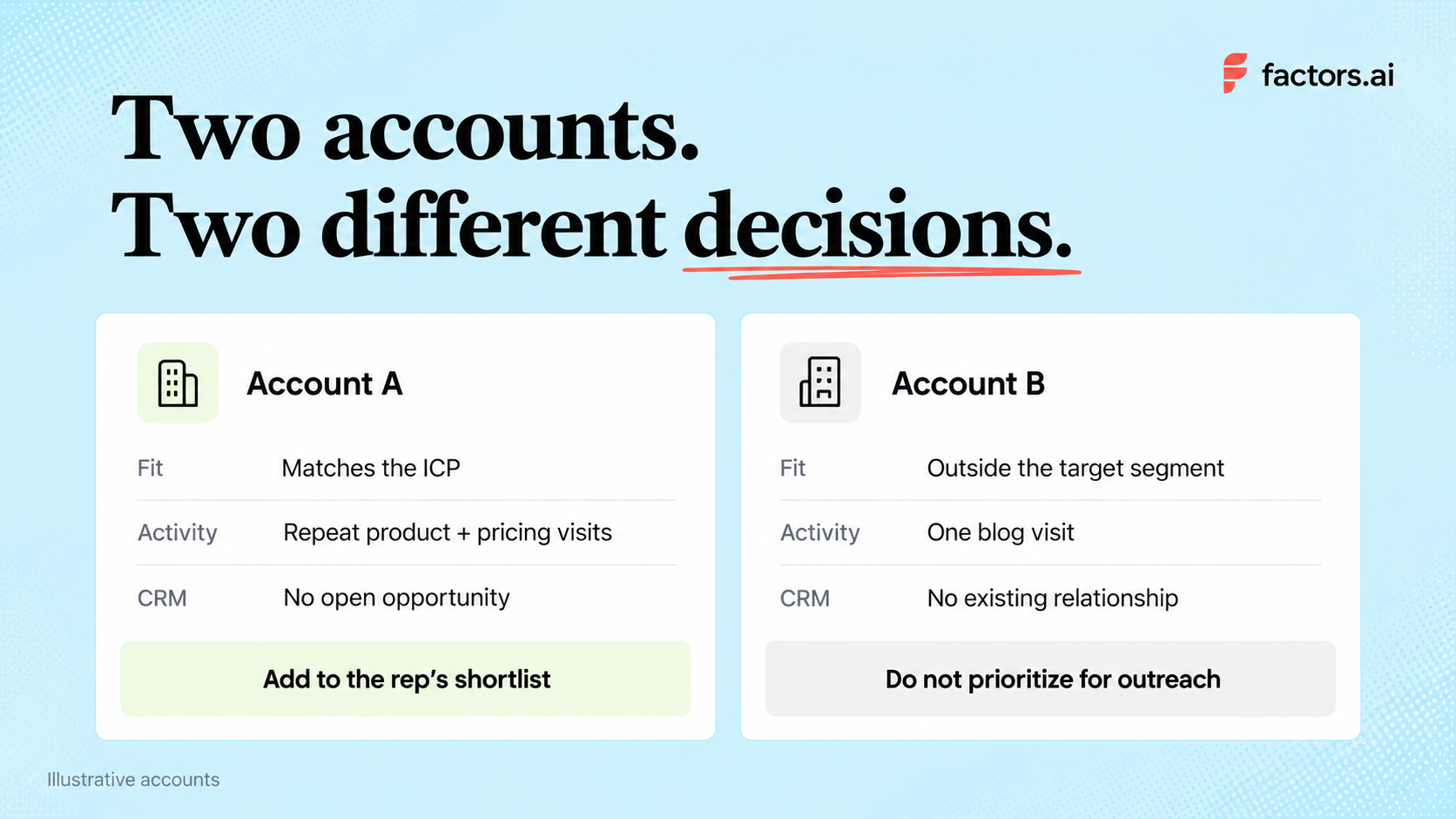
There are three judgments in that decision.
Fit tells you whether an account is worth pursuing. Engagement helps you judge whether its interest has changed. CRM history tells you whether someone on your team already has a relationship with it. AI can process those inputs for account scoring or summarize what has happened. The rep checks the evidence and decides whether to contact an existing buyer, research another person, or wait.
The distinction between AI and automation matters here. A rule that alerts sales when a target account visits the pricing page is automation. A model that estimates the account’s likelihood of reaching a chosen milestone is predictive AI. A system that summarizes activity or suggests what to investigate is generative AI. Those jobs can work together, but they need different data and different checks before you trust their output.
Account activity can begin well before a form fill or an open opportunity. In Factors.ai’s analysis of B2B deals, sustained LinkedIn engagement began 124 days before deal creation in the CRM. That describes the deals analyzed; it is not a timeline for every buyer. It does give teams a reason to look beyond newly created leads when deciding which accounts deserve attention.
Where should you use AI in the sales process?
Choose a use case based on a problem you can observe in your B2B sales process. If reps already know which accounts to work but spend an hour preparing for every meeting, another prioritization score will do little for them.
The data requirements change with the job. Account prioritization needs reliable company matches and, for predictive models, past outcomes. Meeting preparation needs a trustworthy record of previous conversations. Pick the problem before deciding which type of AI to use.
Recommended read: How to use AI to manage your pipeline
How to build your first AI sales workflow
1. Pick one bottleneck and record the current result
“We need more AI in sales” cannot guide a pilot. “Our SDRs review 80 target accounts a week, but rarely know which ones have become more engaged” gives you a decision to improve.
Look at how the team handles that decision now. How many accounts does a rep review? How long does it take? How many lead to a useful conversation? Ask reps which signals they trust and which alerts they ignore. Record the baseline before changing the process, including your lead qualification criteria and how you will count meetings.
2. Check the data behind the decision
For account prioritization, start with your ideal customer profile for sales and CRM records. Then inspect the activity you can reliably associate with an account, such as visits to relevant pages, product usage, past conversations, or third-party research. A pricing-page visit can be interesting. It should not outweigh poor fit or an active deal a rep is already managing.
Alexander Goodwin, Director of Demand Generation at Fingerprint, talks about this in detail. The team does not prioritize an account simply because it belongs to a target industry. It checks whether the company has a problem Fingerprint can solve and estimates the potential value of the opportunity. Recent activity can then inform how the team approaches the account. That's the kind of judgment your data should support before you ask a model to rank thousands of companies.
Steve Armenti, founder of Howdy 1-1 ABM, makes a similar point. He recommends inspecting a small group of contacts, their CRM history, and existing outreach before using signals across the whole go-to-market program. This exercise can expose missing fields, duplicate records, and other CRM data hygiene problems. It also gives sales and marketing a chance to agree on what a promising account looks like.
You do not need predictive scoring on day one. Start with a rule your team understands. For example, a target account with repeat visits to product and pricing pages, no open opportunity, and a named account owner. Test whether reps find those accounts worth researching.
Predictive scoring becomes useful when you have enough trustworthy historical outcomes to build and assess a model. Factors.ai’s predictive-scoring documentation, for example, describes a data check before a model can be built and lets a team choose the event it wants to predict. If the data check fails, change the target or improve the data. A confident score cannot compensate for missing evidence.
Recommended read: Predictive account scoring vs. manual account scoring
3. Decide what the system produces and what a sales rep does next
A recommendation should reach the rep with enough context to assess it. “Account score of 90” leaves them to reconstruct the story. “This target account returned to the integration and pricing pages, has two active contacts, and has no open opportunity” gives them something to check. The underlying activity should be available too. Otherwise, an incorrect company match or stale CRM record can turn a convincing summary into bad advice.
Agree on the action in advance. An SDR might identify an appropriate contact, while an AE might follow up with someone already involved in a deal. Marketing may decide the account needs more education before sales reaches out. Each action depends on the relationship you already have, as well as the new signal.
When the handoff crosses systems, sales automation workflows can move account context into the CRM or a rep’s existing tools. Set clear conditions for accounts with open or recently lost deals.
4. Run a small pilot before widening it
Choose a defined set of accounts, a few reps, and a review period long enough to see an immediate outcome. Keep the existing process running for a comparable group if you can. At the end of each week, review accepted and rejected recommendations with the reps who received them.
You may discover that the model favors high-traffic accounts that never buy, or that alerts reach an SDR after an AE has already spoken with the company. Fix those problems before adding more signals or automation. You can then evaluate AI sales tools against the job your pilot has shown to be useful.
Recommended read: A step-by-step guide to turning signals into sales conversations
How do you know whether the AI sales strategy is working?
For account prioritization, start with recommendation quality. Of the accounts flagged, how many did a rep judge worth pursuing? How many were wrong matches or duplicates? Among those pursued, how many led to a relevant reply, a meeting, or an opportunity?
Compare those figures with accounts handled under your existing process, while allowing for differences in segment, account quality, and rep coverage. Track whether reps use the recommendations and ask why they reject them.
Time saved is useful, but it is not the entire result. If an assistant cuts research from 20 minutes to five while producing generic outreach that earns fewer replies, the workflow needs work.
Keep following meetings and opportunities as deals mature. For workflows aimed at moving existing deals forward, track pipeline velocity as well. A short pilot may be too small to support a revenue claim, even if its early signs are promising.
What tends to break an AI sales strategy?
A common mistake is treating individual buying signals as a complete reason to contact someone. A page view, funding announcement, or job change may be worth investigating, but it rarely tells a rep enough to write a credible message.
Fit, recent behavior, and the account’s history need to make sense together. If sales sees only a score, reps cannot tell you which part of the recommendation is wrong.
Another risk is letting AI supply details nobody checked. Steve Armenti describes having someone validate every source, signal, and message used in his team’s tailored outreach. This matters when a summary refers to a person’s priorities, a company initiative, or an earlier conversation. A false claim sent to a buyer is still your team’s claim, however confidently the software wrote it.
Watch what the pilot rewards as well. More alerts and more emails can look like progress while making it harder for reps to focus. If a recommendation is consistently ignored, find out why. The answer may be a bad account match, poor timing, or a suggested action that does not fit the relationship.
Recommended read: ABM metrics to track from account engagement to pipeline
How Factors.ai supports your AI sales strategy
Factors.ai gives sales teams context from website activity, CRM records, ad engagement, and third-party intent. Scout, its AI copilot, helps teams research accounts, prepare for conversations, review deals, and decide what to do next.
The platformsupports several practical uses across the sales process.
- Research accounts and prepare for meetings: Scout can assemble company research, stakeholder engagement, recent signals, and deal history into a briefing with suggested talking points. Reps can use it to understand what has changed before entering a conversation.
- Find gaps in the buying committee. An active contact does not mean the whole buying group is engaged. Scout can examine engagement across seniority levels and flag where executive coverage is missing.
- Review pipeline and next steps. Sales teams can ask Scout questions about pipeline changes and outbound performance. Its agents can also identify buying signals, warning signs, and missing information, then recommend actions for individual accounts.
- Make outreach more relevant. Factors surfaces account activity and relevant contacts to help reps shape their approach. Interest in a particular product, competitor comparison, or recent interaction gives the rep a more useful starting point for a message.
- Follow up when account activity changes. Teams can monitor engagement after meetings and alert the account owner when a previously lost account returns. That context helps reps decide whether to reopen a conversation and what to address.
- Prioritize accounts using your own criteria. Custom engagement scoring lets teams decide which signals matter and how much weight they receive. Predictive scoring ranks accounts for a chosen outcome, such as submitting a form or becoming an opportunity.
Teams can deliver agent outputs through Slack and CRM workflows, giving reps access to the research and recommendations where they already work. Start with the use case that addresses your team’s biggest bottleneck, then assess whether it improves preparation, conversations, or deal progression.

See how Factors can 2x your ROI
Boost your LinkedIn ROI in no time using data-driven insights


.avif)

.avif)
See Factors in action.
Schedule a personalized demo or sign up to get started for free
LinkedIn Marketing Partner
GDPR & SOC2 Type II


.svg)



.avif)

