.svg)

LinkedIn Conversation Ads: Sliding Into DMs Without Sounding Like an Ad
Let’s be honest.
Most LinkedIn ads get scrolled past faster than a Monday motivation post. You know the ones. Big promise. Bigger stock photo. Zero memory of it five seconds later.
But LinkedIn Conversation Ads are different.
They don’t fight for attention in the feed.
They don’t interrupt someone mid-scroll.
They land straight in the inbox.
And when they’re done right, they don’t feel like ads at all. They feel like the start of a conversation. The kind you might actually reply to.
If you’ve been curious about LinkedIn message ads, LinkedIn sponsored messages, or how to make LinkedIn messaging ads convert without sounding spammy, you’re in the right place.
Let’s break it down, simply, practically, and without the buzzwords.
TL;DR
- LinkedIn Conversation Ads work best for long, complex B2B buying journeys, especially when multiple stakeholders are involved, and buyers want to explore before committing.
- They are not designed for instant conversions. If your goal is quick leads or low CPL, Message Ads or Feed ads are often a better fit.
- The real value of Conversation Ads lies in intent signals, like clicks, choices, and engagement paths, not just form fills.
- To judge them correctly, you need full-funnel visibility. When engagement is connected to downstream behavior and revenue, Conversation Ads become a meaningful driver of the pipeline.
What are LinkedIn Conversation Ads (and how are they different from message ads)?
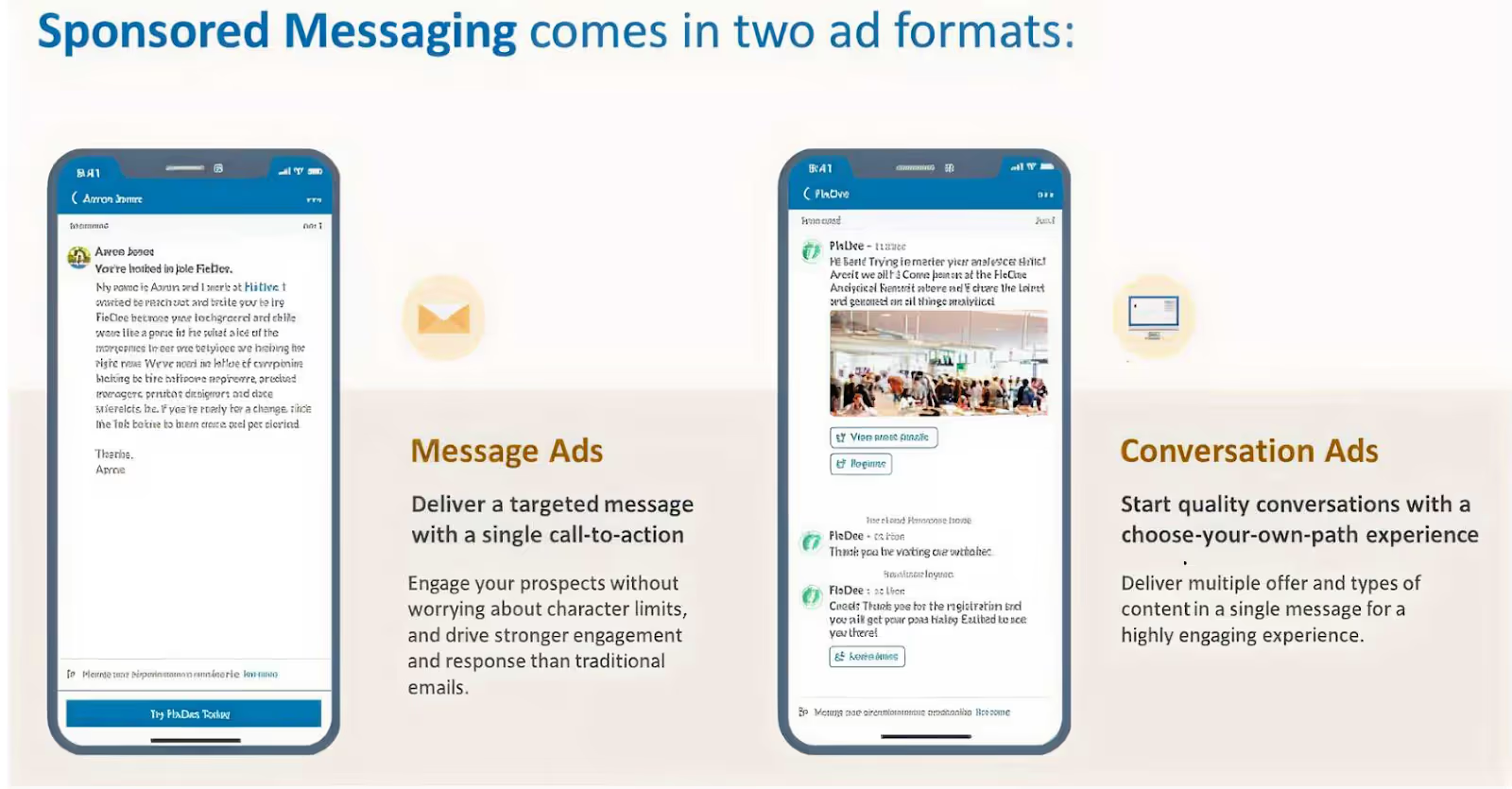
LinkedIn offers two inbox-based ad formats under Sponsored Messaging. They’re often lumped together, but they behave very differently.
1. LinkedIn Message Ads
Think of Message Ads as a single-message push.
You send one message. You include one CTA. You hope they click. That’s it.
They work best when:
- You have one clear goal (book a demo, download a guide)
- You want direct, cost-effective outreach
- Your audience prefers short, no-nonsense messaging
Message Ads aren’t bad. They’re just… direct. Sometimes too direct.
2. LinkedIn Conversation Ads
Conversation Ads are more like choose-your-own-adventure. Instead of forcing one action, you give users multiple response paths:
- FAQs
- Content
- Demos
- Webinars
- Pricing
- Even “just browsing.”
The buyer decides what happens next. They work best when:
- You want interactive engagement
- You’re running ABM or high-intent campaigns
- You want prospects to engage on their terms, not yours
In short: Message Ads talk to people. Conversation Ads speak with them.
And in B2B, that difference matters more than we admit.
Why Conversation Ads work so well in B2B
Here’s the truth about B2B buyers: They hate being sold to, but they love being informed.
Conversation Ads lean into that reality. Instead of forcing a demo request upfront, they let buyers:
- Explore content at their own pace
- Self-qualify without pressure
- Signal intent through clicks and choices
And those choices? They’re gold.
Every click inside a conversation tells you what the buyer actually cares about:
- Are they curious?
- Are they researching?
- Are they close to buying?
That’s far more valuable than a single “Submit” button.
The anatomy of high-performing LinkedIn Conversation Ads
So what actually drives engagement? Let’s break down the patterns that show up again and again in high-performing Conversation Ads.
1. Start with the right CTA (Hint: It’s not “Book a Demo”)
Across successful campaigns, the best-performing CTAs are surprisingly… gentle.
They sound like:
- See how it works
- Get started for free
- Find out more
- Book a demo (but usually not as the first step)
Curious, why does this work? Because
- Early-funnel CTAs reduce pressure
- They invite curiosity instead of commitment
- They feel helpful, not transactional
- Think of CTAs as doors, not demands.
Once someone walks through willingly, the rest gets easier.
2. Personalization starts with targeting (Not copy)
Here’s a hard truth: Great copy cannot save bad targeting.
For Conversation Ads, LinkedIn Ads targeting does most of the heavy lifting. The most effective campaigns usually layer:
- Job title + function (not just one)
- Seniority (decision-makers matter here)
- Skills and expertise tied to the problem you solve
- Location, when buying behavior differs by region
Conversation Ads feel personal by nature. If the targeting is off, that illusion breaks instantly.
Right message. Right inbox. Right moment.
Related read: Top LinkedIn Ads targeting mistakes in B2B.
3. Avoid buzzwords. Say the real thing.
One pattern that shows up again and again in underperforming ads is the use of too many buzzwords and too little substance.
Words like AI-powered, optimize, streamline, and game-changer are everywhere, and buyers have learned to mentally skip them.
What works better?
- Specific problems
- Concrete outcomes
- Relatable frustrations
Bad: “Our AI-powered platform optimizes workflows.”
Better: “Still managing this in spreadsheets? Here’s how your team can save 20 hours a week.”
Specific beats impressive. Every single time.
The psychology behind winning Conversation Ads
Conversation Ads work because they tap into the basic human psychology, not clever tricks.
The most common triggers are simple:
- FOMO – “See what top teams are doing differently.”
- Curiosity – “Want to know how this works?”
- Reciprocity – “Get the report, no strings attached.”
The strongest ads often combine two triggers:
- Curiosity + social proof
- Reciprocity + urgency
- FOMO + data-backed claims
The key thing to remember? Don’t manipulate. If the problem is real, people will lean in.
Related read: Best AI tools for LinkedIn Advertising.
Best practices for LinkedIn Message Ads and Conversation Ads
Let’s make this practical.
LinkedIn Conversation Ads Best Practices
- Keep messages short and skimmable
- Offer multiple response options, not dead ends
- Lead with value, not a sales ask
- Let intent reveal itself through clicks
- Optimize for learning, not just leads
LinkedIn Message Ads Best Practices
- Use them when you have one clear CTA
- Be concise and respectful of time
- Avoid sounding like a cold email blast
- Match message tone to seniority level
Just remember, different tools, different jobs.
Related read: Scaling ABM using LinkedIn Ads
Where most teams still get LinkedIn Conversation Ads wrong
Here’s the gap most marketers don’t see. Conversation Ads generate multiple downstream actions, like:
- Website visits
- Content reads
- Return visits
- Assisted conversions
And not just form fills.
So, if you’re only measuring:
- Clicks
- CPL
- Last-touch conversions
Then, you’re missing most of the story.
What changes when you run LinkedIn Ads with Factors.ai
Launching a LinkedIn Ad Campaign is only half the job. The harder part is figuring out which drove conversions and contributed to revenue.
But here is the catch: buyers do not convert in straight lines. Usually, this is what happens after a prospect clicks your LinkedIn Ad,
- They don’t convert immediately.
- They visit your website days later.
- They read a case study.
- They come back through search.
- Sales finally pick them up weeks later.
And somewhere along the way, LinkedIn quietly loses credit. Read more about this in our LinkedIn Ads B2B Benchmarks Report of 2025.
This is exactly the gap LinkedIn Adpilot from Factors.ai built to close.
See what happens after they click your LinkedIn Ad
Most reporting stops at impressions, clicks, or form fills. That is useful, but incomplete.
Factors.ai helps you see:
- What prospects do after they engage
- How different interactions influence the pipeline
- Which touchpoints actually contribute to deals
Instead of guessing which efforts mattered, you can see the complete picture of how accounts move through your funnel after clicking your LinkedIn Ads.
Simply put, see the true ROI of LinkedIn Ads with Factors.ai
Compare LinkedIn against other channels
Once you can see influence, comparison becomes easier.
Factors.ai lets you analyze how LinkedIn performs alongside other channels and how ad-engaged accounts move through the funnel. This helps teams decide where to invest more and where to pull back.
Build audiences without guesswork
Manually maintaining account lists takes time and still goes stale.
With Factors.ai, LinkedIn audience lists are built and updated automatically using real engagement and intent signals. Instead of guessing who should see your ads, you target accounts that are actually showing interest.
Result: Less waste and cleaner targeting.
Control where your LinkedIn Ads budget really goes
Most teams do not realize this until they see the data. 20% of accounts often consume 80% of the ad impressions. The result is uneven reach and fast budget burn.
Factors.ai’s LinkedIn Adpilot helps you:
- Control impressions and clicks per account
- Reach more accounts with the same budget
- Avoid overserving the same few companies
More coverage. Same spend.
Read more about this in the LinkedIn Smart Reach blog.
Optimize campaigns using conversion feedback
Factors.ai also supports the LinkedIn Conversion API. That means you can:
- Send online and offline conversion signals back to LinkedIn
- Optimize campaigns based on real outcomes
- Scale performance without relying on third-party cookies
All without a complicated setup.
So… should you be running LinkedIn Conversation Ads?
Short answer: Yes. But only if you use them for what they are actually good at.
Conversation Ads work best in buying journeys that take time. They are the best when multiple stakeholders are involved, when buyers want to explore before committing, and when your goal is to educate, qualify, and learn rather than push an immediate demo.
They are not built for instant wins. If you need quick, single-action conversions or you are optimizing purely for cost per lead, Message Ads will usually perform better. Different formats solve different problems.
Where most teams go wrong is not in how they write these ads, but in how they measure them.
Conversation Ads rarely drive a straight line from click to conversion. Instead, they influence interest over time through content views, return visits, and assisted conversions across channels. When revenue is calculated only by last-click results, that influence gets ignored.
But when you connect engagement to downstream behavior and revenue, the picture changes. You can see what sparked curiosity, what kept buyers engaged, and how those early conversations helped deals move forward.
Run Conversation Ads to understand buyer intent, not to force action. Measure them with the full buyer journey in mind, and they become a meaningful driver of the pipeline rather than just another inbox placement.
FAQs on LinkedIn Conversation Ads
Q1. What exactly are LinkedIn Conversation Ads, and how are they different from Message Ads?
LinkedIn Conversation Ads are interactive inbox ads that let prospects choose what they want to do next. Instead of sending one message with one CTA, you offer multiple options like viewing content, checking pricing, or learning more before booking a demo.
Message Ads, on the other hand, are simpler. One message, one CTA, one outcome. They work well when you already know exactly what action you want the reader to take.
If Message Ads are a straight pitch, Conversation Ads are a guided conversation where the buyer stays in control.
Q2. Do Conversation Ads actually feel like real conversations?
They feel conversational, but they are not live chats.
Conversation Ads follow a pre-built flow with buttons and branching paths. The experience feels interactive because buyers choose what to click, but they are not typing free-form responses.
That is also their strength. You can guide buyers without needing someone to reply in real time, while still learning what they care about based on their choices.
Q3. Should I always choose Conversation Ads over Message Ads?
No, and that is a common mistake.
Conversation Ads work best when buyers need time, context, or education. Message Ads work better when the action is simple and obvious.
If you only have one clear CTA and want quick action, Message Ads are usually the better choice. If you want to support research, qualification, or intent discovery, Conversation Ads are a stronger fit.
It is not about which format is better. It is about which one matches the buying situation.
Q4. Are LinkedIn Conversation Ads still effective, or are people tired of them?
They are still effective, but they are easier to get wrong now.
Many marketers report weaker performance when Conversation Ads feel generic, overused, or overly sales-driven. Buyers are quick to ignore anything that looks like a templated pitch in their inbox.
What still works is relevance. Tight targeting, helpful options, and clear value. When the message matches the buyer’s context, Conversation Ads continue to drive engagement and intent signals.
Q5. What metrics should I actually look at for Conversation Ads?
Open rates are usually high, but they do not tell the full story.
The real value comes from interaction metrics like which options people click, what content they engage with next, and whether they return later through other channels.
Conversation Ads are better judged by downstream behavior and assisted conversions, not just immediate form fills. If you only measure last-click leads, you will almost always undervalue them.

SEO ROI Forecast: An SEO Playbook That Convinces Leadership, Survives Google Updates and AI chaos
Imagine you walk into your quarterly planning meeting feeling optimistic. Leadership asks, “So… what will SEO deliver next quarter?” Suddenly, everyone is staring at you like you’re THE one person who knows exactly what Google will do next. (If only.)
You pull up a spreadsheet. You explain the numbers. And someone still asks, “But what about AI Overviews? And LLM search? Isn’t everything changing?”
(A fair question, but also, when does Google not change something?)
If you’ve lived through that moment before, you’re definitely not alone. And here’s a little secret, the most confident SEO managers already know:
Forecasting SEO isn’t about predicting the future. It’s about building a believable story backed by math.
And when that story shows real pipeline and revenue?
Your SEO strategy suddenly becomes the hero of the marketing team.
Let’s break down how to build an SEO ROI forecast that’s fun to present, easy to defend, and shockingly useful for planning.
TL;DR
- SEO forecasting now has two layers: traditional performance and AI-driven visibility. You need both.
- Traffic ≠ impact anymore. AI Overviews change clicks, so rankings alone don’t tell the whole story.
- Good forecasts are built on fundamentals: fresh data, realistic capacity, and scenario ranges, not guesses.
- The goal isn’t prediction. It’s planning for uncertainty and tying SEO to pipeline and revenue.
Why SEO forecasting even matters (Yes, even now..)
Here’s the truth: SEO is helpful for a company because it reduces Customer Acquisition Cost, or CAC, compounds over time, and generates the kind of inbound demand that makes paid search look… well, expensive. (I’ll try not to look too pleased about that.)
But your founders don’t care about ‘rankings’ or ‘domain authority.’ They care about:
- MQLs
- Pipeline
- Revenue
- Efficiency
- Predictability
Your SEO potential forecast is the bridge between ‘here’s what we hope’ and ‘here’s what we’re planning for.’ When done well, it becomes less of a forecast and more of a business case.
(Also, when your forecast is credible, you get fewer surprise ‘urgent’ Slack messages at 9 PM. Small victories…)
Related read: B2B SEO checklist to know what steps to take before starting your SEO planning, keyword research, and strategy development.
The part most SEO forecasts now miss: SEO has two layers
Here’s where SEO changed in the last two years, and where many forecasts quietly fall apart.
SEO no longer operates as a single system. Today, every credible SEO forecast has two parallel layers:
1. The traditional performance layer
This is the familiar one:
- Rankings
- Traffic
- Conversions
- Pipeline
- Revenue
2. The AI visibility layer
This is newer, messier, and harder to measure:
- AI Overviews and zero-click answers
- LLM summaries and citations
- Brand mentions on LLM searches
- Influence that shows up before a user ever lands on your site
This layer assists conversions rather than owning them.
The mistake we all make here is forecasting only the traditional performance layer and ignoring the AI visibility layer, and not both.
So, let’s start with the foundation first.
What a traditional SEO forecast still needs to include
If you want your SEO forecast template to actually hold up in a meeting, it needs a few essentials:
1. Recent baseline metrics
Use your last 3 to 4 months of data, and not all of last year’s. Why? Because SEO changes fast, and old numbers lie. (Lovingly.)
2. Realistic capacity inputs
Be honest about what your team can deliver:
- How many pieces of content can you actually publish each month?
- How many technical fixes can dev genuinely handle?
This keeps your forecast grounded in reality rather than wishful thinking.
3) Real CTR and conversion data
- Skip the outdated ‘position #1 gets 30% CTR’ myths.
- Use your Google Search Console data instead; it reflects how your real audience behaves today.
4) Three scenario ranges
Make three easy versions:
- Low (Conservative): What you can hit even on a bad month
- Middle (Expected): What do you think will actually happen
- High (Ambitious): What’s possible if everything goes right
Why do this?
Because giving leadership one number is a trap. Instead, give them a range. This helps everyone stay calm when things shift, and reminds them that things always shift in SEO.
5) Clear assumptions
Write down every key assumption affecting your forecast, like:
- “We’ll publish 4 articles/month.”
- “We’ll get 6 dev hours per sprint.”
- “CTR stays stable.”
These notes save you later, especially when someone asks, “Why did this change?” and you actually have an answer.
Related read: Top free website traffic analysis tools for 2026.
How AI, AIO, GEO, AEO, and LLMs are reshaping SEO ROI forecasts
(AKA: “Everything changed and here’s how to stay sane.”)
AI isn't “disrupting search.” It's rebuilding a whole new search economy. Everything is evolving, right from traffic flows to visibility layers and the fundamental definition of ranking.
Here’s what’s actually shifting.
1) Zero-click growth & AI answer layers = fewer clicks
Generative AI layers such as AIO (AI Overviews), SGE (Search Generative Experience), and AI mode increasingly provide users with full answers in the SERP.
This means:
- Users get answers without clicking
- CTR drops the hardest on informational and research queries
- AI doesn't consistently cite the same sites that rank organically
- Forecasts based on “rank × volume × CTR” are increasingly wrong
If organic traffic used to be your golden goose, AI just built a fence around the nest.
2) AI search channels are growing, but referrals are still tiny
AI platforms do generate referrals, but they’re just small right now.
Your forecast should include:
- A small-but-growing ‘AI referrals’ line
- A qualitative measure of AI visibility (citations, mentions)
We’re in the ‘teenage years’ of AI search, so it's moody, unpredictable, and still figuring itself out.
3) New optimization targets: AEO, GEO, and LLM SEO
Classic SEO = ‘How do I rank on Google?’
Modern SEO = ‘How do I become the answer everywhere?’
The answer to the latter is:
- AEO: Answer Engine Optimization
- GEO: Generative Engine Optimization
- LLM SEO: Creating content LLMs rely on, cite, or summarize
This means
- You’re no longer forecasting just ‘traffic.’
- You’re forecasting visibility, citations, and brand lift, even when they don’t produce immediate clicks.
(Welcome to the multiverse of search.)
4) Regulatory and platform risks increase volatility
Google is being scrutinized for:
- Using publisher content without compensation
- Potential ‘zero-click monopolization’.
- How AI answers are sourced
This means your forecast must assume:
- Periodic feature rollouts
- Traffic instability
- Possible policy changes around citations
The 7-step playbook for a complete SEO forecast
Even with AI reshaping search, the mechanics of forecasting still rely on fundamentals. This is the traditional SEO, AKA the non-AI layer, and it’s where your numbers earn trust.
1) Start with a clean baseline
Pull the last 3 to 6 months of performance from GSC and GA4. Export impressions, clicks, positions, and conversions.
Why not 12 months?
Because the last few months reflect the current SERP environment and your present traffic behavior (seasonality matters, but recency matters more when SERPs are changing fast).
Practical tip: Build a sheet with ‘current monthly organic clicks’, ‘conversion rate by page type’, and ‘average LTV of an organic customer’.
2) Segment keywords by intent and SERP features
Not all keywords behave the same.
Create buckets: high-intent commercial, informational (AI-overview prone), branded, and long-tail. Apply different CTR assumptions per bucket. Informational terms will often see different click behavior when AI answers or zero-click features appear.
Practical tip: Tag queries in your GSC export and calculate CTR by bucket. This is where a decent traffic estimator helps.
3) Choose your forecasting method (or mix them)
Pick the approach that fits your data and team:
- Keyword-based: useful when you have clear target rankings.
- Traffic trend modeling: good when historical growth trends are stable.
- Back-planning from business goals: best when leadership gives a target (e.g., ‘we need 500 MQLs’).
(You can and should combine them.)
4) Be explicit about capacity and timelines
Forecasting SEO isn’t magic; it’s resourcing. Document how many articles you can publish monthly, the dev hours you can spend on technical fixes, and link-building efforts. Then map those to expected traffic lifts and timelines: most content sees meaningful movement in 3 to 6 months; technical fixes can show impact in 1 to 2 months.
Practical tip: Use an SEO forecast template with inputs for ‘articles/month’, ‘avg visits per article’, and ‘dev hours’.
5) Build three scenarios (conservative / expected / ambitious)
Because uncertainty is real.
Show a cone of probability: A narrow range near-term, wider out 6 to 12 months. Attach assumptions to each scenario for what’s required (headcount, budget) to achieve ambitious vs. conservative outcomes.
Practical tip: For each scenario, calculate leads and pipeline.
Then compute SEO ROI: (pipeline value × close rate × contribution margin) / SEO investment.
6) Add an ‘AI visibility’ and brand lift line item
LLMs and answer engines are new channels of visibility that don’t always mean direct clicks. Track LLM citations, featured-answer impressions, and branded search lift. Assign a conservative conversion proxy (e.g., treat 10–30% of AI-driven awareness as future site sessions or uplift to branded queries) until you have better data.
Practical tip: Create an ‘AI visibility to traffic’ multiplier in your model. Start conservative, iterate with data.
7) Document assumptions, cadence, and adjustment triggers
List every assumption (CTR by position, conversion rates, content velocity). Set thresholds that trigger reforecasting (e.g., >15% MoM traffic variance). Schedule monthly check-ins to recalibrate.
Practical tip: Save assumptions in a single tab of your SEO forecast template so you can show leadership what changed when numbers deviate.
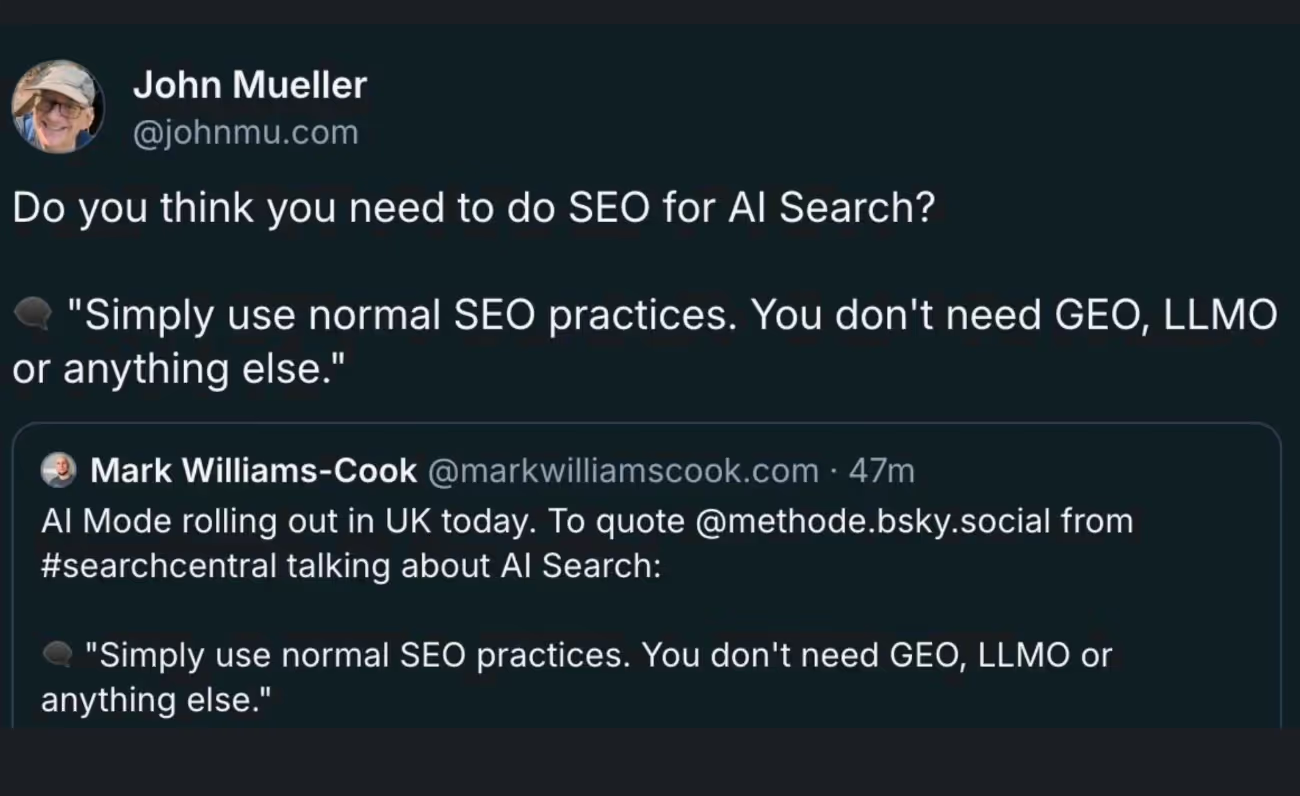
And before anyone asks, yes, we’ve heard this take too:
That you don’t need GEO, LLMO, or a shiny new acronym for every AI update; ‘good SEO is still good SEO.’
We actually agree.
But here’s the nuance:
Doing normal SEO now means understanding where your content shows up, not just where it ranks. Same fundamentals but on new surfaces.
Tools that can be used for SEO ROI forecasting
You don’t need a Frankenstein stack to forecast SEO ROI. You just need tools that answer three questions clearly:
- What’s happening?
- What’s most likely to happen?
- What’s the business impact?
Here’s a practical, non-overkill setup.
1. Google Search Console
This is your source of truth for:
- Impressions
- Clicks
- Real CTRs by query and page
- Early signs of AI Overviews impact
If your forecast ignores GSC data, it’s already shaky.
2. Google Analytics (GA4)
Use GA4 to map:
- Organic sessions → conversions
- Conversion rate by page type
- Assisted conversions and paths
This is where SEO stops being ‘traffic’ and starts being revenue-adjacent.
Optional: If you want this automated
Instead of stitching data together manually, you can use Factors.ai to see traffic and page-level conversion data and performance. You also get to see how buyers actually move from first visit to demo booking across LinkedIn ads, Google ads, and other touchpoints (Yes, the non-linear customer journey using multi-touch attribution.)
3. Keyword & traffic estimation tools
Tools like Ahrefs, Semrush, and the like, help with:
- Search volume (directionally)
- Keyword clustering
- Competitive SEO benchmarking
PS: Treat these as estimators, not promises. They’re inputs, not answers.
4. Spreadsheets (still undefeated)
Your actual SEO ROI forecast will almost always live in a spreadsheet.
Why?
- You can model scenarios
- You can show assumptions
- You can explain why the numbers changed
A clean SEO forecast template with inputs, assumptions, and outputs beats any black-box dashboard.
5. AI visibility tracking (emerging, imperfect, necessary)
This part is still evolving, but you should start tracking:
- LLM citations and mentions
- Featured answer appearances
- Branded search lift over time
Even if the data is directional, leadership will appreciate that you’re measuring what’s changing and not ignoring it. Some of the AI SEO tools help you with this.
Common pitfalls that break SEO ROI forecasts
Most SEO forecasts don’t fail because SEO ‘didn’t work.’ They fail because of avoidable planning mistakes.
Here are the big ones:
1. Treating SEO as a single-channel system
- SEO is no longer just ‘you rank, people click, and they convert’
- Ignoring AI visibility, zero-click behavior, and assisted demand creates blind spots that leadership will notice.
2. Using old CTR assumptions
- Those industry CTR charts from five years ago? Well, they don’t survive AI Overviews.
- If you’re not using your own GSC data, your forecast is already outdated.
3. Forecasting ambition instead of reality
- Publishing ‘10 articles per month’ in a forecast when your team has never shipped more than four is how you end up overpromising and under-delivering.
- Capacity realism matters more than optimism.
4. Giving leadership one number
- SEO outcomes come in ranges, not guarantees.
- Single-point forecasts create unnecessary tension when things shift (and they always do).
5. Forgetting to document assumptions
If assumptions aren’t written down, every variance turns into a debate.
If assumptions are written down, variance turns into a conversation.
Big difference.
Summing it up: How to make SEO forecasting work in the ‘AI era’
SEO forecasting hasn’t become impossible; it’s just become more layered.
Today, a credible SEO ROI forecast does three things well:
1. Models the traditional performance layer
This is the familiar, measurable part of SEO.
It forecasts traffic, conversions, pipeline, and ROI using your real historical data and actual team capacity. No inflated CTRs, no best-case assumptions. Just a clear view of what SEO can realistically deliver as a revenue channel.
2. Accounts for the AI visibility layer
SEO impact now goes beyond clicks.
This layer captures zero-click exposure, LLM citations, and brand presence that influence buyers before they ever visit your website. Even when traffic doesn’t show up immediately, SEO is still shaping demand and improving downstream conversion quality.
3. Communicates uncertainty clearly
Modern SEO isn’t predictable to the decimal.
Instead of promises, the forecast uses scenarios, documented assumptions, and ranges. This sets realistic expectations, builds trust with leadership, and gives you a framework to adapt when the search landscape shifts.
And yesss.. good SEO is still good SEO.
But ‘good SEO’ now means planning for where your content appears, not just where it ranks. Same fundamentals but on newer surfaces.
And with the right forecast? Still completely manageable.
FAQs on SEO ROI forecasting
1) What is SEO forecasting, and why does it matter?
SEO forecasting is the practice of using historical performance and current trends to estimate future organic visibility, traffic, conversions, and business value. It helps marketers set realistic goals, plan resource allocation, and justify SEO investment, especially now that search behavior and SERP features are changing rapidly.
2) How do AI Overviews and generative search impact SEO forecasts?
Generative AI features like AI Overviews and answer boxes increasingly deliver answers without clicks, reducing traditional CTR. Because of this zero-click behavior, forecasts based only on rankings and expected clicks can overstate impact. Modern forecasting must include an AI visibility layer to estimate influence even when users don’t click.
3) What data do I need to build an accurate SEO ROI forecast?
A credible forecast uses:
- Recent organic performance (clicks, impressions, CTR)
- Conversion rates by channel or page
- Search intent and keyword segmentation
- Capacity assumptions (content output, dev support)
- Scenario ranges (conservative, expected, ambitious)
These inputs turn SEO planning into a business case rather than a guess.
4) How can I account for uncertainty in SEO forecasting?
SEO forecasting isn’t about absolute predictions; it’s about preparing for a range of outcomes. Use scenario ranges, regularly update assumptions (e.g., CTR, algorithm changes), and include triggers that signal when you should reforecast. This communicates confidence with realistic caveats, not blind certainty.
5) Are traditional forecasting methods still useful in 2025?
Yes, traditional forecasting using historical trends, keyword models, and CTR estimates is still valuable. But it must be augmented with AI-aware signals (like visibility in generative responses,AI Overviews, and LLM citations) because these increasingly shape user behavior and influence demand without a click. Combining both gives a fuller picture.
Account-Based Marketing Attribution: How to Actually Know What’s Working
If you’ve ever run an ABM campaign and thought, “Okay… but which part of this beautiful Franken-strategy actually moved the needle?” Welcome to the club.
ABM sometimes feels like assembling a carefully crafted monster in the lab. Stitching together channels, touchpoints, and personalized plays, hoping the whole thing comes to life exactly the way you imagined. You flip the switches, monitor every spark… and then wait to see which part actually moved the account. (Happens more often than we admit.)
So today, we’re unpacking ABM attribution, the part everyone talks about but secretly hopes someone else will figure out.
Let’s talk about it, candidly, casually, and with just enough humor to make ABM data feel slightly less intimidating (because let’s be honest, attribution could use a little personality).
Before we dive in, let’s ground ourselves with the basics.
TL;DR
- ABM attribution connects all touchpoints across an account so you can see what actually influenced the pipeline and revenue.
- The biggest blockers are messy data, invisible offline touches, and disconnected tools.
- A strong setup requires sales and marketing alignment, clean account-level tracking, the right model, and ongoing iteration.
- Factors.ai closes the attribution gap with account identification, multi-touch tracking, offline visibility, and clear revenue reporting.
What is ABM (Account-Based Marketing)?
Think of Account-Based Marketing like booking VIP meetings instead of handing out flyers in a crowded street. You’re not trying to reach everyone, but you’re focusing on the accounts that actually matter.
- You zero in on high-value companies.
- You customize every touch so it feels intentional.
- You loop sales in from the very beginning.
- And you measure progress by how deeply the account engages and not by how many random leads fill out a form.
If you’re exploring the tech side of ABM, here’s a quick breakdown of the top ABM tools teams use to run and scale these programs effectively.
And what is attribution?
That’s simply the art of figuring out which marketing activities influenced a conversion, opportunity, or deal.
Combine the two, and you get ABM attribution.
ABM attribution is nothing but connecting all the dots across an entire account to understand what sparked interest, what nurtured it, and what ultimately nudged it into revenue territory.
This shift from volume metrics to account-level impact is exactly what separates ABM from traditional demand generation. This is something we’ve unpacked in detail in our ABM vs Demand Generation article.
Great. Now let’s dig deeper.
What ABM attribution actually is (Explained without jargons)
Accounts aren’t single people. They’re messy, cross-functional buying committees with different motives and attention spans. You might have:
- A VP skimming your ROI guide
- A senior manager lurking on your product pages at 2 a.m.
- A champion forwarding your case study internally
- A procurement person reading the fine print
- A C-level exec who finally joins the demo
And all of them contribute to the deal.
ABM attribution is the process of stitching all of those cross-channel, cross-person interactions together and saying, “Here’s how this account moved. Here’s what influenced it. Let’s do more of that.”
Without this, ABM is just… vibes. But with it, ABM becomes a strategy.
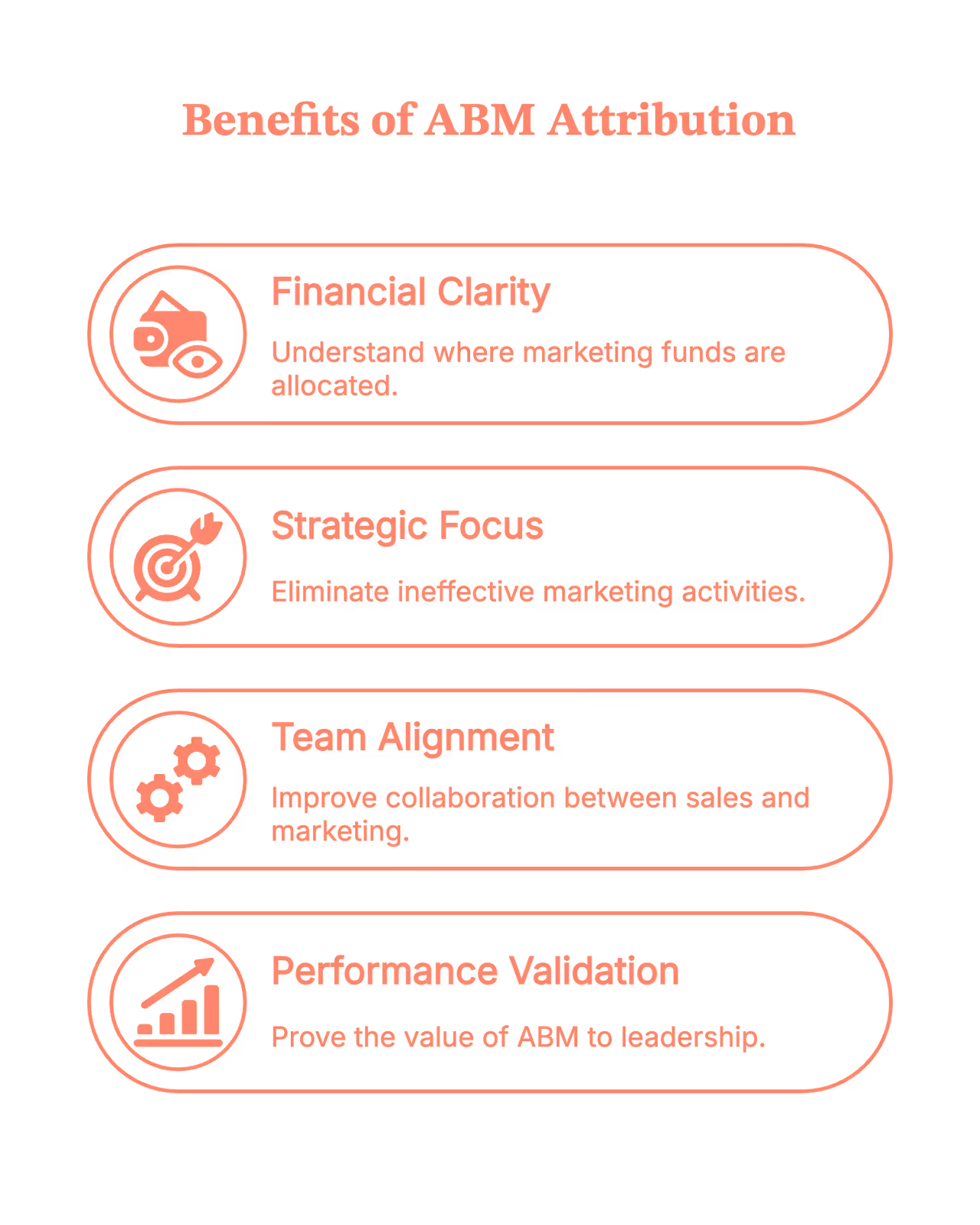
Why ABM attribution matters (a lot more than people admit)
1. You finally know where your money is actually going
ABM campaigns are… not cheap. Personalization takes time, tools, and very patient marketers. Attribution keeps everyone honest.
2. You stop doing “random acts of marketing”
Without attribution, everything seems to be working. With attribution, you see what’s actually working.
3. Sales and marketing stop arguing (well, mostly)
Shared account-level insights = fewer “marketing didn’t bring quality leads” conversations.
4. You can prove ABM works to leadership
And yes, we know this is often half the battle.
What the Community says (because Reddit always has opinions)
Spend five minutes scrolling through marketing Reddit, and you’ll notice a theme: everyone loves the idea of ABM… right up until someone asks how to measure it.
A few familiar takes pop up again and again:
- “Show ROI at the account level or leadership won’t buy in.”
- “ABM is great, but without attribution it’s just fancy targeting.”
- “Half my ABM wins happen offline. Hard to track, but essential.”
- And the crowd favorite: “Attribution is where ABM goes from vibes to revenue.”
In short, the community isn’t anti-ABM; they’re just tired of running programs they can’t prove. Attribution is what turns enthusiasm into confidence.
The real-world challenges of ABM attribution (a.k.a. why it feels hard)
ABM attribution sounds great in theory… until you try to map every touchpoint across an entire buying committee and realize the journey is anything but neat.
So let’s look at the real friction points. The stuff that actually slows teams down when they try to make attribution work in the wild.
Many of these challenges arise because ABM fundamentally differs from the traditional funnel. This breakdown of ABM vs Traditional Marketing shows why the attribution process ends up so different.
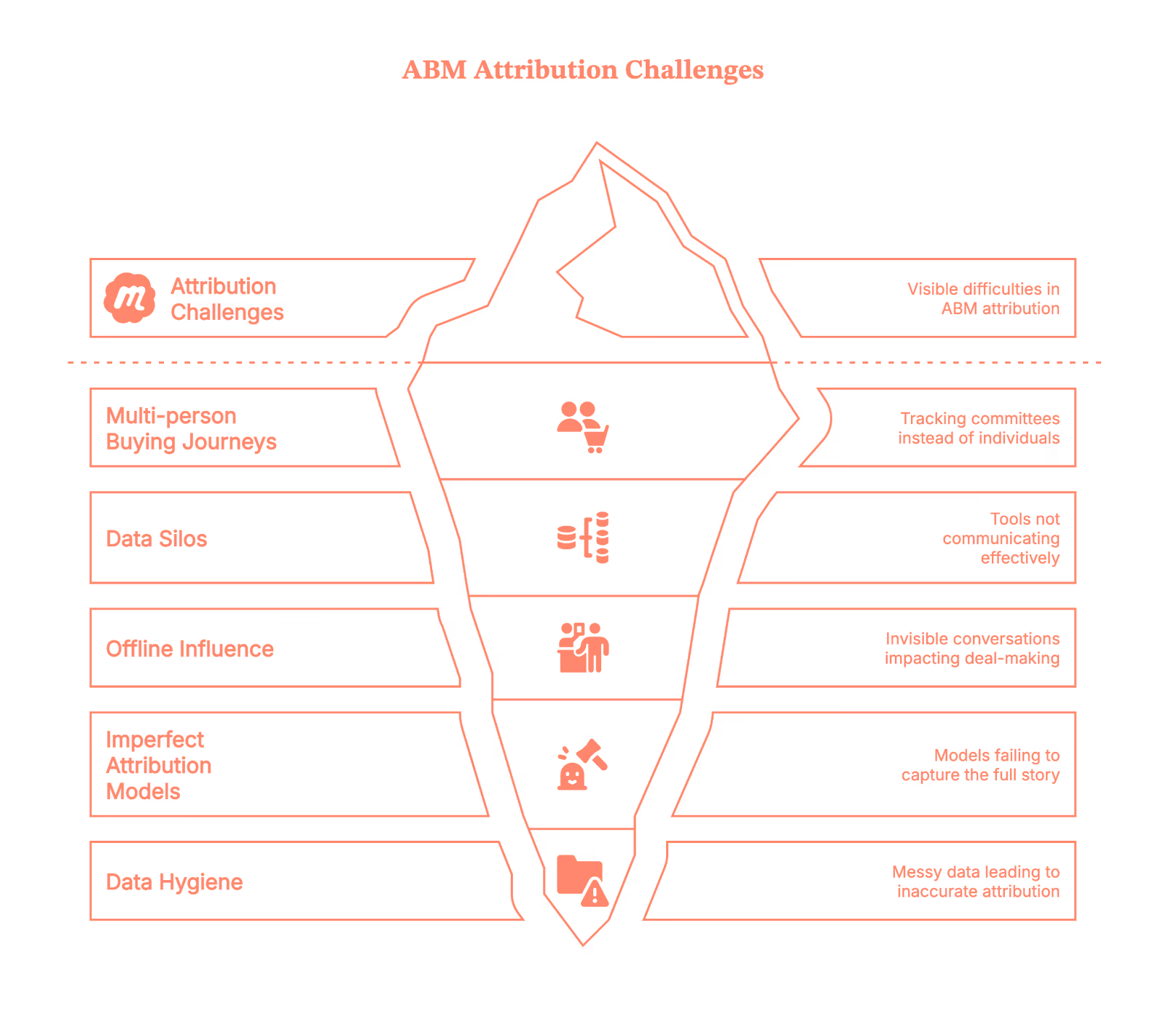
Challenge 1: Multi-person, multi-touch buying journeys
In ABM, you’re not tracking one person; instead, you’re tracking a committee. Touchpoints pile up fast. They are in the form of:
- LinkedIn ads
- Website visits
- Email nurturing
- SDR outreach
- Events
- Offline conversations (yes, these still happen!)
And with all this, attribution becomes tricky. Because…
- The journey isn’t linear.
- People engage anonymously.
- Not every touch gets logged.
- And buyers jump in and out depending on their role.
Challenge 2: Tools don’t speak the same language
Your ABM tool has data.
Your CRM has different data.
Your website analytics has other data.
Your sales reps store half the truth in their inboxes.
Everything is fragmented, and stitching it together feels like assembling IKEA furniture without instructions.
Challenge 3: Offline influence is invisible
Conversations at events, personal outreach, referrals, internal champions… these are often the real deal-makers.
But guess what?
None of that naturally shows up in your attribution reports.
Challenge 4: Attribution models are imperfect
First-touch? Too simplistic.
Last-touch? Doesn’t tell the full story.
Multi-touch? Great… until someone asks who gets how much credit.
W-shaped? U-shaped? Time decay? Weighted? Custom models?
It’s easy to get stuck in “model paralysis.”
Challenge 5: Data hygiene, the Achilles’ heel
Incorrect contact mapping, missing UTM parameters, untracked sessions, and inconsistent naming are the usual chaos.
If the data is messy, the attribution is messy.
How to implement ABM attribution without losing your mind
Alright, challenges aside. Here’s the part where we go from theory to “you can actually do this.”
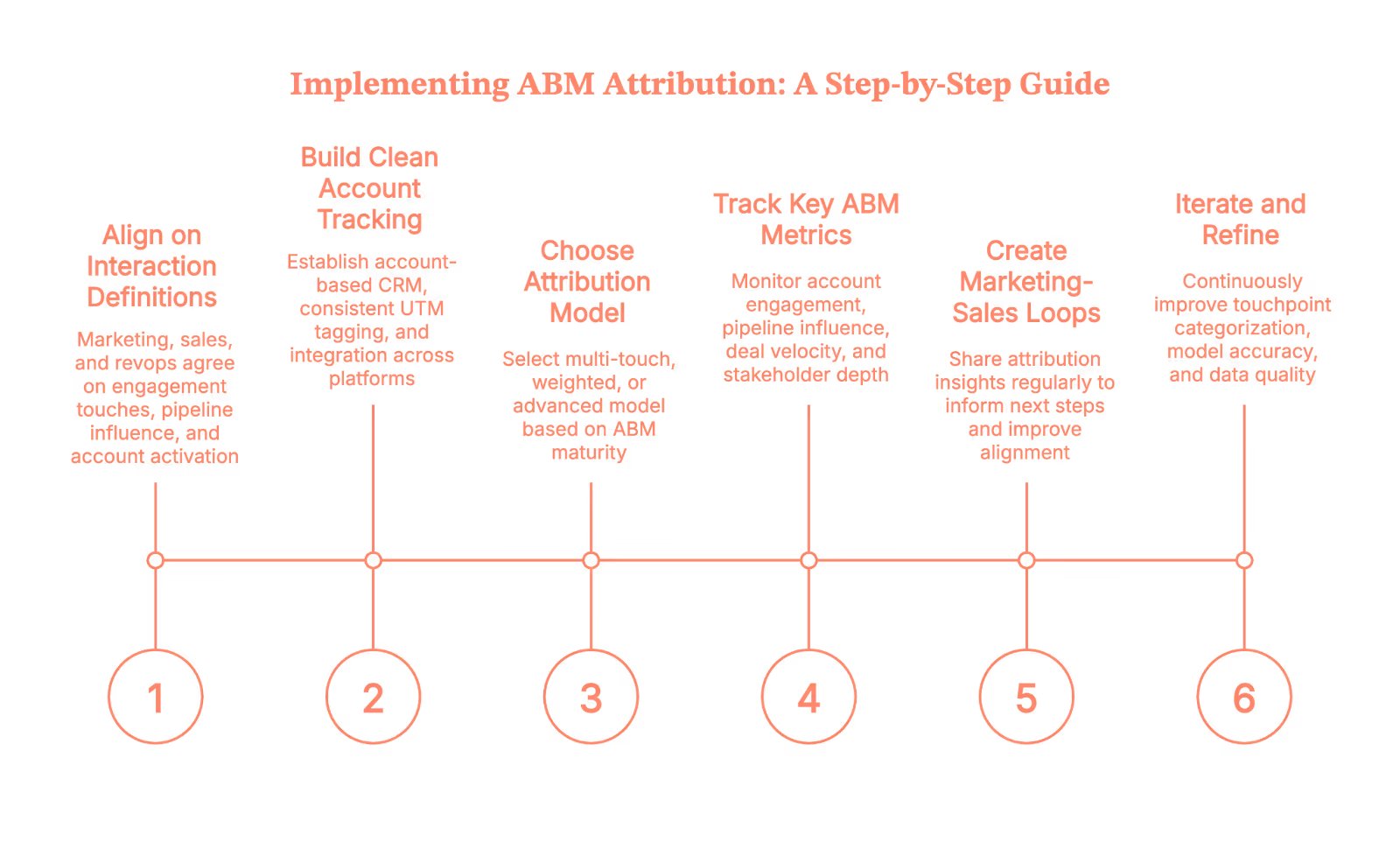
Let’s walk through it step-by-step.
Step 1: Align on what counts as a meaningful interaction
Before you build dashboards, get marketing, sales, and revops aligned on the following:
- What counts as an “engagement touch”
- Which interactions matter at different stages
- What is considered an “influenced pipeline”
- When an account is deemed “activated”
This avoids future “that’s not what I meant” arguments.
Step 2: Build clean account-level tracking
This is foundational. You’ll want:
- An account-based view (not just leads)
- Proper CRM structure
- Consistent UTM tagging
- Integration across ABM platform, CRM, and analytics tools
Think of this as cleaning your kitchen before you start cooking, annoying, but absolutely necessary.
Step 3: Pick an attribution model that matches your ABM maturity
- If you’re starting out, use simple multi-touch.
- If you’re scaling, then use weighted or custom models that account for key ABM engagement moments.
- If you’re advanced, then layer in predictive or machine-learning models to identify influence patterns automatically.
Yes, you can always switch later. Attribution models aren’t set in stone. As data volume, signal quality, and closed-won insights improve, more advanced models simply become more accurate.
Step 4: Track the right ABM Metrics (Not just “leads”)
ABM attribution isn’t about counting people. It’s about understanding accounts. Track:
- Account engagement score
- Pipeline created or influenced
- Deal velocity
- Stakeholder depth (how many people engaged)
- Stage progression tied to marketing/sales activities
- High-intent behaviors (e.g., pricing page visits)
These tell a truer story.
Step 5: Create loops between marketing & sales
Share attribution insights fortnightly or monthly:
- “Here are the touches that influenced the latest deals.”
- “Here’s what triggered conversions in high-value accounts.”
- “Here’s where deals stalled and why.”
When attribution informs next steps, you’ve built a real ABM engine.
Step 6: Iterate like you mean it
It won’t be perfect the first time.
Or the second.
Or the fifth.
But each iteration will sharpen:
- Touchpoints categorization
- Model accuracy
- Data quality
- Sales-marketing alignment
- Personalization strategies
Consistency wins this game.
As you put these steps into practice, pairing attribution with strong execution matters. These 6 ABM tactics to drive conversions can guide what to prioritize in your activation plan.
Where many ABM teams get stuck: The attribution gap
Even with all the right intentions, most ABM teams encounter one frustrating wall: THE ATTRIBUTION GAP.
It’s the uncomfortable space between “we know engagement is happening” and “we can prove it influenced revenue.” Gaps often come from:
- Anonymous website activity
- Multi-touch journeys
- Offline influence
- Data silos
- Untracked channels
- CRM inconsistencies
This is where technology makes or breaks your ABM strategy.
And yes, this is exactly where Factors.ai steps in.
How Factors.ai helps close the ABM attribution gap for B2B teams
Let’s get practical. Factors isn’t just another analytics dashboard; it’s specifically built to solve the attribution problems ABM teams struggle with most.
Here’s how it bridges those gaps:
1. Account-level website analytics (Even for anonymous website visitors)
Factors.ai offers one of the strongest account-level website visitor identification in the market, with coverage reaching up to 75%. It uses a waterfall enrichment setup that pulls from four different data sources, so the insights aren’t just broad… they’re accurate.
Once an account is identified, Factors layers in geo-location and job-title triangulation, which helps surface more than 30% of the actual individuals behind those visits.
In other words, you finally get to see:
- Which companies are showing up
- What pages they’re exploring
- How often do they return
- Which actions signal real intent
All those previously “invisible” touches?
They start showing up loud and clear.
2. Cross-channel, multi-touch attribution (Done automatically)
Factors pulls together data from all your channels, like:
- Paid ads
- Organic traffic
- Events
- LinkedIn engagement
- SDR outreach
- CRM activity
…and creates a unified timeline for each account.
No more stitching data manually.
No more channel blind spots.
Only multi-touch attribution.
3. Offline + Sales touch tracking
Factors doesn’t just capture digital activity; it brings your offline and sales motions into a single view.
With Account 360, all those scattered signals finally land in one place: CRM updates, SDR outreach, meeting notes, LinkedIn interactions, G2 intent, and website engagement all roll up into a unified account timeline.
The result?
You see the full story of how an account interacts with your brand, across both marketing and sales touchpoints.
4. Custom attribution models built for ABM
Instead of forcing you into standard models like last touch or first touch, Factors lets you:
- Use multi-touch
- Create weighted models
- Focus on intent-heavy touches
- Build ABM-specific attribution logic
You can finally choose a model that reflects how your buyers actually buy.
5. Clear pipeline influence & revenue reporting
Factors shows exactly how an account moved from early engagement to opportunity to closed-won. With this, you get clean, defensible reports that leadership actually understands.
6. Insights that actually drive ABM strategy
Factors highlights the signals that matter the most:
- High-intent accounts
- Content that moved deals
- Channels that consistently kickstart meetings
- Patterns across closed-won accounts
So your next ABM campaign isn’t just creative, it’s informed by data.
Read more about this on Using Factors.ai for targeted ABM
ABM attribution doesn’t have to be scary
Yes, attribution is messy.
Yes, ABM multiplies that mess.
And yes, you’ll probably question your life choices once or twice while implementing it.
But once your system is in place?
You stop guessing.
You start learning.
You start predicting.
And your ABM program stops being an experiment and becomes a repeatable revenue engine. The right tools (like Factors.ai) make the journey 10× smoother.
So take the first step, build your foundation, and let your attribution framework evolve from there. Your future ABM programs will thank you.
So to summarise
Account-Based Marketing (ABM) attribution helps B2B teams understand which marketing and sales touchpoints truly influence pipeline, opportunity creation, and revenue at the account level. It connects every interaction across a buying committee, like ads, website visits, content consumption, SDR outreach, events, and even offline conversations, to reveal how an account actually progresses.
Because ABM journeys involve multiple stakeholders, disconnected tools, messy CRM data, and untracked touches, most teams face a real attribution gap. Building a reliable ABM attribution engine requires clean account-level tracking, sales–marketing alignment, the right attribution model, and ongoing data hygiene.
Platforms like Factors.ai close the visibility gap by identifying anonymous accounts, stitching multi-touch journeys automatically, capturing offline influence, and providing clear revenue reporting. The result? A repeatable, insight-driven ABM engine that makes your future programs more effective.
FAQs on Account-Based Marketing attribution
Q1. How do you measure attribution in an ABM campaign?
You measure ABM attribution by mapping every marketing + sales touchpoint at the account level (not at the lead level). This includes website activity, ads, emails, SDR touches, events, and offline conversations. Then you apply an attribution model, like multi-touch, weighted, or custom, to understand which interactions influenced pipeline, opportunity creation, or revenue.
Q2. What makes ABM attribution so difficult for B2B teams?
Most teams struggle because buying journeys span multiple people, tools don’t sync data cleanly, offline influence rarely gets captured, and CRM hygiene is inconsistent. ABM multiplies complexity because each account generates dozens of interactions across different roles and channels.
Q3. Which attribution model works best for ABM programs?
Multi-touch is the most common starting point because it spreads credit across the journey. As ABM maturity increases, teams shift to weighted models that give more value to high-intent touches (e.g., demo page visits, sales meetings), or custom models tailored to their buying cycle.
Q4. How do you track anonymous account activity in ABM attribution?
Most companies rely on layers of website visitor identification and enrichment. Tools like Factors.ai use multi-source waterfall enrichment to identify up to 75% of accounts and surface likely individuals using geo and job-title triangulation. This converts anonymous website traffic into attribution-ready account data.
Q5. How do you include offline and sales touches in ABM attribution?
You need a unified account timeline that blends CRM notes, SDR outreach, meetings, events, referrals, and marketing activity. Without this, you’ll see only half the picture. Platforms like Factors.ai pull these signals into a single Account 360 view so offline influence is fully attributed.
%20(1).avif)
Lead Enrichment Explained: A B2B Marketer's Guide for 2025
In B2B marketing, every lead matters, but not all leads convert into customers. Only high-quality leads can turn into valuable customers. So, how do you identify the valuable prospects amid the junk? The answer is through Lead Enrichment.
A name in your CRM tells you little about whether a lead is worth pursuing. To qualify them for sales, you need more information, such as their company, job title, and location. The Lead Enrichment process bridges this gap. It turns these basic contact details into rich, actionable profiles. This process allows your sales team to target the right prospects with precision.
Keep reading to know how Lead Enrichment can enhance your sales process.
TL;DR
- Lead enrichment enhances basic lead information, such as email addresses, with valuable data, like company size, industry, revenue, and pain points.
- Lead enrichment enables marketers to prioritize leads, personalize outreach, and refine marketing strategies. By leveraging enriched data, marketers can segment audiences effectively, leading to targeted campaigns that resonate with ICP.
- Key types of lead enrichment data include contact details, firmographics, demographics, technographics, intent signals, and behavioral insights. These data provide a comprehensive view of leads and their interests.
What is Lead Enrichment?
Imagine you’ve just wrapped up a successful campaign and collected a list of email addresses. You now have a pool of potential customers, but there's a catch. Without more detailed information, engaging with them becomes a challenge. The solution? Lead Enrichment.
Lead enrichment provides valuable insights into key details like company size, industry, hierarchy, revenue, and the challenges they face. With this data, you can craft personalized messages that address their pain points by positioning your solutions as the perfect fit for their needs.
B2B Lead Enrichment, or data enrichment, involves gathering information about potential customers, such as contact and company data, using top B2B lead enrichment tools.
By understanding these leads with greater detail, you can determine your audience's interest level in the company's products or services. This process helps you improve sales and marketing efforts, ultimately increasing the conversion rate and Return on Investment (ROI).
Why is Lead Enrichment Important For B2B Businesses?
B2B businesses are highly competitive. Accurate and up-to-date data is essential to outlive the competition.
According to The State of CRM Data Management Study in 2023, 58% of respondents indicated data accuracy is still a significant problem.
This is a considerable gap.
With accurate data, marketing teams can efficiently qualify, and score leads, enabling them to drive predictable revenue. B2B lead data enrichment can help you:
- Assess lead fit and prioritize prospects by gaining deeper insights into potential customers.
- Leverage accurate data to personalize messaging and boost conversion rates.
- Build stronger customer relationships by addressing their needs and preferences.
Types of Lead Enrichment Data

Here are the types of lead enrichment data you need to scale your lead enrichment efforts:
1. Contact Data
Contact data, including the contact's phone number and email address, forms the foundation for effective prospecting and lead generation. Accurate contact data ensures you target your Ideal Customer Profile (ICP).
2. Firmographic Data
Imagine you are running a targeted marketing campaign for the IT industry based in the US. Then, firmographic data is what you need. This data is crucial to segmenting and targeting leads effectively.
Firmographics data includes:
- Geographic location
- Customer base
- Industry
- Revenue
- Company structure
3. Demographic Data
Demographic data helps you define and build your ICP. With demographic data, you can personalize your outreach, making it more relevant and engaging. Demographic data includes:
- Age
- Job title
- Gender
- Income
- Education
- Job role
4. Technographic Data
By understanding a company’s tech stack, you can assess if your solution is a good fit to solve their pain points. Technographic data gives you such insights. Technographic data includes:
- Hardware used by the target company
- Software used by the target company
- Applications used
- Account’s IT infrastructure
For example, if you know your ICP is using Hubspot CRM, you can tailor your pitch to highlight how your product integrates seamlessly with Hubspot.
5. Intent Data
Intent data tracks a potential customer's online behavior, such as interests, pain points, and readiness to buy. This allows you to focus on prospects actively searching for solutions like yours and reach out at the right time when they're most receptive to your message. Intent data includes:
- Web searches.
- Content consumption.
- Website/page visits.
- Interactions on the website
With tools like Factors, you can track buying signals by analyzing your leads’ visited website pages, LinkedIn ad campaigns, G2 data, and third-party sources like Gartner and TrustRadius. This helps you target the most promising leads and personalize your outreach for maximum impact.

6. Social Media Data
Social media data enrichment refers to using platforms like Facebook, Twitter, or LinkedIn to gather insights. By tracking your leads’ online behavior, you can uncover their interests, connections, and engagement patterns. This data allows you to personalize your messaging and target your ICP on social platforms.
For instance, you can personalize the message and target the ICP through LinkedIn ads for running ABM campaigns.
7. Behavioral Data
Behavioral data pinpoints prospects who are actively engaging with your content. It gives insight into their online journey, revealing interactions, actions, and engagement patterns. Key behavioral data includes:
- Email engagement, like open rates, click-through rates, and reply rates
- Website activity like page views, time on site, and bounce rates
- Content consumption, including downloads, shares, and comments
- Event Registrations, attendance, and engagement levels
- Site Navigation
- Purchase history
8. Account Data
Account data provides a comprehensive overview of the entire organization, not just an individual lead. This information is crucial for B2B companies to identify cross-selling and upselling opportunities. Essential account data includes:
- Company size and revenue
- Industry size and vertical
- Company hierarchy, including subsidiaries and parent company.
9. Geographic Data
Geographic data provides customer location. By understanding where your leads are based, you can tailor sales and marketing efforts to specific regions. It includes:
- Country
- State
- City/Town
Location-based data helps you run localized campaigns and optimize marketing spend by targeting regions with maximum potential.
Don't miss our B2B account scoring guide for additional details.
How Does Lead Enrichment Work?
The lead enrichment process involves key steps like data collection, lead scoring and segmentation, lead routing, lead conversion and nurturing.

1. Data Collection
This step involves collecting lead information from various sources, such as in-house databases and third-party providers. You can also purchase high-quality data from reputable B2B data providers and add information such as company size, industry, job titles, and contact details.
2. Lead Scoring and Segmentation
Evaluate leads based on their perceived value and potential for conversion. Group leads into categories based on their shared characteristics allows you to tailor your outreach and increase effectiveness.
3. Lead Routing
Assign leads to sales representatives according to their expertise and territory. Lead routing software can help you streamline the process, ensuring that leads are distributed efficiently and to the right person.
4. Lead Conversion and Nurturing
Refine your lead scoring criteria to identify high-quality prospects. Tailor messaging to address each lead's unique needs and interests. For leads that haven't converted yet, maintain engagement with personalized follow-ups and relevant content to nurture the relationship.
Use Cases For Lead Enrichment
The key use cases for B2B lead enrichment include:
1. Targeted ABM
Identify your ICP and tailor your messaging to address the specific challenges faced by each of your target accounts.
2. Data-Driven Lead Scoring
Assess the lead quality based on enriched data. Focus your time and effort on the most promising prospects with the highest potential for conversion.
3. Enhanced Customer Segmentation
Create targeted campaigns based on factors such as industry, company size, and other firmographic attributes. This approach helps you meet the unique needs of different customer segments.
4. Data-Driven Marketing Automation
Automate marketing efforts based on specific lead behaviors and attributes to move them through the sales funnel more efficiently.
How can Factors Help with B2B Lead Enrichment?
One of the biggest challenges B2B marketers face is dealing with anonymous website traffic and the absence of clear buying signals. Without understanding who is visiting your site or what stage of the buyer’s journey they’re in, it’s difficult to nurture and convert leads effectively.
Here’s how Factors can help in the lead enrichment process.
1. Unify Cross-Channel Intent Signals
Factors combines intent data from multiple sources such as website visits, G2, LinkedIn ads, and third-party platforms like Gartner and TrustRadius. It gives you a complete view of your prospects’ interests.
2. Identify High-Value Leads
Factors uncovers up to 64% of your anonymous website traffic, enabling you to focus on companies actively researching your solutions. It helps you prioritize leads with higher conversion potential.
3. Industry-leading match rates
The powerful reverse IP lookup technology of Factors app reveals firmographic and engagement data, enriching leads with key insights about your anonymous visitors.
You can easily integrate Factors with your existing tools, such as CRMs and ad platforms. The setup process is simple. By using Factors, you gain the data you need to target better and prioritize leads, and improve your B2B marketing efforts.
Check out how Rocketlane generated 23% more MQLs and boosted its pipeline with Factors.
Lead Enrichment: Filter Your High-Value Leads
Lead enrichment is a vital component of maximizing lead generation in B2B marketing.
By enriching your lead data with firmographic, demographic, and intent data, you can better understand your target audience and their needs. In this process, you identify high-value leads who are actively seeking solutions.
Lead enrichment enables you to run targeted campaigns that resonate with specific segments, ultimately improving conversion rates. It also allows you to assess potential customers' fit more accurately, ensuring your sales team focuses on the most promising leads and drives predictable revenue growth.
Enhancing lead data drives better targeting and engagement.
1. What It Adds: Key details like company size, industry, and contact info.
2. Why It Matters: Supports personalized messaging and campaign precision.
3. Strategic Benefits: Boosts sales effectiveness, improves segmentation, and increases conversion potential.
Lead enrichment equips teams with deeper insights to drive meaningful connections.
FAQs on Lead Enrichment
What are the benefits of lead enrichment?
Lead enrichment is essential to keeping the B2B lead data accurate and updated. The sales and marketing team can assess and prioritize qualified leads and create personalized messaging based on enriched data, which leads to higher engagement and conversion rates.
What is data enrichment in lead generation?
Data enrichment is the process of enhancing your existing lead data with additional information. It involves gathering data points on warm leads’ interests in your offerings to create more complete and accurate profiles of ICPs.
What is sales enrichment?
Sales enrichment is a specific type of lead enrichment that focuses on gathering and organizing information about potential customers, specifically for sales purposes. It includes contact details, job titles, company information, and purchasing history.

From Website Visitor to Warm Outbound Play: How to Use GTM Engineering Services for Intent-Driven Outreach
TL;DR
- Visitor ID + Intent Data = Real Pipeline: Identify ICP-fit companies visiting your site using reverse IP and intent filters, even if they don’t fill out a form.
- GTM Engineering Automates Everything: From enrichment to outbound handoff, custom workflows eliminate manual busywork and trigger timely outreach.
- Prioritization Drives Focus: Accounts are tiered by fit and intent, allowing reps to focus efforts where they matter most, not just on who clicks first.
- Human Touch, AI Assist: AI-generated summaries and contact bundles give reps the context they need to personalize without guesswork or delay.
Let’s be honest: traffic and MQLs don’t pay the bills. Pipeline and revenue do.
Here’s the truth: your best prospects are probably already on your website. They’re comparing features, peeking at pricing, and reading that one blog you’re weirdly proud of. But only ~3% of visitors fill out a form. The other 97%? Anonymous..unless you can identify the company, recognize buying intent, and trigger smart outreach automatically.
This article shows you how to do exactly that with website visitor identification, intent data, and a layer of GTM engineering that turns signals into ready-to-send outbound and, ultimately, qualified conversations.
We’ll keep it practical, human, and zero-fluff. (Coffee optional. Results, not.)
And yes, we’ll show how Factors does the heavy lifting, tooling, data, and workflows included.
TL;DR: This is the fastest way to build pipeline without ballooning ad budgets or headcount.
But first, the basics.
What is intent data?
Intent data is any signal that shows a buyer might be researching your category or solution. There are four types of intent data:
- Zero-party: They tell you directly (e.g., a demo form).
- First-party: You observe it on your assets (e.g., web sessions, page views, clicks).
- Second-party: Another company’s first-party data (e.g., G2 page visits, LinkedIn Ads views).
- Third-party: Aggregated across many sites (e.g., Bombora-type data).

Why it matters: Studies suggest buyers are ~57% through their journey before they talk to sales. You need to engage earlier, when intent shows up, not when a form arrives.
What is website visitor identification?
It’s how you de-anonymize company-level traffic on your site (without personal PII). Tools like Factors.ai use industry-leading reverse IP technology and enrichment to reveal who’s on your site (company, industry, size, tech, etc.) and what they’re doing (pages, sessions, engagement depth).
Factors.ai offers best-in-class coverage for website visitor identification. It identifies more than 75% of anonymous website visitors using sequential waterfall enrichment.
What is GTM engineering?
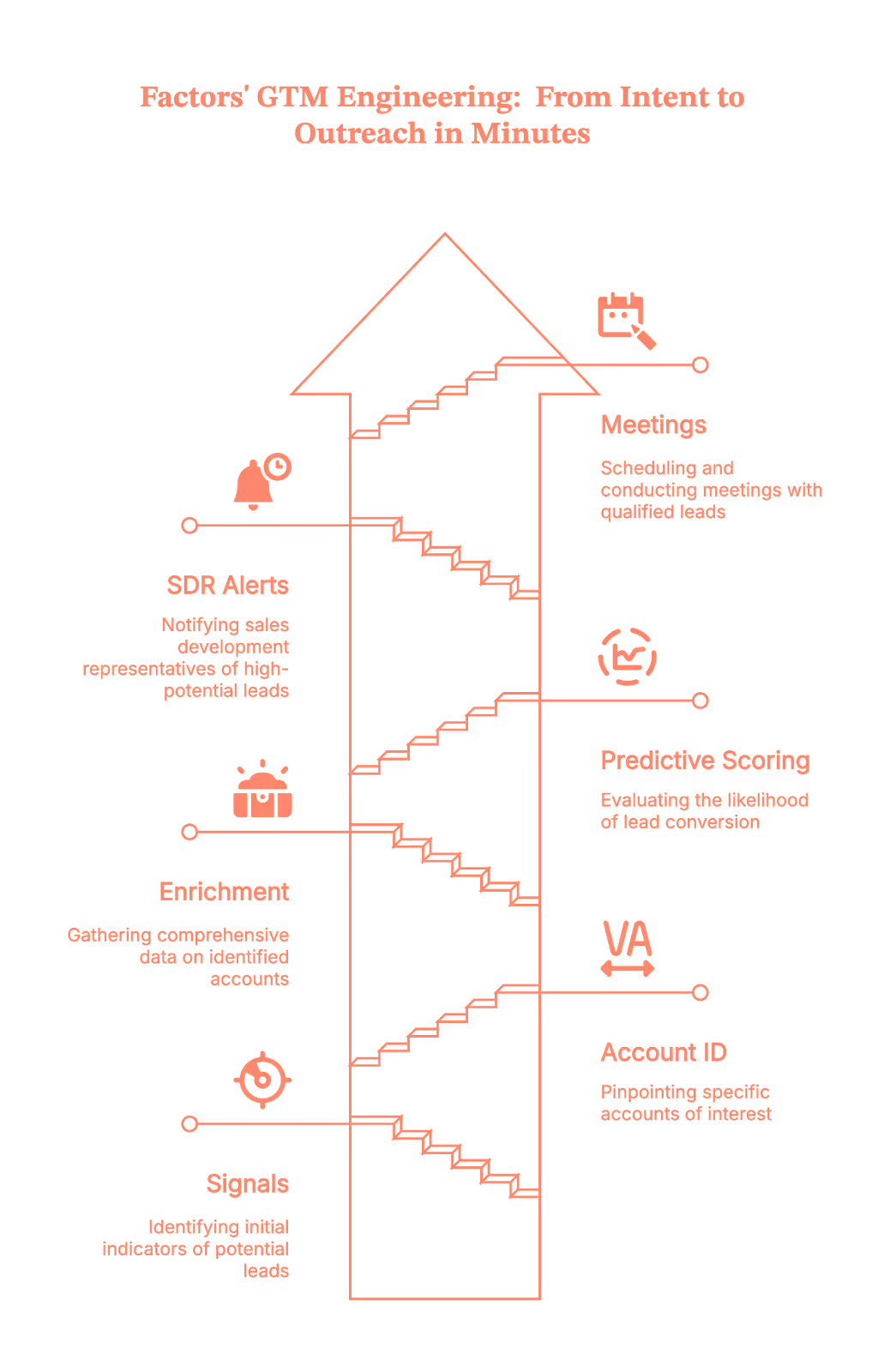
GTM engineering is the missing link between knowing who’s interested and acting on it in real time. It’s the setup of automated workflows (with AI where helpful) that connect your data sources, website, ad platforms, CRM, Apollo, Slack, and more, to trigger instant, contextual outbound plays.
With Factors’ GTM Engineering services, you don’t just get software; you get a managed system that:
- Detects intent signals in real time
- Identifies which companies are visiting your site
- Enriches contact data automatically via Clay and Apollo
- Scores and prioritizes accounts (AI-enabled predictive scoring included)
- Sends ready-to-act Slack alerts and email drafts to SDRs/Sales in minutes (not next Tuesday).
- Automate outreach via LinkedIn InMails, calls, and emails
Okay, but why does this matter now? Because everyone’s doing it (Just kidding)
- Speed wins. Buyers do a lot of research before talking to sales. If you reach out first (and with context), you're more likely to make the shortlist.
- Efficiency is everything. Ad budgets are tight; headcount isn’t infinite. Intent + automation = more meetings per rep, with less chaos.
- Sales teams need clarity, not ‘heads-up’ pings. A good alert says who, why now, who to contact, and what to say. (Not ‘someone from Acme visited lol.’)
The 5-Step Playbook to Turn Visitors into Warm Outbound Play (Run this today)
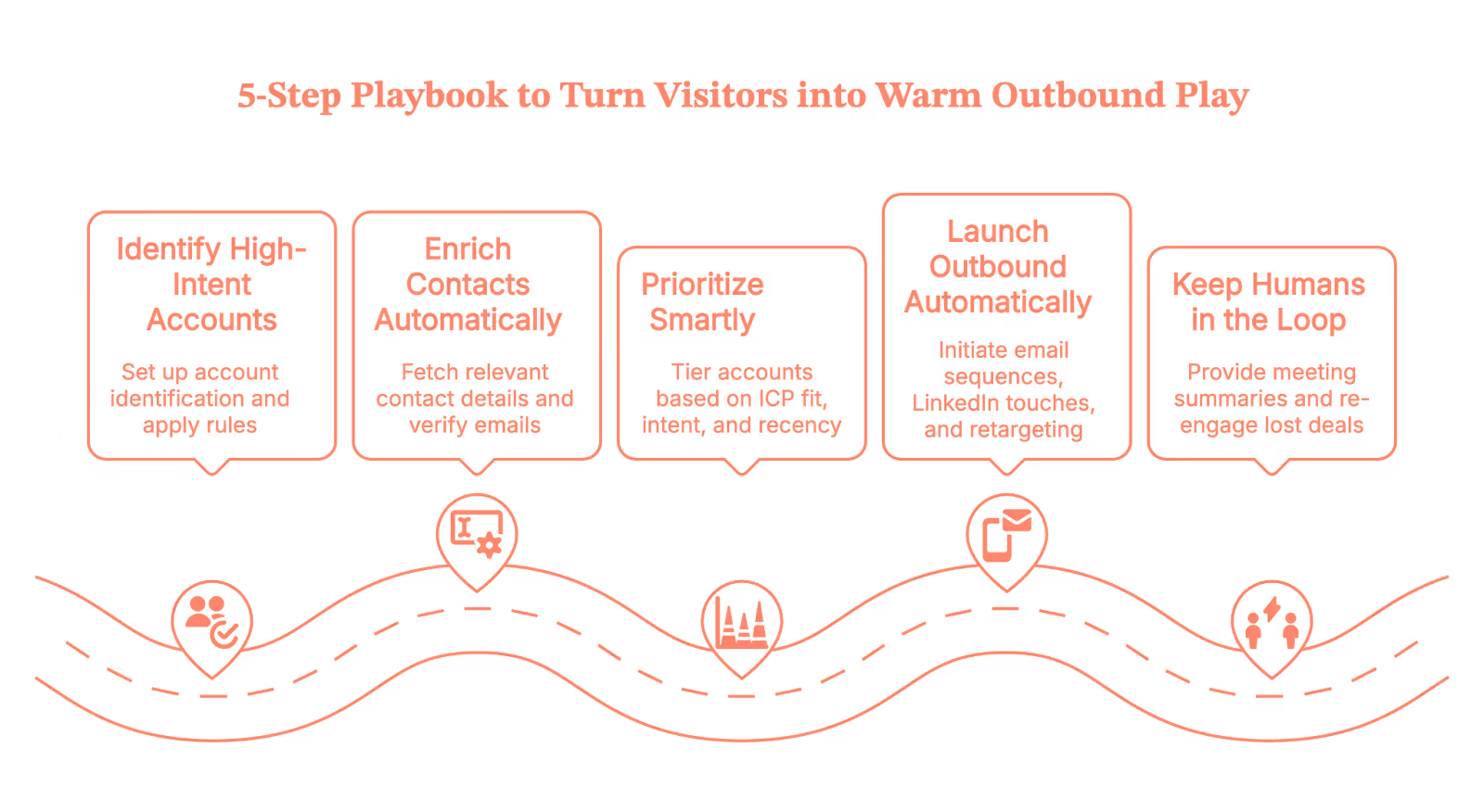
1) Identify high-intent accounts (with Factors)
Set up account identification on your site so you see company, industry, size, location, and what they did (pricing page, comparison page, sessions, etc.). Then add simple rules:
- ICP fit: e.g., Software/IT/Education, US/Canada, 50–500 employees
- Intent filters: e.g., ‘viewed pricing or product pages for ≥60 seconds,’ ‘multiple sessions in 24 hours,’ or ‘visited competitor comparison’
Pro tip: Start with two high-yield streams:
- High-intent ICP (net-new)
- Closed-lost/churned revisits (exclude super-recent losses so you don’t look clingy)
When an account matches, Factors fires real-time alerts and links directly to the account’s journey (so reps see context in one click).
(Because ‘context switching across 12 tabs’ isn’t a growth strategy.)
2) Enrich contacts automatically (this is where GTM engineering shines)
Identifying the company is half the job. The other half is finding the right people with verified emails, without sending SDRs on a copy-paste safari.
Here’s the flow your GTM engineering layer runs behind the scenes:
- Trigger: A Factors alert hits your orchestration tool (Make.com, Zapier, or Clay).
- Journey pull: Fetch last-30-day activity from Factors (pages, sessions, ad touches) into a working sheet.
- Apollo enrichment: Call Apollo to fetch relevant titles/regions/seniority; capture work emails and verification status.
- CRM hygiene: Check HubSpot/Salesforce for duplicates; tag new/existing; write updates.
- Prep the alert: Bundle the journey + top contacts so Slack shows reps who to email first (and why).
Net result: Your team gets verified contacts from the right account, in minutes, without manual chasing.
3) Prioritize smartly (so reps take the next best action)
Not every account deserves a same-day call. Use lightweight tiering so your team focuses on impact, not volume:
- ICP Fit: Expected ACV, win rate, segment (SMB/MM/ENT)
- Intent: Page depth, frequency, topics (pricing/competitor pages > ‘what is’ blogs)
- Recency: Last activity (fresh beats stale)
- Engagement: Channels and content they cared about (ad → landing page ≠ casual blog skim)
Factors’ Account Tiering and Contact Relevance agents do this automatically, grouping buying committees, ranking contacts, and even generating ‘why this person’ reasons.
Tier 1 goes to Sales now; Tier 2 gets Sales + Marketing; Tier 3 goes into the nurture phase.
(Think of it as ‘do the clever things first.’)
4) Launch outbound automatically (without being creepy)
Once you have account + contacts + context, GTM engineering fires multichannel plays:
- Email sequences (via Apollo or Smartlead), personalized to the topic/page cluster
- LinkedIn touches (connection requests and light interactions via tools like HeyReach/Trigify)
- Precision retargeting (show the right creative to live ICP visitors)
- Slack alerts so reps can jump in when Tier 1 accounts are active
Messaging rule of thumb: reference adjacent, observable signals (‘teams like yours comparing X/Y often ask about…’) instead of ‘we saw you on the pricing page at 3:17 pm.’(Because… yikes.)
5) Keep humans in the loop, then measure like a hawk
Automation should tee up great conversations, not replace them.
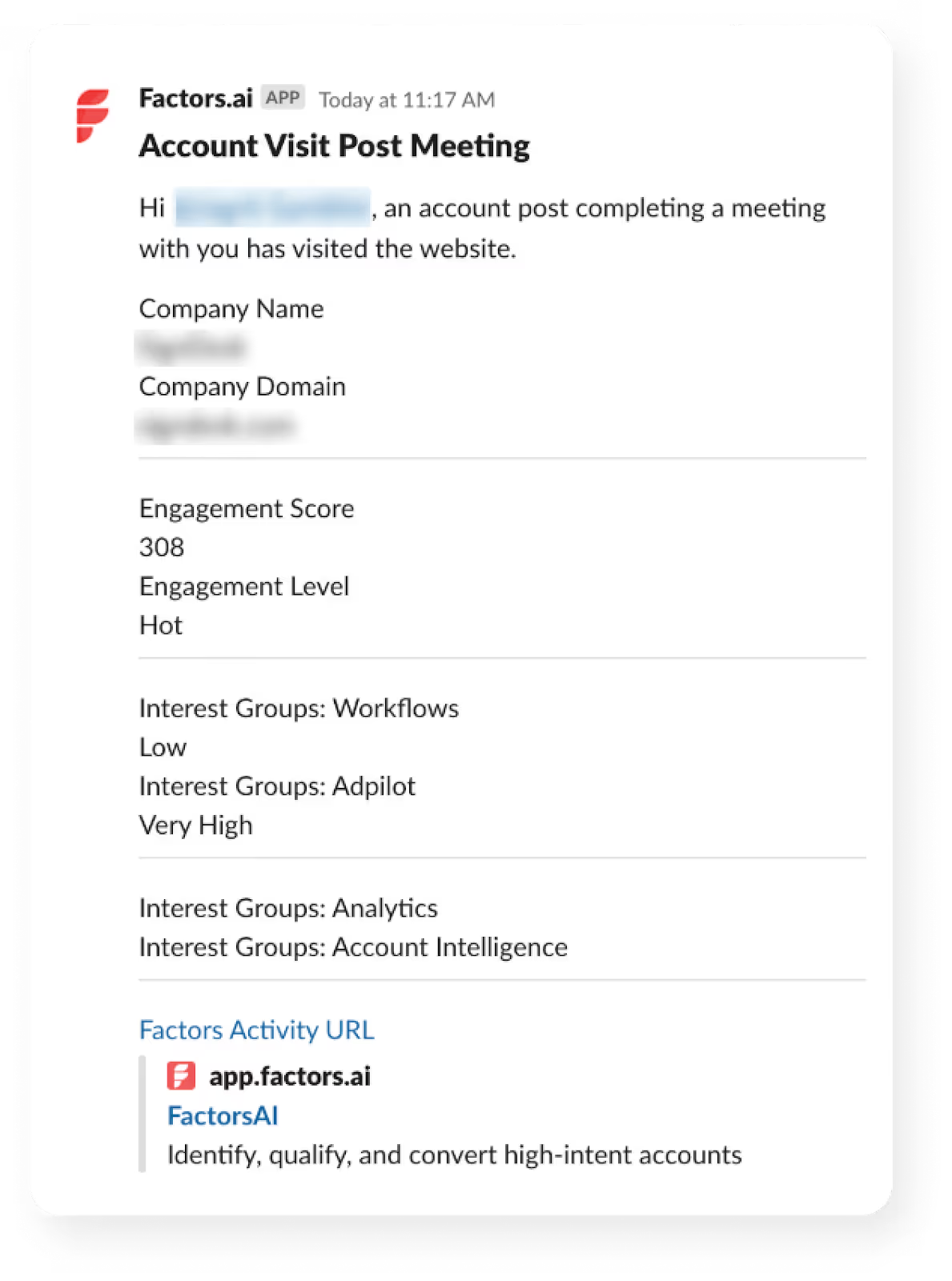
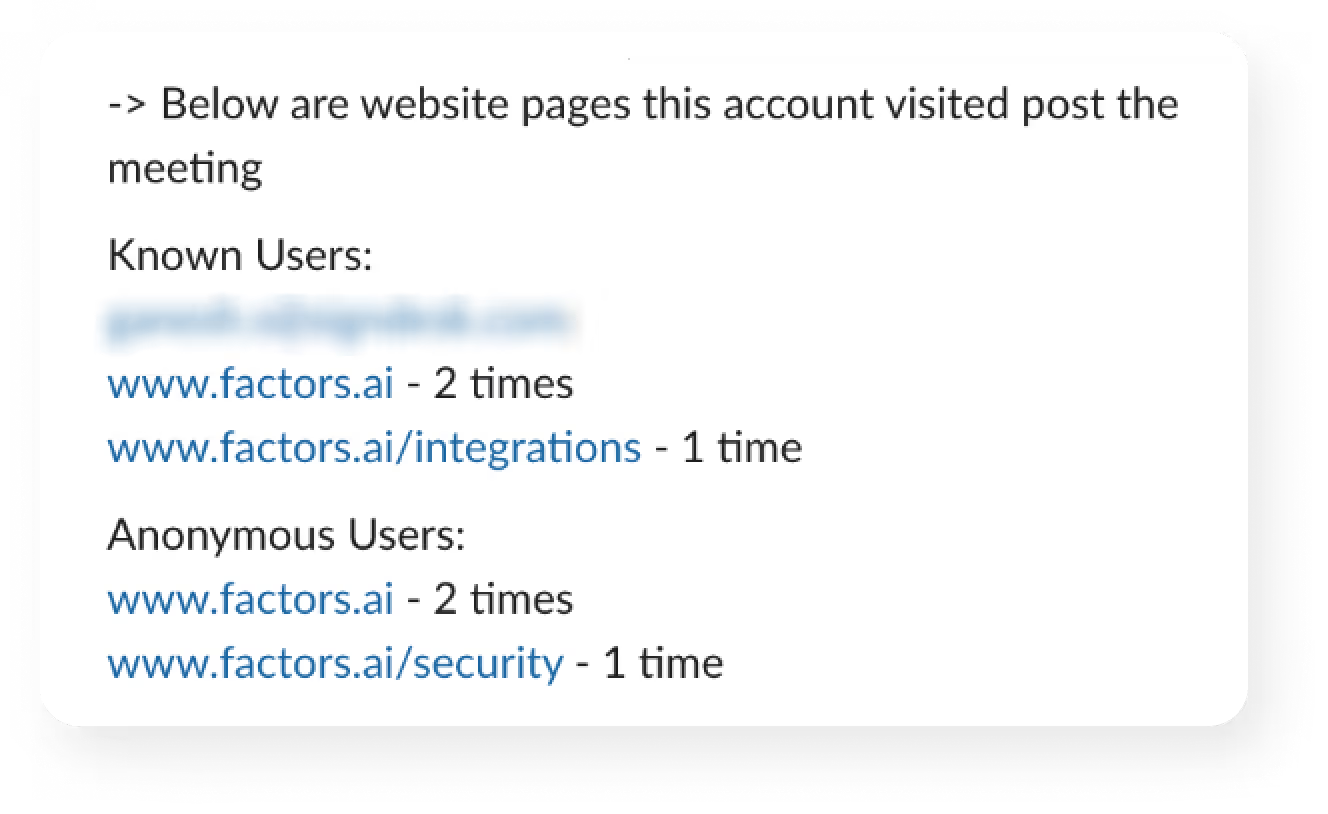
- Meeting Assist: AEs get pre-meeting summaries (firmographics, interest areas, pre/post-visit pages) for tailored follow-ups.
- Closed-lost re-engage: If a lost deal resurfaces, reps get the journey + refreshed contacts (and a reason to re-open the thread).
- Daily digest: Leadership sees which regions and tiers are heating up.
Track the entire intent funnel, not just opens:
- Identified → ICP → Enriched → Assigned → Contacted → Replied → SQL → Demo → Opp → Closed-Won/Lost
- Compare tiers, personas, channels, and sequences. Tweak filters (who we target) and copy (what we say) each week.
A 3-minute micro-play (to show how this feels)
Let’s say a closed-lost account, ‘Acme Corp’, revisits your pricing page (You feel that little heartbeat spike, right?)
Here’s how that moment turns into a meeting, automatically:
- Trigger (instant): Factors spots the visit and tags it as a Closed-Lost Revisit, no manual digging, no delays.
- Collect & Enrich (under the hood): Make.com flow pulls the last 30 days of journey data from Factors, then calls Apollo to fetch role-relevant, verified marketing and sales contacts. Duplicates get checked against your CRM, so records stay clean.
- AI Assist (context you can use): OpenAI summarizes the journey (top pages, themes) and prioritizes contacts by geo, title, and seniority, so reps know exactly who to hit first.
- Slack Handoff (minutes later): Your SDR receives a ready-to-act card with the next best step already included.
- Action (human, fast): The rep tweaks a line or two and hits send. Warm, informed, and perfectly timed.
Ready to catch the next one?
Why teams pick Factors.ai for intent-driven outbound
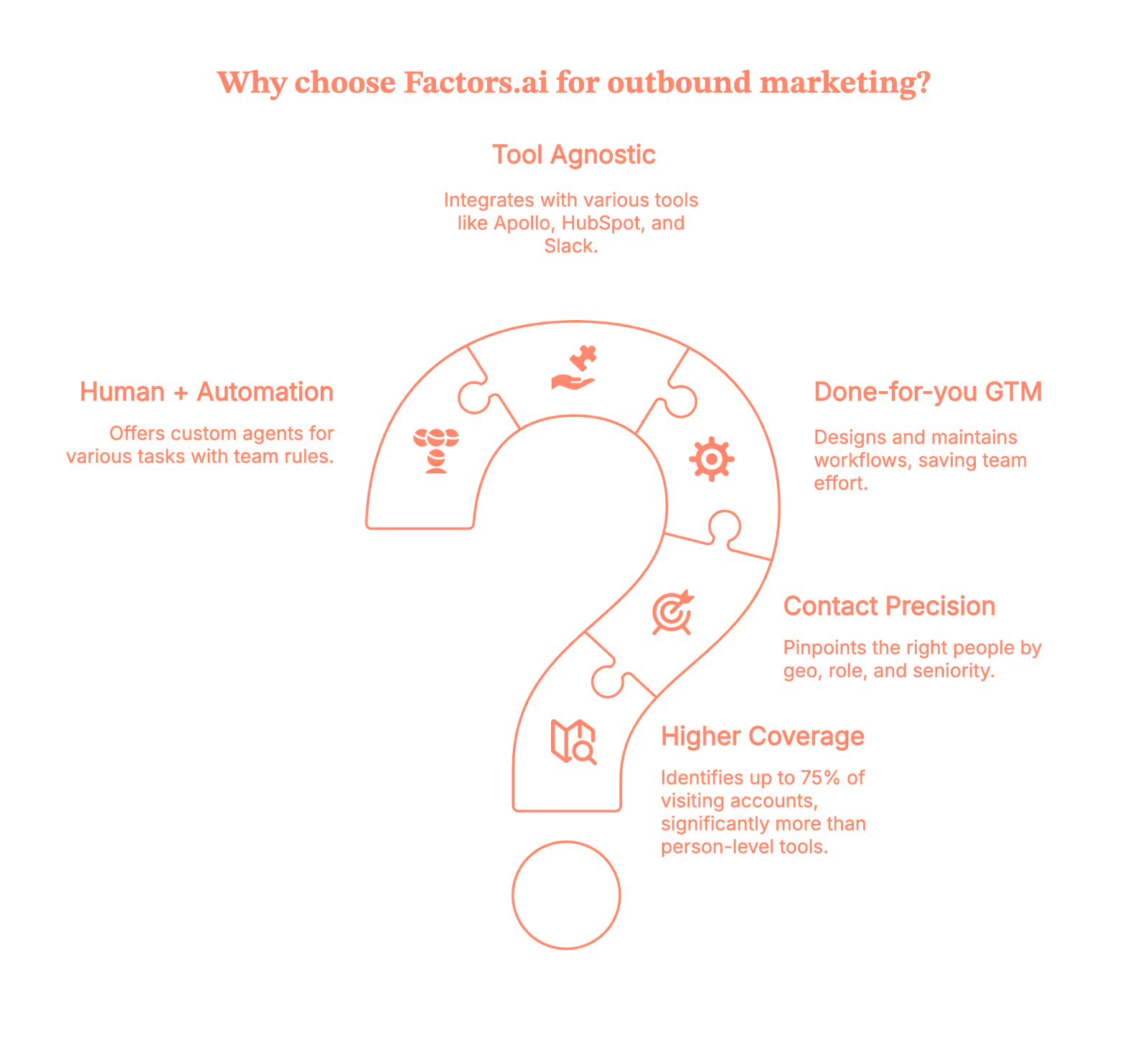
- Higher coverage: Identify up to 75% of visiting accounts (vs 8–10% person-level tools).
- Contact-level precision: Pinpoint the right people by geo, role, seniority, and buying group using user geo + job title triangulation.
- Done-for-you GTM engineering: We design, build, and maintain the workflows, so you don’t.
- Tool-agnostic, outcome-first: Use Factors with Apollo, HubSpot/Salesforce, Slack, Make/Zapier/Clay, Google Sheets, and your ad stack.
- Human + automation: Custom agents for Account Qualification, Contact Relevance, Account Tiering, Account Mapping, Meeting Assist, and Closed-Lost Alerts, with your team’s rules baked in.
(Short version: fewer ‘busywork’ pings, more booked meetings.)
Now, your move
If you’ve got traffic but not enough conversations, you don’t need ‘more leads.’ You need to activate the intent you already have, and do it automatically.
Factors identifies who’s on your site, uses GTM engineering to enrich and prioritize accounts, and delivers ready-to-send outreach to your reps in minutes.
Book a demo, and we’ll show you your high-intent accounts, the exact contacts to reach, and the workflows that make outbound feel (almost) effortless.
You’re closer to your next best deal than you think. Let’s go get it.
Quick FAQ on GTM engineering services from Factors.ai (because your team will ask)
Q. Will this spam Slack?
A. No, alerts are filtered by ICP + intent + tier. Everything else goes to a digest.
Q. Are the emails any good?
A. We use context from buyer journeys and your rules to generate short, human drafts. Reps keep the voice; automation kills the busywork.
Q. What if our ops team is small?
A. That’s why GTM engineering services exist. We build and maintain the flows; you enjoy the pipeline.

GTM Engineering vs. RevOps: Why They’re Not the Same Job (Even If LinkedIn Really Wants Them to Be)
Picture this.
You’re in a meeting, someone brings up hiring a “GTM Engineer,” and suddenly half the room nods like they understand… while the other half quietly panics and starts questioning all their life choices.
Did we miss something?
Is this a real role?
Is everyone hiring them except us?
Yeah. That’s the vibe around GTM Engineering right now.
The truth?
RevOps and GTM Engineering are connected, but they’re not interchangeable.
And if you treat them like the same job, you’ll end up hiring someone amazing… for the wrong thing.
So let’s break this down in a way that actually makes sense.
Related read: Top GTM engineering tools for marketing and sales teams.
TL;DR
- RevOps = alignment and execution; GTM Engineering = automation and scale, confusing the two causes costly hiring mistakes.
- GTM Engineers need firsthand sales experience and build systems from scratch; RevOps optimizes what already exists.
- Roles differ in compensation, tooling, and team alignment. RevOps works across functions, and GTM Engineering sits closer to Product and Data.
- Your growth stage determines who to hire: RevOps for order, GTM Engineering for leverage, never the other way around.
First, let’s get our definitions straight
Before we stir the pot, here's the quick, no-nonsense version:
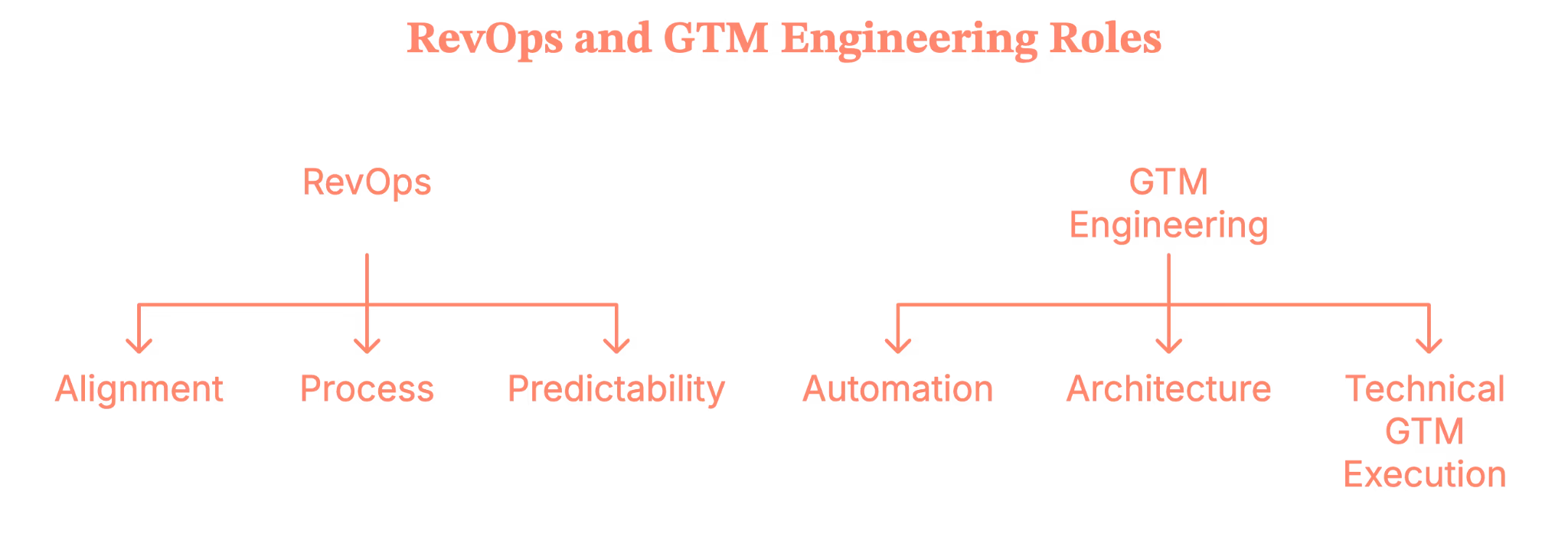
RevOps = alignment + process + predictability.
They make sure Sales, Marketing, and CS are speaking the same language, running the same playbook, and not tripping over one another.
GTM Engineering = automation + architecture + technical GTM execution.
They build AI-powered workflows, scripts, agents, and automations that create revenue leverage at scale.
Both roles touch tools.
Both touch data.
Both help you grow.
But they’re not interchangeable, and treating them like they are is how you end up hiring a Zapier power-user when you needed someone who understands pipeline governance (or vice versa).
Related read: Website visitor to warm outbound play using GTM engineering
What RevOps actually does (No, it’s not just dashboards)
Now imagine this, you’ve hit that awkward growth stage where:
- Data stops making sense,
- Your CRM becomes a black hole,
- Teams debate whose pipeline number is “right.”
- Someone sincerely suggests, “Maybe we need another field.”
This is the moment RevOps becomes real.
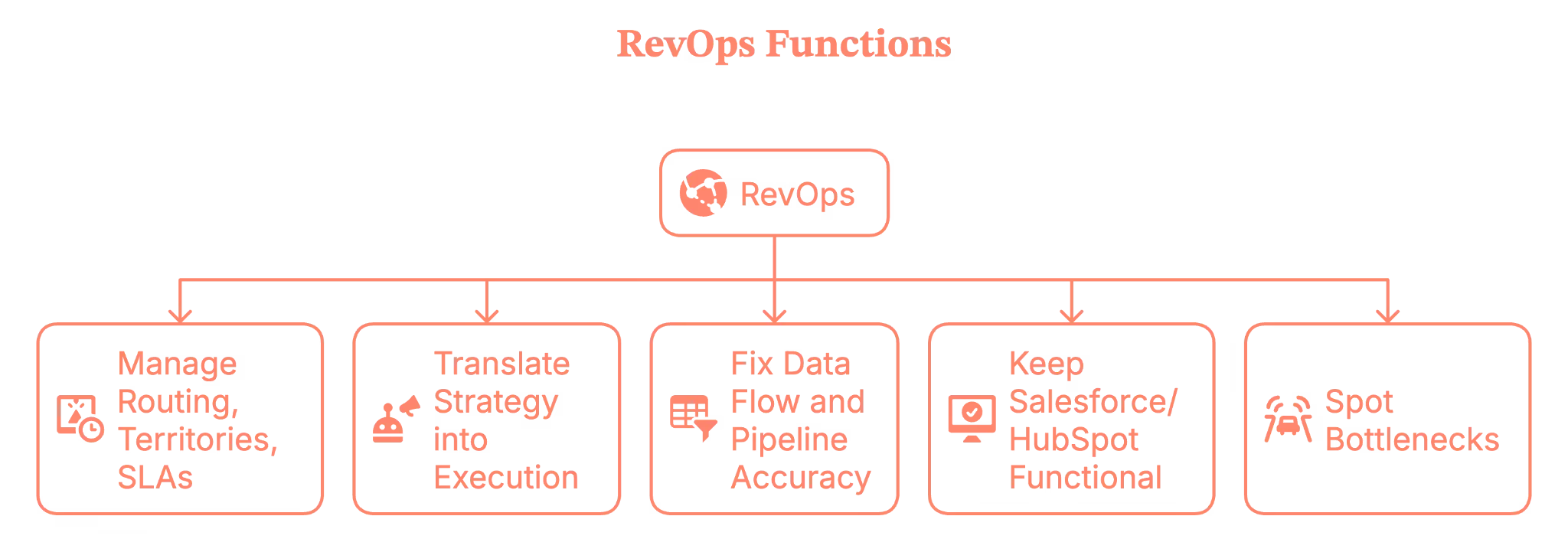
RevOps is the function that:
- Manage routing, territories, SLAs, and your GTM governance
- Translate strategy (CEO/CRO/CMO) into execution
- Fix data flow and pipeline accuracy
- Keep Salesforce/HubSpot and the entire stack functional
- Spot bottlenecks before they sabotage your quarter
If GTM is the engine, RevOps is the person making sure the wheels don’t fall off while everyone else is yelling “faster!”
Okay… So what’s a GTM engineer then?
Here’s where the waters get muddy.
Some people say “GTM Engineer” and mean:
- Building prospect lists
- Scraping contacts
- Automating outbound with Clay, n8n, Make, or Zapier
- Wiring together tools for faster outreach
Is it useful work? Absolutely.
But is it a new role? Not really. That’s classic Sales Ops with modern toys.
But true GTM Engineering is something else entirely.
A real GTM Engineer:
- Builds net-new automation using AI, APIs, and scripts
- Creates automated workflows that actually touch prospects
- Works closely with Product, Data, and Platform teams
- Turns GTM ideas into executable systems
- Helps scale motions that humans can’t keep up with manually

Where RevOps operates inside the existing system, GTM Engineering builds the systems that don’t exist yet.
This is not “run Clay better.” This is “architect GTM like an engineer.”
And it belongs in the category of “new job family created by the AI-native GTM era.”
Why GTM Engineering isn’t just revOps with a trendy title
According to Brendan Short, the founder of The Signal (.club), there are eight reasons why GTM Engineer is not just RevOps rebranded.
Let’s lay this out clearly, because this is where companies make expensive hiring mistakes.
1. The experience factor
A strong RevOps leader doesn’t need SDR or AE experience.
A strong GTM Engineer almost always does, because they automate messaging, outreach, enrichment, tiering, and buyer interactions.
You simply cannot automate what you don’t understand firsthand.
2. The incentives are different
RevOps is compensated like an operations role.
GTM Engineering should be compensated like a revenue role, with pay tied to outcomes rather than task completion.
Different incentives create different behaviors, which ultimately create different results.
3) They build new infrastructure; they don’t patch old workflows
RevOps focuses on optimizing existing systems such as Salesforce and HubSpot.
GTM Engineers build entirely new systems using LLMs, APIs, microservices, agents, and data pipelines.
These require completely different technical skills.
4) They are not responsible for classic RevOps work
GTM engineers do not manage comp plans, forecast models, territory logic, or admin-heavy tasks. Those responsibilities belong to RevOps.
5) Their work touches customers, even if indirectly
GTM Engineers automate actions that reach real buyers, not just internal reports. This raises the stakes and lowers the margin for error.
6) They sit closer to Product and Data than to Sales or CS
GTM engineers need access to internal APIs, event systems, and warehouse infrastructure — areas RevOps rarely works in.
7) They are built for a post-SaaS, AI-native GTM world
Buyer behavior changes quickly, volume is high, and speed matters. GTM Engineers help teams operate at a pace humans alone can’t maintain.
8) Their output is leverage, not insights
RevOps provides clarity through reporting and structured processes. Whereas GTM Engineering provides scalable automation that compounds over time.
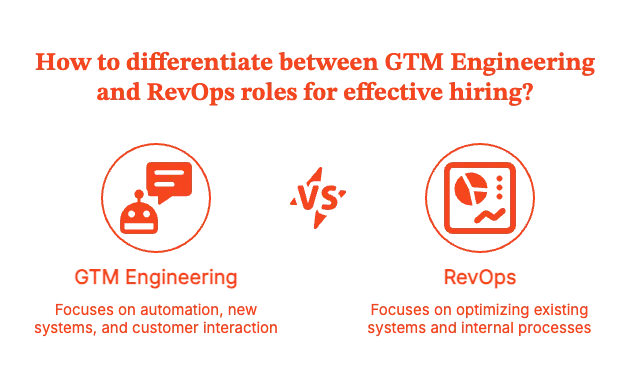
Together, they’re powerful, but confusing them makes hiring far more difficult.
So, why is everyone confused right now?
Well, the short answer is LinkedIn hype cycles.
The long answer is,
- Tools like Clay and n8n make GTM feel more “technical.”
- Influencers start rebranding their workflows as “GTM Engineering.”
- Founders worry they’re behind.
- Operators assume they need a deeply technical hire instead of a strategic one.
- Titles start driving decisions instead of needs
It’s like when Excel wizards started calling themselves “financial engineers.”
Yes... same energy, but a different decade.
Where teams get this wrong (and create their own chaos)
A little tough love:
Using Clay doesn’t make you a GTM strategist. And knowing n8n doesn’t make you a GTM leader.
Tools are not a strategy.
If you let “GTM Engineers” define your GTM… you end up with a tool-driven motion instead of a customer-driven one.
And that’s how companies burn cycles chasing clever automations while ignoring why customers buy them in the first place.
What you actually need, based on your growth stage
Let’s make this simple enough to tape to your founder’s desk.
Pre-$1M ARR
You need:
- Clear ICP
- Simple repeatable processes
- Low-maintenance tools you can manage (Notion, Clay, ChatGPT)
No RevOps yet and definitely no GTM Engineering. You need clarity, discipline, and direct customer learning.
$1M – $5M ARR
This is where a Sales Ops or RevOps generalist becomes essential. You need someone to
- Build dashboards
- Build your CRM
- Clean your data
- Build early GTM processes
- Prevent operational chaos
Their value comes from judgment and prioritization, not advanced tooling.
$5M+ ARR
Now things get fun.
Once you reach this stage, complexity increases. You have:
- Multiple motions
- More channels
- Large teams
- More data
- Rising automation needs
This is when RevOps evolves into a strategic function and when GTM Engineering finally becomes relevant.
You bring these roles in not because LinkedIn says so, but because your business genuinely requires them.
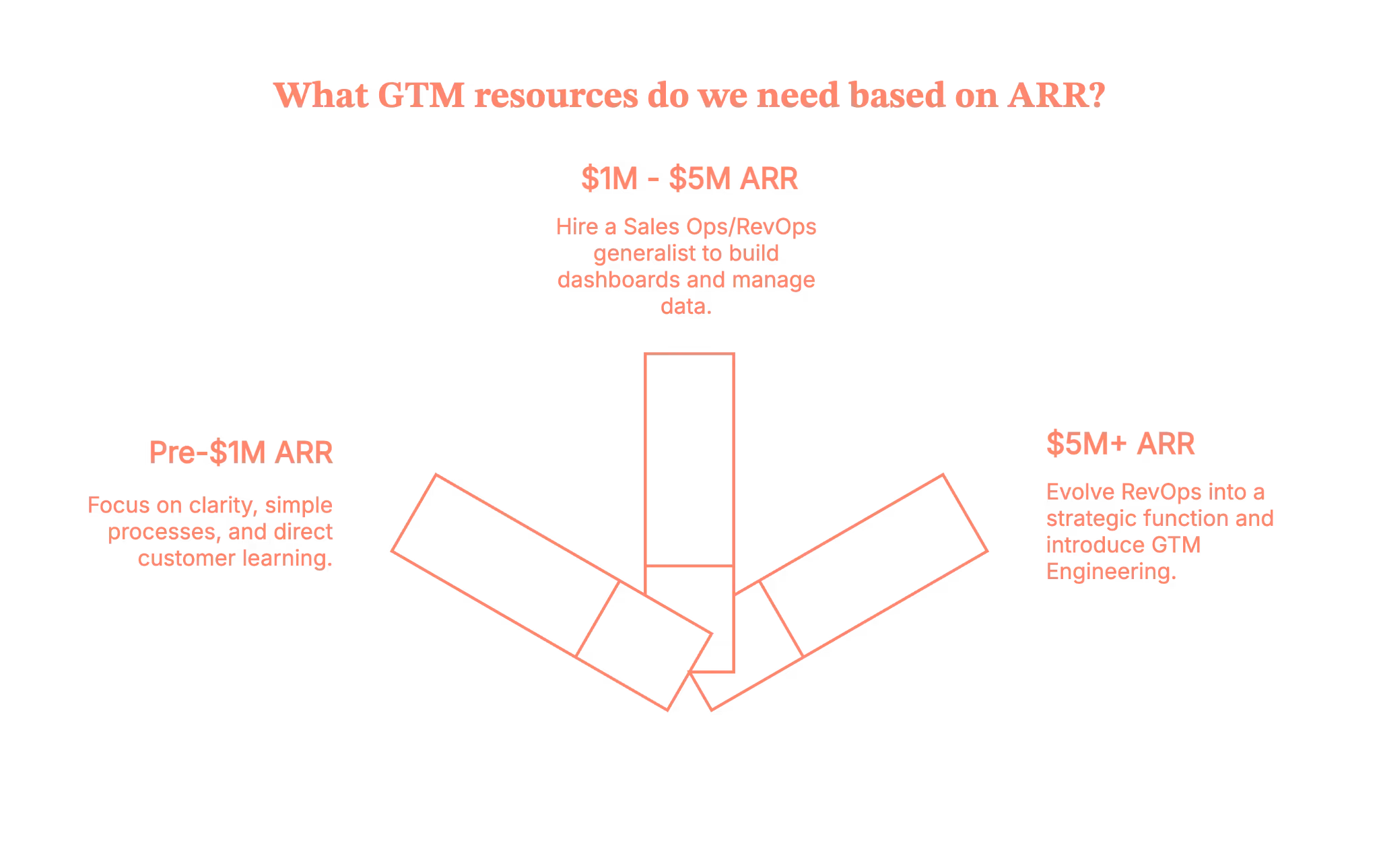
So… which one should you hire first?
The rule is simple, and it rarely fails.
If your business needs alignment, you should hire RevOps first. On the other hand, if your business needs scale, you should hire GTM Engineering first.
When companies confuse the two, they hire the wrong person and unintentionally build the wrong GTM motion.
Unfortunately, this mistake shows up on LinkedIn every single week.
Wrapping this up (Before another new job title drops)
Let’s call things what they are.
- Founders are responsible for setting the strategy.
- RevOps is responsible for turning that strategy into predictable and aligned systems.
- GTM Engineering is responsible for building the technical automation that scales those systems.
Buzzwords will change, titles will trend, and tools like Clay will continue to inspire new job names, but the fundamentals remain the same.
Revenue still needs to be operated. Buyers still need to be understood. And GTM still needs real people who know how to make the motion work.
So do not hire based on hype; hire based on what your business genuinely needs right now.
When you get the roles right, the entire GTM engine runs smoother and grows faster.
Flip your GTM from “nice reports” to “net new revenue” with Factors.ai GTM engineering
With Factors’ GTM engineering services, your tools finally start acting like one smart revenue system instead of a messy pile of apps. You’ll identify up to 75% of accounts visiting your website, enrich the right buyers with verified emails, and hand reps ready-to-send outreach in minutes.
Instead of copy-pasting across tabs, your team runs in a tight loop: detect → enrich → prioritize → alert → execute → write-back. Everyone’s working from the same context, nobody’s asking “Who owns this?”, and intent isn’t cooling off while ops cleans up spreadsheets.
Want to see it on your data? Book a demo and watch the full flow in action. It is configured around how your outbound team actually works (we’ll even bring sample plays you can steal and ship).
How we work
- Done-with-you: we co-build flows with your RevOps team (hands on the keyboard, full enablement).
- Done-for-you: we design, implement, and document; your team just runs the machine day-to-day.
Ready to tighten your loop and let the system do the busywork?
FAQs on GTM Engineering vs. RevOps
Q. What does a GTM Engineer actually do, and how is that different from RevOps?
A GTM Engineer designs and builds revenue systems: AI-powered workflows, data pipelines, automations, enrichment flows, and outbound engines that touch real prospects and customers. Their work lives in tools like Clay, CRMs, APIs, event streams, and data warehouses, turning go-to-market ideas into working automation.
RevOps, by contrast, owns process, governance, and cross-functional alignment: routing, territories, SLAs, forecasting structure, CRM architecture, and reporting. RevOps keeps the machine reliable and consistent; GTM Engineering builds new “engines” that extend what that machine can do.
Q. Is “GTM Engineer” a real job or just a hyped-up title?
Some Redditors argue that “GTM Engineer” is mostly branding on top of Growth/RevOps work, especially when the role is just Clay/Zapier automation with light strategy. Others see it as an emerging specialty: a hybrid of sales, marketing, ops, and technical automation that deserves its own label, especially as AI tooling becomes more central.
Q. When should a company hire RevOps vs. a GTM Engineer?
If you’re fighting messy data, misaligned teams, unclear ownership, or broken handoffs, you’re in RevOps territory. You need someone to define the process, own the CRM, standardize reporting, and keep Sales, Marketing, and CS marching together.
A GTM Engineer makes more sense once you already have basic revenue operations in place and now need scale: higher outbound volume, complex routing/enrichment, AI-driven workflows, or sophisticated multi-tool automations that your existing team can’t maintain.
Early-stage companies usually start with RevOps (or RevOps-ish generalists) and add GTM Engineering as motion complexity and automation demand increase.
Q. Does a GTM Engineer need to know how to code or come from sales?
Here are the two patterns we observed:
- Many GTM Engineers come from sales, SDR, or RevOps and later pick up technical skills. That background helps them automate outreach, qualification, and follow-up in a way that actually matches how reps work.
- Technical depth varies: some roles lean heavily on low-code tools; others expect scripting, API work, and basic data engineering.
Pure software-engineering ability without go-to-market experience often underperforms. You can’t automate a motion you don’t really understand from the front lines.