10 Best LinkedIn Revenue Attribution Tools for 2026
Compare 10 LinkedIn revenue attribution tools, including Factors.ai, Dreamdata, and HockeyStack, by features, CRM integrations, and pricing.

Growth Marketer

Senior Content Marketing Manager




TL;DR
- LinkedIn’s Revenue Attribution Report already connects CRM outcomes with LinkedIn activity. A separate tool becomes useful when you need broader account journeys, cross-channel analysis, or additional CRM workflows.
- Factors.ai, Dreamdata, and HockeyStack connect LinkedIn activity with broader B2B journeys. ZenABM and Fibbler offer a more focused LinkedIn-to-CRM workflow.
- HubSpot Marketing Hub Enterprise suits teams that want revenue attribution inside their existing CRM. Funnel.io combines marketing data management with optional measurement capabilities. Demandbase and DemandScience address broader account-based programs.
- View-through attribution can reveal exposure that click-based reports miss. It does not, by itself, prove that an ad caused a deal.
Choosing a LinkedIn revenue attribution tool depends on what your current reporting leaves unanswered. This guide compares ten options for connecting LinkedIn activity with CRM revenue, understanding account journeys, and measuring performance alongside other marketing channels.
Why LinkedIn revenue attribution matters
Our From Benchmarks to Blueprints report found sustained LinkedIn engagement beginning 124 days before deal creation. Measuring only from the opportunity creation date would leave those earlier interactions out.
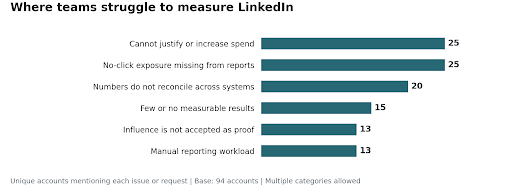
We also reviewed 94 sales and customer success calls. Teams repeatedly described difficulty explaining LinkedIn’s contribution to leadership. They needed to show which deals were included in a report and why those deals qualified for credit.
1. Factors.ai
Factors.ai is an AI-powered account-based marketing (ABM) platform. It brings LinkedIn analytics together with Google Ads, Microsoft Advertising, and Reddit Ads data, website activity, and CRM outcomes to help B2B teams measure marketing’s contribution to pipeline and revenue. Factors.ai is also an official LinkedIn Attribution and Analytics Marketing Partner.
Its Company Intelligence API integration brings supported paid and company-page organic engagement into account-level analysis. This helps you examine companies exposed to your ads even when nobody clicked through. It does not identify every individual who saw an ad or automatically attribute your CEO’s personal posts.
What makes Factors.ai stand out:
- Analytics and attribution combining LinkedIn activity, website journeys, and CRM outcomes.
- LinkedIn AdPilot for account-level campaign optimization, including impression controls on supported plans.
- Audience Builder to build and sync account audiences to LinkedIn.
- Account scoring and CRM integrations with HubSpot and Salesforce, with capabilities depending on your plan.
- LinkedIn Conversions API to send eligible conversion events back to LinkedIn for measurement and optimization.
The last point is a separate workflow: CAPI sends conversion data to LinkedIn. It is not the mechanism that retrieves company-level ad impressions.
Sprinklr used Factors.ai to assess LinkedIn’s influence on 15% of its enterprise pipeline. The analysis connected account engagement with CRM opportunities, giving the team more context than click-based reporting alone.
Best for: Mid-market and enterprise B2B teams that need LinkedIn account engagement alongside cross-channel journeys and CRM outcomes.
Pricing: Published annual plans list Basic at $6,000, Growth at $20,000, and Enterprise from $30,000.
Related read: Setting up LinkedIn Conversions API with Factors.ai.
A LinkedIn attribution use case in Factors.ai
Suppose you want to see which accounts viewed a LinkedIn campaign before becoming qualified opportunities, including accounts that never clicked an ad.
- Connect LinkedIn, your website tracking, and your CRM in Settings → Integrations. Confirm that account and deal associations are populated.
- Create a funnel report using LinkedIn Ad Viewed under LinkedIn Company Engagement as the first event, then filter it to the campaign you want to assess.
- Add the relevant CRM milestone as the next event. In a HubSpot workflow, this can be a contact-update event filtered to the lifecycle stage you use for qualification.
- Set the reporting period and conversion window, then break the results down by account and associated deal fields, such as Deal Name and Deal Amount.
- Inspect several matched journeys before sharing the total. An exposed account reaching a CRM milestone establishes a sequence; it does not automatically assign fractional revenue credit or prove incremental lift.
The LinkedIn True ROI walkthrough shows this reporting approach. For distributing credit across recorded touchpoints, use the separate multi-touch attribution workflow and agree on the model first.
2. Dreamdata
Dreamdata combines LinkedIn activity, other marketing interactions, and CRM opportunities into one single customer journey. Its multi-touch models show how different attribution rules change the revenue credit assigned to each channel.
What makes it stand out:
- Multiple attribution models and revenue analysis by channel, campaign, and content.
- LinkedIn impression attribution with configurable treatment of impression credit.
- Audience activation across LinkedIn, Google, and Meta.
- CRM integrations including HubSpot, Salesforce, Pipedrive, and Microsoft Dynamics.
Dreamdata’s impression attribution settings determine whether impressions receive revenue credit and how much they receive. An impression can appear in the account journey without receiving credit in the selected model.
Best for: Multi-channel B2B teams that want to compare revenue models and activate audiences from a shared customer journey.
Pricing: Dreamdata offers a free entry-level plan. Advanced attribution and audience activation require a paid plan.
Related read: Understanding multi-touch attribution models.
3. Funnel.io
Funnel.io is a marketing data platform rather than a LinkedIn-only attribution tool. It collects and normalizes marketing data, including LinkedIn data, for reporting in its own dashboards or destinations such as Looker Studio, Power BI, BigQuery, and Snowflake.
What makes it stand out:
- A broad connector library, with connector availability varying by plan.
- No-code data preparation, including common definitions and currency normalization.
- Native dashboards as well as external BI and warehouse destinations.
- Funnel Measure, an add-on combining multi-touch attribution, marketing mix modeling, and incrementality methods.
These methods are not interchangeable. Funnel’s multi-touch attribution models work with tracked journeys, while MMM analyzes aggregate relationships. Importing LinkedIn impression totals does not automatically create account-level impression-to-deal attribution.
Best for: Data teams and agencies that need to consolidate marketing reporting and want measurement alongside that infrastructure.
Pricing: Starter is priced at $300/month and Business at $600/month with annual billing. Funnel Measure is an add-on for Business and Enterprise; a Data Hub trial is available.
Related read: Attribution versus media mix modeling for B2B.
4. HubSpot Marketing Hub
HubSpot’s native LinkedIn Ads integration brings campaign reporting and lead tracking into your CRM. LinkedIn Lead Gen Form syncing reduces the manual work of moving form submissions into contact records.
Deal-create and revenue attribution require Marketing Hub Enterprise. Professional also includes contact-create attribution, which measures the interactions leading to a new contact rather than a closed deal.
What makes it stand out:
- LinkedIn ad reporting alongside contacts, deals, and marketing activity.
- Lead Gen Form syncing and CRM-based audience workflows.
- Attribution reports using models including first touch, last touch, linear, time decay, and empirical, with availability depending on the report.
- Less duplication for teams already using HubSpot as their marketing and CRM system.
HubSpot’s ad contact attribution relies on supported tracking and contact interactions. Imported campaign impression metrics are not the same as company-level ad exposures associated with a specific CRM deal. Sales Navigator integrations are also separate from LinkedIn Ads attribution.
Best for: Teams already on HubSpot Enterprise that want revenue attribution within their existing stack and understand its LinkedIn exposure limits.
Pricing: Revenue attribution requires Marketing Hub Enterprise. Use that package when comparing its cost with a separate attribution tool.
Related read: Why LinkedIn conversion tracking gets complicated.
5. HockeyStack
HockeyStack combines advertising, website, CRM, and other go-to-market activity into B2B buyer journeys. It supports company-level LinkedIn impression analysis alongside broader attribution and reporting.
What makes it stand out:
- Account and person-level journeys, with the level of identification depending on the underlying event.
- Attribution models and custom pipeline dashboards.
- Odin, an AI assistant for exploring revenue data in natural language.
- Two-way connections across CRM, advertising, and data infrastructure.
HockeyStack describes two-way syncing. During evaluation, ask which engagement fields can be written back to your particular CRM and under which package.
Best for: B2B teams that want LinkedIn measurement within a broader revenue analytics system and have an owner for reporting definitions and implementation.
Pricing: Request a vendor quote for your deployment, including the data sources and CRM workflows you need.
6. Zen ABM
Zen ABM, branded ZenABM, connects company-level LinkedIn ad engagement and spend with CRM pipeline. It suits teams that need LinkedIn reporting while keeping their existing analytics tools.
What makes it stand out:
- Company-level LinkedIn impressions and engagement from LinkedIn’s API.
- CRM connections including HubSpot, Salesforce, and Attio, depending on the plan.
- Account scoring and ABM stage tracking.
- Campaign and account reporting for prioritizing follow-up.
Best for: Lean B2B teams running LinkedIn-focused account-based programs.
Pricing: Plans start at $59/month. Check the billing term and CRM coverage for the package you select.
Related read: How to build a LinkedIn ABM program.
7. Demandbase
Demandbase covers account intelligence, advertising, engagement, and measurement for broader ABM programs. LinkedIn reporting sits within that larger system rather than being the whole product.
What makes it stand out:
- Account-level engagement, pipeline, and revenue reporting.
- Third-party campaign reporting combining spend, impressions, and clicks from supported platforms, including LinkedIn and Google.
- Account intelligence and audience activation across channels.
- CRM and marketing automation integrations, with direction and capabilities varying by integration and licensing.
Demandbase’s own B2B DSP serves programmatic advertising outside LinkedIn. LinkedIn audience activation and campaign integrations are separate capabilities, so include both in your evaluation if you need to coordinate those channels.
Best for: Enterprise teams coordinating multi-channel account-based programs, not just filling a LinkedIn reporting gap.
Pricing: Custom pricing based on the platform package and users. Get an itemized quote rather than relying on an estimated annual starting price.
Related read: Account-based marketing attribution.
8. Cometly
Cometly connects advertising performance, conversion events, and revenue reporting. Its LinkedIn integration supports ad-performance data, Lead Gen Form imports, URL-based click tracking, and conversion feedback to LinkedIn through CAPI.
What makes it stand out:
- Campaign and ad-level reporting for performance analysis.
- Native LinkedIn Lead Gen Form imports.
- Server-to-server conversion feedback through LinkedIn CAPI.
- Multi-channel reporting for comparing advertising activity with downstream outcomes.
Cometly’s LinkedIn workflow focuses on tracked clicks, leads, and conversion feedback. If your main requirement is connecting company-level ad impressions to deals, ask to see that workflow separately.
Best for: Performance marketing and demand generation teams focused on ad-level conversion measurement and feeding qualified events back to advertising platforms.
Pricing: Core and Enterprise pricing is usage-based. CRM and warehouse syncing sit within the Enterprise offering; confirm your required integrations in the quote.
Related read: LinkedIn pixel tracking for B2B conversions.
9. Fibbler
Fibbler syncs company-level LinkedIn impressions, clicks, and engagement into supported CRMs, then reports which campaigns were associated with pipeline and closed-won deals. It suits teams that want a focused LinkedIn-to-CRM connection without rebuilding their analytics stack.
What makes it stand out:
- Automated LinkedIn engagement syncing to supported CRM records.
- Campaign-level influenced pipeline and revenue reporting.
- HubSpot, Attio, and Pipedrive connections on Growth, with Salesforce available on its Unlimited plan.
- A 30-day free trial.
Best for: Lean B2B teams that want LinkedIn account engagement and influence reporting inside their CRM.
Pricing: Growth is $89/month and Unlimited is $129/month. The CRM you use affects the package you need.
10. DemandScience
DemandScience and Terminus merged in November 2024, bringing Terminus into a broader B2B marketing offering rather than simply renaming the old product.
DemandScience combines account intelligence, targeting, campaign activation, and measurement. Its Ionic announcement describes using account data to prioritize audiences and guide campaign execution.
What makes it relevant:
- Account intelligence and prioritization for broader B2B campaigns.
- Coordinated activation and measurement beyond a single advertising channel.
- An option for teams evaluating the successor to their Terminus-led ABM program.
For LinkedIn revenue attribution specifically, request a demonstration of the current engagement data, CRM connections, and deal-level outputs included in the proposal. Do not assume that legacy Account Hub or Measurement Studio capabilities are packaged unchanged.
Best for: Teams evaluating a broader account-based marketing and activation relationship rather than a standalone LinkedIn attribution subscription.
Pricing: Custom quote. Confirm the measurement deliverables and service scope in the proposal.
So which LinkedIn revenue attribution tool do you actually need?
LinkedIn’s native Revenue Attribution Report gives you a starting point for connecting ad engagement with CRM outcomes. A separate tool is worth considering when you also need to compare channels, inspect more of the account journey, or send engagement data into CRM workflows.
- You need to compare LinkedIn with other channels: shortlist Factors.ai, Dreamdata, and HockeyStack. Compare which interactions each captures and how it assigns revenue credit.
- LinkedIn is your main gap and you want a focused CRM connection: evaluate Zen ABM and Fibbler against your CRM and required history.
- You already have HubSpot Enterprise: test its native revenue attribution before adding another platform, while checking what impression-level context remains missing.
- Your priority is consolidating marketing data and measurement: consider Funnel.io and its optional Measure product.
- You run a broader enterprise ABM program: assess Demandbase and DemandScience against the channels, activation, and service scope you will actually use.
- Your priority is ad-level conversion feedback: include Cometly, particularly if CAPI and lead-form workflows matter more than account-level impression analysis.
In our call research, cross-channel comparison was the most frequent explicit request. Buyers also wanted to adjust attribution rules and investigate the deals included in a report.
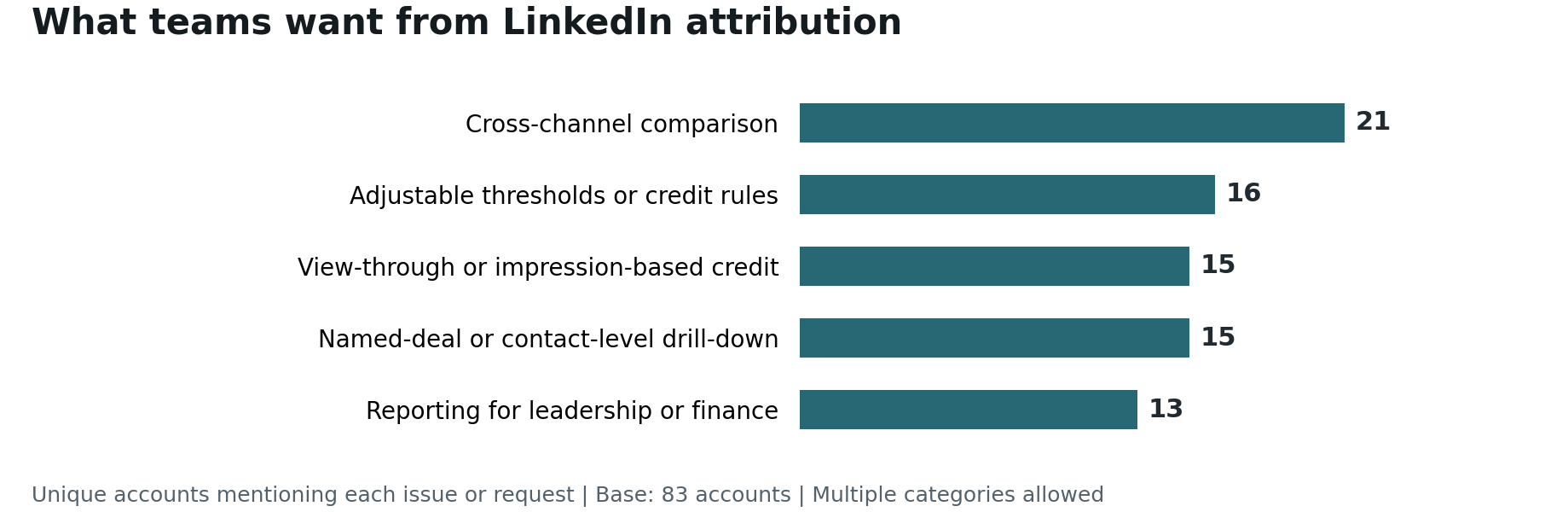
Counts represent unique accounts among 83 that made explicit capability requests. Categories overlap. Source: the same selected call-research sample described above; these are requests within that group, not market-share estimates.
I’d test each shortlisted platform with a closed-won deal your team knows well. Follow the account’s recorded activity and check why the deal appears in the report. You should be able to explain the engagement threshold and attribution window used. Account-level evidence can support that review without identifying the individual who viewed an ad. If totals differ from LinkedIn or your CRM, compare reporting dates, windows, currencies, and deal associations.
Campaign comparisons should include deal value as well as lead cost. Our LinkedIn revenue report found that LinkedIn-sourced deals had 34% higher average contract value than Google-sourced deals in the analyzed CRM dataset. Your results may differ, but a CPL comparison alone would miss that difference in revenue per deal.
Finally, agree on what the revenue number means. An influence report can include the full value of a qualifying deal under more than one channel. You cannot add those channel totals together and call the result company revenue. A fractional multi-touch model distributes credit differently, while incrementality testing asks what would have happened without the advertising. Small deal volumes can make that last question difficult to test reliably.
For the reporting definitions to settle before buying, see our LinkedIn ads analytics and reporting guide and common revenue attribution mistakes.
Recommended reads
- LinkedIn ads for B2B: the practical guide for campaign planning before you evaluate results.
- LinkedIn Ads versus Google Ads versus Facebook Ads for understanding the different channel roles behind a cross-channel comparison.
- Cross-channel marketing attribution for connecting LinkedIn reporting to the rest of your marketing mix.
- How Descope uses Factors.ai for a public customer example of LinkedIn measurement and optimization.
FAQs on LinkedIn revenue attribution in 2026
Q1. Why is LinkedIn’s native revenue reporting different from my CRM?
The reports may use different qualifying interactions, matching logic, attribution windows, deal associations, and reporting dates. A CRM source field might record the final tracked visit, while LinkedIn’s report includes eligible ad exposure before an opportunity or sale.
Compare the definitions before declaring either total wrong. A third-party tool also needs this reconciliation; it is not automatically a neutral or more accurate source. Our guide to first-touch versus last-touch attribution explains how the same journey can produce different credit assignments.
Q2. What is view-through attribution and is it accurate?
View-through attribution connects an ad impression with a later qualifying conversion, even without a click. In account-level B2B reporting, the evidence may establish that a company encountered ads, not that the eventual buyer personally saw them.
Accuracy depends on the data, matching, window, and credit rules. Exposure followed by conversion is an association, not proof that the ad caused the conversion. See LinkedIn view-through conversions and B2B attribution for the distinction.
Q3. How do I track LinkedIn ROI without relying on third-party cookies?
Combine CRM revenue data with first-party event collection and supported LinkedIn integrations. CAPI sends eligible server or CRM conversion events to LinkedIn, while the Insight Tag can complement browser-side measurement. Neither removes consent requirements, matching limits, or the need to deduplicate events sent through multiple routes.
Revenue divided by ad spend is ROAS, not profit-based ROI. Define which revenue is sourced, fractionally attributed, or influenced before using the ratio in a budget review. Our guide to LinkedIn’s true ROI covers that reporting problem.
Q4. What is the best attribution window for B2B LinkedIn campaigns?
LinkedIn’s current conversion-window guidance lists 90-day defaults for click-through and view-through conversions, with standard options of 1, 7, 30, or 90 days. Longer options are available for eligible conversion categories and upload methods. Check the specific conversion rule and distinguish that platform setting from the historical data available in a third-party tool.
Q5. Can I attribute revenue to organic LinkedIn posts, not just ads?
You can analyze supported organic company-page engagement alongside CRM outcomes when the integration provides it. That is not a blanket ability to track every employee or CEO’s personal post; check the Company Intelligence API coverage.
For the wider channel plan, read our LinkedIn B2B marketing strategy guide.

Powered by Bombora
Enter your domain and we'll send you a free list of companies showing buying intent in your vertical.
Powered by Bombora
Enter your domain and we'll send you a free list of companies showing buying intent in your vertical.

See how Factors can 2x your ROI
Boost your LinkedIn ROI in no time using data-driven insights



See Factors in action.
Schedule a personalized demo or sign up to get started for free
LinkedIn Marketing Partner
GDPR & SOC2 Type II