
Good Reads
Fix pipeline pains. Solve GTM puzzles. Read strategic brain dump.
Written for marketers who want real solutions to a leaking pipeline (and their dark circles).
Want to read more from us?

I’m looking for…
LinkedIn Intent Data: The Missing Ingredient in Your B2B Sales Strategy?
Let's look at how Linkedin intent data can benefit sales folk and marketing teams and how Factors can help make the most of this Linkedin buyer data.

TL;DR
- LinkedIn intent data reveal prospects' level of interest and engagement with ads.
- It helps illuminate the "dark funnel" of hidden interactions and potential leads.
- Benefits include audience segmentation, ad optimization, retargeting, and lead scoring.
- Marketers can use intent data to optimize campaigns and improve targeting.
- Sales teams can use intent data to prioritize high-intent accounts and personalize outreach.
- Factors is a tool that integrates LinkedIn intent data with CRM data for deeper insights.
LinkedIn Intent Data: The Missing Ingredient in Your B2B Sales Strategy?
With over 900 million members across 200 countries and 4 out of 5 members driving business decisions, LinkedIn is a crucial platform for B2B sales and marketing teams. 97% of B2B marketers use LinkedIn for lead generation. But how can you ensure that your LinkedIn ads and marketing efforts are influencing conversions?
Enter LinkedIn intent data.
LinkedIn intent data shows if a prospect has interacted with or shown interest in your LinkedIn ads, allowing you to gauge their likelihood of converting. In this article, we'll discuss how this data can benefit both marketing and sales teams, and how Factors can help you make the most of this valuable information.
What Is LinkedIn Intent Data?
LinkedIn intent data is a crucial piece of information that reveals the level of interest and engagement prospects have with your LinkedIn ads. By analyzing this data, you can gain valuable insights into the buyer's journey and identify potential leads who are more likely to convert.
This information is vital in today's competitive B2B landscape, where understanding the preferences and needs of your target audience can significantly improve your sales and marketing efforts.
{{INLINE_MOFU}}
Why Is LinkedIn Intent Data Important?
In B2B, the buyer's journey is often complex and multifaceted. Prospects interact with various touchpoints before making a purchase decision. Unfortunately, not all of these interactions are visible or easily tracked, leading to the existence of a "dark funnel."
What is the dark funnel?
The dark funnel is part of the buyer's journey where prospects have been exposed to your LinkedIn ads, content, or other marketing materials but haven't directly engaged with them or converted immediately.
These “hidden” interactions can make it challenging to assess the true impact of your marketing efforts and identify valuable leads who may convert later in their journey.
How does Linkedin intent data help?
LinkedIn intent data illuminates the dark funnel by providing insights into prospects' level of interest and engagement with your ads, even if they haven't directly interacted with them. Here are a few ways in which it can help you gain a deeper understanding of the dark funnel:
- Segment your audience based on their intent data: By analyzing LinkedIn intent data, you can segment your audience into different categories based on their level of engagement and interest in your ads. This will help you create tailored account-based marketing campaigns that address the unique needs and preferences of each segment, increasing the chances of converting these prospects. For instance, if you run an e-learning platform, you can segment users who have engaged with your ads about coding courses and target them differently than users who’ve shown interest in a writing course.
- Optimize your ad creatives and targeting: Understanding the preferences of prospects within the dark funnel can help you optimize your LinkedIn ad creatives and targeting strategies to better resonate with your audience. Then, fine-tuning your ads based on intent data insights can improve the overall effectiveness of your marketing efforts. For example, if you find that prospects in the dark funnel are engaging more with video ads than image-based ads, you can allocate more budget to video ad campaigns and optimize targeting to reach more people likely to be interested in your product.
- Retarget potential leads: With this data at hand, you can retarget prospects with tailored content and offers. If a prospect has engaged with content about a particular product or service on your website, but didn't complete a purchase, you can retarget them with a special discount or offer, encouraging them to revisit your site and complete the transaction.
- Enhance lead scoring and prioritization: By incorporating intent data, you may find that a group of people have engaged heavily with your ads and content, but haven't reached out directly yet. For instance, if you're a B2B software company, your sales team can reach out to prospects who've shown a high level of engagement with specific features of the software. They can demo the tool while keeping the focus of the conversation on the feature of interest.
LinkedIn Intent Data For Marketers: Unlock The Potential Of Your Ads
As marketers, we aim to reach the right audience, deliver a message that resonates with them, and ultimately drive conversions. Linkedin buyer intent data is highly valuable in achieving these objectives and gaining valuable insights into audience engagement. With this, you can optimize your LinkedIn marketing strategy in several ways:
- Know if ads are reaching the intended audience: Linkedin’s intent data gives you insights into who is interacting with your ads. This information is then curated in an account-level format so your ABM teams can filter accounts with the highest interest in buying your product or service.
- Optimize LinkedIn ads based on engagement: Analyzing LinkedIn intent data can tell which ad formats, visuals, and copy resonate most with your audience. You can then make data-driven decisions to optimize your ads, boosting engagement and conversion rates.
- Know which kind of ad copy resonates with the audience: By examining the intent data from different ad variations, you can identify the messaging that best captures your audience's attention. This empowers you to tailor your ad copy and creatives to better appeal to your target audience, leading to more clicks, higher engagement, and ultimately, more conversions.
- Combine LinkedIn intent data with third-party intent data for a holistic approach: By integrating this data with third-party intent data (from sources like G2, TrustRadius, etc.), you can create a more comprehensive understanding of your prospects' needs throughout their buying journey. This enables you to deliver targeted, relevant content and ads that address their pain points and move them closer to conversion.
How To Use LinkedIn Buyer Intent To Improve Pipeline Velocity
Pipeline velocity is a key performance indicator (KPI) for sales teams, as it measures the speed at which leads move through the sales funnel and ultimately convert into customers. Leveraging LinkedIn buyer intent data can significantly improve pipeline velocity by helping you prioritize high-intent accounts, personalize outreach, and align sales and marketing efforts. Here's how:
- Prioritize high-intent accounts for account-based marketing (ABM): LinkedIn buyer intent data can help sales and account-based marketing (ABM) teams identify high-intent accounts, those that have shown significant interest in your LinkedIn ads, and are more likely to convert into customers. By prioritizing these high-intent accounts, your team can focus its efforts on the most promising leads, increasing the chances of closing deals and improving overall pipeline velocity.
- Use intent data and deanonymization to personalize outreach: Using LinkedIn buyer intent data, you can tailor your sales outreach to the specific needs and interests of your prospects. Adding Factors to the mix, you can also deanonymize website traffic and know about the company and industry that they work in. With this, you can gain deeper insights into their pain points, preferences, and points of friction. This allows your sales team to craft personalized messages that address these concerns and demonstrate the value of your product or service, helping to move prospects through the sales funnel more quickly.
- Align sales and marketing based on intent data: Regularly analyzing LinkedIn buyer intent data can help you identify trends and patterns in your prospects' behavior, allowing you to optimize your sales and marketing tactics accordingly. This is also good for reporting on the effectiveness of campaigns. For example, you may discover that certain types of content or ad formats resonate better with your target audience, leading to higher engagement and faster movement through the sales funnel.
- Add intent data into CRM and marketing automation platforms: Integrating LinkedIn buyer intent data into your CRM and marketing automation platforms can help automate lead scoring, segmentation, and nurturing efforts based on prospects' engagement and intent. This allows your sales and marketing teams to efficiently focus their efforts on high-intent leads, ultimately improving pipeline velocity.
- Enhance Account Scoring: Incorporating LinkedIn buyer intent data into your account scoring methodology can provide a more accurate assessment of a prospect's likelihood to convert. The combination of data from multiple sources allows your sales and marketing teams to better score leads. Add to that Factors’ account scoring features, and you can automate your prioritization process for the teams too.
Make The Most Of Your LinkedIn Intent Data with Factors
Leveraging buyer intent data from LinkedIn effectively can help you identify the users with the highest interest and modify your approach to better target the accounts. Factors enables you to maximize the potential of this data to drive results. Here's how:
1. Integrated data analysis
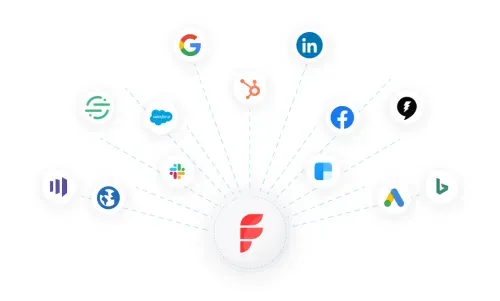
Factors helps combine Linkedin intent data with data from other sources, such as CRM platforms, ads, website, and more. This integrated approach enables you to gain a holistic understanding of your prospects' buyer journey, helping you identify high-intent accounts and optimize your marketing and sales strategies accordingly.
2. Visual user timelines for enhanced attribution
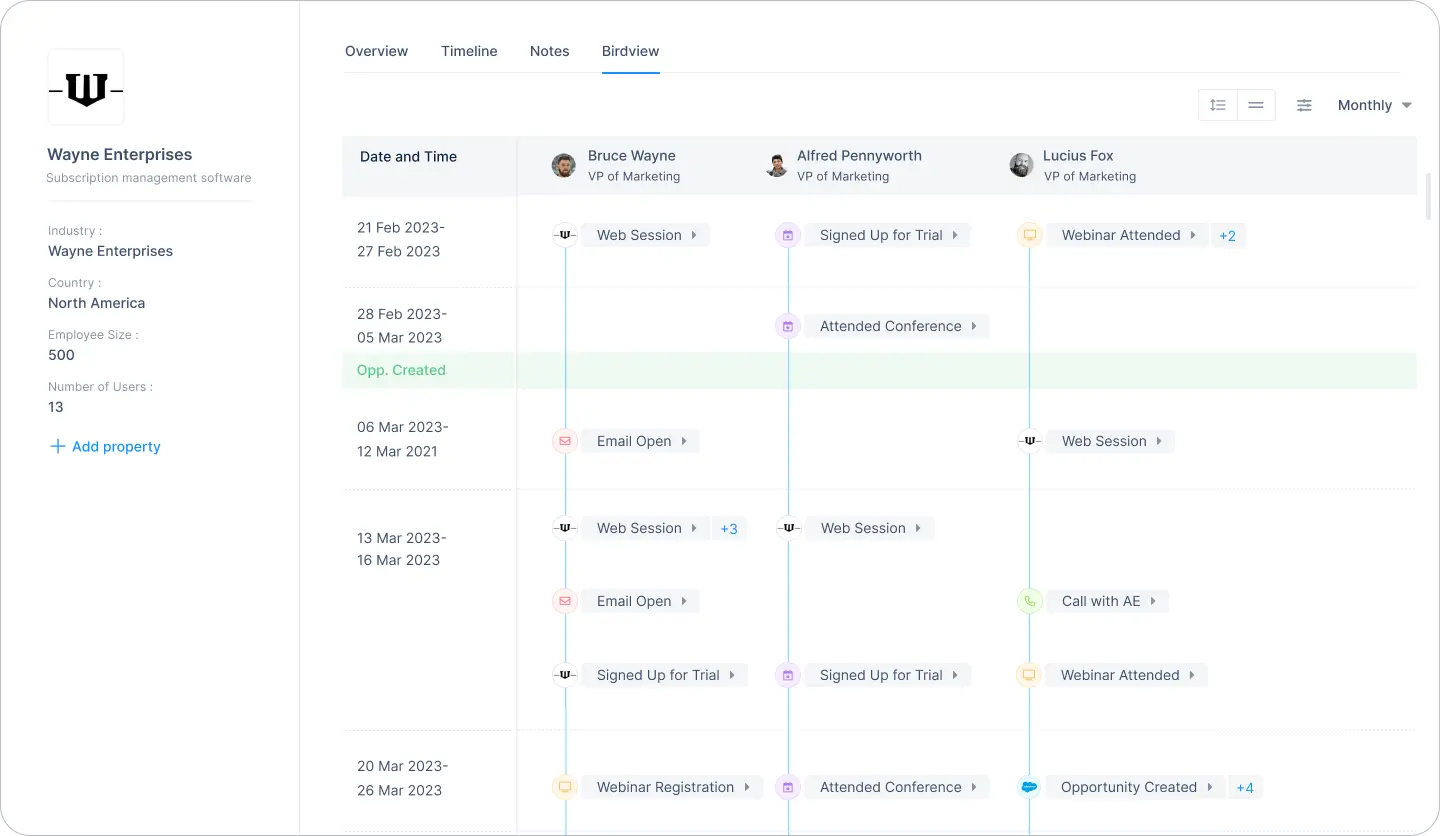
Factors offers a visual user timeline that lets you track and analyze your prospects' interactions with your LinkedIn ads over time. You can also view if the same user has interacted with your brand over other platforms or campaigns that you already track. This gives you a holistic view of an individual user's journey and engagement with your brand across multiple touchpoints.
3. Account intelligence
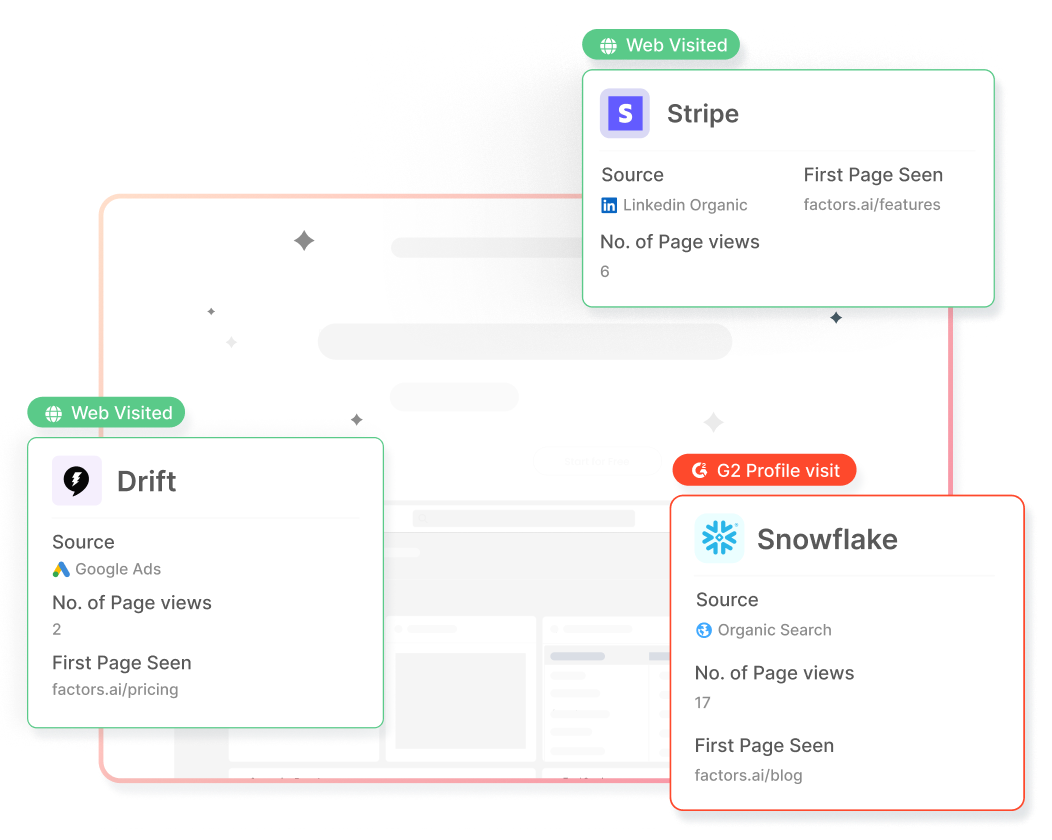
Factors' account intelligence capability allows users to identify anonymous companies visiting your website, along with their intent and firmographics. Your ABM teams can then personalize outreach by understanding their interactions with your content and ads to improve conversions.
4. Optimize ad engagement and performance
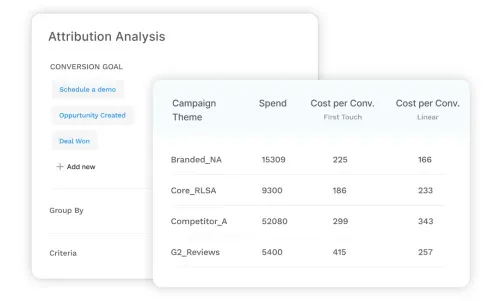
Factors uses Linkedin ad engagement data and audience insights to help you optimize your Linkedin ad campaigns. Knowing which ads resonate with your target audience and generate the most engagement can help you refine your campaigns to maximize returns and drive conversions. You can also uncover the ad formats, content types, and messaging that resonate best with your target audience and increase the likelihood of conversions.
5. Account scoring

Factors' account scoring feature helps prioritize prospects based on their engagement and intent, enabling sales teams to focus their efforts on high-value targets. By combining intent data with firmographics, technographics, and engagement history, you can create a comprehensive account score that helps your sales team prioritize their efforts and focus on the most promising opportunities.
LinkedIn intent data uncovers hidden interactions by revealing prospects' engagement with your ads, helping to identify the "dark funnel."
1. Audience Segmentation: Analyze data to segment audiences and optimize campaigns.
2. Retargeting and Lead Scoring: Use insights to retarget effectively and prioritize high-intent accounts.
3. Sales and Marketing Alignment: Sales teams can personalize outreach, while marketing refines targeting strategies.
4. CRM Integration: Integrating LinkedIn intent data with CRM systems provides deeper insights, enabling more precise B2B sales strategies.
FAQs
1. How does LinkedIn calculate buyer intent?
LinkedIn calculates buyer intent by analyzing user engagement with your company's ads, content, and other interactions on the platform. This includes factors such as clicks, likes, comments, shares, and time spent viewing your content. By tracking these interactions, LinkedIn can identify which users are genuinely interested in your products or services, signaling potential buyer intent.
2. How can you use intent data for sales?
Intent data can be used by sales teams to prioritize high-intent accounts, personalize outreach efforts, align sales and marketing initiatives, optimize sales tactics, and enhance account scoring. By leveraging intent data, sales teams can focus their resources on the most promising leads, creating more targeted and effective sales strategies that drive revenue growth and improve pipeline velocity.
Bring the Power of LinkedIn Buyer Intent Data to B2B Sales
Leveraging LinkedIn buyer intent data can revolutionize your sales and marketing efforts, enabling you to prioritize high-intent accounts, personalize outreach, and align your teams for maximum impact.
By using powerful tools like Factors, you can gain a comprehensive view of buyer journeys and make data-driven decisions to boost pipeline velocity and drive revenue growth. Don't miss out on valuable opportunities – uncover the potential of LinkedIn buyer intent data and elevate your B2B sales strategy today.

LinkedIn Conversation Ads: Sliding Into DMs Without Sounding Like an Ad
Learn how Conversation Ads on LinkedIn compare to LinkedIn Message Ads, best practices for LinkedIn messaging ads, and when to use sponsored messages effectively.

TL;DR
- LinkedIn Conversation Ads work best for long, complex B2B buying journeys, especially when multiple stakeholders are involved, and buyers want to explore before committing.
- They are not designed for instant conversions. If your goal is quick leads or low CPL, Message Ads or Feed ads are often a better fit.
- The real value of Conversation Ads lies in intent signals, like clicks, choices, and engagement paths, not just form fills.
- To judge them correctly, you need full-funnel visibility. When engagement is connected to downstream behavior and revenue, Conversation Ads become a meaningful driver of the pipeline.
Let’s be honest.
Most LinkedIn ads get scrolled past faster than a Monday motivation post. You know the ones. Big promise. Bigger stock photo. Zero memory of it five seconds later.
But LinkedIn Conversation Ads are different.
They don’t fight for attention in the feed.
They don’t interrupt someone mid-scroll.
They land straight in the inbox.
And when they’re done right, they don’t feel like ads at all. They feel like the start of a conversation. The kind you might actually reply to.
If you’ve been curious about LinkedIn message ads, LinkedIn sponsored messages, or how to make LinkedIn messaging ads convert without sounding spammy, you’re in the right place.
Let’s break it down, simply, practically, and without the buzzwords.
What are LinkedIn Conversation Ads (and how are they different from message ads)?
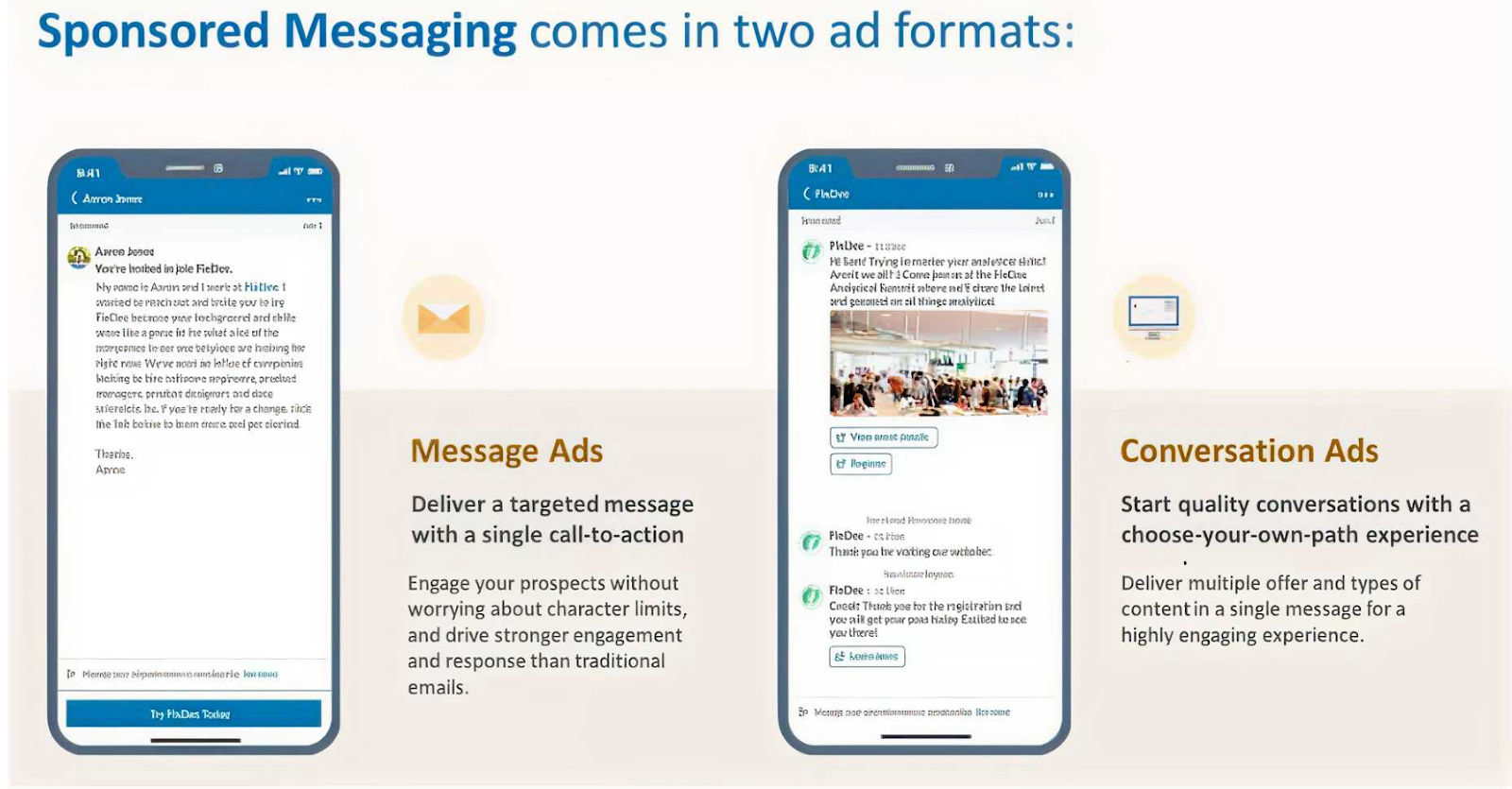
LinkedIn offers two inbox-based ad formats under Sponsored Messaging. They’re often lumped together, but they behave very differently.
1. LinkedIn Message Ads
Think of Message Ads as a single-message push.
You send one message. You include one CTA. You hope they click. That’s it.
They work best when:
- You have one clear goal (book a demo, download a guide)
- You want direct, cost-effective outreach
- Your audience prefers short, no-nonsense messaging
Message Ads aren’t bad. They’re just… direct. Sometimes too direct.
2. LinkedIn Conversation Ads
Conversation Ads are more like choose-your-own-adventure. Instead of forcing one action, you give users multiple response paths:
- FAQs
- Content
- Demos
- Webinars
- Pricing
- Even “just browsing.”
The buyer decides what happens next. They work best when:
- You want interactive engagement
- You’re running ABM or high-intent campaigns
- You want prospects to engage on their terms, not yours
In short: Message Ads talk to people. Conversation Ads speak with them.
And in B2B, that difference matters more than we admit.
Why Conversation Ads work so well in B2B
Here’s the truth about B2B buyers: They hate being sold to, but they love being informed.
Conversation Ads lean into that reality. Instead of forcing a demo request upfront, they let buyers:
- Explore content at their own pace
- Self-qualify without pressure
- Signal intent through clicks and choices
And those choices? They’re gold.
Every click inside a conversation tells you what the buyer actually cares about:
- Are they curious?
- Are they researching?
- Are they close to buying?
That’s far more valuable than a single “Submit” button.
{{INLINE_TOFU}}
The anatomy of high-performing LinkedIn Conversation Ads
So what actually drives engagement? Let’s break down the patterns that show up again and again in high-performing Conversation Ads.
1. Start with the right CTA (Hint: It’s not “Book a Demo”)
Across successful campaigns, the best-performing CTAs are surprisingly… gentle.
They sound like:
- See how it works
- Get started for free
- Find out more
- Book a demo (but usually not as the first step)
Curious, why does this work? Because
- Early-funnel CTAs reduce pressure
- They invite curiosity instead of commitment
- They feel helpful, not transactional
- Think of CTAs as doors, not demands.
Once someone walks through willingly, the rest gets easier.
2. Personalization starts with targeting (Not copy)
Here’s a hard truth: Great copy cannot save bad targeting.
For Conversation Ads, LinkedIn Ads targeting does most of the heavy lifting. The most effective campaigns usually layer:
- Job title + function (not just one)
- Seniority (decision-makers matter here)
- Skills and expertise tied to the problem you solve
- Location, when buying behavior differs by region
Conversation Ads feel personal by nature. If the targeting is off, that illusion breaks instantly.
Right message. Right inbox. Right moment.
Related read: Top LinkedIn Ads targeting mistakes in B2B.
3. Avoid buzzwords. Say the real thing.
One pattern that shows up again and again in underperforming ads is the use of too many buzzwords and too little substance.
Words like AI-powered, optimize, streamline, and game-changer are everywhere, and buyers have learned to mentally skip them.
What works better?
- Specific problems
- Concrete outcomes
- Relatable frustrations
Bad: “Our AI-powered platform optimizes workflows.”
Better: “Still managing this in spreadsheets? Here’s how your team can save 20 hours a week.”
Specific beats impressive. Every single time.
The psychology behind winning Conversation Ads
Conversation Ads work because they tap into the basic human psychology, not clever tricks.
The most common triggers are simple:
- FOMO – “See what top teams are doing differently.”
- Curiosity – “Want to know how this works?”
- Reciprocity – “Get the report, no strings attached.”
The strongest ads often combine two triggers:
- Curiosity + social proof
- Reciprocity + urgency
- FOMO + data-backed claims
The key thing to remember? Don’t manipulate. If the problem is real, people will lean in.
Related read: Best AI tools for LinkedIn Advertising.
Best practices for LinkedIn Message Ads and Conversation Ads
Let’s make this practical.
LinkedIn Conversation Ads Best Practices
- Keep messages short and skimmable
- Offer multiple response options, not dead ends
- Lead with value, not a sales ask
- Let intent reveal itself through clicks
- Optimize for learning, not just leads
LinkedIn Message Ads Best Practices
- Use them when you have one clear CTA
- Be concise and respectful of time
- Avoid sounding like a cold email blast
- Match message tone to seniority level
Just remember, different tools, different jobs.
Related read: Scaling ABM using LinkedIn Ads
Where most teams still get LinkedIn Conversation Ads wrong
Here’s the gap most marketers don’t see. Conversation Ads generate multiple downstream actions, like:
- Website visits
- Content reads
- Return visits
- Assisted conversions
And not just form fills.
So, if you’re only measuring:
- Clicks
- CPL
- Last-touch conversions
Then, you’re missing most of the story.
What changes when you run LinkedIn Ads with Factors.ai
Launching a LinkedIn Ad Campaign is only half the job. The harder part is figuring out which drove conversions and contributed to revenue.
But here is the catch: buyers do not convert in straight lines. Usually, this is what happens after a prospect clicks your LinkedIn Ad,
- They don’t convert immediately.
- They visit your website days later.
- They read a case study.
- They come back through search.
- Sales finally pick them up weeks later.
And somewhere along the way, LinkedIn quietly loses credit. Read more about this in our LinkedIn Ads B2B Benchmarks Report of 2025.
This is exactly the gap LinkedIn Adpilot from Factors.ai built to close.
See what happens after they click your LinkedIn Ad
Most reporting stops at impressions, clicks, or form fills. That is useful, but incomplete.
Factors.ai helps you see:
- What prospects do after they engage
- How different interactions influence the pipeline
- Which touchpoints actually contribute to deals
Instead of guessing which efforts mattered, you can see the complete picture of how accounts move through your funnel after clicking your LinkedIn Ads.
Simply put, see the true ROI of LinkedIn Ads with Factors.ai
Compare LinkedIn against other channels
Once you can see influence, comparison becomes easier.
Factors.ai lets you analyze how LinkedIn performs alongside other channels and how ad-engaged accounts move through the funnel. This helps teams decide where to invest more and where to pull back.
Build audiences without guesswork
Manually maintaining account lists takes time and still goes stale.
With Factors.ai, LinkedIn audience lists are built and updated automatically using real engagement and intent signals. Instead of guessing who should see your ads, you target accounts that are actually showing interest.
Result: Less waste and cleaner targeting.
Control where your LinkedIn Ads budget really goes
Most teams do not realize this until they see the data. 20% of accounts often consume 80% of the ad impressions. The result is uneven reach and fast budget burn.
Factors.ai’s LinkedIn Adpilot helps you:
- Control impressions and clicks per account
- Reach more accounts with the same budget
- Avoid overserving the same few companies
More coverage. Same spend.
Read more about this in the LinkedIn Smart Reach blog.
Optimize campaigns using conversion feedback
Factors.ai also supports the LinkedIn Conversion API. That means you can:
- Send online and offline conversion signals back to LinkedIn
- Optimize campaigns based on real outcomes
- Scale performance without relying on third-party cookies
All without a complicated setup.
So… should you be running LinkedIn Conversation Ads?
Short answer: Yes. But only if you use them for what they are actually good at.
Conversation Ads work best in buying journeys that take time. They are the best when multiple stakeholders are involved, when buyers want to explore before committing, and when your goal is to educate, qualify, and learn rather than push an immediate demo.
They are not built for instant wins. If you need quick, single-action conversions or you are optimizing purely for cost per lead, Message Ads will usually perform better. Different formats solve different problems.
Where most teams go wrong is not in how they write these ads, but in how they measure them.
Conversation Ads rarely drive a straight line from click to conversion. Instead, they influence interest over time through content views, return visits, and assisted conversions across channels. When revenue is calculated only by last-click results, that influence gets ignored.
But when you connect engagement to downstream behavior and revenue, the picture changes. You can see what sparked curiosity, what kept buyers engaged, and how those early conversations helped deals move forward.
Run Conversation Ads to understand buyer intent, not to force action. Measure them with the full buyer journey in mind, and they become a meaningful driver of the pipeline rather than just another inbox placement.
FAQs on LinkedIn Conversation Ads
Q1. What exactly are LinkedIn Conversation Ads, and how are they different from Message Ads?
LinkedIn Conversation Ads are interactive inbox ads that let prospects choose what they want to do next. Instead of sending one message with one CTA, you offer multiple options like viewing content, checking pricing, or learning more before booking a demo.
Message Ads, on the other hand, are simpler. One message, one CTA, one outcome. They work well when you already know exactly what action you want the reader to take.
If Message Ads are a straight pitch, Conversation Ads are a guided conversation where the buyer stays in control.
Q2. Do Conversation Ads actually feel like real conversations?
They feel conversational, but they are not live chats.
Conversation Ads follow a pre-built flow with buttons and branching paths. The experience feels interactive because buyers choose what to click, but they are not typing free-form responses.
That is also their strength. You can guide buyers without needing someone to reply in real time, while still learning what they care about based on their choices.
Q3. Should I always choose Conversation Ads over Message Ads?
No, and that is a common mistake.
Conversation Ads work best when buyers need time, context, or education. Message Ads work better when the action is simple and obvious.
If you only have one clear CTA and want quick action, Message Ads are usually the better choice. If you want to support research, qualification, or intent discovery, Conversation Ads are a stronger fit.
It is not about which format is better. It is about which one matches the buying situation.
Q4. Are LinkedIn Conversation Ads still effective, or are people tired of them?
They are still effective, but they are easier to get wrong now.
Many marketers report weaker performance when Conversation Ads feel generic, overused, or overly sales-driven. Buyers are quick to ignore anything that looks like a templated pitch in their inbox.
What still works is relevance. Tight targeting, helpful options, and clear value. When the message matches the buyer’s context, Conversation Ads continue to drive engagement and intent signals.
Q5. What metrics should I actually look at for Conversation Ads?
Open rates are usually high, but they do not tell the full story.
The real value comes from interaction metrics like which options people click, what content they engage with next, and whether they return later through other channels.
Conversation Ads are better judged by downstream behavior and assisted conversions, not just immediate form fills. If you only measure last-click leads, you will almost always undervalue them.
%2520(1).avif)
LinkedIn Ads vs. Google Ads vs. Facebook Ads: Who’s the winner?
Explore the differences between LinkedIn Ads, Google Ads, and Facebook Ads for B2B marketers. Learn about the strengths, challenges, and multi-channel strategies to boost ROI.

TL;DR
- LinkedIn Ads: Best for targeting decision-makers and professionals in niche industries despite higher costs.
- Google Ads: Ideal for capturing high-intent leads with search ads and retargeting.
- Facebook Ads: Effective for broad audience engagement and cost-effective brand awareness.
- Multi-Channel Strategy: Combining all three platforms maximizes ROI by leveraging their unique strengths across the marketing funnel
LinkedIn, Google, and Facebook—marketers are spoiled for choice because there are many options for running ads and promoting their products.
But which one takes the win? Or should you use each platform in tandem?
This guide analyses LinkedIn Ads vs. Google Ads vs. Facebook Ads and explores how B2B marketers can effectively use these platforms for various campaign types. Additionally, we’ll discuss the challenges associated with each platform and how a multi-channel approach can help maximize ROI.
Overview of Each Ad Platform
LinkedIn Ads
LinkedIn Ads are highly effective for B2B marketers who must reach decision-makers and professionals in specific industries. The platform’s targeting capabilities include options based on job title, company size, industry, and professional skills, making it the go-to choice for account-based marketing (ABM) strategies.

Strengths:
- Superior B2B targeting capabilities.
- High-quality leads due to professional context.
- Ideal for promoting webinars, whitepapers, and other B2B content.
Limitations:
- High cost-per-click (CPC) compared to other platforms.
- Smaller audience size than Google or Facebook.
Google Ads
Google Ads is well-known for its ability to capture intent. Users actively search for solutions on Google, making it an excellent platform for bottom-of-the-funnel conversions. With options like search, display, and YouTube ads, Google offers diverse ways to target audiences.

Strengths:
- High-intent audience.
- Broad reach with multiple ad formats.
- Remarketing capabilities through display ads.
Limitations:
- Competitive keywords can lead to high CPCs.
- Limited ability to target niche professional audiences directly.
Facebook Ads
While Facebook is often seen as a B2C platform, its massive user base allows B2B marketers to target decision-makers who may also use Facebook for personal browsing. The platform's advanced targeting options, such as interests, behaviors, and lookalike audiences, can complement other advertising efforts.
Strengths:
- Lower CPC compared to LinkedIn and Google.
- Advanced audience segmentation and lookalike audiences.
- Ideal for top-of-the-funnel engagement.
Limitations:
- Limited professional targeting options compared to LinkedIn.
- May struggle to capture high-intent B2B leads.

Best Campaign Types for B2B Marketers
- LinkedIn Ads Campaignssome text
- Sponsored Content: Promotes thought leadership content such as eBooks, webinars, and case studies. It is ideal for lead generation and nurturing.
- Message Ads: Directly target prospects with personalized messages. Effective for ABM strategies.
- Lead Gen Forms: Capture user data directly within LinkedIn, streamlining the conversion process.
💡Learn more about types of LinkedIn ads here.
- Google Ads Campaignssome text
- Search Ads: Target specific keywords to capture high-intent prospects. This is useful for driving conversions when prospects are actively searching for solutions.
- Display Ads: Retarget users who have previously visited your website, keeping your brand top-of-mind.
- YouTube Ads: Promote video content to educate potential customers about your product or service.
💡Find out more about SaaS google ads
- Facebook Ads Campaignssome text
- Video Ads: Promote product demos or customer testimonials to build awareness.
- Retargeting Ads: Target users who have previously interacted with your website or content.
- Lead Ads: Collect leads directly on Facebook, similar to LinkedIn’s Lead Gen Forms.
{{INLINE_BOFU}}
Challenges of Each Platform
LinkedIn Ads Challenges
- High CPC: LinkedIn’s cost-per-click is significantly higher than other platforms. B2B marketers need to optimize their targeting and content to achieve a high conversion rate.
- Smaller Audience Size: Compared to Facebook and Google, LinkedIn’s audience is more limited, potentially reducing the reach of some campaigns.
Factors recently launched a new offering called LinkedIn AdPilot, where you can solve these challenges and double your LinkedIn ROI!

Google Ads Challenges
- Keyword Competition: Popular keywords can lead to high CPCs, making it expensive for B2B companies to compete for clicks.
- Complexity in Setup: Google Ads requires a deeper understanding of keyword research, bidding strategies, and ad optimization.
Luckily, with Factors, you can solve these challenges by knowing exactly which ad keywords are bringing you revenue so you can save up to 50% of your ad spend!

Plus, you can also use our Segment Insights feature to compare channel performance to see where you can allocate more ad budget.

Facebook Ads Challenges
- Low Intent: Facebook users may not be actively seeking business solutions, making it harder to drive conversions for B2B campaigns.
- Limited Professional Targeting: While the platform offers demographic and behavioral targeting, it lacks LinkedIn’s professional filters.
Multi-Channel Approach to Maximize ROI
A multi-channel approach leverages the strengths of each platform, addressing the limitations of individual channels and maximizing performance across the marketing funnel.
1. Top-of-the-Funnel (TOFU) Awareness: Use Facebook Ads
- Strategy: Facebook Ads can help you reach a broader audience and create initial awareness. Use engaging content like videos or blog snippets to generate interest.
- Goal: Drive traffic to your website or landing page to build a remarketing audience.
2. Middle-of-the-Funnel (MOFU) Engagement: Leverage LinkedIn Ads
- Strategy: Use LinkedIn’s professional targeting to nurture leads who have shown interest in your content. Promote webinars, eBooks, or whitepapers to educate prospects.
- Goal: Establish credibility and build a relationship with potential customers.
3. Bottom-of-the-Funnel (BOFU) Conversion: Optimize Google Ads
- Strategy: Use Google Search Ads to capture intent-driven leads that are ready to purchase. Bid on keywords related to your solution to target high-intent prospects.
- Goal: Drive conversions by offering product demos, free trials, or consultations.
4. Remarketing Across Channels
- Retarget users on Google Display Network and Facebook who have interacted with your content on LinkedIn or searched for relevant keywords. This ensures your brand remains top-of-mind across various touchpoints.
- Tip: Tailor your messaging based on the user’s previous interactions to make your ads more relevant and personalized.
5. Unified Reporting and Attribution
- Track conversions and attribute leads accurately using tools like Google Analytics, LinkedIn Insights, and Facebook Pixel. This allows you to understand which platform drives the most ROI and adjust budgets accordingly.
Which Ad Platform is Best for B2B Marketers?
The choice between LinkedIn Ads, Google Ads, and Facebook Ads depends on your specific goals and budget:
- Best for High-Quality Leads: If your goal is to target decision-makers or specific industries, LinkedIn Ads offers the best targeting capabilities despite the higher CPC.
- Best for Capturing Intent: Google Ads is the ideal choice for driving conversions when users actively search for solutions related to your product or service.
- Best for Brand Awareness and Engagement: Facebook Ads can be a cost-effective way to build awareness and engage a broader audience, making it a valuable addition to a multi-channel strategy.
Ultimately, no single platform will serve all B2B marketing needs. A balanced, multi-channel approach ensures you can capture leads at various stages of the buyer’s journey and optimize your ad spend for maximum ROI.
Use Factors to Supercharge Your Ad Strategies
When evaluating "LinkedIn Ads vs. Google Ads vs. Facebook Ads," B2B marketers should focus on a multi-channel strategy that leverages each platform's unique strengths. LinkedIn’s professional targeting, Google’s intent-driven search capabilities, and Facebook’s broad reach create a holistic approach that can nurture leads throughout the buyer's journey. While LinkedIn may be the best option for high-quality B2B leads, integrating all three platforms maximizes performance and ROI.
You can use Factors to measure the impact of each channel and shape your paid marketing strategies to generate more pipeline and revenue. Book a demo today to witness the power of signal-based GTM in your performance marketing efforts.
Top 3 Advertising Platforms
Choosing the right advertising platform is crucial for achieving business goals, reaching target audiences, and optimizing budgets.
1. Top Platforms: LinkedIn Ads, Google Ads, and Facebook Ads.
2. Key Features:
- LinkedIn Ads: B2B targeting based on job titles, industries, and company sizes.
- Google Ads: Broad reach, diverse ad formats, targeting high-intent searchers.
- Facebook Ads: Extensive reach with demographic, interest, and behavioral targeting.
3. Strategic Benefits:
- LinkedIn Ads: Ideal for targeting decision-makers but comes with a higher CPC.
- Google Ads: Captures high-intent audiences, though competitive keywords can raise CPC.
- Facebook Ads: Cost-effective for B2C campaigns, though creative strategies may be needed for B2B.
Implementing a multi-channel strategy using these platforms enhances marketing effectiveness and maximizes ROI.
FAQs
Q1. What is the main difference between LinkedIn and Facebook Ads for B2B marketing?
LinkedIn Ads offer more advanced targeting options for professionals based on job title, industry, and company size, whereas Facebook Ads provide broader audience targeting and lower CPCs.
Q2. Are Google Ads effective for B2B companies?
Yes, Google Ads are effective for B2B companies, especially for capturing high-intent leads through search ads and remarketing strategies.
Q3. How can B2B marketers measure the success of their ad campaigns?
B2B marketers can measure the success of their campaigns through KPIs such as conversion rate, cost-per-lead (CPL), and return on ad spend (ROAS), while also using attribution models to track the contribution of each platform
.avif)
LinkedIn’s Company Intelligence API: Prove Full-Funnel Impact with Factors
Discover how Factors.ai’s LinkedIn Company Intelligence API integration unifies paid and organic engagement for full-funnel impact.
.avif)
TL;DR
- LinkedIn’s Company Intelligence API surfaces company-level engagement from paid + organic, so you can finally see LinkedIn’s full-funnel impact.
- You get attribution that reflects how buying groups actually buy, not just last-click or one user’s activity.
- Plug it into Factors.ai to stitch signals into buyer timelines, map them to pipeline/CRM, and activate (alerts, routing, synced audiences) without CSVs.
- Here’s what you can do: Connect the integration → get insights from paid + organic efforts → sync audiences to LinkedIn Campaign Manager → turn on seller alerts → report at the company level.
- Measure success by looking at the influenced pipeline, conversion lift vs. non-engaged companies, time from first LinkedIn touch → first meeting/opportunity, and CPA as budget shifts to proven touchpoints.
If you run B2B demand gen, you already know that LinkedIn is where your buyers research, react, and rally a buying group. And for years, you could measure the paid side of that story, while organic engagement lived in the dark. That changes with our integration of LinkedIn’s Company Intelligence API.
As an official LinkedIn B2B Attribution & Analytics Marketing Partner, Factors now bridges the gap between paid and organic engagement, giving marketers a complete, unified view of buyer behavior on LinkedIn.
This capability surfaces company-level engagement across paid and organic touchpoints, so you can connect every LinkedIn interaction to pipeline and revenue accurately, transparently, and in a way that sales can immediately act on.
What is LinkedIn’s Company Intelligence API?
A way to capture rich, company-level engagement across paid and organic LinkedIn touchpoints such as: Paid Engagements, Organic Engagements, Organic Impressions, Paid Impressions, Paid Clicks and Paid Leads.
With LinkedIn’s Company Intelligence now integrated into Factors reports you can see how companies actually interact with your brand, attribute influence more accurately, and act on buying signals while interest is high.
See how it works in this video.
“LinkedIn Ads is core to our marketing strategy, and the integration between Factors and LinkedIn gives us clear visibility into how both organic and paid touchpoints impact pipeline. It gives us confidence in deciding who to target and which campaigns should get additional investment."
- Bhargav Chandrababu, Director of Digital Marketing, Sprinklr
💡What’s new
- Organic signals: Company-level organic impressions and organic engagement, alongside paid impressions, clicks, and leads.
- Here’s why you should care: Now, you can capture view-through influence (who saw content before acting elsewhere) and early buying-group interest that last-click reports miss.

LinkedIn Company Intelligence API + Factors.AI: Get the best of both worlds
- Full-funnel visibility across paid and organic
The gap today: Paid is measurable; organic often disappears into the dark funnel.
What you get now: A continuous view of how compaines interact with your ads and posts throughout the journey.
Why it matters:
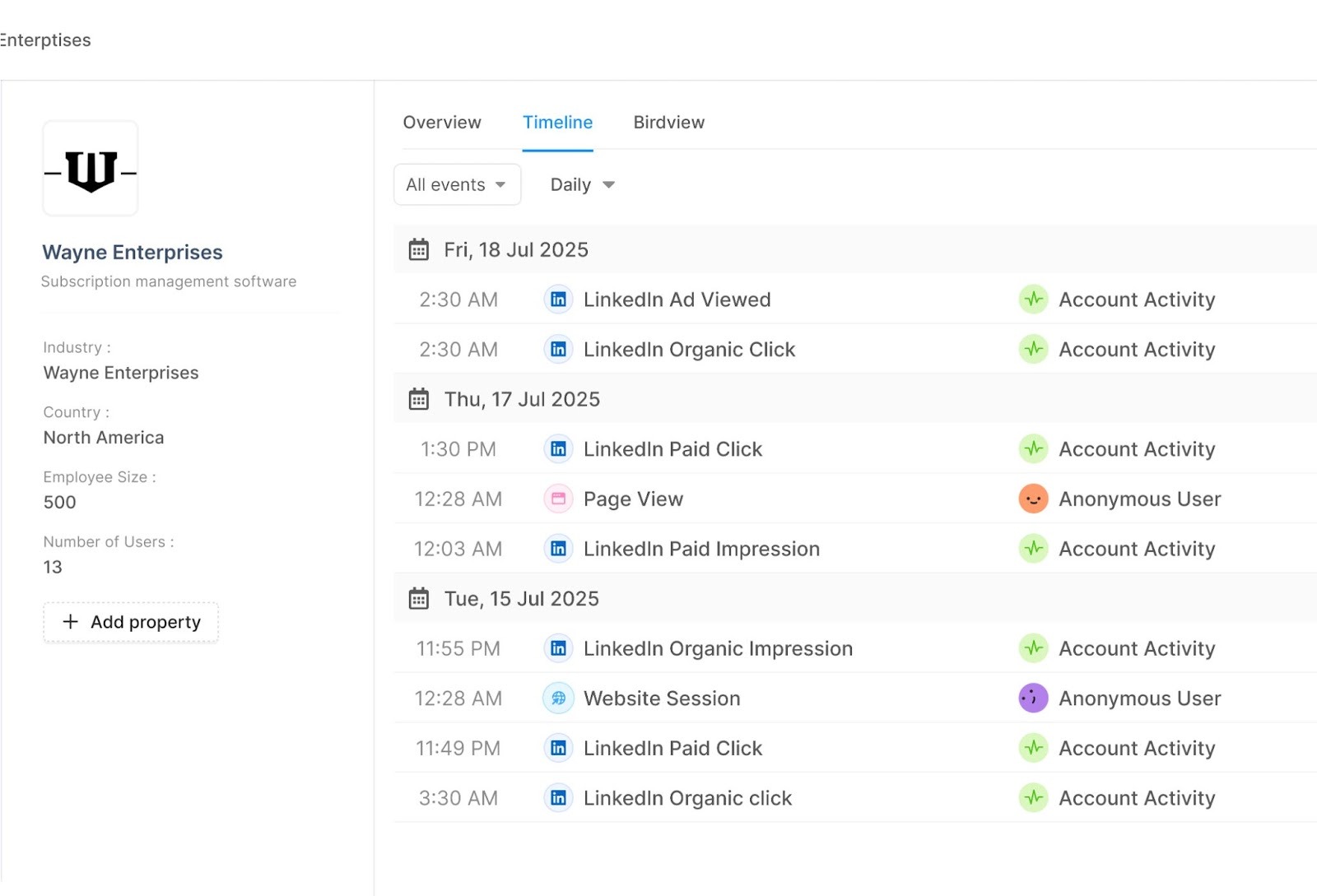
- Narrative clarity: See how a post sparks attention, an ad reinforces the message, and a website visit pushes the deal forward, mapped on your customer journey timeline with other intent signals.
See the full journey with Factors:
Company-level signals across paid & organic LinkedIn, stitched into your account timelines in Factors.
- Attribution that matches how businesses really buy
The gap today: LinkedIn ads work like billboards on your buyers’ commute. Thousands see them, some engage, and a few eventually fill a form. But last-click reports only credit the form fill, ignoring the view-through influence that actually drove the action.
What you get now: company-level engagement from both paid and organic LinkedIn, tied to pipeline.
Why it matters:
- Credit the real influence: Organic interactions that happen before a form fill now show up (and get counted.)
- Invest smarter: Know which LinkedIn touches drive meetings, opps, and revenue.
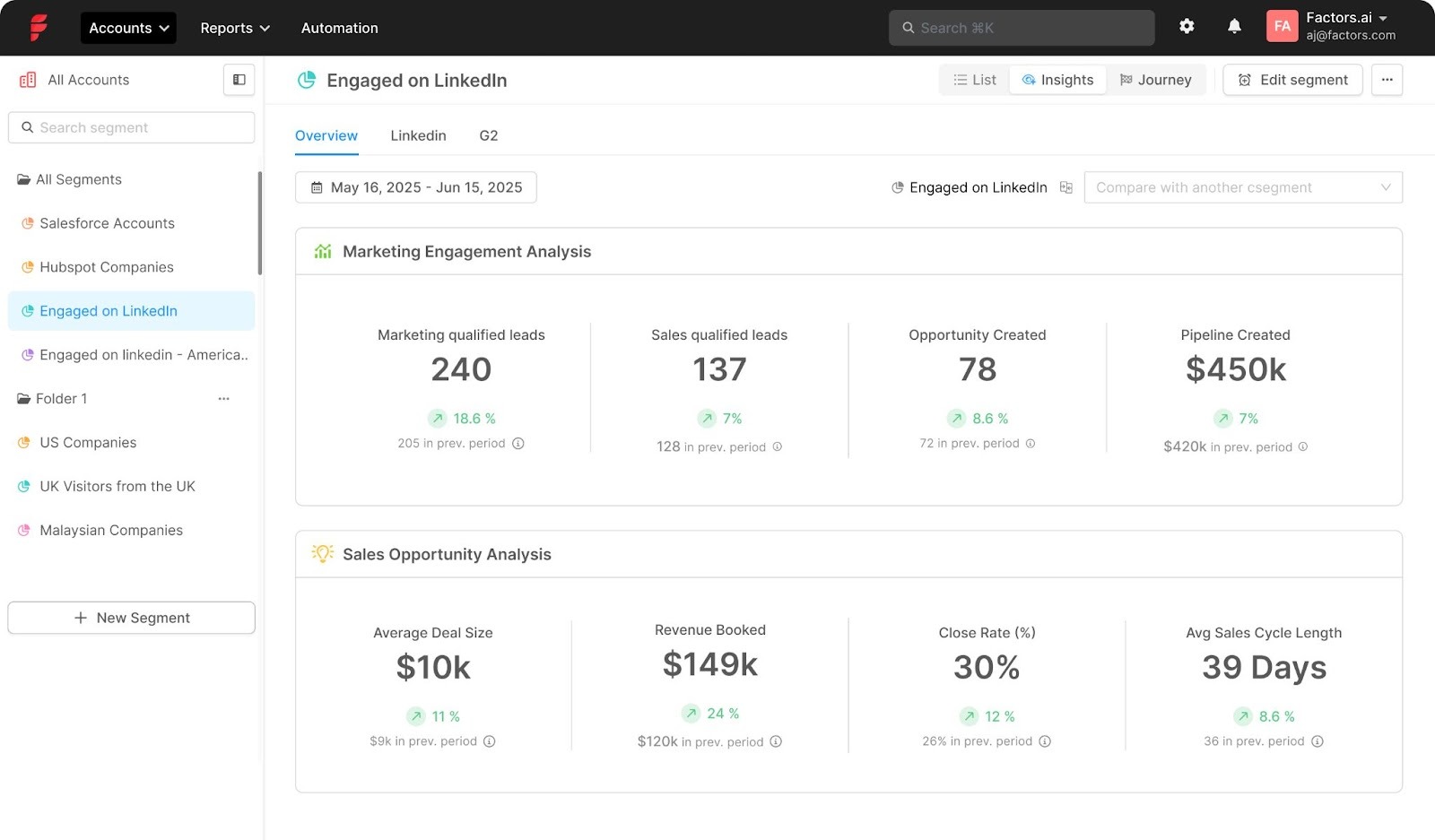
Prove attribution with Factors:
Connect company-level ad + organic activity to meetings, MQLs, SQLs, Opportunities, and Revenue.
- Audience automation that compounds performance
The gap today: Most campaigns run on broad targeting or weak signals like web visits and form fills. Organic engagement never makes it into your targeting, and when it does, it’s through outdated CSV uploads.
What you get now: Build audiences from both organic + paid LinkedIn engagement and sync them straight into Campaign Manager. Audiences stay fresh automatically, with sales alerts and workflows triggered in real time while interest is high.
Why it matters:
- Intent-based precision: Target companies showing real buying signals across ads and organic, not just broad demographics.
- Persistent relevance: Audiences update as engagement changes, so targeting stays aligned with buyer activity.
- Less manual work: No more CSV uploads or stale lists. Everything updates in Factors’ dashboard automatically.
- Faster pipeline: Reps focus on companies already warming up on LinkedIn, moving deals quicker.
Run intent-based campaigns with Factors:
Prioritize high-intent companies, trigger sales alerts, and auto-sync audiences, no manual work required.
{{INLINE_TOFU}}
The proof is in the pudding: Here’s what teams have seen in tests
These gains result from combining organic and paid signals, acting on them through prioritization, audience synchronization, and coordinated outreach. Early results across show:
- Up to 3.6x more companies reached
- Up to 4x more companies engaged
- 75% more MQLs influenced
- 96% more SQLs influenced
- 43% lower CPA
All in all, the takeaway is:
You’ll identify far more of the companies seeing your content (reach) and interacting with it (engagement), not just the small slice that click and convert immediately.
In a nutshell…
LinkedIn surfaces the signals; Factors turns them into pipeline, clearer attribution, smarter spend, faster sales.
FAQs
Q1: What exactly does the Company Intelligence API do?
It tracks company-level engagement across paid and organic LinkedIn touchpoints, so you can see how companiess interact with your brand, attribute influence more accurately, and act when intent spikes.
Q. How is this different from measuring ads alone?
A. Ads tell half the story. This brings organic engagement into view so you capture early research behavior, attribute influence beyond last-click, and act sooner.
Q. What day-one use cases should I set up?
A. KPI reporting at the company level, journey timelines, synced audiences in LinkedIn Campaign Manager, and sales alerts for spikes in combined engagement.
Q. Will this replace my current attribution model?
A. No, it enhances your model with better inputs: company-level LinkedIn engagement (paid + organic) that plugs into your existing reporting.
Q. What outcomes should I expect to track?
A. More engaged companies, more influenced MQL/SQL, and improved CPA as you shift spend toward touchpoints that move companies forward.
Q. How do you match companies between LinkedIn Ads and HubSpot/Salesforce?
A. We match companies by comparing their website domains in LinkedIn and your CRM.
Linkedin Ads For Early-Stage Teams: Framework & Priorities
This chapter of no-nonsense guide explores the LinkedIn ads framework we’ve crafted over months of wins, mistakes & learnings as an early-stage start-up.

With over 750 million users, LinkedIn is by far the largest professional network in the world.
What started off as a simple platform for like-minded business people to connect, has transformed into a social media behemoth. Today, LinkedIn offers everything from algorithmic news feeds, LinkedIn groups, live streaming, and of course, a wide range of advertising mechanisms.
What does this mean for us B2B marketers? Opportunity.
LinkedIn’s massive database of professionals, companies, and industries may be leveraged by marketers to reach out to the right audience with the right message and drive high-quality opportunities.
But there’s no hiding behind the fact that paid marketing on Linkedin can be expensive and competitive — especially for Seed/Series A companies looking to make limited budgets go a long way.
As a result, early-stage teams generally prefer spending on Search Ads over LinkedIn. The former is believed to drive more high-intent leads and in turn, better return on ad spend. Conversely, LinkedIn is thought to be better suited to bigger companies for expensive, top of the funnel branding campaigns.
This is not necessarily true.
When executed well, LinkedIn ads can be an effective channel to generate high-quality leads and bottom-of-the-funnel pipeline — even for smaller teams. This chapter of our no-nonsense guide explores the Linkedin ads framework we’ve crafted over months of wins, mistakes & learnings as an early-stage start-up.
We won’t be discussing the basics of Linkedin Ads given that there’s loads of resources available on this as is. Instead, you can expect to find practical guidelines to pick off low-hanging fruit and drive RoAS.
Linkedin Ads For Series A: Framework & Priorities
Quick results with limited spend and minimal effort is at the core of our LinkedIn ads framework. With that in mind, we suggest using LinkedIn ads to target the following audiences:
- Retarget prospects that are already engaging with your company
- Target customers of your competitors
- Target top of the funnel ICP audience with ABM
Given that not all accounts are equally likely to convert, It’s important to prioritize the right set of audiences. Here’s an order of priority we’ve been seeing growing success with:
| Priority | Audience Set | Problem/Solution | Brand |
|---|---|---|---|
| 1 | Retargeting to website visitors | Audience is aware | Audience is aware |
| 2 | Targeted to competitor customers | Audience is aware | Audience may or may not be aware |
| 3 | Targeted to general ICP (ABM) | Audience may or may not be aware | Audience unaware |
1. Your first priority should be to retarget accounts that are already interacting with your brand — visiting high-intent pages, engaging with G2 reviews, or viewing previous LinkedIn ads. Given that these accounts already know about your product/company in some capacity, we can safely assume that they’re problem, solution AND brand aware.
This audience is at a stage where they’re researching solutions (including yours!) to solve a challenge that they’re actively facing. This set can also include lost and churned accounts that have returned to engage with your brand.
In short, this audience is relatively further along the sales funnel and accordingly, will require the least effort (and spend 😉) to convert.
2. Next, look to target customers of your competitors. While this set of audience may not be aware of your brand, they’re certainly aware of the problem and are in fact already using an alternate solution. This implies that they’re ready to buy and may consider switching to your solution if it’s a better fit. In terms of ideal customer profile, it doesn't get much better than this. Use sales intelligence tools like Builtwith or Slintel to generate competitor customer lists.
3. Finally, target your general ICP audience with account-based marketing (ABM). This consists of the set of accounts that fit your ideal customer profile criteria (based on size, industry, revenue range, technographics, etc). Although this set of audience would make great customers, they’re unaware of your brand as well as the problem your product is solving for. Accordingly, these accounts will require the most effort (and spend) to convert.
With this priority framework established, let’s explore how to build these audience lists, run ads that convert, and optimize paid LI ads.
I. Build Audience Lists
For Retargeting…
Here’s a 3 step process on creating an audience list for LinkedIn retargeting
Step 1. Identify accounts from your website, reviews, and ad impressions
Use LinkedIn’s website tracking pixel in tandem with IP-based account identification tools to discover anonymous companies engaging with your website, G2 reviews, and previous LinkedIn ads.
Tactical Tips: LinkedIn’s website tracking pixel is limited to the number of visitors who actually accept cookies upon landing. This may be an issue for smaller teams with limited traffic because visitors accept cookies only 11% of the time. This may dramatically shrink your audience list. Luckily, there’s a quick fix:
Use an “opt-out” cookie policy instead of an “opt-in” policy everywhere outside the EU to have cookies accepted by default. Both policies are privacy compliant outside the EU, but an “opt-out” policy will result in far more accounts identified by the LinkedIn pixel.

Step 2. Filter down your targets
Depending on the size of your website, you may identify hundreds or thousands of unique accounts every week. It’s probably unrealistic to go after each and every one of them. Instead, refine your list by only targeting accounts that visit high-intent pages (Pricing, Landing pages, Comparison blogs, G2 reviews etc) and fit your ideal client profile based on geography, industry, technographic, revenue range, etc. Once complete, you’ll be left with a list of high-fit, high-intent ICP accounts.

Tactical tips: In order to launch a campaign on LinkedIn, you must target at least 1,000 members. (Or 300 members, with Matched Audience — but we strongly discourage the use of MA). Given that you’re likely targeting multiple people from the same company, a final list of 500 accounts is a good starting point.
3. Build a target member list:
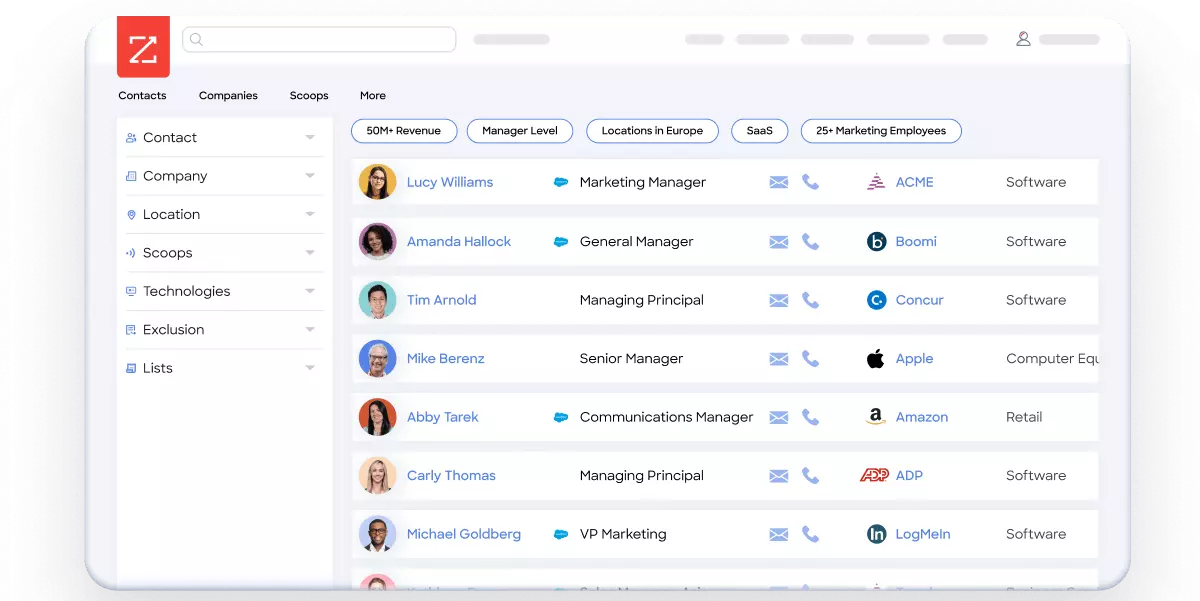
At this stage, we have a brand-aware and possibly in-market set of ICP accounts ready for targeting. Use a sales intelligence tool like Apollo, Zoominfo, or LinkedIn Sales Navigator to create a list of at least 1,000 relevant members to target based on their roles, seniority, etc.
Tactical tips: We find that it’s valuable to create awareness across the entire company you’re targeting. Accordingly, we strongly recommend targeting at least 2-3 employees from every account: final users, their managers, and the final purchase decision makers.
For Competitor Customers & ABM
The process for creating audience lists in these cases is straightforward. Skip straight to building target member lists using sales intelligence tools like Builtwith, Zoominfo, Slintel, etc. Construct lists of competitor customers and ICP accounts by apply the right filters (technographics, firmographics, roles) so you’re left with the right contacts from the right companies.
Now, we’re all set to run highly targeted ads that drive conversions.
{{INLINE_MOFU}}
II. Run ad campaigns
At this stage, we have a primed list of high-fit, high-intent audience fit for targeting. It's safe to assume that every member we’re targeting would find the product/service we’re marketing to be, at the very least relevant, if not of explicit interest to them.
So now, we run great ads! Here are a few point to keep in mind:
Define objectives
The objective and approach of your LinkedIn ads should differ based on the audience you’re targeting. For instance, retargeting ads should look to convert brand-aware accounts and accordingly can be far more direct as compared to ABM ads targeted towards brand-unaware accounts. Here’s how to think about it:
| Audience | Objective | Ad Funnel |
|---|---|---|
| 1. Retargeting | Sign-up | Stage 1: Direct ads with Leadgen form |
| 2. Competitors customers | Sign-up | Stage 1: Comparison ads Stage 2: Leadgen form |
| 3. ABM | Branding | Stage 1: Brand ads Stage 2: Leadgen form |
With retargeting ads, ads you’re targeting members that have already visited your website, interacted with your review pages, or viewed a previous ad. We needn’t create brand awareness from scratch. Instead, we should aim for these ads to generate sign-ups. Accordingly, use straightforward lead-gen forms instead of content assets or website redirects here. In this case, leads generated and conversion rate will be the two key objectives. You may also track cost per conversion and cost per lead. Targets for these will vary based on your budget and ACV.
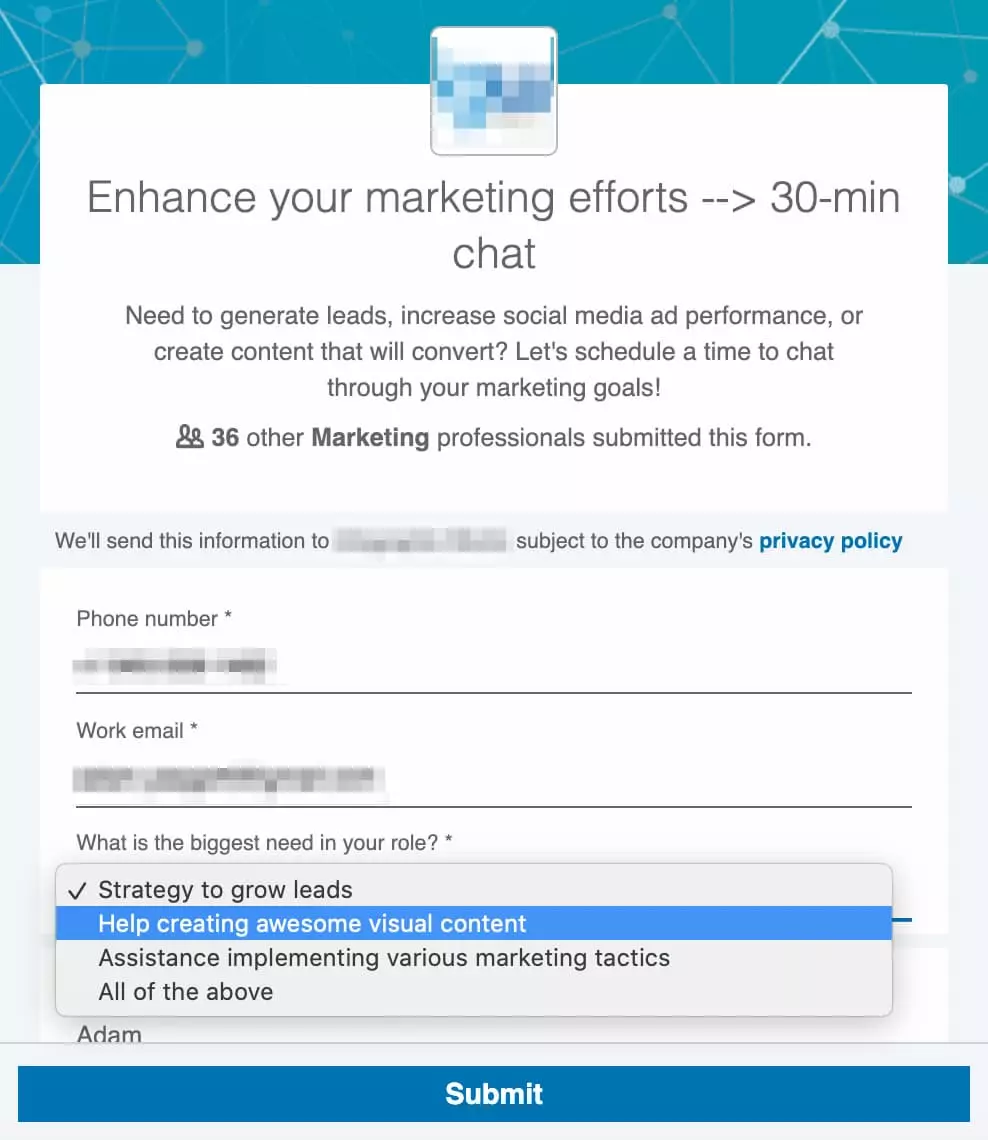
Tactical tips: Keep the number of form fields to a minimum. Work mail and phone number are plenty.
With ads targeted towards competitors' customers and ICP audience in general, it’s better to use a 2-stage funnel: the first stage involves running comparison ads or branding ads to create awareness about your solution. The second stage involves converting target accounts with standard lead gen forms. While this is a more elaborate process than a simple lead gen form, it’s sure to drive better conversions as the target audience will be aware of your work, and thus more likely to submit a form.

Make a mark with messaging
You do not want to run pesky ads and have people mute your campaigns. It’s vital to incorporate customer research into your ad copy and designs to capture positive attention. Even little things like line breaks and emojis can make or break your campaign.
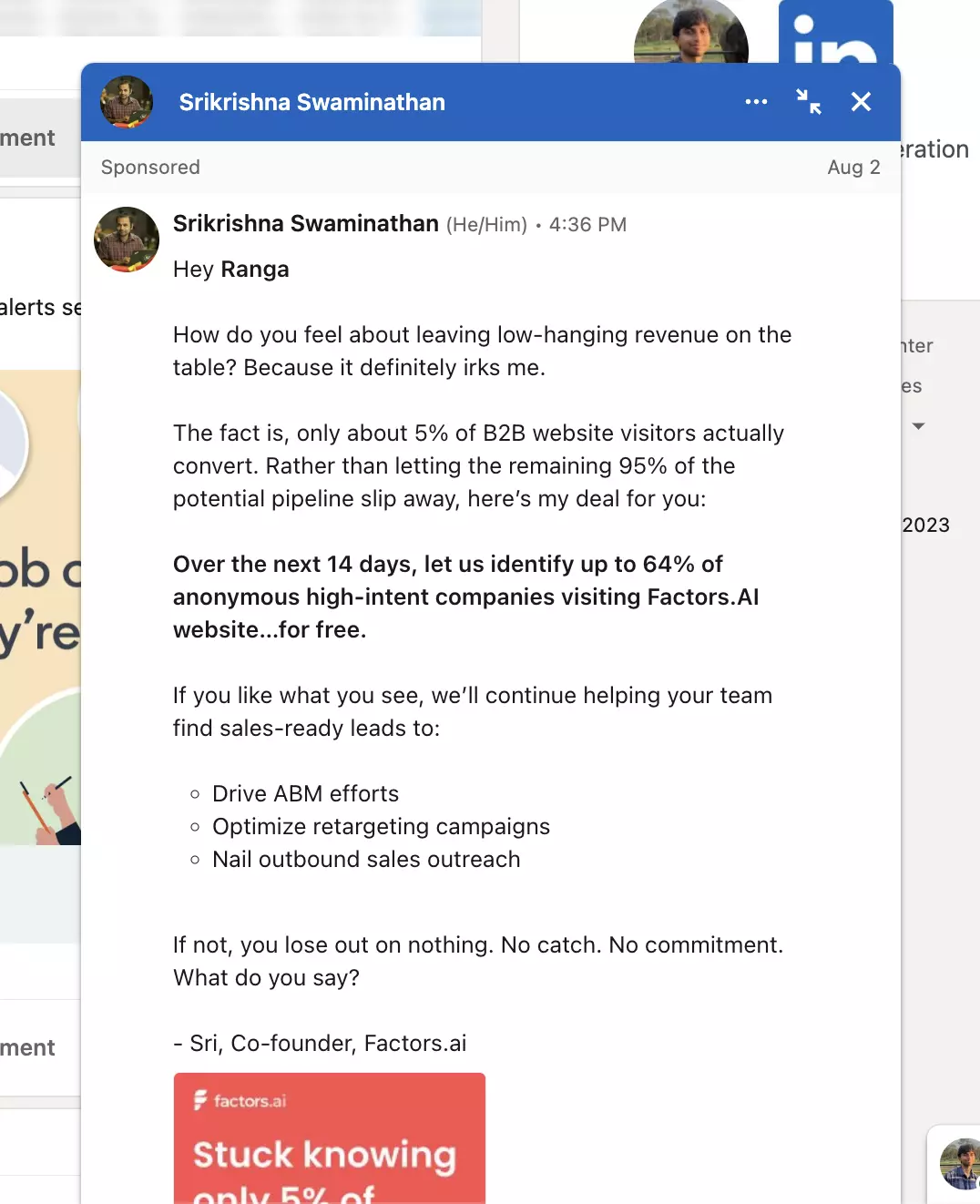
Remember to sell on every element of the ad: the intro text,headline, in-image text, description, etc. Most users won’t consume every part of the ad in its entirety — so ensure that each element is persuasive in its own right:
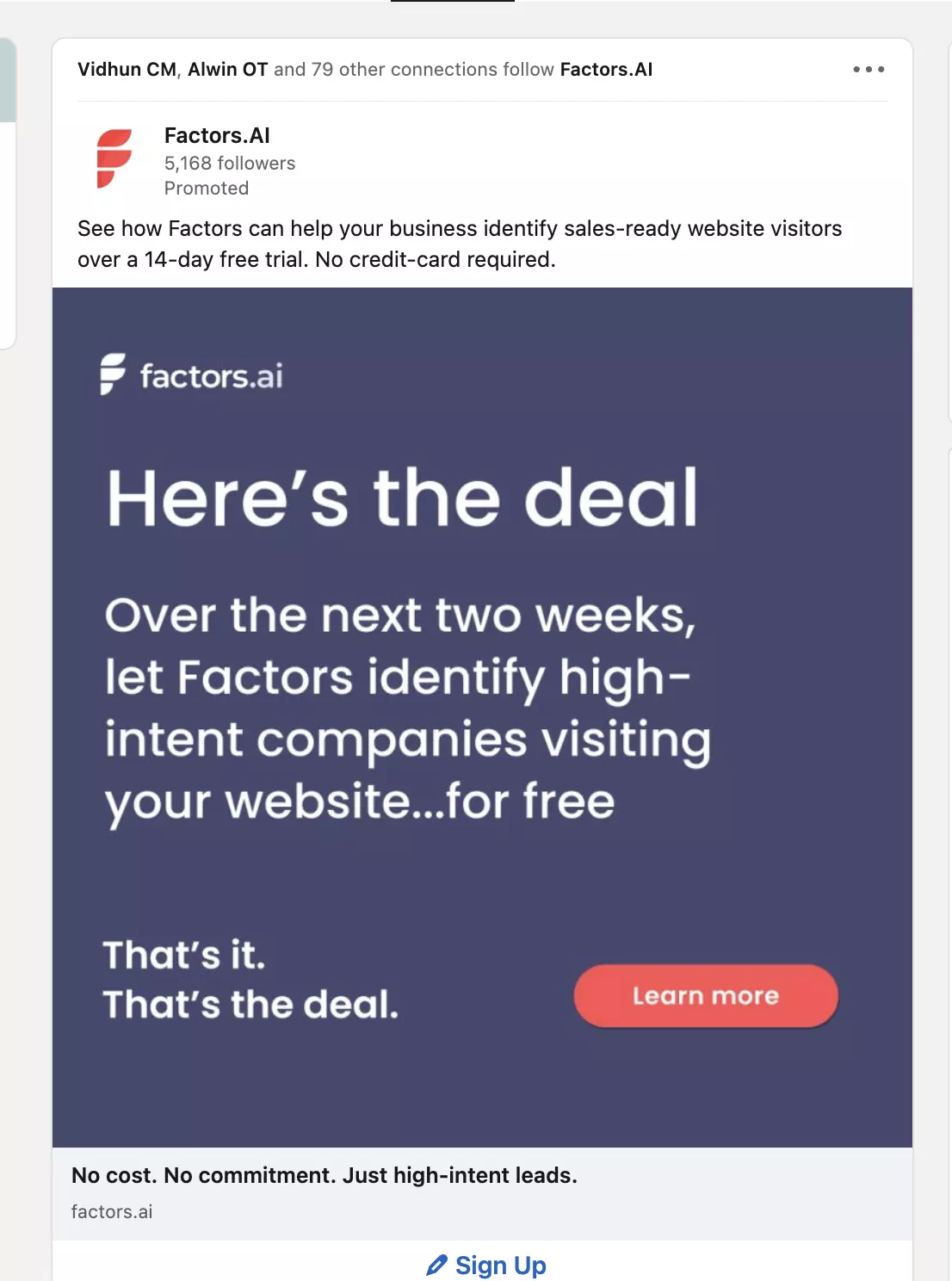
Depending on the target audience, you’ll want to use different messaging. The two examples shared above are relatively more direct with a clear objective — “let us give you a free trial”. This will probably be better suited to retargeting campaigns.
{{LINKEDIN_BANNER}}
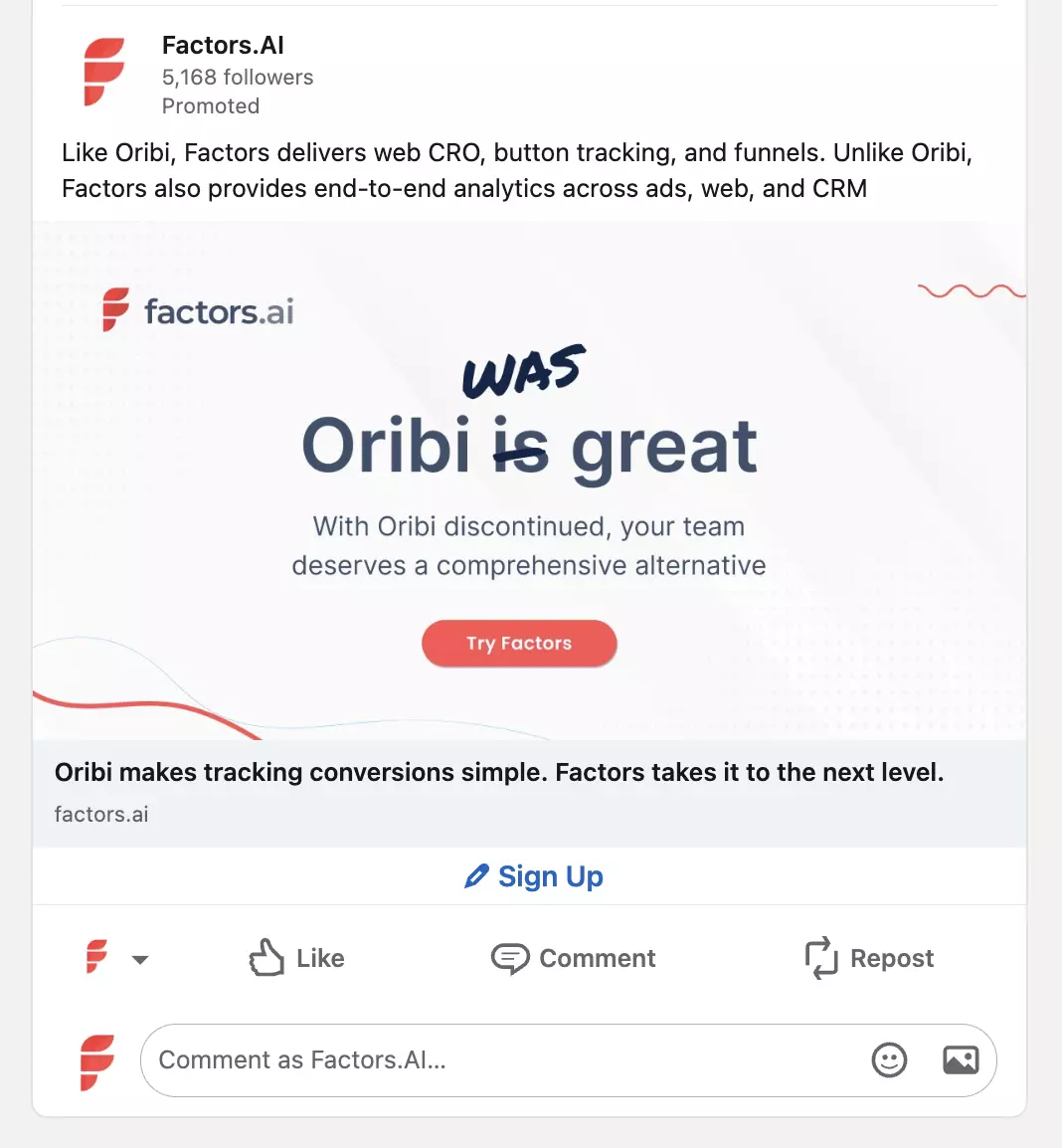
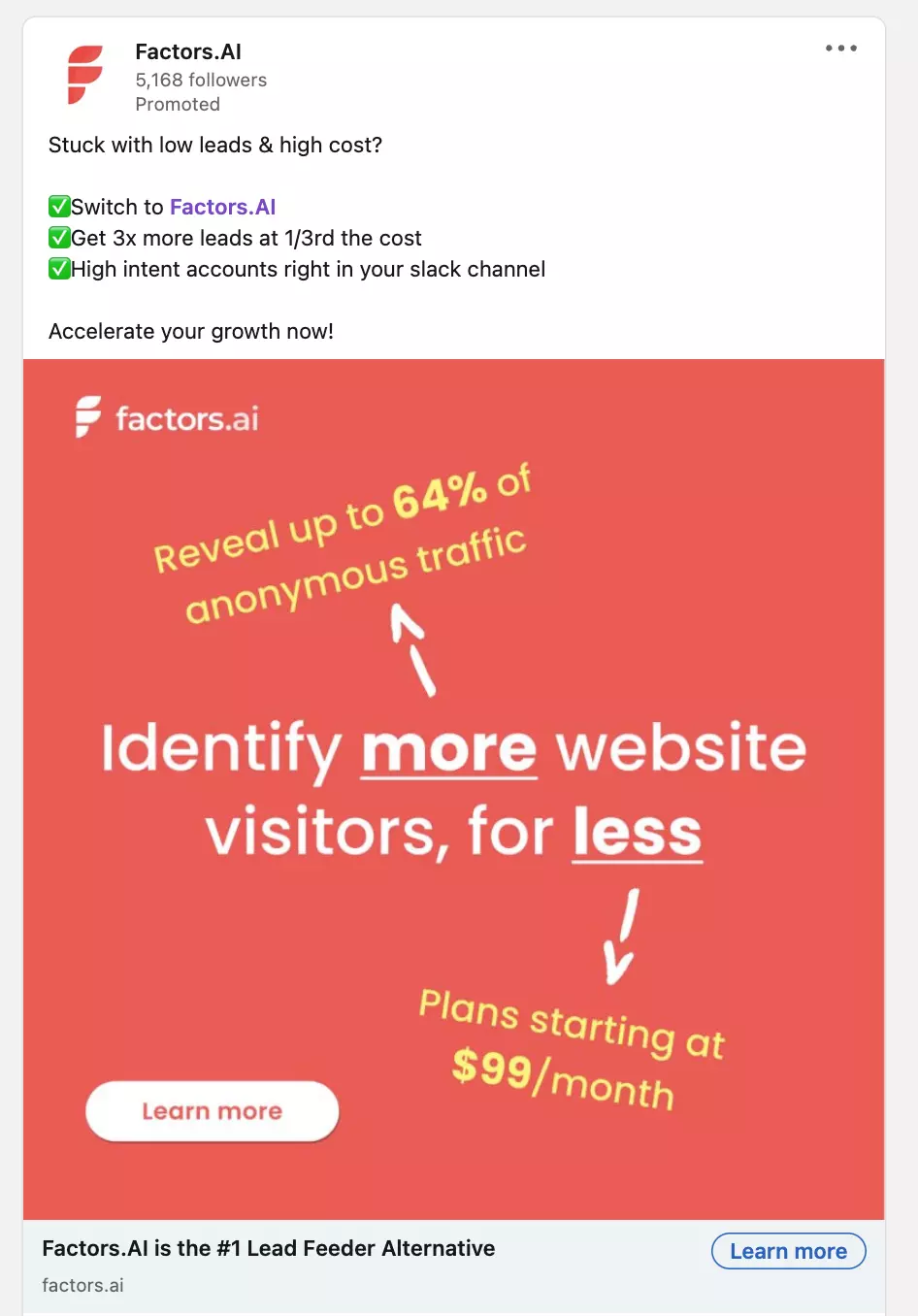
For ads targeted towards competitors, however, comparative ad creatives are likely to perform better. That being said, it’s also important to stay on the right side of the law and respect copyright and trademark policies. Here are a few competitor ad creatives we’ve found success with:
Experiment. Experiment. Experiment.
Continue to experiment with different ad formats, messaging, and creatives until you identify what clicks. Here are a few examples of ads we’ve found success with:
1. Testimonial ads:

2. Before/After ads:
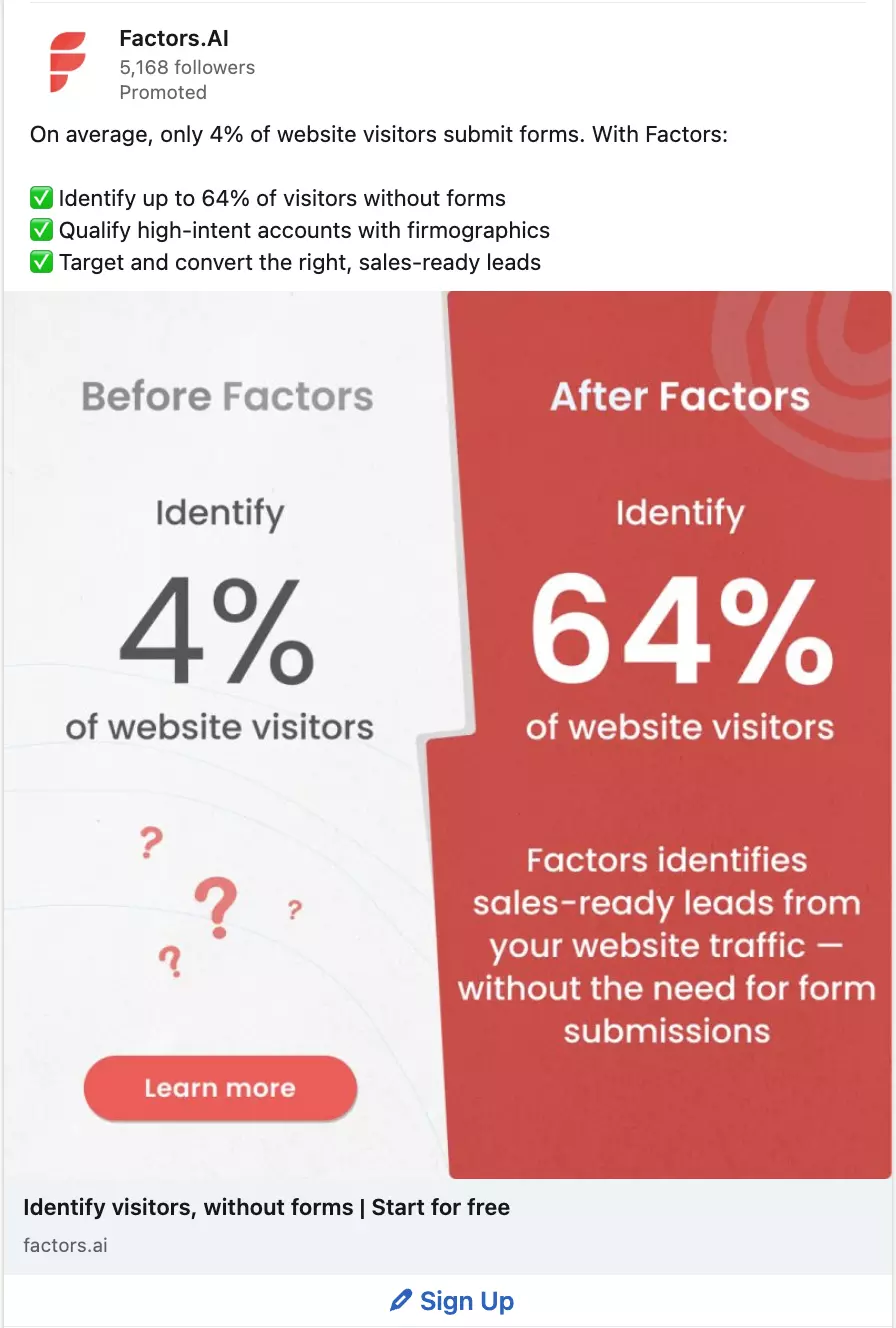
3. Ads with a hook or questions:
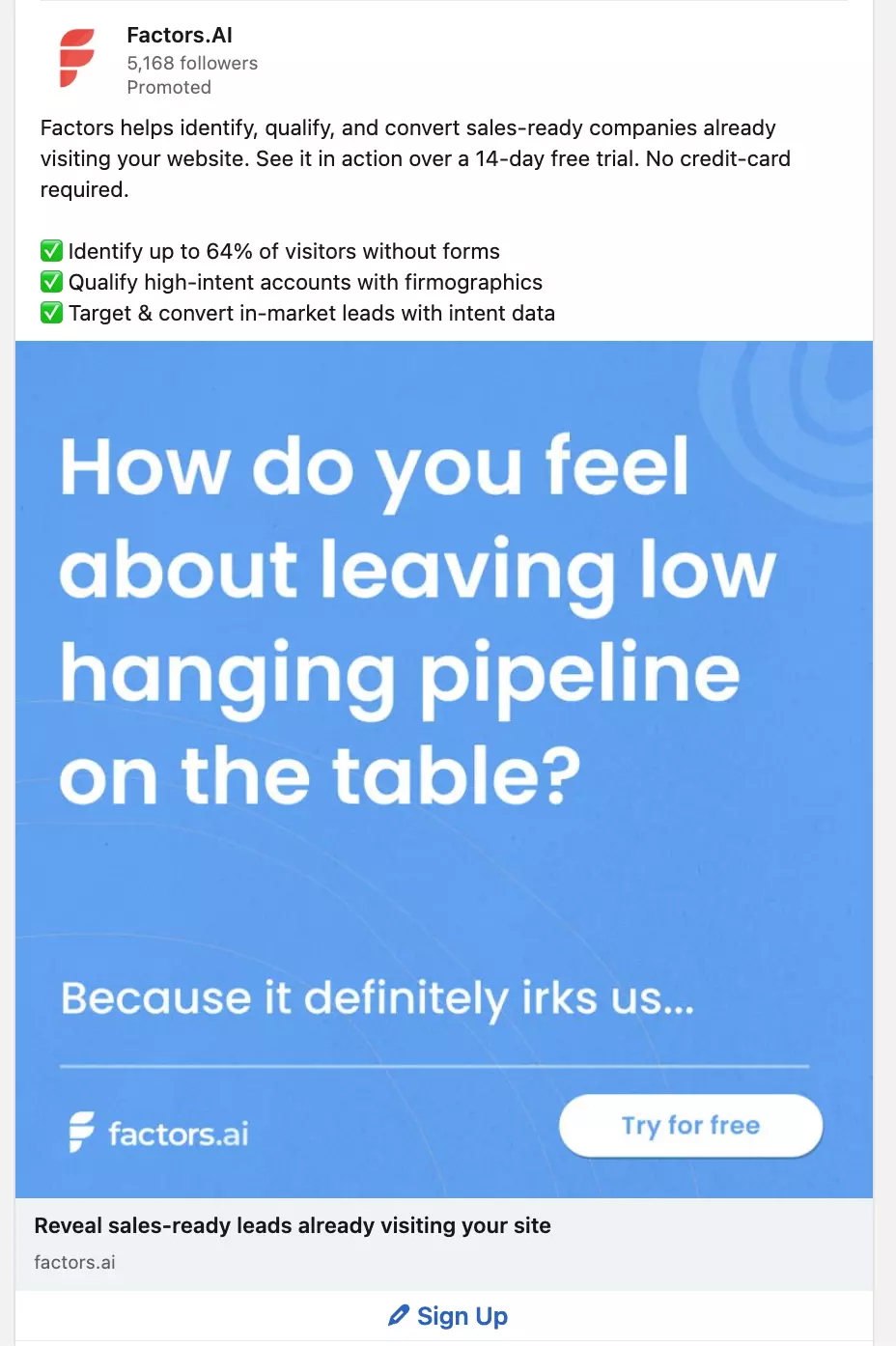
And there you have it! Advertising on LinkedIn, when done right, can be a highly effective channel to drive pipeline and revenue. To conclude, here are a few common mistakes to avoid while running LinkedIn ads:
- When using LinkedIn targeting, ensure that job titles are set in inverted commas so LinkedIn only targets users with those specific titles as opposed to related ones. Eg: ‘CMO’, ‘PMM’, etc.
- Do not use the audience network on LinkedIn as it generally targets irrelevant members resulting in wasted spends.
Maximize ROI by focusing on high-impact audience segments from the start.
1. Target Audiences: Engaged prospects (retargeting), competitors’ customers, and top-of-funnel ICPs.
2. Approach: Use account-based marketing (ABM) to personalize outreach and boost relevance.
3. Strategic Benefits: Improve lead quality, optimize ad spend, and accelerate early growth.
A focused LinkedIn ads strategy helps early-stage teams scale smarter and drive meaningful results.
LinkedIn Ads Targeting: Top 10 Common Mistakes
Learn how to avoid costly LinkedIn ad targeting mistakes. Expert tips on location targeting, audience expansion, and advanced targeting strategies for 2025.

TL;DR
- Always select "based out of this location" over "recently been in" to avoid targeting commuters or conference attendees.
- Master your core Ideal Customer Profile (ICP) before enabling LinkedIn’s Audience Expansion feature.
- Combine job functions with seniority levels for awareness, and layer in member skills or groups to reach active, relevant professionals.
- Set frequency caps (2–3 per week) and use automated rules to kill non-performing campaigns before they drain your budget.
LinkedIn advertising is a great tool for B2B marketers. At Factors.ai we have seen firsthand how easy it is to make costly targeting mistakes on LinkedIn. Over time, we have identified key areas where marketers go wrong and simple adjustments that can drastically improve campaign performance.
Here are the most common LinkedIn ads targeting mistakes and how to avoid them.
1. Understanding LinkedIn's Location Targeting Options
If you're running LinkedIn ads, you've probably noticed two location targeting options: ‘based out of this location’ and ‘recently been in this location.’ Choosing the wrong one can drain your budget faster than a leaky faucet.
From my experience at Factors.ai, I've seen countless campaigns fail because marketers opt for ‘recently been in this location.’ Let me explain why that's a problem. Imagine targeting C-suite executives in New York. If you choose the ‘recent’ option, you might end up showing ads to executives who were just visiting for a conference. They fly back to their home country, and there goes your ad spend.
Always go for ‘based out of this location.’ It ensures you're reaching professionals who live and work in your target area, making your campaigns more cost-effective and results-driven. This simple switch can significantly improve your LinkedIn campaign's ROI.
2. The Pitfalls of Early Audience Expansion
One of the most costly mistakes I see marketers make is enabling audience expansion too early in their LinkedIn campaigns. It's tempting, I get it. LinkedIn's algorithm promises to find similar audiences, and who doesn't want more reach?
But here's the harsh truth: expanding your audience before thoroughly testing your ICP (Ideal Customer Profile) is like throwing darts in the dark. At Factors, we've analyzed thousands of campaigns, and the data is clear - premature audience expansion typically leads to wasted spend and diluted results.
Start with your core audience. Test your messaging, optimize your ad creative, and maximize engagement with the people who match your ICP perfectly. Only when you've truly exhausted this audience, meaning declining reach or rising CPCs—should you consider expansion. This patient approach might seem slower, but it's the surest path to sustainable campaign performance.
{{INLINE_TOFU}}
3. LinkedIn Audience Network: When to Use and When to Avoid
The LinkedIn Audience Network (LAN) is a classic double-edged sword. While it promises extended reach beyond LinkedIn's platform, it often becomes a budget drain if not managed carefully.
From our experience, LAN makes sense in three specific scenarios:
- When your target audience size is critically small (under 20,000).
- During broad brand awareness campaigns where reach is the primary goal.
- When targeting regions with low LinkedIn activity.
However, here's the catch: ad fraud and poor-quality placements are real concerns. If you decide to use LAN, implement these safeguards:
- Always use a whitelist of trusted publishers.
- Maintain an active block list.
- Monitor performance metrics closely, especially click-through rates.
Remember, just because you can extend your reach doesn't mean you should. Quality of engagement usually trumps quantity when it comes to B2B LinkedIn advertising.
4. Industry Targeting Challenges and Solutions
LinkedIn's industry categories are notoriously broad and often misleading. We've seen countless examples where companies are miscategorized, leading to wasted ad spend. Take Spotify, for instance—LinkedIn might categorize it under ‘Music’ when it's fundamentally a tech company.
To overcome this, we recommend a two-pronged approach:
- Build your own industry list externally, focusing on your ideal customer profile (ICP).
- Upload custom company lists rather than relying solely on LinkedIn's categories.
Pro tip: Don't just look at what industry your prospects are tagged with. Instead, analyze their actual business model and revenue streams. A company tagged as ‘Manufacturing’ might have a robust SaaS division that makes them perfect for your tech solution.
Industry targeting is just one piece of the puzzle. Combine it with other targeting parameters like company size and job functions for better precision.
5. Job Function vs. Job Title: Making the Right Choice
One of the most confusing choices in LinkedIn advertising is whether to target by job function or job title. Here's the reality: job functions cast a wider net but can be too inclusive, while job titles offer precision but might severely limit your reach.
For example, targeting the ‘Business Development’ function might include everyone from BDRs to administrative assistants. On the flip side, targeting specific titles like ‘Head of Revenue Operations’ might miss out on similar roles with different titles like ‘Revenue Operations Leader’ or ‘RevOps Director.’
Our recommendation?
Start with job functions combined with seniority levels for awareness campaigns. Then, as you gather data and optimize, experiment with title-based targeting for bottom-of-funnel campaigns. Remember to account for title variations—someone who's a ‘CMO’ in one company might be a ‘Head of Marketing’ in another.
6. Optimal Audience Size for LinkedIn Campaigns
From managing hundreds of LinkedIn campaigns at Factors.ai , I've learned that audience size isn't a one-size-fits-all metric. While LinkedIn recommends a minimum audience size of 50,000 for sponsored content, our data suggests that highly targeted B2B LinkedIn ad campaigns can perform well with audiences as small as 20,000.
The sweet spot? For most B2B campaigns, aim for an audience size between 30,000 to 100,000 members. Going too broad (500,000+) typically leads to wasted spends and diluted messaging, while too narrow (<10,000) limits your reach and drives up costs.
Pro tip: If your audience is too small, don't immediately enable audience expansion. Instead, try these tactics:
- Expand to similar job titles.
- Include additional relevant industries.
- Add complimentary job functions.
- Consider including more locations if relevant to your ICP.
Remember, quality over quantity. A smaller, well-defined audience often outperforms a larger, loosely targeted one.
7. Targeting by Company Size: Best Practices
One of the most deceptive targeting options on LinkedIn is company size filtering. After analyzing data from our clients, we've noticed two critical mistakes marketers make.
First, relying solely on LinkedIn's predefined company size brackets can be misleading. For instance, a company showing ‘201-500’ employees on LinkedIn might actually have 1000+ employees because not all workers maintain LinkedIn profiles.
Second, marketers often forget to exclude unwanted company sizes, leading to wasted ad spend. If you're targeting enterprises, explicitly exclude smaller companies using the ‘exclude’ feature.
A quick tip: Cross-reference your target companies' LinkedIn employee count with their actual employee numbers (from sources like Crunchbase or company websites). This helps you understand the typical disparity and adjust your targeting accordingly.
Remember: Company size targeting works best when combined with other filters like industry and job function rather than used in isolation.
8. Member Skills and Groups: Hidden Opportunities
While most marketers focus on job titles and company targeting, LinkedIn's member skills and groups remain underutilized goldmines. We've seen campaigns achieve up to 30% better engagement rates when incorporating these targeting options strategically.
Skills targeting is particularly powerful because it reflects what people do rather than just their job titles. For instance, targeting people with ‘Salesforce Administration’ skills might be more effective than broadly targeting ‘Sales Operations’ roles.
Groups are even more interesting—they show active interest. Someone who joins a ‘B2B Marketing Innovation’ group is likely more engaged in the field than someone who simply lists marketing as their job function.
Pro tip: Don't just target the obvious skills. Look at your best customers' profiles and identify common secondary skills. These often provide unique targeting opportunities with less competition.
Warning: Avoid targeting groups that haven't had any recent activity. Many LinkedIn groups are dormant.
9. Avoiding Campaign Budget Waste
One of the biggest money drains in LinkedIn advertising is poor budget management. I've noticed three critical areas where budgets typically leak:
- Running ads 24/7 instead of during business hours when B2B decision-makers are active.
- Not setting frequency caps, often leads to audience fatigue.
- Keeping underperforming campaigns active too long without optimization.
The solution?
- Start with a minimum daily budget of $50/campaign to gather meaningful data.
- Monitor your campaigns between 9 AM - 6 PM business days, and pause them during off-hours.
- Set view frequency caps 2-3 times per week to prevent ad fatigue.
Most importantly, use automated rules to pause campaigns that aren't meeting KPI thresholds after spending 2x your target cost per lead. This alone can save 20-30% of your budget from being wasted on non-performing campaigns.
10. Advanced Targeting Strategies for 2025
As we move deeper into 2025, LinkedIn's targeting capabilities have evolved significantly. Here are the cutting-edge strategies that are delivering results:
First-party data integration is now crucial—upload your CRM data and create lookalike audiences based on your best-converting customers. LinkedIn's AI has gotten much better at finding similar profiles.
The new ‘Intent Signals’ feature lets you target users who've shown interest in specific topics through their content engagement. Combine this with traditional targeting for hyper-focused campaigns.
Account-based marketing (ABM) on LinkedIn has become more sophisticated—use LinkedIn's API integrations to sync target account lists in real-time and adjust bids based on account priority.
Also, read ABM Tactics for B2B Marketers.
Most importantly, leverage ‘Buying Committee’ targeting that allows you to reach multiple decision-makers within the same organization simultaneously, which is essential for complex B2B sales cycles.
When implemented correctly, these strategies show 2-3x better conversion rates than traditional targeting methods.
FAQs on LinkedIn Ads Targeting Mistakes
Q1. Should I target job titles or job functions for a new SaaS product launch?
Start with job functions combined with seniority to gather initial data and awareness. Once you identify which roles are clicking, narrow your focus to specific job titles to drive conversions.
Don’t get greedy with the net size early on. A smaller, relevant group is always easier to convert than a "huge, generic crowd."
Q2. Why is my audience size showing 'too small' even with 30k people?
LinkedIn often suggests a 50k minimum for "optimal" delivery, but 20k-30k is perfectly fine for high-intent B2B campaigns. If you're struggling with reach, try adding secondary skills or related job functions rather than enabling broad expansion. Stick to your ICP.
Q3. Is LinkedIn Audience Network just a waste of money?
Not necessarily, but it is dangerous if left unmanaged. Use it only for reach-heavy campaigns and ensure you’ve uploaded a strict block list of sites you don’t want to appear on.
If you’re a small brand with a tight budget, turn it off. It’s better to be seen by the right people on LinkedIn than by thousands of irrelevant people on random websites.
Q4. How do I deal with company size inaccuracies?
Don't rely solely on LinkedIn’s data. Cross-reference your target list with data from tools like Crunchbase or the company's own website to verify their actual headcount.
LinkedIn’s "company size" data can be inaccurate because people rarely update their profile after a company hires 500+ new people. Use it as a loose guide, not a source of truth.
Q5. What is the secret to getting better engagement on LinkedIn ads?
Utilize Member Skills and Groups to layer your targeting. Targeting people who possess specific technical skills or belong to niche professional groups is significantly more effective than broad-stroke job title targeting.

LinkedIn vs Google: A Four-Metric ROI Comparison Every CMO Must See
New data from 100+ B2B teams reveals LinkedIn outperforms Google on ROAS, cost per ICP account, and ACV. Use this comparison to optimize your 2026 ad budget.

TL;DR
- LinkedIn delivers stronger ROI. With a 1.8x ROAS vs Google’s 1.25x, LinkedIn ads are driving 44% more revenue per dollar spent.
- It costs less to reach your ideal buyers. LinkedIn’s cost per ICP account engaged is $257, less than half of Google’s $560.
- Meetings are better and cheaper. LinkedIn generates qualified meetings at a 1.3x cost advantage, and with higher decision-maker quality.
- Deals close bigger on LinkedIn. LinkedIn-sourced opportunities produce 28.6% higher average contract values than Google.
You're sitting in a budget planning meeting. Your CFO is asking why you need more money for LinkedIn Ads when "Google has always worked." Your VP of Sales wants to know which channel is actually delivering pipeline. Your CEO is wondering if this whole "social selling" thing is just marketing buzzword bingo.
You need answers. Real ones. With actual numbers attached.
We analyzed performance data from 100+ B2B marketing teams spanning Q3 2024 to Q3 2025. And the results are about to make your next budget conversation a whole lot easier.
The Stakes: A Massive Budget Shift Is Already Happening
Before we dive into the four-metric-takedown, let's talk about what B2B CMOs are actually doing with their money.
Our report showed that over the past year, LinkedIn's share of digital marketing budgets jumped from 31.3% to 37.6%. Google's share dropped from 68.7% to 62.4%. We're witnessing a 6.3 percentage-point shift in market share, which in absolute dollar terms represents a fundamental reallocation of B2B marketing spend.
CMOs don't make these kinds of moves on a whim. They make them when the ROI data becomes impossible to ignore.
So, what does that data actually say?
Metric #1: Return on Ad Spend (ROAS)
Let's start with the metric that makes your CFO's cold, money-loving heart sing: raw return on ad spend.
- LinkedIn median ROAS: 1.8x
- Google Ads median ROAS: 1.25x
LinkedIn delivers a 44% advantage in revenue return per dollar spent, compared to Google Ads.
Read that again. For every dollar you invest in LinkedIn Ads, you're getting $1.80 back in revenue. For Google Ads? $1.25.
A 1.25x ROAS isn't bad. It's positive ROI. You're making money.
But when you're allocating budget between channels, 44% matters. A lot.
If you have $100K to spend and you're trying to hit pipeline targets, that 44% ROAS advantage translates to real money. We're talking about the difference between hitting your number and explaining to your board why you came up short.
Why the ROAS Gap Exists
LinkedIn's ROAS advantage stems from something fundamental: targeting precision.
Google Ads operates on intent signals. Someone searches for "marketing automation software," and boom, your ad appears. That's powerful. But it's also a blunt instrument.
You're catching people at the moment of search, but you have no idea if they're:
- A qualified buyer or a student doing research
- At a company that fits your ICP or a 10-person startup
- A decision-maker or an intern gathering information
- Actually in-market or just browsing
LinkedIn flips this equation. You're targeting based on professional identity: job title, company size, industry, and seniority level. You know you're reaching the VP of Marketing at a 500-person SaaS company, not some rando who typed marketing-related words into a search bar.
This precision means every ad impression has a higher probability of reaching someone who could actually buy. And that precision compounds into higher ROAS.
{{INLINE_BOFU}}
Metric #2: Cost Per ICP Account Engaged
ROAS tells you about revenue efficiency. But what about pipeline efficiency? How much does it cost to get your ideal customer profile accounts into your funnel?
- LinkedIn: $257 per ICP account engaged
- Google: $560 per ICP account engaged
LinkedIn costs less than half of what Google costs to engage an ICP account.
Half. The. Cost.
You can reach and engage more than twice as many high-fit accounts on LinkedIn for the same budget.
This metric is where the account-based marketing rubber meets the road. B2B isn't about reaching everyone. It's about reaching the right ones. The accounts that fit your ICP. The companies that have the budget, the need, and the authority to buy.
When you're running an ABM motion (and if you're not, what are you even doing?), cost per ICP account engaged might be the most important metric on this list.
The Math That Changes Everything
Say you have $50K to spend on paid media this quarter. Your ICP is mid-market tech companies with 200-1000 employees.
On Google: $50,000 ÷ $560 = 89 ICP accounts engaged
On LinkedIn: $50,000 ÷ $257 = 194 ICP accounts engaged
With the same budget, LinkedIn gets you 109 more ICP accounts into your pipeline. That's not incremental improvement. That's game-changing coverage of your total addressable market.
LinkedIn was historically underappreciated because advertisers couldn’t adequately measure their performance. But recently, LinkedIn has really stepped up its game in the measurement department. Advertisers can see the impact of their LinkedIn ads and their true value. Now, more B2B advertisers are pulling from their Google/Meta budgets in favor of LinkedIn.
Metric #3: Cost Per Qualified Meeting
Pipeline velocity matters. How much does it cost to get a qualified meeting on someone's calendar?
Qualified meetings from Google cost 1.3X more than meetings from LinkedIn.
This metric directly impacts sales productivity and customer acquisition cost. Meetings are where marketing hands off to sales. It's the critical moment where opportunity becomes reality.
When meetings cost 1.3X more from one channel versus another, that inefficiency cascades through your entire go-to-market motion. Your SDRs are spending time on meetings that cost more to generate. Your AEs are working on deals that have higher acquisition costs baked in from the start.
The Quality Question
Here's where the LinkedIn data gets really interesting. It's not just that meetings cost less. It's that the meetings are with better prospects.
Survey data from 125+ marketing leaders reveals:
- 71.9% agree that leads from LinkedIn Ads align more closely with their ideal customer profile
- 52.3% say leads from LinkedIn Ads are more likely to be senior-level decision-makers
You're not just getting cheaper meetings. You're getting meetings with the actual people who can sign contracts.
Compare that to Google, where you're often catching mid-level managers doing research, or consultants gathering information for a client who may or may not be in-market.
Metric #4: Average Contract Value (ACV)
This is LinkedIn’s real flex. Deals sourced from LinkedIn don't just close more efficiently. They close bigger.
LinkedIn-sourced deals close with 28.6% higher average contract value compared to Google-sourced deals.
If your typical Google-sourced deal is $50K, your typical LinkedIn-sourced deal is $64,300. That's an extra $14,300 per deal. On a hundred deals, that's $1.43 million in additional revenue. From the same number of customers.
Why LinkedIn Deals Are Bigger
This isn't some random quirk. LinkedIn's account-based targeting enables you to focus your spend on high-value prospects. You can direct budget toward enterprise accounts capable of larger contracts, rather than Google's broader reach that captures intent regardless of account quality.
When you target the VP of Sales at a 1,000-person company versus catching whoever searches for your product category, the ACV difference is inevitable.
The platform enables relationship building at scale. Video ads. Document ads. Thought Leader ads. These formats let you demonstrate expertise and build trust before a prospect ever fills out a form. That trust translates to bigger deals.
The Synthesis: LinkedIn Wins on Revenue, Google Maintains Pipeline Volume
Let's put all four metrics in one place:
| Metric | Google Ads | |
|---|---|---|
| Median ROAS | 1.8x | 1.25x |
| Cost per ICP Account | $257 | $560 |
| Cost per Meeting | Lower (1.3x advantage) | Higher |
| Average ACV | 28.6% higher | Baseline |
LinkedIn wins decisively on three of four metrics. But there is still nuance: Google drives significant pipeline volume. Its broader reach means you'll capture more total leads, even if cost efficiency is lower.
The strategic insight isn't "LinkedIn good, Google bad." It's understanding where each channel delivers maximum value.
Use LinkedIn for:
- High-value account targeting
- Building relationships with buying committees
- Brand awareness among your ICP
- Generating high-ACV opportunities
Use Google for:
- Capturing bottom-funnel intent
- Reaching buyers actively searching
- Geographic or niche targeting
- Volume pipeline generation
The smartest CMOs aren't choosing between LinkedIn and Google. They're allocating budget based on which metric matters most for their business model and growth stage.
The Multiplier Effect: Why This Isn't Either/ Or
LinkedIn doesn't just win on its own metrics. It also improves your Google performance.
Analysis shows that ICP accounts exposed to LinkedIn Ads demonstrate:
- 46% higher paid search conversion rates
- 14.3% of paid search leads actually started their journey on LinkedIn
LinkedIn creates brand awareness and trust, making every subsequent touchpoint more effective. When someone sees your thought leadership on LinkedIn, then later searches for your product category on Google, they convert at nearly 50% higher rates.
This multiplier effect is why the budget shift is accelerating. CMOs are realizing LinkedIn isn't competing with Google for budget. It's making Google perform better.
What This Means for Your 2026 Planning
If you're building your 2026 marketing plan right now, these four metrics should fundamentally reshape your thinking.
The days of defaulting 70-80% of the paid budget to Google because "that's what we've always done" are over. The data doesn't support it anymore.
Survey results show 56.4% of B2B marketers plan to increase their LinkedIn budgets by more than 10% in 2026. These aren't wild experiments. These are calculated bets based on measurable ROI.
Your move: Stop treating LinkedIn as a "brand awareness" line item with fuzzy attribution. Start measuring it on the same hard revenue metrics you use for Google. When you do, the four-metric comparison becomes impossible to argue with.
1.8x ROAS. $257 cost per ICP account. 23% cost advantage on meetings. 28.6% higher ACV.
Factors.ai provides unified visibility across LinkedIn, your website, CRM, and G2 so you can prove ROI with the metrics that actually matter. Your CFO doesn't need more convincing than that.
FAQs for LinkedIn Ads vs Google Ads
Q. Is LinkedIn really more cost-effective than Google for B2B?
Yes. LinkedIn ads engage ICP accounts at less than half the cost of Google Ads and produce significantly higher average deal sizes.
Q. Does LinkedIn generate pipeline volume, or just better-quality leads?
LinkedIn excels at quality, better-fit accounts, and senior buyers, but still delivers competitive volume when used strategically.
Q. Why are CMOs shifting budget to LinkedIn?
Because the ROI data is undeniable. LinkedIn outperforms on ROAS, cost per meeting, and ACV, and also improves Google Ads performance.
Q. Should I replace Google Ads with LinkedIn Ads?
Not necessarily. Use Google to capture active demand and LinkedIn to influence high-value buyers. The best results come from combining both strategically.
Q. What’s the biggest ROI difference between the platforms?
Average contract value. LinkedIn deals are 28.6% larger on average, making it a key driver of revenue growth.
LinkedIn Ads Targeting & Campaign Strategy for Enterprises in 2026
Learn how enterprise companies use LinkedIn ad targeting in 2026. Discover advanced targeting strategies, budget allocation tips, and industry-specific approaches for B2B success.
TL;DR
- Enterprise LinkedIn ads go beyond lead generation, focusing on brand awareness (30%), pipeline acceleration (40%), and future pipeline development (30%).
- Targeting starts with warm audiences, progressing from awareness content to solution-focused messaging before pushing direct sales engagement.
- Sales and marketing integration is key—campaigns should align with sales conversations to reinforce messaging and drive deal momentum.
- Metrics must match objectives—track reach for awareness, influenced pipeline for acceleration, and long-term attribution for future pipeline growth.
If you've been researching LinkedIn advertising strategies, you've probably encountered plenty of advice about managing small budgets and basic lead generation. You know the typical recommendations: ‘Start with $100-200 per day,’ ‘Focus on high-intent audiences,’ and ‘Build your funnel step by step.’While this advice works well for smaller companies just getting started with LinkedIn, it completely breaks down when you're managing enterprise-level campaigns with million-dollar budgets.
Enterprise LinkedIn advertising in 2026 requires a fundamentally different approach. Instead of focusing solely on lead generation, successful enterprise campaigns serve three distinct purposes, each requiring its own strategy and measurement framework.
The Three Pillars of Enterprise LinkedIn Strategy
1. The first pillar is educational outreach.
For enterprise companies, getting your brand in front of C-suite executives matters more than immediate lead generation. Think of it this way: if a CXO watches your thought leadership video, that's a win – regardless of whether they immediately fill out a form. This educational component typically consumes about 30% of the total advertising budget, and its success is measured by reach and engagement rather than direct response metrics.
2. The second pillar, consuming roughly 40% of the budget, focuses on supporting the current year's pipeline.
This is where things get interesting. Instead of just running lead generation campaigns, enterprise companies use LinkedIn to accelerate active sales opportunities and expand relationships with existing customers. When your sales team books a meeting with a prospect, targeted LinkedIn campaigns provide ‘air cover,’ reinforcing your message and positioning during competitive deals. Similarly, specific campaigns target existing customers for cross-sell and upsell opportunities, often the quickest path to new revenue.
3. The final pillar looks toward the future, using the remaining 30% of the budget to develop next year's pipeline.
With enterprise sales cycles typically stretching 150-200 days, you need to plant seeds now for harvesting in the future. This means investing in new customer acquisition campaigns with the understanding that results might not materialize for six months or more.
Building and Engaging Your Audience
Success with enterprise LinkedIn advertising requires a sophisticated approach to audience development. Rather than immediately targeting cold audiences, start with your warmest prospects and expand outward. Begin by retargeting your website visitors, using LinkedIn's Insight tag, while applying your ideal customer profile (ICP) filters for company size and job titles.
If you have a substantial following on your company page, that's your next layer of warm audience. But don't worry if you don't – you can build your own warm audience pools through targeted top-of-funnel campaigns. The key is progressive engagement: start with broad awareness content, then retarget those who engage with more specific solutions-focused messages, and finally present strong calls-to-action like demo requests to your most engaged audiences.
{{INLINE_MOFU}}
Aligning Content with the Buyer's Journey
Content sequencing becomes crucial at the enterprise level. Your first touch should focus on problem awareness through educational content and industry insights. As prospects engage, move them toward solution education, showcasing your capabilities and ROI through case studies and detailed product information. Only after establishing this foundation should you push for direct sales engagement through demo requests or consultation offers.
This progression aligns naturally with how enterprise buyers make decisions. They need to understand the problem space and potential solutions before they're ready to engage with sales. By respecting this customer journey, you build credibility and trust while moving prospects toward a purchase decision.
Integration with Sales
The most successful enterprise LinkedIn campaigns work in lockstep with sales activities. When your sales team books a meeting with a prospect, that should trigger targeted LinkedIn campaigns supporting the conversation. This coordination ensures your prospects see consistent messaging across all channels and helps maintain momentum throughout long sales cycles.
For account-based marketing initiatives, this integration becomes even more critical. Your LinkedIn campaigns should align with sales conversation stages, targeting multiple stakeholders within key accounts. This creates a surround-sound effect that amplifies your sales team's efforts.
Measuring What Matters
Each objective requires its own measurement approach. For educational campaigns targeting C-suite executives, focus on reach and engagement metrics like video completion rates. Current year pipeline initiatives should track influenced pipeline value and changes in deal velocity. Future pipeline development needs longer-term attribution models that can connect early-stage engagement to eventual opportunities.
The key is matching your metrics to your objectives. Don't judge your C-suite thought leadership campaign by lead form fills, and don't evaluate your pipeline acceleration campaigns solely on impressions. Each type of campaign serves a specific purpose in your overall strategy.
Looking Ahead in Enterprise LinkedIn Advertising
Enterprise LinkedIn advertising in 2025 is about more than just generating leads – it's about supporting complex sales cycles, nurturing long-term relationships, and building brand credibility with senior decision-makers. By moving beyond the basic playbook and adopting a more sophisticated approach, enterprises can create sustainable, scalable LinkedIn programs that drive both immediate revenue and long-term growth.
Remember: success comes from understanding your different objectives, aligning your content and targeting with each goal, and measuring what truly matters for each type of campaign. Whether you're supporting this quarter's pipeline or building awareness with C-suite executives, LinkedIn offers the tools and targeting capabilities to achieve your goals – if you know how to use them.
10 Best Leadlander Alternatives and Competitors for 2025
Looking for an alternative to Leadlander? Explore our top 10 alternatives to Leadlander. Compare features, pricing, and limitations to make an informed purchase decision.
LeadLander serves as a dedicated website visitor analytics and reporting solution tailored for Business-to-Business (B2B) companies. Its primary focus is on the identification of anonymous website visitors, offering essential sales intelligence. By furnishing specific details about each visitor, including verified contact profiles, LeadLander transforms these anonymous interactions into actionable leads. The platform aims to expedite the sales process by showcasing the origin of valuable customers and showcasing customer journeys through website navigation.
So, why look for a Leadlander alternative?
Scenario: Some users perceive Leadlander as relatively expensive, especially for businesses with limited budgets.
Consideration: Evaluate alternative solutions with pricing models that align more closely with your budget constraints while ensuring they meet your specific requirements.
- Integration Challenges:
Scenario: Users have reported difficulties integrating Leadlander with specific platforms, limiting the utility of collected data.
Consideration: Prioritize alternatives that offer seamless integration with your existing tech stack to maximize the efficiency of data utilization.
- Data Accuracy Concerns:
Scenario: While providing accurate tracking data, users express concerns about the precision of metrics, such as the count of unique visitors.
Consideration: Look for alternatives with a strong reputation for data accuracy and quality, ensuring reliable insights for informed decision-making.
- User Interface Usability:
Scenario: The user interface of Leadlander is criticized for its appearance, and some users, especially those with limited technical experience, find it challenging to navigate.
Consideration: Explore alternatives with intuitive and user-friendly interfaces to enhance the overall user experience and facilitate independent navigation.
- Support Responsiveness:
Scenario: Timely support may pose challenges, with extended waiting times and instances where support tickets remain unanswered.
Consideration: Prioritize alternatives with dedicated and responsive support services to ensure efficient problem resolution and maximize the return on investment.
- Feature Enhancement and User Feedback Integration:
Scenario: Users have expressed the need for ongoing improvements in Leadlander's features and user interface.
Consideration: Consider alternatives that actively integrate user feedback for enhancements and demonstrate a commitment to refining features over time.
- Specific Feature Requirements:
Scenario: Your business may have specific feature requirements not fully met by Leadlander.
Consideration: Identify alternatives that offer the specific features crucial for your business goals and tailor your decision based on feature alignment.
{{INLINE_CTA_A}}
Here are some tools we’ll compare today
- LeadMagic
- Factors.AI
- Warmly
- Albacross
- CANDDi
- Clearbit
- Lead Forensics
- Demand
- ZoomInfo
- Dealfront
Factors to consider in the alternative
- Pricing Structure:
Evaluate the pricing plans of alternative solutions to ensure they align with your budgetary constraints. Look for transparent pricing models that cater to your business needs without compromising essential features.
- User Interface Usability:
Prioritize platforms with user-friendly interfaces, especially if your team includes members with varying technical expertise. A visually intuitive and easily navigable interface contributes to a smoother user experience.
- Performance and Stability:
Assess the performance track record of alternative platforms to ensure stable operations and minimal disruptions. A reliable platform contributes to consistent and uninterrupted usage, enhancing overall efficiency.
- Integration Capabilities:
Check the integration capabilities of alternative solutions, especially with the platforms your business relies on. A solution that seamlessly integrates with a variety of tools ensures a cohesive workflow and maximizes data utility.
- Data Accuracy and Precision:
Prioritize alternatives that prioritize data accuracy and provide precise metrics. Reliable tracking data is crucial for making informed decisions, and a platform that delivers accurate insights enhances the value of collected data.
- Support Services:
Assess the responsiveness and quality of support services offered by alternative platforms. A solution with dedicated and effective support mechanisms ensures timely assistance and efficient problem resolution.
- Alignment with Business Size:
Ensure that the pricing plans of alternative solutions align with the size and budget constraints of your business. Look for scalable solutions that cater to the specific needs of enterprises similar in size to yours.
- Feature Set and Functionality:
Compare the features and functionalities of alternative platforms to ensure they meet your business requirements. Look for solutions that offer a comprehensive set of tools and capabilities relevant to your goals.
- Trial Period and Flexibility:
Explore platforms that offer trial periods or free plans to allow for hands-on experience. This ensures that the chosen alternative meets your expectations and offers the flexibility needed for successful implementation.
- User Feedback and Reviews:
Research user reviews and feedback for alternative solutions to gain insights into the experiences of other businesses. Real-world experiences can provide valuable information on the platform's strengths and potential shortcomings.
{{INLINE_CTA_A}}
Before we start off, here’s a little about Leadlander

Leadlander Features
- B2B Website Traffic Identification:
Leadlander focuses on the identification of corporate-based website traffic, providing valuable insights into the companies exploring business websites.
- Verified Contact Profiles:
The platform offers verified contact profiles, encompassing details such as name, email, title, and other critical data points for employees at companies exploring your website. This facilitates actionable connections and informed engagement.
- Analytics and Detailed Reporting:
Leadlander delivers specific details about each website visitor, transforming anonymous visits into actionable contacts. The platform provides insights into customer journeys, connections to conversions, and valuable intent data.
- Sales Platform Integration:
Seamlessly integrating with widely used platforms like Salesforce, Mailchimp, HubSpot, and Slack, Leadlander streamlines the sales process for optimal effectiveness.
- Responsive Support Services:
Leadlander offers dedicated and responsive service and support to maximize the return on investment for users, ensuring efficient utilization of the platform.
- User-Friendly Interface:
Facilitating real-time delivery of actionable data through customized reports, alerts, and online access, Leadlander provides an easy-to-use interface for convenient utilization.
- Intent and Corporate Data Access:
The platform supplies intent data to unveil individual prospects and their details, along with access to key contacts at prospect companies.
Leadlander Pricing
Leadlander offers two distinct pricing plans to cater to varying business needs. The Small Business Plan, priced at $900 annually or $89 per month, is tailored for enterprises with moderate requirements. It includes features such as up to 100 leads per month, tracking for one domain, access to the contact network, unlimited user accounts, and 12 months of data storage.
Leadlander Limitations
- Integration Challenges:
Some users encounter difficulties integrating Leadlander with specific platforms, restricting the utility of collected data.
- Data Accuracy Concerns:
While providing accurate tracking data, some users express concerns about the precision of metrics, such as the count of unique visitors.
- User Interface Usability:
Users, especially those with limited technical experience, find the interface of Leadlander challenging to navigate and comprehend.
- Technical Support Quality:
Issues with the quality and availability of technical support have been reported, making it challenging to receive assistance when needed.
- Affordability Concerns:
While considered cost-effective, some users perceive Leadlander as expensive, particularly for businesses with limited budgets.

1. LeadMagic

LeadMagic Features
- Visitor Identification for Timely Sales and Marketing Communication:
LeadMagic excels in identifying noteworthy accounts visiting a website, ensuring timely communication to both sales and marketing teams.
- Intelligent Lead Scoring for Targeted Approaches:
The platform intelligently assesses and prioritizes leads based on engagement levels. This intelligent lead scoring system promotes a targeted approach to the most promising prospects, improving overall lead management.
- Streamlined Lead Nurturing Campaigns Through Automation:
LeadMagic streamlines lead nurturing campaigns through its automation capabilities, facilitating the automated nurturing of leads. This contributes to building relationships with potential clients more efficiently and systematically.
- Customized Lead Generation Strategies Covering SEO, Social Media, and PPC:
Businesses benefit from LeadMagic's customized lead generation strategies, encompassing SEO, social media marketing, and PPC advertising. This ensures optimal visibility and engagement for the brand across diverse digital channels.
- Comprehensive Digital Marketing Solutions for Optimal Brand Visibility:
LeadMagic provides comprehensive digital marketing solutions that cover various aspects, including search engine optimization (SEO), social media engagement, and pay-per-click (PPC) advertising. This approach ensures optimal brand visibility and engagement in the digital landscape.
LeadMagic Pricing
LeadMagic's pricing is determined by the monthly identification of companies, starting at an upfront annual fee of $139.


LeadMagic Limitations
- Currency Limitation and Future Billing Considerations:
Currently, LeadMagic accepts payments exclusively in USD, posing a limitation for users who prefer other currencies. However, there are indications of potential future considerations for billing in AUD, offering prospects for expanded payment options.

- Interface Improvement and Active User Feedback Integration:
LeadMagic acknowledges the need for interface improvement and actively integrates user feedback for enhancements. This commitment to refining the user interface ensures a more user-friendly experience based on ongoing user input.

- Challenges in the Onboarding Process with Cleanliness Concerns:
Users have reported challenges during the onboarding process with concerns about data cleanliness. Addressing these issues is crucial for users in the initial stages of adopting the platform, emphasizing the importance of a smooth onboarding experience.
2. Factors.AI

Factors.AI Features
- Advanced Account Identification:
Factors.AI, in collaboration with 6sense, leverages enterprise-grade IP data to identify up to 64% of anonymous companies. This includes firmographics like employee headcount, industry, and location, coupled with website activity metrics such as page visits and scroll-depth. Real-time Slack alerts are configured based on firmographic features and website behavior, keeping teams informed of high-intent visitors.
- Holistic Account Timelines:
Integration with campaigns, websites, and CRM data allows Factors.AI to furnish end-to-end account-level timelines across the customer journey. Users gain insights into touchpoints influencing accounts from initial visitors to paying customers.
- Comprehensive Analytics Features:
ABM Analytics:
Unifying reporting across ad platforms, CRMs, and CDPs to support campaign and website analytics at an account level.
Path Analysis:
Enabling the viewing of aggregate user behavior and identifying conversion and drop-off points.
Multi-Touch Attribution:
Connecting go-to-market initiatives to the pipeline, optimizing resource allocations, and proving marketing ROI.
Factors.AI Pricing
Factors.AI has a free plan, and no credit card is required, the basic plan starts at $149 per month (billed annually). Learn more about Factors pricing here: factors.ai/pricing
Factors.AI Limitations
- Documentation and Educational Resources:
Although there are existing materials available, insights from user reviews highlight the demand for more comprehensive guides. Providing clear and instructive documentation is crucial to empower users in fully utilizing the features of Factors.AI, fostering a more user-friendly environment.

- User Interface Enhancement:
User feedback suggests an opportunity to enhance the user interface by improving intuitiveness, navigation clarity, and the inclusion of visual cues. A more user-friendly experience is essential, especially for new users, contributing to a smoother onboarding process and heightened overall satisfaction.

{{INLINE_CTA_A}}
3. Warmly

Warmly Features
- Comprehensive Access to Enrichment and Intent Data:
Warmly provides users with extensive access to both enrichment and intent data. This encompasses a rich source of information regarding potential leads, allowing businesses to gain a deeper understanding of visitor profiles and tailor engagements accordingly.
- Unified Buyer Experience Integrating Intent Insights for Effective Engagement:
The platform focuses on creating a unified buyer experience by seamlessly integrating intent insights into the engagement process. By aligning the understanding of visitor intent with immediate actions, Warmly enhances the effectiveness of engagements with decision-makers.
- Autonomous Sales Orchestration Bridging the Gap Between Intent Signals and Outreach:
Warmly facilitates autonomous sales orchestration by bridging the gap between intent signals and outreach efforts. This feature ensures that sales teams can efficiently leverage identified intent signals to engage with prospects, optimizing competitiveness in the market.
- Effortless Integration with Existing Tools, Converting High-Intent Visitors into Leads:
Warmly prioritizes user convenience through effortless integration with existing tools. This functionality is designed to convert high-intent website visitors into leads seamlessly, ensuring a smooth transition from identification to engagement.
- Orchestrated Workflows Triggered by Site Activity for Automated Prospecting Campaigns:
The platform enables orchestrated workflows that are triggered by site activity. This automation feature allows for the seamless execution of prospecting campaigns based on real-time actions, ensuring a proactive and timely approach to lead generation.
Warmly Pricing
Warmly offers a free account with access to 500 leads per month. The Business plan, starting at $805 per month, provides users with access to 25,000 leads monthly.

Warmly Limitations
- Recognition Challenges with Distinguishing Valuable Leads from Bot Traffic:
The platform acknowledges challenges in accurately distinguishing valuable leads from bot traffic. This aspect highlights the importance of refining recognition mechanisms to ensure a more precise identification process.

- Limitations in User Identification, Suggesting Potential Improvements in Code Additions:
Users have reported limitations in identifying every user, indicating the need for potential improvements. Suggestions, such as code additions to marketing emails, have been proposed to enhance user identification and provide a more comprehensive view.

- Difficulty in Filters, Displaying Existing Customers as Leads:
Users have encountered occasional difficulty in filters, with instances of existing customers being displayed as leads. This points to the need for refining filter functionalities to ensure accurate and reliable differentiation between existing customers and new leads.

- Ongoing Development Expected in Reporting Features for Enhanced CRM Integration:
Anticipated ongoing development in reporting features suggests a commitment to enhancing CRM integration. Users can expect improvements in the platform's reporting capabilities, contributing to more informed decision-making processes and seamless integration with CRM systems.

4. Albacross

Albacross Features
- Identification and Insights:
With its base in Sweden, Albacross, a leading company specializing in visitor identification and intent data, collaborates with a vast network of over 10,000 companies. Albacross stands out in its ability to pinpoint anonymous accounts, providing comprehensive firmographic details and a deep understanding of visitor intent.
- Customization Capabilities:
Albacross seamlessly integrates with popular personalization tools such as Optimizely and VWO. This unique capability empowers businesses to tailor website content dynamically based on individual visitor profiles, enhancing the overall user experience.
- Strategic Display Advertising:
Albacross introduces a distinctive feature by enabling the creation and monitoring of display ads directly within its platform. Forming partnerships with reputable publications like The New York Times and Daily Mail, Albacross facilitates the strategic deployment of account-level targeted ads, expanding the reach and impact of advertising efforts.
Albacross Pricing
Albacross also has a free 14-day trial plan. The Self-Service Package, available at a monthly rate of €79, presents a variety of features aimed at elevating your user experience. Under this plan, you gain the ability to identify a maximum of 100 companies, monitor visitor activities, and leverage advanced segmenting and filtering functionalities.

Albacross Limitations
- Limited Interface Customization:
Certain users express a limitation in the app's interface, highlighting that downloadable CSV reports provide more in-depth insights than the app's native interface. The ability to customize the interface would be advantageous, allowing users to choose and display specific columns in alignment with their preferences.

- Concerns with Integrations:
Feedback from users indicates potential challenges with integrations, particularly with CRMs like Salesforce. Despite available workarounds such as Zapier, this poses a potential concern for B2B teams aiming for streamlined workflows and seamless connectivity.

{{INLINE_CTA_A}}
5. CANDDi

CANDDi Features
- Individualized Account Identification Capabilities
CANDDi goes beyond identifying companies, extending its capability to recognize individual visitors to your website. This unique feature empowers personalized follow-ups and enables tailored pitches, fostering a more targeted and effective engagement strategy with potential prospects.
- Helps Convert Warm Leads
Leveraging CANDDi's advanced visitor tracking solution sheds light on the 98% of website visitors who may not initially inquire. This facilitates the conversion of warm, qualified leads directly into your sales team’s inbox and CRM, amplifying your lead generation and sales initiatives.
- Real-Time Alert Mechanism
CANDDi operates in real-time, merging IP tracking with cookie tracking to ensure no sales opportunities go unnoticed. Whether prospects are browsing from their office or home, you receive immediate alerts the moment crucial activities unfold on your website.
- Precision in Attribution Measurement
It offers detailed insights into visitor attribution, showcasing the specific origin of each visitor, including the marketing channel and campaign. This granular information empowers you with the knowledge of what drives conversions, facilitating more informed decision-making for your marketing endeavors.
CANDDi Pricing
Currently, CANDDi does not offer a free plan. However, users can sign up for trial plans for each of their plans. The Starter Plan starts at $249 per month + VAT.

CANDDi Limitations
- Compatibility with Apple Macs:
Currently, there's a limitation in functionality on Apple Macs. While it's anticipated that improvements are in progress, users on Mac devices may encounter constraints in accessing certain features.

- Interface Intuitiveness:
The platform's interface lacks intuitiveness, making it challenging for users to navigate independently. Users often find themselves relying on assistance from their account manager for guidance, which may impact the user experience.

- Form Tracking Code Application:
Applying the form tracking code is a complex process, requiring substantial effort and collaboration with a web developer. Users have reported spending significant time, approximately four hours, to integrate the tracking code, indicating a potential area for improvement in user-friendliness.
- Guided Platform Usage:
Enhancements in the platform could include prompts or guides to assist users in understanding and maximizing the utility of certain features. This would contribute to a more user-friendly experience, particularly for those exploring the platform independently.

6. Clearbit

Clearbit Features
- Clearbit's Business Targets:
Clearbit's Business Targets feature allows businesses to explore every B2B company on the internet. Going beyond basic target account lists, it enables the creation of a comprehensive audience comprising all potential purchasing companies. The Business Targets tool is instrumental in understanding the genuine B2B target market.
- Intent Identification and Conversion Pipeline:
Clearbit's solution aids in identifying anonymous website visitors, revealing buying intent from high-fit companies. This capability facilitates prompt action to convert intent into a pipeline, effectively transforming website visitors into potential leads and customers.
- Access to Validated B2B Contact Repository:
The platform grants access to a global B2B contact repository housing over 30 million validated contacts. With extensive coverage across the US, APAC, and EMEA, businesses can reach a broad audience of potential prospects. The contacts' deliverability is assured, providing accurate B2B contact data to support the conversion of intent into a pipeline.
- Smooth Integration with Salesforce:
Clearbit seamlessly integrates with Salesforce, allowing effortless data export to the Salesforce Customer Platform. This integration ensures immediate deduplication of data, making it campaign-ready and offering a streamlined prospecting experience.
Clearbit Limitations
- Affordability Concerns:
Some users express concerns about the pricing, deeming it relatively high, especially for early to mid-stage startups. Beyond the cost aspect, users note that credits are often quickly depleted, necessitating additional purchases for more detailed information. This limitation may impede users seeking thorough exploration of the available features and data.


- Intermittent Performance Challenges:
A notable drawback includes occasional lag or unexpected closures without prior notification in specific situations. These unpredictable performance issues may cause interruptions and inconvenience, affecting the overall reliability and user experience of the application.

- Feature Comparison with LinkedIn Sales Navigator:
Some reviews highlight a potential drawback in the form of missing features, such as the ability to InMail prospects and receive real-time notifications for critical decision-making updates within companies. This absence may be viewed as a limitation when compared to similar platforms.
- Limited Customization Options:
The inability to customize the dashboard restricts the capacity to tailor the user interface according to individual preferences. This indicates potential room for improvement in aligning with industry standards.

{{INLINE_CTA_A}}
7. Lead Forensics

Lead Forensics Features
- Visitor Activity Tracking:
Efficiently monitor and document the actions of both companies and individual visitors engaging with a website.
- Contact Details Disclosure:
Reveal pertinent contact details of website visitors, enabling timely and informed outreach initiatives.
- Advanced Lead Scoring:
Implement a robust lead scoring system based on the behavior of website visitors, ensuring an effective prioritization mechanism for sales and marketing teams.
- CRM and Marketing Integration:
Seamlessly integrate with CRM systems and marketing automation tools, fostering a cohesive and streamlined workflow for enhanced efficiency.
- Real-Time Engagement Notifications:
Offer real-time notifications to facilitate immediate engagement with high-potential leads, ensuring timely and personalized interactions.
- Comprehensive Analytics and Reporting:
Provide detailed analytics and comprehensive reporting, offering valuable insights into visitor patterns and behavior for informed decision-making.
Lead Forensics Pricing:
Specific pricing details are not available, but Lead Forensics offers Essential and Automate plans.

Lead Forensics Limitations:
- User Interface Critique:
Users have voiced criticism regarding the unintuitive nature of the user interface, particularly in areas such as analysis, dashboards, and filters. This may pose challenges in terms of user experience.

- Navigation Challenges Across Domains:
Reports of navigation difficulties across multiple domains have been noted, impacting the overall user experience. Users have encountered challenges when moving between different domains within the platform.

- Cost Concerns for Small Businesses:
Smaller businesses have expressed concerns about the costs associated with the platform, suggesting potential misalignment with budget constraints. The pricing model may pose challenges for businesses operating within limited financial parameters.

8. Demand
Demand Features:
- Anonymous Account Identification:
Demand excels in identifying and engaging with B2B website traffic identification, providing a robust foundation for lead nurturing. The platform's capabilities extend beyond mere identification, fostering strategic interactions to nurture potential leads effectively.
- LinkedIn Automation for Personalized Outreach:
A standout feature of Demand is its advanced LinkedIn automation, empowering users with tools for personalized outreach and streamlined demo bookings. The platform facilitates seamless communication on LinkedIn, ensuring tailored engagement that resonates with target audiences.
- Technology Signals Analysis:
Demand offers sophisticated technology signals analysis, enabling businesses to tailor their engagement strategies based on the technology usage patterns of their prospects. This feature enhances targeted engagement, ensuring that interactions align with the technological preferences of the target audience.
- Automated Sentiment Analysis and CRM Sync:
Efficient lead management is a cornerstone of Demand's features. The platform incorporates automated sentiment analysis, providing insights into prospect sentiments. Additionally, seamless CRM sync ensures that these insights contribute to a well-informed and streamlined lead management process.
- AI-Powered Sales Assistant:
Demand's AI-powered sales assistant stands out as a valuable tool for personalized outreach and improved acceptance rates. Leveraging artificial intelligence, this feature augments the effectiveness of outreach efforts, contributing to higher acceptance rates and enhanced overall engagement.
Demand Pricing
Demand offers three plans, starting from $59/user/month, with a free 7-day trial.

Demand Limitations:
- Support Responsiveness:
Timely support may pose challenges, with extended waiting times and instances where support tickets remain unanswered for prolonged periods.
- Effectiveness of Support:
Support responses, when received, may not always offer immediate solutions, often requiring extensive back-and-forth communication for effective problem resolution. Instances of non-responsive support when faced with queries lacking a straightforward answer have been reported.
- Enhancement of Knowledge Base:
User feedback highlights the demand for a more comprehensive knowledge base, aiming to facilitate self-help and ultimately improve the overall user experience by providing in-depth resources.
- User Interface and Performance:
Criticism is directed at the UI's aesthetics, and occasional sluggishness could impact the user experience, despite overall positive feedback on functionality. Suggestions for refining the UI for a more visually appealing and responsive interface are noted.

- Streamlining Manual Tracking:
Users observe a manual process for excluding personal emails from CRM tracking, indicating an opportunity for improvement in automation to streamline this aspect of the user experience.

9. ZoomInfo

ZoomInfo Features
- Sales Prospecting Software:
ZoomInfo provides B2B sales prospecting software to help businesses identify and reach their next best customer. It uses data-driven insights and buying signals to reveal ready-to-buy companies, ultimately empowering sales teams to define markets and discover potential buyers effectively.
- Contact and Company Data:
With access to the largest B2B contact database of 70M+ direct dial phone numbers and 174M+ verified email addresses, ZoomInfo's contact and company data feature allows businesses to build an account universe based on their Ideal Customer Profiles. This enables them to reach decision-makers and key contacts more efficiently.
- Buyer Intent:
ZoomInfo's buyer intent service helps businesses identify and reach prospects at the beginning of their buyer's journey by tracking companies researching solutions like theirs across the web. This feature provides valuable insights for early engagement and lead generation.
- B2B Website Traffic Identification:
By allowing businesses to discover and connect with decision-makers from companies exploring their business website, ZoomInfo's website visitor tracking feature enhances the ability to engage with potential leads.
- Conversation Intelligence:
The platform offers conversation intelligence tools to analyze customer calls, meetings, and emails. This analysis helps drive process changes that impact the bottom line, making every interaction count.
- Engagement:
ZoomInfo helps generate and analyze interactions across communication channels, including sales calls, email and phone outreach, and business website engagements, to create more conversations that convert customers.
- Email & Phone Automation:
Through its native phone dialer and email tool, ZoomInfo enables businesses to build and execute multi-touch sales cadences, streamlining the outreach process.
- Website Chat for Sales:
ZoomInfo Chat is an easy-to-use, data-driven chatbot tool designed to shorten the sales cycle. Businesses can set real-time lead alerts to engage best-fit buyers or automate lead-qualifying interactions to free up their internal team.
- Contact Tracking:
Businesses can easily track their account champions and key contacts using ZoomInfo's contact tracking feature, allowing them to stay informed of their best relationships and potential new opportunities.
- Integrations:
ZoomInfo's comprehensive data and innovative technology can be integrated with existing tools, maximizing sales productivity and automating manual processes based on relevant external and internal activities.
- Workflows:
The platform allows businesses to act faster on critical market signals by automating outreach and sales activities, from buyer intent to funding updates and technology installations.
- Lead Enrichment:
With ZoomInfo Enrich, businesses can clean and standardize their data while capturing and appending fresh, precise information into their database, ensuring high-quality data on new and existing records.
{{INLINE_CTA_A}}
ZoomInfo Pricing
While specific pricing is not available, ZoomInfo has three plans.

ZoomInfo Limitations
- User Interface Limitations:
ZoomInfo's user interface is noted for areas that could be improved, including the ability to change and move columns, as well as export data to Excel. Some updates require intervention from the organization's Salesforce, IT, or ZoomInfo Admin, limiting individual users' autonomy. While recognizing the importance of Role-Based Permissions, users express a desire for Sales Reps to have a mechanism to "suggest changes" for their Admin.

- Contact Data Accuracy Challenges:
Identifying outdated or incorrectly updated contacts has been a challenge for some users, especially when those contacts are not utilizing LinkedIn effectively or maintain a limited online presence. This difficulty can impact the effectiveness of outreach efforts.

- Chrome Extension Stability:
Users report occasional issues with the stability of the ZoomInfo Chrome extension, noting instances of random sign-outs. While this has also been experienced on the website, users mention that it hasn't been as prevalent recently. Such interruptions may impact the seamless use of the platform.

10. Dealfront (Formerly Echobot and Leadfeeder)

Dealfront Features
- Advanced Website Visitor Tracking:
The platform offers robust capabilities for tracking website visitors, providing comprehensive insights into their behavior. Users can gain a detailed understanding of how visitors interact with the website, helping to tailor engagement strategies.
- Lead Scoring and Qualification Tools:
Equipped with tools for lead scoring and qualification, the system enables users to prioritize leads based on their behavior. This feature facilitates efficient lead management by focusing on high-potential prospects.
- Seamless Integration with CRM and Marketing Automation:
The platform seamlessly integrates with CRM and marketing automation platforms, streamlining processes and ensuring a cohesive approach to customer relationship management. This integration enhances workflow efficiency and data consistency.
- Real-Time Notifications for Strategic Follow-Ups:
Users benefit from real-time notifications, enabling prompt and strategic follow-ups with target leads. This feature ensures timely engagement, increasing the chances of converting leads into customers.
- Comprehensive Visitor Information:
The platform provides detailed information about website visitors, contributing to enhanced prospect identification. Users can access a wealth of data to tailor their outreach efforts and create personalized interactions.
- Custom Feeds and Filtering Options:
To further assist users in analyzing visitor data, the platform offers custom feeds and filtering options. This functionality allows for the segmentation of visitor data, providing a more granular understanding of different audience segments and their behaviors.
Dealfront Pricing:
They offer a free plan with no time limit, and the paid plan starts at € 198 per month, paid annually.
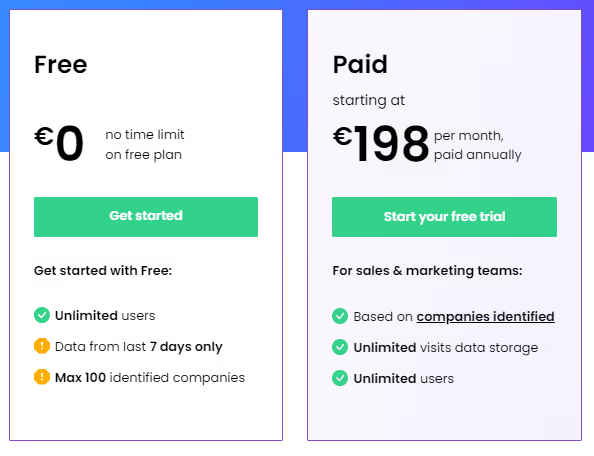
Dealfront Limitations:
- Limitation in Tracking LinkedIn Ad Visits:
Users have reported an inability to effectively track companies visiting the website from LinkedIn ads, particularly on mobile devices. This limitation hinders comprehensive visibility into the impact of LinkedIn advertising efforts.

- Persistent Integration Errors with Microsoft CRM:
The platform has faced ongoing integration errors with Microsoft CRM for approximately a year, affecting usability for users relying on this specific CRM system. The persistence of integration issues raises concerns about the platform's compatibility with Microsoft CRM.
- Incorrect Assignment of Dealfront Visits in CRM:
Users have experienced issues with the correct assignment of Dealfront visits in CRM, rendering this feature unusable. This inaccuracy in data assignment poses challenges for users who depend on precise tracking and attribution.
- Service and Error Resolution Concerns:
Concerns have been raised regarding the service and resolution of errors within the platform. Users have reported challenges in error resolution, prompting some to explore alternative solutions to address these issues. The perceived issues in service and error handling contribute to uncertainties about the platform's reliability.

- Manual Processes and Interface Absence:
Users have expressed dissatisfaction with Dealfront Target, citing manual steps as a significant drawback. The absence of an interface with the CRM necessitates manual intervention, leading to time-consuming processes that could be streamlined with a more integrated solution.
- Challenges in Data Timeliness and Quality:
Dealfront Target faces challenges related to data timeliness and overall data quality, which may fall short of user expectations. Users have reported instances where contact data did not meet the desired standards, highlighting potential areas for improvement in maintaining accurate and up-to-date information.

As businesses scout for Leadlander alternatives, their decision would depend on their specific needs but may include budget considerations, and preferences of businesses. Thoroughly evaluating the features, limitations, and user feedback for each alternative is crucial in making an informed decision that aligns with the goals of the organization.
{{INLINE_CTA_A}}
If you're seeking alternatives to LeadLander for website visitor tracking and lead generation, here are several robust platforms to consider:
1. Lead Forensics
A B2B tool that identifies anonymous website visitors, providing detailed company and contact info. It integrates with CRM systems and offers real-time alerts, making it ideal for converting website traffic into leads.
2. Factors.ai
Combining website visitor tracking with advanced analytics and account-based marketing, Factors.ai captures cross-channel intent signals and automates workflows, enhancing sales and marketing efficiency.
3. Clearbit
Clearbit enriches visitor data with real-time company insights. It integrates with marketing platforms for personalized outreach and lead scoring, boosting targeted marketing efforts.
4. Visitor Queue
Visitor Queue identifies companies visiting your website and provides key contact info. Its user-friendly interface and affordable pricing make it a great choice for small to mid-sized businesses.
5. Albacross
Albacross offers lead generation and ABM solutions by converting anonymous visitors into actionable leads. It provides visitor behavior insights and integrates with major CRM systems for efficient lead management.
When selecting an alternative to LeadLander, consider factors like integration capabilities, data accuracy, interface, support, and pricing to find the best fit for your business.
LinkedIn Ads Targeting Best Practices & Strategy Guide For 2026
Learn proven LinkedIn ad targeting strategies, from location-based segmentation to account-based marketing. Optimize your B2B campaigns with expert tips on audience sizing, budget allocation, and funnel-based targeting approaches.
TL;DR
- LinkedIn's ad targeting focuses on professional attributes, making it ideal for B2B marketing but requiring a different strategy than high-intent platforms like Google Ads.
- Funnel-based targeting is key—start with broad awareness campaigns (TOFU), engage warm audiences through retargeting (MOFU), and push high-intent conversions (BOFU).
- Optimizing audience size and budget is crucial—target 50K-300K members, allocate 80% to proven campaigns, and reserve 20% for testing.
- Avoid common pitfalls like over-narrowing targeting, poor budget allocation, and missing conversion tracking to maximize ROI and campaign performance.
Understanding LinkedIn's Unique Ad Targeting Landscape
LinkedIn is a standout platform for B2B marketing, especially as we are into 2025. With over 1 billion members, including 180 million senior-level influencers, it offers a unique professional context that differentiates it from other advertising platforms. Unlike those focusing on personal interests, LinkedIn allows you to target based on professional attributes, making it ideal for reaching decision-makers and executives when they're in a business mindset.
It's important to note that LinkedIn is fundamentally a low-intent channel compared to platforms like Google Ads, where users actively search for solutions. This characteristic significantly influences how you should approach your LinkedIn targeting and campaign strategy. Most common LinkedIn advertising advice is typically framed around small daily budgets ($100-200), particularly for businesses just starting with the platform as an inbound lead generation channel.
The precision targeting of LinkedIn is invaluable for B2B marketers, allowing you to focus on job titles, company size, industry, skills, and professional interests. To make the most of LinkedIn's capabilities, it's essential to connect with the right professionals who can impact business decisions.
Location-Based Targeting Fundamentals
A strategic funnel-based targeting approach on LinkedIn remains crucial for successful campaigns in 2025. While this approach is highly effective for most businesses using LinkedIn as a lead generation channel, it's important to note that this strategy may need significant modification for enterprise companies with large budgets ($2-3 million), as their needs and objectives often require more sophisticated approaches.
Here's how to structure your targeting across the funnel:
- Top of Funnel (TOFU): Target broad professional demographics, focus on awareness and educational content, and use interest-based targeting and industry-specific filters.
- Middle of Funnel (MOFU): Retarget website visitors and content engagers, implement Matched Audiences for enhanced precision and focus on job functions and seniority levels.
- Bottom of Funnel (BOFU): Target high-intent audiences showing specific behaviors, use contact list targeting for warm leads, and focus on decision-makers within target accounts.
For companies just starting out or working with limited budgets, it's recommended to begin with high-intent audiences and gradually expand. This typically means:
- Start with website visitor retargeting if you have sufficient traffic
- Target company page followers if you have a substantial following
- If neither of these warm audiences exists, begin with targeted top-of-funnel campaigns to build your retargeting pool
Adjust your messaging and content type based on the funnel stage. Use LinkedIn's Website Demographics tool to understand which professionals are engaging with your content at each stage.
{{INLINE_MOFU}}
Professional Targeting Parameters
LinkedIn's professional targeting capabilities are a major advantage. In 2025, these parameters will be even more refined, allowing for precise audience segmentation. You can target by job titles, job functions, industry sectors, company size, and skills & experience. A pro tip is to combine 2-3 professional parameters for optimal results, such as targeting Marketing Directors in Technology companies with 500+ employees. Avoid using too many parameters simultaneously, as this can limit your reach.
Check out Marketing ROI From PPC for more on optimizing your marketing ROI.
Advanced Targeting Strategies
LinkedIn's advanced targeting features in 2025 offer sophisticated ways to reach your ideal audience. Matched Audiences is a powerful tool for retargeting website visitors, uploading contact lists, and implementing account-based marketing (ABM) strategies. For website retargeting, install the LinkedIn Insight Tag to track and re-engage visitors. With Contact Targeting, upload your existing customer or prospect email lists for precise targeting. The ABM approach lets you target specific companies using the Account Targeting feature, which is perfect for B2B campaigns. Best practices include maintaining a minimum list size of 300 matched records and regularly updating your contact lists for better match rates.
Audience Size and Budget Optimization
Finding the right balance between audience size and budget allocation is crucial for LinkedIn campaign success in 2025. Aim for an audience size between 50,000 and 300,000 members. Start broad with 2-3 targeting criteria and monitor audience size in real-time using Campaign Manager. Adjust parameters if the audience becomes too narrow or too broad. Begin with a minimum daily budget of $100-200 for meaningful data and allocate 80% of the budget to top-performing campaigns. Reserve 20% for testing new audiences. Over-targeting can lead to higher costs and limited reach, so focus on the most relevant criteria for your business objectives.
Funnel-Based Targeting Approach
A strategic funnel-based targeting approach on LinkedIn remains crucial for campaign success in 2025. Here's how to structure your targeting across the funnel:
- Top of Funnel (TOFU): Target broad professional demographics, focus on awareness and educational content, and use interest-based targeting and industry-specific filters.
- Middle of Funnel (MOFU): Retarget website visitors and content engagers, implement Matched Audiences for enhanced precision and focus on job functions and seniority levels.
- Bottom of Funnel (BOFU): Target high-intent audiences showing specific behaviors, use contact list targeting for warm leads, and focus on decision-makers within target accounts.
Adjust your messaging and content type based on the funnel stage. Use LinkedIn's Website Demographics tool to understand which professionals are engaging with your content at each stage.
Testing and Optimization
Testing and optimization are critical aspects of any successful LinkedIn advertising strategy in 2025. Implement systematic A/B testing across your campaigns, focusing on one variable at a time. Test 4-5 ad variations simultaneously, run tests for at least 2 weeks and maintain statistical significance with adequate sample sizes. Monitor campaign metrics daily, track conversion rates across funnel stages, and analyze cost-per-lead trends. When scaling successful campaigns, gradually increase the LinkedIn budget and expand successful targeting combinations. Document all test results and insights for future campaign optimization.
LinkedIn Ad Targeting Best Practices For 2026
As we navigate LinkedIn advertising in 2025, several key trends and platform updates have emerged. AI-powered targeting capabilities have become more sophisticated, allowing for better audience prediction and segmentation. Platform updates now emphasize first-party data integration and privacy-compliant targeting methods. Industry trends show an increased focus on video content and interactive ad formats. Future-ready strategies should include implementing conversational ads with AI-powered responses and utilizing LinkedIn's enhanced analytics for real-time optimization. Stay ahead by regularly updating your targeting approach based on LinkedIn's quarterly feature releases.
It becomes essential to measure successful campaigns using a multi-faceted approach focusing on both immediate and long-term metrics. Track key performance indicators like click-through rate, cost-per-lead, and conversion rate. Use LinkedIn's Campaign Manager for real-time performance data and implement the LinkedIn Insight Tag for detailed website visitor analysis. Calculate customer acquisition cost and measure return on ad spend. Align these metrics with your overall marketing objectives and regularly adjust your campaigns based on performance data. For more on measuring marketing ROI, visit Factors: Account Intelligence, Analytics & Attribution.
Common Pitfalls to Avoid in LinkedIn Ad Targeting
When running LinkedIn ad campaigns, avoid these common mistakes:
- Targeting Mistakes: Over-narrowing your audience, combining too many targeting parameters, and neglecting to exclude irrelevant audiences.
- Budget Misallocation: Setting daily budgets too low, not accounting for LinkedIn's higher CPC, and spreading the budget too thin across multiple campaigns.
- Campaign Setup Errors: Running without the LinkedIn Insight Tag, missing conversion tracking setup, and using poor-quality creative assets.
By steering clear of these pitfalls, you'll be better positioned to achieve your campaign objectives and maximize ROI on LinkedIn's platform. For more on maximizing LinkedIn Ads ROI, explore LinkedIn AdPilot.
What should you check before launching a LinkedIn Ads campaign?
A LinkedIn Ads pre-launch checklist is a final verification pass across targeting, budget, creative, and tracking to confirm every campaign element is set up correctly before spend begins. Skipping this step is the most common reason well-planned LinkedIn campaigns underperform in the first two weeks.
LinkedIn Ads best practices checklist
Targeting
- ICP is defined in writing, not just assumed
- Audience size confirmed between 50,000 and 300,000 in LinkedIn Campaign Manager
- No more than 2–3 targeting parameters combined
- Irrelevant audiences explicitly excluded
Funnel and creative
- Each campaign is mapped to a single funnel stage: TOFU, MOFU, or BOFU
- CTA matches the stage ("Book a demo" is a BOFU move, not a cold-audience opener)
- 4–5 ad variations ready, each testing one variable at a time
Budget
- Daily budget is at least $100–200 per campaign
- 80% allocated to proven campaigns, 20% reserved for tests
Tracking (the part most teams skip)
- LinkedIn Insight Tag confirmed firing before launch
- Conversion events configured in Campaign Manager, not set up retroactively
- CRM (HubSpot or Salesforce) synced, so the pipeline can be traced back to campaigns
- Success metric is cost-per-SQL or cost-per-opportunity, not just CPL
FAQs on LinkedIn Ads Best Practices
Q1: Is targeting by Job Title better than Job Function?
Job Titles can be inconsistent across different company cultures. Everyone has a "fancy" title now. Targeting by Job Function + Seniority is generally more reliable for scaling because it captures everyone in a department (e.g., "Marketing") at the right level (e.g., "Director") regardless of their "creative" title.
Q2: What do I do if my audience size is under 50,000?
If your audience is too small, LinkedIn’s AI struggles to optimize, and your CPMs (cost per 1,000 impressions) will skyrocket. Expand your criteria by adding related Job Functions or widening the Company Size filters.
Don't get so "niche" that you're only talking to three people in a basement. The algorithm needs data to breathe! Give it some room to move.
Q3: What is the biggest mistake in LinkedIn budget allocation?
Trying to run five different campaigns on $50/day total. It’s better to put $50/day into one strong campaign than $10 into five weak ones.
Stop trying to be everywhere at once! Pick your best-performing funnel stage, allocate a proper budget, and watch it grow.
Q4: How long should I run an A/B test before giving up?
You need at least two weeks and a significant sample size to reach statistical significance. In 2026, AI-powered targeting needs time to "learn" who is most likely to convert.
Patience is a virtue, especially when LinkedIn is spending your money. Don't pull the plug after two days just because you didn't get a lead; the campaign is still in learning mode.
LinkedIn Ads Strategy for B2B SaaS Growth in 2026
Optimize your LinkedIn ads for free trials, demos, and high-quality leads. Use precision targeting, proven ad creatives, and full-funnel strategies to drive SaaS growth and ROI.
TL;DR
- Prioritize free trials and demo requests over brand awareness.
- Use cold audience targeting, retargeting, and strategic brand awareness campaigns.
- Optimize LinkedIn ads with precise targeting and high-converting creatives.
- Implement CRM tracking, retargeting, and data-driven optimization for sustained ROI.
LinkedIn offers a powerful platform for B2B SaaS companies to generate qualified leads and drive scalable growth. This guide outlines a comprehensive LinkedIn advertising strategy specifically designed for SaaS, with tactical steps to maximize ROI and achieve tangible results.
Defining Core Objectives and the Funnel
The foundation of any successful LinkedIn campaign rests on a clearly defined objective: driving free trial sign-ups and demo requests. These actions represent direct engagement and a clear path toward conversion.
Prioritize these conversion-focused efforts before investing heavily in brand awareness. Brand awareness is valuable for reinforcement but should support, not precede a functional lead-generation strategy.
Strategic Nuances:
- Free Trials: A High-Value Proposition
Free trials offer users tangible value and hands-on experience, often resulting in higher conversion rates.
- Demos: Ideal for Complex Enterprise SaaS
Demos are well-suited for complex solutions that require personalized onboarding and detailed explanations.
Optimizing the Demo Offer: Move beyond simple demo requests and offer ‘expert webinars’ that showcase your software within the context of valuable industry knowledge.
The Integrated Full-Funnel Approach:
- Cold Audience Targeting: Test demo and trial offers on carefully segmented cold audiences.
- Retargeting: Recognize the need for multiple touchpoints. Implement retargeting campaigns to re-engage initial prospects.
- Strategic Brand Awareness: Once demo and trial offers demonstrate success, leverage brand awareness campaigns to build demand and improve demo show-up rates and trial activation.
Campaign Objectives, Ad Formats, and Bidding
Selecting the appropriate campaign objectives and ad formats is critical for maximizing campaign performance.
Campaign Objectives:
- Website Visits: Drive traffic to your website to provide detailed information about your SaaS solution.
- Lead Generation: Collect lead information directly within the LinkedIn platform using pre-filled forms.
Also, read Lead Generation vs Demand Generation.
Ad Formats:
- Single Image Ads: Despite the allure of video, single image ads often outperform in initial engagement. Use compelling visuals and concise messaging to promote trial sign-ups or demo requests.
- Video Ads for Retargeting: Leverage video ads in retargeting campaigns to showcase product features and provide in-depth explanations.
Also, read Types of LinkedIn Ads.
The Hybrid Approach - Lead Gen Forms with Website Links
Combine the lead generation objective with a website link in the ad copy. This allows users to:
- Access Detailed Information: Empower prospects to research your product before committing to a demo or trial.
- Convert Directly: Offer a convenient lead form for those ready to request a demo or trial immediately.
This strategy enhances lead quality and boosts show-up/activation rates. Informed leads are more likely to engage meaningfully with your product.
{{INLINE_MOFU}}
Precision Targeting: Identifying the Ideal SaaS Prospect
LinkedIn's key advantage is its ability to target specific, high-value professional audiences. Focus on IT leaders, engineering managers, business executives, and other decision-makers within your target market.
Strategic Targeting Options
- Interests: Target users who have demonstrated interest in specific software categories relevant to your SaaS solution.
- Skills: Identify users with skills in software that integrates with your product, indicating potential compatibility.
- Groups: Target members of relevant LinkedIn groups focused on specific technologies or industries.
Tailored Approach to Audience Segmentation
- The User: The individual who directly uses your software. Craft ad copy that emphasizes increased productivity, streamlined workflows, and ease of use.
- The Executive/Manager: The decision-maker responsible for purchasing software. Focus on improved team efficiency, increased revenue, and overall business benefits.
The ‘Exact Job Title’ Strategy
Target specific job titles to minimize wasted ad spend. If you sell CRM software, target ‘CRM Managers.’ If you offer plugins for Salesforce, target ‘Salesforce Administrators.’
High-Converting Ad Creatives: Proven Templates for SaaS
Based on extensive campaign data, certain ad creative templates consistently deliver superior results on LinkedIn.
- The Problem Ad: Start with a question that highlights a common pain point: ‘Is your team struggling with [Specific Problem]?’ This approach is particularly effective for new product categories or solutions.
- The Process Graphic Ad: Visualize the steps your software simplifies: ‘Achieve [Desired Result] Better, Faster, and Without [Objection].’ Clearly illustrate the benefits of automation and efficiency.
- The User-Focused Ad: Feature an image of your target user in their work environment: A doctor using medical software or an engineer using design tools.
- The FOMO (Fear of Missing Out) Ad: Showcase well-known companies that have achieved success with your software: ‘See how [Company Name] increased sales by X% with [Your Software].’
Visual Considerations
- UI Illustrations: Use clean and concise UI mockups to demonstrate key software functionalities. Avoid overwhelming full-screen screenshots.
Comprehensive Conversion Tracking and Optimization
Accurate conversion tracking is crucial for measuring the ROI of your LinkedIn advertising efforts and optimizing campaign performance.
CRM Integration
- Track demo requests, trial sign-ups, and lead progression into your CRM.
- Monitor deal stages (lead, qualified, opportunity, closed-won) and attribute them back to specific LinkedIn campaigns.
- Leverage native CRM integrations (HubSpot, Salesforce) or third-party tools (Google Tag Manager, Zapier) for seamless data transfer.
Application Action Tracking
- Track key in-app actions that indicate user engagement and long-term retention: Account creation, profile setup, feature usage, etc.
- Push these conversion events back to LinkedIn to identify the most effective ads for driving desired user behaviors.
Retargeting for Activation and Upselling
- Create retargeting audiences based on user actions within your app.
- Re-engage inactive users and promote relevant features or upgrades to active users.
Actionable Insights and Optimization
- Regularly analyze conversion data to identify underperforming ads and targeting strategies.
- Test new ad creatives, bidding strategies, and audience segments to continuously improve campaign performance.
Optimizing LinkedIn Ads for SaaS Growth in 2025
Prioritize attracting high-quality trial users and nurturing long-term customer relationships. Focus on in-app engagement and activation to maximize the lifetime value of your LinkedIn leads.
A successful LinkedIn strategy focuses on free trials and demo requests for higher conversions. Prioritize these over brand awareness.
- Free Trials & Demos: Drive engagement with hands-on experience and expert webinars.
- Ad Strategy: Use single image ads for engagement and video ads for retargeting.
- Lead Gen Optimization: Combine lead forms with website links for higher-quality conversions.
- Tracking & Retargeting: Monitor CRM data, in-app actions, and re-engage users for better ROI.
By implementing this comprehensive strategy, B2B SaaS companies can effectively leverage LinkedIn ads to drive sustainable growth and achieve significant ROI in 2025 and beyond.

How to use LinkedIn ads to Support SDR Outbound
Discover how you can use LinkedIn ads and Factors AdPilot to level up your outbound motion and close more deals
B2B sales is a long and arduous process. Leading prospects from “Qualified Lead” to “Closed won” is a trying ordeal for even the best SDRs. So, what’s the best way to fast-track these deals?
Two words: LinkedIn ads.
Instead of having your sales reps constantly follow up with “just checking in” emails, you can leverage the power of your ad campaigns to drive consideration for your product as they’re talking to your sales team.
Let’s dive into how you can use LinkedIn ads to support your outbound efforts ⬇️
Streamline your ABM with account engagement data
As you know, ABM typically involves marketing and sales aligning on a target list of accounts and then reaching out to them parallelly via sales outbound and marketing campaigns. However, the way marketers implement this process leaves much to be desired.
For example, if someone replies to your sales email, they’d naturally have higher buyer intent than someone who simply leaves your emails unopened. Would it make sense to show ads to prospects that aren’t interested in your solution? Moreover, you have no control over how your ads are shown to accounts in this list. For instance, you’d naturally want to show more ads to accounts in the SQL stage rather than ones already in negotiations.
Rather than spreading your LinkedIn impressions uniformly across all accounts in the target account list, it is wiser to focus most of your ad spend on accounts showing more intent. You can use account engagement data to tailor your ads based on how far they’re along the sales funnel. To achieve this, you must invest in a tool that consolidates all your CRM data and turns it into actionable insights for your ad strategy.
Here’s how you can use Factors AdPilot to interpret your account data, optimize your LinkedIn ads, and move prospects across the funnel:
Show ads based on sales engagement
While your prospects engage with your sales rep, you can target the buying committee by adding them to a sequential ad campaign and showing how your features effectively solve their problems.
You can use Audience Builder to target the right accounts per your campaign objectives. For example, if you want to target all accounts that have completed a demo call, you can create a segment on our platform and import it to LinkedIn Campaign Manager.
However, you should also limit the number of times you show them ads to avoid ad fatigue. Unfortunately, LinkedIn doesn’t yet have a feature that allows you to control the ad frequency at an account level. Lucky for you, Smart Reach can make it happen!
Smart Reach allows you to cap the number of impressions shown to specific accounts. Find out how we use Smart Reach at Factors to control ad exposure:
- Every account in the target account list (agreed on by marketing and sales) gets 500 impressions per month.
- If the account replies to an email or starts showing website activity, we bump up the impressions for them to 1500
- If a deal is booked we increase the impression cap to 2500 and by 1000 for every stage in the deal funnel.
This approach results in better sales and marketing alignment and allows you to target your account list better.
If you want to know whether your ads are truly working, it’s True ROI to the rescue. Thanks to view-through attribution, you get a complete overview of how prospects interact with your ads and make buying decisions.
Here’s a report that shows how many prospects view your ads and visit your website after a demo call:

You can also use our CAPI integration to send your conversion data from your website and CRM to LinkedIn. For example, you can send data of users who respond to sales emails to optimize your campaigns better:

{{INLINE_TOFU}}
Wrapping up
Outbound Sales can be daunting, but simultaneously running LinkedIn ads makes it easier. When you target your ads to prospects according to how they’re engaged with sales, you can speed up your sales process without seeming pushy. Speak to our team today to learn how AdPilot can help you supercharge your ad campaigns and close deals in no time.
How to use LinkedIn ads for Product-led Growth
Discover how you can use LinkedIn ads to improve your brand’s PLG motion and turn free trial users into paid customers
Product-led growth (PLG) is all about letting your product do the talking. People no longer want to sit through multiple sales calls and lengthy onboarding processes —they prefer to quickly experience the product value and speed up their decision-making.
Of course, the best way to convey product value is to educate your prospects via the channels where they are most active, aka LinkedIn. Given that 4 out of 5 users on the platform are decision-makers, using LinkedIn ads is the ideal way to educate your target accounts about how your tool best solves their pain points.
Let’s dive into how you can leverage the power of LinkedIn ads in a PLG motion ⬇️
Leverage account engagement data the right way
Account engagement data is a treasure trove that offers crucial context on how your prospects make buying decisions. You can use it to tailor your ads based on how far they’re along the PLG funnel.
Unfortunately, companies struggle with effectively consolidating and leveraging this data for their ad campaigns. If you want to run personalized account-level campaigns on LinkedIn, you must invest in a tool that translates complex data into actionable insights to help refine your ad strategy.
Here are a few ways you can use Factors to interpret your account data, optimize your LinkedIn ads, and move prospects across the PLG funnel:
Show ads based on product engagement
Any time a user signs up, boom – they instantly get an email prompting them to schedule a demo. While there’s nothing wrong with this approach, it’s unlikely that every user who signs up is ready to talk to sales.
We suggest using LinkedIn ads to strategically target the buying committee and show them how your features effectively solve their problems. It is a subtle approach that showcases your product's USP without seeming pushy for a sales call.
You can use our Audience Builder feature to target the right accounts with your preferred criteria. For example, if you want to target all accounts who signed up for a free trial but haven’t booked a demo, you can create a segment on our platform and import it to LinkedIn Campaign Manager

Now that you’ve begun showing ads to potential customers, it’s time to focus on “how” you show these ads.
It’s important to remember that not everyone who signs up for your product is a guaranteed customer. You shouldn’t bombard users with the same ad repeatedly, as this can cause a negative attitude toward your brand. Buuut, you still want to ensure your product is top of mind while they’re evaluating other solutions.
A tricky balance, isn’t it? 👀
Luckily, with Smart Reach, you can implement a cap for how many times you want to show your ads to specific accounts. Here’s an example of how we use Smart Reach at Factors to control exposure to our ad campaigns:
- For every account that signs up for our product, we initially set a cap of 500 impressions monthly.
- If they log in more than twice, it indicates they found value in our product but still need to truly understand the features. In this case, we bump it up to 750 impressions per month.
- When they hit certain product milestones, such as creating a dashboard or setting up alerts – it implies they’re aware of our features but still need a final nudge to move to the paid plan. At this stage, we double the frequency cap to 1500 impressions.
- Once they click the “upgrade” button, we set the cap to 3000 impressions.
As we’re increasing the frequency cap for all these accounts, we’re ensuring that ads are only shown to relevant accounts without causing ad fatigue.
If you want to know whether your target accounts are truly resonating with your ads, you can use True ROI. With view-through attribution, you get the complete picture of how LinkedIn plays a role in turning your free-trial users into paying customers.
Here’s a report that shows how many people signed up for a demo:

Once you add the event “LinkedIn ad viewed,” you can see how many users signed up after viewing your ads. This gives greater clarity on how your ad campaigns drive signups and revenue.

Plus, you can also leverage our CAPI integration to send your conversion data from your website and CRM to LinkedIn to better scale and optimize your ad campaigns. CAPI ensures that you show your ads only to accounts that fall under your ICP, thereby helping you massively save ad spend. Here’s how you can set up CAPI to target your ads to users who set up an alert:
{{INLINE_TOFU}}
Wrapping up
Showcasing the product front and center is the core of PLG. When you use LinkedIn ads the right way, you can drive consideration for signed up users and turn them into advocates in no time. Speak to our team today to find out how you can use AdPilot to boost your PLG motion.

Top 4 Oribi Alternatives For B2B Marketing Teams
This article highlights the top 4 alternatives to Oribi and how they fare in terms of their features (pros and cons), pricing, integrations, and user reviews.

Why did Linkedin acquire Oribi?
On March 31st 2022, Linkedin announced its acquisition of Oribi — an Israel-based marketing analytics company, for over $80 million. Oribi was a marketing analytics platform that offers seamless integration and automated event tracking for your website without the need for coding. They provide a user-friendly platform that combines several conversion rate optimization (CRO) features, including customer journey funnels and event correlations, making it easy for users to access and utilize these tools.
An agreement was reached with Oribi CEO, Iris Shoor, after several conversations about product and value alignment. Linkedin’s purchase of Oribi is part of a larger strategy to expand features across Linkedin Marketing Services (LMS). LMS includes a range of strategies, techniques and tools used to promote advertisements, profiles and other businesses on LinkedIn. This helps advertising firms and recruiters to get actionable insights into their posts and advertisements.
With this acquisition LinkedIn aims to position itself strongly in the advertising and marketing analytics domain. With a 43% growth in the marketing service revenue on yearly basis, LinkedIn wants to grab on to the momentum of the growth trajectory of the marketing revenue. It aims to provide its users with keen insights with more data analytics and attribution in order to stronghold itself as a competitor to Google Ads services.
But what are the implications of this acquisition? and how does this affect former-Oribi customers? Let’s find out.
“Understanding which channels and messages have the greatest impact on the decision to take a desired step, such as a buyer requesting a product demo or a job seeker applying to a job posting, is critical to the effectiveness of any marketing campaign. Through the integration of Oribi’s technology into our marketing solutions platform, our customers will benefit from enhanced campaign attribution to optimize the ROI of their advertising strategies” - Tomer Cohen, CPO, LinkedIn
How will Linkedin use Oribi’s technology?
As previously mentioned, Linkedin acquired Oribi with the intention of expanding its LMS portfolio with industry-leading marketing and web analytics software. In particular, Linkedin was expected to employ Oribi to improve LMS insights tag implementation, drive audience insights for retargeting and CRO, and create customer journey funnels for Linkedin campaigns. Campaign attribution and ROI reporting are other Oribi use-cases Linkedin seeks to leverage for LMS.
As part of the agreement, Linkedin opened its very first office in Tel Aviv. The majority of the Oribi team has already joined Linkedin’s LMS division as well. LinkedIn’s action also came with a series of layoffs. According to some reports, 17 Oribi employees working in customer facing verticals(sales, marketing etc) were fired post acquisition.
“Oribi’s team brings deep analytics expertise that will help us accelerate the capabilities of our attribution technology across our lines of business – from helping a marketer find better leads to a recruiter identifying the right candidates. The acquisition will expand our international presence so we can continue delivering products that meet the evolving needs of our global customers and members.” - Tomer Cohen, CPO, LinkedIn
What does Linkedin’s acquisition of Oribi mean for customer data?
A couple of things. First, any data captured following Oribi’s integration remains in the control of customers and adheres to all commitments set by Linkedin’s standard ads agreement. This means that LinkedIn will not use, edit or tarnish the data already captured by Oribi for its existing users. Second, Linkedin will not be combining legacy personal data between Oribi and Linkedin. This means that the data captured by Oribi prior to the acquisition will not be used by LinkedIn in any way, therefore, the existing customers data will not be scrutinized by LinkedIn post integration.
Finally, there are no plans for Linkedin to alter the data it currently collects from users — simply to enhance existing data using Oribi’s technology. This implies that LinkedIn will not change or update its data collection policy from its users post integration with Oribi. Therefore, LinkedIn users should not be worried about collection of additional data points to enhance Oribi’s functionality.
{{INLINE_CTA_A}}
What does Linkedin’s acquisition of Oribi mean for former Oribi users?
According to several reports, Oribi shut down services and canceled customer contracts just weeks after the agreement was reached. Based on conversations with former Oribi-users, its revealed that Oribi has offered its customers a couple of options:
- Try out Oribi/LMS’s early-stage pilot program
- Switch to an alternate marketing/web analytics solution
The problem with the first option is that as a result of Linkedin’s acquisition, the pilot program is heavily limited. Integrations with third-party ad platforms like Google and Facebook look likely to be restricted as well. Therefore, the customers will not be able to get the ultimate benefit of marketing analytics, and integration features post acquisition. Accordingly, option 2 is the popular choice. Especially since historical data will not be preserved, now seems to be the best time to switch to an alternative solution for Oribi.
Best Oribi Alternatives in 2025
Since the acquisition of Oribi by LinkedIn, significant changes have taken place. Although it was anticipated that LinkedIn would leverage Oribi's capabilities to improve its marketing analytics, many users believe that the acquisition did not turn out to be favorable for Oribi.

Many users were not happy with acquisition, as they anticipated a large number of Oribi features to be eliminated post acquisition. Therefore, many Oribi customers are out scouting for viable alternatives for their needs.
There are a host of platforms to consider for replacing Oribi including Factors, Heap (which is a powerful solution, but suited more for product analytics), Wicked Reports, and Plausible.
Let's compare some of the top alternatives to Oribi and see how they fare in terms of their features (pros and cons), pricing, integrations and user reviews.
- Factors.ai
Fcators.ai is a marketing analytics tool which specializes in multi touch attribution with a focus on account based analytics and visitor identification.
Oribi does not offer the concept of dashboarding, making it difficult to group and visualize reports efficiently. Factors provides customizable dashboards where all reports are conveniently organized and displayed, simplifying the process of data grouping and visualization. It allows users to consolidate essential data in a single location, enabling easy tracking, analysis, and generation of insights to optimize marketing campaigns effectively.
Factors offers account-based analytics which includes campaign analytics, website analytics, and funnel analytics. With Factors, marketers can enhance their understanding and optimization of website conversions with automated tracking of buttons, detailed page analytics, access to unsampled data, and the ability to track custom domains. Factors provides end-to-end journey analysis with Funnels, letting the user add as many filters as they like to easily customize their data and dashboards.
What’s more is that Factors consolidates various metrics such as CPC, CTR, ROI, impressions, and more at different levels like channels, campaigns, ad groups, and keywords, enabling more detailed data-driven marketing strategies, this was not possible in Oribi.
Moreover, Oribi has limited integration with HubSpot, only allowing the push of web data into the CRM. In contrast, Factors integrates with both HubSpot and SalesForce, enabling the connection of campaign and web data with contact data, offline events, and revenue metrics from the CRM. This integration empowers comprehensive analysis and attribution throughout the customer journey.
Factors can be set up within 30 minutes and offers no-code integrations with ad platforms, CRMs, MAPs, and CDPs.

Both Oribi and Factors deliver intuitive web analytics, CRO, attribution, and funnels. On top of this, Factors also provides end-to-end customer journey mapping across campaigns, web, & CRMs. You can learn more about how Factors compares against Oribi here.
PROS:
- Unlike Oribi which only provided website attribution, Factors provide attribution at every relevant touchpoint from ads and website interaction to offline interaction using CRM integration. With customizable reports across channels, campaigns, and keywords, Factors can be moulded to any need which the user might have.
- Factors has an impeccable 64% visitor identification rate which is the highest in this category.. Along With its robust visitor identification feature complemented by multi-touch attribution, you can perform various attributions including offline touchpoints to identify the various sources from where visitors come to your website.
- Factors is now the official Marketing Partner of LinkedIn. With this collaboration, the users can get complete information about who is viewing Linkedin ads, clicking on them, and how this leads to conversions. With this partnership, users can optimize their campaigns with AI driven insights for all of their marketing efforts..
CONS:
- Factors cannot automatically send data back into Hubspot or Google Analytics like Oribi. Therefore, it may not be a good fit for you if you are looking for data orchestration rather than analytics.
- Factors does not support integration with ActiveCampaign, Mailchimp, and Klaviyo. Therefore, the user may miss out on the use cases relevant to these integrations
Integrations:
- Google Search Console
- Google Ads
- Facebook Ads
- LinkedIn Ads
- Hubspot
- Salesforce
- Clearbit
- Segment
Pricing:

Factors offers a free 14 day trial with no credit card requirement. Visitor Identification and Website Analytics plans start at 99/month, while it has a separate pricing plan for Multi-Touch Attribution starting at $399/month.
Reviews:

{{INLINE_CTA_A}}
2. Plausible Analytics
Plausible Analytics is a cookieless web analytics tool designed specifically for a wide range of businesses including small and medium-sized enterprises (SMEs), startups, content creators, bloggers, and e-commerce websites.. As an open-source tool, Plausible offers a transparent and customizable solution that empowers businesses to track website performance without compromising user privacy. It offers intuitive data analytics with traffic segmentation, shareable dashboard and real time notifications. Plausible aims to provide simple web analytics at a glance without any complex layering of data with menus, and complex reports. Instead of tracking every imaginable metric, Plausible focuses only on relevant and most important data points. Like Oribi, Plausible provides intuitive data analytics features which are compressed in a 1KB script.
Plausible’s script size is smaller than 1KB, ensuring that website loading time is reduced. With a script size which is 45 times smaller than Google analytics, plausible occupies less space and gets easily installed.

PROS:
- One of the standout features of Plausible Analytics is its incredibly lightweight script, clocking in at less than 1KB. This means that implementing the tool won't slow down your website's loading time, ensuring a seamless user experience for your visitors.
- Plausible complies with GDPR, CCPA, and PECR.. It offers real time slack and email updates which are customizable based on the user’s needs.
CONS:
- Plausible does not provide multi touch attribution but only last click attribution. This leaves you unsure of where the leads actually come from.
- Since Plausible Analytics does not collect or store personally identifiable information (PII) and avoids the use of cookies, it means they do not retain historical data beyond a 30-day period. This could pose a challenge if your tasks involve long-term data analysis or trend tracking, as the limited data retention may affect your ability to derive insights and perform comprehensive analysis
Integrations
- Bubble.io
- Carrd
- Hubspot
- Google Data Studio
- Google Search Console
- Notion
- Wordpress
Pricing

The tool provides a free trial, and the paid plans start from just $9 per month for 10K visitors. Furthermore, users can get a 2-month free subscription if they pay annually.
Reviews

- Heap
Heap is an analytics tool that automatically captures, tracks, and visualizes visitor engagement with the website to provide actionable insights. Heap collects data and collates it into easy to read graphs and funnels.Heap focuses on enhancing customer engagement and tracking their activity throughout their journey with a brand. Heap offers a diverse array of capabilities, like automatic event tracking, retroactive data capture, and real-time reporting. It empowers businesses to segment their data based on users, sessions, and events, simplifying the process of identifying trends and patterns within the data. For Oribi users, Heap could be a good fit since it provides customers with funnels, real time reporting, and a host of data visualization features.

PROS:
- Heap offrs intuitive and customizable dashboards to coordinate important metrics for the business and help drive insight driven actions. It allows businesses to segment their data by users, sessions, and events, making it easier to identify trends and patterns.
- Heap provides user segmentation, which helps categorize users based on their characteristics and behavior. This feature allows businesses to track users retroactively, gaining insights into their past interactions and activities. With user segmentation, companies can better understand their audience and tailor their strategies to meet specific user needs.
- With the user timeline feature, Heap enables marketers to see detailed user level data as to how each user interacts with the website/app. The timeline of this activity can be adjusted from the last 7 days to the date the user first interacted with the website/app.
CONS:
- Heap occupies a large amount of space due to its many features and comprehensive data storage features.. When you have a lot of data stored, it becomes more challenging to calculate the costs associated with data privacy and protection, storage and archiving, and regularly backing up the data. The complexity increases as the amount of data grows, making it important to carefully manage and allocate resources to ensure data security and accessibility.
- Heap only focuses on the website traffic, user activity on the particular site and conversions. It does not factor in the role of paid ads, organic reach on search engines and other touchpoints. Here is where a tool like Factors comes into play as it gives you a complete and in depth overview of the data attribution and visitor identification across multiple touchpoints.
Integrations:
- Shopify
- FullStory
- Clearbit
- RedShift
- Eloqua
- Hubspot
- Salesforce
Pricing

The tool provides a free trial and a free package for up to 10K monthly sessions. The growth package is priced at $3600/YEAR for 3OOk sessions per year.
Reviews

{{INLINE_CTA_A}}
4. Wicked Reports
Wicked Reports is a marketing attribution platform with a wide assortment of campaign analytics features. Some of its unique features include the ability to include/exclude subscription revenue, distinguish new sales from recurring sales revenue, and new leads from re opt-ins.
Attribution in Wicked Reports is its standout feature, primarily used for generating ROI reports. Users can pick from various attribution models provided by this platform like, linear attribution, last click, first click attribution, full impact attribution etc. Wicked Reports also generates insights into customer lifetime value and cohort analysis.

Pro:
- Wicked Reports offers cohort analysis capabilities, allowing you to analyze the behavior and performance of specific groups of customers over time. The platform helps in the visual representation of the monetary value and ROI of the customer, illustrating their profitability and financial performance over time..
CONS:
- Wicked Reports cannot be used to visualize customer funnel journeys. This means that marketers will not be able to locate where leads are lost. Customizing and visualizing of funnels is possible with tools like Factors.ai.
- Wicked Reports primarily focuses on marketing attribution rather than web-level attribution. It specializes in attributing marketing efforts to revenue and ROI, helping marketers understand the impact of their various marketing channels and campaigns. However, when it comes to granular web-level attribution, such as tracking specific user actions on a website, Wicked Reports may not provide extensive capabilities in that area
Integration
- Hubspot
- Mail Chimps
- Shopify
- Google Ads
- Facebook Ads
- Snapchat
- Paypal
Pricing

Reviews

LinkedIn Acquires Oribi: Implications & Top Alternatives
LinkedIn’s acquisition of Oribi in March 2022 enhances its marketing solutions with better campaign attribution and ROI optimization. Former Oribi users may seek alternative analytics platforms.
1. Top Alternatives: Google Analytics, Semrush, SE Ranking, and Similarweb.
2. Key Features: Website traffic analysis, keyword research, competitive insights, and conversion tracking.
3. Strategic Benefits: Optimize marketing performance, track audience behavior, and improve SEO visibility.
These platforms offer valuable analytics solutions to replace Oribi, helping businesses refine their marketing strategies effectively.
{{INLINE_CTA_A}}
In conclusion
LinkedIn’s acquisition of Oribi came at a crucial time for the marketing analytics and attribution space. With a keen focus on positioning itself as a strong rival to Google Ads services, LinkedIn aims to utilize the marketing analytics and attribution features offered by Oribi. LinkedIn wants to focus on its campaign manager which has now become more and more relevant to analyze marketing campaigns.
That said, Oribi can definitely improve its interface and analytics capabilities especially with the continued support of Microsoft. With the acquisition now completed, LinkedIn now has in its coffers a host of features to drive its marketing analysis and attribution arm. As a result, LinkedIn will now be able to offer recruiters and advertisers complete analytics of their ads and posts fueled by AI-driven insights.
Now, more than ever, marketers feel the need and importance of monitoring their efforts and making data-driven decisions to ensure they’re getting the most bang for their buck. The role of marketing analytics will only become increasingly important as even conventionally offline events like seminars and conferences turn digital.
Although the acquisition proved fruitful for LinkedIn and its marketing analytics tool, existing customers did not like it as much. Post acquisition, Oribi shut down its customer-facing vertical, culling out numerous features and also fired customer-facing employees.The existing employees of Oribi especially the sales and marketing vertical had to bear the brunt. Additionally, the existing customers had to venture out in search of alternatives to replace Oribi, which resulted in additional costs, and wastage of time.
The search for an Oribi alternative ends here with Factors. Factors has proven to be a highly effective marketing analytics and attribution platform for B2B marketers. Try it for free or schedule a personalized demo to witness its impact on your campaigns and website conversions today!
FAQ:
- Why did LinkedIn acquire Oribi?
With Oribi’s acquisition, LinkedIn was looking forward to optimizing its marketing and advertising service. LinkedIn aimed to solidify its global presence by providing marketers and recruiters a keen insight into their campaigns. According to Tim Cohen (Chief Product Officer at LinkedIn), marketing services grew about 43% on a yearly basis, with Oribi in its coffers, LinkedIn aims to drive this growth potential and position itself as a reliable source of advertising and marketing services.
Furthermore, LinkedIn aims to position itself as a firm competitor against Google's ads and marketing service.
- What are the best Oribi alternatives?
Some of the best Oribi alternatives for 2023 are Factors.ai, Heap, Plausible Analytics,and Wicked Reports. Some other platforms to look out for are Mixpanel, Amplitude and Fullstory. Oribi carved out a strong position in this market due to its no code and easy to use market attribution feature which housed loads of CRO features. One should look out for relevant attribution services with an easy to use interface in order to match the experience of Oribi.
Top 10 Leadinfo Alternatives and Competitors in 2026 (Updated)
Explore the top Leadinfo alternatives: comparing features, pricing, and limitations for Warmly, Leadinfo, KickFire - A Foundry Company, LeadMagic, among others.
Leadinfo is an innovative software company specializing in B2B marketing data solutions. Utilizing advanced technology, Leadinfo excels in uncovering latent opportunities within website traffic through the analysis of sophisticated intent data.
Throughout the entire customer journey, from initial awareness to decision-making stages, Leadinfo offers in-depth insights. Businesses benefit from the ability to discern potential buyers and tailor engagements according to their preferences.
So, why look for a Leadinfo Alternative?
- Prospect Coverage Limitations:
Scenario: Leadinfo may fall short in capturing smaller prospects, impacting its effectiveness for businesses engaging with a diverse range of potential clients.
Consideration: Companies aiming for comprehensive prospect coverage may explore alternatives with a broader reach and a more inclusive approach to diverse market segments.
- Integration Challenges:
Scenario: Leadinfo's integration capabilities, especially in marketing automation, may have room for improvement, impacting the seamless execution of holistic marketing strategies.
Consideration: Businesses seeking a more integrated marketing tech stack may consider alternatives offering robust compatibility with various platforms, enhancing overall operational efficiency.
- Pricing Sensitivity:
Scenario: While Leadinfo provides a free demo, perceived costliness after the trial period may lead businesses, particularly those with budget constraints, to explore more cost-effective alternatives.
Consideration: Companies prioritizing marketing automation may explore alternatives with advanced features that seamlessly align with their marketing strategies for optimal results.
Factors to consider in the alternative
- Prospect Coverage Precision:
Evaluate the alternative's capability to comprehensively capture a diverse range of prospects, ensuring no segment is overlooked.
- Integration Flexibility:
Assess the alternative's integration capabilities, particularly with marketing automation tools, to guarantee a cohesive and integrated tech stack.
- Cost-Effectiveness:
Consider the pricing structure beyond the trial period, ensuring it aligns with the business's budget while delivering the necessary features and functionalities.
- User Identification Accuracy:
Scrutinize the alternative's precision in identifying and categorizing website visitors, aiming for higher accuracy in lead identification.
- Marketing Automation Enhancement:
Examine the alternative's capabilities in marketing automation, ensuring it meets or exceeds the desired level of functionality for streamlined and automated campaigns.
{{INLINE_CTA_A}}
Today, we’ll be comparing:
- LeadMagic
- Factors AI
- Warmly
- Leadlander
- PearlDiver
- Clearbit
- Demand
- Lead Forensics
- Dealfront (Formerly Echobot and Leadfeeder)
- Snitcher
Before we start, here’s a little about Leadinfo

Leadinfo Features
- Lead Capture Forms:
Leadinfo simplifies the creation of personalized lead generation forms, utilizing visitor information to boost positive responses and improve lead conversions.
- Browsing Activity Tracking:
By monitoring visitors' journeys on the website, Leadinfo enables sales and marketing teams to interpret visitor intent, effectively qualifying them as potential leads.
- User-Friendly Layout:
Leadinfo features an intuitive inbox-style layout, reminiscent of email interfaces, providing a clear and user-friendly overview of each website visitor. This design enhances the tool's usability, making it easily adaptable for teams.
- Seamless Integrations:
Leadinfo seamlessly integrates with over 60 platforms, including Asana, Discord, Freshworks, Insightly, HubSpot, Zoho, and Slack, offering versatile compatibility for diverse business needs.

Leadinfo Pricing
The cost of using Leadinfo is determined by the total number of monthly unique visitors to your website. Users can input their data into the pricing page to determine the corresponding cost for their specific needs.

Leadinfo Limitations
- Integrations:
There is room for improvement in integration development to enhance functionality, particularly in the implementation of marketing automation. This refinement would streamline the execution of marketing strategies for optimal results.

- Pricing
While the free demo period grants access to all features, certain functionalities are disabled upon account creation, leading to a substantial increase in payment. The perceived costliness of Leadinfo is a consideration for potential users.

- Prospect Coverage Limitations:
Leadinfo may not capture all smaller prospects or clients, potentially limiting its coverage and effectiveness for businesses engaging with a diverse range of prospects.

1. LeadMagic

LeadMagic Features:
- Visitor Identification:
The platform assists in recognizing noteworthy accounts that visit a website, ensuring timely communication to sales and marketing teams through Slack messages.
- Lead Scoring and Prioritization:
Using engagement levels as a basis, LeadMagic intelligently assesses and prioritizes leads, promoting a targeted approach to the most promising prospects.
- Lead Nurturing and Automated Workflows:
Streamline lead nurturing campaigns through the platform's automation capabilities, fostering relationships with potential clients.
- Lead Generation Services:
Benefit from customized lead generation strategies, encompassing nurturing, qualification, and strategic outreach facilitated by the platform.
- Digital Marketing Solutions:
Comprehensive digital marketing solutions covering SEO, social media marketing, and PPC advertising, ensuring optimal visibility and engagement for your brand.
- Customer Engagement Programs:
The platform covers diverse digital marketing aspects, including search engine optimization (SEO), social media engagement, and pay-per-click (PPC) advertising, ensuring optimal brand visibility.
- Strategic Consulting:
Specializing in marketing strategy development, data analytics, and insights, the platform aids in campaign performance measurement for informed decision-making.
- Technology Integration:
The platform contributes to marketing effectiveness through technology integration, ranging from marketing automation implementation to interfacing with customer data platforms.

LeadMagic Pricing:
The pricing model is determined by the monthly identification of companies, excluding ISPs and low-quality traffic. Starting at an upfront annual fee of $139, the pricing is adapted to suit various business sizes and web traffic volumes.
Pricing for Visitor Identification with LeadMagic:


LeadMagic Limitations:
- Currency Limitation:
Presently, the platform accepts payments exclusively in USD, with potential future considerations for billing in AUD.

- Interface Improvement:
Acknowledging room for improvement, the platform developers actively integrate customer feedback to enhance the interface.

2. Factors.ai

Factors.ai Features
- Anonymous Account Identification:
Our platform excels in identifying anonymous website traffic, offering comprehensive insights into company details, industry, location, and online behavior.
- Opportunity Generation and Audience Segmentation:
Facilitating opportunity generation and audience segmentation, our platform becomes a catalyst for refining targeting strategies, and empowering precise sales and marketing approaches.
- Seamless Integration:
Integration is achieved through direct compatibility with various marketing and sales platforms, ensuring efficient audience management and enhancing overall sales cycle efficacy.
- Automated Workflow:
Integrating audiences into marketing and sales services is streamlined, boosting marketing activities and providing a robust workflow.
- Opportunity Management and Real-Time Notifications:
Our platform offers unparalleled visibility, expediting deal tracking, identifying buying signals promptly, and notifying users in real-time when existing customers re-enter the market.

Factors AI Pricing
The Free plan, available at $0 per month and requiring no credit card, offers a perpetually free option to users. The Basic Plan, priced at $149 per month and billed annually, offers a comprehensive set of features designed to meet more advanced needs.

Factors AI Limitations
- Documentation and Tutorials:
While existing resources are available, user reviews suggest the need for more comprehensive guides. Clear and instructive documentation would empower users to maximize the potential of Factors.AI, creating a more user-friendly environment.

- User Interface and Experience:
The user interface could benefit from increased intuitiveness, clearer navigation, and visual cues, as indicated by user feedback. Enhancing the overall user experience is vital for new users to comprehend and effectively use the platform's features, contributing to a smoother onboarding process and higher satisfaction.

- Integration Options:
Currently relies on webhooks, specifically through Zapier, for integration instead of native integrations. While webhooks offer a workaround, the absence of native integrations may limit connectivity with a broader array of tools, posing a challenge for users seeking seamless integration.
{{INLINE_CTA_A}}
3. Warmly
Warmly Features
- Comprehensive Access:
Obtain access to enrichment and intent data for streamlined automation.
- Unified Buyer Experience:
Merge intent insights with immediate action for effective engagement with decision-makers.
- Autonomous Sales Orchestration:
Bridge the gap between intent signals and outreach to enhance competitiveness.
- Effortless Integration:
Seamlessly integrate Warmly with existing tools, converting high-intent website visitors into leads.
- Reveal & Enrich:
Build real-time comprehensive profiles of site visitors, linking them to opportunities.
- Orchestrated Workflows:
Trigger automated prospecting campaigns based on site activity.
- Intent-Driven Playbooks:
Integrate insights to prioritize accounts and orchestrate effective next steps.
- Convert Prospects:
Utilize AI chat for engagement, involving sales when visitors signal readiness for a conversation.
- Attribution & ROI:
Gain real-time visibility into driving ideal customer profile (ICP) traffic and understand conversion rates.
- Unified Revenue Team:
Automate handover to sales, enhance pipeline creation efficiency and align sales-marketing efforts.

Warmly Pricing:
Warmly offers a free account with access to 500 leads per month. The Business plan, starting at $805 per month, provides users with access to 25,000 leads monthly.
Warmly Limitations:
- Bot Traffic and Noise:
Recognition of the challenge of distinguishing valuable leads from bots or short-duration visitors, suggests a need for enhanced filtering.

- Limited User Identification:
Some users have pointed out limitations in identifying every user, proposing solutions such as code additions to marketing emails for improved identification.

- Filter Challenges:
Users report occasional difficulty in filters, sometimes displaying existing customers as leads, particularly in intent data.

- Reporting Features Development:
Users acknowledge ongoing development in reporting features and anticipate improved data integration into the CRM for more informed decision-making.

4. Leadlander

Leadlander Features
- Identification of Business Website Visitors:
Emphasizes the identification of corporate-based website visitors, providing valuable insights into the audience frequenting business websites.
- Verified Contact Profiles:
Furnishes verified contact profiles, encompassing details such as name, email, title, and other critical data points for employees at companies exploring your website, facilitating actionable connections.
- Analytics and Reporting Services:
Provides specific details about each website visitor, transforming anonymous visits into actionable contacts. Offers insights into customer journeys, connections to conversions, and intent data.
- Sales Platform Integration:
Effortlessly integrates with widely used platforms like Salesforce, Mailchimp, HubSpot, and Slack, streamlining the sales process for optimal effectiveness.
- Support Services:
Offers dedicated and responsive service and support to maximize the return on investment for users.
- User-Friendly Interface:
Facilitates real-time delivery of actionable data through tailored reports, alerts, and online access for convenient utilization.
- Intent and Corporate Data Access:
Supplies intent data to unveil individual prospects and their details, along with access to key contacts at prospect companies.

Leadlander Limitations:
- Integration Challenges:
Some users encounter difficulties integrating WebVisitor Insights with specific platforms, restricting the utility of collected data.
- Data Accuracy Concerns:
While providing accurate tracking data, some users express concerns about the precision of metrics, such as the count of unique visitors.
- User Interface Usability:
Users, especially those with limited technical experience, find the interface of WebVisitor Insights challenging to navigate and comprehend.
- Technical Support Quality:
Issues with the quality and availability of technical support have been reported, making it challenging to receive assistance when needed.
- Cost Considerations:
While cost-effective, some users perceive WebVisitor Insights as expensive, particularly for businesses with limited budgets.

{{INLINE_CTA_A}}
5. PearlDiver

PearlDiver Features
- Identification of Anonymous Website Visitors:
Pearl Diver excels in discerning anonymous website traffic, providing in-depth insights into company details, industry, location, and online behavior for a comprehensive understanding.
- Opportunity Generation and Audience Segmentation:
Facilitating the generation of opportunities and segmentation of audiences, Pearl Diver catalyzes refining targeting strategies and enabling precise sales and marketing approaches.
- Direct Platform Integration:
Seamless integration is achieved through compatibility with various marketing and sales platforms via Zapier. This functionality ensures efficient audience management, enhancing the overall efficacy of the sales cycle.
- Automated Workflow:
The integration of audiences into marketing and sales services is streamlined through Zapier or by exporting them to email as CSV files. This automation enhances marketing activities, providing a robust workflow.
- Opportunity Management and Real-Time Notifications:
Pearl Diver offers unparalleled visibility, expediting deal tracking, promptly identifying buying signals, and providing real-time notifications when existing customers re-enter the market. Advanced tracking capabilities contribute to proactive opportunity management.

Pearl Diver Pricing
The introductory plan for Pearl Diver starts at $387 per month. At present, the platform does not offer a free trial option.
Pearl Diver Limitations
- Restricted Geographic Coverage:
Pearl Diver currently operates exclusively within the United States, limiting data capture for businesses predominantly operating in Australia and other countries.

- Manual Data Download Process:
Daily manual downloads of data to Excel are a requirement, which may cause inconvenience. However, ongoing efforts suggest the potential introduction of an API setup to streamline this process.

- Challenges in the Onboarding Process:
Users have reported difficulties during the onboarding process, citing concerns about cleanliness. This may pose hurdles for users in the initial stages of adopting the platform.

6. Clearbit

Clearbit Features
- Clearbit's Target Accounts:
Clearbit's Target Market builder provides businesses with access to a comprehensive audience of every B2B company on the internet, extending beyond simple target account lists. This feature aids in understanding the true B2B target market.
- Intent Revelation and Pipeline Conversion:
Clearbit's solution helps identify anonymous website visitors, revealing buying intent from high-fit companies. This enables prompt action to convert intent into a pipeline, transforming website visitors into potential leads and customers.
- Access to Verified B2B Contact Database:
Offers access to a global B2B contact database with over 30 million verified contacts. This extensive database ensures broad coverage across the US, APAC, and EMEA, guaranteeing accurate B2B contact data for converting intent into a pipeline.
- Integration with HubSpot:
Integrates with HubSpot, facilitating the easy export of data to the HubSpot Customer Platform. This integration ensures instant deduplication of data, ready for campaigns, providing a streamlined prospecting experience.

Clearbit Pricing
The Free Plan, priced at $0, offers users 25 credits each month. The Growth Plan, priced between $50 and $275, offers credit tiers ranging from 125 to 1,000 credits monthly. The Enterprise Plan is customized, and organizations are encouraged to contact the sales team to discuss specific requirements and obtain tailored pricing details.

Clearbit Limitations
- Pricing:
Some users find Clearbit's pricing relatively high, posing challenges for early to mid-stage startups. Credits are quickly depleted, requiring additional purchases for more detailed information, and limiting exploration of features and data.
- Performance Issues:
Clearbit faces occasional lag or unexpected closures without prior notification, causing interruptions and inconvenience. This unpredictability affects overall reliability and user experience.

- Feature Gap vs LinkedIn Sales Navigator:
Clearbit lacks features like InMail to prospects and real-time notifications for key decision-making updates, potentially limiting functionality compared to LinkedIn Sales Navigator.
- Inability to Customize:
The dashboard needs more customization options, hindering the ability to tailor the user interface to individual preferences and suggesting room for improvement in alignment with industry standards.

7. Demand
Demand Features
- Identify Website Visitors:
With Demand, businesses can identify and engage with anonymous website visitors, enhancing lead nurturing and conversion opportunities through automated engagement on LinkedIn and via email.
- LinkedIn Automation:
Demand's advanced automation for LinkedIn streamlines outreach, personalizing messages, and facilitating demo bookings, boosting sales team productivity with AI-powered automation.
- Technology Signals Analysis:
Leveraging technology signals, Demand enables businesses to target and engage potential leads based on the technologies they use, ensuring a more targeted and personalized approach to prospect engagement.
- Automated Sentiment Analysis and Actions:
Demand's AI capabilities include automated sentiment analysis, allowing effective handling of positive, neutral, and negative responses, ensuring leads are not overlooked, and enabling CRM sync for efficient lead management.
- Social Selling Engagement:
Enabling social selling at scale, Demand facilitates lead monitoring and engagement on LinkedIn, brand building, and personalized outreach, aligning sales and marketing efforts for an accelerated sales process.
- AI-Powered Sales Assistant:
Demand's AI sales assistant, trained with a vast database, crafts personalized messages using live data, improving acceptance rates and automating personalized outreach for enhanced sales efficiency.
- Automation and Task Management:
The platform offers user-friendly automation and task management features, streamlining communication, task assignment, and project management to simplify the sales process and boost productivity.
- Comprehensive Training and Support:
Demand provides comprehensive training resources, including tutorial videos and educational content, ensuring users can maximize the platform's potential to achieve their sales and marketing goals.
Demand Pricing
Demand offers three plans, starting from $59/user/month, along with a free 7-day trial with a cancel-anytime option.

Demand Limitations
- Limited Support Responsiveness:
Support may not be readily available, with extended waiting times, and there might be instances where support tickets go unanswered.
- Support Effectiveness:
Support replies may not always be helpful, requiring extensive back-and-forth before problem resolution. Lack of responses when support lacks an answer is reported.
- Knowledge Base:
Users express a need for a more detailed knowledge base to facilitate self-help, enhancing the user experience.
- UI and Speed:
The UI is criticized for its appearance, and occasional sluggishness may impact user experience, although the overall functionality is considered good.

- Manual Tracking Process:
Users note a manual process for excluding personal emails from CRM tracking, suggesting room for improvement in automation.

{{INLINE_CTA_A}}
8. Lead Forensics

Lead Forensics Features
- Visitor Tracking:
Lead Forensics monitors and records the activities of both companies and individuals visiting a business website, providing detailed insights into their browsing behavior, viewed pages, and key contacts within visiting companies.
- Contact Information:
The platform excels in revealing contact details of website visitors, enabling businesses to initiate contact with potential leads who have shown interest in their products or services.
- Lead Scoring:
Lead Forensics utilizes an effective lead scoring system to prioritize efforts on leads with the highest likelihood of conversion based on website visitor behavior.
- Integration Capabilities:
The platform seamlessly integrates with CRM systems and marketing automation tools, streamlining lead management for both sales and marketing processes.
- Real-time Alerts:
Lead Forensics stands out by offering real-time notifications when high-potential leads are identified, enabling prompt engagement with interested prospects.
- Detailed Analytics:
Lead Forensics provides in-depth analytics and reporting, offering valuable insights into website visitor patterns and the ROI of various marketing initiatives.

Lead Forensics Pricing
While specific pricing details are not available, Lead Forensics offers two plans - Essential Plan for small to medium-sized businesses and Automate Plan for enterprise businesses.

Lead Forensics Limitations
- Unintuitive UI:
Despite being a pioneer in visitor identification software, Lead Forensics faces criticism for its unintuitive user interface, with users expressing concerns about complicated functionality in analysis, dashboards, and filters.

- Navigation Challenges Across Multiple Domains:
Navigating across multiple domains may be glitchy, occasionally requiring a complete log-out/log-in, impacting the user experience, especially when managing multiple domains.

- Pricing:
Cost may be a concern for smaller businesses, as the pricing structure may not align with budget constraints, posing a challenge for those seeking more budget-friendly options.

9. Dealfront (Formerly Echobot and Leadfeeder)
Dealfront Features
- Website Visitor Tracking:
Dealfront delivers robust website visitor tracking capabilities, providing insights into the companies and individuals visiting the website.
- Lead Scoring and Qualification:
Dealfront includes tools for lead scoring and qualification, empowering users to prioritize and qualify leads based on website behavior.
- Integration with CRM and Marketing Automation Platforms:
Offers integration with popular CRM and marketing automation platforms streamlines lead data synchronization, enhancing sales and marketing processes.
- Real-Time Lead Notifications:
Users receive real-time notifications with Dealfront when target companies or leads visit their websites, facilitating prompt and strategic follow-ups.
- Detailed Visitor Information:
Dealfront offers detailed information about website visitors, including pages visited, time spent, and available contact information.
- Custom Feeds and Filtering:
Users can create custom feeds and apply filters to segment and analyze website visitor data, simplifying the identification and targeting of ideal prospects.
- Dealfront for Agencies:
Tailored features for marketing and sales agencies empower them to provide exceptional value through enhanced lead generation and visitor tracking.

Dealfront Pricing
Dealfront offers a free plan with no time limit. The paid plan starts at € 198 per month, paid annually.

Dealfront Limitations
- LinkedIn Ads Tracking Limitation:
Inability to track companies visiting the website from LinkedIn ads, especially when individuals engage through mobile devices, preventing linkage to company IP addresses.

- Integration Errors with Microsoft CRM:
Two documented integration errors persist between Dealfront and Microsoft CRM for about a year, with no certain resolution timeline.
- Incorrect Assignment of Dealfront Visits in CRM:
Dealfront visits transfer to CRM, but the tool assigns the wrong person during the transfer, rendering the feature unusable. Changing the owner in CRM doesn't reflect in Dealfront.
- Service and Error Resolution Concerns:
Lack of resolution for reported errors and perceived non-existent service make the tool challenging to recommend. Alternative solutions are being explored.

- Manual Steps and Lack of Interface:
Dealfront Target involves manual steps due to the absence of an interface with the CRM, resulting in time loss.
- Data Timeliness and Quality Issues:
Issues with data timeliness and general data quality surrounding contacts may not always meet expectations.

{{INLINE_CTA_A}}
10. Snitcher

Snitcher Features
- Dynamic Account Identification and Monitoring:
Snitcher employs advanced identification technology to dynamically monitor anonymous website visitors in real time. This cutting-edge capability empowers effective engagement with potential leads as they navigate through online platforms.
- Lead Exploration, Assessment, and Prioritization for Sales Units:
Snitcher provides sales teams with a robust system for exploring, assessing, and prioritizing high-intent leads efficiently. The inclusion of real-time notifications ensures that sales teams stay proactive, consistently replenishing and optimizing their pipelines.
- Account-Centric Marketing Intelligence:
Centered around accounts, Snitcher delivers comprehensive insights for marketing teams aiming to engage their target audience strategically. This strategic approach enhances website personalization, refining retargeting efforts, and ultimately boosting conversion rates.
- Customizable Agency Solution:
Agencies leverage Snitcher's customizable white-label solution to gain early insights, diversify revenue streams, and access qualified leads. This strategic implementation enhances client ROI, elevating the agency's overall value proposition.
- Seamless Integration with a Vast App Ecosystem:
Snitcher seamlessly integrates with an extensive ecosystem of over 5,000 apps, augmenting campaigns and fortifying sales pipelines. This integration versatility plays a pivotal role in streamlining processes and enhancing overall workflow efficiency.
- Spotter - Real-time Identification API:
Spotter, Snitcher's Real-time Identification API, provides users with full control, enabling flexible utilization of identification data tailored to individual needs. This customizable approach ensures adaptability and seamless integration.
- Reliable Customer Support:
Benefiting from good data quality, Snitcher offers responsive customer support and regular feature updates, ensuring users receive consistent assistance and stay abreast of the latest capabilities.
- Optimize Revenue Generation Within Existing Budgets:
Snitcher empowers B2B sales and marketing teams worldwide with invaluable insights to optimize campaigns and maximize revenue generation efforts, effectively leveraging existing budgets for enhanced outcomes.

Snitcher Pricing
Snitcher offers pricing that is tailored to your needs, starting at USD 39 per month. The platform offers an estimate based on your business size and web traffic. Users can also use the 14-day free trial before getting started.

Snitcher Limitations
- Pricing Concerns
The pricing may seem a bit high for smaller organizations. Allowing subscriptions to lower plans with performance visibility would address this concern.

- Unpredictable Costs
Paying per identified visitor, with no upper limits, could lead to concerns about potentially large bills with a surge in web traffic in a given month.

- Categorization Challenges
Snitcher sometimes faces challenges categorizing businesses accurately, resulting in businesses from one industry appearing in multiple categories.

- URL and Industry Details
Under company details, sometimes the URL doesn't work due to HTTP/HTTPS issues. Improvements in this aspect, along with visible industries in company details, would enhance user experience.

Find the Right Leadinfo Alternatives
Exploring Leadinfo alternatives can help overcome limitations in prospect coverage, integration, and pricing.
1. Key Considerations: Look for solutions with better prospect identification, seamless integrations, and cost-effectiveness.
2. User Identification: Ensure accurate tracking to enhance lead insights.
3. Marketing Automation: Choose tools with advanced automation features for improved engagement.
By evaluating these factors, businesses can select the best-fit solution to optimize lead generation and drive better results.
Key Takeaways
While Leadinfo offers innovative B2B marketing data solutions, exploring alternatives reveals a diverse landscape. Platforms like Warmly, LeadMagic, Leadlander, Pearl Diver, Clearbit, Demand, Factors AI, Lead Forensics, and Dealfront present varied features, pricing models, and limitations.
Warmly excels in buyer experience, LeadMagic in visitor identification, and Leadlander in verified contact profiles. Pearl Diver focuses on discerning anonymous traffic, Clearbit on a comprehensive B2B audience, and Demand on LinkedIn automation.
Factors AI emphasizes opportunity generation, Lead Forensics offers detailed analytics, and Dealfront excels in robust website tracking. Each alternative has unique strengths and limitations, demanding careful consideration based on specific needs like pricing, integration, and user interface.
As businesses enhance B2B marketing strategies, exploring these Leadinfo alternatives allows informed decisions for improved lead identification, engagement, and overall success.
{{INLINE_CTA_A}}

How to Use LinkedIn Ads for Customer Marketing
Discover how you can use LinkedIn ads to generate upselling opportunities and boost customer retention for your brand
It’s no secret every company massively focuses on acquiring new customers. However, it’s equally important to focus on customer retention because acquiring new customers is five times more expensive than retaining existing ones.
But what’s the best way to drive customer retention and generate upselling opportunities? While most marketers would vouch for emails, we believe it’s LinkedIn ads 👀
Scroll ahead to learn how LinkedIn could be a valuable asset for your customer marketing initiatives ⬇️
Why use LinkedIn for customer marketing?
We know using LinkedIn ads might seem unusual, especially when it’s easier and more feasible just to send emails to your existing customer base. But we’ve identified a few shortcomings with this approach:
- For starters, your emails would only reach 1-2 contacts in an account instead of the entire buying committee. If you want to encourage your customer to consider upgrading their plan, targeting the relevant folks via your ads would be easier.
- Even when you do send emails to your customers, there’s a high chance your emails will remain unopened and they’ll be unaware of the content within.
LinkedIn is a surefire way to reach your stakeholders without cluttering their inboxes and ensuring they’re aware of your latest features. Now, let’s look at how you can use ads to reach them.
Measure product usage data
Every customer uses your product differently. While some see your tool as a holy grail in their tech stack, others might not be as dependent on it. You need to analyze product usage to understand how frequently customers use your product in their daily activities. You can also leverage NPS surveys to gauge their satisfaction with your tool.
We recommend running LinkedIn ads based on their probability of churn and the number of days to contract expiry. For example, if you notice low product usage for a specific set of accounts, you can increase the frequency at which you show them ads.
You can also prioritize showing ads to customers based on how they rate your tool on your NPS surveys. If customers rate your tool as 7 or below on NPS surveys, you can target these accounts with ads that showcase your product’s differentiators.
Phew, that sounds like a lot of conditions for running ads. Imagine manually creating multiple audience lists for each campaign goal and tracking their ROI. Seems exhausting 🥱
What if we told you that we have a solution that makes running and optimizing LinkedIn ads a breeze?
Presenting: AdPilot by Factors, your one-stop solution to supercharging LinkedIn ads ROI.
Here’s how you can use AdPilot to increase upselling opportunities:
Audience Builder can help you target the right customers with your preferred criteria. For example, if you want to target all accounts that have logged in less than five times you can create a segment on Factors and import it to Campaign Manager.

But remember, not all customers are equal – you’d naturally want to show more ads based on churn propensity. *sigh* If only you could control how your ads are shown, right?
Well, with Smart Reach you can!
Marketers can use Smart Reach, to control ad exposure across their target account list. You can show your ads based on the number of days till contract renewal and churn score, which is calculated by analyzing NPS scores and product usage. Here’s a visual explanation of the same:

Let’s dive deep into how we use Smart Reach at Factors to control exposure to our ad campaigns:
- Currently, all our customers are capped at 500 impressions per month
- For customers where renewal is less than 3 months but churn probability is low - we increase to 1000 impressions to keep them aware of our new product upgrades
- Regarding customers where renewal is less than 3 months and churn probability is medium, we raise the cap to 1500 impressions to further drive home the point about how our product is the ideal solution for all their pain points
- For customers whose renewal is less than 3 months and whose churn probability is high, we increase the cap to 3000 impressions and run ads based on our customers' success stories to boost credibility.
We follow a similar pattern when showing ads based on the number of days till contract expiry, wherein we increase the number of impressions for accounts as they get closer to their contract end date.
As we adjust the frequency cap for all these accounts, we ensure that ads are only shown to relevant customers without causing ad fatigue.
If you want to measure how customers take action after viewing your ads, you can use True ROI. With view-through attribution, you can clearly see how seeing an ad impacts their decision to use the product.
Here’s a report that shows how many people decided to log in after viewing an ad:


With our CAPI integration, you can optimize your ad efforts by only showing your ads to customers at churn risk or reaching contract expiry. Here’s how you can set up CAPI to target your ads to customers who have not logged in for more than a month:

When running ads for customers, we recommend showcasing your best testimonials and case studies case studies to boost credibility for your product. Here’s an example of how Gong uses customer reviews in their ads:

{{INLINE_TOFU}}
Wrapping up
Customer marketing should be a critical part of your marketing strategy, but many marketers neglect it or send a couple of emails occasionally. Leveraging LinkedIn ads is a great way to keep your customers aware about how they can make the most of your product. Speak to our team today to learn how AdPilot can 2x your LinkedIn ROI.
%2520(1).avif)
LinkedIn ABM: Using LinkedIn Ads to Scale Your ABM Efforts
Discover how you can use LinkedIn to optimize your ABM campaigns
We’ve worked with many SaaS companies across the world, and every marketer seems to have this one question:
“How do we improve our ABM campaigns?”. While many folks resort to Google Ads for ABM, they miss out on LinkedIn. Since LinkedIn is the ideal place to reach your decision-makers, you can run ads to influence their buying decisions.
But how do you get started with LinkedIn ABM? In this article, we will explore how B2B companies can effectively use LinkedIn ads to scale their ABM efforts, from setting up targeted account lists to measuring success and overcoming challenges.
Understanding Account-Based Marketing (ABM) on LinkedIn
As the world's largest professional network, LinkedIn provides a unique platform for B2B companies to connect with decision-makers and influencers. With its robust targeting capabilities and professional user base, LinkedIn is an ideal channel for executing ABM campaigns.
LinkedIn offers detailed targeting options based on location, job roles, company size, and interests. Unlike platforms like Meta, where you can use filters to focus on specific accounts and decision-makers, where you advertise to a much broader audience.
Setting Up Your LinkedIn ABM Campaign
Creating a target account list for your ABM campaign
The first step in launching a successful LinkedIn ABM campaign is to create a target account list. This list should include high-potential accounts that align with your ideal customer profile and have the potential for significant revenue impact.
P.S: You can use our Audience Builder feature to create a high-intent audience list 📑

LinkedIn's account targeting features for precision
LinkedIn offers advanced targeting features such as Company Size, Industry, Job Title, and Seniority, allowing marketers to target decision-makers within the identified accounts precisely. The Sales Navigator tool also provides even more granular targeting options for reaching specific individuals within target companies.
Crafting Compelling Content for LinkedIn ABM
Developing personalized content for targeted accounts
Personalization is key in ABM, and LinkedIn provides various opportunities to tailor content for specific accounts. From personalized InMails to targeted sponsored content, B2B companies can create tailored messages that resonate with decision-makers.
Leveraging LinkedIn's ad formats for maximum impact
LinkedIn offers a variety of ad formats, including Sponsored Content, Sponsored InMail, and Text Ads, each suited for different stages of the buyer's journey. By utilizing these ad formats strategically, marketers can engage target accounts with compelling content.
💡Check out our list explaining the different Types of LinkedIn Ads
{{INLINE_TOFU}}
Optimizing Your LinkedIn ABM Campaign
Monitoring and analyzing campaign performance
Continuous monitoring of campaign performance is crucial for optimizing LinkedIn ABM efforts. Marketers should track key metrics such as engagement, click-through rates, and conversions to identify areas for improvement.
Implementing A/B testing for continuous improvement
A/B testing different ad creatives, messaging, and targeting parameters can provide valuable insights for optimizing campaign performance. By testing and iterating different campaigns, B2B companies can refine their LinkedIn ABM strategy for better results.
You can also use our CAPI feature to scale and optimize campaigns to get maximum results ↗️

Measuring Success in LinkedIn ABM
Identifying key metrics for evaluating ABM campaign success
In addition to traditional metrics like click-through rates and conversions, B2B marketers should focus on account-level metrics such as pipeline velocity, deal size, and account engagement to measure the impact of their LinkedIn ABM campaigns.
LinkedIn's Campaign Manager provides detailed analytics for tracking the performance of ABM campaigns. Marketers can gain insights into audience demographics, engagement metrics, and ROI to assess the effectiveness of their efforts.
You can use our True ROI feature to measure how each ad campaign contributes to revenue.
Integrating LinkedIn ABM with Your Overall Marketing Strategy
Aligning LinkedIn ABM with other marketing initiatives
LinkedIn ABM should be integrated seamlessly with other marketing efforts to ensure a cohesive, consistent experience for target accounts. Alignment with content marketing, email campaigns, and sales outreach is essential for maximizing impact.
Leveraging LinkedIn's integration capabilities with CRM and marketing automation platforms
Integrating LinkedIn with CRM and marketing automation platforms enables seamless data synchronization and lead nurturing. By connecting LinkedIn ABM efforts with existing systems, B2B companies can streamline their marketing and sales processes.
Best Practices for LinkedIn ABM Success
Tips for effective targeting and personalization
- Research and understand the pain points and challenges of the target accounts
- Tailor messaging and content to address the specific needs of each account
- Leverage LinkedIn's targeting options to reach decision-makers with precision
Strategies for maximizing ROI on LinkedIn ABM campaigns
- Focus on building long-term relationships with target accounts
- Test different ad formats and messaging to identify what resonates best
- Continuously refine targeting parameters based on campaign performance
Overcoming Challenges in LinkedIn ABM
Addressing common hurdles and obstacles in LinkedIn ABM implementation
- Difficulty in identifying and prioritizing high-potential target accounts
- Ensuring alignment between sales and marketing teams for effective execution
- Measuring and attributing ROI to ABM efforts accurately
Strategies for overcoming challenges and optimizing ABM campaigns on LinkedIn
- Implementing a collaborative account selection process involving both sales and marketing teams
- Establishing clear communication and alignment between sales and marketing for coordinated outreach
- Utilizing multi-touch attribution models to measure the impact of ABM efforts across the entire buyer's journey
Use AdPilot to Improve Your LinkedIn ABM Efforts
Factors’ new AdPilot offering gives marketers a complete view of how they can best use LinkedIn for their ABM campaigns. They can:
- Build highly-targeted audience lists to import directly into LinkedIn campaign manager
- Use our Smart Reach feature to ensure that ad impressions are evenly distributed across all accounts in the audience list.
- Leverage LinkedIn Conversion API to send conversion data from websites, campaigns, CRM, and other sources directly to LinkedIn's ad platform to train your Ads algorithm better.
- Measure LinkedIn’s true impact thanks to view-through attribution.
💡Check out how Cacheflow Improved LinkedIn Ads Attribution by 30% with Factors.ai

This article outlines how B2B companies can enhance their ABM strategies on LinkedIn. It highlights the use of LinkedIn's targeting features, such as Company Size, Industry, and Job Title, to effectively reach key decision-makers. Additionally, it underscores the importance of crafting personalized content and utilizing ad formats like Sponsored Content and Sponsored InMail to engage prospects throughout their journey. By applying these tactics, businesses can improve engagement and boost conversions in their LinkedIn ABM campaigns.
Wrapping Up
Using LinkedIn for ABM offers B2B companies a powerful platform for executing targeted and personalized marketing campaigns. By leveraging LinkedIn's robust targeting capabilities, ad formats, and analytics tools, B2B marketers can scale their ABM efforts effectively. As the landscape of B2B marketing continues to evolve, integrating LinkedIn ABM with overall marketing strategies and staying ahead of emerging trends will be crucial for sustained success.
LinkedIn remains a valuable asset for reaching and engaging key decision-makers. As B2B companies navigate the complexities of modern marketing, leveraging LinkedIn for successful ABM campaigns will be essential for driving growth and building lasting customer relationships.
Book a demo today to find out how you can use AdPilot to 2x your LinkedIn ROI

What is Lift Analysis?
Learn how B2B marketers use lift analysis to track true campaign performance. Go beyond clicks, measure incremental pipeline, revenue, and buyer progression.
TL;DR
- Lift analysis isolates real campaign impact by comparing performance between those who saw your ads and those who didn’t.
- It’s ideal for B2B, where decision cycles are long, involve multiple stakeholders, and attribution often misfires.
- Key metrics include conversion lift, incremental leads, and pipeline impact (not just clicks or CTRs.)
- Platforms like Factors’ AdPilot help automate testing, prevent data contamination, and visualize which campaigns are worth scaling.
You know that moment when you launch a campaign, open the dashboard, stare at the numbers, and immediately question every life choice that got you here? Yeah… same.
Fifteen form fills are cute and all. But were they driven by your ads, or were they just bored interns downloading stuff for sport?
Meanwhile, your traffic report is yodeling its heart out… and your pipeline is weeping in silence.
ALL this because in B2B, buyers don’t convert… they wander 🧑🦯 They lurk, bookmark, discuss with teammates, revisit your pricing page at 2 am… and maybe three fiscal quarters later, they finally ask for a demo.
So if all you’re tracking is clicks, you’re basically reading newspaper horoscopes and calling it ✨analytics✨.
But then comes lift analysis… it measures impact… it doesn’t ask, “did this campaign run?” but “did this campaign matter?”
Whether you're running ads on LinkedIn or Google, lift analysis helps you identify which campaigns actually drive pipeline and which ones just burn budget.
In this blog, we’re breaking down how B2B lift analysis works, how to set it up without summoning your entire RevOps team into a mess, and why high-performing GTM teams treat it like a mandatory filter before they scale anything.
Ufff… that’s a lot, so let’s get started.
What is lift analysis? (and why you should care)
Lift analysis helps you understand the actual impact of your marketing campaigns by comparing behavior between two groups of people:
- One group sees your ads (test group)
- The other does not (control group)
This comparison shows the extent of change resulting from the campaign. In other words, it gives you the true incremental effect of your marketing.
In B2B, this becomes even more crucial because your buyer journey isn’t linear, and surface-level metrics like clicks and impressions often reveal veryyy little… basically, it’s a group project where only 2 out of 6 people are actually doing any work.
Lift analysis allows you to answer questions like:
- “How many opportunities did we gain because of this campaign?”
- “Are leads from this channel more likely to move to the next stage?”
- “What portion of the pipeline was influenced directly by ad exposure?”
Side-note: You can FINALLY stop asking “Did people click or not???”
The idea is simple… find out what effect your campaigns have on business outcomes.
How does lift analysis differ from traditional attribution?
Most attribution models assign credit to marketing touchpoints based on timing or position in the journey. For example, first-touch attribution assigns full credit to the first interaction, while multi-touch attribution allocates credit across multiple interactions.
This approach doesn’t always reveal whether a campaign was truly useful. Some interactions would have happened even without a campaign running in the background.
But lift analysis shifts the focus.
It asks a more fundamental question: what would the results look like if no one saw the campaign? You get a clear benchmark by comparing the test and control groups.
For example:
- If the control group generated 100 leads
- And your test group generated 140 leads
Then 40 leads were added because of your campaign. That’s a 40% ‘lift’.
Again… this method works particularly well in B2B, where customers see ads, get outbound emails, and visit your site over extended periods. Attribution often struggles to connect the dots correctly, especially when interactions span days or weeks.
Lift analysis doesn’t try to split credit among channels; instead, it zeroes in on what changed because you spent money and ran the campaign. It simplifies measurement and keeps your focus on impact (instead of touchpoint tracking errors).
Traditional Attribution vs. Lift Analysis
| Category | Traditional Attribution | Lift Analysis |
|---|---|---|
| What it measures | Assigns credit to touchpoints based on when/where they occurred | Measures the incremental impact of a campaign |
| Core question | “Which touchpoint should get credit?” | “What would have happened if no one saw the campaign?” |
| How it works | Distributes credit across first-touch, last-touch, or multi-touch models | Compares performance between exposed and control groups |
| Key limitation | Can over-credit interactions that would’ve happened anyway | Requires clean test/control setup but gives clearer causality |
| Best for | Understanding the journey and mapping interactions | Understanding true lift, what changed because money was spent |
| Common issues in B2B | Long journeys, multiple stakeholders, and delayed conversions make attribution messy and inaccurate | Works well even with long cycles because it measures difference, not touchpoints |
| Output example | “This campaign influenced 140 leads” (even if some were already likely to convert) | “This campaign created 40 incremental leads” (40% lift) |
| Decision-making value | Helps visualize journeys but doesn’t confirm impact | Helps reallocate budget based on what actually drove outcomes |
{{INLINE_TOFU}}
How to run a lift analysis?
1. Start with a clear hypothesis
Before spending a single dollar, define:
- What you want to lift (demos, SQLs, trials…)
- Where you expect to see the lift (top/mid/bottom funnel)
- What success looks like
Example:
“Accounts exposed to our LinkedIn retargeting should generate 20% more SQLs within 30 days.”
A simple hypothesis upfront saves you from running a test you can’t use later.
2. Setting up a valid test and control design for B2B campaigns
Your lift analysis is only as good as your test design. Without a solid design, it becomes difficult to trust the results.
Start by defining two groups:
- Test - sees ads
- Control - absolutely does NOT
These groups should be similar in all ways except for exposure to your campaign. They should share characteristics like company size, industry, or region. This often means creating audience lists at the account or firm level.
For example:
If you are targeting 1,000 accounts on LinkedIn, you might expose 500 to your campaign and keep 500 as a control group
Note: Avoid overlap. If someone in your control group is accidentally served one of your ads, the data becomes blurry. This is especially important when running campaigns across multiple platforms like Google and LinkedIn.
Note 2.0: Ensure your sample size is large enough to show meaningful differences
With a properly designed test-and-control framework, you can validate that the lift is meaningful and actionable rather than just random fluctuation.
3. Run your campaign long enough (B2B ≠ D2C)
B2B conversions take time (A LOT of it). People don’t click today and book a demo tomorrow.
Use this as your guide:
- Top funnel: 2–4 weeks
- Mid funnel: 4–6 weeks
- Bottom funnel: your full sales cycle
A short test might feel efficient, but it won’t tell the real story.
4. Measure beyond vanity metrics
Look deeper than CTR.
Track things like:
- Faster opportunity progression
- Higher-quality SQLs
- Better ACVs
- More buying-committee engagement
- Dormant accounts waking up
If all you measure is clicks, your lift test won’t have much to say.
5. Tie lift to real business outcomes
Your exposed vs. control comparison should map directly to revenue movement:
- Pipeline created
- Demo requests
- SQLs
- Opportunity creation
- Win rates
- Revenue
For example:
“Exposed group generated 31% more opportunities and moved to SQL 22% faster.”
That’s the kind of data that will make your CMO smile like this… 😀
6. Reallocate budgets based on lift
This is the part most teams say they’ll do and then… don’t. But it’s where lift analysis actually pays off.
Use your lift results to make cleaner, bolder decisions:
- High spend + low lift:- cut, pause, or rethink your offer. Something isn’t landing.
- Low spend + high lift:- scale confidently. You’ve found a pocket of efficiency.
- Moderate lift:- experiment with creative, sequencing, or audience refinement to unlock more impact.
The goal is NOT to optimize for cheaper clicks or prettier dashboards. It’s to shift money toward the campaigns that move accounts closer to revenue… and away from the ones that only look busy.
7. Use lift to fix funnels and messaging
Lift results don’t just show what worked… they show why.
Examples:
- Strong demo lift? → messaging is landing, scale it.
- Strong mid-funnel lift but no SQLs? → check your hand-off to sales.
- No lift at all? → revisit audience, creative, offer, or channel-stage fit.
Lift tells you exactly where the blockage is.
8. Build lift analysis into quarterly planning
This is what separates mature GTM teams from the rest.
Use lift insights to:
- Decide which channels belong at ToFu/MoFu/BoFu
- Build better sequencing (awareness → engagement → intent)
- Forecast expected outcomes
- Set better budgets
- Refresh messaging
Over time, lift tests create your team’s version of “GTM instinct,” but backed by data.
9. Use automation tools (like AdPilot) to turn insights into action
Instead of manually stitching exposed vs. control data:
- Auto-create test groups
- Track exposure across channels
- Isolate audiences
- Measure incremental conversions
- Suggest budget shifts
- Visualise lift clearly
With this, you’ll spend less time wrestling spreadsheets and more time optimising (you can thank me later… or get me Vietnamese iced coffee NOW).
10. Rinse, repeat, refine
Lift analysis isn’t a “run it once and forget about it” thing. Your market shifts, your messaging evolves, your product matures, and all of that affects how your campaigns perform.
So your lift will change too.
The teams that win are the ones that treat lift analysis like an ongoing habit, not a quarterly chore. Run it consistently, compare results over time, and use those patterns to make sharper, faster decisions.
That’s where the compounding returns kick in.
Key metrics and calculations
Once your test and control groups are set up, you can begin calculating how much value your campaign truly added. Again, the idea is to isolate incremental performance as results that wouldn’t have happened without the campaign.
- Conversion Rate Lift
Shows the difference in conversion performance between test and control groups. It gives you a baseline sense of effectiveness.
Formula:
Lift % = (Test Conversion Rate - Control Conversion Rate) / Control Conversion Rate × 100
Quick Example:
- Test group: 6% conversion
- Control group: 4% conversion
- Conversion lift: 50%
This difference reflects actual influence and is beneficial when conversions lead to revenue-generating conversations like demos or consultations.
- Incremental Conversions
This metric shows the number of leads, sign-ups, or actions that happened due to the campaign itself.
Example:
- Test group: 120 leads
- Control group: 80 leads
- Incremental leads: 40
Incremental conversions help you understand volume impact and how it affects upper/mid-funnel goals.
- Pipeline Impact
For most teams, success is defined by pipeline impact, especially how it grows with different campaigns.
Example:
- 40 incremental leads
- 25% lead-to-opportunity conversion rate
- $10,000 average opportunity value
Pipeline lift:
40×0.25×$10,000 = $100,000 added to pipeline
Tracking this metric over time helps justify campaign budgets and shape future experiments.
Common pitfalls in lift analysis (and how you can avoid them)
Even well-constructed lift studies can go wrong if certain issues are overlooked.
- Small sample size
Tiny samples create fake confidence. A 30% lift means nothing if it came from five accounts. Always check whether your exposed and control groups are big enough to reflect real buying behavior. If not, your results are just telling stories that might never come true.
- Contamination between groups
If your control group accidentally sees your ads (via retargeting, broad targeting, or overlapping campaigns), the whole test collapses. Map out every channel touching your audience and tighten exclusions so your control group stays truly untouched.
- Missing context
Lift (and life) doesn’t exist in a vacuum. A new competitor entered the market? Quarter-end discounts running? Major product launch? All of these can inflate or suppress lift. Annotate your test window with surrounding activity so you don’t over- or under-credit your campaigns.
- Short test windows
B2B buying cycles are slow and dramatic. If your usual lead-to-demo cycle is 30–45 days, a 10-day test will only capture… nothing. Set your test duration based on your actual CRM conversion timelines to measure the full journey from exposure to opportunity.
- Focusing only on top-level metrics
Also, lift doesn’t always show up at the top of the funnel. Sometimes it shows up as cleaner SQLs, faster deal velocity, or higher win rates. Track mid- and bottom-funnel behaviors as well, because that’s where the real revenue impact lies.
Using lift analysis to optimize your campaigns and budget
The real work begins once you’ve run your first test and have clear lift results. Think of those results as directional signals… they tell you where to invest more, where to cut back, and where to experiment next.
Here’s how to turn those signals into action:
1. Double down where lift is strongest
If a segment, channel, or creative theme shows meaningful lift (demo requests, SQLs, pipeline velocity), increase investment there. This is how you scale efficiently, not emotionally.
2. Fix what’s underperforming
Low lift doesn’t always mean “kill the campaign.” It usually tells you what to fix:
- Wrong audience
- Weak offer
- Creative not resonating
- Mismatch between channel and funnel stage
Lift results show you where the leak is, not just that a leak exists.
3. Compare channels using the same lens
Raw metrics (CTR, CPC, impressions) won’t tell you which platform is working. But lift will.
Example:
- LinkedIn → higher incremental demo lift
- Google → higher incremental pipeline value
This helps you plan channel roles and sequencing instead of treating all channels the same.
4. Build smarter sequencing
If awareness campaigns show strong top-funnel lift but weak SQL lift, don’t scrap them… pair them with stronger mid-funnel nurture. Lift helps you see what stage each campaign actually impacts.
5. Use lift to improve hand-offs
If your exposed group engages heavily but doesn’t progress to SQL, your issue isn’t ads. It’s the sales follow-up or qualification process. Lift highlights operational gaps you’d never catch through attribution alone.
6. Inform quarterly planning
Lift results help you:
- Predict which channels will drive next quarter’s pipeline
- Set realistic targets
- Decide budget splits
- Update ICP or audience logic
- Refresh messaging based on what actually converts
This is how revenue teams get out of “random acts of marketing.”
7. Turn lift into a continuous loop
Teams that optimise regularly outperform teams that optimise reactively. Run lift tests across new segments, new creatives, and new funnel stages. Over time, you build your own internal ‘GTM playbook’ based on real data from your brand, not generic marketing wisdom.
Applying lift analysis to LinkedIn Ads
LinkedIn helps you speak directly to people in specific roles, industries, or companies, and decision makers.
Here's how you can use lift analysis for LinkedIn Ads:
- Start with a segmented audience, based on intent, demographics, industry, interest groups, etc.
- Split those accounts into test and control groups
- Run sponsored content, lead gen forms, or other ad formats to the test group only
- Track outcomes such as form fills, demo requests, or high-intent page visits, and ad views that led to pipeline.
You can use LinkedIn’s built-in reporting and your CRM and website data together to track lifts in performance. For example, compare how many opportunities came from companies that saw ads versus those that didn’t.
Don’t launch another LinkedIn campaign without keeping these in mind:
- LinkedIn can be expensive, so measure what your spending actually does from the get-go
- Ensure your CRM connects campaign exposure with pipeline actions
- Watch out for people who see LinkedIn ads and later visit your site without clicking. Then, use the LinkedIn Insight tag to capture that view-through behavior
Wait, our LinkedIn AdPilot can help scale your ads, here’s how…
LinkedIn AdPilot helps you:
- Build dynamic, real-time ICP audiences
- Control impression pacing and creative reach
- Understand true pipeline influence, even for view-through conversions
“With Factors, our LinkedIn Ads went from a guessing game to a laser-focused strategy.”
- Riley Timmins, Director of Marketing at Cacheflow
Applying lift analysis to Google Ads
Whether you’re running Display, Search, or YouTube ads, you can use lift analysis to measure effectiveness.
Here’s how you can use lift analysis for Google Ads:
- Use conversion lift testing (where available) or geo-based experiments
- Pick a region and audience segment to serve ads to
- Hold back ads from a similar segment to serve as your control
Google lets you compare conversion results between exposed and non-exposed groups.
A few tips for your Google Ad campaigns:
- Ensure your tracking catches form fills or calls from higher-level interactions, not just easy-to-attribute clicks
- Use a consistent conversion window that matches your normal sales cycle
- Build segments based on firmographics if possible, not just generic remarketing groups
Once the test is complete, compare your performance metrics. This shows exactly how much of your conversion or pipeline growth came from advertising with Google platforms. You can then make smarter decisions about where to allocate budgets and which types of campaigns drive real value for B2B buyers.
Wait, our Google AdPilot can also help scale your Google Ads, here’s how…
Google AdPilot ensures:
- Search and display budgets are better directed toward ICP-fit accounts
- Google algorithms are trained with more conversion and account-level data
- Funnel-level metrics track what really matters: revenue from the right accounts
Both platforms were built for revenue-focused marketers who want no guesswork and no wasted spend.
“Before AdPilot, nearly 50% of our Google Ads spend went to non-ICP accounts. That meant wasted budget and poor conversion signals back to Google. With AdPilot, we can focus only on our ICP accounts, the ones most likely to convert, and feed Google the right data to optimize for high-value deals."
- Mansi Peswani, Demand Generation Lead at Factors.ai
👉 Explore how marketing teams use Factors AdPilot to strengthen their channel ROI and prove real impact: Book a demo →
In a nutshell
Lift analysis helps you go beyond surface-level metrics and uncover the actual business impact of your B2B campaigns. For companies running LinkedIn Ads or Google campaigns, it’s a smarter way to know whether what you’re doing is creating real pipeline, or just clicks.
If you're looking to:
- Validate your spend across different platforms,
- Connect your campaigns to meaningful revenue outcomes, and
- Fine-tune your channel mix with real incremental data,
... it’s time to add lift analysis to your stack.
But tracking and optimizing multi-channel results is only half the story. The right platform can take that insight and turn it into action, automatically.
FAQs for lift analysis
Q. What is lift analysis in marketing?
Lift analysis measures the incremental impact of a marketing campaign by comparing performance between two groups: those exposed to the campaign (test group) and those who weren’t (control group). This helps you understand the true effect of your efforts beyond what would have happened anyway.
Q. How is lift analysis different from traditional attribution?
Traditional attribution models credit conversions based on touchpoints, like last-click or multi-touch. Lift analysis goes further by comparing outcomes between exposed and non-exposed audiences, giving you a clearer picture of what the campaign actually drove.
Q. Can you use lift analysis for B2B marketing?
Yes. Despite longer sales cycles and complex buying teams, lift analysis works well in B2B. It helps isolate the real impact of campaigns across stages like engagement, lead generation, and pipeline outcomes.
Q. How do I apply lift analysis to LinkedIn Ads or Google AdPilot?
For LinkedIn: build test and control groups using matched audiences and measure outcomes like conversions or qualified leads. For Google AdPilot: use conversion lift testing or account-based geo-experiments to run similar comparisons.
Q. What metrics should I track in a lift analysis?
Focus on conversion rate lift, incremental conversions, average deal value, and even pipeline impact. In B2B, metrics like ROAS uplift, deal velocity, and pipeline growth matter most.
Q. What are common mistakes in lift analysis?
The most common ones include poorly matched control groups, too few data points, cross-channel contamination, and stopping the test too early, especially if your sales cycle spans weeks or months.


We don’t just write about demand gen. We deliver it.
Our AI Agents help you uncover high-intent accounts, run campaigns that actually convert, and keep your GTM motion in sync.
1000+ GTM teams have already scaled their pipeline with Factors.
*Includes built-in peace of mind. And fewer late-night funnel audits.

.svg)









.png)