

Good Reads
Fix pipeline pains. Solve GTM puzzles. Read strategic brain dump.
Written for marketers who want real solutions to a leaking pipeline (and their dark circles).
Want to read more from us?

I’m looking for…
.avif)
Time Decay Attribution Model Explained
Learn how the time decay attribution model works — including the half-life formula, a step-by-step B2B example, when to use it, and how it stacks up against last-click, linear, and position-based models.

Tl;DR
- What it is: Time decay attribution is a multi-touch model that gives more credit to marketing touchpoints closer in time to a conversion, using an exponential decay function.
- Formula: weight = 2(-t / half-life), where t is days before conversion and the default half-life is 7 days (the Google Analytics standard).
- Best for: B2B sales cycles of 30-90+ days where multiple nurture touchpoints lead to conversion.
- Strengths: Reflects recency bias, configurable half-life, integrates well with other models.
- Weaknesses: Undervalues awareness/brand-building touchpoints; sensitive to half-life choice.
If your B2B sales cycle stretches across weeks of webinars, ads, demos, and emails, you've probably asked the same question every revenue team asks: which touchpoint actually closed the deal?
Last-click says it was the demo. First-touch says it was the LinkedIn ad. Linear splits credit equally. None of those feel right.
Time decay attribution is the model most B2B teams reach for when they want to credit the full journey but still recognize that the touchpoints closest to conversion did the heavy lifting. This guide covers what it is, the formula, a worked example, when to use it, and how it compares to the alternatives.
What is Time Decay Attribution?
The time decay attribution model assigns credit to customer touchpoints across the marketing and sales funnel based on their temporal proximity to a conversion goal. It recognizes that interactions closer to the conversion point have the most significant impact. Accordingly, it gradually diminishes the credit assigned to earlier touchpoints.
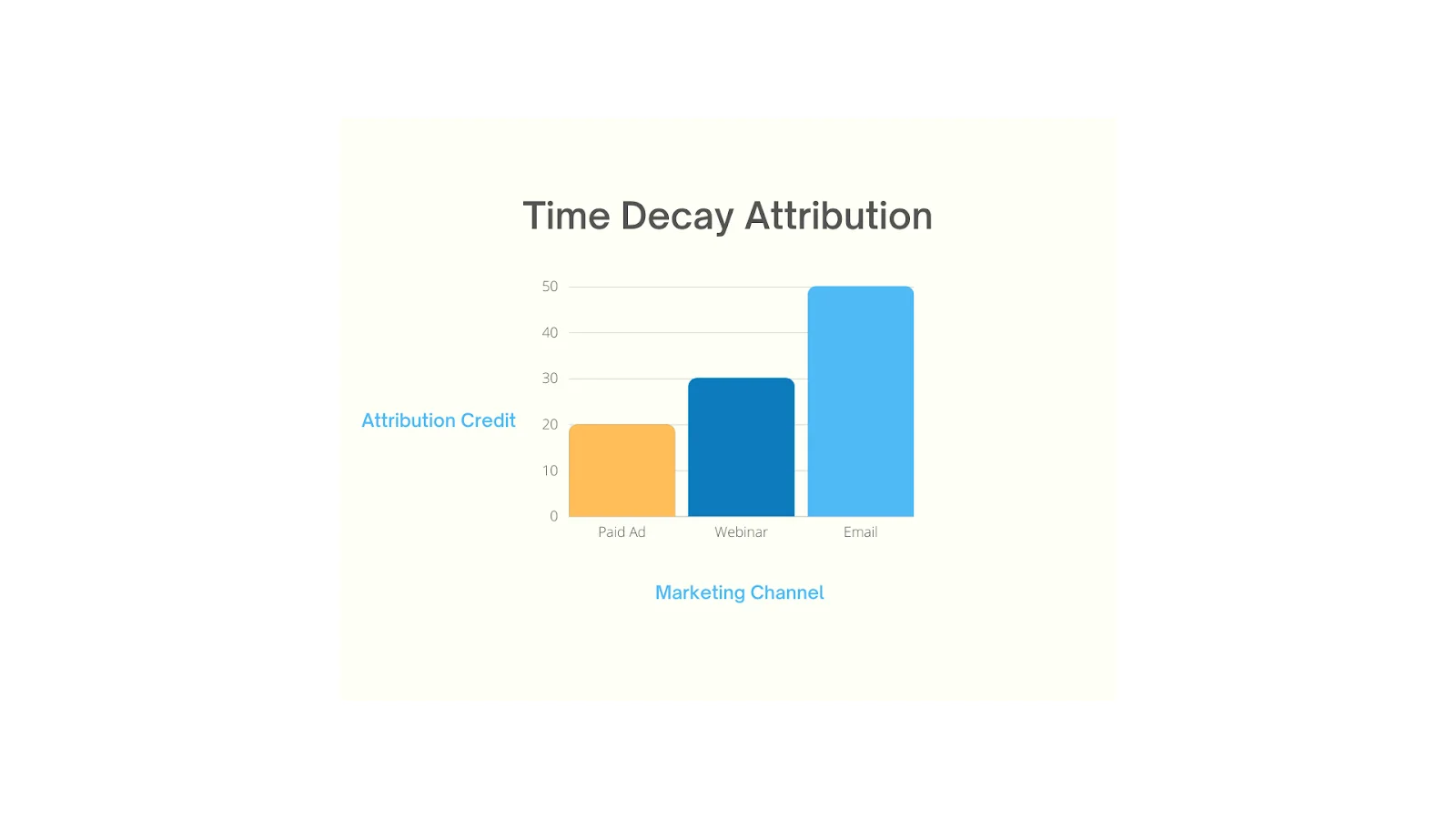
Picture a company trying to understand how customers decide to sign up for their product. Along the customer's journey, buyers first see an ad on a tech blog a few months ago. Then, they attend a webinar, and finally, they receive a targeted mail, prompting them to convert.
Using a time decay attribution model, the email they received just before the conversion gets the most credit (50%) because it had the most immediate impact. The webinar would receive some credit (30%), and the initial ad (20%) would receive the least credit.
This model recognizes that while all interactions play a role, their influence varies over the customer journey from the first touch to conversion. It helps companies see which touch points were most influential, allowing them to fine-tune their marketing strategy accordingly.
The Time Decay Attribution Formula
Time decay uses an exponential decay function to weight touchpoints. The most common formulation — and the one Google Analytics uses by default — is:
Weight = 2(-t / half-life)
Where:
- t = days between the touchpoint and the conversion
- half-life = the time period after which a touchpoint is worth half as much as a touchpoint at conversion (Google Analytics defaults to 7 days)
So with a 7-day half-life:
- A touchpoint on the day of conversion gets full weight (1.0)
- A touchpoint 7 days before gets half weight (0.5)
- A touchpoint 14 days before gets quarter weight (0.25)
- A touchpoint 21 days before gets eighth weight (0.125)
After all touchpoint weights are calculated, they're normalized so the credit per conversion sums to 100%. The half-life parameter is configurable — shorten it to emphasize recency, lengthen it to spread credit more evenly across long sales cycles.
{{INLINE_TOFU}}
Why The Time Decay Attribution Model Matters
A variety of attribution models exist, including First Interaction, Last Interaction, Linear, Position-based, and Time Decay. Each has their own benefits and limitations based on the nature of your business.
Generally, the last click model has been the most popular but it can be heavily limiting as it's a single-touch model that attributes conversions solely to the last touchpoint. As you might expect, this doesn't account for the contribution of previous touchpoints that led to the conversion. While this might be suitable for most B2C brands looking to see what channels drive the most conversions, it fails to capture the complexity of a lengthy, non-linear B2B sales cycle.
Let's take a multi-touch model: linear attribution. This model assigns equal credit to all traffic sources, treating them uniformly, but it might not fully reflect reality. Each channel impacts decision-making differently, and giving them equal credit might be a limiting view for companies looking to optimize their marketing efforts and shorten their sales cycle.
Here's where time decay attribution models fit in. Time decay attribution strikes a balance between giving credit to all relevant traffic sources in reverse order, and how each channel contributed to the decision-making process.
When to Use Time Decay Attribution
Time decay isn't right for every business. Use it when:
- Your sales cycle is 30-90+ days. Time decay shines for B2B, enterprise software, financial services, real estate, and other considered purchases. With shorter cycles, last-click is usually sufficient.
- You run multi-channel nurture sequences. If buyers touch your brand 5-15 times before converting (webinars, retargeting, email, sales calls), time decay reflects which channels actually closed the deal.
- You're optimizing for conversion, not awareness. Time decay tells you what to invest in to drive pipeline this quarter — not what's filling the top of funnel.
- You have clean event-level tracking. The model only works if every touchpoint is captured with timestamps. Gaps in tracking will skew weights toward whatever is tracked.
Use a different model when: your sales cycle is under 7 days (use last-click), you're measuring brand-building campaigns (use first-touch or media-mix modeling), or you have enough conversion volume for algorithmic attribution (use data-driven).
Benefits of Time Decay Attribution
Much like other attribution models, the time decay model has its unique benefits and limitations. Here are a few things to consider before you implement a time decay attribution model.
1. True-to-Life B2B Attribution
In reality, each GTM channel has a unique life cycle, leading to natural performance fluctuations over time. Identifying these changes promptly represents a significant chance for enhancing results, and Time Decay offers a means to seize this opportunity.
This is because Time Decay assigns greater weight to the most recent touchpoints, it amplifies the influence of significant performance fluctuations within those sources on the overall outcomes. Consequently, the utilization of Time Decay empowers a more reliable method for determining the priority of pipeline sources that require immediate attention and improvement compared to other attribution models.
2. Best for Conversion Optimization
The Time decay attribution model's benefit lies in its capacity to enable you to focus on actions that yield the most immediate results. Additionally, it helps identify critical late-stage touchpoints, often overlooked by alternative models, including strategies pertaining to bottom-funnel marketing and sales.
3. Enhanced Customer Journey Representation
Conventional attribution models tend to oversimplify the customer journey by uniformly distributing credit among all touchpoints or solely attributing it to the first or last interaction. In contrast, the time decay model meticulously considers the timing of each interaction, resulting in a more precise depiction of the customer journey.
Moreover, it facilitates the comparative assessment of campaign or channel performance over time, introducing a layer of predictability as marketers can anticipate consistent attribution patterns across various campaigns.
4. Adaptable for Tailored Applications
The Time Decay Attribution Model boasts remarkable adaptability, permitting customization to align with specific requirements. For example, it allows for the adjustment of weightage on recent interactions or the prioritization of specific channels to suit particular needs.
Take the example of a travel company, where placing greater emphasis on the last interaction or channel before booking a trip can offer deeper insights into the decision-making process, as travel decisions often manifest close to the departure date, making recent interactions more influential.
In cases like these, the time decay rate can be reduced to account for external influence.
5. Easy to integrate with other models
Integrating the insights gained from the time decay model with other data sources provides a comprehensive perspective of your marketing strategies.
For instance, many B2B companies observe that direct searches are the last event before a user subscribes to their solution. In these instances a time decay model can be combined with a position-based model, helping give higher credit to touchpoints that contributed to opportunity creation before the final sale took place.
Time Decay vs Other Attribution Models
Here's how time decay stacks up against the other attribution models you'll consider:
ModelHow Credit Is AssignedBest Forvs Time DecayFirst-Touch100% to the first touchpointTop-of-funnel / awareness measurementTime decay spreads credit across the journey with a recency biasLast-Click100% to the final touchpointShort, transactional cycles (under 7 days)Time decay still credits the full funnel — last-click ignores itLinearEqual credit across all touchpointsEducational / equal-emphasis journeysTime decay weights by recency; linear treats all touches the samePosition-Based (U-shaped)40% first, 40% last, 20% middleJourneys where intro and close matter mostTime decay uses continuous time-based weighting instead of fixed positionsData-Driven (Algorithmic)ML / Shapley / Markov chain on actual conversion dataHigh-volume programs with rich dataTime decay is rule-based and explainable; data-driven is more accurate but a black box
Limitations of Time Decay Attribution
1. Weighted Focus on Recent Interactions
This model places a heightened emphasis on touchpoints that are in close proximity to the conversion event. Although this approach yields valuable insights into the effectiveness of strategies for driving conversions, it may unintentionally downplay the significance of initial touchpoints.
In cases involving deliberate and well-considered purchases, such as enterprise sales, customers engage in extensive research and comparison, late-stage interactions may receive an overemphasized credit. This could potentially result in an excessive allocation of resources to strategies aimed at closing sales, while inadvertently neglecting those designed to attract and nurture leads.
2. Greater Complexity
Due to the complexity of the model, it may not be beneficial for companies at different stages in their growth journey. The companies that are just starting out and looking for a product-to-market fit, may benefit more from first-touch attribution, rather than the time decay model, which will require a lot of resources.
Challenges With Implementing Time Decay Attribution Model
As mentioned above, the time decay model can be complex and difficult to implement.
Since attribution relies heavily on data, one of the biggest challenges when implementing any attribution model is the accuracy of data.
But oftentimes, social media attribution tools such as Facebook ads, and analytic tools such as Google Analytics show discrepancies in data when compared to one another.
Account-based marketing solutions can sieve out these interactions, creating a more concise data set to derive insights.
This also helps address another of the challenges faced by marketers and entrepreneurs, when working with time decay attribution. It is to use a refined data set that excludes sessions that lack meaningful engagement, such as quick bounces. You can also filter out sessions with little or no activity, and guarantee that the data you analyze represents genuine user interactions.
What Marketers Say About Time Decay
Outside of vendor blogs, here's how working marketers describe their experience with the model:
"Time-Decay attribution for campaigns with longer decision-making cycles, particularly in our property management services, where potential clients interact with multiple touchpoints over several weeks." — DGonzalezHenao, HubSpot Community
"I have campaigns that run as short as 24 hours to one month to evergreen. I'd want first or last touch in the 24-hour effort, time decay for the one-month campaign, and full path for evergreen." — MAndrews23, HubSpot Community
The pattern across communities is consistent: practitioners reach for time decay when sales cycles stretch beyond a couple of weeks and when there's a genuine multi-touch journey to credit. The most common complaint is that picking the right half-life feels arbitrary — most teams start with the GA default (7 days), then lengthen it to match the median time-to-conversion they actually see in their pipeline data.
Also Read: Revenue Forecasting Models
Time Decay Attribution FAQs
What is a time decay attribution model?
A time decay attribution model is a multi-touch attribution method that gives credit to touchpoints (clicks or impressions) based on how recently they happened — touchpoints closer to the conversion get more weight, earlier touchpoints get exponentially less.
What is the formula for time decay attribution?
Weight = 2(-t / half-life), where t is the days between a touchpoint and the conversion. Weights are then normalized so credit per conversion sums to 100%.
What is the half-life in time decay attribution?
Half-life is the time period after which a touchpoint is worth half as much as a touchpoint at conversion. Google Analytics uses a 7-day default. Lengthen it (30, 45 days) for long B2B cycles; shorten it for short consideration cycles.
When should I use time decay attribution?
Use it for sales cycles of 30+ days with multiple nurture touchpoints — B2B SaaS, enterprise software, financial services, real estate. Avoid it when your cycle is under 7 days (use last-click) or when you need to measure brand awareness (use first-touch or MMM).
What's the difference between time decay and last-click attribution?
Last-click gives 100% credit to the final touchpoint and ignores everything else. Time decay credits the full journey but weights recent touches more heavily — a fairer reflection of multi-touch B2B journeys.
Does Google Analytics support time decay attribution?
Yes. GA4's attribution reports include a Time Decay model with a configurable half-life (default 7 days) and lookback window (default 30 days for non-conversion paths, 90 days for conversions).
What's the difference between MTA and MMM?
Multi-touch attribution (MTA), including time decay, assigns conversion credit at the user-journey level using digital tracking data. Marketing mix modeling (MMM) is an econometric, top-down approach that estimates channel impact from aggregated spend and outcome data — useful for offline channels and brand effects that MTA can't see.
The Bottom Line on Time Decay Attribution
Time decay attribution is the most pragmatic multi-touch model for B2B teams running 30-90+ day sales cycles. It captures the full customer journey, weights recent touchpoints more heavily (matching how decisions actually get made), and is explainable to non-technical stakeholders — three things data-driven attribution can't always claim.
The trade-off: it requires clean event-level tracking, a thoughtfully chosen half-life that matches your actual cycle length, and the discipline to combine its insights with first-touch or MMM data so you don't underinvest in awareness.
Want to see time decay attribution running on your own pipeline? Factors layers time decay (and first-touch, last-touch, U-shaped, and W-shaped models) on top of your CRM, ad accounts, and website data, so you can compare them side-by-side and pick the model that matches your sales cycle.

6 Tips to Align your Sales and Marketing Teams
This blog highlights the importance of sales and marketing alignment and shares a few tips on how to go about aligning your sales and marketing teams.

Sales and marketing are like twins that don’t get along. Teams often confuse the two because they work along similar lines. In fact, both teams are often given a shared budget to divide amongst themselves.
In a study conducted by Harvard Business Review, when sales and marketing teams were asked to describe each, the two had nothing but negative comments. “Paper pusher” and “irrelevant” were the top terms used to describe the marketing team. On the other hand, some words that the marketing team used to describe the sales team included “incompetent” and “simple-minded” (Source).
Of course, this rift between sales and marketing has existed since the beginning of, well, sales and marketing.
But what if…what if…both sales and marketing could join forces to work together?
What can sales and marketing teams achieve when tightly aligned?
Well, organizations that have their sales and marketing teams on the same page enjoy the following:
- 36% higher customer retention rates
- 38% higher win rates (Source)
- 67% improvement in deal closures
- 209% more revenue from marketing (Source)
- 20% annual growth rate (Source)
- Save 30% Customer Acquisition Costs (Source)
Then the next question is—How can you get your sales and marketing teams on the same page? Here are a few tips that will help!
{{INLINE_TOFU}}
6 strategies to align sales and marketing
1. Align Goals to ROI
Sales and marketing teams have different ways of looking at their goals. While sales teams have monthly, quarterly, and annual deadlines, this concept is foreign to the marketing team that has never been linked to revenue performance.
Since both teams work in different styles, confining either one to follow the other process will result in unnecessary friction.
But the one thing that doesn’t change is their goals.
In the end, both their goals should be improving ROI. Taking the focus away from the journey and putting it on the result can even both the teams’ paces and unite them.
2. Employ Lead Qualification
Another area where both teams find themselves at odds is when a successful campaign from the marketing team does not translate into higher conversions for the sales team.

The culprit behind this is lead quality.
If the leads being generated are not interested in buying the company’s product, no matter how many prospects flow into your sales funnel, the end conversion rate will be the same.
One way to improve lead quality is by qualifying them.
Apart from this, lead qualification offers three other benefits: it help the marketing team understand whom they’re supposed to target, get both teams on the same page, and reduce the sales team’s efforts.
Then, how does one employ lead qualification?
One way to qualify a lead is to get both teams to sit together and build an ideal customer profile (ICP). An ICP is basically a customer profile of the business’s ideal buyers. It answers questions like how much they would be willing to spend, where they are more likely to live, what communication channels they are more likely to use, and what they are looking for.
The next step involves setting up a presales team that sorts the leads into invalid, uninterested, partly interested, and interested, before sending the leads forward. The invalid and uninterested leads get discarded.
The marketing team’s goal is to reduce the number of invalids and uninterested leads, whereas the sales team’s job is to convert the remaining two categories into clients.
These two steps can result in smoother operations between sales and marketing.
3. Use a CRM
Lack of communication is the biggest reason for disconnected sales and marketing teams. Since sales and marketing teams are usually swamped with their own work, it can get tricky to find time to interact with each other.
A Customer Relationship Management Software solves this problem by centralizing information. This allows different teams to access resources and monitor each other’s activities, keeping everyone on the same page.
CRMs also help nurture leads, track journeys, decrease duplication of efforts, provide deeper insights and analytics about customers, and score leads, all of which allow better decision-making and harmony between teams.
And if that isn’t enough, the software also provides sales and marketing automation, speeding up the groups’ efforts and saving them time.
4. Invest in Sales Enablement
Sales enablement is one of the most common methods companies employ to align their sales and marketing teams. How it helps companies is by:
1. Encouraging marketers and sales reps to interact
The marketing team needs to notify the sales team whenever they update new content. This forces them to reach out and interact with the sales reps. Similarly, sales reps must provide feedback on how the content helps them and what improvements can be made, thus, improving communication between the two.
2. Giving marketers and sellers an idea of what content resonates with customers the most
Once marketers create new content, they understand which content the sales team uses more and which is used less, thus helping them make better content to enable the reps.
Sales reps can also understand the type of prospects they are interacting with through the marketing team’s enablement content. This allows them to change their pitch according to the customer segment they are dealing with, which results in more closures.
3. Ensuring that the content remains on brand
When sellers have difficulty finding the right content, they might modify the material they already have to suit their sales purposes. This saves them time, but it might not necessarily be brand compliant.
Sales enablement allows representatives to modify materials on the fly using only pre-approved content. Furthermore, it gives marketers access to each modification made by each seller. This allows the marketing team to analyze what sellers are looking for in the material and which ones they are finding difficulty in navigating. This will be really beneficial for future asset optimization and improvement.
5. Attend Each Other’s Meetings
For companies that haven’t yet employed a CRM or an update tracking software, the best way for sales and marketers to keep tabs on each other’s updates is by actually attending their meetings.
Or better still, holding a dedicated joint meeting weekly or monthly can bring both teams on the same page. This ensures everyone is on the same page regarding that quarter's goals, tactics, expectations, strategies, and performance progress.
Here are some tips for holding a fruitful sales and marketing meeting
1. Set a proper agenda
Collect the agendas to be discussed beforehand and allot specific times for them to ensure all the topics are discussed. Remember to keep buffer time in case the topics drag on and the time taken to finalize a decision on that agenda.
2. Keep changing the themes
One way to avoid having complicated agendas with broad topics is by grouping them under different themes. Keeping one theme per weekly meeting can simplify the agenda and burden both teams less.
Some popular sales and marketing themes include:
- Strategies Discussion – Held to discuss the strategies that have been working and the strategies that need to be changed or dropped.
- Performance Reviews – How the teams’ efforts contribute to achieving goals and how much they have progressed.
- Buyer Behaviour – Held to discuss any changes and improvements that can be made regarding buyer engagement or to discuss the results of an already published campaign.
- CCC review – Held to review and discuss marketing and sales content, campaigns to be published or made, and any notable moves competitors have made.
And since there is a theme for each meeting, all members of both teams need not have to attend. Instead, they can look at the meeting minutes later, saving them time to do other work.
3. Share the agenda beforehand and assign representatives to speak
The last way to ensure fruitful meetings is to share the topics to be discussed beforehand. This gives both teams time to prepare in advance. Furthermore, assigning representatives saves time for reps and marketers who must sit through the entire length of the meeting to discuss minute topics.
6. Talk out the discrepancies
It’s common to have disagreements between sales reps and marketers over different issues. However, while they might seem trivial, these conflicts must be dealt with utmost care to not give the illusion that one team is favored over the other.
Another common issue is that both teams might not say out loud whether they agree or not with each other for the fear of retaliation or confrontation.
One solution to these problems is encouraging both teams to provide constructive criticism. Sales and marketing employees can be taught how to provide feedback without sounding rude.
And to ensure that the feedback is formalized and the interactions stay respectful, it can be organized on dedicated venues like forums or a weekly critics session.
The final step is to rinse and repeat these 6 steps. But remember, like all other strategies, they will soon become obsolete and ineffective if your business doesn’t regularly revisit and update them.
Ultimately, aligning both sales and marketing teams is always important, no matter how big or small a business is. While these are very effective strategies, each company knows its employees the best and, thus, should also consider additional custom methods apart from these as well.
.avif)
The Ultimate Guide to Product-Led Growth: A Framework for Growth that Sticks
Learn about the Product-Led Growth (PLG) framework and how it can help your business grow. Read Factors.ai's ultimate guide to PLG now.

What is a product-led growth strategy?
Product-led growth (PLG) is a business strategy and technique that sets the product as the major engine of customer acquisition, activation, satisfaction, retention, and scalable expansion. Customers remain loyal to a brand that offers an innovative and personalized product experience. It most likely happens when all of a company's digital-facing teams—marketing, product, customer success, and more—unite around product-led growth.
Due to Product Led Growth’s pivotal position in some of the most successful SaaS start-ups in recent times (Notion, Dropbox, Canva, Figma, Slack and Dropbox), PLG is being increasingly considered by high-growth teams as a winning growth strategy.
A closer examination of PLG, reveals a fundamentally new approach to product development. One that makes the product the star of the show throughout the whole user experience. Salespeople, marketers, and engineers all play supporting roles in a successful assisted sale, but the product is the star of the show. User-driven virality, activation and engagement journeys, and the first steps toward an assisted sale are all examples of this.
Why is product-led growth the future of SaaS?
In contrast to sales-led organizations whose sole objective is to move a buyer from A to B in a sales cycle, product-led companies invert the typical sales paradigm. Product-driven businesses make this possible by providing the consumer with the "keys" to the product and assisting them in experiencing a meaningful consequence while using the product. At this point, upgrading to a premium subscription is an obvious choice.
On the surface, product-led development may appear to be a straightforward model for your buyer to test before purchasing. However, upon closer inspection, product-led growth is an entirely novel strategy for expanding a SaaS business.
Product-led growth entails that every team in your organization influences the product. Your marketing team will inquire, "How can we develop a demand flywheel for our product?" Your sales staff will inquire, "How can we use this product to qualify leads?" Your customer success team asks, "How can we design a product that facilitates customer success beyond our wildest dreams?" By focusing every team on the product, you establish a culture based on enduring customer value."
By focusing on the product throughout the organization, product-led businesses frequently gain:
- By letting your prospects onboard themselves, you can drastically minimize the time-to-value and sales cycle of your prospects.
- Reduce Customer Acquisition Costs (CAC) by allowing users to upgrade independently.
- Higher Revenue Per Employee (RPE): Less hand-holding results in increased profit margins per customer.
Product-led growth isn't just about disrupting "how" SaaS businesses sell; it's your only means of survival.
Key product-led growth metrics
It's critical that everyone in your team understands and adheres to the same set of performance goals. While there are new measures to rally behind in a product-led growth model, many on this list may sound familiar — many SaaS organizations already do prefer to track product-led growth metrics.
1. Activation Rate: The percentage of users that have found meaningful value in a product.
2. Customer Lifetime Value (CLV): An estimate of how much income a single customer will bring in for your company over the course of your engagement.
3. Acquisition: The number of users who have signed up for your free trial/tier.
4. Product Qualified Lead (PQL): A product qualified lead (PQL) is a lead who has derived significant value from your product via a free trial or freemium model. These customers are primed for an upsell.
5. Net Revenue Churn: This metric, which is commonly represented as a percentage, reflects the amount of money lost after accounting for new and expansion revenue.
6. Average Revenue Per User (ARPU): This metric is excellent for gauging the general health of your company. To determine this, divide the monthly recurring revenue by the total number of clients.
7. TTV: The amount of time it takes new users to reach their Activation moment is known as the Time-to-Value (TTV). The more quickly you can activate users, the more likely it is that they will remain active. The key objective of a successful onboarding process is to minimize TTV.
8. Expansion Revenue: One of the most crucial levers for SaaS growth, expansion revenue serves as an anti-churn strategy. Revenue from existing customers that is created through upsells, add-ons, cross-sells, and other strategies is measured by expansion revenue.
9. Free-to-Paid Conversion Rate: The percentage of trial users that have upgraded to a paid membership.
{{INLINE_MOFU}}
Is your product fit for product led growth?
If your organization possesses the following traits, you might want to employ a product-led growth approach to increase product adoption: In fact, a PLG approach can influence your marketing, product optimization, pricing, and sales strategies.
- The product market conditions are favorable for the proposed strategy to be implemented successfully.
- The user views the product as a "highest-value-product" that they wish to use on a frequent basis, which increases its perceived value.
- The user is able to quickly and easily achieve large ongoing benefit with little to no assistance from corporate staff.
- Rather than setting the price, "paywalls" in a product, track how much value the user is receiving and adjust their pricing accordingly.
- Market, sell, and onboard new consumers are all made possible by the product.
- The goal of marketing is to get people to interact with the product rather than the sales team.
- A network effect is already incorporated into the product.
- Companies that use the product have a vocal proponent who works tirelessly to spread the word about how fantastic it is.
Modelling growth around a product-driven approach
You can escape the onslaught of increasing client acquisition expenses and declining customer willingness to pay for your product by focusing on product-led growth. You must do the following actions in order to create a successful product-led business:
- Learn to articulate the benefits that working with you can offer to your clients.
- Make sure you express this value to your customer in a way that is pertinent to them and the situation they are in.
- Ensure that you deliver on that value.
How does the Product-led growth model fare in comparison to other models?
Growth models commonly used by companies include one or a combination of the following:
- Sales-led
- Marketing-led
- Product-led
Each of the three models has a different internal alignment. Companies that are mostly sales-driven are designed to help the sales team succeed as the company's principal revenue generator. We ask, "Will this help the sales team win more deals?" while making decisions about anything from employee training to software purchases to marketing strategies.
The primary goal of marketing-driven businesses is to persuade customers of the worth of a product and to meet their demands. A marketing team is supported by the firm in its attempts to attract customers and generate leads. After conducting customer research and advertising campaigns, the marketing staff has a key role in bringing new customers into the fold. Marketing initiatives can make all the difference in pipeline and growth in a highly competitive market where items are tough to distinguish.
Prospects must be told the value of a product explicitly under each of these approaches. Product-led businesses, on the other hand, place an emphasis on showcasing the true worth of their offerings. For example, product-driven organizations may encourage prospects to engage with the product immediately—in the form of a free trial or "freemium" subscription—instead of investing extensively in outbound sales. Allowing potential customers to test out a high-quality product before they buy it enables them to experience its advantages first-hand. It is unnecessary to persuade a buyer about the genuine value of a product created with this mindset.
Product-led businesses prioritize minimizing customer acquisition costs (CAC) to the greatest extent possible. Recruiting and training a large sales force is costly. Both traditional and digital marketing tactics that are of high-quality demand substantial and consistent financial commitments. However, becoming product-driven does not entail abandoning all traditional sales and marketing tactics. It is more important to be strategic with your investments and vision.
You still require a sales team to assist with selling and a marketing team to generate demand. But product-driven expansion increases the effectiveness of both sales-driven and marketing-driven activities. Ultimately, it is much simpler to sell and promote a product that customers adore than to sell and market an average product.
How does your business benefit from a Product-led growth model?
Are you unsure if product-led growth is the right path for your company? There are some definite advantages to product-led growth, even if it isn't ideal in every situation.
Accelerated growth - Rapid acceptance and expansion are the primary motivations for using product-led growth in business. To put it another way, you're getting to the point and decreasing the barriers to entry by allowing users to access the product for no charge.
Scalability - Slack and Shopify are two of the most successful startups in the world, but scaling up may be a challenge. If you're looking for rapid expansion, product-driven growth is often the best option. This is because product-driven companies can focus their resources on onboarding and serving customers while their competitors are focusing on developing their sales organizations.
Reduced Cost of Acquisition - Using a product-led growth approach significantly decreases a company's marketing expense because customer acquisition channels are already embedded into the product. Overall acquisition expenses are reduced as a result.
Better Rates of Retention - Product-led growth ensures that user expectations are aligned with the capabilities of your product, ensuring that your product is a success. A better fit for the user is created, which leads to increased user retention over time.
Customer Satisfaction - Growing a business with a product is mostly dependent on word-of-mouth advertising. It's not your company's job to persuade customers to buy your goods. It's your customers, not you, who drive adoption.
Customers are likely to have great things to say about this product because of its emphasis on providing real value. Other customers read these ratings and thoughts, which starts a virtuous circle of purchases. Product-led growth enterprises benefit from the fact that many consumers prefer to investigate things they've heard about online rather than in person.
Transition to product-led: What does it mean to be product led
Not only is the price model changing, but so are many other aspects of the firm as a whole.
Customers can test a product before purchasing it thanks to free trials offered by many companies.
As a result, product onboarding experiences are being improved so that clients may begin experiencing the product's value much sooner.
Product firms devote a lot of time and attention to actually distinguishing themselves from their competitors by uncovering fresh client problems and value to offer.
To deliver even greater value to a more narrowly focused group of clients, businesses are increasingly focusing on a smaller set of distinct demographics and the difficulties they face.
The distinctive value proposition is the focus of the messaging developed by the marketing and sales teams.
Optimizing pricing models around customer experience and providing more options, such as subscription models, is becoming more commonplace.
The term "value" appears in all of them. Customers churn and move on to the next product if they don't feel their demands are addressed and the product doesn't deliver value.
In order to become product-led, the first step is to discover what customers value the most about their products. What are the most common issues customers have with the product? What features and functionalities are absolutely essential to your clients in order to keep them engaged over the long term?
Companies can use this information to improve their product offering, onboarding experience, marketing and sales message, pricing structures, and trial choices so that customers can experience the product's unique value proposition at every stage of their customer journey.

Looking forward…
When brands correctly use product-led growth frameworks, they acquire an unfair competitive edge and experience substantially lower Customer Acquisition Costs (CAC). A good framework will also help reduce friction in the user onboarding process, which might impede the growth of your product.
But beyond the framework, product-led growth is really about knowing your customers' demands and identifying market gaps.
PLG puts the product at the center of the customer journey, guiding users to value without traditional sales touchpoints.
1. Core Principle: Users onboard, engage, and convert through hands-on product experiences.
2. Team Alignment: Success depends on marketing, sales, and success teams working from shared behavioral insights.
3. Strategic Benefits: Builds viral loops, reduces friction, and shortens sales cycles.
With tools like Factors, businesses gain deep behavioral analytics and account-level visibility to identify high-intent users and drive scalable growth.
The Ultimate Guide for B2B Inbound Marketing
Explore how inbound marketing B2B strategies can revolutionize lead generation and sales. Learn effective techniques and how Factors can boost your marketing efforts.
.avif)
TL;DR
- Inbound marketing for B2B attracts customers with valuable content and personalized experiences, aligning with modern buyer behavior.
- Inbound vs. Outbound: Inbound pulls customers in with content, SEO, and lead nurturing, unlike outbound tactics like cold calls.
- Benefits: Boosts visibility and engagement, Cost-effective lead generation, Attracts high-quality leads, Data-driven insights for strategy refinement.
- Key Components:
- Buyer Personas: Tailor content for target customers.
- Content Creation: Blogs, eBooks, videos, etc.
- SEO: Optimize discoverability.
- Lead Nurturing: Build relationships via automation.
- Analytics: Measure and refine continuously.
- Success Examples:
- HubSpot: Content-rich blogs and webinars.
- Zendesk: Trust-building case studies.
- Salesforce: Engaging webinars.
- How Factors Enhances Inbound Marketing: Advanced Insights, Content Suggestions, Automated Nurturing, SEO Tools
- B2B inbound marketing, enhanced by Factors’ advanced tools, drives high-quality leads and sales through targeted content, SEO, and automation.
Inbound marketing for B2B is not just a buzzword; it's an approach that changes how B2B companies generate leads and drive sales. Focusing on attracting potential customers through valuable content and experiences aligns perfectly with modern buyer behaviors and preferences.
In this comprehensive blog, we'll go over the essentials of B2B inbound marketing, explore practical strategies, and highlight how Factors can elevate your B2B inbound marketing efforts to new heights.
Understanding B2B Inbound Marketing
Did you know?
Companies that excel at inbound marketing see a conversion rate of 14.6% compared to 1.7% for outbound marketing.
Before we dive into the strategies, it's essential to understand what B2B inbound marketing B2B entails. Unlike traditional outbound marketing, which relies on pushing messages out to potential customers through channels like cold calls, direct mail, or display ads, inbound marketing is about drawing customers in. It focuses on creating content and experiences that align with the needs and interests of your target audience.
Inbound marketing B2B leverages content marketing, SEO, social media, and lead nurturing to attract, engage, and convert prospects into customers. The goal is to provide valuable content that addresses your target audience's challenges and pain points, thereby building trust and positioning your brand as a thought leader in your industry.

The Benefits of B2B Inbound Marketing
- Increased Visibility and Brand Awareness:
By creating valuable content and optimizing it for search engines, your brand gains visibility among potential customers actively seeking solutions to their problems.
- Cost-Effective Lead Generation:
Inbound marketing strategies, such as content creation and SEO, often cost less than traditional outbound methods. With a well-executed inbound approach, you can generate high-quality leads at a fraction of the cost.
- Enhanced Customer Engagement:
Inbound marketing B2B focuses on providing relevant and valuable content that engages potential customers. This helps build stronger relationships and fosters trust, making it easier to nurture leads and guide them through the sales funnel.
- Improved Lead Quality:
Since inbound marketing attracts prospects who are genuinely interested in your offerings, the leads generated are often of higher quality. These leads are more likely to convert into paying customers than those acquired through traditional outbound methods.
- Data-Driven Insights:
Inbound marketing allows you to track and analyze website traffic, lead conversion rates, and content performance metrics. These insights help you refine your strategies and make data-driven decisions.
{{INLINE_TOFU}}
Key Components of a Successful B2B Inbound Marketing Strategy
To create an effective B2B inbound marketing strategy, you need to focus on several key components. Each plays a crucial role in attracting, engaging, and converting potential customers.
1. Buyer Personas
Creating detailed buyer personas is the first step in any inbound marketing B2B strategy. Buyer personas are semi-fictional representations of what your ideal customers would be like, depending upon accurate data and market research about your pre-existing clients. They help you understand your target audience's needs, challenges, and preferences, enabling you to create content that resonates with them.
To develop accurate buyer personas, consider factors such as:
- Demographics: Age, gender, job title, and company size
- Pain Points: Challenges and problems they face in their industry or role
- Goals: Objectives they aim to achieve
- Decision-Making Process: How they make purchasing decisions and what factors influence them
2. Content Creation
Content is the cornerstone of inbound marketing. Creating high-quality, valuable content that addresses the needs and interests of your target audience is essential for attracting and engaging potential customers. Types of content to consider include:
- Blog Posts: Share insights, tips, and industry trends through regular blog posts. Blogging helps improve your website's SEO and establishes your brand as an authority in your field. B2B companies that blog generate 67% more leads per month than those that do not.
- Ebooks and Whitepapers: Provide in-depth information on specific topics that are relevant to your audience. With these resources, you can capture leads in exchange for contact information.
- Case Studies: Showcase success stories and examples of how your products or services have benefited other businesses. Case studies help build credibility and trust.
- Infographics: Visual content like infographics can simplify complex information and make it more engaging for your audience.
- Videos: Video content is highly engaging and can be used to explain concepts, demonstrate products, or share customer testimonials.

3. SEO (Search Engine Optimization)
SEO is crucial for ensuring that your content is discoverable by your target audience. By optimizing your content for relevant keywords, you can improve your website's search engine rankings and attract organic traffic. Key SEO practices include:
- Keyword Research: Identify the keywords and phrases your target audience uses to search for solutions related to your products or services.
- On-Page SEO: Optimize your content, meta descriptions, headers, and images for the selected keywords.
- Off-Page SEO: Build backlinks to your content from reputable sources to improve your website's authority and credibility.
- Technical SEO: Ensure that your website's technical aspects, such as site speed, mobile friendliness, and crawl ability, are optimized for search engines.
4. Lead Nurturing
Lead nurturing involves building relationships with potential customers throughout their buyer's journey. Effective lead nurturing requires delivering relevant content and personalized experiences based on where the prospect is in the sales funnel. Key strategies include:
- Email Marketing: Use email campaigns to deliver targeted content and offers to your leads. Segment your email list based on buyer personas and engagement levels for more personalized communication.
- Marketing Automation: Implement marketing automation tools to streamline lead nurturing processes, such as sending automated follow-up emails, tracking lead behavior, and scoring leads based on their engagement.
- Lead Scoring: Assign scores to leads based on their interactions with your content and their readiness to purchase. This helps prioritize leads and focus efforts on those most likely to convert.
5. Analytics and Measurement
Measuring the effectiveness of your inbound marketing B2B efforts is crucial for optimizing your strategy. Companies that use real-time analytics are five times more likely to make faster decisions than those that don’t. Key metrics to track include:
- Website Traffic: Monitor the number of visitors to your website and analyze traffic sources to understand where your audience is coming from.
- Conversion Rates: Track the percentage of visitors who take desired actions, such as filling out a contact form or downloading a resource.
- Lead Generation: Measure the number of leads generated through your inbound marketing efforts and assess their quality.
- Engagement Metrics: Analyze metrics such as time on page, bounce rate, and social media engagement to gauge how well your content resonates with your audience.
- ROI (Return on Investment): Calculate the ROI of your inbound marketing activities by comparing the cost of your efforts to the revenue generated from new customers.
How Other Brands Approach It
HubSpot’s Content Strategy
HubSpot, a leader in inbound marketing, uses a content-rich approach that includes blogs, eBooks, and webinars. Their comprehensive content strategy attracts many leads and establishes them as an industry authority.
Value of Diverse Content Formats: Offering various types of content can cater to different audience preferences and stages of the buying journey.
Zendesk’s Case Studies
Zendesk showcases customer success stories through detailed case studies highlighting their software's impact. These case studies build credibility and provide potential customers with relatable examples of how Zendesk can solve their problems.
Importance of Real-World Examples: Case studies and success stories build trust and credibility by demonstrating tangible results.
Salesforce’s Webinars
Salesforce effectively uses webinars to engage prospects and showcase their products' capabilities. These webinars provide valuable information and foster direct interaction with potential clients.
Engagement through Interactive Content: Webinars and interactive content foster deeper engagement and provide opportunities for direct interaction with prospects.
Here’s How Factors Can Help

1. Advanced Data Analytics and Insights
Unlock Deeper Customer Insights: Factors utilizes sophisticated AI algorithms to analyze vast data, providing actionable insights into your target audience’s behavior, preferences, and pain points. This deep understanding enables you to create highly targeted and relevant content that resonates with your audience.
Predictive Analytics: By leveraging predictive analytics, Factors helps you anticipate future trends and customer behaviors. This foresight allows you to stay ahead of market shifts and align your marketing strategies with emerging trends, ensuring your content remains relevant and engaging.
2. Enhanced Content Suggestions
Personalized Content Delivery: Factors’ machine learning algorithms analyze user interactions and preferences to provide personalized content recommendations. Using these insights, marketing teams can tailor their approach before reaching out to prospects.
Content Optimization: By analyzing performance metrics and user feedback, Factors helps you refine your content strategy to enhance its effectiveness and reach.
3. Automated Lead Nurturing
Streamlined Lead Management: Factors automates lead nurturing processes by delivering personalized content and communication based on user behavior and engagement. This automation helps you maintain consistent and relevant interactions with leads throughout their buyer’s journey, improving the chances of conversion.
Behavioral Triggers: The platform uses AI to set up behavioral triggers that automatically send tailored content or offers when a lead reaches specific engagement milestones. This ensures timely and relevant communication, enhancing the overall lead nurturing experience.
4. Predictive Lead Scoring
Prioritize High-Value Leads: Factors employs predictive lead scoring to evaluate each lead's potential based on their interactions and engagement with your content. By focusing on leads with higher scores, you can allocate your resources more effectively and increase the likelihood of closing deals.
Dynamic Scoring Models: The platform’s dynamic lead scoring models adjust in real time based on new data and interactions. This flexibility ensures that your lead scoring remains accurate and relevant as market conditions and customer behaviors evolve.
5. Performance Monitoring In Real-Time
Instant Feedback and Adjustments: Factors provides real-time analytics and performance monitoring, allowing you to track the success of your inbound marketing B2B campaigns as they unfold. This immediate feedback enables you to make data-driven adjustments to optimize your strategy and achieve better results.
Comprehensive Dashboards: The platform’s intuitive dashboards offer a comprehensive view of key metrics, such as website traffic, lead conversion rates, and content performance. This centralized visibility helps you quickly identify improvement areas and measure the impact of your marketing efforts.
6. Enhanced SEO Strategies
Keyword Optimization: Factors’s AI-driven SEO tools analyze keyword performance and competition, providing insights into the most effective keywords for your content. This optimization helps improve your search engine rankings and drive more organic traffic to your website.
Content Gap Analysis: The platform also identifies content gaps and opportunities by comparing your content with competitors’ offerings. This analysis helps you create content that addresses underserved topics and attracts a larger audience.
7. Customizable and Scalable Solutions
Tailored to Your Needs: Factors offers customized solutions tailored to your business needs and objectives. Whether you’re a small startup or a large enterprise, the platform’s flexibility ensures you can implement a strategy that aligns with your goals.
Scalable Growth: As your business grows, Factors scales with you. The platform’s scalable architecture supports increasing data volumes and complexity, ensuring your marketing efforts remain effective and efficient while maintaining operational efficiency.
Key Takeaways
B2B inbound marketing is a powerful approach focusing on attracting, engaging, and converting potential customers through valuable content and personalized experiences. By leveraging content creation, SEO, and lead nurturing strategies, you can build strong relationships with your audience and drive meaningful results for your business.
Factors enhances your inbound marketing efforts by providing advanced analytics, personalized content recommendations, and automated lead nurturing tools. Integrating Factors into your strategy allows you to gain deeper insights into your audience, optimize your content for better performance, and streamline lead management processes.
Success in your inbound marketing journey follows a combination of well-defined goals, data-driven strategies, and continuous improvement. With Factors as your partner, you can unlock the full potential of inbound marketing and achieve exceptional results for your B2B business.
In a nutshell
Inbound marketing B2B is an evolving field that offers immense opportunities for B2B companies looking to boost lead generation and sales. By creating valuable content, optimizing your SEO, and nurturing leads with personalized communication, you can attract high-quality prospects and build lasting relationships.
Factors empowers you to take your inbound marketing efforts to the next level with its advanced analytics, content recommendations, and automation capabilities. Embrace the power of AI-driven insights to refine your strategy, enhance your content, and drive meaningful results for your business.
Incorporate these strategies into your inbound marketing plan and leverage Factors to unlock new opportunities for growth and success. With the right tools and approach, you can achieve your marketing goals and stay ahead of the competition.
The Trinity Of Content | Vendor, Expert & Customer Content
This blog documents Chris Perrine's excellent presentation of the same name. Chris Perrine is VP & MD, Asia Pacific at G2 — and a leading mind on all things GTM.

The following article documents Chris Perrine's excellent presentation of the same name. Chris Perrine is VP & MD, Asia Pacific at G2 — and a leading mind on all things go-to-market. Check him out on LinkedIn.
B2C leads, B2B follows
Credit card payments, customer reviews, eCommerce, affiliate programs, and self-service are but a few selling trends that B2B companies have adopted from their trailblazing B2C counterparts. Without a doubt, implementing these practices have dramatically improved what was otherwise a tedious, time-consuming experience for B2B buyers and sellers alike. In fact, purchase decisions that once took several months (if not years), now take place in under a quarter.
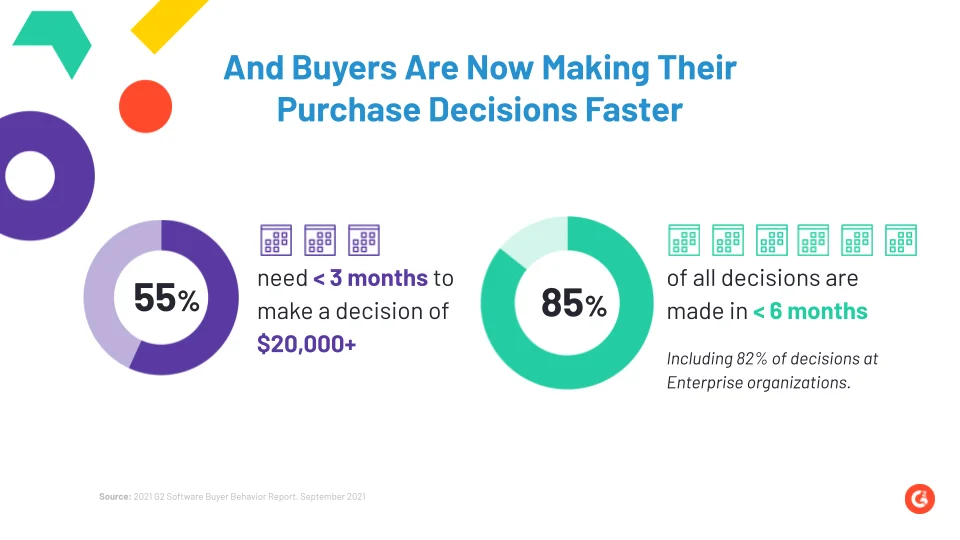
As part of this evolution in buying patterns, B2B customers increasingly choose to conduct their own research — evaluating features, comparing alternatives, considering customer reviews, etc. — before speaking to sales or making a purchase decision. As you might have already guessed, this makes relevant, reliable content assets all the more valuable. Ironically, however, four of the top obstacles to make good software purchase decisions revolve around insufficient content.
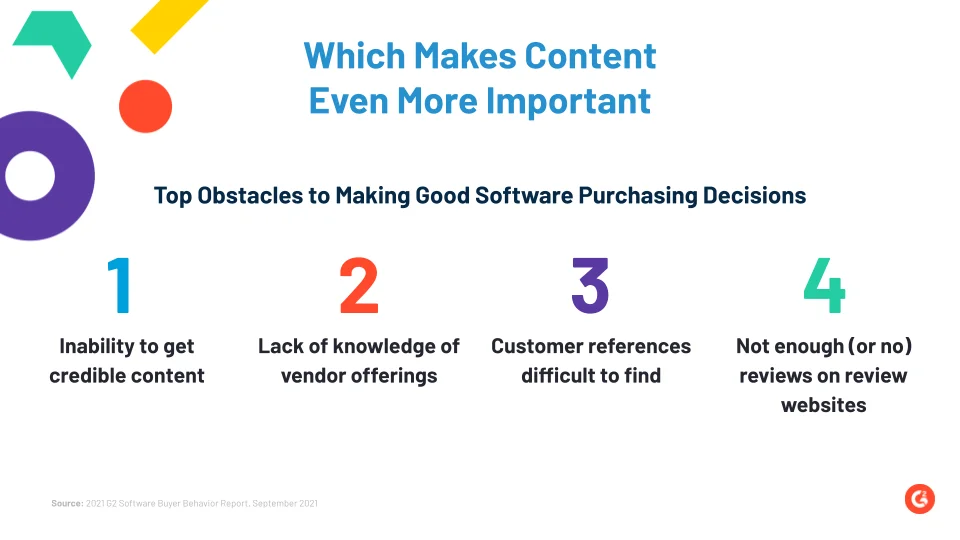
This article explores what Chris refers to as The Trinity of Content — a content framework to resolve these common obstacles in making good software purchasing decision
{{INLINE_TOFU}}
What is the Trinity of Content?
The trinity of content refers to the idea that buyers view content as one entity, but it emanates from three key sources:
- Vendor content
- Expert content
- Customer content
Before diving into the B2B context of the Trinity of Content, let’s take an easier example: buying a car. Before you purchase a shiny new car (or most other things, for that matter), you consume a range of content — product specs, expert reviews, customer feedback, and more — before arriving at a decision.
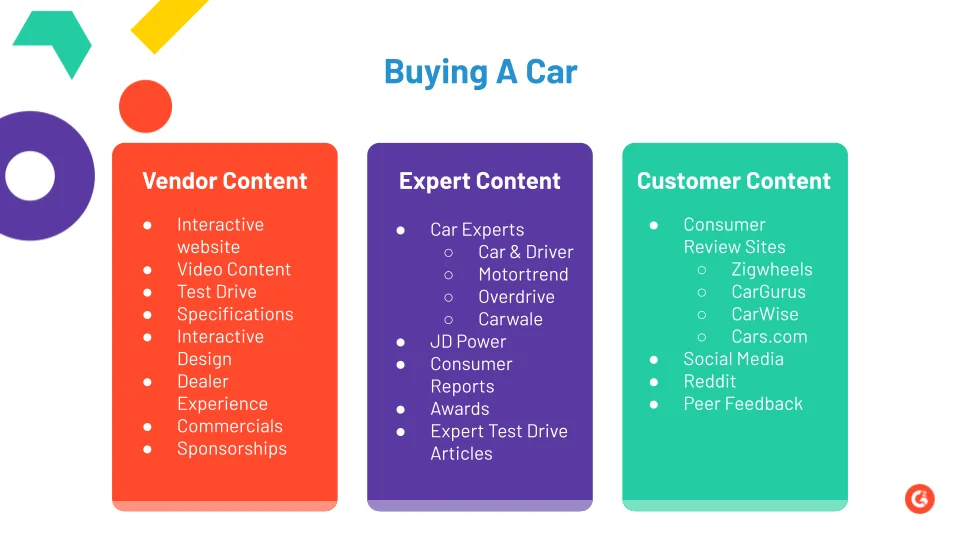
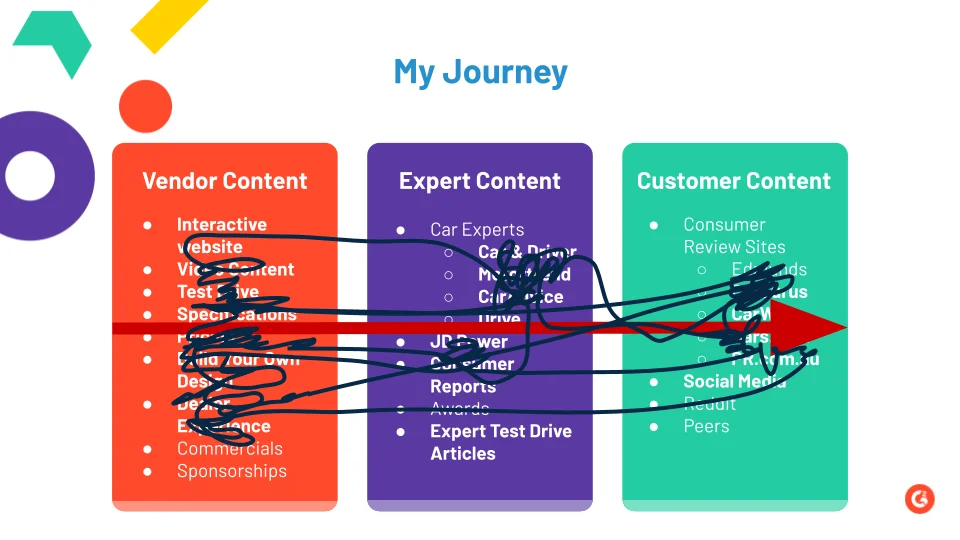
What’s more? The consumption of this content is rarely ever linear. Instead, most of us go back and forth between vendor content (company website, dealer, test drive, etc), expert content (automobile magazines, awards, etc) and customer content (customer reviews, reddit, etc) — resulting in a great big mess of a customer journey. This mess is all the more pronounced in the case of B2B deals as they typically involve lengthy sales cycles and several stakeholders atop multiple channels and touchpoints. You might first learn about a product or service via a search ad, a blog, or a social media post — either way, the next few weeks and months would involve learning more about the offering, comparing alternatives, reading reviews, and eventually, speaking with sales. The next few sections explore the influence of vendor, expert, and customer content in this journey.
I. Vendor Content
The most important aspect with vendor content is that you are in control of it. Everything from the messaging, volume, focus, and placement is in your hands. In the B2B context, few examples of Vendor content include:
- Website
- Sales collateral
- Case studies
- Product demo
- Trials
- Blogs
- Ads
- Events
- Thought-leadership posts
While there’s no doubt that this type of content is absolutely essential to build up a brand as an authority in its space, there are a couple of reasons why it’s insufficient to rely exclusively on vendor content:
- For one, B2B verticals are becoming increasingly competitive across the board. If everyone is pumping out high-quality vendor content, there’s not much scope to stand out.
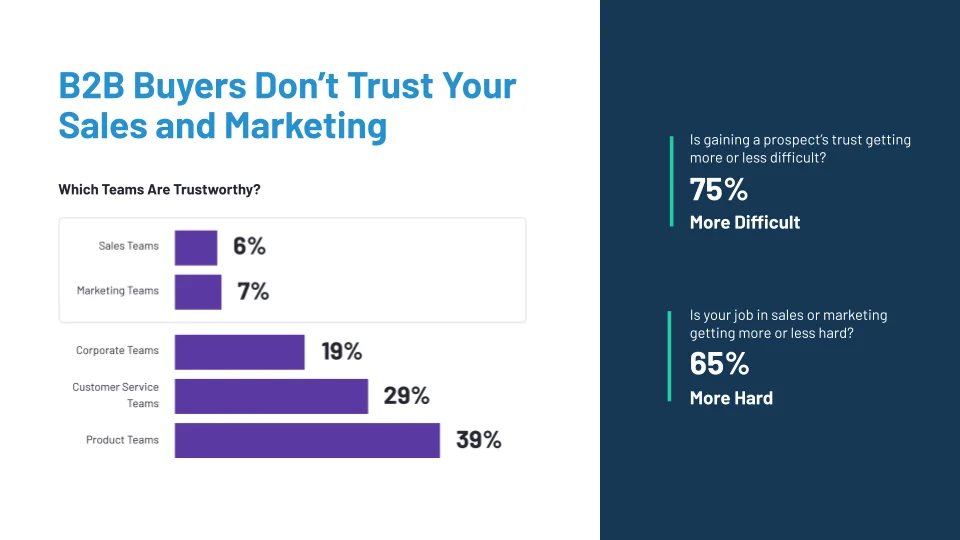
- More importantly, however, the trust and influence that buyers have of vendor content has never been lower. In fact, only about 38% of buyers consider the website to be the most trust-worth resource.
II. Expert Content
To solve this issue of trust, buyers typically consult industry experts for relevant, neutral feedback on products and services. You might have experienced expert content in the form of Gartner/Forrester reports, LinkedIn influencers, or management consultant reports from McKinsey, BCG, etc.
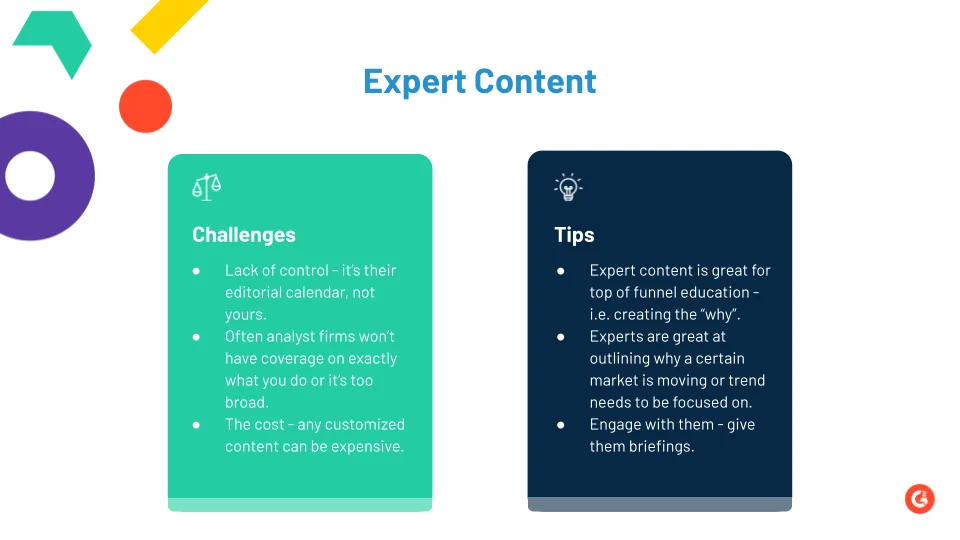
The benefits of expert content are that they take neutral PoVs and are typically extremely well-researched and data-driven. That being said, expert content is not without its limitations:
III. Customer Content
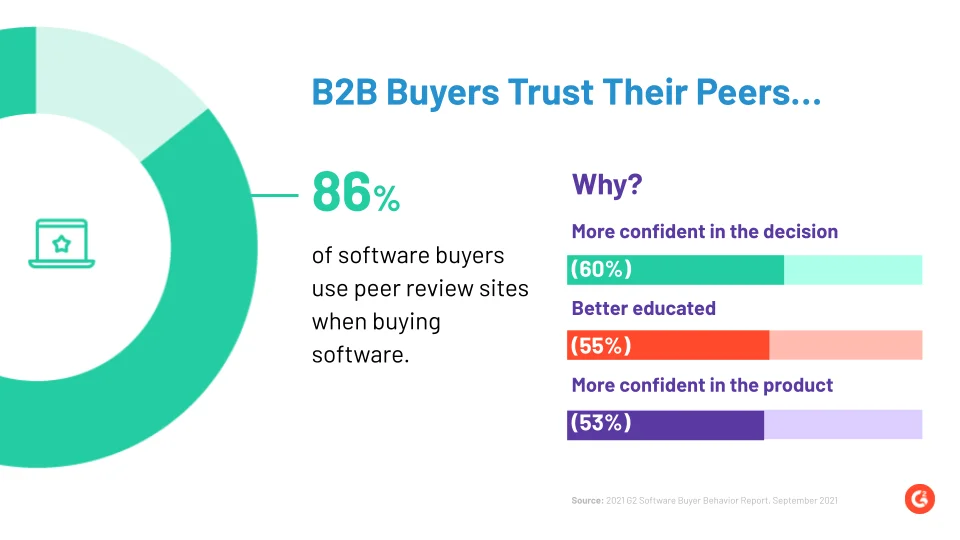
Finally, we arrive at customer content. When was the last time you purchased a product on Amazon without reading the reviews? If you’re like most consumers, the answer is probably never. Customer content is, by far, the most trusted type of content out there — simply because of its in the hands of (generally) unbiased users that have actually adopted the product you’re considering.
And there you have it! A combination of Vendor, Expert, and Customer content to drive trust, and ultimately, pipeline. Here are three key takeaways from the Trinity of Content:

.avif)
The Step-by-Step Guide to Turning Signals into Sales Conversations
Learn how to turn intent data into revenue with a sales signal system that fits your team’s workflow. Map funnel stages, deliver real-time alerts, automate contact discovery, and boost outreach adoption without changing your tech stack.
TL;DR
Here’s what you’ll learn to build:
- A funnel-based journey schema that tracks account behavior
- Region-specific Slack alerts with message suggestions
- Real-time contact visibility pulled from tools you already use (Salesforce, Apollo, ZoomInfo, Clay, etc.)
- A shared playbook that aligns marketing and sales
You’re already collecting intent data. From Google Ads, LinkedIn, G2, CRM, to website visits, your funnel is full of signals.
But here’s the catch: most teams don’t know what to do with all of it.
The tools are there, and the data is accurate. But turning it into meaningful action? That’s where things start to break down. Teams struggle with adoption. Sales doesn’t know what qualifies as ‘intent.’ And even when they do, the follow-up is inconsistent at best.
Why is this so hard?
Most intent-based workflows require a behavior change. A new tool, a new tab, a new process to learn. And that rarely sticks.
We’ve seen this happen over and over again. That’s why, at Factors, we focus on making intent data actually usable, without asking your team to change how they work. That means, your team doesn’t need to learn new tools, and go through long (and confusing) onboarding processes. Instead, we offer contextual alerts sent directly to your team's existing workspace: Slack, your CRM, or email.
In this guide, we’ll show you how to:
- Map funnel stages using your existing intent data
- Deliver region-specific alerts to the right reps
- Automatically suggest the right message and next step
- Pull contacts from tools like Salesforce, Apollo, or ZoomInfo
- Build an internal motion that actually gets adopted
And ALL of this is designed to fit into your team’s current workflow, not change it.
Step 1: Where do I even start?
Before you start building workflows, automations, or Slack alerts, it’s worth taking a step back.
Start by understanding your GTM strategy. You can’t build a signal system if you don’t know what you’re looking for.
Ask yourself:
- Who is your ICP?
- How do they behave across channels?
- What does their typical buying journey look like?
- What kind of signals are already being tracked, and which ones are being ignored?
- How does your sales team currently operate? Do they rely on inbound or outbound plays?
Once you have clarity on this, map it out.
Break your ICP’s journey into funnel stages. List out the signals tied to each stage. Match that with how your sales team prefers to act on those signals.
This mapping becomes your foundation. Everything else (alerts, messaging, workflows) can be built on top of it.
PS: Don't rush this step. A solid map makes the entire system easier to build and even easier to adopt.
Here’s an example structure you can use to define your funnel stages based on intent signals:
| Stage | Touchpoints | Discovery Focus |
|---|---|---|
| 1. Initial Interest & Awareness (Top of Funnel) |
| Understand their global ambitions, surface-level pain points, or why they might be researching your space |
| 2. Exploring Solutions (Mid-Funnel) |
| Dive deeper into their current processes and product interest. What problems are they likely solving? |
| 3. High Intent (Bottom of Funnel) |
| Understand decision timelines, buying committee involvement, and budget expectations. Time to move toward a conversation |
This mapping can be customized based on your own sales process or ICP behavior patterns.
Step 2: Give sales teams the visibility they need
With Factors Segments, your team gets a real-time dashboard called Account 360 that pulls together all the right signals, intent data, ad activity, CRM updates, and G2 visits into one place.
This becomes your team’s starting line every day. The dashboard gives them a clear view of which accounts are heating up and what deserves their attention, so they can spend more time prioritizing and selling to the right accounts.
{{INLINE_TOFU}}
Step 3: Set up real-time alerts for your sales team
Set up real-time Slack alerts that inform your reps when an account shows intent.
Here’s what a good alert includes:
- Account summary: company name, recent behavior, and their current funnel stage.
- Suggested messaging: tailored to the stage they’re in (top, middle, or bottom).
- Next-step prompt: send a resource, ask a discovery question, or offer a quick call.
You can route these alerts by geography, APAC, EMEA, North America, and the like, so each team only sees what’s relevant to them. For example:
- #abm-apac-factors
- #abm-emea-factors
- #abm-namer-factors

Each alert can also tag the relevant SDR or AE based on ownership, so no one misses a warm lead.
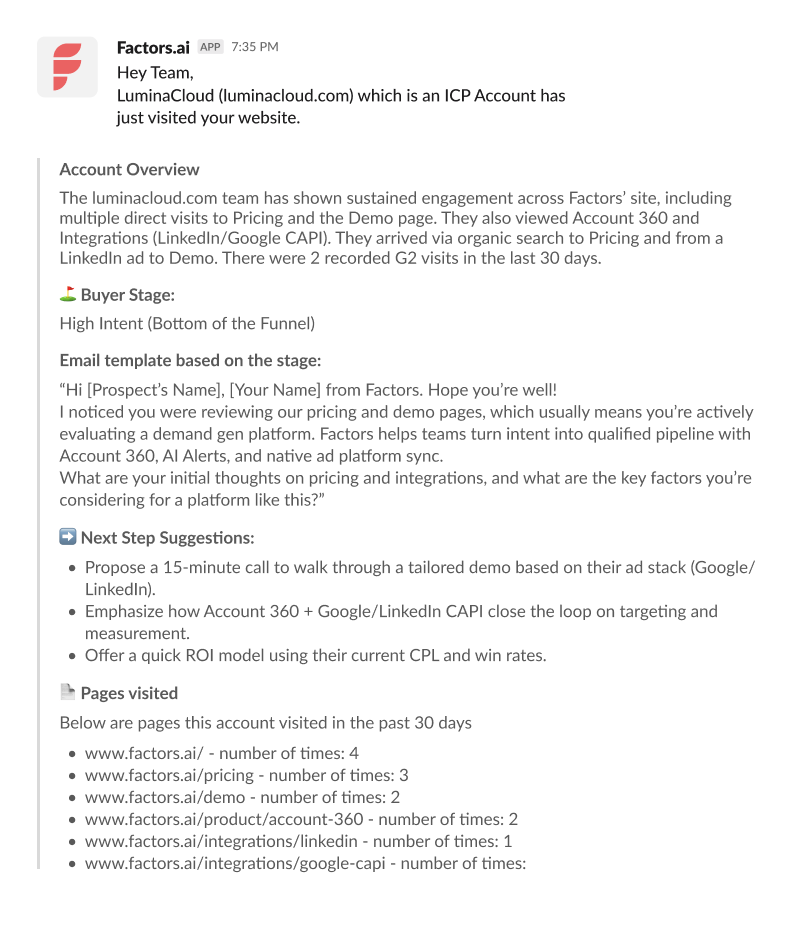
This kind of setup is powered using Factors and Make.com. We handle the mapping, formatting, and delivery logic, so your team just needs to respond, not reinvent their process (Also, FYI, we can hear your team breathing a sigh of relief).
This reduces unnecessary noise, improves focus, and gives BDRs a playbook they can actually follow.
Step 4: Wait, who should your sales team exactly reach out to in an account?
Ask any SDR and they’ll tell you, finding the right contact inside an account is half the battle.
Most teams handle this the hard way:
- Opening Salesforce to see if there’s anyone in the account already
- Jumping to ZoomInfo or Apollo for enrichment
- Manually searching LinkedIn for job titles
- Copy-pasting names into outreach tools
- Hoping at least one of them replies
It’s slow and repetitive. And it’s a huge drain on time that could be spent actually selling.
Manual vs Automated Contact Discovery
| Manual | Automated with Factors |
|---|---|
| SDR spends 15–30 minutes researching each account | Contact discovery happens instantly when an account triggers an alert |
| Multiple tools and tabs to check CRM, enrichment platforms, and LinkedIn | Pulls data directly from Salesforce, Apollo, ZoomInfo, Clay, whatever you already use |
| Guesswork on who's the best contact | AI (OpenAI/Claude) recommends the most relevant contact based on role, seniority, and buying signals |
| Risk of missing key decision-makers | Complete list of contacts with job titles, CRM links, and enrichment |
| No central record of findings | All details appear inside the same Slack alert thread |
This is where Factors changes the game.
With Factors + Make.com + Clay (and the platforms you already use), contact identification and enrichment happen automatically, without you lifting a finger. Our GTM Engineering team sets it up once and maintains it for you, so you’re not stuck troubleshooting workflows every month.

Here’s how it works:
- When a high-intent account triggers an alert, the system automatically looks for existing contacts in your CRM.
- If it needs more, it enriches the account using Apollo, ZoomInfo, or Clay, whatever’s in your stack.
- AI models like OpenAI or Claude analyze the account’s intent data and recommend the most relevant contact based on role, seniority, and buying signals.
- The final list of contacts appears in the same Slack alert thread, complete with job titles, CRM links, and any extra enrichment you’ve set up.

The most important part? You don’t have to set it up yourself.
Our GTM Services team will:
- Integrate with your current stack
- Customize contact alerts for your workflows
- Maintain and update the system as you grow
Whether your process is simple or complex, we make sure finding the right contact is instant, accurate, and fully automated, so your team can focus on starting conversations, not chasing spreadsheets.
Step 5: Turn the system into a repeatable sales motion
Building the system is just the beginning. The real impact comes when it becomes part of your team’s daily rhythm.
The best part? It doesn’t ask your team to change how they work or switch tools. It simply fits into their existing process, and makes their day easier. That’s what drives adoption.
Many teams create a short internal guide (2–3 pages is enough) that includes:
- Funnel stage definitions
- Daily Slack usage
- Messaging templates and talk tracks based on funnel stages
Here are some examples of talk tracks your reps might use:
| Funnel Stage | Talk Track / Message Snippet |
|---|---|
| Top of Funnel | “Saw your team exploring [category/product] recently, curious what prompted the search?” |
| Mid-Funnel | “Noticed you were comparing solutions. If you’re open to sharing, I’d love to learn what you’re looking for so we can point you to the right fit.” |
| Bottom of Funnel | “Saw that you checked out our pricing page, are you evaluating timelines or still gathering options?” |
Here’s why this works
When sales and marketing teams operate from the same signals, you reduce guesswork and increase velocity. Reps stop chasing cold accounts. Marketers stop wondering if their campaigns are working. And your CRM starts turning into actual pipeline.
Most importantly, this works without overhauling your tech stack or buying a dozen new tools. The logic resides within Factors, but the signals are sourced from the tools you already use.
Want to build a setup like this?
If your team is juggling too many accounts and not enough direction, it’s time to simplify.
With Factors, you can build a funnel-aware, region-specific sales signal system that gives your team focus, context, and momentum.
Ready to see it live in your own setup?
Book a free demo and let’s get started.
Frequently Asked Questions (FAQs)
Q1. Do I need thousands of accounts for this to work?
No. Even if you're managing just a few hundred strategic accounts, this setup helps you prioritize better and take timely action.
Q2. What if I don’t use Salesforce or ZoomInfo?
No worries. Factors works with a wide range of tools, Apollo, HubSpot, Clay, Airtable, and more. The idea is to work with your current stack, not force a new one.
Q3. How do I know what qualifies as intent?
Intent signals are fully customizable. You can use clicks on ads, page visits, G2 activity, CRM updates, or email behavior—whatever makes sense for your funnel.
Q4. Is this useful only for outbound teams?
Not at all. Account managers and CS teams can also use these alerts to monitor upsell or renewal opportunities based on engagement signals.
Q5. How long does implementation take?
Anywhere from a few days to two weeks, depending on your stack. Our team helps with mapping signals, setting up workflows, and guiding your rollout.
Q6. Will this flood my team’s Slack?
No. You can control alert frequency, filter based on threshold activity, and assign alerts by region or owner to avoid overload.
Q7. Can I customize the messaging templates?
Yes. You can plug in templates based on funnel stage, vertical, or region—and even personalize by persona.

B2B Lead Generation Tactics: 15 Expert Strategies
Learn how to generate high-quality B2B leads using case studies, behavioral analytics, LinkedIn outreach, and more.

TL;DR
- B2B lead generation relies on personalization, partnerships, and data-driven outreach.
- Website optimization, free trials, and case studies build trust and drive conversions.
- Interactive content, LinkedIn warm outreach, and referral programs nurture leads.
- A/B testing, high-intent keywords, and competitor ads help attract sales-ready prospects.
Generating high-quality B2B leads is an art. Unlike blasting consumer ads, B2B requires finesse, strategy...a certain je ne sais quoi.
You must get inside your prospect's head to understand their pain points and decision-making—create real connections that blossom into sales.
- So, what is the formula for B2B lead generation success?
- What are the insider strategies employed by the top B2B marketers?
- How can you start generating B2B leads without being a pro?
In this article, we're pulling back the curtain on 15 battle-tested methods to power up your B2B lead generation. Strategies that deliver qualified prospects and nurture them into satisfied, lifelong customers.
Ready? Let’s get started.
{{INLINE_MOFU}}
15 Proven Ways to Generate B2B Leads
B2B is different. There are multiple stakeholders involved. And the person you’re trying to talk to is likely not paying. That’s why the approach to B2B lead generation has to be holistic—it has to speak to everyone in the organization while still being personalized.
These 15 methods of generating B2B leads will help you get the hang of the market and create personalized strategies that work for your unique business.
1. Collaborate With Industry Leaders
When you collaborate with the right partners, it unlocks valuable new opportunities for new business. But how exactly can you make these powerful connections? Collaborate on content.
You can create a webinar, podcast, eBook, or relevant content asset. You bring your expertise to the table. They bring theirs. Together, you create excellent content that adds tremendous value to your audiences.
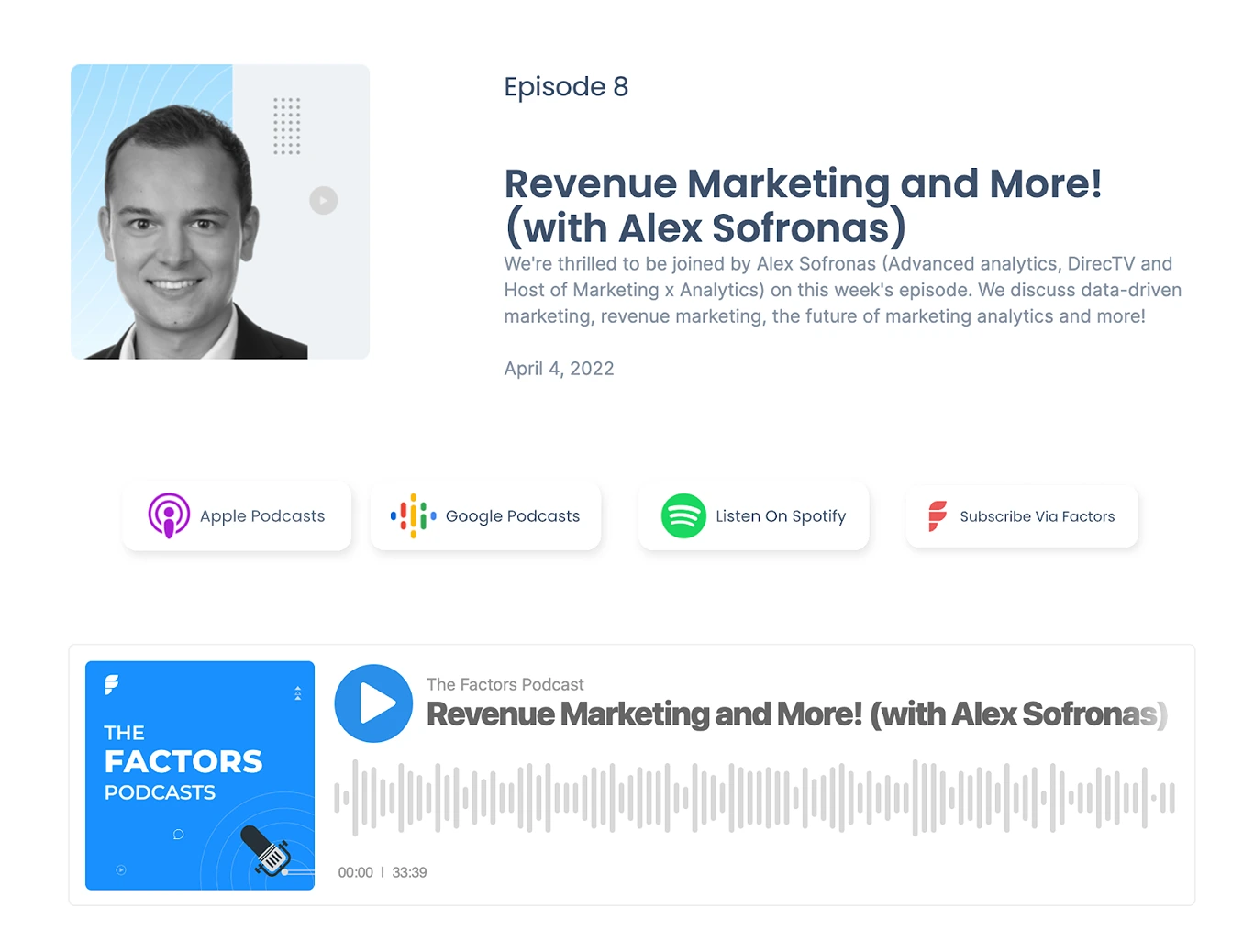
A great example of this in action is the Factors podcast episode with Alex Sofronas. Factors collaborated with a well-known revenue marketing expert and tapped into a whole new audience (Alex’s followers) while enabling Alex to reach new people.
Here are some of the benefits of partnering up with industry leaders:
- It lends your brand instant credibility by associating with a well-known authority. People trust companies that partner with experts.
- You gain access to their audience, followers, and network. This dramatically expands your reach.
- Combining your expertise creates richer content, and you'll squeeze more value from each piece.
- It's incredibly cost-effective. You split the work of content creation and promotion.
This is one of the fastest ways to generate leads if you have a well-known brand. It makes finding and partnering with people much more accessible than if you’re just starting.
2. Optimize Your Website Based on Behavioral Analytics
While partnerships are brilliant, they are slower and don’t provide complete control. On the other hand, your website is entirely under your control—what if you could get more visitors to convert into leads?
That’s where we bring in behavioral analytics.
Behavioral analytics studies how people use your website—what they click on, how long they spend on each page, what pages they visit, etc.
It gives you a clear picture of what sections and pages your prospects find interesting and where they drop off.
Here are some of the benefits of optimizing your website:
- Increased conversions from an improved user experience
- More informed design and content decisions backed by data
- A cost-effective way to identify and fix issues
- Continuously monitor and iterate to maximize performance
Suppose you notice that your pricing page has a high dropout rate—people leaving your site after visiting that page. This dropout rate shows friction. It could indicate that the pricing does not match the perceived value. You can try identifying a better price through surveys or asking existing customers for a fair idea of the value.
3. Offer a Free Trial or a Freemium Version
Free trials let people try your products risk-free before committing. Zoom is a prime example of a freemium product. They offer an entirely usable free version, reducing the entry barrier for people to try Zoom. People try the app and ask others to install it to attend the meeting.
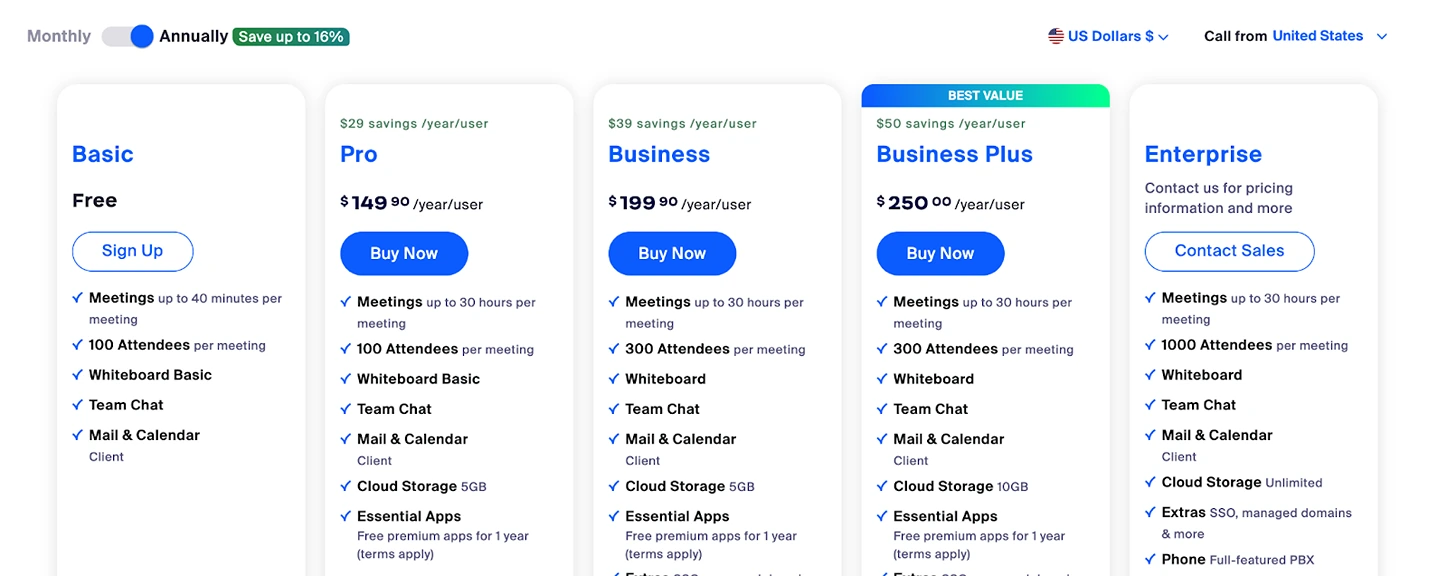
The network effect kicks in, and everyone on your team has installed Zoom—it becomes the go-to choice for hosting meetings.
Now, how can you implement a try-before-you-buy model effectively? Here are a few tips:
- Highlight your core value proposition in the free version
- Set clear boundaries between free and paid features
- Monitor usage and get feedback during trials
- Make upgrading to paid plans frictionless
The benefits of allowing "test drives" are enormous. You generate buzz, reduce barriers to entry, and build trust.
4. Create and Promote Case Studies
Case studies show potential customers real-world examples of how your product or service can help them. It tells prospects a compelling story of how other businesses within the industry are leveraging and benefiting from your products or services.
For instance, we talked to Everstage, a sales commission platform, about the results they achieved using Factors.
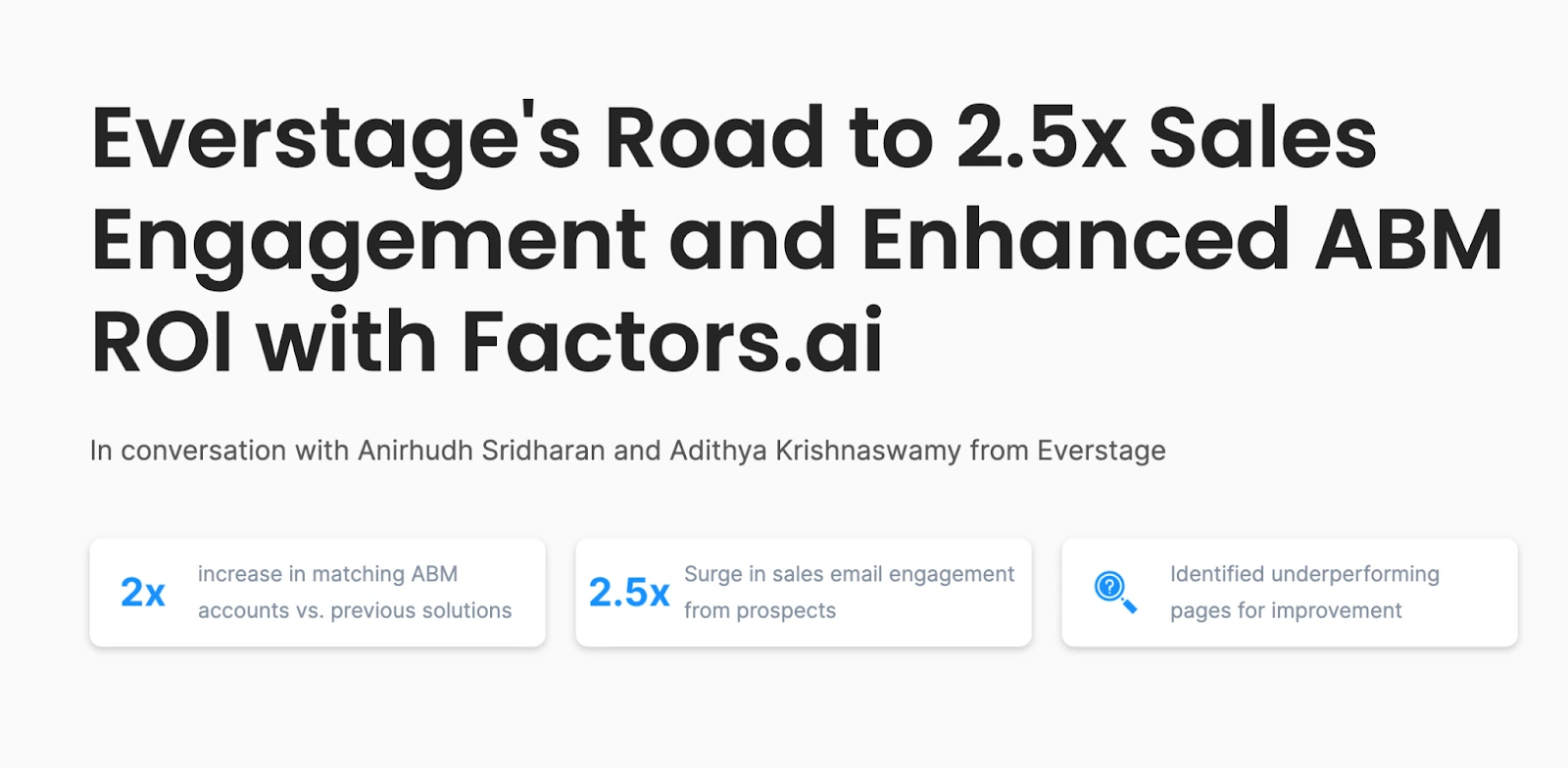
After making notes based on the conversation, we wrote a thorough case study documenting their journey to gaining 250% in sales email engagement after using Factors.
When you create relevant case studies within the industry, you earn brand credibility that allows more people to consider trying you out.
Here are some tips for making super-effective case studies:
- Find a customer whose story stands out and is relevant to who you want to reach. Think of the type of businesses you’re trying to reach—suppose EdTech. Find businesses that use your product/service and operate in the EdTech industry.
- Bring them on for a case study and lay out their journey - problem, solution, results. Use real numbers to prove it worked.
- Add in charts, images, or anything visual that will catch the eyes and connect readers to the story.
- Share the case study on your website, social media, and other marketing channels—you could even turn it into a PDF and use it as lead-gen.
5. A/B Test Your Landing Pages
A/B testing is a handy way to figure out how to improve your website, landing pages, ads, and more. It lets you try out two different versions against each other to see which one performs better.

For example, HubSpot tested changing the color of its call-to-action button from green to red. That simple tweak led to a 21% increase in conversions! Pretty wild, right? It shows how vital A/B testing can be.
Here's a quick rundown of how to use A/B testing for your landing pages:
- Pick out the essential parts you want to test—this could be your headlines, call-to-action buttons, or even pricing. Those tend to have a significant impact.
- Next, make two versions of the page with variations in those elements—one with the original and the other with the change you want to test.
- Now, to do a proper A/B test, you need a tool. Some of the major ones are Google Optimize and VWO. Pick one from these or use another tool that works for you to run the variations.
- Give it a few days or weeks, depending on the traffic you receive to your website. You can achieve statistically significant results faster if more people visit your site daily.
- If the variant does better, awesome—make the winning variant your live page.
- Repeat tests with different elements and pages to gain more insight and improve your website for the best possible conversions.
The great thing about A/B tests is that you can make accurate data-based decisions based on your audience’s preferences.
6. Offer Free Tools or Templates
Free tools or templates can be a great way to attract leads in the B2B space. Who doesn't love something valuable for free, right?
It helps build trust and shows you want to help, not just sell to potential customers.
For example, Signals by Factors is a free tool that lets businesses track critical metrics. It gives them a taste of Factors without any commitment.
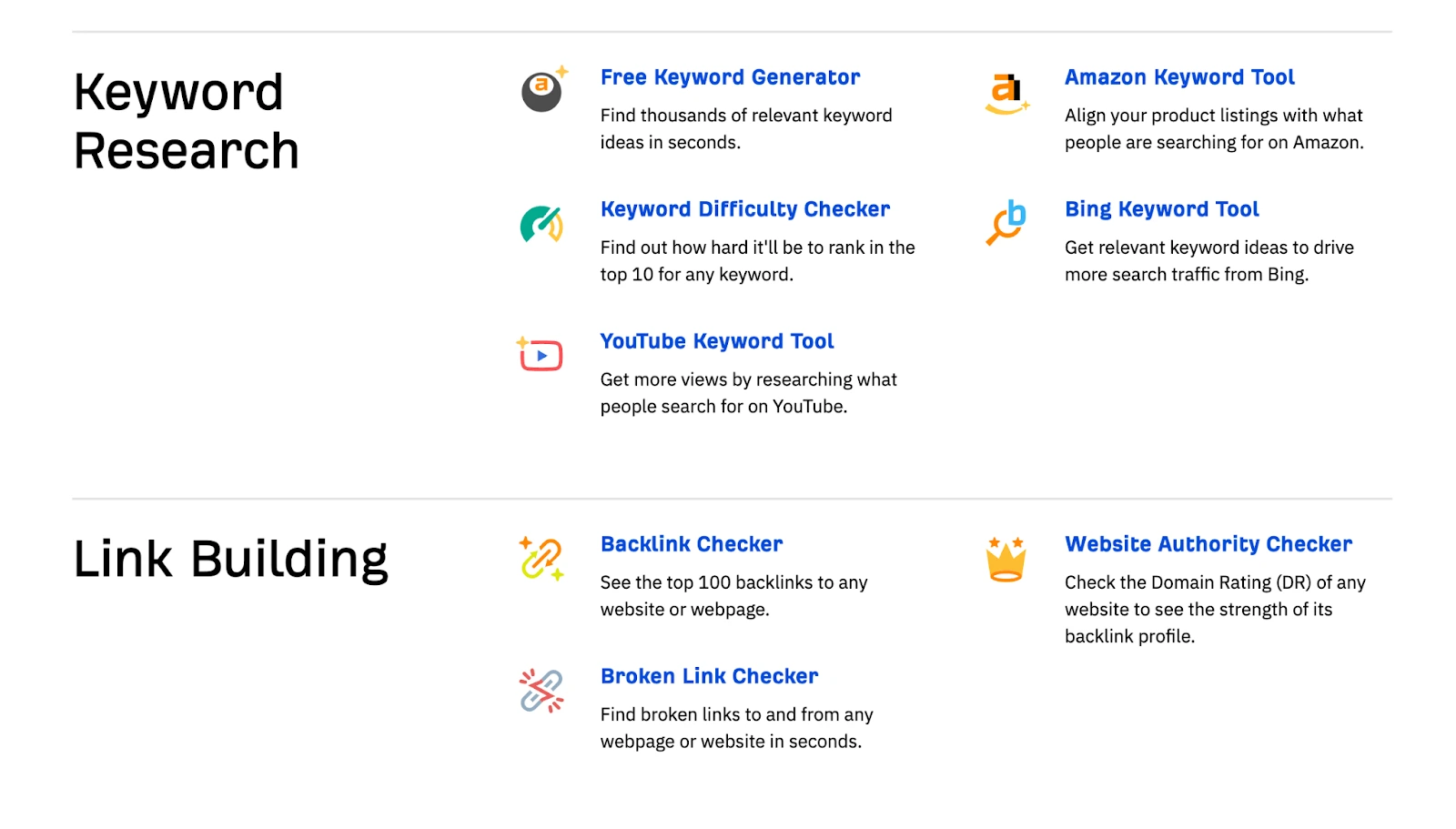
Ahrefs also has free SEO tools to help prospects get a feel for the full power of the tool without commitments.
If creating tools seems like a high investment, businesses can offer free templates everywhere. Hubspot is an excellent example of free templates.
Here are some tips to make it work:
- Identify a real need your audience has. For instance, Ahrefs’ audience wants to perform keyword research and improve their SEO.
- Then, create a smaller but usable version of that module in your product. In the case of Ahrefs, all free tools are a limited version of their complete tool. For instance, the keyword research tool gives the first 100 keywords at most.
- Also, see if there is a search volume for your creation tools. It will tell you if people are already looking for the tool you’re creating. For instance, according to ahrefs, “free keyword research tool” is searched over 4000 times a month.
7. Showcase Testimonials
Building trust is so important in B2B. And one great way to do that is by showing off testimonials from happy customers - especially on LinkedIn.
LinkedIn ads with testimonials can boost leads. Salesforce used customer testimonials in their LinkedIn ads and saw a 10% increase in click-throughs. Not too shabby!
Here's why testimonials are so effective:
- It builds credibility when potential customers see others benefit from your product.
- It provides a personal touch and lets prospects connect with real users of your product. It makes it relatable.
- People like to follow the crowd. New folks will be more likely to try your product if others dig it.
So leverage those raving fan testimonials wherever possible - your website, emails, ads, social posts. Let their powerful stories create a connection and get more leads coming your way.
8. Webinars and Live Events
Webinars and live events are excellent for generating B2B leads. They let you engage with your audience in real time—super powerful.
For example, Factors recently announced a live event on LinkedIn. The event allowed them to answer questions and interact directly with potential clients.
Here are some tips to rock webinars and live events:
- Pick topics that are relevant and interesting for your target audience. Helpful, timely content.
- Promote it effectively on social media, email, and your website - get the word out.
- During the event, engage the audience. Encourage questions, give real-time answers, and make it interactive.
- Follow up with a thank you email, a recording of the event, and any extra resources.
Webinars position you as an expert and allow that crucial human connection. When done right, they can generate solid leads for your B2B biz.
9. Use Interactive Content
Most content marketing is a monologue. Brands want to pitch their products before giving value. But with social media, you must work twice as hard to earn your audience’s attention. It’s much easier for someone to scroll away if you share boring content.
Instead, try to create content that acts as a conversation starter. Hold an opinion and ask others to comment on their thoughts. Here’s an example of Rand Fishkin stirring the conversation with a relatable question.
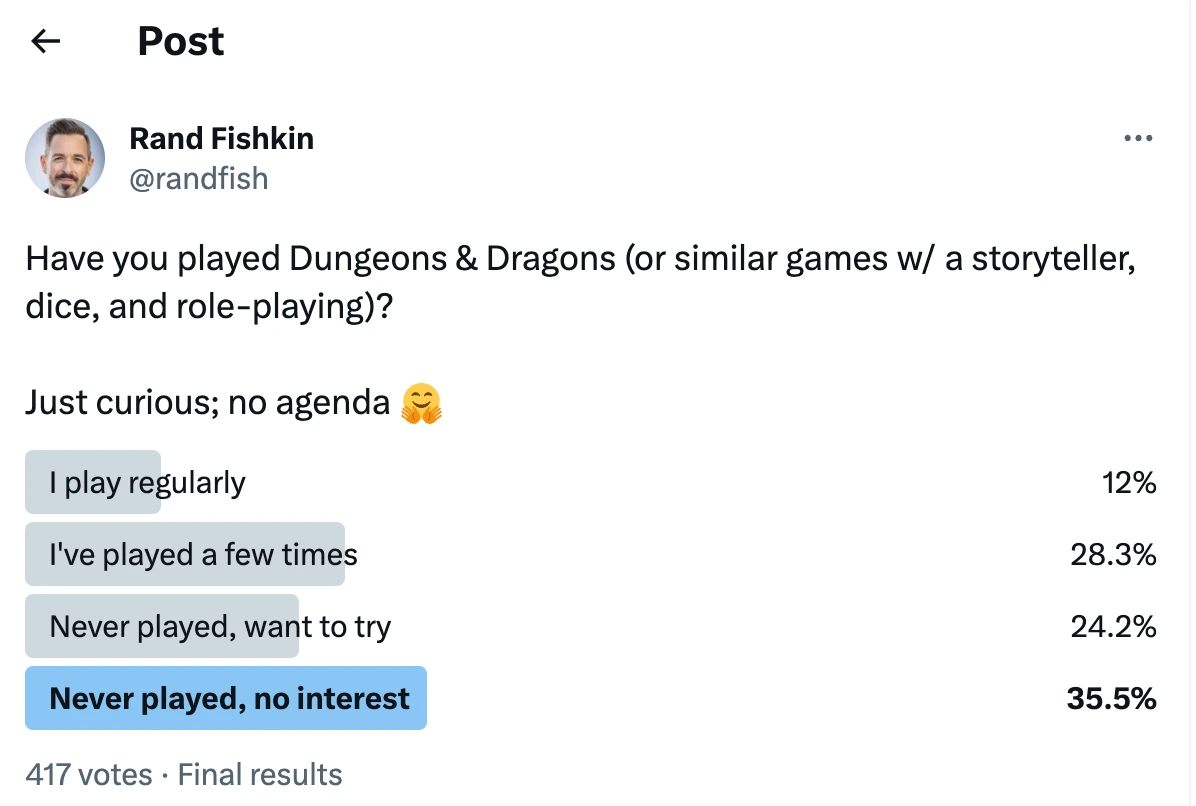
Here’s one by Krispy Kreme that not only makes people interact with content but also reminds them that the new minis are available for purchase

Here are some tips for creating interactive content:
- Use surveys, polls, and quizzes to stir a conversation and allow easy interaction with your content.
- Host competitions that require people to perform specific actions like sharing your post or comment with a particular hashtag.
- Provide industry-relevant opinions and open yourself up for a discussion within the communities.
10. Leverage Referral Programs
If your accounts on social media don’t have a large following, it can become challenging to get any engagement. In such situations, you can leverage referrals. Referral programs can be absolute gold for getting more quality B2B leads.
For instance, ZipWP is a new AI website generator by Brainstormforce, the company behind the most popular WordPress theme, Astra. They created a waitlist, allowing people to climb 100 positions for every additional referral.
Due to the cool demos of this product shown by WordPress influencers on YouTube, people are excited to get access to the tool. The waitlist currently stands beyond 22,000!
That’s the power of referrals.
Another example of this is Deel. Deel helps companies hire employees remotely without worrying about tax compliance in different countries. To help spread the word, Deel offers $200 per qualified client whom you refer to the platform. This bonus incentivizes people to talk about Deel to clients, giving Deel free word-of-mouth marketing even if clients don’t sign up.
Here are some tips to make referral programs work:
- Offer incentives like discounts, credits, or cash bonuses to motivate referrals. But don’t break the bank with it—you need to identify your customer’s lifetime value and decide on the rewards based on that number.
- Make the process super easy for customers to refer others. Provide graphics, text snippets, links, and other information people need to make sharing easy. Make it so easy that people should only need to copy-paste.
- Promote the program through email, social media, your website, etc. Remind customers it exists!
11. High Intent Keywords
High-intent keywords are search terms that show someone is looking to make a purchase or do something specific. This keyword research guide by Ahrefs can be a great starting point if you’re new to SEO.
For example, "best lead generation software for B2B" indicates a person wants to find a lead gen solution for their business.
They have already identified a problem and the solution and are now ready to purchase the best option in the market. Most keywords starting with “best” indicate a buying intent.
To use high-intent keywords:
- See what search terms potential customers use when they're further down the buying journey. For a CRM company, this could be keywords like "CRM systems for small businesses" or "how to choose the best CRM for your business."
- If someone is searching for the "best" software, give your top 3-5 recommendations for that category and explain why they are the best options. Provide comparison charts, pros and cons, and product walkthroughs.
- Targeting high-intent keywords can drive more qualified leads, but you may need to refine them over time. Review keyword performance every month or quarter and adjust your targeted terms.
- The goal is to show up for searches where people are looking for a solution you can provide. Targeting high-intent keywords can connect you with visitors more likely to convert to customers.
12. High-Quality Videos
The first quarter of 2023 recorded a global video audience reach of 92%! More and more people are turning towards videos instead of text.
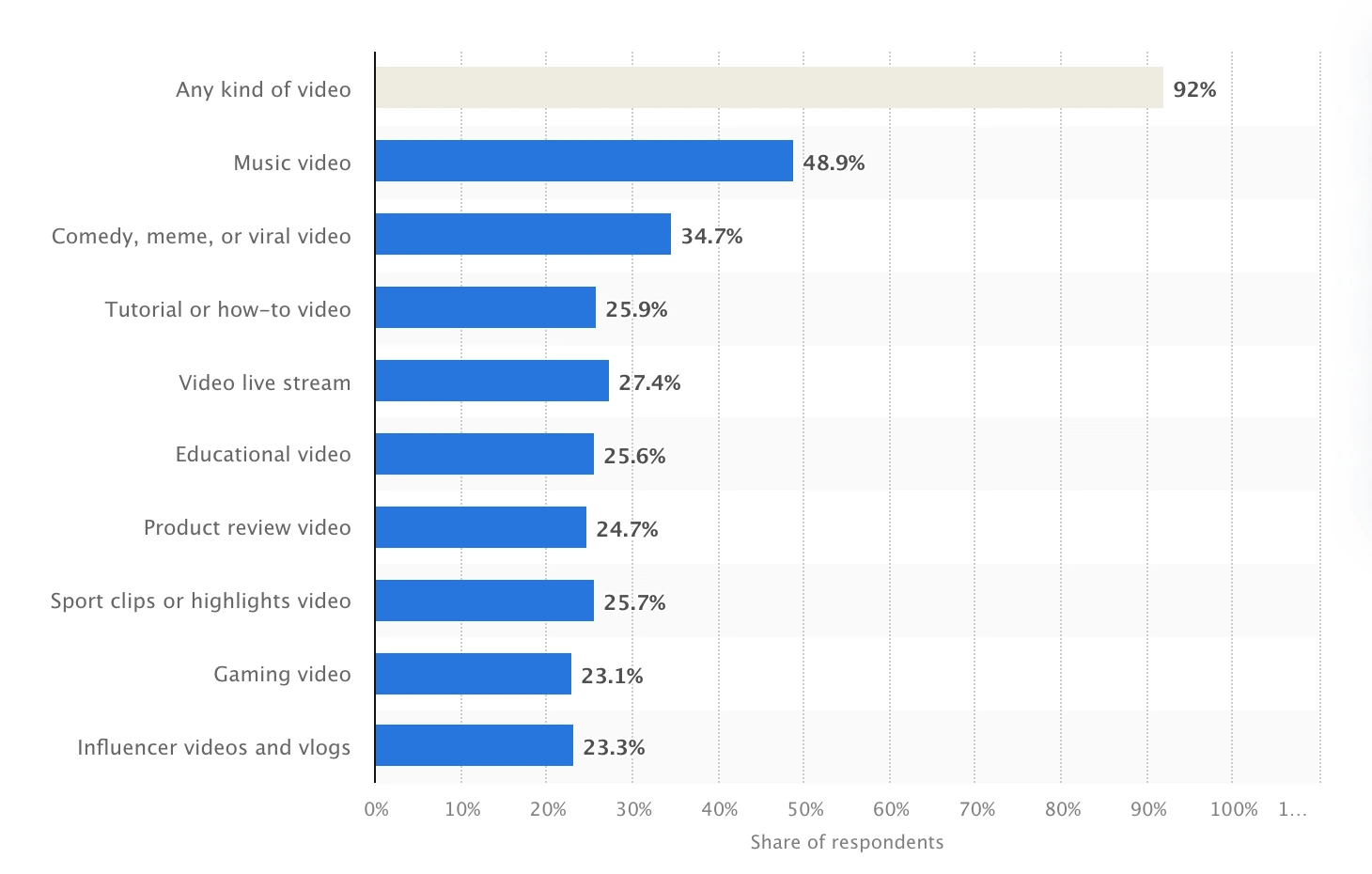
The reason? They’re easier to consume, and if you can make them entertaining, nothing like it.
Webflow took branded video tutorials and how-tos to the next level! It has a free web design course with Hollywood-quality production and storyboarding.
You’ll notice this right from their introduction to the course.
Webflow for beginners: Webflow 101
While it can be challenging to replicate that quality without the big budgets, you can do a lot with a laptop and a good-quality camera.
Some tips for impactful videos:
- What topics do you want to talk about? What makes your brand unique? Start with these questions before you begin creating videos. In the case of Webflow, you’ll notice they have an extremely professional yet humorous way of delivering tutorials.
- Split the topics into chapters or sections you’ll cover over the next 30-100 days. The longer you plan the timeline, the easier it is to create videos.
- Create consistently. When you’re starting, it’s unlikely that you’ll get any views. But social media algorithms like consistency. The more videos you publish, the better the algorithm understands what you do, helping your videos appear in relevant searches.
- Stick to a schedule that lets you deliver quality—every single time. There’s no point in creating boring tutorials for your brand YouTube channel. Instead, make a process that ensures every video you create is brilliant and unique to you.
Use keyword research to your advantage here. Add videos about the high-intent keywords you’ve identified. As you develop a library of videos aligned to different stages of the buyer's journey, you can attract more qualified leads over time.
13. Running Ads on Competitor Keywords
Running ads on competitor keywords is a savvy move. When someone searches for a rival's product or brand, they also signal interest in your offerings. They only haven’t seen you…yet.
For instance, Later, the social media scheduling app, is a direct competitor of Buffer. And they leverage Buffer’s popularity by bidding for the name.
Some tips to get started:
- Research competitors and find relevant keywords people search around them.
- Then, create ads spotlighting why you're different or better. Show your unique strengths.
- Keep watching how those ads do. Tweak bids and copy as needed.
- You can also directly use the brand’s name when possible. However, remember to check for trademarks before bidding on a name.
14. Perform Original Research
Original research can set you apart as an expert in your field. It shows you have unique insights to share. Conducting surveys, analyzing data, and exploring new trends—create valuable content your audience will love.
For instance, if you’re a CRM software company, you can leverage anonymized customer data to understand the average number of leads, the frequency of new lead creation, the intermediate lead conversion for each industry, etc.
You can even run surveys asking your customers to provide valuable insights from within their business.
When such a report is published, you not only provide real value to your audience and become an expert, but you create link-worthy content that earns backlinks from other websites that cite you as a source.
15. Conduct Warm Outreach on LinkedIn
What’s better than cold outreach? Warm outreach. If the person you’re contacting has seen you on LinkedIn providing value, they’re more likely to respond than if you’re an unknown account.
Now, switch it up a bit.
If you engage with your target accounts and leads individually on LinkedIn—commenting on their posts with valuable insights, liking their tweets, and more—you increase your chances of getting a response even further.
Some tips for effective LinkedIn outreach:
- Identify leads based on their roles, industries, or interests—go after those most likely to benefit from your offer.
- Spend a week engaging with your prospects on LinkedIn. Like and comment on their posts. Ask thought-provoking questions. Get in front of the people you want to talk to.
- Then, send a connection request after you’ve engaged long enough. Sending bulk connection requests will rarely lead to a good outcome. If anything, you’ll end up with many connections that don’t care about you.
This approach may seem like a sales trick. But warm outreach is much like dating in the real world—only in business terms.
- You become a known face for the person you want to talk to by spending time in the places they hang out (joining similar communities).
- After a while, you acknowledge their presence with a nod or smile (liking and commenting on posts).
- The familiarity makes chatting much easier (sending a LinkedIn connection request).
- Your leads will have fewer inhibitions while talking now since they’ve already interacted with you outside. (DMs or demo calls)
Go from Zero to Hero With These 15 B2B Lead Gen Strategies
And there you have it — 15 tried and true ways to generate and nurture quality B2B leads into happy, long-term customers. I know B2B lead gen can feel tricky sometimes. But, put simply, it’s all about getting to know your audience and using the right strategies to reach them.
Generating high-quality B2B leads requires a strategic, personalized approach that resonates with decision-makers across organizations. Unlike B2C, B2B lead generation demands understanding complex buying processes and building trust with multiple stakeholders.
Effective B2B lead generation blends outbound and inbound strategies. Partnerships with industry leaders extend reach, while website optimization through behavioral analytics converts traffic into leads. Offering free trials, creating case studies, and leveraging customer testimonials build credibility. Interactive content, webinars, and referral programs foster engagement, while LinkedIn warm outreach nurtures personal connections.
Data-driven practices like A/B testing landing pages, running ads on competitor keywords, and targeting high-intent search terms ensure you attract prospects actively seeking solutions. Video content, free tools, and original research differentiate your brand while providing value.
Combining these methods with unified analytics platforms enables businesses to track the customer journey, optimize touchpoints, and prioritize sales-ready leads. This holistic approach drives sustainable growth by aligning marketing efforts with buyer behavior.
We covered much ground here—from sponsoring events to optimizing for buyer behavior and more. What’s left now is finding the strategies that work for you and going all in on them.
That's where Factors come in handy.
It tracks the key metrics from all your platforms under a single roof. You can view your prospect’s journey from the first touchpoint to the last, shown visually and interactively.
So, let Factors handle the details. Just focus on making real connections with prospects. Try a few of these methods, and you'll be on the road to lead-gen success before you know it.
Ready to take your B2B lead gen to the next level? Jump on a demo call with Factors to learn how we can help you scale your B2B lead gen.

The Ultimate Beginner’s Guide to Search Marketing
Learn the basics of search marketing, the types and how its important for your business to improve your website's visibility & attract more traffic.

What is Search Marketing
As its name suggests, search marketing refers to that segment of digital marketing that focuses on marketing through Search. This involves improving your online presence on search engines like Google, Bing, Yahoo! and more.
Search marketing improves a brand’s presence on the Search Engine Results Page (SERP) using techniques like brand building, SEO, and paid marketing. Simply put, the higher you rank on the SERP, more are the potential users who notice your content, and are thus likely to click on your content. This translates to increased traffic on your website, which in turn influences conversions positively.
Why is Search Marketing Important for you?
Around 80% of consumers conduct their product and service research online. Resultantly, search marketing should have a big role in your digital marketing strategy.
Search Marketing is intuitive in nature. The targets of your search marketing practises are individuals looking for your brand, your competitors, your category, your use-case, the pain points you solve for, and so on.
Ranking high on the SERP is easier said than done. As is expected, users click on the first few links on the search results page after making a search query. More than 90% of user traffic only visit websites that appear on the first page of Google’s search results page. However, as important as appearing on the first page is, it is even more important to show up high enough to catch the user's eye. Paid search marketing has better luck on this end. Further, considering that there are over 200 factors that impact your ranking on Google’s SERP, carefully planning your SEO and PPC marketing can help rank your website and content in the upper echelons of the SERP.
Search Marketing is of two types
1. Organic Search Marketing
As the name suggests, this comprises organically improving the website’s position on the SERP without any payments made to the search engine. Organic comprises Search Engine Optimisation or SEO.
2. Paid Search Marketing
This comprises PPC aka pay-per-click marketing. It involves placing ads on the SERP and paying each time the ads are clicked.
{{INLINE_TOFU}}
Organic Search Marketing
Organic listings refer to links that appear on the search engine’s results page after a user has entered their query. These typically depend on the type of query:
Navigational queries
where the user is searching for a specific website but does not enter the URL. Here, it is important to ensure that users are able to find your website with the simplest of google searches.
Informational queries
where the user is trying to find more information about something like a term they haven’t encountered before, a problem that they are facing and want to understand more about it, a tool or category that they wish to learn more about, etc. This is also called the learning stage where the user might not be ready to buy a product but they are learning more about the use-case and the problem solved by that product. Exposure of the users to the brand at this stage of the customer journey through content marketing can steer the users towards the brand.
Transactional queries
Where users are looking for specific products in a broad category. For example, if I feel like my company has scaled up and I need an ABM tool to improve my marketing and efficiency track all my accounts, I go on Google and search ‘ABM Tools for B2B SaaS 2022’. This would count as a transactional query.
Search engines crawl the internet and review all the text, downloadable whitepaper, documents, media and all other content on each website. This data is used to rank websites on various quality signals like quality of content, how useful the content is for a user using their search engine, site speed, links to other websites, etc. The goal is to ensure that users are getting the best results for their search queries.
This is what determines the ranking of the websites on the search engine’s results page. SEO comes into the picture as the tool that helps you improve upon all the various factors that help Google and other search engines determine the quality and ranking of your website. SEO helps you optimise your website by including keywords and help you ascertain authority over the domain or area that your product or service caters to by creating high quality content.
How to get started with SEO
SEO is a skill that takes time to learn. However, the fact that the learning curve is gradual does not mean that you cannot get started. SEO is a skill that gives returns at every phase of learning.
As you improve, your ROI will increase but a good place to start with SEO is with these three important concepts:
Keyword research
This is the process of researching and analysing keywords and search terms that users enter into their search queries. Keyword research helps figure out what search terms your target audience is using while searching on Google and other search engines. It also helps figure what queries the target audience is using, popularity of search terms within queries, etc. This can help in ensuring that your content reaches the right audience and increases your traffic. The idea is to target the searches that your target audience is bound to make. Keyword research can help with getting your content in front of your intended audience.
Link Building
Link building or building links from external web pages to your webpage is another method of improving your website’s validity and authority in Google’s eyes. Backlinks, not only from other websites, but from sites with authority, improve rankings and visibility on the SERP. Since backlinks often connect websites with similar content, it is a way for Google to ensure that relevant content is being delivered to the users.
Domain Page Authority
Domain authority determines how your site compares to others in terms of how relevant it is within your category or industry. A site with a high domain authority ranks higher on the SERP as search engines identify these sites as having authority and therefore relevance over the information that the user is seeking. Domain authority is also scored by google based on those 200 factors that we mentioned earlier. So there is no set way to know how your website is being scored. However, there are ways to compare how strong your website is, compared to other websites that have similar content.
Advantages of SEO
1. SEO is free if you’re doing it yourself or internally with your marketing team.
2. The ROI is more long term with SEO, as compared to paid. If you have cracked your SEO and Google identifies your website as an authority, traffic increases and in turn, the increased traffic makes it easy to retain a higher ranking.
3. Organic growth is a better judge of brand awareness. Increased organic traffic and ranking higher on organic queries is a sign of a strong brand. The brand gets more consolidated when people find you ranking high on their search results.
Disadvantages of SEO
1. As mentioned, learning SEO takes time. Even though any amount of SEO can improve the strength of your website, SERP rankings are highly competitive and it takes time to actually show up on the first page of the SERP. It is important to remember that many websites are creating the same content as you and these competitors are also continually improving their SEO.
2. SEO can be hard to scale, especially within small organisations where the team has to focus on improving the product, strategy, outreach and even on other aspects of marketing. Converting your entire website, existing content and incoming content to excellent SEO is a long task.
Paid Search Marketing
Pay-per-click or paid search marketing involves paid advertising where you pay for each click on the adverts placed on the search engine results. The amount spent per click is the cost per click or CPC. Search engines determine where to place the advertisement based on keywords and search terms that potential users are going to go to. The main platforms for PPC are Google Ads, Image Pack and featured snippets.
But there are several companies that may be using the same keyword groups and search terms. And as with organic, the goal of the search engine is to show the most relevant content to the user, even for advertisements. Resultantly, search engines need to also rank ads that are placed on the first page of the SERP.
A Few Factors That Affect Your SERP Rankings:
1. PPC bids
Also known as keyword bids, these are bids that online entities place on various keywords or keyword groups to secure ad space. This is commonly used by entities like Google AdWords where auctions are held on various keywords and search terms.
It is important to ensure that you are bidding on keywords that will bring in relevant users. Common keywords are usually more expensive since many people are bidding on them, plus they target a larger audience, a large chunk of which may not have the intent level for your product. On the other hand, niche keywords may be harder to research and figure out, the cost is lesser and the intent of the targeted users is higher.
2. Landing page experience
The landing page or the page that is linked to the ad plays an important role in how Google ranks your ad. Site speed, user experience, ease of navigation, etc are important factors that search engines take into consideration because a website that takes too long to load, is hard for the customer to navigate all spell bad customer experience and search engines won’t want to direct their users to such pages.
Ad Quality: Apart from the landing page experience, search engines like Google also determine a quality score for your PPC ads. The other two components are
CTR or the click-through-rate, which determines how likely it is that your ad is going to be clicked when shown to a user.
Ad Relevance, which determines how closely your ad matches the intent of the user’s search query.
Advantages of PPC
1. PPC is easier to figure out than SEO. This is because the level of control that you have to ensure that your ad shows up on the SERP is higher than the control you have in SEO. The level of uncertainty regarding what works and what does not when determining factors that improve ranking on the SERP is also lower for PPC. The results are instantaneous and you can also A/B test your ads to see which ones perform better.
2. PPC is suitable for new companies. PPC is better for scaling up as you just have to pay more money to get more listings and more exposure.
Disadvantages of PPC
1. Paying for each and every click can be expensive. Moreover, it is important to remember that each click simply re-directs the user to the website and does not guarantee conversions. Therefore, even if it is easier to scale with PPC than with SEO, there are budget constraints that may limit your ability to scale.
2. The gains with PPC are more short term in nature. As compared with SEO, where the gains are more long term and the ROI increases as your organic reach becomes better, the gains for PPC are relatively short term. The ROI at each instance is dependent on how much you paid for the ads and how many conversions came from those ads. Once the ads are discontinued, they stop bringing in visitors to the website.
3. Issues with the steep learning curve. Although figuring out PPC and getting results is faster than SEO, issues can crop up with how steep the learning is. With SEO, even if the learning and growth is gradual, you get improved results at each level of learning. However, if you jump into PPC without learning the ropes behind keyword bidding, customer research, etc, you may lose a large chunk of your budget bidding high amounts of money on keywords that may not be bringing in conversions. This can lead to a wastage of money.
In conclusion, both PPC and SEO have their pros and cons. But rest assured they are really powerful tools that can scale up your marketing efforts and have a positive impact on website traffic, leads, sales and most importantly, revenue. If you want to learn more about this, you can check out Episode 7 of The Factors Podcast where we discuss both the organic first approach as well as the paid first approach for a company that has just found its product-market fit.
The Principles Of Modern B2B Marketing: Brand Building Vs. Sales Activation
Maximize B2B marketing potential with Factors Professional Services and marketing stratergy. Tailor-made analytics, consulting and support to optimize ROI.
B2B marketing strategies that maximize growth
B2B marketing may be in trouble. Research suggests that B2B organizations are inadvertently transforming marketing into a supporting tool for the sales function. In reality, however, marketing is at the very core of a business. With the right principles securely in place, B2B marketing may well transform into the growth engine of B2B organizations.
It’s about time we rethink the principles of marketing
Linkedin’s B2B institute recently conducted wonderful research using B2B effectiveness data in collaboration with Peter Field, Les Binet and the IPA. The primary motivator of this research was to identify the best marketing principles that correlated with growth. Keep in mind that in this case, growth does not mean improving CTR, impressions, engagements or other traditional digital marketing metrics. Instead, we’re referring to growth in terms of market share, revenue, profitability, and other bottom line business metrics.
What makes this research especially special is the fact that it's never been done before through the lens of B2B marketing. That is, of course, until now. The following series will delve into each of these principles one article at a time with hopes of providing an intuitive, straightforward explanation of cutting-edge B2B marketing research.
If you had to take away one thing from this series, it’s this:
Extensive research and anecdotal evidence point to one thing — The key to marketing-sourced growth is balance. While this may seem obvious, the truth is that modern B2B marketing is almost always unbalanced. They tend to involve solely short-term, volume-based endeavors that play to logic and reasoning as opposed to a balanced view of short AND long term strategies that consider volume AND price, logic AND emotion, awareness AND fame.
With that out of the way, let’s finally move on to the first principle of B2B marketing strategies that maximize growth.
{{INLINE_BOFU}}
Brand Building Vs. Sales Activation
A. Have Your Cake & Eat It Too: Brand Building and Sales Activation I
In their research, Binet and Field identify two types of marketing:
1. Sales activation: Sales activation definitely provides short-term growth. But while sales activation captures existing demand, it does not create it. Results with sales activation often produce results that decay just as fast they appear – which isn’t necessarily a bad thing, just something to keep in mind for the long term.
2. Brand building: Brand building provides long-term growth. In a sense, this creates and captures demand together. Note that when executed well, brand building delivers short-term growth as well. So the big takeaway is that you don’t have to pick between one or the other. In a sense, brand building contributes to future demand to ensure a durable pipeline of future sales and profits.
Ideally, a combination of both types of marketing will yield the best results. If you had to pick one, however, the choice is easy. Brand building is the only strategy that delivers both short-term and long-term growth.
B. The 60/40 Rule: Brand Building & Sales Activation II
In B2C marketing, organizations with the most short-term and long-term growth spend most of their budget towards branding (60%) as opposed to sales activation (40%). In most B2B orgs, this marketing investment is skewed in the opposite direction; with most spend being allocated towards activation (54%).
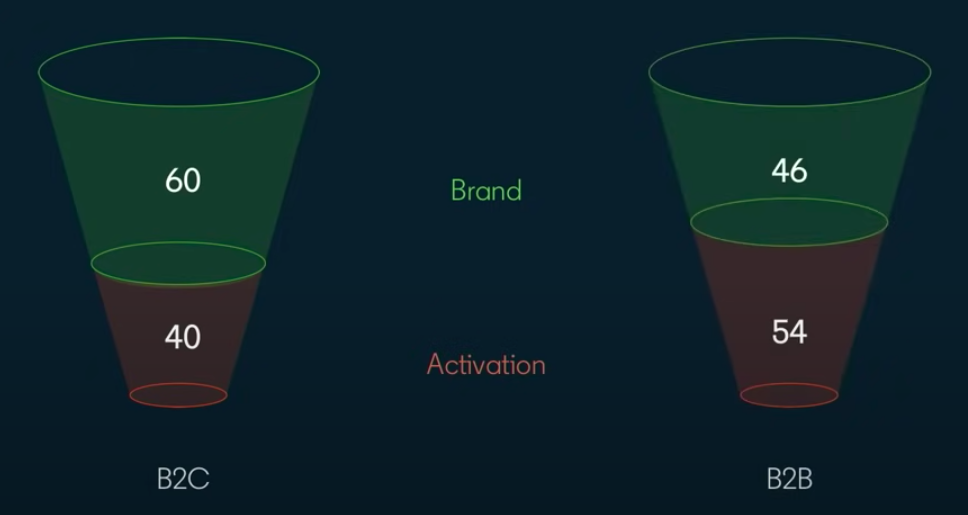
What might explain this variation? Put simply, B2B sales is harder. It involves several touch points across several stakeholders over several months. It also necessitates far more exposition around the product, use-cases, functional benefits, and more. There’s no doubt that in B2B, sales activation, especially in early-stages, has an important (albeit expensive) role to play. But as the novelty and needs of a new business fades, marketing needs to mature towards a brand-focused distribution to ensure sustainable growth.

C. Flip The Funnel: From ToFu/BoFu To In/Out Market
The funnel is a well-known construct in B2B marketing. The conventional B2B funnel depicts a voluminous top-of-the-funnel that wittles down along each step of the funnel towards the bottom of the funnel. Interestingly, Binet and Field suggest flipping the funnel. Rather than ToFu and BoFu, they recommend thinking of the funnel as “in market” buyers and “out market” buyers. In this case, activation spend is mostly for limited market buyers while branding spend is for the much larger, out market buyers.

This approach tends to be more customer-centric because:
- Customers don’t think of themselves as being in the “brand building” phase or “sales activation phase”. Instead, customers think of themselves as being “in-market” to buy a product or “out-market” to not buy a product at this moment.
- Marketers have two customers: Your external customers and your internal finance team. Thinking about the funnel as current cash flow customers and future cash flow customers will help align marketing with the CFO or finance team as well.
D. Different Stroke For Different Folks:
Of course, in-market buyers are inherently very different from out-market buyers. This necessitates different approaches for creative, distribution, and measurement.
For in-market approach:
- Rational Messaging - for immediate ROI and value
- Narrower targeting - for a narrower market
- Sales metrics - revenue and pipeline are the most relevant KPI for in-market
For out-market approach:
- Emotional Messaging - for long term brand retention
- Broder targeting - for a larger market
- Memory metrics - brand sense is an example of a relevant memory metric
And there you have it. The first principles delved deep into the pros and cons of Sales Activation and Brand Building. While employing both approaches in unison are crucial to long-term success, the verdict is that, at the end of the day, the goal should be to prioritize brand building. We also highlight an unconventional perspective of the good old sales funnel. Join us next week to go over the second principle: Awareness vs Fame.
Balancing Brand Building and Sales Activation in B2B Marketing
In modern B2B marketing, balancing brand building and sales activation is essential for sustainable growth.
1. Sales Activation focuses on short-term gains by capturing existing demand, delivering quick but often temporary results.
2. Brand Building creates new demand and strengthens market presence, driving long-term success.
While both strategies play a vital role, prioritizing brand building ensures lasting growth and a strong competitive position in the market.
Step-by-Step Guide to SaaS Content Marketing
Strategically create & distribute valuable SaaS content to attract, engage, & retain your audience. Elevate your SaaS Content Marketing game
“The global SaaS market is projected to grow from $273.55 billion in 2023 to $908.21 billion by 2030 at a CAGR of 18.7%.”
With such growth figures, comes great marketing responsibility. And what’s a better tool than SaaS Content Marketing to take your organic marketing efforts to the next level? If you’re a little iffy about creating content for your SaaS company, this blog is written for you!
Without much ado, let’s get right into clarifying the basics before we jump into the step-by-step guide for SaaS content marketing.

But, what is SaaS Content Marketing?
SaaS Content Marketing is the strategic creation and distribution of relevant, valuable, and consistent content to attract, engage, and retain a target audience within the SaaS industry.
Unlike traditional marketing approaches that emphasize direct selling, SaaS Content Marketing centers around providing information and insights, positioning the brand as a trusted advisor. It serves as the bridge between a SaaS company and its audience, fostering a relationship built on trust and authority. SaaS Content Marketing stands apart due to its focus on delivering targeted, highly informative content tailored to the needs of a tech-savvy audience. Effective content marketing positions the brand as an industry leader resonates with the pain points of the target audience, and ultimately drives customer loyalty and advocacy. It focuses on educating users, offering in-depth insights into the product's functionality, and guiding them through the complexities of the software.

Building a Value Proposition and Demonstrating the Brand's Authority
A compelling value proposition is at the core of successful SaaS Content Marketing. Content should articulate not only the features of the SaaS solution but, more importantly, the value it brings to users. Whether through whitepapers, webinars, or interactive demos, SaaS content should communicate how the product addresses specific pain points, enhances efficiency, and delivers tangible benefits. Establishing the brand's authority involves consistently offering valuable insights, staying abreast of industry trends, and showcasing thought leadership through authoritative content.
Step-by-Step Guide To Content Marketing
Since you’ve made it this far into the article, we’d like to think you’re considering SaaS content marketing. So, as promised, here’s the step-by-step guide that will enable you and your teams to create a framework and scale your content marketing efforts.
Step 1
Market Research: Laying the Foundation
The first step in building a formidable SaaS Content Marketing strategy is laying a strong foundation through thorough market research. This step includes identifying market trends, understanding customer pain points, and analyzing competitors. The goal is to unearth insights that will inform content strategies and ensure they align with the dynamic needs of the target audience.
Market research in SaaS Content Marketing should address the following key aspects:
- Audience Persona Development
Define and understand the various personas within the SaaS target audience. Recognizing their challenges, preferences, and decision-making criteria lays the foundation for tailored content.
- Competitor Analysis
Evaluate the content strategies of key competitors. Identify content gaps, assess engagement levels, and discern successful tactics. This analysis informs the creation of content that stands out in a space that may already be cluttered with content.
- Trend Identification
Stay abreast of industry trends and emerging technologies. This not only showcases the brand's commitment to staying current but also provides valuable content ideas that resonate with a tech-savvy audience.
- Content Consumption Patterns
Understand how the target audience consumes content. Whether through blog posts, videos, webinars, or interactive experiences, aligning content formats with audience preferences enhances engagement.
- SEO
Analyze the way SEO works within the SaaS domain. Identify high-performing keywords, assess competitors' keyword strategies, and uncover opportunities to enhance search engine visibility.
Step 2
Keyword Research: Unlocking Visibility
Keyword research is the cornerstone of an effective SaaS Content Marketing strategy. In fact, a survey conducted among startup founders indicated that 90% consider SEO to be a crucial factor in driving brand awareness and generating leads for their businesses.
SEO involves identifying and targeting the specific terms and phrases that potential users will likely use when searching for SaaS solutions.
A robust keyword research process encompasses the following key steps:
- Identifying Core Keywords
Begin by identifying primary keywords that align with the SaaS offering. These should encapsulate the core functionalities and unique selling propositions of the product.
- Long-Tail Keyword Exploration
Explore long-tail keywords that reflect specific user queries and intent. This is mainly because long-tail keywords are less likely to have high competition and can drive traffic that is relevant to the brand’s target audience.
- Competitor Keyword Analysis
Analyze the keyword strategies of competitors. Identify keywords they are ranking for and evaluate the competitiveness of these terms.
- User Intent Understanding
Consider the intent behind user searches.
Are they searching for some information?
Are they seeking solutions to a problem?
Are they set to buy?
Align keywords with the various stages of the customer journey.
- Seasonal and Trend-Related Keywords
Factor in seasonal trends and industry-specific events. Creating content around timely keywords enhances relevance and visibility during peak periods.
- Localization Strategies
If applicable, incorporate localization into keyword research. This is crucial for SaaS providers targeting specific geographic regions.

Step 3
Choosing the Right Formats for SaaS Marketing: Navigating the Sea of Content
Within SaaS content marketing, the choice of content formats is akin to selecting the sails for a seafaring vessel. Each format serves a distinct purpose, resonates with varying audience preferences, and contributes uniquely to the overarching content strategy. Let's embark on a journey to explore the sea of content formats available for SaaS marketing:
- Blog Posts:
Purpose: Inform, Educate, and Build Authority.
Why? Blogs are the workhorses of content marketing. They offer a platform for in-depth exploration of industry trends, product features, and thought leadership. Regular, well-optimized blog posts enhance SEO and keep the audience engaged.
Did you know?
Approximately 36% of sizable SaaS enterprises employ their blog posts to educate readers on various industry topics. - Whitepapers:
Purpose: Thought Leadership and In-Depth Insights.
Why? Whitepapers dive deep into complex topics, providing comprehensive insights, research findings, and expert opinions. They are instrumental in establishing the brand as a thought leader and a go-to source for industry knowledge.
- Webinars:
Purpose: Engagement, Education, and Interactivity.
Why? Webinars bring a dynamic, interactive element to SaaS marketing. They allow real-time engagement with the audience, facilitating product demonstrations, Q&A sessions, and discussions. Webinars forge a more personal connection with potential users.
Did you know?
In the B2B sector, it is strongly believed that webinars contribute to generating nearly 75% of sales leads.
- Video Tutorials:
Purpose: User onboarding and product understanding.
Why? Visual learners rejoice with video tutorials. These concise, visually appealing guides help users navigate software interfaces, understand features, and maximize the value of the SaaS product. Video tutorials enhance user onboarding and reduce the learning curve. - Case Studies:
Purpose: Showcase real-world successes.
Why? Case studies are testimonials on steroids. They delve into real-world scenarios where the SaaS solution has addressed specific challenges and delivered tangible results. Case studies provide social proof, instilling confidence in potential users. - Infographics:
Purpose: Visual representation of information.
Why? Infographics distil complex information into visually appealing, easily digestible graphics. They are perfect for conveying statistics, processes, and key data points. Infographics enhance content shareability on social media platforms. - Ebooks:
Purpose: In-depth guides and resources.
Why? Ebooks offer a comprehensive exploration of a topic, often serving as downloadable resources. They are valuable assets for lead generation, requiring users to provide their information in exchange for in-depth content. - Interactive Content:
Purpose: Engage and entertain.
Why? Interactive content, such as quizzes, assessments, and interactive guides, adds a layer of engagement. It not only captures attention but also provides users with a personalized experience. - Podcasts:
Purpose: Audio-based thought leadership.
Why: Podcasts are a versatile format for conveying industry insights, interviews, and discussions. They cater to audiences who prefer consuming content while on the go.
Did you know?
Podcasts serve as a marketing tool for a minimum of 18% of the leading SaaS app businesses.
Choosing the right mix of content formats depends on various factors, including the target audience, the complexity of the SaaS solution, and the goals of the marketing strategy. The next segment will illuminate the significance of distribution channels and amplify the reach of SaaS content.

Step 4
Creating a Content Outline in SaaS Content Marketing: Crafting the Story
As we embark on the intricate journey of SaaS Content Marketing, the creation of a content piece is akin to sketching the blueprint of a masterpiece. A well-structured outline lays the foundation for an engaging and informative piece that resonates with the audience.
Here's a step-by-step guide on crafting a content outline for your SaaS marketing endeavours:
- Define Your Objective:
Clearly articulate the purpose of your content piece. Whether it's to educate, entertain, or persuade, a well-defined objective guides the entire creation process.
- Know Your Audience:
Know more about your target audience, including their likes, needs preferences, and even their pain points. Tailor your content to address their specific challenges and provide valuable insights.
- Research Thoroughly:
Dive deep into the subject matter. Conduct thorough research to gather relevant data, statistics, and examples. A well-researched piece enhances credibility and authority.
- Choose the Right Format:
Based on your objective and audience preferences, select the most suitable content format. Whether it's a blog post, whitepaper, webinar, or video tutorial, the format should align with your goals.
- Craft a Compelling Title:
The title is the gateway to your content. Craft a compelling and attention-grabbing title that sparks curiosity and conveys the value of your piece. - Develop a Structured Flow:
Organize your content logically. Create a flow that takes the reader or viewer through a journey, from introduction to conclusion. A structured flow enhances comprehension. - Break Down Into Sections:
Divide your content into sections or chapters. This not only makes it more digestible but also allows readers to navigate easily, focusing on specific areas of interest.
- Incorporate Visual Elements:
Integrate visuals strategically. Whether it's images, infographics, or charts, visual elements enhance engagement and break the monotony of text. - Craft Engaging Headlines and Subheadings:
Headlines and subheadings should be captivating and descriptive. They provide a roadmap for readers, guiding them through the main points of your content.
- Incorporate Key Keywords:
Identify and add relevant SEO keywords to all your content pieces. This optimization ensures better visibility on search engines and attracts your target audience.
- Ensure Consistency:
Maintain consistency in tone, style, and formatting throughout your content. Consistency contributes to a seamless reading or viewing experience.
- Add a Compelling Conclusion:
Summarize key takeaways and end your piece with a compelling conclusion. Leave a lasting impression on your audience and give them a clear call to action before they step out.
Creating a content outline is not just a preliminary step; it's the architectural blueprint that shapes the entire content marketing edifice. The next leg of our journey will delve into the crucial aspects of distributing and promoting your meticulously crafted SaaS content.
Step 5
Writing Your SaaS Content Piece: Crafting the Masterpiece
The writing phase is where ideas, research, and creativity converge to create a compelling narrative. Let's delve into the key steps for bringing your content to life:
- Start with a Captivating Introduction:
The opening should grab attention and set the tone for what follows. Intrigue your audience with a compelling hook that encourages them to read on. - Follow the Flow of Your Outline:
Refer to your meticulously crafted outline. It serves as a roadmap, guiding you through the logical flow of ideas. Each section should seamlessly connect to the next. - Infuse Personality and Style:
Let your brand's personality shine through your writing. Whether it's a conversational tone, a touch of humour, or a more formal approach, maintain consistency with your brand voice. - Prioritize Clarity and Simplicity:
Keep your language clear and concise. Avoid unnecessary jargon or complexity. Aim for simplicity without sacrificing depth. - Provide Value Through Insights:
Deliver on the promises made in your outline. Provide valuable insights, backed by research and examples. This is the substance that keeps your audience engaged. - Craft Engaging Headlines and Subheadings:
Headlines and subheadings should not only guide the reader but also pique their interest. Make them compelling and reflective of the content beneath. - Use Visuals Strategically:
If your outline includes visual elements, strategically integrate them into your content. Visuals break the monotony of text and enhance overall engagement. - Optimize for Readability:
Format your content for easy readability. Try adding shorter paragraphs, headings, subheadings, and pointers to break a full wall of content and information. This enhances the user experience, especially in online reading.
- Ensure Originality:
The audience you're targeting via SaaS content marketing campaigns would like to see valuable and original content. Hence, avoiding plagiarism is a must. You should check plagiarism to maintain originality and impress your targeted audience. An advanced plagiarism checker would help you do that without requiring much time and effort.
- Inject a Personal Touch:
Personal anecdotes or real-life examples can add a human touch to your content, in turn building a personal connection with your audience. - Refine and Polish:
Once the initial draft is complete, revisit and refine it. Polish your content for clarity, coherence, and overall effectiveness. - Incorporate SEO Best Practices:
If SEO is a crucial aspect of your strategy (which it should be), ensure that your content incorporates relevant keywords naturally, to up visibility on search engines. - Craft a Compelling Conclusion:
Conclude your piece with a strong and memorable closing. Summarize key points, restate the main message, and provide a clear call to action.
Writing is the heartbeat of your content strategy. It breathes life into your ideas and transforms them into a cohesive narrative.
Step 6
Distributing Your SaaS Content: Ensuring it Reaches the Right Audience
Now, let's ensure that your masterpiece reaches its intended audience. Distribution is a crucial phase in the content marketing journey, and here's your guide to orchestrating it effectively:
- Leverage Social Media Platforms:
Share your content across relevant social media channels. Craft engaging captions and leverage hashtags to increase discoverability. Each platform has its unique audience, so tailor your approach accordingly.
- Email Marketing:
Harness the power of your email list. Send out newsletters or dedicated emails featuring your content. Personalize your messages to make them more compelling. Email marketing is used by 93% of B2B marketers for distributing their content.
- Partner with Influencers:
Identify influencers or thought leaders in your industry. Collaborate with them to share your content and amplify your reach.
- Repurpose for Different Platforms:
Modify your content to suit various platforms. Create snippets for Instagram, shorter versions for LinkedIn, or visually appealing graphics for Pinterest.
- Utilize Paid Promotion:
Boost your content's visibility through paid promotions. Allocate a budget for strategic target-based promotion.
- Engage in Online Communities:
Participate in forums, groups, or communities relevant to your industry. Share your content where appropriate, but ensure it adds value to the conversation.
- Collaborate with Industry Publications:
Reach out to industry publications and offer your content for publication. This can expose your content to a broader audience and establish your brand as an authoritative voice.
- Optimize for SEO:
Ensure your content is optimized for search engines. This includes using relevant keywords, creating a captivating meta description, and having a clean URL structure.
- Monitor and Respond:
Keep an eye on how your content is performing. Monitor social media comments, respond to queries, and engage with your audience. This will help boost traction, and visibility while enabling you to build a community around your content.
- Explore Guest Posting:
Contribute your content to reputable websites in your industry through guest posting. This can enhance your brand's visibility and authority.
- Collaborate with Your Network:
Leverage your professional network. Encourage your team members, colleagues, and industry connections to share the content within their circles.
- Measure and Adjust:
Use analytics tools to measure the performance of your distribution efforts. Track engagement, click-through rates, and other relevant metrics. Based on the data, refine your distribution strategy for future content.
An important point to remember here is that distribution is not a one-size-fits-all endeavour. Tailor your approach based on your target audience, industry dynamics, and the nature of your content.

Kickstart SaaS Content Marketing for your Organization: A Step-by-Step Guide
All geared up to start SaaS content marketing for your brand, but where do you begin? Let's break it down into actionable steps to guide you through the process:
- Define Your Objectives:
Clearly outline your content marketing goals. Whether it's increasing brand awareness, driving leads, or establishing thought leadership, having a clear purpose will shape your strategy. - Identify Your Target Audience:
Understand who your ideal customers are. Create buyer personas that will help shape your content strategy and process. This ensures that your content speaks directly to the needs and interests of your audience. - Craft a Content Calendar:
Plan your content in advance, a content calendar helps you maintain consistency and ensures a diverse mix of topics. Consider seasonality, industry events, and product launches in your scheduling. - Find Skilled Freelance Writers:
Engaging freelance writers can inject fresh perspectives into your content. Look for writers with experience in SaaS or related industries. Platforms like Upwork, Freelancer, or content creation agencies are excellent resources. - Types of Writers You Need:
Keep in mind the content formats you plan on creating. You may need writers skilled in blog writing, whitepapers, case studies, or video scripts. Having a mix ensures your content strategy is comprehensive. - Set Clear Guidelines:
Provide detailed guidelines to your freelance writers. Clearly communicate your brand voice, style preferences, and formatting requirements. A well-defined brief ensures your writers deliver content aligned with your vision. - Manage the Process Efficiently:
Use project management tools to streamline the content creation process. Platforms like Asana or Trello help in assigning tasks, setting deadlines, and maintaining communication with your freelance writers. - When to Bring in In-House Writers?
As your content strategy matures and the volume of content increases, you might consider bringing in-house writers. In-house writers offer dedicated support and align closely with your brand's nuances. However, before you bring in in-house writers, ensure that you have a comprehensive plan and framework in place, to optimise their time and talent. - Establish a Collaborative Workflow:
Foster collaboration between your in-house and freelance writers. Communicate your brand's messaging, goals, and evolving strategies clearly. A unified team ensures consistency in your content output. - Say Hello to Continuous Learning:
Encourage a culture of continuous learning within your content team. Stay updated on industry trends, SEO best practices, and evolving customer preferences. This ensures your content remains relevant and impactful. - Measure Performance:
Implement analytics tools to measure the performance of your content. Track key metrics such as engagement, conversions, and leads generated, and ensure you avoid these five mistakes when measuring content marketing ROI.
That said, the key to successful SaaS content marketing lies in a strategic and flexible approach. Adapt your strategy based on the evolving needs of your audience and the ever-changing SaaS industry.

{{INLINE_TOFU}}
Emerging Trends in SaaS Content Marketing
- Interactive Content Takes Center Stage
The demand for interactive content experiences is on the rise. Infographics, quizzes, polls, and immersive video content are becoming powerful tools to engage audiences and enhance user experience.
- Personalization Reaches New Heights
Personalized content tailored to individual user preferences is no longer an option but a necessity. AI-driven algorithms and machine learning enable SaaS marketers to deliver highly relevant and targeted content to their audiences.
- Voice Search Optimization
With the growing prevalence of voice-activated devices, optimizing content for voice search is a trend gaining momentum. Tailoring your content to match natural language queries enhances visibility in voice search results. - Long-Form Content for Thought Leadership
In-depth, long-form content is making a comeback. SaaS brands are leveraging comprehensive guides, research papers, and expert insights to establish thought leadership and provide valuable resources for their audience.
Innovations and Technologies Shaping the Future
- Blockchain for Content Security
The decentralized and secure nature of blockchain is finding applications beyond cryptocurrencies. In SaaS content marketing, blockchain can enhance content security, protect intellectual property, and ensure transparent attribution.
- Augmented and Virtual Reality Experiences:
AR and VR technologies are poised to transform content experiences. SaaS marketers can explore immersive product demos, virtual walkthroughs, and interactive AR applications to engage audiences in novel ways. - 5G for Faster Content Delivery
5G technology will revolutionize content delivery, providing faster and more reliable connections. SaaS marketers can leverage this for seamless video streaming, enhanced user experiences, and real-time interactions.
SaaS Content Marketing: A Strategic Approach
SaaS content marketing focuses on creating valuable content to attract, engage, and retain customers by positioning the brand as a trusted advisor.
- Core Strategy: Align content with the buyer’s journey, emphasizing education over direct selling.
- Key Steps: Define objectives, understand the audience, create high-quality content, optimize for SEO, promote effectively, and measure performance.
- Business Impact: Strengthens brand authority, educates users, and builds long-term customer loyalty.
A well-executed SaaS content strategy drives engagement and enhances customer retention.
Through this article, right from the definition and unique characteristics to the strategic nuances of crafting compelling content – one thing’s clear - the world of SaaS Content Marketing is changing constantly. Brands that adapt to these changes and leverage cutting-edge technologies will be well-positioned to capture the attention and loyalty of their target audiences in the future.
The future of SaaS content marketing is teeming with opportunities. From the increasing demand for interactive and personalized content to the transformative potential of emerging technologies, the evolution is both exciting and relentless.
As we come to a close, it’s important to note that the key to success lies in a blend of creativity, strategic insight, and a keen understanding of your audience. Whether you're embracing the power of AI, delving into immersive experiences with AR and VR, or optimizing for the era of voice search, staying at the forefront of innovation is your mantra for success.
SaaS content marketing is not just about conveying messages; it's about creating experiences, forging connections, and establishing lasting relationships with your audience.
.avif)
5 Customer Journey Stages Explained (2026 Guide)
Learn the 5 customer journey stages: Awareness, Consideration, Decision, Retention, and Advocacy. with best practices, real examples, and a B2B vs B2C breakdown. Learn practical strategies to enhance engagement and drive conversions at each stage.
TL; DR
- The customer journey consists of 5 broad stages: Awareness, Consideration, Decision, Retention, and Advocacy.
- Delivering relevant material along each stage ensures that prospects feel understood and valued. This, in turn, contributes to successful journeys and provides practical insights and strategies for each stage.
- Understanding the customer journey is crucial for B2B marketing and sales success due to its complexity and non-linear nature.
- Customer journeys map out various buyer interactions to track how and why prospects become paying customers.
- Businesses can enhance engagement and build long-term relationships by addressing customer needs and behaviors throughout the journey.
- Factors.ai connects the dots across campaigns, websites, and CRM to map the customer journey using path analysis and account timelines.
- Whether you call them customer journey stages, phases, or lifecycle steps, the framework applies to any business model.
Customer journey stages are the five phases a buyer moves through with a brand: awareness, consideration, decision, retention, and advocacy. In simple terms, they describe how someone discovers a problem, evaluates solutions, chooses a product, continues using it, and eventually recommends it. Understanding these stages helps teams map touchpoints, remove friction, and improve conversions across the entire customer journey.
Customer centricity is at the heart of a successful business. Delivering value to buyers at every customer journey stage drives sales conversions and retention. This, however, is easier said than done — especially in the case of B2B customer journeys.
Understanding the customer journey is crucial for modern marketing and sales strategies. With evolving customer behaviors and preferences, it's essential to adapt and refine approaches to address the complexities of how customers interact with brands.
This journey is no longer a straightforward path but a complex, often non-linear process. To effectively engage with potential customers, businesses need to grasp the intricacies of each stage, especially awareness, consideration, and decision. This blog explains these customer journey phases, offering practical insights and strategies based on current industry understanding and research.
The Evolution of Customer Journey Stages
The B2B sales cycle involves several stakeholders and touch points across campaigns, social media, organic efforts, offline events, and more. A customer journey maps out these interactions to track how and why prospects become paying customers.
Since B2B sales cycles tend to be lengthy, non-linear experiences, it can be challenging to map them accurately without the right tools and frameworks.
Learn more about customer journey mapping here: The Complete Guide To Customer Journey Mapping.
Traditionally, the customer journey was viewed as a linear process, with prospects moving through clearly defined stages: awareness, consideration, and decision. However, modern perspectives reflect a more nuanced view. Today's customers might navigate through these stages in a circular or even chaotic manner, reflecting the complexities of contemporary decision-making.
According to Gartner, only 17% of a customer journey is spent directly conversing with the vendor. The remaining 83% takes place through independent research and internal deliberation. Hence, businesses must distribute relevant value at each journey stage — even outside discovery sessions and demo calls.

Common Customer Journey Stage Models
Different frameworks use varying numbers of stages. Here's how the most popular models compare:
ModelStagesBest for3-stage modelAwareness → Consideration → DecisionSimple funnels and short buying cycles5-stage modelAwareness → Consideration → Decision → Retention → AdvocacyMost B2B and B2C teams7-stage modelAwareness → Interest → Consideration → Intent → Evaluation → Purchase → LoyaltyMore complex enterprise buying journeys
The 5-stage model is the best balance of simplicity and completeness because it covers both acquisition and post-purchase growth.
Understanding the Awareness Stage
The awareness stage is where the customer journey begins. At this point, potential customers become aware of a problem or need but have not started actively seeking solutions. It's crucial to recognize that potential customers need help understanding the scope or urgency of their issue during this stage. They may be exploring general trends or innovations without a clear sense of how these relate to their specific needs.
Customers in the awareness stage primarily gather information. They might browse blogs, read articles, and engage with introductory content. Marketing efforts in this stage should focus on educational content that introduces customers to new concepts or challenges. Content such as informative blog posts, eBooks, webinars, and automated AI Phone Calls can effectively capture their interest by delivering personalized voice messages that highlight relevant industry challenges, complementing email campaigns for a cohesive multi-channel engagement strategy.

Transitioning to the Consideration Stage
As customers move from awareness to consideration, they start recognizing the need for a solution. This transition is often triggered by an internal realization, such as remembering the inefficiency of current processes or the impact of emerging trends. This is a critical phase for businesses where prospects evaluate various solutions to address their identified needs.
During the consideration phase, customers will likely seek detailed information about potential solutions. They will look for case studies, ROI calculators, and in-depth product details to compare options. Effective marketing strategies during this phase should provide comprehensive resources that assist decision-making. This includes offering detailed product descriptions, customer testimonials, and interactive tools that help prospects understand the benefits and value of different solutions.
A few questions to ask here would be:
- Is the value of my product easy to grasp?
- Can people find my business without hassle?
- How does my product compare against competitors in terms of pricing and features?
- What is my unique selling point to convince buyers to pick me over the competition?
At this stage, it's important to highlight why your product outshines the others with relevant case studies, product webinars, FAQ documentation, and more.

Navigating the Decision-Making Process
The decision stage is where customers are ready to finalize their purchase. At this point, they compare different solutions and make a final choice. However, it's important to note that the decision-making process is sometimes linear. Customers may revisit earlier stages if they encounter new information or if internal factors, such as budget constraints or organizational changes, influence their decision.
The decision stage involves evaluating competitors and making a purchase decision. Marketing efforts should be geared towards removing any final obstacles to purchase. This includes providing clear pricing information, offering competitive comparisons, and addressing any lingering objections. Strong calls to action and easy-to-navigate purchasing processes can significantly impact the final decision.

Strengthening the Retention Stage
The retention stage begins after the first purchase. The goal here is to help customers realize value quickly, build trust, and keep engaging with your product or service. Common retention touchpoints include onboarding emails, customer support, in-app guidance, renewal conversations, and product education. Strong retention reduces churn and creates the conditions for expansion revenue.
Building the Advocacy Stage
The advocacy stage happens when satisfied customers actively recommend your brand to others. This can show up as referrals, public reviews, case study participation, social mentions, or internal championing inside peer networks. Advocacy is valuable because it lowers acquisition costs and adds trust that brand messaging alone can't create.
Circular and Non-Linear Customer Journeys
Modern customer journeys are often circular or iterative rather than strictly linear. Customers might revisit earlier stages as they gather more information or reassess their needs. HubSpot supports this perspective, noting that the customer journey can involve looping back to previous stages, reflecting the dynamic nature of modern decision-making.
To effectively manage this non-linear journey, businesses must be adaptable and responsive. Implementing tools for account scoring and path analysis can help identify where prospects are in their journey and adjust marketing strategies accordingly. For instance, if a prospect shows renewed interest in a particular product feature, it may indicate a return to the consideration phase.
Key Customer Journey Touchpoints at Each Stage
A customer journey touchpoint is any interaction a buyer has with your brand. Identifying touchpoints at each stage helps you optimize the experience:
- Awareness: Google search results, social media ads, blog posts, podcast mentions, industry events.
- Consideration: Product pages, comparison articles, webinars, email nurture sequences, G2/Capterra reviews.
- Decision: Pricing pages, free trial sign-ups, demo calls, proposal documents, contract negotiations.
- Retention: Onboarding emails, in-app guidance, customer support tickets, QBRs, product updates.
- Advocacy: Referral program invitations, review requests, case study interviews, community forums.
{{INLINE_TOFU}}
Customer Journey Stages vs. Customer Journey Map
Customer journey stages and customer journey maps are related, but they are not the same thing. Stages are the high-level phases a buyer moves through—awareness, consideration, decision, retention, and advocacy. A customer journey map is the visual tool used to document the real touchpoints, questions, channels, and emotions a customer experiences inside those stages. Put simply: the stages are the framework, and the map is the detailed picture of how that framework plays out in real life.
Customer Journey vs. Buyer Journey
The customer and buyer journeys are both essential concepts in marketing and sales, but they refer to slightly different processes. Here's a breakdown:
| Aspect | Customer Journey | Buyer Journey |
|---|---|---|
| Definition | A customer's entire experience with a brand, from first contact to post-purchase. | The process a potential customer goes through before making a purchase decision. |
| Scope | Broader includes awareness, consideration, purchase, post-purchase, and loyalty. | Narrower focuses specifically on the process leading to the purchase decision. |
| Stages | 1. Awareness 2. Consideration 3. Decision 4. Retention 5. Advocacy | 1. Awareness 2. Consideration 3. Decision |
| Focus | Relationship with the brand over time, including loyalty and advocacy. | The factors and decisions leading to the purchase. |
| Post-Purchase Focus | Includes post-purchase stages like retention, advocacy, and ongoing engagement. | Typically, it ends at the decision stage (purchase). |
| Purpose | To understand and enhance the entire customer experience, not just the transaction. | To understand and influence the decision-making process leading to a purchase. |
Leveraging Customer Feedback and Data
Collecting and integrating customer feedback is crucial for refining the customer journey. Feedback at various stages provides valuable insights into customer needs and preferences. By incorporating this feedback, businesses can better align their marketing strategies with customer expectations and improve overall engagement.
Implementing tools for feedback collection, such as surveys and user reviews, can help businesses understand pain points and areas for improvement. Regularly analyzing this data allows for continuous optimization of marketing efforts and enhances the overall customer experience.
Enhance Customer Experience with Personalization
Personalization plays a vital role in managing the customer journey effectively. Tailoring content and interactions based on customer behavior and preferences can significantly enhance engagement. Using data to personalize email campaigns, website content, and product recommendations can create a more relevant and engaging customer experience.
Personalization should be based on insights gained from customer interactions and feedback. Data analytics involves understanding customer behavior, preferences, and pain points. Personalized content can address specific needs and concerns, making it more likely to resonate with the target audience.
The Role of Technology in Managing the Customer Journey
Technology plays a significant role in managing and optimizing the customer journey. Customer relationship management (CRM) systems, marketing automation tools, and analytics platforms are essential for tracking and analyzing customer interactions. These tools can provide valuable insights into customer behavior, preferences, and engagement patterns.
Implementing CRM systems allows businesses to manage customer relationships more effectively by tracking interactions, managing leads, and analyzing data. Marketing automation tools can streamline communication, and nurture leads through personalized content and targeted campaigns. Analytics platforms provide insights into customer behavior, helping businesses make data-driven decisions and optimize their marketing strategies.
How Factors.ai Helps You Track the Customer Journey
Most customer journey maps are built on guesswork. Personas, assumed touchpoints, surveys filled out after the fact. Factors replaces that guesswork with the actual journey, tracked end to end.
- Account-level and contact-level visibility. Factors shows you the journey at two levels: the company interacting with your site, and, where identifiable, the specific contact inside that account (US traffic only). You see who showed up, when, and which pages they spent time on.
- First touch to conversion, and beyond. The tracking doesn't start when someone lands on your site. Factors connects the full path, whether it began with a LinkedIn ad view, a marketing email, or an organic visit, all the way through to conversion. And it doesn't stop there. Once someone becomes a customer, that same tracking picks up which pages and features they're using next.
- You're not limited to historical maps. Factors shows you who's browsing what pages on your site,engagement time, and bounce rate, That turns the customer journey from a static map into something you can watch and see what is working.
- One scope note: Contact-level buyer journey tracking, through the RB2B integration, currently covers US traffic only. Visitors from other regions still get tracked, just at the account level.
Integrating Omnichannel Marketing for a Seamless Journey
In today's digital age, customers interact with brands across multiple channels. Integrating an omnichannel marketing approach ensures a seamless and consistent experience throughout the customer journey. This involves unifying marketing efforts across various platforms such as social media, email, and in-store experiences.
An effective omnichannel strategy involves synchronizing marketing messages and ensuring that customer interactions are consistent regardless of the channel. This enhances the customer experience and provides a holistic view of customer behavior, enabling better decision-making and more personalized interactions.
Difference Between Customer Journey and Sales Funnels
While the customer journey and sales funnel are often used interchangeably, they represent different aspects of the purchasing process.
The sales funnel is a linear model that outlines a customer's stages, from awareness to purchase. It typically includes stages such as awareness, interest, decision, and action. The funnel model focuses on guiding customers through a sequence of steps toward a final conversion. It's a valuable tool for visualizing and managing the sales process but can oversimplify the complexity of modern customer interactions.
In contrast, the customer journey is a broader concept encompassing all customer interactions with a brand, from initial contact to post-purchase experiences. It acknowledges that customer interactions are not always linear and may involve multiple touchpoints and feedback loops. The customer journey model emphasizes the importance of understanding and optimizing the entire experience, including emotional and contextual factors, rather than just focusing on driving conversions.
The Importance of Customer Journey Mapping
Customer journey mapping is a valuable tool for visualizing the customer experience. It helps businesses understand customers' various touchpoints and interactions with the brand. By mapping out the customer journey, companies can identify potential pain points and opportunities for improvement.
Creating detailed customer journey maps is essential to gain insights into customer behavior and preferences. These maps should include all journey stages, from initial awareness to post-purchase interactions. Regularly updating and analyzing these maps allows businesses to stay attuned to evolving customer needs and optimize their marketing strategies.
Tracking Customer Journey Maps with Factors.ai
Factors.ai provides a robust platform for tracking and analyzing customer journey maps. This tool offers valuable insights into customer behavior, preferences, and interactions across various touchpoints.
With Factors.ai, you can:
- Visualize Customer Journeys
Create detailed maps illustrating how customers interact with your brand through different stages. This visualization helps identify critical touchpoints and understand the overall customer experience.
- Analyze Customer Behavior
Track customer actions, preferences, and engagement patterns. Factors.ai provides data-driven insights that inform your marketing and sales strategies, allowing you to tailor your approach based on actual customer behavior.
- Optimize Touchpoints
Use the insights gained from journey maps to optimize customer touchpoints and enhance the overall experience. Factors.ai enables you to identify pain points and improvement areas, helping you refine your strategies for better results.
- Measure Impact
Assess the impact of interactions and touchpoints on customer satisfaction and conversion rates. Factors.ai offers tools to measure the effectiveness of your efforts and make data-driven decisions to drive better outcomes.
By leveraging Factors.ai, you can better understand the customer journey and make informed decisions to enhance engagement and drive success.
Building Long-Term Customer Relationships
The end goal of managing the customer journey effectively is building long-term customer relationships. This involves facilitating a smooth journey from awareness to a decision and ensuring ongoing engagement and satisfaction post-purchase. Loyalty programs, personalized follow-ups, and excellent customer service are crucial to fostering long-term relationships.
Post-purchase engagement is crucial for maintaining customer loyalty and encouraging repeat business. This can include sending personalized thank-you emails, offering exclusive discounts, and providing excellent customer support. Companies can turn satisfied customers into brand advocates who contribute to long-term success by continuously nurturing customer relationships.
Optimize Your Customer Journey for Better Conversions
Understanding and optimizing the five stages of the customer journey - Awareness, Consideration, Decision, Retention, and Advocacy - can significantly impact customer engagement and business growth.
Here's how:
1. Awareness: Educate potential customers with valuable content that addresses their pain points and introduces your brand.
2. Consideration: Provide in-depth solution comparisons, case studies, and testimonials to help prospects evaluate their options.
3. Decision: Ensure a seamless purchasing experience with clear pricing, demos, and a frictionless checkout process.
4. Retention: Build long-term relationships with personalized engagement, exceptional customer support, and loyalty programs.
5. Advocacy: Turn satisfied customers into brand advocates by encouraging reviews, referrals, and community engagement.
By refining each stage, businesses can enhance customer experiences, increase conversions, and drive sustainable growth.
StageCustomer goalKey touchpointsKPIs to trackAwarenessUnderstand the problemSearch, social, ads, blog postsTraffic, impressions, branded search volumeConsiderationCompare optionsProduct pages, webinars, case studies, reviewsTime on page, content downloads, demo requestsDecisionChoose a vendorPricing page, sales calls, trial, proposalsConversion rate, close rate, sales cycle lengthRetentionRealize valueOnboarding, support, product educationActivation, churn, renewal rate, NPSAdvocacyRecommend the brandReferrals, reviews, case studies, communitiesReferral rate, review volume, expansion influenced by champions
Best Practices and Content Examples for Each Customer Journey Stage
Here are actionable best practices and content types that work at each stage of the customer journey:
Awareness Stage Best Practices
- Create educational blog posts that address common pain points and industry trends.
- Invest in SEO and social media to increase organic visibility.
- Content types: Blog articles, infographics, short videos, social media posts, podcasts.
Consideration Stage Best Practices
- Provide detailed product comparisons and use-case breakdowns.
- Share customer testimonials and case studies that show measurable results.
- Content types: Whitepapers, webinars, comparison guides, ROI calculators, product demos.
Decision Stage Best Practices
- Remove purchase friction with clear pricing, free trials, and transparent terms.
- Address final objections through FAQs, live chat, and sales enablement content.
- Content types: Pricing pages, free trial offers, case studies, product tours.
Retention Stage Best Practices
- Onboard new customers proactively with guided tutorials and dedicated support.
- Use personalized follow-ups and check-ins to maintain engagement.
- Content types: Onboarding emails, knowledge base articles, product update announcements, NPS surveys.
Advocacy Stage Best Practices
- Launch referral programs that reward customers for bringing in new business.
- Encourage reviews and user-generated content on third-party platforms.
- Content types: Referral incentives, review request emails, community forums, co-marketing spotlights.
B2B vs B2C Customer Journey Stages: Key Differences
While both B2B and B2C journeys follow the same five stages, the dynamics differ significantly:
FactorB2B Customer JourneyB2C Customer JourneyDecision MakersMultiple stakeholders (buying committee of 6-10 people)Usually 1-2 individualsSales Cycle LengthWeeks to months (average 3-6 months)Minutes to daysPurchase MotivationROI, efficiency, business outcomesPersonal need, desire, convenienceContent NeededCase studies, ROI calculators, whitepapers, demosReviews, social proof, product videosConsideration DepthDeep research, vendor comparisons, internal deliberationQuick comparisons, impulse-drivenRetention FocusAccount management, QBRs, success plansLoyalty programs, personalized offersAdvocacy ChannelCase studies, G2/Capterra reviews, referralsSocial media sharing, word-of-mouth
According to Gartner, only 17% of a B2B customer journey is spent directly conversing with vendors — the rest happens through independent research and internal deliberation. This makes content at every stage especially critical for B2B marketers.
Common Customer Journey Stage Mistakes to Avoid
- Awareness: talking about your product before the customer understands the problem.
- Consideration: failing to provide proof points such as comparisons, reviews, or case studies.
- Decision: hiding pricing, next steps, or implementation details.
- Retention: treating onboarding as a one-time handoff instead of a value-realization process.
- Advocacy: waiting too long to ask for referrals, reviews, or case study participation.
What Real Users Say About Customer Journey Mapping
Across SaaS communities and marketing forums, practitioners share candid insights about working with customer journey stages:
- Feedback changes over time: "The same user at the same funnel stage gives completely different feedback at day 1 vs. day 30 of their trial." This highlights why journey stages aren't static — regular reassessment is essential.
- Non-linear is the norm: Marketing teams consistently report that customers loop back between consideration and awareness, especially in B2B where multiple stakeholders enter at different times.
- Mapping is a team sport: Product managers, marketers, and customer success teams all bring different perspectives to journey mapping. The most effective maps are cross-functional.
- Don't over-complicate it: While some frameworks list 7+ stages, many practitioners find that the 5-stage model (Awareness → Advocacy) is the most practical starting point.
In a nutshell
Navigating the modern customer journey requires a comprehensive understanding of the various stages and an adaptable approach to marketing. The transition from awareness to consideration is a critical phase that demands targeted strategies to address evolving customer needs. Businesses can better engage with prospects and drive successful outcomes by focusing on educational content, detailed product information, and practical decision-making support.
Understanding that the customer journey is often non-linear and iterative allows businesses to remain flexible and responsive. By focusing on each stage and addressing your customers' unique needs and behaviors, you can achieve long-term success and foster a positive relationship with your audience.
Factors.ai can help track each stage, from awareness to advocacy. To see Factors.ai in action, book a personalized demo here!
FAQs on 5 Stages Of Customer Journey
1. What is a customer journey, and why is it important for businesses?
The customer journey is the complete experience a customer has with a brand, from the first interaction to post-purchase. It is important because it helps businesses understand customer behaviors and needs at each stage, allowing for better engagement, sales conversions, and long-term relationships.
2. How can businesses track and improve the customer journey?
Businesses can track the customer journey using tools like Factors.ai, which provides insights into customer behavior, engagement patterns, and pain points. By analyzing this data, businesses can optimize touchpoints, improve customer experience, and enhance overall marketing strategies.
3. What are the 5 stages of a customer journey?
The 5 stages of a customer journey are:
- Awareness: The customer recognizes a problem or need.
- Consideration: The customer explores potential solutions.
- Decision: The customer chooses a solution and makes a purchase.
- Retention: The business focuses on keeping the customer satisfied and engaged.
- Advocacy: Satisfied customers recommend the brand to others.
4. What are the 7 steps to map the customer journey?
The 7 steps to map the customer journey are:
- Define your goals — Clarify what you want to achieve (reduce churn, increase conversions, etc.).
- Create buyer personas — Build detailed profiles of your ideal customers.
- Identify all touchpoints — List every interaction point across channels.
- Map the current journey — Document how customers currently move through each stage.
- Identify pain points and gaps — Find where customers drop off or get frustrated.
- Design the ideal journey — Create an optimized path from awareness to advocacy.
- Measure and iterate — Track KPIs and continuously refine the map based on data.
Tools like Factors.ai can help automate steps 3-5 by tracking customer interactions across campaigns, websites, and CRM systems.
5. What are the 4 stages of the customer journey?
Some teams simplify the model into four stages: awareness, consideration, decision, and retention. In that version, advocacy is treated as an outcome of retention rather than a separate stage. The 5-stage model is still more complete because it highlights referral and review behavior explicitly.
6. What are the 5 A's of the customer journey?
The 5 A's are another framework used in some marketing models: aware, appeal, ask, act, and advocate. They overlap with customer journey stages, but they are not identical. The 5-stage customer journey model remains more practical for mapping touchpoints across marketing, sales, success, and retention.
7. What are the 5 stages of the customer lifecycle?
The 5 stages of the customer lifecycle are Reach, Acquisition, Conversion, Retention, and Loyalty. While similar to customer journey stages, the lifecycle focuses more on the business perspective — how companies attract, convert, and retain customers over time. The customer journey, by contrast, maps the buyer's experience and emotions at each stage. Both frameworks complement each other: the lifecycle helps businesses plan strategy, while the journey map helps optimize the customer experience.
8. How do you measure success at each customer journey stage?
Key metrics for each stage include:
- Awareness: Website traffic, social impressions, branded search volume, share of voice.
- Consideration: Time on page, content downloads, email open rates, webinar attendance.
- Decision: Conversion rate, demo-to-close ratio, average deal size, sales cycle length.
- Retention: Churn rate, Net Promoter Score (NPS), customer satisfaction (CSAT), product adoption rate.
- Advocacy: Referral rate, review count, customer lifetime value (CLV), social mentions.

Supermetrics: Features, Alternatives & more
Explore Supermetrics and its features, discover alternatives, and make an informed decision. Streamline your data analytics and reporting with this blog.

In recent blog posts, we’ve talked about marketing analytics, why they are important for your business, and which marketing analytics tools you should be tracking depending on certain business goals. But gaining data insights is only the second step in the process.
Before you derive insights from your firm’s multiple sources of data from different vendors, be it through reports or visualizations, bridging the gap between data collection and clean data insights is essential.
Here’s an example - you’re a marketing and advertising firm that receives a ton of data from multiple vendors and clients, all of which send their data using different methods of data collection and sorting. Standardizing all these reports and graphs can be an exhausting task, taking up precious time and resources.
Don’t you wish you had a tool that could help you integrate multiple data sources into a single platform that you could then use for cutting-edge insights?
Enter: Supermetrics.
While this tool works quite differently from standard analytics tools such as Google Analytics, it’s been widely used and recommended by B2B firms and their marketing teams - simply because it simplifies the process of having to manually transfer data from multiple sheets and files into a single actionable platform for better analysis.
{{INLINE_CTA_A}}
Supermetrics Features
Supermetrics, if defined simply, is a data-automation tool that allows you to pull data from various sources (such as social media platforms, Google Adwords, and Google Analytics) and feed it into a platform that can help with data organization and insights, such as MS Excel, Google Data Studio, etc.).
The reason why Supermetrics has proven to be a popular and seamless platform is to bridge the gaps between data and database/analytics software. Let’s now take a look at some of the features Supermetrics is best known for -
1. Eliminate the need for manual copy-and-paste
When we talk about B2B company data, we’re not talking about a couple of Excel sheets, but an enormous amount of data from multiple platforms that the brand uses. Ideally, a B2B brand establishes its presence on various platforms such as Linkedin, Instagram, Google Ads, and Twitter Campaigns, to name a few.
Above all, it can be extremely tricky to ensure that all of the data pulled from these platforms is regularly updated, to avoid any snags or data errors while feeding it for data insights or performance reports. Supermetrics helps with exactly that. Once you set up your Supermetrics account, it automatically starts gathering data and pasting it into any tool you opt for analytics, such as Excel or Google Data Studio.
Be it weekly or yearly reports, Supermetrics makes sure you spend a lot less time on the grunt work, and utilize that time to better study and understand the data the tool has pulled, resulting in better, actionable insights.
Pull data from hundreds of sites and platforms
One of the biggest advantages of Supermetrics is that it can pull data from multiple sources in a matter of seconds, and create reports that otherwise would have taken days to prepare. Here are a few of the sites and platforms that Supermetrics can set up to pull data from daily
- Facebook Ads
- Google Ads
- Criteo
- Taboola.
- Linkedin Ad Campaigns
- Twitter Ad Campaigns
- Hubspot
And on the other side of the process, here are the platforms that Supermetrics feeds your data into so that you can immediately create reports, sort, filter, and study reports from the data that you no longer have to manually grab and drop from the channels mentioned above.
- MS Excel
- Snowflake
- Google Sheets
- Google Data Studio
- API
- BigQuery
3. Marketing Data Visualization
Once Supermetrics has pulled data from one platform, it feeds it into another. However, while doing so, it creates visualizations that can be customized according to the brand’s needs.
For example, if you feed data from your Google AdWords campaign into an Excel spreadsheet, Supermetrics will automatically convert your campaign performance data into line charts, bar graphs, and or plotted graphs, according to your needs. In the event of updated data, the platform immediately updates its visualizations, instead of you having to manually update your database every time there’s an update or change.
Apart from these features, Supermetrics is commonly used to track PPC campaign data across various platforms and create automated reports that can be fed into brand new presentation software such as Microsoft PowerPoint, eliminating quite a lot of manual effort.
Limitations with Supermetrics
Just as any other analytics or data-grabbing software, Supermetrics comes with its pros and cons. Before making a choice, it is important to know all of these pros and cons, so that you can align your brand needs with the features of the software, and make an informed decision.
1. No clean-ups for marketing data errors
We talked about how Supermetrics can pull data from hundreds of platforms in one click, and regularly update the database platform you’ve chosen for insights. But if you have to ensure that all your data is clean and filtered through regularly for errors, you might just have to do that manually.
Supermetrics as a platform does not help weed out any data errors. All it does is pull data from one platform, paste it onto another, and create visualizations for the data received. Platforms like ChannelMix help set up rules and conditions for data grabbing, so that all of your data passes through a certain filter, ensuring a slim chance of data errors in your final reports.
2. Unintuitive marketing analytics software
While Supermetrics as a tool is extremely useful, learning how to navigate through the platform and use its features according to your brand needs can be a bit tricky.
Lots of user reviews state how steep the learning curve is for Supermetrics, and that learning how to integrate Supermetrics with multiple sites can be quite time-consuming and difficult.
3. Lack of scalability
An important distinction one must make is that while Supermetrics is an excellent data-grabber, it does not provide any services for long-term data storage, unlike data warehouses. In the event that your brand wants to scale up, or derive long-term insights from past data, it may be time to consider another tool.
The reason behind this limitation is that Supermetrics is simply concerned with pulling and feeding data from one platform to another. It does not focus on long-term data storage that multiple teams in your organization can focus on.
It might be easy in the short term to set up a data warehouse with Supermetrics, but since the warehouse is not part of the product itself, you’ll spend a lot more time, money, and effort trying to maintain and update the warehouse from time to time.
4. Supermetrics pricing
A make-or-break factor for many organizations, the cost is one of the features where Supermetrics falls short when compared to other data-grabbing tools. To ensure you pay for the service you need, and don’t end up paying more than your budget allocates, make sure to check out the pricing page on Supermetrics’s website, compare their pricing with other tools, and book a free trial of the tool so that you know exactly what you’re paying for if you choose to opt for Supermetrics in the future.
{{INLINE_CTA_A}}
How Does Factors Help with B2B marketing analytics and revenue attribution?
1. Data-Grabbing and Insights across the customer journey
While Supermetrics is a data-grabbing tool, a robust marketing effort needs more than just data-grabbing. While Supermetrics is a connector, simply relying on such a software tool does not provide a comprehensive viewpoint that you can use to optimize your efforts. Factors, apart from pulling data from multiple sites and platforms, helps analyze and optimize efforts with KPI reporting, customer journey funnels, and revenue attribution, to name a few.. helps with connecting the data you’ve pulled and shows you just how much value and traffic each of your channels is bringing in.
While data-grabbing is an excellent way to understand the trends in channel performance, Factors help understand why a source/platform performed as well as it did, and how you can use those insights to build a better marketing strategy.
2. Customizable Attribution Modeling
Just as every business has its own goals and needs, keeping a close eye on the channels and platforms that can help you get there is essential. While pulling in data from multiple sources, it can be difficult and time-consuming to figure out which source is bringing in the most profitable audience, and which source(s) need more work.
With Factors’ customizable attribution model, you can select to track and study your sales pipeline the way you want to, according to your goals. To read more about attribution and why you need to use it in your B2B marketing strategy, visit our Blog section!
3. Cost Effectiveness
The Factors pricing model is built for all types and sizes of teams so that you pay only for the services you need, based on your team size. Cost-effectiveness is a make-or-break factor for many brands, and not choosing the right tool for the right price does more harm than good in the long term.
4. User-friendly interface
One of the biggest advantages Factors holds over Supermetrics is how easy it is to use, even if you’re just starting in the world of analytics and data insights. Our interface is created keeping the customer in mind and can be picked up quite easily.
While Supermetrics simplifies data integration, alternatives offer more advanced features for comprehensive data management.
1. Key Alternatives: Look for platforms that provide automatic data normalization and analytics-ready structures.
2. Enhanced Features: Seek solutions that offer transformation capabilities, not just integration.
3. Strategic Benefits: Platforms that scale with your tech stack ensure seamless growth and data insights.
Choosing the right tool goes beyond integration, opt for solutions that enhance data usability and support long-term scalability.
Wrapping Up
There are hundreds of analytics and data-grabbing tools that you might opt for for your B2B brand. However, understanding what your brand needs are, your ideal budget, the time allotted to learning the software, and the quality of insights gained with the help of your chosen software are all factors you should keep in mind while opting for a tool.
{{INLINE_CTA_A}}

SEO Content Strategy: From Rankings to Revenue
Discover proven strategies, structures, and examples for SEO content that drives traffic, intent, and pipeline growth, with a B2B focus.

TL;DR: Building SEO Content That Drives Pipeline
- Intent beats keywords. Create content that matches where buyers are in their journey, not just what has high search volume.
- Use proven structure. Hook with a problem, add context, deliver value, guide to next steps. Make it scannable.
- Build content clusters. Create pillar posts around core ICP problems with supporting deep-dives. Interlink strategically.
- AI assists, humans create. Use AI for research and structure, but keep insights and originality human. Google spots generic content.
- Measure pipeline, not traffic. Track which content drives MQLs, SQLs, and opportunities. Attribution reveals what actually generates revenue.
- Update old winners. Historical optimization beats creating new mediocre content. Refresh your best-performing posts regularly.
- Learn from the best. HubSpot educates constantly. Semrush certifies expertise. Slack meets audiences everywhere with repurposed content.
The Shift from Keywords to Intent
Just when everyone thought they’d mastered SEO with perfect keyword research, flawless meta descriptions, and internal links organized like subway maps… rankings tanked. And instead of adapting, most people doubled down. It’s like Ross yelling “PIVOT!” while everyone pretends not to hear.

“SEO driven content” somehow became code for “stuff as many target keywords as we can!” Teams obsessed over keyword density and meta tags, forgetting one small detail: actual humans have to read this.
Most teams chase volume. “This keyword gets 10,000 searches a month!” Great. But how many of those 10,000 people would ever buy from you? Or are they just window shoppers doomscrolling their time away between meetings?
Here’s the uncomfortable truth, organic traffic alone doesn’t cut it anymore. You need the right kind of traffic. The kind that turns into a robust pipeline. The kind that eventually signs contracts.
Why Great Content Wins SEO
SEO without great content is like a storefront with no products. You might get people to show up, but they'll leave empty-handed.
Today search engines reward originality, depth, and relevance. Google's algorithms, thanks to BERT, MUM and SGE, have gotten scary good at understanding what people actually want, not just what they type into the search bar. That means your content needs to do more than hit keyword targets. It needs to solve problems, provide genuine insights, and align perfectly with user intent.
Say someone searches for “marketing automation platforms.” Who are they, really?
A junior marketer who just heard the term for the first time? A marketing director comparing tools? A VP ready to book demos?
Same search. Totally different intent. Completely different content needed.
Think about your own search queries. When you Google “best project management tool,” you’re not looking for a history lesson. You probably want to understand the best possible tools out there, their features, pricing, pros, and cons.
Growth-focused teams already know that SEO-led content marketing isn't just a traffic play anymore. It's a revenue play. The right content doesn't just bring visitors, it brings qualified accounts into the pipeline.
So, stop asking, “What keyword should I target?” Start asking, “What is this person actually trying to understand/know, and how can I help them do it better than others?”
That’s how you win. With a better understanding of your target audience’s intent.
⚡Quick Read: How To Build Your Ideal Customer Profile In 15 Steps (2025)
{{INLINE_MOFU}}
What Actually Makes SEO Content Work
High-performing content follows a pattern. Not because marketers love formulas (though we do), but because this matches how real humans read online.
Let’s break this SEO version of the Quadratic formula down:
- The Hook + Pain Point Opening
Start by calling out a problem your reader actually has. Skip the "in this post, we'll explore..." nonsense. Get specific about what hurts. - The Context
Answer the "why now?" question. What shifted? Why does this matter today and not six months ago? This keeps people reading instead of bouncing to TikTok. - The Value
Time to deliver. Give people insights, frameworks, examples, real data (use external links). Show them how things work, not just what to do. This is where you earn your keep. - Next Steps
Point people somewhere useful. Another resource, a tool, or just a conversation. Don't leave them hanging like a bad Tinder date.
What Separates Good Content from Great
Internal Linking Strategy
Content clusters around core topics build topical authority. Create multiple pieces that connect around a central theme. You're showing search engines you own this topic. Think of a pillar post on "B2B content marketing strategy" linking to pieces on distribution channels, measurement frameworks, and content formats. It’s like trying to spot Ursa Major on a cloudy night, technically part of the job, but not exactly edge-of-your-seat stuff.
Scannable Formatting
Subheadings every 200-300 words. Short paragraphs. Bullet points for lists (but regular sentences for explanations, please). Most people skim first. Earn their attention, then they'll read deeply.
Finally, On-page SEO ties all these elements together by structuring and linking your content for maximum visibility and user engagement.
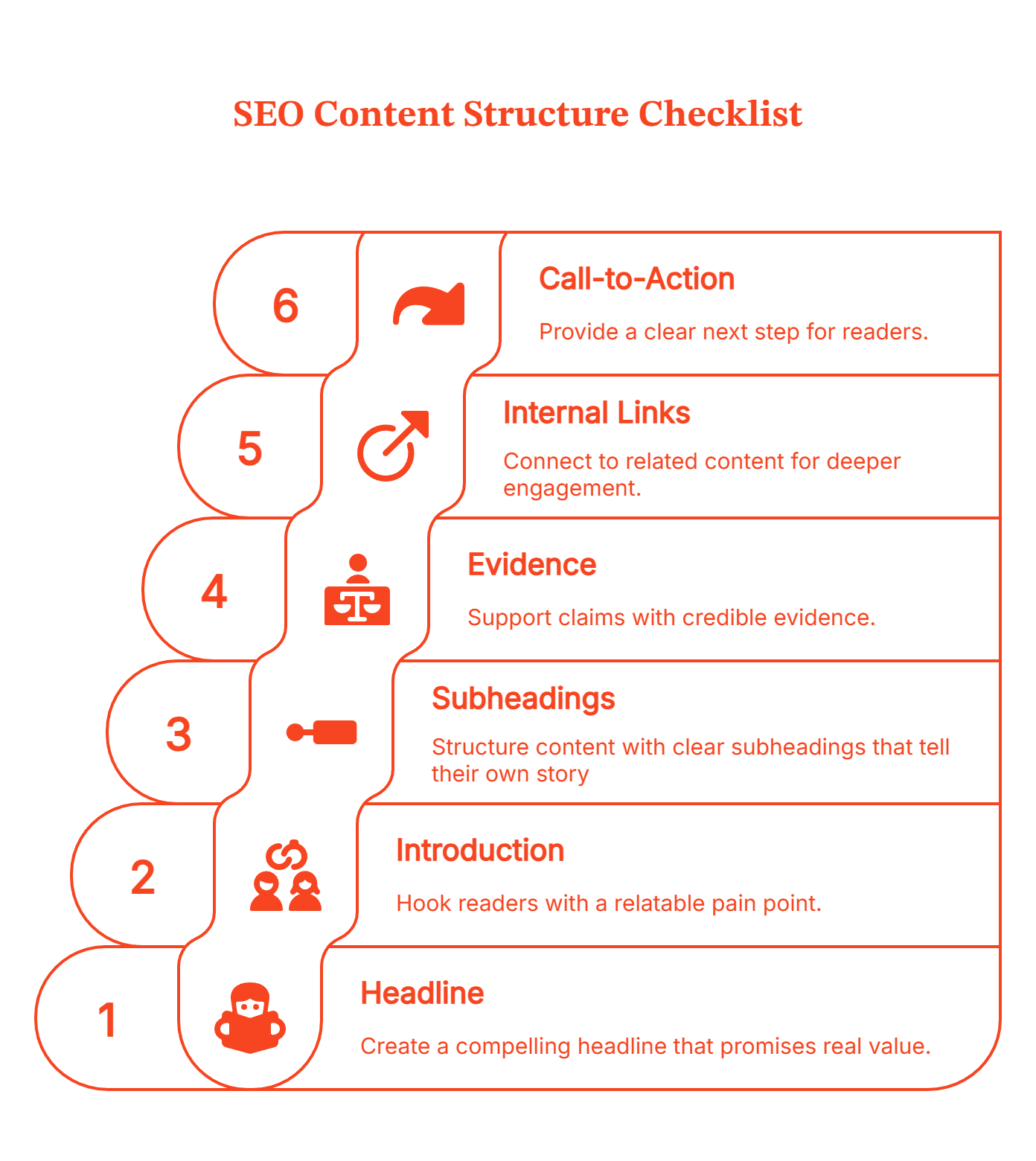
➕Also Read: Step-by-Step Guide to SaaS Content Marketing
Real-World SEO Content Examples (and What They Teach Us)
Right, let's look at some brands that actually get content AND seo right. Here’s what’s actually working out there.
- HubSpot: Practice What You Preach
The Setup:
HubSpot literally invented the term "inbound marketing." So if their content wasn’t killer, that'd be awkward, wouldn't it? They couldn't exactly sell inbound marketing software while doing outbound spam. They had to walk the walk.
What They Did:
Started with a simple realization: their customers couldn't use inbound marketing effectively if they didn't understand the fundamentals. So they created a blog. Then another blog. Then separated blogs by niche: marketing, sales, service, website design. Each with its own audience persona.
But here's the clever bit, instead of just creating more content, they implemented "historical optimization" constantly updating old content to keep it relevant and ranking. Have a look here:
Source: Hubspot
They also built HubSpot Academy with free certifications. The courses teach you marketing concepts, then you practice with HubSpot tools. Smart, right? You learn for free, experience the product firsthand, and if it works... well, converting to paid suddenly makes sense.
Why It Works:
They're not pushing products. They're building credibility. Their content educates first, sells second (or third, or not at all). By consistently creating valuable and authoritative content, they earn quality backlinks from other reputable sites, further boosting their authority and search engine rankings. When you become the trusted guide, people come to you when they're ready to buy.
The Lesson:
Stop selling. Start guiding and establishing your topical authority. And please update your old winners, they're sitting there collecting dust when they could be collecting conversions.
- Semrush: Be the Resource, Not Just the Tool
The Setup:
Semrush is an SEO tool. So is Ahrefs. And Moz. And about 100 others. In a crowded market, how do you stand out?
What They Did:
They realized not everyone visiting their site is an SEO analyst with years of experience. Some are marketers who barely understand what a meta description is. Instead of assuming expertise, Semrush created an entire education ecosystem.
Free courses on technical SEO, keyword research, content strategy, with certificates you can actually put on your LinkedIn. And here's the genius move: the courses teach a bunch of these topics using demos of Semrush. You learn real skills, while subconsciously familiarizing yourself with the tool.
They also partnered with industry heavyweights like Brian Dean and Greg Gifford as course instructors. Borrowed authority used right.
Why It Works:
They're a one-stop shop. Learn SEO and get the tools to implement it. They've positioned themselves as thought leaders, not just software vendors. When you teach someone a skill, they associate that competence with your brand.
Plus, those certifications? Free resume boosters. People share them on social media, which is basically free marketing.
The Lesson:
Turn your expertise into credentials people actually want. And if you can borrow authority from industry leaders to teach your courses? Even better. You're not just selling software. You're building certified practitioners who already trust your platform.

- Slack: Be Everywhere Your Audience Is
The Setup:
Slack exploded during COVID when everyone suddenly needed remote communication tools. But they didn't just ride the pandemic wave, they built a content strategy that works across every channel.
What They Did:
Cross-platform everything. Blog posts, podcasts, live events, on-demand webinars, and an extremely active social presence. Each piece of content complements the others. Blog posts become Twitter threads. Video tutorials get repurposed as Instagram clips. Podcasts distill complex topics for people who prefer audio.
They live by the motto: ‘Go where your audience goes, even if it's not a common channel.’
Why It Works:
They're platform-agnostic. Your target audience isn't just on LinkedIn or just reading blogs. They're everywhere, consuming different formats depending on context. Slack meets them wherever they are.
And everything connects. A podcast episode references a blog post. A social post drives traffic to a tutorial. It's a content ecosystem executed via a great content management system
The Lesson:
Don't put all your eggs in one basket. Repurpose relentlessly. And stop overthinking which channels are "professional enough" for B2B. If your audience is there, you should be too.
Notice the pattern in all the strategies? None of these are about keyword stuffing or winning algorithms. They're about being genuinely helpful in ways their competitors aren't. They provide valuable content, engage, repurpose, and show up consistently.
HubSpot educates. Semrush certifies. Slack meets you everywhere.
That's what winning seo driven content looks like in 2025. Not tricks. Not hacks. Just relentless commitment to being useful to your target audience.
Scaling SEO Content with AI, Analytics, and Data
AI is changing how teams scale SEO content but let's be clear: it's here to support human creativity, not replace it.
Think of AI as the Sheldon of your content team. A genius with data, pattern-spotting, and structure, but completely hopeless at reading the room. That's why it needs a Leonard: someone who can take all that precision and turn it into content that actually connects. Together, they're unstoppable, as long as you know who should lead the conversation.

The AI Advantage (and Its Limits)
AI tools can turbocharge your workflow. Use them for:
- Topic Ideation: Spot trending searches with tools like Clearscope, MarketMuse, SurferSEO, etc.
- Cluster Mapping: Group related themes automatically, so your strategy doesn't look like a conspiracy wall.
- Optimization: Get real-time readability and keyword suggestions.
Google's getting better at identifying AI-generated content that lacks genuine expertise or originality. Your content needs to pass what I call the "unique value test." If your competitor could write something similar with AI, you haven't created real value.
The Data-Driven Edge
The real competitive edge comes from how well you use your existing data and insights.
Here's how you can use analytics to be the brains behind your SEO operation:
Search Trends: Google Trends and Google Search Console to monitor website performance, track SEO rankings and reveal what your target audience actively wants. No more guessing.
CRM Insights: Your sales calls are gold. Real buyer questions, objections, and comparisons. Turn them into content.
But here's where most teams stop short. They track traffic and rankings, then wonder why leadership questions their budget. Organic traffic looks nice in reports. Rankings feel like progress. But if those visitors never become customers, what's the point?
Measuring What Actually Matters
Traditional SEO metrics track rankings, organic search traffic, backlinks. Great. But did revenue grow? Did you close deals?
Modern seo led content marketing connects it to business outcomes. Track which pieces drive qualified accounts, influence deal velocity, and correlate with conversions.
Consider two blog posts:
- Post A: 15,000 visits, #2 ranking, 200 signups → Zero opportunities
- Post B: 800 visits, #8 ranking, 12 opportunities → $380K closed revenue
Traditional metrics pick Post A. Impact metrics reveal Post B drives actual growth.
Stop optimizing for rankings. Optimize for revenue.
Scaling isn't about publishing more. It's about creating better content that stays true to your voice. Use AI for speed, but let humans bring in the creativity, and data bring in the clarity on what's actually working.
How Can Factors Help You?
So you've done the work. Built the clusters. Mapped the intent. Created content value-driven content. Brilliant. Now answer this: which piece drove the deal that closed last week? Can't say? That's the problem. And it's why most content teams spend more time defending their budget than doing their actual job.
Traditional SEO metrics are basically vanity metrics in disguise. "We got 50,000 pageviews this month!" Amazing. Did any of them become customers? "Our blog ranks #1 for this keyword!" Fantastic. Does that keyword bring people who can actually afford your product?
This is where Factors fundamentally changes the conversation.
From Traffic to Pipeline: The Real Metrics
Factors doesn't just tell you which content ranks or how many visits you got. It connects content performance directly to pipeline metrics. You can see which blog posts were visited by accounts that became MQLs, which progressed to SQL, and which created actual opportunities.
Imagine seeing: "This blog post drove 10,000 visits but zero opportunities" versus "This one drove 800 visits and generated 12 opportunities worth $450K in pipeline."
Suddenly your content prioritization becomes crystal clear.
Track Which Content Actually Wins Accounts
Factors tracks content engagement at the account level. You can see which specific assets attract your ideal customer profile accounts and map those interactions directly to pipeline and revenue.
No more guessing which topics resonate with buyers. You'll know exactly which content pieces show up in winning deal journeys versus lost opportunities.
Understanding Your Full Buyer Journey
Factors maps the complete path from anonymous visitor to closed deal. You can see:
- Which accounts visited which content and when
- How buyers move between stages (MQL → SQL → Opportunity → Closed-Won)
- Conversion rates and velocity at each stage
- Where accounts are dropping off and why
- The full sequence of touchpoints that influenced the deal
Cross-Channel Attribution That Actually Works
Here's where most attribution tools fail: they only track one channel at a time. Factors consolidates everything - website visits, ad engagement, sales calls, meetings - into a single dashboard
You can see the complete picture: the account that clicked on your LinkedIn ad, visited three blog posts, downloaded a whitepaper, then requested a demo. Not just fragmented data points, but the actual story of how they discovered and evaluated you.
💡Also read: Understanding Multi-Touch Attribution Models
Beyond First or Last Touch
Traditional attribution models - first touch, last touch - weren't built for complex B2B buyer journeys. Factors gives you complete visibility on every touchpoint that influenced the deal, not just the first or last one.
You'll finally be able to answer questions like: "Which marketing channels contribute most to our highest-value deals?" or "Do accounts that engage with our educational content close faster than those who don't?"
Built for B2B Buying Cycles
Unlike consumer-focused analytics tools, Factors is designed specifically for long, non-linear B2B sales cycles. It tracks at the account level (not just individual users), integrates with your CRM and sales tools, and understands that enterprise deals involve multiple stakeholders across months of evaluation.
To give you the gist
SEO optimized content in 2025 isn't about winning the rankings game. It's about winning the revenue game.
The shift from SEO and keyword optimization to intent-driven strategy isn't optional anymore. You can rank #1 for a hundred keywords and still contribute nothing to your bottom line. Or you can create focused, SEO driven content that brings fewer visitors but generates actual pipeline.
Build content clusters around real ICP problems. Track what drives deals through proper attribution. And update your old content instead of letting it collect digital dust.
The brands winning at SEO led content marketing right now aren't doing anything revolutionary. They're just being consistently useful while everyone else chases vanity metrics.
FAQs for SEO Content Strategy
Q: What's the difference between SEO content and content marketing?
A: SEO content targets search visibility, optimized for keywords and rankings. Content marketing is the broader strategy of creating valuable content across all channels. Best approach? Combine them. Create SEO driven content that ranks in search AND serves your target audience's needs. They're complementary, not separate.
Q: What's the difference between SEO and Search Engine Marketing (SEM)?
A: SEO focuses on organic search rankings through content and optimization. SEM includes both organic SEO and paid search advertising (like Google Ads). Think of it this way: SEO is the long game that compounds over time, while paid search gives immediate visibility. Smart B2B teams use both, paid ads validate topics and drive quick wins, while SEO builds sustainable pipeline without ongoing ad spend.
Q: Has there been a shift in search engine ranking?
A: Absolutely. Google's algorithms (BERT, MUM, SGE) now prioritize search intent over keyword matching. Rankings depend on content depth, user experience, and genuine expertise—not keyword density. The shift moved from "what target keywords can I rank for?" to "what problems can I solve better than competitors?" Quality and intent alignment win over optimization tricks.
Q: What is the ideal structure for a content piece?
A: Hook with a specific pain point, provide context on why it matters now, deliver actionable value (insights, frameworks, examples), and guide to next steps. Use subheadings every 200-300 words, short paragraphs, and scannable formatting. Internal links to related content build topical authority. Make it easy to skim but rewarding to read deeply.
Q: Should I focus on SEO and keyword optimization or user experience first?
A: Both. Write for humans, solve problems clearly. Then optimize: add target keywords naturally, use clear headings, include internal links, make it scannable. Modern seo and keyword optimization means helping search engines understand great content, not tricking them. Google rewards content that genuinely serves users.
Q: How do SEO and social media work together?
A: SEO builds discoverability, social media builds engagement. Repurpose top blog posts into LinkedIn carousels or Twitter threads. Use social signals to identify resonating topics, then create comprehensive blog content around them. Social activity drives brand searches and traffic, which indirectly boosts SEO performance. The integration of SEO and social media amplifies both channels.
Q: How can I scale SEO with AI, analytics, and data?
A: Use AI for topic ideation, keyword clustering, and content outlines. but keep the insights human. Combine three data sources: Search Console (what brings qualified traffic), CRM insights (real buyer questions), and engagement metrics (what resonates). Track which SEO topic categories drive pipeline, not just traffic. Scale based on revenue outcomes, not publishing volume.
Q: How can Factors help you with SEO led content marketing?
A: Factors connects content performance to pipeline metrics. See which blog posts drive MQLs, SQLs, and opportunities, not just pageviews. Track the full buyer journey from content visit to closed deal. Identify which SEO-led content marketing topics attract high-fit accounts versus random traffic. Stop defending budgets with traffic charts; prove value with pipeline reports.

10 Signs Your Sales Process Needs AI Automation Today
Is your sales team overwhelmed or missing leads? Discover 10 signs it’s time to automate your sales process with AI—boost efficiency, conversions, and ROI fast.
TL;DR
- Automation unlocks time: AI eliminates repetitive tasks, freeing reps to focus on high-value sales activities.
- Lead quality improves: Real-time lead scoring and segmentation help target the right prospects faster.
- Communication stays sharp: Automated follow-ups and multilingual support prevent drop-offs and boost engagement.
- Performance becomes visible: With AI-driven analytics, you can track ROI, spot bottlenecks, and scale with confidence.
Sales leaders often see promising leads slip away or watch their teams get stuck with low-value tasks. When your sales process has inefficiencies, conversion rates fall, customer satisfaction drops, and team morale suffers. These problems don't just slow growth; they cost you revenue and market share.
If your sales reps spend more time on data entry than selling, or if follow-ups are missed due to scattered information, you're not alone. The good news? AI sales platforms can now automate routine tasks, provide useful insights, and ensure every lead gets attention at the right time. In this guide, you'll learn the ten clear signs that your sales process needs AI automation and how fixing them can improve your results.
10 Signs Your Sales Process Needs AI Automation
Here are the 10 signs your sales process needs AI automation:
1. Low Conversion Rates and Missed Opportunities
If your sales team faces low conversion rates, manual processes might be the issue. Missed follow-ups, inconsistent outreach, and errors can cause good leads to slip away. When sales reps handle too many tasks, they might overlook top prospects or send messages that don't connect. This not only lowers your close rate but also harms your brand over time.
AI sales platforms can automate follow-ups, personalize communication, and ensure no lead is missed. By analyzing data in real time, AI identifies which prospects are most likely to convert and prompts your team to act at the right moment.
Automated workflows also remove repetitive tasks, allowing your sales reps to focus on building relationships and closing deals. If your pipeline is full but your win rate is low, consider AI automation to capture more opportunities and drive steady growth.
For more insights on improving conversion rates, check out our Funnel Conversion Optimization page.
2. Excessive Time Spent on Repetitive Tasks
When your sales team spends hours on manual data entry, scheduling meetings, or sending routine follow-up emails, it drains productivity and morale. These repetitive tasks take up valuable time and increase the risk of mistakes, leading to missed appointments or incorrect information in your CRM. Over time, this inefficiency can slow down your sales cycle and limit your team’s ability to focus on important activities like building relationships and closing deals.
AI sales platforms automate these time-consuming tasks. They sync data across systems, schedule calls, and send personalized follow-ups. Automation handles each step quickly and accurately. With AI automation, your sales reps gain hours each week, allowing them to focus on strategic conversations and nurture key accounts. If your team is bogged down by repetitive work, it’s a clear sign your sales process needs AI automation to boost efficiency and free up your team for selling.
3. Inconsistent Customer Communication
When your sales team sends mixed messages or misses follow-ups, it can damage trust and hurt your chances of closing deals. This often happens when team members don't have a unified approach or when manual processes cause delays. Prospects might get mixed messages, wait too long for replies, or be forgotten.
AI sales platforms help by automating follow-ups. They ensure each lead gets timely, relevant, and clear communication. Automated workflows send emails, reminders, and updates based on where each prospect is in the sales funnel. This improves the customer experience and helps your team appear professional and reliable. If prospects lose interest or complain about unclear messages, it's a sign your sales process needs AI automation. Consistent, automated outreach keeps leads interested and moves them through your pipeline, increasing your conversion rates.
4. Difficulty Segmenting and Prioritizing Leads
If your sales team finds it hard to spot which leads will likely convert, you're not alone. Guesswork or outdated spreadsheets often guide manual segmentation, wasting time and missing chances. Without clear lead prioritization, your team might spend the same effort on cold leads as on hot prospects, lowering efficiency and sales results.
An AI sales platform can change this process. AI analyzes lead behavior, demographics, and engagement in real time. It automatically segments your database and scores leads based on their likelihood to buy. This lets your team focus on high-priority prospects and tailor outreach for each segment. As a result, you'll see better conversion rates and a more predictable pipeline.
If you still rely on manual lists or intuition to prioritize leads, it's a sign your sales process needs AI automation. With smarter segmentation, your team can work more strategically and close more deals with less effort. Explore our Account Intelligence for more details.
5. Poor Tracking of Sales ROI and Performance
Many sales teams find it hard to measure the real impact of their activities. They often use scattered spreadsheets, manual data entry, or outdated tools, which makes it tough to see what works and what doesn’t. This lack of clarity can waste resources, miss revenue targets, and make it hard to justify spending.
AI sales platforms fix this by automatically gathering and analyzing sales data from every touchpoint. Real-time dashboards and detailed reports give you clear insights into conversion rates, pipeline health, and campaign success. Automated tracking removes human error and keeps data consistent, so you can make decisions based on facts.
If your team spends too much time on reports or can't link sales activities to results, AI automation can change your process. You’ll spot bottlenecks, improve strategies, and prove ROI with confidence, freeing up time for more valuable work. For more on tracking performance, check out our Marketing ROI From PPC page.
For further insights, read this guide on AI-powered sales intelligence.
6. High Manual Labor and Operational Costs
If your sales team spends too much time on data entry, follow-ups, or admin tasks, you face high costs and low productivity. Manual work slows your team and raises the risk of errors and burnout. These issues can cut into your profits and make it hard to grow.
AI sales tools handle tasks like data capture, lead nurturing, and scheduling. This lets your team focus on building relationships and closing deals. Automation lowers the need for more hires, cuts training costs, and keeps your sales process consistent. If you face high labor costs or slow workflows, AI automation offers immediate savings and long-term efficiency, helping your team achieve more with less.
7. Lack of 24/7 Multilingual Support
If your sales process only works during business hours or struggles to serve non-English speakers, you’re missing valuable opportunities. Buyers today expect quick responses, no matter their time zone or language. When leads wait for answers or can’t communicate in their preferred language, they often lose interest and move to competitors.
AI sales platforms can address this by providing support 24/7 and handling conversations in multiple languages. Modern AI tools, like those from. This keeps your sales funnel open, capturing leads and nurturing prospects even when your team is off the clock.
With AI-driven multilingual and 24/7 support, you can expand your reach, boost customer satisfaction, and ensure no lead slips through the cracks due to timing or language barriers. AI automation is essential for global growth and a seamless buyer experience.
8. Inefficient Call Routing and Lead Assignment
If your sales team struggles to decide who should handle each lead or call, you face a common problem that slows response times and frustrates both staff and prospects. Manual lead assignment leads to confusion, missed follow-ups, and uneven workloads. This often leads to lost sales and a poor customer experience.
AI sales platforms fix this by analyzing incoming leads and calls in real time. They automatically route them to the right sales rep based on availability, expertise, and workload. Advanced AI can even detect caller intent, ensuring high-priority leads get quick attention.
By automating call routing and lead assignment, you ensure every inquiry is handled quickly and by the right person. This improves your team’s efficiency and increases your chances of turning leads into loyal customers.
9. Limited Scalability and Growth Constraints
When your sales process relies on manual tasks, scaling up to handle more leads or customers is tough. As your business grows, your team may struggle to meet rising demand. This often leads to slower responses, missed chances, and unhappy customers.
AI sales platforms solve these issues by automating tasks, lead nurturing, and follow-ups. Unlike manual processes that require more staff, AI can handle a surge in leads immediately, without compromising quality or consistency. For example, AI can manage many conversations at once, allowing your business to grow without adding more people or costs.
By using AI automation, you can support growth efficiently and keep high service standards, even during busy times. This ensures your sales process stays quick, responsive, and ready to seize new opportunities, giving you an edge in a competitive market.
10. Inadequate Data Analysis and Reporting
If your sales process uses scattered spreadsheets or manual data entry, you might miss valuable insights. Without centralized, real-time data analysis, it's tough to know which sales tactics work, where leads drop off, or how your team performs. This lack of visibility leads to guesswork, making it hard to improve your sales strategy or predict revenue accurately.
AI sales platforms change raw sales data into useful insights. They automatically collect, organize, and analyze every customer interaction, showing patterns, conversion issues, and top channels. With advanced reporting, you can track KPIs, measure ROI, and make informed decisions quickly. AI also predicts customer behavior, helping you prioritize leads and adjust your approach.
By automating data analysis and reporting, you remove errors and save hours of manual work. This allows your sales team to focus on building relationships and closing deals, rather than struggling with spreadsheets. In the end, you gain a clear, data-driven path to sales growth.
Security and Compliance Risks in AI Sales
Handling sensitive customer data is a core part of sales operations, but relying on manual tools like spreadsheets, emails, or outdated CRMs creates serious vulnerabilities. These methods increase the risk of data breaches, unauthorized access, and non-compliance with privacy regulations such as GDPR, HIPAA, or CCPA. This leads to costly fines, reputational damage, and loss of customer trust.
AI sales platforms significantly reduce these risks by offering robust, built-in security features. Key safeguards include:
- End-to-end encryption to protect data in transit and at rest.
- Role-based access controls (RBAC) are used to restrict sensitive information.
- Automated compliance workflows to ensure data is handled appropriately.
- Real-time threat detection and alerts for proactive protection.
- Audit trails and logging for simplified reporting and regulatory audits
With automation managing data securely and consistently, the chances of human error drop sharply. These platforms not only help you meet evolving legal requirements but also demonstrate your commitment to data protection, which builds trust and confidence with customers and stakeholders alike.
{{INLINE_TOFU}}
When Sales Inefficiency Signals It’s Time for AI
In sales, delays and manual errors can quietly undermine growth. This guide outlines ten unmistakable signs that your sales process is outdated and in urgent need of AI automation. From low conversion rates and inconsistent communication to high operational costs and poor data visibility, each issue points to a broader problem: your team is spending more time managing tasks than closing deals.
AI tools step in to resolve these challenges by streamlining workflows, prioritizing leads, automating follow-ups, and delivering actionable data in real time. The result? Fewer missed opportunities, better customer engagement, and faster decisions. If your CRM is a mess, reports are manual, and support is offline after hours, you’re already falling behind. By implementing AI-driven automation, you free your team to focus on selling while ensuring every lead gets timely, personalized attention. Whether your business struggles with scalability, ROI tracking, or lead segmentation, this guide shows how automation can shift the balance and reinvigorate your revenue engine, without increasing headcount.
Try the Factors AI sales platform for free. Discover how automation can increase your conversion rates and lower costs. Sign up for a free trial and notice improvements in just weeks.

SEO ROI Forecast: An SEO Playbook That Convinces Leadership, Survives Google Updates and AI chaos
AI Overviews changed SEO forecasting. Learn how to model traffic, AI visibility, and pipeline with a two-layer SEO ROI forecast that leadership trusts.

TL;DR
- SEO forecasting now has two layers: traditional performance and AI-driven visibility. You need both.
- Traffic ≠ impact anymore. AI Overviews change clicks, so rankings alone don’t tell the whole story.
- Good forecasts are built on fundamentals: fresh data, realistic capacity, and scenario ranges, not guesses.
- The goal isn’t prediction. It’s planning for uncertainty and tying SEO to pipeline and revenue.
Imagine you walk into your quarterly planning meeting feeling optimistic. Leadership asks, “So… what will SEO deliver next quarter?” Suddenly, everyone is staring at you like you’re THE one person who knows exactly what Google will do next. (If only.)
You pull up a spreadsheet. You explain the numbers. And someone still asks, “But what about AI Overviews? And LLM search? Isn’t everything changing?”
(A fair question, but also, when does Google not change something?)
If you’ve lived through that moment before, you’re definitely not alone. And here’s a little secret, the most confident SEO managers already know:
Forecasting SEO isn’t about predicting the future. It’s about building a believable story backed by math.
And when that story shows real pipeline and revenue?
Your SEO strategy suddenly becomes the hero of the marketing team.
Let’s break down how to build an SEO ROI forecast that’s fun to present, easy to defend, and shockingly useful for planning.
Why SEO forecasting even matters (Yes, even now..)
Here’s the truth: SEO is helpful for a company because it reduces Customer Acquisition Cost, or CAC, compounds over time, and generates the kind of inbound demand that makes paid search look… well, expensive. (I’ll try not to look too pleased about that.)
But your founders don’t care about ‘rankings’ or ‘domain authority.’ They care about:
- MQLs
- Pipeline
- Revenue
- Efficiency
- Predictability
Your SEO potential forecast is the bridge between ‘here’s what we hope’ and ‘here’s what we’re planning for.’ When done well, it becomes less of a forecast and more of a business case.
(Also, when your forecast is credible, you get fewer surprise ‘urgent’ Slack messages at 9 PM. Small victories…)
Related read: B2B SEO checklist to know what steps to take before starting your SEO planning, keyword research, and strategy development.
The part most SEO forecasts now miss: SEO has two layers
Here’s where SEO changed in the last two years, and where many forecasts quietly fall apart.
SEO no longer operates as a single system. Today, every credible SEO forecast has two parallel layers:
1. The traditional performance layer
This is the familiar one:
- Rankings
- Traffic
- Conversions
- Pipeline
- Revenue
2. The AI visibility layer
This is newer, messier, and harder to measure:
- AI Overviews and zero-click answers
- LLM summaries and citations
- Brand mentions on LLM searches
- Influence that shows up before a user ever lands on your site
This layer assists conversions rather than owning them.
The mistake we all make here is forecasting only the traditional performance layer and ignoring the AI visibility layer, and not both.
So, let’s start with the foundation first.
{{INLINE_MOFU}}
What a traditional SEO forecast still needs to include
If you want your SEO forecast template to actually hold up in a meeting, it needs a few essentials:
1. Recent baseline metrics
Use your last 3 to 4 months of data, and not all of last year’s. Why? Because SEO changes fast, and old numbers lie. (Lovingly.)
2. Realistic capacity inputs
Be honest about what your team can deliver:
- How many pieces of content can you actually publish each month?
- How many technical fixes can dev genuinely handle?
This keeps your forecast grounded in reality rather than wishful thinking.
3) Real CTR and conversion data
- Skip the outdated ‘position #1 gets 30% CTR’ myths.
- Use your Google Search Console data instead; it reflects how your real audience behaves today.
4) Three scenario ranges
Make three easy versions:
- Low (Conservative): What you can hit even on a bad month
- Middle (Expected): What do you think will actually happen
- High (Ambitious): What’s possible if everything goes right
Why do this?
Because giving leadership one number is a trap. Instead, give them a range. This helps everyone stay calm when things shift, and reminds them that things always shift in SEO.
5) Clear assumptions
Write down every key assumption affecting your forecast, like:
- “We’ll publish 4 articles/month.”
- “We’ll get 6 dev hours per sprint.”
- “CTR stays stable.”
These notes save you later, especially when someone asks, “Why did this change?” and you actually have an answer.
Related read: Top free website traffic analysis tools for 2026.
How AI, AIO, GEO, AEO, and LLMs are reshaping SEO ROI forecasts
(AKA: “Everything changed and here’s how to stay sane.”)
AI isn't “disrupting search.” It's rebuilding a whole new search economy. Everything is evolving, right from traffic flows to visibility layers and the fundamental definition of ranking.
Here’s what’s actually shifting.
1) Zero-click growth & AI answer layers = fewer clicks
Generative AI layers such as AIO (AI Overviews), SGE (Search Generative Experience), and AI mode increasingly provide users with full answers in the SERP.
This means:
- Users get answers without clicking
- CTR drops the hardest on informational and research queries
- AI doesn't consistently cite the same sites that rank organically
- Forecasts based on “rank × volume × CTR” are increasingly wrong
If organic traffic used to be your golden goose, AI just built a fence around the nest.
2) AI search channels are growing, but referrals are still tiny
AI platforms do generate referrals, but they’re just small right now.
Your forecast should include:
- A small-but-growing ‘AI referrals’ line
- A qualitative measure of AI visibility (citations, mentions)
We’re in the ‘teenage years’ of AI search, so it's moody, unpredictable, and still figuring itself out.
3) New optimization targets: AEO, GEO, and LLM SEO
Classic SEO = ‘How do I rank on Google?’
Modern SEO = ‘How do I become the answer everywhere?’
The answer to the latter is:
- AEO: Answer Engine Optimization
- GEO: Generative Engine Optimization
- LLM SEO: Creating content LLMs rely on, cite, or summarize
This means
- You’re no longer forecasting just ‘traffic.’
- You’re forecasting visibility, citations, and brand lift, even when they don’t produce immediate clicks.
(Welcome to the multiverse of search.)
4) Regulatory and platform risks increase volatility
Google is being scrutinized for:
- Using publisher content without compensation
- Potential ‘zero-click monopolization’.
- How AI answers are sourced
This means your forecast must assume:
- Periodic feature rollouts
- Traffic instability
- Possible policy changes around citations
The 7-step playbook for a complete SEO forecast
Even with AI reshaping search, the mechanics of forecasting still rely on fundamentals. This is the traditional SEO, AKA the non-AI layer, and it’s where your numbers earn trust.
1) Start with a clean baseline
Pull the last 3 to 6 months of performance from GSC and GA4. Export impressions, clicks, positions, and conversions.
Why not 12 months?
Because the last few months reflect the current SERP environment and your present traffic behavior (seasonality matters, but recency matters more when SERPs are changing fast).
Practical tip: Build a sheet with ‘current monthly organic clicks’, ‘conversion rate by page type’, and ‘average LTV of an organic customer’.
2) Segment keywords by intent and SERP features
Not all keywords behave the same.
Create buckets: high-intent commercial, informational (AI-overview prone), branded, and long-tail. Apply different CTR assumptions per bucket. Informational terms will often see different click behavior when AI answers or zero-click features appear.
Practical tip: Tag queries in your GSC export and calculate CTR by bucket. This is where a decent traffic estimator helps.
3) Choose your forecasting method (or mix them)
Pick the approach that fits your data and team:
- Keyword-based: useful when you have clear target rankings.
- Traffic trend modeling: good when historical growth trends are stable.
- Back-planning from business goals: best when leadership gives a target (e.g., ‘we need 500 MQLs’).
(You can and should combine them.)
4) Be explicit about capacity and timelines
Forecasting SEO isn’t magic; it’s resourcing. Document how many articles you can publish monthly, the dev hours you can spend on technical fixes, and link-building efforts. Then map those to expected traffic lifts and timelines: most content sees meaningful movement in 3 to 6 months; technical fixes can show impact in 1 to 2 months.
Practical tip: Use an SEO forecast template with inputs for ‘articles/month’, ‘avg visits per article’, and ‘dev hours’.
5) Build three scenarios (conservative / expected / ambitious)
Because uncertainty is real.
Show a cone of probability: A narrow range near-term, wider out 6 to 12 months. Attach assumptions to each scenario for what’s required (headcount, budget) to achieve ambitious vs. conservative outcomes.
Practical tip: For each scenario, calculate leads and pipeline.
Then compute SEO ROI: (pipeline value × close rate × contribution margin) / SEO investment.
6) Add an ‘AI visibility’ and brand lift line item
LLMs and answer engines are new channels of visibility that don’t always mean direct clicks. Track LLM citations, featured-answer impressions, and branded search lift. Assign a conservative conversion proxy (e.g., treat 10–30% of AI-driven awareness as future site sessions or uplift to branded queries) until you have better data.
Practical tip: Create an ‘AI visibility to traffic’ multiplier in your model. Start conservative, iterate with data.
7) Document assumptions, cadence, and adjustment triggers
List every assumption (CTR by position, conversion rates, content velocity). Set thresholds that trigger reforecasting (e.g., >15% MoM traffic variance). Schedule monthly check-ins to recalibrate.
Practical tip: Save assumptions in a single tab of your SEO forecast template so you can show leadership what changed when numbers deviate.
And before anyone asks, yes, we’ve heard this take too:
That you don’t need GEO, LLMO, or a shiny new acronym for every AI update; ‘good SEO is still good SEO.’
We actually agree.
But here’s the nuance:
Doing normal SEO now means understanding where your content shows up, not just where it ranks. Same fundamentals but on new surfaces.
Tools that can be used for SEO ROI forecasting
You don’t need a Frankenstein stack to forecast SEO ROI. You just need tools that answer three questions clearly:
- What’s happening?
- What’s most likely to happen?
- What’s the business impact?
Here’s a practical, non-overkill setup.
1. Google Search Console
This is your source of truth for:
- Impressions
- Clicks
- Real CTRs by query and page
- Early signs of AI Overviews impact
If your forecast ignores GSC data, it’s already shaky.
2. Google Analytics (GA4)
Use GA4 to map:
- Organic sessions → conversions
- Conversion rate by page type
- Assisted conversions and paths
This is where SEO stops being ‘traffic’ and starts being revenue-adjacent.
Optional: If you want this automated
Instead of stitching data together manually, you can use Factors.ai to see traffic and page-level conversion data and performance. You also get to see how buyers actually move from first visit to demo booking across LinkedIn ads, Google ads, and other touchpoints (Yes, the non-linear customer journey using multi-touch attribution.)
3. Keyword & traffic estimation tools
Tools like Ahrefs, Semrush, and the like, help with:
- Search volume (directionally)
- Keyword clustering
- Competitive SEO benchmarking
PS: Treat these as estimators, not promises. They’re inputs, not answers.
4. Spreadsheets (still undefeated)
Your actual SEO ROI forecast will almost always live in a spreadsheet.
Why?
- You can model scenarios
- You can show assumptions
- You can explain why the numbers changed
A clean SEO forecast template with inputs, assumptions, and outputs beats any black-box dashboard.
5. AI visibility tracking (emerging, imperfect, necessary)
This part is still evolving, but you should start tracking:
- LLM citations and mentions
- Featured answer appearances
- Branded search lift over time
Even if the data is directional, leadership will appreciate that you’re measuring what’s changing and not ignoring it. Some of the AI SEO tools help you with this.
Common pitfalls that break SEO ROI forecasts
Most SEO forecasts don’t fail because SEO ‘didn’t work.’ They fail because of avoidable planning mistakes.
Here are the big ones:
1. Treating SEO as a single-channel system
- SEO is no longer just ‘you rank, people click, and they convert’
- Ignoring AI visibility, zero-click behavior, and assisted demand creates blind spots that leadership will notice.
2. Using old CTR assumptions
- Those industry CTR charts from five years ago? Well, they don’t survive AI Overviews.
- If you’re not using your own GSC data, your forecast is already outdated.
3. Forecasting ambition instead of reality
- Publishing ‘10 articles per month’ in a forecast when your team has never shipped more than four is how you end up overpromising and under-delivering.
- Capacity realism matters more than optimism.
4. Giving leadership one number
- SEO outcomes come in ranges, not guarantees.
- Single-point forecasts create unnecessary tension when things shift (and they always do).
5. Forgetting to document assumptions
If assumptions aren’t written down, every variance turns into a debate.
If assumptions are written down, variance turns into a conversation.
Big difference.
Summing it up: How to make SEO forecasting work in the ‘AI era’
SEO forecasting hasn’t become impossible; it’s just become more layered.
Today, a credible SEO ROI forecast does three things well:
1. Models the traditional performance layer
This is the familiar, measurable part of SEO.
It forecasts traffic, conversions, pipeline, and ROI using your real historical data and actual team capacity. No inflated CTRs, no best-case assumptions. Just a clear view of what SEO can realistically deliver as a revenue channel.
2. Accounts for the AI visibility layer
SEO impact now goes beyond clicks.
This layer captures zero-click exposure, LLM citations, and brand presence that influence buyers before they ever visit your website. Even when traffic doesn’t show up immediately, SEO is still shaping demand and improving downstream conversion quality.
3. Communicates uncertainty clearly
Modern SEO isn’t predictable to the decimal.
Instead of promises, the forecast uses scenarios, documented assumptions, and ranges. This sets realistic expectations, builds trust with leadership, and gives you a framework to adapt when the search landscape shifts.
And yesss.. good SEO is still good SEO.
But ‘good SEO’ now means planning for where your content appears, not just where it ranks. Same fundamentals but on newer surfaces.
And with the right forecast? Still completely manageable.
FAQs on SEO ROI forecasting
1) What is SEO forecasting, and why does it matter?
SEO forecasting is the practice of using historical performance and current trends to estimate future organic visibility, traffic, conversions, and business value. It helps marketers set realistic goals, plan resource allocation, and justify SEO investment, especially now that search behavior and SERP features are changing rapidly.
2) How do AI Overviews and generative search impact SEO forecasts?
Generative AI features like AI Overviews and answer boxes increasingly deliver answers without clicks, reducing traditional CTR. Because of this zero-click behavior, forecasts based only on rankings and expected clicks can overstate impact. Modern forecasting must include an AI visibility layer to estimate influence even when users don’t click.
3) What data do I need to build an accurate SEO ROI forecast?
A credible forecast uses:
- Recent organic performance (clicks, impressions, CTR)
- Conversion rates by channel or page
- Search intent and keyword segmentation
- Capacity assumptions (content output, dev support)
- Scenario ranges (conservative, expected, ambitious)
These inputs turn SEO planning into a business case rather than a guess.
4) How can I account for uncertainty in SEO forecasting?
SEO forecasting isn’t about absolute predictions; it’s about preparing for a range of outcomes. Use scenario ranges, regularly update assumptions (e.g., CTR, algorithm changes), and include triggers that signal when you should reforecast. This communicates confidence with realistic caveats, not blind certainty.
5) Are traditional forecasting methods still useful in 2025?
Yes, traditional forecasting using historical trends, keyword models, and CTR estimates is still valuable. But it must be augmented with AI-aware signals (like visibility in generative responses,AI Overviews, and LLM citations) because these increasingly shape user behavior and influence demand without a click. Combining both gives a fuller picture.

7 Signs Your B2B Marketing Strategy Needs a Complete Solution Overhaul
Learn the key indicators that your B2B marketing solutions need updating, from stalled revenue to misaligned teams. Get actionable insights to revamp your strategy.
TL;DR
- Revenue stalls and conversion rates drop when tactics no longer resonate.
- Lack of clear ROI and poor sales-marketing alignment signal a need for an overhaul.
- Outdated branding and rigid strategies fail to engage today’s buyers.
- Competitors’ superior visibility and engagement highlight strategic gaps.
Has your revenue growth stalled? Are your sales teams working together hard but seeing fewer results? Are competitors catching up despite weaker products? These challenges are common for B2B companies relying on outdated marketing methods. Frustration mounts as marketing fails to generate quality leads, sales cycles lengthen, and your brand fades in a crowded market.
The solution? Recognize when your approach is faltering and transition to modern B2B marketing. By identifying the signs early, you can adjust your strategy, support your teams, and regain your competitive edge. This guide outlines the seven key indicators that your B2B marketing strategy needs a fresh, data-driven update.
If several of these signs resonate, it’s time to consider a comprehensive overhaul with modern B2B marketing solutions that align teams, clarify ROI, and drive sustainable growth.
7 Signs Your B2B Marketing Strategy Needs a Clear Solution
Sign 1: Plateaued Revenue and Stalled Growth
When revenue growth halts, it's a clear sign that your B2B marketing strategy needs reevaluation. Stagnant growth suggests that your current approach has reached its limits. To reignite growth, consider a comprehensive strategy overhaul that leverages data-driven insights and innovative marketing solutions, such as Funnel Conversion Optimization.
Sign 2: Declining Lead Quality and Conversion Rates
If your sales team spends more time on leads but closes fewer deals, it indicates that your B2B marketing isn't reaching the right audience. Poor lead quality means your campaigns attract browsers rather than buyers, wasting resources and frustrating your teams. Even if website traffic remains steady, a drop in conversion rates suggests a disconnect in messaging or a cumbersome process. To address this, refine your targeting, enhance your messaging, and ensure your strategy attracts and converts your ideal B2B customers. Tools like Intent Capture can help identify high-intent leads.
Sign 3: Unclear ROI and Ineffective Attribution
Struggling to measure marketing ROI or attribute results to specific campaigns is a red flag. Without clear metrics, it's challenging to justify marketing spend or understand which efforts drive success. Implementing robust analytics tools can provide the insights needed to optimize your strategy and demonstrate tangible results. Consider using content attribution to gain deeper insights into your marketing efforts.
Sign 4: Misalignment Between Marketing and Sales Teams
A significant indicator that your B2B marketing strategy needs adjustment is misalignment between marketing and sales teams. When these teams don't share goals or data, valuable leads can be lost. Marketing might generate leads that sales deem unqualified, leading to frustration and missed revenue targets.
For B2B companies, seamless teamwork is crucial. Marketing should deliver leads that align with sales' ideal customer profile, and sales should provide feedback on the quality of these leads. Frequent disagreements, unclear processes, or mixed messages to prospects signal the need to realign your strategy. Foster collaboration with shared goals and regular communication to unlock the full potential of your B2B marketing. Tools that have workflow Automations can streamline this process.
Sign 5: Outdated Brand Presence and Messaging
An outdated brand presence is a clear sign that your B2B marketing needs a refresh. Today's buyers research and compare options before engaging with sales. If your website, social media, and content appear outdated or inconsistent, prospects may question your relevance or expertise. Outdated messaging can miss the current needs of your audience, allowing more agile competitors to gain an edge. Regularly evaluate your brand and messaging to ensure they reflect your company's current value and position.
Sign 6: Inability to Adapt to Market or Buyer Changes
Markets and buyer behaviors evolve rapidly, especially in B2B industries. If your marketing strategy can't keep pace with new trends or shifts in buyer roles, you risk falling behind. For instance, if your campaigns target outdated personas or overlook new channels where buyers now spend time, you lose valuable opportunities. A rigid approach can also waste your budget on ineffective tactics. The best B2B marketing solutions are flexible, using data to detect changes early and adjust messaging, channels, and offers. If your team reacts slowly to market feedback or fails to engage new buyer types, it's a clear sign your strategy needs a complete overhaul to stay relevant and competitive. By tapping into the insights available through our Account Intelligence solution, you can pivot faster and engage the right accounts at the right time
Sign 7: Competitors Outperforming Your Marketing Efforts
If competitors consistently outperform you in brand visibility, lead generation, or customer engagement, it's time to rethink your B2B marketing. When rivals with similar products gain more market share, their strategy likely aligns better with current buyer needs. You might notice their content engaging more people, their messaging resonating well, or their use of new channels you haven't explored. Ignoring this can lead to lost revenue and a weakened brand.
Regularly benchmark your performance against competitors. If your results fall short despite similar resources, it's time to revamp your approach to regain your edge and ensure your marketing supports real business growth. Consider leveraging Marketing ROI tools to measure your effectiveness.
Actionable Insights to Revamp Your B2B Marketing Strategy
If your current B2B marketing results are lagging in low conversion rates, misaligned teams, or unclear ROI, it may be time for a full strategic reset. Here are proven, actionable steps to breathe new life into your strategy and drive performance:
1. Reassess Your Ideal Customer Profile (ICP)
Markets evolve, and so do your buyers. Re-evaluate your ICP by analyzing your best-performing accounts and identifying updated firmographic, technographic, and behavioral traits. Tools like Factors.ai can help enrich this data and uncover new segments worth targeting.
2. Conduct a Funnel-Wide Audit
Map out your buyer journey from first touch to closed deal and identify drop-off points. Utilize attribution platforms like Dreamdata or Factors to identify which stages or campaigns are underperforming. Then align content and campaigns to fill those conversion gaps.
3. Realign Sales and Marketing Around Shared Revenue Goals
Break down silos by implementing RevOps principles. Ensure both teams agree on definitions (e.g., MQLs vs. SQLs), share dashboards, and co-own pipeline targets. This alignment improves lead quality and shortens sales cycles.
4. Rebuild Content Strategy for Buyer Intent
Stop producing content for volume. Focus instead on intent-based content tailored to each stage of the buyer journey. Use SEO tools like Ahrefs or Semrush to identify what your target audience is actually searching for, and align assets like whitepapers, case studies, and product demos accordingly.
5. Shift to Account-Based Everything (ABX)
ABM isn’t just for enterprise. If you're selling high-value products, adopt an ABX approach, combining sales, marketing, and customer success to deliver coordinated, personalized outreach. Factors helps you with this process.
6. Upgrade Your Tech Stack for Scalability and Integration
Outdated or isolated tools slow your progress. Rebuild your stack with API-first platforms that integrate seamlessly, e.g., a headless CMS, a unified CRM, and analytics tools that support multi-touch attribution. Automate repetitive tasks to let teams focus on high-value work.
7. Create an Agile Testing Framework
Embed experimentation into your strategy. Use A/B testing and multivariate testing on messaging, CTAs, landing pages, and even sales sequences. Make data-backed decisions fast, and continually optimize based on real performance, not gut feel.
8. Invest in Training and Internal Enablement
Even the best tools and strategies fail without skilled users. Conduct regular training on systems, data literacy, and modern B2B tactics. Empower your team to act on insights, iterate campaigns, and drive continuous improvement.
When you apply these insights, you're not just patching up problems but laying the groundwork for scalable, measurable growth. A strategic overhaul doesn't need to be overwhelming; it just needs to be focused, data-driven, and aligned with real buyer behavior.
{{INLINE_MOFU}}
Final Thoughts: Adapting Your B2B Marketing for Better Results
Traditional B2B tactics often fail to sustain momentum, manifesting as stalled revenue and prolonged sales cycles. Declining lead quality and conversion rates frequently reflect misaligned targeting and messaging. Additionally, opaque measurement frameworks hinder accountability, making it challenging to justify budgets or attribute outcomes. When marketing and sales teams operate in isolation, prime prospects slip through gaps, intensifying friction and delaying deals.
A dated brand presence that misses the mark with today’s decision makers and inflexible strategies that lag behind buyer shifts further exacerbate performance issues. Moreover, competitors capturing superior visibility and engagement expose strategic deficiencies. To reverse these trends, companies must reevaluate their ideal customer profiles, conduct full-funnel audits, and synchronize sales and marketing around unified goals. Adopting an account-based outreach model, upgrading to an integrated technology stack, establishing iterative testing protocols, and investing in targeted team training empower businesses to reclaim relevance and achieve predictable growth.

7 Warning Signs Your B2B Marketing Strategy Needs a Better Funnel Structure
Learn how to identify and fix common B2B marketing funnel issues. Improve conversion rates, customer retention, and ROI with proven solutions.
TL;DR
- Low conversion rates at any stage indicate leaks or friction in your funnel, slowing growth and wasting resources.
- High customer loss and poor retention often mean you lack post-purchase engagement or have value gaps.
- Inconsistent brand messaging confuses prospects and erodes trust, making it hard to move leads forward.
- Poor quality traffic and unqualified leads suggest your top-of-funnel activities aren’t reaching the right audience.
- Relying too much on one traffic source risks your funnel if that source dries up.
- Misalignment between marketing and sales teams leads to missed opportunities and a disjointed buyer experience.
- Lack of data-driven decisions and funnel metrics means you’re unable to optimize or prove ROI.
Imagine your sales team working hard, but deals stall, leads vanish, and your marketing spend falls short. You're putting in the effort, but the results don't show it. Many B2B companies face this issue when they lack a clear marketing funnel. Without it, prospects slip away, messages get mixed, and your team can't find the problem. The key is to build a funnel that fits the complex B2B buying process. With the right structure, you can guide prospects from first contact to loyal customers, ensuring each stage is set for success.
Let's explore the signs that your strategy might need this vital foundation.
Role of a Funnel Structure in B2B Marketing
A clear funnel structure is essential to effective B2B marketing. B2B buyers take a longer path than B2C buyers, involving more people, facing higher costs, and enduring longer sales cycles. You need a clear process to guide prospects from awareness to decision. Without a structured funnel, you can lose track of where leads drop off or which tactics work.
A proper funnel helps you map each stage: awareness, consideration, decision, and retention, so that you can deliver the right message at the right time. It also aligns your marketing and sales teams, ensuring everyone works toward the same goals. A strong funnel structure turns scattered efforts into a cohesive strategy that boosts conversions and maximizes ROI.
7 Signs Your B2B Marketing Strategy Needs a Proper Funnel Structure
Here are the seven signs that you need a better funnel structure:
Sign 1: Low Conversion Rates Across Funnel Stages
If your B2B marketing funnel has low conversion rates, your strategy might need better structure. When prospects engage with your content but don't move from awareness to consideration, or from consideration to decision, it's time to look closer.
Healthy conversion rates should rise as leads move through the funnel: 1-3% at awareness, 3-5% at interest, and up to 10-15% at action. If your rates are below these numbers, your messaging, targeting, or nurturing tactics might be off.
Without a structured funnel, it's hard to see where leads drop off, making it tough to improve your B2B marketing for better results. Explore how subtle tweaks can lift your sales by visiting our Funnel Conversion Optimization insights.
Sign 2: High Customer Attrition and Poor Retention
High customer attrition and poor retention rates are clear indicators that your B2B marketing strategy lacks a robust funnel structure. When customers leave after their initial purchase, it often indicates a lack of post-purchase engagement or a perceived gap in value.
A well-structured funnel doesn't end at the sale; it includes strategies for nurturing existing customers, encouraging repeat business, and building long-term loyalty. By focusing on customer retention, you can increase lifetime value and reduce the cost of acquiring new customers. Explore how our Account Intelligence feature can help you analyze customer behavior and improve retention.
Sign 3: Inconsistent or Fragmented Brand Messaging
Inconsistent or fragmented brand messaging confuses prospects and erodes trust, making it difficult to move leads forward in the funnel. When your messaging is not aligned across all channels and stages of the funnel, it creates a disjointed experience for potential customers.
A strong funnel ensures that your brand message is consistent and cohesive, reinforcing your value proposition at every touchpoint. This consistency builds trust and helps guide prospects smoothly from awareness to decision.
Sign 4: Poor Quality Traffic and Unqualified Leads
If your B2B marketing efforts bring many visitors but few conversions, you might be attracting poor-quality traffic. High bounce rates, short visits, and leads that don’t fit your ideal customer profile are signs of this issue.
When your funnel lacks structure, your campaigns might target broad or irrelevant audiences, leading to wasted ad spend and low returns. Unqualified leads fill your sales pipeline, making your team spend time on prospects who will never buy.
To fix this, review your targeting criteria, refine your messaging, and use analytics to find which channels and content attract high-value prospects. A well-structured funnel helps you attract and nurture leads that truly fit your business. Explore refined sequenced outreach approaches in Cold Outbound for GTM Efforts to accelerate pipeline growth.
Sign 5: Over-Reliance on a Single Traffic Source
Relying too much on one traffic source, like paid ads, organic search, or one social platform, puts your B2B marketing strategy at risk. If that channel changes its algorithm, raises costs, or restricts your account, your lead flow can drop fast. This lack of variety shows your funnel is not complete.
A strong B2B marketing funnel should bring in and nurture leads from many sources, like SEO, content marketing, email, partnerships, and events. Using just one source often leads to unstable performance and makes it hard to grow. Also, single-source traffic can mislead you about what really drives conversions.
To build strength and steady growth, make sure your funnel captures, nurtures, and converts leads from many channels, not just one. Apply buyer-intent signals to expand your reach with tips from our Intent-Based Outreach resource.
Sign 6: Lack of Alignment Between Marketing and Sales Teams
When marketing and sales teams work separately, your B2B marketing strategy may lack a proper funnel. Marketing might generate leads that sales see as low quality, while sales might not give feedback on what works. This gap can lead to missed chances, mixed messages, and wasted resources.
For example, if marketing focuses on early-stage activities but doesn’t nurture leads enough, sales teams get prospects who aren’t ready to buy. On the other hand, if sales doesn’t share customer feedback, marketing can’t improve its approach.
A structured funnel promotes regular communication, shared goals, and a clear definition of qualified leads. This sales and marketing alignment ensures every funnel stage works together to guide prospects toward conversion and lasting partnerships. To ensure this and to maintain cross-functional momentum, leverage our Workflow Automations.
Sign 7: Absence of Data-Driven Decision Making and Funnel Metrics
A strong B2B funnel relies on clear data at every stage. If your team uses gut feelings or random reports instead of consistent metrics, you miss growth opportunities. Without tracking conversion rates, lead quality, and engagement, you can't find bottlenecks or improve campaigns. This often leads to wasted money, poor strategies, and missed revenue goals.
Modern B2B marketing tools should offer real-time dashboards and analytics to show how prospects move from awareness to purchase. Regularly reviewing these metrics helps you adjust tactics, allocate budget wisely, and show marketing’s value to stakeholders. If you don’t know where leads drop off or which content drives action, your funnel needs a data-driven update to stay competitive and deliver results.
{{INLINE_MOFU}}
How to Rebuild and Optimize Your B2B Funnel Structure
Here are the steps to rebuild and optimize your B2B funnel structure:
1. Map the Complete Buyer Journey:
Chart each buyer journey stage from initial awareness to post-purchase engagement. Identify where prospects drop off or lose interest.
2. Spot Funnel Gaps and Bottlenecks:
Analyze which funnel stages lack engagement or have low conversion rates. These are your opportunities for improvement.
3. Segment Your Audience Strategically:
Group prospects by firmographics (industry, size, location) and buying roles (decision-maker, influencer, user) for personalized targeting.
4. Align Sales and Marketing Teams:
Define what qualifies as a lead and standardize the lead handoff process to ensure consistent follow-through.
5. Leverage B2B Analytics Tools:
Use platforms like Factors.ai or HubSpot to track funnel performance, monitor drop-offs, and measure key conversion metrics.
6. Test and Optimize Content:
Experiment with new formats (e.g., video, webinars, interactive tools) and platforms (LinkedIn, email, retargeting ads) to boost engagement.
7. Create a Continuous Feedback Loop:
Encourage regular communication between sales, marketing, and customer success teams to refine strategies and improve results over time.
With a clear, data-driven approach, your funnel will attract better leads and build strong customer relationships.
Upgrade Your Funnel Strategy to Drive Better Results
A well-structured funnel is key to successful B2B marketing. Without it, you may face low conversions, high customer turnover, mixed messages, and wasted resources on poor leads. Issues like poor marketing and sales alignment, relying too much on one channel, or lacking useful data can slow your company's growth. Spot these warning signs early to fix your funnel, align your teams, and create a smooth buyer journey.
Effective B2B marketing strategies are not straight paths but flexible and customer-focused, adapting to real buyer actions and needs. Use the right tools, encourage teamwork, and let data guide your choices. This will lead to steady growth and establish your brand as a trusted market leader.

SEO vs Paid Search: A Marketer’s Marketing Dilemma Answered
SEO vs paid search sounds like a debate. It isn’t. Here’s a clear breakdown of speed, cost, attribution, and how to use each channel at the right time.
TL;DR
- SEO and paid search are not competitors. They solve different problems, on different timelines, even though they show up on the same search results page.
- Paid search delivers speed and clarity. It captures existing demand, works immediately, and is easy to measure, but only while you keep spending.
- SEO builds long-term leverage. It takes time, influences buyers early, compounds over time, and often looks weaker in last-click reports despite real impact.
- The best teams sequence both. Use paid search to move fast and learn what converts, then use SEO to turn those insights into sustainable growth.
As an SEO professional, here is a situation that lives in my head rent-free.
You open your dashboard.
Paid search is driving leads (nice, very nice).
SEO traffic is… slowly inching up (less nice).
Then someone asks that question. You know that one. “So… should we invest more in SEO or paid search?”
Everyone turns to you. You nod thoughtfully, as if this question is not going to haunt you during quarterly planning.
And this is where most conversations go sideways. Because here’s the truth: SEO vs paid search is not a fair fight. They’re not trying to do the same job. They just happen to live on the same Google results page.
Let’s untangle this properly and see how it actually works.
What is Search Engine Optimization (SEO) (aka the channel that refuses to be rushed)
Search engine optimization, or the acronym SEO, is how you earn visibility on Google without paying for every click. You do this by:
- Creating content people actually search for (not just what you want to say)
- Making sure your site is technically sound (no duct tapes or broken links)
- Building authority over time, so Google goes, “Okay, fine, these folks know their stuff.”
Here’s the important part people forget: SEO takes time to start, but once it works, it keeps working.
You don’t see results immediately. In the beginning, it feels quiet. Sometimes too quiet.
But over time:
- Pages start ranking
- Traffic comes in regularly
- Then suddenly, you’re getting leads from a blog you wrote months ago and forgot about.
You’re not “turning SEO on.” You’re building something that continues to drive traffic over time.
Slow start but long payoff, that’s SEO.
Paid search: The overachiever who gets results now
Paid search has a very different energy. You:
- Pick keywords
- Set a budget
- Start getting clicks almost immediately
No waiting. No suspense. No “let’s see what happens in three months.”
It’s fast. It’s measurable. And yes, it can get a little addictive.
Paid search is what you reach for when:
- You need results this month
- Leadership wants numbers, fast
- You’re launching something new and can’t wait for SEO to warm up
But here’s the simple truth people often ignore: Paid search only works while you’re paying. Pause the budget, and the traffic pauses with it.
That doesn’t make it bad. It just means it’s built for speed, not permanence.
{{INLINE_BOFU}}
How SEO actually works
SEO isn’t magic. It’s three things working together:
- Content – Are you answering real questions people search for?
- Technical health – Can Google even understand your site?
- Authority – Do other sites trust you enough to link to you?
And one thing people always forget: SEO runs on Google’s timeline, not yours.
When you publish a page, Google doesn’t instantly reward you with traffic. First, it does a little homework. It:
- Finds your page
- Tries to understand what it’s about
- Decides where it might fit among millions of other pages
Now, at this stage, Google is basically asking, “Is this page useful, and who is it useful for?”
If the answer isn’t clear yet, nothing dramatic happens. Your page just… sits there. (Very humbling, I know.) Which is why:
- New pages don’t rank instantly
- Results feel invisible at first
- Patience becomes a strategy (unfortunately)
Over time, Google watches what users do:
- Do people click your results?
- Do they stay or bounce?
- Do other sites reference or link to it?
Each of these is a small signal. One signal doesn’t move the needle. Many signals, consistently, do.
As that confidence builds, your page starts showing up more often, in more places, for more searches. Not because you asked nicely. But because the data says you deserve it.
Slow, yes.
Predictable, also yes.
And once you understand that, SEO stops feeling mysterious and starts feeling manageable.
How paid search (PPC) actually works (also not magic)
Paid search looks simple at first.
Pick keywords. Add budget. Get clicks.
Easy… until you zoom in.
Behind every single click, Google is quietly evaluating a few things:
- Your bid – How much you’re willing to pay
- Your relevance – How closely your ad matches what someone searched
- Your quality score – How useful Google thinks your ad and landing page are
- Your signals – What Google learns from who converts and who doesn’t
Here’s where things get interesting:
- If your targeting is off, you don’t just get bad clicks. You pay more for them.
- If your conversions are weak, Google learns the wrong lesson.
- If your tracking is messy, Google guesses. And guessing gets expensive.
We know that paid search moves fast, but it has very little patience. It rewards teams who are clear about:
- Who they want
- What action matters
- What a “good” conversion actually looks like
And it quietly punishes everyone else. But once you understand how it thinks, it becomes very predictable.
Fast, yes. Easy? Only if you’ve done the homework.
Let’s talk money (the slightly awkward part)
This is usually where everyone clears their throat and says, “Well… it depends.”
With SEO, you usually pay for:
- Content
- Tools
- People
- Time
You spend upfront, then wait for results. That’s why SEO can feel expensive early on. You’re investing before you see much return.
With paid search, you pay for:
- Every click
- Every test
- Every campaign you run
Traffic starts quickly, but the moment you stop spending, results stop too.
So the difference isn’t really about cheap vs expensive. It’s about when you pay:
- SEO costs more at the start and pays off over time
- Paid search costs less upfront but adds up continuously
Basically, one expects patience and the other expects a credit card. Neither one is actually cheaper. They just hurt (and work) in very different ways.
Once you look at it that way, the tradeoff becomes much easier to explain.
Where SEO and paid search fit in the funnel (aka who does what)
Think of the funnel like buyer’s mood swings.
Paid search works best when buyers already know what they want. They’re typing things like:
- Best X software
- X pricing
- X alternatives
They’ve done the thinking.
They’re comparing options.
They’re basically saying, “I’m ready. Don’t mess this up.”
That’s paid search territory.
SEO shows up much earlier in the story. This is when people are Googling things like:
- How do I solve this problem?
- Is this even the right approach?
- What does everyone else do?
Questions are vague. Intent is forming. Nobody is ready to talk to sales yet (and they definitely don’t want a demo).
That’s where SEO belongs.
So, my point is…
Paid search catches people when they’re ready to decide
SEO meets them while they’re still figuring things out
Paid search captures demand. SEO warms it up quietly, long before anyone is ready to buy.
Different moments. Same journey.
Why SEO always looks worse in reports (and isn’t actually worse)
Paid search is very straightforward to explain in a report.
Someone clicks an ad.
They fill a form.
Revenue shows up.
Everyone nods. Charts look clean. Life is good.
SEO is messier.
Someone reads a blog.
They leave.
They come back a week later.
Then maybe they check pricing.
They later fill a form by clicking on your ad.
Then they talk to sales.
Then they convert.
Then no one remembers how they first found you.
So when you look at last-click attribution reports, SEO looks… underwhelming (and feels like you’re right in the middle of the Bermuda Triangle).
Not because it didn’t help. But because it showed up early, did its job quietly, and didn’t stick around to take credit.
SEO doesn’t close the deal in one move. It warms people up, gives them context, and nudges them forward long before conversion happens.
Which is great for buyers. And mildly frustrating for dashboards.
Classic SEO behavior.
SEO vs Paid Search: Mistakes almost everyone makes
If you have done at least one of these, you are completely normal.
- Expecting SEO to behave like ads
- Giving up on SEO because nothing happened immediately
- Throwing more budget at paid search without fixing targeting
- Treating SEO and paid search like rival teams instead of coworkers
None of these comes from a bad strategy.
They usually come from pressure. Deadlines. And someone asking, “Why is this not working yet?”
So decisions get rushed. Shortcuts get tempting. Context gets ignored.
At this point, know that this is not incompetence (it’s stress).
And once you see that clearly, these mistakes become easier to avoid next time.
What the community actually thinks (and why it matters)
Spend a few minutes reading Reddit threads on SEO vs paid search, and a pattern shows up pretty quickly. People say things like:
- “Paid search works… until it suddenly gets very expensive.”
- “SEO was painfully slow, but it saved us later.”
- “Turning SEO off was a mistake.”
- “Ads are great, as long as you know exactly what you are doing.”
Reddit is not polished. There are no frameworks, slides, or jargon. But it is honest. And here is the part worth paying attention to. Most people are not arguing about which channel is better. They are talking about what happens when teams over-rely on one and ignore the other.
The takeaway is simple:
- Teams that rely only on paid search feel exposed (and broke) when budgets tighten
- Teams that ignore paid search struggle to move fast when it matters
- Teams regret not doing SEO in the early stages of growth.
In other words, the community has already learned the lesson the hard way.
Balance wins. Short-term speed plus long-term stability beats picking sides.
So… SEO vs Paid search: Which one should you choose?
Here’s the answer most people don’t love, because it is not flashy.
You do not choose.
You sequence.
- Use paid search when you need to move fast. It helps you test, learn, and capture demand that already exists.
- Use SEO to build something that keeps working over time, even when budgets or priorities shift.
Let both channels talk to each other. Let paid search show you what converts. Let SEO turn those learnings into long-term traffic and demand.
The best teams do not debate SEO versus paid search. They design a system where each channel does what it is actually good at.
Final thought before your next planning meeting
SEO builds leverage, and paid search buys speed.
One helps you survive the quarter. The other stops you from starting from scratch every quarter.
If this question keeps coming up in your team, that’s a good sign.
It means you’re not just trying to win this month. You’re trying to still be winning a year from now.
And that is when both channels start to make a lot more sense (in their own way).
FAQs on SEO vs Paid Search
Q1. Is SEO better than paid search in the long run?
SEO wins long-term, but only if you are willing to wait. On Reddit, you will often see comments like “SEO saved us once ads got too expensive.” The catch is that SEO takes time to build. If you need results immediately, paid search usually performs better early on.
The practical answer is not either or. Use paid search for speed and SEO for durability.
Q2. Can I rely only on paid search and skip SEO completely?
You can. Many teams do. They just rarely enjoy it forever.
Communities like Reddit are full of stories where teams relied heavily on ads, then struggled when costs increased or budgets tightened. Paid search works, but it keeps charging you rent. SEO gives you a fallback. Without it, you are fully dependent on ongoing spend.
Q3. Why does SEO feel slow compared to paid search?
Because Google does not trust new pages instantly. Paid search shows results as soon as you launch a campaign. SEO needs time to understand your content, test it against competitors, and see how users respond. It is also normal.
Q4. Should startups focus on SEO or paid search first?
Start with paid search if you need quick feedback and leads. Start SEO as early as possible, even if it is small. Paid search helps you learn what converts. SEO helps you avoid rebuilding demand from scratch later.
Teams that delay SEO often say they wish they had started sooner.
Q5. Why does SEO look weak in attribution reports?
SEO often influences buyers early. People read a blog, leave, come back later, then convert through another channel. In last click reports, SEO does not get credit. SEO “works quietly” and gets undervalued because of how attribution is set up, not because it is ineffective.

We don’t just write about demand gen. We deliver it.
Our AI Agents help you uncover high-intent accounts, run campaigns that actually convert, and keep your GTM motion in sync.
1000+ GTM teams have already scaled their pipeline with Factors.
*Includes built-in peace of mind. And fewer late-night funnel audits.


.svg)



.avif)

