

Good Reads
Fix pipeline pains. Solve GTM puzzles. Read strategic brain dump.
Written for marketers who want real solutions to a leaking pipeline (and their dark circles).
Want to read more from us?

I’m looking for…

A Comprehensive Guide to Marketing Attribution
Learn how marketing attribution can help you measure and optimize your campaigns, and maximize your marketing efforts.

TL;DR
Ever poured budget into campaigns, only to wonder which one drove results? For B2B marketers, this isn’t just a frustration but a roadblock to smarter decisions. With long sales cycles, multiple stakeholders, and countless touchpoints, it’s tough to know what’s really working. That’s where marketing attribution earns its place.
According to a study by Gartner, B2B buyers spent only 17% of their time meeting with potential suppliers and merely 5-6% of the entire time with the sales representative of each vendor. This means that the sellers have little opportunity to influence the buyer's decisions.
Buying decisions in B2B typically involve six or more individuals. And they prefer to do their own research instead of relying on the vendor's sales team. Their research includes industry publications, blogs, case studies, pricing, and customer reviews put out by the vendors. They often engage back and forth, moving from your website to your competitors. They take their time, compare, and decide on the best choice.
Hence, the interaction with the sales rep usually happens late in the buyer's journey. Marketing hence plays a much larger role in influencing the buying group's decision.
The back-and-forth engagement also results in multiple touchpoints across many channels. And by using marketing attribution models, a marketer can determine which touchpoints contribute to the conversion.
Many B2B marketing attribution software has emerged in recent years. But the big question is, how can these help? Why is it important for marketers? And which models should your marketing team be using?
This guide will explore the details of B2B marketing attribution. It will give you the knowledge and tools to handle this complex area. Whether you're new to this or want to improve your current strategies, learning about marketing attribution is key for any B2B marketer who wants to grow and succeed. Let’s get started!
What is Marketing Attribution?
Marketing attribution determines what marketing actions help a business reach its goals, like getting leads or growing revenue.
Suppose you're a marketing manager for a software firm. Your goal is to get more leads and earn more revenue.
To do this, you use various marketing channels such as Google search, organic search, LinkedIn ads, and so on. Meanwhile, the sales team contacts potential customers through emails and calls.
However, it can be challenging to know which channels work best and which need improvement. This is where marketing attribution comes in.
Attribution software acts like a GPS for your marketing efforts, helping you track the performance of every channel and campaign.
For instance, say your LinkedIn ads get the most leads, but your webinars don't perform as well. You can see this with the help of attribution software and change your strategy. Instead of putting more investment into an ineffective channel, you can focus on the channels that bring in leads and revenue.
Attribution shows which channels, messages, and interactions influenced a lead, moved them down the funnel, or closed the deal. The main goal of attribution is not to prove the marketing team's value but to help the team improve their efforts and get better results.
What's the difference between marketing attribution, revenue attribution, and digital marketing attribution?
When it comes to attribution, chances are you've come across a whole range of terms—namely, the following three.
- Marketing attribution
- Revenue attribution
- Digital attribution
Well, be relieved to know that all these terms virtually mean the same things. They simply differ in terms of context.
Marketing attribution refers to the process where you can quantify the influence of your channels on business metrics such as meetings, pipeline, and revenue.
Revenue attribution is identical in essence but has a slightly different perspective. Here, the focus is more on assigning value to channels to estimate their revenue impact.
And finally, digital marketing attribution is centered around attributing digital touchpoints. It exclusively focuses on the digital customer journey.
{{INLINE_TOFU}}
Why is marketing attribution important (and useful)?
Have you ever heard the saying, "you can't manage what you can't measure"? Well, that's exactly what marketing attribution is all about.
Imagine a company, ABC, that sells enterprise software solutions to other businesses. The company has a sales team, a digital marketing team, and a trade show presence to generate leads and close deals. The sales team receives leads from a variety of sources, including:
- The company's website through a contact form
- A trade show where the company had a booth
- An email campaign sent to target prospects
- A referral from a satisfied customer
In this scenario, it's important for ABC to understand which campaigns are driving the most conversions. This way, they can allocate their budget and resources more effectively.
For example, let's say the company's sales team closed a deal with a lead that came from the trade show. It's difficult to determine whether the trade show was solely responsible for the conversion or if other marketing efforts also played a role. This is where B2B marketing attribution comes into play.
With marketing attribution, ABC can identify the marketing touchpoints that drove most conversions. This further allows the company to see which marketing channels are the most effective in driving sales.
The tool helps the company to measure and attribute the success of your campaign and optimize and improve your strategies.
What are the functional benefits of marketing attribution?
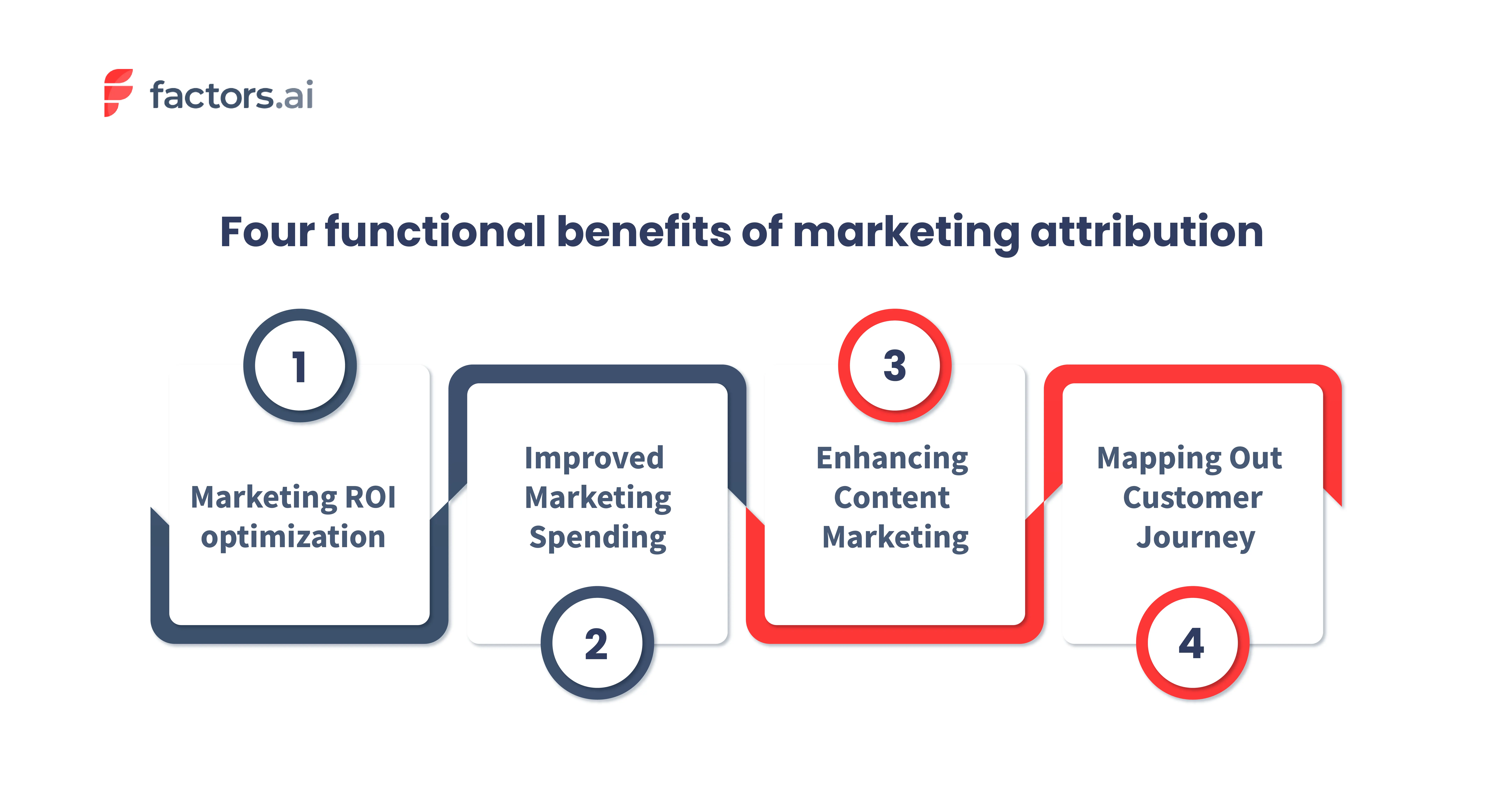
1. Marketing ROI Optimization
With marketing attribution, B2B teams achieve a better and broader picture of each channel's cost-to-revenue ratio or ROI.
By understanding every channel's influence on lead conversion, pipeline, and revenue in relation to their cost, you can effectively quantify marketing performance. Ultimately, this leads to our next point — prudent marketing investment and spending.
2. Improved Marketing Spends
Using marketing attribution can make a significant impact on your marketing investment. This is because it provides crucial information about the performance of different marketing channels and tactics. Armed with this information, you can optimize your spending to achieve the end business objectives. Instead of distributing your investments evenly, you can double down on the channels that are actually performing better.
Consider this example. Imagine you have $10,000 to spend on a marketing campaign. Without attribution, you might split the money evenly between different channels. But with attribution, you might find that Linkedin conversational ads work best and are responsible for 80% of your conversions. So, in this case, you could put 80% of your budget towards Linkedin conversational ads and the rest towards other channels.
In short, marketing attribution helps you make decisions based on data instead of guessing. By knowing what's working, you can spend your money in the best way possible and get the biggest return on your investment.
3. Attribution and Content Marketing
Content marketing remains the best way to communicate effectively with customers and educate them about your offerings. And with the help of marketing attribution, you can take content marketing to the next level.
How?
Your content should engage with the target audience and drive demand for your products/services at every stage of the buying journey. For that, you need to create content that's tailored to your Ideal Customer Profile (ICP).
Marketing attribution plays a crucial role in this process. It provides insight into which content resonates with your audience and leads to more conversions. Traditional CRM and MAP systems credit conversions to content only by a First Touch model (if the content was the first interaction the prospect had), which can be very misleading.
You can also track how different pieces of content contribute to your pipeline and revenue. This allows you to optimize your content strategy.
For example, you may find that a particular blog post is driving a lot of traffic to your website but is not resulting in any conversions. In this case, you can analyze why this is happening and make changes to the content to increase its effectiveness.
Keep reading to learn more about the ROI of B2B content.
4. Mapping Out The Customer Journey
The use of attribution isn't limited to understanding channel influence on conversion. It's also a powerful tool to make sense of marketing's impact across each step of the funnel.
You can use it to identify the relationship between channel interactions, which touchpoints work together, and their relative probability of occurrence down the funnel. All of which help you map out your buyer's typical journey.
Marketing attribution models
Attribution models allow you to understand the different touchpoints in the customer journey and how each of them influenced your prospect to convert. The main goal of attribution models is to help marketers determine their campaigns' performance
For example, consider the following.
A customer reached your website through a LinkedIn ad. Then, the customer further engages with your website content, like blogs and case studies, before becoming a lead. And finally, they are converted (booked a demo) after clicking on a retargeting ad.
Now, depending on your business goals, the attribution model you choose assigns credit to different touchpoints.
If your objective were to create awareness of your brand or product, the credit would be assigned to the first touchpoint. In this case, the LinkedIn ad. But if you were looking at conversion alone, the credit will be given to the last touchpoint, which is the retargeting ads.
There are other scenarios too, where you assign credit to multiple touchpoints. But as we said, it depends on your business objective.
With that said, there are mainly two types of attribution models.
- Single touch models
- Multi-touch model
Types of attribution models
Single-touch
As the name indicates, allocate the credit to a single touchpoint. Some types of single-touch attribution models are;
- First touch
- Last touch
- Last non-direct touch
.webp)
These types of attribution models are used mainly by businesses with a clear and straightforward marketing funnel and want to track the impact of specific touchpoints on conversion
Multi-touch
Again, as the name implies, multi-touch models allocate credit to multiple touchpoints in the customer journey. The main focus of this model is to give a more accurate picture of your marketing channels' impact on conversion.
Some of the types of multi-touch attribution models are:
- Linear attribution model
- Time-decay attribution model
- U-shaped attribution model
- W-shaped attribution model
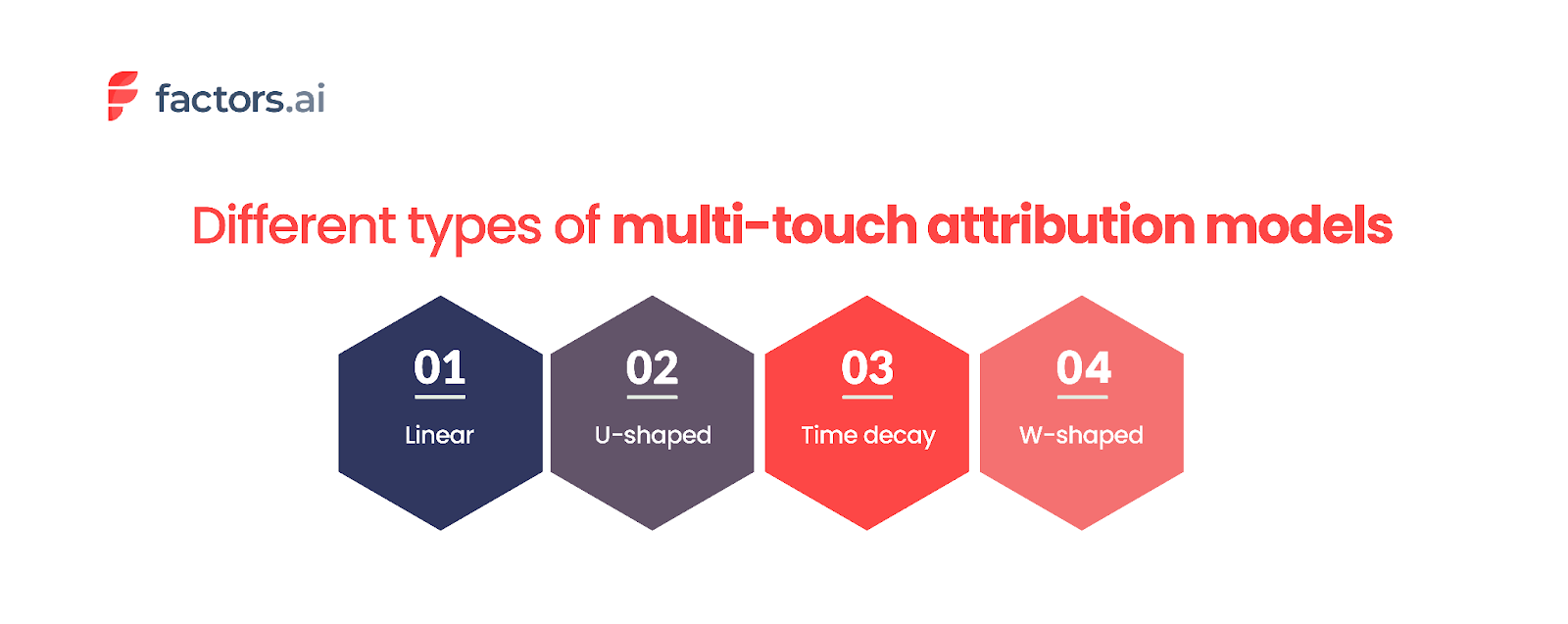
Here, take a look at our take on the seven types of attribution models with examples that can help you understand the attribution models better.
So, how to choose the suitable model for your business?
Choosing the right model for your business can be a challenge. As the saying goes, ‘all models are wrong, but some models are useful. But it's essential to select the one that helps you answer the specific questions you have in mind.
With that said, let's look into the factors that affect choosing the model and how to select the right one for your business.
Some factors that affect the choice of attribution model are as follows.
- The nature of the buyer journey cycle - This includes the length of the sales cycle and the number of decision-makers.
- The nature of the product. Does the product belong to an established category or a new one?
Here are seven steps to help you choose the right attribution model:
- The first and foremost thing to do is to understand your business goal. Ask yourself, "What do I want to achieve with attribution modeling?". The answer can help you select a model that aligns with your business goals.
- Speak with your customer to understand their customer journey and the touchpoints involved. Anecdotal assessments of how each touchpoint contributed to conversion can help you select an appropriate model.
- Evaluate different attribution models. Compare the strengths and weaknesses of each model and see how they align with your business goals.
- Do A/B testing. Test each model and compare the results. This will give you a better understanding of the model that will work best for you.
- Some attribution models require more data than others. So, consider the data you have and select the model that aligns with the data you have.
- Constantly review and adjust the models. It's crucial to ensure that your model is relevant and accurate. So, as your business grows and evolves, you should review the current one and make the necessary changes.
- Evangelize the results of the selected attribution model and get buy-in from relevant teams - field marketing, digital marketing, and sales so that all equally accept the results from the model you select.
Common challenges with marketing attribution
Whilst the benefits of attribution analysis are clear and unquestionable, there are certain challenges and limitations which need to be highlighted. We will briefly discuss a few B2B attribution challenges here. You can follow up on the link to learn more about the B2B attribution challenges and how to overcome them.

Complex customer journey:
B2B customers often go through a lengthy and intricate buying process. There is usually a group of 4-6 people researching and deciding between vendors before moving to purchase. Not to mention the multiple touchpoints across many channels that influence decision-making.
Marketers can't determine which touchpoints are affecting the sales pipeline and revenue without proper attribution. This makes it hard to track the success of their campaigns and make improvements.
However, attribution makes it easier to see all the touchpoints, even if the customer journey is complex. Also, when choosing an attribution software, ensure that it includes the deanonymization feature. This can help track the entire journey of all the buying committee members, even if they browse anonymously.
Longer sales cycle:
B2B purchases require a significant investment. Hence the decision-making process is more rigorous and complex than B2C sales. On top of that, there are contractual agreements, regulations, and budget approvals that further add up the time.
According to Klipfolio, around 75% of B2B companies take an average of 4 months to onboard a new customer. And depending on your sales process, the time can be longer or shorter.
Because the B2B sales cycle is complex and lengthy, it can be difficult to find out which touchpoints influenced the prospect to convert. Moreover, it can take months or years to see the results of your marketing activities. Thus, making it harder to attribute the conversion to a specific campaign.
By using multi-touch attribution models, marketers can understand the impact of their campaigns. This would help them prioritize marketing investments and create a more engaging customer experience.
Multiple touchpoints:
Customers often interact with your company through multiple channels before purchasing. These can be both online and offline interactions. Also, a customer can engage with your company at different stages of the buying journey.
For example, a customer may receive an email about a product. They then visit the company's website for more information, only to later attend a trade show and have a follow-up conversation with a sales representative. Each touchpoint could have a different impact on their decision-making process.
But, determining which touchpoints had the most significant impact can be difficult. One solution is to use an attribution tool that can track all these diverse channels and bring all the interactions together in one place.
Tracking and defining offline touchpoints:
In a B2B sales process, the customer engages with the vendors through both online and offline touchpoints. This makes it difficult to track and attribute conversions accurately, as you now need to stitch data across systems..
For example: consider a set of B2B customers. They attended a trade show and got on a call with your sales team. Afterward, they sign up on your website and complete the purchase. Here, it will be hard to determine credit for a touchpoint if you don't have the right attribution solution.
Marketing analytics software, like Factors, enables tracking of both online and offline touchpoints. Factors has a click-and-select UI through which the offline touchpoints can be set up from your CRM / MAP platform. This ensures that you have a detailed view of the customer journey.
Sales-Marketing alignment:
Alignment between Marketing and Sales teams is essential to maximize returns. However, this is easier said than done. In many B2B companies, there's a lack of communication between the two teams, making it hard to reach potential customers. Fighting for credit can be a reason for this disconnect, as each team believes their efforts to be the reason for closing a deal.
Bridging this alignment divide can be achieved in two ways.
- Emphasize that both teams are not independent but part of a larger go-to-market function.
- Unify the customer journey data across marketing and sales touchpoints.
Sophisticated Marketing Attribution solutions such as Factors can help here by providing a clear and consistent view of the customer journey. On top of the unified data foundation, teams can get answers to questions such as
- How many touchpoints did it take to convert a deal? How many of these were sales vs. marketing touchpoints?
- Were marketing efforts able to drive engagement with the right stakeholders in these accounts?
- When is the right time for sales teams to intervene so as to convert an account?
Furthermore, each team can review and analyze the attribution data to understand which of their strategies are working and which are not. From a sales perspective, such analysis can help in defining the frequency and content of email sequences, calls, and meetings that lead to maximum impact.
Why should CMOs consider marketing attribution?
As a CMO, you are often asked to achieve better results with limited resources. Meanwhile, the buyer's journey has become complex, with more channels, stakeholders, and a longer buying cycle. Attribution Software can be a valuable guide, helping you in the following ways.
Better decision-making
By understanding the customer journey, you can determine the channels to focus on and how to allocate your limited budget.
Improved ROI
Attribution lets you know which channels effectively drive conversions. Therefore, it allows you to allocate expenditures accordingly and generate better results.
Increased accountability
You can unambiguously measure and track your marketing effort's impact. Good or bad, you can hold yourself and your team accountable for the results while continuously finding ways to improve.
Enhanced customer understanding
You can gain a deep understanding of customer behavior and interactions with marketing and sales initiatives. You can know what types of content your customers are seeking, the landing pages they interact with, and more. This enables you to optimize future campaigns to align with the customer's interests.
You can read more about the importance of marketing attribution for CMOs here.
How to Build a B2B Marketing Attribution Model?
Here’s how to build a strong attribution model that delivers actionable insights:
Step 1: Audit Your Existing Marketing Ecosystem
Start by identifying all current marketing channels and touchpoints. From ad impressions and content downloads to email interactions and sales calls, every engagement should be tracked. This initial audit helps uncover gaps in tracking and ensures you’re capturing the complete customer journey.
Step 2: Define Clear Business Objectives
Your attribution model should align with specific goals, whether that’s improving lead quality, shortening the sales cycle, or boosting customer lifetime value. Defining these goals upfront helps you choose the right model and metrics to measure success.
Step 3: Map the Complete Customer Journey
Carefully map each stage of the journey: awareness, consideration, evaluation, and decision. Assign touchpoints to each stage and evaluate their potential influence. Consider using lead scoring systems to highlight which touchpoints contribute most to sales-ready leads.
Step 4: Select the Right Attribution Model
Based on your sales cycle complexity and goals, choose an attribution model that fits. For example:
- First-Touch Attribution can help identify effective top-of-funnel channels.
- W-Shaped or Full-Path Attribution is better suited for tracking engagement across long B2B buying cycles.
- Custom or Data-Driven Models offer flexibility and accuracy for organizations with mature data operations.
Step 5: Leverage the Right Attribution Tools
Use analytics and attribution tools that integrate easily with your CRM, marketing automation, and ad platforms. Tools like HubSpot, Marketo, and Google Analytics (alongside more advanced tools like Factors.ai or Wicked Reports) help track user interactions across multiple platforms.
Step 6: Integrate with Your CRM and Sales Stack
Connect your attribution system with your CRM (like Salesforce or HubSpot) to unify marketing and sales data. This centralization ensures teams are working from the same insights, which improves alignment and leads to handoff efficiency.
Step 7: Customize Reporting and Optimize Over Time
Build dashboards that focus on the KPIs that matter to your business, such as cost per lead, deal velocity, campaign ROI, etc. Attribution is not static: regularly analyze performance, identify patterns, and adjust strategies to stay aligned with changing market dynamics and buyer behavior.
Pro Tip: Start with a simpler model and gradually evolve toward more advanced approaches as your data maturity grows.
By following these steps, you can create an attribution model that improves marketing results.
Key Touchpoints in the B2B Customer Journey
In B2B marketing, understanding and optimizing the key touchpoints throughout the customer journey is essential for driving qualified leads and closing deals. Each touchpoint represents a critical moment of interaction that influences a buyer's path toward becoming a customer. Here's a closer look at the four most important touchpoints in the B2B journey:
1. First Engagement
This is where the journey begins. The first engagement typically happens when a potential buyer interacts with your brand through a blog post, social media ad, webinar invite, or a piece of gated content. This stage is crucial for creating awareness and positioning your brand as a valuable solution to the buyer’s problems. The goal here is to capture interest and drive the user to learn more.
2. Last Marketing Interaction Before Lead Capture
This touchpoint occurs just before a prospect converts into a known lead, often when they fill out a form, request a demo, or download a whitepaper. Identifying this moment helps marketers understand which final nudge (campaign, CTA, content piece) was most effective in prompting conversion. It’s an indicator of what messaging and channels are best at turning interest into action.
3. Opportunity Creation
At this stage, the lead transitions from a Marketing Qualified Lead (MQL) to a Sales Qualified Lead (SQL). It’s the point where marketing hands the lead off to the sales team, often based on engagement metrics, firmographic fit, or behavioral triggers. This handoff is critical: aligning attribution around this milestone helps validate which marketing efforts truly generate sales-ready opportunities.
4. Closed (Won or Lost)
The journey's final and most definitive touchpoint is when a deal is closed. Whether the opportunity results in a win or a loss, this stage reveals which interactions had the most impact on influencing the purchase decision. Attribution here allows you to analyze which marketing strategies contributed to revenue and what might need improvement for future deals.
By tracking and analyzing these key touchpoints, B2B marketers can optimize each stage of the funnel, better allocate budgets, and align more closely with sales teams. This leads to smarter campaigns, higher-quality leads, and ultimately, improved ROI.
Best Practices for Implementing Marketing Attribution
To implement marketing attribution well, follow a clear plan.
1. Centralize Your Data Sources
Start by unifying marketing and sales data into a single system. This ensures consistent tracking across all channels and touchpoints. A centralized data hub often built around a CRM like HubSpot or Salesforce reduces fragmentation, eliminates data silos, and enables deeper insights into the customer journey. Integration with marketing automation tools, ad platforms, and website analytics is also essential.
2. Choose the Right Attribution Model
Select an attribution model that reflects your sales cycle, buyer behavior, and strategic goals. In B2B, where decisions involve multiple stakeholders and longer timeframes, multi-touch attribution models (e.g., Linear, W-Shaped, or Full Path) usually provide the most balanced view. However, start simple if you're new to attribution and evolve your model as your capabilities grow.
3. Continuously Test and Refine
Attribution isn’t a “set it and forget it” system. Buyer journeys shift with new market trends, technologies, and buyer expectations. Regularly review and refine your attribution models to ensure they reflect real user behavior. Use A/B testing, conversion tracking audits, and periodic performance analysis to fine-tune your approach.
4. Foster Cross-Department Collaboration
Effective attribution depends on input from multiple teams. Align marketing, sales, revenue operations, and customer success around shared metrics and definitions of success (e.g., what qualifies as a lead, opportunity, or conversion). This collaboration leads to more accurate attribution reporting and more cohesive strategies across the funnel.
5. Ensure Privacy Compliance
With evolving data privacy regulations (like GDPR, CCPA, and others), it’s crucial to use attribution tools that respect user privacy. Prioritize platforms that offer privacy-friendly tracking (like server-side tagging, consent-based data collection, and anonymized tracking) to stay compliant while still gathering actionable data. This builds trust and protects your brand reputation.
How to choose the right marketing attribution tool?
Choosing a marketing attribution tool requires careful consideration of several factors. Some of the key considerations are
- Data Integration: Ensure the tool integrates easily with your existing data sources. This includes your CRM, marketing automation platform, web analytics, CDPsand advertising platforms.
- User-friendly interface: Make sure the tool is easy to set up, track campaigns, and analyze results.
- Model flexibility: Choose the tool that offers a range of attribution models. This way, you can choose the most appropriate one aligning with your business goals.
- Reporting and analysis: Check whether the tool provides robust reporting and analysis capabilities. This is important for you to understand the impact of your campaigns on lead generation and conversion.
- Customer support: Check the quality of the customer support offered by the vendor. It's best to choose the one who provides good technical support and training.
- Security: Ensure the tool has robust security measures to protect your data.
- Cost: Consider the cost of the tool in relation to the value it can deliver to your business.
Marketing Attribution: Understanding Impact & Optimizing ROI
Marketing attribution is the process of analyzing and assigning credit to marketing touchpoints that contribute to sales or conversions. It helps businesses identify which channels drive the most value, enabling data-driven decision-making.
Key Benefits of Marketing Attribution
- Optimized ROI: Quantifies marketing performance to improve budget allocation.
- Efficient Spending: Identifies high-performing channels for better resource distribution.
- Data-Driven Decisions: Provides insights into customer journeys for smarter marketing strategies.
Common Attribution Models
- First-Touch Attribution: Credits the initial interaction.
- Last-Touch Attribution: Assigns credit to the final touchpoint before conversion.
- Linear Attribution: Distributes credit equally across all interactions.
- Time-Decay Attribution: Gives more weight to touchpoints closer to conversion.
- Position-Based Attribution: Prioritizes the first and last interactions.
Choosing the right attribution model aligns marketing efforts with business objectives, leading to smarter strategies and improved revenue growth.
Ultimately, the right attribution tool for your business will depend on your specific needs and goals. Consider your budget, the data you want to track, and the level of analysis you need.
Factors is one of the leading marketing analytics and attribution tools purpose-built for the B2B segment. It can help businesses make data-driven decisions by accurately attributing conversions to the most influential touchpoints. Some of the highlights of Factors include
- Enables attribution of offline touchpoints such as webinars, field events, and so on.
- You can visualize the customer journey at an Account and User Level.
- Easily integrates with tools like HubSpot, Salesforce, Marketo, 6sense, Segment, and Rudderstack
- Supports Account Level Analytics and Attribution natively
- You can compare attribution models and select the one most aligned with your business objectives
- Provides an extensive set of filters and breakdowns to create rapid, relevant ad hoc reports in seconds.
- AI-fueled insights into performance, anomalies, and fluctuations.
If you’re looking for a marketing analytics tool that facilitates all your attribution needs, look no further than Factors.ai. Sign up for free to learn more about Factors, or book a personalized demo today!
Make the most of your LinkedIn Ads budget: LinkedIn True ROI
Make the most of your LinkedIn budget with Factors' AdPilot, specifically view through attribution
.avif)
TL;DR
We're super excited to announce LinkedIn AdPilot, a LinkedIn ads optimization platform that supports a range of functions, including LinkedIn True ROI. This article explores how and why LinkedIn True ROI is the most accurate approach to measuring the real influence of your LinkedIn ads beyond clicks and sign-ups.
Read more about LinkedIn AdPilot here:
- Introducing LinkedIn AdPilot by Factors
- Synchronize all your data across platforms and create accurate audience lists with Audience Builder.
- Control how your ads are shown to your audiences with Smart Reach.
- Let CAPI help you send accurate conversion feedback to Factors, tackling the challenge of cookie deprecation.
- Tackle inefficiencies of manual ad management with Campaign Automation.
“I love wasting my ad budget and not getting the right ROI for my LinkedIn ads.”, said no marketer ever (hopefully).
While 70% of marketers trust LinkedIn to be a valuable channel that drives a good return on investment, many believe the platform is one of the most expensive channels.

Source: https://blog.hootsuite.com/linkedin-statistics-business/
With high costs per impression (CPM) and cost per click (CPC), marketers often find it hard to justify LinkedIn’s cost-benefit as a marketing channel. According to a report, LinkedIn's average CPM is around $34.00, compared to Facebook's average CPM, which is $10.61.
Despite these relatively high costs, there's no denying that LinkedIn ads do work. A substantial 89% of B2B marketers utilize LinkedIn for lead generation and 62% report that it successfully generates leads for them.
So, what’s the challenge?
The main challenge is accurately measuring the ROI and demonstrating its impact on the pipeline and revenue.
Where does this challenge stem from?
LinkedIn ads work as a display platform, showing ads to accounts discovering content, not researching products. This makes them a low-intent audience needing education and persuasion.
Think of it this way: you wouldn't measure the performance of billboards or TV commercials based only on click-through rates. So, why do it for LinkedIn? Click-through attribution misses the full impact of LinkedIn ads, just like it does for traditional display advertising. Factors helps marketers prove LinkedIn's true ROI.
What is ‘LinkedIn True ROI’?
LinkedIn True ROI is a method of attributing conversions or actions that were viewed but not clicked. It recognizes that these ads can still prompt the desired action without a direct click.
The Challenge
Marketers struggle to justify LinkedIn ad costs due to poor reporting. This, in turn, leads to high expenses, underestimated impact, and misguided strategies, making it hard to prove LinkedIn ads' true value to leadership.
Click-through attribution misses the broader impact of ad impressions. The click-based approach to LinkedIn ROI ignores how ad impressions influence bottom-of-the-funnel conversions.
Food for thought
💡 The click-through Rate on LinkedIn is mostly 0.5%. By relying on click-through attribution, marketers effectively say that 99.5% of the impressions that are not clicked on do not have any impact or influence on the buyers.
{{INLINE_TOFU}}
Two interesting concepts that draw back to this challenge:
The Subconscious Influence of Billboards and Other Display Channels
Imagine this: You're driving down a highway lined with billboards. You might not notice each one, but they leave an impression on your subconscious. Later, those billboards can influence your perceptions and decisions about a product or service. And this is even if you don't remember seeing them. Similar influences can come from sidebar ads or sponsored content in your feed.
So, why does your target audience miss your LinkedIn Ads?
- Subconscious Processing:
Users don't engage with these ads during browsing. However, repeated exposure builds brand recognition. While users may not remember specific ads, they may recall the brand when they need related products or services. This influence is amplified in B2B contexts mainly because multiple decision-makers and touchpoints exist across channels.
A LinkedIn ad may not generate immediate clicks but shapes perceptions and decisions. LinkedIn and similar platforms go beyond clicks and sign-ups. Yet, GTM teams often overlook this broader impact, focusing on immediate outcomes. LinkedIn True ROI assesses ads' indirect effects, giving a comprehensive view of their performance.
Introducing LinkedIn AdPilot: LinkedIn True ROI
Our Ad Pilot introduces 'LinkedIn True ROI', effectively capturing hidden LinkedIn engagement. It recognizes the impact of ads users viewed but didn't click on. AdPilot combines this with other account actions, such as website visits and blog interactions at an account level.
This offers a broader perspective on how LinkedIn contributes to conversions and revenue.
“Even if one person from a specific account visits our website, Factors helps us target decision makers and the larger buying committee as whole to ensure that all the right people from a target account see our ads. Ultimately, this helps our LinkedIn ad budgets go that extra mile further.” - Abhishek Iyer, Director of Marketing at Descope.
Use Cases for LinkedIn True ROI:
LinkedIn True ROI provides avenues for understanding and optimizing your LinkedIn ad campaigns. Here are some ways you can leverage our LinkedIn True ROI to enhance your marketing efforts:
1. Measure LinkedIn ROI Accurately
Accurately measuring LinkedIn ROI is crucial for proving the value of your ads. Click-through attribution typically undervalues LinkedIn’s impact by only counting direct interactions. However, LinkedIn True ROI captures the influence of LinkedIn ads on lead conversions.

Let’s understand this with an example:
- Number of Opportunities
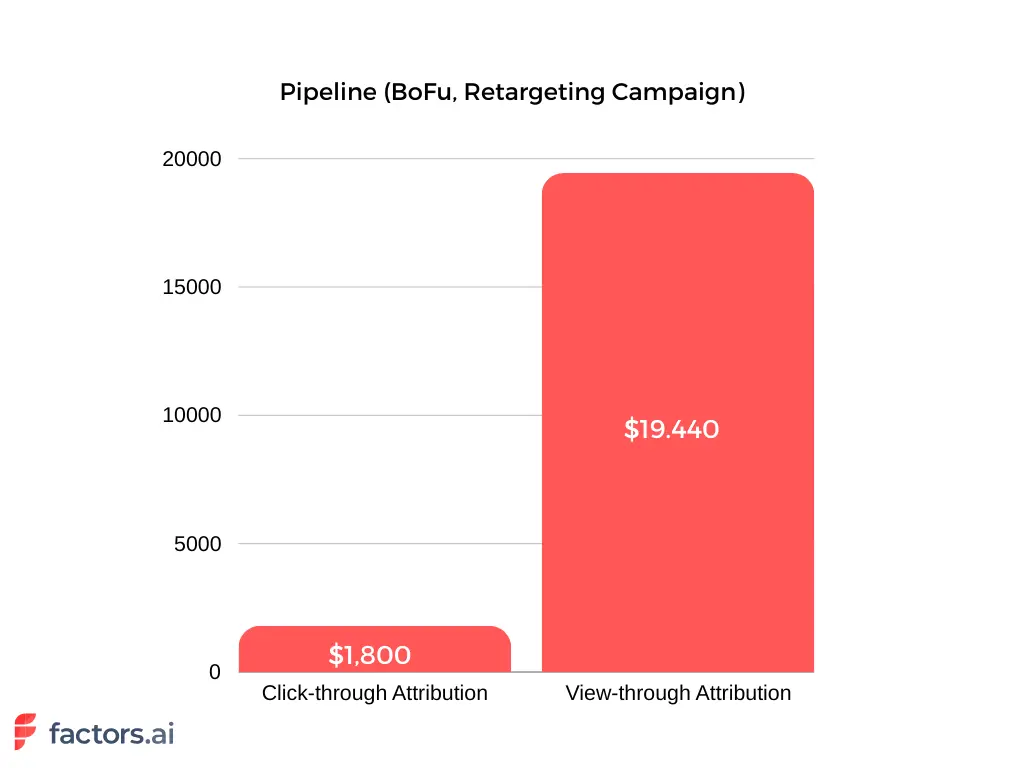
Let's take Factors’ LinkedIn spending in Q1 2024 as an example. We analyzed one month of LinkedIn ads from an SME SaaS remarketing campaign group. Our analysis showed how different approaches affected deals and pipeline contributions. Click-through attribution data came from LinkedIn’s ad manager, while Factors.ai collected LinkedIn True ROI data for this campaign.
The results revealed that the campaign generated only one opportunity through click-through attribution. However, LinkedIn True ROI showed that the same campaign influenced at least 11 opportunities.

- Cost per Opportunity
The cost per opportunity varies starkly based on the number of opportunities and the exact total spend.
Click-through attribution indicates a high $4,338 per opportunity, whereas LinkedIn True ROI shows a more reasonable $395 per opportunity. This difference, nearly 11 times higher based on clicks alone, can lead to the misconception that LinkedIn is too costly.

- Pipeline Value
The impact on the sales pipeline is crucial. Click-through attribution indicates LinkedIn generated $1,800 in pipeline value from one opportunity, with a cost per opportunity of $4,338. In contrast, LinkedIn True ROI reveals 11 opportunities contributing $19,440 to the pipeline at $395 each. Evaluating costs based on ad views rather than clicks provides a more realistic and favorable ROI—$19,440 in pipeline from $4,348 in spend makes far more sense than $1,800.
2. Improve LinkedIn Ads Performance
Understanding which ads drive conversions helps marketers optimize campaigns effectively. Analyzing the most effective ads influencing potential customers allows for refining ad creative, targeting, and budget allocation. This iterative process improves with more data collected.
For example, if certain LinkedIn ads are regularly viewed by target accounts but not clicked, LinkedIn True ROI can reveal their influence on actions like website visits or content engagement. Marketers can then adjust ad creatives for better resonance and increased engagement.

3. Ensure Better LinkedIn (Re)Targeting
LinkedIn True ROI helps improve retargeting strategies by understanding how ads work. Marketers use this to find accounts that see specific ads, making retargeting more personalized and avoiding ad fatigue.
Suppose an account often sees a brand ad but doesn't click. With True ROI, marketers can show them other helpful content like testimonials or product examples. This keeps the retargeting relevant and exciting, guiding prospects further along.
LinkedIn True ROI also shows which types of content work best by spotting patterns in how ads are viewed. This helps marketers plan better content strategies that match their audience's preferences.

4. Gain Granular Insights into Customer Journey
LinkedIn True ROI provides detailed insights into how LinkedIn ads affect each stage of the buying process. Marketers can see how prospects move through the funnel using data from website visits, CRM systems, and other marketing channels.
For instance, a prospect might view a LinkedIn ad, visit the website, download a whitepaper, and later request a demo. While traditional click-through attribution focuses on the final action, LinkedIn True ROI recognizes the LinkedIn ad's initial impact. This helps marketers refine strategies that effectively support the entire customer journey.
“Given that we’re not in the habit of gating our content assets, it’s valuable to understand the full range of otherwise hidden touchpoints that influence conversions.” – Abhishek Iyer, Director of Marketing at Descope

5. Demonstrate Marketing Impact to Leadership
Finally, LinkedIn True ROI helps marketers demonstrate the true impact of their LinkedIn ads to leadership. Marketers can justify their ad spend and secure ongoing investment by providing a comprehensive view of ad influence and ROI.
Accurately attributing conversions to LinkedIn ads can be challenging, especially when dealing with high CPCs and CPMs. LinkedIn True ROI provides the data needed to showcase LinkedIn’s value, presenting a clearer picture of how ads contribute to the sales pipeline.
“It’s very helpful to achieve a bird’s eye view of the customer journey that leads up to a demo — even when a direct attribution isn’t explicitly present in our CRM. In many instances, we see that a lead has been viewing our LinkedIn ads for months before landing on a search ad or blog and then signing up. This helps us validate what we already know: it’s rarely a single touchpoint that leads to conversions.” – Abhishek Iyer, Director of Marketing at Descope
True ROI on LinkedIn goes beyond clicks to measure the value of ad impressions that influence conversions.
1. Attribution Model: Includes viewed-but-not-clicked ads in conversion analysis.
2. Measurement Advantage: Reveals hidden value from brand exposure and top-of-funnel impact.
3. Strategic Benefits: Improves ROI accuracy, informs smarter spend decisions, and enhances campaign optimization.
By embracing True ROI, marketers gain a complete picture of LinkedIn ad performance and drive more effective outcomes.
In a nutshell
LinkedIn True ROI is a game-changer for B2B marketers. It unlocks the value of LinkedIn ads by accurately measuring their impact. This capability helps marketers justify ad spend, optimize campaigns, and improve retargeting. It ensures LinkedIn ads are evaluated on their real influence, not just clicks.
With LinkedIn True ROI, marketers can accurately measure and optimize their LinkedIn ads, leading to better results and a higher return on investment.
Ready to uncover the true impact of your LinkedIn ads? Start using Factors.AI’s LinkedIn True ROI feature today to understand your campaign’s effectiveness better. Get in touch with us to learn more and get started.
Looking to know more about LinkedIn True ROI? Click here.
Making LinkedIn Ads Work: Targeting B2B Audience Intent
Learn how to optimize LinkedIn ad targeting by focusing on intent signals and engaging high-interest companies effectively.

TL;DR
- LinkedIn’s native targeting options often result in cold outreach, making it challenging to connect with high-intent companies.
- Traditional workflows, like manually syncing CRM lists with LinkedIn, are inefficient and prone to errors.
- The solution is to focus on intent signals—target companies already engaging with your website or content and retarget them on LinkedIn.
- Factors.ai simplifies this process by automating audience syncs, keeping campaigns dynamic, precise, and impactful.
Let's talk about LinkedIn advertising. If you're in B2B marketing, you've probably tried different types of LinkedIn ads- and you might have mixed feelings about the results. While LinkedIn seems like the perfect place to reach business decision-makers, many marketers struggle to make their campaigns truly effective. Why? The answer lies in understanding what LinkedIn can and can't do when it comes to targeting.
The Two Sides of LinkedIn Targeting
LinkedIn gives you two main ways to target your ads.
- First, you can target specific people based on who they are professionally - their job title, function, seniority, and so on.
- Second, you can target based on where they work - company size, industry, and other organization-level factors.
Sounds comprehensive, right? Well, here's where things get interesting.
The Cold Audience Problem
As Praveen Das, our co-founder at Factors, explains, “There's a fundamental challenge with LinkedIn's native targeting options. When you use LinkedIn's built-in filters, you're essentially advertising to a cold list of companies. Think about it - you're reaching out to businesses based on basic demographic factors, but you have no idea if they're actually interested in what you're selling.”
This creates what Praveen calls a 'double damage' situation. Not only are you targeting companies that might have zero interest in your product, but you're doing it on a platform where people aren't typically in a buying mindset. It's like trying to sell enterprise software to someone who's just there to update their professional profile.
{{INLINE_TOFU}}
Why Traditional Targeting Falls Short
Let's say you're selling SaaS products and you wish to run LinkedIn ads for SaaS companies. You set up your LinkedIn campaign, and immediately, you hit a wall - there's no ‘SaaS’ industry category in LinkedIn's targeting options. Instead, you're forced to use broad categories like ‘Internet and Services’ or ‘Computer Software,’ which might include companies that aren't remotely interested in your solution.
This limitation leads many companies down a familiar path. They build their target account lists in tools like Apollo or ZoomInfo, import these into their CRM, and then try to connect everything with LinkedIn. It sounds simple enough, but this is where the headaches start.
The CRM Integration Challenge
For example, if you’re using Salesforce, you’ll quickly realize there’s no direct integration with LinkedIn. This leaves you with a tedious workflow: downloading lists from Salesforce, manually uploading them to LinkedIn, and hoping everything stays in sync. Need to update your target accounts? You’ll have to repeat the entire process. Closed a new customer? You’ll need to manually remove them from your LinkedIn campaigns. It’s far from the seamless, efficient process marketers expect.
Also, read about Complexity of LinkedIn Conversion Tracking to read more about the challenges in integrating your CRM and LinkedIn account.
A Better Way to Target
So what's the solution? Praveen says the key is to flip the traditional targeting approach on its head. Instead of starting with LinkedIn's targeting filters, begin with intent signals. Here's how:
1. Identify high-intent companies already showing interest in your solution. These could include:
- Businesses visiting your website.
- Companies engaging with your content.
- Organizations actively searching in your category.
2. Use LinkedIn as a retargeting channel for these accounts. By focusing on high-intent companies, you’re reaching businesses that have already expressed interest in what you offer. This approach makes your LinkedIn campaigns far more precise and impactful.
Making It All Work Together
The real magic happens when you can seamlessly connect all these pieces:
- Your CRM data
- Intent signals from various sources
- LinkedIn advertising campaigns
This is where Factors comes in. Our platform bridges these gaps, ensuring your target lists stay dynamic and up-to-date. Instead of manually managing lists across systems, Factors automatically syncs your target accounts, keeping everything streamlined and ready for action. It’s the smarter, more efficient way to power your LinkedIn campaigns.
What This Means for Your Campaigns
When you approach LinkedIn targeting this way, you’re not just throwing ads into the void. You’re engaging with companies that have already shown interest. This means:
- More efficient ad spend
- Better engagement rates
- Higher quality leads
- More conversions
Looking Ahead
The future of LinkedIn targeting isn’t about improving demographic filters—it’s about leveraging smarter strategies to identify and engage companies when they’re actively in the market for your solution. The shift is clear: intent signals, not just company characteristics, will shape targeting decisions and drive more effective campaigns.
Also read more about frequency capping in LinkedIn ads to increase your LinkedIn targeting efficiency.
The Bottom Line
LinkedIn can be a powerful channel for B2B advertising, but only if you use it strategically. The key is to stop relying solely on LinkedIn's native targeting options and start thinking about intent first. By focusing on companies that are already showing interest in your space and using tools to manage these audiences effectively, you can transform LinkedIn from a hit-or-miss channel into a reliable source of quality leads.
Remember, it's not just about reaching the right companies - it's about reaching them at the right time, with the right message, when they're actually thinking about solutions like yours. That's when LinkedIn advertising truly shines.
Maximize Your LinkedIn Ads ROI with Factors' AdPilot
Are LinkedIn ads not working for you? LinkedIn AdPilot helps you target the right accounts, automate optimizations, and measure the true ROI—so you get more conversions for less spend. Here is how we can help you:
✅ TrueROI – Go beyond clicks and measure LinkedIn’s full-funnel impact accurately.
✅ LinkedIn CAPI – Enhance attribution and optimize without relying on third-party cookies.
Why settle for average results? See how Factors can 2X your LinkedIn Ads ROI with data-driven insights and automation. Talk to our experts today!
.avif)
Accurately Measure LinkedIn Ad Conversions: Conversion API
Accurately measure campaign conversions and optimize campaigns with Factors’ CAPI Integration.
TL;DR
Factors’ CAPI integration is a powerful feature for B2B marketers looking to enhance the performance of their LinkedIn campaigns. CAPI helps businesses overcome the challenges posed by third-party cookie deprecation by leveraging first-party data and enabling automated optimization. With CAPI, marketers can achieve more accurate tracking, seamless integration, and improved ROI, making it an essential component of any modern digital marketing strategy.
Who stole the cookie from the cookie jar? Who, me? No, Google!
If you’re a B2B marketer, we’re almost 99.99% sure you’ve heard that third-party cookies will soon be a thing of the past.
The deprecation of third-party cookies has impacted conversion tracking. This increased the need for accurate feedback data to optimize campaigns, drive conversions, and prove ROI to leadership.
While LinkedIn reports that audiences who see brand and acquisition messages on the platform are 6X more likely to convert than those exposed to just one type of message - what happens when conversion tracking becomes tougher? You fall back on Factors’s LinkedIn AdPilot.
Factors' CAPI integration with "set & forget campaign" optimization solves the cookie deprecation challenge. CAPI ensures your LinkedIn ad campaigns have the necessary data, even without third-party cookies. This feature simplifies campaign optimization. It helps marketers achieve their goals despite the loss of third-party cookies.
What is CAPI?
CAPI sends conversion data from websites, campaigns, CRM, and other sources directly to LinkedIn's ad platform. This data is crucial for self-optimizing campaigns, providing LinkedIn's algorithms with accurate and complete information. It works like Google's Conversion API, which effectively optimizes campaigns.
{{INLINE_TOFU}}
The Problem: Third-Party Cookie Deprecation
Issues with Data Loss and Campaign Optimization
The deprecation of third-party cookies has disrupted conversion tracking. These cookies have allowed marketers to track user behavior and measure conversions accurately. However, with new privacy changes in browser policies, third-party cookies are becoming less viable. This shift has caused substantial data loss. This makes it hard for marketers to gather the insights needed for effective campaign optimization.
Without accurate conversion data, LinkedIn’s self-optimizing algorithms are hampered. Campaigns that rely on third-party cookies may see a significant drop in performance due to incomplete data, resulting in underreported conversions and inefficient ad spending.
Consequences for Marketers
The broader implications of data loss resulting from the deprecation of third-party cookies can be understood in these two ways:
- Reporting limitations hinder marketers from accurately measuring campaign conversions, leading to inefficient budget allocation.
- Auto campaign optimization and bidding strategies suffer due to the lack of conversion data.
How CAPI Solves the Problem
Factors’ CAPI integration addresses this issue by bypassing the need for third-party cookies. Instead, it relies on first-party data from a company’s digital properties and CRM. This data is then passed back to LinkedIn, allowing for continuous and accurate tracking of conversion events.
Our CAPI integration sends conversion event data to LinkedIn. This data includes online events like website visits, clicks, and form fills, as well as offline events like MQLs, SQLs, or deal creations. CAPI removes the guesswork in optimizing ad campaigns, ensuring data-driven decisions and better performance.
Besides CAPI, we seamlessly integrate LinkedIn Ads data into your Factors dashboards through our AdPilot suite. This integration merges comprehensive LinkedIn analytics, giving insights into pipeline and revenue attribution.
Key Benefits of CAPI
- Enhanced Accuracy:
Using first-party data, CAPI ensures accurate tracking and reporting of all conversion events. This results in more reliable data for optimizing campaigns.
- Send Conversion Data to LinkedIn:
Factors’ CAPI integration allows you to send conversion data from any source to LinkedIn. We also enable you to send offline and online conversion data to LinkedIn via Factors.
- Automated Optimization:
Once set up, Factor’s CAPI integration lets you optimize campaigns with a "set & forget" approach. Conversion data automatically feeds back to LinkedIn so the platform can self-optimize your campaigns without constant manual intervention.
- Improved ROI:
With precise conversion tracking, your LinkedIn campaigns become more efficient. Automated optimization further enhances their effectiveness, leading to a higher return on investment.
Use Case: B2B Marketing Campaign
Here’s how CAPI can change up your marketing campaign:
Use Cases
Accurate Conversion Event Tracking
One of CAPI's primary benefits is its ability to ensure accurate conversion event tracking. By utilizing first-party data, CAPI allows for precise and reliable conversion tracking. This improved data accuracy leads to better campaign performance and more informed decision-making.
Self-Optimizing Campaigns
CAPI enables LinkedIn’s algorithms to receive comprehensive data, enhancing self-optimization. With precise and timely conversion data, LinkedIn can automatically adjust targeting, bidding, and creative elements to maximize campaign performance.

Improved Ad Targeting and Personalization
CAPI's granular data enhances targeting strategies, creating more personalized ad experiences. Marketers can effectively tailor their targeting efforts with detailed insights into which ads drive conversions and how users interact with them.
Seamless Integration with Marketing Ecosystem
CAPI integrates with your current marketing infrastructure. This integration ensures a cohesive data strategy. It streamlines workflows and improves data accuracy across platforms.

Integrating LinkedIn's Conversions API (CAPI) with Factors.ai enhances B2B marketers' ability to track and optimize LinkedIn ad campaigns, especially in the evolving landscape of data privacy and third-party cookie deprecation.
Key Benefits of LinkedIn CAPI Integration with Factors.ai:
1. Enhanced Conversion Tracking
CAPI enables the direct transmission of conversion data from websites, CRMs, and other sources to LinkedIn, ensuring accurate and comprehensive tracking of both online and offline conversions.
2. Privacy Compliance
By utilizing server-to-server data sharing, CAPI reduces reliance on browser-based tracking, aligning with stringent data privacy regulations and mitigating the impact of third-party cookie loss.
3. Improved Campaign Optimization
With more precise conversion data, LinkedIn's algorithms can better optimize ad delivery, potentially lowering costs and enhancing performance.
4. Seamless Integration
Factors.ai's partnership with LinkedIn ensures a streamlined setup process, allowing marketers to efficiently connect their data sources and begin leveraging CAPI benefits without extensive technical resources.
By adopting LinkedIn's CAPI through Factors.ai, B2B marketers can achieve more reliable attribution, optimize ad spend, and maintain compliance with evolving data privacy standards.
In a nutshell
Most platforms only track basic CRM events like Marketing Qualified and Sales Qualified Leads. However, Factors identifies top-tier users early by using various upstream events, lowering LinkedIn's Customer Acquisition Cost. It supports multiple online, offline, custom, and unique product events. These events create a feedback loop, integrating data for better campaign optimization and more leads.
Ready to take your LinkedIn campaigns to the next level? Start using Factors’ CAPI feature today and experience the benefits of set-and-forget campaign optimization. Get in touch to learn more and get started.
Read more about LinkedIn Impressions here.
LinkedIn Sales Navigator Cost: Is It Really Worth It In 2026?
Compare LinkedIn Sales Navigator Core, Advanced, and Advanced Plus pricing for 2026. See annual costs, plan differences, and trial details. And whether it’s worth the investment for your sales team in 2026.

TL;DR
- LinkedIn Sales Navigator is a premium subscription service designed for B2B professionals to perform advanced lead targeting, prospect tracking, and social selling.
- LinkedIn Sales Navigator offers 40+ granular "spotlight" search filters, real-time buyer intent alerts, and "Smart Links" for tracking sales deck engagement, features that basic LinkedIn lacks.
- LinkedIn renamed its Sales Navigator tiers in 2023. Professional plan is now called Sales Navigator Core; Sales Navigator Team plan is now called Sales Navigator Advanced; and Enterprise plan is now called Sales Navigator Advanced Plus.
- Sales Navigator is billed per seat, with the Core plan (Sales Navigator Professional) starting at $119.99/month (or ~$89.99/mo when billed annually) and the Advanced plan (Sales Navigator Team) starting at $159.99/month (or ~$149.99/mo when billed annually).
- There might be problems with data accuracy due to user-generated profiles, features that have a steep learning curve, and a lack of native, seamless export capabilities for CRMs.
- LinkedIn Sales Navigator is an essential tool for “social selling,” but if your priority is high-accuracy direct-dial data or robust CRM integration, you should pair it with specialized sales intelligence platforms like Factors.ai.
If you’re part of a sales team, chances are you’ve considered paying for LinkedIn Sales Navigator at some point. LinkedIn Sales Navigator seemingly ticks all the boxes– whether it's accurate data, intuitive, time-saving prospecting, or effortless sales outreach". But do its features justify its steep pricing?
In this blog, we take a close look at LinkedIn Sales Navigator, its pricing, features, benefits, and limitations to see if you should invest in the platform.
What is Linkedin Sales Navigator?
LinkedIn Sales Navigator is a valuable tool for sales professionals and businesses, It facilitates lead generation and relationship management on LinkedIn.
With Sales Navigator’s features, users can efficiently target promising prospects and stay informed about their activities and organizational changes. As compared to the basic/free plan, sales navigator is far more robust. It provides additional data that helps optimize sales strategies as and when the opportunity presents itself.
How much does LinkedIn Sales Navigator cost?
LinkedIn Sales Navigator starts at $119.99 per license per month for Core and $159.99 per license per month for Advanced. Annual billing lowers the effective monthly price to $89.99 for Core and $149.99 for Advanced. Advanced Plus is quote-based.
Prices below are LinkedIn’s US list prices, checked in September, 2026. LinkedIn says prices can vary by location and device, and taxes or promotional discounts may affect the final price. Check LinkedIn’s plan and pricing page for the price shown to your account.
Here's the current pricing breakdown:
And if you're outside the US, pricing is also available in AUD, CAD, EUR, and GBP. For example, the Core plan starts at £94.99/month or A$154.99/month, depending on your region.
Core annual billing saves $360 over 12 months compared with paying monthly at the listed US price. Advanced annual billing saves $120. Confirm the checkout price before purchase.
Worth noting: Prices listed exclude VAT and GST where applicable, and LinkedIn does update pricing periodically. Always check the LinkedIn Sales Navigator pricing page directly for the most current numbers.
Which LinkedIn Sales Navigator plan is right for you?
- Sales Navigator Core is best for individual sellers who want to find high-quality leads and build client relationships without needing team-level features.
- Sales Navigator Advanced is best for sales teams that need AI-powered lead and account research, real-time insights, and built-in collaboration tools.
- Sales Navigator Advanced Plus is best for larger sales teams already using a CRM like Salesforce or HubSpot, and who need deep, native integrations to sync data seamlessly.
Psst.. If you're a solo rep just getting started, Core is the logical entry point. If you're managing a team and attribution matters to you, Advanced Plus is worth the conversation with LinkedIn's sales team.
Can you try LinkedIn Sales Navigator for free?
Yes, LinkedIn Sales Navigator offers a free trial for both the Core and Advanced plans. To be eligible, you need to:
- Have an active LinkedIn account
- Not be on any existing paid LinkedIn subscription (including LinkedIn Premium)
- Not have used a LinkedIn free trial in the past 365 days
LinkedIn does ask for your credit card upfront, but that's purely to activate the subscription seamlessly if you decide to continue. You can cancel at any time before the trial ends, and LinkedIn will send you a reminder email seven days before the trial ends. So there's genuinely no risk in giving it a spin.
Can you get LinkedIn Sales Navigator for free?
LinkedIn may offer a free trial, but eligibility and trial duration can vary by region and promotion. LinkedIn requires a payment card for the trial. Unless you cancel before the trial ends, it automatically renews as a paid subscription. LinkedIn says it sends a reminder before the charge.
Check the renewal date shown in your account when you start the trial. If you cancel a free trial early, LinkedIn says access to the trial features ends immediately. See LinkedIn’s trial eligibility and auto-renewal guidance.
What is LinkedIn Sales Navigator's cancellation policy?
LinkedIn Sales Navigator cancellation is straightforward. You can cancel at any time, and the cancellation takes effect at the end of your current billing period.
- Annual plans: Access continues until the end of the paid year.
- Monthly plans: Access continues until the end of the current month.
No mid-cycle refunds, but no nasty surprises either. (As far as SaaS cancellation policies go, this one's pretty painless.)
LinkedIn Sales Navigator Features:
1. Personalized lead recommendations: Sales Navigator offers tailored lead suggestions based on criteria like industry, company size, and job title preferences.
2. Advanced search functionality: Conduct detailed searches using filters such as location, job title, and company size to pinpoint prospects matching your ideal customer profile.
3. Account and lead insights: It provides valuable insights into prospects, including recent LinkedIn activity, company news, and job changes, aiding in better understanding and engagement.
4. InMail messaging: It helps you reach out to prospects via InMail, even without prior LinkedIn connections, expanding your outreach capabilities.
5. Sales Navigator Pages: Utilize customizable pages to track, save, and receive real-time insights on leads and accounts, optimizing your sales strategies.
You’re probably thinking “But this sounds suspiciously similar to LinkedIn Premium”. Well, you’re not entirely wrong. While they do aim to provide similar benefits such as access to InMail etc, they do have some differences:
What is the difference between LinkedIn Premium and LinkedIn Sales Navigator?
LinkedIn Premium is a whole lot cheaper and seemingly offers similar benefits. Considering you can get LinkedIn Premium at 1/3rd the price, LinkedIn Sales Navigator cost sure seems a bit much. But when it comes to prospecting and outreach in particular, Sales Navigator has so much more to offer.
LinkedIn Premium is designed for a broader audience, including job seekers and recruiters, and offers features such as increased InMail credits, the ability to see who viewed your profile, and access to valuable training courses.
On the other hand, LinkedIn Sales Navigator is designed specifically for salespeople. Accordingly, it offers advanced search filters, lead recommendations, and granular analytics. So, while LinkedIn Premium may be a good choice for job seekers and recruiters, LinkedIn Sales Navigator is certainly the better choice for salespeople.
Let's pit these two against each other:
Why choose LinkedIn Sales Navigator?
Given its reputation and popularity, LinkedIn has to be one of the best social selling tools for B2B businesses. 134.5 million people use LinkedIn daily. It's the first place you go to when you want to post a career update, look for new teammates, or simply post company news. Social selling is a great way to supplement traditional channels. Social selling cannot replace these channels.
The community and trust are certainly the primary appeal of the platform. Here are some other benefits of using LinkedIn Sales Navigator:
Advanced Filters
LinkedIn Sales Navigator has more than 40 advanced search filters. You can filter your search based on company, role, workflow, and keywords. What's unique about this feature is its spotlight filter option. Here are some of them:
- The Job Changes spotlight identifies prospects who have changed jobs within the last three months.
- The Shared Experiences spotlight uncovers prospects who attended the same schools, worked at the same companies, or belong to the same LinkedIn Groups as you.
- The LinkedIn Activity spotlight shows prospects who have posted or shared content on LinkedIn in the past 30 days.
- The Mentioned in the News spotlight uncovers prospects who have been mentioned in the news in the past 30 days.
- The Leads that Follow Your Company spotlight uncovers prospects who follow your company on LinkedIn.
- The TeamLink spotlight finds prospects who are already connected to your colleagues. (not available on all plans)
This feature establishes Sales Navigator as a great “social” selling tool, taking searches a step further and helping sales teams establish connections with leads.
Recommended Leads
LinkedIn recommends leads on Sales Navigator through three methods: on specific company pages, at the top of a lead's profile, and via a recommended leads list.
The Recommend Leads list in Sales Navigator offers an auto-generated list of up to 100 recommended leads based on past user activity, such as searches and saved leads.
Note: This feature relies on AI and functions optimally with increased data input. Therefore, you need to save relevant leads to your lists manually. The more interactions and saved profiles, the more refined your recommended section becomes on Sales Navigator.
Intent Identification and Alerts
LinkedIn Sales Navigator helps sales teams identify buyer intent by monitoring their company interactions– if the prospect has connected with you or your team or if they’ve engaged with your LinkedIn Ads. It sends real-time alerts for each of these activities and helps you make the most of an opportunity.
Note: you need to manually save prospects in a list to ensure you get alerts for activities on their account.
Smart Links
One of the best features of Sales Navigator is the smart link. It allows you to simply create their deck online using this feature on LinkedIn Sales Navigator or even upload an existing PPT. A smart link is shareable and trackable for opens and clicks so you won’t need to switch to your CRM or another software for analytics.
This brings us to the final benefit of the tool:
Performance Analytics
Sales navigator allows you to track user groups and performance trends– you can analyze usage patterns to pinpoint areas of improvement, such as low InMail acceptance rates. Your training programs can be tailored to address these gaps and enhance sales team proficiency.
What Are The Additional Features You Get With LinkedIn Sales Navigator
LinkedIn renamed its Sales Navigator tiers in 2023: Professional is now Core, Team is now Advanced, and Enterprise is now Advanced Plus. Some search results and older guides still use the old names, so we've included both below.
Sourced directly from LinkedIn's own compare-plans page (last updated July 1, 2026):
¹ Only applies if purchased through a LinkedIn sales representative.
Limitations of LinkedIn Sales Navigator
While there are numerous benefits of using Sales Navigator, users have reported some issues with the following:
1. Steep Learning Curve
Some users may find Sales Navigator to have a steep learning curve, especially if they are new to LinkedIn or CRM tools. It may require significant time and effort to fully grasp and utilize all the platform's features effectively, and the complex user interface needs to do more to help. It potentially delays the realization of its benefits apart from taking a lot of resources to set up.

2. Limited InMail Credits
While Sales Navigator provides InMail credits, users are allocated a limited number of Inmail credits each month.
Once you exhaust these credits you need to purchase additional ones or upgrade your plan, adding to the overall cost of using the platform and potentially constraining outreach efforts.

3. Data Inaccuracy
LinkedIn's data, including contact information and job titles, is user-generated, leading to potential inaccuracies or outdated information in profiles. This can undermine the effectiveness of outreach campaigns and result in wasted time and resources.

4. Integration Challenges
Despite offering integration with popular CRM systems like Salesforce and Hubspot, some users encounter difficulties in setting up and maintaining these integrations. Sales Navigator's inability to expert lead or account lists is another challenge for users. These challenges can disrupt workflow efficiency and hinder seamless data management between platforms.

LinkedIn Sales Navigator Cost: Final Verdict
LinkedIn Sales Navigator is a premium service, which can be expensive for individual users or small businesses. This cost may pose a barrier to entry for some potential users, impacting adoption rates and accessibility.

When it comes to social selling, LinkedIn has a unique proposition that can’t be matched by other tools. It is an extension of a professional networking platform and provides insights on “shared experiences” and “commonalities” allowing you to build a rapport with your leads. So if you already have a prospecting or sales intelligence tool and you’re looking to add a social selling tool to your tech stack- we highly recommend LinkedIn Sales Navigator.
Having said that, LinkedIn Sales Navigator leaves you wanting more in terms of data accuracy and lead generation. Anecdotal evidence suggests it's clunky and has surface-level integrations with CRMs. So if you’re building your sales tech from scratch, we recommend you steer clear of LinkedIn Sales Navigator. Here are some tools we recommend instead-
1. Factors.ai
Factors.ai is a tool that facilitates account-based selling. It not only delivers industry-leading enrichment rates of up to 64% but also helps qualify and target the right accounts based on intent data. Factors.ai takes into account website engagement, intent signals, and firmographic information to qualify leads and expedite the sales process.
In comparison, LinkedIn provides a detailed however limiting view of the customer journey, due to its primary focus on LinkedIn activity. Most of the decisions are made based on interactions with the product’s website, its social channels, G2 reviews, etc. Factors.ai (due to its partnership with Clearbit) provides an extensive database and accurate intent identification as well.
If you want more than a primary database and prospecting solution, Factors.ai is a great tool that provides analytical insights that help you identify target and close leads.
2. Cognism
Cognism serves as a sales intelligence solution and data provider, offering cell phone numbers, direct dials, and emails across multiple regions. Its browser extension operates seamlessly across various corporate websites, including LinkedIn.
In contrast, LinkedIn Sales Navigator is effective for targeting prospects active on the LinkedIn platform, aiding in the identification and connection with decision-makers within an Ideal Customer Profile (ICP). It provides access to public emails and phone numbers of these prospects.
Moreover, Cognism boasts phone-verified mobile numbers, ensuring an 87% connection rate with listed contacts. This surpasses LinkedIn's reliance on user-provided data, which, as indicated by Sales Navigator reviews, may lead to data inaccuracies and user frustration.
If you are looking for a global database and want to reach out to decision-makers through the same solution, Cognism is a great choice for you.
3. Zoominfo
Zoominfo is a leading B2B data provider and is a suitable alternative to Sales Navigator-
LinkedIn Sales Navigator is specialized for targeting known prospects, while ZoomInfo excels at identifying decision-makers within targeted accounts. Sales Navigator emphasizes specific personal details, sourced from user updates, whereas ZoomInfo offers more up-to-date macro-level data, collected from web scraping.
Sales Navigator enhances contact targeting with network tools and professional news updates, while ZoomInfo facilitates bulk contact list exports and offers additional tools like ZoomInfo Engage, Chorus, and Chat for comprehensive sales support. If you are looking for a tool that puts equal emphasis on collaboration along with sales prospecting and lead generation- Zoominfo is the way to go. Competitors like Factors.ai are more powerful account intelligence solutions that can make your lead generation cycle seamless. Know more about Factors.ai here.
Is LinkedIn Sales Navigator Worth the Investment for Lead Generation?
LinkedIn Sales Navigator offers advanced search filters, lead recommendations, and in-depth analytics to enhance social selling.
Key features include:
1. Spotlight Filters & Smart Links: Identify high-intent prospects and personalize outreach.
2. Advanced Search & Lead Lists: Segment and track ideal buyers efficiently.
3. Intent Data & Insights: Prioritize leads based on engagement signals.
However, challenges like a steep learning curve, data inaccuracies, and integration issues may impact usability. While Sales Navigator is a powerful tool, its high cost might not suit every business. For greater data accuracy and expanded lead generation, alternatives like Factors offer competitive solutions.
Why buy LinkedIn Sales Navigator through Factors.ai?
LinkedIn Sales Navigator is strong at helping sellers find the right people. But finding people and knowing when to reach them are two very different problems. The second problem is where ABM platforms come in. They connect account-level engagement across LinkedIn, your website, ads, intent data, and CRM activity to show which accounts are worth acting on right now.
Factors.ai is one such tool that is also an official LinkedIn Sales Navigator partner. It combines Sales Navigator's prospecting capabilities with account-level intent intelligence, GTM automation, and ABM attribution.
The core problem Sales Navigator alone doesn't solve:
- Buyers research across LinkedIn, your website, G2, ads, and content simultaneously
- Reps know who to contact, but not when the account is actually in-market
- Outreach happens without visibility into real buying signals
What Factors.ai adds on top of Sales Navigator?
- Predictive account scoring using first-party website signals, third-party intent data, and CRM activity
- Firmographic and technographic enrichment so reps enter every conversation with context
- Coordinated GTM activation across LinkedIn Ads, Google Ads, email, and CRM automatically
The result: reps aren't cold-calling a list. They're reaching decision-makers inside accounts already showing buying intent.
Is LinkedIn Sales Navigator worth the cost?
Sales Navigator is easier to justify when sellers use its search, lead-saving, and relationship workflows consistently. Before buying, estimate the annual cost per seat and ask:
- Will each seat be used every week?
- Does the team need individual prospecting, shared team workflows, or CRM integration?
- Can sellers act on the leads they find, or do they need separate contact data and outreach tools?
- Can you measure whether the subscription improves qualified conversations or pipeline?
Sales Navigator focuses on LinkedIn prospecting. If your team also needs to identify companies visiting your website, connect account activity to CRM opportunities, or activate audiences across ad platforms, evaluate those needs separately. Factors.ai supports account intelligence and attribution workflows alongside ad activation.
FAQs on LinkedIn Sales Navigator Cost
Q1. I’m already paying for Apollo/ZoomInfo. Do I actually need Sales Navigator too?
They do different jobs. Apollo and ZoomInfo are data warehouses; they provide the email and phone number. Sales Navigator is a live signal tool. It tells you when a prospect changes jobs or who they’re connected to in your network.
If you’re doing high-ticket B2B, you probably need both. It’s a pricey combo, but so is a missed $50k deal.
Q2. What happens to my saved leads if I cancel LinkedIn Sales Navigator?
The moment your subscription ends, you lose access to your saved lead lists, custom notes, and tags.
If you’re planning to cancel, you must use a third-party tool, like folk or a scraper, to export your data first. Don't let your 6 months of prospecting disappear into the ether just because you wanted to save $120 this month!
Q3. Can I export my LinkedIn Sales Navigator leads to a CSV without buying an extra tool?
No. LinkedIn does not offer a native "Export to CSV" button on any plan. You must use third-party extensions like Evaboot or Scalelist to scrape and export your saved lists.
Q4. Does "Buyer Intent" actually work on LinkedIn Sales Navigator?
It only tracks LinkedIn activity (ad clicks, profile visits, post engagement). It does not track what prospects are doing on your website or G2.
To see if a lead is actually ready to buy, you need an account-based tool like Factors.ai to bridge the gap between LinkedIn, G2, and your website.
Q5. How much does Sales Navigator cost overall?
Three tiers, all billed per seat. The Professional plan, now called Sales Navigator Core, runs $119.99 per month; Sales Navigator Advanced (Sales Navigator Team) runs $159.99 per month; and the Sales Navigator Advanced Plus plan (Enterprise) is custom-priced, usually starting around $1,600 per seat per year. Go annual and Core drops to about $89.99 a month, and Advanced to about $149.99.
Q6. How much does LinkedIn Sales Navigator cost per month?
LinkedIn’s US list price starts at $119.99 per license per month for Core and $159.99 per license per month for Advanced. Annual billing lowers the effective monthly prices to $89.99 and $149.99, respectively. Advanced Plus has custom pricing.
Q7. How much does LinkedIn Sales Navigator Core cost?
Core costs $119.99 per seat, per month. Commit to annual billing, and it drops to $89.99 a month, or $1,079.88 for the year. It's the entry tier, built for individual sellers who mainly need advanced search and InMail. If your team is just starting to formalize social selling, this is usually where people begin.
Q8. How much is LinkedIn Sales Navigator Advanced?
Advanced runs $159.99 per seat per month, or $149.99 if you go annual, for a total of $1,799.88 for the year. On top of everything in Core, it adds TeamLink, buyer intent signals, and admin-level usage reporting. That's the real jump from Core. Most teams sizing up for cross-functional selling land here.
Q9. How much is LinkedIn Sales Navigator Enterprise (Advanced Plus)?
Advanced Plus skips public pricing altogether. LinkedIn's sales team quotes it directly, and for teams of 10 or more seats, it typically starts around $1,600 per seat per year. It's also the only tier with full two-way CRM sync, which is often the real reason teams move up.
Q10. What are the old LinkedIn Sales Navigator plan names, Professional, Team, and Enterprise?
Those are the old names. LinkedIn renamed the tiers in 2023: Professional became Core, Team became Advanced, and Enterprise became Advanced Plus. A lot of older guides, and a lot of search results, still use the old terms. Worth checking which generation of pricing you're actually looking at before you budget on it.
Q11. Is LinkedIn Sales Insights the same as Sales Navigator?
No. They're related, but they're separate products. Sales Navigator is the prospecting and search tool covered here. Sales Insights is a different analytics product, built for account planning and market mapping: headcount trends, company-level buying signals, that kind of thing. It's historically sold alongside Advanced Plus.
If a quote you got mentions "Sales Insights" as a line item, that's billed separately from standard Sales Navigator seats. Worth confirming with your rep exactly which product you're paying for.
Q12. Is LinkedIn Sales Navigator free?
Not free, but Core and Advanced both include a 30-day trial with full feature access. Advanced Plus skips the self-serve trial. You'd need to book a demo instead.
Q13. Does annual billing actually save money on Sales Navigator?
Yes, though it depends on the tier. Annual billing takes Core from $119.99 to $89.99 a month, about 25% off. On Advanced, the discount is thinner: $159.99 down to $149.99, roughly 6%.
And annual plans lock you into a 12-month term, usually with no prorated refund if you cancel early. Worth weighing against how confident you are in seat retention before you sign.
Q14. Is there a discount for buying multiple Sales Navigator seats?
Not below roughly 100 seats. Core and Advanced are priced strictly per seat, with no published team or volume break. A 5-person team on Advanced simply pays 5 times the per-seat rate. Advanced Plus is where seat count actually factors into the quote, which is part of why larger teams end up there.
Q15. Does LinkedIn Sales Navigator pricing vary by country or currency?
Yes. LinkedIn shows localized pricing in EUR, GBP, CAD, AUD, and a handful of other currencies, and adds local VAT or GST at checkout. Everything on this page reflects US list pricing. Check your account region for the number that actually applies to you.
Q16. Can I cancel LinkedIn Sales Navigator anytime, and do I get a refund?
You can cancel anytime from account settings, and access runs through the end of your current billing period. LinkedIn may refund a charge within 7 days if you haven't used the premium features yet.
Outside that window, monthly Core plans usually aren't prorated, while seats removed mid-cycle on Advanced or team plans often are. Terms here have shifted before. Confirm the current policy on LinkedIn's refund page rather than budgeting off this answer alone.
Q17. Is LinkedIn Sales Navigator worth the cost?
For teams actively prospecting on LinkedIn, most independent reviews and a 2023 Forrester study commissioned by LinkedIn point to a strong ROI, 312% over three years for enterprise Advanced Plus users. Read that number carefully. It describes large sales teams, not a solo rep testing the waters.
Here's the caveat that actually matters for your budget: Sales Navigator doesn't include email addresses or phone numbers on any tier. Most teams end up pairing it with a separate contact-enrichment tool, and that's a real line item if you're totaling up prospecting spend.
Q18. How does Sales Navigator pricing compare to LinkedIn Premium?
Different products, different jobs. LinkedIn Premium (Career at $29.99 to $39.99 a month, Business at $59.99) is a personal-profile upgrade: more InMails, who viewed your profile, and some learning content thrown in. Sales Navigator is the B2B prospecting layer, with advanced lead search, saved lists, and team or CRM features, starting at $119.99 a month for Core.
If your team wants profile perks, go for a Premium. If you want pipeline, then you have to use Sales Navigator.
.avif)
LLM vs. AI vs. GPT: Let’s Clear the Air (And The Alphabet Soup)
Confused by AI vs. LLM vs. GPT? This jargon-free guide for B2B marketers breaks down the differences, so you can pick the right tools and write prompts that actually work.

TL;DR
- AI, LLMs, and GPT are not interchangeable. AI is a broad category; LLMs are language-focused AI models, and GPT is just one popular brand of LLM. Confusing them leads to bad buying decisions and wasted budget.
- LLMs don’t “know” things; they predict language. Treat them like skilled writers, not search engines. Give context and inputs, or they will confidently invent answers that sound right.
- Many AI tools are just GPT wrappers. Knowing what model a tool uses, how it’s deployed, and whether you can switch or self-host helps you avoid overpaying for thin products.
- Understanding the stack gives you leverage. You write better prompts, ask smarter vendor questions, navigate privacy and legal concerns, and choose tools that actually fit your marketing workflows.
It’s 10:03 AM on a Monday. You’re scrolling LinkedIn with coffee in hand. Your feed is… chaotic.
One post says, “AI will replace your entire marketing team by Tuesday.”
Another is a 40-slide carousel on “How to prompt GPT-4 to plan your Q3.”
And there is a vendor who slides into your DMs promising their “proprietary LLM will 10x your pipeline.”
You like the post and even comment, ‘Great insights!’
But quietly, you’re thinking, are these the same things? Different things? Or just different words building the same hype?
You’re not alone.
The tech world loves throwing acronyms around and assuming everyone just… gets it. AI. LLM. GPT. Say them fast enough, and they all start to blur.
As B2B marketers, these aren’t just buzzwords anymore. These are tools we’re buying, using, and explaining to leadership. And if you don’t know the difference:
- You might buy the wrong tool
- Write prompts that don’t work
- Or sound confident while being completely confused in a strategy meeting
So let’s slow this down and clear the air.
AI vs LLM vs GPT: A simple analogy
To keep it brief (because we have campaigns to launch), think of the Coffee Shop Analogy:
- AI (Artificial Intelligence) is the Beverage Industry. It’s the massive umbrella category.
- LLM (Large Language Model) is the Coffee. It’s a specific type of beverage that requires specific ingredients (data) and brewing (training).
- GPT (Generative Pre-trained Transformer) is Starbucks. It’s a specific, popular coffee brand.
Got it? Good. Now let’s get to business.
What is AI (Artificial Intelligence)?
Artificial Intelligence (AI) is the grandfather term. It’s been around since the 1950s, hanging out in university basements and sci-fi movies.
In simple terms, AI is a machine that performs tasks that typically require human intelligence.
Yes, that’s it.
But here’s the nuance we often miss in marketing: AI isn’t just text.
AI is the logic with which:
- Leads get scored as “Sales Ready” in your CRM
- LinkedIn figures out which ad to show to whom
- Your phone unlocks itself while you’re half-asleep, checking Slack
When a SaaS vendor pitches you an “AI-powered solution,” that phrase is practically meaningless on its own. It’s like a restaurant saying they serve food. You need to ask: What kind of AI?
- Is it predictive AI? (Does it look at past data to guess who will churn?)
- Is it computer vision? (Does it analyze images?)
- Or is it generative AI? (Does it create new stuff?)
Most of the hype right now is about that last one, which brings us to our next player.
{{INLINE_BOFU}}
What is LLM (Large Language Model)?
If AI is the big umbrella, then an LLM (Large Language Model) is the engine powering most of the AI hype. This is the tech that powers the chatbots, the copy generators, and those eerie automated SDR emails.
But what does LLM actually mean?
Let’s break down the acronym, purely so you can sound smart at lunch:
- Large: It was trained on a massive amount of data. Basically, the entire public internet. Wikipedia, Reddit threads, coding libraries, fan fiction, you name it.
- Language: It speaks human. Unlike old-school computers that only understood code (1s and 0s), LLMs understand context, nuance, and slang.
- Model: It’s a mathematical system that learns patterns in language.
How do LLMs actually work (not the complicated version tech gives us)
Imagine you read every book in the library. Then, I put a book in front of you, covered the last word of a sentence, and asked you to guess what it was.
You’d probably guess correctly, not because you know the answer, but because you understand patterns and context.
That’s what an LLM does. It is a prediction machine. It doesn’t “know” facts in the way a database does; it predicts the next most likely word in a sequence. This is why LLMs sometimes “hallucinate” (a polite way of saying they lie confidently). They aren’t checking facts; they are just completing the pattern.
Why this matters for B2B marketers
Not all LLMs are the same. Some are trained on:
- General internet data (OK for blog drafts)
- Code (great for developers)
- Specialized domains like healthcare or finance
So when you’re evaluating a writing or AI tool, don’t just ask ‘’Is it LLM-powered?’’Ask:
- Is it a generic model?
- Has it been tuned for marketing and B2B content?
An LLM trained on Reddit will sound very different from one trained on B2B reports and white papers.
What is GPT?
Now we get to the one everyone uses as a verb.
GPT stands for Generative Pre-trained Transformer. (We know everyone says it in meetings to sound cool).
GPT is a specific family of LLMs developed by the company OpenAI.
Here’s the reality check: GPT is not the only game in town. It’s just the one with the best brand recognition. It’s like the Google of search.
Strong brand. Not the entire category.
But in the B2B SaaS world, relying solely on “GPT” is becoming a bit of a rookie move. There is a whole ecosystem of competitors that might actually be better for specific marketing tasks.
Meet the GPT alternatives for marketing
- Claude (by Anthropic): Often considered more “human” and nuanced for long-form writing. (Psst! Many content marketers prefer this one for blogs because it sounds less robotic.)
- Gemini (by Google): Deeply integrated into the Google ecosystem. Useful if your workflows already live there.
- Llama (by Meta): An open-source model that many tech companies build their own tools on top of.
The B2B marketer’s takeaway
Stop asking, “Does it use GPT?” Start asking, “Which model is this using, and can I switch them?”
If you’re building an internal AI bot to write secure sales emails, you might not want to send that data to OpenAI. You might want a private, open-source model, such as Llama, hosted on your own servers. Knowing the difference between the technology (LLM) and the brand (GPT) gives you leverage and buying power.
AI vs LLM vs GPT: Same conversation, very different things
| Term | What it actually is | Scope | Common marketing use cases | How it saves your Monday |
|---|---|---|---|---|
| AI | The broad field of machines performing tasks that usually need human intelligence. | Very broad | Lead scoring, ad bidding, recommendations, and fraud detection | Decides which leads are actually worth calling (predictive scoring) so you don't waste time. |
| LLM | A type of AI model designed to understand and generate human language. | Narrower | Writing emails, summarizing calls, drafting content, and coding help | Summarizes that 2-hour meeting you zoned out of, or drafts those awkward cold emails. |
| GPT | A specific family of LLMs built by OpenAI. | Very specific | Powering ChatGPT, Jasper, and many popular AI writing tools | The specific engine inside the tools you use to generate blog outlines or fix your grammar. |
These are the three lines that matters:
All GPTs are LLMs.
All LLMs are AI.
But not all AI involves text or language.
How does knowing the difference between AI, LLMs, and GPT actually help your marketing strategy?
Fair question. Knowing the definition of an LLM is great for trivia, but it doesn't exactly fill the pipeline.
Now that we’ve got the vocabulary sorted, let’s talk about how this actually helps you do your job (and maybe impress your boss).
Here is how to turn this alphabet soup into better campaigns:
1. You’ll write way better prompts
Once you realize an LLM is just a prediction engine and not a magic truth-teller, you change how you talk to it.
You stop treating it like Google (asking for facts) and start treating it like a very talented, slightly overconfident intern (giving it context).
If you ask for facts, it might just invent them because they "sound" right. But if you give it ingredients, it cooks up a full-course meal.
- The rookie prompt: "Write a blog about SEO." (Result: A generic snooze-fest).
- The pro prompt: "Act as a B2B content strategist targeting technical CTOs. Using the following three data points, write an introduction that challenges the status quo."
2. You’ll spot the "Wrapper" startups (and save budget)
Here’s a dirty little industry secret: Many new SaaS tools are just "GPT Wrappers."
That means they are literally just pretty websites that take your prompt, send them to OpenAI, and hand you the answer, while charging you $30/month for the privilege. (It’s like buying a pre-peeled orange for triple the price).
If you know what GPT is, you can spot these from a mile away.
You might decide it’s cheaper to use ChatGPT directly or build your own simple workflow via the API, rather than paying for a third-party service.
3. You’ll be the hero of the legal department
Your Legal team hates AI. (We know. It’s a struggle.)
But now, you can navigate the "Privacy Conversation" like a diplomat. By understanding that LLMs can be hosted privately (unlike the public version of ChatGPT), you can champion tools that actually keep your company data safe.
Try saying this in your next meeting: "We aren't putting our customer data into the public GPT model; we're using an enterprise instance where the data isn't used for training." Then, just watch your legal team heads and shoulders relax, visibly. (You might even get a smile…maybe.)
FAQs on LLM vs. AI vs. GPT
Q1. Is ChatGPT an AI, an LLM, or both?
Both. Asking if ChatGPT is an AI or an LLM is like asking, "Is a Cappuccino a coffee or a beverage?” It’s both.
- AI is the broad category (Beverage).
- LLM is the technology type (Coffee).
ChatGPT is the specific product (The Cappuccino). Please note that ChatGPT is an app built on an LLM, a type of AI.
Q2. My boss wants us to 'build our own LLM.' Should we?
Probably not. Unless you have a few million dollars and a team of PhDs sitting around, you don't want to build an LLM (train it from scratch). You want to use an existing one (like GPT-4 or Claude) and maybe "fine-tune" it with your data. Engineers on Reddit often joke that companies trying to build their own LLMs are like companies trying to develop their own email servers in 2025. Just use the API. It’s cheaper, faster, and usually better.
Q3. Why does my AI tool sometimes lie to me?
Because it’s a prediction machine, not a fact machine. LLMs are designed to predict the next most likely word, not to fact-check the New York Times. If you ask for a quote and it doesn't know one, it might invent one that sounds plausible because statistically, those words fit together well. Never use an LLM as a search engine. Use it as a writer. Give it the facts first, then ask it to write the copy.
Q4. Is there actually a difference between all these models (Claude, Gemini, Llama)?
Yes. Here is the breakdown:
- GPT-4 (OpenAI): The jack-of-all-trades. Good at almost everything.
- Claude (Anthropic): The writer. Marketers often prefer this for blogs because it sounds more human and less "salesy".
- Gemini (Google): The researcher. Great if you need it to pull live info from Google apps.
- Llama (Meta): The DIY option. Open-source code that developers love to tinker with.
Q5. Do I need an 'AI Agent' or just an LLM?
If you want it to do things, you need an Agent. An LLM can write an email for you. An AI Agent can write the email, open your Gmail, and actually send it.
- LLM = The brain (Thinks).
- Agent = The hands (Does).
Marketers are moving toward Agents. Soon, you won't just ask AI to "write a strategy"; you'll ask it to “analyze our CRM and set up the campaign”.

LLM Hallucination Examples: What They Are, Why They Happen, and How to Detect Them
See real LLM hallucination examples in B2B workflows, and how to detect and reduce them.
TL;DR
- LLM hallucination examples include invented metrics, fake citations, incorrect code, and fabricated business insights.
- Hallucinations happen due to training data gaps, vague prompts, overgeneralization, and lack of grounding.
- Detection relies on output verification, source-of-truth cross-checking, RAG, and constraint-based validation.
- Reduction strategies include better prompting, structured first-party data, limiting open-ended generation, and strong system guardrails
- The best LLM for data analysis prioritizes grounding, explainability, and deterministic behavior
The first time I caught an LLM hallucinating, I didn’t notice it because it looked wrong.
I noticed it because it looked too damn right.
The numbers felt reasonable… explanation flowed. And the confidence was? Unsettlingly high.
And then I cross-checked the source system and realized half of what I was reading simply did not exist.
That moment changed how I think about AI outputs forever.
LLM hallucinations aren’t loud. They don’t crash dashboards or throw errors. They quietly slip into summaries, reports, recommendations, and Slack messages. They show up wearing polished language and neat bullet points. They sound like that one very confident colleague who always has an answer, even when they shouldn’t.
And in B2B environments, that confidence is dangerous.
Because when AI outputs start influencing pipeline decisions, attribution models, compliance reporting, or executive narratives, the cost of being wrong is not theoretical. It shows up in missed revenue, misallocated budgets, broken trust, and very awkward follow-up meetings.
This guide exists for one reason… to help you recognize, detect, and reduce LLM hallucinations before they creep into your operating system.
If you’re using AI anywhere near decisions, this will help (I hope!)
What are LLM hallucinations?
When people hear the word hallucination, they usually think of something dramatic or obviously wrong. In the LLM world, hallucinations are far more subtle, and that’s what makes them wayyyy more dangerous.
An LLM hallucination happens when a large language model confidently produces information that is incorrect, fabricated, or impossible to verify.
The output sounds fluent. The tone feels authoritative. The formatting looks polished. But the underlying information does not exist, is wrong, or is disconnected from reality.
This is very different from a simple wrong answer.
A wrong answer is easy to spot.
A hallucinated answer looks right enough that most people won’t question it.
I’ve seen this play out in very real ways. A dashboard summary that looks “reasonable” but is based on made-up assumptions. A recommendation that sounds strategic but has no grounding in actual data. A paragraph that cites a study you later realize does not exist anywhere on the internet.
That is why LLM hallucination examples matter so much in business contexts. They help you recognize patterns before you trust the output.
Wrong answers vs hallucinated answers
Here’s a simple way to tell the difference:
- Wrong answer: The model misunderstands the question or makes a clear factual mistake.
Example: Getting a date, definition, or formula wrong. - Hallucinated answer: The model fills in gaps with invented details and presents them as facts.
Example: Creating metrics, sources, explanations, or insights that were never provided or never existed.
Hallucinations usually show up when the model is asked to explain, summarize, predict, or recommend without enough grounding data. Instead of saying “I don’t know,” the model guesses. And it guesses confidently.
Why hallucinations are harder to catch than obvious errors
Look, we are trained to trust things that look structured.
Tables.
Dashboards.
Executive summaries.
Clean bullet points.
And LLMs are very, VERY good at producing all of the above.
That’s where hallucinations become tricky. The output looks like something you’ve seen a hundred times before. It mirrors the language of real reports and real insights. Your brain fills in the trust gap automatically.
I’ve personally caught hallucinations only after double-checking source systems and realizing the numbers or explanations simply weren’t there. Nothing screamed “this is fake.” It just quietly didn’t add up.
The true truth of B2B (that most teams underestimate)
In consumer use cases, a hallucination might be mildly annoying. In B2B workflows, it can quietly break decision-making.
Think about where LLMs are already being used:
- Analytics summaries
- Revenue and pipeline explanations
- Attribution narratives
- GTM insights and recommendations
- Internal reports shared with leadership
When an LLM hallucinates in these contexts, the output doesn’t just sit in a chat window. It influences meetings, strategies, and budgets.
That’s why hallucinations are not a model quality issue alone. They are an operational risk.
If you are using LLMs anywhere near dashboards, reports, insights, or recommendations, understanding hallucinations is no longer optional. It’s foundational.
Real-world LLM hallucination examples
This is the section most people skim first and for good reason.
Hallucinations feel abstract until you see how they show up in real workflows.
I’m going to walk through practical, real-world LLM hallucination examples across analytics, GTM, code, and regulated environments. These are not edge cases. These are the issues teams actually run into once LLMs move from demos to production.
Example 1: Invented metrics in analytics reports
This is one of the most common and most dangerous patterns.
You ask an LLM to summarize performance from a dataset or dashboard. Instead of sticking strictly to what is available, the model fills in gaps.
- It invents growth rates that were never calculated
- It assumes trends across time periods that were not present
- It creates averages or benchmarks that were never defined
The output looks like a clean executive summary. No red flags. No warnings.
The hallucination here isn’t a wrong number. It’s false confidence.
Leadership reads the summary, decisions get made, and no one realizes the model quietly fabricated parts of the analysis.
This is especially risky when teams ask LLMs to ‘explain’ data rather than simply surface it.
Example 2: Hallucinated citations and studies
Another classic hallucination pattern is fake credibility.
You ask for sources, references, or supporting studies. The LLM responds with:
- Convincing article titles
- Well-known sounding publications
- Author names that feel plausible
- Dates that seem recent
The problem is none of it exists.
This shows up often in:
- Market research summaries
- Competitive analysis
- Strategy decks
- Thought leadership drafts
Unless someone manually verifies every citation, these hallucinations slip through. In client-facing or leadership-facing material, this can quickly turn into an embarrassment or worse, a trust issue.
Example 3: Incorrect code presented as best practice
Developers run into a different flavor of hallucination.
The LLM generates code that:
- Compiles but does not behave as expected
- Uses deprecated libraries or functions
- Mixes patterns from different frameworks
- Introduces subtle security or performance issues
What makes this dangerous is the framing. The model often presents the snippet as a recommended or optimized solution.
This is why even when people talk about the best LLM for coding, hallucinations still matter. Code that looks clean and logical can still be fundamentally wrong.
Without tests, validation, and human review, hallucinated code becomes technical debt very quickly.
Example 4: Fabricated answers in healthcare, finance, or legal contexts
In regulated industries, hallucinations cross from risky into unacceptable.
Examples I’ve seen (or reviewed) include:
- Medical explanations that sound accurate but are clinically incorrect
- Financial guidance based on assumptions rather than regulations
- Legal interpretations that confidently cite laws that don’t apply
This is where the conversation around a HIPAA compliant LLM often gets misunderstood. Compliance governs data handling and privacy. It does not magically prevent hallucinations.
A model can be compliant and still confidently generate incorrect advice.
Example 5: Hallucinated GTM insights and revenue narratives
This one hits especially close to home for B2B teams.
You ask an LLM to analyze go-to-market performance or intent data. The model responds with:
- Intent signals that were never captured
- Attribution paths that don’t exist
- Revenue impact explanations that feel logical but aren’t grounded
- Recommendations based on imagined patterns
The output reads like something a smart analyst might say. That’s the trap.
When hallucinations show up inside GTM workflows, they directly affect pipeline prioritization, sales focus, and marketing spend. A single hallucinated insight can quietly skew an entire quarter’s strategy.
Why hallucinations are especially dangerous in decision-making workflows
Across all these examples, the common thread is this:
Hallucinations don’t look like mistakes. They look like insight.
In decision-making workflows, we rely on clarity, confidence, and synthesis. Those are exactly the things LLMs are good at producing, even when the underlying information is missing or wrong.
That’s why hallucinations are not just a technical problem. They’re a business problem. And the more important the decision, the higher the risk.
{{INLINE_TOFU}}
FAQs for LLM Hallucination Examples
Q. What are LLM hallucinations in simple terms?
An LLM hallucination is when a large language model generates information that is incorrect, fabricated, or impossible to verify, but presents it confidently as if it’s true. The response often looks polished, structured, and believable, which is exactly why it’s easy to miss.
Q. What are the most common LLM hallucination examples in business?
Common llm hallucination examples in business include invented metrics in analytics reports, fake citations in research summaries, made-up intent signals in GTM workflows, incorrect attribution paths, and confident recommendations that are not grounded in any source-of-truth system.
Q. What’s the difference between a wrong answer and a hallucinated answer?
A wrong answer is a straightforward mistake, like getting a date or formula wrong. A hallucinated answer fills in missing information with invented details and presents them as facts, such as creating metrics, sources, or explanations that were never provided.
Q. Why do LLM hallucinations look so believable?
Because LLMs are optimized for fluency and coherence. They are good at producing output that sounds like a real analyst summary, a credible report, or a confident recommendation. The language is polished even when the underlying information is wrong.
Q. Why are hallucinations especially risky in analytics and reporting?
In analytics workflows, hallucinations often show up as invented growth rates, averages, trends, or benchmarks. These are dangerous because they can slip into dashboards, exec summaries, or QBR decks and influence decisions before anyone checks the source data.
Q. How do hallucinated citations happen?
When you ask an LLM for sources or studies, it may generate realistic-sounding citations, article titles, or publications even when those references do not exist. This often happens in market research, competitive analysis, and strategy documents.
Q. Do code hallucinations happen even with the best LLM for coding?
Yes. Even the best LLM for coding can hallucinate APIs, functions, packages, and best practices. The code may compile, but behave incorrectly, introduce security issues, or rely on deprecated libraries. That’s why testing and validation are essential.
Q. Are hallucinations more common in certain LLM models?
Hallucinations can occur across most LLM models. They become more likely when prompts are vague, the model lacks grounding in structured data, or outputs are unconstrained. Model choice matters, but workflow design usually matters more.
Q. How can companies detect LLM hallucinations in production?
Effective llm hallucination detection typically includes output verification, cross-checking against source-of-truth systems, retrieval-augmented generation (RAG), rule-based validation, and targeted human review for high-impact outputs.
Q. Can LLM hallucinations be completely eliminated?
No. Hallucinations can be reduced significantly, but not fully eliminated. The goal is to make hallucinations rare, detectable, and low-impact through grounding, constraints, monitoring, and workflow controls.
Q. Are HIPAA-compliant LLMs immune to hallucinations?
No. A HIPAA-compliant LLM addresses data privacy and security requirements. It does not guarantee factual correctness or prevent hallucinations. Healthcare and regulated outputs still require grounding, validation, and audit-ready workflows.
Q. What’s the best LLM for data analysis if I want minimal hallucinations?
The best LLM for data analysis is one that supports grounding, deterministic behavior, and explainability. Models perform better when they are used with structured first-party data and source-of-truth checks, rather than asked to “infer” missing context.

Why LLMs Hallucinate: Detection, Types, and Reduction Strategies for Teams
Let’s see why LLMs hallucinate and go over practical methods to detect and reduce AI hallucinations in real-world workflows.
Most explanations of why LLMs hallucinate fall into one of two buckets.
Either they get so academic… you feel like you accidentally opened a research paper. Or they stay so vague that everything boils down to “AI sometimes makes things up.”
Neither is useful when you’re actually building or deploying LLMs in real systems.
Because once LLMs move beyond demos and into analytics, decision support, search, and production workflows, hallucinations stop being mysterious. They become predictable. Repeatable. Preventable, if you know what to look for.
This blog is about understanding hallucinations at that practical level.
Why do they happen?
Why do some prompts and workflows trigger them more than others?
Why can’t better models solve the problem?
And how teams can detect and reduce hallucinations without turning every workflow into a manual review exercise.
If you’re using LLMs for advanced reasoning, data analysis, software development, or AI-powered tools, this is the part that determines whether your system quietly compounds errors or actually scales with confidence.
Why do LLMs hallucinate?
This is the part where most explanations either get too academic or too hand-wavy. I want to keep this grounded in how LLMs actually behave in real-world systems, without turning it into a research paper.
At a high level, LLMs hallucinate because they are designed to predict language, not verify truth. Once you internalize that, a lot of the behavior starts to make sense.
Let’s break down the most common causes.
- Training data gaps and bias
LLMs are trained on massive datasets, but ‘massive’ does not mean complete or current.
There are gaps:
- Niche industries
- Company-specific data
- Recent events
- Internal metrics
- Proprietary workflows
When a model encounters a gap, it does not pause and ask for clarification. It relies on patterns from similar data it has seen before. That pattern-matching instinct is powerful, but it is also where hallucinations are born.
Bias plays a role too. If certain narratives or examples appear more frequently in training data, the model will default to them, even when they do not apply to your context.
- Prompt ambiguity and underspecification
A surprising number of hallucinations start with prompts that feel reasonable to humans.
Summarize our performance.
Explain what drove revenue growth.
Analyze intent trends last quarter.
These prompts assume shared context. The model does not actually have that context unless you provide it.
When instructions are vague, the model fills in the blanks. It guesses what ‘good’ output should look like and generates something that matches the shape of an answer, even if the substance is missing.
This is where llm optimization often begins. Not by changing the model, but by making prompts more explicit, constrained, and grounded.
- Over-generalization during inference
LLMs are excellent at abstraction. They are trained to generalize across many examples.
That strength becomes a weakness when the model applies a general pattern to a specific situation where it does not belong.
For example:
- Assuming all B2B funnels behave similarly
- Applying SaaS benchmarks to non-SaaS businesses
- Inferring intent signals based on loosely related behaviors
The output sounds logical because it follows a familiar pattern. The problem is the pattern may not be true for your data.
- Token-level prediction vs truth verification
This is one of the most important concepts to understand.
LLMs generate text one token at a time, based on what token is most likely to come next. They are not checking facts against a database unless explicitly designed to do so.
There is no built-in step where the model asks, “Is this actually true?”
There is only, “Does this sound like a plausible continuation?”
This is why hallucinations often appear smooth and confident. The model is doing exactly what it was trained to do.
- Lack of grounding in structured, real-world data
Hallucinations spike when LLMs operate in isolation.
If the model is not grounded in:
- Live databases
- Verified documents
- Structured first-party data
- Source-of-truth systems
it has no choice but to rely on internal patterns.
This is why hallucinations show up so often in analytics, reporting, and insight generation. Without grounding, the model is essentially storytelling around data instead of reasoning from it.
| Where mitigation actually starts Most teams assume hallucinations are solved by picking a better model. In reality, mitigation starts with:
|
Types of LLM Hallucinations
As large language models get pulled deeper into advanced reasoning, data analysis, and software development, there’s one uncomfortable truth teams run into pretty quickly: these models don’t just fail in one way.
They fail in patterns.
And once you’ve seen those patterns a few times, you stop asking “why is this wrong?” and start asking “what kind of wrong is this?”
That distinction matters. A lot.
Understanding the type of LLM hallucination you’re dealing with makes it much easier to design guardrails, build detection systems, and choose the right model for the job instead of blaming the model blindly.
Here are the main LLM hallucination types you’ll see in real workflows.
- Factual hallucinations
This is the most obvious and also the most common.
Factual hallucinations happen when a large language model confidently generates information that is simply untrue. Incorrect dates. Made-up statistics. Features that do not exist. Benchmarks that were never defined.
In data analysis and reporting, even one factual hallucination can quietly break trust. The numbers look reasonable, the explanation sounds confident, and by the time someone spots the error, decisions may already be in motion.
- Contextual hallucinations
Contextual hallucinations show up when an LLM misunderstands what it’s actually being asked.
The model responds fluently, but the answer drifts away from the prompt. It solves a slightly different problem. It assumes a context that was never provided. It connects dots that were not meant to be connected.
This becomes especially painful in software development and customer-facing applications, where relevance and precision matter more than verbosity.
- Commonsense hallucinations
These are the ones that make you pause and reread the output.
Commonsense hallucinations happen when a model produces responses that don’t align with basic real-world logic. Suggestions that are physically impossible. Explanations that ignore everyday constraints. Recommendations that sound fine linguistically but collapse under simple reasoning.
In advanced reasoning and decision-support workflows, commonsense hallucinations are dangerous because they often slip past quick reviews. They sound smart until you think about them for five seconds.
- Reasoning hallucinations
This is the category most teams underestimate.
Reasoning hallucinations occur when an LLM draws flawed conclusions or makes incorrect inferences from the input data. The facts may be correct. The logic is not.
You’ll see this in complex analytics, strategic summaries, and advanced reasoning tasks, where the model is asked to synthesize information and explain why something happened. The chain of reasoning looks coherent, but the conclusion doesn’t actually follow from the evidence.
This is particularly risky because reasoning is where LLMs are expected to add the most value.
| Here’s why these types of hallucinations exist in the first place All of these failure modes ultimately stem from how large language models learn. LLMs are exceptional at pattern recognition across massive training data. What they don’t do natively is distinguish fact from fiction or verify claims against reality. Unless outputs are explicitly grounded, constrained, and validated, the model will prioritize producing a plausible answer over a correct one. For teams building or deploying large language models in production, recognizing these hallucination types is not an academic exercise. It’s the first real step toward creating advanced reasoning systems that are useful, trustworthy, and scalable. |
AI tools and LLM hallucinations: A love story (nobody needs)
As AI tools powered by large language models become a default layer in workflows such as retrieval-augmented generation, semantic search, and document analysis, hallucinations stop being a theoretical risk and become an operational one.
I’ve seen this happen up close.
The output looks clean. The language is confident. The logic feels familiar. And yet, when you trace it back, parts of the response are disconnected from reality. No malicious intent. No obvious bug. Just a model doing what it was trained to do when information is missing or unclear.
This is why hallucinations are now a practical concern for every LLM development company and technical team building real products, not just experimenting in notebooks. Even the most advanced AI models can hallucinate under the right conditions.
Here’s WHY hallucinations show up in AI tools (an answer everybody needs)
Hallucinations don’t appear randomly. They tend to show up when a few predictable factors are present.
- Limited or uneven training data
When the training data behind a model is incomplete, outdated, or skewed, the LLM compensates by filling in gaps with plausible-sounding information.
This shows up frequently in domain specific AI models and custom machine learning models, where the data universe is smaller and more specialized. The model knows the language of the domain, but not always the facts.
The result is output that sounds confident, but quietly drifts away from what is actually true.
- Evaluation metrics that reward fluency over accuracy
A lot of AI tools are optimized for how good an answer sounds, not how correct it is.
If evaluation focuses on fluency, relevance, or coherence without testing factual accuracy, models learn a dangerous lesson. Sounding right matters more than being right.
In production environments where advanced reasoning and data integrity are non-negotiable, this tradeoff creates real risk. Especially when AI outputs are trusted downstream without verification.
- Lack of consistent human oversight
High-volume systems like document analysis and semantic search rely heavily on automation. That scale is powerful, but it also creates blind spots.
Without regular human review, hallucinations slip through. Subtle inaccuracies go unnoticed. Context-specific errors compound over time.
Automated systems are great at catching obvious failures. They struggle with nuanced, plausible mistakes. Humans still catch those best.
And here’s how ‘leading’ teams reduce hallucinations in AI tools
The teams that handle hallucinations well don’t treat them as a surprise. They design for them.
This is what leading LLM developers and top LLM companies consistently get right.
- Data augmentation and diversification
Expanding and diversifying training data reduces the pressure on models to invent missing information.
This matters even more in retrieval augmented generation systems, where models are expected to synthesize information across multiple sources. The better and more representative the data, the fewer shortcuts the model takes.
- Continuous evaluation and testing
Hallucination risk changes as models evolve and data shifts.
Regular evaluation across natural language processing tasks helps teams spot failure patterns early. Not just whether the output sounds good, but whether it stays grounded over time.
This kind of testing is unglamorous. It’s also non-negotiable.
- Human-in-the-loop feedback that actually scales
Human review works best when it’s intentional, not reactive.
Incorporating expert feedback into the development cycle allows teams to catch hallucinations before they reach end users. Over time, this feedback also improves model behavior in real-world scenarios, not just test environments.
| Why this matters right now (more than ever) As generative AI capabilities get woven deeper into everyday workflows, hallucinations stop being a model issue and become a system design issue. Whether you’re working on advanced reasoning tasks, large scale AI models, or custom LLM solutions, the same rule applies. Training data quality, evaluation rigor, and human oversight are not optional layers. They are the foundation. The teams that get this right build AI tools people trust. The ones that don’t spend a lot of time explaining why their outputs looked right but weren’t. |
{{INLINE_TOFU}}
When hallucinations become a business risk…
Hallucinations stop being a theoretical AI problem the moment they influence real decisions. In B2B environments, that happens far earlier than most teams realize.
This section is where the conversation usually shifts from curiosity to concern.
- False confidence in AI-generated insights
The biggest risk is not that an LLM might be wrong.
The biggest risk is that it sounds right.
When insights are written clearly and confidently, people stop questioning them. This is especially true when:
- The output resembles analyst reports
- The language mirrors how leadership already talks
- The conclusions align with existing assumptions
I have seen teams circulate AI-generated summaries internally without anyone checking the underlying data. Not because people were careless, but because the output looked trustworthy.
Once false confidence sets in, bad inputs quietly turn into bad decisions.
- Compliance and regulatory exposure
In regulated industries, hallucinations create immediate exposure.
A hallucinated explanation in:
- Healthcare reporting
- Financial disclosures
- Legal analysis
- Compliance documentation
can lead to misinformation being recorded, shared, or acted upon.
This is where teams often assume that using a compliant system solves the problem. A HIPAA compliant LLM ensures data privacy and handling standards. It does not guarantee factual correctness.
Compliance frameworks govern how data is processed. They do not validate what the model generates.
- Revenue risk from incorrect GTM decisions
In go-to-market workflows, hallucinations are particularly expensive.
Examples include:
- Prioritizing accounts based on imagined intent signals
- Attributing revenue to channels that did not influence the deal
- Explaining pipeline movement using fabricated narratives
- Optimizing spend based on incorrect insights
Each of these errors compounds over time. One hallucinated insight can shift sales focus, misallocate budget, or distort forecasting.
When LLMs sit close to pipeline and revenue data, hallucinations directly affect money.
- Loss of trust in AI systems internally
Once teams catch hallucinations, trust erodes fast.
People stop relying on:
- AI-generated summaries
- Automated insights
- Recommendations and alerts
The result is a rollback to manual work or shadow analysis. Ironically, this often happens after significant investment in AI tooling.
Trust is hard to earn and very easy to lose. Hallucinations accelerate that loss.
- Why human-in-the-loop breaks down at scale
Human review is often positioned as the safety net.
In practice, it does not scale.
When:
- Volume increases
- Outputs look reasonable
- Teams move quickly
- Humans stop verifying every claim. Review becomes a skim, not a validation step.
Hallucinations thrive in this gap. They are subtle enough to pass casual review and frequent enough to cause cumulative damage.
- Why hallucinations are especially dangerous in pipeline and attribution
Pipeline and attribution data feel objective. Numbers feel safe.
When an LLM hallucinates around these systems, the risk is amplified. Fabricated explanations can:
- Justify poor performance
- Mask data quality issues
- Reinforce incorrect strategies
This is why hallucinations are especially dangerous in revenue reporting. They do not just misinform. They create convincing stories around flawed data.
Let’s compare: Hallucination risk by LLM use case
| Use Case | Hallucination Risk | Why It Happens | Mitigation Strategy |
|---|---|---|---|
| Creative writing and ideation | Low | Ambiguity is acceptable | Minimal constraints |
| Marketing copy drafts | Low to medium | Assumptions fill gaps | Light review |
| Coding assistance | Medium | API and logic hallucinations | Tests + validation |
| Data analysis summaries | High | Inference without grounding | Structured data + RAG |
| GTM insights and intent analysis | Very high | Pattern overgeneralization | First-party data grounding |
| Attribution and revenue reporting | Critical | Narrative fabrication | Source-of-truth enforcement |
| Compliance and regulated outputs | Critical | Confident but incorrect claims | Deterministic systems + audit trails |
| Healthcare or finance advice | Critical | Lack of verification | Strong constraints + human review |
Here’s how LLM hallucination detection really works (you’re welcome🙂)
Hallucination detection sounds complex, but the core idea is simple.
You are trying to answer one question consistently: Is this output grounded in something real?
Effective llm hallucination detection is not a single technique. It is a combination of checks, constraints, and validation layers working together.
- Output verification and confidence scoring
One of the first detection layers focuses on the output itself.
This involves:
- Checking whether claims are supported by available data
- Flagging absolute or overly confident language
- Scoring outputs based on uncertainty or probability
If an LLM confidently states a metric, trend, or conclusion without referencing a source, that is a signal worth examining.
Confidence scoring does not prove correctness, but it helps surface high-risk outputs for further review.
- Cross-checking against source-of-truth systems
This is where detection becomes more reliable.
Outputs are validated against:
- Databases
- Analytics tools
- CRM systems
- Data warehouses
- Approved documents
If the model references a number, entity, or event that cannot be found in a source-of-truth system, the output is flagged or rejected.
This step dramatically reduces hallucinations in analytics and reporting workflows.
- Retrieval-augmented generation (RAG)
RAG changes how the model generates answers.
Instead of relying only on training data, the model retrieves relevant documents or data at runtime and uses that information to generate responses.
This approach:
- Anchors outputs in real, verifiable sources
- Limits the model’s tendency to invent details
- Improves traceability and explainability
RAG is not a guarantee against hallucinations, but it significantly lowers the risk when implemented correctly.
- Rule-based and constraint-based validation
Rules act as guardrails.
Examples include:
- Preventing the model from generating numbers unless provided
- Restricting responses to predefined formats
- Blocking unsupported claims or recommendations
- Enforcing domain-specific constraints
These systems reduce creative freedom in favor of reliability. In B2B workflows, that tradeoff is usually worth it.
- Human review vs automated detection
Human review still matters, but it should be targeted.
The most effective systems use:
- Automated detection for scale
- Human review for edge cases and high-impact decisions
Relying entirely on humans to catch hallucinations is slow, expensive, and inconsistent. Automated systems provide the first line of defense.
| Why detection needs to be built in early Many teams treat hallucination detection as a post-launch problem. That’s a mistake. |
Detection works best when it is:
|
Techniques to reduce LLM hallucinations
Detection helps you catch hallucinations. Reduction helps you prevent them in the first place. For most B2B teams, this is where the real work begins.
Reducing hallucinations is less about finding the perfect model and more about designing the right system around the model.
- Better prompting and explicit guardrails
Most hallucinations start with vague instructions.
Prompts like “analyze this” or “summarize performance” leave too much room for interpretation. The model fills in gaps to create a complete-sounding answer.
Guardrails change that behavior.
Effective guardrails include:
- Instructing the model to use only the provided data
- Explicitly allowing “unknown” or “insufficient data” responses
- Asking for step-by-step reasoning when needed
- Limiting assumptions and interpretations
Clear prompts do not make the model smarter. They make it safer.
- Using structured, first-party data as grounding
Hallucinations drop dramatically when LLMs are grounded in real data.
This means:
- Feeding structured tables instead of summaries
- Connecting directly to first-party data sources
- Limiting reliance on inferred or scraped information
When the model works with structured inputs, it has less incentive to invent details. It can reference what is actually there.
This is especially important for analytics, reporting, and GTM workflows.
- Fine-tuning vs prompt engineering
This is a common point of confusion.
Prompt engineering works well when:
- Use cases are narrow
- Data structures are consistent
- Outputs follow predictable patterns
Fine-tuning becomes useful when:
- The domain is highly specific
- Terminology needs to be precise
- Errors carry significant risk
Neither approach eliminates hallucinations on its own. Both are tools that reduce risk when applied intentionally.
- Limiting open-ended generation
Open-ended tasks invite hallucinations.
Asking a model to brainstorm, predict, or speculate increases the chance it will generate unsupported content.
Reduction strategies include:
- Constraining output length
- Forcing structured formats
- Limiting generation to summaries or transformations
- Avoiding speculative prompts in critical workflows
The less freedom the model has, the less it hallucinates.
- Clear system instructions and constraints
System-level instructions matter more than most people realize.
They define:
- What the model is allowed to do
- What it must not do
- How it should behave when uncertain
Simple instructions like ‘do not infer missing values’ or ‘cite the source for every claim’ significantly reduce hallucinations.
These constraints should be consistent across all use cases, not rewritten for every prompt.
- Why LLMs should support workflows, not replace them
This is the mindset shift many teams miss.
LLMs work best when they:
- Assist with analysis
- Summarize grounded data
- Surface patterns for humans to evaluate
They fail when asked to replace source-of-truth systems.
In B2B environments, LLMs should sit alongside databases, CRMs, and analytics tools. Not above them.
When models are positioned as copilots instead of decision-makers, hallucinations become manageable rather than catastrophic.
- Tuned to the specific use case
Retrofitting detection after hallucinations surface is far more painful than planning for it upfront.
FAQs for why LLMs hallucinate and how teams can detect and reduce hallucinations
Q. Why do LLMs hallucinate?
LLMs hallucinate because they are trained to predict the most likely next piece of language, not to verify truth. When data is missing, prompts are vague, or grounding is weak, the model fills gaps with plausible-sounding output instead of stopping.
Q. Are hallucinations a sign of a bad LLM?
No. Hallucinations occur across almost all large language models. They are a structural behavior, not a vendor flaw. The frequency and impact depend far more on system design, prompting, data grounding, and constraints than on the model alone.
Q. What types of LLM hallucinations are most common in production systems?
The most common types are factual hallucinations, contextual hallucinations, commonsense hallucinations, and reasoning hallucinations. Each shows up in different workflows and requires different mitigation strategies.
Q. Why do hallucinations show up more in analytics and reasoning tasks?
These tasks involve interpretation and synthesis. When models are asked to explain trends, infer causes, or summarize complex data without strong grounding, they tend to generate narratives that sound logical but are not supported by evidence.
Q. How can teams detect LLM hallucinations reliably?
Effective detection combines output verification, source-of-truth cross-checking, retrieval-augmented generation, rule-based constraints, and targeted human review. Relying on a single method is rarely sufficient.
Q. Can better prompting actually reduce hallucinations?
Yes. Clear prompts, explicit constraints, and instructions that allow uncertainty significantly reduce hallucinations. Prompting does not make the model smarter, but it makes the system safer.
Q. Is fine-tuning better than prompt engineering for reducing hallucinations?
They solve different problems. Prompt engineering works well for narrow, predictable workflows. Fine-tuning is useful in highly specific domains where terminology and accuracy matter. Neither approach eliminates hallucinations on its own.
Q. Why is grounding in first-party data so important?
When LLMs are grounded in structured, verified data, they have less incentive to invent details. Grounding turns the model from a storyteller into a reasoning assistant that works with what actually exists.
Q. Can hallucinations be completely eliminated?
No. Hallucinations can be reduced significantly, but not fully eliminated. The goal is risk management through design, not perfection.
Q. What’s the biggest mistake teams make when dealing with hallucinations?
Assuming they can fix hallucinations by switching models. In reality, hallucinations are best handled through system architecture, constraints, monitoring, and workflow design.
%2520(1).avif)
LinkedIn Smart Reach: Show Your Ads the Right Way
Discover how our latest feature, Smart Reach, can help you show your ads to high-intent accounts at the right time and frequency

When you run an ad campaign on LinkedIn, you expect all the accounts in your audience list to view your ad, right? However, our research reveals a shocking truth: 80% of your ads are shown to only the top 10% of the accounts 🤯
The best way to avoid losing pipeline due to such uneven ad distribution is to use a tool that allows you to control how your ads are shown to your prospects and evenly distribute impressions across your target account list.
In this article, we’ll explain how our newest feature, “Smart Reach,” can put an end to your impression distribution worries ⬇️
The Challenge
“Control is an illusion” – a quote that most B2B marketers relate to when they launch their ad campaigns and leave it all to the algorithms to show their ads to the right people and accounts. A couple of accounts may have viewed your ad too many times, whereas many may not have seen the ad enough.
Here’s an example to help you understand how impression frequency works on LinkedIn:
Suppose you have a target account list of 500 accounts, including SMBs and large companies, with the top 10 accounts being enterprises with 1000+ employees. Since enterprise companies have more employees that match your ICP, LinkedIn will more likely show your ads to larger companies, neglecting the rest of your account list.
This causes a handful of issues like:
- Ad fatigue and underexposure to your ads: Since your ads aren’t evenly distributed across your account list, some prospects would face ad fatigue, whereas others may not have seen them enough.
- Losing out on potential deals: If a sufficient number of ads are not shown to the majority of your accounts, you risk missing out on high-value deals and costing your company significant opportunities.
- Wasted ad spend: If 10% of your accounts consume 80% of the impressions, there is much room for improvement in marketing efficiency.
A lack of frequency capping becomes a major problem, especially when launching brand awareness campaigns, where your main objective is to maximize reach.
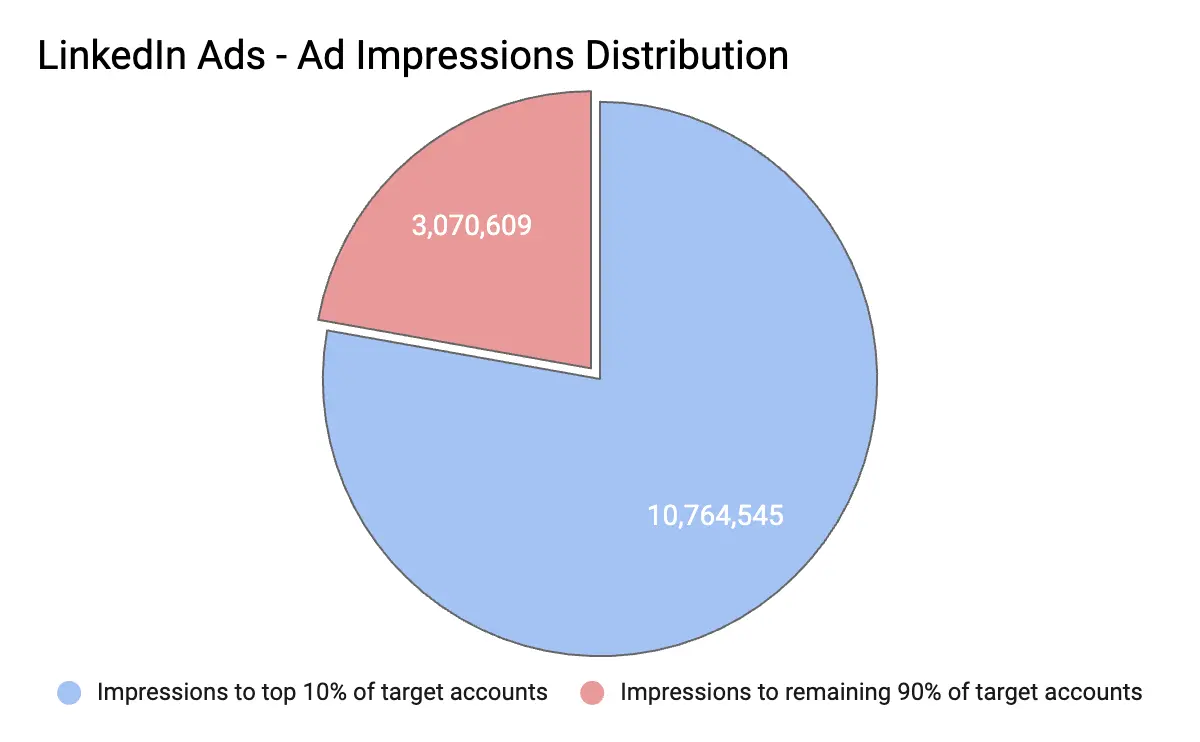
You could maneuver this issue by creating smaller audiences across different campaigns. However, the smaller the audience size for a campaign, the higher the CPMs - which again results in wasted ad spend. Not to mention, it would get increasingly tedious to manage multiple smaller campaigns.
💡Check out our research in detail here: LinkedIn Frequency Capping: Impact Measurement

So how do you possibly win in this lose-lose situation? 2 words: Smart Reach.
“LinkedIn budgets can scale very quickly — and if you’re unsure you’re reaching the right people, you’re essentially setting your money on fire. With Smart Reach, we’ve been able to reach the largest spread of accounts visiting our website without putting too much undue weightage on larger accounts.” – Abhishek Iyer, Director of Marketing at Descope.
Introducing: Smart Reach
Our newest feature allows you to manage the frequency with which your ads are displayed to each account, ensuring maximum reach, lower CPMs, and impact. Plus, with intent-based impression control, you can ensure that your ads are only shown to relevant and high-intent accounts.

Here’s an example of how Descope uses Smart Reach to improve its ad distribution:
We analyzed Descope’s LinkedIn ad metrics to examine how Smart Reach affects campaign reach and ad spend. Our research revealed that without setting a frequency cap, the ads reached 8214 accounts, and the top 25 target accounts consumed 35% of ad impressions. This led to an ad spend of approximately $4700.
| Before Frequency Capping (15th March to 17th April) | ||
|---|---|---|
| Total Accounts Reached | 8214 | |
| Spends | 4772.80 | |
| Total Impressions | 470621 | |
| Top 10 Accounts - Impressions | 117149 | 24.89% |
| Top 25 Accounts - Impressions | 165872 | 35.25% |
We set up a cap of 2000 impressions at an account level across all campaign groups to analyze whether there would be an impact on reach. After a month, we noticed the following improvements:
- Impressions consumed by the top 25 companies have decreased by 17% within a month.
- Descope was able to redistribute around 158,841 impressions that were earlier consumed by the top 25 companies.
- Ad spend was reduced by 22% ($1,000 less!), with CPM going down from $7 to $4
- The reach was reduced by only 6%
| After Frequency Capping (April 18th to May 20th) | ||
|---|---|---|
| Total Accounts Reached | 7690 | |
| Spends | 3709.90 | |
| Total Impressions | 436050 | |
| Top 10 Accounts - Impressions | 44232 | 10.14% |
| Top 25 Accounts - Impressions | 79948 | 18.33% |
This proves that Smart Reach not only saves your ad spend but also ensures that your reach remains intact.
3 key benefits of Smart Reach
Better reach per dollar spent
Imagine investing a good chunk of your budget on LinkedIn ads, only to realize your ads don’t reach all the accounts in your audience list. Well, with Factors, you don’t have to imagine. Smart Reach allows you to redistribute impressions to reach more accounts per dollar spent, helping you make the most of your ad spend.
Intent-based ad distribution
Saying that all prospects are equal sounds good in theory, but in reality, that’s not the case. Ideally, sales-ready accounts should receive more ads than others. However, after analyzing 100+ LinkedIn ad accounts, we’ve found that most ads are distributed to large companies. With Factors, you can configure Smart Reach rules so that the high-intent accounts who visit the pricing page, engage with G2 pages, open emails, etc., receive ads more frequently than others.

Conversely, accounts that have already booked a demo or expressed negative interest in a sales email should be shown fewer ads. Factors empowers intent-based ad distribution to ensure an appropriate ad frequency for each account based on intent levels.
Avoid over and underexposure
Just like Goldilocks and the 3 Bears, there should never be too much or too little of anything, whether porridge or LinkedIn ads. Your high-intent prospects shouldn’t have to deal with seeing the same ad over and over again, but they should also see your ads enough times to consider your product for their needs. Smart Reach ensures that your impression distribution is just right – automatically showing the right frequency of ads to the right accounts.
“Within a month of setting up our frequency capping rules with Factors, we’ve saved 216,448 ad impressions and reached the largest spread of accounts per dollar spent. We’re excited to scale this up in the future.”—Abhishek Iyer, Director of Marketing at Descope.
{{INLINE_TOFU}}
Join the waitlist today
Every marketer launches their campaigns, hoping their ads reach all the relevant accounts at the right time. With Smart Reach, you can make it happen. Factors AdPilot offers a comprehensive range of features that ensures you make the most of your ad spend while increasing revenue via LinkedIn ads. Contact our sales team to learn how you can use AdPilot to take your LinkedIn game to the next level.
LinkedIn’s ad algorithm can sometimes result in ads being disproportionately shown to a small segment of large enterprises, causing ad fatigue and underexposure for other target accounts. Factors.ai's Smart Reach solves this issue by allowing marketers to evenly distribute ad impressions across their entire account list.
With features like intent-based frequency capping, Smart Reach ensures that high-intent accounts receive the right amount of exposure without being overwhelmed. This method boosts reach, reduces wasted ad spend, and enhances overall marketing efficiency, making Smart Reach an essential tool for optimizing LinkedIn ad campaigns.

Are LLM Hallucinations a Business Risk? Enterprise and Compliance Implications
Read how and why LLM hallucinations can be a serious enterprise risk for B2B teams, and how to mitigate them.
In creative workflows, an AI hallucination is mildly annoying, but in enterprise workflows, it’s a meeting you don’t want to be invited to.
Because once AI outputs start touching compliance reports, financial disclosures, healthcare data, or customer-facing decisions, the margin for “close enough” disappears very quickly.
This is where the conversation around LLM hallucinations changes tone.
What felt like a model quirk in brainstorming tools suddenly becomes a governance problem. A hallucinated sentence isn’t just wrong. It’s auditable. It’s traceable. And in some cases, it’s legally actionable.
Enterprise teams don’t ask whether AI is impressive. They ask whether it’s defensible.
This is why hallucinations are treated very differently in regulated and enterprise environments. Not as a technical inconvenience, but as a business risk that needs controls, accountability, and clear ownership.
This guide breaks down where hallucinations become unacceptable, why compliance labels don’t magically solve accuracy problems, and what B2B teams should put in place before LLMs influence real decisions.
Why are hallucinations unacceptable in healthcare, finance, and compliance?
In regulated industries, decisions are not just internal. They are audited, reviewed, and often legally binding.
A hallucinated output can:
- Mis-state medical guidance
- Misrepresent financial information
- Misinterpret regulatory requirements
- Create false records
Even a single incorrect statement can trigger audits, penalties, or legal action.
This is why enterprises treat hallucinations as a governance problem, not just a technical one.
- What does a HIPAA-compliant LLM actually imply?
There is a lot of confusion around this term.
A HIPAA-compliant LLM means:
- Patient data is handled securely
- Access controls are enforced
- Data storage and transmission meet regulatory standards
It does not mean:
- The model cannot hallucinate
- Outputs are medically accurate
- Advice is automatically safe to act on
Compliance governs data protection. Accuracy still depends on grounding, constraints, and validation.
- Data privacy, audit trails, and explainability
Enterprise systems demand accountability.
This includes:
- Knowing where data came from
- Tracking how outputs were generated
- Explaining why a recommendation was made
Hallucinations undermine all three. If an output cannot be traced back to a source, it cannot be defended during an audit.
This is why enterprises prefer systems that log inputs, retrieval sources, and decision paths.
- Why enterprises prefer grounded, deterministic AI
Creative AI is exciting. Deterministic AI is trusted.
In enterprise settings, teams favor:
- Repeatable outputs
- Clear constraints
- Limited variability
- Strong data grounding
The goal is not novelty. It is reliability.
LLMs are still used, but within tightly controlled environments where hallucinations are detected or prevented before they reach end users.
- Governance is as important as model choice
Enterprises that succeed with LLMs treat them like any other critical system.
They define:
- Approved use cases
- Risk thresholds
- Review processes
- Monitoring and escalation paths
Hallucinations are expected and planned for, not discovered accidentally.
So, what should B2B teams do before deploying LLMs?
By the time most teams ask whether their LLM is hallucinating, the model is already live. Outputs are already being shared. Decisions are already being influenced.
This section is about slowing down before that happens.
If you remember only one thing from this guide, remember this: LLMs are easiest to control before deployment, not after.
Here’s a practical checklist I wish more B2B teams followed.
- Define acceptable error margins upfront
Not all errors are equal.
Before deploying an LLM, ask:
- Where is zero error required?
- Where is approximation acceptable?
- Where can uncertainty be surfaced instead of hidden?
For example, light summarization can tolerate small errors. Revenue attribution cannot.
If you do not define acceptable error margins early, the model will decide for you.
- Identify high-risk workflows early
Every LLM use case does not carry the same risk.
High-risk workflows usually include:
- Analytics and reporting
- Revenue and pipeline insights
- Attribution and forecasting
- Compliance and regulated outputs
- Customer-facing recommendations
These workflows need stricter grounding, stronger constraints, and more monitoring than creative or internal-only use cases.
- Ensure outputs are grounded in real data
This sounds obvious. It rarely is.
Ask yourself:
- What data is the model allowed to use?
- Where does that data come from?
- What happens if the data is missing?
LLMs should never be the source of truth. They should operate on top of verified systems, not invent narratives around them.
- Build monitoring and detection from day one
Hallucination detection is not a phase-two problem.
Monitoring should include:
- Logging prompts and outputs
- Flagging unsupported claims
- Tracking drift over time
- Reviewing high-confidence assertions
If hallucinations are discovered only through complaints or corrections, the system is already failing.
- Treat LLMs as copilots, not decision-makers
This is the most important mindset shift.
LLMs work best when they:
- Assist humans
- Summarize grounded information
- Highlight patterns worth investigating
They fail when asked to replace judgment, context, or accountability.
In B2B environments, the job of an LLM is to support workflows, not to run them.
- A grounded AI approach scales better than speculative generation
One of the reasons I’m personally cautious about overusing generative outputs in GTM systems is this exact risk.
Signal-based systems that enrich, connect, and orchestrate data tend to age better than speculative generation. They rely on what happened, not what sounds plausible.
That distinction matters as systems scale.
{{INLINE_TOFU}}
FAQs
Q. Are HIPAA-compliant LLMs immune to hallucinations?
No. HIPAA compliance ensures that patient data is stored, accessed, and transmitted securely. It does not prevent an LLM from generating incorrect, fabricated, or misleading outputs. Accuracy still depends on grounding, constraints, and validation.
Q. Why are hallucinations especially risky in enterprise environments?
Because enterprise decisions are audited, reviewed, and often legally binding. A hallucinated insight can misstate financials, misinterpret regulations, or create false records that are difficult to defend after the fact.
Q. What makes hallucinations a governance problem, not just a technical one?
Hallucinations affect accountability. If an output cannot be traced back to a source, explained clearly, or justified during an audit, it becomes a governance failure regardless of how advanced the model is.
Q. Why do enterprises prefer deterministic AI systems?
Deterministic systems produce repeatable, explainable outputs with clear constraints. In enterprise environments, reliability and defensibility matter more than creativity or novelty.
Q. What’s the best LLM for data analysis with minimal hallucinations?
Models that prioritize grounding in structured data, deterministic behavior, and explainability perform best. In most cases, system design and data architecture matter more than the specific model.
Q. How do top LLM companies manage hallucination risk?
They invest in grounding mechanisms, retrieval systems, constraint-based validation, monitoring, and governance frameworks. Hallucinations are treated as expected behavior to manage, not a bug to ignore.

LinkedIn Industry Tags 101: What Marketers Must Know
LinkedIn is a great platform for B2B ads, but there’s room for optimization when identifying and segmenting audiences. Let's check it out.
LinkedIn is truly the place to B2B, isn’t it?
80% of B2B marketers say LinkedIn is part of their advertising strategy because 4 out of 5 of its 900 million members drive business decisions, making it a key platform for lead generation. Marketers can launch ad campaigns to target decision-makers from small businesses to Fortune 500 companies worldwide.
LinkedIn’s robust campaign manager platform allows companies to set their targeting criteria based on 20 different attribute categories, such as company, job experience, education, demographics, interests, and traits.
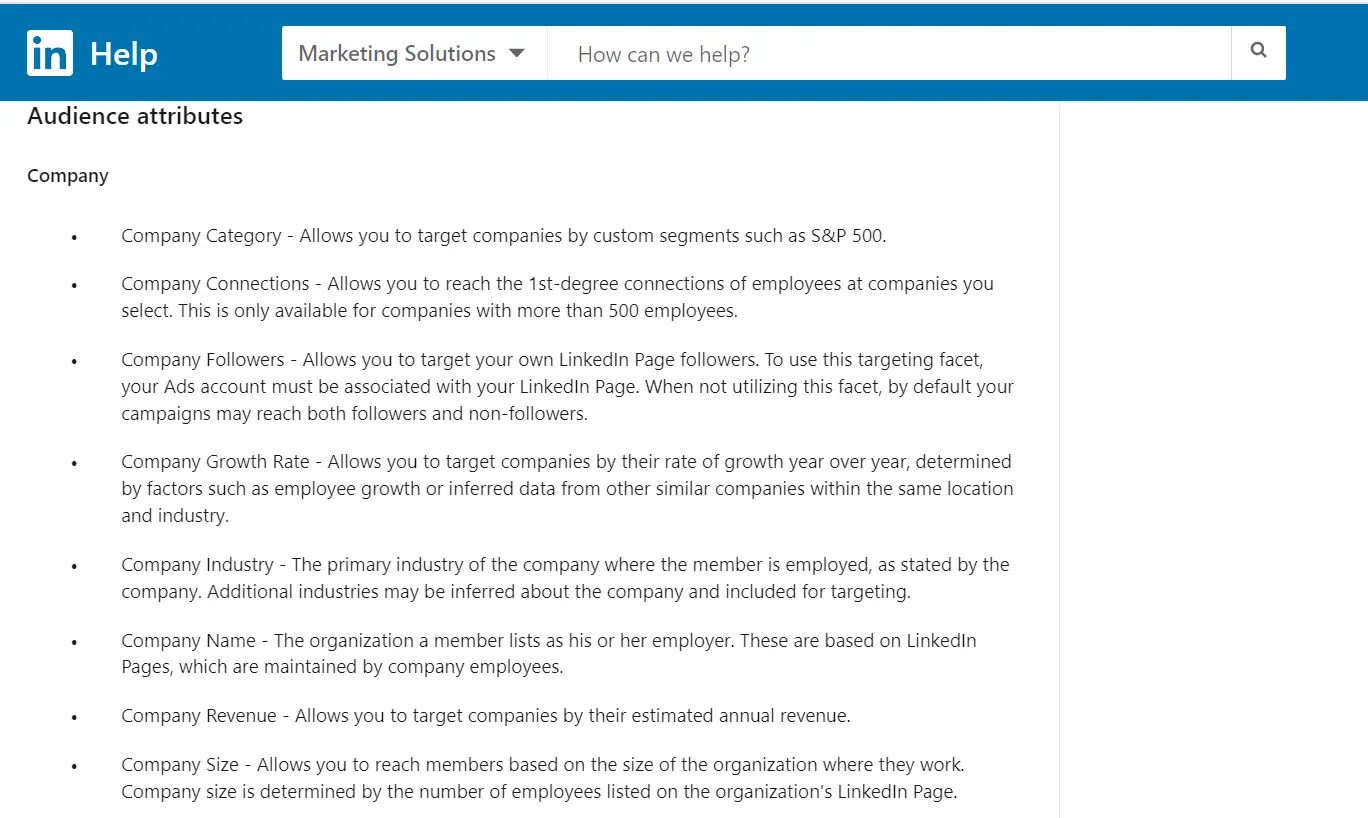
However, while LinkedIn campaign manager is a boon for running B2B ads, there's room for refinement when it comes to the ad platform's industry tag categorization and audience targeting mechanism.
The LinkedIn industry list currently consists of 24 main categories and 148 subcategories as applicable industries for company profiles. These categories are presently visible for company pages but are yet to be updated on Campaign Manager.
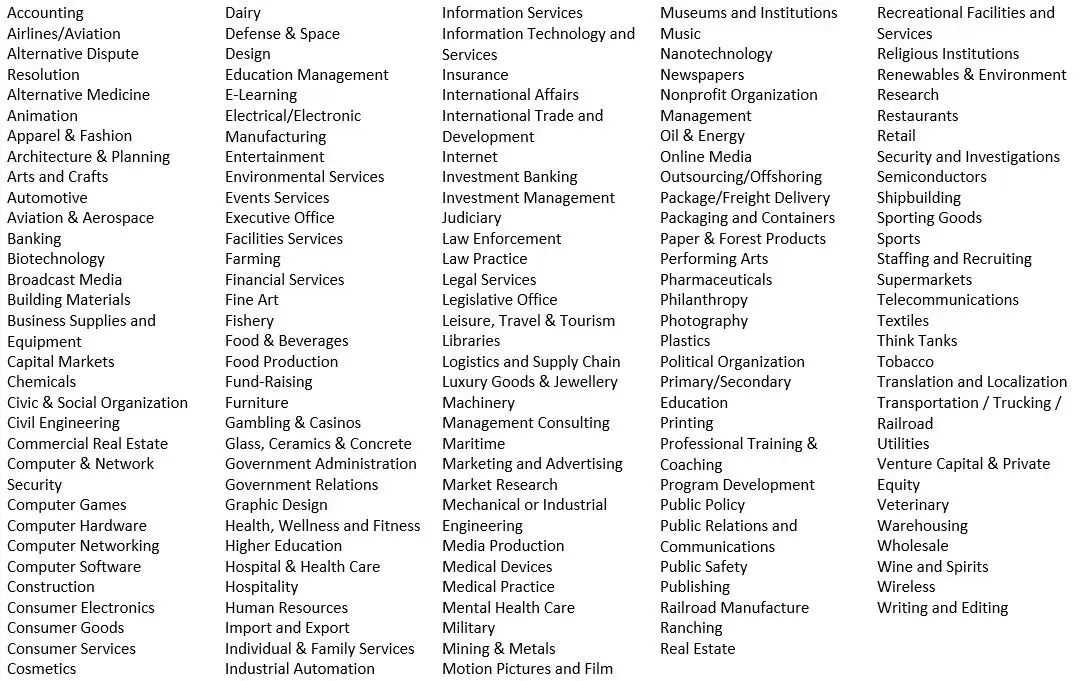
While these categories cover a wide range of industries, this article explores why they may still be insufficient — and how we can overcome the hurdle of vague industry tags to optimize ad performance ⬇️
How Does LinkedIn Campaign Manager Define Industries?
LinkedIn defines industry as the company's primary industry, which is where the member is employed, as stated by the company. Additional industries may be inferred about the company and included for targeting.
Individuals can’t choose the industry but rather get assigned the company's industry to which they are attached.
The problem arises when there is limited clarity on which industry a particular company belongs to. When selecting the industry option of a LinkedIn company page, the creator or page admin determines the industry. Since these are subjective, irregularities can occur especially when a company can come under two different industries.
For instance, a health tech company can come under “health, wellness and fitness,” “hospital and health care” or “software development”
Let’s look at this with a detailed example 🔽
Suppose you want to showcase your ad to decision-makers working in fintechs specifically. Here are examples of 3 fintech companies and how LinkedIn identifies their industries:
1. RazorpayXPayroll is placed under “IT services and consulting,” whereas it’s payroll software.
2. PayPal & Payoneer are similar platforms that facilitate international bank transfers but are under different industry tags.

As you can see, all 3 companies are virtually the same but are categorized differently on Linkedin. Seems confusing, right?
You risk losing out on ICP companies or worse you spend on irrelevant companies that are not your ICP because LinkedIn's categorization is different from your expectations
For instance, if you want to target fintechs and pick “financial services” in campaign manager, you’d also end up advertising to banks and investment companies.
Or if you pick “software and development,” your ads are shown to every other software company, regardless of whether they come under your ICP.
And we all know that an unqualified prospect can take a lot of time from your sales and marketing team, costing your company more than it pays.
Now the real question is,
How Do You Overcome This Problem?
Here’s what Tim Davidson, VP of Marketing at B2B Rizz, has to say:
As mentioned above, creating a target account list on a third-party platform allows you to present your ads to high-intent companies that actually fall within your ICP without overshooting your paid ad spend.
You can either build a list of cold accounts on a database tool like Apollo or ZoomInfo or build granular segments of warm ICP accounts engaging on your Website, LinkedIn, G2, CRM, etc. inside Factors.
💡You can use Factors account segments to identify and create a list of web visitors segmented by source and how far along they are in the customer journey. You can also refine the list by targeting accounts that visit high-intent pages (pricing pages, comparison blogs, G2 reviews, etc.) and fit your ICP based on demographics, industry, technographics, revenue, etc. Once done, you’ll have a list of high-fit, high-intent accounts.
Upload this list when creating audiences on LinkedIn to skip the ambiguity and save ad spend. It also comes in handy when launching retargeting campaigns to prospects in the solution-aware stage.

Understanding LinkedIn Industry Tags
LinkedIn industry tags help categorize companies into 24 main categories and 148 subcategories, enabling audience segmentation for B2B advertising.
- Challenges in Targeting: Categories can be ambiguous, making precise audience segmentation difficult.
- Classification Issues: A health tech company may fall under multiple categories like "Health, Wellness and Fitness," "Hospital and Health Care," or "Software Development."
- Optimizing Targeting: Combine industry tags with job titles, company size, and demographics for better audience reach.
Refining targeting strategies with additional attributes ensures more accurate segmentation, improves ad performance, and enhances B2B marketing effectiveness.
{{INLINE_TOFU}}
Wrapping Up
LinkedIn’s native targeting features while useful still have some room for optimization that the LinkedIn team is currently working on solving. In the meantime, you can use target account lists to save time and exclusively target your ads to prospects in market for your solution.
Find out how you can use Factors.ai for LinkedIn retargeting
And guess what? We’re coming up with something exciting that can help you revamp your LinkedIn ad strategy and make the most of LinkedIn. Stay tuned for more!

LinkedIn Intent Data: The Missing Ingredient in Your B2B Sales Strategy?
Let's look at how Linkedin intent data can benefit sales folk and marketing teams and how Factors can help make the most of this Linkedin buyer data.

TL;DR
- LinkedIn intent data reveal prospects' level of interest and engagement with ads.
- It helps illuminate the "dark funnel" of hidden interactions and potential leads.
- Benefits include audience segmentation, ad optimization, retargeting, and lead scoring.
- Marketers can use intent data to optimize campaigns and improve targeting.
- Sales teams can use intent data to prioritize high-intent accounts and personalize outreach.
- Factors is a tool that integrates LinkedIn intent data with CRM data for deeper insights.
LinkedIn Intent Data: The Missing Ingredient in Your B2B Sales Strategy?
With over 900 million members across 200 countries and 4 out of 5 members driving business decisions, LinkedIn is a crucial platform for B2B sales and marketing teams. 97% of B2B marketers use LinkedIn for lead generation. But how can you ensure that your LinkedIn ads and marketing efforts are influencing conversions?
Enter LinkedIn intent data.
LinkedIn intent data shows if a prospect has interacted with or shown interest in your LinkedIn ads, allowing you to gauge their likelihood of converting. In this article, we'll discuss how this data can benefit both marketing and sales teams, and how Factors can help you make the most of this valuable information.
What Is LinkedIn Intent Data?
LinkedIn intent data is a crucial piece of information that reveals the level of interest and engagement prospects have with your LinkedIn ads. By analyzing this data, you can gain valuable insights into the buyer's journey and identify potential leads who are more likely to convert.
This information is vital in today's competitive B2B landscape, where understanding the preferences and needs of your target audience can significantly improve your sales and marketing efforts.
{{INLINE_MOFU}}
Why Is LinkedIn Intent Data Important?
In B2B, the buyer's journey is often complex and multifaceted. Prospects interact with various touchpoints before making a purchase decision. Unfortunately, not all of these interactions are visible or easily tracked, leading to the existence of a "dark funnel."
What is the dark funnel?
The dark funnel is part of the buyer's journey where prospects have been exposed to your LinkedIn ads, content, or other marketing materials but haven't directly engaged with them or converted immediately.
These “hidden” interactions can make it challenging to assess the true impact of your marketing efforts and identify valuable leads who may convert later in their journey.
How does Linkedin intent data help?
LinkedIn intent data illuminates the dark funnel by providing insights into prospects' level of interest and engagement with your ads, even if they haven't directly interacted with them. Here are a few ways in which it can help you gain a deeper understanding of the dark funnel:
- Segment your audience based on their intent data: By analyzing LinkedIn intent data, you can segment your audience into different categories based on their level of engagement and interest in your ads. This will help you create tailored account-based marketing campaigns that address the unique needs and preferences of each segment, increasing the chances of converting these prospects. For instance, if you run an e-learning platform, you can segment users who have engaged with your ads about coding courses and target them differently than users who’ve shown interest in a writing course.
- Optimize your ad creatives and targeting: Understanding the preferences of prospects within the dark funnel can help you optimize your LinkedIn ad creatives and targeting strategies to better resonate with your audience. Then, fine-tuning your ads based on intent data insights can improve the overall effectiveness of your marketing efforts. For example, if you find that prospects in the dark funnel are engaging more with video ads than image-based ads, you can allocate more budget to video ad campaigns and optimize targeting to reach more people likely to be interested in your product.
- Retarget potential leads: With this data at hand, you can retarget prospects with tailored content and offers. If a prospect has engaged with content about a particular product or service on your website, but didn't complete a purchase, you can retarget them with a special discount or offer, encouraging them to revisit your site and complete the transaction.
- Enhance lead scoring and prioritization: By incorporating intent data, you may find that a group of people have engaged heavily with your ads and content, but haven't reached out directly yet. For instance, if you're a B2B software company, your sales team can reach out to prospects who've shown a high level of engagement with specific features of the software. They can demo the tool while keeping the focus of the conversation on the feature of interest.
LinkedIn Intent Data For Marketers: Unlock The Potential Of Your Ads
As marketers, we aim to reach the right audience, deliver a message that resonates with them, and ultimately drive conversions. Linkedin buyer intent data is highly valuable in achieving these objectives and gaining valuable insights into audience engagement. With this, you can optimize your LinkedIn marketing strategy in several ways:
- Know if ads are reaching the intended audience: Linkedin’s intent data gives you insights into who is interacting with your ads. This information is then curated in an account-level format so your ABM teams can filter accounts with the highest interest in buying your product or service.
- Optimize LinkedIn ads based on engagement: Analyzing LinkedIn intent data can tell which ad formats, visuals, and copy resonate most with your audience. You can then make data-driven decisions to optimize your ads, boosting engagement and conversion rates.
- Know which kind of ad copy resonates with the audience: By examining the intent data from different ad variations, you can identify the messaging that best captures your audience's attention. This empowers you to tailor your ad copy and creatives to better appeal to your target audience, leading to more clicks, higher engagement, and ultimately, more conversions.
- Combine LinkedIn intent data with third-party intent data for a holistic approach: By integrating this data with third-party intent data (from sources like G2, TrustRadius, etc.), you can create a more comprehensive understanding of your prospects' needs throughout their buying journey. This enables you to deliver targeted, relevant content and ads that address their pain points and move them closer to conversion.
How To Use LinkedIn Buyer Intent To Improve Pipeline Velocity
Pipeline velocity is a key performance indicator (KPI) for sales teams, as it measures the speed at which leads move through the sales funnel and ultimately convert into customers. Leveraging LinkedIn buyer intent data can significantly improve pipeline velocity by helping you prioritize high-intent accounts, personalize outreach, and align sales and marketing efforts. Here's how:
- Prioritize high-intent accounts for account-based marketing (ABM): LinkedIn buyer intent data can help sales and account-based marketing (ABM) teams identify high-intent accounts, those that have shown significant interest in your LinkedIn ads, and are more likely to convert into customers. By prioritizing these high-intent accounts, your team can focus its efforts on the most promising leads, increasing the chances of closing deals and improving overall pipeline velocity.
- Use intent data and deanonymization to personalize outreach: Using LinkedIn buyer intent data, you can tailor your sales outreach to the specific needs and interests of your prospects. Adding Factors to the mix, you can also deanonymize website traffic and know about the company and industry that they work in. With this, you can gain deeper insights into their pain points, preferences, and points of friction. This allows your sales team to craft personalized messages that address these concerns and demonstrate the value of your product or service, helping to move prospects through the sales funnel more quickly.
- Align sales and marketing based on intent data: Regularly analyzing LinkedIn buyer intent data can help you identify trends and patterns in your prospects' behavior, allowing you to optimize your sales and marketing tactics accordingly. This is also good for reporting on the effectiveness of campaigns. For example, you may discover that certain types of content or ad formats resonate better with your target audience, leading to higher engagement and faster movement through the sales funnel.
- Add intent data into CRM and marketing automation platforms: Integrating LinkedIn buyer intent data into your CRM and marketing automation platforms can help automate lead scoring, segmentation, and nurturing efforts based on prospects' engagement and intent. This allows your sales and marketing teams to efficiently focus their efforts on high-intent leads, ultimately improving pipeline velocity.
- Enhance Account Scoring: Incorporating LinkedIn buyer intent data into your account scoring methodology can provide a more accurate assessment of a prospect's likelihood to convert. The combination of data from multiple sources allows your sales and marketing teams to better score leads. Add to that Factors’ account scoring features, and you can automate your prioritization process for the teams too.
Make The Most Of Your LinkedIn Intent Data with Factors
Leveraging buyer intent data from LinkedIn effectively can help you identify the users with the highest interest and modify your approach to better target the accounts. Factors enables you to maximize the potential of this data to drive results. Here's how:
1. Integrated data analysis
Factors helps combine Linkedin intent data with data from other sources, such as CRM platforms, ads, website, and more. This integrated approach enables you to gain a holistic understanding of your prospects' buyer journey, helping you identify high-intent accounts and optimize your marketing and sales strategies accordingly.
2. Visual user timelines for enhanced attribution
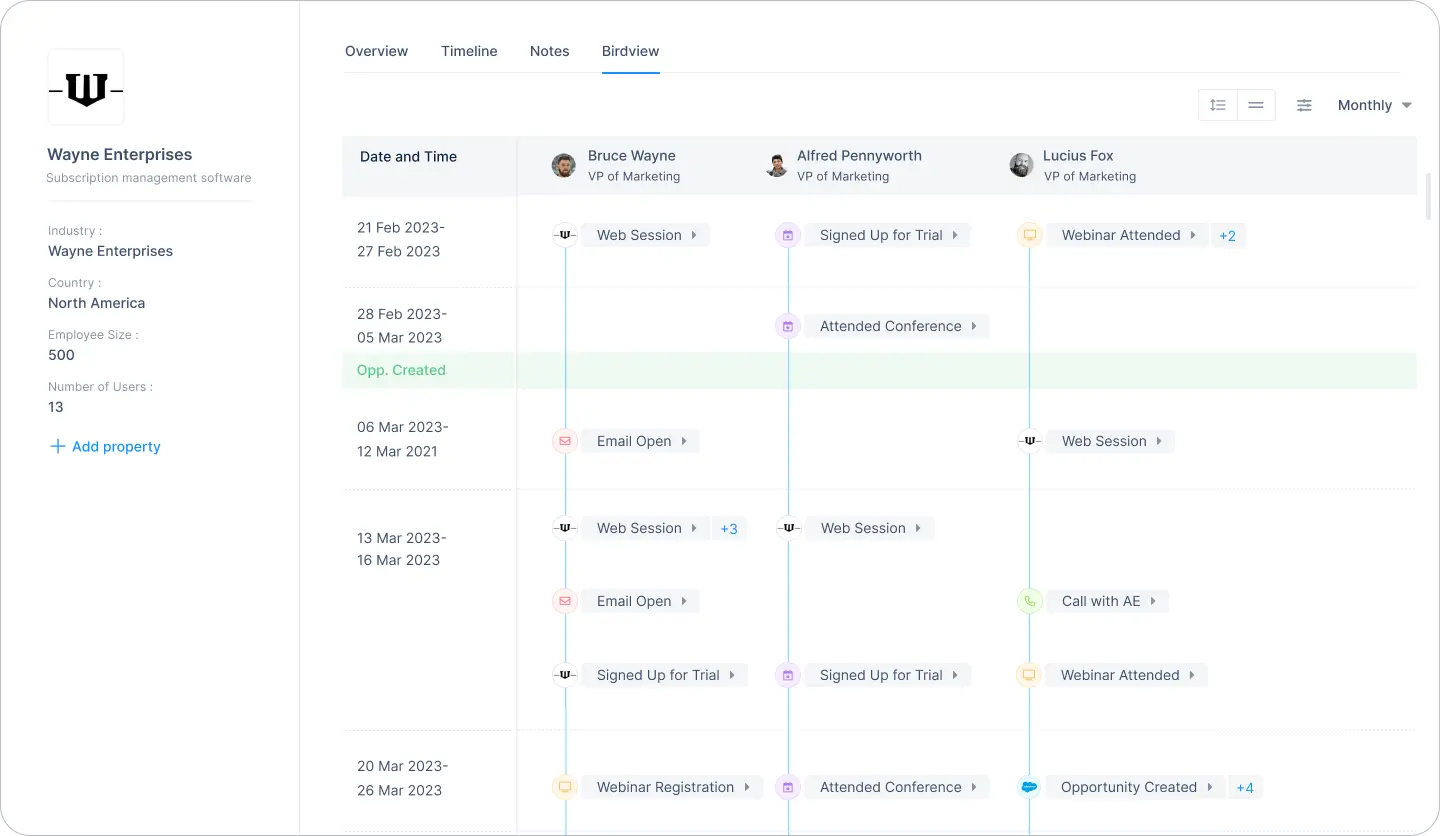
Factors offers a visual user timeline that lets you track and analyze your prospects' interactions with your LinkedIn ads over time. You can also view if the same user has interacted with your brand over other platforms or campaigns that you already track. This gives you a holistic view of an individual user's journey and engagement with your brand across multiple touchpoints.
3. Account intelligence
Factors' account intelligence capability allows users to identify anonymous companies visiting your website, along with their intent and firmographics. Your ABM teams can then personalize outreach by understanding their interactions with your content and ads to improve conversions.
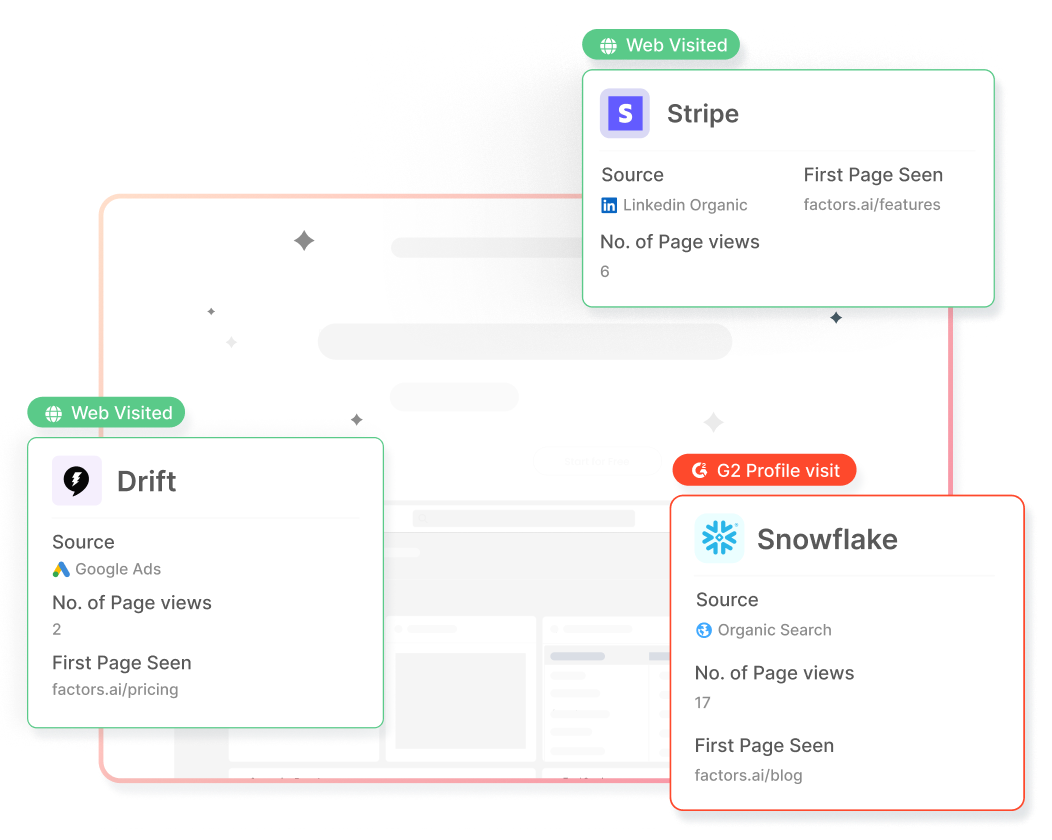
4. Optimize ad engagement and performance
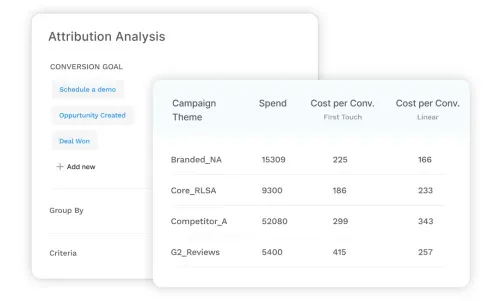
Factors uses Linkedin ad engagement data and audience insights to help you optimize your Linkedin ad campaigns. Knowing which ads resonate with your target audience and generate the most engagement can help you refine your campaigns to maximize returns and drive conversions. You can also uncover the ad formats, content types, and messaging that resonate best with your target audience and increase the likelihood of conversions.
5. Account scoring

Factors' account scoring feature helps prioritize prospects based on their engagement and intent, enabling sales teams to focus their efforts on high-value targets. By combining intent data with firmographics, technographics, and engagement history, you can create a comprehensive account score that helps your sales team prioritize their efforts and focus on the most promising opportunities.
LinkedIn intent data uncovers hidden interactions by revealing prospects' engagement with your ads, helping to identify the "dark funnel."
1. Audience Segmentation: Analyze data to segment audiences and optimize campaigns.
2. Retargeting and Lead Scoring: Use insights to retarget effectively and prioritize high-intent accounts.
3. Sales and Marketing Alignment: Sales teams can personalize outreach, while marketing refines targeting strategies.
4. CRM Integration: Integrating LinkedIn intent data with CRM systems provides deeper insights, enabling more precise B2B sales strategies.
FAQs
1. How does LinkedIn calculate buyer intent?
LinkedIn calculates buyer intent by analyzing user engagement with your company's ads, content, and other interactions on the platform. This includes factors such as clicks, likes, comments, shares, and time spent viewing your content. By tracking these interactions, LinkedIn can identify which users are genuinely interested in your products or services, signaling potential buyer intent.
2. How can you use intent data for sales?
Intent data can be used by sales teams to prioritize high-intent accounts, personalize outreach efforts, align sales and marketing initiatives, optimize sales tactics, and enhance account scoring. By leveraging intent data, sales teams can focus their resources on the most promising leads, creating more targeted and effective sales strategies that drive revenue growth and improve pipeline velocity.
Bring the Power of LinkedIn Buyer Intent Data to B2B Sales
Leveraging LinkedIn buyer intent data can revolutionize your sales and marketing efforts, enabling you to prioritize high-intent accounts, personalize outreach, and align your teams for maximum impact.
By using powerful tools like Factors, you can gain a comprehensive view of buyer journeys and make data-driven decisions to boost pipeline velocity and drive revenue growth. Don't miss out on valuable opportunities – uncover the potential of LinkedIn buyer intent data and elevate your B2B sales strategy today.

LinkedIn Conversation Ads: Sliding Into DMs Without Sounding Like an Ad
Learn how Conversation Ads on LinkedIn compare to LinkedIn Message Ads, best practices for LinkedIn messaging ads, and when to use sponsored messages effectively.
TL;DR
- LinkedIn Conversation Ads work best for long, complex B2B buying journeys, especially when multiple stakeholders are involved, and buyers want to explore before committing.
- They are not designed for instant conversions. If your goal is quick leads or low CPL, Message Ads or Feed ads are often a better fit.
- The real value of Conversation Ads lies in intent signals, like clicks, choices, and engagement paths, not just form fills.
- To judge them correctly, you need full-funnel visibility. When engagement is connected to downstream behavior and revenue, Conversation Ads become a meaningful driver of the pipeline.
Let’s be honest.
Most LinkedIn ads get scrolled past faster than a Monday motivation post. You know the ones. Big promise. Bigger stock photo. Zero memory of it five seconds later.
But LinkedIn Conversation Ads are different.
They don’t fight for attention in the feed.
They don’t interrupt someone mid-scroll.
They land straight in the inbox.
And when they’re done right, they don’t feel like ads at all. They feel like the start of a conversation. The kind you might actually reply to.
If you’ve been curious about LinkedIn message ads, LinkedIn sponsored messages, or how to make LinkedIn messaging ads convert without sounding spammy, you’re in the right place.
Let’s break it down, simply, practically, and without the buzzwords.
What are LinkedIn Conversation Ads (and how are they different from message ads)?
LinkedIn offers two inbox-based ad formats under Sponsored Messaging. They’re often lumped together, but they behave very differently.
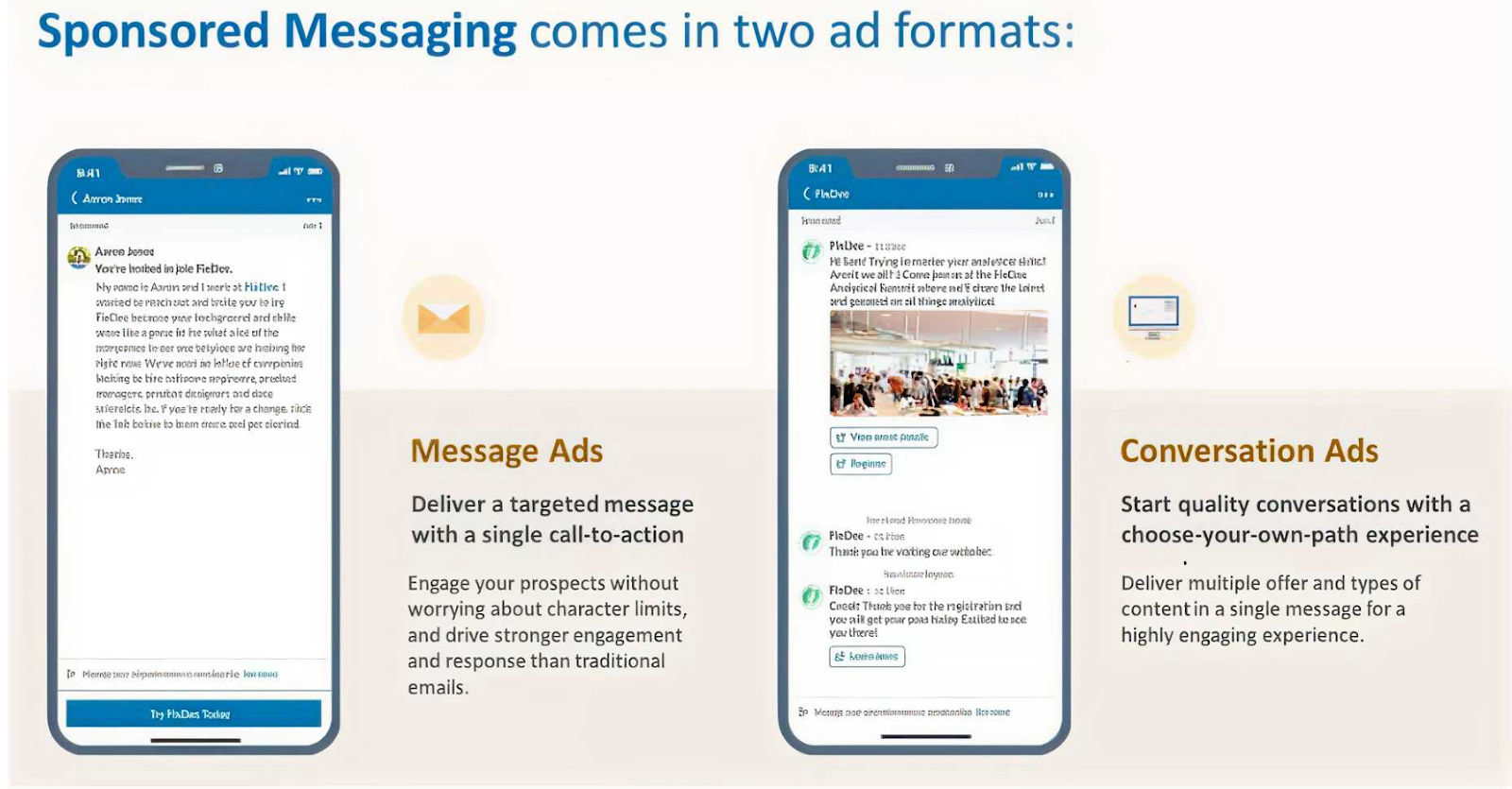
1. LinkedIn Message Ads
Think of Message Ads as a single-message push.
You send one message. You include one CTA. You hope they click. That’s it.
They work best when:
- You have one clear goal (book a demo, download a guide)
- You want direct, cost-effective outreach
- Your audience prefers short, no-nonsense messaging
Message Ads aren’t bad. They’re just… direct. Sometimes too direct.
2. LinkedIn Conversation Ads
Conversation Ads are more like choose-your-own-adventure. Instead of forcing one action, you give users multiple response paths:
- FAQs
- Content
- Demos
- Webinars
- Pricing
- Even “just browsing.”
The buyer decides what happens next. They work best when:
- You want interactive engagement
- You’re running ABM or high-intent campaigns
- You want prospects to engage on their terms, not yours
In short: Message Ads talk to people. Conversation Ads speak with them.
And in B2B, that difference matters more than we admit.
Why Conversation Ads work so well in B2B
Here’s the truth about B2B buyers: They hate being sold to, but they love being informed.
Conversation Ads lean into that reality. Instead of forcing a demo request upfront, they let buyers:
- Explore content at their own pace
- Self-qualify without pressure
- Signal intent through clicks and choices
And those choices? They’re gold.
Every click inside a conversation tells you what the buyer actually cares about:
- Are they curious?
- Are they researching?
- Are they close to buying?
That’s far more valuable than a single “Submit” button.
{{INLINE_TOFU}}
The anatomy of high-performing LinkedIn Conversation Ads
So what actually drives engagement? Let’s break down the patterns that show up again and again in high-performing Conversation Ads.
1. Start with the right CTA (Hint: It’s not “Book a Demo”)
Across successful campaigns, the best-performing CTAs are surprisingly… gentle.
They sound like:
- See how it works
- Get started for free
- Find out more
- Book a demo (but usually not as the first step)
Curious, why does this work? Because
- Early-funnel CTAs reduce pressure
- They invite curiosity instead of commitment
- They feel helpful, not transactional
- Think of CTAs as doors, not demands.
Once someone walks through willingly, the rest gets easier.
2. Personalization starts with targeting (Not copy)
Here’s a hard truth: Great copy cannot save bad targeting.
For Conversation Ads, LinkedIn Ads targeting does most of the heavy lifting. The most effective campaigns usually layer:
- Job title + function (not just one)
- Seniority (decision-makers matter here)
- Skills and expertise tied to the problem you solve
- Location, when buying behavior differs by region
Conversation Ads feel personal by nature. If the targeting is off, that illusion breaks instantly.
Right message. Right inbox. Right moment.
Related read: Top LinkedIn Ads targeting mistakes in B2B.
3. Avoid buzzwords. Say the real thing.
One pattern that shows up again and again in underperforming ads is the use of too many buzzwords and too little substance.
Words like AI-powered, optimize, streamline, and game-changer are everywhere, and buyers have learned to mentally skip them.
What works better?
- Specific problems
- Concrete outcomes
- Relatable frustrations
Bad: “Our AI-powered platform optimizes workflows.”
Better: “Still managing this in spreadsheets? Here’s how your team can save 20 hours a week.”
Specific beats impressive. Every single time.
The psychology behind winning Conversation Ads
Conversation Ads work because they tap into the basic human psychology, not clever tricks.
The most common triggers are simple:
- FOMO – “See what top teams are doing differently.”
- Curiosity – “Want to know how this works?”
- Reciprocity – “Get the report, no strings attached.”
The strongest ads often combine two triggers:
- Curiosity + social proof
- Reciprocity + urgency
- FOMO + data-backed claims
The key thing to remember? Don’t manipulate. If the problem is real, people will lean in.
Related read: Best AI tools for LinkedIn Advertising.
Best practices for LinkedIn Message Ads and Conversation Ads
Let’s make this practical.
LinkedIn Conversation Ads Best Practices
- Keep messages short and skimmable
- Offer multiple response options, not dead ends
- Lead with value, not a sales ask
- Let intent reveal itself through clicks
- Optimize for learning, not just leads
LinkedIn Message Ads Best Practices
- Use them when you have one clear CTA
- Be concise and respectful of time
- Avoid sounding like a cold email blast
- Match message tone to seniority level
Just remember, different tools, different jobs.
Related read: Scaling ABM using LinkedIn Ads
Where most teams still get LinkedIn Conversation Ads wrong
Here’s the gap most marketers don’t see. Conversation Ads generate multiple downstream actions, like:
- Website visits
- Content reads
- Return visits
- Assisted conversions
And not just form fills.
So, if you’re only measuring:
- Clicks
- CPL
- Last-touch conversions
Then, you’re missing most of the story.
What changes when you run LinkedIn Ads with Factors.ai
Launching a LinkedIn Ad Campaign is only half the job. The harder part is figuring out which drove conversions and contributed to revenue.
But here is the catch: buyers do not convert in straight lines. Usually, this is what happens after a prospect clicks your LinkedIn Ad,
- They don’t convert immediately.
- They visit your website days later.
- They read a case study.
- They come back through search.
- Sales finally pick them up weeks later.
And somewhere along the way, LinkedIn quietly loses credit. Read more about this in our LinkedIn Ads B2B Benchmarks Report of 2025.
This is exactly the gap LinkedIn Adpilot from Factors.ai built to close.
See what happens after they click your LinkedIn Ad
Most reporting stops at impressions, clicks, or form fills. That is useful, but incomplete.
Factors.ai helps you see:
- What prospects do after they engage
- How different interactions influence the pipeline
- Which touchpoints actually contribute to deals
Instead of guessing which efforts mattered, you can see the complete picture of how accounts move through your funnel after clicking your LinkedIn Ads.
Simply put, see the true ROI of LinkedIn Ads with Factors.ai
Compare LinkedIn against other channels
Once you can see influence, comparison becomes easier.
Factors.ai lets you analyze how LinkedIn performs alongside other channels and how ad-engaged accounts move through the funnel. This helps teams decide where to invest more and where to pull back.
Build audiences without guesswork
Manually maintaining account lists takes time and still goes stale.
With Factors.ai, LinkedIn audience lists are built and updated automatically using real engagement and intent signals. Instead of guessing who should see your ads, you target accounts that are actually showing interest.
Result: Less waste and cleaner targeting.
Control where your LinkedIn Ads budget really goes
Most teams do not realize this until they see the data. 20% of accounts often consume 80% of the ad impressions. The result is uneven reach and fast budget burn.
Factors.ai’s LinkedIn Adpilot helps you:
- Control impressions and clicks per account
- Reach more accounts with the same budget
- Avoid overserving the same few companies
More coverage. Same spend.
Read more about this in the LinkedIn Smart Reach blog.
Optimize campaigns using conversion feedback
Factors.ai also supports the LinkedIn Conversion API. That means you can:
- Send online and offline conversion signals back to LinkedIn
- Optimize campaigns based on real outcomes
- Scale performance without relying on third-party cookies
All without a complicated setup.
So… should you be running LinkedIn Conversation Ads?
Short answer: Yes. But only if you use them for what they are actually good at.
Conversation Ads work best in buying journeys that take time. They are the best when multiple stakeholders are involved, when buyers want to explore before committing, and when your goal is to educate, qualify, and learn rather than push an immediate demo.
They are not built for instant wins. If you need quick, single-action conversions or you are optimizing purely for cost per lead, Message Ads will usually perform better. Different formats solve different problems.
Where most teams go wrong is not in how they write these ads, but in how they measure them.
Conversation Ads rarely drive a straight line from click to conversion. Instead, they influence interest over time through content views, return visits, and assisted conversions across channels. When revenue is calculated only by last-click results, that influence gets ignored.
But when you connect engagement to downstream behavior and revenue, the picture changes. You can see what sparked curiosity, what kept buyers engaged, and how those early conversations helped deals move forward.
Run Conversation Ads to understand buyer intent, not to force action. Measure them with the full buyer journey in mind, and they become a meaningful driver of the pipeline rather than just another inbox placement.
FAQs on LinkedIn Conversation Ads
Q1. What exactly are LinkedIn Conversation Ads, and how are they different from Message Ads?
LinkedIn Conversation Ads are interactive inbox ads that let prospects choose what they want to do next. Instead of sending one message with one CTA, you offer multiple options like viewing content, checking pricing, or learning more before booking a demo.
Message Ads, on the other hand, are simpler. One message, one CTA, one outcome. They work well when you already know exactly what action you want the reader to take.
If Message Ads are a straight pitch, Conversation Ads are a guided conversation where the buyer stays in control.
Q2. Do Conversation Ads actually feel like real conversations?
They feel conversational, but they are not live chats.
Conversation Ads follow a pre-built flow with buttons and branching paths. The experience feels interactive because buyers choose what to click, but they are not typing free-form responses.
That is also their strength. You can guide buyers without needing someone to reply in real time, while still learning what they care about based on their choices.
Q3. Should I always choose Conversation Ads over Message Ads?
No, and that is a common mistake.
Conversation Ads work best when buyers need time, context, or education. Message Ads work better when the action is simple and obvious.
If you only have one clear CTA and want quick action, Message Ads are usually the better choice. If you want to support research, qualification, or intent discovery, Conversation Ads are a stronger fit.
It is not about which format is better. It is about which one matches the buying situation.
Q4. Are LinkedIn Conversation Ads still effective, or are people tired of them?
They are still effective, but they are easier to get wrong now.
Many marketers report weaker performance when Conversation Ads feel generic, overused, or overly sales-driven. Buyers are quick to ignore anything that looks like a templated pitch in their inbox.
What still works is relevance. Tight targeting, helpful options, and clear value. When the message matches the buyer’s context, Conversation Ads continue to drive engagement and intent signals.
Q5. What metrics should I actually look at for Conversation Ads?
Open rates are usually high, but they do not tell the full story.
The real value comes from interaction metrics like which options people click, what content they engage with next, and whether they return later through other channels.
Conversation Ads are better judged by downstream behavior and assisted conversions, not just immediate form fills. If you only measure last-click leads, you will almost always undervalue them.
%2520(1).avif)
LinkedIn Ads vs. Google Ads vs. Facebook Ads: Who’s the winner?
Explore the differences between LinkedIn Ads, Google Ads, and Facebook Ads for B2B marketers. Learn about the strengths, challenges, and multi-channel strategies to boost ROI.
TL;DR
- LinkedIn Ads: Best for targeting decision-makers and professionals in niche industries despite higher costs.
- Google Ads: Ideal for capturing high-intent leads with search ads and retargeting.
- Facebook Ads: Effective for broad audience engagement and cost-effective brand awareness.
- Multi-Channel Strategy: Combining all three platforms maximizes ROI by leveraging their unique strengths across the marketing funnel
LinkedIn, Google, and Facebook—marketers are spoiled for choice because there are many options for running ads and promoting their products.
But which one takes the win? Or should you use each platform in tandem?
This guide analyses LinkedIn Ads vs. Google Ads vs. Facebook Ads and explores how B2B marketers can effectively use these platforms for various campaign types. Additionally, we’ll discuss the challenges associated with each platform and how a multi-channel approach can help maximize ROI.
Overview of Each Ad Platform
LinkedIn Ads
LinkedIn Ads are highly effective for B2B marketers who must reach decision-makers and professionals in specific industries. The platform’s targeting capabilities include options based on job title, company size, industry, and professional skills, making it the go-to choice for account-based marketing (ABM) strategies.

Strengths:
- Superior B2B targeting capabilities.
- High-quality leads due to professional context.
- Ideal for promoting webinars, whitepapers, and other B2B content.
Limitations:
- High cost-per-click (CPC) compared to other platforms.
- Smaller audience size than Google or Facebook.
Google Ads
Google Ads is well-known for its ability to capture intent. Users actively search for solutions on Google, making it an excellent platform for bottom-of-the-funnel conversions. With options like search, display, and YouTube ads, Google offers diverse ways to target audiences.

Strengths:
- High-intent audience.
- Broad reach with multiple ad formats.
- Remarketing capabilities through display ads.
Limitations:
- Competitive keywords can lead to high CPCs.
- Limited ability to target niche professional audiences directly.
Facebook Ads
While Facebook is often seen as a B2C platform, its massive user base allows B2B marketers to target decision-makers who may also use Facebook for personal browsing. The platform's advanced targeting options, such as interests, behaviors, and lookalike audiences, can complement other advertising efforts.
Strengths:
- Lower CPC compared to LinkedIn and Google.
- Advanced audience segmentation and lookalike audiences.
- Ideal for top-of-the-funnel engagement.
Limitations:
- Limited professional targeting options compared to LinkedIn.
- May struggle to capture high-intent B2B leads.

Best Campaign Types for B2B Marketers
- LinkedIn Ads Campaignssome text
- Sponsored Content: Promotes thought leadership content such as eBooks, webinars, and case studies. It is ideal for lead generation and nurturing.
- Message Ads: Directly target prospects with personalized messages. Effective for ABM strategies.
- Lead Gen Forms: Capture user data directly within LinkedIn, streamlining the conversion process.
💡Learn more about types of LinkedIn ads here.
- Google Ads Campaignssome text
- Search Ads: Target specific keywords to capture high-intent prospects. This is useful for driving conversions when prospects are actively searching for solutions.
- Display Ads: Retarget users who have previously visited your website, keeping your brand top-of-mind.
- YouTube Ads: Promote video content to educate potential customers about your product or service.
💡Find out more about SaaS google ads
- Facebook Ads Campaignssome text
- Video Ads: Promote product demos or customer testimonials to build awareness.
- Retargeting Ads: Target users who have previously interacted with your website or content.
- Lead Ads: Collect leads directly on Facebook, similar to LinkedIn’s Lead Gen Forms.
{{INLINE_BOFU}}
Challenges of Each Platform
LinkedIn Ads Challenges
- High CPC: LinkedIn’s cost-per-click is significantly higher than other platforms. B2B marketers need to optimize their targeting and content to achieve a high conversion rate.
- Smaller Audience Size: Compared to Facebook and Google, LinkedIn’s audience is more limited, potentially reducing the reach of some campaigns.
Factors recently launched a new offering called LinkedIn AdPilot, where you can solve these challenges and double your LinkedIn ROI!

Google Ads Challenges
- Keyword Competition: Popular keywords can lead to high CPCs, making it expensive for B2B companies to compete for clicks.
- Complexity in Setup: Google Ads requires a deeper understanding of keyword research, bidding strategies, and ad optimization.
Luckily, with Factors, you can solve these challenges by knowing exactly which ad keywords are bringing you revenue so you can save up to 50% of your ad spend!

Plus, you can also use our Segment Insights feature to compare channel performance to see where you can allocate more ad budget.

Facebook Ads Challenges
- Low Intent: Facebook users may not be actively seeking business solutions, making it harder to drive conversions for B2B campaigns.
- Limited Professional Targeting: While the platform offers demographic and behavioral targeting, it lacks LinkedIn’s professional filters.
Multi-Channel Approach to Maximize ROI
A multi-channel approach leverages the strengths of each platform, addressing the limitations of individual channels and maximizing performance across the marketing funnel.
1. Top-of-the-Funnel (TOFU) Awareness: Use Facebook Ads
- Strategy: Facebook Ads can help you reach a broader audience and create initial awareness. Use engaging content like videos or blog snippets to generate interest.
- Goal: Drive traffic to your website or landing page to build a remarketing audience.
2. Middle-of-the-Funnel (MOFU) Engagement: Leverage LinkedIn Ads
- Strategy: Use LinkedIn’s professional targeting to nurture leads who have shown interest in your content. Promote webinars, eBooks, or whitepapers to educate prospects.
- Goal: Establish credibility and build a relationship with potential customers.
3. Bottom-of-the-Funnel (BOFU) Conversion: Optimize Google Ads
- Strategy: Use Google Search Ads to capture intent-driven leads that are ready to purchase. Bid on keywords related to your solution to target high-intent prospects.
- Goal: Drive conversions by offering product demos, free trials, or consultations.
4. Remarketing Across Channels
- Retarget users on Google Display Network and Facebook who have interacted with your content on LinkedIn or searched for relevant keywords. This ensures your brand remains top-of-mind across various touchpoints.
- Tip: Tailor your messaging based on the user’s previous interactions to make your ads more relevant and personalized.
5. Unified Reporting and Attribution
- Track conversions and attribute leads accurately using tools like Google Analytics, LinkedIn Insights, and Facebook Pixel. This allows you to understand which platform drives the most ROI and adjust budgets accordingly.
Which Ad Platform is Best for B2B Marketers?
The choice between LinkedIn Ads, Google Ads, and Facebook Ads depends on your specific goals and budget:
- Best for High-Quality Leads: If your goal is to target decision-makers or specific industries, LinkedIn Ads offers the best targeting capabilities despite the higher CPC.
- Best for Capturing Intent: Google Ads is the ideal choice for driving conversions when users actively search for solutions related to your product or service.
- Best for Brand Awareness and Engagement: Facebook Ads can be a cost-effective way to build awareness and engage a broader audience, making it a valuable addition to a multi-channel strategy.
Ultimately, no single platform will serve all B2B marketing needs. A balanced, multi-channel approach ensures you can capture leads at various stages of the buyer’s journey and optimize your ad spend for maximum ROI.
Use Factors to Supercharge Your Ad Strategies
When evaluating "LinkedIn Ads vs. Google Ads vs. Facebook Ads," B2B marketers should focus on a multi-channel strategy that leverages each platform's unique strengths. LinkedIn’s professional targeting, Google’s intent-driven search capabilities, and Facebook’s broad reach create a holistic approach that can nurture leads throughout the buyer's journey. While LinkedIn may be the best option for high-quality B2B leads, integrating all three platforms maximizes performance and ROI.
You can use Factors to measure the impact of each channel and shape your paid marketing strategies to generate more pipeline and revenue. Book a demo today to witness the power of signal-based GTM in your performance marketing efforts.
Top 3 Advertising Platforms
Choosing the right advertising platform is crucial for achieving business goals, reaching target audiences, and optimizing budgets.
1. Top Platforms: LinkedIn Ads, Google Ads, and Facebook Ads.
2. Key Features:
- LinkedIn Ads: B2B targeting based on job titles, industries, and company sizes.
- Google Ads: Broad reach, diverse ad formats, targeting high-intent searchers.
- Facebook Ads: Extensive reach with demographic, interest, and behavioral targeting.
3. Strategic Benefits:
- LinkedIn Ads: Ideal for targeting decision-makers but comes with a higher CPC.
- Google Ads: Captures high-intent audiences, though competitive keywords can raise CPC.
- Facebook Ads: Cost-effective for B2C campaigns, though creative strategies may be needed for B2B.
Implementing a multi-channel strategy using these platforms enhances marketing effectiveness and maximizes ROI.
FAQs
Q1. What is the main difference between LinkedIn and Facebook Ads for B2B marketing?
LinkedIn Ads offer more advanced targeting options for professionals based on job title, industry, and company size, whereas Facebook Ads provide broader audience targeting and lower CPCs.
Q2. Are Google Ads effective for B2B companies?
Yes, Google Ads are effective for B2B companies, especially for capturing high-intent leads through search ads and remarketing strategies.
Q3. How can B2B marketers measure the success of their ad campaigns?
B2B marketers can measure the success of their campaigns through KPIs such as conversion rate, cost-per-lead (CPL), and return on ad spend (ROAS), while also using attribution models to track the contribution of each platform
.avif)
LinkedIn’s Company Intelligence API: Prove Full-Funnel Impact with Factors
Discover how Factors.ai’s LinkedIn Company Intelligence API integration unifies paid and organic engagement for full-funnel impact.
TL;DR
- LinkedIn’s Company Intelligence API surfaces company-level engagement from paid + organic, so you can finally see LinkedIn’s full-funnel impact.
- You get attribution that reflects how buying groups actually buy, not just last-click or one user’s activity.
- Plug it into Factors.ai to stitch signals into buyer timelines, map them to pipeline/CRM, and activate (alerts, routing, synced audiences) without CSVs.
- Here’s what you can do: Connect the integration → get insights from paid + organic efforts → sync audiences to LinkedIn Campaign Manager → turn on seller alerts → report at the company level.
- Measure success by looking at the influenced pipeline, conversion lift vs. non-engaged companies, time from first LinkedIn touch → first meeting/opportunity, and CPA as budget shifts to proven touchpoints.
If you run B2B demand gen, you already know that LinkedIn is where your buyers research, react, and rally a buying group. And for years, you could measure the paid side of that story, while organic engagement lived in the dark. That changes with our integration of LinkedIn’s Company Intelligence API.
As an official LinkedIn B2B Attribution & Analytics Marketing Partner, Factors now bridges the gap between paid and organic engagement, giving marketers a complete, unified view of buyer behavior on LinkedIn.
This capability surfaces company-level engagement across paid and organic touchpoints, so you can connect every LinkedIn interaction to pipeline and revenue accurately, transparently, and in a way that sales can immediately act on.
What is LinkedIn’s Company Intelligence API?
A way to capture rich, company-level engagement across paid and organic LinkedIn touchpoints such as: Paid Engagements, Organic Engagements, Organic Impressions, Paid Impressions, Paid Clicks and Paid Leads.
With LinkedIn’s Company Intelligence now integrated into Factors reports you can see how companies actually interact with your brand, attribute influence more accurately, and act on buying signals while interest is high.
See how it works in this video.
“LinkedIn Ads is core to our marketing strategy, and the integration between Factors and LinkedIn gives us clear visibility into how both organic and paid touchpoints impact pipeline. It gives us confidence in deciding who to target and which campaigns should get additional investment."
- Bhargav Chandrababu, Director of Digital Marketing, Sprinklr
💡What’s new
- Organic signals: Company-level organic impressions and organic engagement, alongside paid impressions, clicks, and leads.
- Here’s why you should care: Now, you can capture view-through influence (who saw content before acting elsewhere) and early buying-group interest that last-click reports miss.

LinkedIn Company Intelligence API + Factors.AI: Get the best of both worlds
- Full-funnel visibility across paid and organic
The gap today: Paid is measurable; organic often disappears into the dark funnel.
What you get now: A continuous view of how compaines interact with your ads and posts throughout the journey.
Why it matters:
- Narrative clarity: See how a post sparks attention, an ad reinforces the message, and a website visit pushes the deal forward, mapped on your customer journey timeline with other intent signals.
See the full journey with Factors:
Company-level signals across paid & organic LinkedIn, stitched into your account timelines in Factors.
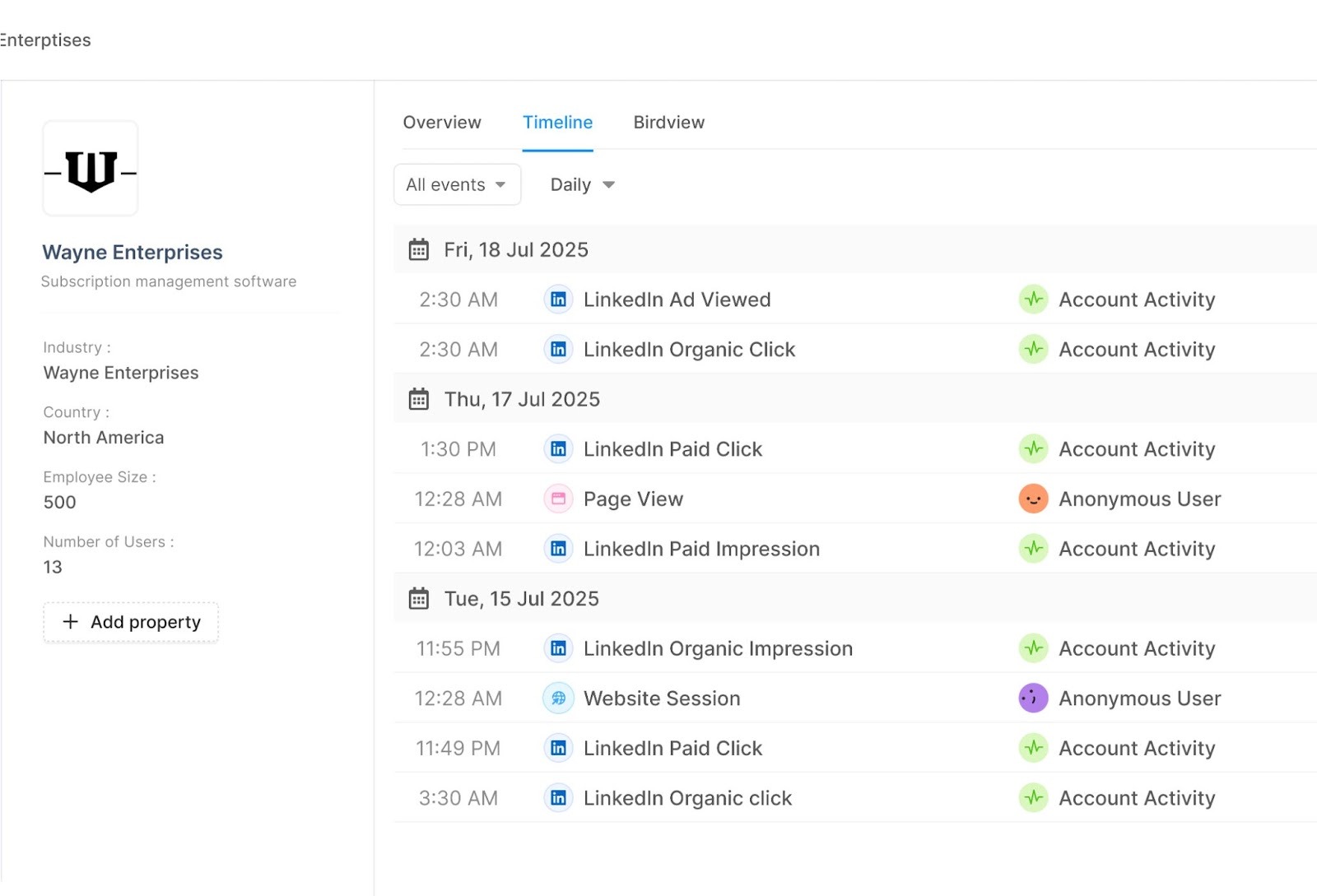
- Attribution that matches how businesses really buy
The gap today: LinkedIn ads work like billboards on your buyers’ commute. Thousands see them, some engage, and a few eventually fill a form. But last-click reports only credit the form fill, ignoring the view-through influence that actually drove the action.
What you get now: company-level engagement from both paid and organic LinkedIn, tied to pipeline.
Why it matters:
- Credit the real influence: Organic interactions that happen before a form fill now show up (and get counted.)
- Invest smarter: Know which LinkedIn touches drive meetings, opps, and revenue.
Prove attribution with Factors:
Connect company-level ad + organic activity to meetings, MQLs, SQLs, Opportunities, and Revenue.
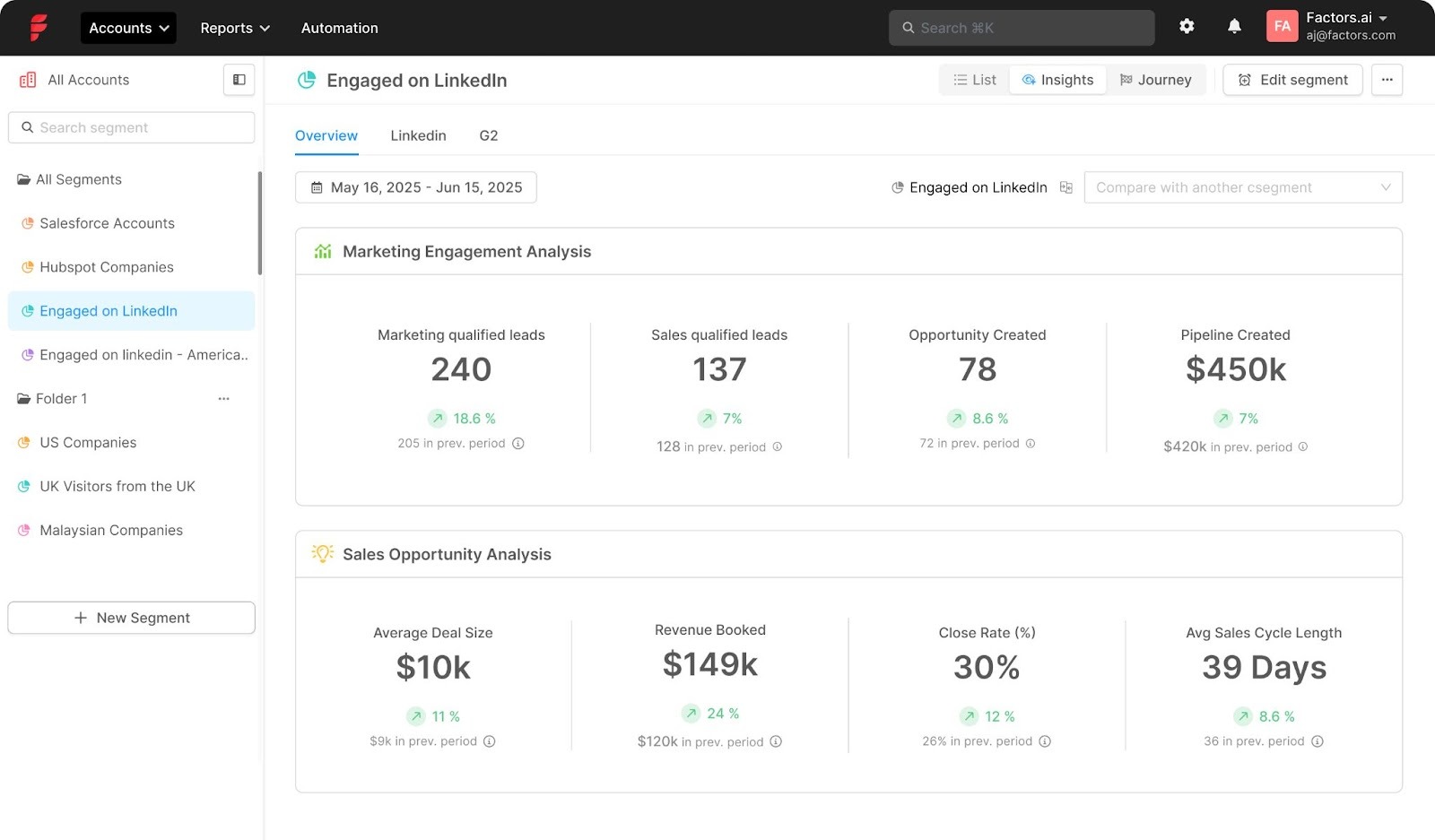
- Audience automation that compounds performance
The gap today: Most campaigns run on broad targeting or weak signals like web visits and form fills. Organic engagement never makes it into your targeting, and when it does, it’s through outdated CSV uploads.
What you get now: Build audiences from both organic + paid LinkedIn engagement and sync them straight into Campaign Manager. Audiences stay fresh automatically, with sales alerts and workflows triggered in real time while interest is high.
Why it matters:
- Intent-based precision: Target companies showing real buying signals across ads and organic, not just broad demographics.
- Persistent relevance: Audiences update as engagement changes, so targeting stays aligned with buyer activity.
- Less manual work: No more CSV uploads or stale lists. Everything updates in Factors’ dashboard automatically.
- Faster pipeline: Reps focus on companies already warming up on LinkedIn, moving deals quicker.
Run intent-based campaigns with Factors:
Prioritize high-intent companies, trigger sales alerts, and auto-sync audiences, no manual work required.
{{INLINE_TOFU}}
The proof is in the pudding: Here’s what teams have seen in tests
These gains result from combining organic and paid signals, acting on them through prioritization, audience synchronization, and coordinated outreach. Early results across show:
- Up to 3.6x more companies reached
- Up to 4x more companies engaged
- 75% more MQLs influenced
- 96% more SQLs influenced
- 43% lower CPA
All in all, the takeaway is:
You’ll identify far more of the companies seeing your content (reach) and interacting with it (engagement), not just the small slice that click and convert immediately.
In a nutshell…
LinkedIn surfaces the signals; Factors turns them into pipeline, clearer attribution, smarter spend, faster sales.
FAQs
Q1: What exactly does the Company Intelligence API do?
It tracks company-level engagement across paid and organic LinkedIn touchpoints, so you can see how companiess interact with your brand, attribute influence more accurately, and act when intent spikes.
Q. How is this different from measuring ads alone?
A. Ads tell half the story. This brings organic engagement into view so you capture early research behavior, attribute influence beyond last-click, and act sooner.
Q. What day-one use cases should I set up?
A. KPI reporting at the company level, journey timelines, synced audiences in LinkedIn Campaign Manager, and sales alerts for spikes in combined engagement.
Q. Will this replace my current attribution model?
A. No, it enhances your model with better inputs: company-level LinkedIn engagement (paid + organic) that plugs into your existing reporting.
Q. What outcomes should I expect to track?
A. More engaged companies, more influenced MQL/SQL, and improved CPA as you shift spend toward touchpoints that move companies forward.
Q. How do you match companies between LinkedIn Ads and HubSpot/Salesforce?
A. We match companies by comparing their website domains in LinkedIn and your CRM.
LinkedIn Ads Targeting: Top 10 Common Mistakes
Learn how to avoid costly LinkedIn ad targeting mistakes. Expert tips on location targeting, audience expansion, and advanced targeting strategies for 2025.
TL;DR
- Always select "based out of this location" over "recently been in" to avoid targeting commuters or conference attendees.
- Master your core Ideal Customer Profile (ICP) before enabling LinkedIn’s Audience Expansion feature.
- Combine job functions with seniority levels for awareness, and layer in member skills or groups to reach active, relevant professionals.
- Set frequency caps (2–3 per week) and use automated rules to kill non-performing campaigns before they drain your budget.
LinkedIn advertising is a great tool for B2B marketers. At Factors.ai we have seen firsthand how easy it is to make costly targeting mistakes on LinkedIn. Over time, we have identified key areas where marketers go wrong and simple adjustments that can drastically improve campaign performance.
Here are the most common LinkedIn ads targeting mistakes and how to avoid them.
1. Understanding LinkedIn's Location Targeting Options
If you're running LinkedIn ads, you've probably noticed two location targeting options: ‘based out of this location’ and ‘recently been in this location.’ Choosing the wrong one can drain your budget faster than a leaky faucet.
From my experience at Factors.ai, I've seen countless campaigns fail because marketers opt for ‘recently been in this location.’ Let me explain why that's a problem. Imagine targeting C-suite executives in New York. If you choose the ‘recent’ option, you might end up showing ads to executives who were just visiting for a conference. They fly back to their home country, and there goes your ad spend.
Always go for ‘based out of this location.’ It ensures you're reaching professionals who live and work in your target area, making your campaigns more cost-effective and results-driven. This simple switch can significantly improve your LinkedIn campaign's ROI.
2. The Pitfalls of Early Audience Expansion
One of the most costly mistakes I see marketers make is enabling audience expansion too early in their LinkedIn campaigns. It's tempting, I get it. LinkedIn's algorithm promises to find similar audiences, and who doesn't want more reach?
But here's the harsh truth: expanding your audience before thoroughly testing your ICP (Ideal Customer Profile) is like throwing darts in the dark. At Factors, we've analyzed thousands of campaigns, and the data is clear - premature audience expansion typically leads to wasted spend and diluted results.
Start with your core audience. Test your messaging, optimize your ad creative, and maximize engagement with the people who match your ICP perfectly. Only when you've truly exhausted this audience, meaning declining reach or rising CPCs—should you consider expansion. This patient approach might seem slower, but it's the surest path to sustainable campaign performance.
{{INLINE_TOFU}}
3. LinkedIn Audience Network: When to Use and When to Avoid
The LinkedIn Audience Network (LAN) is a classic double-edged sword. While it promises extended reach beyond LinkedIn's platform, it often becomes a budget drain if not managed carefully.
From our experience, LAN makes sense in three specific scenarios:
- When your target audience size is critically small (under 20,000).
- During broad brand awareness campaigns where reach is the primary goal.
- When targeting regions with low LinkedIn activity.
However, here's the catch: ad fraud and poor-quality placements are real concerns. If you decide to use LAN, implement these safeguards:
- Always use a whitelist of trusted publishers.
- Maintain an active block list.
- Monitor performance metrics closely, especially click-through rates.
Remember, just because you can extend your reach doesn't mean you should. Quality of engagement usually trumps quantity when it comes to B2B LinkedIn advertising.
4. Industry Targeting Challenges and Solutions
LinkedIn's industry categories are notoriously broad and often misleading. We've seen countless examples where companies are miscategorized, leading to wasted ad spend. Take Spotify, for instance—LinkedIn might categorize it under ‘Music’ when it's fundamentally a tech company.
To overcome this, we recommend a two-pronged approach:
- Build your own industry list externally, focusing on your ideal customer profile (ICP).
- Upload custom company lists rather than relying solely on LinkedIn's categories.
Pro tip: Don't just look at what industry your prospects are tagged with. Instead, analyze their actual business model and revenue streams. A company tagged as ‘Manufacturing’ might have a robust SaaS division that makes them perfect for your tech solution.
Industry targeting is just one piece of the puzzle. Combine it with other targeting parameters like company size and job functions for better precision.
5. Job Function vs. Job Title: Making the Right Choice
One of the most confusing choices in LinkedIn advertising is whether to target by job function or job title. Here's the reality: job functions cast a wider net but can be too inclusive, while job titles offer precision but might severely limit your reach.
For example, targeting the ‘Business Development’ function might include everyone from BDRs to administrative assistants. On the flip side, targeting specific titles like ‘Head of Revenue Operations’ might miss out on similar roles with different titles like ‘Revenue Operations Leader’ or ‘RevOps Director.’
Our recommendation?
Start with job functions combined with seniority levels for awareness campaigns. Then, as you gather data and optimize, experiment with title-based targeting for bottom-of-funnel campaigns. Remember to account for title variations—someone who's a ‘CMO’ in one company might be a ‘Head of Marketing’ in another.
6. Optimal Audience Size for LinkedIn Campaigns
From managing hundreds of LinkedIn campaigns at Factors.ai , I've learned that audience size isn't a one-size-fits-all metric. While LinkedIn recommends a minimum audience size of 50,000 for sponsored content, our data suggests that highly targeted B2B LinkedIn ad campaigns can perform well with audiences as small as 20,000.
The sweet spot? For most B2B campaigns, aim for an audience size between 30,000 to 100,000 members. Going too broad (500,000+) typically leads to wasted spends and diluted messaging, while too narrow (<10,000) limits your reach and drives up costs.
Pro tip: If your audience is too small, don't immediately enable audience expansion. Instead, try these tactics:
- Expand to similar job titles.
- Include additional relevant industries.
- Add complimentary job functions.
- Consider including more locations if relevant to your ICP.
Remember, quality over quantity. A smaller, well-defined audience often outperforms a larger, loosely targeted one.
7. Targeting by Company Size: Best Practices
One of the most deceptive targeting options on LinkedIn is company size filtering. After analyzing data from our clients, we've noticed two critical mistakes marketers make.
First, relying solely on LinkedIn's predefined company size brackets can be misleading. For instance, a company showing ‘201-500’ employees on LinkedIn might actually have 1000+ employees because not all workers maintain LinkedIn profiles.
Second, marketers often forget to exclude unwanted company sizes, leading to wasted ad spend. If you're targeting enterprises, explicitly exclude smaller companies using the ‘exclude’ feature.
A quick tip: Cross-reference your target companies' LinkedIn employee count with their actual employee numbers (from sources like Crunchbase or company websites). This helps you understand the typical disparity and adjust your targeting accordingly.
Remember: Company size targeting works best when combined with other filters like industry and job function rather than used in isolation.
8. Member Skills and Groups: Hidden Opportunities
While most marketers focus on job titles and company targeting, LinkedIn's member skills and groups remain underutilized goldmines. We've seen campaigns achieve up to 30% better engagement rates when incorporating these targeting options strategically.
Skills targeting is particularly powerful because it reflects what people do rather than just their job titles. For instance, targeting people with ‘Salesforce Administration’ skills might be more effective than broadly targeting ‘Sales Operations’ roles.
Groups are even more interesting—they show active interest. Someone who joins a ‘B2B Marketing Innovation’ group is likely more engaged in the field than someone who simply lists marketing as their job function.
Pro tip: Don't just target the obvious skills. Look at your best customers' profiles and identify common secondary skills. These often provide unique targeting opportunities with less competition.
Warning: Avoid targeting groups that haven't had any recent activity. Many LinkedIn groups are dormant.
9. Avoiding Campaign Budget Waste
One of the biggest money drains in LinkedIn advertising is poor budget management. I've noticed three critical areas where budgets typically leak:
- Running ads 24/7 instead of during business hours when B2B decision-makers are active.
- Not setting frequency caps, often leads to audience fatigue.
- Keeping underperforming campaigns active too long without optimization.
The solution?
- Start with a minimum daily budget of $50/campaign to gather meaningful data.
- Monitor your campaigns between 9 AM - 6 PM business days, and pause them during off-hours.
- Set view frequency caps 2-3 times per week to prevent ad fatigue.
Most importantly, use automated rules to pause campaigns that aren't meeting KPI thresholds after spending 2x your target cost per lead. This alone can save 20-30% of your budget from being wasted on non-performing campaigns.
10. Advanced Targeting Strategies for 2025
As we move deeper into 2025, LinkedIn's targeting capabilities have evolved significantly. Here are the cutting-edge strategies that are delivering results:
First-party data integration is now crucial—upload your CRM data and create lookalike audiences based on your best-converting customers. LinkedIn's AI has gotten much better at finding similar profiles.
The new ‘Intent Signals’ feature lets you target users who've shown interest in specific topics through their content engagement. Combine this with traditional targeting for hyper-focused campaigns.
Account-based marketing (ABM) on LinkedIn has become more sophisticated—use LinkedIn's API integrations to sync target account lists in real-time and adjust bids based on account priority.
Also, read ABM Tactics for B2B Marketers.
Most importantly, leverage ‘Buying Committee’ targeting that allows you to reach multiple decision-makers within the same organization simultaneously, which is essential for complex B2B sales cycles.
When implemented correctly, these strategies show 2-3x better conversion rates than traditional targeting methods.
FAQs on LinkedIn Ads Targeting Mistakes
Q1. Should I target job titles or job functions for a new SaaS product launch?
Start with job functions combined with seniority to gather initial data and awareness. Once you identify which roles are clicking, narrow your focus to specific job titles to drive conversions.
Don’t get greedy with the net size early on. A smaller, relevant group is always easier to convert than a "huge, generic crowd."
Q2. Why is my audience size showing 'too small' even with 30k people?
LinkedIn often suggests a 50k minimum for "optimal" delivery, but 20k-30k is perfectly fine for high-intent B2B campaigns. If you're struggling with reach, try adding secondary skills or related job functions rather than enabling broad expansion. Stick to your ICP.
Q3. Is LinkedIn Audience Network just a waste of money?
Not necessarily, but it is dangerous if left unmanaged. Use it only for reach-heavy campaigns and ensure you’ve uploaded a strict block list of sites you don’t want to appear on.
If you’re a small brand with a tight budget, turn it off. It’s better to be seen by the right people on LinkedIn than by thousands of irrelevant people on random websites.
Q4. How do I deal with company size inaccuracies?
Don't rely solely on LinkedIn’s data. Cross-reference your target list with data from tools like Crunchbase or the company's own website to verify their actual headcount.
LinkedIn’s "company size" data can be inaccurate because people rarely update their profile after a company hires 500+ new people. Use it as a loose guide, not a source of truth.
Q5. What is the secret to getting better engagement on LinkedIn ads?
Utilize Member Skills and Groups to layer your targeting. Targeting people who possess specific technical skills or belong to niche professional groups is significantly more effective than broad-stroke job title targeting.

LinkedIn vs Google: A Four-Metric ROI Comparison Every CMO Must See
New data from 100+ B2B teams reveals LinkedIn outperforms Google on ROAS, cost per ICP account, and ACV. Use this comparison to optimize your 2026 ad budget.

TL;DR
- LinkedIn delivers stronger ROI. With a 1.8x ROAS vs Google’s 1.25x, LinkedIn ads are driving 44% more revenue per dollar spent.
- It costs less to reach your ideal buyers. LinkedIn’s cost per ICP account engaged is $257, less than half of Google’s $560.
- Meetings are better and cheaper. LinkedIn generates qualified meetings at a 1.3x cost advantage, and with higher decision-maker quality.
- Deals close bigger on LinkedIn. LinkedIn-sourced opportunities produce 28.6% higher average contract values than Google.
You're sitting in a budget planning meeting. Your CFO is asking why you need more money for LinkedIn Ads when "Google has always worked." Your VP of Sales wants to know which channel is actually delivering pipeline. Your CEO is wondering if this whole "social selling" thing is just marketing buzzword bingo.
You need answers. Real ones. With actual numbers attached.
We analyzed performance data from 100+ B2B marketing teams spanning Q3 2024 to Q3 2025. And the results are about to make your next budget conversation a whole lot easier.
The Stakes: A Massive Budget Shift Is Already Happening
Before we dive into the four-metric-takedown, let's talk about what B2B CMOs are actually doing with their money.
Our report showed that over the past year, LinkedIn's share of digital marketing budgets jumped from 31.3% to 37.6%. Google's share dropped from 68.7% to 62.4%. We're witnessing a 6.3 percentage-point shift in market share, which in absolute dollar terms represents a fundamental reallocation of B2B marketing spend.
CMOs don't make these kinds of moves on a whim. They make them when the ROI data becomes impossible to ignore.
So, what does that data actually say?
Metric #1: Return on Ad Spend (ROAS)
Let's start with the metric that makes your CFO's cold, money-loving heart sing: raw return on ad spend.
- LinkedIn median ROAS: 1.8x
- Google Ads median ROAS: 1.25x
LinkedIn delivers a 44% advantage in revenue return per dollar spent, compared to Google Ads.
Read that again. For every dollar you invest in LinkedIn Ads, you're getting $1.80 back in revenue. For Google Ads? $1.25.
A 1.25x ROAS isn't bad. It's positive ROI. You're making money.
But when you're allocating budget between channels, 44% matters. A lot.
If you have $100K to spend and you're trying to hit pipeline targets, that 44% ROAS advantage translates to real money. We're talking about the difference between hitting your number and explaining to your board why you came up short.
Why the ROAS Gap Exists
LinkedIn's ROAS advantage stems from something fundamental: targeting precision.
Google Ads operates on intent signals. Someone searches for "marketing automation software," and boom, your ad appears. That's powerful. But it's also a blunt instrument.
You're catching people at the moment of search, but you have no idea if they're:
- A qualified buyer or a student doing research
- At a company that fits your ICP or a 10-person startup
- A decision-maker or an intern gathering information
- Actually in-market or just browsing
LinkedIn flips this equation. You're targeting based on professional identity: job title, company size, industry, and seniority level. You know you're reaching the VP of Marketing at a 500-person SaaS company, not some rando who typed marketing-related words into a search bar.
This precision means every ad impression has a higher probability of reaching someone who could actually buy. And that precision compounds into higher ROAS.
{{INLINE_BOFU}}
Metric #2: Cost Per ICP Account Engaged
ROAS tells you about revenue efficiency. But what about pipeline efficiency? How much does it cost to get your ideal customer profile accounts into your funnel?
- LinkedIn: $257 per ICP account engaged
- Google: $560 per ICP account engaged
LinkedIn costs less than half of what Google costs to engage an ICP account.
Half. The. Cost.
You can reach and engage more than twice as many high-fit accounts on LinkedIn for the same budget.
This metric is where the account-based marketing rubber meets the road. B2B isn't about reaching everyone. It's about reaching the right ones. The accounts that fit your ICP. The companies that have the budget, the need, and the authority to buy.
When you're running an ABM motion (and if you're not, what are you even doing?), cost per ICP account engaged might be the most important metric on this list.
The Math That Changes Everything
Say you have $50K to spend on paid media this quarter. Your ICP is mid-market tech companies with 200-1000 employees.
On Google: $50,000 ÷ $560 = 89 ICP accounts engaged
On LinkedIn: $50,000 ÷ $257 = 194 ICP accounts engaged
With the same budget, LinkedIn gets you 109 more ICP accounts into your pipeline. That's not incremental improvement. That's game-changing coverage of your total addressable market.
LinkedIn was historically underappreciated because advertisers couldn’t adequately measure their performance. But recently, LinkedIn has really stepped up its game in the measurement department. Advertisers can see the impact of their LinkedIn ads and their true value. Now, more B2B advertisers are pulling from their Google/Meta budgets in favor of LinkedIn.
Metric #3: Cost Per Qualified Meeting
Pipeline velocity matters. How much does it cost to get a qualified meeting on someone's calendar?
Qualified meetings from Google cost 1.3X more than meetings from LinkedIn.
This metric directly impacts sales productivity and customer acquisition cost. Meetings are where marketing hands off to sales. It's the critical moment where opportunity becomes reality.
When meetings cost 1.3X more from one channel versus another, that inefficiency cascades through your entire go-to-market motion. Your SDRs are spending time on meetings that cost more to generate. Your AEs are working on deals that have higher acquisition costs baked in from the start.
The Quality Question
Here's where the LinkedIn data gets really interesting. It's not just that meetings cost less. It's that the meetings are with better prospects.
Survey data from 125+ marketing leaders reveals:
- 71.9% agree that leads from LinkedIn Ads align more closely with their ideal customer profile
- 52.3% say leads from LinkedIn Ads are more likely to be senior-level decision-makers
You're not just getting cheaper meetings. You're getting meetings with the actual people who can sign contracts.
Compare that to Google, where you're often catching mid-level managers doing research, or consultants gathering information for a client who may or may not be in-market.
Metric #4: Average Contract Value (ACV)
This is LinkedIn’s real flex. Deals sourced from LinkedIn don't just close more efficiently. They close bigger.
LinkedIn-sourced deals close with 28.6% higher average contract value compared to Google-sourced deals.
If your typical Google-sourced deal is $50K, your typical LinkedIn-sourced deal is $64,300. That's an extra $14,300 per deal. On a hundred deals, that's $1.43 million in additional revenue. From the same number of customers.
Why LinkedIn Deals Are Bigger
This isn't some random quirk. LinkedIn's account-based targeting enables you to focus your spend on high-value prospects. You can direct budget toward enterprise accounts capable of larger contracts, rather than Google's broader reach that captures intent regardless of account quality.
When you target the VP of Sales at a 1,000-person company versus catching whoever searches for your product category, the ACV difference is inevitable.
The platform enables relationship building at scale. Video ads. Document ads. Thought Leader ads. These formats let you demonstrate expertise and build trust before a prospect ever fills out a form. That trust translates to bigger deals.
The Synthesis: LinkedIn Wins on Revenue, Google Maintains Pipeline Volume
Let's put all four metrics in one place:
| Metric | Google Ads | |
|---|---|---|
| Median ROAS | 1.8x | 1.25x |
| Cost per ICP Account | $257 | $560 |
| Cost per Meeting | Lower (1.3x advantage) | Higher |
| Average ACV | 28.6% higher | Baseline |
LinkedIn wins decisively on three of four metrics. But there is still nuance: Google drives significant pipeline volume. Its broader reach means you'll capture more total leads, even if cost efficiency is lower.
The strategic insight isn't "LinkedIn good, Google bad." It's understanding where each channel delivers maximum value.
Use LinkedIn for:
- High-value account targeting
- Building relationships with buying committees
- Brand awareness among your ICP
- Generating high-ACV opportunities
Use Google for:
- Capturing bottom-funnel intent
- Reaching buyers actively searching
- Geographic or niche targeting
- Volume pipeline generation
The smartest CMOs aren't choosing between LinkedIn and Google. They're allocating budget based on which metric matters most for their business model and growth stage.
The Multiplier Effect: Why This Isn't Either/ Or
LinkedIn doesn't just win on its own metrics. It also improves your Google performance.
Analysis shows that ICP accounts exposed to LinkedIn Ads demonstrate:
- 46% higher paid search conversion rates
- 14.3% of paid search leads actually started their journey on LinkedIn
LinkedIn creates brand awareness and trust, making every subsequent touchpoint more effective. When someone sees your thought leadership on LinkedIn, then later searches for your product category on Google, they convert at nearly 50% higher rates.
This multiplier effect is why the budget shift is accelerating. CMOs are realizing LinkedIn isn't competing with Google for budget. It's making Google perform better.
What This Means for Your 2026 Planning
If you're building your 2026 marketing plan right now, these four metrics should fundamentally reshape your thinking.
The days of defaulting 70-80% of the paid budget to Google because "that's what we've always done" are over. The data doesn't support it anymore.
Survey results show 56.4% of B2B marketers plan to increase their LinkedIn budgets by more than 10% in 2026. These aren't wild experiments. These are calculated bets based on measurable ROI.
Your move: Stop treating LinkedIn as a "brand awareness" line item with fuzzy attribution. Start measuring it on the same hard revenue metrics you use for Google. When you do, the four-metric comparison becomes impossible to argue with.
1.8x ROAS. $257 cost per ICP account. 23% cost advantage on meetings. 28.6% higher ACV.
Factors.ai provides unified visibility across LinkedIn, your website, CRM, and G2 so you can prove ROI with the metrics that actually matter. Your CFO doesn't need more convincing than that.
FAQs for LinkedIn Ads vs Google Ads
Q. Is LinkedIn really more cost-effective than Google for B2B?
Yes. LinkedIn ads engage ICP accounts at less than half the cost of Google Ads and produce significantly higher average deal sizes.
Q. Does LinkedIn generate pipeline volume, or just better-quality leads?
LinkedIn excels at quality, better-fit accounts, and senior buyers, but still delivers competitive volume when used strategically.
Q. Why are CMOs shifting budget to LinkedIn?
Because the ROI data is undeniable. LinkedIn outperforms on ROAS, cost per meeting, and ACV, and also improves Google Ads performance.
Q. Should I replace Google Ads with LinkedIn Ads?
Not necessarily. Use Google to capture active demand and LinkedIn to influence high-value buyers. The best results come from combining both strategically.
Q. What’s the biggest ROI difference between the platforms?
Average contract value. LinkedIn deals are 28.6% larger on average, making it a key driver of revenue growth.
LinkedIn Ads Targeting & Campaign Strategy for Enterprises in 2026
Learn how enterprise companies use LinkedIn ad targeting in 2026. Discover advanced targeting strategies, budget allocation tips, and industry-specific approaches for B2B success.
TL;DR
- Enterprise LinkedIn ads go beyond lead generation, focusing on brand awareness (30%), pipeline acceleration (40%), and future pipeline development (30%).
- Targeting starts with warm audiences, progressing from awareness content to solution-focused messaging before pushing direct sales engagement.
- Sales and marketing integration is key—campaigns should align with sales conversations to reinforce messaging and drive deal momentum.
- Metrics must match objectives—track reach for awareness, influenced pipeline for acceleration, and long-term attribution for future pipeline growth.
If you've been researching LinkedIn advertising strategies, you've probably encountered plenty of advice about managing small budgets and basic lead generation. You know the typical recommendations: ‘Start with $100-200 per day,’ ‘Focus on high-intent audiences,’ and ‘Build your funnel step by step.’While this advice works well for smaller companies just getting started with LinkedIn, it completely breaks down when you're managing enterprise-level campaigns with million-dollar budgets.
Enterprise LinkedIn advertising in 2026 requires a fundamentally different approach. Instead of focusing solely on lead generation, successful enterprise campaigns serve three distinct purposes, each requiring its own strategy and measurement framework.
The Three Pillars of Enterprise LinkedIn Strategy
1. The first pillar is educational outreach.
For enterprise companies, getting your brand in front of C-suite executives matters more than immediate lead generation. Think of it this way: if a CXO watches your thought leadership video, that's a win – regardless of whether they immediately fill out a form. This educational component typically consumes about 30% of the total advertising budget, and its success is measured by reach and engagement rather than direct response metrics.
2. The second pillar, consuming roughly 40% of the budget, focuses on supporting the current year's pipeline.
This is where things get interesting. Instead of just running lead generation campaigns, enterprise companies use LinkedIn to accelerate active sales opportunities and expand relationships with existing customers. When your sales team books a meeting with a prospect, targeted LinkedIn campaigns provide ‘air cover,’ reinforcing your message and positioning during competitive deals. Similarly, specific campaigns target existing customers for cross-sell and upsell opportunities, often the quickest path to new revenue.
3. The final pillar looks toward the future, using the remaining 30% of the budget to develop next year's pipeline.
With enterprise sales cycles typically stretching 150-200 days, you need to plant seeds now for harvesting in the future. This means investing in new customer acquisition campaigns with the understanding that results might not materialize for six months or more.
Building and Engaging Your Audience
Success with enterprise LinkedIn advertising requires a sophisticated approach to audience development. Rather than immediately targeting cold audiences, start with your warmest prospects and expand outward. Begin by retargeting your website visitors, using LinkedIn's Insight tag, while applying your ideal customer profile (ICP) filters for company size and job titles.
If you have a substantial following on your company page, that's your next layer of warm audience. But don't worry if you don't – you can build your own warm audience pools through targeted top-of-funnel campaigns. The key is progressive engagement: start with broad awareness content, then retarget those who engage with more specific solutions-focused messages, and finally present strong calls-to-action like demo requests to your most engaged audiences.
{{INLINE_MOFU}}
Aligning Content with the Buyer's Journey
Content sequencing becomes crucial at the enterprise level. Your first touch should focus on problem awareness through educational content and industry insights. As prospects engage, move them toward solution education, showcasing your capabilities and ROI through case studies and detailed product information. Only after establishing this foundation should you push for direct sales engagement through demo requests or consultation offers.
This progression aligns naturally with how enterprise buyers make decisions. They need to understand the problem space and potential solutions before they're ready to engage with sales. By respecting this customer journey, you build credibility and trust while moving prospects toward a purchase decision.
Integration with Sales
The most successful enterprise LinkedIn campaigns work in lockstep with sales activities. When your sales team books a meeting with a prospect, that should trigger targeted LinkedIn campaigns supporting the conversation. This coordination ensures your prospects see consistent messaging across all channels and helps maintain momentum throughout long sales cycles.
For account-based marketing initiatives, this integration becomes even more critical. Your LinkedIn campaigns should align with sales conversation stages, targeting multiple stakeholders within key accounts. This creates a surround-sound effect that amplifies your sales team's efforts.
Measuring What Matters
Each objective requires its own measurement approach. For educational campaigns targeting C-suite executives, focus on reach and engagement metrics like video completion rates. Current year pipeline initiatives should track influenced pipeline value and changes in deal velocity. Future pipeline development needs longer-term attribution models that can connect early-stage engagement to eventual opportunities.
The key is matching your metrics to your objectives. Don't judge your C-suite thought leadership campaign by lead form fills, and don't evaluate your pipeline acceleration campaigns solely on impressions. Each type of campaign serves a specific purpose in your overall strategy.
Looking Ahead in Enterprise LinkedIn Advertising
Enterprise LinkedIn advertising in 2025 is about more than just generating leads – it's about supporting complex sales cycles, nurturing long-term relationships, and building brand credibility with senior decision-makers. By moving beyond the basic playbook and adopting a more sophisticated approach, enterprises can create sustainable, scalable LinkedIn programs that drive both immediate revenue and long-term growth.
Remember: success comes from understanding your different objectives, aligning your content and targeting with each goal, and measuring what truly matters for each type of campaign. Whether you're supporting this quarter's pipeline or building awareness with C-suite executives, LinkedIn offers the tools and targeting capabilities to achieve your goals – if you know how to use them.

We don’t just write about demand gen. We deliver it.
Our AI Agents help you uncover high-intent accounts, run campaigns that actually convert, and keep your GTM motion in sync.
1000+ GTM teams have already scaled their pipeline with Factors.
*Includes built-in peace of mind. And fewer late-night funnel audits.


.svg)



.avif)

