

Good Reads
Fix pipeline pains. Solve GTM puzzles. Read strategic brain dump.
Written for marketers who want real solutions to a leaking pipeline (and their dark circles).
Want to read more from us?

I’m looking for…
.avif)
Account Based Marketing (ABM) vs Demand Generation: Differences, Commonalities & Use-cases
Compare ABM vs. demand generation by audience, goals, sales alignment, and metrics. See how B2B teams can use both without treating them as rivals.

TL;DR
- Account-based marketing targets a small number of named, high-value accounts with personalized campaigns. Demand generation goes wider, building broad awareness across the market to generate a larger volume of leads.
- The core difference is scope, not quality. ABM optimizes for depth with a few accounts. Demand generation optimizes for reach across many.
- Key metrics differ by strategy: ABM: Engagement Score, Pipeline Contribution, Conversion Rate; Demand generation: Number of Leads, Cost per Lead, Sales Cycle Length
- Most mature B2B teams run both together, sometimes called blended ABM. Demand generation fills the funnel broadly, then ABM layers on top once specific accounts start showing buying signals.
- Factors.ai is built as a B2B ABM and marketing attribution platform, unifying account-level targeting data with broader demand generation performance measurement in one place.
Account Based Marketing (ABM) and Demand Generation often go head-to-head as top marketing strategies. But which one is right for you?
The choice isn’t quite simple. You need to understand what makes each strategy unique, how they work together, and what impact they can have on your returns.
In this guide, we’re discussing ABM and demand gen to understand their differences, similarities, and potential benefits. We’ll also look at how analytics tools help understand the performance of each for better execution. Let’s get started.
What is Account-Based Marketing?
Account-based marketing or ABM is a targeted strategy where marketers prioritize one or a few businesses(accounts) instead of trying to attract their total addressable market. ABM focuses on targeting specific high-value accounts with personalized content, aligning sales and marketing for a cohesive approach.
All the marketing resources are allocated to converting just one or a few accounts at a time. This is in stark contrast to regular marketing where campaigns are created for mass appeal. With ABM, you look at visitors as part of an account and create personalized campaigns tailored to their unique needs. Answer questions like:
- What’s the visitor’s industry?
- What business are they associated with?
- What are the pages people within this business/industry have shown interest in?
Let’s take an example:
Say you want to onboard a SaaS startup as a new customer. You decide to use ABM. With a marketing analytics and account intelligence tool like Factors, you identify the industry and businesses your visitors are associated with.
As you segment accounts, patterns show that your target accounts repeatedly visit a specific feature page. With this information, you can now retarget the accounts via emails, content, and ads highlighting this feature further.
So, instead of focusing on the entire industry or a persona, your efforts are targeted, and more importantly — backed by data. You can even attribute revenue to your ABM campaigns to maximize the results.
Demand generation, on the other hand, takes a different approach.
What is Demand Generation?
Demand generation is a strategy for creating awareness and interest in your products or services. Rather than collecting leads or targeting accounts, demand gen uses tactics to nurture potential customers through the buyer journey.
It isn't just about attracting leads. It's about mapping out a strategic path to turn interest into action from potential customers from initial awareness all the way to conversion.
Let’s take an example:
Say a B2B SaaS company launches a new software feature. They could use Demand Gen to promote it. They might start with blog posts, webinars, and social media content explaining the feature's benefits. As interest grows, targeted emails and personalized follow-ups help guide prospects toward buying.
The goal of demand generation is building steady demand for a product. By aligning marketing and sales, you create a smooth journey for potential customers. This keeps your brand top of mind when they're looking for a solution.
Account Based Marketing vs. Demand Generation: Key Differences
Before we jump into the details, let’s take a quick glance at the differences between account-based marketing and demand-generation.
ABM vs Demand Gen - Approach
Account-Based Marketing (ABM) and Demand Generation are two strategic approaches in the B2B marketing space. Although they both aim to generate revenue, their methodologies and goals vary significantly.
Account Based Marketing (ABM) targets specific, high-value accounts with personalized messaging across different channels. With ABM, you are targeting accounts that are already looking for a solution. These are generally near the bottom of the funnel. So, you do not need high-level content. Simply segment your targets by common factors, then craft experiences tailored to each segment.
For example, a CRM SaaS company wants to bring on big healthcare providers. Using a tool like Factors, they can de-anonymize and segment accounts based on the pages and features each account engages with. Then, they can create hyper-personalized content that speaks directly to those accounts.
Demand generation casts a wider net where the goal is driving awareness and interest from a broad audience, not just targeting select accounts. You want your customers to remember your brand when they begin to actively look for solutions.
If that same CRM SaaS company used demand gen, they'd create content and initiatives aimed at a buyer persona instead of a specific business/account. With the persona in mind, they could host webinars, write blog posts about CRM benefits in general, or launch broad ad campaigns. This attracts a wide range of potential customers.
Sales and Marketing Alignment
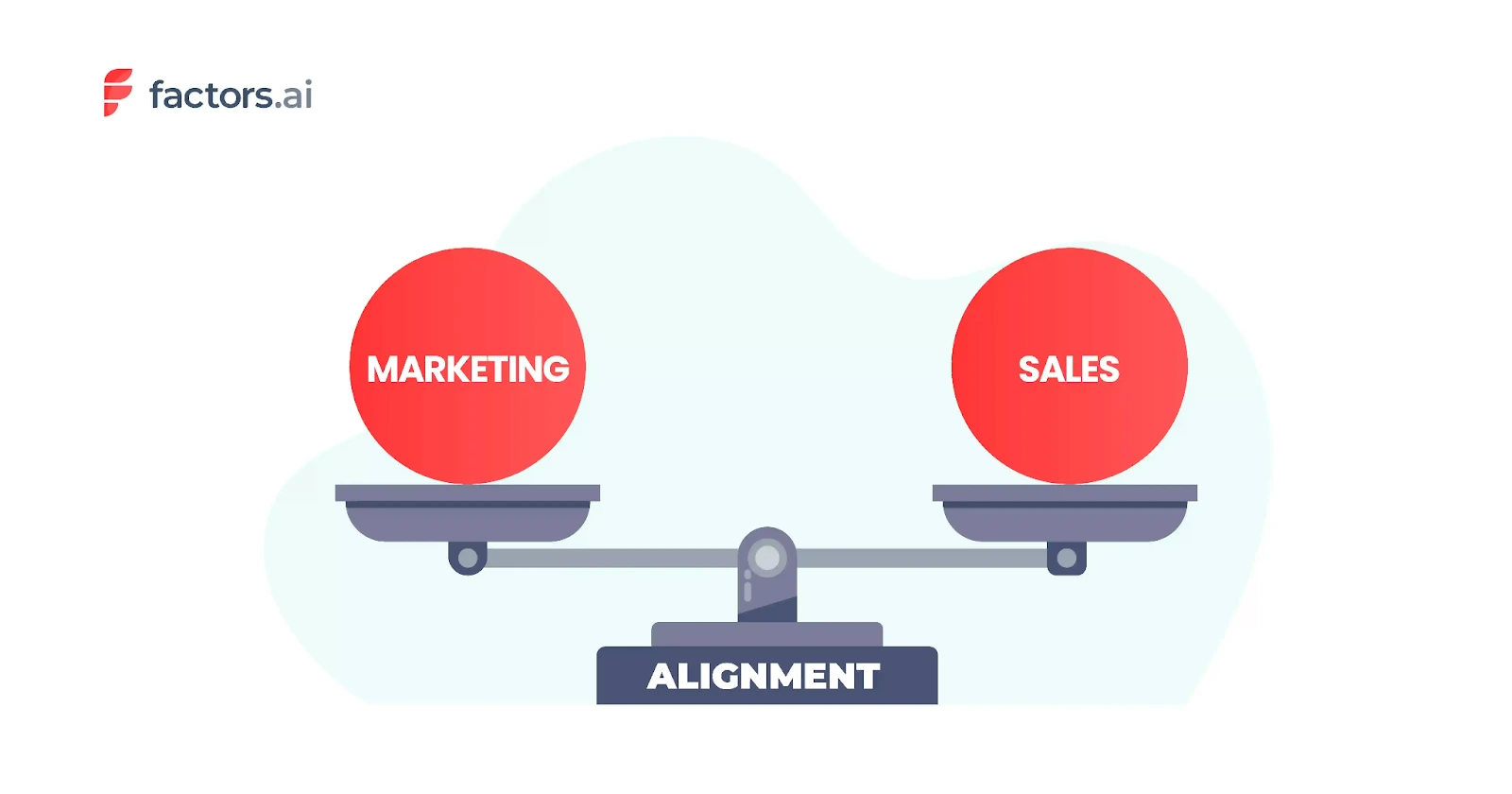
The partnership between sales and marketing teams is super important for both Account-Based Marketing (ABM) and Demand Generation. But the way they work together is really different.
With ABM, sales and marketing collaborate closely to find, target, and connect with the right accounts. They join forces to create customized plans, messaging, and content that speaks to each account's specific needs and challenges.
Imagine a B2B software company selling a banking solution to financial companies. The ABM approach would have the sales and marketing teams analyze the finance industry, identify key companies that could benefit from the solution, and develop targeted campaigns. Here, the sales team provides insights into a company's unique needs and marketing creates custom content to ensure a strategy that directly speaks to the target audience.
Demand Generation has a more linear relationship between sales and marketing. Marketing is in charge of building general awareness and interest. Once leads are created, the sales team takes over to go after those opportunities.
If that same software company uses demand generation, marketing might run broad campaigns about all features or a general benefit of the tool. The content is then catered to everyone that fits their persona and their pain points. When interest is sparked, the sales team steps in to qualify and nurture those leads towards conversion.
Content Strategy
Content strategy plays a central role in marketing, but how it's applied differs quite a bit between account-based marketing (ABM) and demand generation.
As part of ABM, the content is personalized, like a tailored suit stitched to fit an individual client. It zeroes in on the specific needs, pain points, goals, and decision-making processes of each target account.
Suppose a B2B cybersecurity firm wants to land major banks as customers. Their ABM content would be custom products — whitepapers, banking incident reports, interviews with top bankers, etc. — laser-focused on the unique security challenges and regulations faced by the financial industry. This tailored approach helps the content resonate more deeply, demonstrating an intricate understanding of that particular audience's needs.
Demand generation creates content with broad appeal, touting general benefits rather than customized solutions. Here the focus is on establishing the brand as a thought leader and go-to industry resource.
If running a demand-gen campaign, our hypothetical cybersecurity firm would publish ebooks, blogs, and podcasts about cybersecurity trends, best practices, and insights useful to businesses across industries. This positions them as trusted experts, laying the groundwork for future engagement with various audiences across industries.
Metrics for Account Based Marketing vs Demand Generation
Tracking the right metrics gives you real insights into what's working and what needs tweaking. ABM and demand generation measure totally different things since they have different strategies.
What ABM Metrics Should You Be Tracking?
While there are many ABM metrics that you need to keep an eye out for, here are some of the important ones.
Engagement Score — This tracks how much your target accounts interact with your content across channels. Are they spending time on your site, clicking links, or engaging on social media? Having access to this kind of information is very helpful for seeing what content resonates so you can personalize more.
With Factors, you have the ability to bring together data from across different platforms on a single dashboard.
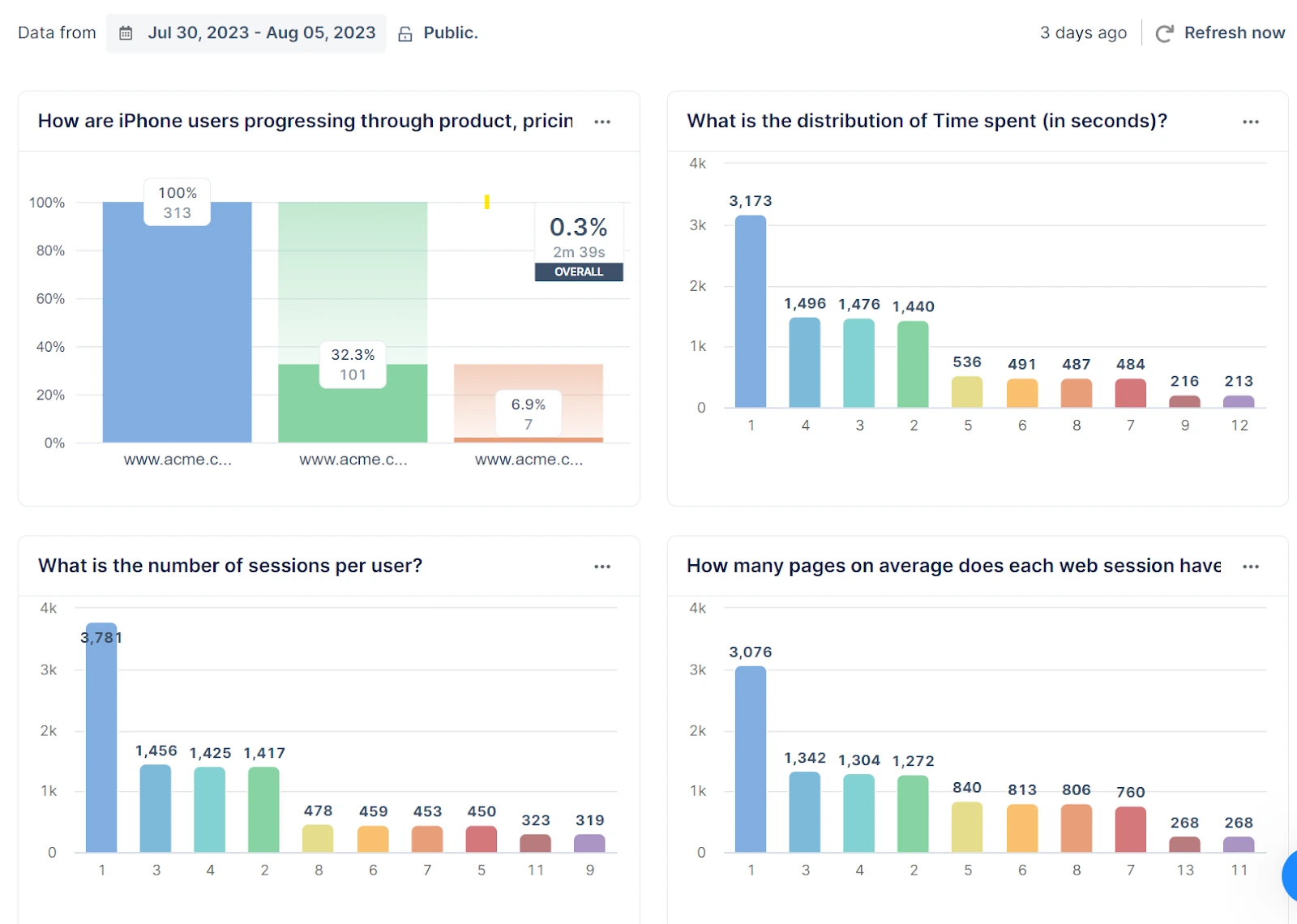
The customizable dashboards and reports on Factors can help you understand:
- if your ABM campaigns are reaching the right people
- If they’re conveying the message well enough so your target accounts interact with the content
Pipeline Contribution — What percentage of sales opportunities come from account-based efforts? This directly connects marketing to revenue. You can see specific deals influenced by account-based campaigns. It's great for understanding ROI and aligning with sales.
Through Factors, you can track specific opportunities that originated or were influenced by ABM campaigns.
Suppose you have multiple ongoing ABM campaigns including email, paid ads, and social media.
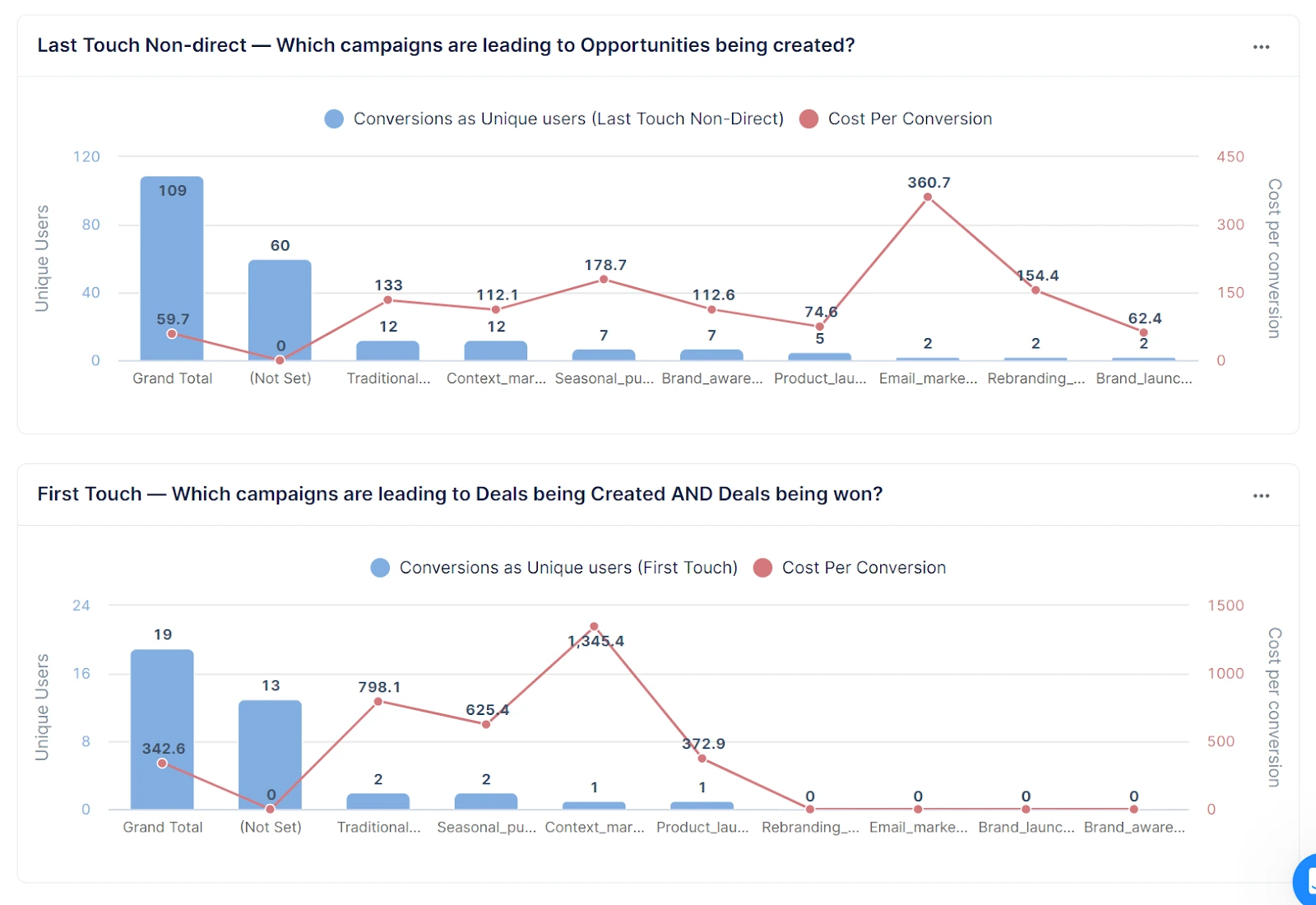
Factors tracks and provides data give you a full view of your ABM performance and helps in understanding the ROI of ABM and aligning marketing with sales goals.
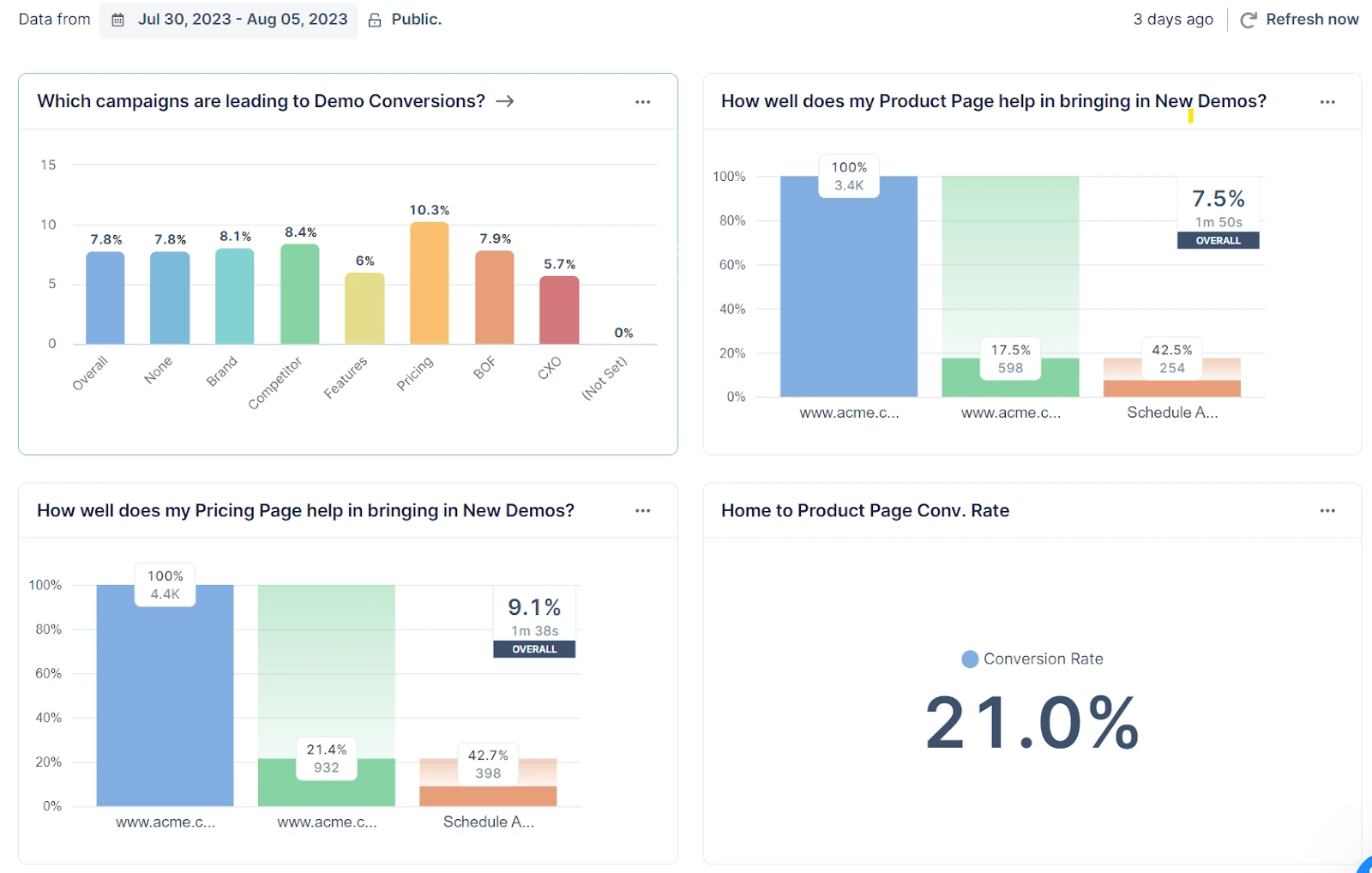
Conversion Rate — What percentage of targeted accounts move to the next stage towards becoming customers? Are your accounts going from leads to qualified leads? This shows how well your targeted content prompts the actions you want. Critical for evaluating personalization.
With custom reporting features on Factors, you can create a full conversion funnel, identify all the campaigns bringing in leads, and more.
What Demand Generation Metrics Should You Track?
Let’s now look at the set of metrics that you need to track for demand generation campaigns.
- Number of Leads — How many new leads are you generating through marketing? Quantity indicates if demand efforts are working initially. Starts you on lead nurturing and qualification.
- Cost Per Lead — What's the average cost to acquire each lead? Total spend divided by lead volume. Helps weigh marketing efficiency and guide budget.
- Sales Cycle Length — How long does it take on average for a lead to become a customer? From initial interest to closed deal. Shows how smoothly leads move through the sales process. Reflects both marketing and sales effectiveness.
With Factors, you can create unified views of your sales and marketing data.It helps you easily track key demand generation metrics like leads, cost per lead, and sales cycle length.
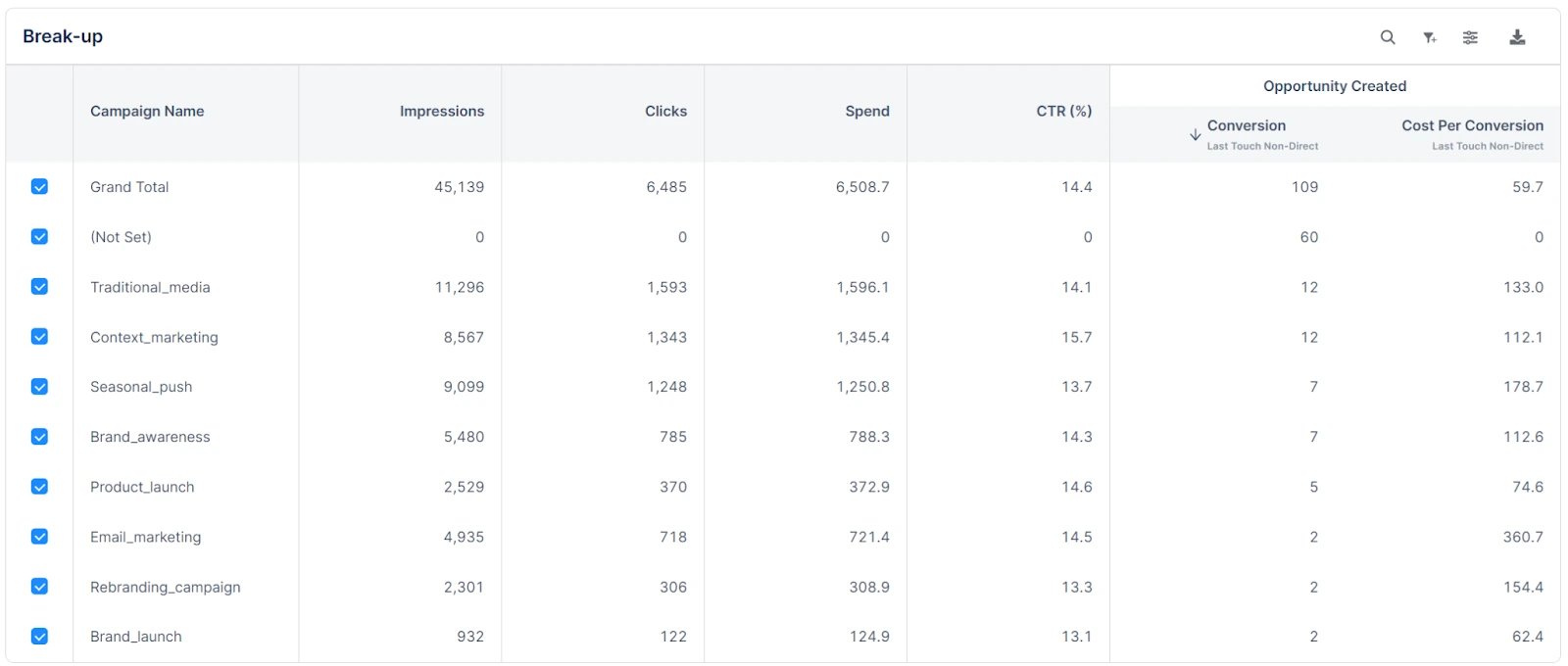
With this, you gain clear insights to optimize your campaigns, processes, and spend for maximum ROI without spending time switching tabs or tools.
Should You Use Demand Gen or Account Based Marketing?
The choice between demand gen and ABM depends on a few key things.
- Business Size: If you're a large company targeting specific high-value accounts, ABM could be a good fit since it's more personalized. Smaller businesses that want broad awareness might prefer demand gen instead.
- Industry: Industries where relationships matter more, like business services, may benefit more from ABM's tailored approach. But industries that need mass outreach could be better off with demand gen.
- Product Complexity: Complex or specialized products that need explaining may also call for ABM's account-specific focus. Products with widespread appeal are likely better suited for demand gen's broad reach.
- Target Audience: It also comes down to knowing your target audience and what will resonate. If you need to cater to particular accounts' unique needs, ABM is probably the way to go. But if you have a more general audience, demand gen can cast a wider net.
You could even use both the strategies together to cover all bases. The key is matching the strategy to your goals and who you're trying to reach so you can create maximum impact with minimal resource wastage.
ABM vs. Demand Generation: Choosing the Right Strategy
Account-Based Marketing (ABM) and Demand Generation serve distinct purposes in B2B marketing, each catering to different business needs.
1. ABM Strategy: Focuses on high-value accounts with personalized campaigns, aligning sales and marketing to engage key decision-makers. Best for enterprises and niche markets where deep relationships drive revenue.
2. Demand Generation Approach: Creates broad awareness and interest using content marketing, SEO, and paid ads to attract and nurture leads. Ideal for businesses targeting a large audience and building a sales pipeline.
3. Key Differences:
- Targeting: ABM is account-specific; Demand Generation casts a wider net.
- Engagement: ABM prioritizes deep, personalized interactions; Demand Generation emphasizes volume and automation.
- Success Metrics: ABM tracks account engagement and revenue; Demand Generation measures lead volume and conversion rates.
Integrating both strategies can maximize reach and conversions, driving sustainable business growth.
When should you use ABM?
ABM is a strong option when:
- A manageable set of companies represents a meaningful growth opportunity.
- Buying decisions involve several people at each company.
- Sales can collaborate on account selection and coordinated follow-up.
- You can tailor useful messages to account needs without creating unnecessary one-off work.
- You can measure engagement and progress at the account and opportunity level.
ABM may be premature if the target list is arbitrary, sales coverage is limited, or account and CRM data are too unreliable to support coordinated work.
When should you use demand generation?
Demand generation is a strong option when:
- You need to build awareness and interest across a market.
- Buyers need education before they know which solution to consider.
- You want to learn which problems, messages, or channels resonate.
- You need a repeatable way to create qualified opportunities across a broader audience.
Demand generation is not just lead capture. Ungated education, events, community, product experiences, and brand activity can all contribute to demand, even when they don't create an immediate form fill.
How can you use ABM and demand generation together?
Start with a clear target market and a shared definition of a qualified opportunity. Run programs that educate and engage the broader audience. Then use account fit and meaningful engagement to decide where sales and marketing should coordinate more focused activity.
For example, a webinar can serve a broad group of finance leaders. If several people at a target account attend, visit relevant product pages, or engage with follow-up content, sales and marketing can plan the next account-level action together. The webinar remains part of demand generation; the coordinated account plan is the ABM layer.
What Strategy Would You Choose?
We've explored the unique strengths of each strategy, compared their differences, and seen how they can precisely target leads or cast a wider net for brand awareness.
So whether you want to create personalized experiences with ABM or prioritize brand awareness with Demand Generation, we hope this guide will help you make the right decisions.
Factors.ai helps you simplify the path to executing successful marketing strategies. You can understand and track demand gen metrics and ABM efforts, aligning them with your unique needs. From segmentation to journey mapping, Factors is your secret weapon to master both strategies and measure campaign performance.
Ready to take your marketing up a level? Check out Factors today and discover how you can leverage ABM and Demand Generation to drive growth and success.
FAQs on ABM vs Demand Generation
Q. What analytics should you track for account-based marketing?
Three metrics matter most:
- Engagement Score: how much your target accounts interact with your content across channels
- Pipeline Contribution: what share of sales opportunities trace back to account-based efforts
- Conversion Rate: what percentage of targeted accounts move to the next stage
Demand gen leans on volume, lead count and the like. ABM doesn't. It's built around how deeply a small, defined set of accounts engages, not how many.
Q. What's the main difference between ABM and demand generation?
ABM goes after a small number of named, high-value accounts with personalized campaigns. Demand generation casts wider, building awareness across a whole market or persona, then nurturing that interest into leads. Neither one is better. It comes down to whether you're optimizing for depth with a few accounts or reach across many.
Q. Can you use ABM and demand generation together?
Yes, and most mature B2B teams do exactly that.
A common setup: demand generation fills the top of the funnel with broad awareness, then ABM takes over once specific accounts start showing real buying signals. Instead of starting from zero, you're applying personalized outreach to accounts that are already showing intent.
Q. Is account-based marketing a type of demand generation, or a separate strategy?
Separate, but complementary. They're not nested inside each other. Demand generation organizes around markets and personas. ABM organizes around specific named accounts. A company can run both at once, just pointed at different segments of the target market.
Q. Which is better for an early-stage startup, ABM or demand generation?
This comes down to deal size and sales cycle more than company stage. A startup selling something lower-priced and broadly applicable usually gets more out of demand gen's wider reach. A startup selling something higher-priced and complex to a handful of enterprise accounts often sees better ROI starting with ABM, even before it scales, since the account list is small enough to personalize from day one.
Q. Which should a CMO prioritize, ABM or demand generation?
Most CMOs don't pick one exclusively. The real question is budget allocation, not exclusive choice. A common starting split is that demand generation gets the bulk of the budget when the company needs pipeline volume and brand awareness, while ABM gets a smaller, dedicated budget aimed at the highest-value accounts where personalized attention actually changes the outcome. The right ratio comes down to average deal size. The larger and more complex the deal, the more ABM tends to pay off relative to broad-reach demand gen.
Q. Is there a real ROI difference between ABM and demand generation?
ABM usually shows a higher ROI per dollar. That's because the spend concentrates on accounts already identified as high-fit; you're not paying to reach people who were never going to convert. Demand generation usually shows a lower ROI per dollar, but far greater total reach, since it's built to fill the top of the funnel broadly rather than convert a small list efficiently. Comparing the two on ROI alone can mislead you if you're not also weighing total pipeline volume, which is exactly what demand gen is built to maximize.
Q. What's the best platform for running both ABM and demand generation together?
Blended ABM means running both strategies against overlapping, but not identical, audiences. That takes a platform built to handle account-level intelligence for ABM and broader campaign and lead analytics for demand generation, together, not two separate tools that don't talk to each other. That's the specific gap Factors.ai is built to close. It supports account-based targeting and demand generation measurement side by side, as one workflow instead of two disconnected ones.
Q. Can I get expert help running ABM and demand generation, not just software?
Yes. Beyond the platform, Factors.ai offers demand generation services with dedicated ABM expertise, for teams that want execution support, not just self-serve tooling. If you're after a partner who actually understands both motions, rather than an agency that only specializes in one, that's exactly what this covers.

How to Structure an ABM Team: Roles and Responsibilities
See how to structure an ABM team across Marketing, Sales, and RevOps. Compare lean, 1:few, and 1:1 models, roles, and responsibilities.
TL;DR:
- Account-based marketing (ABM) focuses on high-value accounts, requiring a well-structured team and diverse skill sets
- Key team members include C-level executives, data analysts, strategists, designers, and content creators
- CEO, CMO, and CRO provide strategic direction, align ABM with company goals, and drive revenue growth
- Operations, Marketing, and Sales Managers oversee and execute various aspects of ABM campaigns
- Execution-based roles include Performance Marketers, Graphic Designers, Content Marketing and Strategy, Social Media Marketers, and Copywriters
- Proper team structure is critical for ABM success. It requires collaboration, strategic thinking, adaptability, and strong communication skills
- Tools like Factors.ai can optimize ABM efforts by providing insights into customer journeys, visitor tracking, and marketing ROI optimization
An ABM team structure defines who is responsible for the different parts of an account-based marketing program, from selecting and planning target accounts to running campaigns, working opportunities, and measuring progress.
Those responsibilities usually sit across Marketing, Sales, and RevOps rather than inside one dedicated ABM department. Marketing may coordinate the program, Sales works the accounts, and RevOps supports the data and processes both teams depend on. Other specialists can step in when a campaign or account needs them.
The exact account-based marketing team structure will vary with the type of ABM program you run and the level of attention your target accounts require. In this guide, we’ll look at the roles involved, what each person owns, and how the team should work together.
Account-Based Marketing Team Structure
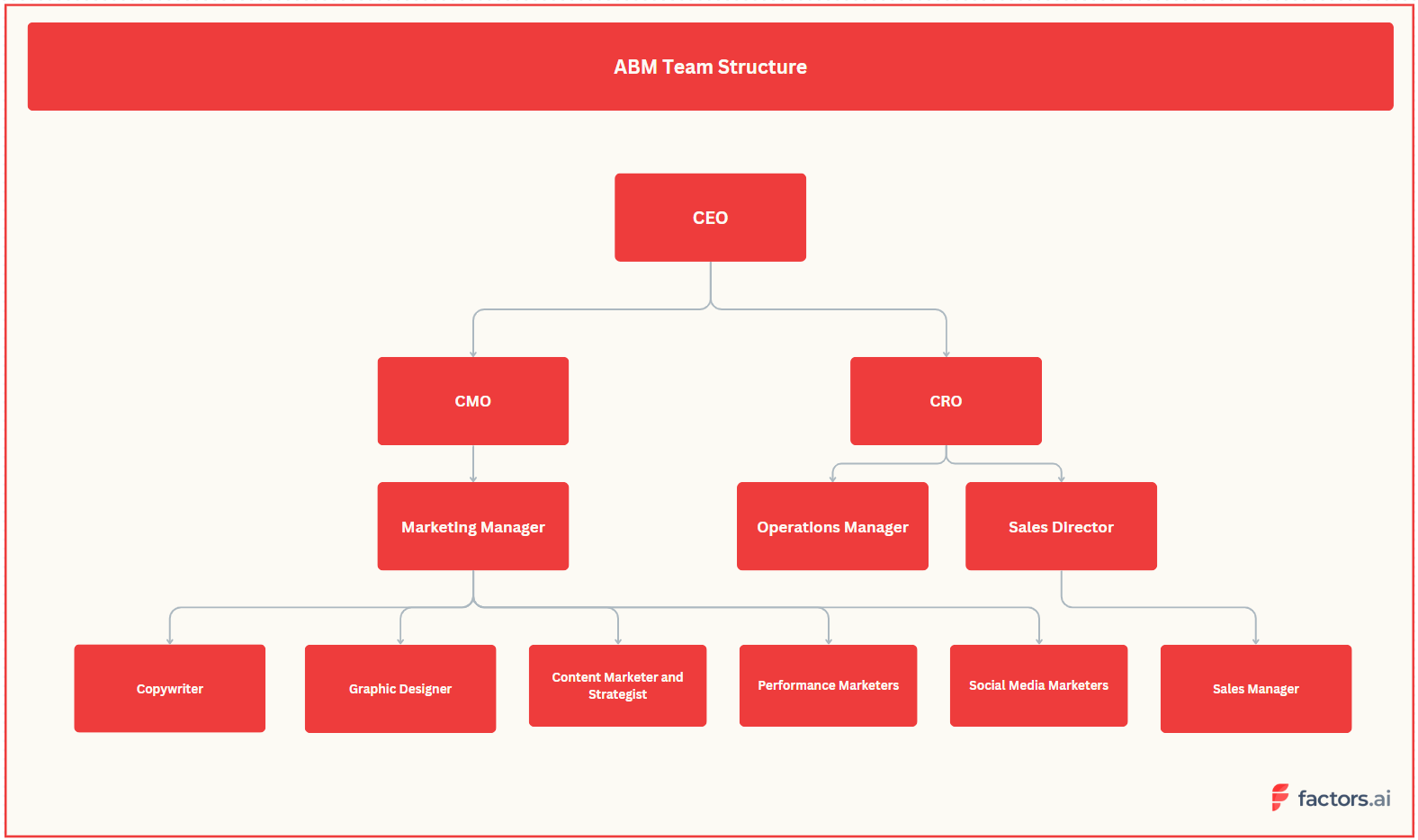
Most ABM teams are led by Marketing, with Sales and RevOps sharing responsibility for account planning, data, and execution.
Praveen, Co-founder and CMO at Factors.ai, spoke with Alexander Goodwin, Director of Demand Generation at Fingerprint, about how Fingerprint runs ABM. Alex's view on team roles and responsibilities was straightforward: “Account Based Marketing is a go-to-market motion, not a Marketing motion, the sales team needs to be involved at every step.”
Depending on the account, the wider ABM team can include leaders, managers, and execution specialists. Here’s where each can contribute.
C-Suite and Directors
The C-Suite and Directors in the ABM team have higher-level access to company information and the long-term vision to align the team towards a singular goal.
Chief Executive Office (CEO)
Before any ABM campaign is planned out, the team needs to understand the long-term vision of the company. That’s where a CEO comes into play. With the top level view of the company, the CEO can assist the ABM team plan things out, provide feedback on strategies, and assist with connecting the team to high-value accounts through their networks.
Some of the key responsibilities of the CEO in terms of the ABM team are:
- Setting the company's vision and long-term strategy
- Providing leadership and guidance to the executive team
- Building and managing relationships with key stakeholders
- Representing the company to the public and media
- Work with stakeholders for account scoring
Chief Marketing Officer (CMO)
The CMO has a critical role in the ABM team. This person helps define the strategy and keeps the ABM team aligned to the company’s goals at all times. The responsibilities may vary, but a CMO is generally involved in:
- Providing strategic direction and guidance for the ABM program
- Aligning ABM initiatives with the company's overall marketing strategy
- Collaborating with the sales team to identify target accounts and prioritize outreach efforts
- Ensuring that the ABM team has the necessary resources and tools to execute campaigns effectively
Chief Revenue Officer (CRO)
The CRO manages all things revenue and has the highest level access to the company’s inflow and outflow. A CRO can help the ABM team to:
- Bring the sales and marketing teams together to create a cohesive ABM strategy
- Ensure high-quality leads and revenue growth through the ABM program
- Approve budgets to execute campaigns as and when required
- Measure and analyzing the ROI of campaigns
- Collaborate with the marketing team to help refine the ABM strategy over time
Sales Directors
Sales directors are responsible for driving revenue growth by managing the sales team and maintaining relationships with key clients. The sales directors might be involved in:
- Collaborating with the marketing team to identify target accounts and prioritize outreach efforts
- Providing feedback on the effectiveness of ABM campaigns in generating leads and driving revenue
- Helping to refine the ABM strategy over time based on sales team feedback
- Ensuring that the sales team is aligned with the ABM program and has the necessary resources to engage with target accounts effectively.
Managerial Roles in ABM
The success of an Account-Based Marketing (ABM) campaign is heavily dependent on the leadership and management of the team. Managers oversee and help with executing various aspects of ABM campaigns.
Operations Manager
The Operations Manager oversees ABM campaigns from planning to execution. They ensure that all tasks are completed on time and that the team works efficiently. The ops manager also helps the ABM team manage the budget and execute tasks cost-effectively.
Some of the key responsibilities of the Operations Manager in ABM include:
- Overseeing the development of the ABM strategy and ensuring it aligns with the company's overall goals
- Managing the budget for the ABM campaign and ensuring that expenses are within the allocated budget
- Setting up systems and processes to track the progress of the ABM campaign
- Collaborating with the Marketing and Sales team to ensure that the campaign is effective in generating leads and revenue
- Reporting on the progress of the ABM campaign to senior management
Generally, the operations manager needs to be on top of things to ensure proper execution of the campaigns.
Depending on the org structure in the company, operations manager may also keep track of the key ABM metrics like customer acquisition, customer retention, and customer engagement.
This can help determine whether the current marketing strategies are effective and whether they need to be modified.
Marketing Manager
The Marketing Manager is responsible for the creative aspects of the ABM campaign, such as developing the messaging and designing the creatives. They work closely with the Operations Manager to ensure that the campaign is executed according to plan. Some of the key responsibilities of the Marketing Manager in ABM include:
- Developing the messaging and creatives for the ABM campaign
- Identifying the right channels to reach the target accounts
- Developing and executing marketing campaigns that align with the ABM strategy
- Measuring the effectiveness of marketing campaigns and making necessary adjustments
- Collaborating with the Sales team to ensure that marketing efforts are aligned with sales objectives
Since a major part of the marketing manager’s role is understanding analytics and data, they can greatly benefit from marketing analytics tools like Google Analytics, Factors.ai, and Microsoft Clarity.
These tools can help measure the performance of marketing campaigns, track visitors and engagement, perform revenue attribution, and identify areas for improvement.
Sales Manager
The Sales Manager is responsible for working with the Sales team to ensure that the ABM campaign is generating leads and revenue. They work closely with the Operations and Marketing Managers to ensure that the campaign is executed smoothly.
Some of the key responsibilities of the Sales Manager in ABM include:
- Collaborating with the Marketing team to identify high-value accounts
- Identifying decision-makers and key contacts within the target accounts
- Developing and executing a personalized outreach strategy for each account
- Reporting on the progress of the ABM campaign to senior management
- Nurturing relationships with key clients and ensuring their needs are met
Sales managers can also choose to employ a conversational ABM strategy to improve the sales team output. This strategy uses chatbots as the first point of contact, helping sales teams filter clients and improve conversions.
Strategy and Execution-Based Roles
While the senior-level team members provide strategic direction, the execution-based roles do the groundwork for ABM campaigns.
Performance Marketers
Performance marketers are responsible for creating and executing paid advertising campaigns. They come up with strategies to target the right audience, work with graphic designers to design ads, and monitor campaigns’ performance to optimize results. The responsibilities of performance marketers include:
- Creating the target audience and segmenting for better targeting
- Keeping track of campaign performance metrics using analytics tools like Factors and Google Analytics
- Collaborating with designers, content strategists, and copywriters to design and create ad copy and landing pages
Graphic Designers
Graphic designers play a crucial role in creating personalized and tailored designs for the ABM campaigns. But generic designs will fail to meet the standards here.
ABM designs need to capture the attention of your target audience and make a lasting impact.
Graphic designers must deliver their highest quality work, bringing creativity and innovation to the table. The designers must also have a deep understanding of the target account's preferences and expectations to truly resonate and drive engagement.
Here are some key responsibilities and qualities of a graphic designer in an ABM team:
- Collaborate with the marketing and strategy teams to create designs that resonate with target accounts
- Craft graphics for various marketing materials, such as display ads, social media posts, landing pages, and email campaigns
- Ensure that all visual elements are consistent with the company's branding and visual identity guidelines
- Optimize and repurpose graphic content for use on different social media platforms
Content Marketing and Strategy
Content is an important part of any ABM campaign. For instance, the content strategy team begins identifying topics that are important to your target audience.
The content marketing team then creates blog posts, whitepapers, and case studies around the topics to rank on search engines and be shared with the target accounts.
They may also collaborate with the sales team to identify content gaps and create additional content that speaks to the pain points of target accounts.
Some of the major responsibilities of the content marketing and strategy team may include:
- Conducting keyword research to optimize content for SEO
- Developing content that speaks to the pain points of target accounts
- Creating a content calendar to ensure consistency in messaging
- Developing and executing on a social media strategy to promote content
- Measuring and analyzing the performance of content to make data-driven decisions
Social Media Marketers
Social media marketers are responsible for ensuring regular engagement with the target accounts. They mould the social presence in a way that the target accounts find value in following your company profile—thus giving you direct access to these accounts. The responsibilities of social media marketers include:
- Creating and managing social media accounts
- Developing social media strategies that align with the ABM campaign's objectives
- Creating social media content that resonates with the target audience
- Engaging with the target audience on social media channels
Copywriters
Copywriters are responsible for creating compelling copy that resonates with the target audience. They work closely with content strategists to ensure that the copy aligns with the ABM campaign's objectives. The responsibilities of copywriters include:
- Creating copy for ad campaigns, landing pages, and other marketing materials
- Collaborating with content strategists to ensure that the copy aligns with the ABM campaign's objectives
- Conducting research to identify the pain points of the target audience
- Writing compelling copy that resonates with the target audience
Your ABM team should change with the account
Not every account needs the same level of support from the people above.
A 1:many campaign across a large account list can run with a marketing owner, Sales participation, and Operations support. A strategic 1:1 account may justify dedicated time from an AE, BDR, solutions engineer, marketer, and executive sponsor.
Fingerprint scales its team involvement this way. For its highest-value accounts, Alex describes a "full account team motion" with a marketer, AE, BDR, and SE working together. The SE can support technical outreach or workshops, while Marketing and Sales coordinate campaigns and direct outreach.
These aren't fixed staffing rules. Put more time and specialist support behind accounts where the potential value and level of personalization justify it.
Why is team structure important for ABM?
ABM decisions rarely sit with one team. Marketing may see account engagement and intent. Sales knows the relationships, conversations, and opportunity history. RevOps manages much of the data and processes connecting the two.
A clear team structure gives those people a shared way to plan and work the account.
At Fingerprint, Sales and Marketing use mutual account planning for priority accounts. The team works through questions such as:
- What is the path into the account?
- Who needs to be involved in the buying process?
- Is the company already using a competitor or an internal solution?
- What strategic initiatives is the account prioritizing?
- If we had to focus on one message for the account, what should it be?
The account plan also needs to change as new information comes in.
Fingerprint uses AE scorecards to track areas such as account engagement, outreach, and multi-threading across the buying committee. The team reviews this information every two weeks, agrees on next steps, and changes account priorities when needed.
A useful account review should leave the team with clear answers to a few questions:
- What has changed at the account?
- Are we reaching the right people?
- What has happened since the last review?
- What should happen next, and who owns it?
- Does the account still deserve the same level of investment?
The purpose of the meeting is to make decisions, not simply report activity.
{{INLINE_TOFU}}
A strong ABM team structure needs shared ownership across GTM
A strong ABM team structure keeps ownership clear without turning ABM into a Marketing-only program. Marketing can lead the motion, while Sales and RevOps stay involved where their input matters. As accounts become more strategic, bring in additional support deliberately rather than involving more people by default.
FAQs
1. What qualities should I look for when building my ABM team?
Here are some of the qualities to look for in an ABM team member.
- Strong collaboration skills
- Strategic thinking.
- Analytical mindset
- Adaptability for constantly changing environment
- Creativity
- Strong communication skills
2. How do I create an ABM team?
Creating an ABM team involves understanding your end goals and finding people to fill the talent and skill gaps within your marketing and sales teams. However, here are the general steps to build your ABM team.
- Establish the end results you want to achieve with an ABM team
- Based on the goals, identify what skills and expertise is needed for your marketing team. This could include account management, data analysis, content creation, and project management
- Hire people with the required skill sets and establish clear roles and responsibilities for each of the new team members
- Create an open environment for the team to collaborate with the stakeholders as an when required for the successful execution of your ABM campaigns

Account-Based Marketing Attribution: How to Actually Know What’s Working
Learn what ABM attribution is, why it matters, the real challenges, and how to implement it. Know how Factors.ai helps B2B teams close the attribution gap.

TL;DR
- ABM attribution connects all touchpoints across an account so you can see what actually influenced the pipeline and revenue.
- The biggest blockers are messy data, invisible offline touches, and disconnected tools.
- A strong setup requires sales and marketing alignment, clean account-level tracking, the right model, and ongoing iteration.
- Factors.ai closes the attribution gap with account identification, multi-touch tracking, offline visibility, and clear revenue reporting.
If you’ve ever run an ABM campaign and thought, “Okay… but which part of this beautiful Franken-strategy actually moved the needle?” Welcome to the club.
ABM sometimes feels like assembling a carefully crafted monster in the lab. Stitching together channels, touchpoints, and personalized plays, hoping the whole thing comes to life exactly the way you imagined. You flip the switches, monitor every spark… and then wait to see which part actually moved the account. (Happens more often than we admit.)
So today, we’re unpacking ABM attribution, the part everyone talks about but secretly hopes someone else will figure out.
Let’s talk about it, candidly, casually, and with just enough humor to make ABM data feel slightly less intimidating (because let’s be honest, attribution could use a little personality).
Before we dive in, let’s ground ourselves with the basics.
What is ABM (Account-Based Marketing)?
Think of Account-Based Marketing like booking VIP meetings instead of handing out flyers in a crowded street. You’re not trying to reach everyone, but you’re focusing on the accounts that actually matter.
- You zero in on high-value companies.
- You customize every touch so it feels intentional.
- You loop sales in from the very beginning.
- And you measure progress by how deeply the account engages and not by how many random leads fill out a form.
If you’re exploring the tech side of ABM, here’s a quick breakdown of the top ABM tools teams use to run and scale these programs effectively.
And what is attribution?
That’s simply the art of figuring out which marketing activities influenced a conversion, opportunity, or deal.
Combine the two, and you get ABM attribution.
ABM attribution is nothing but connecting all the dots across an entire account to understand what sparked interest, what nurtured it, and what ultimately nudged it into revenue territory.
This shift from volume metrics to account-level impact is exactly what separates ABM from traditional demand generation. This is something we’ve unpacked in detail in our ABM vs Demand Generation article.
Great. Now let’s dig deeper.
What ABM attribution actually is (Explained without jargons)
Accounts aren’t single people. They’re messy, cross-functional buying committees with different motives and attention spans. You might have:
- A VP skimming your ROI guide
- A senior manager lurking on your product pages at 2 a.m.
- A champion forwarding your case study internally
- A procurement person reading the fine print
- A C-level exec who finally joins the demo
And all of them contribute to the deal.
ABM attribution is the process of stitching all of those cross-channel, cross-person interactions together and saying, “Here’s how this account moved. Here’s what influenced it. Let’s do more of that.”
Without this, ABM is just… vibes. But with it, ABM becomes a strategy.
{{INLINE_TOFU}}
Why ABM attribution matters (a lot more than people admit)
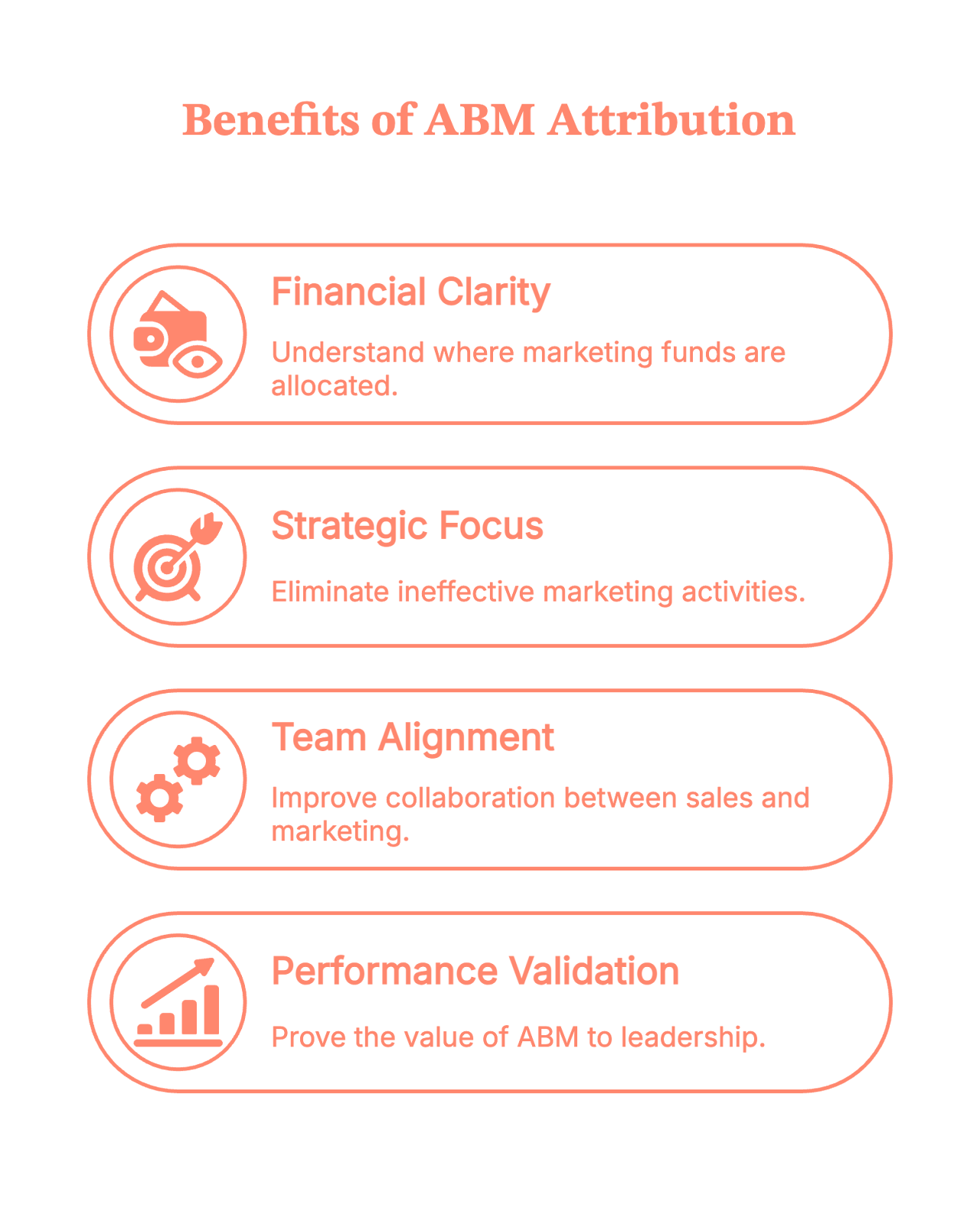
1. You finally know where your money is actually going
ABM campaigns are… not cheap. Personalization takes time, tools, and very patient marketers. Attribution keeps everyone honest.
2. You stop doing “random acts of marketing”
Without attribution, everything seems to be working. With attribution, you see what’s actually working.
3. Sales and marketing stop arguing (well, mostly)
Shared account-level insights = fewer “marketing didn’t bring quality leads” conversations.
4. You can prove ABM works to leadership
And yes, we know this is often half the battle.
What the Community says (because Reddit always has opinions)
Spend five minutes scrolling through marketing Reddit, and you’ll notice a theme: everyone loves the idea of ABM… right up until someone asks how to measure it.
A few familiar takes pop up again and again:
- “Show ROI at the account level or leadership won’t buy in.”
- “ABM is great, but without attribution it’s just fancy targeting.”
- “Half my ABM wins happen offline. Hard to track, but essential.”
- And the crowd favorite: “Attribution is where ABM goes from vibes to revenue.”
In short, the community isn’t anti-ABM; they’re just tired of running programs they can’t prove. Attribution is what turns enthusiasm into confidence.
The real-world challenges of ABM attribution (a.k.a. why it feels hard)
ABM attribution sounds great in theory… until you try to map every touchpoint across an entire buying committee and realize the journey is anything but neat.
So let’s look at the real friction points. The stuff that actually slows teams down when they try to make attribution work in the wild.
Many of these challenges arise because ABM fundamentally differs from the traditional funnel. This breakdown of ABM vs Traditional Marketing shows why the attribution process ends up so different.
Challenge 1: Multi-person, multi-touch buying journeys
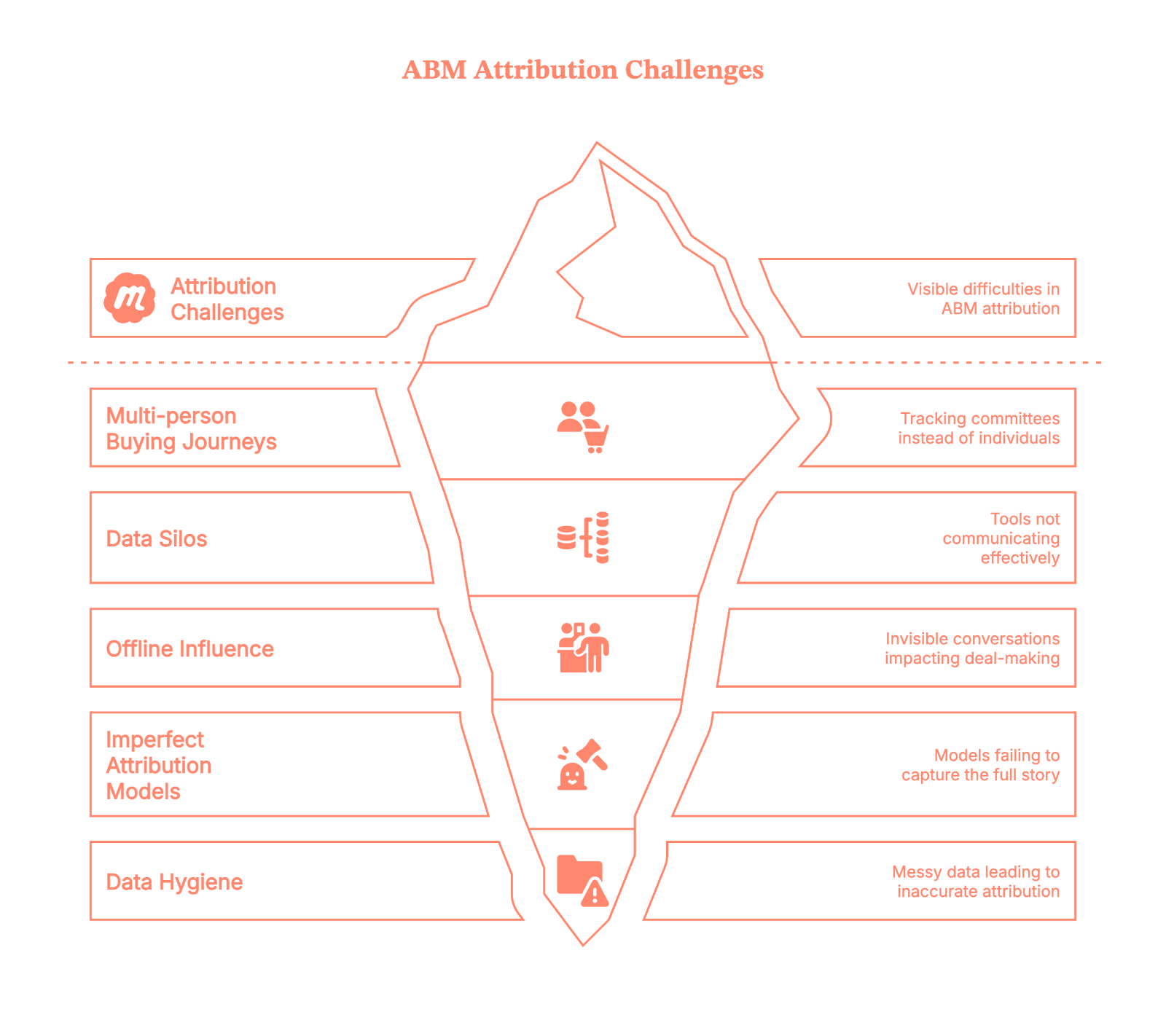
In ABM, you’re not tracking one person; instead, you’re tracking a committee. Touchpoints pile up fast. They are in the form of:
- LinkedIn ads
- Website visits
- Email nurturing
- SDR outreach
- Events
- Offline conversations (yes, these still happen!)
And with all this, attribution becomes tricky. Because…
- The journey isn’t linear.
- People engage anonymously.
- Not every touch gets logged.
- And buyers jump in and out depending on their role.
Challenge 2: Tools don’t speak the same language
Your ABM tool has data.
Your CRM has different data.
Your website analytics has other data.
Your sales reps store half the truth in their inboxes.
Everything is fragmented, and stitching it together feels like assembling IKEA furniture without instructions.
Challenge 3: Offline influence is invisible
Conversations at events, personal outreach, referrals, internal champions… these are often the real deal-makers.
But guess what?
None of that naturally shows up in your attribution reports.
Challenge 4: Attribution models are imperfect
First-touch? Too simplistic.
Last-touch? Doesn’t tell the full story.
Multi-touch? Great… until someone asks who gets how much credit.
W-shaped? U-shaped? Time decay? Weighted? Custom models?
It’s easy to get stuck in “model paralysis.”
Challenge 5: Data hygiene, the Achilles’ heel
Incorrect contact mapping, missing UTM parameters, untracked sessions, and inconsistent naming are the usual chaos.
If the data is messy, the attribution is messy.
How to implement ABM attribution without losing your mind
Alright, challenges aside. Here’s the part where we go from theory to “you can actually do this.”
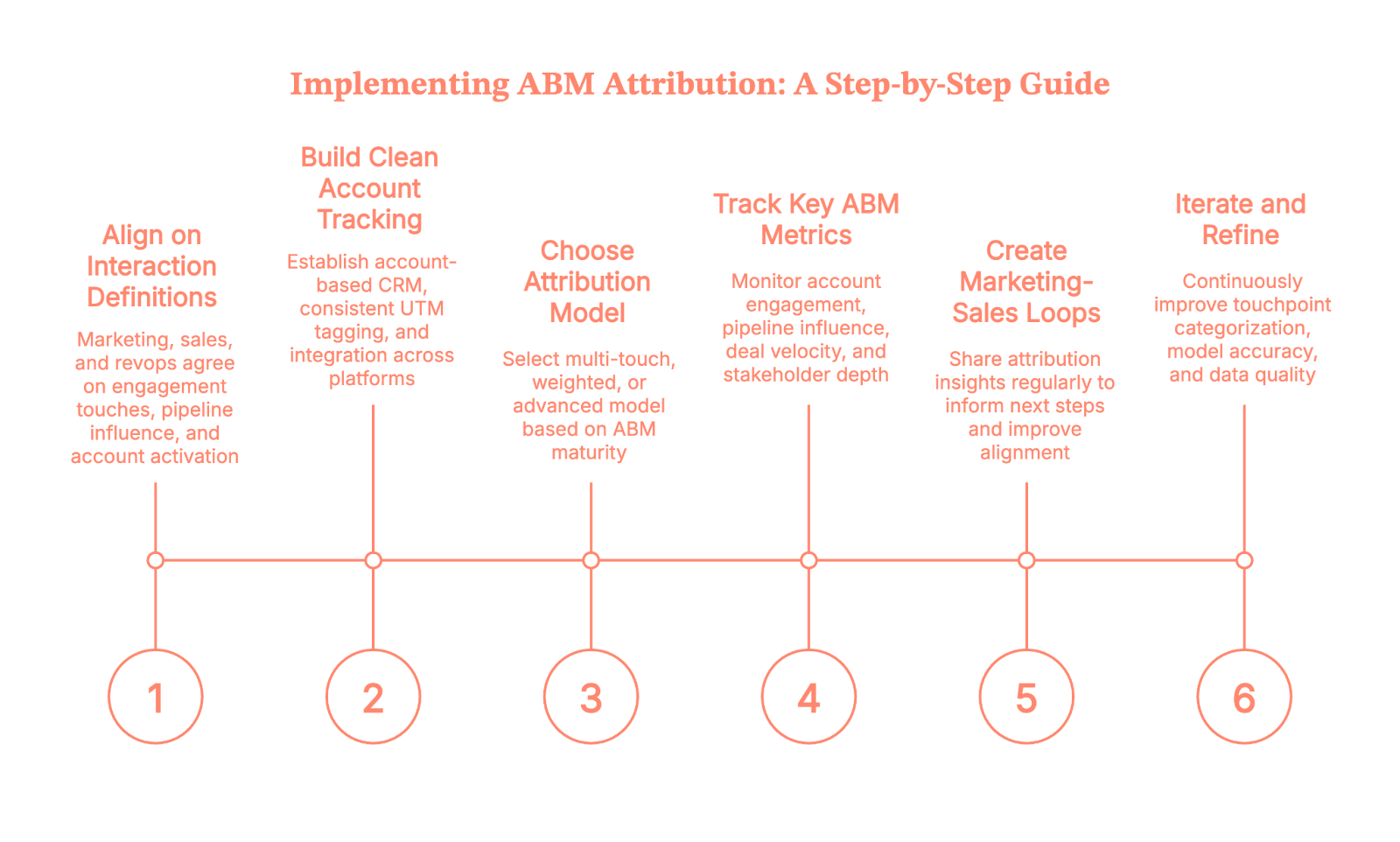
Let’s walk through it step-by-step.
Step 1: Align on what counts as a meaningful interaction
Before you build dashboards, get marketing, sales, and revops aligned on the following:
- What counts as an “engagement touch”
- Which interactions matter at different stages
- What is considered an “influenced pipeline”
- When an account is deemed “activated”
This avoids future “that’s not what I meant” arguments.
Step 2: Build clean account-level tracking
This is foundational. You’ll want:
- An account-based view (not just leads)
- Proper CRM structure
- Consistent UTM tagging
- Integration across ABM platform, CRM, and analytics tools
Think of this as cleaning your kitchen before you start cooking, annoying, but absolutely necessary.
Step 3: Pick an attribution model that matches your ABM maturity
- If you’re starting out, use simple multi-touch.
- If you’re scaling, then use weighted or custom models that account for key ABM engagement moments.
- If you’re advanced, then layer in predictive or machine-learning models to identify influence patterns automatically.
Yes, you can always switch later. Attribution models aren’t set in stone. As data volume, signal quality, and closed-won insights improve, more advanced models simply become more accurate.
Step 4: Track the right ABM Metrics (Not just “leads”)
ABM attribution isn’t about counting people. It’s about understanding accounts. Track:
- Account engagement score
- Pipeline created or influenced
- Deal velocity
- Stakeholder depth (how many people engaged)
- Stage progression tied to marketing/sales activities
- High-intent behaviors (e.g., pricing page visits)
These tell a truer story.
Step 5: Create loops between marketing & sales
Share attribution insights fortnightly or monthly:
- “Here are the touches that influenced the latest deals.”
- “Here’s what triggered conversions in high-value accounts.”
- “Here’s where deals stalled and why.”
When attribution informs next steps, you’ve built a real ABM engine.
Step 6: Iterate like you mean it
It won’t be perfect the first time.
Or the second.
Or the fifth.
But each iteration will sharpen:
- Touchpoints categorization
- Model accuracy
- Data quality
- Sales-marketing alignment
- Personalization strategies
Consistency wins this game.
As you put these steps into practice, pairing attribution with strong execution matters. These 6 ABM tactics to drive conversions can guide what to prioritize in your activation plan.
Where many ABM teams get stuck: The attribution gap
Even with all the right intentions, most ABM teams encounter one frustrating wall: THE ATTRIBUTION GAP.
It’s the uncomfortable space between “we know engagement is happening” and “we can prove it influenced revenue.” Gaps often come from:
- Anonymous website activity
- Multi-touch journeys
- Offline influence
- Data silos
- Untracked channels
- CRM inconsistencies
This is where technology makes or breaks your ABM strategy.
And yes, this is exactly where Factors.ai steps in.
How Factors.ai helps close the ABM attribution gap for B2B teams
Let’s get practical. Factors isn’t just another analytics dashboard; it’s specifically built to solve the attribution problems ABM teams struggle with most.
Here’s how it bridges those gaps:
1. Account-level website analytics (Even for anonymous website visitors)
Factors.ai offers one of the strongest account-level website visitor identification in the market, with coverage reaching up to 75%. It uses a waterfall enrichment setup that pulls from four different data sources, so the insights aren’t just broad… they’re accurate.
Once an account is identified, Factors layers in geo-location and job-title triangulation, which helps surface more than 30% of the actual individuals behind those visits.
In other words, you finally get to see:
- Which companies are showing up
- What pages they’re exploring
- How often do they return
- Which actions signal real intent
All those previously “invisible” touches?
They start showing up loud and clear.
2. Cross-channel, multi-touch attribution (Done automatically)
Factors pulls together data from all your channels, like:
- Paid ads
- Organic traffic
- Events
- LinkedIn engagement
- SDR outreach
- CRM activity
…and creates a unified timeline for each account.
No more stitching data manually.
No more channel blind spots.
Only multi-touch attribution.
3. Offline + Sales touch tracking
Factors doesn’t just capture digital activity; it brings your offline and sales motions into a single view.
With Account 360, all those scattered signals finally land in one place: CRM updates, SDR outreach, meeting notes, LinkedIn interactions, G2 intent, and website engagement all roll up into a unified account timeline.
The result?
You see the full story of how an account interacts with your brand, across both marketing and sales touchpoints.
4. Custom attribution models built for ABM
Instead of forcing you into standard models like last touch or first touch, Factors lets you:
- Use multi-touch
- Create weighted models
- Focus on intent-heavy touches
- Build ABM-specific attribution logic
You can finally choose a model that reflects how your buyers actually buy.
5. Clear pipeline influence & revenue reporting
Factors shows exactly how an account moved from early engagement to opportunity to closed-won. With this, you get clean, defensible reports that leadership actually understands.
6. Insights that actually drive ABM strategy
Factors highlights the signals that matter the most:
- High-intent accounts
- Content that moved deals
- Channels that consistently kickstart meetings
- Patterns across closed-won accounts
So your next ABM campaign isn’t just creative, it’s informed by data.
Read more about this on Using Factors.ai for targeted ABM
ABM attribution doesn’t have to be scary
Yes, attribution is messy.
Yes, ABM multiplies that mess.
And yes, you’ll probably question your life choices once or twice while implementing it.
But once your system is in place?
You stop guessing.
You start learning.
You start predicting.
And your ABM program stops being an experiment and becomes a repeatable revenue engine. The right tools (like Factors.ai) make the journey 10× smoother.
So take the first step, build your foundation, and let your attribution framework evolve from there. Your future ABM programs will thank you.
So to summarise
Account-Based Marketing (ABM) attribution helps B2B teams understand which marketing and sales touchpoints truly influence pipeline, opportunity creation, and revenue at the account level. It connects every interaction across a buying committee, like ads, website visits, content consumption, SDR outreach, events, and even offline conversations, to reveal how an account actually progresses.
Because ABM journeys involve multiple stakeholders, disconnected tools, messy CRM data, and untracked touches, most teams face a real attribution gap. Building a reliable ABM attribution engine requires clean account-level tracking, sales–marketing alignment, the right attribution model, and ongoing data hygiene.
Platforms like Factors.ai close the visibility gap by identifying anonymous accounts, stitching multi-touch journeys automatically, capturing offline influence, and providing clear revenue reporting. The result? A repeatable, insight-driven ABM engine that makes your future programs more effective.
FAQs on Account-Based Marketing attribution
Q1. How do you measure attribution in an ABM campaign?
You measure ABM attribution by mapping every marketing + sales touchpoint at the account level (not at the lead level). This includes website activity, ads, emails, SDR touches, events, and offline conversations. Then you apply an attribution model, like multi-touch, weighted, or custom, to understand which interactions influenced pipeline, opportunity creation, or revenue.
Q2. What makes ABM attribution so difficult for B2B teams?
Most teams struggle because buying journeys span multiple people, tools don’t sync data cleanly, offline influence rarely gets captured, and CRM hygiene is inconsistent. ABM multiplies complexity because each account generates dozens of interactions across different roles and channels.
Q3. Which attribution model works best for ABM programs?
Multi-touch is the most common starting point because it spreads credit across the journey. As ABM maturity increases, teams shift to weighted models that give more value to high-intent touches (e.g., demo page visits, sales meetings), or custom models tailored to their buying cycle.
Q4. How do you track anonymous account activity in ABM attribution?
Most companies rely on layers of website visitor identification and enrichment. Tools like Factors.ai use multi-source waterfall enrichment to identify up to 75% of accounts and surface likely individuals using geo and job-title triangulation. This converts anonymous website traffic into attribution-ready account data.
Q5. How do you include offline and sales touches in ABM attribution?
You need a unified account timeline that blends CRM notes, SDR outreach, meetings, events, referrals, and marketing activity. Without this, you’ll see only half the picture. Platforms like Factors.ai pull these signals into a single Account 360 view so offline influence is fully attributed.

ABX Strategy Explained: What It Is, How It Works, and Why It Matters for B2B Growth
Learn what ABX strategy is, how it aligns sales, marketing & CX, and why B2B companies must embrace it for sustainable growth.

TL;DR
- ABX (Account-Based Experience) focuses on the full B2B customer lifecycle, not just acquisition. It works to connect marketing, sales, and customer success teams into one continuous account journey and shared context.
- ABX goes beyond ABM by prioritizing long-term account value, retention, and expansion instead of only pipeline and deal creation. It uses “experience” to win over high-value accounts.
- Modern B2B buying involves multiple stakeholders, longer decision cycles, and higher expectations. If stakeholders have fragmented experiences with different teams, they are likely to just drop the deal.
- Successful ABX requires unified data, cross-functional alignment, journey mapping, and continuous feedback. Simply better marketing campaigns won’t cut it.
- For B2B SaaS companies, ABX is a sustainable growth model that directly improves win rates, reduces churn, and increases customer lifetime value over time.
Last year, an almost perfect B2B fell apart right in front of me.
Marketing did its job. User intent was high, the account was actively engaged, and they were responsive in all demo meetings. Sales closed it too.
Three months later, the renewal conversation went…not great.
The customer was confused.
They had been promised one thing, onboarded into another, and supported like they were a completely different company. Their interactions with us felt disconnected with new people, context, and explanations at every step.
Essentially, the customer was dealing with a new experience every time our organization changed its priorities or product priorities. We weren’t considering them when making these decisions.
This gap between marketing, sales, and customer experience is where ABX (Account-Based Experience) comes into play.
ABX helps organizations treat their potential customers and existing accounts as long-term relationships rather than short-term transactions. One shared context, narrative, and continuous journey.
In this guide, I’ll detail
- What ABX strategy actually is
- How it goes beyond traditional ABM
- Why it matters for B2B growth
- And how companies can implement ABX and acquire customers without losing their minds
What is ABX (Account-Based Experience)?
ABX (Account-Based Experience) is a market strategy using data, intent, and behavioral insights to enable relevant and trustworthy customer interactions across the B2B customer journey.
It focuses on delivering cohesive experiences across marketing, sales, and customer success. No more isolated campaigns.
ABX treats each account as a “market of one”. Every customer touchpoint (from initial awareness to onboarding to support conversations) merges into a single continuous experience.
This is necessary because B2B buying decisions often involve multiple stakeholders, take months to close, and require significant support even after the deal is closed.
Why ABX Matters for B2B
What I keep seeing is that B2B teams still work with 2018 playbooks. Naturally, pipelines take longer to convert, deals stall, and almost-won accounts continue to churn.
B2B buyers are smarter. Deals now involve large buying committees with 6 to 10 stakeholders. Decision cycles are longer, with more internal reviews, budget scrutiny, and risk evaluation. Expectations for products are also much higher.
This is a high bar, and many B2B teams aren't making the cut.
Traditional Demand Gen is Breaking Down
Generic demand gen has lost its edge.
Every inbox, LinkedIn feed, and ad platform has been bombarded with content, but buyer attention hasn’t increased. Buyers are overwhelmed by content, and most outreach messages are ignored or filtered. When the customer speaks, marketers don't really listen.
Even if marketing teams can generate leads, not many of those accounts actually convert, retain, and expand.
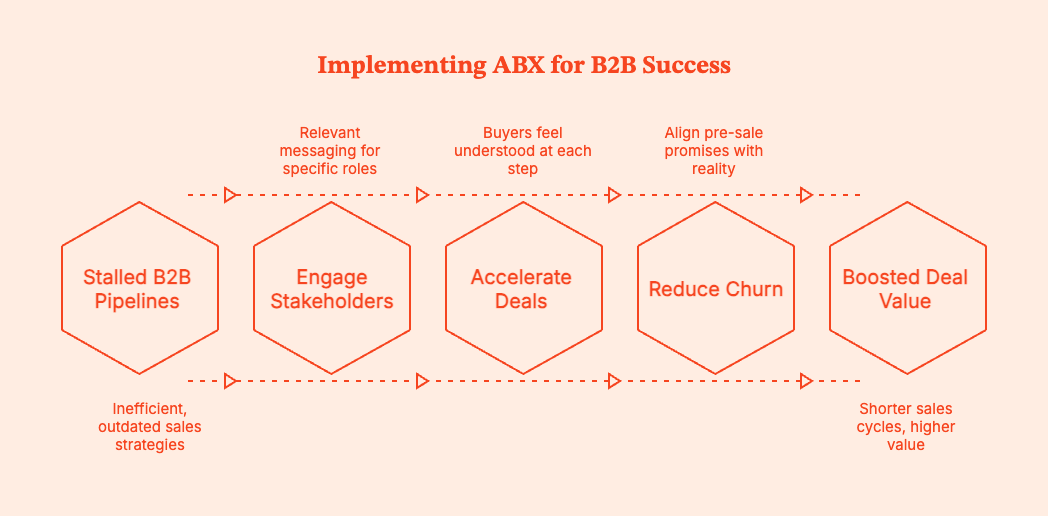
ABX changes the equation
ABX shifts the focus from: “How many leads did we generate?” to “How well did we serve this account across its entire journey?”
It designs product and org growth around customer value. Marketers can use ABX to:
- Engage multiple stakeholders in the same account with messaging relevant to specific roles and concerns
- Move deals forward faster, because buyers feel understood at each step
- Reduce churn by ensuring pre-sale promises match post-sale reality
Account-based strategies have already been shown to increase deal value by 171% and shorten sales cycles by 40%. To keep the gains long-term, you need the ‘Experience’ in ABX.
{{INLINE_MOFU}}
ABX vs ABM: Key Differences
You already know what ABX is.
Account-Based Marketing (ABM) is a B2B strategy that targets high-value accounts as individual markets. It uses personalized campaigns to push for higher rates of acquisition and pipeline.
| Parameter | Account-Based Marketing (ABM) | Account-Based Experience (ABX) |
|---|---|---|
| Primary focus | Acquiring and converting high-value accounts | Supporting the account from initial contact to renewal, and everything that comes after. |
| Core objective | Pipeline generation and deal creation | Long-term account value, retention, and growth |
| Teams involved | Mainly marketing and sales | Everyone involved with the account is finally on the same page |
| View of the account | Target account for campaigns | Ongoing relationship and evolving experience |
| Data & signals used | Firmographics, account lists, historical engagement | Firmographics + intent data + real-time behavioral signals + usage data + feedback |
| Engagement style | Pre-planned campaigns and outreach following a fixed schedule | Relevant interactions that adapt to what the account is doing and what it needs next |
| Personalization depth | Campaign-level and persona-based | Different messages for different roles, delivered at the right stage of the relationship. |
| Journey coverage | Mainly pre-sale stages (awareness → purchase) | Full journey (awareness → onboarding → adoption → renewal → expansion) |
| Success metrics | MQLs, SQLs, pipeline, win rate | Account health, retention, expansion revenue, customer satisfaction, lifetime value |
| Time horizon | Short- to mid-term revenue impact | Long-term, compounding revenue growth |
Bottomline: ABM shows who to focus on. ABX tells you how to treat them.
Core Components of a Successful ABX Strategy
Fundamentally, ABX is a set of very practical disciplines performed consistently that place the account at the center of operations. You're literally changing how a company shows up for customer accounts over time.
Here's how to make it work.
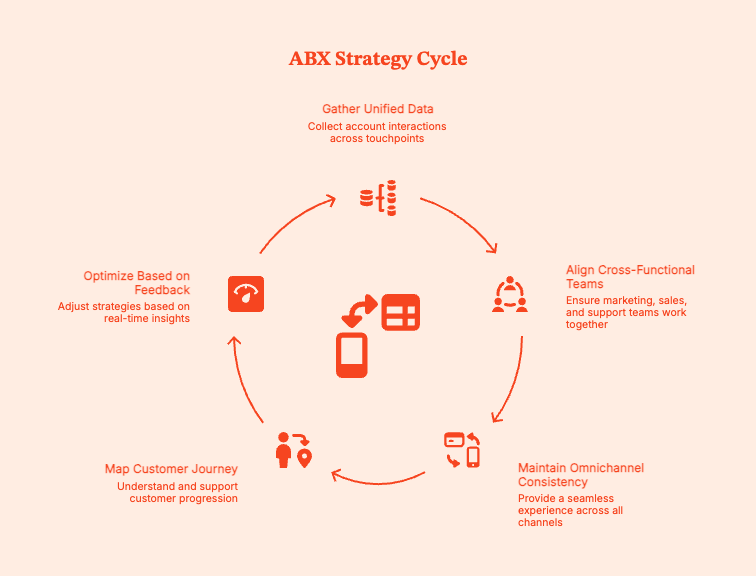
- Unified Data and Intent Signals
The foundation of ABX is account intelligence. Start with getting a unified view of each account interaction across touchpoints:
- Firmographics: industry, size, region, tech stack
- Website and content engagement: who’s visiting, what they’re reading, what they’re ignoring
- Product or trial behavior, where applicable
- Intent data: in-market signals, competitive research, and topic interest
- CRM activity: sales intelligence and conversations, deal stage, objections.
- Customer feedback: support tickets, NPS, qualitative notes
This context allows for data-based personalization rather than educated guesswork. No more assumptions. Only evidence-backed relevance.
- Cross-Functional Alignment
Let's cut to the chase. ABX does not work unless marketing, sales, customer success, and support teams:
- Work from the same account view
- Pursue shared goals, not competing KPIs
- Speak the same data language
If such alignment does not occur, here's what happens:
- Sales promises features that customer support (CS) isn’t ready to support.
- CS inherits accounts without context.
- Marketing optimizes for engagement, but it doesn't convert to revenue.
Omnichannel Consistency
In ABX, your answer to the following question needs to be yes every time.
If a customer read your email, talked to sales, and opened a support ticket in the same week, would it all feel like it came from the same company?
That means emails shouldn't contradict the information in sales calls, ads shouldn't say anything different from live conversations, and support shouldn’t be surprised by what was promised in pre-sale conversations.
Journey Mapping and the Customer Value Journey
ABX is not campaign-led. It is experience-led.
ABX works in cohesion with:
- The customer journey: how accounts discover and evaluate you.
- The customer service journey: how accounts are supported in the pipeline.
- The customer value journey: how they actually realize ROI over time.
Most B2B accounts move through these stages of the customer journey:
- Awareness
- Evaluation
- Purchase
- Onboarding
- Adoption
- Expansion
- Renewal or advocacy
Internal teams, however, often do not make decisions based on where the customer accounts are on the buyer's journey. They mostly consider internal timelines of quarterly campaigns, sales quotas, and renewal dates.
ABX brings account activity into consideration, so that prospective customers get messaging and support around the product journey and evolution.
Feedback and Continuous Optimization
ABX strategy has to keep adjusting based on real-time feedback. You need to keep a hawk’s eye on:
- How accounts respond post-sale.
- Friction in onboarding and support.
- Drops in engagement before churn happens.
- Changes to be made to messaging, plays, and support accordingly.
You learn faster than your competitors and keep tweaking messaging, assets, and support to deliver better experiences, stronger customer relationships, higher retention, and easier expansion.
How ABX Aligns Sales, Marketing and Customer Success
A disjointed customer experience is a B2B team's worst nightmare. And yet it keeps happening because go-to-market teams are structurally set up for failure.
Here's how it usually goes:
- Marketing generates interest
- Sales convert interest into a deal
- Customer success inherits the customer who has expectations that the CS team wasn't part of setting or even knowing (in many cases)
From the customer's POV, the experience resets every time they talk to a new team. They're left asking:
- “We were told onboarding would be lightweight.”
- “This isn’t how sales described the workflow.”
- “Why am I explaining this again?”
The problem isn't product gaps but lost context.
ABX changes the sequence from Marketing → Sales → handoff → CS to one continuous account story, shared across teams that keep evolving with time.
All teams now know:
- What sparked the account’s first interest?
- What content influenced which stakeholders?
- What objections came up in sales conversations?
- What value was promised, and exactly how it was framed?
- What does success look like from the customer’s point of view?
In the real world, this looks like:
- Sales teams knowing what content, webinars, or use cases actually moved the deal forward.
- Customer success teams knowing not just what was sold, but why the customer bought it and with what expectations.
- Marketing teams continuously learning from post-sale behavior, such as what features get adopted, where accounts struggle, and what leads to expansion.
A tool like Factors.ai can provide the shared context alignment needed for cleaner handoffs, better onboarding, smarter upsell timing, and happier customers.
ABX Through the Lens of the Customer Journey & Customer Value Journey
An ‘account’ in B2B is not a single person with a single opinion. Instead, you'll deal with an ecosystem of people, each experiencing your product in a different way, at a different pace.
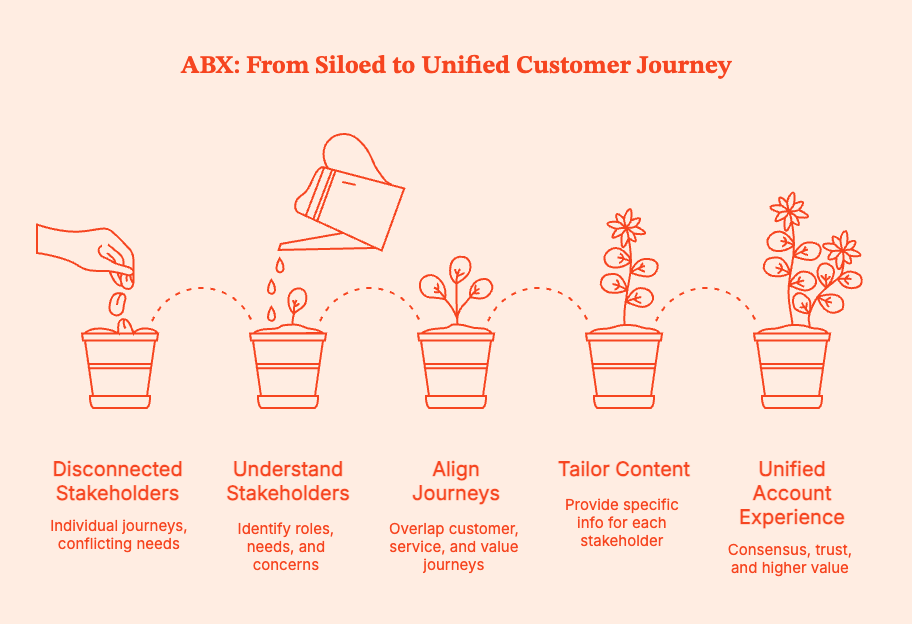
Generally, each account includes:
- A CTO or technical leader analyzing product architecture, security, and scalability.
- A CFO or finance stakeholder evaluating ROI, risk, and total cost of ownership.
- Stakeholders focusing on usability, workflows, and whether this tool makes their day easier.
- Procurement personnel studying compliance, contracts, and vendor risk.
ABX understands that each stakeholder follows their own buyer's journey for the same product in parallel. It overlaps customer journey, customer service journey, and customer value journey, so that every stakeholder gets what they need to be convinced.
For example,
- CTOs get technical deep-dives, architecture diagrams, security documentation, and roadmap clarity.
- CFOs get business cases, ROI models, pricing transparency, and risk mitigation plans.
- End users get enablement info, quick wins, onboarding guides, and workflow best practices.
- Post-sale stakeholders get reassurance about an easy onboarding, progress milestones, and proof that you're just not talking a big game.
Common Challenges & How to Overcome Them
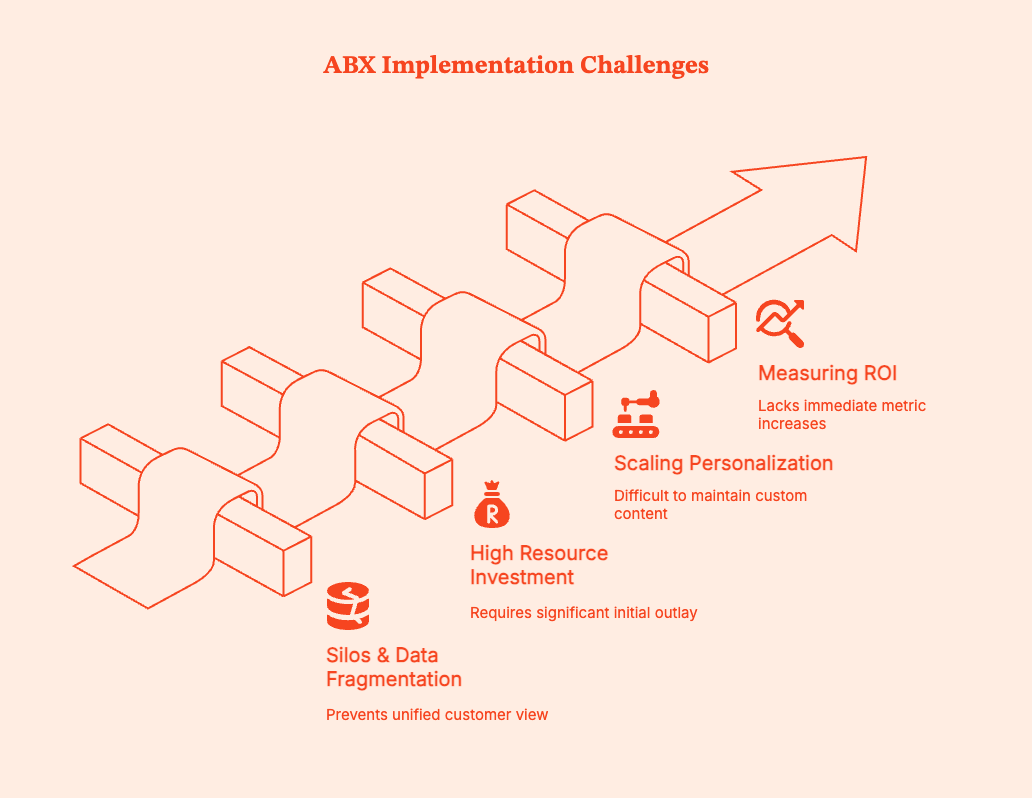
In practice, implementing ABX requires companies to change fundamental processes they have been running for years. You'll inevitably see some friction in the early stages, such as:
- Silos and Data Fragmentation
Most teams lack shared context, even if they have access to the same data. For eg, marketing efforts have engagement metrics, sales teams have deal notes, and customer success teams have support tickets and usage data.
No one team can see the whole picture. This causes major issues with ABX, which depends on all teams working with the exact same understanding of customer accounts.
What Helps:
- Shared account dashboards that show metrics pertinent to all teams.
- Clear ownership and data governance so that the “source of truth” is never in question.
- Regular cross-functional reviews focused on accounts rather than channels or campaigns.
- High Resource Investment
No lies, ABX does require increased resources for granular levels of personalization.
The answer is to:
- Focus on the high-value customers and high-risk accounts
- Prove impact before expanding ABX operations
Don't start by doing more work. Do more intentional work where it will show value.
3. Scaling Personalization Without Burning Out Your Team
Personalization is work.
It's hard to scale one-off messaging and custom decks for every account. You simply cannot personalize everything. Instead, try this:
- Utilize role-based frameworks instead of individual customization.
- Build modular content blocks that can be recombined to become assets for each stage and stakeholder.
- Automate where possible.
4. Measuring ROI
ABX is sometimes viewed as ‘sus’ because it doesn't immediately show increases in traditional marketing metrics, such as lead volume.
The metrics that actually show ABX success are:
- Retention and churn trends.
- Expansion and upsell revenue.
- Account health and product adoption.
- Customer lifetime value (CLV).
You'll have to listen to less short-term noise, more long-term buying signals for B2B sales & marketing teams.
Measuring Success: KPIs and Metrics for ABX
The success of ABX is, ultimately, in how healthy, durable, and expandable your accounts become over time. The metrics you need to watch to track this success are:
| Metric | What to Measure | Why It Matters for ABX |
|---|---|---|
| Account-Level Engagement | Number of engaged stakeholders per account, depth of content consumption, repeat interactions | ABX is designed for multi-stakeholder buying, so narrow engagement indicates low interest. |
| Win Rate | Close rate of ABX-treated accounts vs non-ABX accounts | Helps you see if buyers are feeling more confident and aligned as they move forward in the pipeline. |
| Deal Velocity | Time from first meaningful engagement to close | Shows whether ABX is making the buying process smoother and easier to navigate. |
| Retention & Churn | Renewal rate, logo churn, revenue churn | ABX should prevent post-sale experience breakdowns |
| Expansion Revenue | Upsell, cross-sell, seat growth, usage-based expansion | Higher expansion means ABX is compounding in value. |
| Customer Lifetime Value (CLV) | Revenue per account over its full lifecycle | The ultimate ABX scorecard |
| Account Health Signals | Product adoption, feature usage, support trends | Early indicators of future churn or expansion |
| Customer Satisfaction (NPS / CSAT) | NPS, CSAT, qualitative feedback | Measures experience continuity across the customer acquisition funnel |
| Handoff Quality | Onboarding time, implementation friction, expectation alignment | Shows whether cross-team alignment is working in practice. |
| Revenue Efficiency | Revenue per account vs cost to serve | Ensures ABX scales sustainably |
Summary
Account-Based Experience (ABX) is a strategy that fundamentally changes how modern B2B companies approach growth. Instead of optimizing for short-term wins such as leads or isolated deals, ABX curates cohesive, high-quality experiences for prospective customers throughout the entire account lifecycle, from first touch to renewal and expansion.
ABX treats each account as a long-term relationship rather than a transaction. It unifies marketing, sales, customer success, and support around a shared narrative and context. Account interactions are driven by real-time intent data, behavioral signals, and continuous feedback. Getting multiple teams on the same page eliminates common breakdowns that occur during handoffs. It also ensures that customer expectations set pre-sale are actually met post-sale.
ABX is key to B2B growth because B2B buyers have changed. Purchase decisions now involve multiple stakeholders, longer cycles, and higher scrutiny. Generic demand gen and static account lists don’t work anymore. You have to offer relevance, continuity, and value at every stage of the buyer journey.
For B2B SaaS companies, ABX offers a sustainable growth path. It boosts engagement across buying committees, speeds up deal velocity, lowers churn, and expands revenue by building trust over time. With real-time analytics, AI-driven orchestration, and revenue-aligned teams becoming fixtures in the B2B pipeline, ABX has gone from a competitive advantage to a baseline expectation.
Future of ABX: Trends to Watch
Real-time intent and behavioral analytics will become the standard
B2B teams can no longer be satisfied with static account lists. They must look at live signals to see what accounts are researching and engaging with them in the moment. Buyers increasingly expect companies to anticipate needs based on behavior, not forms. Source
AI-driven orchestration will replace rigid campaigns
AI engines, trained appropriately, will help teams decide when and how to engage accounts based on real-time context. AI-driven personalization stands on precise customer journey mapping, which pushes higher revenue and loyalty in the long run. Source
Revenue teams will replace siloed GTM functions
Marketing, sales, and customer success are getting on board with shared revenue and retention goals. After all, customers experience one company, not multiple departments. RevOps-led orgs are already proving to be more efficient and resilient. Source
Frequently Asked Questions for ABX Strategy
Q. What is ABX vs ABM?
ABM (Account-Based Marketing) prioritizes the acquisition of high-value accounts through targeted campaigns and sales alignment.
ABX (Account-Based Experience) extends the ABM approach across the entire customer lifecycle, including onboarding, adoption, retention, and expansion. Its core goal is to deliver improved customer experience along the buyer journey.
Q. Is ABX just ABM + CX?
Operationally, ABX is more integrated than ABM. It doesn't just layer in customer experience after focusing on marketing and sales. Instead, ABX unifies marketing, sales, customer success, and support around one shared account strategy.
Q. Is ABX only for enterprise companies?
No.
Mid-size B2B companies can benefit notably from ABX when it’s applied specifically to high-value or high-potential accounts.
Q. How long does ABX take to show ROI?
Your ABX implementation may improve pipeline quality and win rates within 6 months, especially if you're applying it to active leads. Over time, these strategies can deliver higher retention, expansion revenue, and increased customer lifetime value (CLV).
Q. Can ABM and ABX be used together?
Yes. Absolutely.
ABM finds and engages the right accounts. ABX ensures that those accounts receive a consistent, valuable experience throughout their entire lifecycle.
Q. How does ABX handle multiple stakeholders in one account?
Primarily, ABX uses role-based journeys to deal with different stakeholders within a single account.
Each stakeholder (technical leaders, finance, end users, procurement personnel) receives messaging and experiences relevant to their role, needs, and stage in the buyer and customer journey.
ABM vs. Traditional Marketing
Compare ABM (Account-Based Marketing) and traditional B2B marketing by audience, channels, alignment, and metrics. See when to use each and how a hybrid approach works
.avif)
TL;DR
- Account-Based Marketing (ABM) and Traditional Marketing are two different approaches to reaching potential clients.
- ABM focuses on a select number of high-value accounts with highly personalized campaigns, making it ideal for businesses that need to build deep relationships and improve sales efficiency.
- Traditional Marketing, on the other hand, targets a broad audience using mass marketing techniques like SEO, email marketing and paid ads, effectively generating high volumes of leads and increasing brand awareness.
- The choice between ABM and Traditional Marketing depends on your business goals, target audience, and resources.
- A hybrid approach can combine the broad reach of Traditional Marketing with the targeted precision of ABM, maximizing both lead generation and account engagement.
- Factors can enhance both strategies with advanced analytics, personalized campaign support, and improved sales and marketing alignment.
Choosing the correct strategy for your business can often feel like picking between two powerful superheroes. On one side, we have Account-Based Marketing (ABM)—the precision marksman, zeroing in on high-value targets with pinpoint accuracy. On the other, there’s Traditional Marketing—the versatile general, casting a wide net to reach as many prospects as possible. Both strategies come with their own set of superpowers and kryptonite, influencing how companies attract clients, use their resources, and hit their goals.
Let’s understand how each approach works, compare their strengths and weaknesses, and help B2B businesses decide which strategy or blend of both might be their ticket to marketing success.
What is Traditional Marketing?
Traditional marketing is a wide-reaching approach that seeks to attract as many leads as possible, regardless of their individual potential value. This strategy often aims to raise brand awareness, generate large volumes of leads, and drive them down a sales funnel that moves them from awareness to consideration to decision-making stages.

Core Components of Traditional Marketing:
- Mass Audience Reach
Traditional marketing uses SEO, email marketing, paid advertising, and content marketing to target a broad audience. The idea is to cast a wide net, capturing leads from various market segments and nurturing them into customers.
- Lead Generation Volume
The number of leads generated often measures success in traditional marketing. Marketers focus on driving high lead volumes, assuming that some leads will eventually convert into paying customers.
- Content Creation for Broad Appeal
Traditional marketing content is designed to appeal to a broad, diverse audience. This can include blog posts, email campaigns, and advertisements to educate and raise awareness about a company’s product or service.
- Linear Sales Funnel
Traditional marketing follows a funnel approach where prospects move through stages like awareness, interest, decision, and purchase. The idea is to gradually push leads down the funnel through various marketing tactics until they convert.
The Advantages of Traditional Marketing
- Broad Audience Reach
Traditional marketing is effective for brand awareness and mass-market reach. It allows businesses to scale quickly by reaching large audiences across multiple channels.
- Established Tactics
Traditional marketing strategies are well-established, making it easy for marketers to implement SEO, content marketing, and email campaigns. These methods are supported by robust tools and technologies allowing high scalability.
- Cost-Effectiveness
Traditional marketing can be a cost-effective way for smaller businesses or those with limited budgets to reach a broad audience. Techniques like organic social media marketing and content creation offer affordable ways to attract prospects.
Challenges with Traditional Marketing
- Low Efficiency
The broad, untargeted nature of traditional marketing means resources can be wasted on leads that don’t fit the company’s ideal customer profile (ICP). This reduces efficiency, as time and effort are spent nurturing leads that may not convert.
- Lower Personalization
Traditional marketing content is often less personalized, as it’s designed to appeal to a wide audience. This lack of customization can make it harder to engage high-value prospects or build deep relationships.
- Misalignment Between Sales and Marketing
Traditional marketing can lead to misalignment between sales and marketing teams. Since marketing is focused on lead generation volume, sales teams may receive leads that aren’t adequately qualified, leading to friction between the two departments.
What is Account-Based Marketing (ABM)?
Account-based marketing flips the traditional marketing model by focusing on specific, high-value accounts. Rather than casting a wide net, ABM aligns sales and marketing efforts to target a select number of key accounts that have the highest potential for long-term value. ABM is not about generating as many leads as possible but about building deep relationships with carefully selected accounts.
Core Components of ABM:
- Highly Targeted Approach
ABM is a laser-focused strategy that involves identifying a set of target accounts and crafting personalized marketing campaigns specifically for those accounts. These are usually high-value accounts that have a strong likelihood of converting into significant revenue for the company.
- Account-Specific Content
ABM content is highly personalized. Rather than creating broad, one-size-fits-all messaging, ABM campaigns are tailored to address each account's specific needs, challenges, and goals.
- Sales and Marketing Alignment
ABM relies on close collaboration between sales and marketing teams. Both departments work together to target the same accounts and share insights on how to engage these accounts at different stages of the buyer's journey.
- Account Lifecycle Focus
Unlike traditional marketing’s funnel approach, ABM operates on an account lifecycle model. The focus isn’t just on converting leads but also on building long-term relationships and driving growth within existing accounts.
The Advantages of ABM

- Higher ROI
ABM often delivers a higher return on investment because resources are concentrated on high-value accounts more likely to convert. The personalized approach means fewer wasted resources and more targeted engagement.
- Stronger Customer Relationships
ABM’s personalized campaigns foster stronger relationships with key accounts. By addressing the specific needs and challenges of each account, businesses can build trust and loyalty over time.
- Increased Sales Efficiency
With ABM, sales and marketing teams target the same accounts, leading to better sales efficiency. This alignment ensures that marketing efforts directly support sales objectives, and leads are more likely to convert.
- Long-Term Account Value
ABM isn’t just about acquiring new customers; it’s also about expanding relationships with existing customers. By nurturing accounts after the initial sale, businesses can drive more revenue through upselling, cross-selling, and long-term retention.
Challenges with ABM
- Resource-Intensive
ABM can be resource-intensive. Personalizing content for specific accounts takes time, effort, and tools. Scaling ABM efforts can be challenging for smaller companies or those with limited resources.
- Data-Driven Requirements
ABM requires sophisticated data management tools to track account engagement and measure success. Without these tools, it can be difficult to know which accounts are progressing through the lifecycle and which need more attention.
ABM vs. Traditional Marketing: A Proper Comparison
Account-based marketing (ABM) focuses marketing and sales on a defined set of target companies. Broad-reach marketing aims to attract and engage a wider audience, then qualify the people who show interest.
The difference is mainly who you target and how you measure progress. ABM is an account-focused strategy; broad-reach marketing is an audience approach. They can use the same channels, including paid media, email, content, events, and search. Many B2B teams use both: broad programs create awareness and demand, while ABM gives priority accounts more focused attention.
These differences are not rules every campaign must follow. A broad campaign can use segmentation and personalization; an ABM program can still include broad awareness campaigns around a target market.
ABM vs Traditional Marketing: When to Use Which

The choice between ABM and traditional marketing isn’t necessarily an either/or decision. Both strategies have their place, depending on the business’s goals, target audience, and available resources.
When to Use Traditional Marketing
- Brand Awareness
If your goal is to build brand awareness and establish your company in the market, traditional marketing is an excellent choice. Its wide reach and scalability make it ideal for getting your message out to a large audience.
- Lead Generation at Scale
For companies that need to generate a large volume of leads, traditional marketing is more effective. It allows you to cast a wide net and capture a broad range of prospects.
- Lower Complexity
Traditional marketing is easier to implement and doesn’t require the same level of personalization as ABM. This makes it a good option for companies with limited resources or those looking for a straightforward marketing strategy.
When to Use ABM
- Targeting High-Value Accounts
If your business relies on a few high-value accounts for revenue, ABM is the way to go. Its personalized approach is better suited to engaging and converting these accounts.
- Long-Term Relationship Building
ABM is ideal for companies that want to build long-term relationships with their customers. By nurturing accounts over time, you can drive customer loyalty and lifetime value.
- Sales and Marketing Alignment
If you need closer sales and marketing alignment, ABM is the solution. Its focus on targeting specific accounts requires both teams to work closely together, ensuring a more cohesive customer journey.
Broad campaigns vs. ABM
Imagine a B2B software company selling to enterprise IT teams.
A broad-reach campaign could promote a research report to IT and operations leaders across the company’s addressable market. Marketing measures registrations, qualified leads, and resulting pipeline.
An ABM program could select 30 enterprise accounts that fit the ideal customer profile. Marketing and sales map the relevant buying-group roles, run account-relevant ads and content, and coordinate outreach when engagement rises. They measure which accounts engaged, how many relevant roles were reached, and whether qualified opportunities and revenue followed.
The ABM version is more focused, but it is not automatically more effective. It works only if the accounts are a good fit, the message is useful, and sales follows up well.
When should you use broad-reach marketing?
Use broad-reach programs when you need to:
- Build awareness or demand across a market.
- Reach buyers before you know which companies will become opportunities.
- Test which audiences, messages, or offers attract qualified interest.
- Create a steady flow of leads and nurture them by fit and behavior.
- Scale with a team or budget that cannot support one-to-one programs for many accounts.
When should you use ABM?
Use ABM when:
- A defined set of companies represents a meaningful share of your growth opportunity.
- Several people at each company influence the buying decision.
- Sales can work from the same target-account list and coordinate follow-up.
- You can create relevant experiences for account segments without pretending every company has identical needs.
- You can measure account engagement and connect it to qualified pipeline and revenue.
ABM is usually a poor fit when the target list is arbitrary, account data is unreliable, or sales and marketing cannot agree on who owns the accounts and what happens after engagement.
Can you combine ABM and traditional marketing?
Yes. A practical hybrid approach is to run broad programs across your market, then focus additional effort on accounts that fit your ICP or show meaningful buying activity.
For example, publish useful category content for the market, promote it to relevant roles, and use account-level engagement to identify which target companies deserve more attention. Sales and marketing can then coordinate the next action for those accounts. Keep the account criteria and follow-up rules clear so the ABM layer adds focus instead of just adding another campaign label.
How should you measure each approach?
For broad-reach marketing, track reach, engagement, lead quality, qualified pipeline, and revenue. Avoid treating raw lead volume as the final outcome.
For ABM, track target-account coverage, engagement from relevant buying-group roles, account progression, qualified opportunities, pipeline, deal velocity, and closed-won revenue. Compare results against a defined account cohort and time period.
Neither attribution nor engagement alone proves that a campaign caused a deal. Use experiments or a suitable comparison group when you need to estimate incremental impact.
The Future: A Hybrid Approach?
For many companies, the future of marketing lies in a hybrid approach that combines the broad reach of traditional marketing with the personalized touch of ABM. This allows businesses to enjoy the benefits of both strategies, targeting a wide audience while also focusing on high-value accounts with personalized campaigns.
How the Hybrid Approach Works
A hybrid approach might involve using traditional marketing tactics to generate a large pool of leads and then segmenting these leads to identify high-value accounts. Once identified, ABM strategies can be applied to nurture these accounts through personalized campaigns, building deeper relationships and increasing the likelihood of conversion.
How Factors.ai supports a hybrid marketing approach
Broad campaigns can attract companies you haven’t added to your target-account list. Factors.ai helps you identify companies visiting your website and review their recorded engagement, so you can decide which accounts deserve more focused attention.
For example, suppose an ICP-fit company discovers your business through an organic article and later returns to explore your product and pricing pages. Your team can review that activity in Factors, assess whether the company should become a priority account, and plan relevant outreach.
With account intelligence, sales and marketing can review account journeys and prioritize companies based on fit, intent, and engagement. Configured workflows can also send account context to Slack, helping sales prepare its follow-up.
You can then use analytics and attribution to examine which content and campaigns appear in those accounts’ journeys and how their recorded activity relates to pipeline and revenue.
This supports a hybrid approach: continue reaching a wider market while using account data to decide where to invest more focused sales and marketing effort.
How Factors.ai supports Account-Based Marketing (ABM)
ABM requires your team to agree on which accounts to pursue, understand their activity, and coordinate what happens next. Factors.ai supports this work by helping sales and marketing identify engaged companies, prioritize accounts, and track their progress toward pipeline and revenue.
Identify and prioritize accounts
Factors.ai helps identify companies visiting your website, including those that haven’t filled out a form. You can assess these companies against your ICP and review their engagement before deciding which accounts deserve more attention.
Its account intelligence platform also captures signals from connected advertising platforms and sources such as G2. Account scores based on fit, intent, and engagement help your team prioritize follow-up.
Give sales context for outreach
An account’s engagement history gives sales more context than a company name on a target list. Factors.ai lets your team review recorded website activity, content engagement, advertising interactions, and sales touchpoints in an account-level view.
For example, an account exploring your integrations and pricing pages may need a different conversation from one reading introductory content. Configured workflows can deliver account journey summaries and recommended contacts to Slack, helping reps prepare relevant outreach.
Build audiences around account engagement
You can segment accounts to support different campaigns and follow-up plans. Marketing might nurture accounts showing early interest while coordinating more focused outreach for accounts with stronger engagement.
Factors.ai supports LinkedIn audience sync, allowing teams to use account segments in their advertising strategy. Your team can tailor campaign messaging to each segment’s needs and stage of evaluation.
Measure account progression and pipeline
ABM reporting needs to show whether target accounts are progressing toward opportunities and revenue. Factors.ai’s analytics and attribution help you track engagement, conversion rates, pipeline, and revenue by account segment.
You can examine which content and campaigns appear in account journeys, compare progression across segments, and investigate where accounts drop off. These reports help your team decide which campaigns and accounts warrant further investment.
Also Read: Account-based Marketing Vs Demand Generation
ABM vs. Traditional Marketing: Key Differences & Benefits
Choosing the right marketing approach depends on business goals, audience, and resources.
1. Core Approach: ABM targets high-value accounts with personalized campaigns, while Traditional Marketing focuses on broad audience outreach.
2. Key Strategies: ABM leverages tailored messaging, deep account engagement, and sales alignment, whereas Traditional Marketing uses SEO, email, and paid ads for lead generation.
3. Best Use Cases: ABM excels in B2B sales with complex buying cycles, while Traditional Marketing is ideal for brand awareness and high-volume lead acquisition.
A hybrid strategy can combine ABM’s precision with Traditional Marketing’s reach, maximizing both engagement and conversions.
In a nutshell: ABM and Traditional Marketing - Which is Right for Your Business?
The decision to implement either Account-Based Marketing or Traditional Marketing depends mainly on your business objectives, available resources, and the structure of your sales and marketing teams.
- Traditional marketing still offers a viable, scalable solution for businesses looking to build broad awareness or generate a high volume of leads.
- ABM provides a far more personalized and efficient approach for businesses targeting a select group of high-value accounts or focused on building long-term relationships with their customers.
As marketing technologies evolve, a hybrid approach may be the best solution for many companies. Combining the wide reach of traditional marketing with the precise targeting of ABM allows businesses to maximize their lead-generation efforts while nurturing high-value accounts through personalized engagement.
Whatever strategy your business chooses, the key is data-driven insights. Platforms like Factors.ai enable B2B marketers to make informed decisions, optimize campaigns, and measure success in previously impossible ways.
By embracing tools like Factors, companies can harness the full potential of ABM, driving deeper relationships, increased revenue, and long-term growth. In an increasingly competitive marketplace, the ability to target the right accounts with the right message at the right time can make all the difference.
Also Read: Top ABM Tools
Frequently asked questions on ABM vs. traditional marketing
Q. Is ABM better than traditional marketing?
Neither is always better. Broad-reach marketing helps build demand across a market. ABM concentrates additional effort on selected accounts. The right approach depends on your market, deal size, sales capacity, data, and goals.
Q. What is the main difference between ABM and traditional marketing?
ABM organizes marketing and sales around target companies. Broad-reach marketing targets a larger audience or market segment and qualifies respondents.
Q. Can ABM and demand generation work together?
Yes. Demand generation can create awareness and interest across a market; ABM can prioritize high-fit accounts and coordinate more focused engagement. They can share channels and content.
Q. Is ABM only for enterprise companies?
No, but ABM needs a practical target list and enough potential value to justify account-level coordination. Smaller teams can start with a focused account segment rather than building a large, one-to-one program.
Q. What should I measure in an ABM program?
Track target-account fit, engagement from relevant buying-group roles, account progression, qualified pipeline, deal velocity, and revenue. Choose measures that match the program’s goal and stage.
ABM vs. Inbound Marketing
Discover the crucial differences between Account-Based Marketing (ABM) and Inbound Marketing. Learn how to choose the right strategy for your business with our elaborate guide.
TD;LR
Account-Based Marketing (ABM) and Inbound Marketing are distinct strategies for driving leads and sales. ABM targets a few high-value accounts with personalized campaigns ideal for complex sales cycles and high-value clients. Inbound marketing attracts a broad audience with valuable content perfect for scalable lead generation and nurturing. Choosing between them depends on your business model, sales cycle, and budget. A hybrid approach can leverage both methods' strengths, offering precision targeting and broad audience reach. Factors can support both strategies with comprehensive analytics and insights.
Imagine ABM as your precision sniper, targeting high-value accounts with laser focus, while Inbound Marketing is like casting a wide net to reel in various leads with irresistible content.
Enterprise B2B marketers often face the dilemma: Should you choose ABM marketing or inbound marketing for the best ROI? Many teams waste resources by either chasing unqualified leads or overlooking key accounts that could boost revenue. This challenge leads to frustration: generic campaigns don't reach decision-makers, while personalized outreach seems slow or costly to scale. The solution lies in understanding each approach's strengths and how they align with your goals.
Marketers find higher ROI with ABM for key accounts, while inbound marketing excels in scalable lead generation and brand building. But which strategy works better for enterprise B2B? This guide offers a clear comparison of ABM marketing and inbound marketing, helping you make informed choices, avoid mistakes, and create a marketing plan that drives growth.
What is Account-Based Marketing (ABM)?
Account-Based Marketing (ABM) is a highly targeted, strategic marketing approach designed for B2B businesses focusing on high-value accounts. ABM treats these accounts as individual markets, building personalized marketing campaigns to engage key decision-makers and drive conversions. The goal is not to generate a broad range of leads but to ensure the engagement of a smaller, more defined group of prospects, resulting in higher ROI and stronger relationships.
Understanding ABM Marketing in Enterprise B2B
ABM marketing is a focused strategy for B2B companies. In ABM, marketing and sales teams collaborate to target a specific list of high-value accounts. Instead of casting a wide net, ABM zeroes in on companies that fit your ideal customer profile, delivering personalized campaigns and content tailored to each account’s needs.
ABM relies on deep research, identifying decision-makers, understanding their challenges, and crafting messages that align with their business goals. This approach often uses various channels, such as personalized emails, LinkedIn campaigns, targeted ads, and custom events.
ABM is particularly effective for enterprise B2B companies with complex sales cycles, large deals, and multiple stakeholders. It allows precise measurement of engagement and ROI at the account level, making it easier to justify marketing spend. However, ABM requires close teamwork between sales and marketing, careful planning, and investment in data and technology. When executed well, ABM can shorten sales cycles, increase win rates, and build long-term relationships with your most valuable clients.
{{INLINE_BOFU}}
Inbound Marketing for Enterprise B2B
Inbound marketing attracts potential enterprise B2B buyers by creating and sharing valuable content that meets their needs. Instead of sending out messages, inbound marketing draws prospects in with helpful blog posts, whitepapers, webinars, and social media updates that address real business challenges.
This approach focuses on understanding your target audience’s problems and offering solutions at each stage of their buying journey. Effective inbound marketing uses search engine optimization (SEO), content marketing, and automated email workflows to nurture leads. Over time, this builds a steady flow of qualified leads interested in your business.
For enterprise B2B companies, inbound marketing is scalable and cost-effective. It helps build brand authority and trust in crowded markets. It works well for companies that want to educate their audience, increase organic website traffic, and generate leads without aggressive sales tactics. However, inbound marketing requires patience, regular content creation, and ongoing improvements to see results. When done well, it can provide a growing return on investment and support long-term growth for B2B organizations.
Key Components of ABM:
- Account Identification
Marketing and sales teams collaborate to identify high-value accounts with the greatest revenue potential. These accounts typically fit an ideal customer profile (ICP) based on factors like company size, industry, revenue, and specific pain points.
- Personalization
ABM emphasizes creating personalized content, messages and offers that directly address the unique needs and challenges of each target account.
- Sales and Marketing Alignment
Successful ABM requires close collaboration between marketing and sales teams. Both departments must work together to ensure a consistent, seamless customer experience throughout the buyer's journey.
- Data and Insights
ABM relies heavily on data to inform its strategies. Marketers use advanced analytics to understand each account's buying behavior, map out key stakeholders, and tailor their outreach accordingly.
Key Benefits of ABM:

- Higher ROI
ABM provides a more focused and effective approach to marketing by concentrating resources on high-value accounts. According to a report by ITSMA, 87% of marketers say ABM delivers a higher return on investment than any other marketing strategy.
- Enhanced Personalization
ABM allows marketers to create personalized experiences for each account, increasing the likelihood of conversion. This personalized approach is especially important for B2B businesses with complex sales cycles, where multiple decision-makers are involved.
- Better Alignment with Sales
Since ABM targets specific accounts, it naturally aligns marketing efforts with sales goals, ensuring that both teams are working toward the same objectives. This improves communication and coordination between departments.
- Shorter Sales Cycles
By focusing on accounts already identified as high potential, ABM helps shorten the sales cycle. Personalized content and engagement strategies move prospects more quickly through the sales funnel, often skipping the awareness and consideration stages of the buyer’s journey.
What is Inbound Marketing?
Inbound marketing is a broad, scalable marketing strategy that focuses on attracting potential customers by creating valuable content and experiences tailored to their interests. Instead of targeting specific accounts, inbound marketing seeks to attract a wider audience by offering educational and informative content that addresses the pain points and needs of prospective buyers.
Inbound marketing is built on the principle that businesses should offer value to potential customers before asking for their business. By providing helpful content through various digital channels, such as blogs, eBooks, social media, and webinars, companies can build trust and credibility with their audience, nurturing leads through the sales funnel until they’re ready to make a purchase.

Key Components of Inbound Marketing:
- Content Creation
The foundation of inbound marketing is creating valuable, relevant content that educates, informs, or entertains your target audience. This content can take many forms, including blog posts, eBooks, whitepapers, videos, and infographics.
- Search Engine Optimization (SEO)
To attract organic traffic, inbound marketing relies on SEO strategies to ensure that content ranks well in search engines. By optimizing content with relevant keywords and phrases, businesses can increase their visibility and reach more potential customers.
- Lead Nurturing
Inbound marketing emphasizes nurturing leads over time by providing them with the information they need at every stage of the buyer’s journey. This often involves using automated email campaigns, drip marketing, and personalized content recommendations.
- Conversion Optimization
Once visitors are drawn to a company’s website, the goal is to convert them into leads. Inbound marketing uses tools like landing pages, forms, and calls-to-action (CTAs) to capture lead information and move prospects further along the sales funnel.
Key Benefits of Inbound Marketing:
- Scalability
Inbound marketing can reach a broad audience without significant incremental effort. Once content is created, it attracts and engages potential customers over time, providing a long-term ROI.
- Cost-Effectiveness
Inbound marketing is often more cost-effective than outbound marketing methods or even ABM. Companies can reduce their reliance on paid advertising by focusing on organic traffic generation through SEO and content creation.
- Lead Nurturing
Inbound marketing excels at nurturing leads through the buyer’s journey. By offering valuable content at every funnel stage, businesses can build relationships with prospects, increasing their chances of converting leads into customers.
- Long-Term Benefits
High-quality content created for inbound marketing has long-term value. Blog posts, videos, and social media content can continue to attract visitors and generate leads long after their initial publication.
Key Differences Between ABM and Inbound Marketing
| Criteria | Account-Based Marketing (ABM) | Inbound Marketing |
|---|---|---|
| Target Audience | Focuses on a specific set of high-value accounts. | Aims to attract a broader audience through valuable content. |
| Personalization | Highly personalized messaging tailored to each account. | Broadly personalized based on buyer personas. |
| Sales Cycle | Best suited for long, complex sales cycles. | Works well for shorter sales cycles with self-guided education. |
| Alignment with Sales | Strong alignment between marketing and sales teams. | Moderate alignment, with a focus on marketing-driven leads. |
| Scalability | Limited scalability due to its account-specific nature. | Scalable, can reach a wide audience with minimal incremental effort. |
| Metrics | Account-level metrics such as engagement and pipeline growth. | General metrics like website traffic, lead generation, and conversions. |
| ROI | Often provides a higher return for high-value accounts. | Cost-effective, especially for companies with smaller budgets. |
Choosing Between ABM and Inbound Marketing: Which is Best for Your Business?

The choice between ABM and inbound marketing depends on several factors, including your business model, target audience, sales cycle, and revenue goals. Here are some key considerations:
- Target Audience Size
ABM may be the better choice if your company operates in a niche market with a small number of high-value accounts. On the other hand, if your business targets a broad market, inbound marketing’s wide reach may be more effective.
- Sales Cycle Complexity
ABM is often the better option for businesses with complex sales cycles involving multiple decision-makers. The personalized approach helps build stronger relationships with key stakeholders. In contrast, inbound marketing works well for businesses with shorter sales cycles, where potential customers can self-educate and move quickly through the funnel.
- Budget Considerations
Inbound marketing is generally more cost-effective, especially for smaller companies with limited marketing budgets. While providing higher ROI for specific accounts, ABM often requires more resources to execute effectively, as it involves tailored content creation and personalized engagement strategies.
- Long-Term vs. Short-Term Focus
Inbound marketing’s long-term approach is ideal for businesses building brand awareness and nurturing leads over time. Conversely, ABM is well-suited for businesses looking to generate immediate impact with high-value accounts.
When to Use ABM Marketing or Inbound Marketing in Enterprise B2B?
Deciding between ABM marketing and inbound marketing depends on your goals, market size, and deal complexity. ‘
Use ABM Marketing When:
- You're targeting a small number of high-value enterprise accounts.
- Your sales cycles are long and involve multiple decision-makers.
- Personalization is critical, like in SaaS, IT, or professional services.
- You need custom content, tailored messaging, and focused outreach for each account.
- Your goal is to expand existing accounts or win large, strategic deals.
Use Inbound Marketing When:
- You want to build brand awareness and attract a broad set of leads.
- You're targeting mid-market or SMBs with simpler buying journeys.
- You aim to educate the market and nurture prospects over time.
- Your strategy relies on content marketing, SEO, and social media to drive traffic.
- You need a scalable lead generation engine for sustained pipeline growth.
When to Combine Both:
- You want to fill the top of the funnel with inbound and convert high-value prospects through ABM.
- Your team has the resources and alignment to balance personalized outreach with broader demand generation.
- You need to support both volume-based marketing and targeted enterprise growth.
Many successful enterprise B2B companies use both methods, using inbound to fill the funnel and ABM to convert high-value prospects, maximizing returns throughout the customer journey.
Hybrid Approach: Combining ABM and Inbound Marketing
In some cases, businesses may benefit from a hybrid approach that combines the strengths of both ABM and inbound marketing. For example, inbound marketing could attract a broad range of leads at the top of the funnel, while ABM tactics could target high-value accounts later in the buyer’s journey. This allows companies to capitalize on the scalability of inbound marketing while still delivering personalized experiences for critical accounts.
Which Strategy is Better for Your Business?
Businesses need to assess their unique needs and goals when deciding whether to focus on ABM, inbound marketing, or a hybrid strategy. While both approaches offer distinct advantages, the right choice depends on several factors:
- Revenue Goals
If your company’s revenue is driven by a few large accounts, ABM might be the best option since it focuses on high-value, high-potential clients. Inbound marketing, on the other hand, works well for companies looking to build a broad, sustainable pipeline of leads that can be nurtured over time.
- Marketing Team Size
ABM strategies can be more resource-intensive, requiring significant coordination between sales and marketing, as well as dedicated content for specific accounts. Companies with smaller marketing teams may find inbound marketing easier to execute, as it allows them to focus on creating scalable content that can be repurposed across various channels.
- Customer Lifetime Value (CLV)
Companies with high CLV often benefit from ABM strategies, as the potential payoff from winning a key account justifies the cost and effort involved in highly personalized marketing. In contrast, businesses with lower CLV or a larger customer base may find inbound marketing a better fit, as it scales more easily across numerous prospects.
- Sales Cycle Length
ABM is often more effective for businesses with long, complex sales cycles that involve multiple decision-makers. It provides the personalized touch needed to guide prospects through each stage of the buyer’s journey. Inbound marketing works better for companies with shorter sales cycles, where prospects can make purchasing decisions with minimal sales intervention.
- Marketing Budget
ABM generally requires a higher upfront investment since it targets a smaller number of high-value accounts with highly personalized campaigns. Inbound marketing is often more cost-effective, mainly when businesses focus on organic traffic, SEO, and content creation.
Measuring ROI: Which Delivers Better Results for Enterprise B2B?
ABM focuses on account-level metrics:
- Tracks deal size, engagement depth, pipeline velocity, and influenced revenue.
- Measures success through how high-value accounts progress through the funnel.
- Ideal for long sales cycles and complex B2B purchases.
Inbound marketing measures broader performance indicators:
- Looks at website traffic, content engagement, lead volume, and conversion rates.
- Can generate more leads at a lower cost-per-lead.
- May produce many unqualified leads in enterprise contexts.
ABM delivers stronger ROI for enterprise deals:
- 87% of marketers report higher ROI with ABM for enterprise-level accounts.
- Personalized outreach and alignment with sales make it more effective in closing large deals.
Inbound remains essential for top-of-funnel growth:
- Builds brand awareness and attracts a wide audience.
- Helps nurture prospects who may not be ready to buy but show future potential.
Best results come from combining ABM + Inbound:
- Inbound fills the pipeline with engaged contacts.
- ABM narrows the focus to convert top-tier accounts into customers.
The best results often come from combining both approaches, where inbound fills the funnel and ABM turns high-value opportunities into revenue.
Factors: Enhancing Both ABM and Inbound Marketing with Data-Driven Precision
Factors is designed to elevate both Account-Based Marketing (ABM) and Inbound Marketing strategies, providing businesses with the insights and tools to optimize their B2B marketing efforts. Here's how Factors supports both approaches:
- Unified Analytics Across Strategies
Factors offers comprehensive analytics that unify marketing and sales data, delivering actionable insights across ABM and inbound marketing. Whether you're evaluating account-level engagement in ABM or tracking the performance of inbound marketing content, the platform helps marketers make informed decisions and drive better results.
- Powerful ABM Features
For businesses focusing on ABM, Factors simplifies account tracking by providing in-depth insights into account engagement. The platform identifies key decision-makers, monitors multi-channel interactions, and measures the impact of personalized campaigns across targeted accounts. This enables companies to focus on high-priority accounts, ensuring efficient resource allocation.
- Optimizing Inbound Marketing Campaigns
With Factors, businesses can enhance their inbound marketing efforts by leveraging advanced content analytics. The platform helps you track which types of content engage your audience, how leads progress through your funnel, and the effectiveness of SEO strategies. This data-driven approach ensures that your inbound marketing initiatives are continuously optimized for better engagement and higher conversion rates.
- Bridging Sales and Marketing Alignment
A common challenge in both ABM and inbound marketing is aligning sales and marketing teams. Factors bridges this gap by providing a transparent view of both teams' activities, facilitating better coordination and collaboration. This alignment is critical for delivering a cohesive customer experience and driving revenue growth, regardless of your marketing approach.
- Customizable Dashboards for Targeted Insights
Factors empowers businesses with customizable dashboards, allowing marketers to monitor the most relevant metrics for their ABM or inbound marketing efforts. Whether you're tracking specific content performance or account-level engagement, these dashboards offer the flexibility to stay aligned with your strategy.
By seamlessly integrating with both ABM and inbound marketing strategies, Factors becomes the perfect partner for businesses looking to refine their B2B marketing efforts.
In a Nutshell
Both Account-Based Marketing and Inbound Marketing offer unique advantages for businesses, but they are fundamentally different strategies. ABM is best suited for targeting specific high-value accounts with personalized campaigns. It is ideal for companies with longer sales cycles, high customer lifetime value, and a focused target audience. On the other hand, inbound marketing is perfect for businesses looking to cast a wider net and attract a broad audience by providing valuable content that nurtures leads over time.
The key to success in today’s competitive B2B environment is not choosing one strategy over the other but finding a balance. Combining the personalized precision of ABM with the scalable power of inbound marketing allows businesses to reach a wider audience while still delivering tailored experiences for key accounts.
With the help of platforms like Factors, businesses can optimize both ABM and inbound marketing strategies, ensuring that they are driving the highest possible ROI from their marketing efforts. Whether you’re looking to target specific accounts, nurture leads through inbound marketing, or do both, Factors provides the tools and insights you need to succeed.

Measure Your Campaign Success with These 9 ABM Metrics
Learn which ABM metrics matter most and how to use them to understand whether your campaigns are actually working.

From aligning the sales and marketing team to providing personalized campaigns to increasing the likelihood of converting a potential customer, ABM has become a key marketing strategy for B2B marketers. In fact, B2B companies now invest about a third of their marketing budget in ABM.
There is no doubt that ABM has proven to be effective in increasing conversion rates and ROI.
But how do you measure the effectiveness of an ABM campaign? Which metric should be considered for the purpose?
Don’t worry, we are here to help you. Let’s dive into the 9 ABM metrics you should measure to understand the campaign’s performance.
9 ABM Metrics to Measure Campaign Performance
1. Total Addressable Market
TAM (Total Addressable Market) refers to the total revenue opportunity available for a product or service within a specific market.
A common approach for calculating TAM is as follows.
TAM = (Total no. of potential customers) * (Annual contract value )

If a company offers a product that costs $9600 annually and its target customers are all SMBs in the US, which is 10,000, then the TAM will be 96 million dollars per annum.
TAM= 10,000*9600
TAM= 96,000,000
TAM is more useful as a planning metric than a campaign-performance metric. In ABM, it helps you understand the size of the account universe you can realistically pursue and whether the potential revenue justifies the level of investment.
2. Pipeline Generated
This refers to the total amount of potential revenue that is currently in the sales pipeline.
By tracking the pipeline generated, teams can learn the following.
- How many new opportunities have been created?
- How are these opportunities progressing through the pipeline?
- How much potential revenue can the business generate?
If you consistently generate more pipelines, it means the ABM campaigns are resonating with your target accounts and driving meaningful businesses.
Keep in mind that this metric may vary over time as opportunities progress through the pipeline. So, it’s important to track it regularly and adjust your ABM campaigns accordingly.
3. Close Rate (Conversion Rate)
Close rate measures the percentage of sales opportunities that end in a closed-won deal. In ABM, it helps you understand whether the target accounts that enter your pipeline are turning into customers.
The formula is:
Close Rate = (Closed-won opportunities / Total closed opportunities) × 100
If 20 out of 100 closed opportunities are won, the close rate is 20%.
By tracking the close rate over time, one can identify which aspects of the ABM campaigns are working and which are not. Furthermore, businesses can calculate the close rate at each stage of the sales funnel and identify inefficiencies in the sales process. This can help businesses refine their ABM strategy and maximize results.
The following are some best practices to optimize close rates and yield better results.
- Select accounts that align with your ICP criteria.
- Personalize the marketing and sales strategies to provide the target account’s needs and address their pain points.
- Align your marketing and Sales team to ensure that the messaging and offers are consistent through the sales funnel.
- Develop a multi-channel engagement strategy to maximize the chance of conversions.
- Regularly track and analyze the metrics and optimize the ABM campaigns as needed.
4. Pipeline Velocity
Pipeline velocity estimates the rate at which qualified pipeline turns into revenue. The calculation combines opportunity volume and win rate with average deal size, then adjusts for sales-cycle length.
You can calculate pipeline velocity using the following formula.
PV= (S *W *D)/ L
PV - pipeline velocity,
S - number of SQLs in the pipeline
W - win rate (%)
D - average deal size
L - length of the sales cycle.
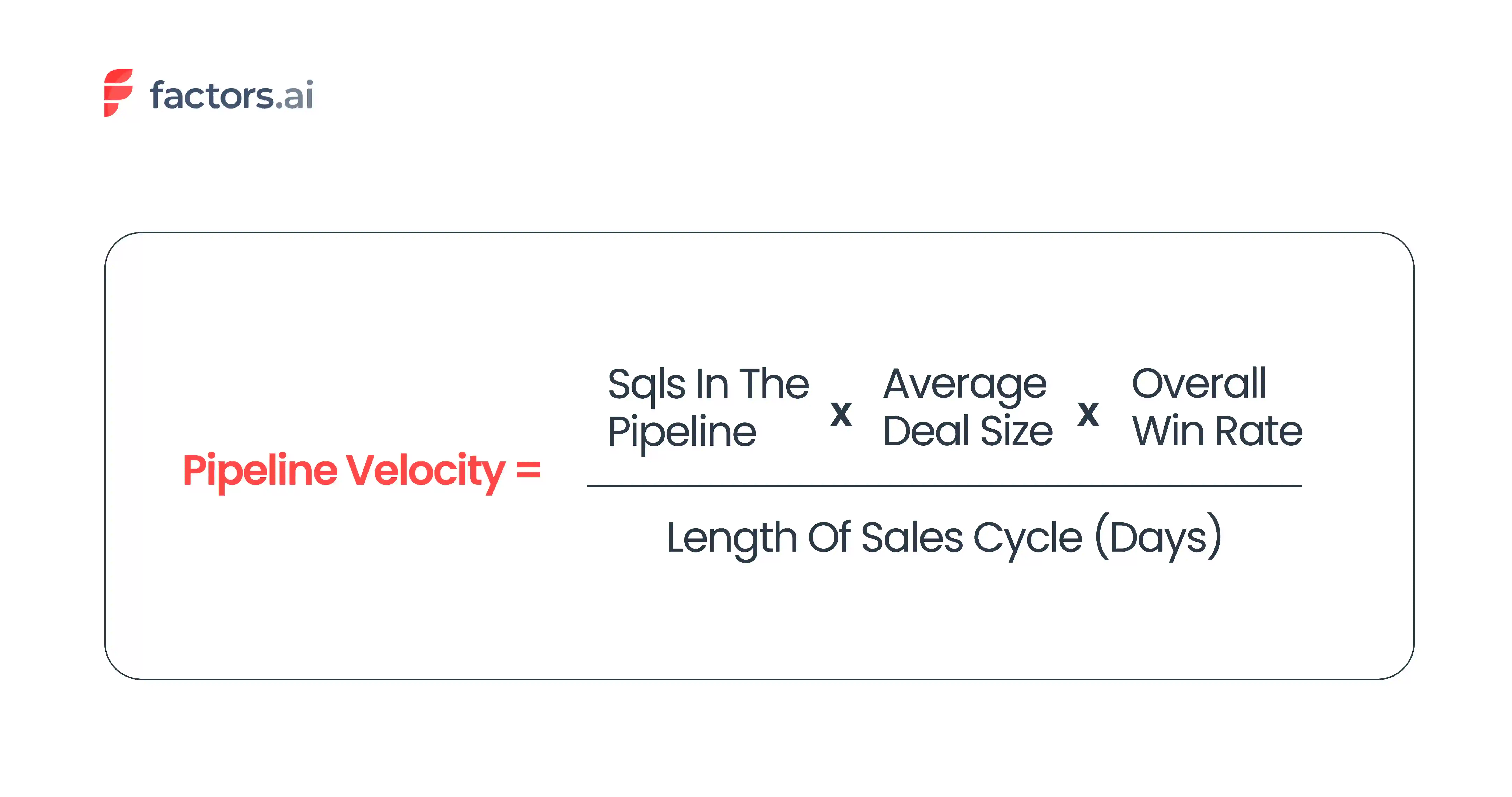
So, if a company has 60 SQLs in their pipeline, with a win rate of 20% and an average deal size of $10,000, and the length of the sales cycle is 90 days. Then the Pipeline velocity will be $1333 per day.
Pipeline Velocity = 60*10,000*20/(100*90)
Pipeline Velocity = $1333.33 per day
To increase the pipeline velocity, focus on the following.
- Increase your lead quality and ensure that the visitors fall in your ICP criteria by tracking qualified traffic.
- If you are losing customers from the pipeline, determine what prompted it. Accordingly, make necessary changes to ensure they stay put and increase the win rate.
- Align the marketing and sales team to make the messaging consistent and relevant for the prospects. Also, make the sales process more streamlined and remove any unnecessary steps. Both these can help improve sales efficiency and subsequently shorten the sales cycle.
5. Churn rate
From a B2B perspective, it is the rate at which a company loses its clients or customers.
It is a crucial ABM metric as it helps businesses understand the health of their customer base and their ability to retain them. A business can calculate the churn rate by dividing the number of customers a company lost during a specific period of time by the total number of customers the business had at the beginning of that period.

So, if a company starts the quarter with 100 customers and loses 20 customers by the end of that quarter, then the churn rate will be 20%.
Churn Rate= 20 100 100
Churn Rate= 20%
A high churn rate is detrimental to a B2B company. It will result in revenue loss and increased expenditure to acquire new customers to replace lost ones. Following are a few ways to reduce the churn rate.
- Build strong relationships with the customers
- Provide excellent customer service
- Offer personalized solutions
- And deliver on the promise you advertise
6. Customer Lifetime Value
Customer lifetime value estimates the value a customer contributes over the course of the relationship. It can be calculated on a revenue or profit basis, which means the formula should match what you want to measure.
For a simple revenue-based estimate, multiply average monthly recurring revenue by the average customer lifetime.
CLV = Average Monthly Recurring Revenue × Average Customer Lifetime in Months
A higher CLV can give you more room to spend on acquiring a customer, provided the margin and payback period still make sense.

So if a company’s average MRR (Monthly Recurring Revenue) is $1000 and the average time period a customer chooses to stay with the company is 8 months, then the CLV will be $8000.
CLV= $1000*8
CLV= $8000

7. Customer Acquisition Cost
CAC, or Customer Acquisition Cost, refers to the total cost spent by a company to attract new customers.
The metric is calculated in a set period of time, and the formula for calculating it is as follows.
CAC= (Cost of sales and marketing/ New customers acquired)
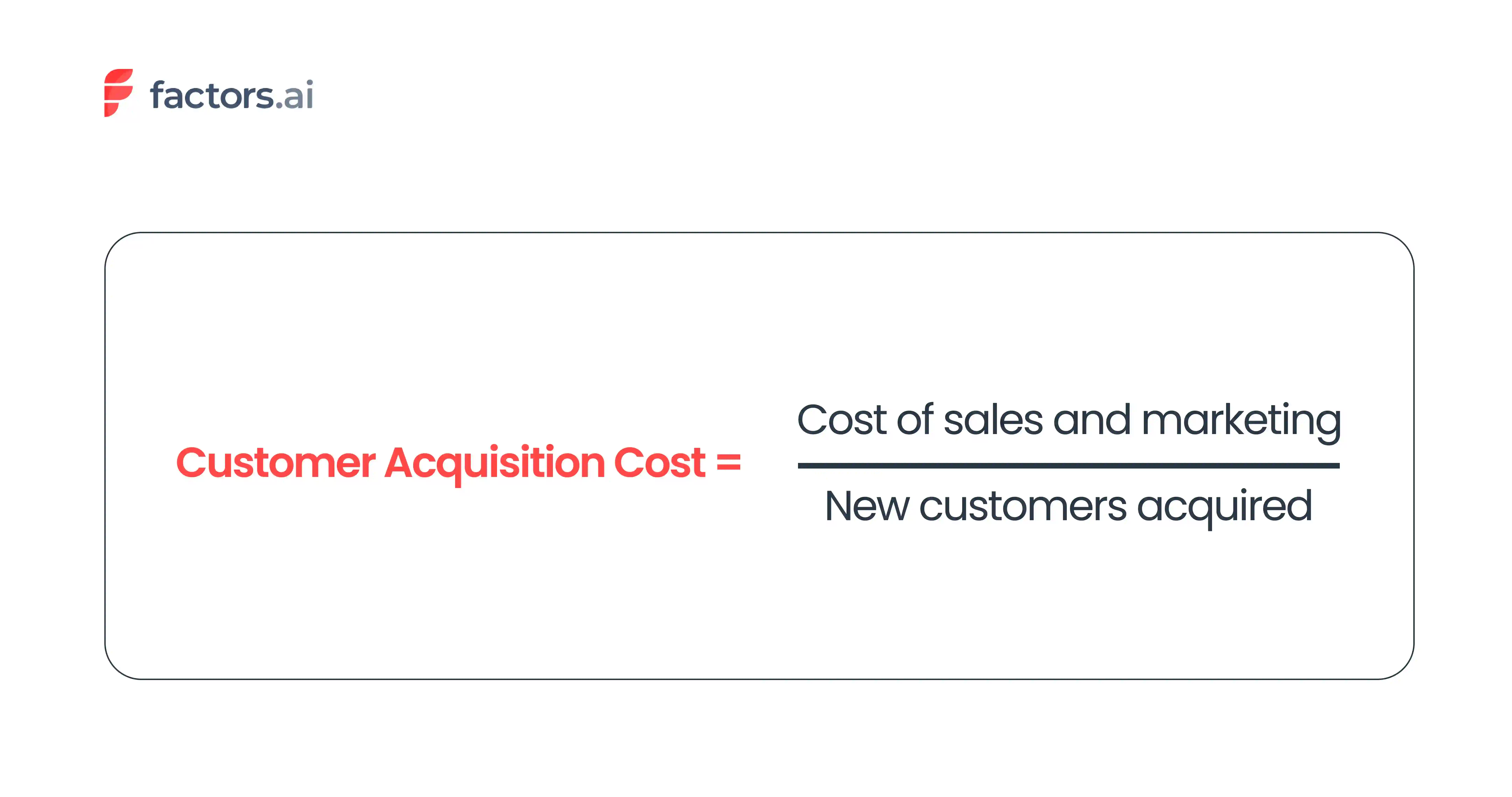
So, if a company spends $400K on sales and $300K on marketing and generates about 700 customers by the end of the fiscal year, then CAC will $1K per customer.
CAC= $400K +$300K 700
CAC=$700K 700
CAC= $1K
Compare the Acquisition cost with the Customer Lifetime Value (CLV) to understand the business’s profitability. If the cost of acquiring a customer is higher than the revenue generated from that customer over their lifetime, then the business is likely to lose money. In this case, it’s time to reevaluate the marketing strategies or consider investing in alternative approaches to lower the acquisition cost.

8. Average Deal Size (ADS)
This is a metric used to measure the average value of each sale made by a company.
By tracking the average deal size, a business can understand how much the customers are willing to pay/invest in their products/services.
ADS is often calculated monthly or on a quarterly basis and can be calculated by dividing the total value of all deals closed by the total number of deals closed during a given period.
ADS= (Total value of the deals won / Total no. of deals won)

So, if a company closes 10 deals in a given month, and the total value of the deals is $200,000, then Average Deal Size is $20,000.
ADS= $200,000/10
ADS= $20,000
9. Length of Sales Cycle
Sales cycle length is the total time a company takes to complete a sale, from the customer’s initial contact with the company to the final closing of the deal.
The sales cycle length differs from industry to industry. For example, according to Klipfolio, the average B2B SaaS sales cycle length is 83 days, whereas, for a B2C company, it will be a week or less.
It is an important metric for businesses as it can impact the revenue, profitability, and overall success of the company. For example, if the length of a sales cycle is higher for a company than its competitors, it indicates that there are inefficiencies in the sales process that need to be addressed.
If you want to calculate the sales cycle length, simply divide the total number of days taken to close each deal by the total deals won.
Sales Cycle Length= (Total no.of days taken to close each deal / Total no. of deals won)

So, if a company closed three deals, each taking 35, 55, and 90 days, then the average sales cycle length will be 60 days.
Sales Cycle Length= (35+55+90)/3
Sales Cycle Length= 60 days
Longer sales cycles also change how you measure ABM performance. If a strategic account may take months to convert, waiting for pipeline or revenue alone can leave you with very little information about whether the campaign is making progress.
Fingerprint runs into this with its highest-value accounts. Alexander Goodwin, Director of Demand Generation at Fingerprint, says the team uses both “input and output-based measurements.” Before a deal closes, its AE scorecard looks at signals such as account engagement and whether sales is successfully multi-threading across the buying committee.
Watch 36:06–37:53 to hear Alex explain how Fingerprint measures progress during longer ABM sales cycles.
Measure the Success of Your ABM Campaigns with Factors.ai
ABM measurement is ultimately about understanding whether the accounts you care about are actually moving. Revenue and pipeline matter, but they only tell part of the story. For longer sales cycles, you also need visibility into how target accounts are engaging before an opportunity is created, and whether that engagement is turning into meaningful progress.
This gets difficult when account activity is spread across your website, CRM, ad platforms, campaigns, and sales touchpoints. Factors.ai brings those signals together at the account level, helping GTM teams see how target accounts are engaging and connect that activity to pipeline and revenue.
You can:
- Identify the companies engaging with your website and connect that activity with other first-party and intent signals.
- Follow account journeys across marketing and sales to understand which accounts are becoming more active and where they are in the buying process.
- Connect campaigns and account engagement to pipeline with attribution and reporting built around revenue outcomes.
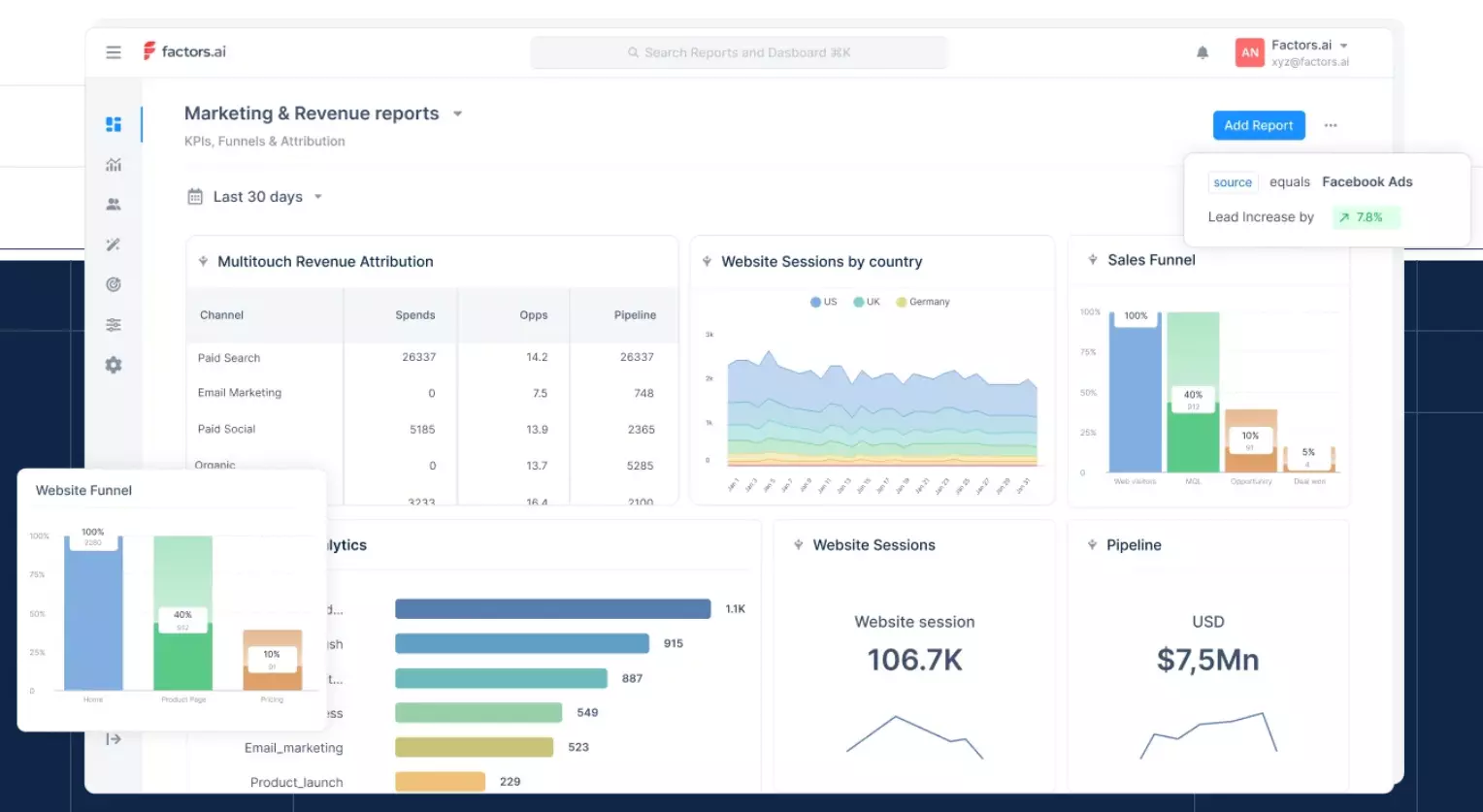
Book a demo to understand how Factors.ai can help you get the most out of your ABM campaigns. Or sign up here to try the platform for free!

ABM Platform Pricing Guide 2026: Compare Costs & Features
Compare ABM platform pricing in 2026, from basic plans to enterprise solutions. Learn about pricing models, hidden costs, and key features.

TL;DR
- Pricing Range: Basic ABM platforms start at $399/month; enterprise plans can exceed $30,000/year.
- Cost Drivers: Volume of accounts, data depth, integrations, and support levels significantly impact price.
- Hidden Fees: Watch for onboarding, integration, and training costs, often omitted in base pricing.
- Model Types: Choose between usage-based, tiered, or custom pricing to match your ABM goals and scale.
What Determines the Cost of an ABM Platform?
The cost of an ABM platform usually ranges from $850 to $2,500 per month for basic plans. Enterprise solutions can cost over $30,000 a year. Key factors affecting the price include the number of target accounts, data needs, and features you choose.
The number of target accounts you track plays a big role in pricing. Platforms charge based on how many accounts you can monitor and engage. For example, Factors' basic plan lets you track 3,000 companies a month for an annual plan of $5K, while our growth plan covers 8,000 companies a month for $15K/year.
You can learn more about Factors for B2B Sales to understand how account intelligence can impact your strategy.
Data quality and depth also impact cost. Platforms with intent data, technographic details, and real-time engagement signals cost more than those with basic account info. Services like buyer intent tracking can add additional money yearly to your subscription.
For insights on how to leverage intent data, check our page on Intent Capture: B2B Buyer Intent Data.
Integration capabilities can also change the price. Basic CRM integrations may be included, but linking to marketing automation platforms, ad systems, or custom APIs often incurs additional costs. For example, at Factors, we charge additional money for our LinkedIn AdPilot, which helps you maximize your LinkedIn ads ROI.
The level of customer support and training also affects the cost. Basic email support is usually included in standard plans, but dedicated account management and premium support can add around $500 or more per month to your subscription.
Explore our Workflow Automations to see how automating tasks can enhance your efficiency.
How Expensive are ABM Platforms in 2026?
ABM platform prices vary widely. The pricing is based on key features and capabilities offered by the ABM tools. Basic options range from $399 to $850 per month for small to mid-sized businesses. Mid-tier platforms cost between $999 and $2,500 per month, offering more features.
Here are the costs for major platforms in 2025:
- Factors.ai: Free Plan, Basic ($5K/year), Growth ($15K/year), Enterprise ($25K/year)
- 6sense: From $2,500/month
- Demandbase: Custom pricing, usually $30,000+ annually
- RollWorks: Starting at $850/month
Enterprise plans often need annual contracts and cost roughly between $165,000 and $325,000 per year. These plans include:
- Advanced AI intent tracking
- Custom integrations
- Dedicated support
- Unlimited accounts
- Premium data services
Most vendors do not list full pricing online. They usually require a demo or sales call, especially for enterprise solutions, as prices depend on business needs and features.
For a deeper understanding of how to optimize your marketing investments, visit our page on Marketing ROI from PPC.
Remember, the cheapest option may not be the best value. Look at the platform's return on investment, not just the monthly cost.
If you are a beginner to Account Based Marketing and wish to know more about it, check our guide on Account Based Marketing in 2025. In case you are looking to evaluate ABM tools, check this guide on How to Choose the Right Account Based Marketing Software.
{{INLINE_CTA_A}}
What Features Impact ABM Platform Pricing?
The features in ABM tools play a big role in their cost. Here's how specific features affect what you'll pay:
Account targeting features impact costs. Basic platforms might only offer IP-based targeting. Premium options include intent data and predictive analytics, which increase prices. For example, Factors offers Interest Groups targeting as an optional add-on for just a few extra dollars.
Data quality and depth drive prices. Enterprise-grade platforms, costing $30,000+ annually, usually offer:
- Real-time intent signals
- Firmographic data
- Technographic insights
- Buyer journey tracking
Integration capabilities influence pricing. Basic plans ($399-$850 per month) often include standard CRM connections. Advanced integrations like:
- Custom API access
- Marketing automation tools
- Ad platform connections (LinkedIn, Google) can add $1,000+ monthly.
Reporting features differ by price. Entry-level plans offer basic analytics. Premium tiers include:
- Custom dashboards
- Attribution modeling
- ROI tracking
- Account engagement scoring
More advanced features mean higher costs. Consider which features impact your ABM strategy to avoid paying for extras you don't need.
For insights on how to improve your funnel efficiency, check out our page on Funnel Conversion Optimization.
Which Pricing Models Do ABM Platforms Use?
In 2025, ABM platforms usually use three main pricing models:
- Usage-Based Pricing: You pay based on your activity. The cost depends on:
- Number of identified accounts
- Contact records accessed
- Monthly active users, for instance, at Factors, we charge based on the companies identified each month: $ 200 for free, $3,000 for $399, and $8,000 for $999.
- Tier-Based Pricing: Features are grouped into packages:
- Basic tiers ($399-850/month): Essential targeting and basic integrations
- Growth tiers ($999-2,500/month): Advanced analytics and more seats
- Enterprise tiers ($2,500+/month): Custom features and full platform access
- Custom Enterprise Pricing: Best for larger organizations:
- Tailored solutions
- Multiple business units
- Complex integration
- Dedicated support. These deals often start at $30,000 per year.
Most vendors require demos to give exact prices, so they can understand your needs and tailor their offerings. Some platforms have add-ons like: - Premium support ($500/month) - Advanced targeting features ($750/month) - Ad platform integrations ($1,000/month)
Select a pricing model that fits your usage and growth plans to get the best return on investment. For more information on how to choose the right ABM platform, visit our page on How Factors Works.
Visit our Factors pricing page for a detailed breakdown of features and plan costs.
{{INLINE_CTA_A}}
What Hidden Costs Should You Watch For?
When planning your budget for an ABM platform in 2025, be aware of several hidden costs that can affect your total investment:
Implementation Fees Most ABM platforms have a one-time setup fee between $1,000 and $5,000. This fee covers technical integration and initial setup. Some vendors include these costs in annual contracts, while others list them separately.
Training Costs: Basic training is often included, but advanced training can add costs.
- Team onboarding: $500-$1,500
- Advanced feature workshops: $750-$2,000
- Certification programs: $1,000-$3,000 per user
Integration Expenses
- API integration fees: $500-$2,000
- Linking third-party tools
- Developing custom integrations
- Maintaining integrations
- Data syncing
Additional Data Costs
- Intent data subscriptions
- Extra contact credits
- Premium account intelligence
- Custom audience creation fees
Always ask for a detailed breakdown of all potential costs when talking to vendors.
Some platforms, like Factors, are clear about add-ons ($750 for Interest Groups, $1,000 for Ad Platform integrations, T&C applied), which helps you plan your budget better.
For insights on how to revive cold deals, check out our page on Revive Cold Deals With Factors.
How to Compare ABM Platform Pricing
When you compare ABM platform pricing in 2025, ask vendors these key questions:
Questions to Ask ABM Platform Vendors:
- What does the base price cover, and what costs extra?
- Do you offer discounts based on usage volume?
- What if I go over the usage limits?
- How flexible are the contract terms?
- How does pricing change if I add team members?
Evaluating Pricing Transparency:
Look for vendors who:
- Show clear pricing tiers on their website
- Provide detailed feature comparisons.
- List the add-on costs.
- Share case studies with ROI details
- Outline all fees upfront
Long-Term Contract Considerations:
Think about these aspects:
- Options for annual vs. monthly payments
- Contract length requirements
- Fees for ending the contract early
- Clauses about price increases
- Terms and conditions for renewal
At Factors, we offer clear pricing starting at $5K/year for basic features, with add-ons for Interest Groups. This clarity helps you make informed choices and avoid surprises when expanding your ABM efforts.
If you are looking to use the Factors platform to scale your ABM efforts, read this guide on using Factors.ai for targeted ABM.
{{INLINE_CTA_A}}
How Much Does an ABM Platform Cost in 2026?
Account-Based Marketing (ABM) platforms in 2025 come with a wide pricing spread, ranging from $399 per month for entry-level plans to well over $30,000 annually for enterprise-grade solutions. Pricing is shaped by account volume, data complexity, integrations, and support level. Vendors like Factors offer tiered pricing based on the number of target companies 3,000 companies/month for $5K/year and 8,000 companies a month for $15/year—while premium platforms like Demandbase and 6sense charge significantly more for AI intent tracking, advanced integrations, and custom support.
Costs also rise with the inclusion of buyer intent data, technographics, or LinkedIn ad optimization, often adding $750 to $1,000 monthly. Hidden fees for setup, onboarding, and integration can push total investment further, especially for businesses scaling their ABM efforts. Pricing models vary—usage-based, tiered, or fully custom making it vital to align cost with current and future needs. Transparent vendors outline these details upfront, helping teams avoid surprise expenses and better forecast ROI.
Built for the modern B2B team. Priced like we actually want you to grow.
Factors is a revenue attribution and account intelligence platform purpose-built for B2B companies running ABM, performance marketing, and demand gen. Our platform helps you identify high-intent accounts, track campaign influence, personalize outreach, and scale what works with zero fluff and full transparency.
Unlike platforms that bury their pricing behind sales calls, we put it all out there, starting at $5K/month with clear add-ons, no surprise fees, and full clarity on what you’re paying for.
What makes Factors different?
- Account-level intelligence: Go beyond vanity metrics. Get visibility into which accounts are engaging, what they’re consuming, and how close they are to conversion.
- Multi-touch attribution: Finally answer, “Which campaigns are actually driving pipeline?”
- LinkedIn AdPilot: Run smarter LinkedIn ads with better targeting, budget control, and ROI tracking.
- Intent-based automation: Prioritize warm accounts with real-time buying signals and automated workflows that hand off leads to sales at the right moment.
- Friendly onboarding & support: No gatekeeping. No ‘you-need-an-implementation-partner’ headaches. Just a team that wants you to win.
If you're evaluating ABM platforms and want to avoid long sales cycles, bloated pricing, or hard-to-use interfaces, Factors is worth a look.
Book a demo to see what a modern, marketer-friendly ABM platform looks like.
ABM Platform Integration Guide: Connecting Marketing Tools in 2026
Learn how to integrate ABM platforms with CRM, ads, analytics, and automation tools. Boost targeting, workflows, and ROI with smart connections.

TL;DR
- Centralized Data: Integrating ABM with CRM and analytics tools consolidates account-level insights for faster decision-making.
- Workflow Automation: Triggers and rules help automate outreach, reduce manual steps, and accelerate responses to intent signals.
- Ad Optimization: Linking ABM with platforms like LinkedIn and Google Ads enables sharper targeting and real-time campaign tuning.
- Integration Challenges: Security, outdated systems, and user adoption can stall progress—prioritize training, audits, and incremental rollouts.
How ABM Platforms Work with Other Marketing Tools
Today, Account-Based Marketing (ABM) platforms are key to targeted marketing strategies. These platforms don't work alone—they connect smoothly with your current marketing tools. For instance, integrating with CRM Systems like Salesforce and HubSpot can enhance your account data management.
Think of ABM platforms as the leader of a band, bringing different marketing tools together to focus on accounts. By 2025, these platforms offer easy connections with almost any marketing tool you use.
The real strength is in how these connections turn scattered data into valuable insights. When your ABM platform links with your Marketing Automation Platforms, advertising tools, and analytics systems, you have one clear source for all account activities.
This connected approach is not just about ease—it makes your marketing more efficient and data-driven, helping you find, target, and engage important accounts with accuracy and a personal touch.
{{INLINE_CTA_A}}
Core Marketing Tools That Connect with ABM Platforms
Modern ABM platforms connect well with four key marketing tools. First, CRM systems like Salesforce and HubSpot store important account data and track relationships. These systems keep sales and marketing efforts in sync.
Second, Marketing Automation Platforms (MAPs) automate tasks like email campaigns and lead scoring. When linked to your ABM platform, they can start personalized campaigns based on account actions.
Third, advertising platforms like LinkedIn and Google Ads help run targeted ad campaigns. These links allow precise audience targeting and quick campaign changes based on account engagement.
Finally, analytics tools give deeper insights into account behavior and campaign results. By gathering data from different sources, ABM platforms provide a full view of account journeys, helping teams measure success and adjust strategies.
These integrations create a unified marketing system where data flows smoothly and actions are coordinated across channels.
Benefits of Integrating ABM Platforms With Other Marketing Tools
When ABM platforms connect with other marketing tools, four main benefits arise. First, unified data management brings account information, engagement data, and campaign metrics into one place. Teams can access real-time insights without switching platforms.
Automated workflows save time and reduce errors. For example, when a high-value account shows intent signals, the system can update CRM records, trigger targeted ads, and alert sales teams. This automation ensures quick responses to account activities.
Enhanced campaign performance comes from better targeting and personalization. By combining data from multiple sources, ABM platforms help create more relevant content and campaigns. They can adjust ad spend based on account engagement and prioritize high-intent prospects.
Better ROI tracking helps teams understand what works. With integrated systems, you can track accounts from first touch to closed deals, seeing how different marketing efforts contribute to success. This clear view of performance helps optimize marketing spend and improve strategy.
{{INLINE_CTA_A}}
ABM Platform X Marketing Tools: Popular Integration Examples
Modern ABM platforms connect easily with key marketing tools. Salesforce integration brings in vital account data like leads, contacts, opportunities, and campaign results. This helps track account progress and monitor funnels automatically.
HubSpot integration syncs CRM data, letting teams qualify and track top accounts using web analytics and account details. It gathers contact info, company data, deals, forms, and lists.
LinkedIn Advertising integration lets teams review ad performance, such as clicks and views, and identify companies interacting with ads for precise outreach. This improves campaign ROI and audience targeting.
Google Ads integration adds advertising data to the ABM system, allowing for detailed ROI analysis. Teams can track campaign results and make informed decisions about ad spend and targeting.
These integrations are key to successful ABM campaigns, ensuring data moves smoothly between platforms so teams can quickly act on insights.
Best Practices for ABM Platform Integration
When setting up ABM platform integrations, follow proven steps for smooth data flow and optimal performance. Start by setting clear rules for how information moves between systems. This prevents duplicate records and keeps data accurate.
Manage permissions carefully. Ensure team members have the right access while keeping security strong. For instance, sales teams might need full CRM access but limited marketing permissions.
For workflow automation, start with simple processes before creating complex ones. Visually map your workflow, noting trigger points and actions. Test each automation thoroughly in a controlled setting before going live.
Regularly audit your integration settings to maintain top performance. Check monthly for sync issues, outdated workflows, or permission conflicts. Document all configurations and keep a change log to track changes and solve issues effectively.
{{INLINE_CTA_A}}
ABM Platform Integration Challenges and Solutions
ABM platforms can integrate well, but teams often face challenges. Data issues can lead to duplicate records or missing information. The fix? Set up regular audits and automated cleanups.
Security can be a concern when linking platforms. Use strict permission controls and ensure all tools comply with standards like GDPR and SOC2 Type II.
Old systems may not work well with new ABM platforms. Use middleware or API connectors to help. Some teams succeed with phased integration instead of doing it all at once.
Users may struggle with complex workflows. Improve this with:
- Structured training
- Clear documentation
- Simple interfaces
- Regular feedback
Budget limits might restrict integration. Start with key integrations that give the best return, then expand as you can. This ensures growth and keeps the system effective.
How to Connect ABM Platforms with Key Marketing Tools in 2026
Account Based Marketing platforms have evolved into the connective tissue of B2B marketing operations. Their strength lies not just in targeting but in their ability to unify marketing stacks—from CRMs and automation platforms to ad systems and analytics dashboards. In 2026, leading ABM tools offer plug-and-play integrations that allow marketers to orchestrate campaigns with accuracy and agility.
Tightly integrating with CRMs like Salesforce and HubSpot, ABM platforms enhance account visibility across the funnel. When paired with automation tools, they trigger intelligent, real-time responses to account activity. Ad platform integrations further refine targeting, enabling responsive audience segmentation based on engagement signals. Meanwhile, analytics tools complete the loop, tying performance metrics back to specific accounts.
The benefits are tangible: better data consistency, faster workflows, smarter personalization, and clearer attribution. However, integration isn’t plug-and-play for every team. Challenges—from data hygiene and security to platform compatibility—require structured planning and continuous optimization. Successful implementation hinges on governance, automation logic, and disciplined execution.
{{INLINE_CTA_A}}

9 SaaS Marketing Metrics You Should Be Tracking
Discover Top 9 essential SaaS marketing metrics that you should be tracking for success. Learn how to measure your performance and optimize your strategies

Not all SaaS marketing metrics are made equal
Between traffic, conversion rates, MQLs, CAC, churn, and more, there’s no shortage of key marketing metrics for SaaS companies to track.
Each of these metrics allows teams to capture the pulse of marketing health, which in turn helps make iterative improvements to marketing performance and ROI.
No doubt, SaaS marketing metrics are important.
But it can also be overwhelming for teams to know which metrics matter more than others. Given that monitoring marketing metrics can be an investment in and of itself, it’s vital to prioritize a few key ones to begin with.
This blog explores 9 of the most important SaaS metrics that every marketing team should regularly keep tabs on. But first, let’s briefly discuss what marketing metrics are and why they’re important.
Related reading: 9 ABM metrics to track campaign success
What are SaaS marketing metrics?
SaaS marketing metrics are standards of measurement used to monitor the efficacy of SaaS marketing campaigns and assets.
These metrics provide a frame of reference to compare past and present performance in order to continue to make iterative improvements to desired objectives.
For instance, observing that the signups have dramatically increased by 40% after a landing page design overhaul is clear evidence of improvement in performance. At a deeper level, SaaS marketing metrics like return on investment helps marketers prove the impact of their campaigns on pipeline.
In summary, marketing metrics help SaaS companies track performance, improve ROI, and quantify bottom line impact.
{{INLINE_TOFU}}
9 key marketing metrics for SaaS companies
1. Website traffic
Definition: Website traffic refers to the total number of web sessions or website visitors over a certain period of time.
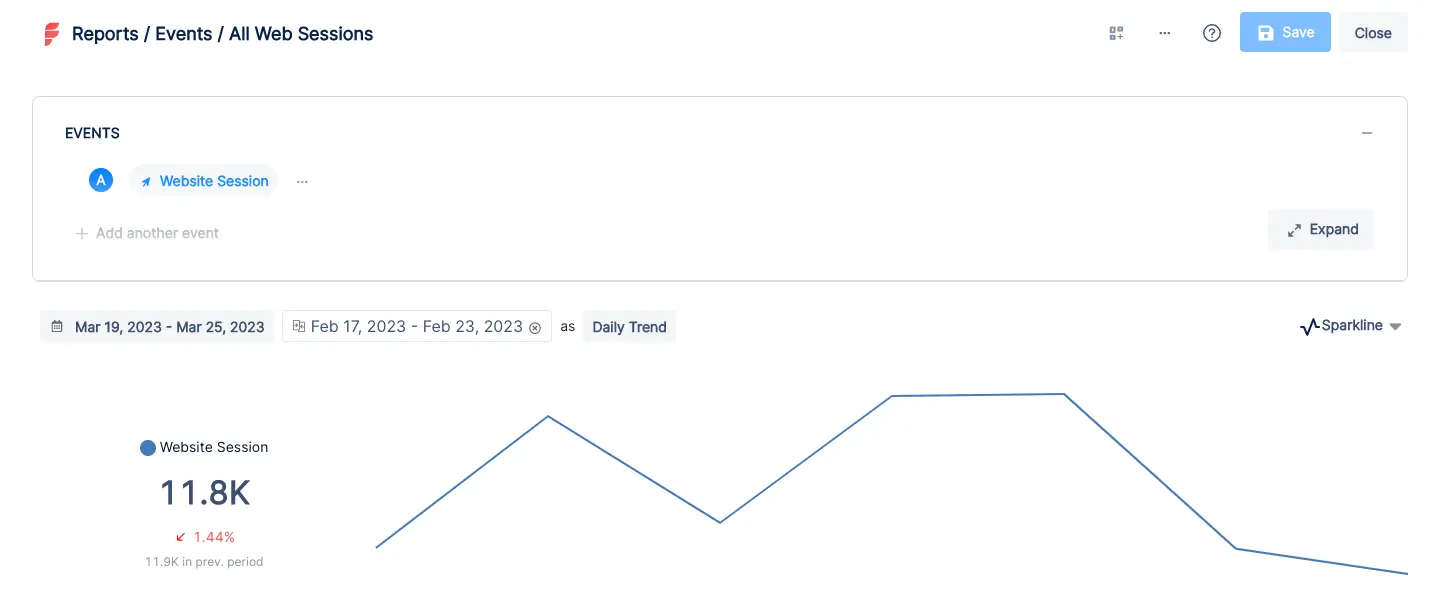
Especially in SaaS, the website is at the heart of business. It acts as a hub for prospects to learn more about your work and reach out for a demo call or free trial. Needless to say, not all traffic is from high-intent prospects. In fact, only a fraction of traffic is likely to be relevant to your business. That being said, when used in tandem with other metrics, website traffic can help SaaS companies asses how the number of visitors interested in your brand and product.
Several tools including Google Analytics and Factors.ai measure website traffic. It’s a helpful metric to understand high-level website health as well as the immediate impact of marketing campaigns and content. While traffic in and of itself may not provide granular insights, growing traffic is generally a positive sign as it means more visitors are likely to eventually convert to paying customers.
2. Conversion rate
Definition: Conversion rate measures the proportion of users who complete a certain event or action.
Conversion rate % = total conversions ÷ total visitors x 100
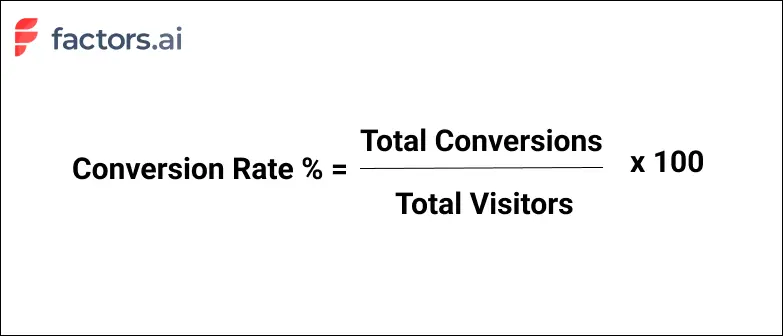
Conversion rate is a broad SaaS marketing metric that can apply to a wide range of scenarios such as webinar registrations, demo form submissions, or trial sign-ups.
One of the most common uses of conversion rate is in landing pages.
For example, say 50 people click on a search ad and arrive at a landing page with a demo form. 2 people actually submit the demo form and schedule time to speak with a sales rep. In this case, the conversion rate is 2/50 x 100 = 4%. Maybe improving headline relevancy and page design could increase conversions even further.
The average benchmark landing page conversion rate is 9.7%
3. Bounce rate
Bounce rate is defined as the percentage of website visitors who click away from a website without viewing or interacting with any other page apart from the one they initially landed on.
As much fun as it sounds, bounce rate is a serious marketing metric that reflects the quality of your web pages. A high bounce rate indicates that your web page design/content does not resonate with the visitor, causing them to leave without exploring any further.
Bounce rate = total one-page visits ÷ total visitors x 100

Note that a landing page with a high-bounce rate isn’t necessarily a cause for concern given that the purpose of the landing page is almost always to bring in a visitor, have them submit a form, and leave.
Instead, bounce rate is more relevant for the homepage, feature page, pricing page, or blogs. High bounce rates in such pages indicate that the content or design isn’t relevant or captivating enough for the visitor to continue exploring the website.
Bounce rate benchmarks:
- 0-40% bounce rate: excellent performance
- 40-55% bounce rate: decent performance
- 55% - 70%: mediocre performance
- 70%+ bounce rate: poor performance
Average bounce rates by channel:
- Display ads: 56%
- Social: 54%
- Direct: 49%
- Paid search: 44%
- Organic: 43%

In addition to tracking traditional bounce rates, Factors.ai shows granular insight into exit and engagement rates as well. This provides complete insight into where visitors are dropping off and what content resonates most with the audience.
4. Marketing Qualified Leads (MQLs)
It’s all well and good to improve website traffic but real marketing impact involves driving qualified visitors who show explicit potential to eventually become paying customers. Marketing qualified leads is a metric that captures the number of leads early along the customer journey — but nonetheless on the path to becoming customers.
Marketing qualified lead (MQL) measures the number of top-of-the-funnel leads that exhibit explicit interest in what a company has to offer based on their interactions across paid campaigns, social media, website, and other touchpoints.
For example, a visitor downloading an eBook on “customer journey mapping” is likely interested in addressing this use-case and is at the very least open to learning more about Factors. Generally speaking, this lead can be considered an MQL.
Factors.ai connects the dots between campaigns, website, and CRM to showcase which marketing efforts and assets are contributing to MQLs, SQLs, deals, and other lifecycle stages.
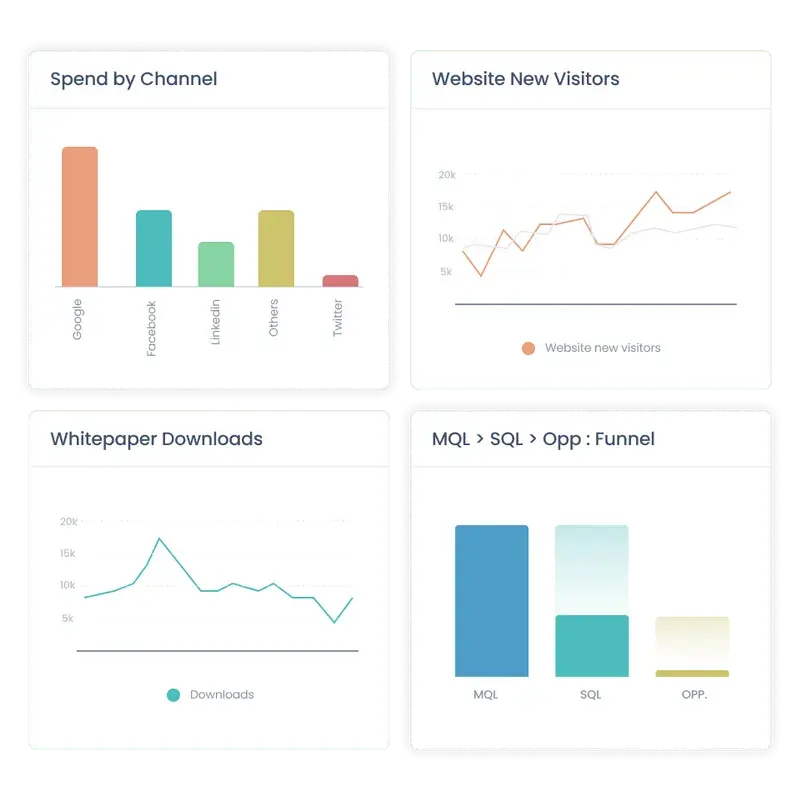
5. Sales velocity
Sales velocity is defined as the rate at which leads and prospects move through the sales funnel and generate pipeline.
Sales velocity = (opportunities x deal value x % win rate) ÷ length of sales cycles
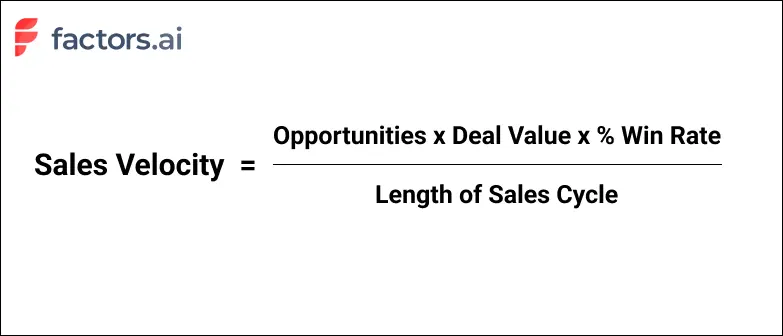
Sales velocity indicates the health and performance of sales and marketing teams to herd buyers towards becoming paying customers.
Go-to-market teams can improve sales velocity by:
- Increasing number of opportunities by scaling marketing initiatives and sales outreach
- Increasing deal values by targeting larger customers
- Increasing % win rate by improving sales pitches and enablement material
- Decreasing the length of the sales cycle with incentives like free trials or limited time deals

Funnel analytics on Factors.ai allows users to calibrate custom sales cycles to identify the velocity between one stage to the next. With this, users can understand how long it takes for visitors to progress from ad campaigns to web sessions to button submissions to deal won. In turn, this helps identify points of weaknesses or friction to eliminate across the journey.
6. Customer Acquisition Cost
Most marketing teams invest significant resources in paid campaigns, social, SEO, and offline events with the hopes that these initiatives attract further customers to cover their costs several times over.
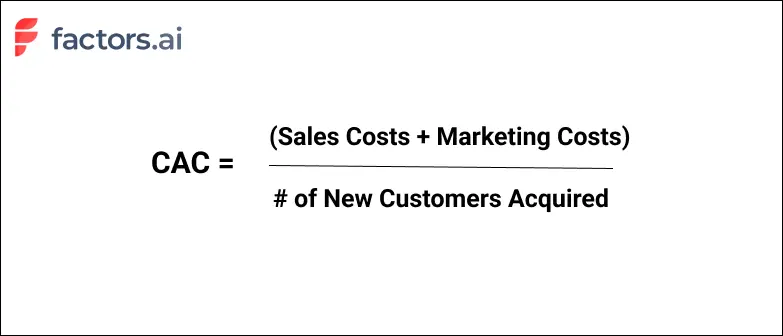
Customer acquisition cost (CAC) or cost per acquisition (CPA) is a metric that measures the amount of money spent to acquire a single new customer.
In theory, this includes employee compensation, overheads, and, of course, marketing expenses. In practice, most teams only consider the latter.
For example, if a marketing team spends $70 on ads and $30 a website redesign to acquire 20 new customers, the CAC works out to be: ($70 + $30) ÷ 20 = $5 per customer.
7. Customer lifetime value
Customer lifetime value (CLV) is the total expected revenue from a customer during the entire relationship with a business.
For instance, long-term, enterprise customers with large contract values are bound to have greater CLV than mid-market customers with short-term contracts.
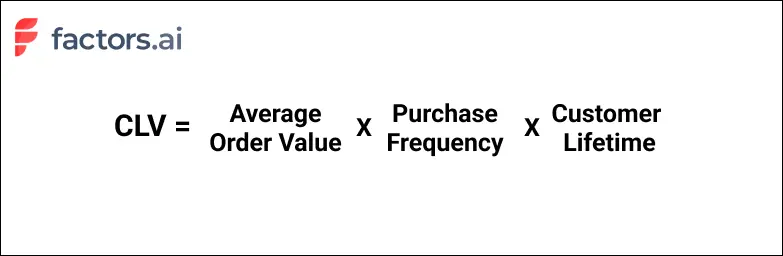
While it certainly helps to know the cost of acquiring a single customer, it’s crucial to measure the lifetime value of each of these customers to truly understand if acquisition initiatives are worth it.
For example, if it costs $300 to acquire a single customer with a customer lifetime value of $250, it’s actually a loss of $50 to the business. Alternatively, if CAC is $500 but CLV is $5000, the customer pays back the CAC several times over. Hence, it’s important to look at CAC and CLV in conjunction.
8. Return on marketing investment (RoMI)
Now more than ever, SaaS marketing teams are urged to prove their impact on bottom line metrics like pipeline and revenue. This is where RoMI comes in.
Return on marketing investment (RoMI) measures the revenue won from marketing campaigns against the cost of that campaign.
RoMI = revenue earned from campaign ÷ cost of campaign x 100
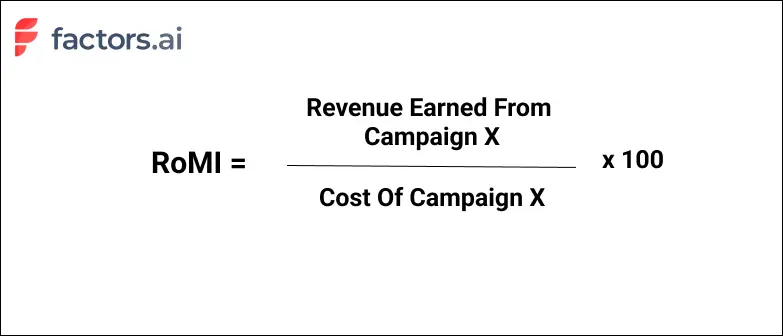
In theory, the RoMI is a straightforward concept. But in practice, calculating RoMI without the right multi-touch attribution tools can be an unintuitive, time-consuming chore. Given that SaaS sales cycles involve several touch-points across several campaigns and stakeholders, it’s hard to pin-point exactly which campaign contributed to revenue.
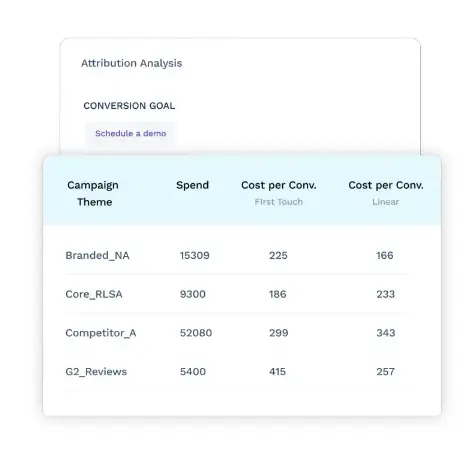
Factors.ai solves for this challenge with a wide range of powerful revenue attribution models to quantify marketing ROI. In turn, this helps allocate budgets towards campaigns that drive results and prove marketing’s impact on revenue.
9. Retention & Churn
We’ve combined retention & churn together as they’re two sides of the same coin.
Customer retention measures the number of customers that a business retains over time through repeated purchases or contract renewals.
Customer retention is an important SaaS metric as retaining existing customers works out to 5-10 times cheaper than acquiring new ones. Hence, businesses should always look to improve retention rates.
On the flip side, Churn refers to the number of customers who discontinue their relationships as buyers with a business.
A high rate of churn indicates that customers are not receiving the value or service they expect from the business. It’s a strong signal of dissatisfaction. Hence, businesses should always look to limit churn rates.
And there you have it. While there are several other important SaaS marketing metrics out there, the 9 metrics we’ve covered in this blog should give any SaaS marketing team an idea of their top and bottom line performance.
Want to learn more about how Factors.ai can help ll the metrics that matter to you under one roof? Request a personalized demo today!

ABM Content Strategy: How B2B & SaaS Teams Drive Revenue
A practical guide to ABM content strategy for B2B and SaaS teams. Learn what content works, how to activate it, and how to measure real pipeline impact.
TL;DR:
- ABM content strategy is not about creating more content. It’s about delivering the right content to the right accounts based on intent, buying stage, and sales context.
- Inbound content attracts demand. ABM content reorients it by supporting live deals, real objections, and buying-group decisions.
- Effective ABM content is activated by account behavior, not publishing calendars. It is measured by pipeline movement, not engagement metrics.
- SaaS teams excel at ABM when they use product signals (feature interest, docs usage, trials, demos) to deploy business-relevant content.
- Platforms like Factors.ai make ABM executable by mapping content engagement to account intent, sales actions, and revenue impact.
Does this story sound familiar?
Marketing spends weeks creating ‘‘personalized’ content. They tell sales it’s ready. A few emails go out. Nothing happens.
And the conclusion is:
“ABM content doesn’t scale.”
That’s not true. The content wasn’t wrong. The timing, context, and ownership were.
A functional ABM content strategy is more about operational discipline than creative brilliance. You need to know who the content is for, why it exists, when it should be used, and how sales should act on it.
This article breaks down ABM content strategy and what works for B2B SaaS teams IRL.
What Is ABM Content Strategy (Practically Speaking)?
Technically, ABM content strategy refers to the planning, creation, activation, and measurement of content designed to influence specific target accounts and their buying decisions. Unlike search engine optimization, ABM is heavily driven by account intelligence signals, buying stage, and sales context.
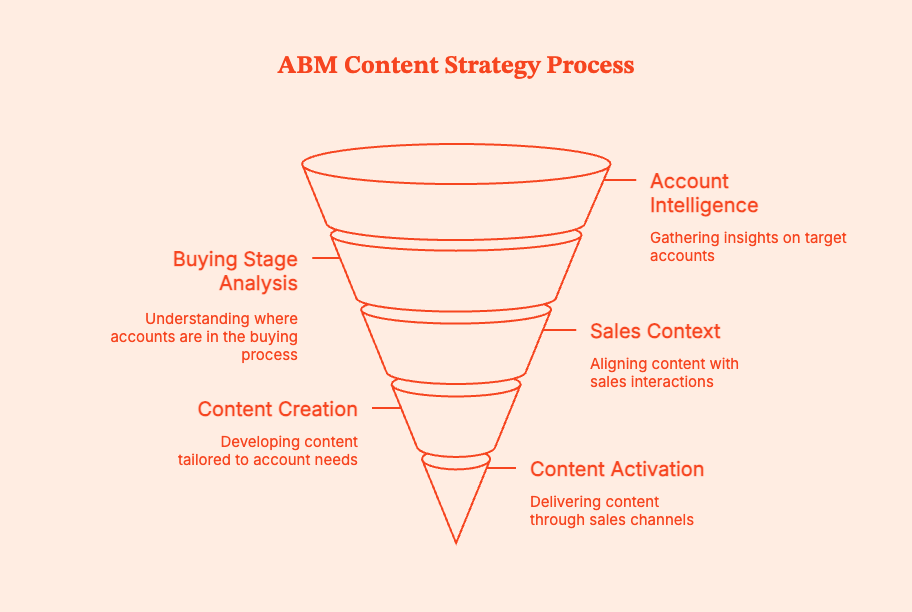
In practice, it means answering three uncomfortable questions:
- Which accounts are we trying to move this quarter?
- What decision are they currently stuck on?
- Who inside that account needs proof, reassurance, or leverage?
ABM content strategy plans, creates, and leverages content around those answers.
Within an inbound marketing content strategy, you publish and wait.
ABM content is:
- Triggered by account behavior
- Used directly in sales motion
- Measured in its impact by deal movement
Pro-Tip: If any content piece does not support a step in the sales funnel, it’s probably not ABM content.
For a practical example, our webinar recap with Concirrus shows how its team personalizes ads, landing pages, and follow-up messages for target accounts.
ABM content in practice: How Concirrus personalizes the buyer journey
Once you have mapped content to buying questions, plan how that messaging carries across interactions. An account might encounter a LinkedIn ad, visit a landing page, and later receive an email from sales. Each interaction should help them continue evaluating the same business problem.
In our webinar recap, Viswanathan Nadarajah at Concirrus explained how his team approaches this. Account-specific LinkedIn ads led to tailored landing pages. For companies focused on profitability, the messaging emphasized ROI and cost efficiency. For growth-focused companies, the emphasis changed accordingly.
Website activity then triggered personalized outreach. The follow-up messages used the contact’s role, company context, and predefined pain points to make the content relevant to that person.
You can apply this approach by planning related assets together. For example, an ad about reducing operating costs could lead to a page explaining the potential savings, followed by an email sharing a relevant customer example. A finance buyer might need the cost breakdown, while an operations lead needs evidence about implementation.
Define those content choices before automating delivery. For each follow-up, your team should know which buying question it answers and which asset provides useful evidence.
ABM Content vs Inbound Marketing Content Strategy
Inbound content is the raw material. ABM content reframes existing assets around real account-related questions that arise at that moment.
If you are looking to understand more about this, here is a blog you might be interested in ABM vs. Inbound Marketing
The Operating Principles Behind ABM Content That Actually Works
ABM content often fails because teams skip the basics under pressure.
But these principles are essential and evidence-based on patterns that show up repeatedly when ABM programs either start influencing pipelines or just stall.
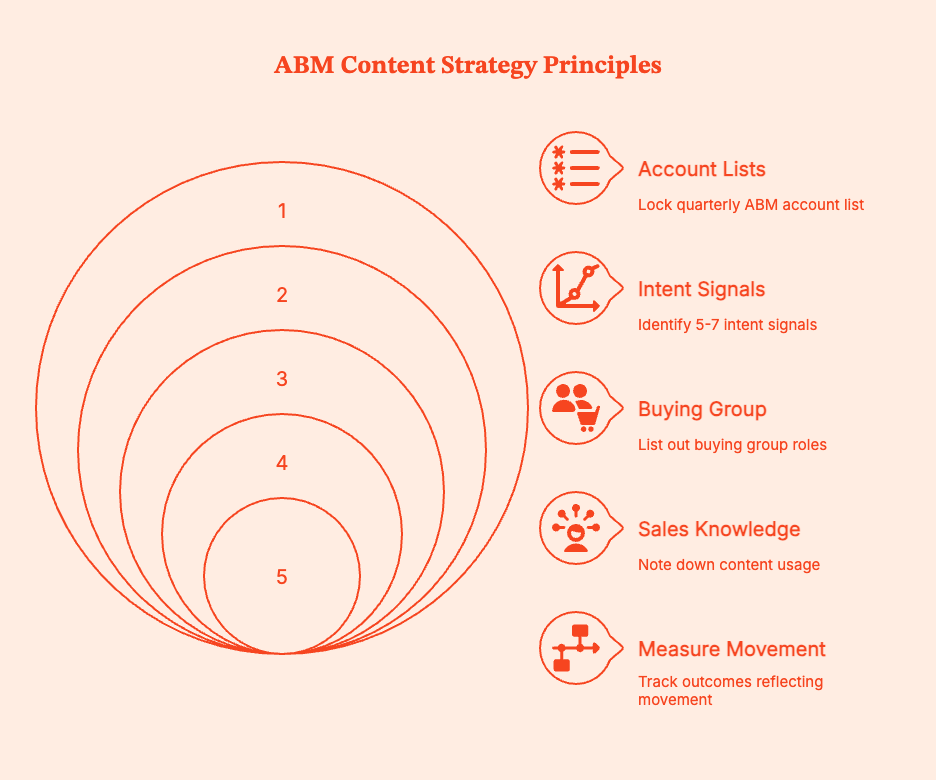
1. Account lists always come before content ideas
Don't ask “What content should we create?” before “Which accounts matter right now?” If you do, you end up with:
- Content that feels generic, truly relevant to no one
- Sales saying, “This does not work for my accounts.”
Instead, do this:
- Lock a quarterly ABM account list with sales
- Group accounts by shared decision blockers like budget approval, security review, and internal consensus. Don't just judge by industry or size.
- Then ask: What proof or clarity is missing for these accounts to move?
2. Intent, not calendars, determines timing
If you serve the right ABM content at the wrong moment, you find that even great content “didn’t work.”
Accounts move in bursts, pauses, and regressions. Your content marketing efforts have to match this momentum. Be timely, not persistent.
Instead, do this:
- Identify 5–7 intent signals indicating real movement: pricing/demo page revisits, competitor comparison views, repeat visits from the same account, direct engagement with sales emails, etc.
- Map one clear content action to each signal
- If an account isn’t showing buyer intent, don't bombard them with content. Consider letting the account rest for a while
Question: Are you counting LinkedIn intent data into your ABM brainstorming?
3. Buying-group coverage > persona perfection
You can refine ABM personas all you want, but deals will get stuck even if one person in the B2B account has unanswered questions. ABM content works best if it is catered to core decisions in the sales pipeline, rather than these personas.
Instead, do this:
For each target account, list out:
- The economic buyer (who approves spending)
- The technical evaluator (who manages risk)
- The day-to-day user or champion (who actually uses the product)
Then ask yourself and your team: Which of these roles seem to currently lack proof or confidence in our product?
Now build ABM content to unblock that decision. Address specific concerns instead of throwing generic assets at them.
4. Sales must know when and how to use content
ABM content can't just live in marketing folders. If sales teams don't know when to use an asset, why it exists, and what it’s meant to achieve, it just won’t get used.
Instead, do this:
For every ABM asset, note down:
- When in the sales funnel, it should be used
- The specific objection or risk each content piece talks to
- The follow-up action that the content is meant to enable
If a salesperson can’t explain any asset’s purpose in one sentence, it's not ABM content, just marketing collateral.
5. Measure movement, not performance
ABM content isn't successful when it ‘performs’, but rather when it moves accounts along the buying pipeline.
Instead, do this:
Track outcomes that reflect movement, such as
- Target audience engaged after exposure
- If opportunities were created or accelerated by the content
- If relevant content has helped sales move conversations forward
Vanity engagement metrics do not matter. Only the ones that correlate with pipeline change do.
One account journey shared in our Concirrus webinar illustrates why measurement needs context. The account received LinkedIn ad impressions in April, showed website visits from several stakeholders in May, and submitted a demo request through Google Ads in June. The conversion captured the final step in a longer recorded journey.
Use engagement as an early indicator, then check whether the account progresses toward a sales conversation or opportunity. Earlier interactions help explain the journey, but their presence alone does not establish how much each channel caused the conversion.
Types of ABM Content That Hold Up in Real Sales Cycles
Content for account based marketing works best when it is deployed at the exact moment a deal risks stalling.
Since B2B buying dynamics are mostly predictable, mature ABM pipelines tend to use content in a few repeatable categories.
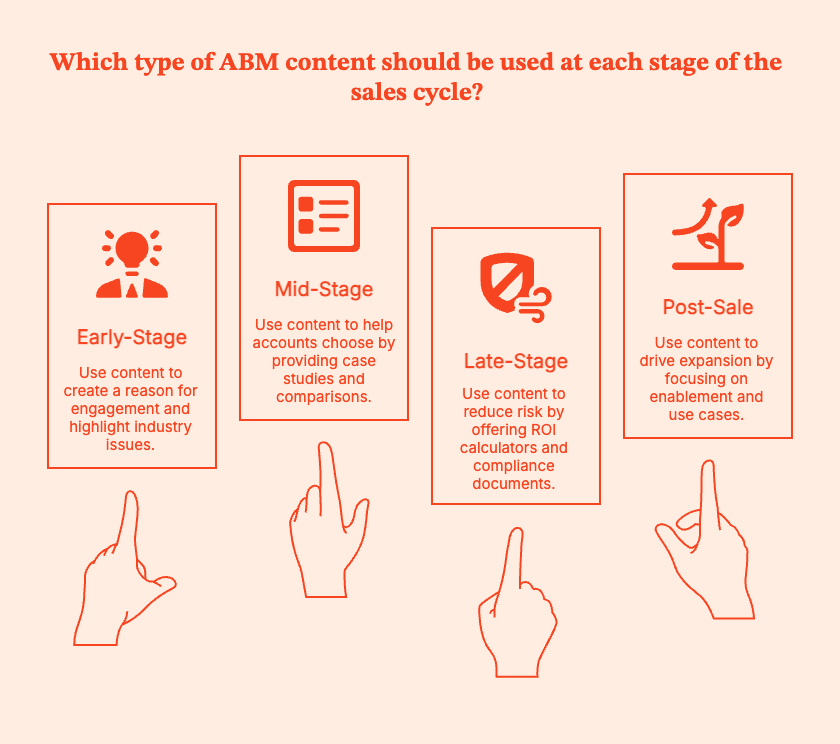
1. Early-Stage: Creating a Reason to Engage
Right now, key accounts are aware of the problem but not yet working on solving it, especially with you. You have to get their attention on said problem.
Try using:
- Industry POV memos talking about issues each account is likely feeling, but hasn’t focused on
- Problem-specific landing pages pointing out operational pain points rather than product features
- Lightly personalized ads speaking to the account’s industry, role, or maturity
Deploy this valuable content when accounts are still researching, or when sales needs a credible reason to start a conversation.
Concirrus offers a practical example of keeping personalization consistent across content. In our webinar, Viswanathan Nadarajah described account-specific ad creative and tailored landing pages, reporting LinkedIn ad click-through rates of 1.5–2%. Treat this as a result from his campaigns.
For selected priority accounts, check whether the landing page continues the business problem introduced in the ad. Personalizing the creative helps little if the page leaves buyers searching for information relevant to them.
Also, read this guide to implementing a conversational ABM strategy
2. Mid-Stage: Helping Accounts Choose, Not Browse
At this stage, multiple stakeholders enter the conversation, internal comparisons begin, and “we need to review options” becomes a frequent reply.
Try using:
- Industry-specific case studies responding to each account’s structure
- Competitive comparison pages that acknowledge tradeoffs
- Webinars or workshops tailored to a narrow segment or buying concern
This content helps you when more than one stakeholder is involved, when deals stall, and when the account is comparing you to competitors.
3. Late-Stage: Reducing Risk, Not Selling Harder
Here, the deal has to be justified. Accounts tend to back off when they perceive some form of risk.
Try using:
- ROI calculators mapped to the account’s scale and cost hierarchy
- Security, legal, and compliance documentation to address specific risk concerns
- Custom decks aligned with the account's internal approval process
These assets are best used when budget, security, or procurement teams are involved as buyer personas.
4. Post-Sale: Expansion
Don't stop thinking about ABM once the deal closes. Instead, work on:
- Creating content around enablement, tied to real usage milestones
- Building expansion use-case playbooks for accounts based on similar growth paths
This content comes into play when sales and marketing teams want ABM to extend beyond acquisition, and when expansion depends on more product adoption and internal advocacy.
The goal of post-sale ABM content is to anticipate the next buying decision before the account explicitly asks for it.
Pro-Tip: The strongest ABM teams don’t create endless new assets but edit ruthlessly.
- Remove generic framing
- Use examples relevant to the account’s reality
- Map each asset to a specific deal moment
Focus on relevance, not novelty.
ABM Content Strategy for SaaS Teams
SaaS buying behavior is quite visible if you know what to look for. You can actually gauge intent way before anyone fills out a form or replies to sales messages.
SaaS teams can operationalize these signals via ABM content. The trick is to stitch together product data, content, and sales insights into ABM assets.
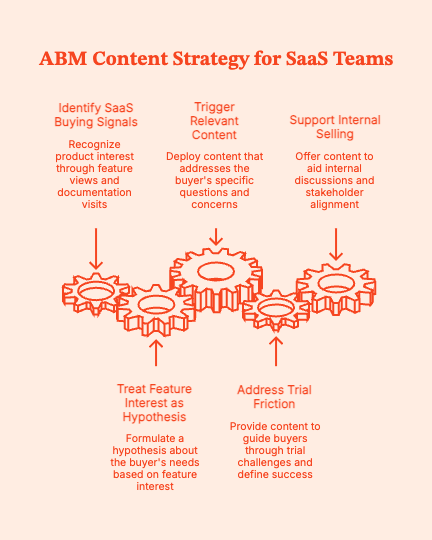
1. SaaS buying is product-informed
Serious SaaS buyers don’t read blog posts to make decisions. They explore feature pages, study product documentation, take free trials, and watch demos multiple times. ABM success comes from responding to signs of product curiosity with business contextual content.
These are the metrics to focus on, rather than engagement, eBook downloads, webinar attendance, and generic site visits.
2. Treat feature interest as a buying hypothesis
If an account repeatedly views a specific feature, they are probably wondering whether it can solve their problem.
Instead of retargeting such accounts with product ads or generic nurture emails, trigger content that explains:
- Why teams like them care about this capability
- What problem it typically solves
- What changes operationally after adoption
3. Pay attention to documentation and help-center visits
Pre-sale documentation page visits are one of the clearest signs of buying intent in SaaS. Such accounts are usually:
- Validating feasibility
- Pressure-testing the product
- Raising and debating internal questions
When you detect such account behavior:
- Flag repeated or deep documentation usage
- Trigger ABM content that anticipates implementation concerns, explains time-to-value, and shows how similar teams have onboarded successfully
4. Trial friction is an ABM content opportunity
When an account stalls inside a trial, don't jump right to blaming onboarding or UX.
It could be that:
- The buyer doesn’t know what “success” should look like
- The wrong stakeholder is judging the product
- The use case isn’t clearly mapped to ROI
Use ABM content to smooth the journey with:
- Role-specific “what success looks like” guides
- Use-case playbooks relevant to the account’s industry or size
- Short internal decision aids
5. Repeated demo views = internal selling (probably)
If an account watches demos multiple times over several days, that's usually a sign of internal sharing. Most probably, someone on the account side is discussing the product internally and trying to get other stakeholders on board.
Deploy high-impact ABM content to help them out. This can include:
- One-page decision summaries
- Stakeholder-specific FAQs (security, finance, ops)
- ROI narratives that can be forwarded without explanation
Note: The biggest ABM content marketing strategy mistake is treating ABM content as gated inbound content (long-form, overproduced assets, no clear instructions for sales use, etc.). ABM needs to be shorter, sharper, and tied to specific moments in the customer journey.
If you are a small team and and are looking to run ABM, here is a guide that you may be interested in ABM marketing for small B2B teams
How Factors.ai enables ABM
Most ABM programs stall due to visibility and handoff issues. Marketing creates or curates account-level content, but nobody knows which accounts are engaging, how that engagement helps deals, or when sales should act. Factors.ai fixes those gaps by extracting account signals from raw engagement data.
1. What Factors actually gives you
- Anonymous account identification to match IP and behavioral patterns to companies. Uses firmographics to show who’s visiting even before forms are filled.
- Unified account-level intent to analyze website behavior, intent feeds, ad interactions, and trial/demo signals. Combines this data into a single account engagement profile.
This might help: A Guide to Intent Data Platforms: Features, Benefits & Best Tools
- AI scoring & Milestones that score accounts by fit + intent, detect milestones (e.g., pricing page + repeated docs views), and point out accounts that look ready for conversation.
- Activation & orchestration to notify sales, trigger outbound sequences, and refresh ad audiences automatically (AdPilot/activation features).
- Account-first attribution that connects content and engagement to pipeline and revenue.
In other words, with Factors.ai in your ABM toolkit:
- You stop guessing which content gave a win. You know which account visited which pages, saw which ads, and led to what opportunity.
- You act at the right moment. Factors will trigger content or sales actions (like reaching out, sending a specific deck) when an account shows signals of buying interest.
- You make sales-shareable content for the buyer. When you know which stakeholder is interacting, you can push the right asset that tips the scales in your favor.
2. How to wire Factors.ai into your ABM content operating model
3. Measuring ABM Content Success
Common ABM Content Strategy Mistakes
Most ABM content failures don’t blow up ABM campaigns or trigger emergency meetings. They drain time, budget, and credibility until teams either mistakenly conclude that “ABM doesn’t work”. Or, they accurately realize that ABM exposes weak operating models.
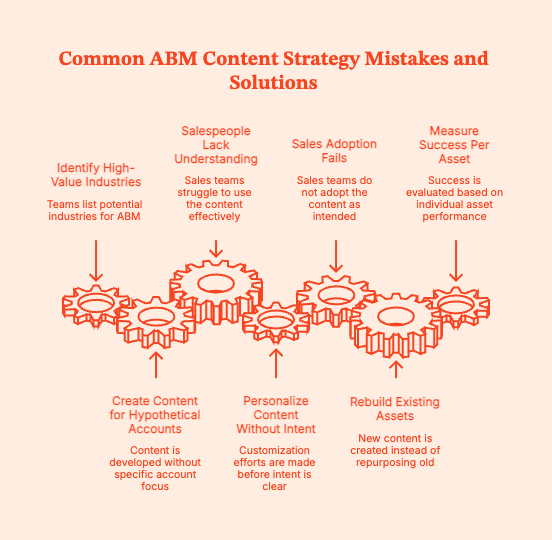
1. Creating content before account prioritization
Often, ABM starts with a quarterly planning meeting, a list of “high-value” industries, and content ideas. The high-value accounts are forgotten, which means:
- Content is designed for hypothetical accounts
- Salespeople don't understand how to use it
Instead, try this:
- Set up a time-bound ABM account list (30–90 days)
- Tie every asset to specific accounts
- If you can’t name the deal a content piece aims to influence, toss it
2. Over-personalizing before intent is clear
In ABM, personalization is not equivalent to effectiveness. Don't spend time creating heavily customized content for accounts that haven’t yet shown buying signals. You just end up with:
- High effort, low response
- Teams burning out trying to scale 1:1 assets
- Leadership questioning ROI
Instead, try this:
- Only personalize content for accounts showing intent
- Start with light contextualization according to industry, role, and problem
- Only offer deep customization to accounts showing high-confidence signals
3. Expecting sales adoption without enablement
Don't just create “ABM-ready” content and wait. Often, sales does not know how to use it. The content also might not map clearly to account objections.
Instead, treat every ABM asset like a sales tool. Define the moment in the sales funnel when it should be used, the specific objection it addresses, and the next step it enables.
Review ABM assets in sales meetings, not just marketing syncs.
4. Rebuilding assets that already exist
Marketing teams assume ABM requires entirely new content libraries, which eats up duplicate effort, pushes longer timelines, and results in inconsistent messaging.
Instead, try this:
- Audit existing content ruthlessly
- Strip away generic pointers
- Rebuild assets around specific account problems, clear account questions, and internal objections
5. Measuring success per asset instead of per account
Often, teams running ABM look at engagement without noticing how the content impacts deals. Content optimization happens in a vacuum, and eventually sales loses trust in marketing data.
Instead, measure this:
- Accounts engaged
- Stakeholders reached
- Deals influenced or accelerated
- Kill or refine assets that don’t move accounts forward
Delete or refine assets that do not move any accounts to
the final purchase. Judge the success of ABM content at the account level, not the asset level.
Summary
ABM content strategy is a structured, account-first approach to planning, activating, and measuring content that influences specific target accounts and buying groups. It does not bother with boosting anonymous traffic. Unlike inbound marketing content strategy, which optimizes for reach and discovery, ABM content strategy optimizes for relevance, timing, and deal progression.
In practice, ABM content works best when teams start with account prioritization, not content ideas. Define which accounts matter in a given window, identify the decisions those accounts are stuck on, and create or repurpose content to unblock those decisions. Content is activated based on account-level intent signals (pricing views, demo replays, documentation usage, or trial behavior) and is used directly in sales interactions.
For SaaS companies, ABM content strategy helps because buying intent is visible early through product behavior. Feature interest, trial friction, repeated demos, and technical validation are signals that directly impact business impact, risk reduction, and internal justification.
ABM content success is evaluated at the account level, using metrics such as buying-group coverage, pipeline influenced, deal velocity, and sales adoption. Vanity metrics such as pageviews or asset-level conversion rates are not important here.
Tools like Factors.ai enable ABM content execution by identifying high-intent accounts (including anonymous visitors), tracking account-level content engagement, activating timely sales actions, and mapping content exposure to pipeline and revenue outcomes.
FAQs for ABM Content Strategy
Q. What is ABM content strategy?
ABM content strategy is a structured approach to planning, delivering, and measuring content for specific target accounts and buying groups. This content is based on account intent, buying stage, and sales context. It aims to move accounts through real deals, not to generate traffic or leads at scale.
Q. How is ABM content strategy different from inbound marketing content strategy?
An inbound marketing content strategy aims to attract unknown buyers through SEO, social, and gated content. ABM content strategy supports known accounts that are already analyzing solutions. It deploys content based on intent signals and aligns directly to sales conversations.
Q. What types of content work best for account-based marketing?
Account based marketing content is best served by content that helps buyers evaluate risk and justify decisions. For example, industry-specific case studies, ROI or cost-impact calculators, competitive comparison pages, security and compliance documentation, and short sales-enablement assets for internal sharing.
Q. Can ABM content strategy scale for SaaS companies?
Yes. ABM content strategy scales for SaaS when teams reuse inbound content and deploy it according to account intent and product signals (such as feature interest, demo replays, or trial behavior).
Q. Do you need to create new content for ABM?
In most cases, no.
Successful ABM teams recontextualize existing inbound and sales content, and anchor it to account-specific context, buying-stage questions, and real objections.
Q. How personalized should ABM content be?
Light personalization (industry, role, problem) works early. Deep, account-specific personalization should be reserved for high-value accounts that show clear buying intent. Increase personalization with intent, not by default.
Q. How do sales teams use ABM content?
Sales teams utilize ABM content to initiate conversations, address objections, facilitate internal decision-making, and expedite deals. If content cannot be used directly in sales outreach or follow-ups, it is not effective ABM content.
Q. What tools are required to execute an ABM content strategy?
Teams need tools for CRM alignment, easy access to sales-ready content, and account-level visibility into engagement and intent. Without account intelligence, ABM content is difficult to scale.
Q. How does Factors.ai support ABM content execution?
Factors.ai supports ABM content execution by identifying high-intent accounts (including anonymous visitors), tracking content engagement at the account level, activating timely sales actions, and connecting content to pipeline and revenue outcomes.
Q. Is ABM content strategy only for enterprise teams?
No. While enterprise teams use ABM, mid-market SaaS teams often see faster results because account lists are shorter, sales cycles are cleaner, and marketing–sales collaboration is easier to achieve.

7 ABM Marketing Strategies to Align Sales and Marketing Teams for Better Results
Learn how ABM marketing bridges the gap between sales and marketing teams. Discover 7 practical strategies to improve alignment and drive revenue growth.
TL;DR
- Include sales in ABM planning from the start. This ensures everyone is on board, clarifies roles, and builds trust between teams.
- Agree on ideal customer profiles and target accounts together. This focus boosts efficiency and relevance.
- Work together on content and messaging to provide a consistent, personal experience across all channels.
- Use shared tools and content hubs so both teams can quickly access the latest ABM materials.
- Use analytics to segment accounts, personalize outreach, and focus on high-value opportunities.
- Hold regular meetings to discuss progress, share feedback, and adjust strategies as needed.
- Set shared goals and measure results together to align efforts and grow revenue.
- Address misalignment by fostering open communication, defining clear processes, and focusing on the customer journey.
Sales and marketing misalignment can quietly harm B2B organizations. When these teams work separately, budgets get wasted, opportunities slip away, and blame circulates when revenue goals aren't met. Sales teams often complain about low-quality leads, while marketing feels overlooked. This tension slows the buyer’s journey and affects your bottom line.
ABM marketing offers a practical solution. ABM shifts the focus to a shared set of high-value accounts. Instead of chasing numbers, both teams work together to identify, engage, and nurture the accounts most likely to drive revenue.
If you're ready to move past the blame game and see real results, aligning your sales and marketing teams through ABM marketing is the way forward. In this guide, you'll learn seven proven ways ABM helps your teams collaborate for stronger, more predictable growth.
What is ABM Marketing?
ABM marketing is a strategy where sales and marketing teams collaborate to target specific accounts and convert them into customers. Unlike traditional marketing methods that aim at many leads, ABM strategy focuses on a few high-value companies that fit your ideal customer profile. This approach is particularly effective in B2B, where buying decisions are complex and involve many stakeholders.
ABM is not just about targeting; it’s about building strong, personalized relationships with each account. Sales and marketing teams research target companies, understand their specific needs, and deliver custom messages and content at every stage of the buying process. This teamwork ensures that every interaction, from first contact to post-sale, is relevant and valuable.
Companies using ABM marketing often see higher contract values and increased revenue. ABM also shortens sales cycles and improves customer retention, as teams focus on accounts with the best growth potential.
In summary, ABM marketing changes how B2B companies grow by aligning sales and marketing around shared, important goals.
Why Sales and Marketing Alignment is Important?
In B2B companies, sales and marketing teams often work separately, leading to missed opportunities and wasted resources. When they don't coordinate, marketing might bring in leads that sales see as unqualified, and sales might ignore useful insights from marketing. This disconnect can cause low conversion rates, longer sales processes, and internal conflict.
{{INLINE_CTA_A}}
1. Breaks Down Silos Between Teams
In many B2B companies, sales and marketing function independently. This lack of coordination often leads to friction, where marketing delivers leads that sales don’t trust, and sales ignores insights from marketing efforts.
2. Improves Deal Win Rates and Customer Retention
When both teams align, companies experience a 67% improvement in closing deals and a 58% boost in customer retention, according to industry data. Alignment ensures more qualified leads and a smoother handoff from marketing to sales.
3. Strengthens ABM Strategy Execution
ABM Marketing requires collaboration to identify and engage key accounts. Without alignment, ABM fails to deliver personalized, consistent messaging across touchpoints, something both teams must orchestrate together.
4. Delivers Consistent, Personalized Messaging
Unified messaging across emails, calls, ads, and content helps build trust with target accounts. Misalignment leads to mixed messages and confusion, weakening your brand’s credibility during the buying process.
5. Increases Revenue Impact & Customer Lifetime Value
When sales and marketing share a vision and strategy, efforts are more focused on high-impact accounts, leading to higher ROI, stronger pipelines, and better long-term relationships with customers.
6. Establishes Shared Goals and Success Metrics
Defining common objectives like Ideal Customer Profiles (ICPs), lead qualification standards, and joint KPIs ensures both teams are working toward the same outcomes, driving accountability and strategic clarity.
7. Enables Better Collaboration Through Tools and Processes
Shared CRMs, marketing automation platforms, and content libraries allow both teams to track account activity, access relevant materials, and respond to prospects with unified efforts in real-time.
Thus, Sales and marketing alignment is not just a best practice, it’s essential for ABM to achieve measurable, long-term results in the B2B space.
7 ABM Marketing Strategies to Align Sales and Marketing Teams
ABM marketing works best when sales and marketing teams collaborate closely. Here are seven ways ABM unites these teams for better B2B outcomes:
1. Early Sales Involvement in ABM Strategy
One of the most effective ways to align sales and marketing in ABM is to bring sales into the conversation from the very beginning. When sales teams help define target accounts, messaging strategy, and campaign objectives, they’re more invested in the outcome. This early collaboration ensures that marketing’s efforts align with the real-world challenges and goals of the sales team. It also helps eliminate disconnects later on, as both sides are clear on their roles, priorities, and expectations from day one.
Bonus Tip: Create a shared kickoff document or strategy brief where both sales and marketing can contribute ideas, target account suggestions, and campaign themes, and revisit it regularly as a living plan.
2. Shared Ideal Customer Profiles and Targeting
For ABM to succeed, both teams must agree on who they’re targeting. Sales and marketing should co-develop Ideal Customer Profiles (ICPs) based on firmographics, intent data, pain points, and previous success stories. This shared understanding helps concentrate efforts on high-value accounts that are more likely to convert. It also avoids the classic scenario where marketing generates leads that sales deems irrelevant, streamlining the pipeline and improving conversion efficiency.
Bonus Tip: Use recorded win/loss interviews from recent deals to refine your ICPs based on actual buyer behavior, objections, and motivations, and make sure both teams review these insights together quarterly.
{{INLINE_CTA_A}}
3. Unified Messaging and Content Creation
ABM marketing is about delivering personalized, consistent messages across channels. That’s only possible when marketing and sales create content together. Marketing might lead content development, but sales brings valuable insights from real conversations with prospects. Together, they can craft case studies, email sequences, ads, and sales decks that align with the buyer’s journey and resonate with each account. The result is a seamless experience for prospects, no matter who they interact with.
Bonus Tip: Set up a "Content Council" with rotating members from both sales and marketing to review messaging quarterly and ensure all new content aligns with field insights and sales objections.
4. Centralized Resources and Technology Integration
Technology plays a key role in keeping sales and marketing aligned. A shared CRM, marketing automation platform, and content management system ensure that both teams have access to the same insights and assets. A centralized content hub allows sales to quickly find relevant materials, while integrated tools help track account engagement in real time. This reduces confusion, prevents duplicate work, and ensures consistent messaging throughout the sales cycle.
Bonus Tip: Build a “Top Content by Sales Stage” dashboard that highlights the most effective content at each step of the buyer journey, making it easy for sales to find and use what works.
5. Data-Driven Account Selection and Personalization
ABM marketing thrives on precision, and that starts with data. Sales and marketing can use analytics, intent signals, and CRM data to identify which accounts are most likely to engage and convert. Once selected, those accounts can be segmented and prioritized based on buying stage, industry, or behavior. From there, both teams can collaborate on crafting hyper-personalized outreach strategies that resonate with decision-makers, driving higher engagement and faster deal progression.
Bonus Tip: Incorporate intent data tools (like Bombora or 6sense) and run monthly account scoring sessions where sales and marketing review high-intent accounts and adjust outreach plans together.
6. Continuous Communication and Feedback Loops
Alignment isn’t a one-time effort. It’s ongoing. Regular check-ins, campaign reviews, and pipeline meetings help keep both teams in sync. These feedback loops allow for real-time adjustments: if something isn’t working, the team can pivot quickly. Continuous communication also fosters transparency, mutual respect, and a shared sense of ownership over results. It transforms the relationship from siloed departments to a unified revenue team.
Bonus Tip: Create a shared Slack or Teams channel for ABM campaigns to enable real-time updates, quick wins, and rapid feedback on messaging or lead quality from both sides.
7. Joint Measurement, KPIs, and Revenue Accountability
Finally, alignment becomes truly effective when sales and marketing share common goals. That means setting joint KPIs such as account engagement, pipeline velocity, deal size, and revenue contribution. By agreeing on what success looks like and measuring it together, both teams remain accountable for driving growth. This shared responsibility helps eliminate finger-pointing and instead fosters collaboration to improve results continuously.
Bonus Tip: Include both sales and marketing metrics in your quarterly business reviews (QBRs) and rotate ownership of presenting results to ensure equal accountability and visibility.
{{INLINE_CTA_A}}
Common Challenges in Implementing ABM Marketing and How to Overcome Them
Here are some of the commonly faced challenges in aligning marketing and sales teams:
1. Poor Communication Between Teams
When sales and marketing don’t regularly communicate, valuable insights about target accounts are lost. This leads to inconsistent messaging, duplicated efforts, and missed opportunities.
Solution: Schedule recurring cross-functional meetings and create shared communication channels (e.g., Slack, Teams). Use these to discuss account progress, campaign feedback, and buyer behavior.
Bonus Tip: Assign a liaison or “ABM champion” from each team to ensure communication stays active and focused.
2. Misaligned Lead Qualification Criteria
Sales may find that the leads passed by marketing aren’t ready to convert, while marketing may feel their efforts are undervalued. This disconnect reduces conversion rates and causes tension.
Solution: Collaboratively define the Ideal Customer Profile (ICP) and establish lead scoring rules using real sales data and behavior patterns.
Bonus Tip: Create a simple “lead SLA” (service level agreement) outlining how leads are defined, routed, and followed up on, and revisit it quarterly.
3. Siloed or Incompatible Technology Tools
When teams use different or non-integrated platforms, it's hard to share data, track engagement, or access the latest content. This leads to delays and inefficiencies.
Solution: Integrate your CRM, marketing automation platform, and ABM marketing tools to give both teams visibility into account activity and buyer journey stages.
Bonus Tip: Build a shared dashboard that both teams can access to monitor performance, engagement, and pipeline impact in real-time.
{{INLINE_CTA_A}}
4. Conflicting KPIs and Incentives
If marketing is focused on lead quantity and sales on revenue, efforts may be misaligned. This creates a situation where teams aren’t working toward the same goal.
Solution: Develop shared KPIs that reflect the full funnel, such as pipeline influenced, account engagement, and deal velocity.
Bonus Tip: Align compensation or team bonuses with shared metrics to drive collaboration and mutual accountability.
5. Challenge: Lack of Content Accessibility
Sales teams often struggle to find the right content at the right time, while marketing may feel their content is underutilized.
Solution: Create a central content hub with categorized assets (by funnel stage, industry, persona, etc.), and ensure it’s easy to search and update.
Bonus Tip: Use content tagging and real-time usage data to see which assets drive conversions, then continuously optimize the library based on what works.
6. Feedback Loop Is Missing
Without structured feedback, marketing doesn’t learn what’s resonating in the field, and sales doesn’t get updated messaging or resources.
Solution: Implement a regular feedback loop via surveys, shared retrospectives, or short review calls to close this gap.
Bonus Tip: Use win/loss analysis sessions that include both teams to surface insights from real sales conversations and improve future ABM efforts.
7. Fragmented Account Experience
When sales and marketing aren’t aligned, prospects receive disjointed messages, weakening trust and brand credibility.
Solution: Coordinate messaging across all touchpoints with joint content calendars and persona-based journeys. Ensure consistency from ads to demos.
Bonus Tip: Develop “account playbooks” that map out the full journey for key personas and standardize actions across both teams.
By addressing these challenges, you create a solid base for ABM success. Sales and marketing will work together, providing a seamless experience for high-value accounts and driving better business results.
Why Sales and Marketing Alignment is Important?
Aligning sales and marketing through ABM marketing is key to B2B growth. When these teams work together, they understand the ideal customer better, create consistent messaging, and provide a smooth experience at every stage. This unity ensures both teams aim for the same revenue targets, use the same data, and communicate effectively with top accounts.
The seven ABM strategies address common challenges in B2B settings and help eliminate barriers that hinder growth.
As you apply these strategies, keep communication open and review your outcomes together. With a unified approach, your sales and marketing teams can fully harness ABM, leading to clear results and lasting business success.
About Factors
Most teams say they want better alignment between sales and marketing. Few actually know where the disconnects are, or how much revenue is slipping through the cracks.
That’s where Factors comes in.
We help B2B teams stop operating on assumptions. With Factors, you get full-funnel visibility into who’s visiting, what they’re engaging with, and where accounts are dropping off. From anonymous account identification to real-time buying signals to campaign-level attribution, everything lives in one unified platform. No more juggling spreadsheets or waiting on yet another attribution report.
Whether you’re running ABM campaigns, retargeting high-intent accounts, or just trying to prove that your LinkedIn ads aren’t a black hole, Factors makes it easier to work as one revenue team.
Here’s what you can expect with Factors:
- Account-level journey tracking, from first touch to closed won
- Multi-touch attribution that marketing trusts and sales uses
- Lead identification and enrichment so reps don’t waste time chasing ghosts
- Custom dashboards for reporting across campaigns, channels, and pipeline stages
Sales gets better leads. Marketing gets the credit. And leadership finally sees the full picture. Everyone's happy!
A Step-By-Step Process To Do A Google Ads Audit
Discover a detailed, step-by-step guide to performing a Google Ads audit. Improve your campaign performance with expert tips and best practices.
Recently, Google Ads has emerged as a cornerstone for businesses aiming to enhance their online presence and drive significant website traffic. Google Ads, formerly Google AdWords, is a robust advertising platform allowing businesses to display ads on Google's search engine results pages (SERPs) and across its extensive network of partner sites. Leveraging Google Ads can be transformative, enabling businesses to reach potential customers precisely when searching for related products or services.
However, regular account audits are essential to maximize the benefits of Google Ads. A Google Ads audit is a comprehensive review of your advertising campaigns to identify improvement areas and ensure that your ad spend yields the best possible returns. Conducting an account audit helps pinpoint inefficiencies, optimize performance, and align your campaigns with your business objectives. Here is a step-by-step guide on conducting a thorough Google Ads account audit, focusing on critical aspects such as account structure, keywords, ad copy, and landing pages, just for you.

Define Your Goals and Objectives
The first step in any successful Google Ads audit is to define clear and measurable goals for your campaigns. With specific goals, evaluating performance and making informed decisions is easier. Common objectives for Google Ads campaigns include increasing website traffic, boosting conversions (sales or lead generation), enhancing brand awareness, and improving return on ad spend (ROAS).
For example, if your goal is to increase website traffic, your Google Ads audit should focus on metrics like click-through rates (CTR) and cost per click (CPC). If boosting conversions is your primary goal, you’ll need to examine conversion rates and cost per conversion closely. Aligning your Google Ads account audit with these goals ensures that you focus on the most relevant metrics and make adjustments that directly impact your business outcomes.
Businesses make an average of $2 in revenue for every $1 they spend on Google Ads. To effectively align your Google Ads audit with your goals, review your current performance metrics against your objectives. Identify gaps between your targets and actual performance, and use these insights to guide your Google Ads audit process.
Review Google Ads Account Structure

Source: How to Audit a Google Ads Account: The Ultimate PPC Audit Checklist 2024
A well-organized account structure is fundamental to running efficient and effective Google Ads campaigns. Your account structure should reflect your business goals and simplify managing and optimizing your campaigns. Key elements of a well-structured account include logically grouped campaigns and ad groups, relevant keywords, and targeted ads.
Begin your Google Ads audit by examining your campaign and ad group organization. Ensure that your campaigns are segmented based on your business’s products or services and that each ad group contains closely related keywords and ads. This structure helps you create highly targeted ads that resonate with specific audience segments, improving relevance and performance.
To ensure your structure aligns with your business goals, consider the following tips:
- Use descriptive naming conventions for campaigns and ad groups to easily identify their purpose.
- Segment campaigns by different business objectives, geographic locations, or product categories.
- Review and refine your structure regularly to adapt to changing business goals and market conditions.
Analyze Keywords

Keyword analysis is a critical component of a Google Ads audit. The right keywords can drive highly targeted traffic to your site, while irrelevant or poorly performing keywords can save ad spend and reduce campaign effectiveness.
Start by reviewing your keyword lists to identify which keywords are driving traffic and conversions and which are underperforming. Then, use the built-in tools in your Google ads accounts, such as the Keyword Planner and Search Terms Report, to assess keyword performance and discover new opportunities.
Optimizing your keyword lists involves:
- Removing irrelevant or low-performing keywords that do not contribute to your goals.
- Adding new, high-potential keywords that align with your business and target audience.
- Using negative keywords to exclude terms that are not relevant to your offerings prevents wasted ad spend.
Effective keyword analysis also involves using various tools and techniques to gain deeper insights. Tools like SEMrush, Ahrefs, and Moz can help you analyze keyword competitiveness, search volume, and trends, providing a comprehensive view of your keyword landscape.
Data from HubSpot shows that using the right keywords can improve click-through rates (CTR) by 30%. Keyword optimization is crucial for the success of Google Ads campaigns.
{{INLINE_TOFU}}
Evaluate Ad Copy and Extensions
Compelling ad copy is essential for attracting clicks and driving conversions. During your Google Ads audit, carefully review your ad copy to ensure it is engaging, relevant, and aligned with your campaign goals.
Evaluate your ad copy by examining the following:
- Headlines and descriptions: Ensure they are concise and include relevant keywords.
- Calls to action (CTAs): Use strong, action-oriented language to encourage users to click.
- Relevance: Ensure your ad copy aligns with the keywords and user intent.
Improving ad copy involves testing different variations through A/B testing to identify what resonates best with your audience. Regularly update and refine your ad copy based on performance data to maintain its effectiveness.
Ad extensions, such as site links, callouts, and structured snippets, enhance your ads by providing additional information and increasing visibility. During your Google Ads audit, use your Google Ads account to review the performance of your ad extensions and optimize them for better results. Ensure they are relevant to your ads and provide valuable information to potential customers.
Assess Landing Pages
Landing pages play a crucial role in the success of your Google Ads campaigns. Poor landing page performance can significantly impact your results even with well-optimized ads. During your Google Ads audit, evaluate your landing pages to ensure they provide a seamless user experience and drive conversions.
Key aspects to assess include:
- Relevance: Ensure your landing pages align closely with your ad copy and keywords. The message and offer in the ad should match what users find on the landing page.
- User experience: Evaluate your landing pages' design, layout, and usability. They should be visually appealing, easy to navigate, and mobile-friendly.
- Load time: Fast-loading pages improve user experience and reduce bounce rates. Use tools like Google PageSpeed Insights to identify and fix any performance issues.
- Conversion elements: To encourage conversions, ensure your landing pages have clear and compelling CTAs, easy-to-use forms, and trust signals (such as testimonials and security badges).
Optimizing your landing pages involves testing elements like headlines, images, CTAs, and form fields to identify what works best. Use A/B testing to experiment with variations and continually refine your landing pages for better performance.
Also Read: Dummies Guide to Google Ads Management
Review Bidding Strategies
When managing Google campaigns through your Google Ads account, choosing the right bidding strategy is crucial for maximizing return on investment (ROI). Google Ads offers various bidding strategies to align with different campaign goals, including:
- Manual CPC (Cost Per Click): This strategy allows advertisers to set their maximum CPC bids for individual keywords or ad groups, providing granular control over their ad spend.
- Enhanced CPC (ECPC): ECPC adjusts your manual bids for clicks that seem more likely to lead to a conversion, using Google's algorithms to optimize bids.
- Maximize Clicks: This automated bidding strategy aims to get as many clicks as possible within your specified budget, which is ideal for driving traffic.
- Target CPA (Cost Per Acquisition): This strategy sets bids to achieve as many conversions as possible at your desired CPA, perfect for lead generation campaigns.
- Target ROAS (Return on Ad Spend): This automated strategy sets bids to maximize revenue based on your target ROAS, suitable for e-commerce campaigns.
- Maximize Conversions: This strategy focuses on driving as many conversions as possible within your budget.
- Maximize Conversion Value: This strategy maximizes the total conversion value within your budget and is ideal for campaigns with varying conversion values.
- Target Impression Share: This strategy helps ensure your ads achieve a desired percentage of impressions, which is applicable for brand awareness campaigns.
How to Determine if Your Current Strategy is Effective
87% of customers used Google to evaluate local businesses in 2022. To assess the effectiveness of your current bidding strategy, consider the following steps:
- Monitor Key Performance Indicators (KPIs): Track metrics such as CTR, conversion rate, cost per conversion, and ROI. Your strategy is likely effective if these metrics align with your campaign goals.
- Analyze Historical Data: Review past performance data to identify trends and patterns. Consistent improvements in performance metrics indicate an effective strategy.
- Compare Against Benchmarks: Compare your performance against industry benchmarks. Your strategy is on the right track if your metrics meet or exceed these benchmarks.
- A/B Testing: Conduct A/B tests using different bidding strategies to determine which yields better results. This helps identify the most effective approach for your campaigns.
Tips for Adjusting Bids to Improve ROI
- Bid Adjustments: Use bid adjustments to increase or decrease bids based on device, location, time of day, and audience segments. This allows for more targeted spending.
- Monitor Competitors: Monitor competitor bids and adjust your strategy to stay competitive.
- Use Bid Modifiers: Implement bid modifiers for high-performing keywords or placements to capitalize on their potential.
- Leverage Automated Bidding: Utilize automated bidding strategies that use machine learning to optimize real-time bids based on performance data.
- Adjust Based on Performance: Regularly review and adjust bids based on keyword performance. Increase bids for high-performing keywords and decrease bids for underperforming ones.
Check Quality Scores
Quality Score is a metric used by Google to determine the relevance and quality of your ads, keywords, and landing pages. It is a significant factor in the Ad Rank formula, which affects your ad position and cost per click. Quality Scores are rated on a scale from 1 to 10, with higher scores indicating better performance. Factors influencing Quality Scores include:
- Expected Click-Through Rate (CTR): The predicted likelihood that your ad will be clicked.
- Ad Relevance: How closely your ad matches the search query's intent.
- Landing Page Experience: The quality and relevance of your landing page to the user.
Also Read: Google Ads: Better Audiences and Targeting
How to Review and Improve Quality Scores
- Monitor Quality Scores: Regularly check your Quality Scores for each keyword in your Google Ads account.
- Improve Ad Relevance: Ensure your ad copy is closely aligned with your target keywords. Use dynamic keyword insertion to make ads more relevant.
- Enhance Landing Page Experience: Optimize your landing pages for relevance, speed, and user experience. Ensure the landing page content matches the ad’s promise.
- Optimize for Mobile: With increasing mobile traffic, ensure your ads and landing pages are mobile-friendly.
- Increase Expected CTR: Write compelling ad copy with strong calls-to-action (CTAs) to improve CTR. Test different ad variations to find the most effective ones.
Importance of Relevance and User Experience
Relevance and user experience are crucial for maintaining high-quality scores, directly impacting your campaign’s success. High-quality, relevant ads lead to better user engagement, higher CTRs, and improved conversion rates. Ensuring a positive user experience on your landing page boosts Quality Scores and enhances customer satisfaction and loyalty.
Analyze Performance Metrics

Here are the key performance metrics for you to track:
- Click-Through Rate (CTR): Measures the percentage of people who clicked on your ad after seeing it. A high CTR indicates your ad is relevant and compelling.
- Cost Per Click (CPC): The amount you pay for each click on your ad. Lower CPCs can help maximize your budget.
- Conversion Rate: The percentage of clicks that result in a desired action, such as a purchase or sign-up.
- Cost Per Conversion: The amount you spend to acquire a conversion. Lowering this metric improves ROI.
- Return on Ad Spend (ROAS): Measures the revenue generated for every ad dollar spent. A higher ROAS indicates a more profitable campaign.
- Impressions: The number of times your ad is displayed. Strong impressions are essential for brand awareness campaigns.
Here’s how you use these metrics to assess campaign effectiveness:
- Set Clear Goals: Define specific goals for each metric based on your campaign objectives.
- Regular Monitoring: Continuously track and analyze these metrics to identify trends and areas for improvement.
- Benchmarking: To gauge performance, compare your metrics against industry benchmarks and historical data.
- Adjust Strategies: Use insights from your performance metrics to adjust your bidding strategies, ad copy, and targeting options.
Here are the tools you need for tracking and analyzing performance data:
- Google Analytics: Provides detailed insights into user behavior and conversion tracking.
- Google Ads Dashboard: Offers real-time data on ad performance and key metrics.
- Third-Party Tools: Platforms like SEMrush, Moz, and Ahrefs provide advanced analytics and competitive analysis.
- Data Visualization Tools: Tools like Tableau and Power BI help visualize performance data for better decision-making.
Optimize Budget Allocation
Budget management is essential for maximizing ROI and ensuring your ad spend is utilized efficiently. Proper budget allocation helps prioritize high-performing campaigns and avoid overspending on underperforming ones.
Here’s how you review and adjust budget allocation across campaigns
- Analyze Performance Data: Identify high-performing campaigns and allocate more of the budget to them. Conversely, reduce or pause the budget for underperforming campaigns.
- Seasonal Adjustments: Adjust budgets based on your industry's seasonal trends and peak periods.
- Reallocate Based on Goals: Shift the budget towards campaigns that align with your current business goals, whether brand awareness, lead generation, or sales.
- Test and Learn: Experiment with different budget allocations and monitor the impact on performance.
Here are some tips for maximizing ROI with your budget:
- Focus on High-Intent Keywords: Allocate more budget to keywords with high purchase intent or conversion rates.
- Leverage Automated Budget Management: Use Google Ads’ automated budget recommendations to optimize spend.
- Monitor Daily Spend: Regularly review your daily budget utilization to ensure you’re not overspending.
- Implement Dayparting: Adjust budgets based on the time of day or days of the week when your audience is most active.
Monitor and Adjust Regularly
Continuous monitoring and regular adjustments are vital for maintaining campaign performance. Digital marketing and advertising is dynamic, with frequent changes in user behavior, competition, and market trends.
Here’s how one can set up a regular Google Ads Audit schedule:
- Weekly Reviews: Conduct weekly reviews of key performance metrics to identify immediate issues.
- Monthly Audits: Perform comprehensive monthly Google Ads audits to assess overall campaign health and make strategic adjustments.
- Quarterly Deep Dives: Conduct in-depth quarterly analyses to review long-term performance trends and make significant strategy changes.
Here’s how one can use data and insights to make informed adjustments:
- Leverage Historical Data: Use historical performance data to guide future strategies and predict outcomes.
- Stay Updated with Trends: Keep abreast of industry trends and updates in Google Ads features to stay competitive.
- Incorporate Feedback: Use customer feedback and insights to refine ad copy, targeting, and bidding strategies.
How Factors can help
On Google, you only see surface-level metrics like costs, clicks, and impressions, which don’t give you the full story. Factors.ai goes beyond that by layering in critical insights on MQLs, SQLs, and your ICP. It connects the dots between your ad spend and real pipeline impact, giving you a complete view of how your marketing efforts drive business outcomes. With Factors, you can finally understand how your Google campaigns contribute to lead generation, sales, and long-term growth.
Google Ads Audit: Optimize Campaign Performance
A structured Google Ads audit enhances campaign efficiency and ROI through key optimization strategies.
1. Core Elements: Define campaign objectives, assess account structure, and analyze keywords.
2. Key Factors: Evaluate ad copy, bidding strategies, and landing page effectiveness.
3. Strategic Benefits: Improve CTR, maximize conversions, and refine budget allocation.
Regular audits ensure continuous performance improvements, helping businesses achieve their advertising goals efficiently.
In a nutshell
A thorough Google Ads audit is essential for optimizing your campaigns and achieving your advertising goals. Following this step-by-step process, you can systematically review and improve your bidding strategies, Quality Scores, performance metrics, budget allocation, and overall campaign effectiveness. Stay proactive and adaptive, continuously monitor your campaigns, and make data-driven adjustments to maximize your ROI and stay ahead of the competition. Implementing these best practices will ensure your Google Ads campaigns are well-optimized and successful.
Also Read: Everything you need to know about SaaS Google Ads

ABM Marketing for Small Teams: Strategies That Don’t Require Enterprise Resources
Learn how small B2B teams can implement effective ABM marketing with limited resources. Includes practical tactics, affordable tools & real examples.
TL;DR
- Define a clear scope: target a small list of high-value accounts instead of spreading resources thin.
- Align sales and marketing teams early to ensure unified goals and shared insights.
- Build a Target Account List (TAL) using criteria like fit, potential revenue, and engagement signals.
- Use low-cost tactics: personalize emails, leverage existing content, and engage across multiple channels (social, email, LinkedIn).
- Create tailored campaigns for each account’s unique pain points and track engagement at the account level.
- Regularly refine your ABM approach based on results and feedback from sales.
- With focus, creativity, and the right tools, small teams can achieve enterprise-level ABM results without enterprise resources.
For small B2B marketing teams, delivering big results with limited resources is a constant challenge. The pressure to drive growth, engage key accounts, and collaborate with sales can feel overwhelming without a large budget or dedicated ABM department. However, ABM Marketing offers a solution.
By focusing on the accounts that matter most, small teams can achieve significant results. This guide will explore how small teams can leverage ABM with practical tactics and affordable tools to win more deals, build stronger relationships, and grow their business confidently.
Understanding ABM Marketing for Small Teams
ABM Marketing is a B2B strategy where sales and marketing teams focus on specific high-value accounts. Instead of broad campaigns, ABM creates personalized experiences for each account, tailoring messages, content, and outreach to their unique needs. This approach fosters stronger relationships and delivers better results.
Why Small Teams Should Consider ABM?
For small teams, ABM maximizes limited resources by concentrating efforts on high-potential accounts. This focus saves time and budget, simplifies tracking success, and allows for strategic adjustments. With fewer accounts, teams can offer a personal touch, leading to quicker sales and loyal customers. ABM enables small teams to compete and succeed in the B2B space, even without extensive resources.
To learn more about choosing the right ABM tool, read our blog on how to choose the right ABM software.
{{INLINE_CTA_A}}
Setting the Foundation: ABM Marketing Without Enterprise Resources
Small teams can launch ABM initiatives with a smart, focused approach.
- Start with a Focused Strategy: Choose a small number of high-value accounts that closely match your ideal customer profile. A narrow focus allows for more meaningful outreach with limited resources.
- Align Sales and Marketing Teams: Schedule regular check-ins and create shared KPIs. Agreement on target accounts and engagement strategies ensures both teams work in sync toward the same outcomes.
- Build a Target Account List (TAL): Use a mix of CRM data, sales feedback, and market research to identify top prospects. Keep your TAL short and precise to maintain clarity and actionability.
- Leverage Simple, Impactful Tools: Even without enterprise tech, tools like a webinar platform can drive engagement. Host targeted webinars to deliver value and build trust with accounts on your TAL.
- Prioritize Quality Over Quantity: Avoid spreading efforts too thin. High-touch, personalized experiences, like account-specific webinars, are more effective than broad outreach.
By keeping your strategy lean, collaborative, and tightly aligned with your TAL, small teams can run successful ABM programs, even without enterprise-level resources.
Low-Cost and No-Cost ABM Marekting Strategies
Some of the low-cost and no-cost ABM strategies are:
- Use Personalized Outreach: Craft tailored emails or LinkedIn messages for each account, addressing specific pain points and opportunities. Personalization builds trust and increases response rates without extra cost.
- Repurpose Existing Content: Adapt blog posts, whitepapers, and case studies for your target accounts. Adding account-specific context makes the content feel custom without requiring new production.
- Engage Across Free Channels: Connect with prospects on LinkedIn, Twitter, and through email marketing. These channels are free or low-cost and offer multiple touchpoints for engagement.
- Use Lightweight ABM Tools: Leverage free plans from tools like Leadfeeder to identify account-level traffic, and use Google Analytics to track engagement. Tools like Factors can help streamline follow-ups and segment your outreach.
- Host Targeted Webinars: A webinar platform can help you deliver tailored presentations or demos to select accounts. Even low-budget tools can support this format, helping drive engagement at scale.
- Foster Sales-Marketing Collaboration: Keep both teams aligned on messaging, timing, and next steps to ensure every touchpoint reinforces your ABM strategy.
By implementing these low-cost strategies, small teams can create a personalized ABM experience that drives engagement and conversions without requiring large budgets.
{{INLINE_CTA_A}}
Creating Account-Focused ABM Marketing Campaigns
Here’s how to create account-focused campaigns:
- Focus on Relevance Over Reach: Small teams should prioritize high-impact messaging for fewer, high-value accounts rather than broad outreach. Personalization wins over volume.
- Segment by Shared Traits: Group target accounts by industry, company size, or pain points. This allows you to tailor messaging and adapt content in a way that feels custom without creating everything from scratch.
- Use Affordable Ad Platforms: Launch small, focused ad campaigns using tools like LinkedIn AdPilot. With precise targeting and a compelling message, even modest budgets can drive solid results.
- Personalize Web and Email Experiences: Implement personalization tools that greet website visitors by company name or surface solutions based on industry. Email tools with dynamic content can offer the same benefit at scale.
- Incorporate Webinars Into Campaigns: Use your webinar platform to host industry- or account-specific sessions that speak directly to your audience’s needs. These can serve as high-value content offers or demo opportunities.
- Measure and Refine Constantly: Track results by account. Use insights to fine-tune your content, targeting, and cadence, ensuring your efforts are focused where they’ll have the most impact.
Choosing the Right ABM Marketing Tools for Small Teams
Selecting the right ABM tools is essential for small teams aiming for impact without overspending. Here’s how to choose the best one:
- Focus on Essentials, Not Extras: Select tools that align with your core ABM needs, like account targeting, engagement tracking, and outreach automation, without overwhelming features or enterprise pricing.
- Ensure CRM Compatibility: Choose tools that integrate seamlessly with your existing CRM and marketing stack. Smooth data flow between platforms, like your webinar platform, CRM, and analytics, improves tracking and campaign efficiency.
- Explore Budget-Friendly Options: Platforms like Factors offer affordable plans tailored for small teams. These tools help identify anonymous visitors, group key accounts, and launch targeted campaigns without large investments.
- Prioritize Usability and Support: Look for tools with intuitive interfaces, simple setup, and responsive customer service. This reduces onboarding time and ensures your team can execute quickly.
- Test Before You Commit: Take advantage of free trials and live demos to ensure a tool fits your workflow and goals. Choose platforms that can scale with your team as your ABM program matures.
- Integrate With Your Webinar Platform: Select tools that can sync with your webinar platform to track attendee behavior, trigger post-webinar actions, and personalize follow-ups within your ABM campaigns.
By investing in the right mix of simple, scalable tools, small teams can execute high-performing ABM strategies without overspending or adding unnecessary complexity.
{{INLINE_CTA_A}}
Common Challenges and How to Overcome Them
Small teams often face specific challenges with ABM marketing. Some are:
- Limited Resources: Budget and bandwidth are top constraints for small teams. Focus on a select few high-value accounts and prioritize actions with strong ROI, like personalized email outreach or targeted webinar campaigns using a webinar platform.
- Data and Integration Gaps: Without enterprise-grade tools, data quality and system integration can suffer. Use affordable platforms like Factors, which offer simplified integrations and account-tracking features tailored for smaller teams.
- Scaling Personalization: Personalization often feels time-consuming. Instead of customizing everything from scratch, create modular content blocks, reusable templates for emails, landing pages, or presentations that can be lightly tailored for each account.
- Sales-Marketing Misalignment: Small teams can’t afford silos. Schedule regular syncs between sales and marketing to align on account lists, outreach strategies, and insights. Shared dashboards or simple CRM tagging systems can help both teams stay in sync.
- Managing Multiple Channels: Juggling email, ads, social, and webinars can stretch a small team thin. Automate where possible, especially follow-ups from your webinar platform, to ensure consistent touchpoints without manual effort.
By addressing these hurdles with practical strategies and the right lightweight tools, small teams can run efficient, high-impact ABM programs, even without enterprise-level resources.
Winning at ABM Marketing with a Small Team and the Right Tool
ABM marketing isn't exclusive to large companies with big budgets. Small B2B teams can succeed by focusing on the fundamentals: collaborating closely with sales, targeting a few high-value accounts, and leveraging affordable tools like Factors. By emphasizing quality, small teams can create personalized campaigns that resonate with decision-makers and accelerate sales.
Start simple, identify your best accounts, create tailored content, and engage on the channels your prospects use most. Measure your results and adjust your approach based on what works. With the right mindset and strategy, small teams can build strong relationships with target accounts and drive growth. Thoughtful ABM marketing empowers small teams to compete effectively in the B2B world. With Factors, you can find, engage, and nurture your top accounts without the hassle or cost of big platforms.
About Factors
Small teams don’t only need fewer problems. They need better tools.
That’s where we come in.
Factors is built for B2B marketing teams that want clarity, control, and conversion without getting buried under 10 tools and 20 dashboards. Whether you're identifying high-intent accounts, running lean ABM campaigns, or aligning tightly with sales, Factors gives you everything you need to make smarter decisions and move faster.
Here’s what we bring to the table:
- Account-level tracking to see which companies are visiting your site, what they’re engaging with, and where they’re dropping off.
- Segmentation and orchestration so you can target the right accounts across ads, email, and sales outreach—automatically.
- Campaign analytics to understand what’s working, what’s not, and where to double down.
- CRM and marketing tool integrations that just… work. No duct tape or manual patchwork.
Most importantly? You don’t need a full-time RevOps team to get started. Our platform is designed to be plug-and-play for small teams and scale as you grow.
Want to see how Factors fits into your ABM strategy?

10 Proven Marketing Automation Trends To Follow In 2026
Marketing automation is the use of software to scale campaigns. Discover the top 10 trends for 2026, from AI insights to predictive analytics.
TL;DR
- AI-powered insights and predictive analytics are reducing customer acquisition costs (CAC) by automatically identifying pipeline drop-offs.
- Smarter chatbots and voice-assisted shopping are turning cold user interfaces into high-converting 24/7 dialogues.
- Automated email drips and dynamic website experiences deliver up to 6x higher transaction rates by leveraging real-time behavioral data.
- Unifying your messaging across social, mobile, and web channels boosts purchase rates by up to 287% compared to single-channel campaigns.
Feeling overwhelmed by the constantly changing world of marketing automation? This article curates 10 cutting-edge marketing automation trends you can implement right away. These trends will help you enhance customer engagement, streamline operations, and boost your ROI.
By the end of this read, you’ll know which trends fit well with your business goals. You’ll have the actionable knowledge to implement them and stay ahead of the competition. Let’s get into it.
The 10 Marketing Automation Trends Dominating 2026

75% of marketers report increased ROI within a year of implementing automation. To understand how they do it, let’s dive into these 10 innovative trends.
1. Stay On Top Of The Funnel With AI Insights
Leveraging AI for sales funnel insights is one of the latest marketing automation trends. AI eliminates the need for manual pivot tables and labor-intensive data manipulation.
Today, you have tools like Factors.ai to deep dive into the buyer’s journey. These tools aggregate customer interactions with path analysis and timelines, helping you understand what works at each stage of the buyer's journey.
Moreover, you get weekly insights that highlight funnel performance and predict drop-offs. This approach increases your chances of converting leads into the pipeline.

2. Smarter Chatbots
Chatbots save time and reduce your annual customer service costs by up to $8 billion. Use chatbots on your websites, social media, and messaging apps for tasks like:
- Order tracking
- Answering FAQs
- Product recommendations
You can also use chatbots during high-traffic periods. Or when live support isn't available to provide 24/7 assistance. They are particularly effective in eCommerce to guide your users in the purchasing process.
Additionally, chatbots collect and analyze data from customer interactions. This gives valuable insights into customer preferences. So, consider integrating chatbots into marketing platforms, CRM systems, and social media channels. It will ensure a unified and automated customer experience across all touchpoints.

While you are using chatbots, make sure to have a customer service team to handle complex issues that require a human touch. Agents can handle sensitive situations, and offer personalized solutions that chatbots can't. Use platforms like Upwork or Genius to hire skilled professionals who can manage escalations, and build customer relationships over time.
3. Shop With Your Voice
71% of consumers use voice assistants to research products. With the use of smart devices like Amazon Echo, Google Home, and Apple's Siri, voice-based shopping is becoming more accessible. These devices integrate seamlessly with online shopping platforms. So that users can browse, compare, and purchase products using simple voice commands.
Voice-based shopping reduces the steps required to complete a transaction. Users can add items to their cart, check out, and confirm orders all through voice commands. This efficiency reduces friction in the buying process. It’s one of the reasons the voice shopping market is expected to reach $40 billion by 2024 in the U.S. alone.
You can implement voice shopping with these 5 strategies:
- Ensure your product listings and website content are optimized for voice search.
- Partner with platforms like Amazon Alexa, Google Assistant, and Apple's Siri for voice-based shopping.
- Use data from voice interactions to personalize recommendations and offers.
- Streamline the checkout process to make transactions via voice commands quickly.
- Leverage analytics tools to gain insights from voice interactions. It will help you refine your marketing strategies and better understand customer needs.
4. The Power Of Predictive Analytics
Gartner predicts that by 2024, 75% of businesses will use predictive analytics in their marketing strategies. When you analyze past behaviors and patterns, you can predict what products your customers will want. Then, you can tailor your marketing strategies accordingly.
Predictive analytics not only helps in acquiring new customers but retains existing ones. It helps you identify at-risk customers and understand the factors that contribute to churn like:
It provides insights into the factors contributing to customer churn, such as:
- Dissatisfaction with a product
- Lack of customer engagement
- Better offers from the competitors
- Poor customer service experiences
- Unmet expectations by your product or service.
With this information, you can take proactive measures to retain your customers like:
- Address product issues promptly to improve satisfaction.
- Implement strategies to re-engage customers through targeted campaigns.
- Create attractive offers to counter competitors' deals and retain your customers.
- Train your support team to provide excellent service and resolve issues efficiently.
- Ensure your marketing efforts set accurate expectations to prevent dissatisfaction.
5. From Data To Dialogue: Generative AI At Work
Generative AI can deliver 30% to 50% efficiency. It can create new content by learning from existing data. For instance, GPT-4 can generate blog posts, social media updates, and personalized emails that sound human-like. It mimics human creativity. You can produce large volumes of content quickly using AI tools. This process is also cost-effective.
Applications In Marketing:
- Generative AI can automate your content creation process. Create articles, product descriptions, and social media posts.
- Generative AI can create personalized content that resonates with individual preferences.
- You can tailor AI-generated ad copy to different audience segments.
- Tools like DALL-E, also by OpenAI, can generate unique images and graphics. It gives marketers fresh and innovative visual content.
6. Nurture Leads On Autopilot With Email Drip Campaigns
Businesses using automated email campaigns see a 320% increase in revenue. These pre-scheduled emails nurture leads, onboard new customers, and re-engage inactive subscribers.
Start by segmenting your audience based on behaviors, preferences, and purchase history. Then, personalize content so that it resonates with each segment. This increases open and click-through rates.
Drip campaigns are perfect for guiding potential customers through the sales funnel. They also keep your audience engaged with consistent, and relevant communication. For new customers, automate onboarding sequences to ensure a smooth brand introduction.
Additionally, use drip campaigns to re-engage inactive subscribers with targeted messages. The automation behind drip campaigns frees up your marketing team to focus on strategic initiatives.
A great example is Going’s highly personalized, automated emails. Each email contains the flight deals tailored to the subscriber’s preferred departure airports and destinations. This ensures better chances of relevance and high engagement.

7. Get Personal With Your Marketing
80% of consumers prefer to buy when brands offer personalized experiences. Moreover, personalized emails deliver 6x higher transaction rates compared to non-personalized emails. So, personalize your marketing content to make your emails, ads, and website experiences feel relevant.
This added relevance increases open rates, click-through rates, and ultimately, sales. For instance, personalized email subject lines can boost open rates by 26%.
To achieve this, leverage tools like CRM systems and marketing automation platforms like Hubspot. They offer segmentation and content capabilities to automate sending the right message to the right person, at the right time.
5 Creative Strategies To Get Personal With Your Marketing
- Use customer purchase history to send personalized product recommendations.
- Send personalized emails with special discounts on customers' birthdays.
- Create location-based offers like local events or weather-related products.
- Set up automated emails when a customer abandons carts, or sign up for newsletters.
- Use dynamic content in emails to display different images, text, or offers based on individual recipient preferences.
A prime example of this is website product recommendations. For example, if you’re browsing an online store and come across a tailored dress shirt. As you view this product, the website dynamically generates a "You May Also Like" section. This section features similar shirts in different colors or sizes.

This personalized approach increases the likelihood of additional purchases by presenting items that align with your buyers’ interests.
8. Automated Social Media Marketing
Businesses that automate their social media marketing see a 25% boost in sales conversions. That’s because automation maintains a consistent and engaging online presence. And that with minimal manual intervention. Here’s a step-by-step guide on how to implement automated social media marketing.
8.1 Plan & Schedule Content
Automate your content calendar by scheduling posts in advance.
- Create a content calendar to organize your posts for the week or month. This includes captions, images, and hashtags.
- Schedule posts using tools like Hootsuite or Buffer to schedule your content. These tools let you set specific times and dates for your posts. This ensures your posts go live when your audience is most active.
8.2 Automate Engagement
Automate routine interactions to keep your followers engaged.
- Use tools like ManyChat or Sprout Social to automate responses to common queries. You can also set up automated instant replies for common comments and direct messages.
8.3 Analyze Performance
Understand how your content performs to refine your strategy. Automated social media marketing tools come with analytics features that track performance metrics. For example, likes, shares, comments, and click-through rates.
- Use Sprout Social and Hootsuite to track key metrics like engagement rates and click-through rates.
- Use these tools to generate custom reports. They give insights into what’s working and what needs improvement.
8.4 Target Your Advertising
Automate your ad campaigns to reach the right audience with the right message at the right time.
- Use Facebook Ads Manager to create and manage ads, make sure to set targeting parameters, and optimize your ad spend.
- Use Google Ads to automate your search and display ads. This way you will target specific demographics and interests to maximize ROI.
8.5 Maintain Consistent Branding
Gen Z adults in the US are willing to shop on TikTok, YouTube, and Instagram. So, maintain a consistent brand image across all platforms for recognition. Automated tools ensure that your posts adhere to your brand guidelines. They also give a unified and professional appearance.
- Automate posting with tools like Later to keep your visual content consistent and aesthetic.
9. Full-funnel Omnichannel Marketing For A Unified Shopper Experience
Marketers who use three or more social marketing channels see a 287% higher purchase rate compared to those using single-channel campaigns.
Customers can interact with your brand across multiple channels and marketing funnel stages. While this variety offers incredible opportunities to expand your reach. It also gets challenging to give a unified experience across all touchpoints. That's why omnichannel marketing is a major marketing automation trend for 2025.
Creating a seamless experience across various channels and funnel stages to meet customer expectations. Given the complexity, automation is crucial for implementing omnichannel marketing successfully. Use tools like Factors.ai to get insights into every stage of your funnel, including impressions, clicks, and website traffic.
A great example of full-funnel omnichannel marketing is Transparent Labs. They use a mobile app that customers can download by scanning a QR code available on their website and packaging. This app provides personalized product recommendations and exclusive offers.

They also leverage social media marketing to share user-generated content and promote their products on Instagram, Facebook, and Twitter. They also use chatbots on their website to handle common customer queries. It gives instant customer support.
10. Optimize Campaigns With Mobile-Optimized Marketing
60% of global website traffic comes from mobile devices, and this number is only expected to grow. As consumers increasingly rely on their smartphones for shopping, you must optimize your marketing strategies to cater to this trend.
Deliver tailored messages and offers directly to users through mobile apps and push notifications. Personalized push notifications increase engagement by 9.6 times compared to generic messages. This level of personalization helps build stronger relationships with customers and boosts conversion rates.
Moreover, leverage Google Ads, Facebook Ads Manager, and mobile-specific platforms like AppsFlyer to create and manage projects for mobile-centric campaigns. These tools provide analytics to optimize your strategies for better results.
Besides tools, you can use a texting service like DialMyCalls to send promotional text messages in bulk. Select your specific niche from their catalog like eCommerce business texting, church texting, or school texting. Then, you can send SMS campaigns to your entire contact list in just minutes. Afterward, you'll receive a campaign performance report that tells you what happened with each text message that was sent.
Marketing Automation Tools You Should Use In 2026
Evaluate each tool based on your specific needs, goals, and budget. Make sure you take advantage of free trials to test the functionality and ease of use.
I. Factors.ai: Ideal For Data-Driven Marketing Optimization

Factors.ai identifies customer drop-offs and refines demand-generation strategies. Use it to aggregate customer interactions, perform path analysis, and optimize your marketing efforts with actionable data.
Key Features
- Optimize return on ad spend RoAS with AI-led insights.
- Re-engage with returning accounts to boost conversion rates.
- Funnel optimization to reduce customer acquisition costs (CAC).
- Target high-intent accounts to drive more effective marketing campaigns.
II. HubSpot: Comprehensive Marketing Automation

HubSpot continues to be a leader in the marketing automation software market. It helps manage your entire marketing funnel with an all-in-one platform. It integrates email marketing, social media management, CRM, and analytics seamlessly. Use HubSpot to centralize your marketing activities, enhance campaign tracking, and gain deeper customer insights.
Key Features
- Personalized email campaigns with advanced segmentation.
- Seamless integration with HubSpot CRM for better customer management.
- Detailed insights into marketing campaign performance and customer behavior.
- Schedule and manage social media posts across multiple platforms.
III. Marketo: Advanced Automation for Enterprise

Marketo, now a part of Adobe, is ideal for larger enterprises looking for advanced marketing automation solutions. It optimizes email marketing and personalized customer journeys. Use Marketo to automate complex workflows, and improve lead nurturing.
Key Features
- Comprehensive lead scoring and nurturing capabilities.
- Data-driven insights to optimize marketing strategies.
- Personalized marketing for key accounts.
- Advanced email personalization and automation features.
IV. ActiveCampaign: Perfect For Small To Mid-Sized Businesses

ActiveCampaign combines email marketing, sales automation, and CRM to personalize customer interactions. Its advanced segmentation and automation capabilities are standout features. Use ActiveCampaign to deliver tailored marketing messages and automate customer workflows.
Key Features
- Automated email sequences and personalized content.
- Integrated CRM to manage customer relationships and sales.
- Tools to enhance customer journey and engagement.
- Track and analyze campaign performance.
V. Mailchimp: User-friendly & Versatile

Mailchimp offers intuitive email marketing automation and social media ad management. It’s perfect for small to medium-sized businesses. It stands out for its ease of use and robust analytics. Use Mailchimp to design targeted campaigns, track engagement metrics, and enhance audience reach.
Key Features
- Easy-to-use email templates and automation workflows.
- Create and manage ads on various social media platforms.
- Design and launch landing pages without needing a developer.
- Track and analyze email and ad performance.
{{INLINE_TOFU}}
The 5 Definitive Automation Tools for 2026
To help you choose the right engine for your marketing stack, here is a direct comparison matrix of the market leaders:
| Tool | Core Strengths | Ideal Business Profile |
|---|---|---|
| Factors.ai | AI ABM platform, intent data tracking, multi-touch attribution, and autonomous GTM agents. | Data-driven B2B teams wanting to connect ad spend directly to pipeline revenue. |
| HubSpot | All-in-one CRM, unified marketing automation, and advanced audience segmentation. | Mid-market companies looking to centralize marketing, sales, and service under one roof. |
| Marketo | Enterprise workflow design, predictive lead scoring, and deep account-based data analytics. | Large enterprise corporations managing complex, multi-layered buyer journeys. |
| ActiveCampaign | Integrated email flow building, sales automation, and highly flexible user CRM tracking. | Small to mid-sized businesses requiring powerful behavioral segmentation without enterprise bloat. |
| Mailchimp | Highly user-friendly email templates, social ad management, and rapid landing page creation. | Early-stage teams and eCommerce businesses focusing heavily on fast, clean email newsletters. |
Staying Ahead in 2026: Key Marketing Automation Trends for Business Growth
Marketing automation is evolving rapidly, and businesses that embrace new trends can enhance customer engagement, streamline operations, and improve ROI. Staying ahead requires understanding the technologies driving this evolution and integrating them into your strategy.
AI-powered insights now play a crucial role in optimizing sales funnels, automating data analysis, and predicting performance. Smart chatbots offer 24/7 support while gathering customer behavior data. Predictive analytics helps businesses anticipate customer needs, reducing churn and improving retention. Generative AI automates content creation, boosting efficiency and personalization. Automated email drip campaigns nurture leads and re-engage customers with minimal effort.
Personalization remains essential, as tailored experiences increase conversion rates and customer loyalty. Mobile-optimized strategies meet growing consumer demand for on-the-go solutions.
Businesses should evaluate these trends based on their goals, customer behavior, and available resources. Implementing the right mix of automation tools can drive growth, improve efficiency, and position your business ahead of competitors.
Looking for an automation tool to enhance your marketing efforts? Factors.ai helps you monitor and optimize sales and marketing performance and KPIs. So, you can make data-driven decisions to streamline your campaigns, enhance customer engagement, and boost your ROI. Start your free trial with Factors.ai now and watch your business thrive.
.avif)
A (non-exhaustive) list of limitations with GA4 In 2026
Discover the potential drawbacks and limitations of Google Analytics 4 with Factors.ai's comprehensive list. Stay informed to make the most of your data!
With GA4 here to stay, here’s why you might want to leave
[July 5th 2023 Update] As of this month, GA4 has been sunsetted. What's more? Sweden has recently announced a comprehensive ban of Google Analytics due to security concerns. The Swedish Authority for Privacy Protection has cautioned users against the use of GA as a result of privacy risks posed by the U.S. government. This makes Sweden one of several European nations to have elected to ban Google Analytics in recent months.
It’s official — on July 1st, 2023, GA4 will permanently replace Universal Analytics (GA3) as Google’s primary marketing analytics platform. While ga4 vs universal analytics (ua) is still hotly debated, the general verdict emerging within the marketing community is that ga4 falls short in several, fundamental aspects. Criticism ranges from ga4’s exceptionally unintuitive UI to limitations around ga4 events, event parameters, and reporting mechanisms. The following article lists out a few of these major drawbacks to highlight why it may be time for B2B marketers to consider ga4 alternatives.
I usually can find my way round any piece of software quickly. But Google Analytics 4 is making me cry...
I've never seen a tool upgrade that made simple things sooo complicated :face_palm: Non-tech business owners were already struggling to use it. But now they have NO chance.
Gill Andrews (@StoriesWithGill)
GA4 migration challenges
The most pressing issue with migrating to GA4 is that the platform is not ready for independent use as of yet. Several bugs continue to persist, third-party integrations are scarce, and many features, including core ones like internal filtering, continue to remain under development. To be fair, ga4 is likely to squash these issues by the time it's standardized in 2023. But at the moment, ga4 is a half baked product.
How to set-up GA4? Well, the logistics of migrating to ga4 isn’t all that straightforward either. While former universal analytics users have the option to upgrade for free, this facility is not available for all ua properties. Depending on your Google Tag Manager implementation, setting-up GA4 can take significant time and effort (depending on developer bandwidth) — in some cases, as long as a month!
Marketing analytics on GA4
Missing metrics and reports on GA4
A big change from UA to ga4 is the shift away from sessions and pageviews. Hit types like page views, social, transaction, use-timing, and more have been consolidated into a single measurement property on ga4 — events. Familiar metrics like average session duration and bounce rate have been stripped as well. The latter is an especially jaring loss because it’s a valuable metric for marketers to understand and compare landing page performance.
Standard reports have also taken a hit in google analytics update from UA to ga4. For instance, acquisition reporting on UA had as many as 30 standard reporting techniques. This included useful features such as traffic acquisition reports and source/medium reports. Unfortunately, ga4 has adopted only 10% (just 3) of its predecessors standard reports! One explanation for this is that ga4 is transitioning from a full fledged marketing analytics platform to a solution that enables you to capture and transport data elsewhere for further analysis.
Conversion tracking on GA4
Universal analytics offered 4 types of goals — session duration, page/sessions, destination, and event. Conversion goals could easily be configured, for example, a “thank you” page could be tagged as the destination to measure form-fill conversions, in a matter of seconds. Because ga4 misses out on this “destination” goal type, ga4 requires tedious, manual GTM configurations to set-up “form-fills” as a conversion goal. In fact, Zack Duncan from the Root and Branch Group found that it takes around 16 minutes (along with adequate knowledge of GTM) to configure submission tracking on GA4 (as compared to a minute on UA). This is a major limitation for B2B SaaS websites and marketers as a significant proportion of leads come through demo form fills.
Event collection on GA4
Other Ga4 mechanisms have also faced significant backlash for a couple of reasons. Let’s start with event collection limits. As a rule, ga4 will not log events, event parameters, and user properties that exceed these limits:
- Distinctly named events: 500 per app instance
- Event parameters per event: 25 event parameters only
- User properties: 25 properties only
While these limits may suffice for early-stage teams, event collection on ga4 will almost certainly become an issue once the organizations starts to scale and garner complex events on relatively high-traffic websites.
Character limits on GA4
What’s especially concerning is that on ga4, distinctly named events and user properties can not be deleted/updated if you’re close to hitting their limits. In addition, ga4 heavily restricts character length on event and user names and values. For example, ga4 will truncate page names to a maximum of 300 characters. So, if your landing page has a url longer than 300 characters (which is far from uncommon), it will consider only the first 300 characters and perform attribution and analytics based on that. This could also mean that the entirety of the UTM may not be sent to google analytics servers, which in turn means a significant loss in data.

Data sampling and Processing time on GA4
Credit where credit is due — ga4 has taken a big step in the right direction by eliminating data sampling for standard reports. The keyword here, however, is standard. Advanced reporting (explore, advertising, configure) on ga4 continues to sample data under certain conditions. These advanced reports include core techniques like funnel exploration, path exploration, user explorer and more.
A drawback of unsampled data analytics on ga4 is the processing time. Standard ga4 claims up to 24 hours of processing time for intraday reporting and as much as 48 hours for complex features like multi-channels funnels and attribution modeling. To put this in perspective, Factors.ai delivers standard reports near instantly and will require at most 24 hours (half that of ga4!) for multi-touch attribution reporting.
While on the topic of data, it’s worth mentioning that ga4 offers data-retention for up to 14 months only. What’s more? XL properties are limited to a measly 2 months! This can be of great hindrance to B2B SaaS marketing analytics — wherein customer journeys can easily stretch across a couple of years.
Custom events, properties, and dimensions on GA4
As of today, GA4 supports only 2 scopes for custom dimensions: event scopes and user scopes. This is two less than UA’s custom scopes which covered session and product dimensions as well. What’s worse is that the pair of custom dimensions offered on GA4 are heavily limited (even with GA360!). Here’s how the limits break down for standard GA4:

- Event-scoped custom dimensions: Max 50
- User-scoped custom dimensions: Max 25
- Custom metrics: Max 50
If you reach the ceiling on these custom dimensions, unfortunately your only option on ga4 is to archive infrequently used dimensions and hope for the best.
Google Analytics 4 (GA4) introduces a new interface and shifts away from Universal Analytics, creating challenges for teams adapting to the change.
1. Key Issues: Steep learning curve, limited functionality, and reduced cross-platform support.
2. Challenges for Users: Many teams are facing difficulties with GA4’s non-intuitive interface.
3. Strategic Move: Exploring alternatives that focus on ease of use and better integration can streamline analytics processes.
Adopting a more user-friendly analytics solution can help businesses maintain efficiency and data accuracy.
{{INLINE_TOFU}}
And there you have it…
This article explicitly covers a non-exhaustive list of shortcomings with GA4. Other concerns include useability, privacy-risks, lack of third-party integrations, and challenges at scale. While Google Analytics has dominated the marketing and web analytics space for years now (mostly because it’s a free tool), its limitations are starting to catch up with it. With dozens of robust Google Analytics alternatives emerging from the market, now is the time to replace ga.
Factors is an end-to-end marketing analytics and revenue attribution platform that goes above and beyond the likes of Google Analytics to help you make sense of (and optimize) your marketing efforts. Here’s how Factors compare to Google Analytics.
Interested in learning more? Book a personalized demo here!
A/B Testing: A Beginner’s Guide
Learn the basics of A/B testing and how it can help optimize your marketing campaigns with this beginner's guide from Factors.ai. Boost your results today.

Here's a handy beginner's guide on the basics of A/B testing that covers what A/B testing is, why it's important, how to perform a robust test, and more! This should be a great introduction for those looking to dive into the world of optimisation.
What Is A/B Testing?
A/B testing is a strategy that, simply put, allows you to compare two versions of something and find out which version performs better.
Marketers use this technique to compare two or more versions of their websites, adverts, emails, pop-ups, or landing pages against each other to see which version is most effective. In A/B testing, A refers to ‘control’ or the original version and B refers to ‘variation’ or the new version. A/B tests can provide both qualitative and quantitative insights for the marketer. It usually falls under the larger umbrella of Conversion Rate Optimization or CRO.
To illustrate an example, you might test two different Google Ads to see which one drives more purchases or you might want to test two versions of a CTA button on a webpage to see which version leads to more webinar sign-ups. The version that drives more visitors to take the desired action (click on the ad, sign up for the webinar, etc) is the winner.
Why Does it Matter?
A/B testing is a great way to field-test ideas before finalising implementation. A/B testing helps you track impact of the changes on key metrics like conversion rates, drop off rates, etc. Thereby providing key insights on how effective the changes are going to be. Secondly, leaders don’t want to make decisions unless there is strong evidence for them, particularly when they have to incur costs. A/B testing helps databack ideas and decide where and how to invest the marketing budget. It is a great tool for creating effective marketing strategies.
Where do marketers use A/B testing?
Almost any style or content element that is a customer-facing item can be evaluated using A/B testing.
Some common examples include:
- Website design and layout
- Email campaigns and personalised emails
- Social media marketing strategies
- Paid Adverts
- Newsletters
In each category, A/B tests can be conducted on multiple elements. For example, if you want to test your website design, you can test the colour scheme, layout, headings and subheadings, pricing page, special offers, CTA button designs, etc, amongst many other elements.
While the metrics for conversion are unique to each website, A/B tests can be used to collect data and understand user behaviour, user actions, the pain points, reception to new features, satisfaction with existing features, etc. The metrics however depend on the industry and type. For example, the metrics for B2B (new leads or deals won) will be different from their B2C and D2C counterparts (cart abandonment rate, total purchases, etc).
{{INLINE_TOFU}}
The Primary Types of A/B tests:
1. Split URL testing:
The simplest in concept — in split URL testing, two versions of a webpage url are compared with each other using webpage traffic to see which performs better on key metrics. It is the primary testing method for most organisations vying for website optimisation. However, this is not the best method to compare between two changes. It is mostly used to compare the original version with the new version that has some changes. More importantly, you can’t learn more about how different changes or elements interact with each or what combinations perform best.
2. Multivariate testing (MVT):
Multivariate testing allows the experimenter to compare multiple variables in the same test. This helps further what split URLs can do by overcoming their main limitation. Here, you can compare various combinations of the elements whose impact you’re trying to test. Good multivariate tests can combine all possible permutations to find which combination produces the best results. However, a large traffic is needed to be able to divide the traffic to face all the permutations of the webpage that is created by the traffic.
3. Multi-page testing:
Multi-page, as the name suggests, implements the changes being studied over multiple pages instead of a single page as is seen with simple split A/B tests. This helps understand how the changes impact the visitors in terms of how they interact with the different pages that they encounter on the website. This also helps maintain consistency when a visitor is met with a new variation that is being tested.
How to perform an A/B test
The A/B testing process can be summarised as follows...
1. Data Collection:
In the first stage, the marketers or experimenters collect data from their analytics softwares to look out for numbers like high and low traffic areas, pages with high and low conversion rates, and or drop-off rates. This helps understand how the webpage is currently performing.
2. Decide what features you want to test:
Here marketers decide what features on the website or webpage they want to track and identify the goals. In other words, the determining the key conversion metrics that they want to improve for those features.
3. Formulate hypothesis:
Here, one starts generating A/B testing ideas and formulating a hypothesis for why the changes will perform better in terms of impact on the metrics being tracked.
4. Create variations:
After the hypothesis has been created, giving direction and clarity to the marketer’s goals, create variations that will be tested against the current version. This is where the marketer will choose the method of testing as well as the A/B tool used for testing.
5. Run test:
After everything is in place, the only thing left to do is to run the test. Most A/B testers suggest around two weeks of testing on average. However, it varies based on the campaign, industry and traffic.
6. Analyse results:
Once the test is complete, the experimenter can interpret the results given by the A/B test. It is important to ensure that the result is statistically significant. In other words, if one version saw better results than the other version, the changes can be confidently attributed to the new changes (and not coincidences).
7. Make changes:
Finally, now that the marketer has data backing their new ideas or proposed changes, they can go ahead and implement them to reap the reward of a more effective variation on metrics such as conversion rates, drop off rates, click-through rates and so on.
How do A/B testing tools work?
In short, every A/B testing tool has a piece of code that decides which variation of the webpage, email or ad each visitor sees. It also collects the data for the visitors of each variation which helps you compare and analyse visitor behaviour.
This code works by incorporating the URL of the page(s) that are being tested. It also incorporates the metrics that you want to test. The results from this will determine which variation performs better. The tool’s cookies track visitors and opt them into the experiment. It will divert the traffic where half the visitors see version A (the control) and half see version B (the variant). The cookies track which version a particular visitor is opted into and measures their actions on the webpage towards the specified goal.
There are several tools on the market today for A/B testing including Hubspot’s A/B testing tool, Google Optimize, VWO, and Optimizely.
5 Ps of Marketing Explained
Master the 5 Ps of Marketing (Product, Price, Promotion, Place, People) to create winning strategies that engage customers, boost sales, & build loyalty
While most of us may have studied or heard about the 5 Ps of marketing, a quick revision wouldn’t hurt, right?
This time, imagine marketing your grandma’s secret recipe - each ingredient is carefully chosen to create a yummy dish that leaves you craving for more. In her special recipe marketing, there's a tried-and-true formula that has stood the test of time: the 5 Ps. Think of it as your secret mix for success in the kitchen!
Did you know?
Prof. James Culliton of Harvard University cooked up this concept in the 1940s. He called it the "4 Ps of the marketing mix." But just like any great recipe, it evolved, adding one more essential ingredient to the mix.
These five Ps are
1. Product
The main dish that everyone's here to taste.
2. Price
Price sets the tone, like the price tag on a menu, signalling whether it's a budget-friendly meal or a gourmet treat.
3. Promotion
Promotion is your chef's special, the aroma that draws customers in, whether it's through flashy ads or word-of-mouth.
4. Place
The cozy restaurant tucked away on a street corner or the trendy food truck parked in the heart of the city. It's all about convenience and accessibility, making sure your customers can feast on your offerings wherever they are.
5. People
The friendly faces behind the counter, the enthusiastic servers, and the satisfied customers and influencers singing your praises. They're the ones who bring your brand to life, turning first-time visitors into loyal fans with every interaction.
As legendary marketer Seth Godin once said, "Marketing is no longer about the stuff that you make, but about the stories you tell." And the 5 Ps? Well, they're the mix that helps you cook up those irresistible stories, leaving your customers hungry for more.
So, grab your apron and sharpen those knives. Let's dive right in to uncover the secrets to crafting a recipe for success.
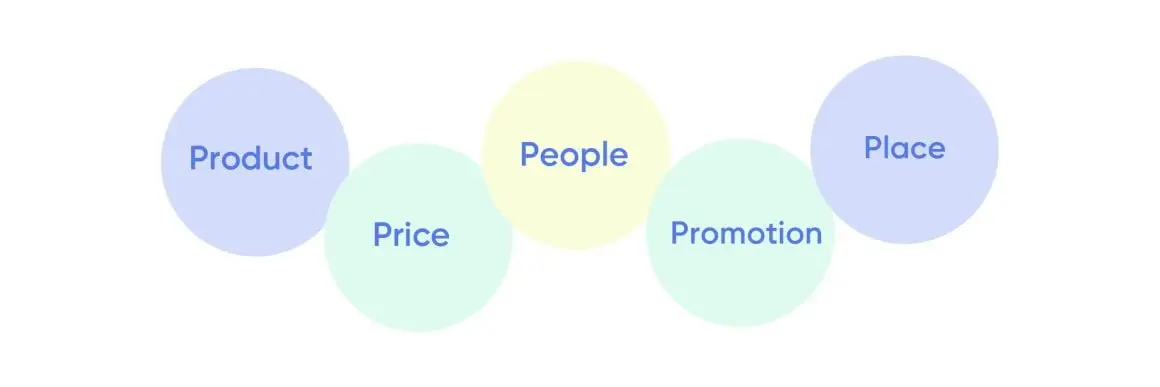
I. Product
The product is the essence of any business; it's what you offer to fulfill your customers' needs or desires. Without a compelling product, the other elements of marketing lose their significance. Your product is at the heart of your brand identity and the primary way you create value for your customers.
Your product encompasses everything from the physical attributes of what you're selling to the intangible benefits it provides. This includes features, design, quality, branding, packaging, and even the customer experience associated with your offering. It's about crafting something that meets a specific need or solves a particular problem for your target audience.
Types of Products
- Digital Products
As you may already know, these are intangible goods or services delivered electronically. Examples include software, e-books, online courses, and digital downloads. Digital products offer scalability, low distribution costs, and the ability to deliver instant gratification to customers.
- Physical Products
These are tangible goods that customers can touch, feel, and use. Examples range from consumer goods like electronics and apparel to industrial products like machinery and equipment. Physical products often involve manufacturing, inventory management, and distribution logistics.
Points for Consideration
- Product Development Activities
These include market research, ideation, prototyping, testing, and refinement. By understanding your target market's preferences and pain points, you can develop products that resonate with them. Continuous improvement based on customer feedback ensures that your offerings remain relevant and competitive.
- Product Lifecycle
Products go through distinct stages – introduction, growth, maturity, and decline – each requiring different strategies. Understanding where your product stands in its lifecycle helps you anticipate market dynamics and plan accordingly. It also informs decisions about product extensions, updates, or discontinuations.
- Distribution Channels
How you deliver your product to customers is crucial. Distribution channels can include direct sales, retail stores, e-commerce platforms, wholesalers, or a combination of these. Choosing the right channels depends on factors like target market preferences, geographic reach, and cost considerations.
Example
Let's consider the example of a smartphone. The product itself encompasses the physical device – its design, features, and specifications. However, it also includes intangible elements such as the brand reputation, user interface, and ecosystem of apps and services. Product development activities for a smartphone might involve market research to identify consumer preferences, iterative design processes to refine the user experience, and testing to ensure reliability and performance. Throughout its lifecycle, the smartphone may be distributed through various channels, including retail stores, telecom carriers, and online marketplaces. In a digital era, smartphone manufacturers also leverage software updates and app ecosystems to enhance the product's value proposition and longevity.
II. Price
Pricing entails setting a monetary value for your product or service that reflects its perceived worth to customers. It involves considering factors like production costs, competitor pricing, market demand, and customer willingness to pay. Effective pricing strategies align with your business objectives, target market, and positioning in the marketplace.
Also read: AI marketing automation pricing comparison: what B2B teams should actually pay for
Price is crucial because it determines the value exchange between you and your customers. It's not just about putting a number on your product or service; it's about finding the sweet spot that balances what customers are willing to pay with the profitability of your business. Price directly influences consumer perceptions, purchase decisions, and your overall competitiveness in the market.
Factors that help brands make pricing decisions
- Cost-based Pricing
Calculating the total cost of production, distribution, and marketing, and adding a markup to ensure profitability.
- Value-based Pricing
Assessing the perceived value of the product or service to the customer and pricing accordingly.
- Competitive Pricing
Analyzing competitor pricing strategies and positioning your product accordingly in the market.
- Demand-based Pricing
Setting prices based on supply and demand dynamics, adjusting prices to maximize revenue during peak periods or to stimulate demand during off-peak times.
- Psychological Pricing
Leveraging pricing tactics such as charm pricing (ending prices in 9 or 99), prestige pricing (setting high prices to convey luxury or exclusivity), or price bundling (offering multiple products or services for a single price) to influence consumer perception and behavior.
Pricing Strategies
- Dynamic Pricing
This strategy involves adjusting prices in real-time based on factors like demand, seasonality, competitor pricing, and customer behavior. Airlines, hotels, and ride-sharing services often use dynamic pricing algorithms to optimize revenue.
- Pricing Tiers
Offering multiple price points allows you to cater to different customer segments with varying needs and budgets. For example, software companies may offer tiered pricing plans with basic, standard, and premium features to appeal to different user groups.
- Subscription-based Pricing
Subscriptions offer customers ongoing access to a product or service for a recurring fee. This model provides predictable revenue streams for businesses and fosters customer loyalty through continuous value delivery. Examples include streaming services like Netflix and software-as-a-service (SaaS) platforms like Adobe Creative Cloud.
- Minimum Pricing and Maximum Ceiling
Establishing a floor price prevents undervaluing your product or service, maintaining brand integrity and profitability. Similarly, setting a maximum ceiling ensures that prices remain competitive without alienating price-sensitive customers.
- Deferred Payments
Allowing customers to pay for products or services over time through installment plans or financing options can increase affordability and purchasing flexibility. However, it's essential to assess credit risk and ensure timely payments.
- Discounts and Coupons
Offering temporary price reductions or promotional incentives can stimulate sales, attract new customers, and reward loyalty. Whether through seasonal sales, loyalty programs, or referral discounts, discounts and coupons can create a sense of urgency and incentivize action.
Example: Coffee Shop
Let's consider the example of a coffee shop. The price of a cup of coffee may vary based on factors such as the quality of beans, location, and competition. The coffee shop may implement dynamic pricing during peak hours, increasing prices to capitalize on high demand and maintain profitability.
Additionally, they may offer pricing tiers for different coffee sizes or specialty drinks, catering to varying customer preferences and budgets. To encourage repeat business, the coffee shop could introduce a subscription model, where customers pay a monthly fee for unlimited coffee refills or exclusive discounts. They may also participate in price comparison sites to showcase their competitive pricing and attract new customers searching for the best deals.
Finally, the coffee shop could offer discounts or coupons during off-peak hours to drive traffic and boost sales during slower periods. Through a strategic approach to pricing, the coffee shop maximizes revenue while delivering value to customers.
Example: Netflix Subscription Tiers
Netflix's pricing strategy for its subscription-based streaming service is a prime example of catering to diverse customer needs while maximizing revenue. Netflix offers multiple subscription tiers, each tailored to different usage levels and budget preferences.
The basic tier offers access to standard-definition content on one screen at a time, making it an affordable option for individual users. In contrast, the premium tier provides access to ultra-high-definition content on up to four screens simultaneously, catering to families or users who value premium features.
Furthermore, Netflix adjusts its pricing periodically to reflect changes in content offerings, market demand, and competitive pressures. This dynamic pricing approach allows Netflix to optimize its revenue while providing value to its diverse customer base.
By offering a range of pricing options and periodically adjusting its rates, Netflix effectively balances affordability with value, ensuring a competitive edge in the crowded streaming market.
Also read: Generative AI marketing use cases: what actually works for B2B teams
{{INLINE_TOFU}}
III. Promotions
Promotions encompass all activities aimed at communicating the value proposition of a product or service to the target audience. This includes advertising, public relations, sales promotions, personal selling, direct marketing, and digital marketing efforts.
Your promotions play a crucial role in the marketing mix because they serve as the primary means of communication between businesses and consumers. While the product addresses customer needs, the price reflects the perceived value, and the place ensures accessibility, promotions amplify these elements and influence consumer perception and behavior.
The goal of promotions is to create awareness, stimulate interest, generate desire, and ultimately drive action or purchase intent among consumers. Effective promotions can differentiate a brand, build brand equity, and ultimately drive sales and revenue.
Distribution Channels for Promotions
Promotions can be distributed through various channels, both traditional and digital, depending on the target audience, budget, and marketing objectives.
Common distribution channels for promotions include:
- Television, radio, and print advertisements
- Social media platforms (Facebook, Instagram, Twitter, LinkedIn)
- Online display ads and search engine marketing (Google Ads)
- Email marketing campaigns
- Influencer partnerships and collaborations
- Public relations activities (Press Releases, Media Events)
- Sales promotions (Discounts, Coupons, Rebates)
Factors to consider while choosing the Promotional Channel
Choosing the right promotional channels requires careful consideration of various factors, including
- Target Audience
Understanding the demographics, psychographics, and media consumption habits of your target audience helps identify the most effective channels to reach them.
- Budget
Assessing the available budget and cost-effectiveness of different channels helps prioritize promotional activities and allocate resources accordingly.
- Objectives
Aligning promotional channels with specific marketing objectives – whether it's building brand awareness, driving website traffic, or increasing sales – ensures that efforts are focused and measurable.
- Reach and Frequency
Evaluating the reach and frequency potential of each channel helps maximize exposure and engagement with the target audience.
- Competitive Landscape
Analyzing competitors' promotional strategies and presence across different channels can inform decisions about where to allocate resources for maximum impact.
- Integration and Consistency
Ensuring consistency and synergy across promotional channels and messaging helps reinforce brand identity and enhance the overall customer experience.
Example: Clothing Brand
Let's consider the example of a clothing brand launching a new product line targeting young adults. To promote the new collection, the brand might leverage a mix of promotional channels
- Social Media
Launching teaser posts on Instagram and Facebook to build anticipation, followed by sponsored ads showcasing the products and directing users to the brand's website.
- Influencer Marketing
Partnering with fashion influencers and bloggers to create sponsored content featuring the new collection and sharing their reviews and styling tips with their followers.
- Email Marketing
Sending out targeted email campaigns to subscribers announcing the product launch, offering exclusive discounts, and inviting them to shop the collection online. Here are Google’s latest guidelines for bulk email senders (2024).
- Pop-Up Events
Hosting experiential pop-up events in trendy locations frequented by the target audience, where customers can preview and purchase the new collection while enjoying music, refreshments, and interactive activities.
- Public Relations
Securing media coverage in fashion magazines, blogs, and online publications to generate buzz and raise awareness about the brand and its new collection.
Also read: AI orchestration in marketing workflows: the missing layer in modern B2B marketing
Example: Nike's "Just Do It" Campaign
Nike's "Just Do It" campaign stands as a timeless example of effective promotion that transcends traditional advertising to inspire and motivate consumers. Launched in 1988, the campaign features iconic slogans and powerful imagery that resonate with athletes and non-athletes alike.
Through compelling storytelling and endorsements by prominent athletes like Michael Jordan and Serena Williams, Nike positions itself as a brand that champions determination, perseverance, and excellence. The campaign's message of empowerment transcends mere product promotion, fostering a deep emotional connection with consumers.
Moreover, Nike's strategic use of multiple promotion channels, including television commercials, print ads, social media, and sponsorships, ensures widespread visibility and engagement. By leveraging the power of storytelling and aligning its messaging with core brand values, Nike's "Just Do It" campaign continues to inspire and resonate with audiences worldwide.
IV. Place
Place, also known as distribution, encompasses the methods and channels through which products or services are made available to customers. It involves everything from the physical locations where products are sold to the logistical processes involved in getting them there. Place ensures that products are accessible and convenient for customers to purchase.
So why is ‘place’ so important?
Place is critical because even the most innovative product, compelling price, and effective promotion are futile if customers can't access or obtain the product conveniently. It ensures that the right product is available at the right time, in the right quantity, and in the right location.
The ‘place’ is where the transaction between the business and the customer occurs, making it a pivotal part of the marketing mix.
Types of Distribution Channels
Distribution channels refer to the pathways through which products move from the manufacturer to the end consumer. Fulfillment is the process of receiving, processing, and then delivering customer orders.
Common distribution channels and fulfillment methods include
- Direct Distribution
Involves selling products directly from the manufacturer to the end consumer without intermediaries. Examples include company-owned retail stores, e-commerce websites, and direct sales representatives.
- Retail Stores
Brick-and-mortar stores where customers can physically browse, purchase, and take immediate possession of products. Examples include department stores, specialty shops, and supermarkets.
- E-commerce Platforms
Online marketplaces and websites where customers can browse, select, and purchase products remotely. E-commerce platforms offer convenience, 24/7 accessibility, and the ability to reach a global audience.
- Indirect Distribution
Involves one or more intermediaries between the manufacturer and the end consumer. Indirect distribution channels can include wholesalers, distributors, retailers, and agents.
- Wholesale
Selling products in bulk quantities to retailers or other businesses for resale to end consumers. Wholesale distribution involves negotiating contracts, managing inventory levels, and coordinating shipments to distributors or wholesalers.
- Multichannel Distribution
Utilizes multiple distribution channels simultaneously to reach different customer segments or markets. For example, a company may sell its products through both retail stores and e-commerce platforms to cater to diverse customer preferences.
- Intensive Distribution
Aims to make products available in as many outlets as possible to maximize market coverage and accessibility. Intensive distribution is common for everyday consumer goods like beverages, snacks, and personal care products.
- Selective Distribution
Involves carefully selecting a limited number of retail outlets or distributors based on specific criteria such as geographic location, target market demographics, or brand image. Selective distribution is typical for products with higher prices or specialized features.
- Exclusive Distribution
Grants exclusive rights to a single distributor or retailer to sell a product within a particular geographic area or market segment. Exclusive distribution is often used for luxury or high-end products to maintain exclusivity and prestige.
That said, businesses must keep the logistics and supply chain management in mind while formulating their distribution strategies. Managing the flow of products from suppliers to warehouses to distribution centers to retail stores or customers' doorsteps. Effective logistics ensure timely delivery, accurate inventory management, and cost-efficient operations.
Example: Starbucks Retail Stores
Starbucks' retail stores exemplify strategic placement and meticulous attention to the customer experience. With over 30,000 stores worldwide, Starbucks has established a ubiquitous presence in high-traffic locations, including urban centers, shopping malls, and transportation hubs.
Also read: How to build a fully agentic AI ABM workflow that runs itself
The placement of Starbucks stores is carefully curated to maximize convenience and accessibility for customers, ensuring that they can easily find and frequent their favorite coffee destination. Whether it's a bustling city street or a suburban neighborhood, Starbucks' presence is felt in diverse locations, catering to a broad demographic of coffee enthusiasts.
Moreover, Starbucks' emphasis on creating inviting and comfortable environments further enhances the appeal of its retail stores. From cosy seating areas to free Wi-Fi access, Starbucks stores offer more than just coffee – they provide a welcoming space for customers to relax, socialize, and enjoy the Starbucks experience.
V. People
People are at the heart of every marketing endeavor. It's the people who drive demand for products or services, make purchase decisions, and ultimately determine business success.
People refer to all individuals involved in the marketing process, including customers, employees, partners, stakeholders, and influencers. It encompasses understanding their needs, preferences, motivations, and behaviors to create meaningful interactions and relationships.
Understanding and catering to the needs and preferences of people – whether they are customers, employees, or partners – is essential for creating value, fostering loyalty, and achieving sustainable growth.
Moving Beyond your Sales Team
- Sponsorships
Sponsorships involve partnering with individuals, organizations, events, or causes to promote brand awareness, enhance brand image, and reach target audiences. Sponsorship opportunities can include sports events, concerts, festivals, charity initiatives, or industry conferences. By associating with relevant sponsorships, businesses can increase visibility, credibility, and engagement with their target market.
- Cross-promotions
Cross-promotions entail collaborating with complementary businesses or brands to promote each other's products or services. This can involve joint marketing campaigns, co-branded promotions, or product bundling arrangements. Cross-promotions leverage the existing customer bases and brand equity of both parties to expand reach, drive sales, and create mutual benefits.
- Influencer marketing
Influencer marketing involves partnering with individuals or social media personalities who have a significant following and influence over their audience. Influencers can endorse products or services through sponsored content, reviews, or endorsements, leveraging their credibility and authority to sway purchase decisions. Influencer marketing can be particularly effective for reaching niche audiences, generating authentic engagement, and building brand advocacy.
Significance of having industry influencers for B2B selling
In B2B selling, industry influencers play a crucial role in driving credibility, trust, and thought leadership. B2B buyers often rely on industry experts, thought leaders, and influencers for insights, recommendations, and validation when making purchasing decisions. Partnering with industry influencers can provide access to decision-makers, enhance brand visibility, and position the business as a trusted authority in the industry.
Example: Fitness Apparel
Let's consider the example of a fitness apparel brand aiming to target health-conscious millennials. They could leverage people-focused strategies such as
- Influencer Marketing
Partnering with fitness influencers and lifestyle bloggers to showcase their products in action, share workout routines, and promote healthy living tips to their followers. By aligning with influencers who embody their brand values and resonate with their target audience, the apparel brand can increase brand awareness and drive sales.
- Cross-Promotions
Collaborating with fitness studios, gyms, or wellness brands to offer joint promotions, such as discounted gym memberships with apparel purchases or co-branded fitness events. These cross-promotions create synergy between complementary businesses and provide added value to customers.
- Sponsorships
Sponsoring local fitness events, charity runs, or wellness festivals where their target audience is likely to participate. By associating with these events, the brand can demonstrate its commitment to health and fitness, engage with the community, and build positive brand associations.
Also read: AI marketing automation pricing comparison
Example: Tesla's Sales and Service Representatives
Tesla's sales and service representatives exemplify the importance of knowledgeable and customer-centric personnel in driving sales and fostering brand loyalty. Unlike traditional car dealerships, Tesla's approach to sales and customer service emphasizes direct engagement with knowledgeable representatives who are passionate about electric vehicles.
Tesla's sales representatives are trained to provide personalized guidance and support to customers throughout the purchase process, from test drives to vehicle customization options. Their expertise in electric vehicle technology and commitment to customer satisfaction differentiate Tesla's sales experience from traditional automotive retail.
Furthermore, Tesla's service representatives play a crucial role in maintaining customer satisfaction and loyalty by providing prompt and efficient support for vehicle maintenance and repairs. With a focus on transparency and proactive communication, Tesla's service team ensures that customers receive the highest level of care and attention.
By investing in knowledgeable and customer-focused personnel, Tesla not only enhances the sales and service experience but also strengthens its brand reputation and fosters long-term customer relationships.
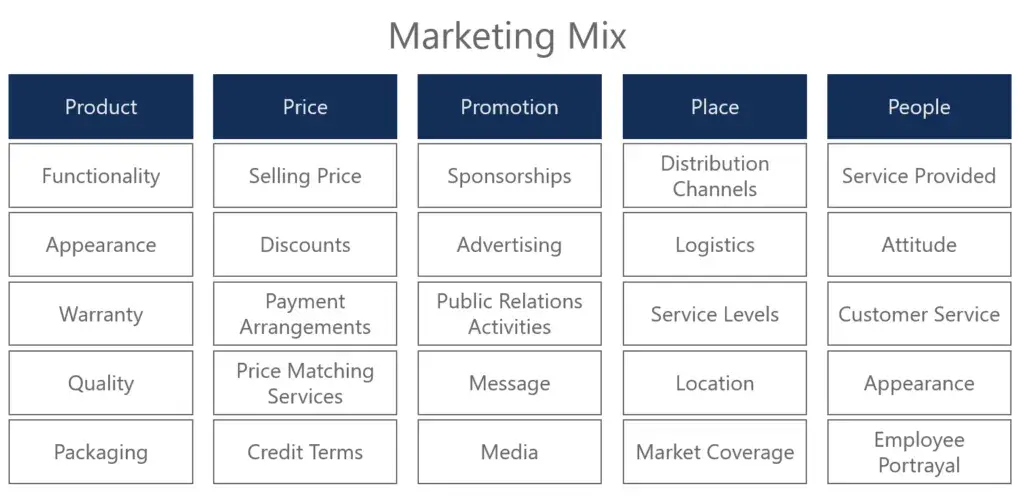
As we come to a close, it's clear that the 5 Ps of Marketing bring their own unique strengths to the table. By stitching these elements together, we create a strategy that captivates audiences, drives sales, and builds relationships that stand the test of time.
If you’re looking to read and learn more about marketing terms, read our blog on 102 Essential B2B Terms.

We don’t just write about demand gen. We deliver it.
Our AI Agents help you uncover high-intent accounts, run campaigns that actually convert, and keep your GTM motion in sync.
1000+ GTM teams have already scaled their pipeline with Factors.
*Includes built-in peace of mind. And fewer late-night funnel audits.


.svg)



.avif)

